USER MANUAL T3 Lamax
natural_image
LAMAX 3D digital camera with head-mounted sensor and display screen (no visible text or symbols on device body)
EN - USER MANUAL
CONTENTS
- PRODUCT FEATURES....4
- BUTTON FUNCTIONS....4
- SPECIAL FUNCTIONS 6
- BASIC OPERATION 6
- OTHER FUNCTIONS 6
- PRODUCT SPECIFICATIONS....7
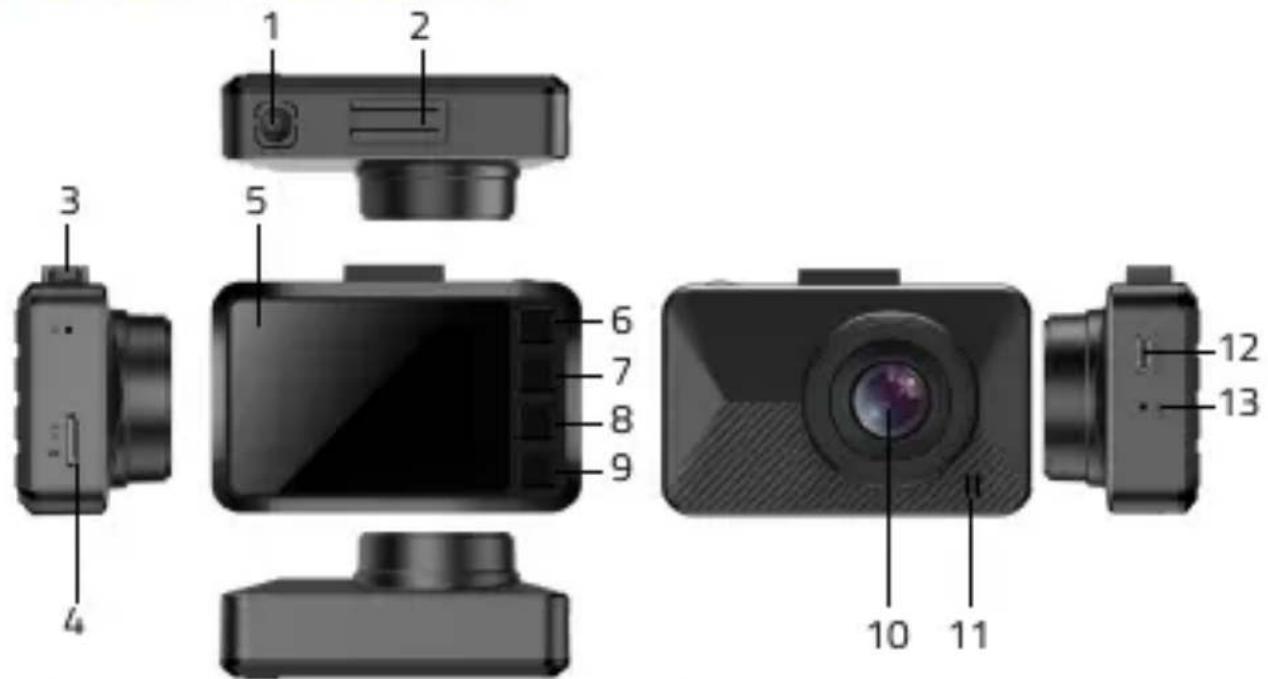
1. PRODUCT FEATURES


Press for 3 seconds to turn on/off. Press once in the main recording interface to activate the screensaver.
2) Mounting slot
Insert the suction cup mount here and secure it to the vehicle glass.
Located in the „R“ hole for resetting the device.
4) MicroSD card slot
For data storage.
5) LED indicator
Flashes during recording; stable in standby mode.
Short press to open the function settings menu. Hold to switch between video recording, photo taking and gallery viewing modes.
Navigate up in the settings menu.
Navigate down in the settings menu; press briefly during recording to toggle audio recording.
Confirm selections; start/stop recording in camera mode.
10) Lens
Sensor module for scene detection.
11) Speaker
Outputs device sound.
For charging, power supply during operation, and data transfer.
13) Microphone
Two microphone jacks: one for recording sound and one for receiving sound.
- SPECIAL FUNCTIONS
| Auto on/off: | Automatic start/stop with car power connection. |
| Motion detection: | Records movement in front of the camera when the vehicle is stationary. |
- BASIC OPERATION
| Power on/off: | Long press the POWER button for 3 seconds. |
| Video recording mode: | Press OK to start/stop recording; red dot on icon indicates recording. |
| Photo mode: | Long press MENU to switch; press OK to take a photo. |
| Playback: | 2x Long press MENU to switch; use UP/DOWN to navigate; press OK to play. |
| Time Settings: | Access settings with 2x press MENU button; select Date/Time and adjust using OK, UP, and DOWN. |
- OTHER FUNCTIONS
| Resolution: | Select higher values for better quality. |
| Resolution Photo: | Select higher values for better quality. |
| Loop recording: | Choose between 1/3/5-minute intervals. |
| White balance: | Choose the optimal balance for different environments. Automatic setting recommended. |
| Exposure: | Adjust light and darkness levels; 0 value recommended. |
| Motion Detection: | The detection continuously monitors the surroundings of the vehicle and automatically responds to any changes in motion by initiating video recording |
| Audio Recording: | Toggle sound recording on/off. |
| Date Stamp: | Display time on playback screen. |
| G-sensor: | Locks recording in case of strong impact; adjustable sensitivity. |
| System Sounds: | Enables / disables button sound. |
| Date and time: | Select to enter the time and date. Resets when battery runs out. |
| Auto-off: | Camera turns off when no memory card is present or recording is not in progress. |
| Language: | Multiple language options. |
| Frequency: | Default 50 Hz. |
| Screen saver: | Display turns off after a set time, but recording continues. |
| Format: | Recommended every 14 days, especially if memory is full. |
| Default Settings: | Restores original settings. |
- PRODUCT SPECIFICATIONS
| Video resolution: | 1920x1080/30fps, 1440x1080/30fps, 1280x720/30fps |
| Viewing angle: | 140° |
| Video format and compression: | MJPEG, AVI |
| Audio: | Built-in microphone, can be turned off |
| Display: | 2" |
| G-sensor: | Yes |
| Micro SD slot: | 128 GB |
| Loop recording: | 1/3/5 min |
| Lock files against overwriting: | Yes |
| Auto start function: | Yes |
| Date and time display: | Yes |
| Motion detection: | Yes |
| Languages: | Czech, Slovak, English, German, Polish, Hungarian, Lithuanian |
| WDR: | Yes |
| Connectivity: | USB-C |
| Holder: | Suction |
| Power: | Supercapacitor |
| Power Interface: | 5V 1.5A |
| Power cable length: | 340 cm |
LAMAX
ELECTRONICS
T3
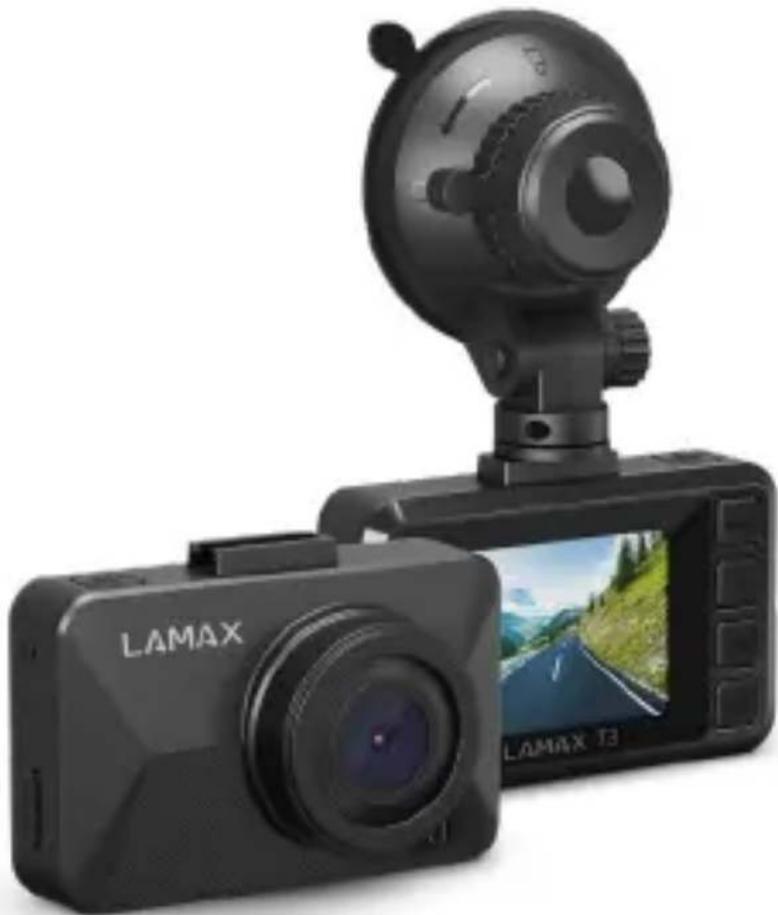
natural_image
Black LAMAX 73 digital camera with rear-mounted headlamp and display screen (no visible text or symbols on device body)
DE - BENUTZERHANDBUCH
INHALT
natural_image
LAMAX 3D digital camera with rear-mounted headlamp and display screen (no visible text or symbols on device body)
OBSAH
- VLASTNOSTI PRODUKTU....16
- POPIS FUNKCÍ TLAČÍTEK 16
- POKYNY PRO SPECIÁLNÍ FUNKCE....18
- ZÁKLADNÍ POKYNY PRO FOTOGRAFOVÁNÍ A NAHRÁVÁNÍ....18
- DALŠI FUNKCE 19
- SPECIFIKACE PRODUKTU....20
1. VLASTNOSTI PRODUKTU
natural_image
LAMAX 3D digital camera with head-mounted camera and display screen (no visible text or symbols on device body)
OBSAH
- VLASTNOSTI PRODUKTU....22
- POPIS FUNKCIÏ TLAČIDIEL....22
- POKYNY PRE SPECIÁLNE FUNKCIE....24
- ZÁKLADNĚ POKYNY PRE FOTOGRAFOVANIE A NAHRÁVANIE....24
- ĐALŠIE FUNKCIE 25
- ŠPECIFIKÁCIA PRODUKTU....26
1. VLASTNOSTI PRODUKTU
natural_image
LAMAX 3D digital camera with head-mounted sensor and display screen (no visible text or symbols on device body)
TREŠĆ
- CECHY PRODUKTU....28
- OPIS FUNKCJI PRZYCISKÓW 28
- INSTRUKCJE DOTYCZĄCE FUNKCJI SPECJALNYCH....29
- PODSTAWOWE INSTRUKCJE DOTYCZĄCE FOTOGRAFOWANIA I NAGRYWANIA......30
- INNE FUNKCJE 31
- SPECYFIKACJA PRODUKTU 32
1. CECHY PRODUKTU

natural_image
LAMAX 3D digital camera with mounted head-mounted camera and display screen (no visible text or symbols on device body)
TARTALOM
- A TERMÉK JELLEMZÖI 34
- A GOMB FUNKCIÕINAK LEÍRÅSA 34
- ÚTMUTATÓ A SPECIÁLIS FUNKCIÓKHOZ 36
- ALAPVETŐ UTASÍTÁSOK A FÉNYKÉPEZÉSHEZ ÉS RÖGZÍTÉSHEZ 36
- EGYÉB FUNKCIÓK 37
- TERMÉKLEÍRÁS....38
1. A TERMÉK JELLEMZÖI

natural_image
LAMAX 3D digital camera with mounted head-mounted camera and display screen (no visible text or symbols on device body)
VSEBINA
- LASTNOSTI IZDELKA 40
- OPIS FUNKCIJ GUMBOV 40
- NAVODILA ZA POSEBNE FUNKCIJE....41
- OSNOVNA NAVODILA ZA SNEMANJE IN SNEMANJE 42
- DRUGE FUNKCIJE 43
- SPECIFIKACIJE IZDELKA 44
1. LASTNOSTI IZDELKA

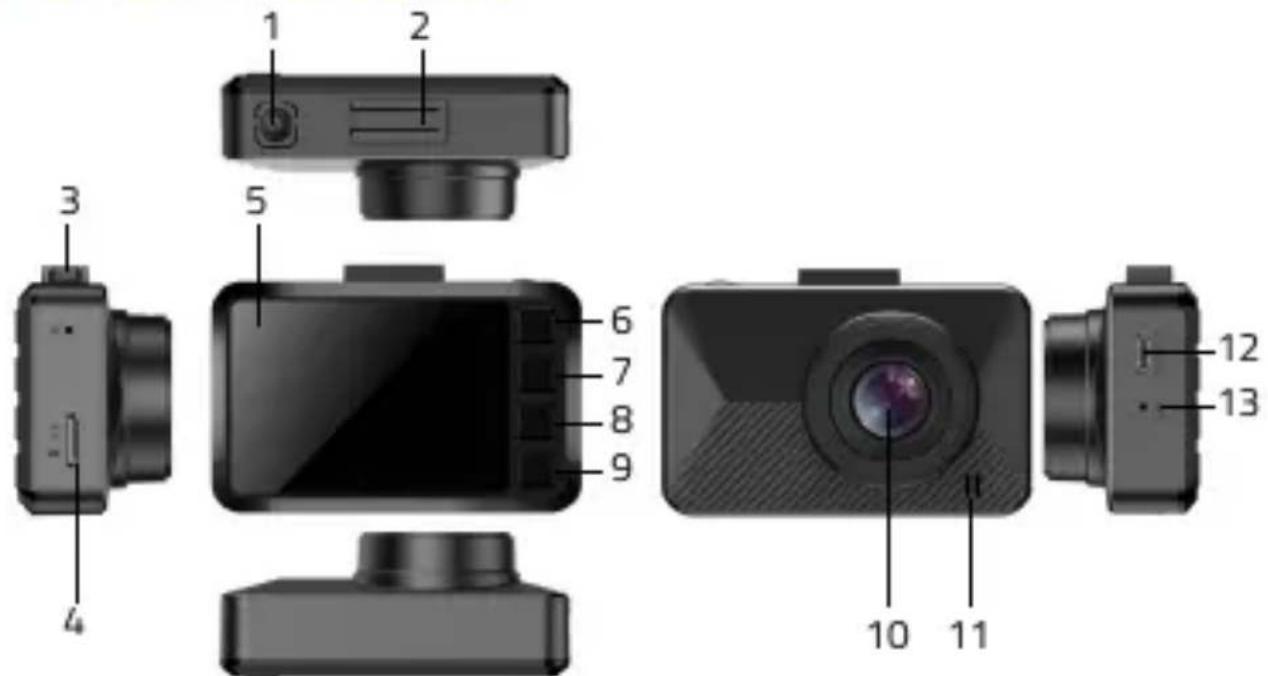
1) POWER
2) Reža za držalo
3) RESET
4) Reža za kartico microSD
5) Dioda
6) MENU
7) GOR
8) DOL
9) OK
10) Objektiv
11) Zvočnik
12) USB-C vhod
13) Mikrofon
2. OPIS FUNKCIJ GUMBOV
1) POWER
natural_image
LAMAX 3D digital camera with mounted head-mounted camera and display screen (no visible text or symbols on device body)
SADRŽAJ
- ZNAČAJKE PROIZVODA 46
- OPIS FUNKCIJA GUMBA....46
- UPUTE ZA POSEBNE FUNKCIJE 48
- OSNOVNE UPUTE ZA SNIMANJE I SNIMANJE 48
- OSTALE FUNKCIJE 49
- SPECIFIKACIJE PROIZVODA 50
1. ZNAČAJKE PROIZVODA
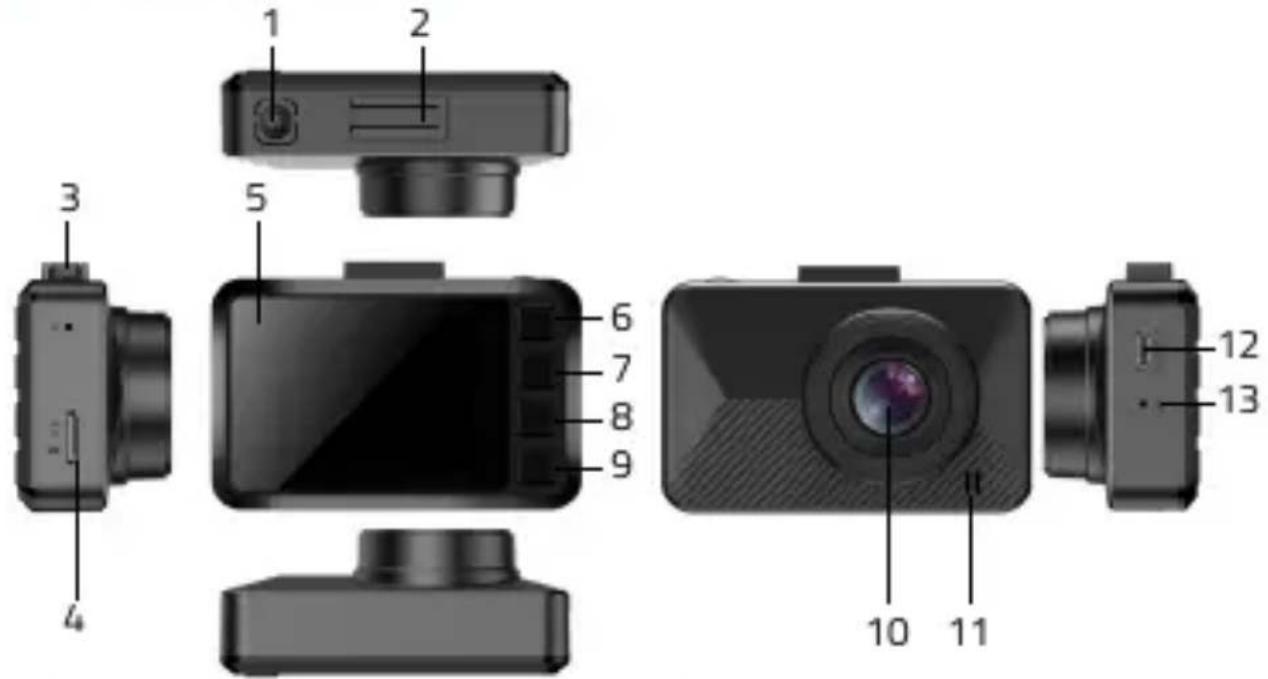
1) POWER
8) DOLJE
2) Utor za držač 9) OK
3) RESET 10) Leće
4) utor za microSD karticu 11) Zvučnik
5) Dioda 12) USB-C ulaz
6) MENU 13) Mikrofon
7) GORE
2. OPIS FUNKCIJA GUMBA
1) POWER