
BB30BT - Hi-Fi System BLAUPUNKT - Free user manual and instructions
Find the device manual for free BB30BT BLAUPUNKT in PDF.


| Product Type | Hi-Fi System |
| Power Source | AC 100-230V~ 50Hz or DC 12V (8 x UM1 batteries, not included) |
| FM Frequency Range | 87.5 - 108.0 MHz |
| Supported Discs | CD, CD-R, CD-RW, MP3-CD, WMA-CD |
| RMS Power Output | 2 x 6W |
| USB Output | 5V / 500mA (not for charging) |
| USB Supported | Up to 32GB, MP3 audio files |
| Bluetooth Version | EDR + 4.2, working distance up to 10 meters |
| Power Consumption | 14W |
| Standby Power Consumption | < 1W |
| Clock and Alarm | Yes, with 12/24h format and alarm source selection |
| Equalizer Modes | Normal, Rock, POPs, Jazz, Classic |
| Display | LCD |
| Headphone Jack | Yes, 3.5mm |
| AUX Input | Yes, 3.5mm stereo |
| SD/MMC Card Slot | Yes |
| USB Port | Yes |
| CD Door | Yes |
| Preset Stations (FM) | Up to 40 |
| Programmable Tracks (CD/MP3) | Up to 20 (CD), up to 99 (MP3) |
| Sleep Timer | 10-90 minutes (adjustable) |
| Auto Standby | After 15 minutes without audio input (ERP2 compliant) |
| Operating Temperature | Up to 35°C |
| Ventilation Clearance | At least 20 cm above, 5 cm on sides |
Frequently Asked Questions - BB30BT BLAUPUNKT
User questions about BB30BT BLAUPUNKT
0 question about this device. Answer the ones you know or ask your own.
Ask a new question about this device
Download the instructions for your Hi-Fi System in PDF format for free! Find your manual BB30BT - BLAUPUNKT and take your electronic device back in hand. On this page are published all the documents necessary for the use of your device. BB30BT by BLAUPUNKT.
USER MANUAL BB30BT BLAUPUNKT
Enjoy it.
Important Safety Instructions



RISK OF ELECTRIC SHOCK DO NOT OPEN
Caution:
To reduce the risk of electric shock, do not remove cover (or back). No user serviceable parts inside. Refer servicing to qualified service personnel.
Explanation of Graphical Symbols:

The lightning flash within an equilateral triangle is intended to alert you to the presence of uninsulated dangerous voltage within the product's enclosure that may be of sufficient magnitude to constitute an electric shock to a person or persons.

The exclamation point within an equilateral triangle is intended to alert you to the presence of important operating and maintenance (servicing) instructions in the literature accompanying the product.
To achieve the utmost in enjoyment and performance, and in order to become familiar with its features, please read this manual carefully before attempting to operate this product. This will assure you years of trouble free performance and listening pleasure.
Important Notes
• This safety and operating instruction should be retained for future reference.
• The apparatus should not be exposed to dripping or splashing or placed in a humid atmosphere such as a bathroom.
• Do not install the product in the following areas:
- Places exposed to direct sunlight or close to radiators.
• On top of other stereo equipment that radiate too much heat.
• Blocking ventilation or in a dusty area.
- Areas where there is constant vibration.
• Humid or moist places.
• Do not place near candles or other naked flames.
• Operate the product only as instructed in this manual.
• Before turning on the power for the first time, make sure the power adaptor is properly connected.
• Plug-in the USB stick directly or use an USB-extension cable which is not longer than 25 cm.
For safety reasons, do not remove any covers or attempt to gain access to the inside of the product. Refer any servicing to qualified personnel.
Do not attempt to remove any screws, or open the casing of the unit; there are no user serviceable parts inside. Refer all servicing to qualified service personnel.
SAFETY INSTRUCTIONS
- Read Instructions - All the safety and operating instructions must be read before the product is operated.
- Retain Instructions - The safety and operating instructions should be kept with the product for future reference.
- Heed warnings - All warnings on the product and in the operating instructions should be adhered to.
- Follow instructions - All operating and users' instructions should be followed.
- Installation - Install in accordance with the manufacturer's instructions.
- Power sources - This product should be operated only from the type of power source indicated by the marking adjacent to the power cord entry. If you are not sure of the type of power supply to your home, consult your product dealer or local power company.
- Grounding or polarization - the product is not required to be grounded. Ensure that the plug is fully inserted into the wall outlet or extension cord receptacle to prevent blade or pin exposure. Some versions of the product are equipped with a power cord fitted with a polarized alternating line plug (a plug having one blade wider than the other). This plug will fit onto the power outlet only one way. This is a safety feature. If you are unable to insert the plug fully into the outlet, try reversing the plug. If the plug should still fail to fit, contact your electrician to replace your obsolete outlet. Do not defeat the safety purpose of the polarized plug. When using an extension power-supply cord or a power-supply cord other than that supplied with the appliance, it should be fitted with the appropriate molded plugs and carry safety approval appropriate to the country of use.
- Power cord protection - Power-supply cords should be routed so that they are not likely to be walked on, kinked or pinched by items placed on or against them, paying particular attention to cords from plugs, receptacles and the point where they exit from the product.
- Overloading - Do not overload wall outlets, extension cords, or multiple sockets, as this can result in a risk of fire or electric shock.
- Ventilation - The product must be properly ventilated. Do not place the product on a bed, sofa, or other similar surface. Do not cover the product with any items such as tablecloths, newspapers, etc.
- Heat - The product should be situated away from heat sources such as radiators, heat registers, stoves, or other products, including amplifiers that produce heat. No naked flame sources, such as lighted candles, should be placed on the apparatus.
- Water and moisture - To reduce the risk of fire or electric shock, do not expose the product to rain, dripping, splashing or excessive moisture such as in a sauna or bathroom. Do not use this product near water, for example, near a bathtub, washbowl, kitchen sink, laundry tub, in a wet basement or near a swimming pool (or similar).
- Object and Liquid Entry - Never push objects of any kind into this product through openings, as they may touch dangerous voltage points or short-circuit parts that could result in a fire or electric shock. Never spill liquid of any kind on the product. Do not place any object containing liquid on top of the product.
- Cleaning - Unplug the product from the wall outlet before cleaning. Dust in the woofer may be cleaned with a dry cloth. If you wish to use an aerosol cleaning spray, do not spray directly on the cabinet; spray onto the cloth. Be careful not to damage the drive units.
- Attachments - Do not use attachments not recommended by the product manufacturer, as they may cause hazards.
- Accessories - Do not place this product on an unstable cart, stand, tripod, bracket or table. The product may fall, causing serious injury to a child or adult, and serious damage to the product. Use only with a cart, stand, tripod, bracket or table recommended by the manufacturer or sold with the product. Any mounting of the product should follow the manufacturer's instructions and should use a mounting accessory recommended by the manufacturer.
- Moving the product - A product and cart combination should be moved with care. Quick stops, excessive force and uneven surfaces may cause the product and cart combination to overturn.
- Unused periods - The power cord of the appliance should be unplugged from the outlet during lightning storms or when the apparatus is left unused for a long period of time.
- Servicing - Do not attempt to service this product yourself, as opening or removing covers may expose you to dangerous voltage or other hazards. Refer all servicing to qualified service personnel.
- Please remove the power plug from the main power source or wall power source when not in use. When plugged in to a power source, the system is in standby mode, so the power is not entirely cut off.
- Replacement parts - When replacement parts are required, ensure that the service technician has used replacement parts specified by the manufacturer or have the same characteristics as the original part. Unauthorized substitutions may result in fire, electric shock or other hazards.
- Mains fuses - For continued protection against fire hazard, use fuses only of the correct type and rating. The correct fuse specification for each voltage range is marked on the product.
- Do not turn up the volume while listening to a section with very low level inputs or no audio signals. If you do, the speaker may be damaged when a peak level section is suddenly played.
- The only means of completely disconnecting the product from the power supply is by removing the power cord from the wall outlet or the product. The wall outlet or the power cord entry to the product must remain freely accessible at all times while the product is in use.
- Try to install the product near a wall socket or extension cord and shall be easily accessible.
- The highest environmental temperature suitable for this product is 35°C.
- ESD hints - If the product maybe reset or not reset to operation of control due to electrostatic discharge, just switch off and reconnect again, or move the product to another location.
- Battery
a. The batteries must not be exposed to excessive heat such as sunshine, fire or the like. b. The batteries should be drawn to the environmental aspects of battery disposal. c. Battery usage CAUTION - to prevent battery leakage which may result in body injuries, property damage, or damage to the apparatus:
. Install all batteries correctly, + and - as marked on the apparatus.
. Do not mix batteries (old and new or carbon and alkaline, etc.)
. Remove batteries when the unit is not used for a long time.
ERP2 (Energy Related Products) note
This product with ecodesign complies with the stage 2 requirements of Commission Regulation (EC) NO. 1275/2008 implementing Directive 2009/125/EC regard to standby and off mode electric power consumption of electronic household and office equipment. After 15 minutes without any audio input, the device will automatically switch into standby mode. Follow up the instruction manual to resume the operation.
Important note:
This device is equipped with an energy saving mode: if no signal is given during 15 minutes the device will switch automatically into standby mode in order to save energy (ERP 2 standard). Please note that low volume setting in the audio source may be recognized as "no audio signal": this will affect the capability of signal detection from the device and can also originate an automatic switch into standby mode. If this happens please reactivate the audio signal transmission or increase the volume setting on the audio source player (MP3 player, etc.), in order to resume playback. Please contact the local service center if the problem remains.
WARNING
This appliance is not intended for use by persons (including children) with reduced physical sensory or mental capabilities, or lack of experience and knowledge, unless they have been given supervision or instruction concerning use of the appliance by a person responsible for their safety. Children should be supervised to ensure that they do not play with the appliance.
- Never use the device unsupervised! Switch off the device whenever you are not using it, even if this only for a short while.
- The appliance is not intended to be operated by means of an external timer or separate remote control system.
- If the supply cord is damaged, it must be replaced by the manufacturer, its service agent or similarly qualified persons in order to avoid a hazard.
- Before operating this system, check the voltage of this system to see if it is identical to the voltage of your local power supply.
- The unit should not be impeded by covering the ventilation opening with items such as newspaper, table-cloths, curtains etc. Make sure that there are at least 20 cm of space above and at least 5 cm of space on each side of the unit.
- The apparatus must not be exposed to dripping or splashing and that objects filled with liquids, such as vases, must not be placed on the apparatus.
- To prevent fire or shock hazard, do not expose this equipment to hot places, rain, moisture or dust.
- Do not locate this unit near any water sources e.g. taps, bathtubs, washing machines or swimming pools. Ensure that you place the unit on a dry, stable surface.
- Do not place this unit close to a strong magnetic field.
- Do not place the unit on a amplifier or receiver.
- Do not place this unit in a damp area as the moisture will affect the life of electric components.
- If the system is brought directly from a cold to a warm location, or is placed in a very damp room, moisture may condense on the lens inside the player. If this occurs, the system will not operate properly. Please leave the system turned on for about an hour until the moisture evaporates.
- Do not attempt to clean the unit with chemical solvents as this might damage the finish. Wipe with a clean, dry or slightly damp cloth.
- When removing the power plug from the wall outlet, always pull directly on the plug, never pull on the cord.
- Depending on the electromagnetic waves used by a television broadcast, if a TV is turned on near this unit while it is also on, lines might appear on the TV screen. Neither this unit nor the TV is malfunctioning. If you see such lines, keep this unit well away from the TV set.
- The mains plug is used as the disconnect device, the disconnect device must remain readily operable.
- To keep the laser pickup clean, do not touch it, and always close the disc tray.
- During playback, the disc rotates at high speed. DO NOT lift or move the unit during playback, doing so may damage the disc or the unit.
- When changing places of installation or packing the unit for moving, be sure to remove the disc and return the disc tray to its closed position in the player. Then, press switch to turn the power off and disconnect the power cord. Moving this unit with the disc loaded may result in damage to this unit.
- Put discs back in their case after playing them. Never expose discs to direct sunlight or heat sources. Never leave discs inside a car parked in full sunlight.
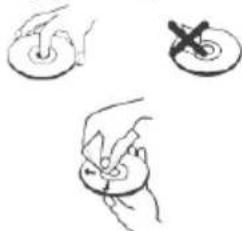
- Do not touch the playback side of disks. Hold discs by the edges to avoid leaving fingerprints on the surface. Any dust, fingerprints or scratches may cause a malfunction. Never attach a label or sticky tape to the disc.
- Use a clean soft lint-free cloth to clean the disc, working from the center outwards in a straight line, thinners, commercially available cleaners or anti static sprays for vinyl discs.
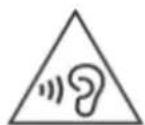
- To prevent possible hearing damage, do not listen at high volume levels for long periods.
WARNING: DANGER OF RADIATION
CLASS 1 LASER PRODUCT LUOKAN 1 LASERLAITE KLASS 1 LASERAPPARAT
This label means that this unit contains a laser component. Opening the CD compartment lid and defeating the safety interlocks will expose the user to radiation from the laser beam. Do not stare into the laser while it is operating.
BEFORE OPERATION
Notes: Concerning compact discs.

Since dirty, damaged or warped discs may damage the appliance, care should be taken of the followings items:
a. Usable compact discs. Use only compact disc with the mark shown below.
b. CD compact disc only with digital audio signals.
NOTICE

Conformity
Hereby, Blaupunkt Competence Center 2N-Everpol Sp. z o.o., declares that this equipment is in compliance with the essential requirements and other relevant provisions of Directive 2014/53/EU. The declaration of conformity can be obtained from the product page at www.blaupunkt.com.
Responsible party: 2N-Everpol Sp. z o.o, Puławska 403A, 02-801 Warsaw, Poland, Phone: +48 22 331 99 59, E-mail: info@everpol.pl

Your product is designed and manufactured with high quality materials and components, which can be recycled and reused.
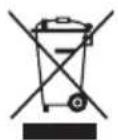
When this crossed-out wheeled bin symbol is attached to a product, it means that the product is covered by the European Directive 2002/96/EC. Please inform yourself about the local separate collection system for electrical and electronic products. Please act according to your local rules and do not dispose of your old products with your normal household waste. Correct disposal of your old product helps to prevent potential negative consequences for the environment and human health.
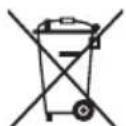
Your product contains batteries covered by the European Directive 2006/66/EC, which cannot be disposed of with normal household waste. Please inform yourself about the local rules on separate collection of batteries because correct disposal helps to prevent negative consequences for the environment and human health. Environmental information
All unnecessary packaging has been omitted. We have tried to make the packaging easy to separate into three materials: cardboard (box), polystyrene foam (buffer) and polyethylene (bags, protective foam sheet). Your system consists of materials which can be recycled and reused if disassembled by a specialized company. Please observe the local regulations regarding the disposal of packaging materials, exhausted batteries and old equipment. Recording and playback of material might require consent. See Copyright Act 1956 and The Performer's Protection Acts 1958 to 1972.

Bluetooth™
The Bluetooth® word mark and logos are registered trademarks owned by Bluetooth SIG, Inc. and any use of such marks by us is under license. Other trademarks and trade names are those of their respective owners.
Location of controls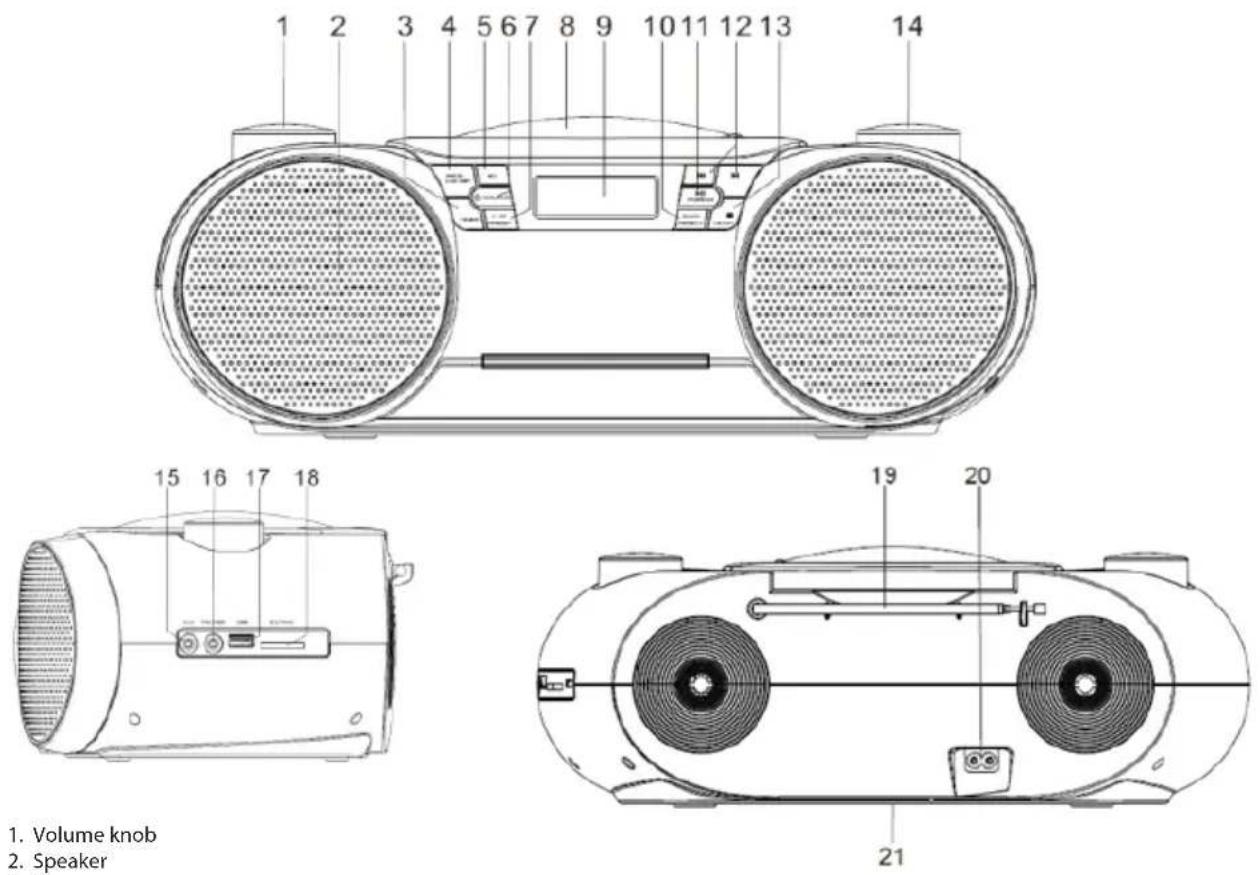
- Volume knob
- Speaker
- Timer
- Program/ clock set
- EQ (normal/rock/POPS/Jazz/classic)
- Power/Source
- +10/Preset
- CD door
- LCD display
- Scan/Repeat (repeat one/repeat all/random)
- Play/Pause, pairing
- Previous, next
- Stop/Mono/Stereo
- Tuning knob
- Aux-in jack
- Earphone jack
- USB port
- SD/MMC card slot
- FM Antenna
- AC socket
- Battery compartment
Power source and connection
AC operation: Using the supplied power cable, connect the AC port on the rear panel of the unit, then insert the power plug into the household AC wall-mount socket to obtain the power source.
DC operation (battery power): Open the battery door and insert 8 pcs x UM1/1.5V batteries (not included) according to the engraved positive and negative polarity symbols. Then close the battery door. The display will light up after power connection is successful. Press the power/source button to switch the play mode; press and hold the power/source button for 2 seconds to power off (standby mode) the unit. The battery power will be disconnected automatically once AC power is available.
Notes:
a. The sound will become distorted due to low or exhausted battery power. Please replace them with fresh batteries. Please dispose of the batteries in an environmentally friendly way; please reference and follow the requirements of your local government.
b. Please do not mix battery brands. Please take out the batteries if the unit will not be used for a long time to avoid liquid leakage.
Clock and alarm setting
Clock setting: Press and hold the power/source button for 2 seconds to enter standby mode. Press and hold the program/clock set button for 2 seconds to start the setting. Press the previous/next button to switch the time format between 12/24 hours. Press the program/clock set button again to confirm the selection. Repeat the previous operation to set the hour and minute.
Alarm setting: In standby mode, press and hold the timer button for 2 seconds to start and make the hour digits flash on the display. Press the previous/next button to adjust the hours and press the timer button again to confirm the selection. Repeat the previous operation to set the minute, alarm source (CD/USB/SD/BUZZ/FM), alarm volume, etc.
a. The clock and alarm only work when there is an available power source. Please set up the clock and alarm again in case of power interruption.
b. Short press the timer button in standby mode to turn the alarm on or off.
c. When the alarm is activated and rings, short press the power/source or timer button to cancel the alarm sound, and it will wake you up again when the alarm time comes the next day.
d. The alarm sound duration is 5 minutes if you do not cancel it.
e. When you select CD/USB/SD as the alarm source, please make sure the corresponding device is available; otherwise, it will switch to buzz.
CD operation
This unit can play CD discs in CD/CD-R/CD-RW/MP3 format. Before starting playback, please check the CD disc format first, and make sure the CD disc is clean and undamaged.
CD playback: Open the CD door and load a CD disc, then close the door. Press the power/source button to switch to CD mode; the unit will then read the CD and produce sound output automatically.
In CD playback mode, turn the volume knob to adjust the volume output level; press the play/pause button to pause or resume playback; press the stop button to stop playback; short press the previous and next buttons to select tracks, or press and hold them for fast-forwarding or fast-rewinding playback selection; press the repeat button to select repeat one/repeat all/random; short press the +10 button to select tracks in increments of 10; press the EQ button to switch the equalizer.
Programming playback (up to 20 tracks for CD discs, and 99 tracks for MP3 discs): press the stop button to stop CD playback first; press the program button to start programming; the display will show "P01" and "PROG"; press the previous and next buttons to switch and select the track you wish to program, then press the program button to confirm
the selection; the track will be saved as P01. Repeat the operation until "FUL" appears on the display, which means the programming memory is full. Press the play/pause button to play the programmed tracks; open the CD door or press the stop button twice to cancel and clear the programmed CD.
Radio operation
Before starting radio operation, please fully extend the FM antenna and try to place the unit near a window to obtain better signal and reception.
Scan and auto scan: press and hold the previous/next button for 2 seconds to auto scan for available stations in upward or downward frequency; press the scan/repeat button to auto scan and save available stations (maximum supported preset stations up to 40). Press the preset button to select and switch between preset stations.
Station manual memory: When you tune to a favorite station by rotating the tuning knob or scanning, press the program/clock set button first, then rotate the tuning knob to select the preset station number where you want to save it, press the program/clock set button to confirm the selection; repeat the operation to save other stations.
In FM radio mode, press the stop/Mono stereo button to switch the output; you can switch to mono output for listening in case of weak signal stations.
USB/SD card playback operation
Before starting USB/SD card playback, please copy MP3 audio files to the device (maximum supported device capacity up to 32GB), then insert the device into the USB/SD card port properly.
Press the power/source button repeatedly to enter USB/SD mode, then the unit will automatically decode the audio files and produce sound output after a while.
In USB mode, press the play/pause button to pause or resume playback; press the stop button to stop playback; short press the previous and next buttons to select tracks, and press and hold them to fast-forward or fast-rewind during playback; press the repeat button to cycle through repeat one, repeat all, and random modes; short press the +10 button to skip forward or backward by 10 tracks; press the EQ button to switch the equalizer.
Note:
a. Using an extension cable for USB stick connection and playback is not recommended due to audio signal transfer issues that may cause intermittent sound output.
b. Not all USB/SD card devices are guaranteed to be supported due to differences in design and brand.
c. Not all MP3 audio files are guaranteed to play successfully.
Bluetooth operation
The unit includes Bluetooth functionality, which allows wireless audio playback with other devices. Pairing: Press the power/source button repeatedly until "BT" appears on the display. Then enable Bluetooth on your device (e.g., smartphone) and refer to your device's manual for detailed operation. Check the available Bluetooth devices list on your device and select "BP BB30BT". A notification sound will come from the speaker after successful pairing. Then select and play music from your device, and sound will be output from the speaker.
In Bluetooth mode, press the play/pause button to pause or resume playback; press the previous/next buttons to select tracks; press and hold the pairing button for 2 seconds to disconnect from the current device, and the speaker will be ready to pair with others.
Notes:
a. Not all Bluetooth devices are guaranteed to pair successfully due to differences in brand and design. b. The best working distance for Bluetooth operation is within 10 meters without any obstacles. c. In case of an incoming phone call, Bluetooth playback will temporarily stop and resume after the call ends.
AUX IN/Line in/MP3 Link operation
Using a 3.5mm to 3.5mm stereo audio cable (not included), connect the AUX IN jack on the rear panel of the unit to another player (e.g., MP3 player). Press the power/source button repeatedly to enter AUX IN mode. Select and play music from your player, and the sound will be output from the unit. Please note that the main control is on your player, but you can adjust the volume level on the speaker side.
Headphone: In playing mode (CD/USB/SD/AUX/Bluetooth/radio), plugging headphones into the headphone jack on the rear panel of the unit will mute the speakers, but audio will be output through the headphones automatically.
Sleep: In playing mode, press the timer button repeatedly to cycle through sleep times of 10/20/30/40/50/60/70/80/90 minutes or off. The unit will automatically turn off when the set sleep time elapses.
Specification
Power source: AC 100-230V~50Hz;
DC 12V battery power (8 x UM1 size, 1.5V; batteries not included);
FM frequency: 87.5~108.0MHz;
Supported discs: CD, CD-R, CD-RW, MP3-CD, WMA-CD
RMS power output: 2 x 6W;
USB rating output: 5V/500mA (not for charging);
USB supported: up to 32GB, MP3 audio files;
Bluetooth: Version EDR + 4.2; best working distance within 10 meters.
Power consumption: 14W
Standby power consumption: < 1W
(The above specifications may be updated without prior notice)
Troubleshooting
- Cannot power on the unit. a. Please check if the DC power has been connected properly. b. Please contact the service center for support if the problem persists.
- The radio station sounds poor.
a. Please move the unit next to window or adjust the direction of antenna in order to get better reception.
b. Please try switch to another station for listening.
c. Please contact the service center for support in case of the problem remains.
- The unit cannot read out the CD disc or USB stick.
a. Please double check if the CD disc or audio file format is correct or not.
b. Please contact the service center for support in case of the problem remains.
- The Bluetooth sound output intermittently.
a. Please try to move your Bluetooth device more close to the unit.
b. Please turn off the Bluetooth and pair it again.
IMPORTANT SAFETY INSTRUCTIONS
IMPORTANT SAFETY INSTRUCTIONS



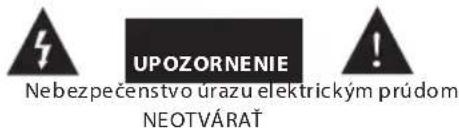
RISK OF ELECTRIC SHOCK DO NOT OPEN
Caution:
To reduce the risk of electric shock, do not remove the cover or the back of the unit. There are no user-serviceable parts inside. Maintenance and repair should be performed only by qualified service personnel.
Explanation of graphic symbols:

The lightning flash with arrowhead symbol, within an equilateral triangle, is intended to alert the user to the presence of uninsulated "dangerous voltage" within the product's enclosure that may be of sufficient magnitude to constitute a risk of electric shock.

The exclamation point within an equilateral triangle is intended to alert the user to the presence of important operating and maintenance (servicing) instructions in the literature accompanying the appliance.
WARNING: RADIATION SOURCE
CLASS 1 LASER PRODUCT
LUOKAN 1 LASERLAITE
KLASS 1 LASERAPPARAT

This label indicates that laser components are present inside the device. Opening the CD compartment cover and bypassing the interlocks may expose the user to laser radiation. Do not stare into the laser beam while it is operating.
BEFORE OPERATION
Notes on discs.
Dirty, damaged, or deformed discs may cause damage to the device. Please observe the following:
WARNING: RADIATION SOURCE
CLASS 1 LASER PRODUCT LUOKAN 1 LASERLAITE KLASS 1 LASERAPPARAT

WARNING: RADIATION SOURCE
CLASS 1 LASER PRODUCT LUOKAN 1 LASERLAITE KLASS 1 LASERAPPARAT

BEFORE STARTING WORK
02-801 Warsaw, Poland
phone: +48 22 331 99 59
e-mail: info@everpol.pl
www.blaupunkt.com
In case of questions or problems
please contact our service.
Tel. 00 48 22 331 99 53
E-mail: info@blaupunkt-audio.pl
All rights reserved. All brand names are registered trademarks of their respective owners. Specifications are subject to change without prior notice.
Enjoy it.

- IMPORTANT SAFETY INSTRUCTIONS
- CAUTION
- EXPLANATION OF GRAPHICAL SYMBOLS
- IMPORTANT NOTES
- SAFETY INSTRUCTIONS
- ERP2 (ENERGY RELATED PRODUCTS) NOTE
- IMPORTANT NOTE
- WARNING
- WARNING: DANGER OF RADIATION
- BEFORE OPERATION
- NOTICE
- BLUETOOTH™
- POWER SOURCE AND CONNECTION
- NOTES
- CLOCK AND ALARM SETTING
- CD OPERATION
- RADIO OPERATION
- USB/SD CARD PLAYBACK OPERATION
- NOTE
- BLUETOOTH OPERATION
- AUX IN/LINE IN/MP3 LINK OPERATION
- SPECIFICATION
- TROUBLESHOOTING
- RISK OF ELECTRIC SHOCK DO NOT OPEN
- EXPLANATION OF GRAPHIC SYMBOLS
- WARNING: RADIATION SOURCE
- NOTES ON DISCS
- ENJOY IT
Brand : BLAUPUNKT
Model : BB30BT
Category : Hi-Fi System