
IAN 39057 - Weather Station AURIOL - Free user manual and instructions
Find the device manual for free IAN 39057 AURIOL in PDF.


| Product Type | Indoor/Outdoor Thermometer |
| Model | IAN 39057 (also H4286A/H4286B) |
| Power Supply | 1 x 1.5V AAA battery (included) |
| Indoor Temperature Range | -10°C to +40°C |
| Outdoor Temperature Range | -40°C to +60°C |
| External Sensor Cable Length | Approx. 2.8 m |
| Display | LCD, 21 x 50 mm |
| Functions | Indoor/Outdoor temperature, Min/Max memory, Time display (24h format) |
| Mounting Options | Stand or wall mount (screw and self-adhesive pad included) |
| Scope of Supply | Thermometer, 1x AAA battery, dowel, screw, self-adhesive pad, operating manual |
| Safety | Keep out of reach of children; do not disassemble; avoid moisture, extreme temperatures, and direct sunlight |
| Cleaning and Care | Use a slightly damp, non-fluffing cloth; do not use abrasive or corrosive cleaners |
| Intended Use | Home use only; not for commercial purposes |
Frequently Asked Questions - IAN 39057 AURIOL
User questions about IAN 39057 AURIOL
0 question about this device. Answer the ones you know or ask your own.
Ask a new question about this device
Download the instructions for your Weather Station in PDF format for free! Find your manual IAN 39057 - AURIOL and take your electronic device back in hand. On this page are published all the documents necessary for the use of your device. IAN 39057 by AURIOL.
USER MANUAL IAN 39057 AURIOL
c/o Milomex Services
Hilltop Cottage
Barton Road
Pulloxhill
Bedfordshire
MK45 5HP
UK
Model no.: H4286A/ H4286B
Version: 05/2012


GB CY
INDOOR/OUTDOOR THERMOMETER
Operation and Safety Notes
HR
UNUTARNJI I VANJSKI TERMOMETAR
GB / CY Operation and Safety Notes Page 4
HR Upute za posluživanje i za
Vašu sigurnost Stranica 22
natural_image
Color palette bar with grayscale shades and a central crosshair symbol (no text or labels)



natural_image
Two horizontal color swatches: one grayscale from dark gray to white, the other solid-colored from yellow to pink (no text or symbols)


AURIOL®
3

Introduction
Intended use ......Page 5
Description of parts ......Page 6
Technical data ......Page 7
Scope of supply ......Page 7
Safety notes......Page 8
Battery Safety Instructions ......Page 10
Getting started
Inserting / changing the battery ......Page 12
Positioning / installing the device ......Page 13
Mounting the device on a wall ......Page 15
Temperature memory ......Page 16
Setting the time ......Page 17
Troubleshooting......Page 18
Cleaning and Care......Page 19
Indoor / outdoor thermometer
- Introduction

Familiarise yourself with the product before using it for the first time. In addition please refer carefully to the operating instructions below and the safety advice. Use the product only as described and for the indicated purpose. Keep these instructions in a safe place. If you pass the product on to anyone else, please ensure that you also pass on all the documentation.
- Intended use
The thermometer measures the inside and outside temperature in Celsius (°C). The main unit is placed indoor, and sensor can be put outdoor. The thermometer also displays the highest and lowest measured temperature and the time in 24-hour format. Other uses or changes to the device are considered to be contrary to the intended use and may result
AURIOL®
5 GB/CY
in personal injury and / or damage to the device. The manufacturer accepts no liability for damage caused through the use of the device in contradiction of its intended use. The device is not intended for commercial use.
• Description of parts
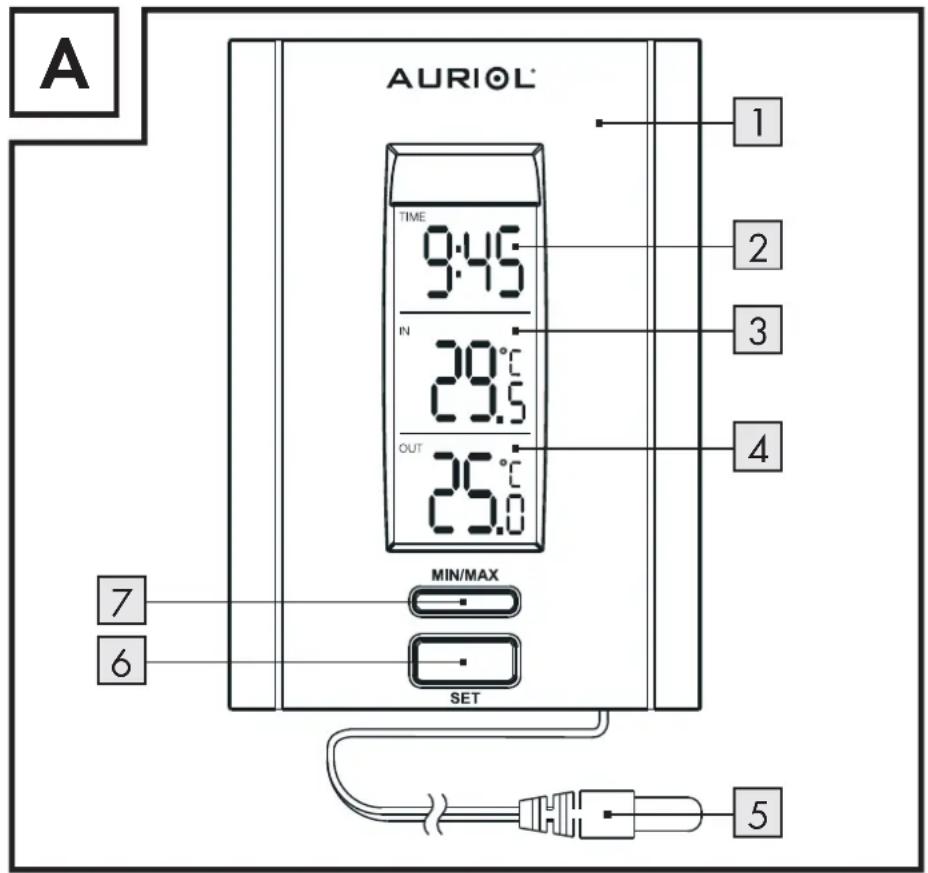
1 In / outdoor thermometer
2 "TIME" display
3 "IN" indoor temperature display
4 "OUT" outdoor temperature display
5 External sensor
6 "SET" button
7 MIN/MAX button
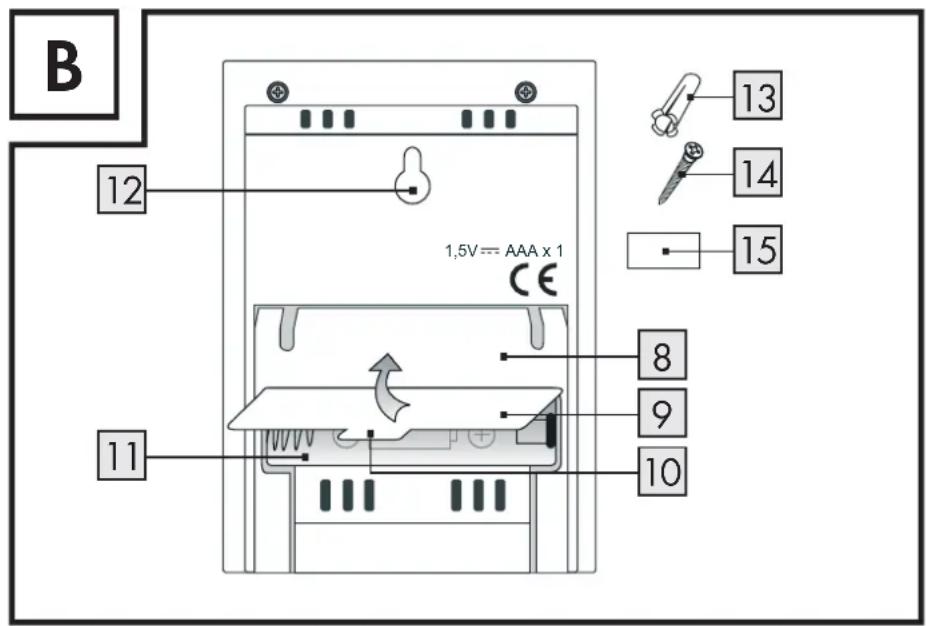
8 Stand
9 Battery compartment cover
10 Extension of battery compartment cover
11 Battery compartment
12 Hanger
13 Dowel
14 Screw
15 Self-adhesive pad
6 GB/CY
AURIOL®

- Technical data
Operating voltage: 1.5 V (D€) =
Power supply: 1 x 1.5 V --- AAA
battery (included)
Temperature range: Indoor: -10 °C to
+ 4 0 ^ irc C
Outdoor: -40 °C to
+ 6 0 ^ irc C
External sensor lead: approx. 2.8 m
Liquid crystal display: 21 x 50 mm

- Scope of supply
Please check the supplied items immediately after unpacking the device to ensure that there is nothing missing and that the product and all of its parts are in perfect condition.
Do not under any circumstances install the product if the delivery scope is incomplete.
1 Indoor/outdoor thermometer
1 1.5 V--- AAA battery
1 Dowel
1 Screw
1 Self-adhesive pad
1 Operating manual

Safety notes
KEEP ALL THE SAFETY ADVICE AND INSTRUCTIONS IN A SAFE PLACE FOR FUTURE REFERENCE!

WARNING!
OF FATAL INJURY AND ACCIDENTS FOR INFANTS
AND CHILDREN! Never leave children unattended with the packaging material, as it poses a risk of suffocation. Keep the product out of the reach of children. The product is not a toy.
Children or anyone who does not have the knowledge or experience to handle the device, or anyone whose physical, sensory or mental capacities are limited, may only use the device under supervision
8 GB/CY
AURIOL®
or instruction by a person responsible for their safety. Children must be supervised to ensure that they do not play with the device.
■ Never dismantle the product. Improper repair can cause significant risks to the user. Repairs must always be carried out by a specialist only.
Do not use the device if it is damaged. Damaged devices represent a danger of death from electric shock!
Do not expose the device to
- extreme temperatures,
- strong vibrations,
- heavy mechanical loads,
- direct sunlight,
- moisture.
Otherwise there is a danger that the device will be damaged.
Do not expose the device to an extremely high electromagnetic field. This may impair the correct functioning of the device.
Please prevent the housing of the device from rubbing to strongly against textiles. This may result in static charges and affect the results of the measurements.
Please note that the guarantee does not cover damage caused by incorrect handling, non-compliance with the operating instructions or interference with the device by unauthorised individuals.
Install the external senso5 outdoors so that it is not exposed to direct sunlight.
Take care that the mains lead is not damaged on installation.
● Battery Safety Instructions
CAUTION! RISK OF EXPLOSION!
Never recharge the batteries. Have a spent battery removed from the instrument immediately. There is an increased risk of leakage.
■ Batteries must not be disposed of in household waste.
■ Consumers are under a legal obligation to dispose of batteries in the proper way.
- Keep the battery out of the reach of children, do not dispose of the battery in fire, do not shortcircuit it, and do not take it apart.
Failure to observe these instructions may result in the battery discharging beyond its end voltage, which poses a risk of leakage. If the battery in your instrument has leaked, have it removed immediately to prevent damage to the instrument.
Avoid contact with skin, eyes and mucous membrane. In the event of contact with battery acid, rinse the affected area with plenty of water and / or consult a doctor.

CAUTION! TAKE CARE NOT TO DAMAGE THE PRODUCT!
■ Only use the stated type of battery.
■ Make sure that the polarity is correct.
- Check the battery regularly for signs of leakage.
■ Remove the battery if the device is not in use for any length of time.
Do not under any circumstances short-circuit the terminals.
- Getting started
☐ Remove the protective foil before first use.
- Inserting / changing the battery
Open the battery compartment on the back of the device by pulling the battery compartment cover 9 up by its extension 10 off the battery compartment 11 (see Fig. B).
☐ Insert the supplied battery with the correct polarity, or replace a spent battery with a new one.
Place the battery compartment cover back on the battery compartment 11 to close it.
- Positioning / installing the device
⚠️ CAUTION! When choosing a position for the device, make sure that it is not exposed to direct sunlight, vibrations, heat, cold damp or dust. Do not install devices close to heat sources, e.g. radiators. There is otherwise a danger that the device will be damaged.
Take care that the device is standing safely on a stable surface.
Take care that the device is suspended properly if mounted on a wall. If the device falls, it could cause injury or damage to itself or other property.
Place the device on a flat, level surface.
☐ Do not place the device on valuable or sensitive surfaces without suitable protection. The surfaces may otherwise be damaged.
Stand:
Open the stand on the back of the device to support the device.
Wall mount:
Note: you will need a drill for this step.
⚠️ CAUTION! DANGER TO LIFE, RISK OF INJURY AND DAMAGE TO
PROPERTY! Please read the operating and safety instructions for your drill carefully.
☐ Hold the device on the wall to find a suitable position for installation.
☐ Use a pencil if necessary to mark the required position.
⚠️ DANGER OF ELECTRIC SHOCK! DAN- GER OF DAMAGE TO PROPERTY! DANGER OF INJURY! Ensure that
you do not strike electrical cables, gas or water pipes when you are drilling into the wall. If necessary, check the wall using a suitable detector before you drill.
Drill a suitable hole in the wall using an electric drill.
☐ Push a suitable dowel into the hole and screw a screw 14 into the dowel 13.
14 GB/CY
AURIOL®
Ensure that the screw 14 is not completely screwed into the dowel 13.
☐ Hang the indoor / outdoor thermometer from the screw 14. To do this hook the hanger 12 of the indoor / outdoor thermometer on to the screw 14.
- Mounting the device on a wall
☐ Pull the protective foil from one of the sides of the self-adhesive pad 15.
Stick the self-adhesive parts on to the back of the device.
☐ Pull the protective foil from the other side of the self-adhesive pad 15.
Take the device to the desired location and press it carefully on to a wall or other smooth surface.
Note: Wait 24 hours after installation until using the device. This is to allow the self-adhesive pad 15 to achieve an optimum level of
adhesion. After installation, do not change the position of the self-adhesive pad 15 , otherwise the level of adhesion achieved by the self-adhesive pad could be reduced.
● Temperature memory
☐ Press the MIN / MAX button to show the lowest temperature measured indoors, "IN" 3, and outdoors, "OUT" 4.
☐ Press the MIN / MAX button again to display the highest measured temperature.
☐ Press the MIN / MAX button again to return to the current temperature.
Note: if the MIN / MAX button is not pressed for 5 seconds, the display automatically reverts to the current temperature.
Note: the stored minimum and maximum temperature is deleted every day at 00:00 hours and measurement begins again.
- Setting the time
Press the "SET" button briefly to begin setting the hour. The hours in the "TIME" display 2 flash.
☐ Press the MIN / MAX button to set the hour.
Tip: keep the MIN / MAX button7 pressed. This allows you to make the settings faster. If you do not press any button for 60 seconds, the LC display automatically reverts to the standard display.
Press the "SET" button briefly again to begin setting the minutes. The minutes in the "TIME" display 2 flash.
☐ Press the MIN / MAX button to set the minutes.
Press the "SET" button briefly again to confirm the set time.
Note: the set time is also confirmed if no button is pressed in a space of 1 minute.
Note: the thermometer now displays the current time under "TIME" 2, the inside
temperature "IN" 3 and the outside temperature "OUT" 4.
- Troubleshooting
Note: the device contains sensitive electronic components. It is therefore possible that radio transmission devices in its immediate vicinity may cause interference. Such devices include e.g. mobile phones, two-way radios, CB radios, radio controls / other remote controls and microwaves.
☐ Remove any such device from the vicinity of the indoor / outdoor thermometer if errors occur on the display.
Note: electrostatic discharge may interfere with operation.
In the event of any malfunction, briefly remove the battery and replace it as described under "Inserting / changing the battery".
18 GB/CY
AURIOL®
- Cleaning and Care
Do not under any circumstances use corrosive or abrasive cleaning agents.
Otherwise the surface of the product can be damaged.
☐ Use a slightly dampened, non-fluffing cloth to clean the product.
- Disposal


The packaging is made entirely of recyclable materials, which you may dispose of at local recycling facilities.

Contact your local refuse disposal authority for more details of how to dispose of your worn-out product.
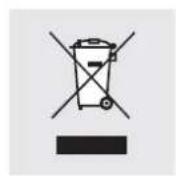
To help protect the environment, please dispose of the product properly when it has reached the end of its useful life and not in the household waste. Information on collection points and their opening hours can be obtained from your local authority.
Faulty or used batteries must be recycled in accordance with Directive 2006/66/EC. Please return the batteries and / or the device to the available collection points.
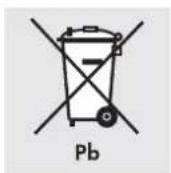
Environmental damage through incorrect disposal of the batteries!
Batteries may not be disposed of with the usual domestic waste. They may contain toxic heavy metals and are subject to hazardous waste treatment rules and regulations. The chemical symbols for heavy metals are as follows:
20 GB/CY
AURIOL®
natural_image
Color palette bar with grayscale swatches and a central black dot, no text or symbols presentCd = cadmium, Hg = mercury, Pb = lead. That is why you should dispose of used batteries at a local collection point.
EMC CE


Uvod
Namjenska uporaba ...... Stranica 23
natural_image
Color palette bar with grayscale swatches and a central black dot, no text or symbols presentIzjava o sukladnosti za ovaj proizvod dostupna je na internet stranici www.lidl.hr.
EMC CE


Introducere
natural_image
Color palette bar with grayscale swatches and a central black dot, no text or symbols present14 Šurub
15 Pad adeziv
natural_image
Color palette bar with grayscale swatches and a central black dot, no text or symbols present1 Termometru interior / exterior
1 Baterie 1,5-V---AAA
1 Diblu
1 Şurub
1 Pad adeziv
1 Manual de utilizare

natural_image
Color palette bar with grayscale swatches and a central black dot, no text or symbols present

58 RO
AURIOL®

Въведение
Употреба по предназначение .....Страница 60
natural_image
Color palette bar with grayscale swatches and a central black dot, no text or symbols presentnatural_image
Color palette bar with grayscale swatches and a central black dot, no text or symbols present

AURIOL®
99 GR/CY


- INDOOR/OUTDOOR THERMOMETER
- UNUTARNJI I VANJSKI TERMOMETAR
- Introduction
- Getting started
- Indoor / outdoor thermometer
- - Introduction
- - Intended use
- AURIOL®
- • Description of parts
- - Technical data
- - Scope of supply
- Safety notes
- ● Battery Safety Instructions
- CAUTION! RISK OF EXPLOSION!
- CAUTION! TAKE CARE NOT TO DAMAGE THE PRODUCT!
- - Getting started
- - Inserting / changing the battery
- - Positioning / installing the device
- Stand:
- Wall mount:
- ⚠️ CAUTION! DANGER TO LIFE, RISK OF INJURY AND DAMAGE TO
- ⚠️ DANGER OF ELECTRIC SHOCK! DAN- GER OF DAMAGE TO PROPERTY! DANGER OF INJURY! Ensure that
- - Mounting the device on a wall
- ● Temperature memory
- - Setting the time
- - Troubleshooting
- - Cleaning and Care
- - Disposal
- Environmental damage through incorrect disposal of the batteries!
- EMC CE
- Uvod
- Introducere
- Въведение
Brand : AURIOL
Model : IAN 39057
Category : Weather Station