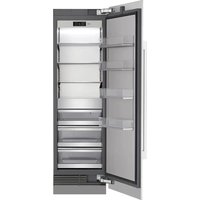
SKSCF2401P - Fridge SKS - Free user manual and instructions
Find the device manual for free SKSCF2401P SKS in PDF.


| Product Type | Built-in Freezer |
| Brand | SKS |
| Model | SKSCF2401P |
| Dimensions (W x H x D) | 610 x 1780 x 711 mm (estimate) |
| Net Weight | 163 kg (359 lb) |
| Power Supply | 115 V, 60 Hz |
| Refrigerant | R600a (isobutane) - flammable |
| Required Water Pressure | 20 to 120 psi (138 to 827 kPa) |
| Water Filter Capacity | 757 liters (200 gallons) |
| Automatic Ice Maker | Yes, produces 12 ice cubes per cycle |
| Ice Plus Function | Increases ice production for 24 hours |
| Sabbath Mode | Yes, disables alarms and lights |
| Connectivity | Wi-Fi 2.4 GHz via LG ThinQ app |
| Smart Grid | Yes, compatible with demand management |
| Interior Lighting | LED |
| Adjustable Shelves | Yes, glass |
| Removable Door Bins | Yes |
| Freezer Drawer | Yes, removable |
| Water Filter Type | LT1000P-S (ADQ74793506), replace every 6 months |
| Recommended Cleaning | Mild detergent and warm water, avoid abrasives |
| Warranty (Parts and Labor) | 3 years (see terms) |
| Compressor Warranty | 10 years (parts only) |
| Customer Service Number (Canada) | 1-888-289-2802 |
Frequently Asked Questions - SKSCF2401P SKS
User questions about SKSCF2401P SKS
0 question about this device. Answer the ones you know or ask your own.
Ask a new question about this device
Download the instructions for your Fridge in PDF format for free! Find your manual SKSCF2401P - SKS and take your electronic device back in hand. On this page are published all the documents necessary for the use of your device. SKSCF2401P by SKS.
USER MANUAL SKSCF2401P SKS
Read this owner's manual thoroughly before operating the appliance and keep it handy for reference at all times.
ENGLISH
SKSCF1801P, SKSCF2401P, SKSCF3001P
TABLE OF CONTENTS
3 IMPORTANT SAFETY INSTRUCTIONS
3 READ ALL INSTRUCTIONS BEFORE USE
3 W A R N I N G
6 CA U T I O N
7 PRODUCT OVERVIEW
7 Product Features
9 OPERATION
9 B e f o r e U s e
10 Control Panel
12 Sabbath Mode
12 Automatic Icemaker
13 Storing Food
14 Drawers
16 Shelves
17 Door Bins
19 SMART FUNCTIONS
19 LG ThinQ Application
21 Smart Grid Function
22 Smart Diagnosis TM Feature
24 MAINTENANCE
24 Cleaning
24 Water Filter
29 TROUBLESHOOTING
29 FAQs
30 Before Calling for Service
37 LIMITED WARRANTY
37 USA
41 Canada
IMPORTANT SAFETY INSTRUCTIONS
READ ALL INSTRUCTIONS BEFORE USE
Safety Messages
Your safety and the safety of others are very important.
We have provided many important safety messages in this manual and on your appliance. Always read and follow all safety messages.

This is the safety alert symbol.
This symbol alerts you to potential hazards that can kill or injure you and others. All safety messages will follow the safety alert symbol and either the word WARNING or CAUTION.
These words mean:

WARNING
You may be killed or seriously injured if you do not follow instructions.

CAUTION
You may be injured or cause damage to the product if you do not follow instructions.
All safety messages will tell you what the potential hazard is, tell you how to reduce the chance of injury, and tell you what may happen if the instructions are not followed.
WARNING

WARNING
- To reduce the risk of explosion, fire, death, electric shock, scalding or injury to persons when using this product, follow basic precautions, including the following:
Installation
- To avoid a hazard due to instability of the appliance, it must be fixed in accordance with the instructions.
- When positioning the appliance, ensure the supply cord is not trapped or damaged.
- Do not locate multiple portable socket-outlets or portable power supplies at the rear of the appliance.
Operation
-
This appliance is intended to be used in household and similar applications such as:
-
staff kitchen areas in shops, offices and other working environments;
- farm houses and by clients in hotels, motels and other residential type environments;
- bed and breakfast type environments;
-
catering and similar non-retail applications.
-
This appliance is not for use in portable or mobile installations, such as marine or RV uses, where it will be in motion while operating.
- This appliance is not intended for use by persons (including children) with reduced physical, sensory or mental capabilities, or lack of experience and knowledge, unless they have been given supervision or instruction concerning use of the appliance by a person responsible for their safety.
- This product is not to be used for special purposes such as the storage of medicine or test materials or for use on ships, etc.
- DO NOT allow children to climb, stand, or hang on the appliance doors or on the shelves in the freezer. They could damage the appliance and seriously injure themselves.
- Do not allow children to climb into the appliance. They could be trapped and suffocated.
Children should be supervised to ensure that they do not play with the appliance. - Keep fingers out of pinch point areas; clearances between the doors and cabinets are necessarily small. Be careful closing doors when children are nearby.
- Do not touch frozen food or the metal parts in the freezer compartment with wet or damp hands. Doing so may cause frostbite.
- Do not refreeze frozen food that has thawed completely. Doing so may result in a serious health hazard.
- Do not use an adapter plug or plug the power plug into a multi-outlet extension cord.
- If the supply cord is damaged, it must be replaced by the manufacturer or its service agent or a similarly qualified person in order to avoid a hazard.
- Do not operate the appliance or touch the power cord with wet hands.
- Do not modify or extend the power cord.
- Do not use an uncertified power outlet. Do not plug the appliance into a damaged wall outlet.
- Do not put hands, feet or other objects into the air vents or bottom of the appliance. Doing so could result in personal injury or electric shock.
- In the event of a gas leak (propane/LPG), ensure the area is adequately ventilated and contact an authorized service center before resuming use. Do not touch the appliance or power button of the appliance.
- Turn off power to the appliance immediately and contact an authorized service center if there is a strange noise, odor, or smoke coming from the appliance.
- Do not use any fuse (such as copper, steel wire, etc.) other than a standard fuse.
- Do not place or use an electrical appliance inside the freezer, unless it is of a type recommended by the manufacturer.
- Do not put animals inside the appliance.
- Do not place heavy or fragile objects, liquid filled containers, combustible substances, or flammable objects (such as candles and lamps) on the appliance.
- If connected to a circuit protected by fuses, use time delay fuse.
- Keep ventilation openings, in the appliance enclosure or in the built-in structure, clear of obstruction.
- Do not use mechanical devices or other means to accelerate the defrosting process, other than those recommended by the manufacturer.
- Do not use electrical appliances inside the food storage compartments of the appliance, unless they are of a type recommended by the manufacturer.
- Do not store explosive substances such as aerosol cans with a flammable propellant in this appliance.
- Do not damage the refrigerant circuit.
- An individual properly grounded branch circuit or circuit breaker must be used in case of a required disconnect after installation.
- This appliance incorporates an earth connection for functional purposes.
-
Fill with potable water only.
-
If using an icemaker, make sure to fill it with potable water only.
Maintenance
- Do not use a hair dryer to dry the inside of the appliance.
- Do not light a candle to remove odors in the appliance.
-
In the event of a refrigerant leak, move flammable objects away from the appliance. Ensure the area is adequately ventilated and contact an authorized service center.
-
Keep flammable materials and vapors, such as gasoline, away from the appliance.
- This appliance is not intended for use by persons (including children) with reduced physical, sensory or mental capabilities, or lack of experience and knowledge, unless they have been given supervision or instruction concerning use of the appliance by a person responsible for their safety.
- Turn off power before cleaning or repairing the appliance.
- The freezer compartment lights are interior LED lighting, and service should be performed by a qualified technician.
- Turn off power immediately in the event of a blackout or thunderstorm.
- Turn the power off if water or dust penetrates into the appliance. Call a service agent.
- Do not store glass containers or soda in the freezer compartment. Contents may expand when frozen, break the container and cause injury.
- Do not store, disassemble or repair the appliance yourself or allow unqualified personnel to do so.
- Do not damage the refrigerant circuit.
Disposal
- Risk of child entrapment. Junked or abandoned appliances are dangerous, even if they are sitting for only a few days. When disposing of the appliance, remove the packing materials from the door or take off the doors but leave the shelves in place so that children may not easily climb inside.
- If disposing of an appliance, make sure the refrigerant and insulation foam are removed for proper disposal by a qualified servicer. If you release the refrigerant or throw away the insulation foam, you may be fined or imprisoned in accordance with the relevant environmental law. Insulation foam contains flammable blowing gas.
- When discarding the appliance, remove the door gasket while leaving the shelves and bins in place, and keep children away from the appliance.
Grounding Instructions
- Improper connection of the equipment-grounding conductor can result in a risk of electric shock. Check with a qualified electrician or service personnel if you are in doubt whether the appliance is properly grounded. Do not modify the plug provided with the appliance; if it will not fit the outlet, have a proper outlet installed by a qualified electrician.
- Have a certified electrician check the wall outlet and wiring for proper grounding.
- An individual properly grounded branch circuit or circuit breaker must be used in case of requiring disconnect after installation.
Risk of Fire and Flammable Materials
This symbol alerts you to flammable materials that can ignite and cause a fire if you do not take care.
This appliance contains a small amount of isobutane refrigerant (R600a), which is combustible. When transporting and installing the appliance, care should be taken to ensure that no parts of the refrigerating circuit are damaged. Refrigerant squiring out of the pipes could ignite or cause an eye injury. If a leak is detected, avoid any naked flames or potential sources of ignition and air out the room in which the appliance is standing for several minutes.
In order to avoid the creation of a flammable gas air mixture if a leak in the refrigerating circuit occurs, the size of the room in which the appliance may be sited depends on the amount of refrigerant used. The room must be 10.8 square feet (1 square meter) in size for every 8g of R600a refrigerant inside the appliance. The amount of refrigerant in your particular appliance is shown on the identification plate inside the appliance. Never start up an appliance showing any signs of damage. If in doubt, consult your dealer.
CAUTION

CAUTION
- To reduce the risk of minor or moderate injury to persons, malfunction, or damage to the product or property when using this product, follow basic precautions, including the following:
Installation
- Do not install the appliance where there may be a danger of the unit falling.
- The appliance must be properly installed in accordance with the Installation Instructions.
Operation
- Do not use aerosols near the appliance.
- This appliance is intended to be used only in domestic and similar applications.
- Do not strike or apply excessive force to any glass surface. Do not touch glass surfaces if they are cracked or broken.
- Do not overfill or pack items too tightly into door bins. Doing so may cause damage to the bin or personal injury if items are removed with excessive force.
- Do not overfill the appliance with food. Doing so may cause personal injury or property damage.
Maintenance
- Do not use strong detergents like wax or thinkers for cleaning. Clean with a soft cloth.
- Remove foreign objects (such as dust and water) off the prongs of the power plug and contact areas. Do not use a wet or damp cloth when cleaning the plug.
- Do not spray water directly on the inside or outside of the appliance.
- Do not clean glass shelves or covers with warm water when they are cold. They may break if exposed to sudden temperature changes.
SAVE THESE INSTRUCTIONS
PRODUCT OVERVIEW
Product Features
The images in this guide may be different from the actual components and accessories, which are subject to change by the manufacturer without prior notice for product improvement purposes.
Interior
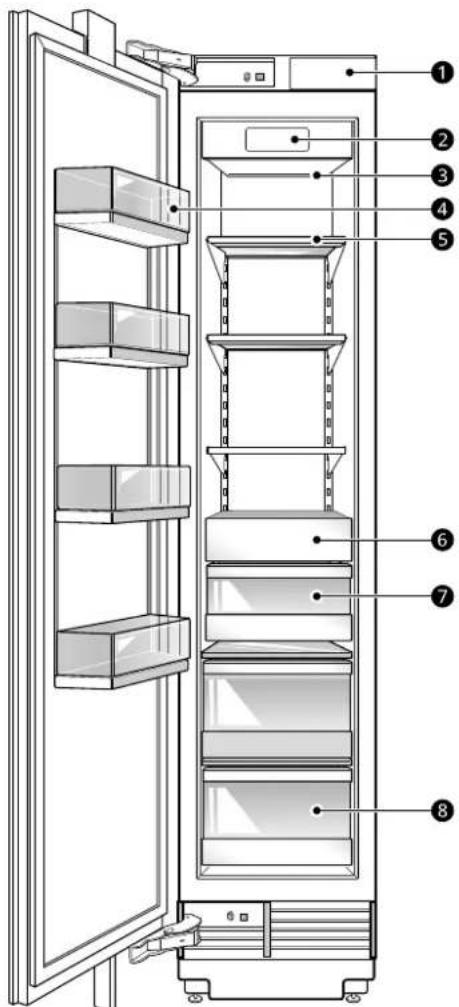
Water filter
Purifies water.
NOTE
- The water filter should be replaced every 6 months.
- See the Replacing the Water Filter section in this manual for details.
Control Panel
Sets the freezer temperature and the water filter condition.

8 PRODUCT OVERVIEW
LED Interior Lighting
Lights up the inside of the refrigerator.
4Adjustable Refrigerator Shelf
The refrigerator shelves are adjustable to meet individual storage needs.
Movable Door Bin
Store chilled food or drinks.
Automatic Icemaker
Dispenses ice automatically.
Ice Storage
3FreezerDrawer
Store long-term frozen items.

CAUTION
- The door alarm will sound every 30 seconds if the door remains open longer than one minute.
Product Specifications
The appearance and specifications listed in this manual may vary due to constant product improvements.
Electrical requirements: 115V 60Hz
Min./Max.water pressure:20-120 psi (138-827 kPa)
| Model Description Net weight | |
| SKSCF1801P Built-in, Freezer 309 lb (140 kg) | |
| SKSCF2401P Built-in, Freezer 359 lb (163 kg) | |
| SKSCF3001P Built-in, Freezer 417 lb (189 kg) |
OPERATION
Before Use
Checklist
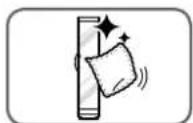
Clean the freezer.
Clean the freezer thoroughly and wipe off all dust that accumulated during shipping.
CAUTION
- Do not scratch the freezer with a sharp object or use a detergent that contains alcohol, a flammable liquid or an abrasive when removing any tape or adhesive from the freezer. Remove adhesive residue by wiping it off with your thumb or dish detergent.
- Do not peel off the model or serial number label or the technical information on the rear surface of the freezer.
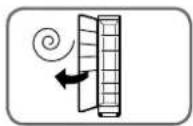
Open freezer door to ventilate the interior.
The inside of the freezer may smell like plastic at first. Remove any adhesive tape from inside the freezer and open the freezer door for ventilation.
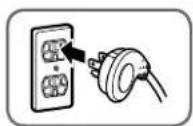
Connect the power supply.
Check if the power supply is connected before use.
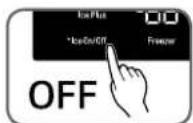
Turn off the icemaker.
Turn off the icemaker if the freezer is not yet connected to the water supply.
NOTE
- The icemaker water valve may buzz if the icemaker is turned on while the freezer is not connected to the water supply.
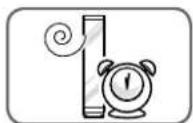
Wait for the freezer to cool.
After the freezer is connected to power, it will take time to cool. The duration depends on the model and ambient conditions. In summer, it may take longer for the interior to cool down. Keep the refrigerator doors closed to allow it to cool down quickly.
- Don't add food before the appliance has cooled. Food may spoil or odors may linger.
- To reach the set temperature quickly, keep the refrigerator doors closed after placing food inside.
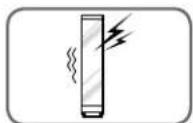
The freezer makes a loud noise after initial operation.
This is normal. The volume will decrease as the temperature decreases.
10 OPERATION
Control Panel
Depending on the model, some of the following functions may not be available. The actual control panel may differ from model to model.
Control Panel Features
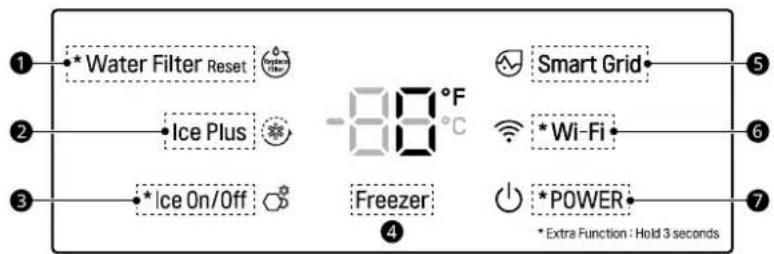
Water Filter Reset
Replace the water filter when the icon turns on. After replacing the water filter, press and hold the Water Filter Reset button for three seconds to turn the icon light off. Replace the water filter approximately every six months.
2 Ice Plus
This function increases both ice making and freezing capabilities.
Press the Ice Plus button to illuminate the icon and activate the function for 24 hours. The function automatically shuts off after 24 hours. Stop the function manually by pressing the button once more.
Ice On/Off
Press the Ice On/Off button for three seconds to turn the icemaker on/off.
4Freezer
Indicates the set temperature of the freezer compartment in Celsius (^) or Fahrenheit (^) . The default freezer temperature is 0^ (-18^) . Press the Freezer button repeatedly to select a new set temperature from -7^ to 5^ (-23^ to -15^) .
NOTE
- To change the temperature mode from ^ F to ^ C (or vice versa) press the Freezer button first to wake the display. Press and hold the Freezer and Smart Grid buttons simultaneously for approximately five seconds until you hear a beep sound. The temperature indicator on the display window switches between Celsius and Fahrenheit.
Smart Grid
Press the Smart Grid button to turn the function On/Off. When the function is on, the icon illuminates. The function automatically turns on when the freezer is connected to the Wi-Fi network.
When the freezer is responding to a Demand Response (DR) message from the electric company, the Grid text illuminates.
6Wi-Fi
The Wi-Fi button, when used with the LG ThinQ application, allows the freezer to connect to a home Wi-Fi network. Refer to SMART FUNCTIONS for information on the initial setup of the application.
The icon shows the status of the freezer's network connection. The icon illuminates when the freezer is connected to the Wi-Fi network.
Press and hold the Wi-Fi button for 3 seconds to connect to the network. The icon blinks while the connection is being made, then turns on once the connection is successfully made.

7 POWER
The POWER button turns off all electrical power to the unit.
Press and hold the POWER button for 3 seconds to turn off the power. When the power is off, the icon light is off. There is no need to turn off power at the circuit breaker or wall receptacle. Use this function for service or extended vacations.
NOTE
- When the freezer is in the Power Saving Mode, the display remains off until a door is opened or a button is pressed. Once on, the display remains on for 20 seconds.
Display Mode (For Store Use Only)
- The Display Mode disables all cooling in the freezer sections to conserve energy while on display in a retail store. When activated, BF is displayed on the control panel and the display remains on for 20 seconds.
To deactivate / activate:
- With the door opened, press and hold the Freezer and Water Filter Reset buttons at the same time for five seconds. The control panel beeps and the temperature settings display to confirm that Display Mode is deactivated. Use the same procedure to activate Display Mode.
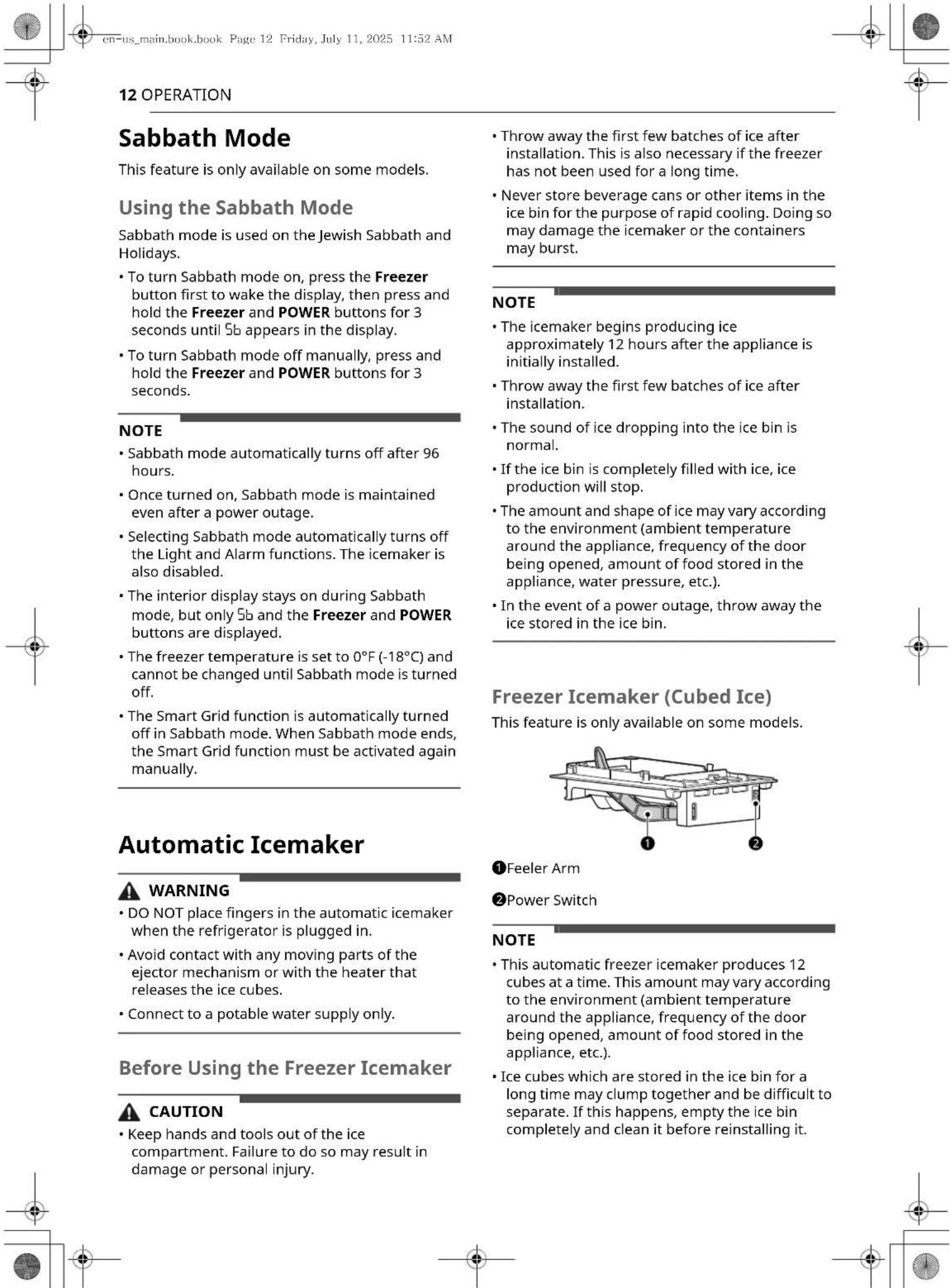
Occasionally shake the ice bin to level the ice. If the ice cubes pile up on the side nearest the shutoff sensor, ice production will stop.
To increase ice production, use the Ice Plus function. The function increases both ice making and freezing capabilities.
Turning the Icemaker On/Off
To turn the automatic icemaker On/Off, press and hold the Ice On/Off button on the control panel for three seconds.

CAUTION
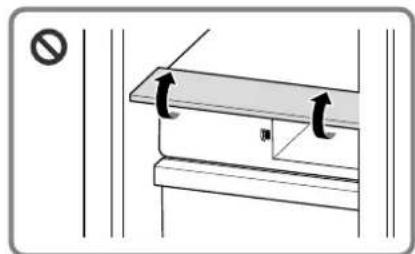
- There is a risk of damage if the icemaker cover is overturned by more than 90 degrees.
Normal Sounds You May Hear
- Keeping the power turned on to the icemaker before the water line is connected can damage the icemaker.
The icemaker water valve buzzes as the icemaker fills with water. If the Ice On/Off icon is illuminated, it will buzz even if it has not yet been hooked up to water. To stop the buzzing, press the Ice On/Off button to turn off the icon - You will hear the sound of ice dropping into the bin and water running in the pipes as the icemaker refills.
Preparing for Vacation
If the ambient temperature will drop below freezing, have a qualified technician drain the water supply system to prevent serious property damage due to flooding caused by ruptured water lines or connections. Press the Ice On/Off button on the display for 3 seconds to turn off the icon * and shut off the water supply to the appliance.
NOTE
The ice bin should be emptied any time if the Ice On/Off icon 已 is turned off.
Storing Food
NOTE
- If you are leaving home for a short period, like a short vacation, the refrigerator should be left on.
- If you are leaving the refrigerator turned off for an extended period, remove all food and unplug the power cord. Clean the interior, and leave the doors open to prevent fungi from growing in the refrigerator.
- If doors are opened or closed too often, warm air may penetrate the refrigerator and raise its temperature. This can increase the running costs of the unit.
Food Storage Tips
Wrap or store food in the freezer in airtight and moisture-proof material unless otherwise noted. This prevents food odor and taste transfer throughout the freezer. For dated products, check date code to ensure freshness.

CAUTION
- Do not overfill or pack items too tightly into door bins. Doing so may cause damage to the bin or personal injury if items are removed with excessive force.
- Do not store glass containers in the freezer. Contents may expand when frozen, break the container and cause injury.
How to Store Food
Butter or Margarine
- Keep opened butter in covered dish or closed compartment. When storing an extra supply, wrap in freezer packaging and freeze.
Fish
- Freeze fresh fish and shellfish if they are not being eaten the same day purchased. Eating fresh fish and shellfish the same day purchased is recommended.

14 OPERATION
NOTE
- If you are leaving home for a short period, like a short vacation, the freezer should be left on. Refrigerated foods that are able to be frozen will stay preserved longer if stored in the freezer.
- If you are leaving the freezer turned off for an extended period, remove all food and unplug the power cord. Clean the interior, and leave the door open to prevent fungi from growing in the freezer.
- If the freezer is kept in a hot and humid place, frequent opening of the door or storing a lot of vegetables in the freezer may cause condensation to form. Wipe off the condensation with a clean cloth or a paper towel.
- If the freezer door is opened or closed too often, warm air may penetrate the freezer and raise its temperature. This can increase the running costs of the unit.
Storing Frozen Food
Check a freezer guide or a reliable cookbook for further information about preparing food for freezing or food storage times.
Freezing
Your freezer will not quick-freeze a large quantity of food. Do not put more unfrozen food into the freezer than will freeze within 24 hours (no more than 2 to 3 pounds of food per cubic foot of freezer space). Leave enough space in the freezer for air to circulate around packages. Be careful to leave enough room at the front so the door can close tightly.
Storage times will vary according to the quality and type of food, the type of packaging or wrap used (how airtight and moisture-proof) and the storage temperature. Ice crystals inside a sealed package are normal. This simply means that moisture in the food and air inside the package have condensed, creating ice crystals.
NOTE
- Allow hot foods to cool at room temperature for 30 minutes, and then package and freeze. Cooling hot foods before freezing saves energy.
Packaging
Successful freezing depends on correct packaging. When you close and seal the package, it must not allow air or moisture in or out. If it does, you could
have food odor and taste transfer throughout the freezer and could also dry out frozen food.
Packaging Recommendations
- Rigid plastic containers with tight-fitting lids
- Straight-sided canning/freezing jars
- Heavy-duty aluminum foil
Plastic-coated paper
Non-permeable plastic wraps - Specified freezer-grade self-sealing plastic bags
- Follow package or container instructions for proper freezing methods.
Do not use
- Bread wrappers
Non-polyethylene plastic containers - Containers without tight lids
- Wax paper or wax-coated freezer wrap
- Thin, semi-permeable wrap
Drawers
Removing/Assembling Drawers

CAUTION
- The drawers are heavy. Always use two hands when removing or assembling the drawers to avoid product damage or personal injury. Always empty drawers before removing them.
Always open the door completely before removing or assembling the drawers.
Removing the Printer
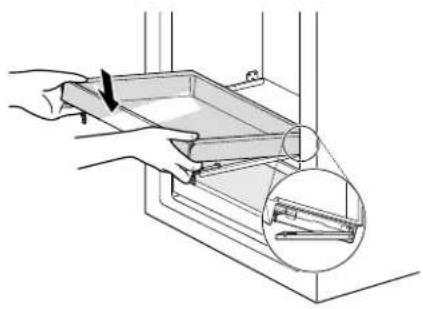
1 Pull the drawer out until it stops. Empty all contents out of the drawer before removing it.
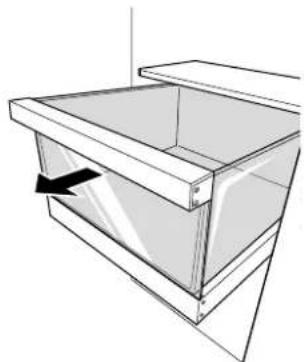
2 Lift the empty drawer slightly to remove it from the support.
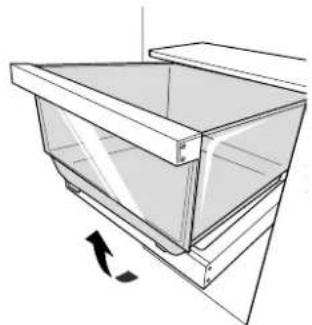
Assembling the Analyzer
1 Pull out the drawer support until it stops. Angle the drawer into the space and set it on the support.
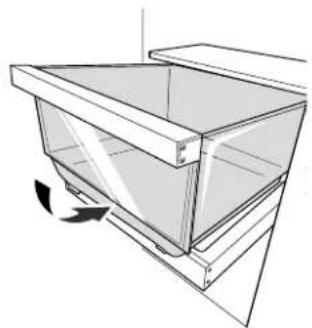
2 Slide the drawer back until it lowers into place on the support. Close the drawer.
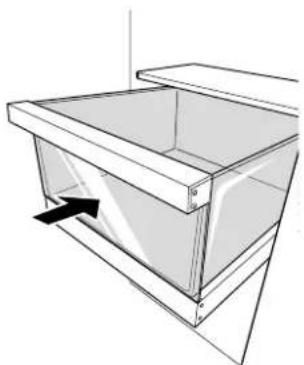
Removing/Assembling the Printer Support
Removing the Printer Support
1 Press the levers on either side of the drawer support.
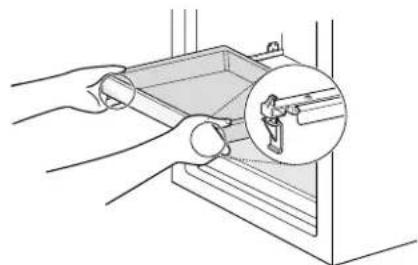
2 Keeping both levers pressed, lift the drawer support slightly and remove it from the rail system.
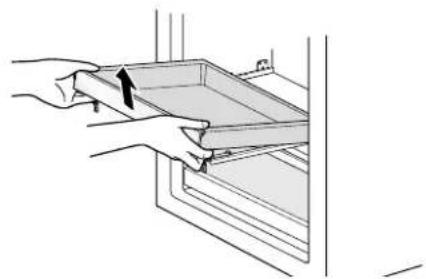
Assembling the Analyzer Support
1 Pull both drawer rails out until they stop.

2 Line up the bottom edges on the sides of the drawer support with the groove in each rail and then lower the support until it clicks into place.

16 OPERATION
4 Lower the front of the shelf so that the hooks drop into the slots.
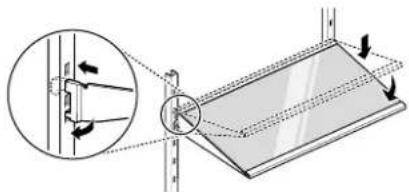
Shelves
Detaching/Assembling the Shelf
The shelves in the refrigerator are adjustable to meet individual storage needs.
Adjusting the shelves to fit items of different heights will make finding the exact item you want easier.
CAUTION
- Make sure that shelves are level from one side to the other. Failure to do so may result in the shelf falling or spilled food.
- Do not clean glass shelves with warm water while they are cold. Shelves may break if exposed to sudden temperature changes or impact.
Glass shelves are heavy. Use special care when removing them.
1 To detach, tilt up the front of the shelf and lift the shelf straight up.
2 Pull the shelf out.
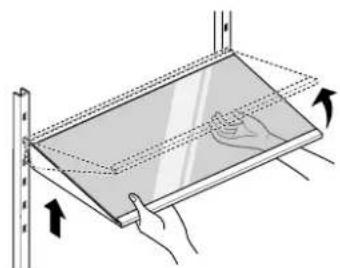
3 To assemble, tilt the front of the shelf up and guide the shelf hooks into the slots at a desired height.
NOTE

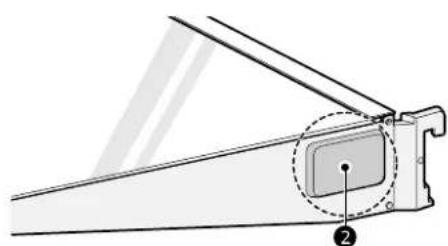
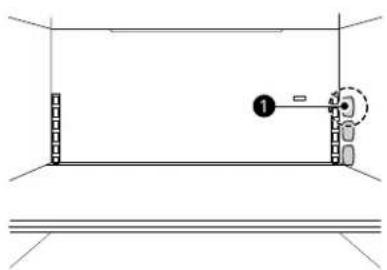
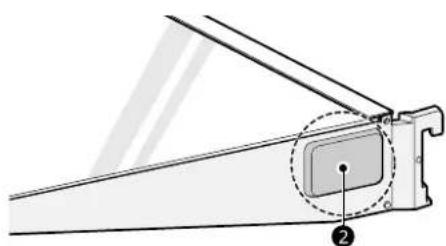
1Transmitter
2Receiver
- Foreign objects and dirt between the shelf and the inner cabinet wall could prevent the shelf light from turning on.
- The shelf light turns on when the door is opened.
- The shelf light turns off after seven minutes or when the door is closed.
Detaching/Assembling the Shelf
The shelves in the freezer are adjustable to meet individual storage needs.
Adjusting the shelves to fit items of different heights will make finding the exact item you want easier.
CAUTION
- Make sure that shelves are level from one side to the other. Failure to do so may result in the shelf falling or spilled food.


- Do not clean glass shelves with warm water while they are cold. Shelves may break if exposed to sudden temperature changes or impact.
Glass shelves are heavy. Use special care when removing them.
1 To detach, tilt up the front of the shelf and lift the shelf straight up.
2 Pull the shelf out.
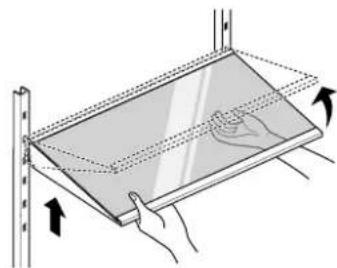
3 To assemble, tilt the front of the shelf up and guide the shelf hooks into the slots at a desired height.
4 Lower the front of the shelf so that the hooks drop into the slots.

NOTE
ENGLISH
- Foreign objects and dirt between the shelf and the inner cabinet wall could prevent the shelf light from turning on.
- The shelf light turns on when the door is opened.
- The shelf light turns off after seven minutes or when the door is closed.
Door Bins
Using Door Bins
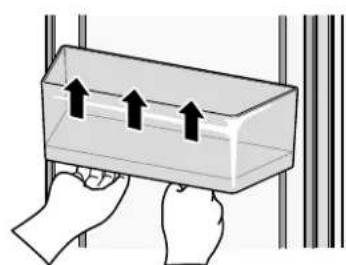
To adjust the bin position, hold the bottom of the bin at both ends and flip it up and down.

Detaching/Assembling the Door Bins
The door bins are removable for easy cleaning and adjustment.
1 To detach the door bins, hold the guide so that the bin cannot move and tap the bottom of the bin 2 or 3 times.

18 OPERATION
2 To assemble the door bin, align both sides of the bin with the guides and push the bin down until it snaps into place.

CAUTION
- Regularly detach and wash the storage bins and shelves; they can become easily contaminated by food.
- Do not apply excessive force while detaching or assembling the storage bins.
- Do not use the dishwasher to clean the storage bins and shelves.
SMART FUNCTIONS
LG ThinQ Application
This feature is only available on models with Wi-Fi.
The LG ThinQ application allows you to communicate with the appliance using a smartphone.
LG ThinQ Application Features
Energy Monitoring
- This feature keeps track of the freezer's power consumption and the number of door openings.
- Push Messages
- If the door remains open for more than ten minutes, you will receive a push message. When Ice Plus is finished, you will receive a push message.
- Smart Diagnosis™
- This function provides useful information for diagnosing and solving issues with the appliance based on the pattern of use.
- Settings
- Allows you to set various options on the freezer and in the application.
NOTE
- In the following cases, you must update the network information for each appliance in the LG ThinQ application under Device Cards Settings Change Network.
- wireless router is changed
- wireless router password is changed
- Internet service provider is changed
This information is current at the time of publication. The application is subject to change for product improvement purposes without notice to users.
Installing LG ThinQ Application and Connecting an LG Appliance
Models with QR Code
Scan the QR code attached to the product using the camera or a QR code reader application on your smartphone.
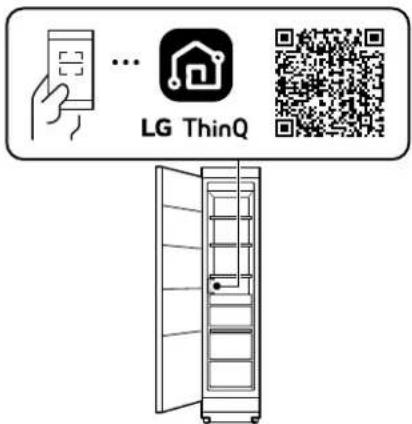
Models without QR Code
1 Search for and install the LG ThinQ application from the Google Play Store or Apple App Store on a smartphone.
2 Run the LG ThinQ application and sign in with your existing account or create an LG account to sign in.
3 Touch the add (+) button on the LG ThinQ application to connect your LG appliance. Follow the instructions in the application to complete the process.
NOTE
To verify the Wi-Fi connection, check that the Wi-Fi indicator on the control panel is lit.
- The appliance supports 2.4 GHz Wi-Fi networks only. To check your network frequency, contact your Internet service provider or refer to your wireless router manual.
- LG ThinQ is not responsible for any network connection problems or any faults, malfunctions, or errors caused by network connection.
- The surrounding wireless environment can make the wireless network service run slowly.
20 SMART FUNCTIONS
NOTE
- If the distance between the appliance and the wireless router is too far, the signal becomes weak. It may take a long time to connect or fail to install the application.
- If the appliance is having trouble connecting to the Wi-Fi network, it may be too far from the router. Purchase a Wi-Fi repeater (range extender) to improve the Wi-Fi signal strength.
The network connection may not work properly depending on the Internet service provider. - The Wi-Fi may not connect or the connection may be interrupted because of the home network environment.
- If the appliance cannot be connected due to problems with the wireless signal transmission, unplug the appliance and wait about a minute before trying again.
- If the firewall on your wireless router is enabled, disable the firewall or add an exception to it.
The wireless network name (SSID) should be a combination of English letters and numbers. (Do not use special characters.) - Smartphone user interface (UI) may vary depending on the mobile operating system (OS) and the manufacturer.
- If the security protocol of the router is set to WEP, network setup may fail. Change the security protocol (WPA2 is recommended), and connect the product again.
- To disable the Wi-Fi function, press and hold the Wi-Fi button for 3 seconds. The Wi-Fi indicator will be turned off.
- To reconnect the appliance or add another user, press and hold the Wi-Fi button for 3 seconds to temporarily turn it off. Run the LG ThinQ application and follow the instructions in the application to connect the appliance.
Radio Equipment Specifications
| Type | Operating Frequency Range | Output Power (Max.) |
| Wireless LAN | 2400 MHz - 2472 MHz | < 1 W |
| Bluetooth† | 2400 MHz - 2483.5 MHz |
† This feature is only available on some models.
FCC Statement
This equipment has been tested and found to comply with the limits for a Class B digital device, pursuant to part 15 of the FCC Rules for transmitter module and part 18 of the FCC Rules for this equipment. These limits are designed to provide reasonable protection against harmful interference in a residential installation. This equipment generates, uses and can radiate radio frequency energy and, if not installed and used in accordance with the instructions, may cause harmful interference to radio communications.
However, there is no guarantee that interference will not occur in a particular installation. If this equipment does cause harmful interference to radio or television reception, which can be determined by turning the equipment off and on, the user is encouraged to try to correct the interference by one or more of the following measures:
- Reorient or relocate the receiving antenna.
- Increase the separation between the equipment and receiver.
- Connect the equipment into an outlet on a circuit different from that to which the receiver is connected.
- Consult the dealer or an experienced radio/TV technician for help.
This device (transmitter module contained in this product) complies with part 15 of the FCC Rules. Operation is subject to the following two conditions:
(1) This device may not cause harmful interference and
(2) This device must accept any interference received, including interference that may cause undesired operation.
Any changes or modifications in construction of this device which are not expressly approved by the party responsible for compliance could void the user's authority to operate the equipment.
FCC RF Radiation Exposure Statement
This equipment complies with FCC radiation exposure limits set forth for an uncontrolled environment. This transmitter must not be collocated or operating in conjunction with any other antenna or transmitter.
This equipment should be installed and operated with a minimum distance of 20cm (7.8 inches) between the antenna and your body. Users must

follow the specific operating instructions for satisfying RF exposure compliance.
Industry Canada Statement
This device contains licence-exempt transmitter(s)/receiver(s) that comply with Innovation, Science and Economic Development Canada's licence-exempt RSS(s). Operation is subject to the following two conditions:
(1) This device may not cause interference.
(2) This device must accept any interference, including interference that may cause undesired operation of the device.
IC Radiation Exposure Statement
This equipment complies with IC radiation exposure limits set forth for an uncontrolled environment.
This equipment should be installed and operated with a minimum distance of 20cm (7.8 inches) between the antenna and your body.
NOTE
- THE MANUFACTURER IS NOT RESPONSIBLE FOR ANY RADIO OR TV INTERFERENCE CAUSED BY UNAUTHORIZED MODIFICATIONS TO THIS EQUIPMENT. SUCH MODIFICATIONS COULD VOID THE USER'S AUTHORITY TO OPERATE THE EQUIPMENT.
Open Source Software Notice Information
To obtain the source code that is contained in this product, under GPL, LGPL, MPL, and other open source licenses that have the obligation to disclose source code, and to access all referred license terms, copyright notices and other relevant documents, please visit https://opensource.lge.com.
LG Electronics will also provide open source code to you on CD-ROM for a charge covering the cost of performing such distribution (such as the cost of media, shipping, and handling) upon email request to opensource@lge.com.
This offer is valid to anyone in receipt of this information for a period of three years after our last shipment of this product.
Smart Grid Function
When the freezer operates in Smart Grid mode, the Smart Freezer function can control energy usage or delay the operation of some functions to save energy during peak usage periods.
- You can override the Smart Grid function at any time (using the Smart Grid button or application).
- To use the Smart Grid function, you need to register your appliance with your electric utility company, provided that your electric utility company supports the function. In other words, the Smart Grid function will not be available if your electric utility company does not support the function or does not have the capability to support the function.
Smart Grid Application Features
-
Smart Saving_Demand Response
-
You can lower energy usage based on Demand Response (DR) signals from the utility company. If the freezer is operating in Smart Saving mode according to the DR signal, you can see a pop up.
-
Seasonal Energy Savings
- Lower energy usage based on time period.
Using the Smart Grid Function
This feature responds to notification events from your utility company to run high energy consuming tasks during off-peak periods when demand is lower. These notification events are known as Demand Response signals.
If the freezer receives a Demand Response signal from the utility company, the freezer will turn on the Grid LED on the freezer display and control its power consumption according to the signal. The freezer will respond to the signals received from the utility company as long as product performance is maintained.
If the freezer receives a Demand Response signal, the freezer will operate in Delay Appliance Load (DAL) or Temporary Appliance Load Reduction (TALR) mode.
Delay Appliance Load (DAL)
The freezer responds to a DAL signal by providing a moderate load reduction for the duration of the delay period.
This mode controls functions that consume a lot of energy such as adjusting the cooling system, running the defrost cycle, and making ice.


22 SMART FUNCTIONS
- When the freezer operates in DAL mode, the Grid LED is illuminated on the freezer display.
- DAL mode is automatically deactivated after the period stipulated by the DAL signal (max. 4 hours) or when you override the Smart Grid function.
Temporary Appliance Load Reduction (TALR)
The freezer responds to a TALR signal by aggressively reducing the load for a short time period, typically 10 minutes. This mode reduces energy consumption by stopping the compressor and controlling the functions that consume a lot of energy such as the defrost cycle and fan.
- When the freezer operates in TALR mode, the Grid LED is illuminated on the freezer display.
TALR mode is automatically deactivated after the received duration (max. 10 minutes), or when you override the Smart Grid function. The mode is immediately deactivated and the freezer returns to its normal state if the door is opened or closed, or the dispenser is used.
Override Smart Grid Mode
To ignore the Demand Response signal from the utility company and override the Smart Grid function, push the Smart Grid button while the freezer is in Smart Grid mode.
When you override the Smart Grid function, the freezer ignores the Demand Response signal and is no longer controlled by the utility company until the next Demand Response signal is sent. You can also override the Smart Grid function using the smart phone app.
SKS Open API
You can manage Smart Grid features for the SKS Smart Freezer.
Please check the detailed specifications on the notice page on sksappliances.com.
API List
- Dem and Response
- Send demand response signal
Power Saving
- Set saving mode
- Get schedule of DR/Delay Defrost
Energy Monitoring
-Get door open event
- Get energy consumption
-
Delay Defrost Capability
-
Insert a delay defrost schedule event
- Update a delay defrost schedule event
- Delete a delay defrost schedule event
Get the delay defrost schedule
Smart Diagnosis™ Feature
This feature is only available on some models. Use this feature to help you diagnose and solve problems with your appliance.
NOTE
- For reasons not attributable to LGE's negligence, the service may not operate due to external factors such as, but not limited to, Wi-Fi unavailability, Wi-Fi disconnection, local app store policy, or app unavailability.
- The feature may be subject to change without prior notice and may have a different form depending on where you are located.
Using LG ThinQ to Diagnose Issues
If you experience a problem with your Wi-Fi equipped appliance, it can transmit troubleshooting data to a smartphone using the LG ThinQ application.
- Launch the LG ThinQ application and select the Smart Diagnosis feature in the menu. Follow the instructions provided in the LG ThinQ application.
Using Audible Diagnosis to Diagnose Issues
Follow the instructions below to use the audible diagnosis method.
- Launch the LG ThinQ application and select the Smart Diagnosis feature in the menu. Follow the instructions for audible diagnosis provided in the LG ThinQ application.
1 Open the freezer door.
2 Press the Freezer button first to wake the display.
3 Hold the mouthpiece of your phone in front of the speaker that is located on the filter cover of the freezer.
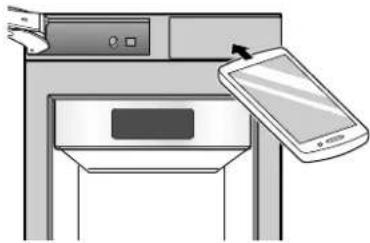
4 Press and hold the Freezer button for three seconds while continuing to hold your phone to the speaker.
5 After you hear three beeps, release the Freezer button.
6 Keep the phone in place until the tone transmission has finished. The display will count down the time. Once the countdown is over and the tones have stopped, the diagnosis will be displayed in the application.
NOTE
- For best results, do not move the phone while the tones are being transmitted.
24 MAINTENANCE
MAINTENANCE
Cleaning

WARNING
- Use non-flammable cleaner. Failure to do so can result in fire, explosion, or death.

CAUTION
- Do not use an abrasive cloth or sponge when cleaning the interior and exterior of the appliance.
- Do not place your hand on the bottom surface of the appliance when opening and closing the doors.
General Cleaning Tips
- The freezer defrost automatically; however, clean both sections once a month to prevent odors.
- Wipe up spills immediately.
- Unplug the freezer or disconnect power before cleaning.
- Remove all removable parts, such as shelves.
- Use a clean sponge or soft cloth and a mild detergent in warm water. Do not use abrasive or harsh cleaners.
- Hand wash, rinse and dry all surfaces thoroughly.
-
When cleaning the inside or outside of the appliance, do not wipe it with a rough brush, toothpaste, or flammable materials. Do not use cleaning agents containing flammable substances.
-
Doing so may cause discoloration or damage to the appliance.
- Flammable substances: alcohol (ethanol, methanol, isopropyl alcohol, isobutyl alcohol, etc.), thinner, bleach, benzene, flammable liquids, abrasives, etc.
Inside Walls
- Allow freezer to warm up so the cloth will not stick.
To help remove odors, wash the inside of the freezer with a mixture of baking soda and warm water. Mix 2 tablespoons of baking soda to 1 quart of water (26 g soda to 1 liter water). Be sure the
baking soda is completely dissolved so it does not scratch the surfaces of the freezer.
Door Liners and Gaskets
Use a clean sponge or soft cloth and a mild detergent in warm water. Do not use cleaning waxes, concentrated detergents, bleaches, or cleaners containing petroleum on plastic freezer parts.
Plastic Parts (Covers and Panels)
Use a clean sponge or soft cloth and a mild detergent in warm water. Do not use glass cleaners, abrasive cleansers, or flammable fluids. These can scratch or damage the material.
Water Filter
Before Replacing the Water Filter

WARNING
To reduce the risk associated with choking, do not allow children under 3 years of age to have access to small parts during the installation of this product.
To reduce the risk associated with the ingestion of contaminants, do not use with water that is microbiologically unsafe or of unknown quality without adequate disinfection before or after the system.
- Use of unauthorized water filters may result in product malfunction, water leakage or water quality issues, which will not be covered under the product warranty.
- Connect to a potable water supply only.

CAUTION
- Read and follow Use Instructions before installation and use of this system.
- Installation and use MUST comply with all state and local plumbing codes.
- Do not install if water pressure exceeds 120 psi (827 kPa). If your water pressure exceeds 80 psi, you must install a pressure limiting valve. Contact a plumber if uncertain how to check your water pressure.
- Do not install where water hammer conditions may occur. If water hammer conditions exist you must install a water hammer arrester. Contact a plumbing professional if you are uncertain how to check for this condition.
- Do not install on hot water supply lines. The maximum operating water temperature of this filter system is 100^ (37.8^) .
- Protect filter from freezing. Drain filter when temperatures drop below 40^ (4.4^) .
- The disposable filter cartridge MUST be replaced every 6 months, at the rated capacity or if a noticeable reduction in flow rate occurs.
To protect it from freezing, remove filter cartridge when temperatures are expected to drop below 33^ - Do not install systems in areas where ambient temperatures may go above 110^ (43.3°C).
- Where a backflow prevention device is installed on a water system, a device for controlling pressure due to thermal expansion must be installed.
- Ensure all tubing and fittings are secure and free from leaks.
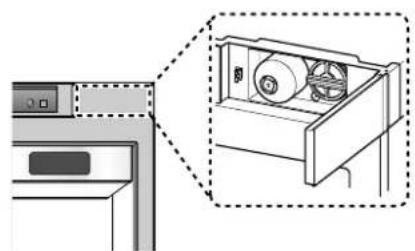
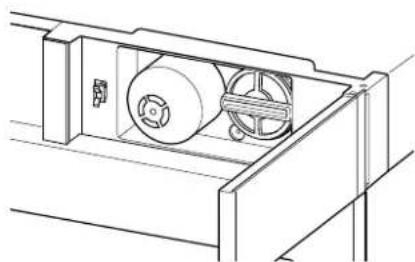
1 Remove the old water filter.
Push to open the water filter cover at the top right of the freezer.
NOTE
- Replacing the water filter causes a small amount of water (around 1 oz. or 25 cc) to drain.
- Wrap a cloth around the front end of the water filter cover to collect any leaking water. Hold the water filter upright, once it is removed, to prevent any remaining water from spilling out of the water filter.
Replacing the Water Filter
-
Replace the water filter:
-
Approximately every six months.
- When the icon turns on.
-
When the icemaker output decreases.
-
To purchase a replacement water filter:
-
Visit your local dealer or distributor
Find Parts & Accessories from Support section of sksappliances.com - Call 1-855-790-6655 (USA) or 1-888-289-2802 (CANADA)
- Use replacement cartridge: LT1000P-S (ADQ74793506)
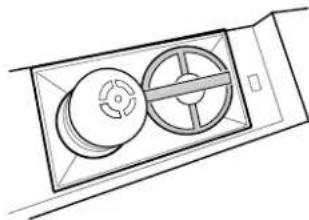
2 Put the cap on the water filter, then grasp and rotate it counterclockwise to remove the water filter from the filter head.


3 Replace with a new water filter.
Take the new water filter out of its packing and remove the protective cover from the o-rings. Put the cap on the new water filter, then push it into the manifold hole until it stops.


4 Grasp and rotate cap clockwise until it stops. Replace the cap to the side of the water filter.

5 After changing the filter, press and hold the Water Filter Reset button for three seconds to reset the icon light.
- Water Filter Reset

-
For further assistance, call:
-
1-855-790-6655 (USA)
- 1-888-289-2802 (CANADA)
Performance Data Sheet
Model: LT1000P-S
NSF System Trade Name Code: MDJ64844601
The concentration of the indicated substances in water entering the system was reduced to a concentration less than or equal to the permissible limit for water leaving the system as specified in NSF/ ANSI Standard 42, Standard 53 and Standard 401.

System tested and certified by NSF International against NSF/ANSI Standard 42, Standard 53 and Standard 401 for the reduction of substances listed below.
| Substance Reduction | Average Influent Challenge | NSF Specified Challenge Concentration | Avg % Reduction | Average Product Water Concentration | Max Permissible Product Water Concentration | NSF Reduction Requirements |
| Chlorine Taste and Odor | 2.0 μg/L | 2.0 μg/L± 10% | >97.5% | 0.050 μg/L | N/A | ≥ 50.00% |
| Nominal Particulate Class I, ≥ 0.5 to < 1.0 μm | 12,000,000 pts/mL | At least 10,000 particles/mL | 99.80% 24,000 pts/ml N/A | ≥ 85.00% | ||
| Asbestos 180 MFL | 107to \( {10}^{8}\mathrm{{MFL}} \) ; fibers greater than 10 μg/Lin length | >99.00% < 1 MFL N/A | ≥ 99.00% | |||
| Atrazine | 8.5 μg/L | 9.0 μg/L ± 10% | >94.10% | 0.500 μg/L | 3.0 μg/L | NA |
| Benzene | 15.0 μg/L | 15.0 μg/L ± 10% | >96.60% | 0.510 μg/L | 5.0 μg/L | NA |
| Carbofuran | 74.0 μg/L | 80.0 μg/L ± 10% | 98.30% | 1.258 μg/L | 40 μg/L | NA |
| Lindane | 1.9 μg/L | 2.0 μg/L ± 10% | >99.00% | 0.019 μg/L | 0.2 μg/L | NA |
| P-Dichlorobenzene | 230.0 μg/L | 225.0 μg/L ± 10% | >99.80% | 0.460 μg/L | 75.0 μg/L | NA |
| 2,4-D | 210.0 μg/L | 210.0 μg/L ± 10% | >99.90% | 0.210 μg/L | 70.0 μg/L | NA |
| Lead pH @6.5 | 140.0 μg/L | 150.0 μg/L ± 10% | 99.60% | 0.560 μg/L | 10.0 μg/L | NA |
| Lead pH @8.5 | 150.0 μg/L | 150.0 μg/L ± 10% | >99.70% | <0.500 μg/L | 10.0 μg/L | NA |
| Mercury @ pH6.5 | 5.9 μg/L | 6.0 μg/L ± 10% | 91.00% | 0.531 μg/L | 2.0 μg/L | NA |
| Mercury @ pH8.5 | 5.6 μg/L | 6.0 μg/L ± 10% | 92.5% | 0.420 μg/L | 2.0 μg/L | NA |
| Cyst* | 100,000 cysts/L | Minimum 50,000 cysts/L | >99.99% 10 cysts/L | N/A | ≥ 99.95% | |
| Atenolol | 240 ng/L | 200 ± 40% ng/L | > 95.50% | 10.80 ng/L | 30 ng/L | NA |
| Carbamazepine | 1600 ng/L | 1400 ± 40% ng/L | 98.40% | 25.60 ng/L | 200 ng/L | NA |
| DEET | 1600 ng/L | 1400 ± 40% ng/L | 97.10% | 46.40 ng/L | 200 ng/L | NA |
| Trimethoprim | 170 ng/L | 140 ± 40% ng/L | >96.80% | 5.44 ng/L | 20 ng/L | NA |
| Linuron | 160 ng/L | 140 ± 40% ng/L | >96.60% | 5.44 ng/L | 20 ng/L | NA |
| Phenytoin | 200 ng/L | 200 ± 40% ng/L | >94.80% | 10.40 ng/L | 30 ng/L | NA |
| Ibuprofen | 400 ng/L | 400 ± 40% ng/L | >94.50% | 22.00 ng/L | 60 ng/L | NA |
| Naproxen | 140 ng/L | 140 ± 40% ng/L | >96.10% | 5.46 ng/L | 20 ng/L | NA |
| Estrone | 120 ng/L | 140 ± 40% ng/L | >96.10% | 4.68 ng/L | 20 ng/L | NA |
| Bisphenol A | 2000 ng/L | 2000 ± 40% ng/L | >98.90% | 22.00 ng/L | 300 ng/L | NA |
| Nonyl Phenol | 1600 ng/L | 1400 ± 40% ng/L | >97.10% | 46.40 ng/L | 200 ng/L | NA |
28 MAINTENANCE
- Based on the use of Cryptosporidium parvum oocysts.
| Guidelines for Application / Water Supply Parameters | |
| Service Flow 0.5 gpm (1.9 lpm) | |
| Water Supply Community or Private Well - Potable Water | |
| Water Pressure 20 – 120 psi (138 – 827 kPa) | |
| Water Temperature 33 °F – 100 °F (0.6 °C – 37.8°C) | |
| Capacity 200 gallons (757 liters) |
It is essential that the manufacturer's recommended installation, maintenance and filter replacement requirements be carried out for the product to perform as advertised.
NOTE
- While the testing was performed under standard laboratory conditions, actual performance may vary.
For replacement filters, visit your local dealer or distributor or find a dealer on the sksappliances.com website.
For further assistance, contact the SKS Customer Information Center.
USA:1-855-790-6655
Canada: 1-888-289-2802
Replacement Cartridge: LT1000P-S or ADQ74793506
NSF is a trademark of NSF International.
TROUBLESHOOTING
FAQs
Frequently Asked Questions
Q: What are the best temperature settings for my freezer?
A: The default setting for the freezer is 0^ Fahrenheit (-18^ Celsius). Adjust these settings as necessary to keep food at desired temperatures. Ice cream should be firm and ice cubes should not melt in the freezer.
Q: How do I set the freezer temperatures?
A: Continually press the Freezer button on the control panel until the desired temperature appears. The numbers will cycle from highest to lowest and then return to the highest again with continuous pressing.
Q: Why do I hear a buzzing noise from my freezer periodically?
A: This may happen if you do not have a water source attached to your freezer and the icemaker is turned on. If you do not have a water source attached to the freezer you should turn the icemaker off on the control panel.
Q: Why does the icemaker tray look crooked?
A: This is a normal part of the icemaker cycle. The icemaker tray may appear level or with a slight tilt. The change in position is to assist in the freezing process.
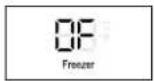
Q: My freezer is powered on and the controls are working, but it's not cooling and the display shows "OF" (see below). What is wrong?
A: The freezer is in Display Mode. This mode disables cooling to save energy while the appliance is on display in a store. To restore normal operation, press Freezer button first to wake the display then press and hold the Freezer and Water Filter Reset buttons until you hear a beep and the temperature setting appears in the display. Use the same procedure to return the freezer to Display Mode, if desired.
30 TROUBLESHOOTING
Before Calling for Service
Review this section before calling for service; doing so will save you both time and money. For detailed information or videos, visit www.lg.com for the troubleshooting page.
Cooling
| Problem Possible | Cause & Solution | |
| Freezer is not cooling or has no power. | The freezer control is set to OFF (some models).Turn the control ON. Refer to the Control panel section for proper temperature settings. | |
| Freezer is set to Display Mode.Display Mode allows the lights and control display to work normally while disabling cooling, to save energy while the freezer is on the showroom floor. See the Control panel section of this manual for instructions on how to disable Display Mode. | ||
| Freezer is in the defrost cycle.During the defrost cycle, the temperature of each compartment may rise slightly. Wait 30 minutes and confirm the proper temperature has been restored once the defrost cycle has completed. | ||
| Freezer was recently installed.It may take up to 24 hours for each compartment to reach the desired temperature. | ||
| Freezer was recently relocated.If the freezer was stored for a long period of time or moved on its side, it is necessary for the freezer to stand upright for 24 hours before connecting it to power. | ||
| Cooling system runs too much. | Freezer is replacing an older model.Modern freezers require more operating time but use less energy due to more efficient technology. | |
| Freezer was recently plugged in or power restored.The freezer will take up to 24 hours to cool completely. | ||
| The door is opened often or a large amount of food / hot food was added.Adding food and opening the door warms the freezer, requiring the compressor to run longer in order to cool the freezer back down. In order to conserve energy, try to get everything you need out of the freezer at once, keep food organized so it is easy to find, and close the door as soon as the food is removed. (Refer to the Food Storage Guide.) | ||
| Doors are not closed completely.Firmly push the doors shut. If they will not shut all the way, the "Doors will not close correctly or pop open" section in Troubleshooting. | ||
| Freezer is installed in a hot location.The compressor will run longer under warm conditions. At normal room temperatures (70 °F or 21 °C) expect your compressor to run about 40 % to 80 % of the time. Under warmer conditions, expect it to run even more often. The freezer should not be operated above 110 °F (43 °C). | ||
| Interior moisture buildup. | Doors are opened often or for long periods of time.When the doors are opened often or for long periods of time, warm, humid air enters the compartment. This raises the temperature and moisture level within the compartment. To lessen the effect, reduce the frequency and duration of door openings. | |
| Doors are not closed correctly.See the "Doors will not close correctly or pop open" section. | ||
| Interior moisture buildup. | Weather is humid. • Humid weather allows additional moisture to enter the compartments when the doors are opened, leading to condensation or frost. Maintaining a reasonable level of humidity in the home will help to control the amount of moisture that can enter the compartments. | |
| Defrost cycle recently completed. • During the defrost cycle, the temperature of each compartment may rise slightly and condensation may form on the back wall. Wait 30 minutes and confirm that the proper temperature has been restored once the defrost cycle has finished. | ||
| Food is not packaged correctly. • Food stored uncovered or unwrapped, and damp containers can lead to moisture accumulation within each compartment. Wipe all containers dry and store food in sealed packaging to prevent condensation and frost. | ||
| Freezer is too cold. Incorrect temperature control settings. • If the temperature is too cold, adjust the control one increment at a time and wait for the temperature to stabilize. Refer to the Control Panel for more information. | ||
| Frost or ice crystals form on frozen food (inside of sealed package). | Condensation from food with a high water content has frozen inside of the food package. • This is normal for food items with a high water content. | |
| Food has been left in the freezer for a long period of time. • Do not store food items with high water content in the freezer for a long period of time. | ||
| Frost or ice crystals form on frozen food (outside of package). | Door is opened frequently or for long periods of time. • When the doors are opened often or for long periods of time, warm, humid air enters the compartment. This raises the temperature and moisture level within the compartment. Increased moisture will lead to frost and condensation. To lessen the effect, reduce the frequency and duration of door openings. | |
| Door is not closing properly. • Refer to the "Doors will not close correctly or pop open" section in Troubleshooting. | ||
| Freezer is too warm. Freezer was recently installed. • It may take up to 24 hours for each compartment to reach the desired temperature. | ||
| The air vents are blocked. • Locate air vents by using your hand to sense airflow and move all packages that block vents and restrict airflow. Rearrange items to allow air to flow throughout the compartment. | ||
| Doors are opened often or for long periods of time. • When the doors are opened often or for long periods of time, warm, humid air enters the compartment. This raises the temperature and moisture level within the compartment. To lessen the effect, reduce the frequency and duration of door openings. | ||
| Unit is installed in a hot location. • The freezer should not be operated in temperatures above 110 °F (43 °C). | ||
| A large amount of food or hot food was added to the compartment. • Adding food warms the compartment requiring the cooling system to run. Allowing hot food to cool to room temperature before putting it in the freezer will reduce this effect. | ||
| Doors are not closed correctly. • See the "Doors will not close correctly or pop open" section in Troubleshooting. | ||
| Temperature control is not set correctly. • If the temperature is too warm, adjust the control one increment at a time and wait for the temperature to stabilize. | ||
32 TROUBLESHOOTING
| Problem Possible | Cause & Solution |
| Freezer is too warm. | Defrost cycle has recently completed.During the defrost cycle, the temperature of each compartment may rise slightly and condensation may form on the back wall. Wait 30 minutes and confirm the proper temperature has been restored once the defrost cycle has completed. |
Water
| Problem Possible | Cause & Solution |
| Water is dispensing slowly. | Water filter has been exhausted. • Replacing the water filter is recommended: - Approximately every six months. - When the water filter indicator turns on. - When the water dispenser output decreases. - When the ice cubes are smaller than normal. |
| Reverse osmosis filtration system is used. • Reverse osmosis filtration systems can reduce the water pressure below the minimum amount and result in icemaker issues. If the problem persists, it may be necessary to contact a plumber. | |
| Low house water supply pressure. • The water pressure must be between 20 and 120 psi on models without a water filter and between 40 and 120 psi on models with a water filter. If the problem persists, it may be necessary to contact a plumber. | |
| Water is not dispensing. | New installation or water line recently connected. • Dispense 2.5 gallons of water (flush for approximately 5 minutes) to remove trapped air and contaminants from the system. Do not dispense the entire 2.5 gallon amount continuously. Depress and release the dispenser pad for cycles of 30 seconds ON and 60 seconds OFF. |
| Refrigerator or freezer doors are not closed properly. • Water will not dispense if any of the refrigerator doors are left open. | |
| Water filter has been recently removed or replaced. • After the water filter is replaced, dispense 2.5 gallons of water (flush for approximately five minutes) to remove trapped air and contaminants from the system. Do not dispense the entire 2.5 gallon amount continuously. Depress and release the dispenser pad for cycles of 30 seconds ON and 60 seconds OFF. | |
| Tubing connecting refrigerator to house supply valve is kinked. • The tubing can kink when the refrigerator is moved during installation or cleaning, resulting in reduced water flow. Straighten or repair the water supply line and arrange it to prevent future kinks. | |
| The house water supply is not connected, the valve is not turned on fully, or the valve is clogged. • Connect the refrigerator to the water supply and turn the water shutoff valve fully open. If the problem persists, it may be necessary to contact a plumber. | |
| Dispensing warm water. | Refrigerator was recently installed. • Allow 24 hours after installation for the water storage tank to cool completely. |
| The water dispenser has been used recently and the storage tank was exhausted. • Depending on your specific model, the water storage capacity will range from approximately 20 to 30 oz. | |
| Dispensing warm water. | Dispenser has not been used for several hours. ·If the dispenser has not been used for several hours, the first glass dispensed may be warm. Discard the first 10oz. |
| Refrigerator is connected to the hot water supply. ·Make sure that the refrigerator is connected to a cold water pipe. WARNING: Connecting the refrigerator to a hot water line may damage the icemaker. | |
| Water has bad taste or odor. | Water supply contains minerals such as sulfur. ·A water filter may need to be installed to eliminate taste and odor problems. |
| Water filter has been exhausted. ·Replacing the water filter is recommended: -Approximately every six months. -When the water filter indicator turns on. -When the water dispenser output decreases. -When the ice cubes are smaller than normal. | |
| Refrigerator was recently installed. ·Dispense 2.5 gallons of water (flush for approximately 5 minutes) to remove trapped air and contaminants from the system. Do not dispense the entire 2.5 gallon amount continuously. Depress and release the dispenser pad for cycles of 30 seconds ON and 60 seconds OFF. |
ENGLISH
Ice
| Problem Possible | Cause & Solution |
| Icemaker is not making enough ice. | Demand exceeds ice production capacity.Refer to the Automatic Icemaker section for ice production capacity to check the amount of ice produced in a 24 hour period. |
| House water supply is not connected, valve is not turned on fully, or valve is clogged.Connect the freezer to a cold water supply with adequate pressure and turn the water shutoff valve fully open. If the problem persists, it may be necessary to contact a plumber. | |
| Water filter has been exhausted.Replacing the water filter is recommended:- Approximately every six months.- When the water filter indicator turns on.- When the water dispenser output decreases.- When the ice cubes are smaller than normal. | |
| Low house water supply pressure.The water pressure must be between 20 and 120 psi (138 and 827 kPa) on models without a water filter and between 40 and 120 psi (276 and 827 kPa) on models with a water filter.If the problem persists, it may be necessary to contact a plumber. | |
| Reverse osmosis filtration system is used.Reverse osmosis filtration systems can reduce the water pressure below the minimum amount and result in icemaker issues. | |
| Tubing connecting freezer to house supply valve is kinked.The tubing can kink when the freezer is moved during installation or cleaning resulting in reduced water flow. Straighten or repair the water supply line and arrange it to prevent future kinks. |
34 TROUBLESHOOTING
| Problem Possible | Cause & Solution |
| Icemaker is not making enough ice. | Doors are opened often or for long periods of time. ·If the doors of the unit are opened often, ambient air will warm the freezer which will prevent the unit from maintaining the set temperature. Lowering the freezer temperature can help, as well as not opening the doors as frequently. |
| Doors are not closed completely. ·If the doors are not properly closed, ice production will be affected. See the "Doors will not close correctly or pop open" section in Parts & Features Troubleshooting for more information. | |
| The temperature setting for the freezer is too warm. ·The recommended temperature for the freezer compartment for normal ice production is 0 °F (-18 °C). If the freezer temperature is warmer, ice production will be affected. | |
| Icemaker is not making ice | Freezer was recently installed or icemaker recently connected. ·It may take up to 24 hours for each compartment to reach the desired temperature and for the icemaker to begin making ice. |
| Icemaker is not turned on. ·Locate the icemaker ON/OFF and confirm that it is turned on. | |
| The ice detecting sensor is obstructed. ·Foreign substances or frost on the ice-detecting sensor can interrupt ice production. Make sure that the sensor area is clean at all times for proper operation. | |
| The freezer is not connected to a water supply or the supply shutoff valve is not turned on. ·Connect the freezer to the water supply and turn the water shutoff valve fully open. | |
| Icemaker shutoff (arm or sensor) obstructed. ·If your icemaker is equipped with an ice shutoff arm, make sure that the arm moves freely. If your icemaker is equipped with the electronic ice shutoff sensor, make sure that there is a clear path between the two sensors. | |
| Reverse osmosis water filtration system is connected to your cold water supply. ·Reverse osmosis filtration systems can reduce the water pressure below the minimum amount and result in icemaker issues. | |
| Ice has bad taste or odor. | Water supply contains minerals such as sulfur. ·A water filter may need to be installed to eliminate taste and odor problems. NOTE: In some cases, a filter may not help. It may not be possible to remove all minerals/odor/taste in all water supplies. |
| Icemaker was recently installed. ·Ice that has been stored for too long will shrink, become cloudy, and may develop a stale taste. Throw away old ice and make a new supply. | |
| The food has not been stored properly in either compartment. ·Rewrap the food. Odors may migrate to the ice if food is not wrapped properly. | |
| The interior of the freezer needs to be cleaned. ·See the Maintenance section for more information. | |
| The ice storage bin needs to be cleaned. ·Empty and wash the bin (discard old cubes). Make sure that the bin is completely dry before reinstalling it. | |
| Icemaker is making too much ice. | Icemaker shutoff (arm/ sensor) is obstructed. ·Empty the ice bin. If your icemaker is equipped with an ice shutoff arm, make sure that the arm moves freely. If your icemaker is equipped with the electronic ice shutoff sensor, make sure that there is a clear path between the two sensors. Reinstall the ice bin and wait 24 hours to confirm proper operation. |
Parts & Features
| Problem Possible | Cause & Solution |
| Doors will not close correctly or pop open. | Food packages are blocking the door open. • Rearrange food containers to clear the door and door shelves. |
| Ice bin, crisper cover, pans, shelves, door bins, or baskets are out of position. • Push bins all the way in and put crisper cover, pans, shelves and baskets into their correct positions. See the Operation section for more information. | |
| The doors were removed during product installation and not properly replaced. • Remove and replace the doors according to the installation instructions. | |
| Freezer is not leveled properly. • See Door Alignment in the installation instructions to level freezer. | |
| Doors are difficult to open. | The gaskets are dirty or sticky. • Clean the gaskets and the surfaces that they touch. Rub a thin coat of appliance polish or kitchen wax on the gaskets after cleaning. |
| Door was recently closed. • When you open the door, warmer air enters the freezer. As the warm air cools, it can create a vacuum. If the door is hard to open, wait one minute to allow the air pressure to equalize, then see if it opens more easily. | |
| Lights do not work. LED interior lighting failure. | |
| The interior of the freezer is covered with dust or soot. | The freezer is located near a fire source, such as a fireplace, chimney, or candle. • Make sure that the freezer is not located near a fire source, such as a fireplace, chimney or candle. |
ENGLISH
Noises
| Problem Possible | Cause & Solution |
| Clicking | The defrost control will click when the automatic defrost cycle begins and ends. The thermostat control (or freezer control on some models) will also click when cycling on and off. ·Normal Operation |
| Rattling | Rattling noises may come from the flow of refrigerant, the water line on the back of the unit, or items stored on top of or around the freezer. ·Normal Operation |
| Freezer is not resting solidly on the floor. ·Floor is weak or uneven or leveling legs need to be adjusted. See the Leveling and Door Alignment section in the installation instructions. | |
| Freezer with linear/inverter compressor was jarred while running. ·Normal Operation | |
| Whooshing Evaporator | fan motor is circulating air through the freezer compartment. ·Normal Operation |
| Air is being forced over the condenser by the condenser fan. ·Normal Operation | |
| Gurgling Refrigerant f | flowing through the cooling system. ·Normal Operation |
| Popping Contraction and expansion of the inside walls due to changes in temperature. • Normal Operation | |
| Sizzling Water dripping on the defrost heater during a defrost cycle. • Normal Operation | |
| Vibrating If the side or back of the freezer is touching a cabinet or wall, some of the normal vibrations may make an audible sound. • To eliminate the noise, make sure that the sides and back cannot vibrate against any wall or cabinet. | |
| Dripping Water running into the drain pan during the defrost cycle. • Normal Operation | |
| Pulsating or high-pitched sound | Your freezer is designed to run more efficiently to keep your food items at the desired temperature. The high efficiency compressor may cause your new freezer to run longer than your old one, but it is still more energy efficient than previous models. While the freezer is running, it is normal to hear a pulsating or high-pitched sound. • Normal Operation |
Wi-Fi
| Problem Possible | Cause & Solution |
| Trouble connecting appliance and smartphone to Wi-Fi network | The password for the Wi-Fi network was entered incorrectly. • Delete your home Wi-Fi network and begin the connection process again. |
| Mobile data for your smartphone is turned on. • Turn off the Mobile data on your smartphone before connecting the appliance. | |
| The wireless network name (SSID) is set incorrectly. • The wireless network name (SSID) should be a combination of English letters and numbers. (Do not use special characters.) | |
| The router frequency is not 2.4 GHz. • Only a 2.4 GHz router frequency is supported. Set the wireless router to 2.4 GHz and connect the appliance to the wireless router. To check the router frequency, check with your Internet service provider or the router manufacturer. | |
| The appliance and the router are too far apart. • If the appliance is too far from the router, the signal may be weak and the connection may not be configured correctly. Move the router closer to the appliance or purchase and Install a Wi-Fi repeater. | |
| During Wi-Fi setup, the app is requesting a password to connect to the product (on certain phones). • Locate the network name which starts with "LG" under Settings > Networks. Note the last part of the network name. - If the network name looks like LGE_Appliance_XX-XX-XX, enter lge12345. - If the network name looks like LGE_Appliance_XXXX, enter XXX twice as your password. For example, if the network name appears as LGE_Appliance_8b92, then you would enter 8b928b92 as your password. In this instance, the password is case sensitive and the last 4 characters are unique to your appliance. |
LIMITED WARRANTY
USA
TERMS AND CONDITIONS
ARBITRATION NOTICE: THIS LIMITED WARRANTY CONTAINS AN ARBITRATION PROVISION THAT REQUIRES YOU AND LG ELECTRONICS ("LG") TO RESOLVE DISPUTES BY BINDING ARBITRATION INSTEAD OF IN COURT, UNLESS YOU CHOOSE TO OPT OUT. IN ARBITRATION, CLASS ACTIONS AND JURY TRIALS ARE NOT PERMITTED. PLEASE SEE THE SECTION Titled "PROCEDURE FOR RESOLVING DISPUTES" BELOW.
Should your LG Refrigerator ("Product") fail due to a defect in materials or workmanship under normal and proper use, during the warranty period set forth below, LG will, at its option, repair or replace the Product. This limited warranty is valid only to the original retail purchaser of the Product ("You") and applies only when purchased lawfully and used within the United States including U.S. Territories.
| WARRANTY PERIOD | |||
| Product | Sealed System (Condenser, Dryer, Connecting Tube and Evaporator) | Compressor | |
| Three (3) years from the date of original retail purchase, or from the date of delivery as per applicable law | Five (5) years from the date of original retail purchase, or from the date of delivery as per applicable law | Five (5) years from the date of original retail purchase, or from the date of delivery as per applicable law | Linear / Inverter Compressor Only : Parts Only for years 6-10 from the date of original retail purchase, or from the date of delivery as per applicable law (You will be charged for labor.) |
| Parts and Labor (internal/functional parts only) | Parts and Labor Parts and | Labor | |
- Replacement Products and parts are warranted for the remaining portion of the original warranty period or ninety (90) days, whichever is greater.
- Replacement Products and parts may be new, reconditioned, refurbished, or otherwise factory remanufactured.
- Replaced Product or part(s) will be the property of LG.
Proof of original retail purchase specifying the Product model and date of purchase is required to obtain warranty service under this limited warranty.
EXCEPT TO THE EXTENT PROHIBITED BY APPLICABLE LAW, ANY IMPLIED WARRANTY OF MERCHANTABILITY OR FITNESS FOR A PARTICULAR PURPOSE ON THE PRODUCT IS LIMITED IN DURATION TO THE DURATION OF THE ABOVE LIMITED WARRANTY. UNDER NO CIRCUMSTANCES SHALL LG OR ITS U.S. DISTRIBUTORS/DEalers BE LIABLE FOR ANY INDIRECT, INCIDENTAL, CONSEQUENTIAL, SPECIAL, OR PUNITIVE DAMAGES, INCLUDING, WITHOUT LIMITATION, LOST GOODWILL, LOST REVENUES OR PROFITS, WORK STOPPAGE, IMPAIRMENT OF OTHER GOODS, COST OF REMOVAL AND REINSTALLATION OF THE PRODUCT, LOSS OF USE, OR ANY OTHER DAMAGES WHETHER BASED IN CONTRACT, TORT, OR OTHERWISE. LG'S TOTAL LIABILITY, IF ANY, SHALL NOT EXCEED THE PURCHASE PRICE PAID BY YOU FOR THE PRODUCT.
SOME STATES DO NOT ALLOW THE EXCLUSION OR LIMITATION OF INCIDENTAL OR CONSEQUENTIAL DAMAGES OR LIMITATIONS ON HOW LONG AN IMPLIED WARRANTY LASTS, SO THE ABOVE EXCLUSIONS OR LIMITATIONS MAY NOT APPLY TO YOU. THIS LIMITED WARRANTY GIVES YOU SPECIFIC LEGAL RIGHTS AND YOU MAY ALSO HAVE OTHER RIGHTS THAT VARY FROM STATE TO STATE.
38 LIMITED WARRANTY
THIS LIMITED WARRANTY DOES NOT COVER:
- Service trips to deliver, pick up, or install, educate how to operate, correct wiring, or correct unauthorized repairs.
- Damage or failure of the Product to perform during power failures and interrupted or inadequate electrical service.
- Damage or failure of the Product caused by leaky or broken water pipes, frozen water pipes, restricted drain lines, inadequate or interrupted water supply or inadequate supply of air.
- Damage or failure of the Product resulting from operating the Product in a corrosive atmosphere or contrary to the Product owner's manual.
- Damage or failure of the Product caused by accidents, pests and vermin, lightning, wind, fire, floods, acts of nature, or any other causes beyond the control of LG.
- Damage or failure of the Product caused by unauthorized modification or alteration, or if the Product is used for other than the intended purpose, or any water leakage where the Product was not properly installed.
- Damage or failure of the Product caused by incorrect electrical current, voltage, or plumbing codes.
- Damage or failure of the Product caused by transportation, storage, and/or handling, including scratches, dents, chips, and/or other damage to the finish of the Product, unless such damage is reported within one (1) week of delivery.
- Damage or failure of the Product resulting from misuse, abuse, improper installation, repair, or maintenance. Improper repair includes the use of parts not authorized by LG. Improper installation or maintenance includes installation or maintenance contrary to the Product owner's manual.
- Damage or failure of the Product caused by the use of parts, components, accessories, consumable cleaning products, or any other products or services that were not authorized by LG.
- Damage or missing items to any display or open box Product.
- Refurbished Product or any Product sold "As Is", "Where Is", "With all Faults", or similar disclaimer.
- Products with original serial numbers that have been removed, altered, or cannot be readily determined
Increases in utility costs and additional utility expenses. - Any noises associated with normal operation.
- Products used for other than normal and proper household use (e.g., commercial or industrial use) or contrary to the Product owner's manual.
- Costs associated with removal and reinstallation of the Product for repairs, or the removal and reinstallation of the Product if it is installed in an inaccessible location or not installed in accordance with the Product Owner's manual.
- Accessories, removable components, or consumable parts (e.g. Shelves, door bins, drawers, water/air filters, racks, light bulbs, batteries, etc., as applicable), except for internal/functional parts covered under this limited warranty.
The cost of repair or replacement under these excluded circumstances shall be borne by You.
TO OBTAIN WARRANTY SERVICE AND ADDITIONAL INFORMATION
Call 1-855-790-6655 and select the appropriate option from the menu.
Or visit our website at sksappliances.com.
Or by mail: LG Customer Service P.O. Box 240007 Huntsville, AL 35813 ATTN:CIC
PROCEDURE FOR RESOLVING DISPUTES:
ALL DISPUTES BETWEEN YOU AND LG ARISING OUT OF OR RELATING IN ANY WAY TO THIS LIMITED WARRANTY OR THE PRODUCT SHALL BE RESOLVED EXCLUSIVELY THROUGH BINDING ARBITRATION, AND NOT IN A COURT OF GENERAL JURISDICTION. BINDING ARBITRATION MEANS THAT YOU AND LG ARE EACH WAIVING THE RIGHT TO A JURY TRIAL AND TO BRING OR PARTICIPATE IN A CLASS ACTION.
Definitions. For the purposes of this section, references to "LG" mean LG Electronics U.S.A., Inc., its parents, subsidiaries and affiliates, and each of their officers, directors, employees, agents, beneficiaries,
predecessors in interest, successors, assigns and suppliers; references to "dispute" or "claim" shall include any dispute, claim or controversy of any kind whatsoever (whether based in contract, tort, statute, regulation, ordinance, fraud, misrepresentation or any other legal or equitable theory) arising out of or relating in any way to the sale, condition or performance of the product or this Limited Warranty.
Notice of Dispute. In the event you intend to commence an arbitration proceeding, you must first notify LG in writing at least 30 days in advance of initiating the arbitration by sending a letter to LG at LG Electronics, USA, Inc. Attn: Legal Department- Arbitration 111 Sylvan Avenue, Englewood Cliffs, NJ 07632. You and LG agree to engage in good faith discussions in an attempt to amicably resolve your claim. The notice must provide your name, address, and telephone number; identify the product that is the subject of the claim; and describe the nature of the claim and the relief being sought. If you and LG are unable to resolve the dispute within 30 days, either party may proceed to file a claim for arbitration.
Agreement to Binding Arbitration and Class Action Waiver. Upon failure to resolve the dispute during the 30 day period after sending written notice to LG, you and LG agree to resolve any claims between us only by binding arbitration on an individual basis, unless you opt out as provided below. Any dispute between you and LG shall not be combined or consolidated with a dispute involving any other person's or entity's product or claim. More specifically, without limitation of the foregoing, any dispute between you and LG shall not under any circumstances proceed as part of a class or representative action. Instead of arbitration, either party may bring an individual action in small claims court, but that small claims court action may not be brought on a class or representative basis.
Arbitration Rules and Procedures. To begin arbitration of a claim, either you or LG must make a written demand for arbitration. The arbitration will be administered by the American Arbitration Association ("AAA") and will be conducted before a single arbitrator under the AAA's Consumer Arbitration Rules that are in effect at the time the arbitration is initiated (referred to as the "AAA Rules") and under the procedures set forth in this section. The AAA Rules are available online at www.adr.org/consumer. Send a copy of your written demand for arbitration, as well as a copy of this provision, to the AAA in the manner described in the AAA Rules. You must also send a copy of your written demand to LG at LG Electronics, USA, Inc. Attn: Legal Department-Arbitration 111 Sylvan Avenue, Englewood Cliffs, NJ 07632. If there is a conflict between the AAA Rules and the rules set forth in this section, the rules set forth in this section will govern. This arbitration provision is governed by the Federal Arbitration Act. Judgment may be entered on the arbitrator's award in any court of competent jurisdiction. All issues are for the arbitrator to decide, except that issues relating to the scope and enforceability of the arbitration provision and to the arbitrability of the dispute are for the court to decide. The arbitrator is bound by the terms of this provision.
Governing Law. The law of the state of your residence shall govern this Limited Warranty and any disputes between us except to the extent that such law is preempted by or inconsistent with applicable federal law.
Fees/Costs. You do not need to pay any fee to begin an arbitration. Upon receipt of your written demand for arbitration, LG will promptly pay all arbitration filing fees to the AAA unless you seek more than $25,000 in damages, in which case the payment of these fees will be governed by the AAA Rules. Except as otherwise provided for herein, LG will pay all AAA filing, administration and arbitrator fees for any arbitration initiated in accordance with the AAA Rules and this arbitration provision. If you prevail in the arbitration, LG will pay your attorneys' fees and expenses as long as they are reasonable, by considering factors including, but not limited to, the purchase amount and claim amount. Notwithstanding the foregoing, if applicable law allows for an award of reasonable attorneys' fees and expenses, an arbitrator can award them to the same extent that a court would. If the arbitrator finds either the substance of your claim or the relief sought in the demand is frivolous or brought for an improper purpose (as measured by the standards set forth in Federal Rule of Civil Procedure 11(b)), then the payment of all arbitration fees will be governed by the AAA Rules. In such a situation, you agree to reimburse LG for all monies previously disbursed by it that are otherwise your obligation to pay under the AAA Rules. Except as otherwise provided for, LG waives any rights it may have to seek attorneys' fees and expenses from you if LG prevails in the arbitration.
Hearings and Location. If your claim is for 25,000 or less, you may choose to have the arbitration conducted solely on the basis of (1) documents submitted to the arbitrator, (2) through a telephonic hearing, or (3) by an in-person hearing as established by the AAA Rules. If your claim exceeds 25,000, the right to a hearing will be determined by the AAA Rules. Any in-person arbitration hearings will be held at a location within the federal judicial district in which you reside unless we both agree to another location or we agree to a telephonic arbitration.
40 LIMITED WARRANTY
Opt Out. You may opt out of this dispute resolution procedure. If you opt out, neither you nor LG can require the other to participate in an arbitration proceeding. To opt out, you must send notice to LG no later than 30 calendar days from the date of the first consumer purchaser's purchase of the product by either: (i) sending an e-mail to optout@lge.com, with the subject line: "Arbitration Opt Out" or (ii) calling 1-800-980-2973. You must include in the opt out e-mail or provide by telephone: (a) your name and address; (b) the date on which the product was purchased; (c) the product model name or model number; and (d) the serial number (the serial number can be found (i) on the product; or (ii) online by accessing https://www/lg.com/us/support and clicking on "How do I find my model number?").
You may only opt out of the dispute resolution procedure in the manner described above (that is, by e-mail or telephone); no other form of notice will be effective to opt out of this dispute resolution procedure. Opting out of this dispute resolution procedure will not affect the coverage of the Limited Warranty in any way, and you will continue to enjoy the full benefits of the Limited Warranty. If you keep this product and do not opt out, then you accept all terms and conditions of the arbitration provision described above.
Canada
TERMS AND CONDITIONS
ARBITRATION NOTICE: THIS LIMITED WARRANTY CONTAINS AN ARBITRATION PROVISION THAT REQUIRES YOU AND LG TO RESOLVE DISPUTES BY BINDING ARBITRATION INSTEAD OF IN COURT, UNLESS THE LAWS OF YOUR PROVINCE OR TERRITORY DO NOT PERMIT THAT, OR, IN OTHER JURISDICTIONS, IF YOU CHOOSE TO OPT OUT. FOR FURTHER CLARITY, THIS ARBITRATION PROVISION IS NOT APPLICABLE TO CONSUMERS RESIDING IN ONTARIO AND QUEBEC. IN ARBITRATION, CLASS ACTIONS AND JURY TRIALS ARE NOT PERMITTED. PLEASE SEE THE SECTION Titled "PROCEDURE FOR RESOLVING DISPUTES" BELOW.
Should your LG Refrigerator ("Product") fail due to a defect in materials or workmanship under normal and proper use, during the warranty period set forth below, LG will, at its option, repair, replace or pro rate the Product upon receipt of proof of the original retail purchase. This limited warranty is valid only to the original retail purchaser of the Product and applies only to a Product distributed, purchased from an authorized retailer and used within Canada, as determined at the sole discretion of LG.
| WARRANTY PERIOD | |||
| Product | Sealed System (Condenser, Dryer, Connecting Tube and Evaporator) | Linear/Inverter Compressor | |
| Three (3) years from the date of original retail purchase | Three (3) years from the date of original retail purchase | Seven (7) years from the date of original retail purchase | Ten (10) years from the date of original retail purchase |
| Parts and Labor (Internal / functional parts only) | Parts and Labor Parts Only | (Consumer will be charged for labor) | Parts Only (Consumer will be charged for labor) |
- Replacement products and parts are warranted for the remaining portion of the original warranty period or ninety (90) days, whichever is greater.
- Replacement products and parts may be new, reconditioned, refurbished, or otherwise factory remanufactured, all at the sole discretion of LG.
Proof of original retail purchase specifying the Product model and date of purchase is required to obtain warranty service under this Limited Warranty.
DISCLAIMER:
IF YOU ARE A CONSUMER SUBJECT TO QUEBEC AND ONTARIO'S CONSUMER PROTECTION ACT, THE EXCLUSION OF WARRANTYES CONTAINED IN THIS SECTION DO NOT EXCLUDE OR LIMIT THE RIGHTS AND REMEDIES THAT YOU MAY HAVE UNDER SUCH ACT, INCLUDING THE RIGHT TO MAKE A CLAIM UNDER ANY OF THE STATUTORY WARRANTYES PROVIDED THEREUNDER.
LG'S SOLE LIABILITY IS LIMITED TO THE LIMITED WARRANTY SET OUT ABOVE, UNLESS SUCH LIMITATION IS PROHIBITED BY THE LAWS OF THE PROVINCE IN WHICH YOU RESIDE. EXCEPT AS EXPRESSLY PROVIDED ABOVE, OR IF OTHERWISE PROHIBITED BY THE LAW OF THE PROVINCE IN WHICH YOU RESIDE, LG DOES NOT MAKE ANY OTHER WARRANTYES OR CONDITIONS RESPECTING THE PRODUCT, AND HEREBY DISCLAIMS, ALL OTHER WARRANTYES AND CONDITIONS RESPECTING THE PRODUCT, WHETHER EXPRESS OR IMPLIED, INCLUDING BUT NOT LIMITED TO, ANY IMPLIED WARRANTY OR CONDITION OF MERCHANTABILITY OR FITNESS FOR A PARTICULAR PURPOSE, AND NO REPRESENTATIONS SHALL BE BINDING ON LG. LG DOES NOT AUTHORIZE ANY PERSON TO CREATE OR ASSUME FOR IT ANY OTHER WARRANTY OBLIGATION OR LIABILITY IN CONNECTION WITH THE PRODUCT. TO THE EXTENT THAT ANY WARRANTY OR CONDITION IS IMPLIED BY LAW, IT IS LIMITED TO THE WARRANTY PERIOD SET OUT ABOVE. UNDER NO CIRCUMSTANCES SHALL LG, THE MANUFACTURER OR DISTRIBUTOR OF THE PRODUCT, BE LIABLE FOR ANY INCIDENTAL, CONSEQUENTIAL, SPECIAL, DIRECT, INDIRECT, PUNITIVE OR EXEMPLARY DAMAGES, INCLUDING, WITHOUT LIMITATION, LOSS OF GOODWILL, LOST PROFITS, LOSS OF ANTICIPATED PROFITS, LOST REVENUE, LOSS OF USE, OR ANY OTHER DAMAGE, WHETHER ARISING DIRECTLY OR INDIRECTLY FROM ANY CONTRACTUAL BREACH, FUNDAMENTAL BREACH, TORT OR OTHERWISE, OR FROM ANY ACTS OR
OMISSIONS. LG'S TOTAL LIABILITY, IF ANY, SHALL NOT EXCEED THE PURCHASE PRICE PAID BY YOU FOR THE PRODUCT.
This Limited Warranty gives you specific legal rights. You may also have other rights that vary from province to province depending on applicable provincial laws. Any term of this Limited Warranty that negates or varies any implied condition or warranty under provincial law is severable where it conflicts with such provincial law without affecting the remainder of this warranty's terms.
THIS LIMITED WARRANTY DOES NOT COVER:
- Service trips to i) deliver, pick up, or install or; educate on how to operate the Product; ii) correct wiring or plumbing; or iii) correct unauthorized repairs or installations of the Product;
- Damage or failure of the Product to perform during power failures and interrupted or inadequate electrical service:
- Damage or failure caused by leaky or broken water pipes, frozen water pipes, restricted drain lines, inadequate or interrupted water supply or inadequate supply of air;
- Damage or failure resulting from operating the Product in a corrosive atmosphere or contrary to the instructions outlined in the Product's owner's manual;
- Damage or failure to the Product caused by accidents, pests and vermin, lightning, wind, fire, floods, acts of God, or any other causes beyond the control of LG or the manufacturer;
- Damage or failure resulting from misuse, abuse, improper installation, repair, or maintenance of the Product. Improper repair includes use of parts not authorized or specified by LG. Improper installation or maintenance includes installation or maintenance contrary to the Product's owner's manual;
- Damage or failure caused by unauthorized modification or alteration of the Product, or if used for other than the intended household purpose/use of the Product, or damage or failure resulting from any water leakage due to improper installation of the Product;
- Damage or failure caused by incorrect electrical current, voltage or plumbing codes;
- Damage or failure caused by use that is other than normal household use, including, without limitation, commercial or industrial use, including use in commercial offices or recreational facilities, or as otherwise outlined in the Product's owner's manual;
- Damage or failure caused by the use of any accessories, components or cleaning products, including, without limitation, water filters, that are not approved/authorized by LG;
- Replacement of the water filter cartridge due to water pressure that is outside the specified operating range or due to excessive sediment in the water supply;
- Damage or failure caused by transportation and handling, including scratches, dents, chips and/or other damage to the finish of the Product, unless such damage results from defects in materials or workmanship and is reported to LG within one (1) week of delivery of the Products;
- Damage or missing items to any display, open box, refurbished or discounted Product;
- Refurbished Product or any Product sold "As Is", "Where Is", "With all Faults", or any similar disclaimer;
- Products with original serial numbers that have been removed, altered or cannot be readily determined at the discretion of LG;
Increases in utility costs and additional utility expenses in any way associated with the Product;
Any noises associated with normal operation of the Product; - Replacement of light bulbs, filters, fuses or any other consumable parts;
- Replacement of any part that was not originally included with the Product;
Costs associated with removal and/or reinstallation of the Product for repairs; and - Racks, shelves, door bins, drawers, handle and accessories to the Product, except for internal/functional parts covered under this Limited Warranty.
All costs and expenses associated with the above excluded circumstances, listed under the heading, This Limited Warranty Does Not Cover, shall be borne by the consumer.
TO OBTAIN WARRANTY SERVICE AND ADDITIONAL INFORMATION, PLEASE CALL OR VISIT OUR WEBSITE:

- Call 1-888-289-2802 and select the appropriate option from the menu.
- Visit our website at sksappliances.com .
By mail: 20 Norelco Drive, North York, ON, M9L 2X6
PROCEDURE FOR RESOLVING DISPUTES:
EXCEPT WHERE PROHIBITED AT LAW (INCLUDING WITH RESPECT TO QUEBEC AND ONTARIO CONSUMERS), ALL DISPUTES BETWEEN YOU AND LG ARISING OUT OF OR RELATING IN ANY WAY TO THIS LIMITED WARRANTY OR THE PRODUCT SHALL BE RESOLVED EXCLUSIVELY THROUGH BINDING ARBITRATION, AND NOT IN A COURT OF GENERAL JURISDICTION. EXCEPT WHERE PROHIBITED AT LAW (INCLUDING WITH RESPECT TO QUEBEC AND ONTARIO CONSUMERS), YOU AND LG BOTH IRREVOCABLY AGREE TO WAIVE THE RIGHT TO A JURY TRIAL AND TO BRING OR PARTICIPATE IN A CLASS ACTION.
Definitions. For the purposes of this section, references to "LG" mean LG Electronics Canada, Inc., its parents, subsidiaries and affiliates, and each of their officers, directors, employees, agents, beneficiaries, predecessors in interest, successors, assigns and suppliers; references to "dispute" or "claim" shall include any dispute, claim or controversy of any kind whatsoever (whether based in contract, tort, statute, regulation, ordinance, fraud, misrepresentation or any other legal or equitable theory) arising out of or relating in any way to the sale, condition or performance of the product or this Limited Warranty.
Notice of Dispute. In the event you intend to commence an arbitration proceeding, you must first notify LG in writing at least 30 days in advance of initiating the arbitration by sending a letter to LGECI Legal Team at 20 Norelco Drive, North York, Ontario, Canada M9L 2X6 (the "Notice of Dispute"). You and LG agree to engage in good faith discussions in an attempt to amicably resolve your claim. The notice must provide your name, address, and telephone number; identify the product that is the subject of the claim; and describe the nature of the claim and the relief being sought. If you and LG are unable to resolve the dispute within 30 days of LG's receipt of the Notice of Dispute, the dispute shall be resolved by binding arbitration in accordance with the procedure set out herein. You and LG both agree that, during the arbitration proceeding, the terms (including any amount) of any settlement offer made by either you or LG will not be disclosed to the arbitrator until the arbitrator determines the dispute.
Agreement to Binding Arbitration and Class Action Waiver. Upon failure to resolve the dispute during the 30 day period after LG's receipt of the Notice of Dispute, you and LG agree to resolve any claims between you and LG only by binding arbitration on an individual basis, unless you opt out as provided below, or you reside in a jurisdiction that prevents full application of this clause in the circumstances of the claims at issue (in which case if you are a consumer, this clause will only apply if you expressly agree to the arbitration). To the extent permitted by applicable law, any dispute between you and LG shall not be combined or consolidated with a dispute involving any other person's or entity's product or claim. More specifically, without limitation of the foregoing, except to the extent such a prohibition is not permitted at law, any dispute between you and LG shall not under any circumstances proceed as part of a class or representative action. Instead of arbitration, either party may bring an individual action in small claims court, but that small claims court action may not be brought on a class or representative basis except to the extent this prohibition is not permitted at law in your province or territory of jurisdiction as it relates to the claims at issue between you and LG. This does not apply to consumers in Ontario and Quebec. In accordance with provincial legislation, the consumer and LG may agree to resolve the dispute using any procedure available, including commencing the action before the competent courts of those provinces.
Arbitration Rules and Procedures. To begin arbitration of a claim, either you or LG must make a written demand for arbitration. The arbitration will be private and confidential, and conducted on a simplified and expedited basis before a single arbitrator chosen by the parties under the provincial or territorial commercial arbitration law and rules of the province or territory of your residence. You must also send a copy of your written demand to LG at LG Electronics, Canada, Inc., Attn: Legal Department-Arbitration, 20 Norelco Drive, North York, Ontario M9L 2X6. This arbitration provision is governed by your applicable provincial or territorial commercial arbitration legislation. For consumers in Ontario and Quebec, the applicable arbitration legislation only applies if consumers agree to submit the dispute to arbitration. Judgment may be entered on the arbitrator's award in any court of competent jurisdiction. All issues are for the arbitrator to decide, except that, issues relating to the scope and enforceability of the arbitration provision and to the arbitrability of the dispute are for the court to decide. The arbitrator is bound by the terms of this provision.

44 LIMITED WARRANTY
Governing Law. The law of the province or territory of your purchase shall govern this Limited Warranty and any disputes between you and LG except to the extent that such law is preempted by or inconsistent with applicable federal or provincial/territorial law. Should arbitration not be permitted for any claim, action, dispute or controversy between you and LG, you and LG attend to the exclusive jurisdiction of the courts of the province or territory of your purchase for the resolution of the claim, action, dispute or controversy between you and LG.
Fees/Costs. You do not need to pay any fee to begin an arbitration. Upon receipt of your written demand for arbitration, LG will promptly pay all arbitration filing fees unless you seek more than $25,000 in damages, in which case the payment of these fees will be governed by the applicable arbitration rules. Except as otherwise provided for herein, LG will pay all filing, administration and arbitrator fees for any arbitration initiated in accordance with the applicable arbitration rules and this arbitration provision. If you prevail in the arbitration, LG will pay your attorneys' fees and expenses as long as they are reasonable, by considering factors including, but not limited to, the purchase amount and claim amount. Notwithstanding the foregoing, if applicable law allows for an award of reasonable attorneys' fees and expenses, an arbitrator can award them to the same extent that a court would. If the arbitrator finds either the substance of your claim or the relief sought in the demand is frivolous or brought for an improper purpose (as measured by the applicable laws), then the payment of all arbitration fees will be governed by the applicable arbitration rules. In such a situation, you agree to reimburse LG for all monies previously disbursed by it that are otherwise your obligation to pay under the applicable arbitration rules. Except as otherwise provided for, LG waives any rights it may have to seek attorneys' fees and expenses from you if LG prevails in the arbitration.
Hearings and Location. If your claim is for 25,000 or less, you may choose to have the arbitration conducted solely (1) on the basis of documents submitted to the arbitrator, (2) through a telephonic hearing, or (3) by an in-person hearing as established by the applicable arbitration rules. If your claim exceeds 25,000, the right to a hearing will be determined by the applicable arbitration rules. Any in-person arbitration hearings will be held at the nearest, most mutually-convenient arbitration location available within the province or territory in which you reside unless you and LG both agree to another location or agree to a telephonic arbitration.
Severability and Waiver. If any portion of this Limited Warranty (including these arbitration procedures) is unenforceable, the remaining provisions will continue in full force and effect to the maximum extent permitted by applicable law. Should LG fail to enforce strict performance of any provision of this Limited Warranty (including these arbitration procedures), it does not mean that LG intends to waive or has waived any provision or part of this Limited Warranty.
Opt Out. The arbitration provision requires you and LG to resolve disputes by binding arbitration instead of court, unless the laws of your province or territory do not permit that, or, in other jurisdictions, if you choose to opt out. The arbitration provision does not apply to consumers in Ontario and Quebec.
For individuals that fall within the binding arbitration provisions, you may opt out of this dispute resolution procedure. If you opt out, neither you nor LG can require the other to participate in an arbitration proceeding. To opt out, you must send notice to LG no later than 30 calendar days from the date of the first consumer purchaser's purchase of the product by either (i) sending an e-mail to optout@lge.com, with the subject line: "Arbitration Opt Out;" or (ii) calling 1-800-980-2973. You must include in the opt out e-mail or provide by telephone: (a) your name and address; (b) the date on which the product was purchased; (c) the product model name or model number; and (d) the serial number (the serial number can be found (i) on the product; or (ii) online by accessing https://www/lg.com/ca_en/findmodelserial/).
In the event that you "Opt Out", the law of the province or territory of your residence shall govern this Limited Warranty and any disputes between you and LG except to the extent that such law is preempted by or inconsistent with applicable federal or provincial/territorial law. Should arbitration not be permitted for any claim, action, dispute or controversy between you and LG, you and LG agree to attend to the exclusive jurisdiction of the courts of the province or territory of your residence for the resolution of the claim, action, dispute or controversy between you and LG.
You may only opt out of the dispute resolution procedure in the manner described above (that is, by e-mail or telephone); no other form of notice will be effective to opt out of this dispute resolution procedure. Opting out of this dispute resolution procedure will not affect the coverage of the Limited Warranty in any way, and you will continue to enjoy the full benefits of the Limited Warranty. If you keep this product and do not opt out, then you accept all terms and conditions of the arbitration provision described above.
Conflict of Terms. In the event of a conflict or inconsistency between the terms of this Limited Warranty and the End User License Agreement ("EULA") in regards to dispute resolution, the terms of this Limited Warranty shall control and govern the rights and obligations of the parties and shall take precedence over the EULA.
ENGLISH


SKS
MANUAL DEL PROPIETARIO
6 P R E C A U C I O N
7 DESCRIPCION GENERAL DEL PRODUCTO
Dispensa hielo automatistically.
Almacenamento de hielo
Emballages recommends
Application LG ThinQ
Customer Information Center
For inquiries or comments, call:
1-855-790-6655 USA, Consumer User
1-888-289-2802 CANADA, Consumer User
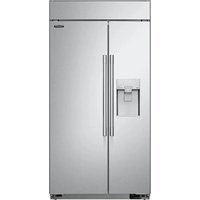


- ENGLISH
- TABLE OF CONTENTS
- IMPORTANT SAFETY INSTRUCTIONS
- PRODUCT OVERVIEW
- OPERATION
- SMART FUNCTIONS
- MAINTENANCE
- TROUBLESHOOTING
- LIMITED WARRANTY
- IMPORTANT SAFETY INSTRUCTIONS
- READ ALL INSTRUCTIONS BEFORE USE
- Safety Messages
- WARNING
- Installation
- Operation
- Maintenance
- Disposal
- Grounding Instructions
- Risk of Fire and Flammable Materials
- CAUTION
- SAVE THESE INSTRUCTIONS
- PRODUCT OVERVIEW
- Product Features
- Interior
- Water filter
- NOTE
- Control Panel
- PRODUCT OVERVIEW
- LED Interior Lighting
- 4Adjustable Refrigerator Shelf
- Movable Door Bin
- Automatic Icemaker
- Ice Storage
- 3FreezerDrawer
- Product Specifications
- Before Use
- Checklist
- Clean the freezer.
- Open freezer door to ventilate the interior.
- Connect the power supply.
- Turn off the icemaker.
- Wait for the freezer to cool.
- The freezer makes a loud noise after initial operation.
- OPERATION
- Control Panel Features
- Water Filter Reset
- Ice Plus
- Ice On/Off
- 4Freezer
- Smart Grid
- 6Wi-Fi
- POWER
- Turning the Icemaker On/Off
- Normal Sounds You May Hear
- Preparing for Vacation
- Storing Food
- Food Storage Tips
- How to Store Food
- OPERATION
- Storing Frozen Food
- Freezing
- Packaging
- Packaging Recommendations
- Do not use
- Drawers
- Removing/Assembling Drawers
- Removing the Printer
- Assembling the Analyzer
- Removing/Assembling the Printer Support
- Removing the Printer Support
- Assembling the Analyzer Support
- OPERATION
- Shelves
- Detaching/Assembling the Shelf
- Door Bins
- Using Door Bins
- Detaching/Assembling the Door Bins
- OPERATION
- SMART FUNCTIONS
- LG ThinQ Application
- LG ThinQ Application Features
- Energy Monitoring
- - Push Messages
- - Smart Diagnosis™
- - Settings
- Installing LG ThinQ Application and Connecting an LG Appliance
- Models with QR Code
- Models without QR Code
- SMART FUNCTIONS
- Radio Equipment Specifications
- FCC Statement
- FCC RF Radiation Exposure Statement
- Industry Canada Statement
- IC Radiation Exposure Statement
- Open Source Software Notice Information
- Smart Grid Function
- Smart Grid Application Features
- Using the Smart Grid Function
- Delay Appliance Load (DAL)
- SMART FUNCTIONS
- Temporary Appliance Load Reduction (TALR)
- Override Smart Grid Mode
- SKS Open API
- API List
- Smart Diagnosis™ Feature
- Using LG ThinQ to Diagnose Issues
- Using Audible Diagnosis to Diagnose Issues
- Cleaning
- General Cleaning Tips
- Inside Walls
- Door Liners and Gaskets
- Plastic Parts (Covers and Panels)
- Before Replacing the Water Filter
- Remove the old water filter.
- Replacing the Water Filter
- Replace with a new water filter.
- Performance Data Sheet
- MAINTENANCE
- Replacement Cartridge: LT1000P-S or ADQ74793506
- TROUBLESHOOTING
- FAQs
- Frequently Asked Questions
- TROUBLESHOOTING
- Before Calling for Service
- Cooling
- TROUBLESHOOTING
- Water
- Ice
- TROUBLESHOOTING
- Parts & Features
- Noises
- Wi-Fi
- LIMITED WARRANTY
- USA
- TERMS AND CONDITIONS
- LIMITED WARRANTY
- THIS LIMITED WARRANTY DOES NOT COVER:
- The cost of repair or replacement under these excluded circumstances shall be borne by You.
- PROCEDURE FOR RESOLVING DISPUTES:
- LIMITED WARRANTY
- Canada
- DISCLAIMER:
- OMISSIONS. LG'S TOTAL LIABILITY, IF ANY, SHALL NOT EXCEED THE PURCHASE PRICE PAID BY YOU FOR THE PRODUCT.
- All costs and expenses associated with the above excluded circumstances, listed under the heading, This Limited Warranty Does Not Cover, shall be borne by the consumer.
- LIMITED WARRANTY
- SKS
- MANUAL DEL PROPIETARIO
- DESCRIPCION GENERAL DEL PRODUCTO
- Almacenamento de hielo
- Emballages recommends
- Application LG ThinQ
Brand : SKS
Model : SKSCF2401P
Category : Fridge