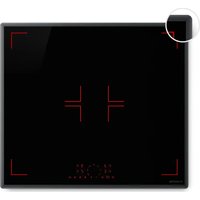
Red Flame - Cooker Klarstein - Free user manual and instructions
Find the device manual for free Red Flame Klarstein in PDF.


| Product type | Built-in induction hob |
| Brand | Klarstein |
| Model | Red Flame |
| Article number | 10047619 |
| Dimensions (W x D x H) | 590 x 520 x 62 mm |
| Cutout dimensions (W x D) | 560 x 490 mm |
| Power supply | 220-240 V ~ 50 Hz |
| Number of cooking zones | 4 (induction) |
| Zone power | Front left: 1500 W (Boost 2000 W) Rear left: 1200 W (Boost 1500 W) Rear right: 1500 W (Boost 2000 W) Front right: 1200 W (Boost 1500 W) |
| Power levels | 9 levels + Boost |
| Main functions | Boost, Keep warm, Timer, Pause, Child lock, Pan detection, Automatic shutdown |
| Control type | Touch (slider and buttons) |
| Surface material | Ceramic glass |
| Energy consumption | 193.3 Wh/kg |
| Approximate weight | 12 kg |
| Safety | Overheating protection, small object detection, automatic shutdown, residual heat indication, child lock |
| Cleaning and maintenance | Mild cleaner for ceramic glass, scraper for burnt residues, avoid abrasives |
| Manufacturer | Chal-Tec GmbH, Mühlenstraße 25, 10243 Berlin, Germany |
Frequently Asked Questions - Red Flame Klarstein
User questions about Red Flame Klarstein
0 question about this device. Answer the ones you know or ask your own.
Ask a new question about this device
Download the instructions for your Cooker in PDF format for free! Find your manual Red Flame - Klarstein and take your electronic device back in hand. On this page are published all the documents necessary for the use of your device. Red Flame by Klarstein.
USER MANUAL Red Flame Klarstein
11.PRODUKTDATENBLATT
INDUKTIONSKOCHFELD
Congratulations on your purchase. Please read the following instructions carefully and follow them to prevent potential damage. We accept no liability for damage caused by disregarding the instructions and improper use. Please scan the QR code to access the latest operating instructions and further information about the product.

CONTENTS
- Technical Data 35
- Safety Instructions 36
- Product Overview 40
- A Word on Induction Cooking 42
- Choosing the right cookware 43
6.Installation 44 - Operation 48
- Device Protection 54
- Cleaning and maintenance 55
- Troubleshooting 57
- Product Data Sheet induction hob 60
Disposal Considerations 61
Manufacturer & Importer (UK) 61
1. TECHNICAL DATA
| Article number 10047 | 619 |
| Model Red Flame | |
| Supply Voltage 220-240 V ~50 Hz | |
2. SAFETY INSTRUCTIONS
Your safety and the safety of others are very important. Please read all safety instructions and warnings below before installation or use.
2.1 Electrical Safety and Installation
- Installation by Qualified Professional: This appliance must be installed and connected by a qualified electrician. Incorrect installation or wiring can lead to electric shock, injury, or product damage and will void the warranty.
- Disconnect from Mains: Always switch off the circuit breaker and unplug or isolate the hob from the mains before installing, cleaning, or servicing the unit.
- Proper Grounding: The hob must be properly earthed. Connect it to a dedicated, grounded circuit according to local electrical codes. An isolating switch (all-pole disconnection with at least 3mm contact gap) must be incorporated into the fixed wiring for safety.
- Electrical Supply: Ensure the voltage and frequency of your power supply correspond to the ratings on the appliance nameplate. Use an appropriate circuit breaker/fuse as specified. Do not use extension cords, multi-plug adapters or portable power plugs to connect the hob – this is a fire and safety hazard.
- Cable Safety: Use the specified power supply cable type and diameter. The cable should not be bent, pinched, or come into contact with any hot surfaces. If the supply cord is damaged, it must be replaced by the manufacturer, an authorized service agent, or similarly qualified persons to avoid danger.
- No DIY Alterations: Do not modify the plug, power cord or internal wiring yourself. Do not attempt to repair or replace any electrical components of the appliance. All repairs must be performed by qualified service technicians using original spare parts.
2.2 Operational Safety
- Intended Use: This induction hob with integrated extractor is intended for indoor domestic use only. It is not designed for commercial or outdoor use. Using the appliance in a commercial setting or for any purpose not outlined in this manual may result in injury, damage, and will void the warranty.
Supervision Required: CAUTION: Never leave the appliance unattended during operation. Boil-overs, spills, or overheated oil/fat can ignite and cause fire. - Suitable Cookware Only: Only use cookware that is compatible with induction hobs (ferrous-metal bottoms). The hob will automatically shut off or not activate if incompatible or undersized cookware is used (see Section 5 Choosing the Right Cookware).
-
No External Timer: WARNING: The appliance is not intended to be operated by means of an external timer or separate remote-control system. Always switch it off manually as described in this manual.
-
No Worksurface: Do not use the hob surface as a cutting board, worktop, or for storage. Placing heavy objects can scratch or crack the glass, and objects left on the hob (even when off) may heat up or melt if the hob is accidentally turned on.
-
Hot Surfaces: WARNING - Burn Hazard: During use, the cooking zones and certain accessible parts of the hob will become very hot. Do not touch the ceramic glass surface or nearby metal parts until they have fully cooled. Even after switching off, the surface remains hot for some time and is indicated by an "H" (hot) on the display.
-
Keep clothing, paper, curtains and other flammable materials away from the hob. They may catch fire from residual heat or if accidentally placed on an active cooking zone.
-
Handles of pots and pans should be turned inward so they do not extend over the edge of the hob or over other active zones. This helps prevent knocks, spills, and burns.
- Child Safety
- WARNING: Keep children under 8 years old away from the hob unless constantly supervised. The appliance and its accessible parts become hot during use, which can cause serious burns.
- This appliance can be used by children aged 8+ and by persons with reduced physical, sensory or mental capabilities only if they are given supervision or instruction concerning safe use and understand the hazards.
- Do not let children play with the appliance, sit or climb on it, or operate any controls.
Children must not perform cleaning or maintenance unsupervised. -
The hob features a Child Lock function (see Section 7.18) - engage it to prevent unintended activation by children.
-
Cooking with Oil /Grease: WARNING - Fire Hazard: Oil and fat can overheat rapidly and catch fire.
-
When heating oil for frying:
-
Do not leave the hob unattended.
-
Do not attempt to extinguish an oil fire with water! In case of fire, switch off the hob and use a pan lid, metal tray or fire blanket to smother flames.
-
Flammable Items: WARNING: Do not store items on the hob's cooking surface. Objects such as plastic utensils, dishcloths, packaging or other flammable materials can melt or ignite if placed on a hot cooking zone or near the extractor inlet.
- After Use: Always turn off all cooking zones using the controls after cooking. Do not rely only on the automatic pan detection or safety shut-off alone. When finished, also switch off the hob using the main power (ON/OFF) button to fully deactivate the appliance.
- No Room/Ambient Heating: Do not use the appliance for space heating or to dry clothes. It is designed for cooking food only.
2.3 Appliance and component safety
- Glass ceramic surface: Do not cook on a broken or cracked hob surface. If you notice a crack in the glass, even a small one, unplug the hob immediately and do not use it until it has been repaired or replaced by a qualified technician. A cracked surface may allow water to penetrate, or sharp edges may present a risk of electric shock or injury.
- Pan detection & auto shut-off: This induction hob is equipped with safety features such as pan detection and auto shut-off. If no pan is detected on an active zone, or if you forget to switch off a zone, the hob will automatically switch off that zone after a preset time (see section 8 Auto shut-off times). However, do not rely on this - always switch off the hob manually after use.
Cooling fan and ventilation: An internal cooling fan runs during cooking and may continue to run for a short time after the hob is switched off to cool the electronics. This is normal. Do not disconnect the power supply while the fan is running. Ensure that the ventilation openings (air intake and outlet) are not blocked. Good airflow is essential for safe operation. - Use hob guards: WARNING: Only use a hob guard that has been designed or approved by Klarstein for this model. Use of an incompatible guard may result in an accident.
- Sharp edges: Be careful when handling the appliance during installation - the metal edges of the cooktop or cut-out may be sharp. Wear suitable gloves to avoid cuts. Similarly, if you use a scraper to clean the glass (for burnt-on spills), be extremely careful - the scraper blade is very sharp (cut hazard).
2.4 Health Advice
- This appliance complies with electromagnetic safety standards.
- However, persons with pacemakers or other electrical implants (such as insulin pumps) should consult their physician or implant manufacturer before using this appliance to ensure that their implants are not affected by the electromagnetic field.
- Failure to follow this advice may result in death.
2.5 Cleaning and Maintenance Safety
- Disconnect the power supply: Always switch off the hob and disconnect it from the power supply before cleaning or carrying out any maintenance (e.g. removing filters, wiping the control panel).
- Allow to cool: Clean the hob only after all surfaces have cooled down. Cleaning a hot glass surface can cause burns or damage to your cleaning tools.
- No steam cleaners: Do not use steam or high pressure cleaners to clean the hob. Steam can reach electrical components and cause a short circuit or electric shock.
- Gentle cleaning: Do not use abrasive sponges, steel wool or harsh scouring powders on the glass or stainless steel parts. They can scratch or damage the finish. Use only non-scratching cleaners and follow the guidelines in Section 6 for proper cleaning techniques.
- Filter handling: Handle with care when cleaning or replacing the extractor hood filters. Some edges may be sharp. Ensure that the filters are replaced correctly before using the extractor hood again. Do not operate the extractor hood without filters.
- Service: There are no user serviceable parts inside the appliance (except for routine cleaning of accessible components as described). Do not attempt to disassemble or modify internal components. If the unit requires service or repair, contact Klarstein Customer Service or an authorised technician.
IMPORTANT: Failure to follow the safety instructions and warnings may result in electric shock, fire, serious injury, or damage to the appliance. Incorrect installation or misuse will void your warranty. Keep these safety instructions for future reference and share them with any person who will be operating the appliance.
3.PRODUCT OVERVIEW
3.1 Appliance Description - Top View
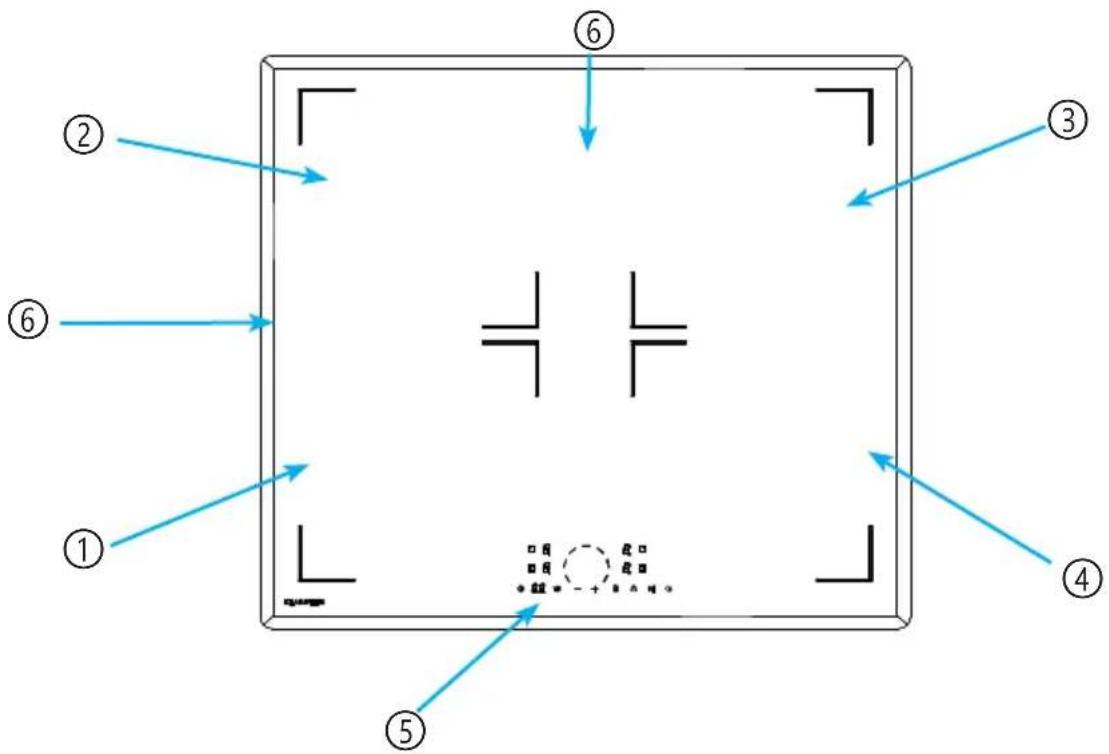
| Number Function Description | |
| 1 Left front cooking zone Induction hob zone (Ø ~180 mm, 1500 W normal / 2000 W boost) | |
| 2 Left rear cooking zone Induction hob zone (Ø ~180 mm, 1200 W / 1500 W boost) | |
| 3 Right rear cooking zone Induction hob zone (Ø ~180 mm, 1500 W / 2000 W boost). | |
| 4 Right front cooking zone Induction hob zone (Ø ~180 mm, 1200 W / 1500 W boost). | |
| 5 Control panel Touch control interface for the hob functions (detailed description below). | |
| 6 Glass ceramic surface Durable vitro-ceramic cooking surface that is easy to clean. The cooking zones are marked on the surface. |
3.2 Control panel Layout
Nr. Reference Function Description
| 1 | Heating zone selection controls | Select the desired heating zone with this heating zone selection controls- |
| 2 | Power-/ Timer-regulator | Adjust the power- or timer-value. |
| 3 Timer | Timer setting key. Used to toggle the timer setting mode and assign timers to cooking zones (see Operating Instructions for details). | |
| 4 Keep warm | Activates a low power “Keep Warm” function on a selected zone (maintains a low simmer temperature, approximately 42 °C or 70 °C). | |
| 5 | Boost (Power Boost) | Activates the power boost mode for a selected cooking zone, providing extra high heat for a short duration (5 minutes max). |
| 6 Childlock | Locks/unlocks the control panel to prevent unintended operation. (Long press to activate or deactivate the lock.) | |
| 7 Start-/Stop-function | Temporarily pauses all active cooking zones. Useful for short interruptions; touch again to resume cooking at previous settings. | |
| 8 ON/OFF | Main power touch button for the hob. Turns the appliance on or off (standby). | |
| 9 Slider control | A sliding touch strip used to set cooking power levels (heat settings 1-9) and to adjust the timer values. Slide or tap along the scale to increase or decrease values. |
Note: The control panel will beep to acknowledge touches. The power indicator for each active cooking zone shows its level or an error code if applicable.
4. A WORD ON INDUCTION COOKING
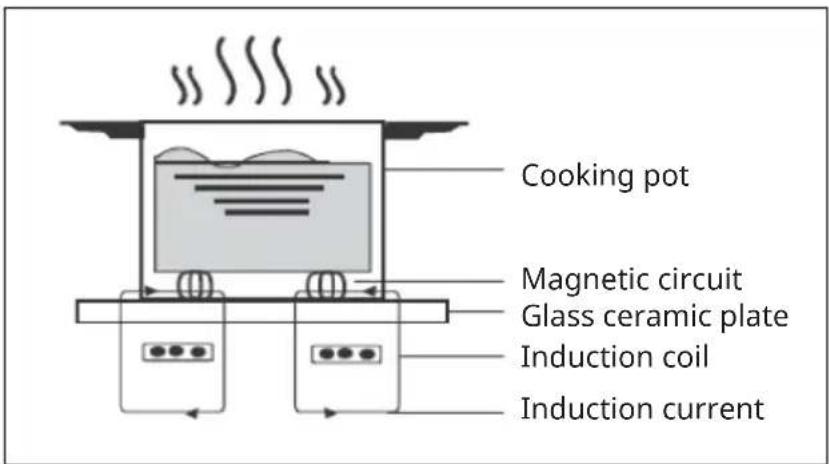
Induction cooking is an advanced, efficient and affordable cooking technology. It works with the help of electromagnetic vibrations and transfers the heat directly to the pot instead of heating it indirectly via the glass surface. The glass only gets hot because the pot heats it up.
Touch Controls
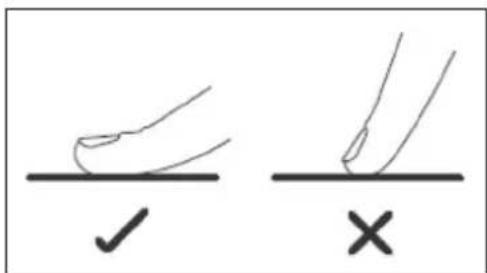
- The controls respond to touch, so you don't need to apply any pressure.
- Use the ball of your finger, not its tip.
- You will hear a beep each time a touch is registered.
- Make sure the controls are always clean, dry, and that there is no object (e.g. a utensil or a cloth) covering them. Even a thin film of water may make the controls difficult to operate.
5. CHOOSING THE RIGHT COOKWARE
Note: Only use cookware suitable for induction. Look for the induction symbol on the packaging or on the bottom of the pot. Always lift the pot off the induction hob. Do not pull the pot as this could scratch the glass.
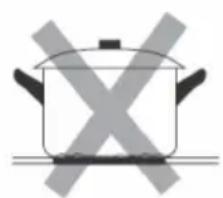
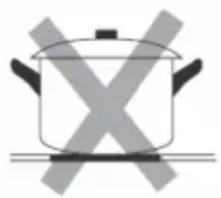
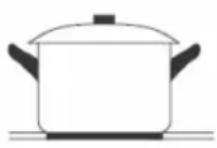
Cookware made of the following materials is not suitable: pure stainless steel, aluminium or copper without magnetic underside, glass, wood, porcelain, ceramics and pottery. Do not use cookware that has sharp edges or a rounded bottom.
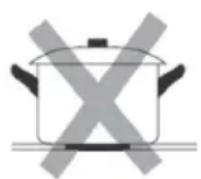
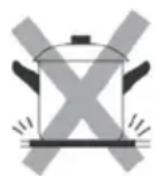
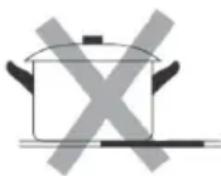
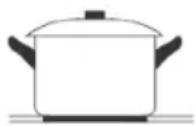
Make sure the bottom of your pot is level, sits flat on the glass surface and is the same size as the hob. Only use pots whose diameter is as large as the marking on the hob. If you use a slightly larger pot, the energy is consumed at the highest efficiency level. If you use a smaller pot, the efficiency might be lower than expected. Pots with a diameter of less than 140mm might not be detected by the induction hob. Always place the pot in the middle of the hob.
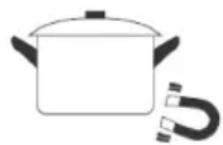
You can perform a magnet test to check the usability. Move a magnet in the direction of the bottom of the pot. If the magnet is attracted to it, the pot is suitable for induction.
6. INSTALLATION
IMPORTANT: Installation of this equipment must comply with local building and electrical codes. Improper installation, adjustment or maintenance can cause personal injury or property damage. Have the hob and extractor installed by a qualified engineer. Klarstein is not responsible for damage or injury caused by improper installation.
Before starting the installation, read this entire section carefully and make sure you have the necessary tools and materials.
6.1 Installation requirements
6.1.1 Installation Location & Cut-out
- Suitable cabinetry: This hob is designed for installation into a counter-top or worktop. Ensure that the mounting surface is flat, level and structurally sound enough to support the weight of the hob.
- Clearances: Maintain the required clearances around the hob for safety and ventilation. There must be at least 50mm clearance on all sides of the cut-out (under the worktop) to allow for heat dissipation and airflow. No structural supports, beams or appliances should obstruct the space directly beneath the hob.
- Cut-out dimensions: Cut an opening in the worktop to the following dimensions in the table below. Use a suitable jigsaw or router with a straight edge to ensure a clean cut. It is recommended that the edges of the cut-out are lightly sanded or filed. (See Figure 3 for cut-out diagram.) The thickness of the worktop should be 30 - 50mm for secure installation.
- Heat resistant surface: The worktop material around the cut-out must be heat resistant (>= 90^) to avoid warping. WARNING: Do not install on a combustible surface that hasn't been properly insulated. The use of heat reflective tape or a heat resistant barrier around the edges of the cut-out is recommended for wood or laminate worktops.
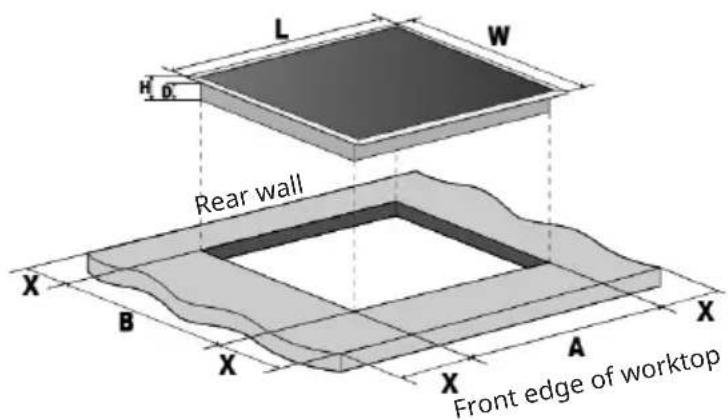
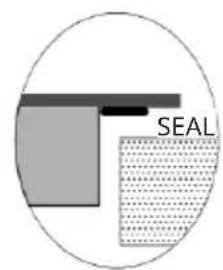
Note: The dimensions given in the table are "mm".
Dimensions table
| L W H | D A B X | |||
| 590 5 | 20 62 56 560 490 min. 50 |
6.1.2 Before Installation Checks
Before installing the hob in the cut-out, verify that
- The mains wiring and the isolation switch (or socket) are in place and accessible. You should be able to easily connect and disconnect the hob after installation.
- The ambient temperature of the installation area does not exceed 50^ (e.g. don't install above a dishwasher or refrigerator without proper insulation, as these appliances can transfer heat or moisture). Do not install the hob directly above a washing machine, tumble dryer or refrigerator.
- If installing above a built-in oven, ensure that the oven has its own cooling fan and that the oven and hob combination is approved by the manufacturer. (Typically, this hob can be installed above an oven if there is an air gap or insulating partition between them - check the oven manual for compatibility with the above induction hob).
- Check that the supplied mounting brackets and screws are available to secure the hob.
6.2 Securing the hob in the countertop
6.2.1 Mounting Brackets Installation
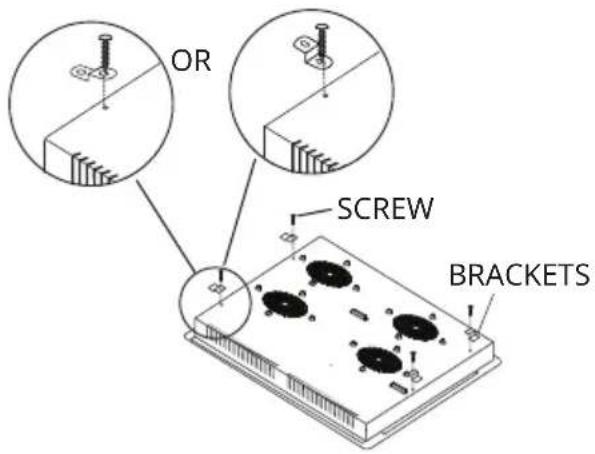
1 Assemble Seal Gasket - Assemble the supplied seal gasket in the full perimeter of the product. Do not use additional sealant (such as silicone). Check if worktop is level and cut-out is correct to assure prefect levelling.
2 Insert the Hob - With help of another person, carefully lower the hob into the prepared cut-out. Caution: The hob is heavy, take care and wear gloves to avoid injury or scratching the appliance. Do not push on the control panel or glass surface. Be careful not to get your fingers caught between the appliance and the worktop.
3 Positioning - Rotate the hob into place and align final position. Be careful to not damage the seal gasket. If that happens, please replace the gasket with a new one
4 Tighten the screws - Manually tighten the screws and supplied brackets. Do not over-tighten as this could deform the hob frame or worktop.
| A B C | D E F G | |||||
| 600 min. | 60 min. | 20 Air inlet | opening Air outlet ≥5 | mm > 35 mm > 50mm |

Note: The distance between the hotplate and the cupboard above should be at least 600mm and there must be a 560× 5mm opening in the front (position E) to dissipate the air.
6.3 Electrical connection
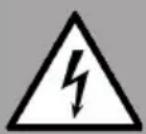
WARNING
Risk of electric shock! Check with an electrician whether the domestic wiring system is suitable without alterations. Any alterations must only be made by a qualified electrician.
-
This hob must be connected to the mains power supply only by a suitably qualified person. Before connecting the hob to the mains power supply, check that:
-
The domestic wiring system is suitable for the power drawn by the hob.
- The voltage corresponds to the value given in the rating plate.
- The power supply cable sections can withstand the load specified on the rating plate. To connect the hob to the mains power supply, do not use adapters, reducers, or branching devices, as they can cause over heating and fire.
WARNING: Electrical Shock Hazard!
Voltage of heating elements 220-240V!
In the event of any connection the safety Wire must be connected to the E-TERMINAL.

L1 L2 N1 N2


L1 L2 N1 N2

NE L
Note: If the power cable is too short or needs replacing, it must be replaced with an equivalent type by a qualified technician. The new cable should be routed and clamped exactly as the original to maintain safety. Do not replace the cable without proper validation by a qualified technician.
7. OPERATION
7.1 Using the Induction Hob
7.1.1 Basic operation - switching on and cooking
- Power On the Hob: Ensure the appliance is connected to the mains and the isolation switch is on. Touch the ON/OFF button (control panel reference 3.2) once. You will hear a beep and all zone displays will light up briefly and then show "--" or "--". This indicates the hob is in standby mode, ready for zone selection.
- Place Cookware: Put a suitable induction-compatible pan in the center of the desired cooking zone. The bottom of the pan should cover the zone completely. Make sure the pan base and the hob surface are clean and dry.
- Select a Cooking Zone: Touch one of the Zone Selector keys corresponding to the zone you want to use. The LED indicator next to that zone's control will illuminate or its power display will flash, indicating it's selected.
. Set the Heat Level: Using the Slider control (or the + / - buttons), adjust the heat setting for the selected zone. Levels range from 1 (lowest heat) to 9 (highest heat). The chosen power level will show on that zone's display.
For gentle heating or simmering, use lower settings (1-3). For normal cooking or boiling, medium settings (4-6). High heat (7-9) is for searing or rapidly boiling. You can adjust up or down at any time by sliding or tapping the control.
- Cooking: The induction zone will start heating the pan immediately once a level is set. You may see the numbers on the display alternately flash if the zone is cycling on/off to maintain that level (normal operation). If no pan is detected or if the pan is not induction-compatible, the display for that zone may flash an error (often a “” or pan symbol) and the zone will not heat (see Troubleshooting).
You can cook as usual. If you need to adjust heat, just touch the zone selector of the zone you want to change (if not already active) and then adjust the slider to the new level. Each zone's display always shows its current setting.
Note: If you do not select a heat setting within 1 minute of switching on the hob (step 1), the hob will automatically switch to standby (off) as a safety measure. In this case, simply switch on again if you still wish to cook.
7.1.2 Finish cooking and switching off
- Turn off a cooking zone: When your food is cooked and you wish to turn off a particular cooking zone, first ensure that the zone is selected (press its selector button). Then either slide the power control down to "0" or press the " - " until the display shows 0. The zone is now off. Its display will likely show "H" if the zone is hot, or turn off completely if cool.
- Alternative way: You can also turn the cooking zone off by holding the heating zone selection control for 2s.
- Main Power Off: To completely switch off the hob, touch the ON/OFF button (control 1) again. All zone displays will go dark (except any "H" indicating hot zones). The appliance is now in off mode. If you forget, the hob will also turn itself off if all zones are 0 for a while.
- Residual Heat Warning: After cooking, do not touch the cooking zones until the residual heat indicator has gone off. An "H" on a zone display means that zone's glass is still above 60^ (hot enough to cause burns). The "H" will disappear once the surface cools to a safe temperature. You can use the residual heat to keep food warm or start heating another pan (energy-saving tip), but exercise caution.
7.1.3 Power boost function
The Boost function allows an individual cooking zone to run at above its nominal maximum power for a short time. This is useful for rapidly heating a large pot of water or bringing a dish to boil quickly.
Activating the boost function
Select the desired cooking zone by touching its zone selector. Make sure there is a pot on that zone. Then touch the Boost button (B). The power level display for that zone will show "P" (or another Boost indicator) to confirm that Boost mode is on. The hob will provide extra power to that zone for up to 5 minutes.
Automatic time-out: Boost mode will automatically deactivate after
approximately 5 minutes. The power level will then drop back to previous level and continue to heat at that level. This prevents the cookware and the hob from overheating.
Cancelling the boost function
You can cancel the boost before the 5 minutes are up by touching the Boost button again. The display will revert from "p" to previous level.
7.1.4 Pause function (temporary stop)
The pause function allows you to temporarily stop all cooking activity on the hob without losing your settings. This can be useful if you need to step away or do something urgent.
To pause: Touch the Pause button. All active zones will go into pause mode - their displays may flash (often "II" or another pause indicator) and the heating will stop.
During the pause state: The controls (except the ON/OFF, lock and pause button) are locked, effectively freezing the cooktop state. You can safely wipe up a quick spill on the control panel during pause (be careful as surfaces may still be hot).
To resume cooking: Touch the Pause button again. The hob will restart all the zones at the power levels they were set to before the pause. Cooking continues as normal.
Auto-off reminder: The pause function is intended for short interruptions (a few minutes). Do not leave the hob on pause for long periods. After a certain amount of time (about 30 minutes, depending on the model), the hob may beep and switch off as a safety measure. If this happens, you'll need to switch it back on and reset your cooking settings.
Note: Always remember to restart or switch off - do not rely on the hob to remain paused indefinitely.
7.1.5 Keep warm function
The Keep Warm function maintains a low, constant heat on a hob, useful for keeping food warm or gently melting chocolate or butter. Typically, this function maintains the temperature at around 42^ or 70^ .
Activate keep warm function: With the desired zone selected (press its zone button), press the keep warm button. The zone display may show a special symbol (such as or ) to indicate that the keep warm mode is active. The hob will control the power to maintain a very low simmering temperature on that zone.
Use cases: This mode prevents food from burning or sticking after cooking. It's great for keeping sauces, soups or stews at serving temperature, or reheating dinner plates. You can also use it to slowly melt ingredients without boiling.
Duration: The keep warm mode can typically operate for up to 8 hours continuously unless switched off. Our model has an extended keep warm function of up to 8 hours as a safety feature -it will automatically switch off the zone after 8 hours to prevent it being left on indefinitely.
Cancel Keep Warm: 1. Touch the heating zone selection control that you wish to turn off.
2. In mode 2 state touch the "keep warm"key again the corresponding display shows "-", the keep warm function will be turned off.
Note: Always use a lid on your cookware during keep-warm to conserve heat and avoid drying out the food. This also helps the extractor, as less steam will need to be drawn in.
7.1.7 Timer functions
- You can set it to turn one cooking zone off after the set time is up.
-
You can set the timer up to 99 minutes.
-
Ensure that you have finished setting the powerlevels for any zones. Touch the heating zone selection control that you want to set the timer for.
- Touch the Timer button. The timer display will start flashing and then usually show "30" with one of the digits flashing. The flashing indicates that you can adjust that digit.
- Use the slider or + / - controls to set the desired time. The timer is set in minutes. Pressing + oder - increases/ decreases the timer in 1 minute increments (or 10 minutes if held). Alternatively you can slide the slider clockwise/ counterclockwise in order to increase/ decrease the time by 10 minutes.
- Touch the "-control to reduce the remaining time to zero, or press the 'timer control' when "00" appears in the minute display to cancel the timer.
- When the desired time is set (e.g. 45 for 45 minutes). The timer will start to count down. You can confirm it's active when the numbers start to decrease after one minute and a countdown dot or indicator remains lit.
- When the set time has elapsed, the hob will beep for once and the corresponding cooking zone will switch off automatically.
7.1.8 Locking the controls
In this mode you can lock the controls to prevent them being used unintentionally (for example, to stop children accidentally turning the cooking zones on). When this feature is activated, all controls except the ON/OFF control are disabled.
To lock the controls:
Touch and hold the keylock control for 2s. The timer indicator will show "Lo".
To unlock the controls:
- Make sure the induction hob is turned on.
- Touch and hold the keylock control for 2s.
- You can now start using your induction hob.
Note: When the hob is in lock mode, all controls are disabled except the ON/OFF control. You can always turn the induction hob off with the ON/OFF control in an emergency, but you would have to unlock the hob first for the next operation.
7.2 Heat settings
The settings below are guidelines only. The exact setting will depend on several factors, including your cookware and the amount you are cooking. Experiment with the induction hob to find the settings that best suit you.
| Power level Suitable for | |
| 1-2 | ·Warming up small amounts of food ·Melting chocolate, butter, and foods that burn quickly ·Simmering ·Slow heating |
| 3-4 | ·Warming up ·Rapid simmering ·Cooking rice |
| 5-6 · Pancakes | |
| 7-8 | ·Brief frying ·Cooking pasta |
| 9 | ·Deep frying and searing ·Bringing soup to a boil ·Bringing water to a boil |
8. DEVICE PROTECTION
Over-temperature protection
A built-in temperature sensor can monitor the temperature inside the induction and infrared hob. When an excessive temperature is monitored, the induction hob will stop operation automatically.
Detection of small articles
When an unsuitable size or non-magnetic pan (e.g. aluminium), or some other small item (e.g. knife, fork, key) has been left on the hob, flashes on the display and the hob automatically go on to standby in 1 minute. The fan will keep cooling down the induction hob for a further 2 minutes.
Auto Shutdown protection
Auto shut down is a safety protection function for your induction hob. The hob will shut down automatically if you forget to finish your cooking. The default working time for various power levels are shown in the below table:
| Power level | 1-3 4-6 | 7-9 | |
| Default working time (hours) | 8 4 2 |
When the pot is removed, the induction hob can stop heating immediately and the hob automatically switch off after 1 minute.

Caution! Danger of personal injury
People with a pacemaker should consult with their doctor before using this unit.
9. CLEANING AND MAINTENANCE
Regular maintenance will ensure that your machine operates efficiently and safely for many years. Always follow safety precautions when cleaning (see Safety Information). Ensure that the appliance is switched off and has cooled down sufficiently before cleaning.
9.1 Cleaning the cooking surface
The cooking surface is made of high quality ceramic glass. It should be cleaned after each use to prevent food from sticking or burning. Prompt cleaning makes it easier to remove spills.
Recommended cleaning materials: soft cloth or sponge, cooktop cream cleaner or mild soapy water, paper towels and a scraper for stubborn residues. Avoid abrasive cleaners or metal scouring pads as they can scratch the glass.
The table below outlines cleaning methods for different types of spillage:
| Type of soiling How to | clean Important Tips | |
| Light daily soiling (fin-gerprints, water marks, minor stains) | 1. After switching off the hob, wait until the glass is only warm (not hot).2. Apply a few drops of ceramic hob cleaner or a mild detergent to the glass.3. Wipe with a soft cloth or paper towel to remove any residue.4. Rinse the cloth and wipe again to remove any cleaner residue.5. Dry the surface with a clean, lint-free cloth or paper towel. | ·If the power is off, the residual heat indicator won't appear, but the surface may still be hot. Be careful.·Never use abrasive powders or rough scouring pads as they can scratch the glass.·Do not leave cleaner residue on the hob - it can burn onto the glass. |
| Stubborn spills or slightly burnt residue | 1. Follow steps 1-3 above (use warm soapy water or detergent).2. Leave the cleaner on the stain for a minute to soften it.3. Scrub gently with a nylon scrubber (non-scratch) if necessary.4. Wipe and dry as in steps 4-5. | ·Persistent stains may require repeating the cleaning process.·Do not use sharp objects to remove dirt, use the correct scraper if necessary (see below). |
| Boil-overs, melted sugar or syrup, heavily burnt spills (e.g. milk or starchy foods) | 1. Immediate action (while the hob is still hot but switched off):2. Wearing oven gloves for protection, use a hob scraper at a low angle of 30° to the glass.Gently scrape most of the spill away from the hot area to a cooler part of the hob.3. Still carefully, use paper towels to gently wipe up the spill from the cooler area.4. When the hob has cooled down, apply cooktop cleaner and clean as normal (steps above) to remove any film. | WARNING: Risk of burns and cuts:Work carefully to avoid touching the hot surface or cutting yourself with the scraperSugar spills (sugar, jam, sauces) can permanently damage glass if not removed immediately. They can etch the surface. Act quickly but safely; keep a scraper handy when cooking sugary foods. |
| Spillage on touch controls (liquid or food on buttons / display area) | 1. Switch off the hob immediately (if it hasn't already switched off - liquid may cause the controls to beep).2. Use a soft cloth or sponge to absorb the spill from the control panel.3. Wipe the controls with a damp cloth to remove any residue.4. Dry the area thoroughly with a paper towel.5. Do not switch on the hob until the control panel is completely dry. | The hob may beep or switch off if liquid covers the control panel – this is a safety feature.Ensure that no moisture remains on the touch buttons as this can confuse the sensors.Never spray cleaning solution directly onto the control panel; apply to a cloth first, then wipe. |
Additional cleaning reminders:
- Never use steel wool, scouring powder or harsh oven cleaners on the ceramic glass. They can scratch or dull the surface.
- For limescale or mineral deposits (white, cloudy stains), you can use a little vinegar or a special glass-ceramic cleaner. Apply, leave to soak and then wipe off.
- Make sure the base of your cookware is clean. Deposits on pan bottoms can be transferred to the hob and burn on.
- After cleaning, make sure the hob surface is completely dry before next use. Even a small amount of water on the surface can cause the controls to beep or the pan detection to malfunction when the hob is switched on.
10. TROUBLESHOOTING
| Problem Possible cause | Solution | |
| The cooktop cannot be turned on (no lights on display). | No power to the appliance Verify the hob is connected to the power supply and that the circuit breaker or fuse hasn't tripped. Make sure the wall switch (isolation switch) is on. Check for a general power outage in your home. If power is definitely present and the hob still shows no sign of life, do not attempt to fix internally - call a technician. | |
| The touch controls are unresponsive (pressing buttons does nothing). | The controls may be locked by the Child Lock feature. | Check the control panel for a keylock icon or the letters "Lo"/"L" on the display. If so, unlock the hob by touching and holding the Child Lock button (3.2) for 3 seconds (until the lock indicator goes off). Once unlocked, try the controls again. |
| The touch controls are difficult to operate or not registering taps. | There might be a thin film of water or grease on the control panel; or you may be touching with the fingertip at an angle rather than the flat of your finger. | Ensure the control area is clean and dry. Wipe away any moisture or spills (with the hob off). When using the controls, use the pad of your finger (not a fingernail or tip) and press straight down for about half a second per input. If you still have trouble, power off the hob for a minute, then turn it on and try again once fully dry. |
| The glass surface is being scratched. | Using rough or uneven-bottomed cookware (e.g., ceramic or cast iron with burrs); or cleaning with abrasive scourers/chemicals | Use cookware with flat, smooth bases - check that your pots/pans have no rough edges. Lift cookware slightly when moving it on the hob, don't drag it. For cleaning, use recommended non-scratch methods (see Section 9.1). Minor scratches cannot be removed, but they usually don't affect function. For future prevention, be mindful of cookware and cleaning tools. |
| You hear a crackling or clicking noise from the cookware during cooking. | This is often due to the construction of the cookware-layers of different metals expanding at different rates can create sounds. It can also occur with certain types of cookware on induction. | This is generally normal and not a fault. You can continue cooking. If the noise is very loud or bothersome, consider trying a different pan. Using heavy, high-quality pans tends to produce less noise. |
| A low humming noise is heard, especially on high heat settings. | The induction system can hum when drawing a lot of power, and the cooling fan also makes a steady hum. | This is normal for induction hobs. The hum should reduce when you decrease the heat setting. Ensure the appliance is installed correctly with proper ventilation, as restricted airflow can make the fan louder. |
| The internal cooling fan keeps running for several minutes after the hob has been turned off. | The hob's electronics are cooling down. The fan is designed to run until a safe temperature is reached. | This is normal. Do not switch off power at the wall until the fan stops on its own. Just let it finish (usually no more than 5-10 minutes). If the fan runs excessively long (beyond 15 minutes after use) every time, check that the air intakes and outlets aren't blocked by dust or an object. |
| A cooking zone suddenly turned itself off during use. (Also maybe a beep sounded.) | Several possibilities:- The zone may have automatically shut off because no pan was detected (e.g., if the pan was lifted or is non-inductive).- The built-in timer turned it off (check if you had a timer set and forgot).- The hob overheated or detected an electrical fault, triggering a safety shutdown. In that case, an error code might be displayed. | If it's the pan detection, the display would show a flashing pan symbol or similar. Ensure your pan is induction-compatible and properly centered. The zone will resume heating once a proper pan is detected and you turn it back on. If it was the timer, the zone display will possibly show an "H". Simply restart the zone if more cooking is needed, or realize that the programmed time elapsed. If it was a technical fault (with an error code or all zones off), see Error Codes below. In such a case, turn the hob off, wait a few minutes for cooling, then turn it on and try again. If it repeats, call a technician. |
10.1 Errorcodes
| ErrorCode Possible cause Solution | ||
| ≥U≤ | The hob cannot detect the pan or the pan material is not induction friendly. | Use a magnetic (ferrous) pan of the correct size. Ensure the pan is centered on the zone. Once a proper pan is recognized, the indicator will stop flashing and heating will commence. If you remove a pan intentionally, the zone will show the pan-missing indicator and then shut off after a minute. |
| E1 Input power too high. | The voltage of the main power supply exceeds 250 V. Please check that the voltage is normal. Once the voltage returns to normal, restart the unit. If there is a PCB fault, please send the unit to the service centre for repair. | |
| E2 Input power too low. | The voltage of the main power supply is less than 180 V. Please check that the voltage is normal. Once the voltage returns to normal, restart the unit. If there is a PCB fault, please send the unit to the service centre for repair. | |
| E3 | Temperature of coil thermistor is too high. | The temperature on the induction glass surface is too high. Please check that there is no water in the pan. After treatment, reconnect to power. If the problem persists, it is possible that the cooktop sensor has failed. Send it to the service centre for repair. |
| E5 IGBT thermistor temperature is to high | The temperature of the IGBT thermistor is too high and the air outlet is blocked. Open the air outlet and restart the unit. It is possible that there is an error in the cooling fan connection, the cooling fan is damaged or the fan drive circuit has failed or the IGBT temperature sensor is open/short-circuited. If the problem persists, send it to a service centre for repair. | |
| F3 | Coil thermistor short circuit | Coil thermistor sensor connection error. If the coil thermistor fails, send it to the service centre for repair. |
| F4 | Coil thermistor open circuit | |
| F9 | IGBT thermistor short circuit | The IGBT thermistor sensor detects connection errors. If the IGBT PCB sensor fails, send it to the service centre for repair. |
| FA | IGBT thermistor open circuit | |
- PRODUCT DATA SHEET INDUCTION HOB
| Symbol Value Unit | ||||
| Model identification 10 | 047619 | |||
| Type of hob Built-In Hob | ||||
| Number of cooking zones and/or areas | 4 | |||
| Heating technology (induction cooking zones and cooking areas, radiant cooking zones, solid plates) | Induction cooking zone | |||
| For circular cooking zones or area: diameter of useful surface area per electric heated cooking zone, rounded to the nearest 5 mm | ∅ | Left Front | 18 | cm |
| Left Rear | 18 | |||
| Right Front | 18 | |||
| Right Rear | 18 | |||
| For non-circular cooking zones or areas: length and width of useful surface area per electric heated cooking zone or area, rounded to the nearest 5 mm | L W | cm | ||
| Energy consumption per cooking zone or area calculated per kg | EC Electric Cooking Hob | Left Front | 196 | Wh/kg |
| Left Rear | 187 | |||
| Right Front | 187 | |||
| Right Rear | 203 | |||
| Energy consumption for the hob calculated per kg | EC Electric Cooking Hob | 193,3 Wh/kg | ||
DISPOSAL CONSIDERATIONS
If there is a legal regulation for the disposal of electrical and electronic devices in your country, this symbol on the product or on the packaging indicates that this product must not be disposed of with household waste. Instead, it must be taken to a collection point for the recycling of electrical and electronic equipment. By disposing of it in accordance with the rules, you are protecting the environment and the health of your fellow human beings from negative consequences. For information about the recycling and disposal of this product, please contact your local authority or your household waste disposal service.
This product contains batteries. If there is a legal regulation for the disposal of batteries in your country, the batteries must not be disposed of with household waste. Find out about local regulations for disposing of batteries. By disposing of them in accordance with the rules, you are protecting the environment and the health of your fellow human beings from negative consequences.
MANUFACTURER & IMPORTER (UK)
Chal-Tec GmbH, Mühlenstrasse 25, 10243 Berlin, Germany. Contact: info@electronic-star.de
Estimado cliente:
Chere cliente, cher client,
3. APERÇU DU PRODUIT

- 11.PRODUKTDATENBLATT
- INDUKTIONSKOCHFELD
- CONTENTS
- TECHNICAL DATA
- SAFETY INSTRUCTIONS
- Electrical Safety and Installation
- Operational Safety
- - Child Safety
- Appliance and component safety
- Health Advice
- Cleaning and Maintenance Safety
- 3.PRODUCT OVERVIEW
- Appliance Description - Top View
- Control panel Layout
- Nr. Reference Function Description
- A WORD ON INDUCTION COOKING
- Touch Controls
- CHOOSING THE RIGHT COOKWARE
- INSTALLATION
- Installation requirements
- Installation Location & Cut-out
- Before Installation Checks
- Securing the hob in the countertop
- Mounting Brackets Installation
- Electrical connection
- WARNING
- WARNING: Electrical Shock Hazard!
- OPERATION
- Using the Induction Hob
- Basic operation - switching on and cooking
- Finish cooking and switching off
- Power boost function
- Activating the boost function
- Cancelling the boost function
- Pause function (temporary stop)
- Keep warm function
- Timer functions
- Locking the controls
- To lock the controls:
- To unlock the controls:
- Heat settings
- DEVICE PROTECTION
- Over-temperature protection
- Detection of small articles
- Auto Shutdown protection
- Caution! Danger of personal injury
- CLEANING AND MAINTENANCE
- Cleaning the cooking surface
- Additional cleaning reminders:
- TROUBLESHOOTING
- Errorcodes
- DISPOSAL CONSIDERATIONS
- MANUFACTURER & IMPORTER (UK)
- Estimado cliente:
- APERÇU DU PRODUIT
Brand : Klarstein
Model : Red Flame
Category : Cooker