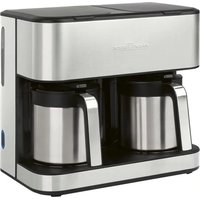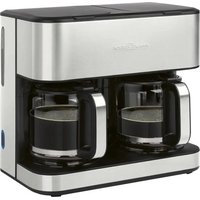
PC-KAD 1308 - Coffee machine PROFICOOK - Free user manual and instructions
Find the device manual for free PC-KAD 1308 PROFICOOK in PDF.


| Product type | Double filter coffee machine |
| Brand | ProfiCook |
| Model | PC-KAD 1308 |
| Power supply | 220-240 V~, 50-60 Hz |
| Power | 2000 W |
| Water tank capacity | Approx. 3 liters |
| Net weight | Approx. 4 kg |
| Protection class | I |
| Automatic shut-off | At most 35 minutes after brewing ends |
| Standby consumption | ≤ 0.3 W |
| Number of independent coffee makers | 2 |
| Anti-drip function | Yes |
| Keep warm function | Yes, up to 35 minutes |
| Removable filter holders | 2, filter size 1×4 |
| Glass carafes included | 2 (with lids) |
| Descaling | Recommended with citric acid-based descaler |
| Cleaning | Exterior with a damp cloth; carafes and filter holders hand-washable |
| Safety | Do not immerse; hot surfaces; anti-splash lid |
| Included accessories | 2 filter holders, 2 glass carafes, 2 lids |
Frequently Asked Questions - PC-KAD 1308 PROFICOOK
User questions about PC-KAD 1308 PROFICOOK
0 question about this device. Answer the ones you know or ask your own.
Ask a new question about this device
Download the instructions for your Coffee machine in PDF format for free! Find your manual PC-KAD 1308 - PROFICOOK and take your electronic device back in hand. On this page are published all the documents necessary for the use of your device. PC-KAD 1308 by PROFICOOK.
USER MANUAL PC-KAD 1308 PROFICOOK
natural_image
Modern kitchen appliance with two black-and-white filter units, no visible text or symbols on the main body.Be sure to read the separately enclosed safety instructions first.
Instruction Manual
Thank you for choosing our product. We hope you will enjoy using the appliance.
Read the instruction manual and the separately enclosed safety instructions very carefully before using this appliance. Keep these documents, including the warranty certificate, receipt and, if possible, the box with the inner packaging in a safe place. If you pass the appliance on to a third party, always include all the relevant documents.
Symbols in this Instruction Manual
Important information for your safety is specially marked. It is essential to comply with these instructions in order to avoid accidents and prevent damage to the appliance:

WARNING:
This warns you of dangers to your health and indicates possible injury risks.

CAUTION:
This refers to possible hazards to the appliance or other objects.
Unpacking the Appliance
- Remove the appliance from its packaging.
- Remove all packaging material, such as foils, filling material, cable ties and cardboard packaging.
- Check the scope of delivery for completeness.
- If the contents of the packaging are incomplete or if damage can be detected, do not operate the appliance. Return it to the dealer immediately.
- There may still be dust or production residues on the appliance. We recommend that you clean the appliance as described under "Cleaning".
Scope of Delivery
1×Coffeemaker
2×Filterholder
2×Glassjug
2 × Lid for the jug
Overview of the Components
1 Water tank lid
2 Water tank
3 Water level indicator
4 Button (On / Off)
5 Warming plate
6 Glass jug with lid
7 Filter holder
8 Tab for opening the water tank lid
The controls (2-6) are located on both sides of the appliance.
Warnings for the Use of the Appliance

WARNING:
- Even after use, the water tank lid, the hot plate and the jug base still have residual heat.
- Only touch the jug by the handle.
- Never open the water tank lid during cooking.
- If you want to make several pots of coffee in succession, let the appliance cool down first with the water tank open so that no hot water splashes when refilling the water.
- Only operate the appliance when the water tank is filled with water.
Notes for Use
Location
- Place the coffee maker on a stable and level surface. Place the appliance in such way that it cannot tip over
- Do not place the appliance in close proximity to a gas or electric stove or any other heat source.
Electrical connection
- Check whether the mains voltage you want to use matches that of the appliance. You will find the details on the type plate on the appliance.
- Only connect the appliance to a properly installed protective contact socket.
European Regulations on Energy Saving
The European Directive 2009 / 125 / EC (Ecodesign Directive) incorporates measurements for energy saving.
The following applies to coffee makers: The keep-warm period is limited to max. 35 minutes after which the appliance turns off automatically.
You benefit from better safety and lower energy consumption.
Initial Operation
Before brewing coffee for the first time, start the appliance twice with clean water only, without paper filter and without coffee powder. This will remove any dust that may have accumulated in the appliance during transport. Proceed as described under “Operation”.
Switching the Appliance On/Off
- Press the button to switch on the appliance. The control lamp in the button lights up.
- Press the button again to switch off the appliance or to cancel the brewing process. The control lamp in the button goes out.
Note on the Brewing Process
Depending on the grind and quantity, the coffee powder absorbs water during the brewing process. The amount of finished coffee therefore differs from the amount of water added.
Single or Combined Operation
You have the option of brewing just one pot or two pots of different types of coffee at the same time.
- If you want to brew coffee on the left, please proceed as described under "Operation". Press the left button to start the brewing process.
- If you want to brew coffee on the right, please proceed as described under "Operation". Press the right button to start the brewing process.
- To brew two pots of coffee at the same time, proceed as described under "Operation". Press the button on the left and right side.
Operation
- Fold open the water tank lid.
- Fill the water tank with cold water according to the desired number of cups. The water level can be read off the scale.
- The jug can be used to fill the water tank.
- Do not overfill the water tank! Do not fill beyond the MAX mark.
- Insert the filter holder.
- Bend the bottom fold of the paper filter (size 1 × 4 ) and place in the filter holder. Fill the filter with coffee powder.
- Do not put too much coffee powder in the filter, otherwise there is a risk of the filter overflowing.
- Now close the lid of the water tank.
- Place the jug onto the warming plate.
CAUTION: Anti-drip protection
Your appliance is equipped with anti-drip protection. It closes when the jug is removed. This prevents coffee from dripping onto the shelf when there is still water in the filter.
- Make sure that the lid is on the jug. It opens the anti-drip protection.
-
If there is still water in the water tank, put the jug back on the storage surface in good time. The filter could otherwise overflow.
-
Switch on the appliance. The appliance starts with the brewing process.
After the Brewing Process
- When no more coffee runs through the filter, the jug can be removed.
- Turn the appliance off.
- Would you like to keep the remaining coffee warm? Leave the appliance turned on until the end of the keep-warm period. If you wish to keep the coffee warm even after the keep-warm period has finished, pour the remaining coffee into a thermal flask.
- The filter holder can be pulled out of the appliance by its handle. This makes it easier to dispose of the old coffee filter, for example.
Cleaning

WARNING:
- Always disconnect the mains plug from the socket before cleaning and wait until the appliance has cooled down.
- Do not immerse the appliance in water. This could lead to an electric shock or fire.

CAUTION:
- Do not use a wire brush or any abrasive items.
- Do not use any acidic or abrasive detergents.
- Clean the outside of the appliance with a slightly damp cloth if necessary – without any additives.
- Use a paper towel to remove any coffee grounds that may have spilled into the inner housing. Wipe with a damp cloth.
- Clean the jug and the filter holder in warm rinsing water with a little hand dishwashing liquid. If necessary, use a soft brush.
De-scaling
De-scaling becomes necessary when the preparation time increases significantly.
- Only use commercially available citric acid-based de-scaling agents for de-scaling.
- Dose as indicated on the packaging or instruction leaflet.
- Place the jug on the shelf.

WARNING:
- Then boil fresh water three to four times to rinse out any residue of the descaling agent.
- Do not use coffee powder!
- Do not use this water as drinking water.
Storage
- Clean the appliance as described. Allow the accessories to dry completely.
- We recommend storing the appliance in its original packaging if you do not intend to use it for a longer period of time.
- Always store the appliance out of the reach of children in a well-ventilated and dry place.
Troubleshooting
| Problem Possible Cause Remedy | ||
| The appliance has no function. | The appliance has no power supply. Check | the power socket with another appli-ance. |
| Insert the mains plug correctly. | ||
| Check the house fuse. | ||
| The appliance is defective. Contact our service or a specialist. | ||
| Filter blockage:Coffee grounds spill over the edge of the filter. | The anti-drip protection is closed:The coffee jug is not on the warming plate or the lid is not on the coffee jug. | 1. Switch off the appliance. Unplug the machine from the mains.2. Put the coffee jug with lid on the warming plate so that the filter is emptied.3. Dispose of the paper filter.4. Clean the appliance as described. |
| Too much coffee powder in the filter. | ||
| Coffee grounds in the coffee. | The paper filter is too small. Use a paper filter size “ 1 × 4 ”. | |
| Too much coffee powder in the filter. Use less coffee powder. | ||
| The brewing process takes too long. | Limescale deposits in the appliance. Decalcify the appliance as described. | |
| The appliance turns off automatically. | This isnota malfunction of the appliance.In order to comply with the Ecodesign Directive (2009 / 125 / EC), the appliance turns off automatically after max. 35 mins-utes after the brewing process has finished. | |
Technical Data
Model: PC-KAD 1308
Power supply: 220–240 V\~, 50–60 Hz
Power consumption: 2000 W
Power consumption in off-mode: ....≤0.3 W
Switching to the off-mode: ....≤35 minutes
Filling quantity: ....approx. 3 litre
Protection class:....I
Net weight: .... approx. 4 kg
The right to make technical and design modifications in the course of continuous product development remains reserved.
This appliance has been tested according to all applicable, current CE directives and built according to the latest safety regulations.
Disposal
Meaning of the "Dustbin" Symbol
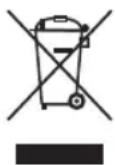
Protect our environment: do not dispose of electrical equipment in the domestic waste.
Please return any electrical equipment that you will no longer use to the collection points provided for their disposal.
This helps avoid the potential effects of incorrect disposal on the environment and human health.
This will contribute to the recycling and other forms of re-utilisation of electrical and electronic equipment.
Information concerning where the equipment can be disposed of can be obtained from your local authority. Your dealer and contractual partner is also obliged to take back the old appliance free of charge.
BELANGRIJK:
Volume: ....ong. 3 liter
CTC Clatronic Sp. z o.o
Ul. Brzeska 1
45-960 Opole