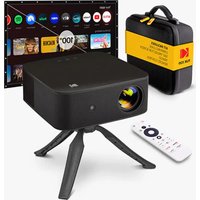
FLIK X20 - Projector KODAK - Free user manual and instructions
Find the device manual for free FLIK X20 KODAK in PDF.


| Product Type | Full HD Smart Multimedia Projector |
| Brand | Kodak |
| Model | FLIK X20 |
| Native Resolution | Full HD (1920 × 1080) |
| Operating System | Android TV / Google TV |
| Connectivity | HDMI, USB, Bluetooth, Wi-Fi (2.4 GHz and 5 GHz) |
| Keystone Correction | Automatic and Manual (Keystone) |
| Focus | Automatic and Manual |
| Smart Features | Google Cast, AirPlay (via AirScreen), Android screen mirroring, Google Assistant |
| Pre-installed Apps | YouTube, Netflix, Prime Video, Disney+ |
| Power Input | AC adapter (power cord included) |
| Ports | 1× HDMI, 1× USB, 1× 3.5 mm audio output |
| Mounting | Integrated stand and 1/4" tripod screw |
| Care and Cleaning | Use a soft, dry cloth. Do not use solvents or liquid products. |
| Safety | Do not look directly at the lens. Ensure clear ventilation (minimum 30 cm distance from wall). Keep out of reach of children. |
| Warranty | 1 year limited (parts and labor) |
| Support (USA) | kodak@camarketing.com |
| Support (International) | kodakintl@camarketing.com |
| Spare Parts and Repairability | Contact customer service for any repairs. Do not disassemble yourself. |
| Dimensions | Not specified in the manual |
| Weight | Not specified in the manual |
Frequently Asked Questions - FLIK X20 KODAK
User questions about FLIK X20 KODAK
0 question about this device. Answer the ones you know or ask your own.
Ask a new question about this device
Download the instructions for your Projector in PDF format for free! Find your manual FLIK X20 - KODAK and take your electronic device back in hand. On this page are published all the documents necessary for the use of your device. FLIK X20 by KODAK.
USER MANUAL FLIK X20 KODAK
natural_image
Abstract red geometric logo with arrow shape and vertical text 'KODAK' (no readable document text)CONTENTS
EN
INTRODUCTION 3
PRODUCT OVERVIEW 4-5
REMOTE CONTROL OVERVIEW 6
SETTING UP THE PROJECTOR 7
Thank you for purchasing the Kodak Flik X20 Full HD Multimedia Smart Project. This Quick Start Guide is intended to provide you with guidelines to ensure that operation of this product is safe and does not pose risk to the user. Any use that does not conform to the guidelines described in this User Guide may void the limited warranty.
This product is covered by a limited one-year warranty. Coverage is subject to limits and exclusions. See warranty for details.
Please make sure to view and download the full user guide by visiting
https://kodakprojectors.caglobal.com/pages/kodak-flik-x20-full-hd-multimedia-smart-projector or scanning the QR code.

PRODUCT OVERVIEW
- Lens
- Autofocus camera
- Power input
- HDMI port
- USB port
- Audio out jack
- IR receiver
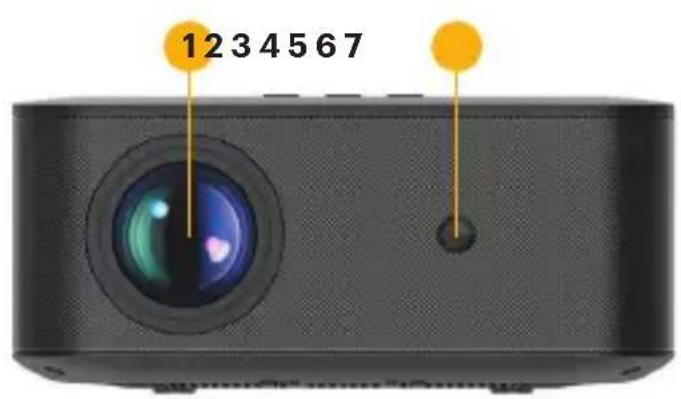
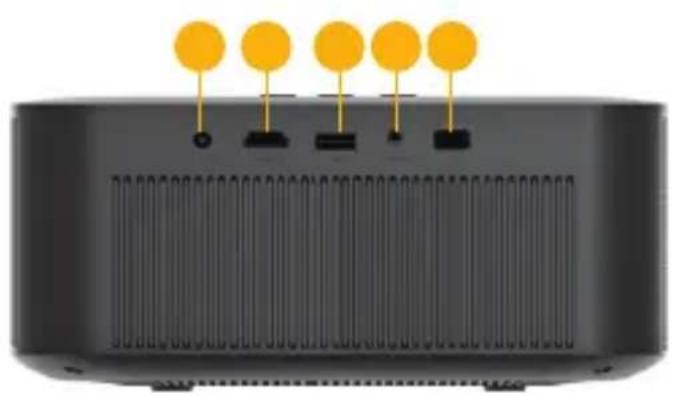
natural_image
Diagram of a device rear panel with five yellow circular components and black connectors (no text or symbols)PRODUCT OVERVIEW
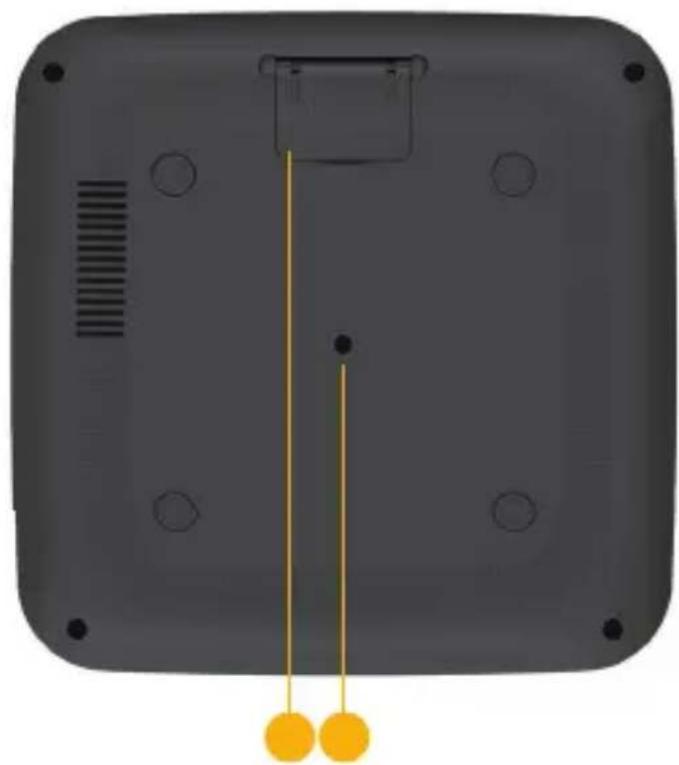
- Volume down
- Power on/off
- Volume up
- Built-in stand
- ¼" mounting-type tripod port
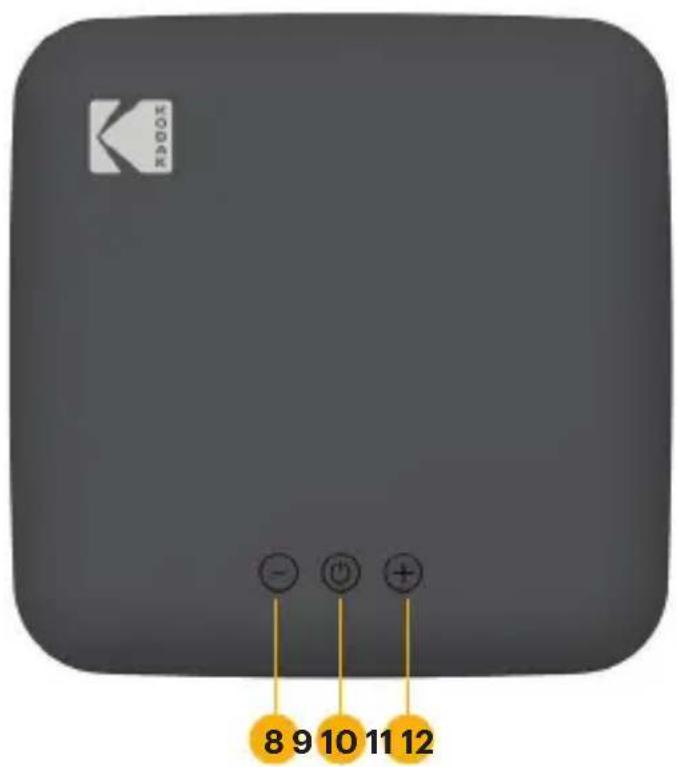
natural_image
Back view of a black rectangular device with circular holes and a vertical yellow indicator line, no text or symbols visible.REMOTE CONTROL OVERVIEW
- Power on/off
- Account
- Return
- Home
- Volume
- Mute
- YOUTUBE
- PRIME VIDEO
- Input source
- GOOGLE Assistant
- Projector setting
- Confirm
- Direction pad
- GTV setting menu
- Auto focus
- Manual focus
- NETFLIX
- DISNEY+
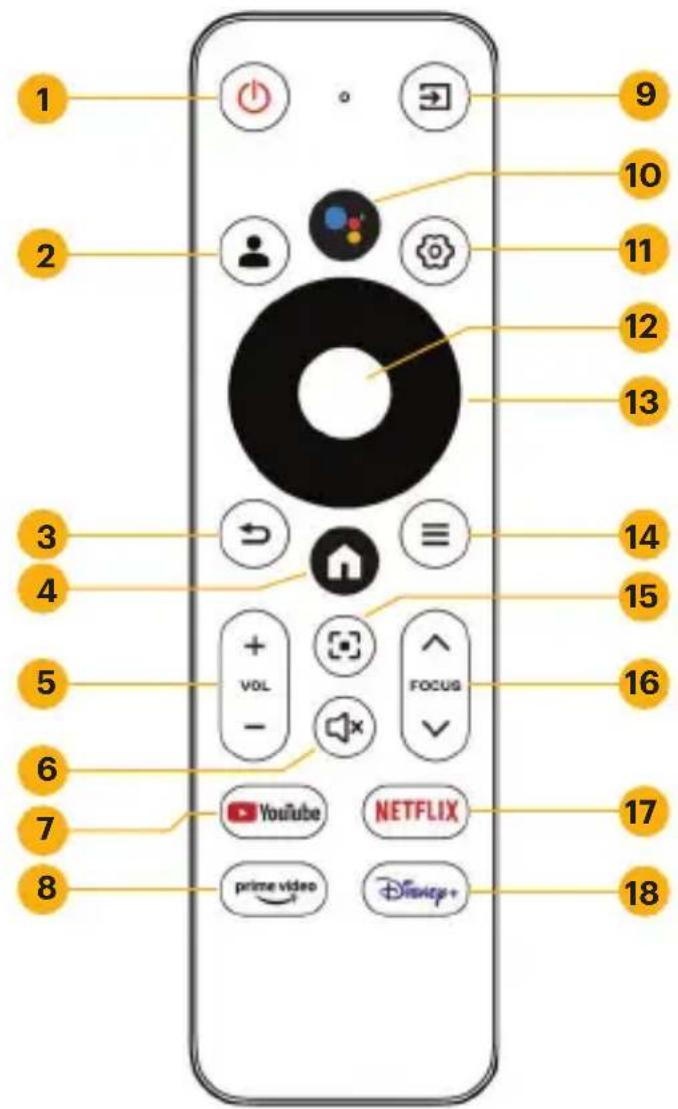
The projector will automatically connect to the remote upon startup. For manual pairing, press and hold the Back and Home buttons simultaneously for five (5) seconds.
SETTING UP THE PROJECTOR
-
Place the projector in front of a suitable screen or wall and plug it in. Your projector can be front-ceiling mounted, or placed on a tabletop.
-
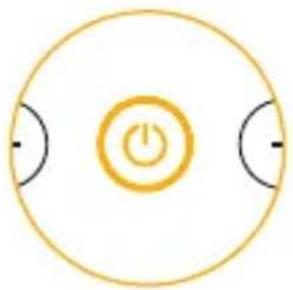
Press and hold the power button to turn the device on.
natural_image
Simple circular diagram with a central power button and two side arcs, no text or symbols present.There are three ways to set up ANDROID TV on your projector:
Method 1: Set Up with an ANDROID Device
-
When your projector says, "Quickly set up your projector with your ANDROID phone?" choose "Continue" or "Yes."
-
Open the Google app on your phone and type or say, "Set up my device."
-
Follow the on-screen instructions until you get a code.
-
Enter the code on the projector and tap the name of the projector on your phone when it shows up.
-
Follow the on-screen instructions to complete setup.
Method 2: Set up with an iOS Device
- When your projector says, "Quickly set up your projector with your ANDROID phone?" choose "Skip."
- Make sure your device and projector are on the same Wi-Fi network.
- Visit androidtv.com/setup on your device.
- Enter the code that appears on your projector screen.
- Follow the on-screen instructions to complete setup.
Method 3: Set Up with the Remote Control
- When your projector says, "Quickly set up your projector with your ANDROID phone?" choose "Skip."
- Press the Google TV settings button on your remote to open Google TV settings.
- Go to Network and select your network. Enter your password and wait for your projector to connect.
- Go to Account and select Add Account.
- Enter your email address and password and press Confirm. You will now be able to enjoy your apps on Google TV.
PROJECTOR SETTINGS
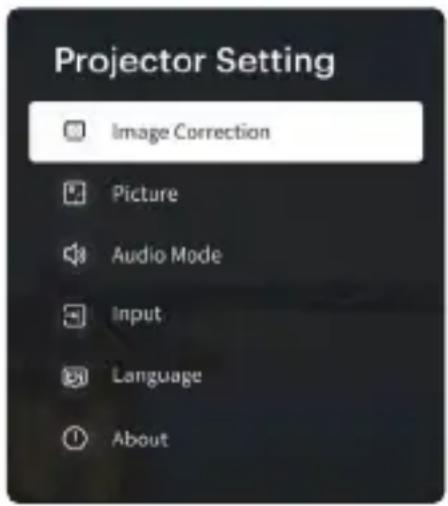
Press the Projector Settings button to access image correction, picture, audio, input, language, and about options.
Image Correction: Access Focus, Keystone, Zoom, Screen Alignment, Obstacle Avoidance, and Projection Mode.
Manual Keystone: Adjust the keystone manually.
Auto Keystone: Turn the keystone on or off.
Projection Mode: Select between front projection, front ceiling projection, rear front projection, or rear ceiling projection.
Front: The projector is placed on a table in front of the screen.
Ceiling: The projector is suspended upside-down in front of the screen.
A ceiling/wall mount kit is required (not included).
Rear: The projector is placed on a table behind the screen. A special rear projector screen is required (not included).
Rear Ceiling: The projector is suspended upside-down from behind the screen.
Picture: Adjust picture settings like Colors and Picture Mode.
Audio: Adjust audio settings.
Input: Choose from GTV, USB, and HDMI inputs.
About: Access system information like Device Name, Device Model, and System Version, and perform a Factory Reset, if needed.
CASTING CONTENT VIA GOOGLE CAST
- Connect your device to the same Wi-Fi® network as your projector.
- Open a Google Cast-enabled app that has content you want to cast and find and select "Cast."
- On your device, select the name of your projector. Wait for the Cast symbol to change color, indicating a successful connection.
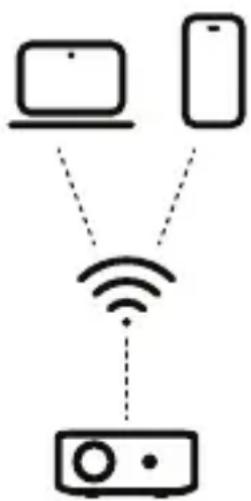
flowchart
graph TD
    A["Laptop"] -->|Wireless Signal| B["Server"]
    C["Smartphone"] -->|Wireless Signal| B["Server"]
MIRRORING OR CASTING CONTENT FROM IOS
First, you'll need to install the AirScreen app from Google Play on your projector. Once installation is complete, follow these steps:
From iPhone or iPad
- Make sure your iOS device and projector are on the same network.
- Swipe down on your home screen and tap the AirPlay icon.
- Select the device you want to cast to.
From Mac
- Make sure your Mac and projector are on the same network.
- Click the AirPlay icon on the Mac and select your projector to start mirroring.
- The AirPlay icon will turn blue once AirPlay is active.
MIRRORING OR STREAMING CONTENT FROM ANDROID
- Make sure your ANDROID device and projector are on the same network.
- Download the Google Home app on your ANDROID device.
- Open the Google Home app and choose "Kodak Flik X20."
- Tap "Cast my screen."
NOTE: Copyrighted content from HULU, NETFLIX, and other similar services cannot be mirrored or screencast. To view copyrighted content from these services, download and use the official apps directly through the projector.
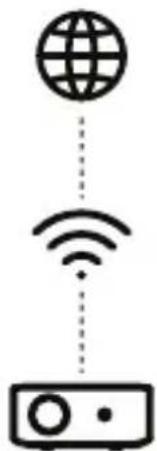
natural_image
Simple diagram showing a globe above wireless signals and a server with ports (no text or symbols)CONNECTING EXTERNAL DEVICES
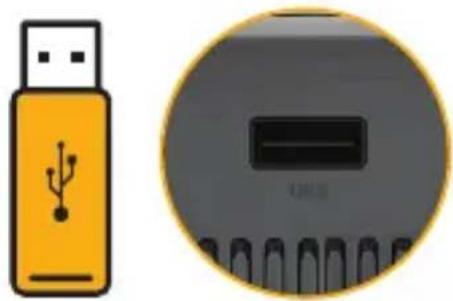
USB Drives
Insert the USB drive into the USB port. A pop-up File Commander window will appear, asking if you want to access the connected storage device. Select "OK" and locate the content you want to view.
natural_image
Illustration of a USB flash unit and a circular electronic device (no text or symbols)EN | 11
CONNECTING EXTERNAL DEVICES
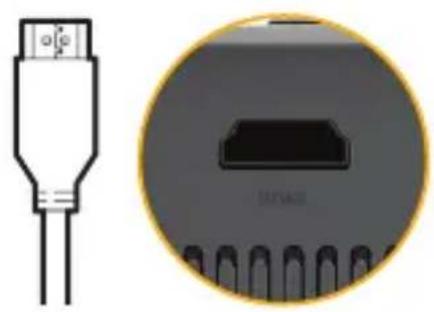
HDMI Compatible Devices
Connect an HDMI cable from the device to your projector. Then, press the Projector Settings button, and under "Input" select "HDMI."
natural_image
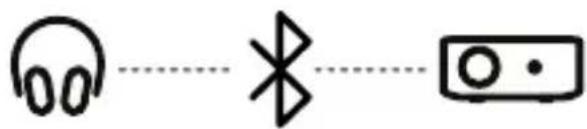
Diagram of a USB connector and its internal circuit board (no text or symbols)Connecting Headphones or Speakers via BLUETOOTH
- Open the Google TV Settings and select "Remote & Accessories." Click "Add Accessory."
- Activate pairing mode on the device you want to connect and select it from the list.
- Wait for the two devices to successfully pair together.
EN | 12
GOOGLE ASSISTANT

With GOOGLE Assistant, you can navigate through the apps and streaming services with your voice.
- Press the GOOGLE Assistant button on your remote.
- Follow the on-screen instructions to complete setup.
- Once setup is complete, press the GOOGLE Assistant button to ask a question or give a command.

natural_image
Stylized cartoon face with black, blue, and orange circles inside a yellow circular border (no text or symbols)CUSTOMER SERVICE
Should you experience any problems with your product, please contact us before returning the item to the place of purchase. We're here to help!
U.S. Support: kodak@camarketing.com
International Support: kodakintl@camarketing.com
www.kodakprojectors.caglobal.com
The Kodak trademark, logo, and trade dress are used under license from Eastman Kodak Company.
ANDROID and GOOGLE PLAY are trademarks of Google LLC.
NETFLIX is a registered trademark of NETFLIX, Inc.
PRIME VIDEO is a trademark of Amazon Technologies, Inc.
Apple, iOS, and App Store are trademarks of Apple Inc. in the U.S. and/or other countries.
BLUETOOTH is a trademark of BLUETOOTH SIG, Inc. USA.
Wi-Fi, WPA, and WPA2 are trademarks of Wi-Fi Alliance in the U.S. and/or other countries.
HDMI, the HDMI logo, and High-Definition Multimedia Interface are trademarks or registered trademarks of HDMI Licensing, LLC in the United States and/or other countries.
All other products, brand names, company names, and logos are trademarks of their respective owners, used merely to identify their respective products, and are not meant to connote any sponsorship, endorsement, or approval.
Distributed by C&A Marketing, Inc., 114 Tived Lane East, Edison, NJ 08837 USA.
© 2024. C&A IP Holdings LLC. All Rights Reserved. Made in China.
LIMITED WARRANTY TO ORIGINAL CONSUMER
This KODAK FLIK X20 Full HD Multimedia Smart Projector ("Product"), including any accessories included in the original packaging, as supplied and distributed new by an authorized retailer is warranted by C&A Marketing, Inc. (the "Company") as follows:
To receive Warranty service, the original consumer purchaser must contact the Company or its authorized service provider for problem determination and service procedures. Proof of purchase in the form of a bill of sale or received invoice, evidencing that the Product is within the applicable Warranty period(s), MUST be presented to the Company or its authorized service provider in order to obtain the requested service.
Service options, parts availability, and response times may vary and may change at any time. In accordance with applicable law, the Company may require that you furnish additional documents and/or comply with registration requirements before receiving warranty service. Please contact our customer service for details on obtaining warranty service:
USA: kodak@camarketing.com, 844-516-1539
International: kodakintl@camarketing.com, +1-844-516-1540
Shipping expenses to the Company's Return Facility are not covered by this warranty and must be paid by the consumer.
The consumer likewise bears all risk of loss or further damage to the Product until delivery to said facility.
EXCLUSIONS AND LIMITATIONS
The Company warrants the Product against defects in materials and workmanship under normal use for a period of ONE (1) YEAR from the date of retail purchase by the original end-user purchaser (“Warranty Period”). If a hardware defect arises and a valid claim is received within the Warranty Period, the Company, at its sole option and to the extent permitted by law, will either (1) repair the Product defect at no charge, using new or refurbished replacement parts, (2) exchange the Product with a Product that is new or which has been manufactured from new or serviceable used parts and is at least functionally equivalent to the original device, or (3) refund the purchase price of the Product.
A replacement Product or part thereof shall enjoy the warranty of the original Product for the remainder of the Warranty Period, or ninety (90) days from the date of replacement or repair, whichever provides you with longer protection. When a Product or part is exchanged, any replacement item becomes your property, while the replaced item becomes the Company's property. Refunds can only be given if the original Product is returned.
This Warranty does not apply to:
(a) Any non-KODAK FLIK X20 Full HD Multimedia Smart Projector product, hardware, or software, even if packaged or sold with the Product;
(b) Damage caused by use with non-KODAK FLIK X20 Full HD Multimedia Smart Projector products;
(c) Damage caused by accident, abuse, misuse, flood, fire, earthquake, or other external causes;
(d) Damage caused by operating the Product outside the permitted or intended uses described by the Company;
(e) Damage caused by third-party services;
(f) A Product or part that has been modified to alter functionality or capability without the written permission of the
Company;
(g) Consumable parts, such as batteries, fuses, and bulbs;
(h) Cosmetic damage; or
(i) If any KODAK FLIK X20 Full HD Multimedia Smart Projector serial number has been removed or defaced.
This Warranty is valid only in the country where the consumer purchased the Product and only applies to Products purchased and serviced in that country.
The Company does not warrant that the operation of the Product will be uninterrupted or error-free. The Company is not responsible for damage arising from your failure to follow instructions relating to its use.
NOTWITHSTANDING ANYTHING TO THE CONTRARY AND TO THE MAXIMUM EXTENT PERMITTED BY APPLICABLE LAW, THE COMPANY PROVIDES THE PRODUCT "AS-IS" AND "AS-AVAILABLE" FOR YOUR CONVENIENCE AND THE COMPANY AND ITS LICENSORS AND SUPPLIERS EXPRESSLY DISCLAIM ALL WARRANTIES AND CONDITIONS, WHETHER EXPRESSED, IMPLIED, OR STATUTORY, INCLUDING THE WARRANTIES OF MERCHANTABILITY, FITNESS FOR A PARTICULAR PURPOSE, TITLE, QUIET ENJOYMENT, ACCURACY, AND NON-INFRINGEMENT OF THIRD-PARTY RIGHTS. THE COMPANY DOES NOT GUARANTEE ANY SPECIFIC RESULTS FROM THE USE OF THE PRODUCT, OR THAT THE COMPANY WILL CONTINUE TO OFFER OR MAKE AVAILABLE THE PRODUCT FOR ANY PARTICULAR LENGTH OF TIME. THE COMPANY FURTHER DISCLAIMS ALL WARRANTIES AFTER THE EXPRESS WARRANTY PERIOD STATED ABOVE.
YOU USE THE PRODUCT AT YOUR OWN DISCRETION AND RISK. YOU WILL BE SOLELY RESPONSIBLE FOR (AND THE COMPANY DISCLAIMS) ANY AND ALL LOSS, LIABILITY, OR DAMAGES RESULTING FROM YOUR USE OF THE PRODUCT. NO ADVICE OR INFORMATION, WHETHER ORAL OR WRITTEN, OBTAINED BY YOU FROM THE COMPANY OR THROUGH ITS AUTHORIZED SERVICE PROVIDERS, SHALL CREATE ANY WARRANTY,
IN NO EVENT WILL THE COMPANY'S TOTAL CUMULATIVE LIABILITY ARISING FROM OR RELATED TO THE PRODUCT, WHETHER IN CONTRACT OR TORT OR OTHERWISE, EXCEED THE FEES ACTUALLY PAID BY YOU TO THE COMPANY OR ANY OF ITS AUTHORIZED RESELLERS FOR THE PRODUCT AT ISSUE IN THE LAST YEAR FROM YOUR PURCHASE. THIS LIMITATION IS CUMULATIVE AND WILL NOT BE INCREASED BY THE EXISTENCE OF MORE THAN ONE INCIDENT OR CLAIM. THE COMPANY DISCLAIMS ALL LIABILITY OF ANY KIND OF ITS LICENSORS AND SUPPLIERS. IN NO EVENT WILL THE COMPANY OR ITS LICENSORS, MANUFACTURERS, AND SUPPLIERS BE LIABLE FOR ANY INCIDENTAL, DIRECT, INDIRECT, SPECIAL, PUNITIVE, OR CONSEQUENTIAL DAMAGES (SUCH AS, BUT NOT LIMITED TO, DAMAGES FOR LOSS OF PROFITS, BUSINESS, SAVINGS, DATA, OR RECORDS) CAUSED BY THE USE, MISUSE, OR INABILITY TO USE THE PRODUCT.
Nothing in these terms shall attempt to exclude liability that cannot be excluded under applicable law. Some countries, states, or provinces do not allow the exclusion or limitation of incidental or consequential damages or allow limitations on warranties, so certain limitations or exclusions may not apply to you. This warranty gives you specific legal rights, and you may have other rights that vary from state to state or province to province. Contact your authorized retailer to determine if another warranty applies.
Distributed by C&A Marketing, Inc., 114 Tived Lane East, Edison, NJ 08837 USA.
© 2024. C&A IP Holdings LLC. All Rights Reserved. Made in China.
REGISTER YOUR PRODUCT!
Scan the QR code below or visit kodakprojectors.caglobal.com/pages/register-your-product to activate your one-year limited warranty and get important information regarding product updates, recommendations, maintenance, and safety.
*Product serial number and proof of purchase needed for product registration.

Important Safety notice for Kodak Flik X20 Full HD Multimedia Smart Projector
This product has been designed to ensure the safety of the user when handled correctly, and in accordance with the user guide and the instructions provided.
It is important that the Kodak projector is handled properly and only used to project media as instructed in the user guide.
For future reference, keep the user guide in a safe place.
WARNING
- Keep away from children and infants. Improper use of this product may cause suffocation or accident.
- Do not install the projector in a place with no ventilation (e.g., a bookshelf or closet). The increased internal temperature may result in a fire.
- Do not place the projector near sources of steam, oil, or mist (e.g., humidifiers or kitchen counters), as this may result in fire, corrosion, or electric shock.
- Do not use the projector in a damp place where it is likely to get wet (e.g., bathroom). This may result in fire or electric shock.
- Ensure good ventilation around the projector. To prevent fire due to increased internal temperature, place it at least 30 cm (11.8") away from the wall.
- Stop using the device immediately if it emits smoke or a strange smell, or otherwise behaves abnormally.
- A strap wound around a child's neck may result in asphyxiation. If your product uses a power cord, mistakenly winding the cord around a child's neck may result in asphyxiation.
- If the projector is dropped in water or any foreign object enters the device, unplug the power cord, turn the projector off, and immediately cease use.
WARNING
- Never attempt to take this product apart. You may be injured.
- If this product is dropped or damaged so that the inside is showing, do not touch it. Contact Kodak customer support at 844-516-1539 or email us at kodak@camarketing.com.
- Never get this product wet or handle it with wet hands. Doing so my result in electric shock and injury.
- Do not cover or wrap the projector or power adapter in a cloth or blanket, or otherwise place the projector in the sun or an environment where heat may build up. This could distort the casing and cause a fire.
- Use a soft dry cloth to clean the device. Do not clean with a damp cloth or volatile liquids such as paint thinner.
- If the device is not functioning properly, please contact the dealer you purchased this product from or Kodak customer support.
- Keep the cover closed to avoid dust and other particles from entering the inside of the device.
- Do not look directly into the projector lens when in use. This may cause damage to your eyes.
- When the lamp is on or has just been turned off, do not touch the air vent or lamp, as they will be very hot.
- Do not use the projector near devices that generate a strong magnetic field.
- Do not block the light beam emitted from the projector using a book or other object. The reflected heat may cause a fire and damage the lens.
- Proper ventilation is required. Do not block airflow around the unit, as this may cause injury and internal overheating.
Projector Care
- Do not get your projector wet or drop it and do not expose it to sand, dust, or dirt.
- Do not use cleaning products or solvents such as those with bleach or alcohol to remove dirt.
- In hot weather, do not leave your projector in places such as in a car or on the beach. Do not leave it in damp places or places where weather exposure could result.
- Be careful not to allow any impact to the lens during transport. Also, do not touch the lens or use sharp tools such as knives or hammers.
- Do not drop anything onto the projector or allow anything to bang into the projector, as this may cause internal damage.
- In order to avoid damage to your eyesight, it is recommended to maintain a distance of more than 5-7 times the diagonal length of the screen.
- Do not start the projector with the volume up high, as this may cause damage to your hearing.
- Do not use high-voltage electrical equipment (e.g., bug zappers) near the projector, as this may cause it to malfunction.
Bluetooth ^® Devices
IMPORTANT: Read the following notices before using the product's built-in Bluetooth transmitter.
Use only as part of a Bluetooth network. Kodak and its affiliates do not accept liability for damages resulting from unauthorized use. Do not use in applications requiring a high degree of reliability, for example in medical devices or other systems that may directly or indirectly impact human life.
Changes or modifications not expressly approved by the Kodak representative responsible for compliance could void the user's authority to operate the equipment. This transmitter must not be co-located or operated in conjunction with any other antenna or transmitter.
Wireless data may be intercepted by third parties. The security of data transmitted over wireless networks is not guaranteed. Do not use the device in locations subject to magnetic fields, static electricity, or radio interference.
Do not use the transmitter in the vicinity of microwave ovens or in other locations subject to magnetic fields, static electricity, or radio interference that may prevent reception of wireless signals. Mutual interference may occur when the transmitter is used in the vicinity of other wireless devices operating in the 2.4 GHz band.
The Bluetooth transmitter operates in the 2.4 GHz band. The standard output is approximately 3.16 mW. This device operates on the same frequency as
commercial, educational, and medical devices and wireless transmitters. It also operates on the same frequency as licensed transmitters and special unlicensed low-voltage transmitters used in radiofrequency identification tracking systems for assembly lines in other similar applications.
Trademark Information: The Bluetooth® word mark and logos are registered trademarks owned by the Bluetooth SIG, Inc., and any use of such marks by C&A Marketing is under license.
Traceability in Europe
UK: Global E-Commerce Experts, Unit 5 Mountpark, Wide Lane, Southampton SO18 2FA UK, Tel: 02039 151930, Email: rp@globalecommexperts.com
EU: Global E-Commerce Experts, Rijnlanderweg 776 Unit H, 2132 NM Hoofddorp Netherlands, Tel: +44 2039 151930, Email: rp@globalecommexperts.com
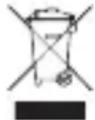
Waste Electrical and Electrical Equipment (WEEE)
This marking shown on the product or its literature indicates that it should not be disposed of with other household wastes at the end of its working life. To prevent possible harm to the environment or human health from uncontrolled waste disposal, please separate this from other types of waste and recycle it responsibly to promote the sustainable reuse of material resources. Household users should contact either the retailer where they purchased this product, or their local government office, for details of where and how they can take this item for environmentally safe recycling. Business users should contact their suppliers and check the terms and conditions of the purchase contract. This product should not be mixed with other commercial wastes for disposal.


For Users in USA and Canada
FCC Statement:
The United States Federal Communications Commission (in 47 CFR15.105) has specified that the following notice be brought to the attention of users of this product.
This equipment has been tested and found to comply with limits for a Class B digital device, pursuant to Part 15 of the FCC Rules. These limits are designed to provide reasonable protection against harmful interference in a residential installation. This equipment generates, uses, and can radiate radio frequency and, if not installed and used in accordance with the instructions, may cause harmful interference to radio communications. However, there is no guarantee that interference will not occur in a particular installation. If this equipment does cause harmful interference to radio or television reception, which can be determined by turning the equipment off and on, the user is encouraged to try to correct the interference by one or more of the following measures:
Reorient or relocate the receiving antenna.
Increase the separation between the equipment and receiver.
Connect the equipment into an outlet or circuit different from that to which the receiver is connected.
Consult the dealer or an experienced radio/TV technician for help.
This device complies with Part 15 of the FCC Rules and Industry Canada licence-exempt RSS standard(s). Operation is subject to the following two conditions: (1) this device may not cause harmful interference, and (2) this device must accept any interference received, including interference that may cause undesired operation.
Modifications (part 15.21)
Any changes or modifications made to this device that are not expressly approved by C&A Marketing may void the user's authority to operate the equipment.
For further information, contact:
C+A Global
114 Tived Lane East, Edison, NJ 08837
Email: kodak@camarketing.com
Telephone: 1-844-516-1539
Website: www.kodakprojectors.caglobal.com
This equipment complies with FCC and Canada radiation exposure limits set forth for an uncontrolled environment. This equipment should be installed and operated with a minimum distance of 20cm between the radiator and your body.
This transmitter must not be co-located or operating in conjunction with any other antenna or transmitter.
Notice to Users in Canada (5 GHz)
CAUTION: When using IEEE 802.11a wireless LAN, this product is restricted to indoor use, due to its operation in the 5.15-5.25 GHz frequency range. The Innovation, Science and Economic Development Canada requires this product to be used indoors for the frequency range of 5.15 GHz to 5.25 GHz to reduce the potential for harmful interference with co-channel mobile satellite systems. High-power radar is allocated as the primary user of the 5.25- to 5.35-GHz and 5.65- to 5.85-GHz bands. These radar stations can cause interference with and/or damage to this device.
INTRODUCCIÓN
natural_image
Diagram of a device rear panel with five yellow circular components and black connectors (no text or symbols)natural_image
Back view of a black rectangular device with circular holes and a vertical yellow indicator line, no text or symbols visible.natural_image
Simple circular diagram with a central power button and two side circles (no text or symbols)natural_image
Simple line diagram showing a globe above a wireless network with a monitor below (no text or symbols)natural_image
Illustration of a USB flash unit and a circular device with a resistor (no text or symbols)ES | 28
natural_image
Diagram showing a USB connector and its corresponding physical component (no text or symbols)ES | 29
GOOGLE ASSISTANT

natural_image
Stylized cartoon face with black, blue, and orange circles inside a yellow circular border (no text or symbols)ATENCIÓN AL CLIENTE
APERÇU DU PRODUIT
natural_image
Diagram of a device rear panel with five yellow circular components and black connectors (no text or symbols)APERÇU DU PRODUIT
natural_image
Back view of a black rectangular electronic device with two yellow hanging weights and mounting holes (no text or symbols visible)APERÇU DE LA TÉLÉCOMMANDE
natural_image
Simple circular diagram with a central power button and two side arcs, no text or symbols present.flowchart
graph TD
    A["Laptop"] --> C["Wireless Signal"]
    B["Smartphone"] --> C
    C --> D["Device"]
MISE EN MIROIR OU DIFFUSION DE CONTENU À PARTIR D'IOS
natural_image
Simple diagram showing a globe above wireless signals and a server with ports (no text or symbols)CONNEXION D'APPAREILS EXTERNES
Lecteurs USB
natural_image
Illustration of a USB flash unit and a circular electronic device (no text or symbols)FR | 45
CONNEXION D'APPAREILS EXTERNES
Appareils compatibles HDMI
natural_image
Diagram showing a USB connector and its corresponding physical component (no text or symbols)FR | 46
GOOGLE ASSISTANT

natural_image
Stylized cartoon face with black, blue, and orange circles inside a yellow circular border (no text or symbols)SERVICE CLIENT
114 Tived Lane East, Edison, NJ 08837
Courriel : kodak@camarketing.com
Téléphone: 1-844-516-1539
Site web : www.kodakprojectors.caglobal.com
PRODUKTÜBERSICHT
natural_image
Diagram of a device rear panel with five yellow circular components and black connectors (no text or symbols)PRODUKTÜBERSICHT
natural_image
Back view of a black rectangular electronic device with two yellow hanging weights and mounting holes (no text or symbols visible)natural_image
Simple circular diagram with a central power button and two side circles, no text or symbols present.natural_image
Simple diagram showing a globe above wireless signal and a server with ports (no text or symbols)natural_image
Illustration of a USB flash unit and a circular electronic device (no text or symbols)DE | 62
natural_image
Diagram showing a USB connector and its corresponding physical package (no text or symbols)DE | 63
GOOGLE ASSISTANT

natural_image
Stylized cartoon face with black eyes, blue circles, red dots, and a yellow ring (no text or symbols)KUNDENDIENST
114 Tived Lane East, Edison, NJ 08837
E-Mail: kodak@camarketing.com
Telefon: 1-844-516-1539
Website: www.kodakprojectors.caglobal.com
PANORAMICA DEL PRODOTTO
natural_image
Illustration of a black cylindrical device with five yellow circular components and three black rectangular blocks, no text or symbols present.PANORAMICA DEL PRODOTTO
natural_image
Back view of a black rectangular electronic device with two yellow hanging weights and mounting holes (no text or symbols visible)PANORAMICA DEL TELECOMANDO
natural_image
Simple circular diagram with a central power button and two side arcs, no text or symbols present.IMPOSTAZIONE DI ANDROID TV
natural_image
Simple line diagram showing a globe above a wireless network with a monitor below (no text or symbols)COLLEGAMENTO DI DISPOSITIVI ESTERNI
Unità USB
natural_image
Illustration of a USB flash unit and a circular electronic device (no text or symbols)COLLEGAMENTO DI DISPOSITIVI ESTERNI
natural_image
Diagram showing a USB connector and its corresponding physical component (no text or symbols)GOOGLE ASSISTANT

natural_image
Stylized cartoon face with black, blue, and orange circles inside a yellow circular border (no text or symbols)SERVIZIO CLIENTI
114 Tived Lane East, Edison, NJ 08837
E-mail: kodak@camarketing.com
Telefono: 1-844-516-1539
Sito web: www.kodakprojectors.caglobal.com"

- CONTENTS
- EN
- PRODUCT OVERVIEW
- REMOTE CONTROL OVERVIEW
- SETTING UP THE PROJECTOR
- Method 1: Set Up with an ANDROID Device
- Method 2: Set up with an iOS Device
- Method 3: Set Up with the Remote Control
- PROJECTOR SETTINGS
- CASTING CONTENT VIA GOOGLE CAST
- MIRRORING OR CASTING CONTENT FROM IOS
- From iPhone or iPad
- From Mac
- MIRRORING OR STREAMING CONTENT FROM ANDROID
- CONNECTING EXTERNAL DEVICES
- USB Drives
- HDMI Compatible Devices
- Connecting Headphones or Speakers via BLUETOOTH
- GOOGLE ASSISTANT
- CUSTOMER SERVICE
- LIMITED WARRANTY TO ORIGINAL CONSUMER
- REGISTER YOUR PRODUCT!
- Important Safety notice for Kodak Flik X20 Full HD Multimedia Smart Projector
- WARNING
- Projector Care
- Bluetooth ® Devices
- Traceability in Europe
- Waste Electrical and Electrical Equipment (WEEE)
- For Users in USA and Canada
- FCC Statement:
- INTRODUCCIÓN
- ATENCIÓN AL CLIENTE
- APERÇU DU PRODUIT
- APERÇU DE LA TÉLÉCOMMANDE
- MISE EN MIROIR OU DIFFUSION DE CONTENU À PARTIR D'IOS
- CONNEXION D'APPAREILS EXTERNES
- Lecteurs USB
- Appareils compatibles HDMI
- SERVICE CLIENT
- PRODUKTÜBERSICHT
- KUNDENDIENST
- PANORAMICA DEL PRODOTTO
- PANORAMICA DEL TELECOMANDO
- IMPOSTAZIONE DI ANDROID TV
- COLLEGAMENTO DI DISPOSITIVI ESTERNI
- Unità USB
- SERVIZIO CLIENTI
Brand : KODAK
Model : FLIK X20
Category : Projector