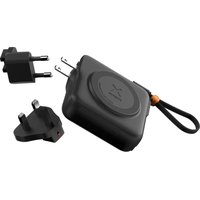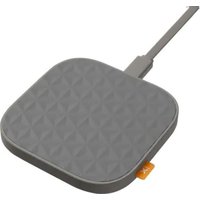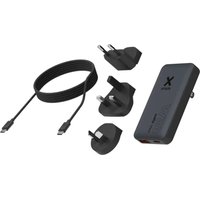
XTPC0651 - Battery charger Xtorm - Free user manual and instructions
Find the device manual for free XTPC0651 Xtorm in PDF.


User questions about XTPC0651 Xtorm
0 question about this device. Answer the ones you know or ask your own.
Ask a new question about this device
Download the instructions for your Battery charger in PDF format for free! Find your manual XTPC0651 - Xtorm and take your electronic device back in hand. On this page are published all the documents necessary for the use of your device. XTPC0651 by Xtorm.
USER MANUAL XTPC0651 Xtorm
natural_image
Technical line drawings of four different electrical socket components (no text or symbols)SPECIFICATIONS PRODUCT OVERVIEW1 2

Output 1: USB-C PD 65W
Output 2: USB-A QC 3.0 27W
Combined max. output: 57W (15W - 12W)

Charger 85g
EU plug 13q
UK plug 18g
AU/NZ plug 15g

AC 100V-240V
50/60Hz
1.3A max.

EU plug
UK plug
AU/NZ plug (type-i)
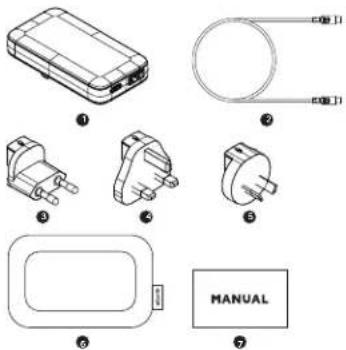
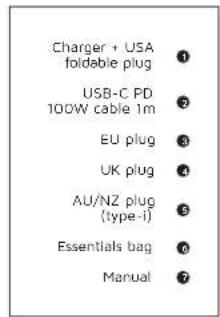
USB-C PD 100W cable 1m
Essentials bag
Manual

45 × 85 × 15mm
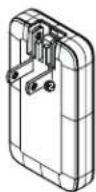
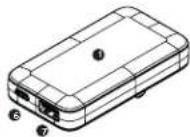
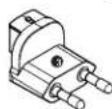
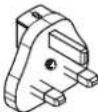

Charger
USA foldable plug
EU plug
UK plug
①
②
3
4
AU/NZ plug (type-i)
USB-C output
USB-A output
CHARGING YOUR DEVICE3
CHARGING YOUR DEVICE 3
natural_image
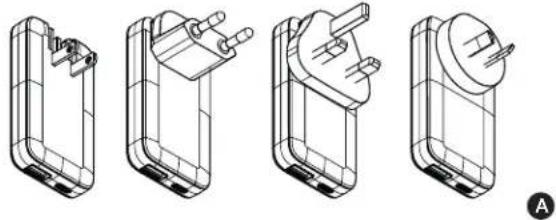
Four technical line drawings of a battery pack assembly, showing internal components and mounting points (no text or symbols)3A Use the US plug by folding out the pins. Or fold these pins in and place the preferred plug onto the Fast Travel Charger. The plug is successfully added and locked whenever you hear it "click". To remove a plug, pull back the red switch and simultaneously slide out the plug
natural_image
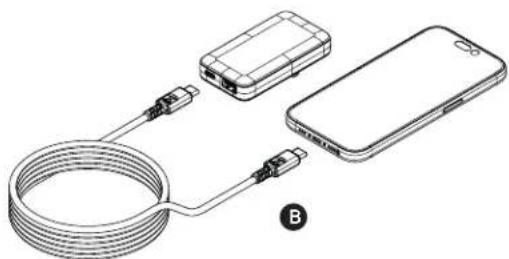
Diagram showing three connected devices: a cable, a smartphone, and a device with connectors (no text or symbols)3B Connect the USB-C PD or an USB-A cable into one of the USB ports of the Fast Travel Charger and the other end to the input of your device.
CHARGING YOUR DEVICE3
IN THE BOX 4
natural_image
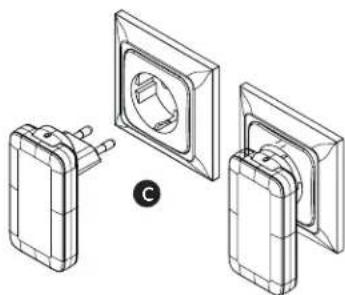
Technical line drawing of three electrical socket components with a central socket (no text or symbols)3C Plug the Fast Travel Charger into the wall socket. Charging will start automatically. 3D The output power of the Fast Travel Charger depends on the input and charging speed of your connected device.
EN - ENGLISH NL - NEDERLANDS
1 SPECIFICATIONS
2 PRODUCT OVERVIEW
-
Charger
-
USA foldable plug
- EU plug
- UK plus
- AU/NZ plug (type-i)
- USB-C output
- USB-A output
3 CHARGING YOUR DEVICE
3.A Use the US plug by folding out the pins. Or fold these pins in and place the preferred plug onto the Fast Travel Charger. The plug is successfully added and locked whenever you hear it "click". To remove a plug, pull back the red switch and simultaneously slide out the plug.
3.B Connect the USB-C PD or an USB-A cable into one of the USB ports of the Fast Travel Charger and the other end to the input of your device.
3.C Plug the Fast Travel Charger into the wall socket. Charging will start automatically.
3.D The output power of the Fast Travel Charger depends on the input and charging speed of your connected device.
4 IN THE BOX
1 SPECIFICATIES
2 PRODUCTOVERZICHT
-
Lader
-
Opyouwbare stekker V5
- EU-stekker
- UK stekker
- AU/NZ-stekker (type-i)
- USB-C-uitgang
- USB-A-uitgang
3 JE APPARAAT OPLADEN
3.C Plugg Fast Travel Charger inn i
stikkontakten. Ladingen starter automatisk
3 INCĂRCAREA DISPOZITIVULUI DVS.
Provided with a temperature control chip that prevents overheating.

- SECURED POWER MANAGEMENT
Automatically picks the correct charging speed and efficiently devides power between
attached devices.

- SHORT CIRCUIT PROTECTION
Breaks the circuit automatically when an overcurrent is detected. This protects the
Xtorm charger and your device from short circuit damage.

- HIGH EFFICIENCY
Our power products are built to power your device as efficient as possible. This ensures the least possible loss of energy during the charging process.

WARNINGS
EN Warnings
Don't drop, disasible or attempt to repair the charges by yourself. Avoid exposure to water or high humidity. Don't access to any heat source. Keep out of reach of children. Don't use in the presence of fluctammable gas. The warranty will lapse in the event of improper use. Telco Accessories has tested the product in a test environment. All statements/declarations made by Telco Accessories about the (paration) of the product are based on the results obtained from such tests. These results/statements/declarations cannot be guaranteed, for example in cases of depositing or inudicious use and/or use in a different environment.
NL Waarschuwingen
The following table provides the original data:
AR
- 1960(2) was the first time of the year. (2023) E: 1960 (2) was the second time of the year. (2024) E: 1960 (3) was the third time of the year. (2025) E: 1960 (4) was the fourth time of the year. (2026) E: 1960 (5) was the fifth time of the year.
(1) 12 12 12 12
The following table is a simple formula:
in Arcoa, 2017.
- 12 . 12 . 12 . 12 .
EU DECLARATION OF CONFORMITY
| Item Name | Item Type |
| Item Name | Item Name |
| Item ID | Item ID |
| Item Size | Size (mm) |
| Item Name | Item Name |
| Item Name | Item Name |
| Item Name | Item Name |
| Item Name | Item Name |
| Item Name | Item Name |
| Item Name | Item Name |
| Item Name | Item Name |
| Item Name | Item Name |
| Item Name | Item Name |
| Item Name | Item Name |
| Item Name | Item Name |
| Item Name | Item Name |
| Item Name | Item Name |
| Sample Name | Sample Name |
| Sample Name | Sample Name |
| Sample Name | Sample Name |
| Sample Name | Sample Name |
| Sample Name | Sample Name |
| Sample Name | Sample Name |
| Sample Name | Sample Name |
| Sample Name | Sample Name |
| Sample Name | Sample Name |
| Sample Name | Sample Name |
| Sample Name | Sample Name |
| Sample Name | Sample Name |
| Sample Name | Sample Name |

natural_image
Pure horizontal line with four corner markers (no text or symbols)
HIGHER QUALITY
= LOWER IMPACT
CUSTOMER SUPPORT
support@tag.nl
+31 (0)30 635 4800
TELCO ACCESSORIES GROUP
Hoofdveste 19, 3992DH Houten
The Netherlands
MOREENERGY
XTORM.EU