
HAMTCBP86IRCS - Cooker HAIER - Free user manual and instructions
Find the device manual for free HAMTCBP86IRCS HAIER in PDF.
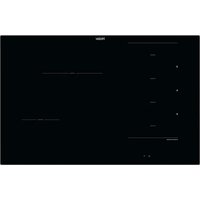


| Product type | Induction hob |
| Brand | Haier |
| Model | HAMTCBP86IRCS |
| Power supply | 220-240 V ~ 50/60 Hz |
| Maximum power | 7.4 kW (adjustable from 2 kW to 7.4 kW) |
| Number of cooking zones | 4 |
| Zone type | Induction |
| Power levels | 15 levels + Boost |
| Boost function | Yes (levels 14-15) |
| Pan detection | Yes |
| Power management | Yes, 8 levels (P1 to P8) |
| Special functions | Sous-vide, Grill, Simmer, Steam, Assisted cooking |
| Cooking probe | Compatible (Preci Probe) |
| Timer | Yes |
| Child lock | Yes |
| Automatic safety shut-off | Yes |
| Residual heat indicator | Yes (H symbol) |
| Surface type | Ceramic glass |
| Recommended cleaning | Special glass scraper and induction cleaner |
| Compatible pan diameter | 90 mm to 210 mm depending on zone |
| Net weight (estimated) | Approximately 11 kg |
| Mobile app | Compatible with hOn |
Frequently Asked Questions - HAMTCBP86IRCS HAIER
User questions about HAMTCBP86IRCS HAIER
0 question about this device. Answer the ones you know or ask your own.
Ask a new question about this device
Download the instructions for your Cooker in PDF format for free! Find your manual HAMTCBP86IRCS - HAIER and take your electronic device back in hand. On this page are published all the documents necessary for the use of your device. HAMTCBP86IRCS by HAIER.
USER MANUAL HAMTCBP86IRCS HAIER
DISCOVER THE FULL USER MANUAL
(EL) DISCOVER THE FULL USER MANUAL (CS) GET THE FULL USER MANUAL (PT) DISCOVER THE FULL USER MANUAL (ET) DISCOVER THE FULL USER MANUAL (LT) GET TO KNOW THE FULL USER MANUAL (LV) DISCOVER THE FULL USER MANUAL (HR) DISCOVER THE COMPLETE USER MANUAL (SR) VIEW THE COMPLETE USER MANUAL (RO) DISCOVER THE COMPLETE USER MANUAL (HU) DISCOVER THE FULL USER MANUAL (SK) GET THE FULL USER MANUAL
Haier
INSTRUCTION GUIDE EN 4 HOBS
GUIDA ALL'USO PIANO COTTURA IT 11
INSTRUCTIONS PLAQUE DE CUISSON FR 18
5 Before starting 8 Cooking guidelines 11 Care and cleaning 12 Failure display and inspection
WELCOME
Thank you for choosing our product. To ensure your safety and get the best results, please read this manual carefully, including the safety instructions, and keep it for future reference. Before installing the hob, note the serial number, which you might need for repairs. Check for any damage during transportation and consult a technician if you're unsure before using it. Keep packaging materials away from children.
NOTE: Please note that the hob's accessories may vary depending on the model you purchased.
1. BEFORE STARTING
1.1 GENERAL INFORMATION
Before you begin, it is important to know: all functions of this hob are designed in order to comply with the most stringent safety regulations.
For this reason:
- Some functions will be activated, or will be automatically deactivated in absence of pots on the burners or when they are not correctly positioned.
- In other cases, functions will be automatically deactivated after a few seconds when they require more than one step (e.g., "Turn the hob on" without "selecting the cooking zone").
- In case of long-term use, the appliance may not immediately shut down, even with all cooking zones off, because it is in the cooling phase; the H symbol appears on the cooking zone display until it is cooled.
Safe activation: the product is activated with the presence of pots on the cooking zone. The heating process does not start or is interrupted if there are no pots or if these are removed.
Safety shut down: for safety reasons, each cooking zone has a maximum operating time, which depends on the maximum power level set.
1.2. POWER MANAGEMENT
When the product is first used, the hob is set to maximum reachable power. Different power limits can be chosen according to the home main supply system by using the power management function.
How to set the power management
It is possible to set a maximum power absorption level for the induction hob, choosing up to different power ranges.
Induction hobs are able to limit themselves automatically in order to work at a lower power level, to avoid the risk of overloading.
To enter the Power Management Function:
- Turn on the hob, then press at the same time and
- The timer indicator will show "P8" which means power level 8. The default mode is on 7.4kW.
To switch to another level
- Scroll left and right on the slider to change the power management level.
- There are 8 power levels, from "P1" to "P8". The timer indicator will show one of them:
| P1 P2 | P3 P4 | P5 P6 | P7 P8 | ||||
| 2kW | 2,5kW | 3kW | 3,5kW | 4,5kW | 5,5kW | 6,8kW | 7,4kW |
Confirmation and Exit Power Management Function
For confirmation, turn off the hob. The power level will be saved automatically. The selected value is permanently stored and remains even after power down of the main supply. To change the power level, repeat the operations described above.
NOTE: depending on the power management selection, some power levels and functions of the cooking zones could be automatically limited so as not to exceed the selected value. In particular, in case of a power management level set less than 4.5 kW, the Boost function, Varycook, and some cooking preparations with the app could not be selected.
In particular, the last power level selection can be refused or adjusted according to the available amount of residual power from the previous setting.
1.3. CHOOSING THE RIGHT COOKWARE
1.3.1. Characteristics of the cookware
Use only pots with the induction symbol.
- Only pots with a perfectly flat bottom. Otherwise, the following situations may occur:
- No pot detection;
- Low performance;
- Unwanted noise.
- Only pots with a smooth base, to avoid scratching the hob surface;
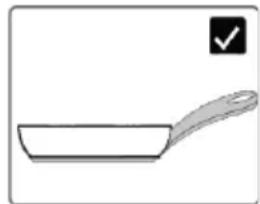
NOTE: avoid as much as possible moving pot operations on the glass surface just to minimize scratches.
Magnet test
Induction cooking uses magnetism to generate heat; pots must therefore contain iron. If you already have a cookware, you can check if the material is magnetic by using a magnet. Pots are suitable if they are magnetically attracted by the magnet.
Cookwares made from the following materials are not suitable: pure stainless steel, aluminum or copper without a magnetic base, glass, wood, porcelain, ceramic, earthenware.
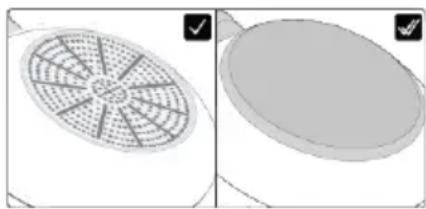
1.3.2 Higher quality cookwares
All cookwares with the induction symbol are generally accepted. Depending on the type of bottom, however, the behavior may vary. When using large cookware with a smaller ferromagnetic element, only the ferromagnetic element heats up. Consequently, heat might not be uniformly distributed.
1.3.3. Dimension & placement
Always use the cooking zone that best matches the bottom diameter of the pan. Place the pot making sure it is well centered in the cooking area.
NOTE: it's recommended not to use pans that exceed the perimeter of the cooking zone.
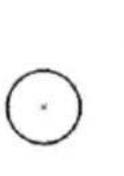
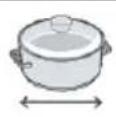
For the correct working of the hob, it's necessary to use pots with the bottom diameter inside the range described in the following table.
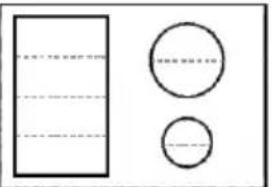 | 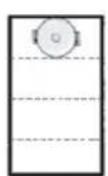 | 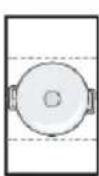 | 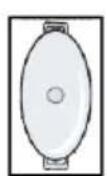 |  |  | |
 | min. | 90 mm | 160 mm | 160 mm | 185 mm | 90 mm |
| max. | 180 mm | 220 mm | 200 x 380 mm | 210 mm | 150 mm | |
NOTE: by using a cookware smaller than the minimum required, it could not be detected. While using one bigger than the maximum required, malfunctions or low performances may occur.
ATTENTION: do not put the pot on/near the control panel during cooking or cooling down.
2.COOKING GUIDELINES
2.1 POWER TABLE
| POWER LEVEL | SYMBOL | TYPE OF COOKING SUGGESTED USE | |
| 14/15 BOOSTER |  | Fast Heating, Booster | Ideal for stir-frying, searing, bringing soup to the boil, boiling water |
| 11-13 | Frying, Grilling, Keep Boiling | Ideal for starting cooking, sautéing, cooking pasta, deep frying, grilling | |
| 5-10 | Stewing, Cooking | Ideal for preheat stewing, keep gentle boiling, cooking, long & continuos frying (rice, roast, pancakes*) | |
| 3-4 | [COXS] | Simmering, Keep Warm, Slow Cooking | Ideal for slow cooking recipes, gentle simmering, cream sauces and liquid |
| 1-2 |  | Melting, Keep Liquid, Defrosting | Delicate warming for small amounts of food, slow warming, melting & keep liquid chocolate** |
| OFF | - | - | |
*Continuous frying pancake at level 5-6. **Melting Level 2, when begins to melt, move to level 1 to keep liquid.
5.2. COOKING TABLE
| MANUAL COOKING GUIDELINES | EVERYDAYCOOKING& SPECIALPROGRAMSAVAILABLE | EVERYDAYCOOKING,RECIPES &SPECIALPROGRAMSAVAILABLEON APP | CULINARYSENSORRECIPESAVAILABLEON APP (*) | ||||
| FOOD | RECIPE | Preheat | Cooking | ONPRODUCT | |||
| CATEGORY | Heating Phase | Power Level | Power Level | ||||
| Pasta & rice | Pasta | Heating Water | 14 - 15 6 | - 11 | X | ✓ | X |
| Rice Pudding | Heating Milk | 13 - 15 6 | - 8 | ||||
| Boiled Rice | Heating Water | 14 - 15 | 6 - 8 | ||||
| Risotto | Stir-frying &Roasting | 13 - 15 | 6 - 8 | ||||
| Meat | Roast Meat | Stir-frying &Roasting | 10 - 13 | 6 - 11 | X | ✓ | ✓ |
| Grilled Steak | Preheat Grill | 10 - 13 | 10 - 13 | ||||
| Sausages & Hamburger | Preheat Grill | 10 - 11 | 10 - 13 | ||||
| Chicken Pieces | Preheat Pan | 10 - 11 | 6 - 10 | ||||
| Breaded Steak | Preheat Pan | 6 - 11 | 10 - 13 | ||||
| Fish | Grilled Fish | Preheat Grill | 10 - 13 | 8 - 10 | X | ✓ | ✓ |
| Fillet Fish | Stir-frying | 10 - 13 | 8 - 10 | ||||
| Shrimps & Prawns | Stir-frying | 10 - 13 10 | - 13 | ||||
| Vegetables &legumes | Fresh Frying Potatoes | Heating Oil* | 14 | 11 - 14 | X | ✓ | ✓ |
| Frozen Frying Potatoes | Heating Oil* | 14 | 11 - 14 | ||||
| Grilled vegetables | Preheat Grill | 6 - 11 | 10 - 13 | ||||
| Peppers, Zucchini & Eggplant | Preheat Pan | 6 - 11 | 10 - 13 | ||||
| Eggs & Eggproducts | Hard Boiled Eggs | Heating Water | 14 - 15 6 | - 8 | X | ✓ | ✓ |
| Fried Eggs | Stir-frying | 10 - 13 | 8 - 10 | ||||
| Pancakes | Preheat Pan | 6 - 11 | 5 - 6 | ||||
| Sauces,Creams &Dessert | Tomato Sauces | Heating Sauces | 4 - 6 2 - 4 | X | ✓ | X | |
| Melted Cheese | Melting | 6 - 11 | 2 - 5 | ||||
| Cream & Custard | Heating Cream | 4 - 6 2 - 4 | |||||
| Melted Chocolate | Melting | 1 - 2 1 | |||||
| Butter | Melting | 1 - 3 1 - 3 | |||||
*Applicable for models with Culinary Sensor
2.3. COOKING PREPARATIONS WITH THE APP
Preci Probe as thermometer
Set the target temperature you want to reach in the hOn App, insert the Preci Probe inside the food or with its accessory inside liquids, and you will see the temperature rising in the app until it reaches the target temperature.
It will help you to accurately maintain the temperature for all kinds of food. You cannot use it when the Assisted Cooking function operates.
Assisted Cooking: "Cook with me" function
Choose from the hOn App recipes or special programs, follow the preparation step by step, and then the hob will automatically set the parameters for the chosen cooking method.
Sous Vide
Type of cooking in which the food is placed in a vacuum bag and cooked in a low-temperature water bath.
The food prepared in this way will be more juicy and tender and will keep the nutritional properties intact, making it healthier and tastier.
Go to the hOn App, select the category of food, select this type of cooking, insert the bag with the food in the pot with water, and the induction hob will set the correct cooking temperature for a perfect result.
Grill
Select the category of food from the hOn App, select this type of cooking, and the induction hob will automatically bring the grill to the correct temperature in a predetermined time.
Simmering
The simmering function is ideal for cooking sauces, stews, braised dishes, and all preparations with an average long cooking time.
The automatic function you find in the hOn App will gently bring the food to a slightly boiling temperature, keeping it for the entire duration of cooking.
Steaming
With the steaming function you can steam food such as vegetables, meat, or fish in pots equipped with a steamer basket. Steam cooking is faster than boiling, and since the food is not immersed in a liquid, it disperses fewer nutrients and preserves its vitamin content, improving its taste and structure, which will be more compact and pleasant.
If necessary, contact the authorized service center.
2.4 CULINARY SENSOR (available depending on the model)
This function is available for three cooking methods: Grilling, Pan frying, and Deep frying. All accessible in the Everyday Cooking section (HoN app).
Utility
Thanks to Culinary Sensor technology, the pan or the oil automatically reaches and maintains the ideal temperature based on the selected cooking method.
Directions for Use
- Cooking performance may vary because of cookware quality: please refer to Paragraph 3.3. Optimized cookware bottom diameter is 18 cm.
- Cookware must be placed centered on the cooking zone and not moved during the initial cooking phase (preheating phase). The function must be started only when the hob is cold.
Grilling and Pan-frying
Please use empty cookware before activating the function.
Deep Frying
Please fill the cookware with 1.5 liters of frying oil (around 5 cm frying oil depth) before activating the function.
3.1. GENERAL RECOMMENDATIONS
Regular cleaning can extend the lifecycle of your appliance.
• Clean the hob after each use; • Always use cookware with a clean base; • Scratches on the surface have no effect on how the hob operates; • Use a special cleaner suitable for the surface of the hob; • Use a special scraper for the glass.
3.2. CLEANING THE HOB
Before proceeding with the cleaning, make sure that the cooking zones are turned off. Always remember to follow the recommended cleaning instructions and avoid using abrasive products that could damage the surface of the cooktop.
a) FATTY SOIL
This procedure is recommended for these kinds of scenarios: splatters caused by frying or grilling meat.
- Let the hob cool down.
- Absorb any excess liquid around the pot with kitchen paper, then remove the pot.
- Clean the cooking surface with a cloth and detergent solution.
- If necessary, clean the hob a second time using hot water and cleaner for induction hob glasses.
b) SUGARY SOIL
This procedure is recommended for foods that, due to their high sugar content, need to be promptly removed to prevent damage to the hob surface (syrups, jams, or preserves).
- When the hob is still warm, absorb any excess liquid around the pot with kitchen paper, then remove the pot.
- If necessary, we recommend using a scraper at an acute angle to remove any remaining residue.
- Clean the cooking surface with a detergent solution and dry it with the kitchen paper. • If necessary, clean the hob a second time using hot water and cleaner for induction hob glasses.
c) STARCHY SOIL
This cleaning procedure is recommended for these kinds of foods: pasta, rice and potatoes.
- Absorb any excess liquid around the pot with kitchen paper, then remove the pot.
- Let the hob cool down.
- Use a damp cloth to moisten any starch residues. Allow it to sit for a couple of minutes.
- Clean the cooking surface with a cloth and detergent solution. After cleaning, wipe the hob dry with a soft cloth.
- If necessary, clean the hob a second time using hot water and cleaner for induction hob glasses.
NOTE: Please consider these instructions also for water rings, limescale rings, fat stains.
d) SHINY METALLIC DISCOLORATION
Use a solution of water with vinegar and clean the glass surface with a cloth.
4. FAILURE DISPLAY & INSPECTION
4.1 TROUBLESHOOTING
| Problem | Possible causes | What to do |
| The induction hob cannot be turned on. | No power. | Make sure the induction hob is connected to the power supply. Check whether there is a power outage in your home or area. If the problem persists, call a qualified technician. |
| The touch controls are unresponsive. | The controls are locked. | Unlock the controls by checking the section 'How product works'. |
| The touch controls are difficult to operate. | There might be water residue on the controls, or you might not be applying the correct pressure to the buttons. | Make sure the touch control area is dry and use the right pression when touching the controls. |
| The glass is being scratched. | Rough-edged cookware. Unsuitable, abrasive scourer or cleaning products being used. | Use cookware with flat and smooth bases. See 'Choosing the right cookware' and "Care and cleaning" sections. |
| Some pans make crackling or clicking noises. | This may be caused by the construction of your cookware (layers of different metals vibrating differently). | This is normal for cookware and does not indicate a fault. |
| The induction hob makes a low humming noise when used on a high heat setting. | This is caused by the technology of induction cooking. | This is normal, but the noise should quieten down or disappear completely when you decrease the heat setting. |
| Fan noise coming from the induction hob. | A cooling fan built into your induction hob has come on to prevent the electronics from overheating. It may continue to run even after you've turned the induction hob off. | This is normal and needs no action. Do not switch the power to the induction hob off at the wall while the fan is running. |
| Pans do not become hot and "U" appears in the dis play. | The induction hob cannot detect the pan because it is not suitable for induction cooking. The induction hob cannot detect the pan because it is too small for the cooking zone or not properly centred on it. | Use cookware suitable for induction cooking. See section 'Choosing the right cookware'. Centre the pan and make sure that its base matches the size of the cooking zone. |
| The induction hob or a cooking zone has turned itself off unexpectedly, a tone sounds and an error code is displayed (typically alternating with one or two digits in the cooking timer display). | Technical fault. | Please note down the error letters and numbers, switch the power to the induction hob off at the wall, and contact a qualified technician. |
| d0 warning appears on display | Pressing two buttons at the same time, waterdrops or dust on the glass | Make sure no buttons are being pressed at the same time and clean the hob to remove any water or dust residues. |
4.1.2 ERROR CODES
| ERROR CODE | RULE OF DISPLAY | ACTIONS | |
| E0 | Call ASA | ||
| Front left | |||
| E1 | Call ASA | ||
| Front left | |||
| E2 | Call ASA | ||
| Front left | |||
| E3 | Call ASA | ||
| Front left | |||
| E4 | Left Right | Check mains cable & circuit breaker, Check mains supply voltage If ok call ASA | |
| E5 | Wait for cooldown, clean and/or remove foreign bodies Call ASA | ||
| Front left | |||
| E6 | Rear left | Rear right | Check installation requirements via user manual, if ok call ASA |
| Front left | Front right | ||
| E7 | Rear left | Rear right | Call ASA |
| Front left | Front right | ||
| E8 | Rear left | Rear right | Check installation requirements via user manual, if ok call ASA |
| Front left | Front right | ||
| E9 | Call ASA | ||
| Front left | |||
*ASA = Service Center
3.2. ASSET MANAGEMENT
- DISCOVER THE FULL USER MANUAL
- HAIER
- WELCOME
- BEFORE STARTING
- GENERAL INFORMATION
- FOR THIS REASON
- POWER MANAGEMENT
- HOW TO SET THE POWER MANAGEMENT
- TO ENTER THE POWER MANAGEMENT FUNCTION
- TO SWITCH TO ANOTHER LEVEL
- CONFIRMATION AND EXIT POWER MANAGEMENT FUNCTION
- CHOOSING THE RIGHT COOKWARE
- CHARACTERISTICS OF THE COOKWARE
- MAGNET TEST
- HIGHER QUALITY COOKWARES
- DIMENSION & PLACEMENT
- COOKING GUIDELINES
- POWER TABLE
- COOKING TABLE
- COOKING PREPARATIONS WITH THE APP
- PRECI PROBE AS THERMOMETER
- ASSISTED COOKING: "COOK WITH ME" FUNCTION
- SOUS VIDE
- GRILL
- SIMMERING
- STEAMING
- CULINARY SENSOR (AVAILABLE DEPENDING ON THE MODEL)
- UTILITY
- DIRECTIONS FOR USE
- GRILLING AND PAN-FRYING
- DEEP FRYING
- GENERAL RECOMMENDATIONS
- CLEANING THE HOB
- FATTY SOIL
- SUGARY SOIL
- STARCHY SOIL
- SHINY METALLIC DISCOLORATION
- FAILURE DISPLAY & INSPECTION
- ASSET MANAGEMENT
Brand : HAIER
Model : HAMTCBP86IRCS
Category : Cooker