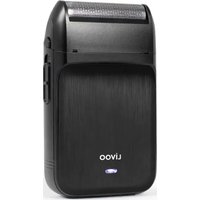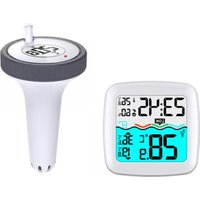
SL266 - Food thermometer LIVOO - Free user manual and instructions
Find the device manual for free SL266 LIVOO in PDF.


User questions about SL266 LIVOO
0 question about this device. Answer the ones you know or ask your own.
Ask a new question about this device
Download the instructions for your Food thermometer in PDF format for free! Find your manual SL266 - LIVOO and take your electronic device back in hand. On this page are published all the documents necessary for the use of your device. SL266 by LIVOO.
USER MANUAL SL266 LIVOO
David Bousquet, CEO Signature:
text_image
DELTA SAS 1 rue FOCH BP 61071 67452 MUNDOLSHEM GEDEX FRANCE SHEET: 324 332 186 0139 XPE: 516 J TEL: 33 190-22 61 32 FAX: 33 3 90 20 30 29 e-mail: delta-import.com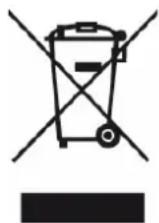
Thank you for choosing a Livoo product!
EN
Your blender, your barbecue, and your headphones are not just objects, they are extensions of yourself, allowing you to get closer to your friends and family, to bring them together, to laugh and to share experiences. Livoo's aim is to help you live your life to the fullest, whatever wishes you have throughout the year. Winter raclette, summer barbecue. Or the other way around. "t's up to you. Take advantage of this freedom for feel good moments every day.
That's why we're constantly innovating and creating clever products full of zest, but most of all, accessible. Find our entire collection on our website www.livoo.en.
Livooó your daily companion till social networks

@Livoo

@livoo_officiel

@Livoo
Safety Instructions
Please, take time to read well the instruction sheet before the first use and keep them for a future use.
A misuse of the appliance can damage it or hurt the user. Assure that you use the appliance for the use for which it is designed. We refuse any responsibilities as for the damages by an incorrect use or a bad manipulation.
- This appliance can be used by children aged from 8 years and above and persons with reduced physical, sensory or mental capabilities or lack of experience and
øëowÅÜßòÜðæÖöthÜyôhövÜöäÜüëöðævÜëôsupÜrvæsæoëöoröæëstruütæoëöüöüürë öppÅæöëüÜöæëööösöÜöwöyööëßõuëßÜrstöëßöthÜôhözörßsöæëvoÄvÜß.õ
â. ChæÅßrÜëôshöÅÅõeotôpÅöyôwæthôthÜööppÅœöëüÜ.ô
3. CÄÜöëæëdõöëßõusÜrôÆöæëtÜëöëüÜshöÅÅöëotõäÜôÆößÜöäyõühæÅßrÜëöwæthoutc
ê. «ÜvÜrôæÆÆÜrsÜôthÜôßÜvœüÜôcεëwötÜrôorôöëyôothÜrôÅcæquæß.ô
5. DoôëotôœësÜrtôöëyôoäåÜütsôœëtoôthÜûuëcet.ô
6. ThæsôöppÅæöëüÜðæsôæëtÜëßÜßôÖorôhoÆÜûusÜööëÄy.õ
7. ToôövoœßôœëöüüurötÜôrÜößœëösôorôœëtÜreöÅõuœrüucetôÖöeÄurÜ,ôf
ßÜvœüÜôötôhœòhôtÜÆpÜröturÜs,ôœëôhœòhôhuÆœßæty,ôœëôßærtyôör
stroëôôÆööëÜtœüûÕöeÜÅßs.ô
8. ToôövoœßôßöÆöòÜ,ôßoôëotôöÅÅowôthÜôthÜrÆoÆÜtÜrôtoôüoÆÜôæëtoôüwaethôwötÜrôorôothÜrôÅæquœßs.ô
9. AëôõÆäœÜëtôtÜÆpÜröturÜôthötôæsôtooôÅowôorôtooôhœôhôÆöyôüösÜ ÜquæpÆÜëtôÖöœÅurÜ.ô
Äechnical Specifications
"ëputõusæëöööööttÜræÜsõ(ëotõsuppÄdeÜß):õDCõ3õVõ-õWærÜÄÜssõoutßoorôsÜësor,õäõAAAõäöttÜræÜsõëTröësÆaessæoëöröëöÜûupõtoõlççõÆõ-õMöxôrößæoõÖrÜquÜëüyõoutputõpowÜrõ:õ-3.3ê3ßBAÉõ-õ°rÜquÜëüyõrõe33.ç5ç-ê3ê.79çõMHzõ
árawing of the device
ñigure à
| à | ìceòhtæëöööëßööÅörÆõüÅoüøöö 9 MœëdeÆu | ÆôwötÜrötÜÆpÜröturÜöö |
| ê | Houröö à0 | |
| x | WötÜrötÜÆpÜröturÜöüoÆÖortöÅÜvÜÅöö àå WöÅÅöAttöühÆÜëtö | |
| 4 | TröësÆcæssæoëöühöëëÜÅöö àè MoßÜöButtoöö | |
| 5 | WötÜrötTÜÆpÜröturÜööö àx MÜÆoryöäuttoöö | |
| 6 | "ëßooröTÜÆpÜröturÜöö à4 | |
| 7 | "ëßooröhuÆcæßcetyöÅÜvÜÅö | |
| y | MöxæÆuÆôwötÜrötÜÆpÜröturÜöö | ô |
ñigure ê
| à | TröësÆcæssæoëööëtÜëëöö | 6 WötÜrôTÜÆpÜröturÜöö |
| ê | îœßõëotühöö | 7 TröësÆcæssæoëöSæoëööÅõiEDö |
| x | DÜòrÜÜôsÜÄÜütæoëöäuttoëö | y BösÜöëotühöö |
| 4 | ChöëëÜÅôsÜÄÜütæoëöäuttoëööö | 9 BöttÜryöüoÆpörtÆÜëtö |
5 Transmission channel
Àsing the device
ñor the wireless thermometer (ñigure à)
Press and push at the same time to open the battery compartment of the thermometer. "insert 2 AAA batteries respecting the polarity and then close the lid, all the icons on the LCD screen will light up for 3 seconds.
ñor the probe (ñigure ê)
Unscrew the lid. Under the lid, using the degree selection button, select °C or °F, do the same for the transmission channel. Open the battery compartment inside the probe and insert 2 AAA batteries respecting the polarity. Replace it and screw on the probe cover.
"f the lid is screwed on properly, all icons on the LCD display will light up for 3 seconds."
Manual time setting
"n normal mode, press and hold the MODE button for 2 seconds to enter the setting mode. The item to be adjusted flashes on the screen. Press the "+" or "-" buttons to adjust the value. Press the MODE button to confirm the set item and move on to the next one. The sequence of items to be adjusted is as follows:
RCC ON/OFF → Time Format (12/24H) → Time Zone (-12 to +12) → Hour → Minute
Press the MODE button to confirm and complete the setting procedure. The device will then return to normal mode.
áaily alarm setting
- "n normal mode, touch the 1" 🔊 button once to turn the alarm on or off. The "♥" icon is displayed on the LCD screen when the alarm function is activated. Tap the 1 "button again, the "♥" icon disappears, which means the alarm function is disabled.
- "n normal mode, press the MODE button once, the alarm time will be displayed on the screen. Within 5 seconds of the alarm time being displayed, press and hold the MODE button for 2 seconds until the alarm time flashes. Use the "+" and "-" buttons to set the desired time.
- Press the MODE button to confirm the time setting. The minutes are flashing. Use the "+" and "-" buttons to set the minutes.
- Press the MODE button to confirm and complete the setting procedure.
áisabling the alarm signal
- When the alarm sounds, press any button except " 🔊" to stop the signal. There is no need to reactivate the alarm: it will sound again at the same time the next day.
Snooze ŋunction
- When the alarm sounds, tap the " 🔊" button to activate SNOOZE mode. The alarm signal will sound again after 8 minutes.
Rñ Äransmission Procedure
- The thermometer receives information from the probe (e.g., pool temperature) after the batteries are inserted.
- "f the receiver is unable to receive the sensor signal ("--." displayed on the LCD screen), press and hold the 14 "CH" button for 2 seconds to initiate a manual reception. The RF icon will flash on the screen.
- Press the 14 "CH" button to view channel data or to activate the cyclic display. When the symbol appears, it means that the data from all three channels will be displayed.
óaution: Make sure that the transmission channel (ñigures à and ê) between the probe and the thermometer are the same.
åiewing maximum/minimum values
- When the indoor/outdoor temperature and humidity are displayed on the LCD screen, the device will start to automatically record the maximum and minimum temperature and humidity values.
- Press the MEM "13" button once: the LCD display will display the maximum temperature and humidity values. Press the MEM "13" button again while the maximum values are displayed to see the minimum values.
- The indication "MAX" or "M"N" is displayed simultaneously on the screen.
- An arrow at the bottom right of the screen indicates the max/min values of the outside temperature:
- The symbol ▲ indicates the maximum temperature
- The ▼ symbol indicates the minimum temperature
- To reset the max/min values, press and hold the MEM "13" button for 2 seconds. The values will be cleared and "- -." will be displayed for 2 seconds.
- The stored data for the day is automatically reset to 0:00 each night.
óomfort äevel

Sensor temperature is below 20^ C ( 68^ F)

The temperature is between 20^ C ( 68^ F) and 30^ C ( 86^ F)

Temperature is above 30°C (86°F)
äow battery indication
When the low battery symbol appears on the station or probe, it means that the batteries need to be replaced.
óleaning and maintenance
Clean the pool thermometer and probe with a slightly damp cloth. Do not use any detergent or soap to clean them. "f you are not using the device, remove the batteries.
EÀ áEóäARAÄÓON Oñ óONÑORMÓÄÆ We DELTA BP6107I 67452 Mundolsheim – France Declare under our own responsibility that the article : Description : Wireless pool thermometer
- Reference : Säê66
to which this declaration applies, is in conformity with the applicable EU harmonization legislation
| áÓREÓÄÓÃES NORMES or SPEÓÓÑÓÓAÃÓONS | |
| (RED) 2014/53/EU ETS" EN 301 | 489-1 V2.2.3 2019 ETS" EN 301 489-3 V2.3.2 2023ETS" EN 300 220-1 V3.1.1 2023 ETS" EN 300 220-2 V3.2.1 EN "EC 62368-1 2020+A11 2020; EN62479:2010; EN50663:2017 |
| ROHS 2011/65/EU The object of the declaration described above is in conformity with Directive 2011/65/EU of the European Parliament and of the Council of 8 June 2011 on the restriction of the use of certain hazardous substances in electrical and electronic equipment.EU 2011/65/EU et EU 2015/863 | |
Mundolsheim le 23/06/2025
David Bousquet, CEO
text_image
DELTA SAS True FOCH BP 61071 67452 MUNDOLSHEM CEDEX-FRANCE SHEET: 384 592 186 0030-APSL: 516 J TEL: 33 3 90-22 61.22 FAX: 33 3 90 20 39 29 e-mail: delta@delta-Import.com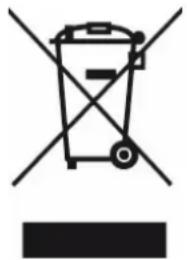
natural_image
Symbol of a trash bin with no visible text or labelsócorrect disposal of the unit (Electrical and Electronic Equipment).
(Applicable in the European Union and the rest of Europe that have adopted separate collection systems countries). The European Directive 2012/19/EU on Waste Electrical and Electronic Equipment (WEEE), requires that old household electrical appliances must not be disposed of in the normal household waste stream. Old appliances must be collected separately in order to optimize the recovery and recycling of the materials they contain and reduce the impact on human health and the environment. The symbol of the crossed out dustbin is marked on all products to remind the obligations of separate collection. Consumers should contact their local authority or retailer for information concerning the correct disposal of their product.
• Non üontraütual illustration
- Produüt information is subjekt to ühange without prior notüe.