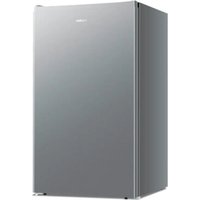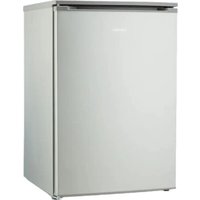
MD 37777 - Hi-fi system MEDION - Free user manual and instructions
Find the device manual for free MD 37777 MEDION in PDF.


User questions about MD 37777 MEDION
0 question about this device. Answer the ones you know or ask your own.
Ask a new question about this device
Download the instructions for your Hi-fi system in PDF format for free! Find your manual MD 37777 - MEDION and take your electronic device back in hand. On this page are published all the documents necessary for the use of your device. MD 37777 by MEDION.
USER MANUAL MD 37777 MEDION
natural_image
Exterior view of a modern gray refrigerator with a flat top and side legs (no visible text or symbols)Gefrierschrank
Congélateur
Diepfries
Congelador
Congelatore
Freezer
MEDION MD 37777
Inhaltsverzeichnis
natural_image
Technical line drawing of a mechanical clamp or bracket assembly (no text or symbols)natural_image
Technical line drawing of a mechanical assembly with hands holding parts, no visible text or symbolsnatural_image
Technical line drawing of a mechanical assembly with no visible text or symbolsnatural_image
Technical line drawing of a mechanical component with mounting holes and a handle (no text or symbols)natural_image
Technical line drawing of a mechanical component with an arrow indicating rotation (no text or symbols)natural_image
Technical line drawing of a structural component with directional arrows indicating movement (no text or symbols)natural_image
Diagram of a screwdriver holding a small electrical socket with directional arrows indicating motion (no text or symbols)natural_image
Diagram showing a tool interacting with a device, with arrows indicating direction (no text or symbols)natural_image
Technical line drawing of a structural frame with an arrow indicating force or direction (no text or symbols)natural_image
Technical line drawing of a mechanical assembly with directional arrows indicating motion (no text or symbols)natural_image
Technical line drawing of a mechanical lever system with dashed arrows indicating motion direction (no text or symbols)natural_image
Technical line drawing of a mechanical device with internal components and directional arrows indicating motion (no text or symbols)natural_image
Technical line drawing of a screwdriver interacting with a mechanical bracket (no text or symbols)natural_image
Technical line drawing of a mechanical assembly with hands and structural components (no text or symbols)natural_image
Line drawing of a two-door refrigerator with open door and top panel (no text or symbols)natural_image
Diagram of a door handle with a curved arrow indicating rotation, no text or symbols presenttext_image
ca. 15 cm ca. 84 cmtext_image
Labeled diagram of an refrigerator interior showing numbered components for identification and assembly reference.natural_image
Technical line drawing of a mechanical clamp or bracket assembly (no text or symbols)Fig. 2 - Entretoise
- Entretoise

natural_image
Technical line drawing of a mechanical assembly with hands holding components (no text or symbols)natural_image
Technical line drawing of a mechanical assembly with no visible text or symbolsnatural_image
Technical line drawing of a mechanical component with mounting holes and internal features (no text or symbols)natural_image
Technical line drawing of a mechanical component with an arrow indicating direction (no text or symbols)natural_image
Technical line drawing of a structural frame with directional arrows indicating movement or force (no text or symbols)natural_image
Diagram of a screwdriver with directional arrows indicating motion (no text or symbols)natural_image
Diagram showing a screwdriver with directional arrows indicating motion or force (no text or symbols)natural_image
Technical line drawing of a structural frame with an arrow indicating direction (no text or symbols)natural_image
Technical line drawing of a mechanical component with directional arrows indicating motion or force (no text or symbols)natural_image
Technical line drawing of a mechanical bracket with dashed arrows indicating motion or force direction (no text or symbols)natural_image
Technical line drawing of a mechanical device with internal components and directional arrows (no text or symbols)natural_image
Technical line drawing of a screwdriver interacting with a mechanical bracket (no text or symbols)text_image
Technical diagram showing mechanical assembly with labeled components and directional arrows indicating motion or movementnatural_image
Line drawing of a double-door refrigerator with open doors and top lid (no text or symbols)natural_image
Diagram of a door lock mechanism with directional arrows indicating movement (no text or symbols)text_image
ca. 15 cm ca. 84 cm– in bed and breakfasts;
text_image
Labeled diagram of an refrigerator interior showing numbered components for identification and assembly reference.natural_image
Technical line drawing of a mechanical clamp or bracket assembly (no text or symbols)natural_image
Technical line drawing of a mechanical assembly with hands holding parts, no visible text or symbolsnatural_image
Technical line drawing of a mechanical assembly with a screwdriver inserted, showing no text or symbolsnatural_image
Technical line drawing of a mechanical component with mounting holes and internal features (no text or symbols)natural_image
Technical line drawing of a mechanical component with an arrow indicating direction (no text or symbols)natural_image
Technical line drawing of a structural component with arrows indicating direction (no text or symbols)natural_image
Diagram of a screwdriver holding a small component with directional arrows indicating motion (no text or symbols)natural_image
Diagram showing a screwdriver holding a component with directional arrows indicating motion (no text or symbols)natural_image
Architectural line drawing of a corner structure with dashed guide lines and an arrow indicating direction (no text or symbols)Afb. 10 - Bovenste scharnier monteren
natural_image
Technical line drawing of a mechanical assembly with directional arrows indicating motion (no text or symbols)Afb. 11 – Blinde stop vervangen
natural_image
Technical line drawing of a mechanical lever system with dashed arrows indicating motion direction (no text or symbols)natural_image
Technical line drawing of a mechanical device with internal components and directional arrows (no text or symbols)natural_image
Technical line drawing of a screwdriver interacting with a mechanical bracket (no text or symbols)text_image
Technical diagram showing mechanical assembly with labeled components and directional arrows indicating motion or movementnatural_image
Line drawing of a double-door refrigerator with open doors and top lid (no text or symbols)natural_image
Diagram showing a door lock mechanism with directional arrows indicating rotation and movement (no text or symbols)text_image
ca. 15 cm ca. 84 cmtext_image
Labeled diagram of an open refrigerator with numbered parts for identification and assembly reference.natural_image
Technical line drawing of a mechanical clamp or bracket assembly (no text or symbols)natural_image
Technical line drawing of a mechanical assembly with hands and arrows indicating motion (no text or symbols)natural_image
Technical line drawing of a mechanical assembly with no visible text or symbolsFig. 4 - Quitar los tornillos de la bisagra
natural_image
Technical line drawing of a mechanical component with mounting holes and a central hole (no text or symbols)Fig. 5 - Desplazar la espiga de la bisagra
natural_image
Technical line drawing of a mechanical component with an arrow indicating direction (no text or symbols)natural_image
Technical line drawing of a structural component with arrows indicating direction (no text or symbols)Fig. 7 - Quitar la bisagra superior
natural_image
Diagram of a handheld device with directional arrows indicating motion or force (no text or symbols)Fig. 8 – Quitar la espiga de la bisagra
natural_image
Diagram showing a tool interacting with a device, with arrows indicating direction (no text or symbols)Fig. 9 – Desplazar la espiga de la bisagra
natural_image
Architectural line drawing of a corner structure with dashed lines indicating hidden edges (no text or symbols)Fig. 10 - Montar la bisagra superior
natural_image
Technical line drawing of a mechanical component with directional arrows indicating motion or force (no text or symbols)natural_image
Technical line drawing of a mechanical bracket with dashed arrows indicating motion or force direction (no text or symbols)natural_image
Technical line drawing of a mechanical device with internal components and directional arrows (no text or symbols)natural_image
Technical line drawing of a screwdriver interacting with a mechanical bracket (no text or symbols)Fig. 14 - Fijar la bisagra inferior
text_image
Technical diagram showing mechanical assembly with labeled components and directional arrows indicating motion or movementnatural_image
Line drawing of a double-door refrigerator with open doors and top lid (no text or symbols)natural_image
Diagram of a door lock mechanism with directional arrows indicating movement (no text or symbols)text_image
ca. 15 cm ca. 84 cmMEDION Service Center
ENAME, S.A
text_image
Labeled diagram of an refrigerator interior showing numbered components for identification and assembly reference.natural_image
Technical line drawing of a mechanical clamp or bracket assembly (no text or symbols)natural_image
Technical line drawing of a mechanical assembly with hands and arrows indicating motion (no text or symbols)natural_image
Technical line drawing of a mechanical assembly with no visible text or symbolsnatural_image
Technical line drawing of a mechanical component with mounting holes and a central hole (no text or symbols)natural_image
Technical line drawing of a mechanical component with an arrow indicating direction (no text or symbols)natural_image
Technical line drawing of a structural component with arrows indicating direction (no text or symbols)natural_image
Diagram of a screwdriver with directional arrows indicating motion (no text or symbols)natural_image
Diagram showing a screwdriver holding a component with directional arrows indicating motion (no text or symbols)natural_image
Technical line drawing of a structural component with dashed alignment lines and an arrow indicating direction (no text or symbols)natural_image
Technical line drawing of a mechanical component with directional arrows indicating motion or force (no text or symbols)natural_image
Technical line drawing of a mechanical support structure with dashed arrows indicating direction (no text or symbols)natural_image
Technical line drawing of a mechanical device with internal components and directional arrows (no text or symbols)natural_image
Technical line drawing of a screwdriver interacting with a mechanical bracket (no text or symbols)text_image
Technical diagram showing mechanical assembly with labeled components and directional arrows indicating motion or movementnatural_image
Line drawing of a double-door refrigerator with open doors and top lid (no text or symbols)natural_image
Diagram showing a lock mechanism with directional arrows, no text or symbols presenttext_image
ca. 15 cm ca. 84 cm- Information about this user manual 86
1.1. Explanation of symbols 86
-
Proper use 86
-
Safety instructions 87
3.1. General safety instructions....87
3.2. Installation and electrical connection 87
3.3. Use of the appliance....88
-
Package contents....89
-
Description of components....89
-
Before operation....89
6.1. Changing the door hinge 89
6.2. Fitting the spacers....92
6.3. Setting up the appliance 92
6.4. Removing and reinserting a drawer/glass shelf....93
- Operating the appliance....93
7.1. Switching off the appliance....93
7.2. Tips on saving energy 93
7.3. Deep-freezing food....94
7.4. Using the ice cube tray....94
7.5. Defrosting food....94
- Cleaning and defrosting 94
8.1. Defrosting the freezer 95
8.2. Cleaning the appliance 95
-
Measures in case of power failure 95
-
Troubleshooting....95
-
Longer periods without use....96
- Transport....96
- Disposal....96
- Technical specifications....97
- Product data sheet 97
- EU declaration of conformity....97
- Spare parts....97
- Information on the appliance....98
18.2. Information regarding refrigerant R-600a 98
- Service information....98
- Legal Notice....98
1. Information about this user manual

Thank you for choosing our product. We hope you enjoy using this appliance.
Please read the safety instructions and the user manual carefully before using the appliance for the first time. Note the warnings on the appliance and in the user manual.
Always keep the user manual close to hand. If you sell the appliance or give it away, please ensure that you also pass on this user manual. It is an essential component of the product.
1.1. Explanation of symbols
If a block of text is marked with one of the warning symbols listed below, the hazard described in that text must be avoided to prevent the potential consequences described there from occurring.

DANGER!
Warning: risk of fatal injury!
DANGER!
Warning: risk of electric shock!

WARNING!
Warning: risk of possible fatal injury and/or serious irreversible injuries!
Warning: danger due to combustible and/or highly flammable substances!
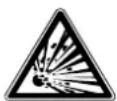
Warning: risk of explosive materials!

NOTICE!
Follow the instructions to avoid damaging the appliance!

Notes regarding assembly or operation

Follow the instructions in the user manual!

AC (alternating current)
2. Proper use
This appliance is intended to be used for freezing foodstuffs. This appliance is designed for use in private households and similar household applications, such as:
- Staff kitchens in shops, offices and other workplaces
– In agriculture and by guests in hotels, motels and other types of accommodation - Bed-and-breakfast establishments
– Catering establishments and wholesale use
The manufacturer accepts no liability for damages if the appliance is used for commercial purposes or for any purpose other than freezing food.
Please note that we shall not be liable in cases of improper use:
- Do not modify the appliance without our consent and do not use any auxiliary equipment that we have not approved or supplied.
- Only use replacement parts or accessories that we have supplied or approved.
- Comply with all the information in this user manual, especially the safety instructions. Any other use is considered improper and can cause personal injury or property damage.
3. Safety instructions
IMPORTANT SAFETY INSTRUCTIONS – READ CAREFULLY AND KEEP FOR FUTURE REFERENCE!
■ This appliance can be used by children of 8 years and older, and by people with reduced physical, sensory or mental capacity, or with a lack of experience and/or knowledge, but only with proper supervision, or if they have been told how to use the appliance safely, and have understood the risks involved if they use it improperly.
■ Children must not be allowed to play with the appliance.
■ Children between the ages of 3 and 8 are allowed to load and remove items from refrigerating appliances.
■ Cleaning and user maintenance must not be carried out by children unless they are supervised.
- Keep children away from the appliance inner. If the freezer door is closed, there is a risk of suffocation!
3.1. General safety instructions

Warning! Risk of injury!
The appliance's refrigeration system contains R-600a refrigerant. If the refrigerant escapes, there is a risk of injuries.
■ WARNING! Do not damage the refrigerant circuit.
■ If the refrigeration system has nevertheless become damaged, ventilate the room. Avoid naked flames and ignition sources. Have the appliance repaired by a qualified technician before using it again.
■ If refrigerant comes into contact with the skin or eyes, this can lead to injuries. If necessary, rinse the eyes with clean water and consult a doctor.
■ WARNING! Do not operate electrical appliances inside the cooling chamber that do not conform to the design recommended by the manufacturer.
■ Do not use any other electrical appliances (such as ice machines) inside the refrigerating appliance unless they are approved for this purpose by the manufacturer.
■ Tampering with the refrigerant circuit is prohibited and will invalidate the warranty.
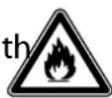
WARNING! Risk of fire!
There are flammable liquids in the coolant circuit and the compressor.
■ Note the "Fire hazard" warning signs on the back of the appliance or the compressor.
■ Avoid naked flames and ignition sources when using, maintaining and disposing of the appliance.
3.2. Installation and electrical connection

WARNING! Risk of fire!
Insufficient air circulation can lead to heat accumulation.
■ WARNING! Make sure that the ventilation openings in the housing, around the appliance and in the installation niche are not blocked.
■ The appliance is not designed to be an integrated appliance.
■ Do not install near heat sources such as hobs, radiators, underfloor heating etc. If installation near a heat source cannot be avoided, use an appropriate insulation panel or maintain the following minimum clearances to the heat source:
– from electric or gas ovens or similar: approx. 5 cm
– from oil or coal side cookers: approx. 50 cm.
- If installed next to another refrigerating appliance, a minimum distance of 2 cm from the side is required.
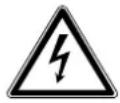
DANGER!
Risk of electric shock!
There is a risk of electric shock due to live parts.
■ After installing the appliance, check that the mains connection cable is not squashed or damaged.
■ Do not operate the appliance if it has been visibly damaged or the mains cable or plug is defective.
■ In the event of damage, contact our Service Centre.
■ Only connect the appliance to a properly installed and easily accessible earthed mains socket that is close to where you are using the appliance. The local mains voltage must match the voltage stated in the technical specifications for the appliance.
■ The power socket must be easily accessible so that you can unplug the appliance from the mains quickly if necessary.
■ WARNING! Ensure the mains cable is out of harm's way and will not trip people up. Do not use an extension cable.
■ WARNING! Do not allow the mains cable to become trapped or damaged during installation.
■ WARNING! Do not connect portable multiple sockets or power supplies to the back of the appliance.
In order to disconnect the appliance completely from the electrical circuit, pull the mains plug out of the socket.
3.3. Use of the appliance

WARNING!
Risk of injury/risk to health!
Improper handling of the appliance can lead to injuries.
- Do not touch the freezer compartment's frozen inner walls or frozen foodstuffs with your hands. Do not put ice cubes or ice lollies directly from the freezer into your mouth. Cold burns are possible.
■ Do not misuse the plinth, drawer compartments, doors etc. as a step or for support.
The appliance may not work properly (possibility of stored foods defrosting or the temperature in the freezer compartment increasing), if the appliance is exposed to temperatures that fall below the specified intended temperature range for a prolonged period of time (below 10^ C).
In case of power failure or a switched off appliance, stored foodstuffs may start to thaw or defrost completely. There is a risk of food poisoning.
■ If there has been a power failure, check that the food which is stored in the appliance still looks and smells safe to eat.
■ If there has been a power failure, dispose of any frozen food which has visibly started to thaw.
■ Do not refreeze food that has thawed or defrosted.
■ WARNING! If the door is left open for a long time, this can cause the temperature inside the appliance to increase significantly.
■ Regularly clean surfaces that may come into contact with food and accessible drain systems.
In the event of disconnection, even of a temporary nature only, take the frozen food out of the appliance and keep it in sufficiently cold storage.
■ Ensure cleanliness and correct storage of food.
■ If the appliance is not going to be used for a longer period of time, pull the mains plug out of the mains socket, defrost and clean the appliance, leaving the freezer door open to avoid unpleasant odours and to prevent mould from forming.
4. Package contents

DANGER!
Risk of choking and suffocation!
There is a risk of choking and suffocation due to swallowing or inhaling small parts or plastic wrap.
- Keep the packaging materials used (bag, pieces of polystyrene etc.) out of the reach of children.
■ Do not allow children to play with the packaging material.
Please check the package contents to ensure that all items are included and in perfect condition. If anything is missing or damaged, contact us within 14 days of purchase.
The following items are supplied with your product:
- Freezer, incl.
- 2 transparent drawers
- 2 glass shelves
- 1 spacer
- 1 ice cube tray
- 1 ice scraper
- Short manual
5. Description of components
text_image
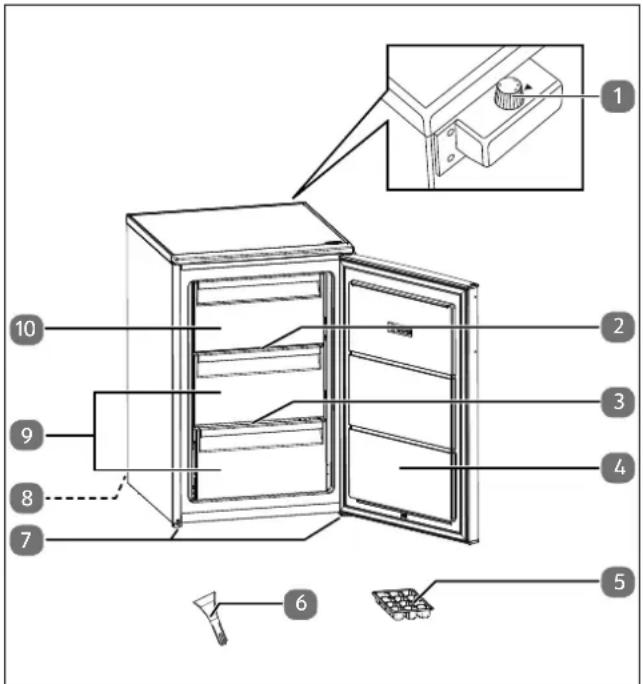
Labeled diagram of a refrigerator interior showing numbered components for identification and assembly reference.Fig. 1 - Front view with door open
- Temperature control (on the back of the appliance)
- Glass shelf, large
- Glass shelf, small
- Freezer door
- Ice cube tray (similar to the image)
- Ice scraper
- Appliance feet
- Mains cable with plug (on the back of the appliance, not shown)
- Drawers
- Freezer compartment with flap
natural_image
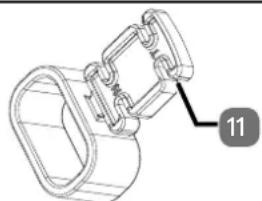
Technical line drawing of a mechanical clamp or bracket assembly (no text or symbols)Fig. 2 - Spacer
- Spacer

The type plate is located in the freezer compartment at the bottom left.

Recommended food storage in the *** freezer compartment:
Seafood (fish, prawns, shellfish), freshwater fish and meat products (recommended for 3 months; the longer the storage time, the more likely that the taste and nutritional value will deteriorate), frozen fresh foods. Store the food in appropriate containers.
6. Before operation
▶ Unpack the appliance and remove the adhesive tape. Use a mild cleaning agent to remove any adhesive residues.
▶ Dispose of the expanded polystyrene padding separately from the other packaging.
Clean the inside of the appliance and the fittings with lukewarm water and mild cleaning agent and allow to dry (see section "8. Cleaning and defrosting" on page 94).
6.1. Changing the door hinge
The freezer is supplied with a door hinged on the right-hand side. If you would like to change the opening direction of the freezer door, proceed as follows.
Required tools:
- Slotted screwdriver
– Phillips screwdriver
▶ Turn the temperature control (1) briefly past position 1 to position ●. You will hear a click. The appliance switches off. Pull the mains plug (8) out of the mains socket.
Remove the drawers (9) and the glass shelves (2/3) as described in the following section.
▶ Tilt the appliance backwards (maximum 40^ ) and place it carefully, e.g. on the edge of a chair, so that you can reach the fixing screws of the lower hinge.
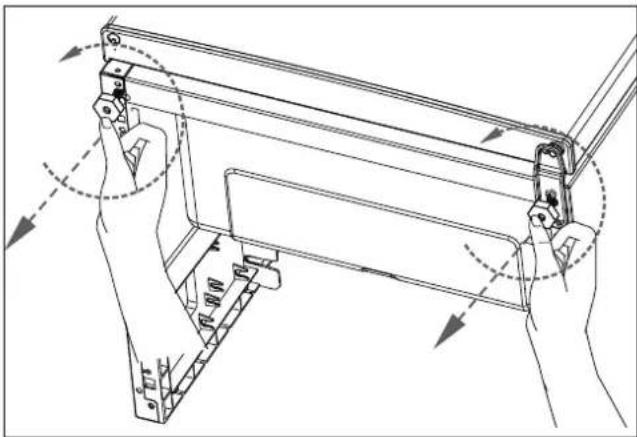
Remove both appliance feet (7) by turning anti-clockwise (see Fig. 3).
▶ Keep the freezer door (4) closed.
natural_image
Technical line drawing of a mechanical assembly with hands holding parts, no visible text or symbolsFig. 3 - Unscrewing the appliance feet
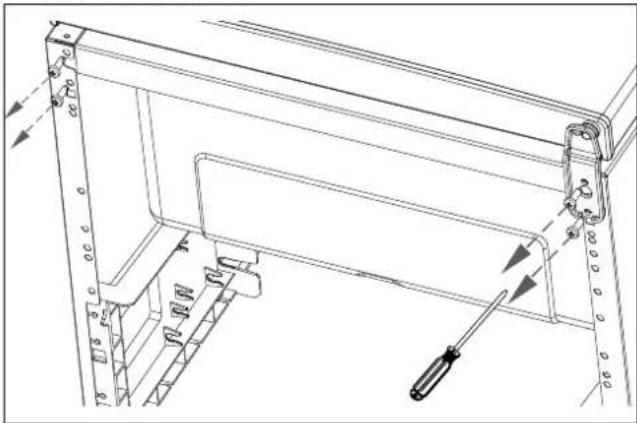
▶ Use a Phillips screwdriver to loosen the two screws on the lower hinge (see Fig. 4).
Remove the two screws on the left-hand side of the housing and reposition the screws on the right-hand side of the housing.
natural_image
Technical line drawing of a mechanical assembly with no visible text or symbolsFig. 4 - Removing the hinge screws
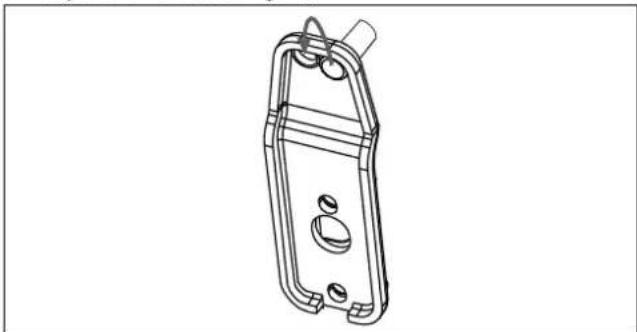
▶ Use a flat-head screwdriver to remove the hinge pin on the lower hinge and reposition the hinge pin in the adjacent hole (see Fig. 5).
natural_image
Technical line drawing of a mechanical component with mounting holes and internal features (no text or symbols)Fig. 5 - Repositioning the hinge pin
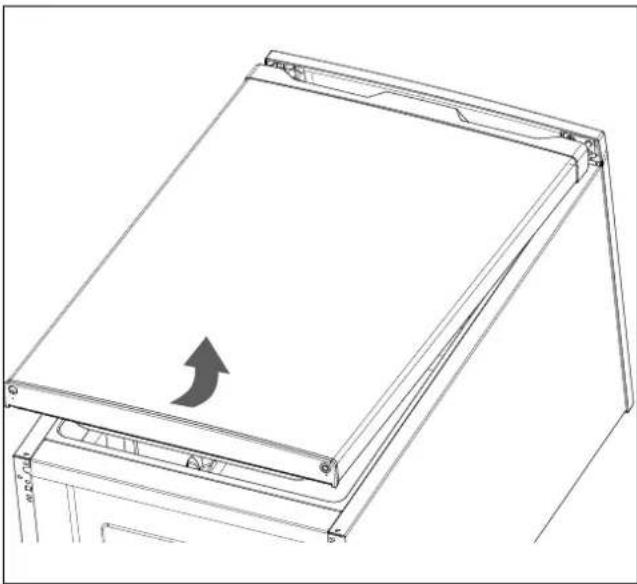
▶ Lift the freezer door (4) slightly at the bottom and pull the freezer door off the upper hinge pin (see Fig. 6).
Place the freezer door (4) to one side on a soft surface to avoid scratches and secure it against falling over.
natural_image
Technical line drawing of a mechanical component with an arrow indicating direction (no text or symbols)Fig. 6 - Removing the freezer door
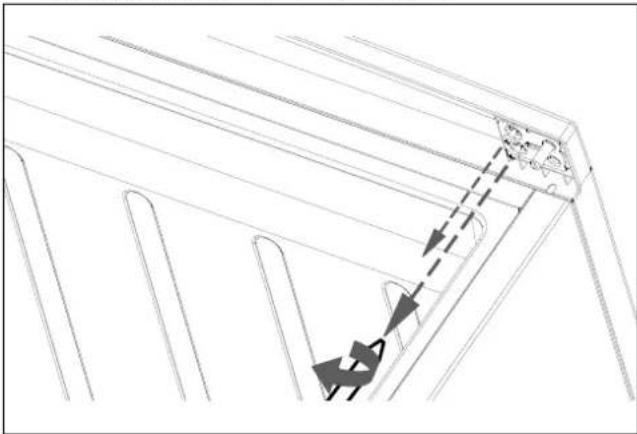
▶ Use a Phillips screwdriver to loosen the two retaining screws on the upper hinge (see Fig. 7).
natural_image
Pure technical line drawing of a structural component with arrows indicating direction (no text or symbols)Fig. 7 - Removing the upper hinge
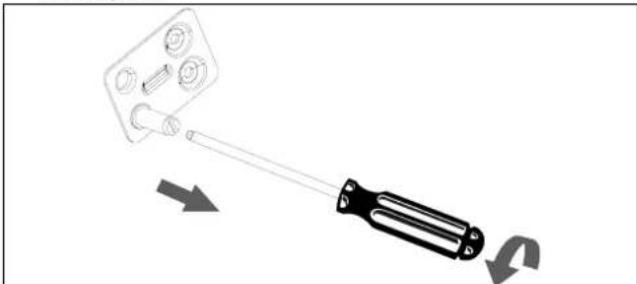
▶ Use a flat-head screwdriver to remove the hinge pin (see Fig. 8).
natural_image
Diagram of a screwdriver holding a small component, with arrows indicating motion direction (no text or symbols)Fig. 8 - Removing the hinge pin
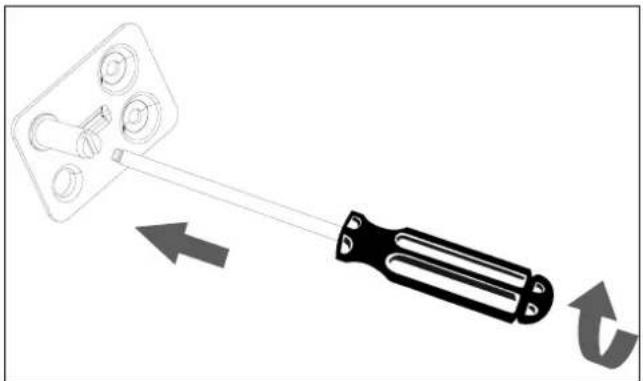
▶ Reposition the hinge pin in the opposite hole (see Fig. 9) and tighten it using a flat-head screwdriver.
natural_image
Diagram showing a tool interacting with a mechanical component, with arrows indicating direction (no text or symbols)Fig. 9 - Repositioning the hinge pin
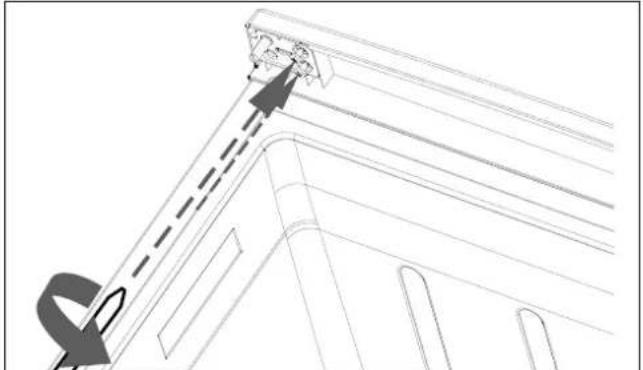
▶ Use a Phillips screwdriver to fasten the upper hinge to the left side with the two retaining screws (see Fig. 10).
natural_image
Technical line drawing of a structural component with dashed lines indicating hidden edges and an arrow pointing to a detail (no text or symbols present)Fig. 10 - Fitting the top hinge
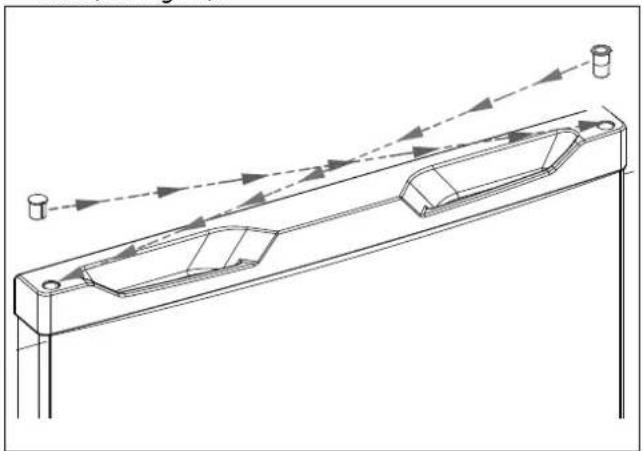
Remove the blind plug on the top left-hand side of the freezer door and the hinge bushing on the right-hand side using a small flat-head screwdriver.
Insert the hinge bushing into the hole on the left-hand side. When doing so, pay attention to the guide nose.
▶ Insert the blind plug into the hole on the right-hand side (see Fig. 11).
natural_image
Technical line drawing of a mechanical assembly with arrows indicating motion or direction (no text or symbols)Fig. 11 - Replacing the blind plug
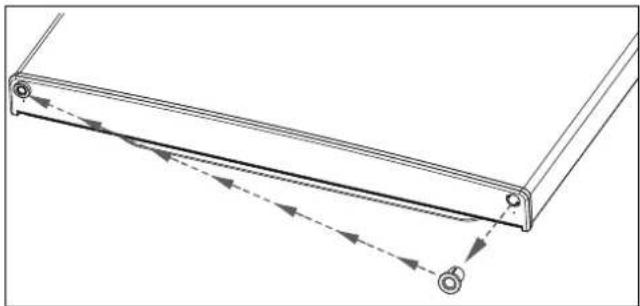
▶ Reposition the hinge bushing on the bottom of the freezer door to the left-hand side as well (see Fig. 12).
natural_image
Technical line drawing of a mechanical bracket with dashed arrows indicating motion or force direction (no text or symbols)Fig. 12 - Moving the hinge bushing
▶ Refit the freezer door (4) on the freezer compartment by sliding the freezer door (4) upwards at a slight angle from below (see Fig. 13). Ensure that the hinge pin of the upper hinge is seated in the hinge bushing on the top of the freezer door and that the seal is properly flush with the edge of the housing.

natural_image
Technical line drawing of a mechanical device with internal components and directional arrows indicating motion (no text or symbols)Fig. 13 - Fitting the freezer door
Place the lower hinge so that the hinge pin engages with the lower door socket.
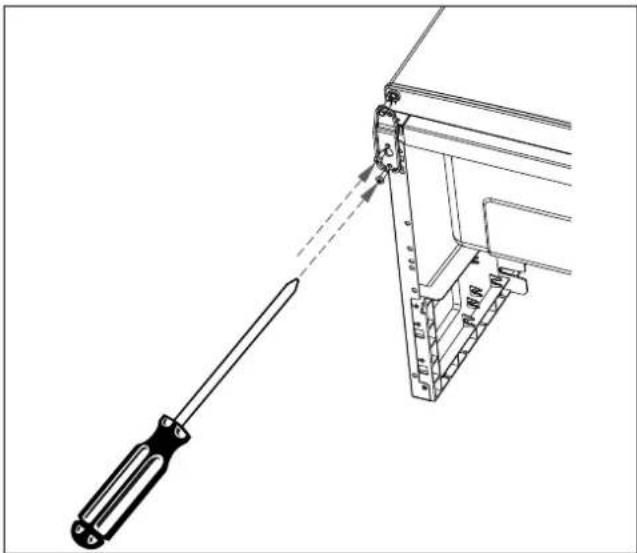
▶ Use a Phillips screwdriver to fasten the two screws on the lower hinge.
Do not tighten the screws completely yet so that you can still align the freezer door (4). Tighten the screws firmly only when it is possible to close the freezer door (4) evenly (see Fig. 14).
natural_image
Technical line drawing of a screwdriver operating a mechanical clamp or bracket assembly (no text or symbols present)Fig. 14 - Fastening the bottom hinge
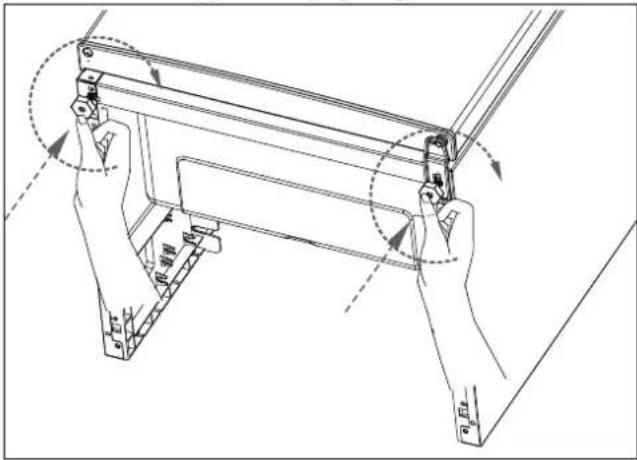
▶ Reattach both appliance feet (7) by turning clockwise (see Fig. 15).
▶ Stand the appliance upright again.
text_image
Technical diagram showing mechanical assembly with labeled parts and directional arrows indicating motion or force vectorsFig. 15 - Screwing in the appliance feet
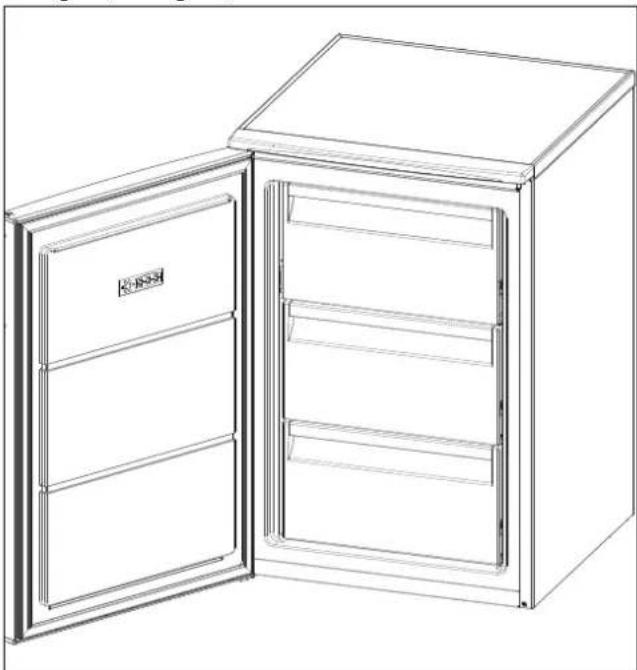
The opening direction of the freezer door (4) is now changed (see Fig. 16).
natural_image
Line drawing of a two-door refrigerator with open doors and top lid (no text or symbols)Please note: The door seal adapts to the new door hinge after a few hours.

If tilted to an angle of more than 40^ during transport, wait 3 hours before connecting the appliance to the mains and switching it on to enable the refrigerant circuit to settle after transport.
6.2. Fitting the spacers
natural_image
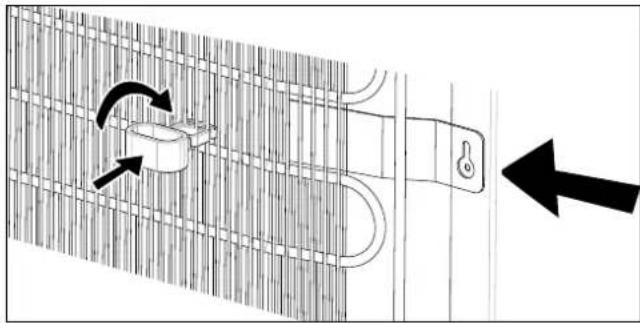
Diagram showing a door lock mechanism with directional arrows indicating movement (no text or symbols)Fig. 17 - Attaching the spacer
Mount the spacer (11) at the height of the upper fixing plate (see Fig. 17) on the back of the appliance on the cooling ribs.
Insert each spacer (11) in the vertical position up to the recess marked T between two cooling ribs and turn it 90° to the horizontal position. This prevents the condenser from coming into direct contact with the wall.
6.3. Sett ing up the appliance

NOTICE!
Possible material damage!
Risk of damage to the appliance due to improper handling
■ Install the freezer in a dry and ventilated room. The room should be around 4 m^2 , so there will be sufficient air volume available if the cooling system becomes damaged.
■ Take the space requirements into consideration when setting up the appliance:
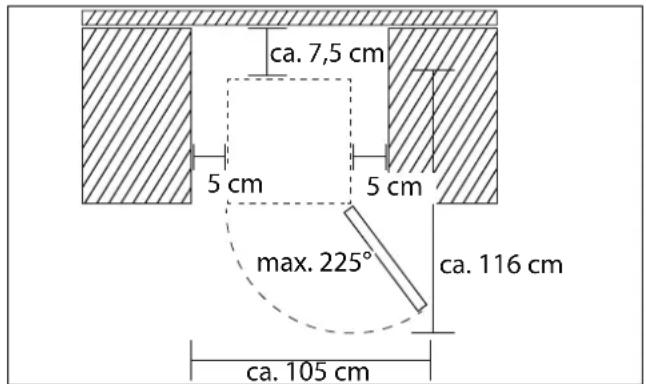
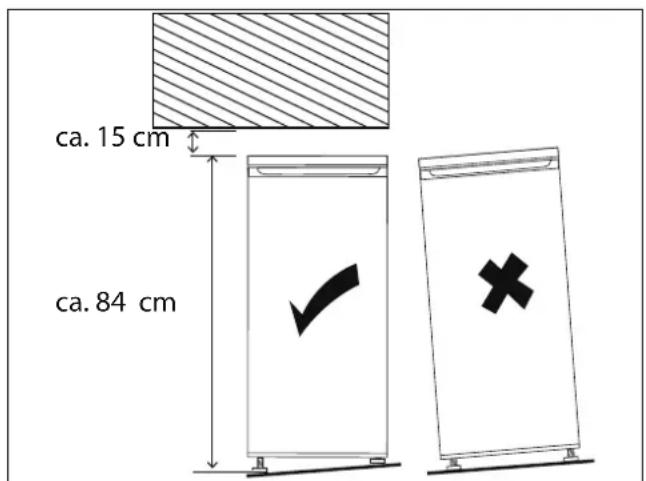
To ensure adequate ventilation, a minimum clearance of 15 cm to the top, 5 cm to the sides and 7.5 cm to the back must be observed. To be able to open the freezer door (4) fully, the following room dimensions must be available (see Fig. 18).
■ The appliance is suitable for climate classes T and SN (see the type plate). The cooling performance of the appliance is guaranteed at ambient temperatures from 10^ C to 43^ C. If temperatures deviate from this range, the appliance performance may be reduced.
■ Do not expose the appliance to extreme conditions.
Avoid:
– high humidity or wet conditions
- extremely high or low temperatures
- direct sunlight
- naked flames.
text_image
ca. 7,5 cm 5 cm 5 cm max. 225° ca. 116 cm ca. 105 cmFig. 18 - Necessary room dimensions
▶ Move the appliance to a suitable location.
text_image
ca. 15 cm ca. 84 cmFig. 19 - Minimum room height, aligning the appliance
▶ Level the appliance by compensating for any unevenness in the floor by screwing in the appliance feet (7) accordingly (see Fig. 19).
▶ Level the freezer with a spirit level.
6.4. Removing and reinserting a drawer/ glass shelf
▶ To remove a drawer (9) or a glass shelf (2/3), open the freezer door (4) fully.
▶ Pull out the drawer (9) with both hands and remove the drawer (9) from the freezer compartment at a slight angle.
▶ To remove the large glass shelf (2), first open the freezer compartment with the flap (10).
▶ Lift the glass shelf (2/3) and remove it from the guide at a slight angle.
To reinsert the glass shelf (2/3), first place it in the rear guide at a slight angle and then carefully insert it in the front guide.
▶ To reinsert a drawer (9), slide the drawer (9) into the appliance at a slight angle.
7. Operating the appliance
Connect the appliance to an earthed mains socket. The local mains voltage must match the voltage stated in the technical specifications for the appliance.
The temperature control setting automatically adjusts the temperature in the freezer compartment.
There is a choice of 3 settings on the temperature control:
| 1 | Lowest level of cooling (warmest) | Short-term storage of frozen products |
| 2 | Intermediate position Medium | medium-term storage of frozen products |
| 3 | Highest level of cooling (coldest) | Long-term storage of frozen products |
▶ Before storing fresh foods, set the temperature control (1) to position 3.

The internal temperatures can be influenced by factors such as the installation location, ambient temperature and the number of times the door is opened. Take these factors into account when setting the temperature control.

Audible noises such as cracking, humming or gurgling are caused by the expansion and shrinkage of the components as a result of the temperature changes or by the compressor working and do not indicate a malfunction.
▶ Check the temperatures in the freezer compartment with a thermometer. The ideal temperature in the freezer compartment is -18^ . Once this temperature is reached, you can load it with food and set the temperature control (1) back to 2.5.
After switching on for the first time, the appliance needs approx. 24 hours to reach this temperature.
7.1. Switching off the appliance
To switch off the appliance, briefly turn the temperature control (1) past position 1 to position ●. You will hear a click. Then pull the mains plug (8) out of the mains socket.
▶ Wait approx. 10 minutes before switching on the appliance again.
7.2. Tips on saving energy
In order to achieve the best possible cooling performance with low energy consumption, observe the following:
- Do not position the appliance near a heat source (radiator or cooker etc.).
The location should be not too warm, dry, dust-free and well ventilated.
▶ Ensure that air can circulate freely around the refrigerating appliance.
The energy consumption will be lowest if all drawers (9) are left inside the appliance when it is in use.
If the freezer door (4) is left open for a long time, this can cause the temperature inside the compartments of the appliance to increase significantly. Only open the door briefly when loading and removing food-stuffs. Less cold can escape if the door is left open for only a short time and therefore the appliance requires less energy.
▶ Select the temperature setting according to how full the appliance is.
▶ Ensure that the door seals are undamaged and that the door closes properly.
If the appliance is left empty for an extended period of time, switch it off. Defrost and clean the appliance and allow it to dry. Leave the door open to prevent mould from forming in the appliance.
7.3. Deep-freezing food

WARNING!
Risk of explosion!
Flammable gases and liquids can cause explosions if stored in the appliance.
■ Do not store any explosive materials, e.g. aerosol containers containing propellant gas, in the appliance.
■ Do not freeze any carbonated beverages. Expanding liquid can break the container.
■ Do not store glass or metal containers filled with liquid in the freezer compartment.

WARNING!
Risk to health!
To avoid food from becoming contaminated, please observe the following instructions:
If the freezer door (4) is left open for a long time, this can cause the temperature inside the compartments of the appliance to increase significantly.
■ Regularly clean surfaces that may come into contact with food and accessible drain systems.
■ Food to be frozen must not come into contact with food that has already been frozen. It may be necessary to reduce the quantity of food to be frozen if you intend to freeze food each day.
■ Do not exceed the storage times recommended by the food manufacturers. If no specification is given, food should not be stored for more than three months.
■ To avoid cross-contamination, place the food in odourless, airtight, moisture-free, greaseproof and leach-resistant packaging.
– Polythene bags and aluminium foil are the most suitable materials.
- The food must be closely wrapped in airtight packaging.
- Do not use glass packaging as the glass may shatter.
■ Take care not to overload the freezer compartment as otherwise optimal performance cannot be guaranteed and energy consumption will increase.
■ Signs of moisture or swelling of deep-freeze packaging indicates that the food has not been stored/transported correctly and may be spoiled. Check the condition of food before eating.
Almost all types of food are suitable for freezing, except vegetables which are eaten raw, e.g. lettuce.
Only fresh food is suitable for freezing. Portion the food for single use. Do not refreeze defrosted products.
▶ Set the temperature control (1) to position 36 hours before putting fresh food in the freezer. After putting fresh food in the freezer, set the temperature control (1) to position 2.5.
Fruit can be frozen in the freezer compartment and ice cubes can be made.
7.4. Using the ice cube tray
▶ Clean the ice cube tray (5) thoroughly with water and a little washing-up liquid before using for the first time.
▶ Fill the tray with drinking water.
Place the ice cube tray (5) so that it is level in the bottom drawer (9).
As soon as the ice cubes are frozen, remove the ice cube tray (5) from the drawer (9) and press the ice cubes out of the mould.
7.5. Defrosting food
Depending on the type and use, food can be defrosted in a refrigerator, in a container filled with lukewarm water, in a microwave, at room temperature or in the oven. Fruit and vegetables which are going to be cooked do not need to be defrosted.
Once defrosted, food is preferably to be eaten on the same day or stored in the refrigerator until the next day at the latest. Food must not be refrozen, even if it has not fully defrosted.
8. Cleaning and defrosting
▶ Regularly clean surfaces that may come into contact with food.

DANGER!
Risk of electric shock!
There is a risk of electric shock from electrified parts.
Before starting any cleaning or defrosting work, make sure you briefly turn the temperature control (1) past position 1 to position ●. You will hear a click. The appliance switches off. Then pull the mains plug (8) out of the socket (do not pull on the cable, but on the mains plug (8)). If the plug is not accessible, the corresponding fuse for the mains electricity supply to the house needs to be switched off.
■ Do not touch the mains plug (8) with wet or damp hands.

DANGER!
RISK OF EXPLOSION AND FIRE!
An accumulation of gas can lead to explosions.
■ Do not use any flammable liquids to clean the appliance or its individual parts.
■ Do not use defrosting sprays, as they can form explosive gases.

WARNING!
Risk of injury!
Cold burns are possible.
- Do not touch the freezer compartment's frozen inner walls or frozen foodstuffs with your hands. Use a dry cloth, for example, to hold the frozen products.

NOTICE!
Possible material damage!
Damage to the appliance due to improper handling of the sensitive surfaces of the appliance.
■ Sensitive surfaces: Do not allow oil and grease to come into contact with the plastic parts and the door seal as the door seal can become porous and brittle. Do not allow oil or grease to come into contact with the plastic parts.
■ Never use acidic, abrasive or granular, acetic-acid-, soda- or solvent-based cleaning agents. These may damage the surfaces of your appliance.
■ Do not use any other mechanical equipment or synthetic agents to accelerate the defrosting process, e.g. electric heaters, hot air blowers or hair-dryers or pointed or hard objects. The heat insulation and appliance interior are sensitive to scratches and heat and can melt.
■ Do not operate any electronic devices inside the appliance. Both appliances may be damaged irreparably.
▶ Set the temperature control (1) briefly past position 1 to position ●. You will hear a click. The appliance switches off.
▶ Unplug the mains plug (8).
8.1. Defrosting the freezer
Thick deposits of ice on the freezer compartment surfaces reduce the efficiency of the appliance and increase the energy consumption.
Before defrosting the appliance, set the temperature control (1) to position 3 a few hours in advance. The frozen products can then be stored at room temperature for a longer period of time.

A rise in temperature of the frozen food during manual defrosting, maintenance or cleaning can shorten the storage life of the frozen products.
It is advisable to defrost the appliance at least once a year.
▶ Take the frozen product out of the freezer compartment, wrap in a few layers of paper and possibly a blanket and store it in a cool location.
Remove the drawers (9) and glass shelves (2/3) from the freezer compartment.
▶ After approx. 30 minutes the coating of frost on the smooth walls can be easily removed using the ice scraper (6).
8.2. Cleaning the appliance
▶ Clean the freezer compartment with a mild cleaning agent (e.g. washing-up liquid) and allow to dry.
▶ Clean all fittings carefully with a mild cleaning agent (e.g. washing-up liquid). The components are dish-washer safe.

WARNING!
Risk of injury!
There is a risk of glass breakage and cut injuries.
- Do not rinse the cold glass shelves (2/3) with hot water. Stresses can lead to glass breakage. Wait until the glass shelves (2/3) have warmed up to room temperature.

To prevent mould, vinegar (cleaning vinegar, household vinegar or vinegar essence) can be added to the water for cleaning. Cleaning agents containing sand, soda and acid are not suitable.
▶ Clean the appliance surfaces, except the door seal, with a mild cleaning agent.
▶ Clean the door seal with clean water, wipe it off and allow to dry.
Once or twice a year, carefully vacuum the cooling ribs on the back of the appliance with a brush nozzle to ensure optimum air circulation around the cooling compressor. When vacuuming, take care not to damage the electrical cables and capillary tubes.
▶ Switch the appliance on again according to the corresponding section in the user manual.
9. Measures in case of power failure
Food must not be refrozen, even if it has not fully defrosted.
In case of a power failure, check the condition of food before eating (see also "3.3. Use of the appliance" on page 88).
10. Troubleshooting
Malfunctions may occur during operation. Please use the following table to check whether you can resolve the problem yourself. All other repairs are not permitted and will invalidate the warranty. Therefore, in the event of a fault, contact our Service Centre or another suitable professional repair workshop.

WARNING!
Risk of electric shock!
There is a risk of electric shock due to live parts.
■ Never try to open and/or repair an appliance component yourself.
If there is damage to the mains connection cable on this appliance, it must be replaced by the manufacturer, its customer service department, or another suitably qualified person. This is necessary to avoid hazards.
In the event of a fault, contact the Service Centre or another suitable professional repair workshop.
| Fault Cause Solution | ||
| The appli-ance is not working. | Power supply interrupted | ▸ Check whether the mains plug (8) is plugged in.▸ Check whether the mains socket is live by plugging in another electrical appliance (e.g. a bedside lamp).▸ Check the fuse.▸ Check the mains cable (8) for dam-age. |
| The compressor is very rarely activated. | ▸ Check whether the ambient temper-ature is not below 10°C. | |
| The temper-ature in the freezer com-partment is not low enough. | The freezer door (4) does not seal properly or is opened too often. | ▸ Arrange food so that it does not prevent the door from closing pro-perly.▸ Open the freezer door (4) for less time. |
| The temper-ature in the freezer com-partment is not low enough. | The ambient temperature is above +43°C. | ▸ The appliance is designed for use in a temperature range from +10°C to +43°C. |
| The air cir-culation is insufficient. | ▸ Move the appli-ance away from the wall. | |
| The appli-ance has been set up in a location exposed to direct sun-light or next to a heat source. | ▸ Place the appliance in a different posi-tion. | |
| The appli-ance makes too much noise. | The appli-ance has not been set up properly. | ▸ Level the appli-ance. |
| The ap-pliance is touching fur-niture or oth-er objects. | ▸ Position the ap-pliance as a free standing unit and ensure that it does not touch any oth-er objects. | |
11. Longer periods without use
If the freezer is not to be used for a long time, the following activities must be carried out:
▶ Set the temperature control (1) briefly past position 1 to position ●. You will hear a click. The appliance switches off.
▶ Unplug the mains plug (8).
▶ Clear out the appliance.
▶ Clean the freezer compartment and allow to dry.
▶ Carefully clean and dry the drawers (9).
Leave the freezer door (4) open to avoid unpleasant odours and to prevent mould from forming.
12. Transport

CAUTION!
Risk of injury!
The appliance is very heavy. There is a risk of injury from the strain of lifting the appliance.
- Seek the assistance of at least one other person in order to move the appliance. Do not transport the appliance alone.

NOTICE!
Possible material damage!
Risk of damage to the appliance if transported incorrectly
■ Make sure that the packaging is not damaged.
■ Carefully remove the packaging material and check the appliance for transport damage.
■ Never connect a damaged appliance. In the event of damage, contact the Service Centre.
■ Always transport the freezer in its packaging and with the transport lock.
■ Ensure that no part of the refrigerant circuit is damaged when transporting and installing the appliance.
■ Where possible, always transport the appliance upright. If tilted to an angle of more than 40^ during transport, wait 3 hours before connecting the appliance to the mains and switching it on to enable the refrigerant circuit to return to normal after transport.
■ Do not place the appliance on its side or back, as this can cause oil from the compressor to enter and block the refrigerant circuit.
■ Do not expose the appliance to rain or spray water.
13. Disposal

DANGER!
Risk of choking and suffocation! Risk of injury!
To avoid risks to children, proceed as follows before disposing of the appliance:
■ Remove the freezer door and the door seal or tape the freezer door closed.
■ Leave the drawers (9)/shelves (2/3) in the appliance so that no children or other persons can climb into the appliance.
PACKAGING
Your appliance has been packaged to protect it from damage in transit. The packaging is made of materials that can be recycled in an environmentally friendly manner.

Observe the following labels on the packaging materials regarding waste separation with the abbreviations (a) and numbers (b): 1–7: plastics/20–22: paper and cardboard/80–98: composite materials.

(France only)
The "Triman" symbol tells the consumer that the product can be recycled, is covered by an extended system of manufacturer's responsibility and must be sorted by material type in France.
APPLIANCE
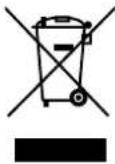
All old appliances marked with the symbol shown must not be disposed of in normal household waste.
In accordance with Directive 2012/19/EU, these appliances must be disposed of correctly at the end of their service life.
This involves separating the materials in the appliance for the purpose of recycling as well as minimising the environmental impact and negative effects on human health.
Take old appliances to a collection point for electrical scrap or a recycling centre.
Contact your local waste disposal company or your local authority for more information on this subject.
i
■ During disposal, please note that the appliance/insulation contains cyclopentane (a flammable expanded gas for insulation).
■ The appliance/insulation must be disposed of correctly.
- Technical specifications
| Supplier's address: MEDION | AGAm Zehnthof 7745307 EssenGermany |
| Model identifier: MD 37777 | |
| Rated voltage: | 220 – 240 V~ |
| Rated frequency: 50 Hz | |
| Rated current: 0.96 A | |
| Refrigerant: R-600a | |
| Refrigerant quantity: 44 g | |
| Insulation gas: Cyclopentane | |
| Weight: | Approx. 28.0 kg |
| Protection class | I |
| Storage time in case of fault | 11 hours |


www.36.com ID:1111272709
15. Product data sheet
Scan the QR Code shown to download the product data sheet or contact the service department at www.medion.com/contact to obtain a printed copy of the product data sheet. You will also find the QR code on the energy label.
16. EU declaration of conformity

MEDION AG hereby declares that the product conforms to the following requirements of the European Union:
• EMC Directive 2014/30/EU
• Low Voltage Directive 2014/35/EU
• Ecodesign Directive 2009/125/EC
• RoHS Directive 2011/65/EU.
17. Spare parts
Please visit our MEDIONserviceshop at https://www.medion.com/medionserviceshop to order any spare parts you need.
You will be able to find all suitable spare parts for your product there.
All available spare parts can be purchased for a period of 7 years, seals can be purchased for a period of 10 years.
18. Information on the appliance
- The appliance uses refrigerant R-600a (HCFC- and CFC-free) in the refrigerant circuit.
- The refrigerant circuit has been checked for leaks. This complies with the relevant safety regulations for electrical appliances.
• Energy efficiency class D
• Climate class T/SN
The different climate classes are explained in the following table.
| Climate class | Meaning | Ambient temperature |
| SN Appliances for subnor-mal climate | +10°C to +32°C | |
| N Appliances for normal climate | +16°C to +32°C | |
| ST Appliances for subtropical climate | +16°C to +38°C | |
| T Appliances for tropical climate | +16°C to +43°C | |

Under the following ambient conditions and settings, the appliance achieves energy efficiency class D.
Ambient temperature Temperature setting
32 °C
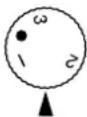
16 °C
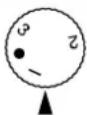
18.2. Information regarding refrigerant R-600a
R-600a and cyclopentane are used as 100% HCFC-free refrigerant and insulating materials in this appliance. This helps to protect the ozone layer and reduces the so-called greenhouse effect.
These appliances can be identified by the "Refrigerant R-600a" notice on the type plate.
▶ Ensure that the refrigerant circuit is not damaged, as small quantities of R-600a can contribute to the greenhouse effect if released.
This applies both when transporting the appliance and throughout its service life. Also ensure that you dispose of this appliance correctly according to local regulations.
19. Service information
Please contact our Customer Service team if your device ever stops working the way you want or expect it to. There are several ways for you to contact us:
- In our Service-Community, you can meet other users, as well as our staff, and you can exchange your experiences and pass on your knowledge there. You will find our Service-Community at community.medion.com.
• Alternatively, use our contact form at www.medion.com/contact. - You can also contact our Service team via our hotline or by post.
| Opening times | Hotline number UK |
| Mon – Fri: 08.00 – 20.00Sat – Sun: 10.00 – 16.00 | 1 0333 3213106 |
Service address
MEDION Electronics Ltd. 120 Faraday Park, Faraday Road, Dorcan Swindon SN3 5JF, Wiltshire United Kingdom

You can download this and many other sets of operating instructions from our service portal at www.medionservice.com.
We have stopped providing printed copies of our warranty terms and conditions as part of our commitment to sustainability, but you can access the warranty terms and conditions on our service portal.
You can also scan the QR code on the side of the screen, to download the operating instructions onto your mobile device from the service portal.
20. Legal Notice
Copyright 2024
Date: 9. July 2024
All rights reserved.
These operating instructions are protected by copyright. Mechanical, electronic and any other forms of reproduction are prohibited without the written permission of the manufacturer.
Copyright is owned by the company:
MEDION AG
Am Zehnthof 77
45307 Essen
Germany
Please note that you cannot use the address above for returns. Please always contact our Customer Service team first.