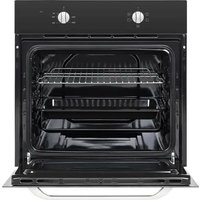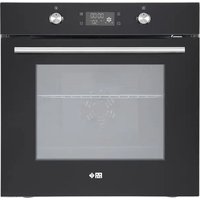
FMP 7121 NA - Oven FAR - Free user manual and instructions
Find the device manual for free FMP 7121 NA FAR in PDF.


| Product type | Built-in electric oven |
| Brand | FAR |
| Model | FMP 7121 NA |
| Dimensions (H x W x D) | 595 x 595 x 575 mm |
| Weight | 33 kg |
| Cavity volume | 70 liters |
| Power supply | 220-240 V ~ 50 Hz, 2800 W |
| Power cable | 3 x 1.5 mm² |
| Energy efficiency class | A |
| Energy consumption (conventional mode) | 0.77 kWh/cycle |
| Energy consumption (fan-assisted mode) | 0.82 kWh/cycle |
| Cooking functions | Defrosting, fan-assisted, grill, forced air, pyrolysis, etc. |
| Self-cleaning mode | Pyrolytic (1.5 to 2.5 h) |
| Oven light | Bulb 25 W / 300 °C, pygmy base |
| Included accessories | Wire rack, drip tray |
| Control type | Touch electronic with rotary knobs |
| Display | LED with clock, temperature and programming |
| Door material | Tempered glass |
| Cleaning | Warm soapy water, soft sponge; pyrolysis for tough residues |
| Safety | High temperature door lock, overheating protection, automatic shut-off, child safety |
| Installation | Built-in, observe safety distances and heat resistance of furniture (min 85 °C) |
| Repairability | Replaceable bulb; other repairs by qualified professional |
| Warranty | Manufacturer's warranty (refer to terms) |
Frequently Asked Questions - FMP 7121 NA FAR
User questions about FMP 7121 NA FAR
0 question about this device. Answer the ones you know or ask your own.
Ask a new question about this device
Download the instructions for your Oven in PDF format for free! Find your manual FMP 7121 NA - FAR and take your electronic device back in hand. On this page are published all the documents necessary for the use of your device. FMP 7121 NA by FAR.
USER MANUAL FMP 7121 NA FAR
natural_image
Exterior view of a modern kitchen oven with an open door and mounted dish (no visible text or symbols)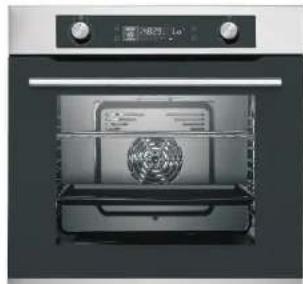
natural_image
Exterior view of a modern kitchen oven with mounted appliances (no visible text or symbols)FMP 7121 NA
FMP 7121 XA
MANUEL D'UTILISATION
FMP 7121 NA
FMP 7121 XA
Attention! Surfaces chaudes!
Risques de brûlure!
K4: Pause / annulation
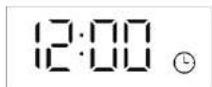
Image 3: Mode veille initial
FRANÇAIS
FRANÇAIS
natural_image
Technical line drawing of a mechanical clamp or bracket assembly (no text or symbols)FIG.1
natural_image
Technical line drawing of a mechanical component with no visible text or symbolsnatural_image
Two identical 3D rectangular panels with upward-pointing arrows, no text or symbols presentFIG.4
FR-64
FRANÇAIS
FIG.6
FR-65
FRANÇAIS
FRANÇAIS

natural_image
Line drawing of a cabinet with an open door and internal components (no text or symbols)Vérification finale
natural_image
Exterior view of a modern kitchen oven with an open door and mounted dish (no visible text or symbols)
natural_image
Exterior view of a modern kitchen oven with mounted appliances (no visible text or symbols)FMP 7121 NA
FMP 7121 XA
INSTRUCTION MANUAL
FMP 7121 NA
FMP 7121 XA
Thank you to have chosen the FAR quality. This product has been created by our professional team and according to the European regulation. For a better use of your new device, we recommend you to read carefully this user manual and keep it for record.
TABLE OF CONTENTS
WARNING -2-
SPECIFICATIONS....-17-
CONTROL PANEL....-18-
PRODUCTION PROGRAM AND FUNCTIONS....-20-
BEFORE USING THE OVEN FOR THE FIRST TIME.....-42-
HOW TO OPERATE THE OVEN....-43-
BAKING AND GRILLING TIPS....-45-
CLEANING AND MAINTENANCE....-51-
ELECTRICAL INSTALLSTION....-59-
INSTALLATION NOTES....-60-
TROUBLESHOOTING....-64-
ENVIRONMENTAL NOTE....-67-
EN-1
ENGLISH
ENGLISH
WARNING
- This appliance is intended to be used in household and similar applications such as - staff kitchen areas in shops, offices and other working environments;
- farm houses and by clients in hotels, motels and other residential type environments;
- bed and breakfast type environments; - catering and similar non-retail applications.
- Warning: The appliance and its accessible parts become hot during use. Care should be taken to avoid touching heating elements.
• Children less than 8 years of age shall be kept away unless continuously supervised.
• The appliance can be used by children aged from 8 years and above and persons with reduced physical, sensory or mental capabilities or lack of experience and knowledge if they have been given supervision or instruction concerning use of the appliance in a safe way and understand the hazards involved. Children shall not play with the appliance. Cleaning and user
maintenance shall not be made by children without supervision.
- WARNING: Unattended cooking on a hob with fat or oil can be dangerous and may result in fire.
- NEVER try to extinguish a fire with water, but switch off the appliance and then cover flame e.g. with a lid or a fire blanket.
- WARNING: Danger of fire: do not store items on the cooking surface.
- A steam cleaner is not to be used. The appliance is not intended to be operated by means of an external timer or separate remote control system.
- WARNING: Ensure that the appliance is switched off before replacing the lamp to avoid the possibility of electric shock. Regarding the instructions for installation and electric connection of the appliance, thanks to refer to the below paragraph of the manual.
ENGLISH
WARNING: Accessible parts may become hot during use. Young children should be kept away.
If the supply cord is damaged, it must be replaced by the manufacturer, its service agent or similarly qualified persons in order to avoid a hazard.
Do not use harsh abrasive cleaners or sharp metal scrapers to clean the oven door glass since they can scratch the surface, which may result in shattering of the glass.
Excess spillage must be removed before cleaning.
During use the appliance becomes hot. Care should be taken to avoid touching heating elements inside the oven.
Regarding the instructions for cleaning surfaces in contact with food thanks to refer to the below paragraph of the manual.
Regarding the information of the method for replacing illuminating lamps, thanks to refer to the below paragraph of the manual.
ENGLISH
Operation

Warning! Danger of fire!
- Do not allow paper or cloth to come in contact with any heating element.
- Never store or use corrosive chemicals, vapors, flammables or nonfood products in or near oven. It is specifically designed for use when heating or cooking food. The use of corrosive chemicals in heating or cleaning will damage the appliance and could result in injury.
- If food inside an oven should ignite, keep door closed. Switch off the oven and disconnect from supply power.
- Exercise caution when opening the door. Standing to the side, open the door slowly and slightly to let hot air and/or steam escape. Keep your face clear of the opening and make sure there are no children or pets near the oven. After the release of hot air and/or steam, proceed with your cooking. Keep doors closed at all time unless necessary for cooking or cleaning purposes.
- Only use utensils that are suitable for use with ovens.
ENGLISH
ENGLISH

Warning! Danger of explosion!
- Liquids and other foods must not be heated in sealed containers since they are liable to explode.
- If smoke is observed, switch off the oven and keep the door closed in order to stifle any flames.
- Do not allow any accessories or electric cables to contact the hot parts of the appliance.

Warning! Hot surfaces! Risk of
burns!
- During use the appliance becomes hot. Care should be taken to avoid touching heating elements inside the oven.
- Warning! Accessible parts may become hot during use. Young children should be kept away.
- Never move racks or pans when they are hot. Wait until they cool.
Safety Advices

IMPORTANT!
Always switch off the electricity supply at the mains during installation and maintenance.
General Information
- This appliance is designed for domestic household use and can be built into a standard kitchen cabinet or housing unit.
- IMPORTANT: The adjacent furniture or housing and all materials used in the installation must be able to withstand a minimum temperature of 85^ above the ambient temperature of the room it is located in, whilst in use.
- Certain types of vinyl or laminate kitchen furniture are particularly prone to heat damage or discolouration at temperatures below the guidelines given above.
• The appliance surfaces will become hot during use and retain heat after operation.
ENGLISH
- Any damage caused by the non-compliance of temperature tolerance of oven during installation or by the too close distance between the furniture and the oven will be borne by the owner.
Installation
- The oven must be installed in accordance with the installation instructions and all measurements must be followed.
- All installation work must be carried out by a competent person or qualified electrician.
The appliance must not be installed behind a decorative door in order to avoid overheating.
- Regarding the instructions for the installation of the accessories, replacement of the bulb, please refer to below paragraphs of this manual.
- Regarding the instructions for the installation of the oven and connection to power supply, please refer to below paragraphs of this manual.
Children
- Please dispose of the packaging material carefully. Packaging material can be dangerous to children.
- Make sure to keep children away from the appliance, children should be supervised to ensure that they do not play with the appliance. It might be dangerous to allow the children to touch the appliance.
• Under the pyrolytic self-cleaning mode, the surfaces may get hotter than usual and children should be kept away.
General Safety
- Do not place heavy objects on the oven door or lean them on the oven door when it is open, as it may cause damages to the oven door hinges.
- Do not place pans or baking trays directly on the base of the oven cavity, even if aluminum foil is placed below them.
- Do not allow cable or plug to come into contact with the heating areas of appliance.
ENGLISH
- Do not install the appliance next to curtains or soft furnishings.
- Do not attempt to lift or move cooking appliances by using the oven door or handle, as this may cause damage to the appliance or result in injury to the person lifting the appliance.
Electrical safety
- The appliance must be placed in such a way, that the power supply is accessible at all times.
- Before connecting the appliance to the power supply, check that the power supply voltage and current rating corresponds with the power supply details shown on the appliance rating label.
- Never use a damaged appliance! Disconnect the appliance from the power source and contact your supplier if it is damaged.
- Danger of electric shock! Do not attempt to repair the appliance yourself. In case of malfunction, repairs are to be conducted by qualified personnel only.
• To avoid damaging the cord, do not squeeze, bend or chafe it on sharp edges. Keep it away from hot surfaces and open flames as well.
- Lay out the cord in such a way that no unintentional pulling or tripping over it is possible.
- Do not open the appliance casing under any circumstances. Do not insert any foreign objects into the inside of the casing.
- Never use accessories which are not recommended by the manufacturer. They could pose a safety risk to the user and might damage the appliance. Only use original parts and accessories.
- Keep the appliance away from any hot surfaces and open flames. Always operate the appliance on a level, stable, clean and dry surface. Protect the appliance against heat, dust, direct sunlight, moisture, dripping and splashing water.
ENGLISH
- Do not place objects with open flames, e.g. candles, on top of or beside the appliance.
- The fixed wiring for applicant shall have an all-pole disconnection device.
If the surface is cracked, switch off the appliance to avoid the possibility of electric shock. - Disconnection incorporated in the fixed wiring is in accordance with AS/NZS 3000.

Safety:
Attention, the glass is an extremely fragile. Always wear gloves when handling.
For your safety, this product is made of tempered glass. This type of glass is highly resistant but has the feature to retain the "memory" of shocks.
Therefore, it should handle the product with the greatest care to avoid shocks and twists, especially during installation.
ENGLISH
Avoid installing this type of product in areas where it would be highly exposed to shocks.
Do not let children play with the product.
Do not stick adhesive film on the glass surface. In case of breakage, it would generate large pieces that could be dangerous
1. INTRODUCTION
- Read this manual carefully before assembling, installing or using the appliance. It contains important information for your safety as well as operating and maintenance advices.
- Observe all safety instructions to avoid damage through improper assembly, installation or use! Follow all warnings on the appliance.
- Keep this manual for future use.
Electrical connection

Danger of electric shock!
Any electrical installation must be carried out by an authorised professional.
- All fittings must be installed by a competent person in accordance with local regulations. If in doubt, consult a qualified electrician.
- Important! Always switch off the electricity supply at the mains during installation and maintenance. We recommend that the fuse is withdrawn or circuit breaker switched off at the distribution board whilst work is in progress.
- This product must be earthed – if no earth feed wire is available, consult an electrician.
- Means for disconnection must be incorporated in the fixed wiring in accordance with the wiring rules.
To achieve this install appropriate switched fused connection unit. - Note! A switched fused connection unit having a contact separation of at least 3mm in all poles should be connected in fixed wiring.
- Connect the incoming positive, neutral and earth cables to the terminals of the switched fused connection unit. Ensure connections are tight.
- The spur outlet must still be accessible even when your oven is located in its housing to enable the appliance to be disconnected from the mains supply.
Cleaning
• Always disconnect the power supply prior to cleaning the appliance. If the switched fused connection unit is difficult to reach, shut off the power supply by using the corresponding circuit breaker at the distribution board.
- Clean the appliance thoroughly before first use. The oven should be cleaned regularly and any food deposits removed.
- Never clean the oven surfaces by steam cleaning.
- The oven cavity should only be cleaned with warm soapy water, using either a sponge or soft cloth. No abrasive cleaners should be used.
ENGLISH
- Any stains that may appear on the bottom of the oven will have originated from food splashes or spilt food, these splashes occur during the cooking process. These could possibly be a result of the food being cooked at an excessively high temperature or being placed in cookware that is too small.
- You should select a cooking temperature and function that is appropriate for the food that you are cooking. You should also ensure that the food is placed in an adequately sized dish and that you use the drip tray where appropriate.
- Warning! Do not use abrasive products to clean the glass door panel to avoid scratching it. Otherwise, severe failure might happen to the appliance.
- Excess spillage must be removed before cleaning and take out all your accessories.
2. INTENDED USE
- This appliance is only suitable for cooking food. Do not use it for other purposes, i.e. for storage purposes. Otherwise, it might lead to damage to the appliance or personal injury.
ENGLISH
SPECIFICATIONS
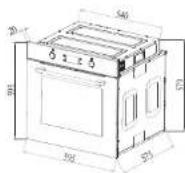
Dimensions :
Height : 595 mm
Width : 595 mm
Depth : 575 mm
Electrical details :
Rated Voltage : 220-2409 \~ 50Hz
Max Rated Inputs : 2800W
Mains Supply Lead : 3 × 1.5mm^2
Oven Light Bulb : 25 W/300°C screw
type pigmy
ENGLISH
ENGLISH
CONTROL PANEL
Buttons
回


1

Pic 1: Buttons diagram
K1: Reminder/parameter (temperature/time)
K2: Clock/ reservation
K3: Start-up
K4: Pause/ cancel
KB1: Plus/minus (cooking function)
KB2: Plus/minus (temperature/time)
Display section
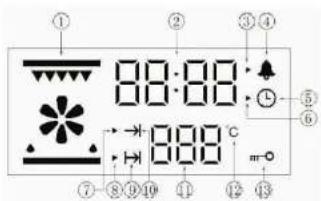
Pic 2: Display screen icon
- Function icon
- Time value display
- Reminder time setting icon
- Reminder time icon
- System time icon
- System time setting icon
- Work parameter setting icon (time and temperature)
- Cooking end time setting icon
- Reservation function
- Oven working icon
- Display the temperature value
- Unit of degree Celsius °C
- Lock function
Function icon instruction
| Icon Icon Function Function | ||
| Top outer heat element | ||
| Heating fan (Defrost) |
ENGLISH
ENGLISH
PROGRAM FUNCTIONS
1. Power on
Connect your appliance to the mains supply, all indicator lights of the display board will light up for 1second and then enter the clock setting state. Default time show 12:00, hour "12" flashes, the system clock setting icon "▶" flashes, and the system clock icon "①" is always on. The clock can be input at this time, refer to clock setting requirement for details.
• After 10 seconds without any operation and the oven will enter to adjust minute automatically.
- Within 10 seconds without any operation when adjusting minute, the oven will enter standby mode automatically.
• Under the standby mode, the display always shows system time.(Refer to picture 3 for the display effect.)
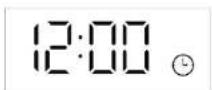
Pic 3: Initial standby mode
When the oven is powered on, the oven door lock will start to self-inspection. During the self-inspection, the door lock will run back and forth automatically. If there is no abnormal alarm within 20 seconds, then self-inspection is completed. Or if it shows fault code "E-3" during the self-inspection, please refer to protection function for problem analysis, you can touch "☐" to cancel the fault code and return to standby mode.
2. Time setting
In the standby mode, touching the “☐” button once to enter the system clock setting state. At this time, the hour value of the clock and the setting icon “▶” flash (1s/1 time) and the hour is set by rotating the switch KB2. (0\~23\~0 is recyclable)
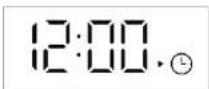
Pic 4: Hour and minute adjustment display effect
ENGLISH
- After adjusting the hours, re-touch “☐” to switch to minute adjustment. Minute value and the setting icon “▶” flash at this time, you can set minute time by rotating programming switch KB2.(0\~59).
- After adjusting the minutes, re-touch the “☐” to confirm, clock setting accomplished. And at this time, the clock setting icon “▶” goes out and the second icon “:” flashes (1s/1 time).
- When the hour and minute are set, the system clock setting icon “▶flashes and the system clock icon “☐” is always on. After confirming, the setting icon “▶” is off and the system clock icon “☐” continues to be displayed. In the hour setting, if you do not touch the “☐” button to confirm within 10 seconds, it will automatically switch to the minute setting. If the “☐” button is not confirmed within 10 seconds after the clock setting is completed, the system defaults to complete the clock setting and automatically returns to the standby state. If the clock is not set within 20 seconds after power-on, the system default clock is 12:00 and enters standby state. If the power is turned off, the clock will be reset.
ENGLISH
3. The choices of function
- In the standby state, only the system clock is displayed.
- Under standby status, switch different functions by rotating the programming switch KB1 in turn, refer to picture 5 for the order. (The oven will remember the last operation)

Pic 5: Oven function mode
- When selecting the function, the clock position shows the default cooking time of the corresponding function (it will show “Eco” under Eco mode), the temperature position shows the default temperature of the corresponding function. For temperature adjustable function mode, temperature place will display default temperature value of corresponding function and flash, temperature icon “C” will flash, and the working parameter setting icon “▶” flash as well as the oven working icon “→” is
ENGLISH
ENGLISH
always on. You can rotate the programming switch KB2 to set the cooking temperature. If temperature is not adjustable for that function level, the default clock value and the working parameter setting icon “▶” flash as well as the oven working icon “→” is always on.
- For temperature adjustable function mode, after the cooking temperature is set, touch “☐” to switch to cooking time adjustment, display screen clock place will display default cooking time of corresponding function and flash, the working parameter setting icon “▶” flash and working time icon “→” is always on, you can rotate programming switch KB2 to set the cooking time at this time.
- For temperature is not adjustable function mode, you can set the cooking time directly. Please refer to the above for detailed operation.
- If the cooking time and temperature are not set, or not touching “▶” within 10 seconds of completion, the system automatically returns to standby status. (The cooking functions table are attached behind.)
EN-24
• Under working status the oven displays as followings:
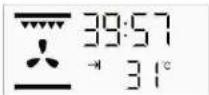
Pic 6: Working status display effect
- Oven display when working: “→” cooking time icon will display, clock place will display cooking countdown time, corresponding selection menu display, and the temperature position displays the real-time cavity temperature.
Note:
(1) Normal function cooking time setting range is 0 minutes to 10 hours.
(2) When the cooking time is set to 0 minutes, if the button “▶” is touched at this time, the oven will not work and the system will automatically return to the standby state.
- When the cooking time is set to 0 minutes, if the reservation function setting is performed at this time, after setting the reservation time, touch the button “▶”, the oven will not make a reservation, and the system will automatically return to the
EN-25
ENGLISH
ENGLISH
standby state.
- When the cooking time or cooking temperature setting are finished, press“▶” button to start the oven and corresponding icon stop flashing. After the oven starts working, the cooking time begin to countdown by second.
- Cooking note: When cavity temperature is close to set temperature, oven will prompt for 2 seconds. If cooking time countdown to 0, oven will stop cooking (exhaust fan will continue to work), and the system return to standby status automatically. Buzzer will continuously prompt for 5 minutes(1s/time), exhaust fan will stop working after cavity temperature is below 100 C.
• Temperature display range: not lower than 30^ C, display Lo C when lower than 30^ C.
- Reservation function
- After setting cooking time and temperature and before touching “▶” to start-up, touch “◀” to enter to cooking end time(reservation function) setting (default end time=system time +set cooking time), cooking end time icon “▶” will flash (1s/ time), the reservation function icon “→” is always on and the hour value of
EN-26
the clock position flashes at this time, rotating programming switch KB2 to set the hour. After the hour time setting is completed, touch “☐” again to enter the minute time setting. At this time, the minute value of clock position flashes, and the minute time can be set by rotating programming switch KB2.(You can use the “☐” to switch hour and minute settings circularly.)After cooking end time setting completed, touch “▶” to start, oven will enter reservation status.
- The longest reservation time is 24 hours. - Under reservation status the display screen will display as picture 7. All elements and motors will not work at this time.
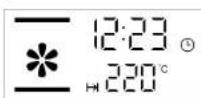
Pic 7: Reservation status display effect
- Reservation status display: “→” reservation icon will display, “☐” system clock icon will display, clock position will display system time, the selected menu will display, temperature position will display setting or default cooking temperature.
EN-27
ENGLISH
- If more than 10 seconds not confirmed during setting reservation function, the oven will automatically return to standby state.
- Under reservation status, you can touch “☐” to query the cooking start time (cooking start time=cooking end time-cooking time).
- If you need to cancel the reservation setting, you can touch “☐” to cancel it and oven will enter to standby mode.
5. Pyrolytic self-cleaning mode
- You can switch to pyrolytic self-cleaning mode by rotating programming switch KB1. The default temperature of this mode is not adjustable, default working time is 1.5 hours. You can rotate KB2 to adjust the working time, adjustable working time range is min. 1.5 hours and max. 2.5 hours.
- After selecting the pyrolytic self-cleaning mode and setting working time, touch “▶” to start working. At this time, “→” icon will display, door lock will be activated, door lock icon “○” will always display, indicating that the oven door has been locked and pyrolytic self-cleaning mode
ENGLISH
starts, touch “☐” button can pause or cancel the function.
- After the self-cleaning function is confirmed and started, clock position shows working countdown time, temperature position shows "PYA". Oven lamp cannot be used after pyrolytic self-cleaning mode is activated.
- After start self-cleaning, door lock function will be activated automatically, the oven door will be locked and self-cleaning process starts. After self-cleaning process starts, if the display screen shows fault code “E-3”, please refer to protection function for problem analysis. You can touch “ ☐ to cancel the fault code and return to standby mode. After clear the fault code, reset self-cleaning function, and touch “ ☑ again to start.
6. Door lock function
6.1 Door lock display: When self-cleaning process is completed, oven will enter standby mode. When oven cavity temperature is higher than 300 °C, display screen will display door lock icon “m-0” (display effect refer to picture 8.) Door lock
ENGLISH
will be relieved automatically when cavity temperature is lower than 280 C, door lock icon “m-O” on the display screen will extinguish at this time.(Refer to picture 9 for display effect.)
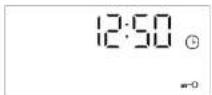
Pic 8: Door lock activated display effect under standby status
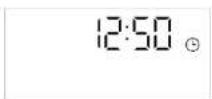
Pic 9: Door lock relieved display effect under standby status
6.2 Oven will be locked under following status:
- Among all function mode(except for dc frost mode),door lock will automatically be activated when oven cavity temperature is higher than 300°C.
- During self-cleaning process, door lock will be activated.
- When oven is under standby mode, and temperature sensor is open-circuit or short circuit, door lock will be activated and cooling fan still works, display effect will be as picture 8 shown.
6.3 Oven will be unlocked under following situations:
- When self-cleaning process is completed or paused, oven door lock will automatically be relieved only when oven cavity temperature drops to below 280^ .
If electricity is cut off during self-cleaning process, oven door will be unlocked only after power on again. (Note: Even if power on again, oven door will be automatically unlocked only when cavity temperature is below 280°C.)
- During other function mode working, if oven temperature is abnormal, the oven door will be relieved only when cavity temperature is below 280 C.
ENGLISH
6.4 Forced unlocking: In the case of oven lock, you can press and hold the “K2+K4” button to unlock in the oven standby state. When you hear the sound “Di” the door lock is forced unlock, the door lock icon will be extinguished. The door can be opened and door lock function is disabled.
Note: After the oven door lock is forcibly unlocked, the oven must be powered off and re-powered. The door lock will be self-tested after the power-on process, and the oven can be used normally after self-test.
- Error code & Solutions
7.1 Display will show E-1 if sensor is short circuit or open circuit under cooking mode, buzzer will continuously prompt for 10 times (1s/time), refer to display effect 10. Oven will be locked at this time, touch “ 📋 button can return to standby mode.
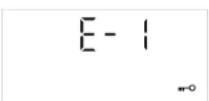
Pic 10: Sensor abnormal alarm display effect
ENGLISH
7.2 When the temperature is below 35°C after 5 minutes of heating(except for defrost mode and Eco mode), it means the heating element have a problem, display will show E-2, buzzer will continuously prompt for 10 times(1s/time), refer to display effect shown as pic 11. Touch “☐” button can return to standby status at this time.
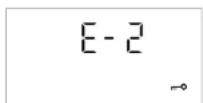
Pic 11: Heat element abnormal alarm display effect
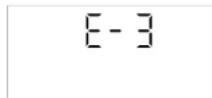
7.3 During self-cleaning process, if display screen shows fault code "E-3" when door is locked into place, it means door lock or detection circuit is faulty. When the fault code appears, the buzzer will continuously prompt for 10 times (1s/time), display effect as below pic 12). Touch "☐" button can return to standby status.
Pic 12: Door lock abnormal alarm display effect
ENGLISH
7.4 In any state, when the power board cannot receive valid communication data from the display board for 20 seconds, the power board automatically turns off all loads, and the display board displays "E-5". When the display board cannot receive valid communication data from the power board for 20 seconds, the display board sends data to close all loads, and the display board displays "E-6".
| Error code | Description | Reason |
| E-1 | Open or shorted sensor Sensor or detection circuit failure | |
| E-2 | Sensor failure Sensor or heating | element failure |
| E-3 | Door lock failure Door lock or detection circuit failure | |
| E-4 | MCU Register failure MCU failure | |
| E-5 | The power board cannot receive the effective communication data from the display board for 20 seconds, and the power board automatically turns off all loads. | Communication line failure |
| E-6 | The display board cannot receive valid communication data from the power board for 20 seconds, and the display board sends data to turn off the load. | Communication line failure |
| E-7 | High temperature protection occurs, and the load is turned off within 10 seconds. | Defective sensor or heating element drive circuit |
EN-34
ENGLISH
- Enquiry function
(1) When the oven is working, touch “☐” button once can query system time, the clock position shows the current time of the system, second icon will flash. Re-touch “☐” button or 10s later automatically return to the barbecue time display.
(2) After the reminder time setting is completed, and the oven in the reservation or working state, touch “☐” can query the alarm remaining countdown. Re-touch “☐” button or 10s later automatically return to its original state. You can query the remaining alarm time and reset the alarm time under standby state. When the alarm countdown time is less than 1 minute, the clock position shows 0:00.
(3) In the reservation status, first touch of the “☐” can query the cooking start time, the clock position shows the cooking start time, clock value flashes. Re-touch “☐” button or 10s later automatically return to the system time display.
EN-35
ENGLISH
ENGLISH
9. Reminder function
Touch “☐” button under standby state to enter to reminder function setting, at this time the clock position hour value will flash, minute value will long lit. The reminder time setting icon “▶” flashes, the reminder time icon “◀” is always on.
(1) Rotate programming switch KB2 to set the hour, at this time the hour value is always bright, the value setting range is 0-23;
(2) Touch “☐” button again, minute value flashes, and hour value keeps bright;
(3) Rotate programming switch KB2 to set the minute, at this time the value of the minute is always bright, the setting range is 0-59;
(4) When the alarm time is set, you can touch “▶” for confirmation. At this time, the display shows the system time, the reminder time setting icon “▶goes out, the second icon “:” flashes, the “▲” is always on, and the reminder time starts to count down in seconds. When the time countdown is 00:00, buzzer will sound for 1 minute (1s/time), and the reminder time icon “▲” is always flashing (1s/time), then press any button to stop flashing.
EN-36
Note:
(1) During setup, second icon “ ”: and alarm clock icon “ 🔊” will always bright.
(2) During setup, touch “☐” button will cancel the current reminder time setting and return to standby state.
(3) If a reminder function has been set, then reminder icon “ 🔊” should always be displayed when the menu is working, and the reminder time can be queried.
10. Start/pause/cancel function
- After setting up the cooking function, touch “▶” button to start working; if touching “▶” button when the cooking is suspended, you can restart the work.
- During oven cooking, touch “☐” button once can pause the cooking, temperature and time will flash display, oven working icon “→” flashes, function icon is always on; Touch “☐” button again will cancel current cooking.
- When setting system time, press “☐” button to exit the clock setting state directly and return to standby state.
- When oven function, cooking time and temperature are set, press “ 11 ” button to exit function setting state and return to
EN-37
ENGLISH
ENGLISH
standby state.
- After setting the reservation function or entering the reservation function, press the “☐” button can return to the standby mode directly.
- Other instructions
(1) Button sound
(2) Sound for touching the button
(3) Alarm sound: Heating element faulty sound, sensor fault sound;
(4) Prompt sound: The temperature reaches the set value, the cooking time counts down to 0, and the alarm time counts down to 0.
- The required cooking mode is selected using the multi-functional control button. The functions that may be selected are:
| Function 1 | Defrost mode: The fan runs without heat to reduce the defrosting time of frozen foods. The time required to defrost the food will depend on the room temperature, the quantity and type of food. Always check food packaging for the defrosting instructions. | |
| Function 2 | Conventional oven (top outer and lower element) mode: This method of cooking provides traditional cooking, with heat from the top and lower elements. This function is suitable for roasting and baking on one shelf only. |
| Function 3 | Conventional grill mode: This method of cooking is a conventional cooking method, the oven heat from top element to lower element, and the fan helps to circulate the heat to achieve an even baking result. This function is suitable for roasting and baking on one shelf only. | |
| Function 4 | Half grill mode: This method of cooking utilizes the inner part only of the top element, which directs heat downwards onto the food. This function is suitable for grilling small portions of bacon, toast and meat etc. | |
| Function 5 | Full grill mode: This method of cooking utilizes the inner and outer parts of the top element, which directs heat downwards onto the food. This function is suitable for grilling medium or large portions of sausages, bacon, steaks, fish etc. | |
| Function 6 | Fan heating and grill mode: This mode by using top heat element and fan together, to let the inner heating circulate quickly. It is suitable for needing bake food quickly and locking the inner moisture of food, such as beefsteak, hamburger, and some vegetables. | |
| Function 7 | Fan and bottom element mode: This method of cooking utilizes the bottom element in conjunction with the fan, which helps to circulate the heat quickly. This function is suitable for food needing to heat bottom ,for example pizza etc. | |
| Function 8 | Energy saving grilling mode: This method of cooking uses the top inner ring and the bottom heating element to control the temperature, making the grilling more energy saving, mainly suitable for large food, oven temperature rises slowly, the heat fully penetrates and the excess heat consumption is reduced. |
ENGLISH
ENGLISH
| Function 9 | Self-cleaning mode(the display will show “PYR”):1. Before use of the self-cleaning function, all the accessories such as the wire rack, oven pan and side shelves must be taken out of the oven, otherwise the high temperature will damage the fittings.2. When the temperature of the cavity reaches the high temperature of carbonization, the grease and food residue will be carbonized for easy cleaning. | |
| Note:A.The exhaust motor works at low speed under the Function1 - Function 7 state and ECO function, and the exhaust motor stops working when the cavity temperature is lower than 100°C in the standby state.B.Under any function, if the cavity temperature is higher than 300°C, the exhaust motor will work at high speed. | ||
Accessories
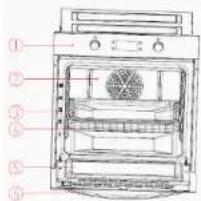
1、Control panel
2、Fan motor (behind steel plate)
3、Oven tray
4、Wire rack
5、Door 6、Handle
EN-40
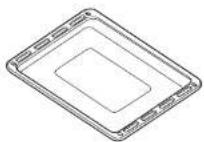
Oven tray
For moist cakes, pastries, frozen meals and large roasts. It can also be used to catch dripping fat when you are grilling directly on the wire rack.
Wire rack
Used for roasting and for placing the food to be baked, roasted or cooked in casserole dishes to the desired rack.
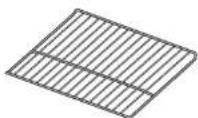
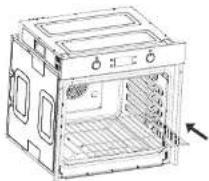
Put the wire rack into the oven in the direction of the arrow. And horizontally insert until it is fixed
EN-41
BEFORE USING THE OVEN FOR THE FIRST TIME
Heating up the oven
To remove the new cooker smell, heat up the oven when it is empty and closed. An hour of Top/bottom heating at 240^ C is ideal for this purpose. Ensure that no packaging remnants have been left in the cooking compartment.
-
Use the function selector to set Top/bottom heating.
-
Set the temperature selector to 240°C.
After an hour, switch off the oven. To do so, turn the function selector to the off position.
Cleaning the accessories
Before you use the accessories for the first time, clean them thoroughly with hot soapy water and a soft dish cloth.
Tips for saving energy
The following information will help you to use your appliance in an ecological way, and to save energy:
-
Use dark coloured or enamel coated cookware in the oven since the heat transmission will be better.
-
While cooking your dishes, perform a preheating operation if it is advised in the user manual or cooking instructions.
- Do not open the door of the oven frequently during cooking.
- Try to cook more than one dish in the oven at the same time, whenever possible. You can cook by placing two cooking vessels onto the wire grill.
- Cook more than one dish one after another. The oven will already be hot.
- You can save energy by switching off your oven a few minutes before the cooking time. Do not open the oven door.
- Defrost frozen dishes before cooking them.
General information on baking, roasting and grilling Risk of scalding by hot steam! Take care when opening the oven door as steam may escape.
ENGLISH
Tips for baking
- Use non-stick coated appropriate metal plates or aluminium containers or heat-resistant silicone moulds.
- Make best use of the space on the rack.
- It is recommended to place the baking mould in the middle of the rack.
- Keep the oven door closed.
Tips for roasting
- Seasoning with lemon juice and black pepper will improve the cooking performance when cooking a whole chicken, turkey or a large piece of meat.
- Meat with bones takes about 15 to 30 minutes longer before it is cooked than a roast of the same size without bones.
- You should calculate about 4 to 5 minutes cooking time per centimetre height of the meat.
- Let meat rest in the oven for about 10 minutes after the cooking time. The juice is better distributed all over the roast and does not run out when the meat is cut.
- Fish in a fire-resistant dish should be placed on the rack at the medium or lower level.
EN-44
ENGLISH
Tips for grilling
Grilling is ideal for cooking meat, fish and poultry and will achieve a nice brown surface without it drying out too much. Flat pieces, meat skewers and sausages are particularly suited for grilling as are vegetables with a high water content such as tomatoes and onions.
BAKING AND GRILLING TIPS
Baking tips
- How to establish whether sponge cake is baked through. Approximately 10 minutes before the end of the baking time specified in the recipe, stick a cocktail stick into the cake at the highest point. If the cocktail stick comes out clean, the cake is ready.
- The cake collapses. Use less fluid next time or set the oven temperature 10 degrees lower. Observe the specified mixing times in the recipe.
- The cake has risen tin the middle but is lower around the edge. Do not grease the sides of the spring form cake tin. After baking, loosen the cake carefully with a knife.
EN-45
ENGLISH
- The cake goes too dark on top. Place it lower in the oven, select a lower temperature and bake the cake for a little longer.
- The cake is too dry. When it is done, make small holes in the cake using a cocktail stick. Then drizzle fruit juice or an alcoholic beverage over it. Next time, select a temperature 10 degree higher and reduce the baking time.
- The bread or cake(e.g. cheesecake) looks good, but is soggy on the inside (sticky, streaked with water). Use slightly less fluid next time and bake for slightly longer at a lower temperature. For cakes with a moist topping, bake the base first. Sprinkle it with almonds or bread crumbs and then place the topping on top. Please follow the recipe and baking times.
- The cake is unevenly browned. Select a slightly lower temperature to ensure that the cake is baked more evenly. Bake delicate pastries on one level using Top/bottom heating. Protruding greaseproof paper can affect the air circulation. For this reason, always cut greaseproof paper to fit the baking tray.
ENGLISH
- The bottom of a fruit cake is too light. Place the cake one level lower the next time.
- The fruit juice overflows. Next time, use the deeper universal pan, if you have one.
- Small baked items made out of yeast dough stick to one another when baking.
There should be a gap of approx. 2 cm around each item. This gives enough space for the baked items to expand well and turn brown on all sides. - You were baking on several levels. The items on the top baking tray are darker than that on the bottom baking tray. Always use
3D hot air to bake on more than one level. Baking trays that are placed in the oven at the same time will not necessarily be ready at the same time. - Condensation forms when you bake moist cakes. Baking may result in the formation of water vapor, which escapes above the door.
The steam may settle and form water droplets on the control panel or on the fronts of adjacent units. This is natural process.
Grilling tips
- When grilling, preheat the oven for approx. 4 minutes, before placing the food into the cooking compartment. Always grill with the oven door closed.
- As far as possible, the pieces of food you are grilling should be of equal thickness. This will allow them to brown evenly and remain succulent and juicy.
- Turn the food you are grilling after 2/3 of the time.
- Do not add salt to steaks until they have been grilled.
- Add in a little liquid if the meat is lean. Cover the base of the ovenware with approx. 1/2 cm of liquid.
- Add liquid generously for pot roasts. Cover the base of the ovenware with approx. 1-2 cm of liquid.
-
Place the food to be grilled directly on the wire rack. If you are grilling a single piece, the best results are achieved by placing it in the centre of the wire rack. The universal pan should also be inserted at level 1. The meat juices are collected in the pan and the oven is kept cleaner.
-
When grilling, do not insert the baking tray or universal pan at level 4 or 5. The high heat distorts it and the cooking compartment can be damaged when removing it.
- The grill element switches on and off continually. This is normal. The grill setting determines how frequently this will happen.
- When the roast is ready, turn off the oven and allow it to rest for an additional 10 minutes. This allows better distribution of the meat juices.
- For roast pork with a rind, score the rind in a crossways pattern, then lay the roast in the dish with the rind at the bottom.
- Place whole poultry on the lower wire rack breast-side down. Turn after 2/3 of the specified time.
- For duck or goose, pierce the skin on the underside of the wings. This allows the fat to run out.
ENGLISH
- Turn the pieces of fish after 2/3 of the time, whole fish does not have to be turned. Place the whole fish in the oven in its swimming position with its dorsal fin facing upwards. Placing half a potato or a small ovenproof container in the stomach cavity of the fish will make it more stable.
- How to tell when the roast is ready. Use a meat thermometer (available from specialist shops) or carry out a “spoon test”. Press down on the roast with a spoon. If it feels firm, it is ready. If the spoon can be pressed in, it needs to be cooked for a little longer.
- The roast is too dark and the crackling is partly burnt. Check the shelf height and temperature.
- The roast looks good but the juices are burnt. Next time, use a smaller roasting dish or add more liquid.
- The roast looks good but the juices are too clear and watery. Next time, use a larger roasting dish and use less liquid.
ENGLISH
- Steam rises from the roast when basted. This is normal and due to the laws of physics. The majority of the steam escapes through the steam outlet. It may settle and form condensation on the cooler switch panel or on the fronts of adjacent units.
CLEANING AND MAINTENANCE

Cleaning operations must only be carried out when the oven is cool.
The appliance should be disconnected from your mains supply before commencing any cleaning process.
° The oven should be thoroughly cleaned before it is operated for the first time and after each use. This will avoid residual food stuffs becoming baked on the oven cavity. After residues have been baked on several times, they are far more difficult to remove.
° Never clean the oven surfaces by steam cleaning.
ENGLISH
° The oven cavity should only be cleaned with warm soapy water, using either a sponge or soft cloth. No abrasive cleaners should be used.
° Any stains that may appear on the bottom of the oven will have originated from food splashes or spilt food, these splashes occur during the cooking process. These could possibly be a result of the food being cooked at an excessively high temperature or being placed in cookware that is too small.
° You should select a cooking temperature and function that is appropriate for the food that you are cooking. You should also ensure that the food is placed in an adequately sized dish and that you use the drip tray where appropriate.
° Outer parts of the oven should only be cleaned with warm soapy water, using either a sponge or soft cloth. No abrasive cleaners should be used.
° If you use any form of oven cleaner on your appliance, then you must check with the manufacturer of the cleaner that it is suitable for use on your appliance.
ENGLISH
° Any damage that is caused to the appliance by a cleaning product will not be fixed free of charge, even if the appliance is within the guarantee period.
Cleaning the oven
No oven cleaner or any other special cleaning agent is required for cleaning the oven. It is recommended to wipe the oven with a damp cloth while it is still warm.
To clean the side walls and oven door
- Take down left and right side-shelves, method is pushing the bottom of shelves and pull to sides at the same time, push up side shelves and rotate up to level, and pull out the rack.
- Cleaning left and right sides, order of install is opposite to the order of take down.
Removing the door from the oven (Fig.1)
° To simplify cleaning the interior of the oven, the door can be removed.
° The process of removing the door is shown below:
° Full open the door.
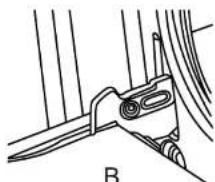
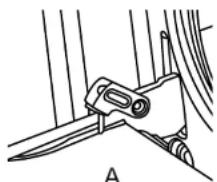
° Fold up the right and left side of locking rod. (picture A)
° Close the door until reach to stop step, hold on both left and right sides of the door, then reclose the door, upward and downward and pull out the door.
° The process of installing the door is shown below:
° Accord to the opposite order of door disassembly.
° When install oven door, make sure both hinge plug into opening mouth directly.
° Both sides of hinge rabbet must bite up each other.
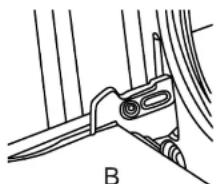
° When open the door, spread down locking rod(picture B)

If the door drop accidentally or hinges shut up suddenly, do not push you hand in hinges. Please call your after-sale department.
natural_image
Technical line drawing of a mechanical clamp or bracket assembly (no text or symbols)FIG.1
natural_image
Technical line drawing of a mechanical component labeled B, showing a lever and pivot (no text or symbols present)Cleaning the glass door (Fig.2-5)
° If possible, remove the oven door glass following the manufacture's instructions. Use warm water with a little detergent to clean the glass sections of the door.
° Do not use abrasive products which could damage the glass. Remember that if the surface of the glass panel becomes scratched, it could cause a dangerous failure.
° To simplify the cleaning, the inner glass panel can be taken out of the door. The method for removing the glass from the door is shown below. Install the glass use the opposite steps like removed.
ENGLISH
1) Remove oven door, put it on a piece of cloth.
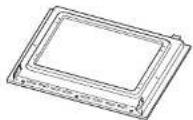
FIG.2
2) Remove the three screws using a cross screwdriver.
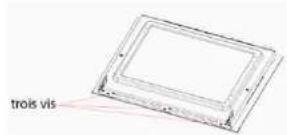
FIG.3
3)Lift up the enamel door and then push forward.
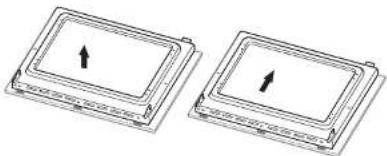
natural_image
Two identical rectangular electronic components with upward-pointing arrows, no text or symbols present.FIG.4
EN-56
ENGLISH
4) Flip the enamel door, remove the four screws using a cross screwdriver.
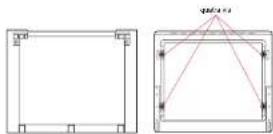
FIG.5
Notice! Dangerous!
If the glass has some scratches, it may lead to crack.
Don't use the glass container corrosive cleaning product or detergent to clean the glass.
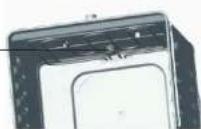
Replacement of the oven light bulb (Fig.6)
Not covered by the appliance guarantee.
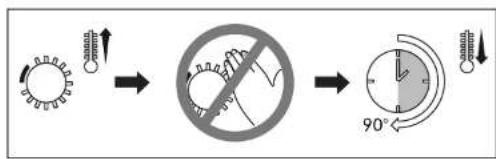
FIG.6
EN-57

WARNING: Disconnect the appliance from the electricity supply, open the oven door remove the oven shelves.
The oven has a light with the following characteristics: 25 W, 300 °C.
- During use the appliance becomes hot. Care should be taken to avoid touching heating elements inside the oven
- WARNING: Ensure that the appliance is switched off before replacing the lamp to avoid the possibility of electric shock
- Remove the glass cover that protects the light bulb by turning it anti-clockwise.
- Unscrew the old light bulb and dispose of it safely and ecologically.
Note:
The glass cover may be tight and, therefore, may need a grip to release it.
BULB and BULB PROTECTOR
ELECTRICAL INSTALLATION
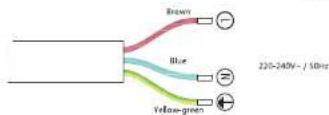
The installation must be carried out by a suitably qualified person, in accordance with the current version of the following.
Before connecting the appliance, make sure that the supply voltage marked on the Rating Plate corresponds with your mains supply voltage.
WARNING: THIS APPLIANCE MUST BE EARTHED.
- Our company shall not be held responsible for any damage caused by using the appliance without an earthed socket. Risk of electric shock, short circuit or fire by unprofessional installation! The appliance may be connected to the mains supply only by an authorized qualified person and the appliance is only guaranteed after correct installation.
- Risk of electric shock, short circuit or fire by damage of the mains lead! The mains lead must not be clamped, bent or trapped or come into contact with hot parts of the appliance. If the mains lead is damaged, it must be replaced by a qualified electrician.
ENGLISH
- The mains supply must correspond to be data specified on the rating plate of the appliance. The appliance mains cable must correspond to the specifications and the power consumption.

Risk of electric shock!
Before starting any work on the electrical installation, please disconnect the appliance from the mains supply.
INSTALLATION NOTES
Before installation
The appliance should be installed built in the cabinet. It should be keep safety distance with appliance and the kitchen walls. Detail please check below picture. (values in mm).
Surfaces, synthetic laminates and adhesives used must be heat resistant (100 C minimum), and neighbouring unit fronts up to 70 C.
◇ Kitchen cabinets must be set level and fixed. A gap of 5 mm is required between the appliance and surrounding unit fronts.
◇ If there is a drawer beneath the oven, a shelf must be installed between oven and drawer.
EN-60
ENGLISH
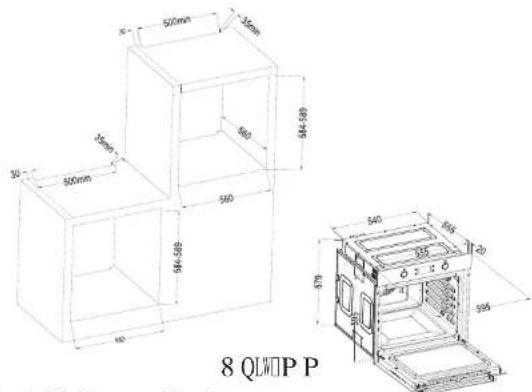
Installation method
Installation and connection
- The door and/or handle must not be used for lifting or moving the appliance.
☐ For installation the appliance must be connected in accordance with all local gas and/or electrical regulations.
◇ Carry the appliance with at least two persons.
◇ Use the slots or wire handles located at both sides to move the appliance.
EN-61
ENGLISH

Connection to the mains supply This appliance must be earthed!
Our company shall not be held responsible for any damage caused by using the appliance without an earthed socket. Risk of electric shock, short circuit or fire by unprofessional installation! The appliance may be connected to the mains supply only by an authorized qualified person and the appliance is only guaranteed after correct installation.
Risk of electric shock, short circuit or fire by damage of the mains lead! The mains lead must not be clamped, bent or trapped or come into contact with hot parts of the appliance. If the mains lead is damaged, it must be replaced by a qualified electrician.
◇ The mains supply must correspond to be data specified on the rating plate of the appliance. The appliance mains cable must correspond to the specifications and the power consumption.
ENGLISH

Risk of electric shock!
⚠️ Before starting any work on the electrical installation, please disconnect the appliance from the mains supply. Installation
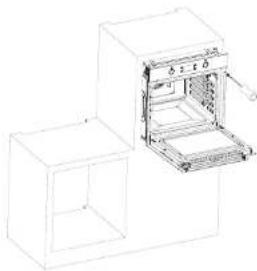
- Slide the oven through the cabinet aperture, align and secure.
- Fix your oven with the 2 screws and washers as indicated in the figure.
natural_image
Line drawing of an open oven with a rack, placed on top and bottom of a rectangular base (no text or symbols)Final check
- Connect the appliance to the mains supply correctly and switch on the mains supply.
- Check function.
ENGLISH
ENGLISH
TROUBLESHOOTING
| Fault | Cause | Solution |
| Oven isn't working | Interrupt electrical current | Check your kitchen light or other appliance if working on |
| Breaker malfunction | Check if your breaker are working on | |
| I'orgot to active the timer function | Reset the timer function | |
| Lamp isn't coming on | Lamp have defectiveness | Change for a new lamp |
| No electrical current Check if the oven have electrical current | ||
| Oven stop working in a sudden during working | Power interrupt Check your kitchen light or other appliance whether still working on | |
| Normal close thermostat protective | Check if the cool fan are working, if yes, need change for a new thermostat | |
| Oven not heating when operation | Not adjust the temperature controller | Set up the temperature |
| If this model have timer, you may not set up the time | Set up the timer | |
| No power | Check the power box | |
| Heating element was damaged | Change for a new heating element | |
| Water come out from the glass door when working | Door seal is blow-by Change for a new door seal | |
| Hinge is not strong enough | Change for a new hinge | |
EN-64

IMPORTANT: If your appliance appears not to be operating correctly, Please contact with dealer. DO NOT ATTEMPT TO REPAIR THE APPLIANCE YOURSELF.
EN-65
Information for domestic ovens
| Symbol Value Unit | |||
| Model identification | FMP 7121 NA/FMP 7121 XA | - | - |
| Type of oven | Build in Electric Ovcn | - | - |
| Mass of the appliance | M 33 kg | ||
| Number of cavities | - 1 - | ||
| Heat source per cavity (electricity or gas) | Electricity - - | ||
| Volume per cavity | V 70 L. | ||
| Energy consumption (electricity)required to heat a standardized load in a cavity of an electric heated oven during a cycle in conventional mode per cavity(electric final energy) | EC electric cavity 0,77 | kWh/cycle | |
| Energy consumption required to heat a standardised load in a cavity of an electric heated oven during a cycle in fan-forced mode per cavity (electric final energy) | EC electric cavity 0,82 | kWh/cycle | |
| Energy Efficiency Index per cavity | EEI cavity | 91,7 | - |
| Energy efficiency class | - | A | - |
1kWh/cycle = 3.6MJ/cycle
The measurement and calculation method of the above table was done in accordance with commission regulation (EU) No 65/2014 & 66/2014.
We decline liability for any damage or accident derived from any use of this product which is not in conformity with the instructions contained in this booklet.
ENVIRONMENTAL NOTE
ENVIRONMENTAL PROTECTION:
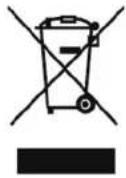
European directive 2012/19/EU on Waste from Electrical and Electronic Equipment (WEEE), requires that used household appliances are not thrown into the normal municipal waste stream. Used appliances must be collected separately in order to optimize the rate of recovery and recycling of materials that compose them, and to reduce the impact on human health and on the environment. The crossed bin symbol is affixed to all the products to remind you of the obligations of separated collection.
ENGLISH
This instruction book is also available on our website: www.conforama.fr.
CE
Note :
a. In order to reduce the environmental impact (e.g. energy use) of the cooking process, please be sure that your product is installed according to the user manual, keep the operation place ventilated, keep the extraction duct be direct and short as possible as it can be.
b. For the product with manual operation mode, we suggest switch the motor off within 10 minutes after finishing the cooking process.
c. Please be sure to dismantle related components according to the user manual when maintaining for non-destructive, protect the parts to make the re-installed work can be favoring and avoid damage.
ENGLISH
Environmental note
Note: Before discarding an old appliance, switch off and disconnect it from the power supply. Cut off and render any plug useless. Cut the cable off directly behind the appliance to prevent misuse. This should be undertaken by a competent person.
This appliance is marked according to the European directive 2002/96/EC on Waste electrical and Electronic Equipment (WEEE). By ensuring this product is disposed of correctly, you will help prevent potential negative consequences for the environment and human health, which could otherwise be caused by inappropriate waste handling of this product.
The symbol 📄 on the product or on the documents accompanying the product indicates that this appliance may not be treated as household waste. Instead it shall be handed over to the applicable collection point for the recycling of electrical and electronic equipment.
ENGLISH
Disposal must be carried out in accordance with local environmental regulations for waste disposal. For more detailed information about treatment, recovery and recycling of this product, please contact your local city office or local waste management office.
The packaging materials that we use are environmentally friendly and can be recycled. Please discard all packaging material with due regard for the environment.
EN-70
EN-71
ENGLISH
CONFORAMA France SA