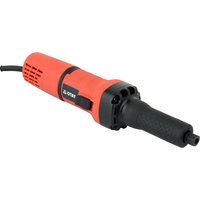
YT-82080 - Grinder Yato - Free user manual and instructions
Find the device manual for free YT-82080 Yato in PDF.


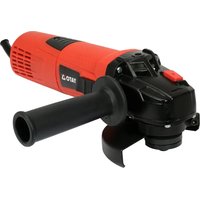
| Brand | Yato |
| Model | YT-82080 |
| Product type | Angle grinder (die grinder) |
| Supply voltage | 220 - 240 V~ |
| Mains frequency | 50 / 60 Hz |
| Rated power | 750 W |
| Electrical protection class | II |
| Rated speed | 10,000 - 30,000 min⁻¹ |
| Tool holder diameter | 6 / 8 mm |
| Maximum tool diameter | 50 mm |
| Weight | 1.8 kg |
| Sound pressure level (LpA ± KpA) | 74 ± 3 dB(A) |
| Sound power level (LwA ± KwA) | 85 ± 3 dB(A) |
| Vibration level (a_n ± K) | 4.4 ± 1.5 m/s² |
| Protection degree | IP20 |
| Main functions | Grinding, polishing, brushing |
| Included accessories | Mounting wrenches, instruction manual |
| Maintenance and cleaning | Clean with compressed air (≤0.3 MPa) or dry cloth; do not use chemical agents |
| Safety instructions | Wear safety goggles, hearing protection, dust mask; use gloves and appropriate clothing |
| Repairability | Authorized after-sales service only; original spare parts |
Frequently Asked Questions - YT-82080 Yato
User questions about YT-82080 Yato
0 question about this device. Answer the ones you know or ask your own.
Ask a new question about this device
Download the instructions for your Grinder in PDF format for free! Find your manual YT-82080 - Yato and take your electronic device back in hand. On this page are published all the documents necessary for the use of your device. YT-82080 by Yato.
USER MANUAL YT-82080 Yato
natural_image
Exterior view of a YATO precision tool with no visible text or symbols on its body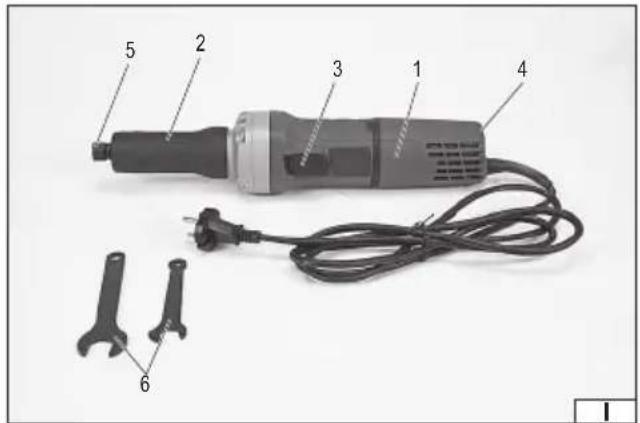
natural_image
Close-up of hands using a pliers to adjust a mechanical component (no visible text or symbols)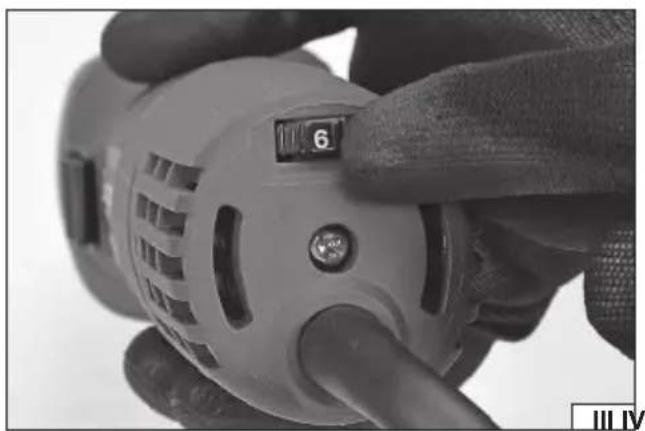
natural_image
Close-up of a hand holding a power tool with a dial indicator (no visible text or symbols)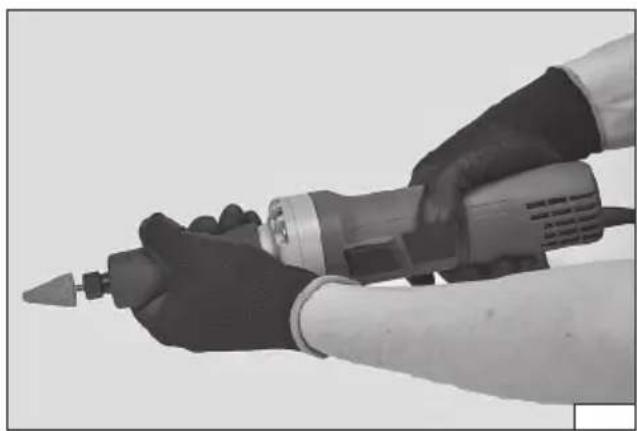
natural_image
Close-up of hands using a power tool to handle a cylindrical component (no visible text or symbols)PL
- housing
- front handle
- power switch
- rpm speed control
- tool chuck
- wrench
- grinding tool
DE
Read the operating instruction
Wear protective goggles
Schutzbrille tragen
Wear hearing protectors
Gehörschutz tragen
Second class of insulation
This symbol indicates that waste electrical and electronic equipment (including batteries and storage cells) cannot be disposed of with other types of waste. Waste equipment should be collected and handed over separately to a collection point for recycling and recovery, in order to reduce the amount of waste and the use of natural resources. Uncontrolled release of hazardous components contained in electrical and electronic equipment may pose a risk to human health and have adverse effects for the environment. The household plays an important role in contributing to reuse and recovery, including recycling of waste equipment. For more information about the appropriate recycling methods, contact your local authority or retailer.
PRODUCT CHARACTERISTICS
The straight grinder is a type of grinder which allows the material to be machined with grinder pins, wire brushes, and polishing wheels. Due to the small size of the accessories, it is particularly suitable for work in places that cannot be reached with other types of grinders. The correct, reliable, and safe operation of the tool depends on its proper use, therefore:
Read this entire manual before the first use of the tool and keep it for future reference.
The supplier shall not be liable for any damage resulting from failure to comply with the safety instructions and recommendations specified in this manual.
ACCESSORIES
The tool is supplied complete and does not require assembly. Wrenches for assembling and disassembling accessories are supplied with the product. The equipment does not include machining accessories such as grinding wheels.
TECHNICAL DATA
| Parameter Unit Value | ||
| Catalogue No. YT-82080 | ||
| Power supply voltage [V~] 220 - 240 | ||
| Power frequency [Hz] 50 / 60 | ||
| Rated power [W] 750 | ||
| Insulation class II | ||
| Rated speed [min] | ^-1 10000 - 30000 | |
| Tool chuck diameter | [mm] | 6 / 8 |
| Max. grinding tool diameter | [mm] | 50 |
| Weight | [kg] | 1,8 |
| Noise level | ||
| - sound pressure L_pA ± K_pA | [dB(A)] | 74 ± 3 |
| - sound power L_wA ± K_wA | [dB(A)] | 85 ± 3 |
| Vibration Level a_h ± K | [m/s ^3 ] | 4,4 ± 1,5 |
| Protection rating IP20 |
GENERAL SAFETY CONDITIONS
NOTE! Get acquainted with all the instructions below. Failure to observe them may lead to an electric shock, fire or injuries. The notion of electric tool used in the instructions applies to all the tools which are powered with electric current, both wire tools and wireless ones.
OBSERVE THE FOLLOWING INSTRUCTIONS
Place of work
The place of work must be properly illuminated and clean. Disorder and poor illumination may be a cause of accidents.
Do not work with electric tools in explosive environments, or those which contain inflammable liquids, gases or vapours.
Electric tools generate sparks, which may cause a fire in case of contact with inflammable gases or vapours.
Do not allow children and outsiders to the place of work. A lack of concentration may result in a loss of control over the tool.
Electric safety
The plug of the power supply cable must fit the mains socket. Do not modify the plug. Do not use any adapters whatsoever in order to adapt the plug to the socket. Unmodified plug which fits the socket reduces the risk of an electric shock.
Avoid contact with grounded surfaces, such as pipes, heaters and refrigerators. Grounding of the body increases the risk of an electric shock.
Do not expose electric tools to precipitation or humidity. Water and humidity which gets into the electric tool increases the risk of an electric shock.
Do not overload the power supply cable. Do not use the power supply cable in order to carry the tool or to connect and disconnect the plug from the mains socket. Avoid contact of the power supply cable with heat, oils, sharp tools and moving elements. Damage to the power supply cable increases the risk of an electric shock.
In case work is realised outside closed areas, it is necessary to use extension cords designed for applications outside closed areas. Using a correct extension cord permits to reduce the risk of an electric shock.
EN
If operating a power tool in a damp location is unavoidable, use a residual current device (RDC) protected supply. Use of an RCD reduces the risk of electric shock.
Personal safety
Commence work in good physical and psychological conditions. Pay attention to what you do. Do not work if you are tired or under effects of medicines or alcohol. Even a moment's inattention during work may lead to serious injuries.
Always use individual means of protection. Always wear goggles. Using individual means of protection, such as dust-masks, protective shoes, helmets and hearing protections permits to reduce the risk of serious injuries.
Avoid accidental activation of the tool. Make sure the switch is in the OFF position, before you connect the tool to the mains. Holding the tool with a finger on the switch or connecting an electric tool when the switch is in the ON position may lead to serious injuries.
Before you turn an electric tool on remove all the spanners and other tools, which have been used for adjustments. A spanner left on rotating elements of the tool may lead to serious injuries.
Keep your balance. Maintain an appropriate position. It will permit to control the electric tool in case of unpredicted situations during its operation.
Use protective clothes. Do not wear loose clothes or jewellery. Keep your hair, clothes and gloves away from moving elements of the electric tool. Loose clothes, jewellery or long hair may get caught on moving elements of the tool.
Use dust extractors or dust containers, if the tool is equipped with any. Make sure they are properly connected. Using of dust extractors permits to reduce the risk of serious injuries.
Operation of the electric tool
Before the battery is installed, make sure the switch is off. Installation of the battery when the switch is on may lead to accidents. Use solely the charger recommended by the manufacturer. Using a charger designed for another type of battery may be a cause of fi re.
The electric tool must be operated exclusively with the battery indicated by the manufacturer. Using another battery may be a cause of fire or injuries.
When the battery is not used, it must be stored away from such metal objects as paper clips, coins, nails, screws or other small metal elements, which might short-circuit the terminals. Short-circuited terminals of the battery may cause burns or fire.
Under adverse circumstances liquid may leak from the battery; avoid any contact. In case of accidental contact with the liquid, rinse it with water. In case of eye contact, seek medical. The liquid leaking from the battery may cause irritation or burns.
During work when the tool may touch a hidden live conductor, the electric tool must be held by insulated handles. The installed bit in case of contact with a live conductor may conduct electricity to the metal elements of the tool, which may cause electric shock to the operator.
Repairs
The tool may be repaired only by authorised service centres, which must use solely original spare parts. It will guarantee a proper level of safety of operation of the electric tool.
ADDITIONAL SAFETY INSTRUCTIONS
Safety warnings for straight grinders
The tool is designed only for grinding with grinding pins, wire brushes with the spindle, and polishing. Read and view all warnings, instructions, figures, and specifications supplied with the power tool. Failure to follow all of the instructions provided below may result in electrocution, fire, and / or serious injury.
It is not recommended to perform works such as cutting or grinding with sandpaper with this type of tool. Performing other works than for which the tool is intended may pose a risk and result in injuries.
Do not use accessories which have not been designed by the manufacturer or intended for the work with the tool. A possibility of mounting accessories on the tool does not ensure safe operation.
The maximum rotational speed of the accessories must be equal to or greater than the maximum rotational speed of the tool. Accessories with a lower rotational speed than the tool speed can disintegrate during operation.
The outer diameter and thickness of accessories must be within the size range specified for the tool.
It is not possible to properly guard or operate improperly sized accessories.
The size of the hole used for fixing wheels, discs, flanges, and other accessories must match the size of the tool spindle.
Accessories with a fixing hole size not suitable for the tool spindle size will start to vibrate during operation, which may result in the loss of control of the tool.
Do not use damaged cutting discs. Before each use, check the discs for cracks and splinters. If the power tool or disc has been dropped, check them for damage or assemble undamaged discs. After inspection, leave and remove bystanders from cutting disc rotation plane and then turn on the power tool for one minute at maximum speed. Damaged cutting discs will break during this test.
Wear personal protective equipment. Use face shields, goggles, or safety goggles, depending on the application. If required, use dust masks, hearing protection, safety gloves, and aprons to protect against small pieces of accessories or
EN
materials generated during work. The eye protection must be capable of stopping any flying debris generated during work. The dust mask must be capable of filtering out dust generated during work. Exposure to noise for too long can result in hearing loss. When carrying out work in which the disc may come into contact with a live, concealed electrical cable or power cord, hold the wall chaser's insulated handles only. When the disc is in contact with a live wire, it may cause the metal parts of the tool to become live, which may lead to an electrocution to the tool operator.
Ensure all bystanders keep a safe distance from the work area. Persons entering the work area must wear personal protective equipment. Splinters produced during the work or splinters of damaged accessories may be thrown outside the immediate vicinity of the work area.
Keep the power cord away from rotating tool parts. If you lose control of the tool, the cord can be cut or caught, and your hand or arm can be drawn into the rotating parts of the machine.
Never put down the tool until the rotating parts have come to a complete standstill. Rotating parts can “catch” the floor and pull the tool out of your control.
Do not turn on the tool while carrying it around. Accidental contact with rotating parts may cause catching and pulling in the clothing as well as the contact of the tool with the operator's body.
Clean the tool's ventilation openings regularly. The motor fan draws dust inside the tool during operation. Excessive accumulation of metal particles contained in the dust increases the risk of electrocution.
Do not use the tool near flammable materials. Sparks generated during operation may cause a fire.
Do not use accessories that require liquid cooling. Water or coolant may lead to electrocution.
The thread size of the accessories must match the thread of the wall chaser spindle. For flange-mounted accessories, the fixing opening for the accessories must match the size of the fixing flange. Accessories that do not fit into the power tool mount will cause imbalance, excessive vibration and may result in loss of control.
Caution! Tool kickback towards the operator
The kickback of the tool towards the operator is caused by a rotating disc, polishing tape, brush, or other accessories when suddenly blocked or clamped. Blocking or clamping causes a rotating accessory to stop suddenly, which results in the power tool rotating in the opposite direction to the accessory rotation.
For example, if the abrasive disc is blocked or clamped by the processed object, the disc edge which enters into the clamping point may penetrate the surface of the material, causing the disc to get out or be ejected.
The disc can also escape towards or away from the operator, depending on the direction of the wheel movement at the clamping point. Abrasive discs may also break in these conditions.
The tool kickback towards the operator is a result of misuse or failure to follow the guidelines in the instructions manual. This occurrence can be avoided by following the instructions below.
Use a firm grip on the tool and the correct position of the body and hands to withstand the forces generated by the kickback. Always use an additional handle, if supplied with the tool, to ensure maximum control during the kickback or any unexpected rotation during the tool start. The operator will be able to control the tool rotation or the kickback if appropriate precautions are taken.
Keep your hands away from rotating tool parts. The rotating parts may, during the kickback, come into contact with a hand.
Do not stand in the area where the tool may kickback. The kickback will direct the tool in the opposite direction to the direction of the abrasive disc rotation, at the clamping point.
Pay special attention when working near corners, sharp edges, etc. Prevent the abrasive disc from axial displacement and being jammed. When working corners or edges, there is an increased risk of the abrasive disc jam, leading to a loss of control or tool kickback.
Do not use discs with cutting chain or circular saws. The blades cause frequent kickbacks and the loss of control of the tool.
Safety warnings related to grinding and cutting with abrasive discs
Use only tool-specific discs and guards which are designed for the type of the disc in question.
The discs for which the tool is not designed cannot be properly guarded and are not safe.
The convex disc must be mounted in such a way that the grinding surface does not protrude beyond the plane of the protective flange of the guard. An incorrectly mounted disc that protrudes above the guard poses a risk to safety during operation. The guard must be securely attached to the tool and positioned for maximum safety so that the smallest possible area of the disc is exposed towards the operator. This guard helps to protect the operator from broken disc fragments and prevents accidental contact with the disc.
The disc must be used as intended. For example, do not grind with a cutting disc. Abrasive discs for cutting are designed for use under heavy pressure and the lateral forces applied to such a disc may cause it to break.
Always use undamaged fixing flanges, which are the correct size for the abrasive disc. The correct fixing discs of the abrasive disc reduce the possibility of damage to the abrasive disc. The fixing discs for cutting discs can be different from the fixing discs for abrasive discs.
Do not use worn abrasive discs from larger tools. A larger diameter abrasive disc is not suited for a higher rotational speed of smaller tools and may break.
EN
Safety warnings related to polishing
Do not allow any loose part of the polishing cover or drawstring to rotate freely. Tie or cut off any loose strings. The loosely rotating drawstrings can entangle in the operator's fingers or catch on the material being machined.
Safety warnings related to the work with the wire brush
Be careful, as wire splinters are also ejected from the brush during normal operation. Do not overload the wires by applying too much pressure to the brush. The wires can easily pierce thin clothing or skin.
If the use of covers is recommended during the work with the wire brush, prevent any contact between the brush and the cover. The wire brush can increase its diameter under load and centrifugal force.
Allow the brush to rotate at working speed for at least one minute before use. During this time, no person is allowed to stay in front of or in the line of the brush. Loose fragments or wires will be ejected during this time.
Direct the ejection of spinning wires away from yourself. Small particles and small wire pieces can be ejected at high speed when using the brush and can penetrate your skin.
TOOL OPERATION
Preparing for operation
Warning! Before starting any assembly, disassembly, or adjustment works, make sure that the tool is turned off, and the power cord plug is disconnected from the electric outlet.
Unpack the tool and remove all packaging components. It is recommended to maintain the packaging, as it may be useful for later storage of the product.
Check the tool parts for damage during transport. In case of damage, do not proceed with work.
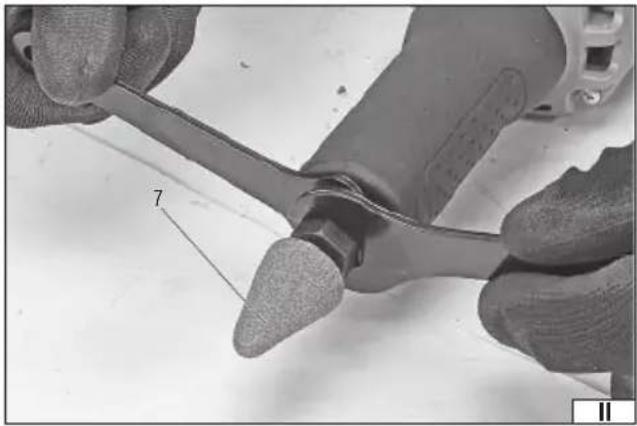
Assembly of accessories in the tool chuck (II)
Warning! Before starting any assembly, adjustment, or disassembly works related to the accessories, make sure that the tool is turned off, and the power cord plug is disconnected from the electric outlet.
Grinding tools with the same spindle diameter as the tool chuck diameter given in the technical data table should be mounted in the chuck. Using a different spindle diameter will cause the incorrect assembly of the grinding tool. It is forbidden to work with an incorrectly assembled grinding tool.
Loosen the tool chuck nut by unscrewing it so as not to remove it from the chuck. Slide the spindle into the tool chuck so that at least 10 mm of the grinding tool spindle is located inside the grinder tool chuck. Hold the grinder spindle with one wrench and securely tighten the tool chuck nut with the other wrench. Remove the wrenches from the nut and spindle.
Ensure the correctness of the assembly. The user should not be able to pull out the grinding tool from the tool chuckle. There should be no noticeable assembly play.
Rotational speed adjustment (III)
The tool rotational speed can be adjusted within the range presented in the Technical Data table. The adjustment is performed with the knob on the tool's rear wall. The higher the number visible on the knob, the higher the tool rotational speed.
Dust extraction
The tool is not equipped with an integrated dust extraction system. Machining of certain materials can produce dust that can be hazardous. Inhalation of dust may present a health hazard. During work, use upper respiratory tract protection; perform work in well-ventilated areas.
Dust and chips that accumulate during work should be removed frequently. Dispose of accumulated dust according to local regulations.
Turning the tool on and off
After completing all the steps described above, make sure that the power tool switch is in the "off" position, i.e., which means it is in the rear position by the "O" symbol. Then plug the power cord plug into the electric outlet.
Grasp the tool with both hands so that the power switch remains within reach of the fingers of one hand (IV).
Make sure that the accessory assembled in the tool chuck does not come into contact with any object, then press and hold the rear part of the power switch and move it forward so that it is near the "I" symbol. This will start the tool motor.
Allow the tool to achieve its nominal rotational speed and hold it in this position for approx. 30 seconds. If abnormal vibrations, unusual noise, or other symptoms of non-typical work are observed during this time, immediately turn off the power tool by releasing the pressure on the switch.
The switch can be locked in the "on" position during operation, and it is not necessary to hold it down all the time. If, during the operation, there is a power failure, the tool will not resume operation automatically when power is restored. To resume work, turn
EN
the switch to the "off" position and turn on the tool again.
The tool is turned off when the switch at the rear part is pressed; the spring will automatically move it to the “off” position. It is recommended to check the operation of the switch before connecting the tool to the power supply.
Grinder operation
Do not apply too much pressure when grinding with grinding wheels. Guide the grinding wheels along the machined surface in a smooth motion in both directions.
In the case of the polishing wheel, it is recommended to use a lower speed to apply and spread the polishing agent and possibly increase it during the polishing process itself.
Recommendations for working with the straight grinder
Always wear hearing protectors and dust masks when working. Wear other personal protective equipment such as eye protection, protective gloves and appropriate work clothing that are capable of stopping small particles generated during work that may be thrown towards the operator.
Do not cut asbestos or materials containing asbestos. Dust from cutting asbestos is carcinogenic.
Always hold the tool with both hands, using the handles. Holding the tool in the wrong way can lead to a loss of control over it and increases the risk of injury.
Before each cutting, check the condition of the tool and grinding tools. If any cracks, bends, defects, or other damage are detected, replace the grinding tools with new ones that are free of damage before starting work. If damage to the tool is detected, it should be handed over to the manufacturer's authorised service centre. It is forbidden to use the damaged tool.
Additional notes
The declared total vibration value has been measured using the standard test method and can be used to compare one tool to another. The declared total vibration value can be used in the initial exposure assessment.
Caution! The vibration emission during tool operation may differ from the declared value, depending on the manner the tool is used. Caution! Safety measures to protect the operator, which are based on an assessment of exposure under actual conditions of use (including all parts of the work cycle, such as the time when the tool is switched off or idle and the activation time), must be specified.
MAINTENANCE AND OVERHAUL
ATTENTION! Before any adjustment, technical service or maintenance operations unplug the tool. Once the operations have been finished, the technical conditions of the tool must be assessed by means of external evaluation and inspection of the following elements: body and handle, conductor with a plug and deflection, functioning of the electric switch, patency of ventilation slots, sparking of brushes, noise level of functioning of bearings and gears, start-up and smoothness of operation. During the guarantee period, the user cannot dismantle the electric tools or change any sub-assemblies or elements, since it will cancel any guarantee rights. All irregularities detected at overhaul or during functioning of the tools are a signal to have the tool repaired at a service shop. Once the functioning has been concluded, the casing, ventilation slots, switches, additional handle and protections must be cleansed with a stream of air (at a pressure not exceeding 0.3 MPa), with a brush or a cloth without any chemical substances or cleaning liquids. Tools and handles must be cleansed with a clean cloth.
PRODUKTBESCHREIBUNG
CARACTÉRISTIQUES DU PRODUIT
DECLARATION OF CONFORMITY
0925/YT-82080/EC/2025
We declare and guarantee with full responsibility that the following products:
Straight grinder 220-240 V\~; 50/60 Hz; 750 W; 10000 - 30000 min ^-1 ; 50 mm; item no. YT-82080
meet requirements of the following European Standards / Technical Specifications:
EN 62841-1:2015 + A11:2022
EN IEC 55014-1:2021
EN IEC 55014-2:2021
EN IEC 61000-3-2:2019 + A1:2021
EN 61000-3-3:2013 + A1:2019 + A2:2021
and fulfill requirements of the following European Directives:
2006/42/EC Machinery and safety elements
2014/30/EU Electromagnetic compatibility (EMC) Directive
2011/65/EU Restriction of the Use of Certain Hazardous Substances
Serial number: concern all serials numbers of item(s) mentioned in this declaration
The person authorized to compile the technical file:
Agnieszka Rędziak
TOYA S.A., ul. Sołtysowicka 13 - 15, 51-168 Wrocław, Poland
Wrocław, 2025.09.25
(Place and date of issue)
V-CE PREZES ZARZADU
JAN SZMIDT
(Name and signature of authorized person)
TOYA S.A.

- PL
- DE
- PRODUCT CHARACTERISTICS
- ACCESSORIES
- TECHNICAL DATA
- GENERAL SAFETY CONDITIONS
- OBSERVE THE FOLLOWING INSTRUCTIONS
- Place of work
- Electric safety
- EN
- Personal safety
- Operation of the electric tool
- Repairs
- ADDITIONAL SAFETY INSTRUCTIONS
- Safety warnings for straight grinders
- Caution! Tool kickback towards the operator
- Safety warnings related to grinding and cutting with abrasive discs
- Safety warnings related to polishing
- Safety warnings related to the work with the wire brush
- TOOL OPERATION
- Preparing for operation
- Assembly of accessories in the tool chuck (II)
- Rotational speed adjustment (III)
- Dust extraction
- Turning the tool on and off
- Grinder operation
- Recommendations for working with the straight grinder
- Additional notes
- MAINTENANCE AND OVERHAUL
- PRODUKTBESCHREIBUNG
- CARACTÉRISTIQUES DU PRODUIT
- DECLARATION OF CONFORMITY
Brand : Yato
Model : YT-82080
Category : Grinder