YT-821024 - Grinder Yato - Free user manual and instructions
Find the device manual for free YT-821024 Yato in PDF.


| Product Type | Angle grinder (grinder) |
| Brand | Yato |
| Model | YT-821024 |
| Power supply | 230-240 V ~ 50 Hz |
| Rated power | 1700 W |
| No-load speed | 2850 – 10500 min⁻¹ (variable) |
| Abrasive disc diameter | 125 mm |
| Disc bore diameter | 22 mm |
| Spindle thread | M14 |
| Weight | 2.5 kg |
| Sound pressure level (Lₐ ± Kₐ) | 97.0 ± 3.0 dB(A) |
| Sound power level (Lₐ ± Kₐ) | 105.0 ± 3.0 dB(A) |
| Vibration level (main handle/auxiliary) | 4.5 ± 1.5 m/s² |
| Insulation class | II (double insulation) |
| Protection rating | IPX0 |
| Speed adjustment | Yes, by wheel (only YT-821024) |
| Included accessories | Auxiliary handle, protective guard, fixing key |
| Grinding discs included | No |
| Main functions | Grinding, sanding, brushing, cutting (with appropriate accessories) |
| Safety | Spindle lock, protective guard, insulated handle, motor stop in case of blockage (kickback) |
| Maintenance and cleaning | Clean ventilation slots with compressed air (≤0.3 MPa), brush or dry cloth; do not use chemicals |
| Repairability | Repair only by authorized service; original spare parts |
| General information | For professional use; read the manual carefully before use |
Frequently Asked Questions - YT-821024 Yato
User questions about YT-821024 Yato
0 question about this device. Answer the ones you know or ask your own.
Ask a new question about this device
Download the instructions for your Grinder in PDF format for free! Find your manual YT-821024 - Yato and take your electronic device back in hand. On this page are published all the documents necessary for the use of your device. YT-821024 by Yato.
USER MANUAL YT-821024 Yato
natural_image
Exterior view of a YATO angle grinder with visible blade and handle (no text or symbols beyond brand name)PL EN DE RU UA LT LV CZ SK HU RO ES FR IT NL GR BG PT HR AR
natural_image
Pure technical diagram showing two circular components with cross-sectional views and dimension lines (no text or symbols)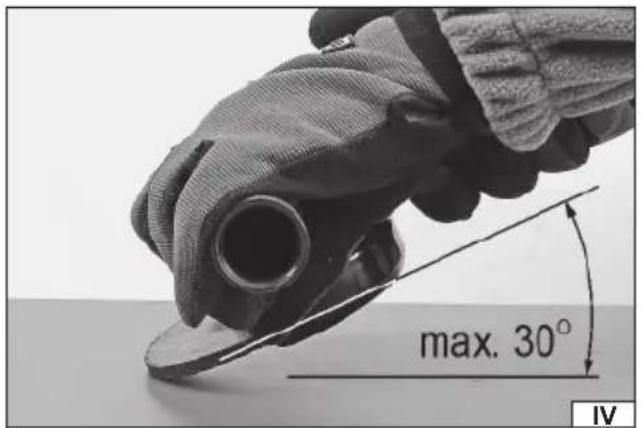
natural_image
Close-up of hands using a power tool to cut a circular component with directional arrows indicating rotation (no text or symbols visible)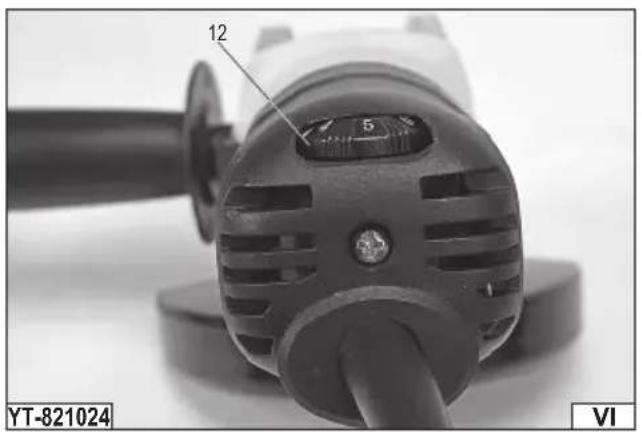
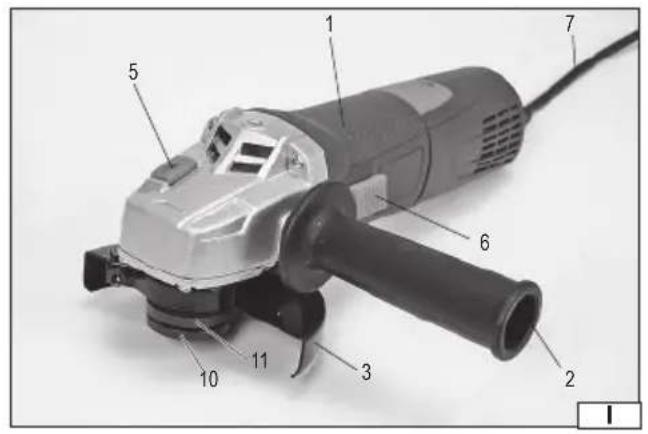
- body
- additional handle
- protection of the abrasive disc
- spindle
- spindle lock
- switch
- power supply cable with plug
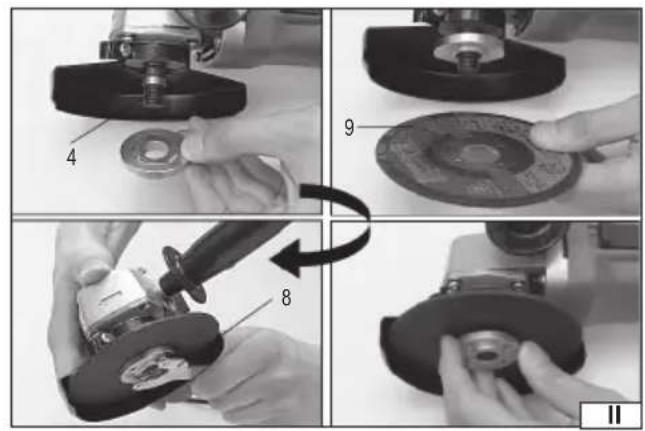
- wrench for installation of the abrasive disc
- abrasive disc
- lower fixing disc
- upper fi xing disc
- revs control knob (only in YT-821024)
DE
Read the operating instruction
Do not use for cutting
Wear protective goggles
Second class of insulation
Wear hearing protectors
Always work the grinder holding it with two hands
This symbol indicates that waste electrical and electronic equipment (including batteries and storage cells) cannot be disposed of with other types of waste. Waste equipment should be collected and handed over separately to a collection point for recycling and recovery, in order to reduce the amount of waste and the use of natural resources. Uncontrolled release of hazardous components contained in electrical and electronic equipment may pose a risk to human health and have adverse effects for the environment. The household plays an important role in contributing to reuse and recovery, including recycling of waste equipment. For more information about the appropriate recycling methods, contact your local authority or retailer.
The angle grinder is a power tool designed for grinding and cutting metals and mineral building materials such as brick, natural and artificial stone, concrete, glazing, etc. using abrasive discs and grinding wheels selected for a given material. Under no circumstances must the tool be used for processing materials other than those mentioned above, e.g. for grinding and cutting wood. The correct, reliable and safe operation of the grinder requires its proper use, so before using the grinder:
Read the entire instructions manual before the first use of the tool and keep it for future reference.
Always wear eye protections!
Do not use grinding discs with a maximum permissible perimeter speed of less than 80 m/s!
Do not use grinding discs with a maximum permissible rotational speed lower than the grinder's speed.
The supplier is not liable for any damage resulting from failure to observe the safety instructions and recommendations contained in this manual.
ANGLE GRINDER EQUIPMENT
Ginders are supplied with the following equipment:
- additional handle
- grinding disc guard
- hex wrench for fi xing the grinding disc
The equipment does not include abrasive discs.
TECHNICAL DATA
| Parameter Unit Value Value | |||
| Part No. YT-821023 YT-821024 | |||
| Mains voltage [V~] 230-240 230-240 | |||
| Mains frequency [Hz] 50 50 | |||
| Rated power | [W] | 1700 | 1700 |
| Rated rpm | [min ^-1 ] 10500 | 2850-10500 | |
| Diameter of the abrasive disc | [mm] | 125 | 125 |
| Diameter of the abrasive disc hole | [mm] | 22 22 | |
| Spindle taper | M14 | M14 | |
| Weight | [kg] | 2.5 | 2.5 |
| Noise level | |||
| - sound pressure L_pA ± K_pA | [dB (A)] | 97.0 ± 3.0 | 97.0 ± 3.0 |
| power L_wA ± K_wA | [dB (A)] | 105.0 ± 3.0 | 105.0 ± 3.0 |
| Vibration level _abAG ± K (main handle /additional handle) | [m/s ^2 ] | 4.5 ± 1.5 | 4.5 ± 1.5 |
| Insulation class | II | II | |
| Protection rating | IPX0 | IPX0 |
The declared noise emission value has been measured using the standard test method and can be used to compare one tool to another. The declared noise emission value can be used in the preliminary exposure assessment.
The declared total vibration value has been measured using the standard test method and can be used to compare one tool to another. The declared total vibration value can be used in the initial exposure assessment.
Note! The vibration emission during tool operation may differ from the declared value, depending on the manner the tool is used. Note! Safety measures to protect the operator, which are based on an assessment of exposure under actual conditions of use (including all parts of the work cycle, such as the time when the tool is switched off or idle and the activation time), must be specified.
GENERAL WARNINGS FOR THE SAFETY OF POWER TOOLS
Warning! Read all safety warnings, illustrations and specifications provided with this power tool. Failure to do so may result in electric shock, fire or serious injury.
Keep all warnings and instructions for future reference.
The term “power tool” used in warnings applies to all tools driven by power both wired and wireless.
EN
Workplace safety
Keep the workplace well-lit and clean. Disorder and poor lighting can be causes of accidents.
Do not work with power tools in an environment with an increased risk of explosion, containing flammable liquids, gases or vapors. Power tools generate sparks that can ignite dust or fumes.
Children and third persons should not be allowed to enter the workplace. Loss of concentration can result in loss of control.
Electrical safety
The plug of the electric cable must match the power socket. You must not modify the plug in any way. Do not use any plug adapters with earthed power tools. An unmodified plug that fits the outlet reduces the risk of electric shock.
Avoid contact with earthed surfaces such as pipes, radiators and coolers. Grounding the body increases the risk of electric shock.
Do not expose power tools to contact with atmospheric precipitation or moisture. Water and moisture that gets inside the power tool increases the risk of electric shock.
Do not overload the power cable. Do not use the power cord to carry, pull or unplug the power plug from the power outlet.
Avoid contact of the power cable with heat, oils, sharp edges and moving parts. Damage or entanglement of the power cord increases the risk of electric shock.
In the case of working outside closed rooms, use extension cords intended for work outside closed rooms. The use of an extension cord adapted for outdoor use reduces the risk of electric shock.
When using a power tool in a humid environment is unavoidable as a protection against supply voltage use a residual current device (RCD). The use of RCD reduces the risk of electric shock.
Personal safety
Stay alert, pay attention to what you do and keep common sense while working with the power tool. Do not use a power tool when you are tired or under the influence of alcohol or medication. Even a moment of inattention while working can lead to serious personal injury.
Use personal protective equipment. Always wear eye protection. The use of personal protective equipment such as dust masks, anti-slip safety shoes, helmets and hearing protection reduce the risk of serious personal injury.
Prevent accidental operation. Make sure that the electric switch is in the “off” position before connecting to the power supply and / or battery, lifting or moving the power tool. Moving the power tool with the finger on the switch or powering the power tool, when the switch is in the “on” position can lead to serious injuries.
Before turning on the power tool remove any keys and other tools that were used to adjust it. The key left on the rotating parts of the power tool can lead to serious injuries.
Do not reach and do not lean too far. Keep the right attitude and balance all the time. This will allow easier control over the power tool in case of unexpected work situations.
Dress accordingly. Do not wear loose clothing or jewelry. Keep your hair and clothing away from moving parts of the power tool. Loose clothing, jewelry or long hair can be caught by moving parts.
If the devices are fitted for the connection of dust extraction or dust collection, make sure that they are connected and used properly. The use of dust extraction reduces the risk of dust hazards.
Do not let the experience acquired from frequent use of the tool resulted in carelessness and ignoring safety rules.
Carefree action can cause serious injuries in a fraction of a second.
Use and care of the power tool
Do not overload the power tool. Use the power tool appropriate for the selected application. The right power tool will provide a better and safer job if used according to the designed load.
Do not use the power tool, if the electric switch does not allow switching on and off. Power tool, which cannot be controlled by means of a power switch is dangerous and must be returned for repair.
Disconnect the plug from the power socket and / or remove the battery if it is detachable from the power tool before adjusting, changing accessories or storing the tool. Such preventive measures will allow you to avoid accidentally turning on the power tool.
Keep the tool out of the reach of children, do not let people who do not know how to operate the power tool or these instructions use a power tool. Power tools are dangerous in the hands of untrained users.
Maintain power tools and accessories. Check the tool for mismatches or jams of moving parts, damage to parts and any other conditions that may affect the operation of the power tool. Damage must be repaired before using the power tool. Many accidents are caused by incorrectly maintained tools.
Keep cutting tools sharp and clean. Properly maintained cutting tools with sharp edges are less prone to jamming and are easier to control when working.
Use power tools, accessories and inserted tools etc. in accordance with these instructions, taking into account the type and conditions of work. The use of tools for work other than designed is likely to result in a dangerous situation.
Handles and gripping surfaces must be dry, clean and free from oil and grease. Slippery handles and gripping surfaces do not allow for safe operation and control of the tool in dangerous situations.
Repairs
Repair the power tool only in authorized facilities using only original spare parts. This ensures proper operation safety of the power tool
EN
ADDITIONAL SAFETY GUIDELINES FOR DISC GRINDERS AND POLISHING MACHINES
The tool is intended only for grinding, grinding with sandpaper, grinding with wire brushes and cutting. Read and view all warnings, instructions, figures, and specifications supplied with the power tool. Failure to follow all of the instructions provided below may result in electrocution, fire, or serious injury.
Do not convert this tool to make it fit for a job for which it has not been designed and specified by the manufacturer. Such conversion will result in loss of control and cause serious injuries.
It is prohibited to use the tool as a polishing machine or in any other manner which is non-compliant with the manual.
Performing other works for which the tool is not intended may pose a risk and result in injuries.
Do not use accessories that have not been designed or intended for the work with the tool by the manufacturer. The fact that the accessories can be installed on the tool does not ensure safe operation.
The maximum rotational speed of the accessories must be equal to or greater than the maximum rotational speed of the tool. Accessories with a lower rotational speed than the tool speed can disintegrate into fragments during operation.
The outer diameter and thickness of accessories must be within the size range specified for the tool. It is not possible to properly guard or operate improperly sized accessories.
The size of the hole used for fixing wheels, discs, flanges, and other accessories must match the size of the tool spindle.
Accessories with a fixing hole size not suitable for the tool spindle size will start to vibrate during operation, which may result in the loss of control of the tool.
Do not use damaged accessories. Before each use, examine the condition of the accessories for possible splinters, cracks, abrasions and excessive wear. If any accessories are dropped, check them for damages or install new and undamaged accessories. After checking and installing the accessories, make sure you and all bystanders stand outside the rotation plane of the accessories, then run the tool for one minute at a maximum rotational speed. Damaged accessories will disintegrate during the test.
Wear personal protective equipment. Use face shields, goggles, or safety goggles, depending on the application. If required, use dust masks, hearing protection, safety gloves, and aprons to protect against small pieces of accessories or materials generated during work. The eye protection must allow for stopping any flying debris generated during work. The dust mask must be capable of filtering out dust generated during work. Exposure to noise for too long can result in hearing loss.
Ensure all bystanders keep a safe distance from the work area. Persons entering the work area must wear personal protective equipment. Debris or pieces of damaged accessories which are generated during work can be thrown out of the immediate vicinity of the work area.
When carrying out work during which the disc may come into contact with a live concealed electrical cable or power cord, hold the sander by the insulated handles only. When the disc is in contact with a live wire, it may cause the metal parts of the tool to become live, which may lead to electrocution of the tool operator.
Keep the power cord away from rotating tool parts. If you lose control of the tool, the cord can be cut or caught, and your hand or arm can be drawn into the rotating parts of the machine.
Never put down the tool until the rotating parts have come to a complete standstill. The rotating parts can “catch” the ground and pull the tool out of your control.
Do not turn on the tool while carrying it around. Inadvertent contact with rotating parts can cause your clothes to be caught and pulled in by the tool, which can result in contact with the operator's body.
Clean the tool's ventilation openings regularly. The motor fan draws dust generated during operation inside the tool. Excessive accumulation of metal particles contained in the dust increases the risk of electrocution.
Do not use the tool near flammable materials. Sparks generated during operation may cause a fire.
Do not use accessories that require liquid cooling. Water or coolant may lead to electrocution.
The thread size of the accessories must match the thread of the sander spindle. For flange-mounted accessories, the fixing hole for the accessories must match the size of the fixing flange. Accessories which do not fit into the power tool mount will cause imbalance, excessive vibration and may result in loss of control.
Warnings related to tool kickback towards the operator
The kickback of the tool towards the operator is a sudden reaction to a blocked or clamped: rotating disc, polishing belt, brush or other accessory. Blocking or jamming causes a rotating accessory to stop suddenly, which results in the power tool rotating in the opposite direction to the accessory rotation.
For example, if the grinding wheel is blocked or clamped by the workpiece, the edge of the disc that enters the clamping point may sink into the surface of the material causing the disc to come out or be ejected.
The disc can also be ejected towards or away from the operator, depending on the direction of the grinding wheel movement at the jamming point. Abrasive discs may also break in these conditions.
The tool kickback towards the operator is a result of misuse or failure to follow the guidelines in the manual. This phenomenon can be avoided by following the instructions below.
Use a firm grip on the tool and the correct body posture and hands position to withstand the forces generated by the kickback. Always use an additional handle, if supplied with the tool, to ensure maximum control during the kickback or any unexpected rotation during the tool start. The operator will be able to control the tool rotation or the kickback if appropriate
EN
precautions are taken.
Keep your hands away from rotating tool parts. The rotating parts can come into contact with your hands during kickback.
Do not stand in the area where the tool may move during the kickback. The kickback will direct the tool in the opposite direction to the direction of the abrasive disc rotation at the jamming point.
Pay special attention when working near corners, sharp edges, etc. Prevent the abrasive disc from runout and being jammed. When machining corners or edges, there is an increased risk of the grinding wheel jam, leading to a loss of control or tool kickback.
Do not use discs with a cutting chain for wood processing, segmented diamond discs with circumferential spacing between segments greater than 10 mm or discs with teeth. Such discs cause frequent kickbacks and loss of control of the tool.
Warnings related to grinding and cutting
Use only discs intended for work with a chosen tool and guards designed for a given type of disc. The discs for which the tool is not designed cannot be properly guarded and are not safe.
The convex disc must be mounted in such a way that the grinding surface does not protrude beyond the plane of the protective flange of the guard. An incorrectly mounted disc that protrudes above the guard poses a risk to safety during operation.
The guard must be securely attached to the tool and positioned for maximum safety so that the smallest possible area of the disc is exposed towards the operator. This guard helps to protect the operator from broken disc fragments and prevents accidental contact with the disc.
The disc must be used as intended. For example, do not grind with a cutting disc. Abrasive discs for cutting are designed for circumferential load, lateral forces applied to such a disc may cause it to disintegrate.
Always use undamaged fixing discs, which are of the correct size adapted to the abrasive disc. The correct fixing discs for the abrasive discs reduce the possibility of damage to the abrasive discs. The fixing discs for cutting discs can be different from the fixing discs for abrasive discs.
Do not use worn abrasive discs from larger tools. A larger diameter grinding wheel is not suited for a higher rotational speed of smaller tools and may break.
If you use dual-purpose discs, always use a guard appropriate for the type of work. The use of the wrong guard may lead to the failure to provide the desired degree of protection, which can lead to serious injury.
Warnings related to cutting
Do not “jam” the disc or apply too much pressure. Do not try to cut too deep. Excessive stress of the grinding wheel increases load and susceptibility for twisting or catching the disc in the cut groove, which increases the risk of kickback towards the operator or disc damage.
Do not place your body in the cutting line or behind the rotating grinding wheel. If during operation, the grinding wheel rotates in the direction away from the operator's body, the kickback towards the operator can direct the rotating disc and tool towards the operator.
If the disc is caught or the cut is interrupted for any reason, turn off the tool then keep it at a standstill until the disc rotation stops completely. Never attempt to get the rotating cutting disc out of the groove as it may result in kickback towards the operator. It is recommended to find causes and take appropriate steps to prevent the disc from being caught.
Do not resume cutting in the material. Allow the disc to achieve its nominal rotational speed and only then carefully insert it into the cut groove. The disc may be clamped, pulled out, or kicked back towards the operator if the cut is resumed in the material.
Support panels and other oversized materials to minimise the risk of clamping and kickback towards the operator. Oversized materials tend to bend under their own weight. The supports must be placed under the material close to the cutting line and close to the edge of the material on both sides of the cutting line.
Take special care when performing deep cuts in the walls or other unknown surfaces. A protruding disc may cut through gas pipes, electric cables, or other objects that may cause a kickback towards the operator.
Do not attempt to cut following the shape of an arc. Overloading the disc increases its load and susceptibility to twisting or jamming in the cut groove and the likelihood of kickback towards the operator or disc damage, which can lead to serious injury.
Warnings related to grinding with sandpaper
Use the correct size sandpaper. When selecting a grinding wheel, follow the manufacturer's recommendations. Sand-paper that protrudes well beyond the disc may cause injury, and also increase the risk of jamming, tearing or kickback towards the operator.
Warnings related to the work with the wire brush
Be careful, as wire fragments are also ejected from the brush during normal operation. Do not overload the wires by applying too much pressure to the brush. The wires can easily pierce thin clothing or skin.
If the use of guards is recommended during the work with the wire brush, prevent any contact of the brush with the guard. The wire brush can increase its diameter under load and centrifugal force.
EN
Safety warnings related to polishing
Do not allow any loose part of the polishing disc or fastening cord to rotate freely. Loose and rotating cords can entangle in the fingers or be caught in the workpiece.
EQUIPMENT INSTALLATION
Installation of the abrasive disc guard
To do this, place the disc guard on the cylindrical part of the body around the spindle and use a screw or clamp to fix the guard so that it is attached straight, firmly and securely. Place the abrasive disc guard so that the covered part of the disc is as far away from the hand of the grinder as possible. Never operate the grinder without the disc guard installed correctly!
The grinder is supplied with a guard to ensure proper protection only when sanding with abrasive discs and discs using sandpaper and some wire brushes. The disc must not protrude beyond the side edge of the guard when mounted on the spindle. If any other type of authorised work is carried out, contact the manufacturer for a guard intended for this type of work. When using a Type A guard (for cutting) for grinding with a lateral surface, the guard may interfere with the workpiece causing poor control of the tool. When a Type B guard (for grinding) is used for cutting with a grinding wheel, the risk of exposure to sparks and particles increases, as well as to parts of the wheel in the event of a breakage. When using a Type A (for cutting), Type B (for grinding) or Type C (combined) guard for cutting or grinding of concrete or stone with side surface, the risk of exposure to dust and loss of control due to kickback towards the operator increases. When using a Type A (for cutting), Type B (for grinding) or Type C (combined) guard with a disc wire brush of a thickness that will cause the brush to protrude beyond the guard flange, it may cause the wires to catch the guard, which will cause the wires to break.
Installing the additional handle
Install the handle by screwing it securely to the tool head.
HANDLING OF THE GRINDING DISCS
CAUTION! Install the abrasive discs when the supply voltage is disconnected. Pull the grinder cable plug out of the socket!
Grinding wheel assembly
Disconnect the supply voltage from the tool. Unplug the tool!
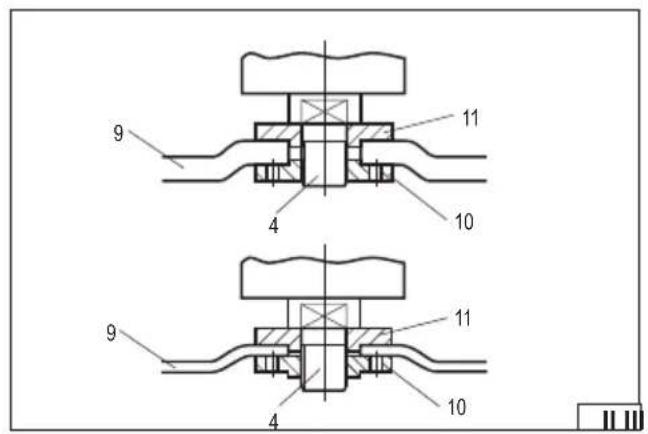
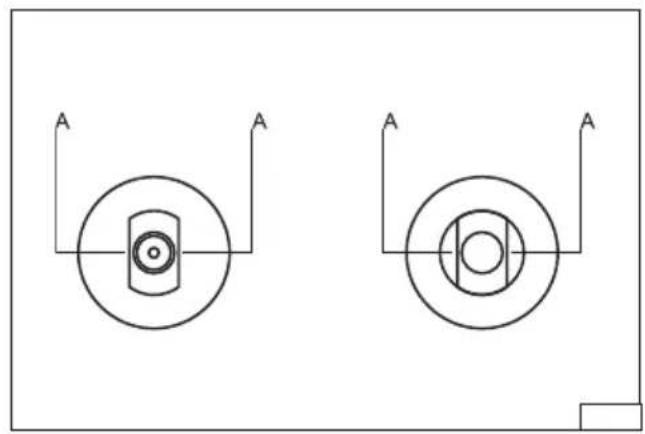
During installation, make sure that the edges A (IV) at the bottom of the spindle tip and the fixing flanges overlap thoroughly. Place the upper fixing flange on the spindle. Place the abrasive disc on the spindle and the upper fixing flange. Screw the lower fixing flange on the spindle. Press the spindle lock and tighten the lower fastening flange with a wrench and then release the pressure on the lock button. Insert the power cable plug of the tool into the power outlet, turn on the grinder and observe its operation without any load for about 1 minute. Remove the plug from the socket and check the mounting of the discs.
Positioning of the fixing flanges
Note that the discs at the place of fixing to the spindle may be of different thickness. Depending on the thin abrasive discs used (thickness up to 3.2 mm) or thick ones (thickness over 3.2 mm), the location of the fixing flanges (III) is different. The maximum thickness of the abrasive disc that can be attached to the grinder is 6 mm.
Removing the abrasive discs
Turn off the grinder and pull the plug out of the power outlet. Press the spindle lock and unscrew the lower fixing flange with the fixing wrench and then remove the abrasive disc from the spindle. Clean the spindle and the fixing flanges of dust and other contaminants generated during operation.
Types of grinding wheels
Any grinding wheel reinforced with a plait intended for use with angle grinders with a permissible circumferential speed of at least 80 m/s and fixing and external diameters specified in the technical data table may be used with the grinder.
If the grinding wheel is provided with a non-threaded hole for its assembly, use the fixing flanges. It is also possible to assemble wheels with an external diameter specified in the technical data table, equipped with a M14 threaded hole. In this case, do not use fixing flanges and screw the wheel directly to the spindle, locking it with a button, and tightening the wheel firmly and securely using a flat wrench (not included with the grinder). In the case of wheels enabling the installation of the sandpaper disc with Velcro, only sandpaper discs with the diameter specified in the technical data table should be used. The disc should be placed concentrically on the wheel. The edge of the disc must not project beyond the edge of the wheel. It is also possible to use diamond grinding wheels with the dimensions specified in the technical data table intended for dry cutting and grinding. Perform the assembly in the same manner as in the case of grinding wheels. When using diamond segmented discs, the gap between the segments must not exceed 10 mm, measured at the perimeter of the disc, and the segments must have a negative angle of attack. It is recommended to use grinding wheels made of materials intended for machining a given type of metal.
Refer to the documentation provided with the grinding wheel. Grinding wheels intended for machining stone or diamond grinding wheels for dry working can be used for the machining of ceramic materials. It is recommended to use wire brushes and sandpaper
EN
discs to remove old paint coats from metal parts. It is forbidden to modify the fixing hole, spindle or use reduction rings to adjust the diameter of the fixing hole to the spindle diameter. It is forbidden to use grinding wheels with a fixing hole diameter other than specified in the technical data table. It is forbidden to use grinding wheels with a cutting chain or cutting discs because they increase the risk of tool kickback towards the operator.
Caution! It is forbidden to use discs other than those allowed for use in this manual, even if they can be assembled on the grinder spindle. Improper discs may not withstand the loads generated during the operation of the angle grinder. Damaged or decaying grinding wheels present a risk of serious injury or death.
USING THE GRINDER
Unplug the tool!
Before using the tool, check that the housing and and power cord are not damaged. If any damage is visible, it is forbidden to connect the grinder to the electrical network! Fix the abrasive disc cover and handle. Never work with the grinder without the abrasive disc guard installed!
Select the type of abrasive disc suitable for the type of operation and install the disc on the grinder spindle. The workpiece must be secured, e.g. with vices or clamps, in such a manner that it cannot move during work. The grinder disc rotates at a high speed and, if not properly secured, the material may move uncontrollably during work, which would increase the risk of serious injury. In the case of cutting, support the material being cut on both sides of the cutting line, but in such a way that it does not cause the cutting disc to jam during cutting. Place the supports near the edge of the material being cut and near the cutting line.
Wear eye protection, hearing protectors and protective gloves.
Check that the power switch is in the off position "O". Then insert the plug of the grinder into the mains socket.
Keep an appropriate body position to ensure balance and turn the tool on with the switch. If the power switch is located in the upper or side wall of the grinder body, press the power switch in the rear part of it to turn it on, and then, without releasing the pressure, move it forward in the direction marked with the symbol "I." The power switch may have a hitch that allows it to be locked in this position easier prolonged use. To turn the grinder off, press the power switch on the back of the grinder and allow it to retract. If the power supply is lost while working with the locked power switch, it will only be possible to start work after the power switch has been restored after unlocking and restarting the power switch.
If the grinder is equipped with a power switch located in the lower part of the handle, press and hold the lock button and then press the power switch. Hold the power switch pressed while performing work, but it is not necessary to hold the lock button. Releasing the pressure on the power switch will turn the grinder off. Such a power switch cannot be locked for operation.
Start work by applying the correct surface of the disc to the workpiece:
- when using abrasive discs grind with the side and/or front surfaces,
- in the case of leaf grinding wheels, grind with the side surface so that the sandpaper leaves move parallel to the workpiece,
- in the case of velcro discs enabling the attachment of sandpaper, sanding should be carried out with the side surface,
- in the case of wire brushes, the surface should be worked on with ends of the wires and not with their side surface,
- in the case of cutting discs, cut with the front surface, do not grind with the front surface of the cutting discs.
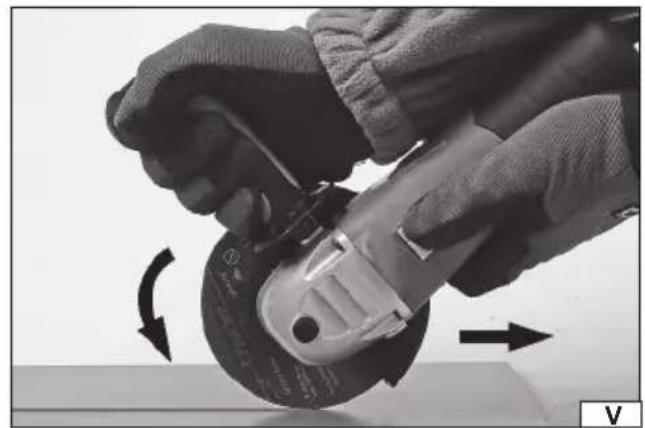
When grinding with the side surface, keep the grinder at an angle of not more than 30 degrees from the surface to be worked on (V). Move the grinder smoothly to and from yourself. When cutting, the disc should be at a right angle to the cut surface. Do not cut at a different angle. It is forbidden to change the angle of the cutting disc to the workpiece while cutting. Cut only in a straight line. Failure to follow the above recommendations increases the risk of jamming the cutting disc in the workpiece, which can cause the tool to bounce towards the operator, break the disc or fall apart. When cutting, guide the grinder towards the rotation of the disc (VI). When working with the grinder, do not exert too much pressure on the workpiece and do not make sudden movements in order not to cause jamming or cracking and tearing of the abrasive disc. Do not overload the tool, the temperature of the external surface must never exceed 60°C. After the work has been completed, turn off the grinder, remove the hose plug of the grinder from the socket and check the tool. Caution! The disc may be still spinning for some time after turning the grinder off. Wait for the disc to cool down before starting the inspection. During operation, both the disc and the material to be processed can become heated to high temperatures.
Rotational speed control (VII)
The product (YT-821024) enables adjustment of the rotational speed. The adjustment is done by means of a knob. The lower the knob setting, the lower the rotational speed. The lower the rotational speed is recommended when using the product for grinding with wire brushes or sanding with sandpaper. Reducing the rotational speed results in reduced heating of the discs and the material itself, and reduces the amount of dust generated during operation. However, it should be remembered that due to design solutions, the higher the rotational speed, the better the cooling of the product. When operating at reduced speed, more frequent breaks should be used to cool the product.
Remember! When operating with an angle grinder:
Always use an eye guard.
Do not use abrasive discs with a maximum permissible circumferential speed of less than 80 m/s.
Do not use abrasive discs with a maximum permissible rotational speed of less than the grinder's rotational speed.
EN
MAINTENANCE AND OVERHAUL
ATTENTION! Before any adjustment, technical service or maintenance operations unplug the tool. Once the operations have been finished, the technical conditions of the tool must be assessed by means of external evaluation and inspection of the following elements: body and handle, conductor with a plug and deflection, functioning of the electric switch, patency of ventilation slots, sparking of brushes, noise level of functioning of bearings and gears, start-up and smoothness of operation. During the guarantee period, the user cannot dismantle the electric tools or change any sub-assemblies or elements, since it will cancel any guarantee rights. All irregularities detected at overhaul or during functioning of the tools are a signal to have the tool repaired at a service shop. Once the functioning has been concluded, the casing, ventilation slots, switches, additional handle and protections must be cleansed with a stream of air (at a pressure not exceeding 0.3 MPa), with a brush or a cloth without any chemical substances or cleaning liquids. Tools and handles must be cleansed with a clean cloth.
DEKLARACJA ZGODNOŚCI DECLARATION OF CONFORMITY DECLARATIE DE CONFORMITATE
0125/YT-821023/EC/2025
We declare and guarantee with full responsibility that the following products:
meet requirements of the following European Standards / Technical Specifications:
and fulfill requirements of the following European Directives:
2006/42/WE Machinery and safety elements
2014/30/UE Electromagnetic compatibility (EMC) Directive
Directiva privind compatibilitatea electromagnetică (EMC) (H.G. nr. 487/2016)
2011/65/UE Restriction of the Use of Certain Hazardous Substances
Serial number: concern all serials numbers of item(s) mentioned in this declaration
The person authorized to compile the technical file: