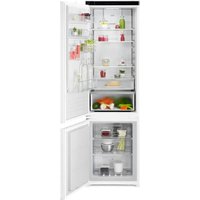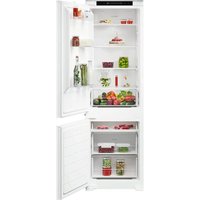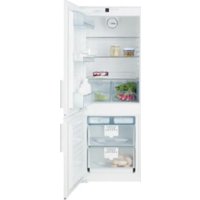
EK26010LIWE - Fridge AEG - Free user manual and instructions
Find the device manual for free EK26010LIWE AEG in PDF.


User questions about EK26010LIWE AEG
0 question about this device. Answer the ones you know or ask your own.
Ask a new question about this device
Download the instructions for your Fridge in PDF format for free! Find your manual EK26010LIWE - AEG and take your electronic device back in hand. On this page are published all the documents necessary for the use of your device. EK26010LIWE by AEG.
USER MANUAL EK26010LIWE AEG
natural_image
Simple line drawing of a rectangular frame with a small handle on the left side (no text or symbols)EK 260 10 RE WE
EK 260 10 LI WE
EK 320 10 RE WE
EK 320 10 LI WE
Electrolux
Seite 2

Page 10
Pagina 18

Page 26

Entsorgungshinweis
natural_image
Line drawing of a refrigerator with lid and door, no text or symbols presentKlimaklasse
text_image
Keyboard layout diagram showing numbered keys and a digital display with numbers 1-8 and directional arrowsKühlteil
natural_image
Diagram of a refrigerator interior showing the door, shelf, and door handle with an arrow indicating direction (no text or symbols present)
Achtung
text_image
Diagram of an open refrigerator with numbered compartments and labeled partsTaste \*
text_image
Diagram showing a refrigerator interior with a downward arrow and a circular dial labeled 'S' pointing to the inner ring.Einfrieren
text_image
Gefiervermögens/Freasing Capacity Pouvoir de Congel/Capac, Conpletions kg/24h Fremolten: 1000000000000000000000000000000000000000000000000000000000000000000000000000000000000 Kg/24h Fremolten: 14.5 - 16.5 - 18.5 - 21.5 - 24.5 - 27.5 - 31.5 - 35.5 - 39.5 - 43.5 - 47.5 - 51.5 - 55.5 - 59.5 - 63.5 - 67.5 - 71.5 - 75.5 - 79.5 - 83.5 - 87.5 - 91.5 - 95.5 - 99.5 - 1,03.5 - 1,13.5 - 1,23.5 - 1,33.5 - 1,43.5 - 1,53.5 - 1,63.5 - 1,73.5 - 1,83.5 - 1,93.5 - 2,03.5 - 2,13.5 - 2,23.5 - 2,33.5 - 2,43.5 - 2,53.5 - 2,63.5 - 2,73.5 - 2,83.5 - 2,93.5 - 3,03.5 - 3,13.5 - 3,23.5 - 3,33.5 - 3,43.5 - 3,53.5 - 3,63.5 - 3,73.5 - 3,83.5 - 3,93.5 - 4,03.5 - 4,13.5 - 4,23.5 - 4,33.5 - 4,43.5 - 4,53.5 - 4,63.5 - 4,73.5 - 4,83.5 - 4,93.5 - 5,03.5 - 5,13.5 - 5,23.5 - 5,33.5 - 5,43.5 - 5,53.5 - 5,63.5 - 5,73.5 - 5,83.5 - 5,93.5 - 6,03.5 - 6,13.5 - 6,23.5 - 6,33.5 - 6,43.5 - 6,53.5 - 6,63.5 - 6,73.5 - 6,83.5 - 6,93.5 - 7,03.5 - 7,13.5 - 7,23.5 - 7,33.5 - 7,43.5 - 7,53.5 - 7,63.5 - 7,73.5 - 7,83.5 - 7,93.5 - 8,03.5 - 8,13.5 - 8,23.5 - 8,33.5 - 8,43.5 - 8,53.5 - 8,63.5 - 8,73.5 - 8,83.5 - 9,999,999.9 Kg/24h Fremolten: 14.5 - 16.5 - 18.5 - 21.5 - 24.5 -27.5 -29.5 -31.5 -34.5 -37.5 -41.5 -44.5 -47.5 -49.5 -61.5 -64. Fremolten: 14.6 - 16.6 -18.6 -21.6 -24.6 -27 Fremolten: 14.7 - 16.7 -18.7-21 Fremolten: 14.8-16-18-21 Fremolten: 14-16-18-21 Fremolten: 14-16-18-21 Fremolten: 14-16-18-21 Fremolten: 14-16-18-21 Fremolten: 14-16-18-21 Fremolten: 14-16-18-21natural_image
Line drawing of a tray with an arrow indicating direction, no text or symbols presentAbtauen
Kühlteil
natural_image
Diagram of a double door with an arrow indicating downward motion (no text or symbols)Gefrierteil
text_image
Technical diagram of a refrigerator with numbered parts and 180° angle annotations for assembly or installation.Dekorplattenmontage
text_image
Technical diagram of a multi-panel electrical enclosure with labeled components and directional arrows indicating flow or movement.natural_image
Line drawing of a cabinet or enclosure with an open door and side panel, no text or symbols present.Classe climatique
Compartiment congélation
text_image
Keyboard layout diagram showing numbered keys and a digital display with numbers 1-8Réfrigérateur
natural_image
Diagram of a refrigerator interior showing door, shelf, and door handle (no text or labels)
Attention
text_image
Diagram of a refrigerator interior with numbered compartments and labeled storage areasTouche \*
text_image
Diagram of a refrigerator interior showing airflow direction and labeled compartments with Chinese text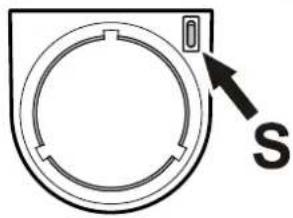
natural_image
Simple line drawing of a circular device with a pointer and letter 'S' label, no text or symbols present.Congélation
text_image
Diagram of a device control panel with labeled buttons and directional arrows indicating movement or operationnatural_image
Line drawing of a cabinet with a flat top and drawer, no text or symbols presentDégivrage
natural_image
Diagram of a double-door refrigerator with a downward arrow indicating compression or cooling (no text or symbols)Partie congélateur
text_image
Technical diagram of a refrigerator with numbered parts and 180° angle annotations for assembly or repair.text_image
Technical diagram of a mechanical assembly with numbered components and directional arrows indicating flow or movement.natural_image
Line drawing of a refrigerator with door and side panels, no text or symbols presentClasse climatica
natural_image
Diagram of a refrigerator interior showing the door, shelf, and ventilation system (no text or labels)text_image
Diagram of a refrigerator interior with numbered compartments for identificationTasto \*
text_image
Technical diagram showing a mechanical assembly with labeled components and directional arrow indicating motion or force.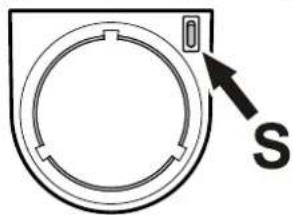
natural_image
Diagram of a circular device with a pointer and label 'S' (no text or symbols on the device itself)Congelazione
text_image
Gefenvermögen/Freezing Capacity Pouvoir de Congel/Capac/Gangeladora kg/24h Current Air Air Quality Air Pressure Air Efficiency Air Temperature Air Quality Air Pressure Air Quality Air Quality Air Quality Air Quality Air Quality Air Quality Air Quality Air Quality Air Quality Air Quality Air Quality Air Quality Air Quality Air Quality Air Quality Air Quality Air Quality Air Quality Air Quality Air Quality Air Quality Air Quality Air Quality Air Quality Air Quality Air Quality Air Quality Air Quality Air Quality Air Quality Air Quality Air Quality Air Quality Air QualityCongelare con Superfrost
text_image
Diagram of a device control panel with labeled buttons and directional arrows indicating movement or operationnatural_image
Simple line drawing of a rectangular object on a wooden stand, no text or symbols presentSbrinamento
Vano frigorifero
natural_image
Diagram of a double-door refrigerator with an arrow indicating downward motion (no text or symbols)Vano congelatore
text_image
Technical diagram of a refrigerator with numbered parts and 180° angle annotations for assembly or repair.text_image
Technical diagram of a mechanical assembly with numbered components and directional arrows indicating flow or movement.The appliance contains reusable materials and should be disposed of properly - not simply with unsorted household refuse. Appliances which are no longer needed must be disposed of in a professional and appropriate way, in accordance with the current local regulations and laws.
When disposing of the appliance, ensure that the refrigerant circuit is not damaged to prevent uncontrolled escape of the refrigerant it contains (data on type plate) and oil.
- Disable the appliance.
- Pull out the mains plug.
- Cut through the connection cable.

WARNING
Danger of suffocation due to packing material and plastic film! Do not allow children to play with packaging material. Take the packaging material to an official collection point.
Description of the appliance
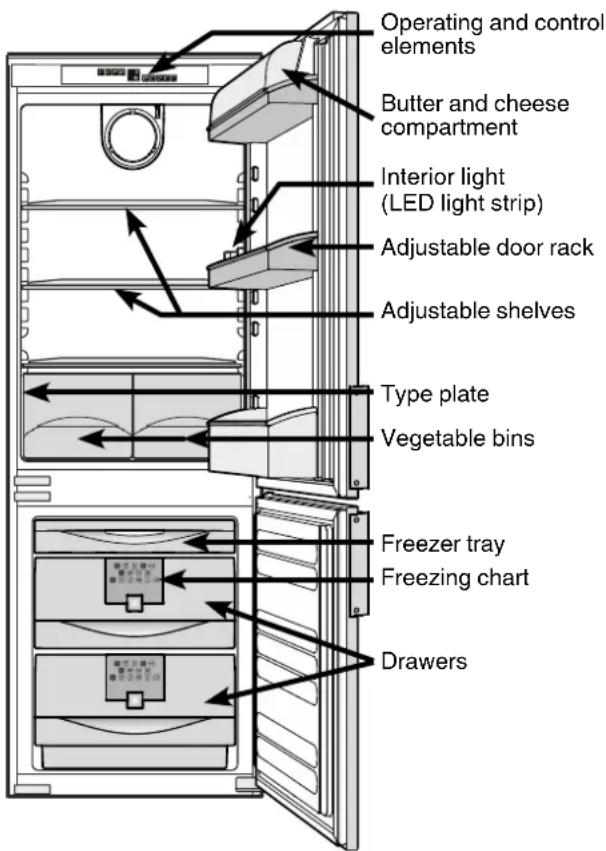
text_image
Operating and control elements Butter and cheese compartment Interior light (LED light strip) Adjustable door rack Adjustable shelves Type plate Vegetable bins Freezer tray Freezing chart DrawersSafety instructions and warnings
- To prevent injury or damage to the unit, the appliance should be unpacked and set up by two people.
- In the event that the appliance is damaged on delivery, contact the supplier immediately before connecting to the mains.
- To guarantee safe operation, ensure that the appliance is set up and connected as described in these operating instructions.
- Disconnect the appliance from the mains if any fault occurs. Pull out the plug, switch off or remove the fuse.
- When disconnecting the appliance, pull on the plug, not on the cable.
- Any repairs and work on the appliance should only be carried out by the customer service department, as unauthor ised work could prove highly dangerous for the user. The same applies to changing the mains power cable.
- Do not allow naked flames or ignition sources to enter the appliance. When transporting and cleaning the appliance, ensure that the refrigerant circuit is not damaged. In the event of damage, make sure that there are no ignition sources nearby and keep the room well ventilated.
- Do not stand on the plinth, drawers or doors or use them to support anything else.
- This appliance is not intended for use by persons (including children) with reduced physical, sensory or mental capabilities or lack of experience and knowledge unless they have been given initial supervision or instruction concerning use of the appliance by a person responsible for their safety. Children should be supervised to ensure that they do not play with the appliance.
- Avoid prolonged skin contact with cold surfaces or chilled/frozen food. This could cause pain, numbness and frostbite. In the case of prolonged skin contact, protective measures should be taken, e.g. gloves should be worn.
- Do not eat ice cream, particularly ice lollies or ice cubes, immediately after taking them from the freezer compartment as there is a risk of "burning" because of the very cold temperatures.
- Do not consume food which has been stored for too long, as it could cause food poisoning.
Climate rating
- Do not store explosives or sprays using combustible propellants such as butane, propane, pentane, etc. in the appliance. Electrical components might cause leaking gas to ignite. You may identify such sprays by the printed contents or a flame symbol.
- Do not use electrical appliances inside the appliance.
- The LED light strip illuminates the interior of the appliance. It is not suitable for lighting a room.
The climate rating indicates the room temperature at which the appliance may be operated in order to achieve full refrigeration performance.
The climate rating is indicated on the type plate.
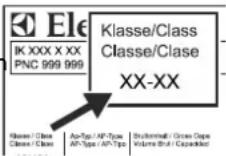
The position of the type plate is shown in the section entitled Description of the appliance.
Climate rating Room temperature
SN +10°C to +32°C
N +16°C to +32°C
ST +16°C to +38°C
T +16°C to +43°C
SN-ST +10°C to +38°C
SN-T +10°C to +43°C
Range of appliance use
The appliance is suitable solely for cooling food in a domestic environment or similar. This includes, for example, use
- in staff kitchenettes, bed and breakfast establishments,
- by guests in cottages, hotels, motels and other forms of accommodation,
- in catering and similar services in the wholesale trade.
Use the appliance solely as is customary within a domestic environment. All other types of use are inadmissible. The appliance is not suitable for storing and cooling medicines, blood plasma, laboratory preparations or similar substances and products covered by the 2007/47/EC Medical Devices Directive. Any misuse of the appliance may result in damage to or spoilage of stored goods. Furthermore, the appliance is not suitable for operation in potentially explosive atmospheres.
Setting up
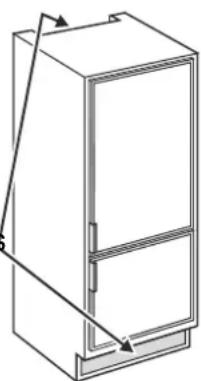
- Standard EN 378 specifies that the room in which you install your appliance must have a volume of 1m^-3 per 8g of R 600a refrigerant used in the appliance, so as to avoid the formation of inflammable gas/air mixtures in the room where the appliance is located in the event of a leak in the refrigerant circuit. The quantity of refrigerant used in your appliance is indicated on the type plate on the inside of the appliance.
- Only use the appliance when it is installed.
- Do not cover ventilation openings or grille.
natural_image
Technical line drawing of a cabinet or refrigerator with an attached door and side panel (no text or symbols)Do not operate the appliance outside the specified room temperature range.
Electrical connection
Only operate the appliance with alternating current (AC).
The permissible voltage and frequency are indicated on the type plate. The position of the type plate is shown in the section entitled Description of the appliance.
The socket must be properly earthed and protected by a fuse.
The tripping current of the fuse must be between 10 A and 16 A.
The socket must not be situated behind the appliance and must be easily accessible.
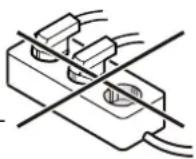
Do not connect the appliance using an extension cable or extension socket.
Do not use stand-alone inverters (conversion of direct current to alternating/three-phase current) or energy-saving plugs. Risk of damage to the electronic control system!
Saving energy
- Always ensure good ventilation. Do not cover ventilation openings or grille.
- Do not place appliance in areas of direct sunlight or next to a stove, heater or similar object.
- The energy consumption depends on the installation conditions, e.g. the ambient temperature.
- Keep the time the appliance is open to a minimum.
- Store food logically.
- Ensure that all food is well packed and covered for storage. This will prevent frost from forming.
- First cool warm food to room temperature before storing it.
- Defrost frozen food in the refrigerator.
Freezer compartment
- If there is a thick layer of frost in the appliance: defrost the appliance.
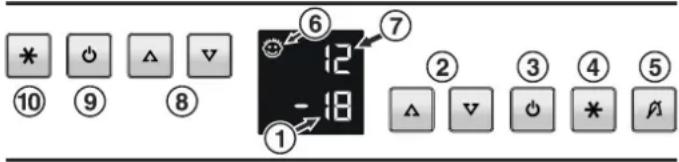
Operating and control elements
text_image
* ⑩ ○ Ⓧ △ ▽ ⑨ ⑧ ① ⑥ 12 -18 ⑦ ② ③ ④ ⑤ △ ▽ ○ * ⬆Refrigerator compartment
⑦ Temperature display
⑧ Temperature setting buttons
⑨ On/Off button
⑩ *button (The button switches the refrigerator compartment to maximum cooling)
Frezzer compartment
① Temperature display
② Temperature setting buttons
③ On/Off button
④ Superfrost-button
⑤ Audible warning On/Off button
⑥ Child lock is activated
Switching the appliance on and off ③
You are recommended to clean the appliance before switching it on for the first time (see „Cleaning“).
Switching on: Press the ON / Off buttons (on left for refrigerator, on right for freezer) so that the temperature display lights up/flashes.
Switching off: Press the On/Off buttons for approx. two seconds so that the temperature display goes out.
Note
If the freezer compartment is switched off, the appliance is out of operation.
Setting the temperature ②
To reduce the temperature
Press the ▼ button (on left for refrigerator, on right for freezer).
To increase the temperature/warmer
Press the △ button each.
- When pressing one of the buttons for the first time, the display will start to flash.
- Pressing this button again enables you to change the temperature setting.
- The electronic controls will switch over automatically about 5 seconds after the last time you pressed the button, and the actual temperature will be displayed.
- You can change the temperatures in the refrigerator between 9°C and 2°C in the freezer between -16°C and -26°C.
Temperature display
In normal operation, the average refrigerator temperature ⑦ and the warmest frozen food temperature ① will be displayed.
When starting up for the first time or when the appliance is warm, dashes will appear until the temperature reaches a level that can be displayed (19° to 0°C in the refrigerator and below 0°C in the freezer).
If F1 to F5 appears in the display, the appliance has a fault. Consult the customer service department indicating the fault number displayed.
Audible warning signal
The appliance is equipped with an alarm function.
Audible/visual temperature alarm:
It sounds when it is not cold enough in the freezer compartment. The temperature display will also flash;
The audible warning device is switched off by pressing the button.
The temperature display will continue to flash until the cause of the alarm has been rectified.
This can be caused by:
- the freezer door being left open for a long time, allowing warm ambient air to enter;
- a long power failure;
- a fault in the appliance.
In each case, make sure food has not defrosted or perished.
Additional functions
In set-up mode you can set the child lock and adjust the brightness of the display.
text_image
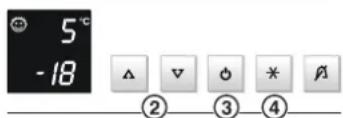
5°C -18 △ ▽ ◎ * ⬆ ② ③ ④Activating set-up mode:
- Press the ✕ button ④ for approx. 5 seconds.
- The ✱ button flashes.
-
The display shows c for child lock.
Note: The value to be altered flashes. -
Select the required function by pressing the V/A button ②:
c = child lock,
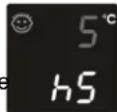
h = display brightness or
- Now select/acknowledge the function by pressing the button briefly:
For c = child-proof lock,
press the V/Abutton ② to select
c1 = child lock on or
c0 = child lock off and acknowledge with the *button ④. When the symbol is lit, the child lock is activated.
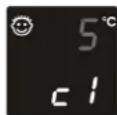
> For h = brightness,
press the V/A button ② to select
h1 = minimum to
h5 = maximum brightness and acknowledge with the * button ④.
Exiting set-up mode:
- Exit the set-up mode by pressing the On/Off button ③; after 2 min. the electronic system switches over automatically. The normal operating mode is activated again.
Power failure „frost-control“ display
If nA appears in the display, this means that the freezer temperature has risen too high during the last few hours or days due to a power failure.
If you press the „ALARM“ button whilst the display is reading nA, the highest temperature registered during the power failure will be displayed. Check the quality of the food and its suitability for consumption in case it has become too warm or even defrosted.
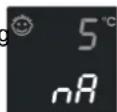
The highest temperature will appear for appox. 1 minute. After that, the actual temperature in the freezer will re-appear. The display can be switched off by repeatedly pressing the „ALARM“ button.
Equipment
You can re-arrange the storage shelves as required.
Lift the glass shelf, align the recess over the support and replace the shell in a higher or lower position.
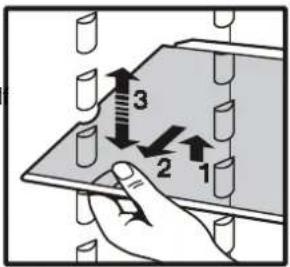
text_image
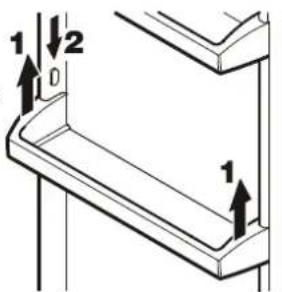
Diagram showing a hand pressing down on a panel with numbered arrows indicating movement or force direction.Repositioning the door racks
- Lift door rack vertically, lift out to the front and re-insert at a different height, following these steps in the reverse order.
text_image
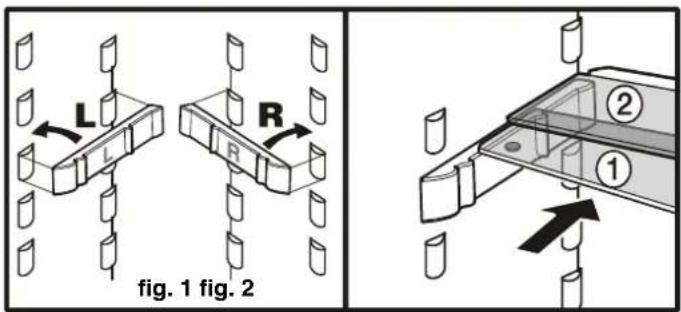
1 2 D 1The sectioned glass shelves can be moved to make space for tall containers. Place the shelf rails provided, fig. 1, on the supports on the left and right at the desired height.
Insert the glass shelves ① and ② as shown in fig. 2. The glass shelf ② with the raised edge must go at the back.
If you need to make space for tall containers, simply slide the front half of the sectioned glass shelf carefully underneath the back half, fig. 2.
text_image
L R L R fig. 1 fig. 2 ② ①Interior LED light
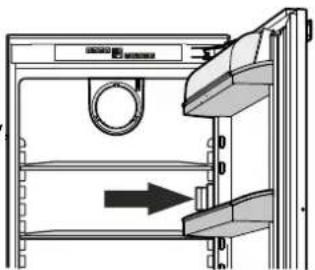
The interior light switches off automatically after the door has been opened for approx. 15 minutes.
If the interior light does not switch on when the door is opened briefly but the temperature display is working, the light may be defective.
The light intensity of the LED light corresponds to laser class 1/1M.
natural_image
Diagram of a refrigerator interior showing a door, shelf, and door handle with an arrow indicating direction (no text or symbols present)⚠️ Important
The light cover may only be removed by customer service staff. If the cover is removed, do not look directly at the light through optical lenses from close distance. This can damage your eyes.
Cooling
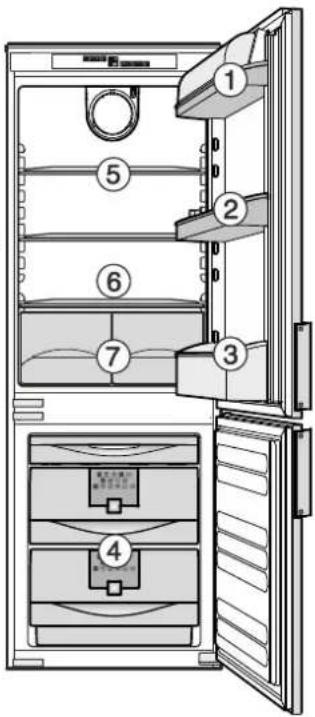
Storage example
① butter, cheese
② eggs
③ bottles
④ frozen food, ice cubes
⑤ baked goods, pre-cooked meals, drinks
⑥ meat, sausage products, dairy products
⑦ salad, fruit, vegetables, fresh herbs
Note
- Food which gives off or absorbs odours and flavours as well as liquids should always be stored covered or in closed containers. High- percentage alcohols should be tightly sealed and stored upright.
- Fruit, vegetables, salad can be stored unpacked in the bins.
text_image
Diagram of a refrigerator interior with numbered compartments and labeled doors for cleaning or storage.\* Button
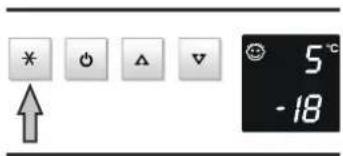
The button switches the refrigerator compartment to maximum cooling. This is recommended particularly if you wish to cool large quantities of fresh food or drinks as fast as possible.
Switching on
Press the ✗ button briefly so that the LED comes on. The refrigerator temperature will drop to its lowest value.
text_image
* ↑ 5 °C -18After approx. 6 hours, however, the refrigerator switches back automatically to normal operation.
Cooling with fan
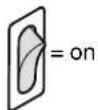
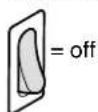
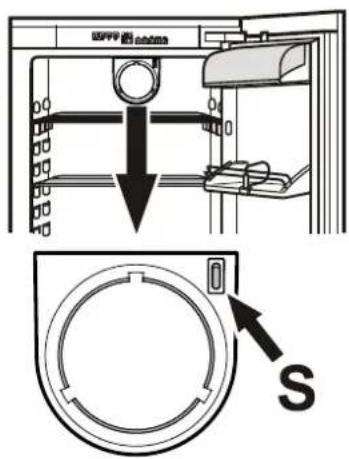
With the fan function switched on, a uniform temperature distribution will be attained in the refrigerator compartment.
This is recommended:
- in high room temperatures (approx. 33°C or higher),
- if the air humidity is high (e.g. during the summer).
To switch on
To switch off
text_image
Technical diagram showing a mechanical assembly with a downward arrow and a circular component labeled 'S' pointing to a button.Freezing
Fresh food should be frozen to the core as rapidly as possible. Frozen food can also be given a cold boost. This is provided by the „Superfrost“ facility.
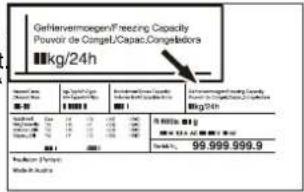
The maximum amount of food wich can be frozen in 24 hours is shown on the type plate („Freezing capacity...kg/24 hours“).
Freezing with Superfrost
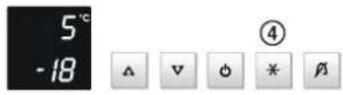
By activating the Superfrost function the temperature in the freezer compartment will drop to the lowest attainable value. Thus food can be rapidly frozen to the core and the quality is preserved.
- Press the Superfrost button ④.
- Wait 24 hours.
- Place the fresh food in the freezer.
• The Superfrost facility automatically switches the fast freezing procedure off after 65
You should not switch on the Superfrost function:
- when placing frozen food in the freezer;
- when freezing up to approx. 2 kg fresh food daily.
Notes on freezing
- Pack food which you are freezing yourself in quantities appropriate to your household. To ensure that the food freezes right through, the following quantities should not be exceeded per package: fruit, vegetables: up to 1 kg, meat: up to 2.5 kg.
- Pack frozen food in standard freezer bags or reusable plastic, metal or aluminium containers.
- Do not allow fresh food which is to be frozen to come into contact with food already frozen. Always keep packs dry in order to avoid them sticking together.
- Always write the date and contents on the pack and do not exceed the stated storage time for the food.
- Do not freeze bottles and cans which contain carbonated drinks as they might burst.
- Only take out as much food as is immediately required for thawing. Use food which has been thawed in prepared meals as quickly as possible.
Frozen food can be thawed in the following ways:
-in a fan oven
-in a microwave oven
- at room temperature
- in the refrigerator
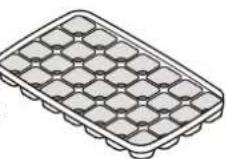
Making ice cubes
- Fill the ice-cube tray with water.
- Place the ice-cube tray in the appliance and leave it to freeze.
- The ice cubes can be removed from the tray by twisting or by holding upside down for a short time under running water.
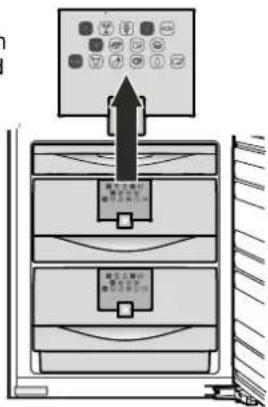
Freezing chart
The freezing chart represents the frozen food and the time it can be safely stored in months.
The individual storage times and whether or not the lower or upper value is applicable depend on the food quality, its processing prior to freezing, and the individual household's quality requirements.
The lower values always apply to food with a high fat content.
text_image
Diagram showing a device with labeled control panel and two internal compartments, likely for industrial or electrical system operation.Freezer tray
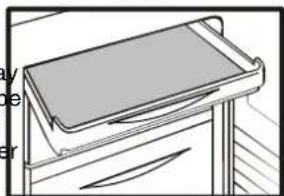
You can use the freezer tray to gently freeze fruit (e.g. berries or
slices of fruit), herbs and vegetables for serving or garnishing.
natural_image
Line drawing of a tray placed on a cabinet (no text or symbols)Spread the food out loosely on the tray (the pieces of fruit will retain their shape and will not stick together). Freeze for 10 to 12 hours then transfer to a freezer bag or container and store in one of the drawers.
Defrosting
Refrigerator compartment
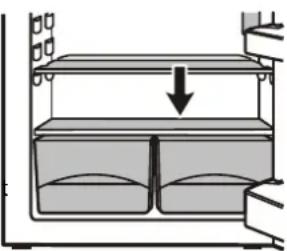
The refrigerator compartment defrosts automatically. The condensate evaporates automatically through the compressor heat.
Ensure that the water can flow without hindrance through the hole above the vegetable bins.
natural_image
Diagram of a two-tiered storage unit with a downward arrow indicating compression or clearance (no text or symbols)Freezer compartment
After the appliance has been in operation for some time, a layer of frost or ice will form on the inside walls. This increases energy consumption. Therefore defrost the freezer compartment regularly.
- Switch the appliance off to defrost. Pull out the mains plug or press the freezer compartment- On/ Off button ③ so that the temperature display goes dark.
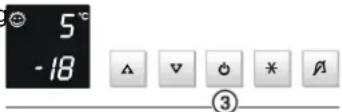
- Remove the drawers and glass shelves.
- Wrap the frozen food in paper or blankets and store in a cool place.
- To speed up the defrosting process put a saucepan of hot water on the compartment floor.
- Leave the door of the appliance open while defrosting. After defrosting mop up the remaining water and clean the appliance.
Do not use any mechanical devices or other artificial aids for defrosting other than those recommended by the manufacturer.
Malfunctions
You may be able to rectify the following faults by checking the possible causes yourself:
• Appliance does not function:
– Is the appliance switched on?
– Is the plug correctly fitted in the mains socket?
– Is the socket fuse intact?
- Loud running noise:
– Is the appliance set up firmly on the floor?
- Does the appliance cause nearby items of furniture or objects to vibrate? Please note that noises caused by the refrigerant circuit cannot be avoided.
• The temperature is not low enough:
- Is the temperature setting correct (see "Setting the temperature")?
- Have excessive amounts of fresh food been placed in the appliance?
- Does the separately installed thermometer show the correct reading?
- Is the ventilation system working properly?
- Is the appliance set up too close to a heat source?
- The inside of the appliance may feel warm in places
- That is quite normal. The dissipated heat is necessary for normal operation of the appliance.
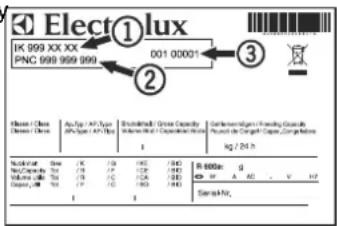
If none of the above causes apply and you cannot rectify the fault yourself, contact the nearest customer service department stating the type of appliance ①, PNC number ② and appliance number ③ as indicated on the type plate.
The position of the type plate is shown in the section entitled Description of the appliance.
text_image
Elect①lux IK 999 XX XX PNC 999 999 999 001 00001 ② 3 Elast Class Classes I/II Achyp-IV/IV Type (IV/IV/IV/IV/IV/IV/IV/IV/IV/IV/IV/IV/IV/IV/IV/IV/IV/IV/IV/IV/IV/IV/IV/IV/IV/IV/IV/IV/IV/IV/IV/IV/IV/IV/IV/IV/IV/IV/IV/IV/IV/IV/IV/IV/IV/IV/IV/IV/IV/IV/IV/ Kg / 24 h Molecular Size: K / 100 MHz / (Hz) R = 6000 g No. of the Molecule: N / 100 MHz / (Hz) R = 6000 g Volume: 100 mL / (Hz) R = 100 mL / (Hz) R = 100 mL / (Hz) Volume: 100 mL / (Hz) R = 100 mL / (Hz) R = 100 mL / (Hz) Total: 100 mL / (Hz) R = 100 mL / (Hz) R = 100 mL / (Hz)Cleaning
Before cleaning always switch off the appliance. Disconnect from the mains or unscrew or switch off the fuse.
- Clean the inside, equipment parts and outer walls with lukewarm water and a little detergent. Do not use abrasive or acid cleaners or chemical solvents.
- Ensure that no cleaning water penetrates into the electrical components or ventilation grille.
- Dry all parts well with a cloth.
- Do not damage or remove the type plate on the inside of the appliance. It is very important for servicing purposes.
- Clean the drain hole in the refrigerator compartment with a thin object, e.g. cotton swab or the like.
Do not use steam cleaners because of the risk of injury and damage.
Shutting your appliance down
If your appliance is to be shut down for any length of time, switch it off and disconnect the plug or switch off or unscrew the fuse. Clean the appliance and leave the door open in order to prevent unpleasant smells.
The appliance complies with the relevant safety regulations and EC Directives 2004/108/EC and 2006/95/EC.
All types and models are subject to continuous improvement and the manufacturer therefore reserves the right to make modifications to the shape, equipment and technology.
Installation dimensions (mm)
| A | B | C | |
| SMS 12/6 | 1524 | 1523 | 1514 |
| SMS 14/6 | 1778 | 1777 | |
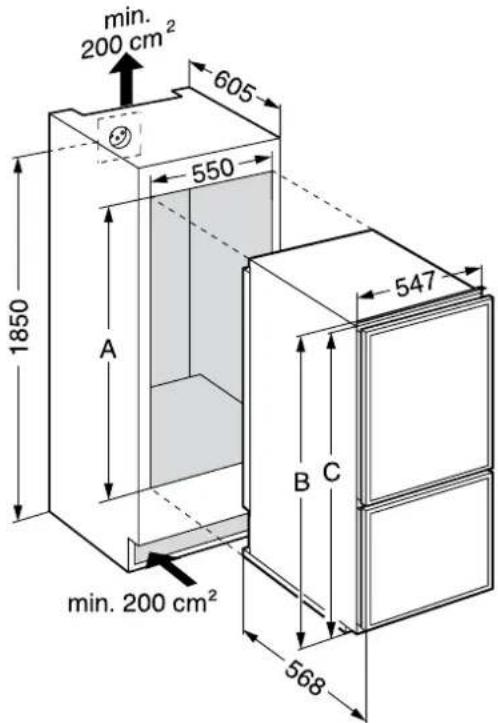
text_image
min. 200 cm² 605 550 1850 A min. 200 cm² 547 B C 568Changing over door hinges
- Unscrew decor frame ①.
- Tilt the door to the front and lift off.
- Transfer plug⑪.
- Remove cover⑩.
- Unscrew hinge bracket⑤.
- Transfer cover⑨ to the opposite side.
- Unscrew hinge bracket⑥ and lift lower door off upwards.
- Transfer plug⑫.
- Unscrew hinge pin③ and screw into the adjacent fastening hole.
- Unscrew hinge bracket⑧.
- Unscrew hinge pin⑦ and screw into the adjacent fastening hole.
- Remove covers ② and transfer to the opposite side.
- Remove plugs ④ and transfer to the opposite side.
- Screw hinge bracket ⑧ into place on the opposite side.
- Suspend lower door on hinge pin⑧ and close.
- Screw hinge bracket ⑥ into place on the opposite side.
- Screw hinge bracket ⑤ into place on the opposite side.
- Replace cover⑩.
- Suspend upper door on hinge pin ⑥ and close.
- Insert hinge pin ① and tighten.
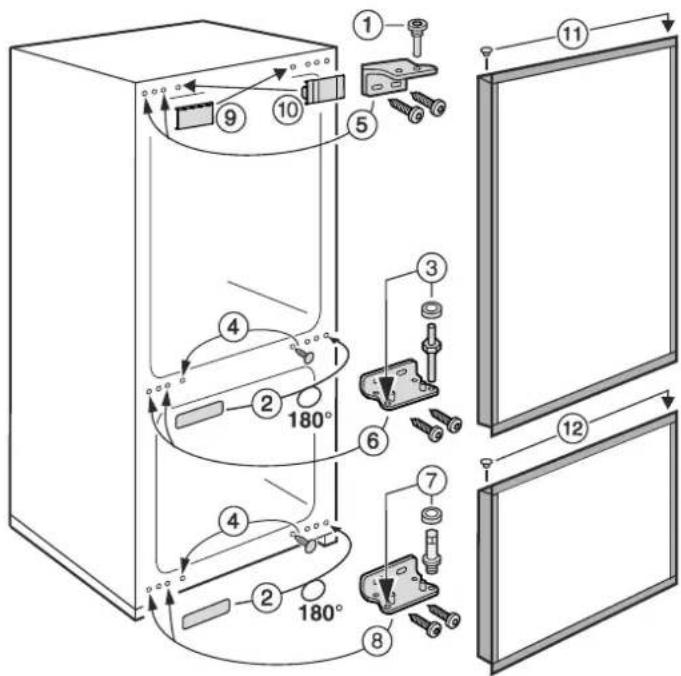
text_image
Technical diagram of a refrigerator with numbered parts and 180° angle annotations for assembly or maintenance.Assembling decor panels
Decor panel dimensions EK 260
Height Width Thickness max. Refrigerator 845 mm 535 mm 4 mm Freezer 598 mm 535 mm 4 mm
Decor panel dimensions EK 320
Height Width Thickness max. Refrigerator 1099 mm 535 mm 4 mm Freezer 598 mm 535 mm 4 mm
Assembly
- Unscrew door handle.
- Unscrew decorframes①.
- Loosen decor frames ② and slide forwards.
- Slide the decor panel ③ between the frames and the door.
- Screw on the decorframes ① with handle.
- Slide all decor frames back and screw tightly.
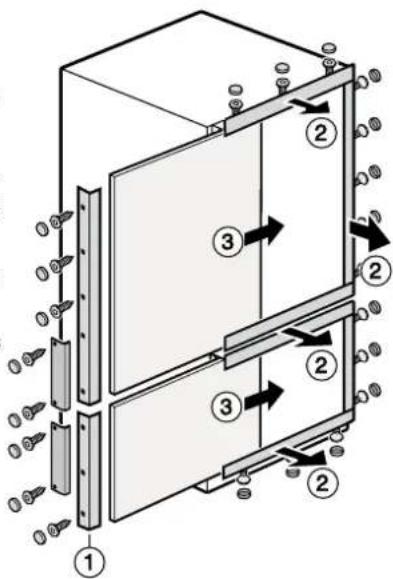
text_image
Technical diagram of a multi-panel electrical enclosure with labeled components and directional arrows indicating flow or movement.Installing in a kitchen unit
- Slide the attachment element into the rail underneath the appliance on the handle side on the left or right, depending on which side the handle is. Screw into place with screw 3.5 x 17.
- Slide the appliance into the recess.
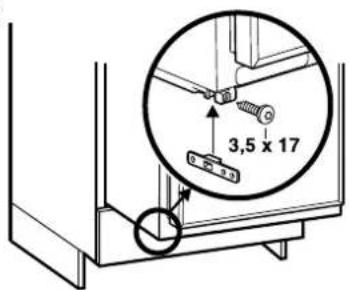
text_image
3,5 x 17Fastening in the recess
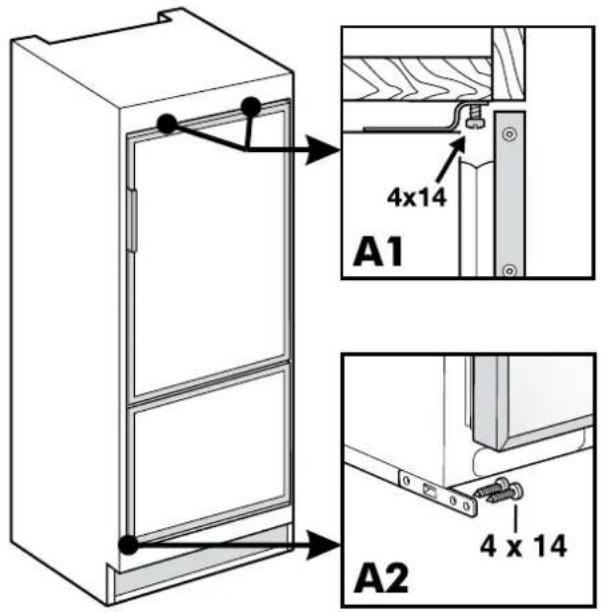
Fasten the appliance in the recess
- with the attachment profile at the top A1, - with the attachment element at the bottom A2.
text_image
4x14 A1 4 x 14 A2| Servicestellen | Points de service | Servizio dopo vendita | Point of service |
| 5506 Mägenwil/Zürich Industriestr. 10 | |||
| 9000 St. Gallen Zürcherstrasse 204 e | |||
| 4052 Basel St. Jakob-Turm Birsstrasse 320 B | |||
| 6020 Emmenbrücke Seetalstrasse 11 |  | ||
| 7000 Chur Comercialstrasse 19 | |||
| 3018 Bern Morgenstrasse 131 | |||
| 1028 Préverenges Le Trési 6 | |||
| 6928 Manno Via Violino 11 |
Ersatzteilverkauf / Point de vente de rechange / Vendita pezzi di ricambio / spare parts service
5506 Mägenwil, Industriestrasse 10, Tel. 0848 848 111
8048 Zürich, Badenerstrasse 587, Tel. 044 405 81 11
Fachberatung, Verkauf/Demonstration, Vente/Consulente (cucina), Vendita/consulting, sales
| Garantie | Für jedes Produkt gewähren wir ab Verkauf bzw. Lieferdatum an den Endverbraucher eine Garantie von 2 Jahren. (Ausweis durch Garantieschein, Faktura oder Verkaufsbeleg).Die Garantieleistung umfasst die Kosten für Material, Arbeits- und Reisezeit.Die Garantieleistung entfällt bei Nichtbeachtung der Gebrauchsanweisung und Betriebsvorschriften, unsachgerechter Installation, sowie bei Beschädigung durch äussere Einflüsse, höhere Gewalt, Eingriffe Dritter und Verwendung von Nicht-Original Teilen. |
| Garantie | Nous octroyons sur chaque produit 2 ans de garantie à partir de la date de livraison ou de la mise en service au consommateur (documenté au moyen d'une facture, d'un bon de garantie ou d'un justificatif d'achat). Notre garantie couvre les frais de mains d'œuvres et de déplacement, ainsi que les pièces de rechange.Les conditions de garantie ne sont pas valables en cas d'intervention d'un tiers non autorisé, de l'emploi de pièces de rechange non originales, d'erreurs de maniement ou d'installation dues à l'inobser-vation du mode d'emploi, et pour des dommages causés par des influences extérieures ou de force majeure. |
| Garanzia | Per ogni prodotto concediamo una garanzia di 2 anni a partire dalla data di consegna o dalla sua messa in funzione. (fa stato la data della fattura, del certificato di garanzia o dello scontrino d'acquisto) Nella garanzia sono comprese le spese di manodopera, di viaggio e del materiale.Dalla copertura sono esclusi il logoramento ed i danni causati da agenti esterni, intervento di terzi, utilizzo di ricambi non originali o dalla inosservanza delle prescrizioni d'installazione ed istruzioni per l'uso. |
| Warranty | For each product we provide a two-year guarantee from the date of purchase or delivery to the consumer (with a guarantee certificate, invoice or sales receipt serving as proof).The guarantee covers the costs of materials, labour and travel.The guarantee will lapse if the operating instructions and conditions of use are not adhered to, if the product is incorrectly installed, or in the event of damage caused by external influences, force majeure, intervention by third parties or the use of non-genuine components. |