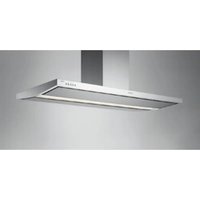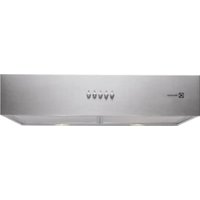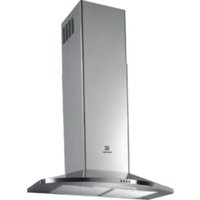
EFC1060X - Range hood ELECTROLUX - Free user manual and instructions
Find the device manual for free EFC1060X ELECTROLUX in PDF.


User questions about EFC1060X ELECTROLUX
0 question about this device. Answer the ones you know or ask your own.
Ask a new question about this device
Download the instructions for your Range hood in PDF format for free! Find your manual EFC1060X - ELECTROLUX and take your electronic device back in hand. On this page are published all the documents necessary for the use of your device. EFC1060X by ELECTROLUX.
USER MANUAL EFC1060X ELECTROLUX
Thinking of you Electrolux
USER MANUAL
EFC1060

natural_image
Close-up of a young girl with curly hair and hands preparing food, wearing a patterned overalls (no visible text or symbols)We were thinking of you
when we made this product
DE
RECOMMENDATIONS AND SUGGESTIONS 36
CHARACTERISTICS 37
INSTALLATION 39
USE 42
MAINTENANCE 44
DE
Welcome to the world of Electrolux
Thank you for choosing a first class product from Electrolux, which hopefully will provide you with lots of pleasure in the future. The Electrolux ambition is to offer a wide variety of quality products that make your life more comfortable. You find some examples on the cover in this manual. Please take a few minutes to study this manual so that you can take advantage of the benefits of your new machine. We promise that it will provide a superior User Experience delivering Ease-of-Mind.
Good luck!
Anschluss in Abluftversion
text_image
Vr 12r 7.5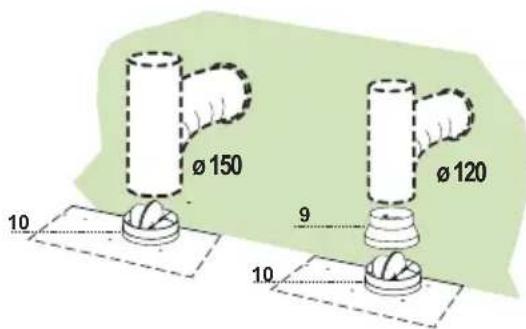
text_image
Ø 150 Ø 120 9 10 10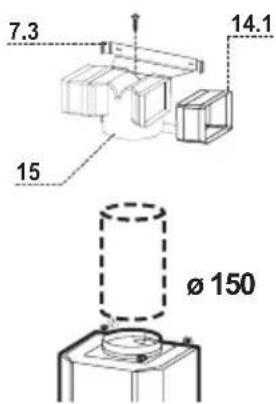
text_image
7.3 14.1 15 Ø 15011 electrolux Montage/Bedienung
Elektroanschluss
natural_image
Mechanical assembly diagram showing a component with a green arrow indicating direction (no text or symbols)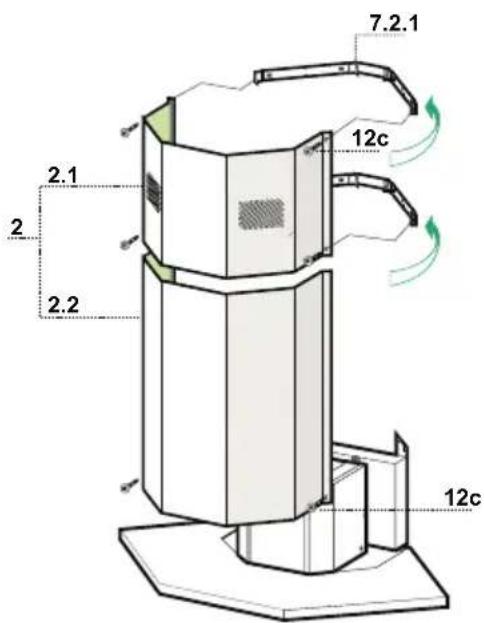
text_image
7.2.1 12c 2.1 2 2.2 12cBEDIENUNG
text_image
L T1 T2 T3 T4 Tnatural_image
Illustration of a hand pointing at a grid-based electronic device with an orange arrow indicating rotation (no text or symbols)natural_image
Illustration of a hand pressing down on a green surface with a green arrow symbol (no text or labels)natural_image
Illustration of a hand holding a small object with a green flag above it (no text or symbols)CONSEILS ET SUGGESTIONS
INSTALLATION
7.3 1 Bride Support Raccord
7.4 1 Attack Bride Support Raccord
text_image
Vr 12r 7.5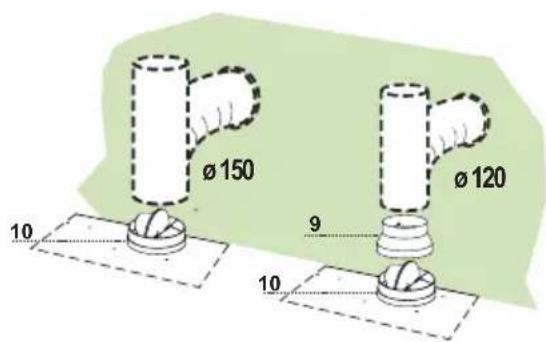
text_image
Ø 150 Ø 120 9 10 10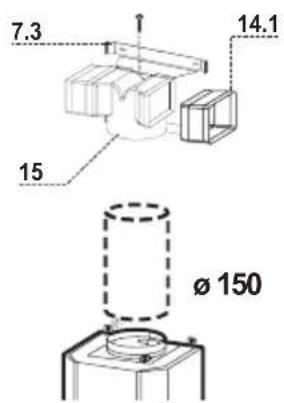
text_image
7.3 14.1 15 Ø 150natural_image
Diagram showing a mechanical component with a green arrow indicating direction, no text or symbols present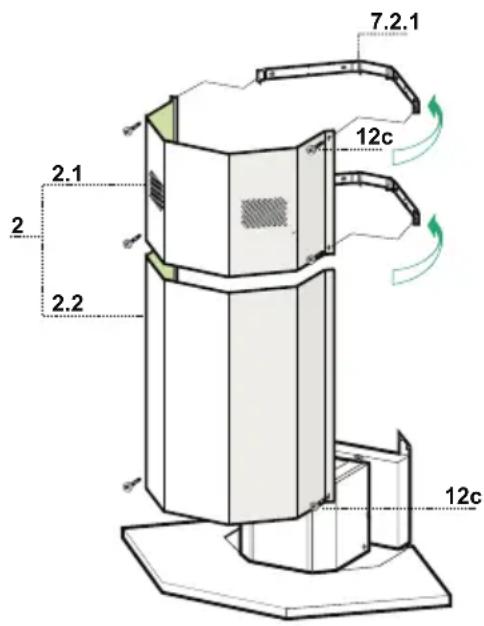
text_image
7.2.1 2.1 2 2.2 12c 12cUTILISATION
text_image
L T1 T2 T3 T4 Tnatural_image
Illustration of a hand pointing at a grid-based device with a yellow arrow on its screen (no text or symbols)natural_image
Illustration of a hand pressing down on a mechanical component with a green arrow indicating downward motion (no text or symbols)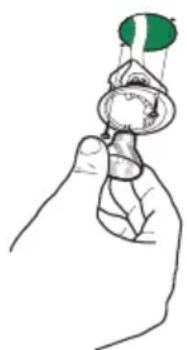
natural_image
Illustration of a hand holding a small object with green markings (no text or symbols)text_image
Vr 12r 7.5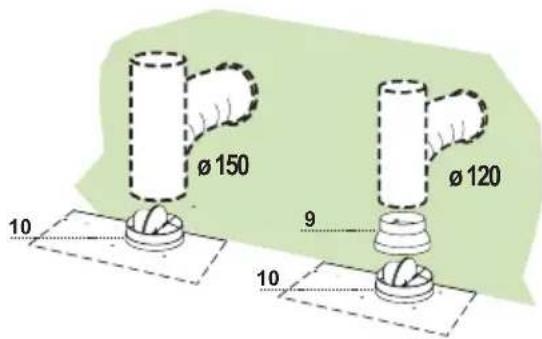
text_image
Ø 150 Ø 120 10 9 10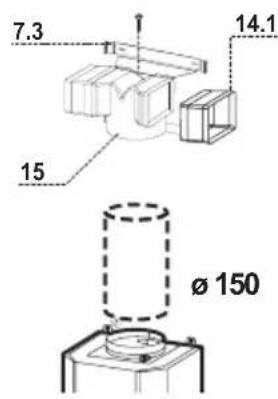
text_image
7.3 14.1 15 Ø 150natural_image
Diagram of a mechanical component with a green arrow indicating direction, no text or symbols presentMontaggio Camino
Camino superiore
natural_image
Illustration of a hand pointing at a grid-based device with a yellow arrow indicating rotation (no text or symbols)natural_image
Illustration of a hand pressing down on a green surface with a green arrow symbol (no text or labels)natural_image
Line drawing of a hand holding a small object with a green and white object above it (no text or symbols)RECOMMENDATIONS AND SUGGESTIONS
Installation
- The manufacturer will not be held liable for any damages resulting from incorrect or improper installation.
- The minimum safety distance between the cooker top and the extractor hood is 650 mm.
- Check that the mains voltage corresponds to that indicated on the rating plate fixed to the inside of the hood.
- For Class I appliances, check that the domestic power supply guarantees adequate earthing.
Connect the extractor to the exhaust flue through a pipe of minimum diameter 120 mm. The route of the flue must be as short as possible.
- Do not connect the extractor hood to exhaust ducts carrying combustion fumes (boilers, fireplaces, etc.).
- If the extractor is used in conjunction with non-electrical appliances (e.g. gas burning appliances), a sufficient degree of aeration must be guaranteed in the room in order to prevent the backflow of exhaust gas. The kitchen must have an opening communicating directly with the open air in order to guarantee the entry of clean air.
Use
- The extractor hood has been designed exclusively for domestic use to eliminate kitchen smells.
- Never use the hood for purposes other than for which it has been designed.
-
Never leave high naked flames under the hood when it is in operation.
-
Adjust the flame intensity to direct it onto the bottom of the pan only, making sure that it does not engulf the sides.
- Deep fat fryers must be continuously monitored during use: overheated oil can burst into flames.
- Do not flambè under the range hood; risk of fire
- The hood should not be used by children or persons not instructed in its correct use.
Maintenance
- Switch off or unplug the appliance from the mains supply before carrying out any maintenance work.
- Clean and/or replace the Filters after the specified time period.
- Clean the hood using a damp cloth and a neutral liquid detergent.

The symbol on the product or on its packaging indicates that this product may not be treated as household waste. Instead it shall be handed over to the applicable collection point for the recycling of electrical and electronic equipment. By ensuring this product is disposed of correctly, you will help prevent potential negative consequences for the environment and human health, which could otherwise be caused by inappropriate waste handling of this product. For more detailed information about recycling of this product, please contact your local city office, your household waste disposal service or the shop where you purchased the product.
CHARACTERISTICS
Dimensions

text_image
MIN 650 - MAX 115 480 60 528 532 46 78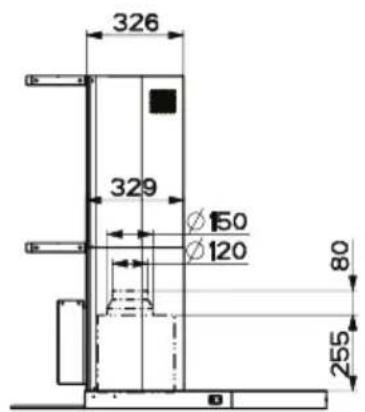
text_image
326 329 Ø150 Ø120 80 255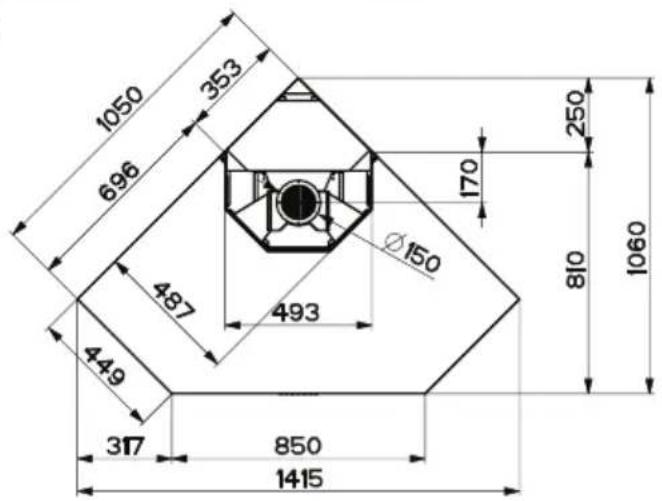
text_image
1050 353 696 487 449 317 850 1415 Ø150 493 170 250 810 1060EN
Components
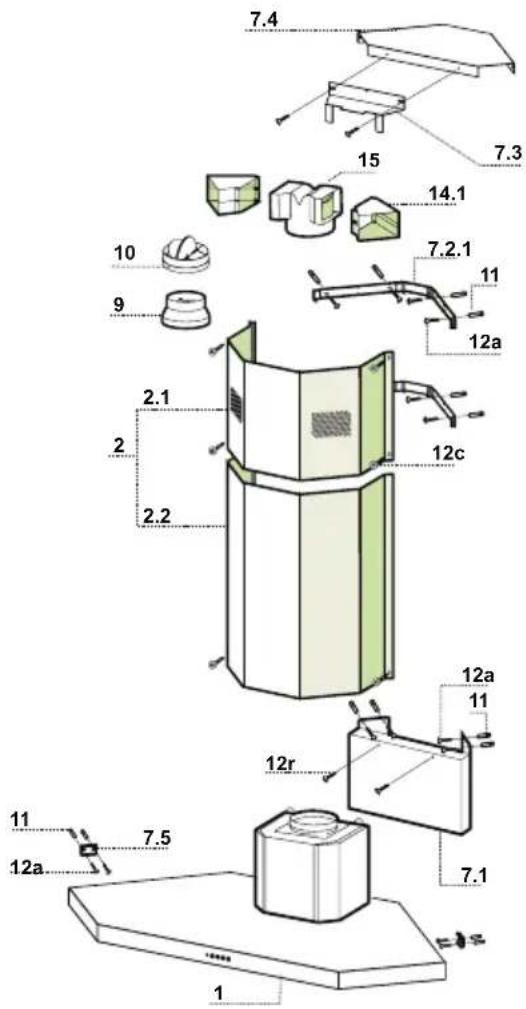
Ref. Q.ty Product Components
1 1 Hood Body, with: Controls, Light, Blower, Filters
2 1 Telescopic Chimney:
2.1 1 Upper Section
2.2 1 Lower Section
9 1 Reducer Flange ø 150-120 mm
10 1 Damper
14.1 2 Air Outlet Connection Extension
15 1 Air Outlet Connection
Ref. Q.ty Installation Components
7.1 1 Hood Coupling Support
7.2.1 2 Upper Chimney Section Fixing Brackets
7.3 1 Air Outlet Connection Support
7.4 1 Support Air Outlet Connection Brackets
7.5 2 Safety Brackets
11 16 Plugs
12a 16 Screws 4.2 x 44.4
12c 8 Screws 2.9 x 9.5
12r 2 Screws 4.2 x 12.7
Q.ty Documentation
1 Instruction Manual
text_image
7.4 15 7.3 14.1 10 9 7.2.1 11 12a 2.1 2 2.2 12c 12r 12a 11 11 7.5 12a 7.1 1INSTALLATION
Wall drilling and bracket fixing
Wall marking:
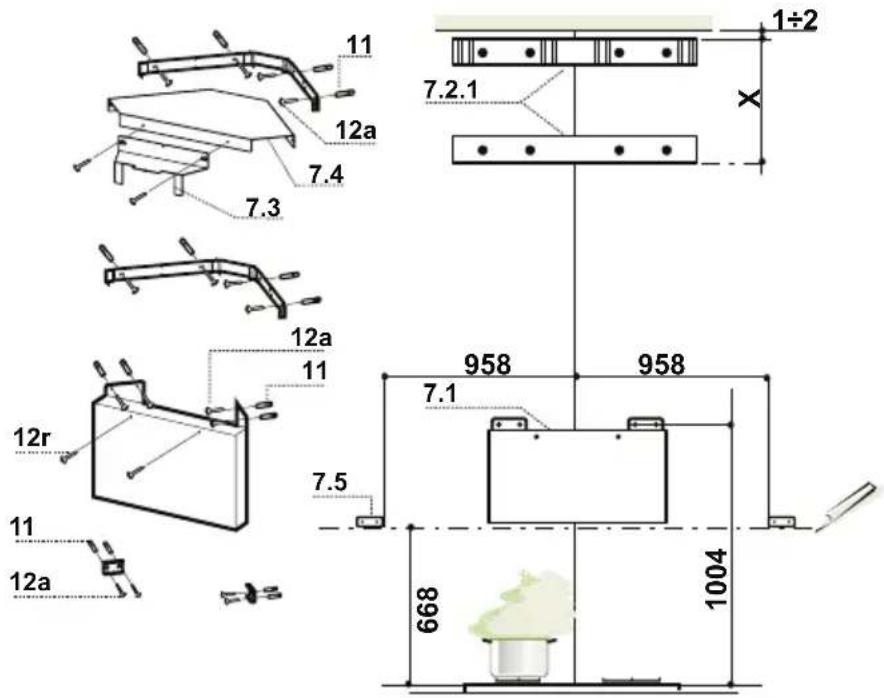
- Rest the Bracket 7.2.1 as indicated 1-2 mm from the ceiling or top limit.
- Mark the centres of the Bores in the Bracket.
- Rest the Bracket 7.2.1 as indicated X mm under the first bracket (X = height of the Top Chimney provided).
- Mark the centres of the Bores in the Bracket.
- Rest the Hood Coupling Support 7.1 as indicated 1004 mm above the Cooker Top, checking that the fixing bores are equidistant from the corner of the wall.
- Mark the centres of the Bores in the Support.
- Drill the points marked with a ø 8 mm drill bit.
- Insert the plugs 11 into the holes.
- Draw a Horizontal line on the Wall 668 mm above the Cooker Top.
- Rest the Safety Brackets 7.5 as indicated on the reference Horizontal line, at a distance of 958 mm from the corner of the wall, checking that they are level.
- Mark the centres of the Bores in the Safety Brackets.
- Drill the points marked with a ø 8 mm drill bit.
- Insert the plugs 11 into the holes.
- Fix the Brackets and the Support, using the Screws 12a (4.2 x 44.4) provided.
- In case of recycling version installation, you should fix the upper bracket 7.2.1, the holder 7.4, the bracket 7.3 to the holder 7.4 and the recycling connector 15 to the bracket 7.3.
- Fasten 2 Screws 12r (4.2 x 12.7) provided into the Hood Canopy fixing holes, positioned on the front plate of the Hood Coupling Support, leaving a space of 5-6 mm between the support and the head of the screw.
text_image
11 12a 7.4 7.3 12a 11 12r 11 12a 7.5 958 958 7.1 668 1004 1÷2 7.2.1 XHood body installation
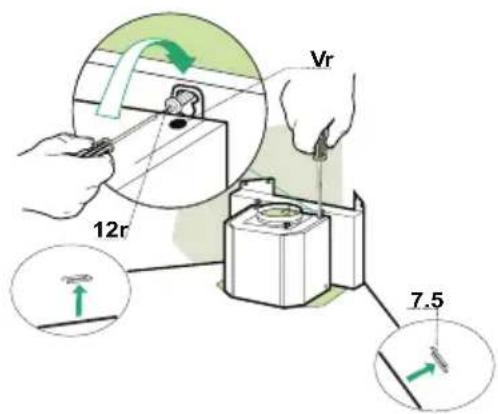
- Before hooking up the Hood Canopy, lock the 2 Screws Vr located at the Hood Canopy connection points.
- Hook up the Hood Canopy to the Screws 12r taking care to ensure that the Safety brackets 7.5, fixed to the wall, enter the Side Housings provided.
- Tighten the support Screws 12r until they lock.
- Adjust Screws Vr to level the Hood Canopy.
Connection in Ducting Version
When installing the ducting version, connect the hood to the chimney using either a flexible or rigid pipe 150 or 120 mm, the choice of which is left to the installer.
To install a ø 150
• To install the dumper 10.
- Fix the pipe in position using sufficient pipe clamps (not supplied).
To install a ø 120
- To install a ø 120 mm air exhaust connection, insert the reducer flange 9 on the dumper 10.
- Fix the pipe in position using sufficient pipe clamps (not supplied).
- Remove any activated charcoal filters.
Connection in Recycling Version
- Insert the connection extension pieces laterally 14.1 in connec-tion 15.
- Insert the Connector 15 into the Support bracket 7.3 and fix it with a screw.
- Make sure that the outlet of the extension pieces 14.1 is hori-zontally and vertically aligned with the chimney outlets.
- Connect the air outlet connection 15 to the hood body outlet using either a flexible or rigid pipe 150 mm, the choice of which is left to the installer.
- Ensure that the activated charcoal filters have been inserted.
text_image
Vr 12r 7.5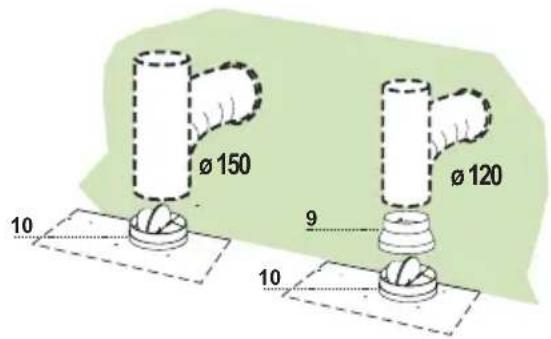
text_image
Ø 150 10 Ø 120 9 10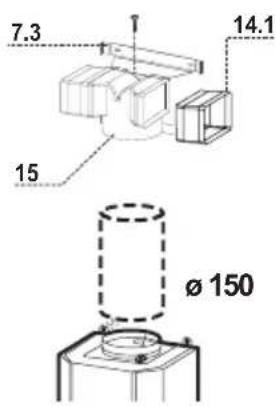
text_image
7.3 14.1 15 Ø 150Electrical Connection
- Connect the hood to the mains through a two-pole switch having a contact gap of at least 3 mm.
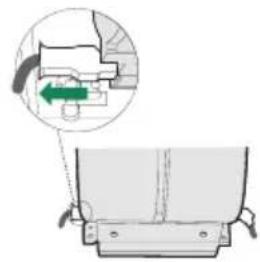
- Remove the grease filters (see paragraph Maintenance) being sure that the connector of the feeding cable is correctly inserted in the socket placed on the side of the fan.
Chimney assembly
Upper Chimney
- Slightly widen the two sides of the upper flue and hook them behind the brackets 7.2.1, making sure that they are well seated.
- Secure the sides to the brackets using the 4 screws 12c (2,9 x 9,5) supplied.
- Make sure that the outlet of the extensions pieces is aligned with the chimney outlets.
Lower exhaust flue
- Slightly widen the two sides of the flue and hook them between the upper flue and the wall, making sure that they are well seated.
- Fix the lower part laterally to the hood body using the 2 screws 12c (2,9 x 9,5) supplied.
natural_image
Diagram of a mechanical assembly with a green arrow indicating a directional component (no text or symbols present)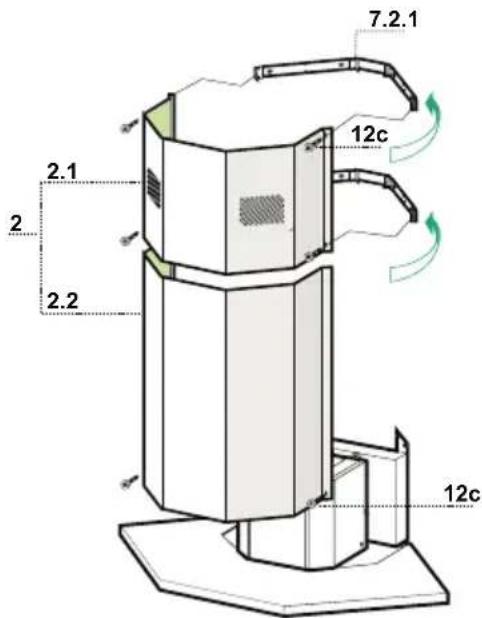
text_image
7.2.1 12c 2.1 2 2.2 12cUSE
The hood can be switched on pushing directly onto the requested speed without firstly having to select 0/1 button
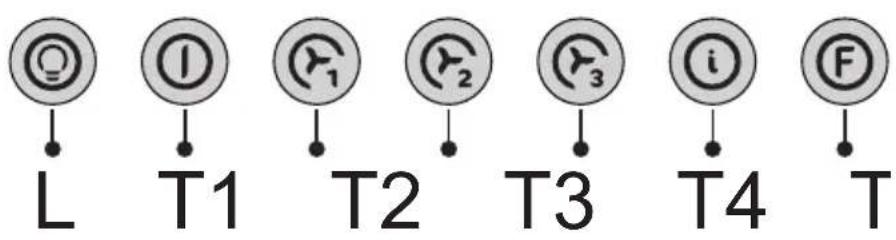
text_image
L T1 T2 T3 T4 T| Touch control | Basic functions Indicator lights | ||
| Dual Function | |||
| L | When briefly pressed it switches the lighting system on and off. | Touch control unlit | Lights off |
| When pressed for 2 seconds it starts the lighting system in “courtesy light” mode.The lamps are fed at a reduced power of approximately 5W. Such function can be stopped by pressing the touch control for 2 seconds or just by pressing it shortly in order to return to the normal lighting mode. In courtesy light mode the touch control is not lit. | Touch control lit | Lights on | |
| Touch control unlit | Courtesy light on | ||
| T1 | When pressed the motor is stopped, regardless of the speed it is set to. | Touch control lit | Motor on |
| Touch control unlit | Motor off | ||
| T2 | When pressed the motor is set to the first speed | Touch control lit | |
| T3 | By a brief pressing the motor is set to the second speed. | Touch control lit | Second speed on |
| By pressing the touch control for approximately 2 seconds the Delay function is enabled, i.e delayed shutdown of the appliance ensuring a complete elimination of the residual odours.This function can be activated at OFF-position and at 1°, 2° and 3° speeds. It can be stopped in advance by pressing any of the touch controls (T) with the exception of T3. The Delay function works according to the following scheme:1° speed / OFF = 20 minuets2° speed = 15 minutes3° speed = 5 minutes | Flashing touch control | Delay function on | |
| T4 | When pressed the motor is set to the third speed | Touch control lit | |
| T5 | When pressed the motor is set to the intensive speed timed to 5 minutes. At the end of 5 minutes of intensive speed the hood starts again at the speed it was set to previously. In case the hood is set to the intensive speed directly from OFF-state it will then start from the first speed after 5 minutes of intensive speed. | Touch control lit | |
| F | When pressed for 4 seconds it resets the filter alarm signal indicated by flashing of the touch control T1. This procedure can be carried out only when the motor is stopped. | Touch control lit | Metal grease filters saturation alarm. Metal grease filters need to be washed. The alarm starts up after 100 working hours. |
| Flashing touch control | Charcoal filter saturation alarm. Charcoal filter has to be replaced and metal grease filters washed. The alarm starts up after 200 working hours. (Activation; check the paragraph “Charcoal filter”) | ||
MAINTENANCE
Cleaning of the Metal Cassette Filters
Alarm reset
- Stop the motor.
- Press the F -touch control for at least 4 seconds until the T1 -touch control flashes.
Cleaning the filters
- The filters must be cleaned every 2 months of operation, or more frequently for particularly heavy usage, and can be washed in a dishwasher.
- Remove the filters one at a time holding them up with one hand and pulling the handle downwards with the other hand at the same time.
- Wash the filters, taking care not to bend them. Allow them to dry before refitting.
- When refitting the filters, make sure that the handle is visible on the outside.
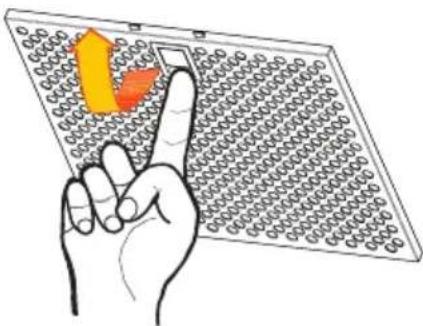
natural_image
Illustration of a hand pointing at a grid-based device with a yellow arrow indicating the direction (no text or symbols present)Replacing the Charcoal Filter
This filter cannot be washed or regenerated, and must be replaced when the F touch control starts to flash, or at least once every 4 months. The alarm is only triggered when the motor is on.
Enabling/Disabling the alarm signal
- In Recirculation Version Hoods, the Filter saturation Alarm must be enabled at the time of installation or later.
- Switch off the lights and the motor.
- Disconnect the mains power supply to the hood by removing the motor unit power supply cable connector, switching off the power supply at the Mains or turning the Main switch off.
- Restore the connection, pressing and holding T2.
- Release the touch control, touch controls L, T2 and F will light up normally.
- Within 3 seconds press the touch control F until the key itself flashes to confirm as follows:
- 2 flashes – Charcoal Filter saturation Alarm ENABLED
• 1 flash - Charcoal Filter saturation Alarm DISABLED
Reset the alarm signal
- Stop the motor.
- Press the touch control F for at least 4 seconds, until the touch control T1 flashes.
Replace the Filter
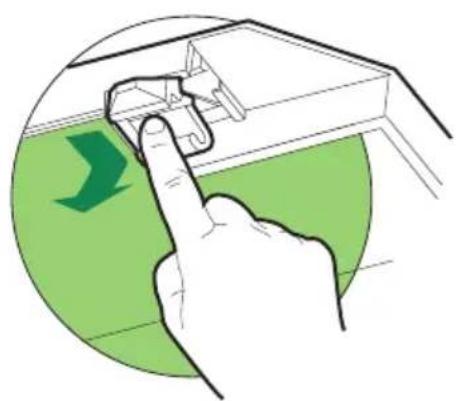
- Close the suction panel.
- Remove the metal grease filters.
- Remove the saturated charcoal filter, turning the fasteners provided.
- Fit the new filter and fasten it its correct position.
- Put the metal grease filters in their seats.
- Close the suction panel.
Light replacement
20 W halogen light.
- Remove the 2 screws fixing the Lighting support, and pull it out of from the Hood.
• Extract the lamp from the Support.
- Replace with another of the same type, making sure that the two pins are properly inserted in the lamp holder socket holes.
- Replace the Support, fixing it in place with the two screws removed as above.
natural_image
Illustration of a hand pressing down on a mechanical component with a green circular background (no text or symbols)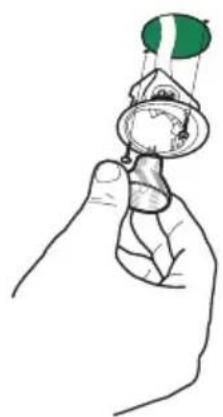
natural_image
Illustration of a hand holding a small object with a green flag above, resembling a stylized face or mask (no text or symbols present)
natural_image
Modern stainless steel kitchen air conditioner unit with recessed top panel (no visible text or symbols)
natural_image
Exterior view of a modern microwave oven with digital display and control panel (no visible text or symbols)
natural_image
White electric stove with four top ovens and front panel, no visible text or symbols
natural_image
Red and silver vacuum cleaner with adjustable arm and blue control knob (no text or symbols visible)
natural_image
3D rendering of a yellow gas stove with four black flanges (no text or symbols visible)
natural_image
Exterior view of a stainless steel laboratory oven with control panel and digital display (no visible text or symbols)
natural_image
Exterior view of a stainless steel industrial oven with a glass door and control panel (no visible text or symbols)
natural_image
Exterior view of a stainless steel industrial appliance with ventilation grilles (no visible text or symbols)
natural_image
Product photo of a red and blue vacuum cleaner with a flat base (no visible text or symbols)
natural_image
Silver washing machine with digital display and side door (no visible text or symbols)
natural_image
Exterior view of a stainless steel electric grill with multiple doors and control panels (no visible text or symbols)
natural_image
Exterior view of a modern stainless steel refrigerator with dual doors and a water dispenser (no visible text or symbols)www.electrolux.com