ALPHA - Mouse Essentiel B - Free user manual and instructions
Find the device manual for free ALPHA Essentiel B in PDF.


User questions about ALPHA Essentiel B
0 question about this device. Answer the ones you know or ask your own.
Ask a new question about this device
Download the instructions for your Mouse in PDF format for free! Find your manual ALPHA - Essentiel B and take your electronic device back in hand. On this page are published all the documents necessary for the use of your device. ALPHA by Essentiel B.
USER MANUAL ALPHA Essentiel B
natural_image
Black remote control device with a circular dial and scroll wheel (no visible text or symbols)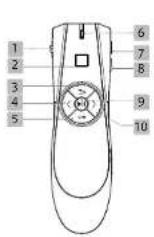
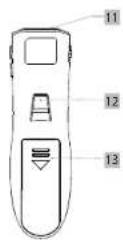
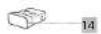
| FRENESDENL | |||||
| 1 | Bouten ON/OFF ON/OFF button Button Button ON/OFF ON/OFF Schalter ON/OFF Knop | ||||
| 2 | Navigation tactile Touch navigation Navigation tactile Touch-Navigation Touch navigatie | ||||
| 3 | Sortie du mode présentation mode | Ex1 presentation mode | Salida del modo presentacion | Verlassen des Präsentationsmodus | Presentatiemodus verlaten |
| 4 | Precedent Beck Anterior Zurich Volge | ||||
| 5 | Écran noir | Black soren | Pantela negra | Schwarzbild | Zwart schem |
| 6 | Témoin lumineux | Indicator light | Luz indicadora | Kontrolleuche | Signaalampje |
| 7 | Volume - | Volume + | Volumen + | Lautstärke + | Volume + |
| 8 | Volume - | Volume - | Volumen - | Lautstärke - | Volume - |
| 9 | Play | Play | Play | Play | Play |
| 10 | Sulvant | Next | Siguente | Vor | Voigende |
| 11 | Sorte du faisceau laser | Laser beam exit | Salida del haz laser | Austritt des Laserstrahls | Uitgang laserstraal |
| 12 | Activation du laser | Laser activation | Activacion del laser | Laseraldivierung | Activering van de laser |
| 13 | Compartment des pilos | Battery compartment | Compartmento de las pilos | Batteriofach | Batterijvak |
| 14 | Récepteur USB | USB receiver | Receptor USB | USB Emplinger | USB-ontvanger |
Thank you for purchasing an Essential b brand product. We pay special attention to the RELIABILITY, EASE OF
USE and DESIGN of our products
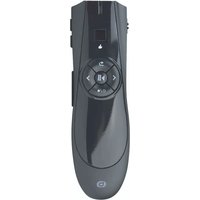
We hope that you will be fully satisfied with this laser pointer.
your product
Contents of the box
- 1 laser pointer 2.4GHz
- 1 USB receiver
- 1 carry bag
- 2 AAA batteries
- 1 user guide
Technical Features
- Frequency band: 2408MHz - 2474MHz
- Emitted power: <1mW
- Range: 20 metres
- Dimensions: L130 x W38 x H28 mm
- Weight: 50 g
- Resolution: 800 DPI
- Input voltage: 3 V

Compatibility
Compatible with the following operating systems: Windows *7/8/10/11, Mac OS X*
*This Essentiel b product is compatible with the brands listed (belonging to third parties with no links to Sourcing & Création).
user guide
Warnings
- Never disassemble the pointer yourself.
- Never place the pointer near a window where it could be exposed to direct sunlight. Do not place it in any area that could be subjected to splashes of water.
- Never put heavy objects on top of the pointer.
- Protect the pointer against any impact or excessive vibration.
- Clean the outer surface of the pointer by wiping with a mild cleaning product.
- Warning: Damage may be caused if harsh cleaning products or solvents are used such as petrol or alcohol, or if liquids are allowed to penetrate into the pointer.
Radio Frequencies
Your device transmits and receives radio electric frequencies in the 2.4 GHz range. These emissions can interfere with the operation of many electronic devices. To prevent accidents, remove the receiver from the computer when in the following places:
• where flammable gas is present, in a hospital, train, plane or petrol station,
• near automatic doors or fire alarms.
This device and its receiver must not be placed or operated together with any other receiver or transmitter.
If you have a pacemaker or other prosthesis, ask your doctor for advice.
Battery recycling

- Do not dispose of the batteries with household waste. In order to protect the environment, the batteries must be disposed of according to current regulations.
- Do not recharge the batteries, do not disassemble them and do not throw them into the fire.
- Do not expose them to high temperatures or direct sunlight.
• Do not incinerate them
Class 2 laser
• Never point the laser towards the eyes.
- Do not stare or look at the laser beam directly or with
optical instruments.
- Wave length: 650 nm
• Laser power: 0.4-0.8 mw
WARNING
INVISIBLE LASER RADIATION WHEN SAFETY
DEVICES ARE OPEN OR DEFECTIVE.
AVOID ALL DIRECT EXPOSURE TO THE LASER
BEAM.

Laser radiation: Class 2 laser device
Do not look directly into the laser beam.
Product complies with standards
EN 60825-1: 2014

use
Inserting batteries
- Press down on the top of the battery compartment and slide it out.
- Install the AAA batteries, ensuring the correct polarity.
- Then push and slide the battery compartment into the back of the pointer in until it stops.
Installing the pointer
- Remove the USB receiver from the compartment and plug it into a free USB port on your computer.
- The operating system automatically detects the pointer. When the "Installing pilot software. Your device is ready
to be used." information window appears on the bottom right of your screen, your pointer is ready to be used. - Place the ON/OFF switch on the side of the pointer in ON position to turn it on.
The receiver has an operating radius of approximately 20 metres. The communication range may vary depending on obstacles (person, metal, wall, etc.) or the electromagnetic environment.
Use
- Turn on the pointer using the ON/OFF switch, then use the touch navigation button like a mouse to move your cursor and click.
- Press the PLAY button to launch a presentation.
• Use the BACK and NEXT buttons to move from slide to slide. - Press the BLACK SCREEN button to pause the display.
- Press the EXIT PRESENTATION MODE button to exit the presentation.

- Press the laser activation button to generate a laser beam.
- Press the BACK and NEXT buttons simultaneously to switch from PowerPoint mode* (light flashes slowly) to Keynote mode* (light flashes quickly). The pointer is set to PowerPoint* mode by default.
Note
- After the installation of USB receiver, please make sure the laser pointer is on within 1 minute. Otherwise, the USB receiver is needed to unplug and plug on the computer again if the receiver is not paired with the laser pointer.
- Within 20cm of the receiver, press and hold the PLAY button and switch ON at the same time, the laser pointer will automatically search for the receiver and establish a connection.
troubleshooting
- If your pointer does not work: remove the USB receiver from your computer's USB port and turn off the pointer. Insert the receiver into another USB port and turn the pointer back on. Press the BACK and NEXT buttons simultaneously until the light flashes red. The pairing process will begin. The process is complete when the light stops flashing.
- When the light flashes continuously, it means that the batteries need to be replaced. Replace them with the indicated batteries.
simplified EU declaration of conformity
The undersigned, Sourcing & Création, hereby declares that the ESSENTIELB Laser Pointer Alpha complies with Directive 2014/53/EU. The full text of the EU declaration of conformity is available at:
https://www.boulanger.com/info/assistance
All information, designs, drawings and pictures in this document are the property of SOURCING & CREATION, SOURCING & CREATION reserves all rights to its brands, designs and information. Any copy and reproduction through any means shall be deemed and considered as counterfating.
Protection of the environment
This symbol attached to the product means that it is an appliance whose disposal is subject to the directive on waste from electrical and electronic equipment (WEEE). This appliance may not in any way be treated as household waste and must be subject to a specific type of removal for this type of waste. Recycling and recovery systems are available in your area (waste removed) and by distributors. By taking your appliance at its end of life to a recycling facility, you will contribute to environmental conservation and prevent any harm to your health.
Tested in our laboratories
Warranty valid from the date of purchase (except as proof of purchase). This warranty does not cover defects or damage caused by improper set up, incorrect use, or normal wear and bear of this product.