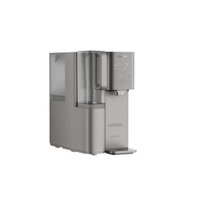
ADD6928 - Water dispenser PHILIPS - Free user manual and instructions
Find the device manual for free ADD6928 PHILIPS in PDF.


| Brand | Philips |
| Model | ADD6928 (DG/37) |
| Product Type | Countertop Water Dispenser with Reverse Osmosis Filtration |
| Rated Voltage | 120V |
| Rated Frequency | 60Hz |
| Rated Total Current | 12A |
| Heating Capacity | 507 oz/h (≥195°F) |
| Cooling Capacity | ≥78 oz/h (≤50°F) |
| Cooling Current | 0.6A |
| Refrigerant | R600a (18g) |
| Ambient Water Flow Rate | 6.7 oz/min |
| Applicable Water Source | Municipal Tap Water |
| Inlet Water Pressure | 0 - 0.06 MPa |
| Applicable Water Temperature | 40°F - 100°F |
| Tap Water Reservoir Capacity | 25 cups (6.0 L) |
| Filtered Water Jug Capacity | 7.5 cups (1.8 L) |
| Filtration Type | Reverse Osmosis |
| Filter Model | ADD583 |
| Filter Replacement Cycle | 1 year |
| Display | Digital with TDS In/Out, progress, and status indicators |
| Safety Features | Child Safety Lock, auto shut-off, overheat protection |
| Cooling Function | Compressor-cooled, requires 2-hour rest after transport |
| Heating Function | Instant heating up to 203°F |
| UV Sterilization | Built-in |
| Package Contents | Dispenser with filter, removable drip tray, filtered water jug, user manual, quick start guide |
Frequently Asked Questions - ADD6928 PHILIPS
User questions about ADD6928 PHILIPS
0 question about this device. Answer the ones you know or ask your own.
Ask a new question about this device
Download the instructions for your Water dispenser in PDF format for free! Find your manual ADD6928 - PHILIPS and take your electronic device back in hand. On this page are published all the documents necessary for the use of your device. ADD6928 by PHILIPS.
USER MANUAL ADD6928 PHILIPS
natural_image
Exterior view of a Philips water dispenser with digital display and control panel (no visible text or symbols)User Manual 01
6 Daily Maintenance 18
7 Troubleshooting 23
8 Package Contents 25
9 Guarantee and Support 25
Thank you for choosing Philips!
- We appreciate your decision to prioritize health and environmental sustainability. With your new Philips Water Dispenser, you can enjoy the benefits of clean and filtered water while contributing to the fight against single-use plastic bottle waste.
- Philips is committed to making water better—for both people and the planet.
The Philips Water Dispenser is thoughtfully designed with a 7.5-cup (1.8L) portable water jug and a 25-cup (6.0L) detachable tap water reservoir, seamlessly fitting into your home. Its powerful countertop filtration system provides instant access to healthier water by effectively reducing TDS, chlorine, particulates, and unpleasant taste and odor*—all at the touch of a button. - By choosing Philips, you're not only improving your drinking water but also contributing to a more sustainable future.
Each Philips Reverse Osmosis filter helps reduce reliance on single-use plastic water bottles—cutting down plastic waste and supporting environmental protection. - If you need information or if you have any problems, please visit the Philips website at www.philips.com or contact the consumer care center in your country. If there is no consumer care center in your country, go to the local dealer.
* The substances reduced by this water filter are not necessarily in all users' water.

Drinking Water NSF/ANSI 372 Only MC305031
Certified by CSA to NSF/ANSI/CAN 372 for lead free compliance.
IMPORTANT SAFETY INSTRUCTIONS
Note: Please read this section carefully as it contains important safety information.
These precautions are intended to ensure correct usage of this product and help prevent potential hazards or accidents.
- Do not use unauthorized or non-original accessories. Doing so may cause damage to the appliance and void the warranty.
- After unpacking, check the appliance for any damage and ensure all accessories are included.
- To prevent the risk of suffocation, keep plastic bags out of reach of children.
- Do not pour unknown liquids, untreated water, or poor-quality source water into the tap water tank.
- Always place the appliance on a flat surface. Do not exceed the maximum water level to avoid continuous dripping or malfunction.
- Please handle the appliance with care to prevent dropping, which may result in injury or equipment damage.
- Keep the appliance out of reach of children and pets.
- Keep out of reach of children or supervise young users when operating the appliance.
- Place the appliance indoors, away from direct sunlight o t sources such as radiators, stoves, or other high-temperature areas.
- Do not install the appliance near open flames or in flammable gas environments.
- Do not plug in or unplug the appliance with wet hands to avoid electric shock.
- Do not disassemble or modify the appliance, or place heavy objects on it, to prevent damage or injury.
- If the appliance will not be used for an extended period, unplug the appliance and drain the tap water tank and filtered water jug.
- The inlet water temperature should be 40^ F- 100^ F. If the temperature is higher than 100^ F, the filter will be damaged and be unable to work. If the temperature is lower than 40^ F, the dispenser might be frozen and the elements of the dispenser might be damaged.
- This appliance is for indoor usage only and must be connected to a properly grounded three-prong outlet.
- If the appliance has been unused for an extended period, it is recommended to replace the filter before reuse.
-
For maintenance and filter replacement, only use Philips-approved replacement parts.
-
Do not clean the appliance with flammable liquids such as gasoline or solvents.
-
If a fault occurs, immediately unplug the appliance and avoid continued use with damaged parts.
-
Product functions may be updated through firmware upgrades. Please refer to the latest user manual for details.
-
After dispensing hot water, switching immediately to ambient water or water of 45^ C may result in a short flow of residual hot water. To avoid burns, it is recommended to dispense room temperature water for 10 seconds before use.
-
If water remains unused for more than 24 hours, it is recommended to drain the appliance before next use.
23 If the power cord is damaged, stop using the appliance immediately. Contact customer support for replacement to avoid risk.
-
Do not attempt to disassemble or repair the appliance yourself, and do not entrust repairs to unauthorized service personnel. Improper repairs may result in safety hazards.
-
Storage of used filters for future reuse
Seal and store the filter in a refrigerated place to prevent bacteria build-up.
(1) Rotate the used filtered counter clockwise to the " 🔍 " position and take it out from the appliance.
(2) Seal the filter using plastic wrap. and store the filter in a refrigerator (35-40°F). Do not put it in the freezer.
(3) Unplug the system.
- Philips assumes no responsibility for any consequences resulting from failure to follow the above safety instructions.
The information for user
(1) Potential equipment interference:
This equipment has been tested and found to comply with the limits for Consumer ISM equipment, pursuant to Part 15 of the FCC Rules. These limits are designed to provide reasonable protection against harmful interference in a residential installation. This equipment generates, uses and can radiate radio frequency energy and, if not installed and used in accordance with the instructions, may cause harmful interference to radio communications. However, there is no guarantee that interference will not occur in a particular installation.
(2) System maintenance:
Please note that changes or modifications of this product are not expressly approved by the party responsible for compliance could void the user's authority to operate the equipment.
(3) Simple measures to correct interference:
If this equipment does cause harmful interference to radio or television reception, which can be determined by turning the equipment off and on, the user is encouraged to try to correct the interference by one or more of the following measures:
- Reorient or relocate the receiving antenna.
- Increase the separation between the equipment and receiver.
- Connect the equipment into an outlet on a circuit different from that to which the receiver is connected.
- Consult the dealer or an experienced radio/TV technician for help.
1 Product Specifications
| Philips RO Water DispenserProduct name | |
| Product model | ADD6928DG/37 |
| 120VRated voltage | |
| Rated total current | 12A |
| Rated frequency | 60Hz |
| Heating capacity | 507oz/h, ≥195°F |
| Cooling capacity | ≥78oz/h (≤50°F) |
| Cooling current | 0.6A |
| Refrigerant and filling amount | R600a, 18g |
| Ambient water flow rate | 6.7oz/min |
| Applicable water source | Municipal tap water |
| Inlet water pressure | 0 - 0.06MPa |
| Applicable water temperature | 40°F - 100°F |
2 Product Overview
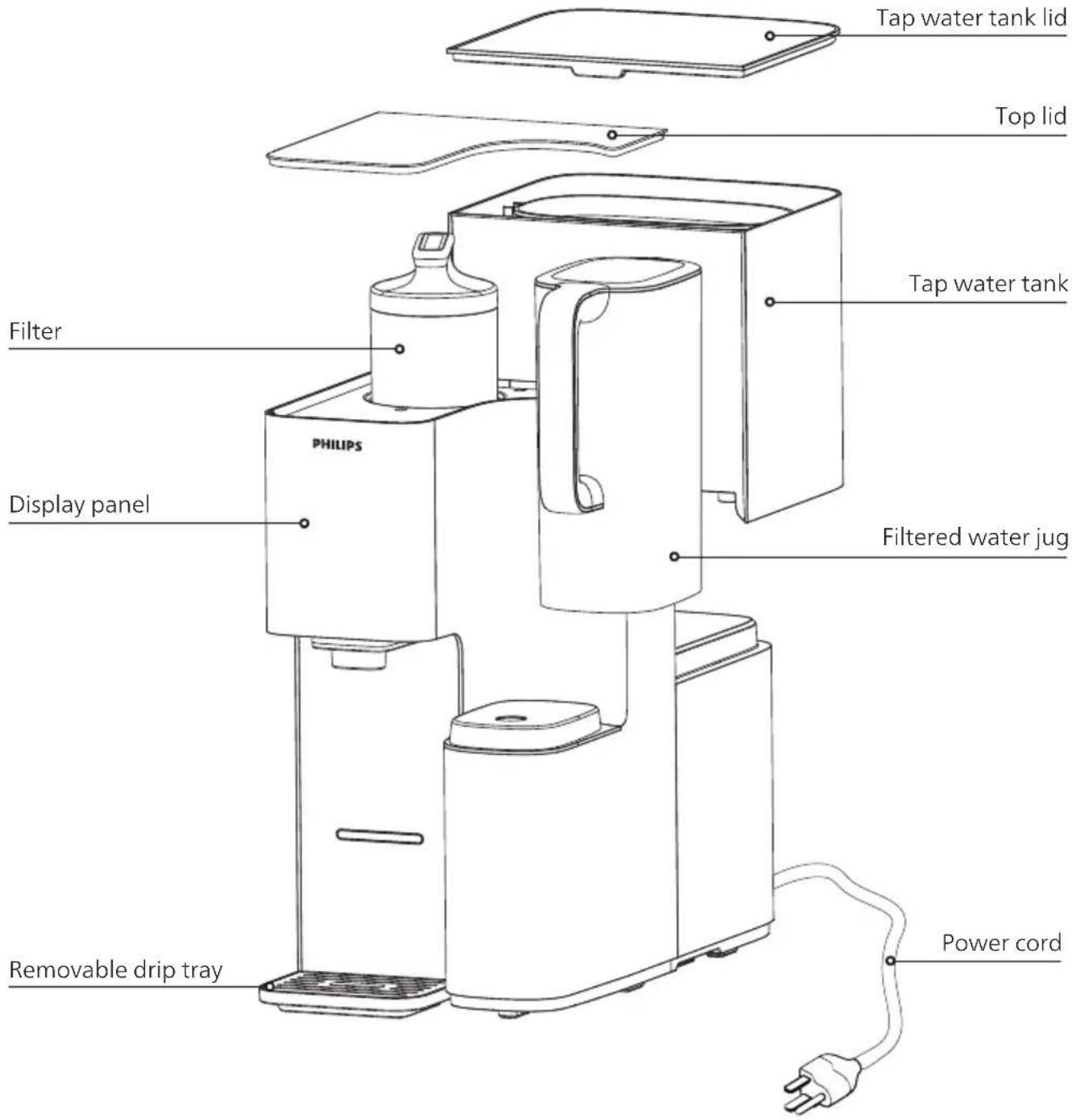
3 User Interface
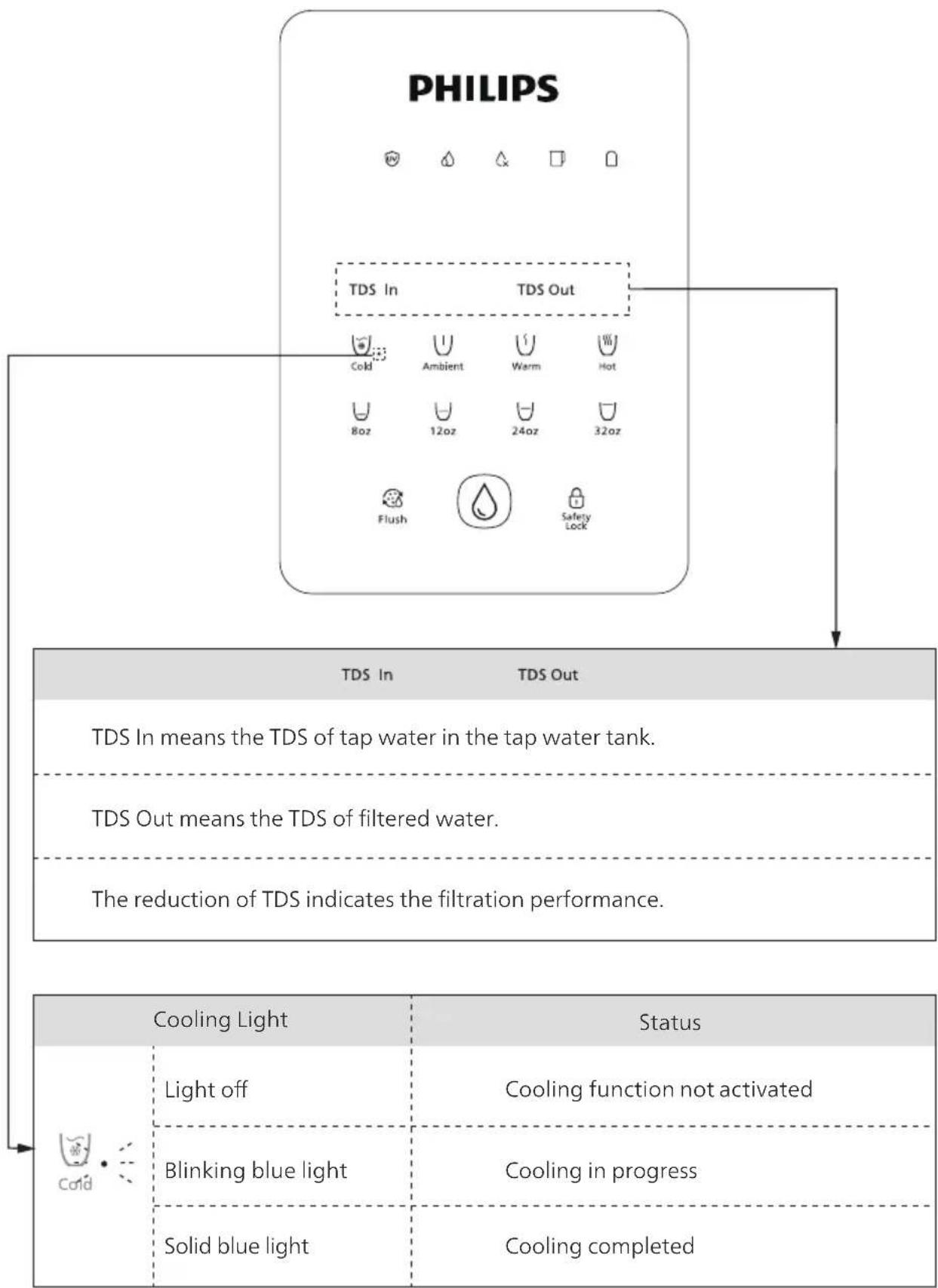
flowchart
graph TD
    A["PHILIPS"] --> B["TDS In"]
    A --> C["TDS Out"]
    B --> D["Cold: Ambient 8oz"]
    B --> E["Ambient 12oz"]
    B --> F["Warm 24oz"]
    B --> G["Hot 32oz"]
    C --> H["Flush"]
    C --> I["Safety Lock"]
    D --> J["TDS In means tap water in tap water tank."]
    E --> K["TDS Out means filtered water."]
    F --> L["The reduction of TDS indicates filtration performance."]
    M["Cooling Light"] --> N["Light off"]
    M --> O["Blinking blue light"]
    M --> P["Solid blue light"]
    M --> Q["Status: Cooling function not activated"]
    M --> R["Status: Cooling in progress"]
    M --> S["Status: Cooling completed"]
PHILIPS

TDS In
TDS Out


| StatusIndicator | Light Meaning | |
| Solid white light | UV sterilization in progress | |
| Solid white light | Filtering in progress | |
| Blinking white light | Low filtered water. Try dispensing again later. | |
| Blinking white light | Water in the tank is stale. Please replace it. | |
| Blinking red light | Tap water tank is low or water quality is poor. Discard all remaining water and refill with fresh water immediately. | |
| * When " 🔒 " indicator blinks, the water in the tap water tank must be changed. Lift the tap water tank, discard the remaining water, and then refill it with fresh tap water. | ||
| Solid white light | Filtered water jug is correctly in place. | |
| Blinking white light | Filtered water jug is not in place.Please insert properly before dispensing water. | |
| Solid white light | Filter is within its lifespan. Feel free to use. | |
| Blinking red light | Filter is nearing the end of its lifespan.Please replace the filter soon. | |
| Solid red light | Filter has reached the end of its lifespan.Please replace the filter immediately. | |
4 Before First use
4.1 Setup Guide
To prevent microorganism growth, place the appliance in a location out of direct sunlight.
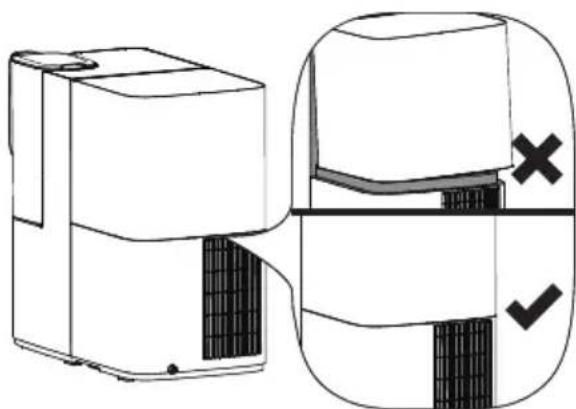
(1) Allow adequate clearance behind the unit Leave at least 7.8in (20 cm) of space between the back of the product and any wall to ensure proper heat dissipation. This helps maintain compressor cooling efficiency and prolong product lifespan.
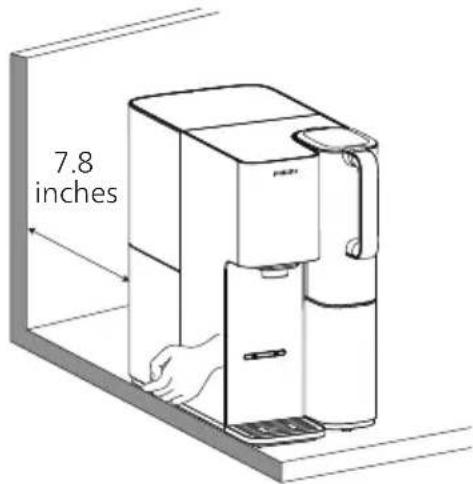
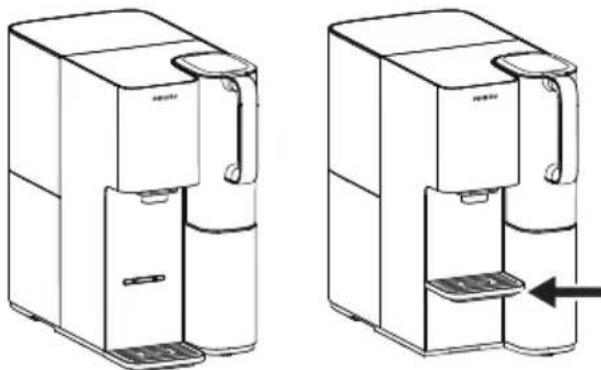
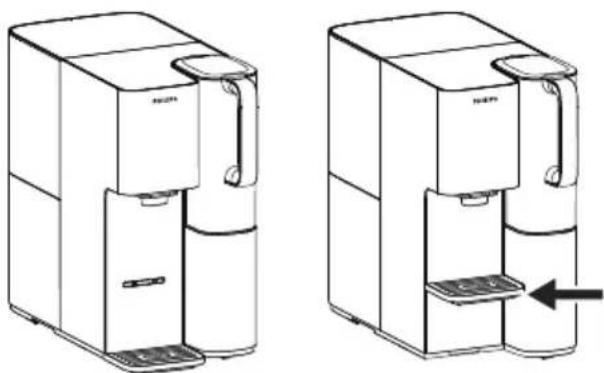
(2) Adjustable drip tray height
The drip tray comes with an adjustable height setting—choose the level that best fits your cup size.
natural_image
Line drawings of two water purifiers with control knobs and a door, shown from different angles (no text or symbols)(3) Ensure proper tank placement
Attach the water tank to the back of the appliance, and make sure it is securely installed. Otherwise, the appliance may not dispense purified water properly and could leak.
natural_image
Diagram showing a device with internal components and a magnified view highlighting a cross symbol (no text or labels present)(4) Secure the filtered water jug
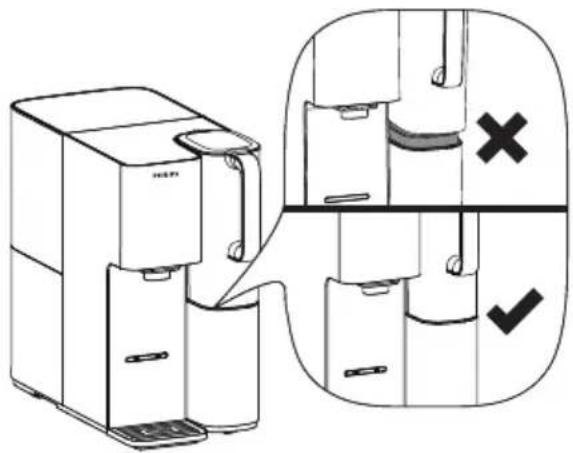
Ensure the filtered water jug is fully attached to the pedestal.
Improper placement may cause leakage or overflow, and affect normal operation.
Important — Let it sit in an upright position for 2 hours before activating the cooling function
Because the appliance contains a compressor cooling system, please let it rest for at least 2 hours after transportation. Skipping this step may damage the appliance.
Before first use, please perform the new filter flush to ensure the best drinking experience.
4.2 New Filter Flushing
For optimal performance, follow these steps before the dispenser's first use or after replacing the filter. The process takes about 1.5 hours.
If the dispenser will not be used for an extended period of time, please drain the appliance and disconnect the dispenser from power supply. Seal the filter and store it in the refrigerator (2-4°C, do not put it in the freezer). When you use it again, please follow the new filter flush procedure.
(1) Open the tap water tank lid, fill it with ambient temperature tap water up to the "Max" line, then plug the power in.
(2) Install the filtered water jug, then press and hold the "Flush" for 3 seconds. You'll hear a "beep," indicating the flushing process has started.
Reminder: Make sure the filtered water jug is empty before turning on flushing function.
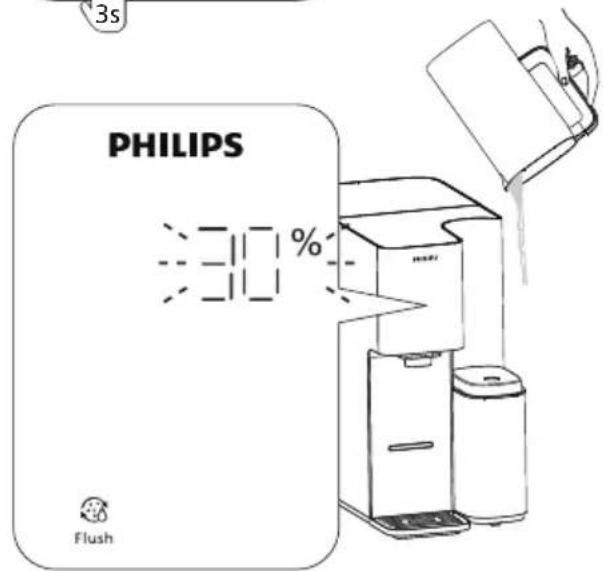
(3) During the flushing (0–80% completion), the progress indicator will increase in 10% increments and blink to show progress. The appliance will beep as each stage is completed. When you hear a beep, empty the filtered water jug. Repeat this process until the progress indicator reaches 80%.
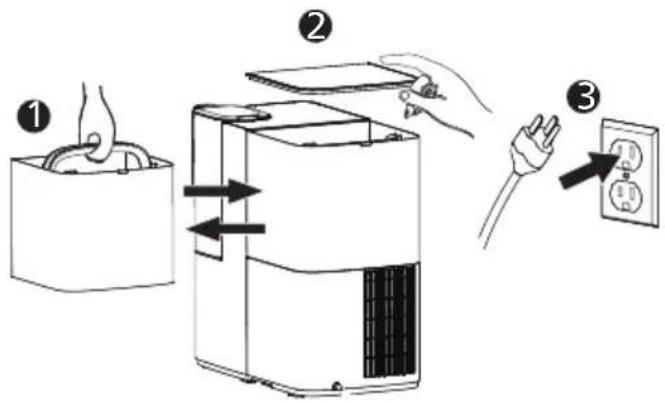
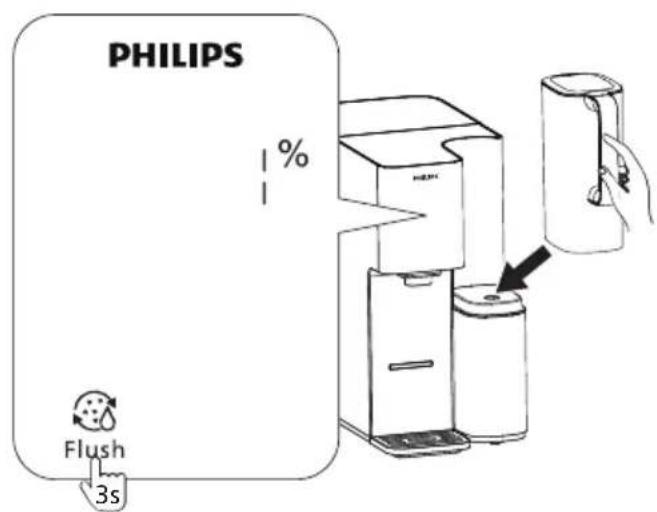
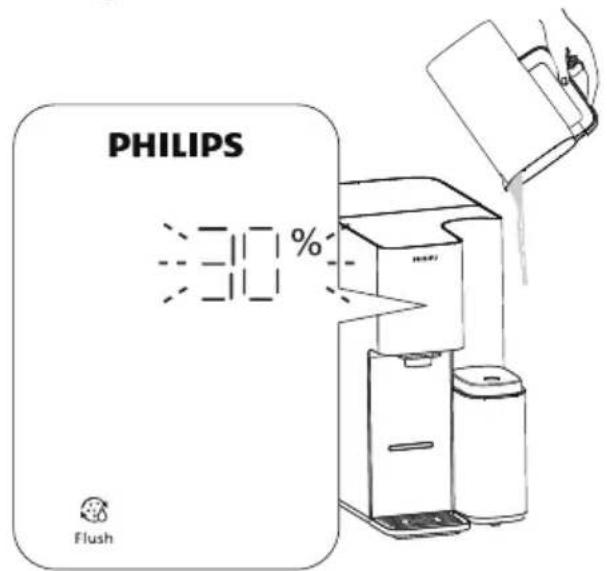
(4) When the "△" indicator light starts blinking, the appliance will beep. At this point, remove the tap water tank, empty it, refill it up to the "Max" line, and reinsert it to resume the flushing.
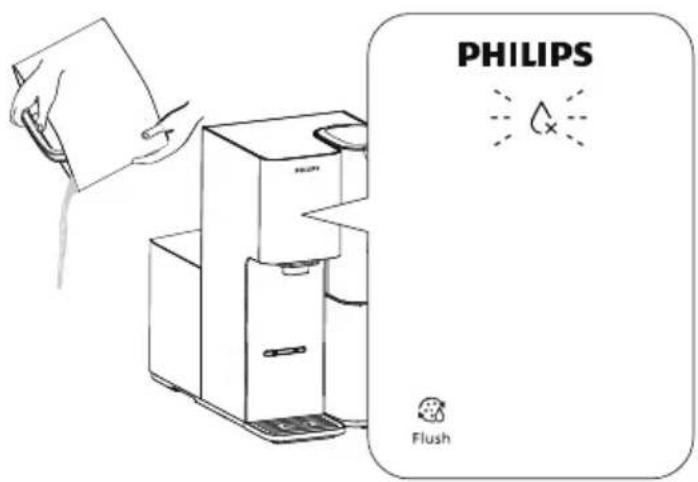
(5) At 90% progress, the progress indicator blinks and the appliance beeps 3 times. No need to change the water—just place a large cup under the spout and press the “💧”.
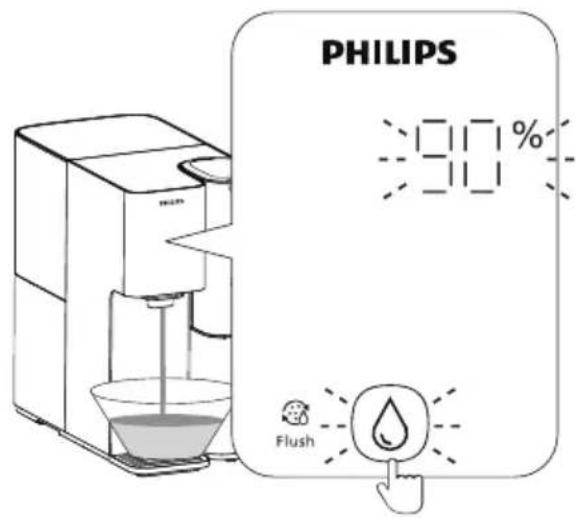
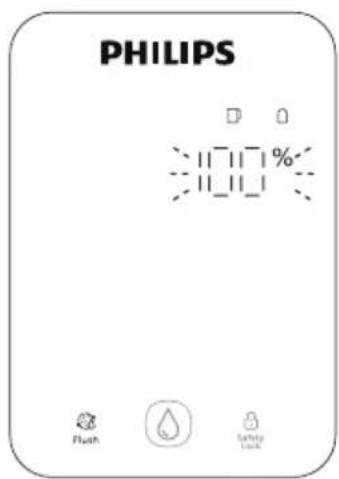
(6) When the display shows 100%, flushing is complete—you can now use the machine normally.
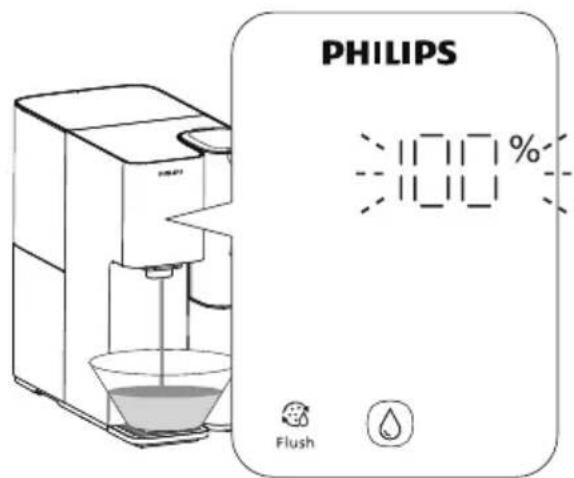
Flushing Notes
- Do not press and hold the "Flush" again during the flushing process—doing so will prematurely end the cycle and is not recommended.
- It's normal to hear motor noise between 90% and 100% progress, so there's no need for concern.
- If you notice water leakage, unusual noises, a burning smell, or smoke, unplug the appliance immediately and contact customer service.
- During the process, white cloudiness in the tap water tank or filtered water jug is caused by micro-bubbles formed as air passes through the high-precision filter. Any black particles observed are residues from the filter. Both are normal and do not affect product performance.
4.3 Boiling Point Calibration
The product is factory-set to the default boiling point for low-altitude regions. Users in high-altitude areas must adjust the boiling point before use.
(1) Upon first setup, ensure that a sufficient amount of purified water is in the filtered water jug. Set the water temperature to "Hot 203°F".
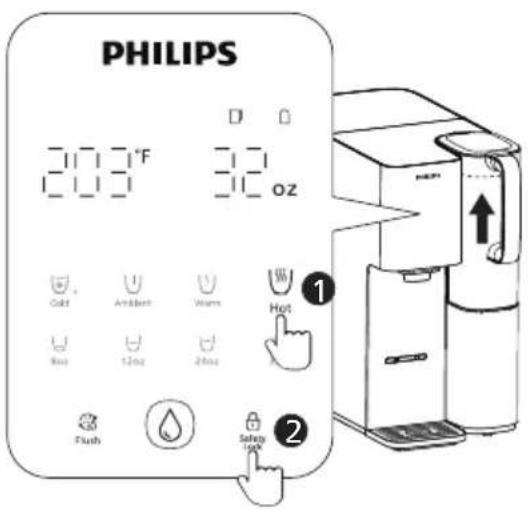
(2) Place a large-capacity cup under the spout and press the “💧”. The appliance will dispense boiling water continuously for approximately one minute. Once water stops dispensing, the boiling point adjustment is complete.
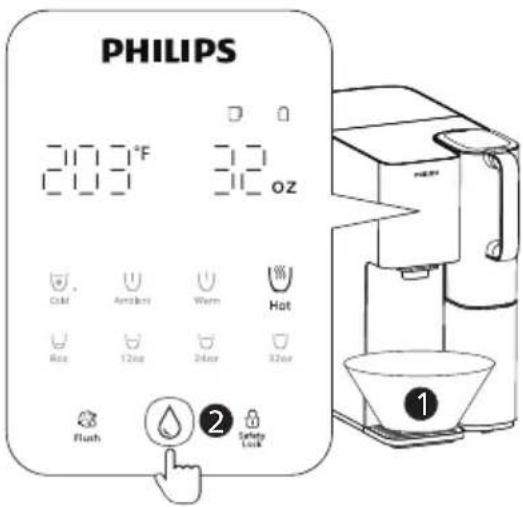
Caution: Hot steam may be released during the boiling point calibration process, which can cause burns. Please keep a safe distance to avoid injury.
5. Usage Instructions
5.1 Cooling Function
5.1.1 Turn On the Cooling Function
After the appliance has been plugged in for 2 hours, press and hold the “Cold” for 3 seconds until the cooling light begins blinking — this indicates that cooling has been activated.
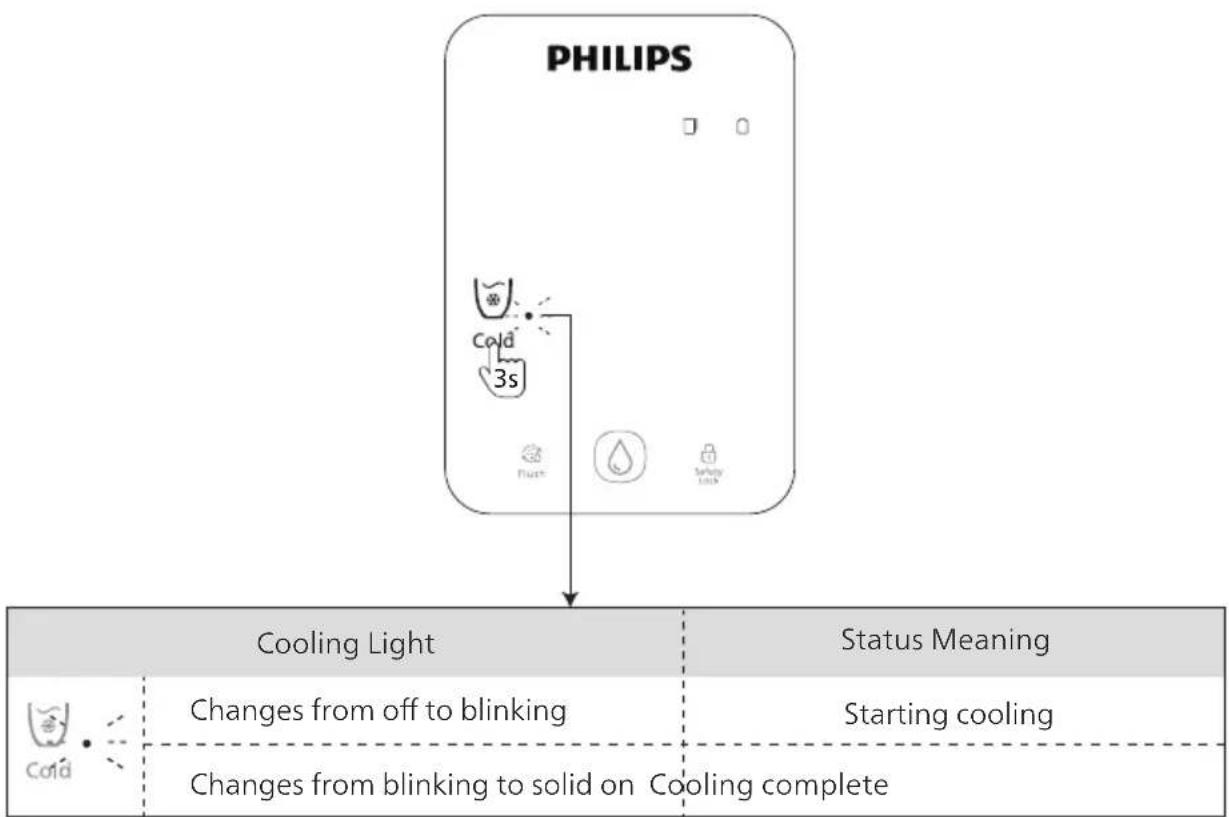
flowchart
graph TD
    A["PHILIPS"] --> B["Cooling Light"]
    A --> C["Status Meaning"]
    B --> D["Changes from off to blinking"]
    B --> E["Changes from blinking to solid on Cooling complete"]
    C --> F["Starting cooling"]
Do not dispense water while the "Cold" is blinking, as this may affect cooling efficiency. The initial cooling process takes approximately 20 minutes to reach the set temperature.
5.1.2 Turn Off the Cooling Function
Note: After turning off, the cold water in the system should be drained to prevent contamination.
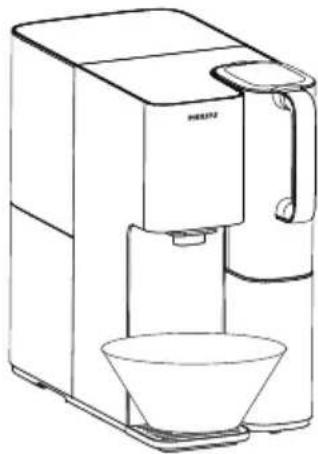
(1) Place a large container under the spout.
natural_image
Line drawing of a modern coffee maker with a glass bowl (no text or symbols)(2) Press and hold the “Cold” for 3 seconds, then press the “💧” to begin draining (press again to pause if needed).

(3) Once the progress reaches 100%, draining is complete.
(4) The cooling light will turn off, after cooling is fully turned off.
- Do not unplug the appliance or exit the process during drainage.
- It's normal to hear motor noise during drainage process. The sound will stop once the process reaches 100%.
5.2 Dispensing Water
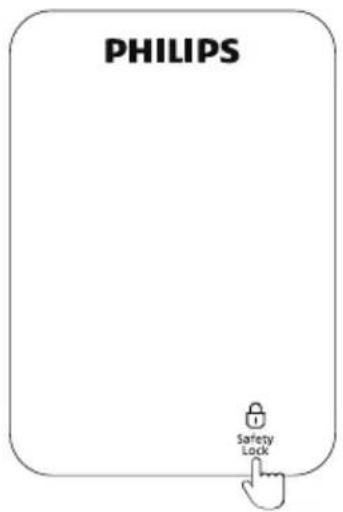
(1) Press the "🔒" to unlock.
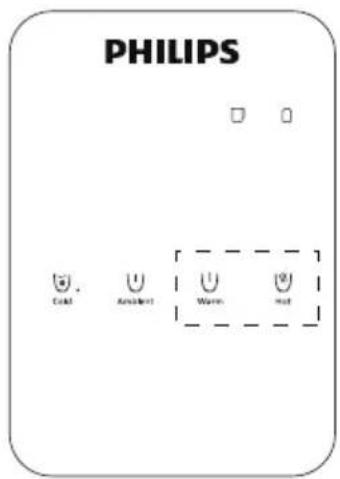
(2) Temperature Selection:
Press " ∪ Warm " repeatedly to choose between
113°F and 130°F;
Press " Hot " repeatedly to choose between
185^ and 203^ .
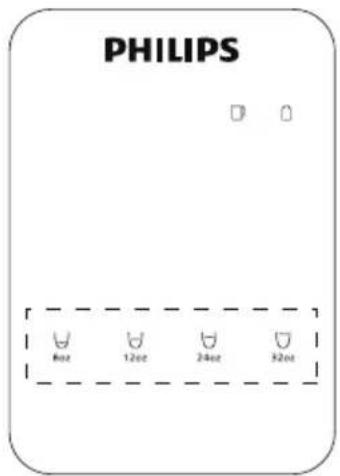
(3) Volume Selection:
There are four water volume presets for selection: 8oz, 12oz, 24oz, 32oz.
(4) Press " 🔒 ", then press " 🔒 " to dispense water. To stop, press " 🔒 " again. (Cold and ambient water dispensing do not require unlocking. Simply press the " 🔒 " to start.)
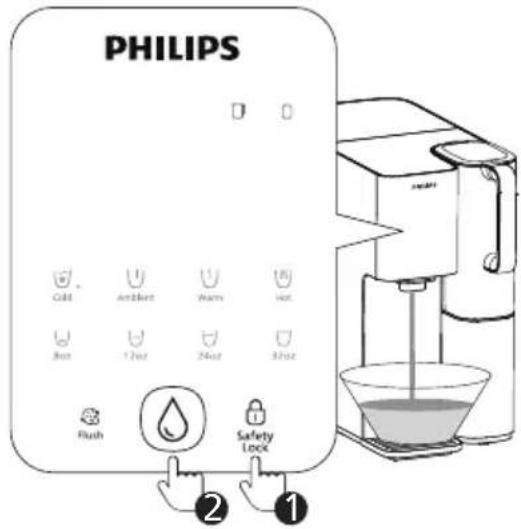
Notes:
- Press and hold " 🔒 " 3 seconds to disable/enable the safety lock.
- Press and hold " ∪ Hot " + " ∪ 32oz " for 3 seconds to disable/enable the beep sound prompt.
6 Daily Maintenance
6.1 Flush Function
It is recommended to clean the waterway if the appliance has not been used for more than 1 week, or if it has been used continuously for 1 month.
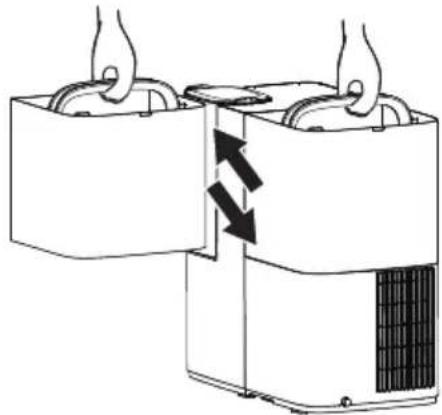
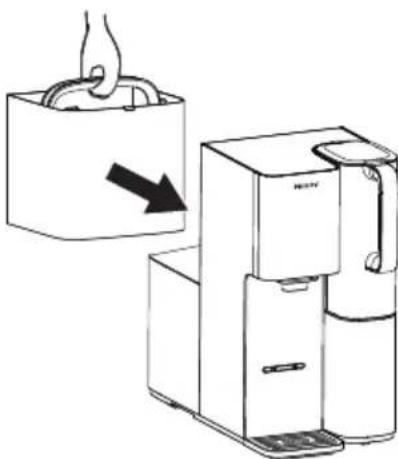
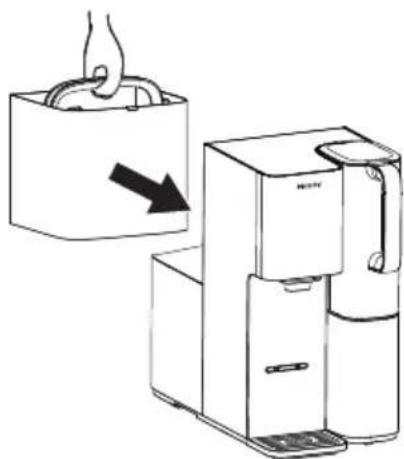
(1) Fill the tap water tank with tap water and place it back to the appliance, then place the lid back to the tap water tank properly.
natural_image
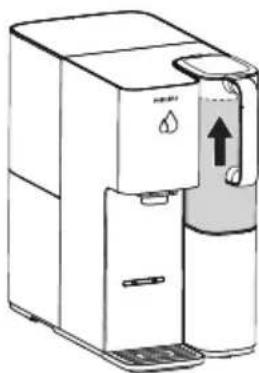
Diagram of a hand holding a container with arrows indicating internal flow or movement (no text or symbols)(2) Wait until the filtered water jug is full, and the " 🔊" indicator light turns off. Otherwise, the function cannot be activated.
natural_image
Line drawing of a water dispenser with water drop symbol (no text or labels)(3) Place a large container under the spout and press " Flush" → " 🔍" → " 🔍" to start. Approximately 60oz/1800ml will dispense during the cleaning process.

(4) During the cleaning process, press " Ⓓ " to pause.
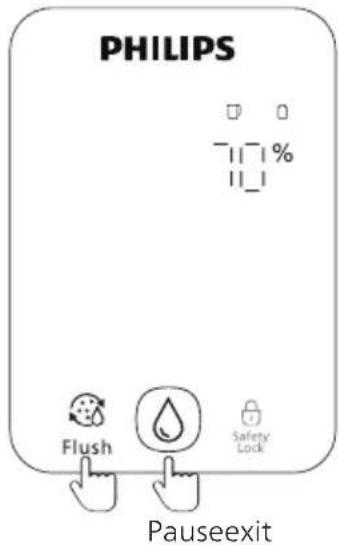
(5) When "100%" blinks, the flushing process is complete.
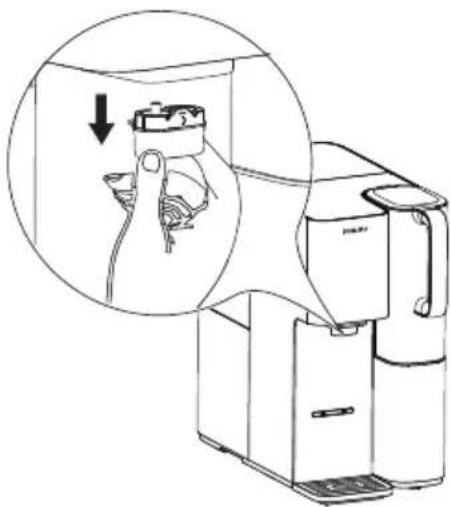
(6) To clean the spout, pull out, wash it with clean water, and then reinstall it.
natural_image
Line drawing of a refrigerator with hand inserting a cable into the refrigerator (no text or symbols)6.2 Cleaning the Tap Water Tank and Filtered Water Jug
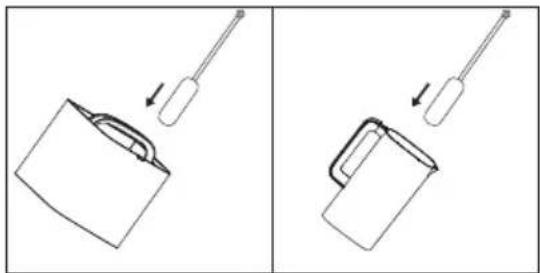
6.2.1 When there is visible residue in the tap water tank or filtered water jug, please wash them with the cleaning brush.
* Please note that the cleaning brush is not included with the product and should be purchased separately if needed.
Note: Do not put the tap water tank or the filtered water jug in the dishwasher.
6.2.2 Descaling the tap water tank
① Empty any remaining water in the tap water tank.
② Add approximately 30 g (1 oz) of citric acid to the tap water tank, then fill it with tap water up to 3 L (3.2 qt). Stir gently and let the solution sit for 2 hours.
* Citric acid needs to be purchase separately.
③ Rinse thoroughly with clean water. Fill the tank with tap water, then reassemble it.
natural_image
Two diagrams showing a tool interacting with a container, one with an arrow indicating motion (no text or symbols present)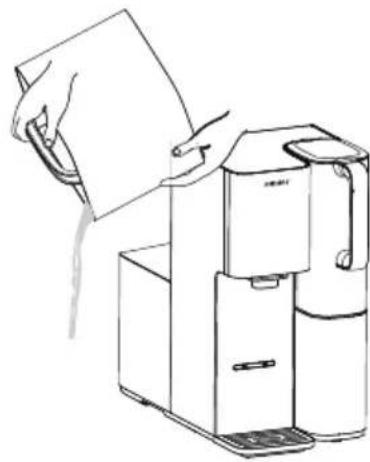
natural_image
Line drawing of a hand holding a sheet of paper next to a water dispenser (no text or symbols)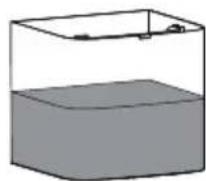
natural_image
Illustration of a hand holding a bag with an arrow indicating a process (no text or symbols present)6.3 Filter Replacement
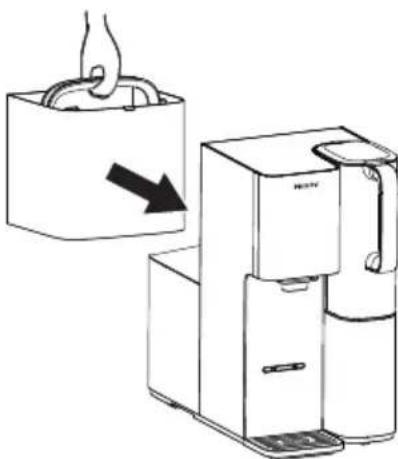
Please change the filter according to the filter lifetime indicator "☐" on the display panel, or the suggested replacement cycle. New filter can be purchased from authorized retailers and service. The model is ADD583.
| Model Suggested Replacement Cycle | |
| ADD583 | 1 year |
Only the certified Philips filter can be used for replacement.
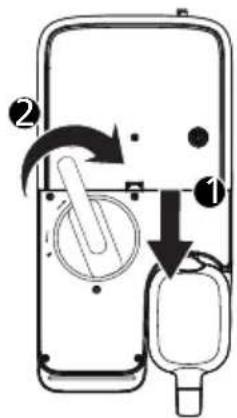
(1) Power off and take out the tap water tank and the appliance top lid.
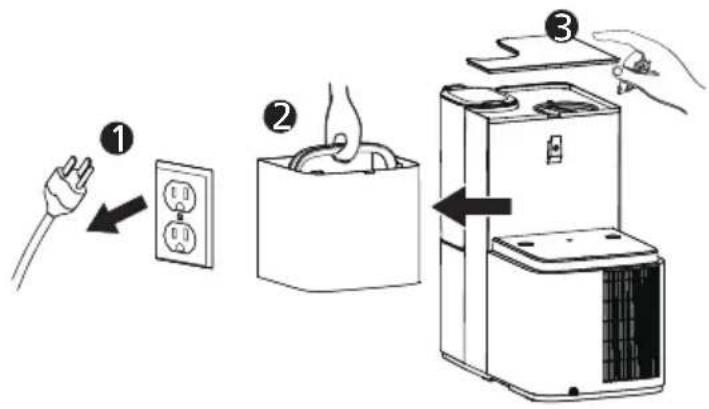
(2) Rotate the used filter counterclockwise to the "☐" position and take it out.
Note: The wrench is only included in the replacement filter package. It is not provided with the appliance.
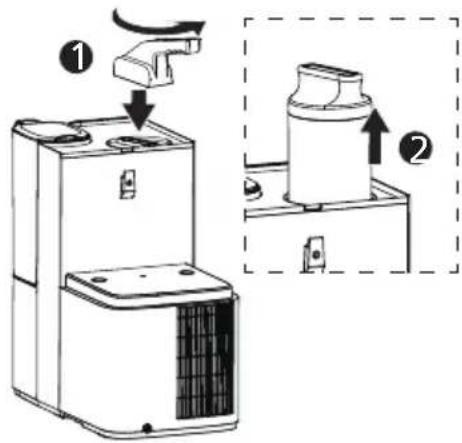
(3) Insert the new filter into the filter holder and rotate it clockwise to the locked " 🔒 " position, and cover the machine top lid. Put the tap water tank back to the dispenser. Then, plug in the power cord to turn on the appliance.
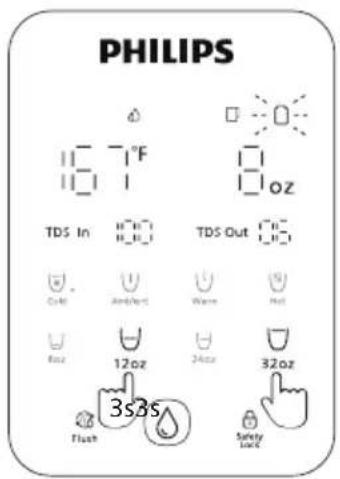
(4) Long press " _12oz " + " _32oz " for 3 seconds.
The" 🔔 " changes to white again, which means you have reset the lifetime.
( If you need to cancel the reset, press and hold " _8oz " + " _12oz " for
3 seconds within 2 hours.)
7 Troubleshooting
| Error | Causes | Solutions |
| E01: Unable to heat water | Tap water temperature sensor failure or tap water temperature > 100°F | Ensure tap water added to the tap water tank is below 100°F |
| E02: Unable to dispense hot water | Temperature sensor at the spout outlet is malfunctioning | Dispense 3 cups of 150ml ambient temperature water, then retry hot water |
| E04: Unable to dispense hot water | Heating failure detected | Dispense 3 cups of 150ml ambient temperature water, then retry hot water |
| E06: Unable to filter and dispense water normally | Abnormal water filtration alarm. Filter not installed properly or clogged | Check if the filter is installed properly or clogged. If the filter is clogged, please replace it |
| E0b: Unable to cool the water | If the machine is not dispensing cold water, or the cooling time exceeds 1 hour in a single cycle, the machine will activate its cooling protection and stop cooling | Power off for 1–2 minutes, then restart |
| E0L: Unable to dispenser cold water | Cooling temperature sensor failure | Power off for 1–2 minutes, then restart |
| EU: Communication abnormality of the product | Abnormal communication signal within the product's electronic control board | Power off for 1–2 minutes, then restart |
| Unable to dispense water | Filtered water jug is out of water | If " 🔊 " is fashing, wait for it to stop fashing before dispensing water normally |
| Tap water tank is not properly installed | Check tap water tank installation | |
| Unable to filter water | Tap water tank is at a low water level, and " 🔊 " blinks red | Refill the tap water tank with clean water |
| Tap water tank not properly installed | Check installation of tap water tank | |
| appliance leaks | Drip tray is full Empty the drip tray | |
| Foreign object stuck in the sealing area at the bottom of the tap water tank | Use a probe to check for any foreign objects lodged around the spring-loaded seal at the bottom of the product, and remove them if found | |
| Filtered water jug not properly installed | Ensure the filtered water jug is properly installed and securely seated with no gaps | |
| Odd taste of the water | Failure to rinse as required during initial use or after filter replacement, or the appliance has not been used for an extended period | Refer to the New Filter Flushing section in this manual |
| Filter not replaced in time | Refer to the 'Filter Replacement' section | |
| Electric leakage or static electricity on the appliance body | Improper grounding or damaged power cord. | Use only a properly grounded three-prong outlet. If the power cord is damaged, contact customer service for a replacement immediately |
| Button/display not responding | System error or hardware damage | Power off for 1–2 minutes, then restart |
8 Package Contents
| Dispenser (with 1 filter inside) | ×1 |
| Removable water drip tray | ×1 |
| User manual | ×1 |
| Filtered water jug | ×1 |
| Quick start guide | ×1 |
9 Guarantee and Support
If you need information or have any questions, please visit www.philips.com/support or contact the consumer service center in your country/region. If there is no consumer service center in your country/region, please contact your local distributor.
Within two years from the date of purchase, you will receive free warranty service for any damage caused by manufacturing process problems, or any damage to components under normal use conditions confirmed by our maintenance service personnel.
Warranty service excludes frequently replaced consumables, auxiliary equipment, shipping costs and door-to-door service. Please show proof of purchase to service personnel when servicing.


https://gozerowater.com/

(888) 258-3660

support@gozerowater.com
Customer Support Available: 10 a.m. - 6 p.m. PST
Français
SOMMAIRE
Certified by CSA to NSF/ANSI/CAN 372 for lead free compliance.
INSTRUCTIONS DE SÉCURITÉ IMPORTANTES
natural_image
Two line drawings of a water dispenser device, showing front and side views with no text or symbols.
natural_image
Diagram showing two views of a device with internal components and a cross symbol indicating failure or damage (no text or labels present)natural_image
Line drawing of a coffee maker with a funnel and side panel (no text or symbols)natural_image
Diagram of a hand inserting a component into a container with arrows indicating rotation (no text or symbols)natural_image
Line drawing of a water dispenser with water drop and upward arrow (no text or symbols)natural_image
Line drawing of a refrigerator with a hand inserting a cable into the refrigerator (no text or symbols)natural_image
Two diagrams showing a tool interacting with a container, one with an arrow indicating motion (no text or symbols)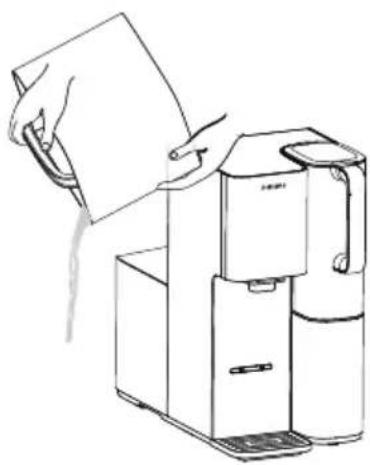
natural_image
Line drawing of a hand pouring liquid into a water dispenser (no text or symbols)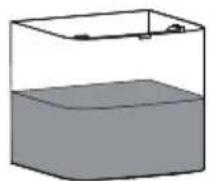
natural_image
Diagram showing a hand pressing down on a box with an arrow indicating force or motion (no text or symbols present)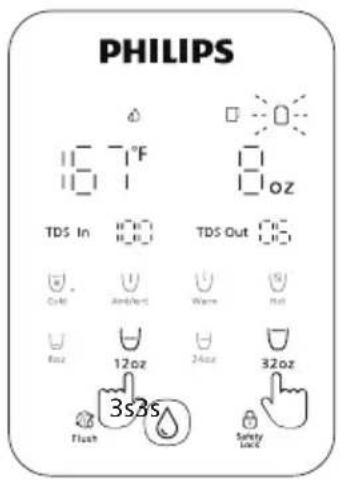
7 Dépannage

https://gozerowater.com/

(888) 258-3660

support@gozerowater.com
Support client disponible : 10 h - 18 h PST
Español
Índice
Certified by CSA to NSF/ANSI/CAN 372 for lead free compliance.
natural_image
Line drawings of two water purifiers with control knobs and a door, showing internal components and movement arrows (no text or symbols)natural_image
Diagram showing a device with internal components and a magnified view of its internal structure (no text or symbols)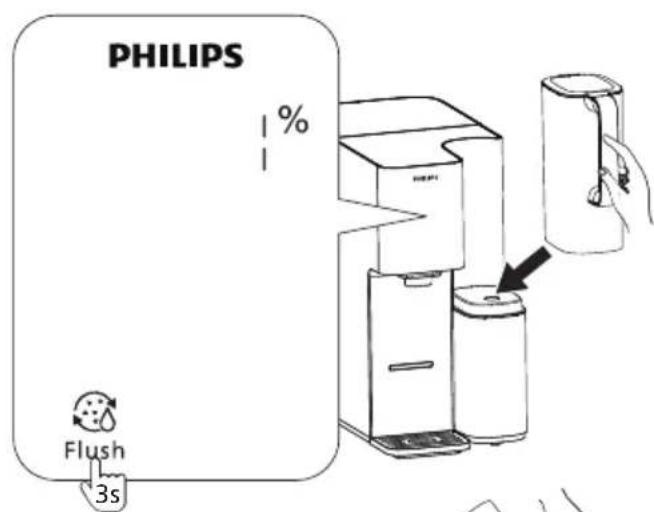
natural_image
Line drawing of a modern coffee maker with a glass bowl (no text or symbols)natural_image
Diagram of a two-part appliance with hands holding handles and arrows indicating rotation or movement (no text or symbols)natural_image
Line drawing of a water dispenser with water drop symbol (no text or labels)natural_image
Line drawing of a refrigerator with hand inserting a cable into the refrigerator (no text or symbols)natural_image
Two diagrams showing a tool interacting with a container, one with an arrow indicating motion (no text or symbols present)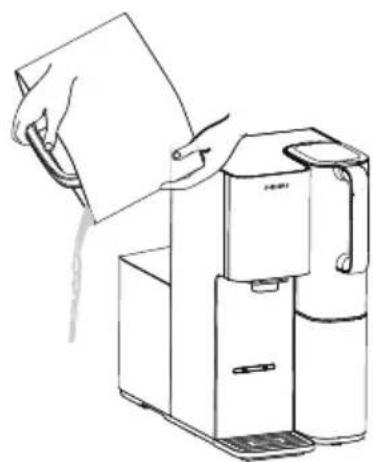
natural_image
Line drawing of a hand holding a sheet of paper next to a water dispenser (no text or symbols)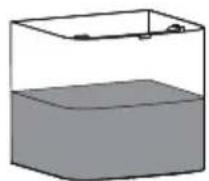
natural_image
Illustration of a hand holding a cup with a handle, next to a device with a hand gesture and arrow indicating motion (no text or symbols)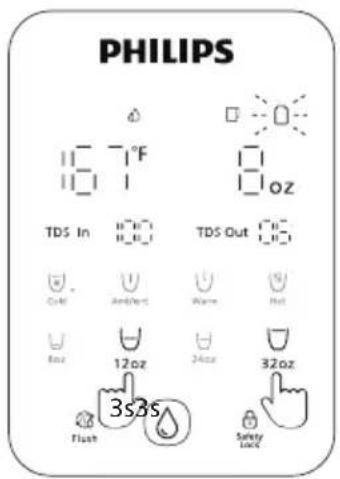

https://gozerowater.com/

(888) 258-3660

support@gozerowater.com
Register your product and learn more via the website link below: www.philips.com/water
Specifications are subject to change without prior notice
© 2025 AquaShield
All rights reserved.
Philips and the Philips Shield Emblem are registered trademarks of Koninklijke Philips N.V. and are used under license.
This product has been manufactured by and is sold under the responsibility of AQUASHIELD North America LLC.
and AQUASHIELD North America LLC. is the warrantor in relation to this product.
Rev A DEC 25