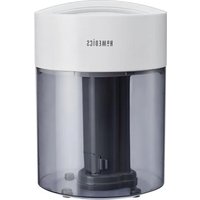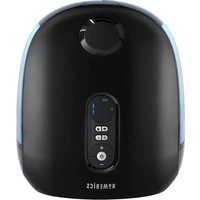
Total Comfort Deluxe UHE-WM130 - Humidifier HOMEDICS - Free user manual and instructions
Find the device manual for free Total Comfort Deluxe UHE-WM130 HOMEDICS in PDF.


User questions about Total Comfort Deluxe UHE-WM130 HOMEDICS
0 question about this device. Answer the ones you know or ask your own.
Ask a new question about this device
Download the instructions for your Humidifier in PDF format for free! Find your manual Total Comfort Deluxe UHE-WM130 - HOMEDICS and take your electronic device back in hand. On this page are published all the documents necessary for the use of your device. Total Comfort Deluxe UHE-WM130 by HOMEDICS.
USER MANUAL Total Comfort Deluxe UHE-WM130 HOMEDICS
text_image
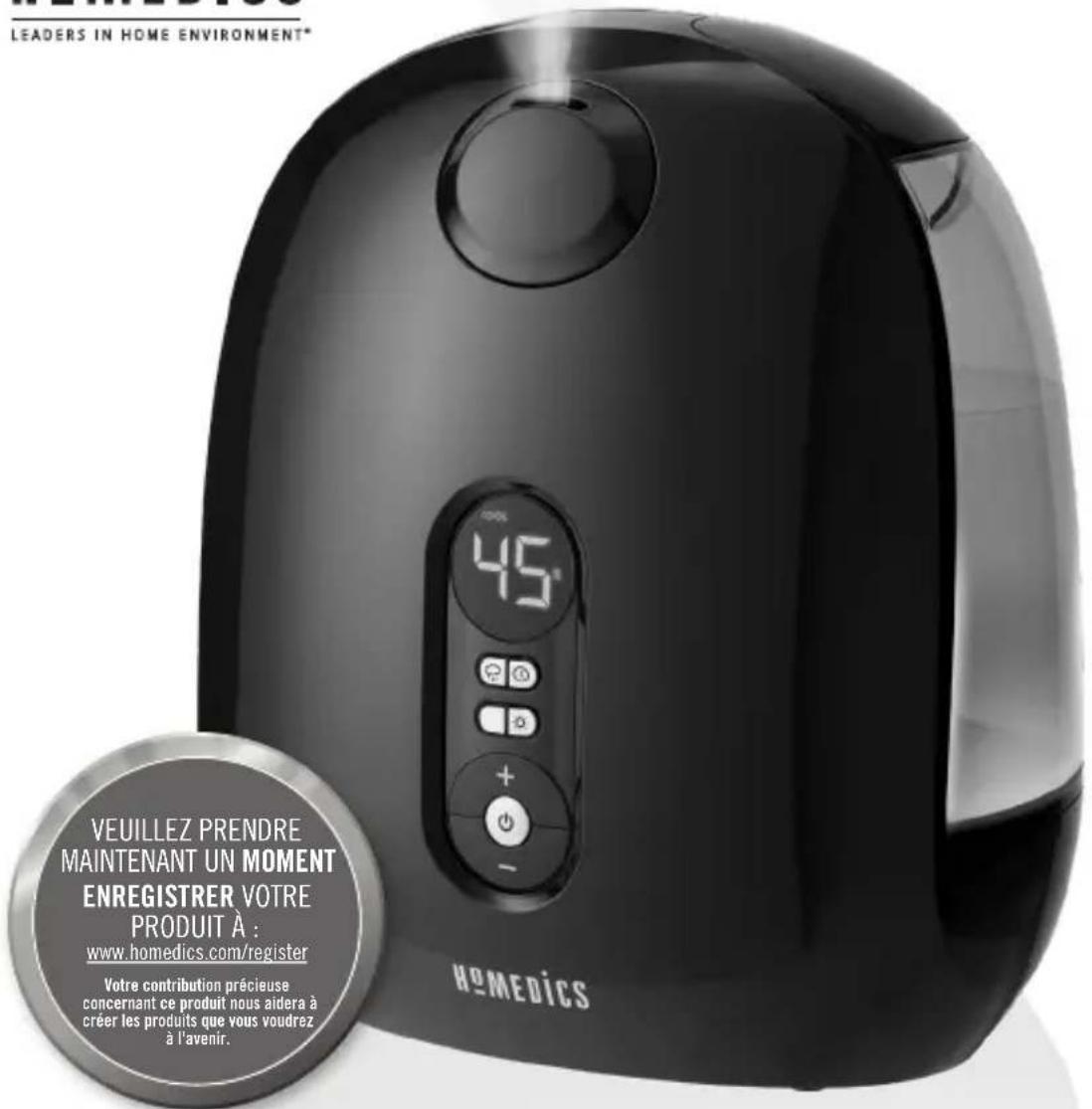
LEADERS IN HOME ENVIRONMENT PLEASE TAKE A MOMENT NOW REGISTER YOUR PRODUCT AT: www.homedics.com/register Your valuable input regarding this product will help us create the products you will want in the future. HOMEDICSTOTALCOMFORT DELUXE ULTRASONIC HUMIDIFIER
WARM & COOL MIST
INSTRUCTION MANUAL AND WARRANTY INFORMATION
2-YEAR LIMITED WARRANTY
IMPORTANT SAFETY INSTRUCTIONS
WHEN USING ELECTRICAL PRODUCTS, BASIC SAFETY PRECAUTIONS SHOULD ALWAYS BE FOLLOWED, INCLUDING THE FOLLOWING:
READ ALL INSTRUCTIONS BEFORE USING.
DANGER – TO REDUCE THE RISK OF ELECTRIC SHOCK:
- Always place humidifier on a firm, flat surface. A waterproof mat or pad is recommended for use under the humidifier. NEVER place it on a rug or carpet, or on a finished floor that may be damaged by exposure to water or moisture.
- Always unplug the unit from the electrical outlet immediately after using and before cleaning.
- DO NOT reach for a unit that has fallen into water. Unplug it immediately.
- DO NOT place or store the unit where it can fall or be pulled into a tub or sink.
• DO NOT place or drop into water or other liquids.
• DO NOT use water above 86° Fahrenheit.
WARNING – TO REDUCE THE RISK OF BURNS, FIRE, ELECTRIC SHOCK, OR INJURY TO PERSONS:
- Use this unit only for its intended use as described in this manual. DO NOT use attachments not recommended by HoMedics; specifically, any attachments not provided with this unit.
- NEVER drop or insert any object into any opening.
- DO NOT operate where aerosol (spray) products are being used, or where oxygen is being administered.
- NEVER operate the appliance if it has a damaged cord or plug, if it is not working properly, if it has been dropped or damaged, or dropped into water. Return the appliance to a HoMedics Service Center for examination and repair.
• Always unplug the unit when filling or moving the unit. - Ensure that your hands are dry when operating the controls or removing the plug.
- Always hold the water tank firmly with both hands when carrying a full tank of water.
- NEVER use the humidifier in an environment where explosive gases are present.
- DO NOT place the humidifier near heat sources, such as a stove, and DO NOT expose the humidifier to direct sunlight.
- DO NOT carry this unit by the power cord or use the power cord as a handle.
- To disconnect, turn all controls to the off position, then remove the plug from the outlet.
- CAUTION: All servicing of this humidifier must be performed by authorized HoMedics service personnel only.
SAVE THESE INSTRUCTIONS
CAUTION – PLEASE READ ALL INSTRUCTIONS CAREFULLY BEFORE OPERATING.
- This product is intended for household use only.
- NEVER cover the unit while it is operating.
• Always keep the cord away from high temperature and fire. - Perform regular maintenance on the ultrasonic membrane.
- NEVER use detergent to clean the ultrasonic membrane.
- NEVER clean the ultrasonic membrane by scraping with a hard object.
- DO NOT attempt to adjust or repair the unit. Servicing must be performed by professional or qualified personnel.
- Stop using this unit if there is an unusual noise or smell.
- Unplug this unit when not in use for a long period of time.
- DO NOT touch the water or any parts of the unit that are covered by water while the unit is on or plugged in.
- NEVER operate without water in the tank.
- Only use water in the tank.
- NEVER use any additive in the water.
- DO NOT wash, adjust, or move this unit without first unplugging it from the electrical outlet.
- Keep this unit out of reach of children. DO NOT allow children to use this unit without supervision.
- DO NOT use outdoors. For indoor use only.
CAUTION: DO NOT place humidifier on furniture.
ALWAYS USE a waterproof mat or pad on wood floors.
UNIQUE FEATURES & SPECIFICATIONS
ULTRASONIC TECHNOLOGY
This humidifier uses ultrasonic, high-frequency technology to convert water into a fine mist that is dispersed evenly into the air.
DIGITAL READOUT
Displays programmed humidity setting, timer setting, warm or cool mist selection, mist output level, and clean notification.
PROGRAMMABLE HUMIDISTAT
Customize the level of humidity between 35% and 55% in 5% increments.
BUILT-IN TIMER
Programmable timer, up to 12 hours.
NIGHT-LIGHT/DISPLAY LIGHTS
A useful light feature is included, with the option of independent night-light and display light controls.
AUTO-SHUTOFF PROTECTION
When the tanks are empty, the unit will shut off automatically.
CAPACITY
2.0 gallons – 7.57 liters
ROOM SIZE
This humidifier is recommended for rooms up to 533 FT ^2 /49.5 M ^2 based on AHAM HU-1-2016 measurement as shown by independent third-party testing.
DUAL WATER TANKS
Dual water tanks are easy to fill and carry.
RUNTIME: 12-120 HOURS
Runtime is calculated based on using cool mist and setting the mist level to the low setting. Based on the natural humidity level in your home, the temperature of water you use, and the mist-level setting you choose, you may experience longer or shorter run times.
OIL TRAY
Includes 3 essential oil pads. Use with your favorite essential oil to deliver aroma into the air.
CLEAN REMINDER
“CLEAN” will illuminate on the display, indicating it is time to clean the transducer/ultrasonic membrane.
TOTALCOMFORT® ULTRASONIC HUMIDIFIER WARM & COOL MIST
text_image
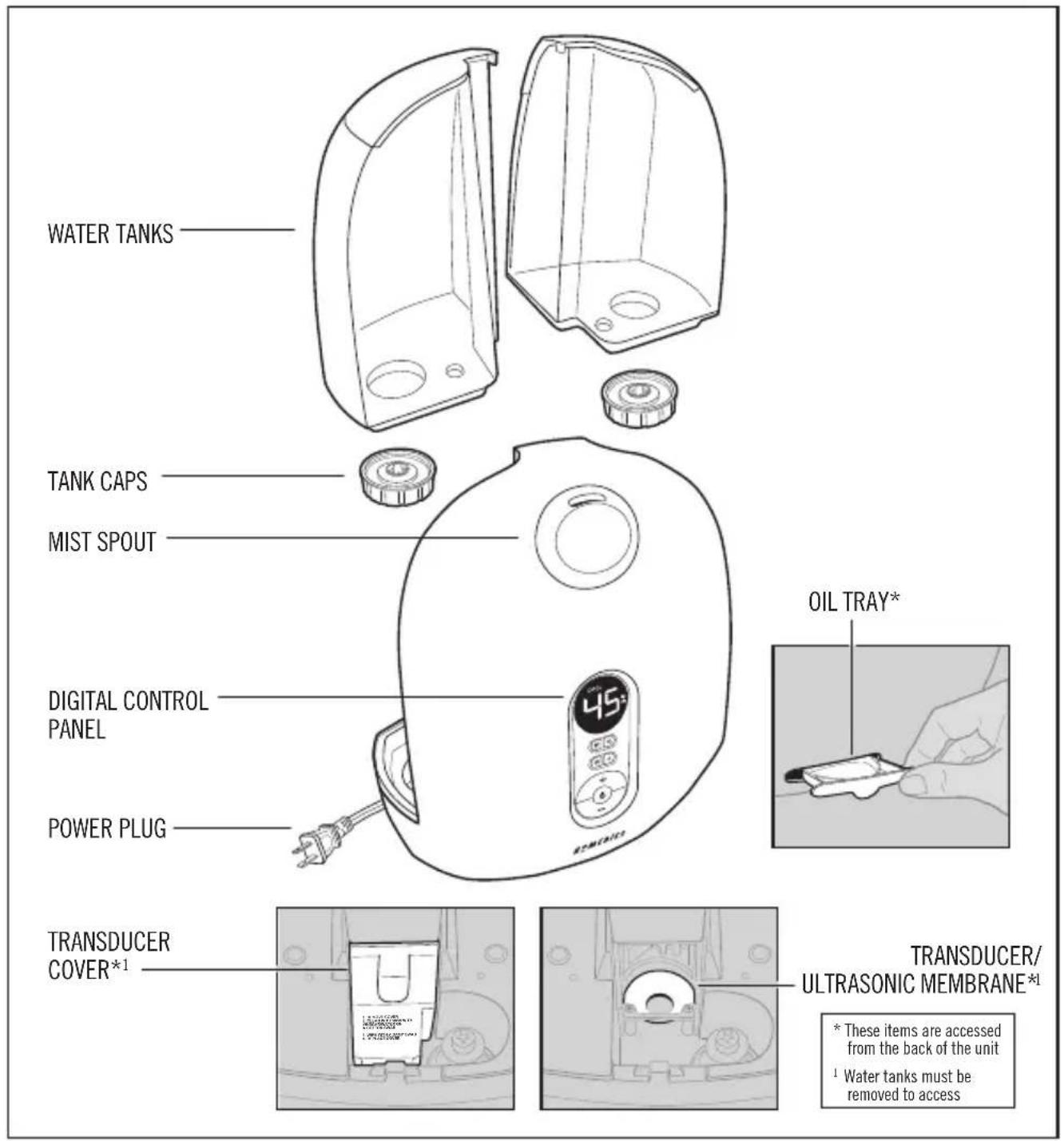
WATER TANKS TANK CAPS MIST SPOUT DIGITAL CONTROL PANEL POWER PLUG OIL TRAY* TRANSDUCER COVER*1 TRANSDUCER/ ULTRASONIC MEMBRANE*1 * These items are accessed from the back of the unit 1 Water tanks must be removed to accessHOW TO USE
text_image
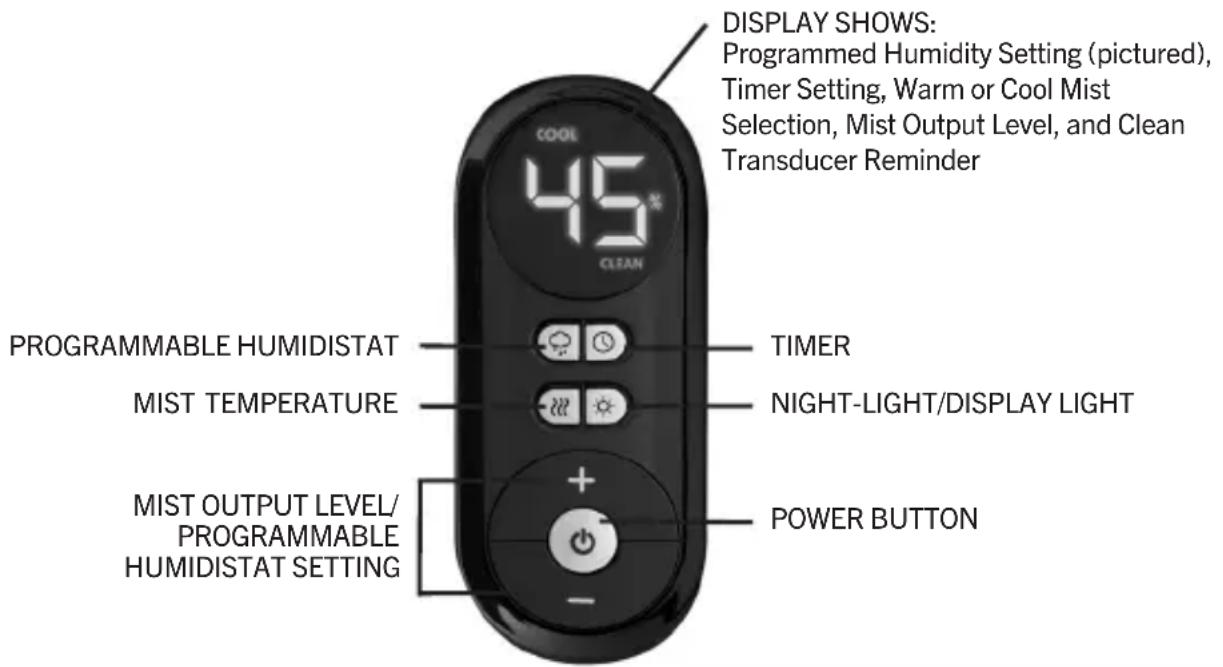
DISPLAY SHOWS: Programmed Humidity Setting (pictured), Timer Setting, Warm or Cool Mist Selection, Mist Output Level, and Clean Transducer Reminder 45 COOL CLEAN PROGRAMMABLE HUMIDISTAT TIMER MIST TEMPERATURE NIGHT-LIGHT/DISPLAY LIGHT MIST OUTPUT LEVEL/ PROGRAMMABLE HUMIDISTAT SETTING POWER BUTTONPOWER BUTTON
Plug unit into a 120-volt AC electrical outlet. Press the power button to turn unit on.
MIST OUTPUT LEVEL
Mist adjusts from the lowest output (1) to the highest output (5). To increase the mist output, press the + button. The corresponding mist level will be lit on the display. To decrease mist output, press the - button.
MIST TEMPERATURE SETTING
To change the mist temperature from cool to warm mist, press the mist temperature 🎨button. “WARM” will be illuminated on the display. To change the mist temperature from warm to cool mist, press the mist temperature 🎨button again. “COOL” will be illuminated on the display.
NOTE: Once warm mist is selected, it will take approximately 20 minutes to heat up the mist. The warm setting reduces Escherichia coli and Staphylococcus aureus bacteria in the mist after 40 minutes continuous warm mist operation on the low mist setting as shown by independent third-party testing.
PROGRAMMABLE HUMIDISTAT
The default humidistat setting is CO (continuous on). The programmable humidistat can be set in 5% increments, from 35% to 55% humidity.
To program the humidity level, press the humidistat 🔗 button. Then press the + or - button. The humidity level will increase/decrease by 5% every time the + or - button is pressed and will show on the display screen. Keep pressing the + or - button until the desired humidity setting is reached. The display will show the set humidity level for 5 seconds, then default back to display the mist output level.
NOTE: To eliminate any programmed humidistat setting, press the humidistat 🔗 button. Then press the + button until you reach "CO" (continuous on), one level above 55%.
NOTE: When the set humidity level is reached, the humidifier will cycle off until the humidity in the room drops 5% below the set humidity level, then will cycle on until the set humidity level is reached again.
Press the night-light/display light ⚙ button once to turn on the night-light. The light at the bottom of the water tanks will turn on, illuminating the tanks. Press the night-light/display light ⚙ button a second time to leave the night-light on, but turn off the display light. Press the night-light/display light ⚙ button a third time to turn off the night-light and display light so no lights are illuminated. Press the night-light/display light ⚙ button a fourth time to turn the display light back on.
TIMER
Press the timer Ⓑ button. Keep pressing the timer button until the desired timer setting is lit on the display. The timer button will cycle through the following settings: 2 hours, 4 hours, 8 hours, 12 hours. To turn the timer off, press the timer button until 0 hours is shown on the display.
NOTE: Always be sure the humidifier has a full tank of water prior to using the timer setting.
AUTO-SHUTOFF PROTECTION
When the water in the tank is almost empty, the humidifying function will power off.
NOTE: It is normal to have a small amount of water in the base during and after use.
ESSENTIAL OIL-CAPABLE
The optional essential oil feature will function automatically when the mist is turned on.
CLEAN REMINDER
"CLEAN" will illuminate red indicating it is time to clean the transducer/ultrasonic membrane. See cleaning instructions in the Cleaning and Care section. After cleaning, press and hold the power button until the clean light indicator turns off.
HOW TO FILL
CAUTION: Before filling tanks with water, turn the power off and unplug the unit from the outlet.
NOTE: Always use 2 hands to carry the water tank.
natural_image
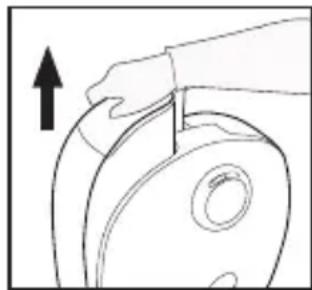
Line drawing of a hand holding a cylindrical object with an arrow indicating upward motion (no text or symbols)- Remove the tank from the humidifier base. Turn the tank upside down and remove the tank cap by turning counterclockwise.
natural_image
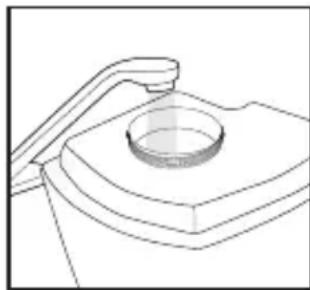
Technical line drawing of a mechanical component with a circular base and lever (no text or symbols)- Fill the water tanks with clean, cool (not cold) water. We recommend using distilled water if you live in a hard water area.
CAUTION: NEVER add essential oils or any other additives to the water tank or water reservoir. Even a few drops will damage the unit.
natural_image
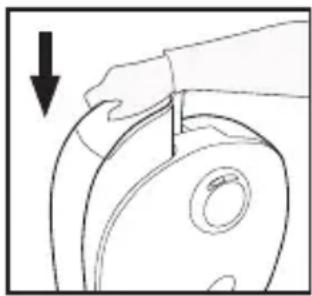
Line drawing of a hand holding a cylindrical object with a downward arrow indicating force or direction (no text or symbols)- Replace the tank cap by turning clockwise until tight. Turn over and place the tank back on the humidifier base, making sure it is firmly seated. Repeat the process for the second tank.
HOW TO USE
ESSENTIAL OIL
Use your favorite essential oil to deliver scent into the air.
NOTE: For use with the included HoMedics essential oil pads only.
NOTE: DO NOT leave a filled essential oil pad in the oil tray of the humidifier if it will be out of use for a long period of time.
ARE ESSENTIAL OILS SAFE TO USE AROUND PETS?
We should always exercise caution when using essential oils around our pets. Keep all essential oil and aromatherapy products (like diffusers) out of reach of pets. Keep open bottles away from pets to avoid internal consumption. We do not recommend the topical use of essential oils on pets, as they have a strong sense of smell and cannot get rid of the oil if they don't like it or it is disturbing them. When diffusing essential oils around pets, always diffuse in a well-ventilated area and leave an option for them to remove themselves from the space, such as leaving a door open. Every animal is different, so carefully observe how each animal responds when introducing an essential oil for the first time. If irritation occurs, discontinue the use of the essential oil. We recommend seeking medical attention if ingestion of essential oil occurs.
ADDING ESSENTIAL OILS
WARNING: PUTTING OIL ANYWHERE BUT THE OIL TRAY WILL DAMAGE THE HUMIDIFIER.
natural_image
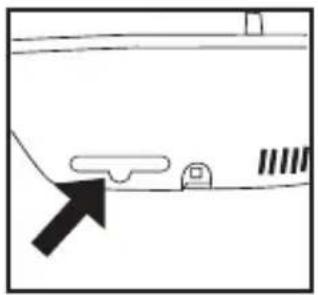
Simple line drawing of a vehicle or road with an arrow pointing to a vehicle (no text or symbols)- The oil tray is located on the back of the humidifier under the water tank.
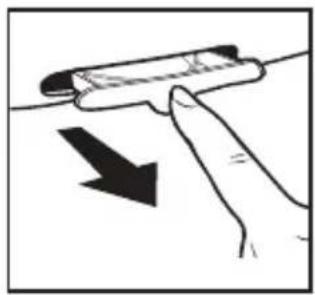
natural_image
Illustration of a hand holding a cylindrical object with an arrow indicating downward motion (no text or symbols)- Push to open and remove the tray. Place 1 essential oil pad (3 included) into the oil tray.
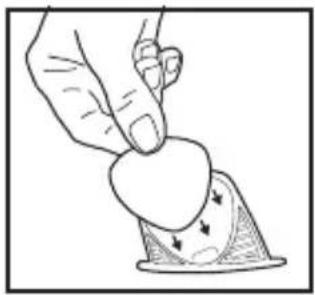
natural_image
Illustration of a hand pressing down on a piece of paper with arrows indicating motion (no text or symbols)- Place the oil tray back in its compartment and push to close. The scent will start automatically when the mist is turned on.
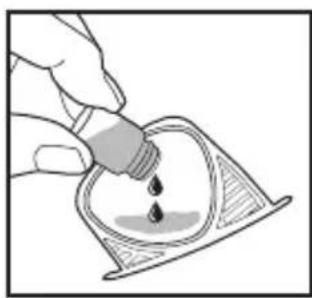
natural_image
Illustration of a hand pouring liquid into a container with liquid droplets (no text or symbols)- Add 5-7 drops of essential oil to the pad. You may use more or less depending on personal preference. WARNING: Only place essential oil on the pad and NOT directly into the tray.
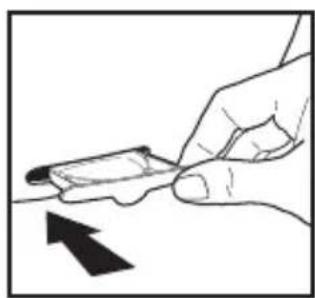
natural_image
Hand holding a small object with an arrow pointing to it, no text or symbols presentTo purchase genuine HoMedics Replacement Essential Oil Pads, Model #UHE-PAD1, go to your retailer where you purchased your TotalComfort Ultrasonic Humidifier, or visit www.homedics.com (US), www.homedics.ca (CAN).
To purchase genuine HoMedics Essential Oils, go to your retailer where you purchased your TotalComfort Ultrasonic Humidifier, or visit www.homedics.com (US), www.homedics.ca (CAN).
ABOUT WHITE DUST
Use of high mineral content hard water may cause a white mineral residue to accumulate on surfaces in the room near the humidifier. The mineral residue is commonly called “white dust.” The higher the mineral content (or, the harder your water is), the greater the potential for white dust. The white dust is not caused by a defect in the humidifier. It is caused only by minerals suspended in the water.
HOW AND WHY TO USE DEMINERALIZATION CARTRIDGES
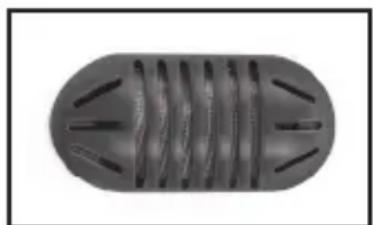
The HoMedics Demineralization Cartridge will help reduce the potential for white dust. The cartridge should be replaced every 30–40 fillings. The cartridge may need to be replaced more often if you are using very hard water. Replace the cartridge when you notice an increase in white dust buildup. If white dust still forms around the humidifier after a new cartridge has been installed, consider using distilled water.
If you live in an area with hard water or use a water softener, we recommend using distilled water for better results from your humidifier. NEVER use water-softening additives in your humidifier.
INSTALLATION INSTRUCTIONS
- Remove Demineralization Cartridges from packaging and let them soak in water for 10 minutes.
- Remove the tanks from humidifier base and turn them over.
- Unscrew the tank caps by turning counterclockwise.
- Fill each tank with water as shown in the How to Fill section of the instructions.
- Add the soaked Demineralization Cartridge into each tank.
- Replace the tank caps by turning clockwise.
- Turn the tanks over and place back on the base.
natural_image
Top-down view of a cylindrical object with internal parallel grooves and protruding blades (no text or symbols visible)Demineralization Cartridge
To purchase new Demineralization Cartridges, Model # UHE-HDC4, go back to the retailer (where you purchased your humidifier), or visit www.homedics.com (US), www.homedics.ca (CAN).
CLEANING AND CARE
CAUTION: Before cleaning the unit, turn power off and unplug unit from the outlet.
CLEANING THE TRANSDUCER/ULTRASONIC MEMBRANE
The transducer/ultrasonic membrane must be cleaned to remove water mineral deposits when "CLEAN" is illuminated on the display. Failure to do so may cause reduced or no mist output.
natural_image
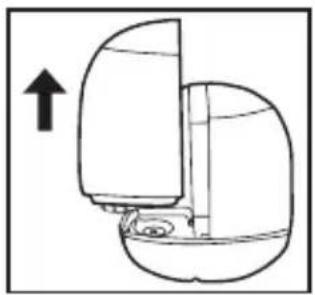
Diagram of a mechanical device with an arrow indicating upward motion (no text or symbols)- Remove both water tanks from the humidifier base and set aside.
natural_image
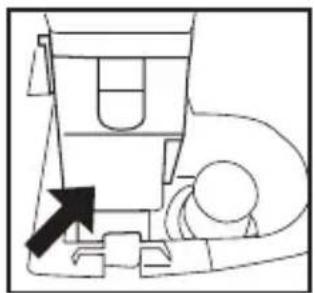
Simple line drawing of a mechanical device with an arrow pointing to a component (no text or symbols)Transducer cover Transducer/ultrasonic membrane
natural_image
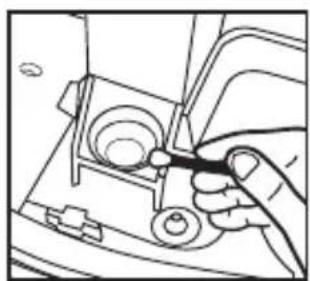
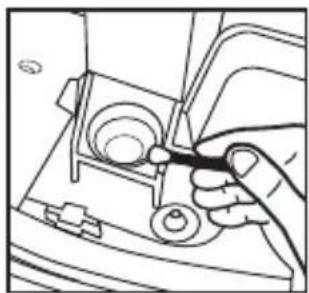
Line drawing of a hand using a tool to adjust or install a mechanical component (no text or symbols visible)- Remove the transducer cover. Clean the transducer/ultrasonic membrane with a 50/50 mix of white vinegar and water on a cotton swab. Wipe off with a damp cotton swab. Replace the transducer cover. Press and hold the power button until the "CLEAN" light turns off.
NEVER touch the transducer/ultrasonic membrane with your fingers; the natural oils in the skin can damage the surface.
NEVER submerge the base in water or any other liquid.
natural_image
Line drawing of a hand pressing a button on a mechanical device (no text or symbols)TO CLEAN THE TANKS
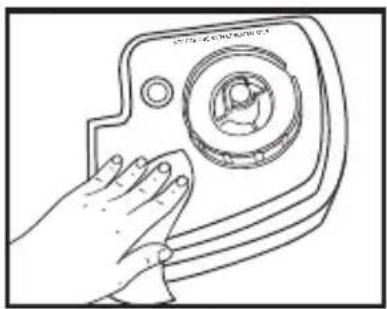
Remove the water tanks from the humidifier base by lifting them from the main unit. Unscrew the tank caps and rinse inside the tanks with clean water.
Every day: Empty and rinse each tank and tank cap before refilling.
Every week: To remove any scale or buildup, use a 50/50 mixture of white vinegar and lukewarm water to clean the inside of the tanks.
natural_image
Line drawing of a hand holding a circular object with a ring, no text or symbols presentTO CLEAN THE OIL TRAY
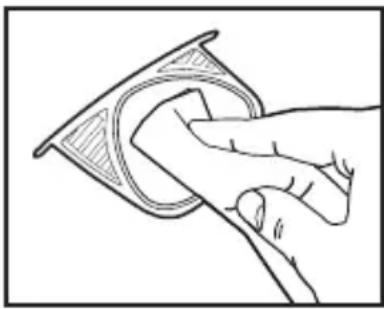
Open the oil tray and remove the pad. Essential oil pads should be changed when switching to a different essential oil scent. If continuing to use the same scent, set the essential oil pad aside for reuse. Wipe down the inside of the oil tray with a soft cloth. Place the essential oil pad back in the tray and close.
NOTE: Leave the essential oil pad out of the oil tray when storing.
natural_image
Line drawing of a hand touching a device with a circular button and control panel (no text or symbols)TO CLEAN THE SURFACE
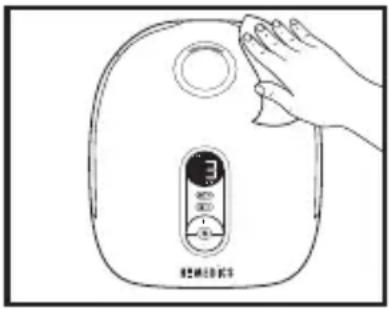
Clean the surface of the unit with a soft, damp cloth.
Before storing: Clean the tanks, reservoir, tank caps, and the transducer/ultrasonic membrane with a 50/50 mixture of white vinegar and water. Be sure to rinse and let all parts dry completely before storing. Clean the oil tray with a soft cloth.
After storing: Rinse the tanks, reservoir, ultrasonic membrane, and essential oil tray with water. Dry completely before filling. Only fill the tank just before operating.
TROUBLESHOOTING
| PROBLEM POSSIBLE CAUSE SOLUTION | ||
| No power/no mist from spout • Unit is not plugged in• Humidifier not turned on• No power at unit• Low water level• The humidistat setting is lower than the current room humidity• Transducer/ultrasonic membrane needsto be cleaned | • Plug unit in• Press the power button to turn the unit on• Check circuits and fuses or try a different outlet• Refill the tank with water• Reset the humidistat to a higher humidity level, or change the mist output to continuous on• Follow Cleaning the Transducer/Ultrasonic Membrane instructions in the Cleaning and Care section | |
TROUBLESHOOTING
| PROBLEM POSSIBLE CAUSE SOLUTION | ||
| Peculiar odor • Unit is new | • If unit is in use, the odor may be a dirty tank or old water in the water reservoir | • Remove the tank cap and let the tank air out in a cool, dry place for 12 hours• Empty the old tank and reservoir water, clean the tank and water reservoir, and fill the tank with clean water |
| Excessive noise • Unit is not level | • Low water level | • Place unit on a flat, even surface• Check the water level; refill the tank if the water is low |
| White dust accumulation • Hard water used | • Demineralization Cartridge needs to be replaced | • Use distilled water and a Demineralization Cartridge• Replace Demineralization Cartridge |
| Red “Clean” light illuminated • Clean Transducer/Ultrasonic Membrane reminder | • Clean reminder needs resetting | • Clean the transducer following the instructions in the Cleaning and Care section• Press and hold the power button until the red clean light turns off |
SUPPLIER'S DECLARATION OF CONFORMITY
Product Description: TOTAL COMFORT® DELUXE ULTRASONIC HUMIDIFIER
Model Number: UHE-WM130
Trade Name: Homedics
FCC Compliance Statement
This device complies with Part 18 of the FCC Rules. Operation is subject to the following two conditions: (1) This device may not cause harmful interference, and (2) This device must accept any interference received, including interference that may cause undesired operation.
U.S. Contact Information
Company: Homedics, LLC.
Address: 3000 N Pontiac Trail, Commerce Township, MI 48390
8:30am-7:00pm EST Monday-Friday 1-800-466-3342
Homedics is not responsible for any radio or TV interference caused by unauthorized modifications to this equipment. Such modifications could void the user authority to operate the equipment.
This equipment has been tested and found to comply with the limits for a Class B digital device, pursuant to Part 18 of the FCC Rules. These limits are designed to provide reasonable protection against harmful interference in a residential installation. This equipment generates, uses, and can radiate radio frequency energy and, if not installed and used in accordance with the instructions, may cause harmful interference to radio communications. However, there is no guarantee that interference will not occur in a particular installation. If this equipment does cause harmful interference to radio or television reception, which can be determined by turning the equipment off and on, the user is encouraged to try to correct the interference by one or more of the following measures:
- Reorient or relocate the receiving antenna.
- Increase the separation between the equipment and receiver.
- Connect the equipment to an outlet on a circuit different from that to which the receiver is connected.
- Consult the dealer or an experienced radio/TV technician for help.
This product has been tested and compiles with the requirements for Federal Communication Commission, Part 18. Although this product is tested and compiles with FCC, it may interfere with other devices. If this product is found to interfere with another device, separate the other device and this product. Conduct only the user maintenance found in this instruction manual. Other maintenance and servicing may cause harmful interference and can void the required FCC compliance.
CAN ICES-001(B)/NMB-001(B)
2-YEAR LIMITED WARRANTY
HoMedics sells its products with the intent that they are free of defects in manufacture and workmanship for a period of 2 years from the date of original purchase, except as noted below. HoMedics warrants that its products will be free of defects in material and workmanship under normal use and service. This warranty extends only to consumers and does not extend to retailers.
To obtain warranty service on your HoMedics product, contact a Consumer Relations representative for assistance. Please make sure to have the model number of the product available.
HoMedics does not authorize anyone, including but not limited to retailers, the subsequent consumer purchaser of the product from a retailer or remote purchasers, to obligate HoMedics in any way beyond the terms set forth herein. This warranty does not cover damage caused by misuse or abuse; accident; the attachment of any unauthorized accessory; alteration to the product; improper installation; unauthorized repairs or modifications; improper use of electrical/power supply; loss of power; dropped product; malfunction or damage of an operating part from failure to provide manufacturer's recommended maintenance; transportation damage; theft; neglect; vandalism or environmental conditions; loss of use during the period the product is at a repair facility or otherwise awaiting parts or repair; or any other conditions whatsoever that are beyond the control of HoMedics.
This warranty is effective only if the product is purchased and operated in the country in which the product is purchased. A product that requires modifications or adoption to enable it to operate in any other country than the country for which it was designed, manufactured, approved, and/or authorized, or repair of products damaged by these modifications, is not covered under this warranty.
THE WARRANTY PROVIDED HEREIN SHALL BE THE SOLE AND EXCLUSIVE WARRANTY. THERE SHALL BE NO OTHER WARRANTIES EXPRESS OR IMPLIED, INCLUDING ANY IMPLIED WARRANTY OF MERCHANTABILITY OR FITNESS OR ANY OTHER OBLIGATION ON THE PART OF THE COMPANY WITH RESPECT TO PRODUCTS COVERED BY THIS WARRANTY. HOMEDICS SHALL HAVE NO LIABILITY FOR ANY INCIDENTAL, CONSEQUENTIAL, OR SPECIAL DAMAGES. IN NO EVENT SHALL THIS WARRANTY REQUIRE MORE THAN THE REPAIR OR REPLACEMENT OF ANY PART OR PARTS THAT ARE FOUND TO BE DEFECTIVE WITHIN THE EFFECTIVE PERIOD OF THE WARRANTY. NO REFUNDS WILL BE GIVEN. IF REPLACEMENT PARTS FOR DEFECTIVE MATERIALS ARE NOT AVAILABLE, HOMEDICS RESERVES THE RIGHT TO MAKE PRODUCT SUBSTITUTIONS IN LIEU OF REPAIR OR REPLACEMENT.
This warranty does not extend to the purchase of opened, used, repaired, repackaged, and/or resealed products, including but not limited to sale of such products on internet auction sites and/or sales of such products by surplus or bulk resellers. Any and all warranties or guarantees shall immediately cease and terminate as to any products or parts thereof that are repaired, replaced, altered, or modified, without the prior express and written consent of HoMedics.
This warranty provides you with specific legal rights. You may have additional rights that may vary from state to state and country to country. Because of individual state and country regulations, some of the above limitations and exclusions may not apply to you.
For more information regarding our product line in the USA, please visit www.homedics.com. For Canada, please visit www.homedics.ca.
FOR SERVICE IN THE USA:
Email: cservice@homedics.com
8:30am-7:00pm EST Monday-Friday
1-800-466-3342
FOR SERVICE IN CANADA:
Email: cservice@homedicsgroup.ca
8:30am-5:00pm EST Monday-Friday
1-888-225-7378
©2020-2022 HoMedics, LLC. All rights reserved. HoMedics, TotalComfort, and HoMedics Leaders in Home Environment are registered trademarks of HoMedics, LLC.
IB-UHEWM130B
Made in China
HOMEDICS
LEADERS IN HOME ENVIRONMENT®
natural_image
Line drawing of a hand holding a cylindrical object with an arrow indicating upward motion (no text or symbols)natural_image
Diagram of a hand holding a mechanical component with a downward arrow indicating force or direction (no text or symbols)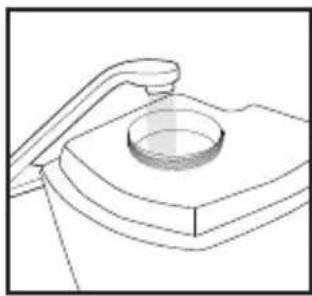
natural_image
Technical line drawing of a mechanical component with a circular base and curved top (no text or symbols)natural_image
Simple line drawing of a vehicle or road with an arrow pointing to a vehicle (no text or symbols)natural_image
Illustration of a hand holding a cylindrical object with an arrow indicating downward motion (no text or symbols)natural_image
Illustration of a hand pressing down on a heart-shaped object with arrows indicating motion (no text or symbols)natural_image
Illustration of a hand pouring liquid into a container with a droplet (no text or symbols)natural_image
Illustration of a hand holding a small object with an arrow pointing downward (no text or symbols)natural_image
Top-down view of a cylindrical mechanical component with internal grooves and protrusions (no text or symbols visible)natural_image
Diagram of a mechanical component with an arrow indicating upward motion (no text or symbols)natural_image
Simple line drawing of a mechanical component with an arrow pointing to it (no text or symbols)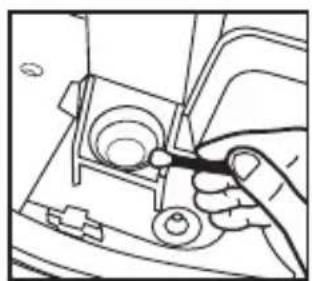
natural_image
Line drawing of a hand using a tool to adjust or install a mechanical component (no text or symbols visible)natural_image
Line drawing of a hand pressing a button on a device casing (no text or symbols)NETTOYAGE DES RÉSERVOIRS
natural_image
Line drawing of a hand holding a circular object with a ring, no text or symbols presentNETTOYAGE DU PLATEAU D'AROMATHÉRAPIE
text_image
Line drawing of a device with a hand touching it, showing a dial indicator and control buttons.NETTOYAGE DE LA SURFACE
Adresse : 3000 N Pontiac Trail, Commerce Township, MI 48390
natural_image
Line drawing of a hand pressing down on a mechanical component with an upward arrow (no text or symbols)natural_image
Technical line drawing of a mechanical component with a circular base and curved top (no text or symbols)natural_image
Line drawing of a hand holding a cylindrical object with a downward arrow indicating motion (no text or symbols)natural_image
Simple line drawing of a vehicle or road with a black arrow pointing to a component (no text or symbols)natural_image
Illustration of a hand holding a cylindrical object with a downward arrow, no text or symbols presentnatural_image
Illustration of a hand pressing down on a heart-shaped object with motion arrows (no text or symbols)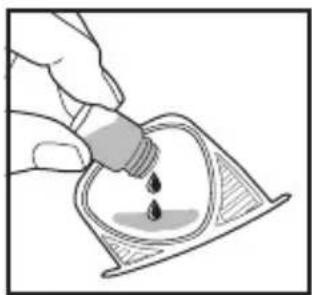
natural_image
Illustration of a hand pouring liquid into a container with a droplet (no text or symbols)natural_image
Illustration of a hand holding a small object with an arrow pointing downward (no text or symbols)natural_image
Top-down view of a cylindrical object with internal grooves and protrusions (no text or symbols visible)natural_image
Diagram of a mechanical device with an arrow indicating upward motion (no text or symbols)natural_image
Simple line drawing of a mechanical device with an arrow pointing to it (no text or symbols)