PerfectSteam PS-80 - Steam Steamer HOMEDICS - Free user manual and instructions
Find the device manual for free PerfectSteam PS-80 HOMEDICS in PDF.


User questions about PerfectSteam PS-80 HOMEDICS
0 question about this device. Answer the ones you know or ask your own.
Ask a new question about this device
Download the instructions for your Steam Steamer in PDF format for free! Find your manual PerfectSteam PS-80 - HOMEDICS and take your electronic device back in hand. On this page are published all the documents necessary for the use of your device. PerfectSteam PS-80 by HOMEDICS.
USER MANUAL PerfectSteam PS-80 HOMEDICS
activate your product warranty
scan the QR code and register your product within 7 days to activate your warranty

text_image
QR code image containing encoded data, no visible human-readable textRegistering also gives you access to tips, exciting offers and more!
perfectsteam®
2-in-1 garment steamer & iron
INSTRUCTION MANUAL AND WARRANTY INFORMATION
PS-80A | PS-81A | L-04843, Rev.1
IMPORTANT SAFETY INSTRUCTIONS
WHEN USING ELECTRICAL PRODUCTS, BASIC SAFETY PRECAUTIONS SHOULD ALWAYS BE FOLLOWED, INCLUDING THE FOLLOWING:
READ AND SAVE THESE INSTRUCTIONS.
DANGER – TO REDUCE THE RISK OF ELECTRIC SHOCK:
- Always unplug appliance immediately after using, before cleaning, and before filling with or emptying water.
- DO NOT reach for an appliance that has fallen into water. Unplug it immediately.
- DO NOT place or store appliance where it can fall or be pulled into a tub or sink.
- DO NOT place in or drop into water or other liquids.
- Use only in a dry area.
WARNING – TO REDUCE THE RISK OF BURNS, FIRE, ELECTRIC
SHOCK, OR INJURY TO PERSONS:
- Use this appliance only for its intended use as described in this manual. Do not use attachments not recommended by Homedics; specifically, any attachments not provided with this unit.
- NEVER drop or insert any object into any opening.
- DO NOT use outdoors or operate where aerosol (spray) products are being used or where oxygen is being administered.
- NEVER operate the appliance if it has a damaged cord or plug, if it is not working properly, if it has been dropped or damaged, or dropped into water.
- NEVER leave this appliance unattended when plugged in.
- This appliance is not a toy and is not to be used by children.
- Close supervision is necessary when this appliance is used near children or individuals with certain disabilities. Unsupervised use could result in fire or personal injury.
- Rest the appliance on a stable surface when placing on its base.
- DO NOT allow the cord to contact heated surfaces. Do not pull or twist cord. Let appliance cool completely before putting away.
- This appliance has a polarized plug (one blade is wider than the other). As a safety feature, this plug will fit in a polarized outlet only one way. If the plug does not fit fully in the outlet, reverse the plug. If it still does not fit, contact
a qualified electrician. Do not attempt to defeat this safety feature.
- DO NOT use an extension cord to operate appliance.
- Surfaces of this appliance are hot when in use. Do not let heated surfaces touch eyes or skin.
- DO NOT place the steam nozzle directly on any surface or on the appliance power cord while it is hot or plugged in.
- Unplug this appliance before filling or emptying the water.
- DO NOT operate steamer without properly filling the water container with distilled water.
- NEVER yank cord to disconnect from outlet; instead, grasp plug and pull to disconnect.
- Burns could occur from touching hot parts, hot water, or steam. Use care when removing the water reservoir or when you turn a steam appliance upside down – there may be hot water in reservoir. Always position steamer with head away from you and any other person when turning on.
• DO NOT hold hand in front of steam. - To reduce likelihood of circuit overload, do not operate another high-wattage appliance on the same circuit.
- Use caution when installing or removing an attachment as it may contain hot water from condensation. Ensure that the unit is off, and the attachment is dry or cooled off to avoid contact with hot water.
- NEVER steam a garment while it is being worn.
- NEVER use water containing additives.
- When emitting steam, this appliance may cause burns if it is used too close to the skin or eyes, or if it is used incorrectly. To reduce the risk of contact with hot water emitting from the steam vents, test appliance before use by holding it away from the body.
CAUTION – PLEASE READ ALL INSTRUCTIONS CAREFULLY BEFORE OPERATING.
- This product is intended for household use only.
- DO NOT use outdoors. For indoor use only.
2-IN-1 GARMENT STEAMER & IRON
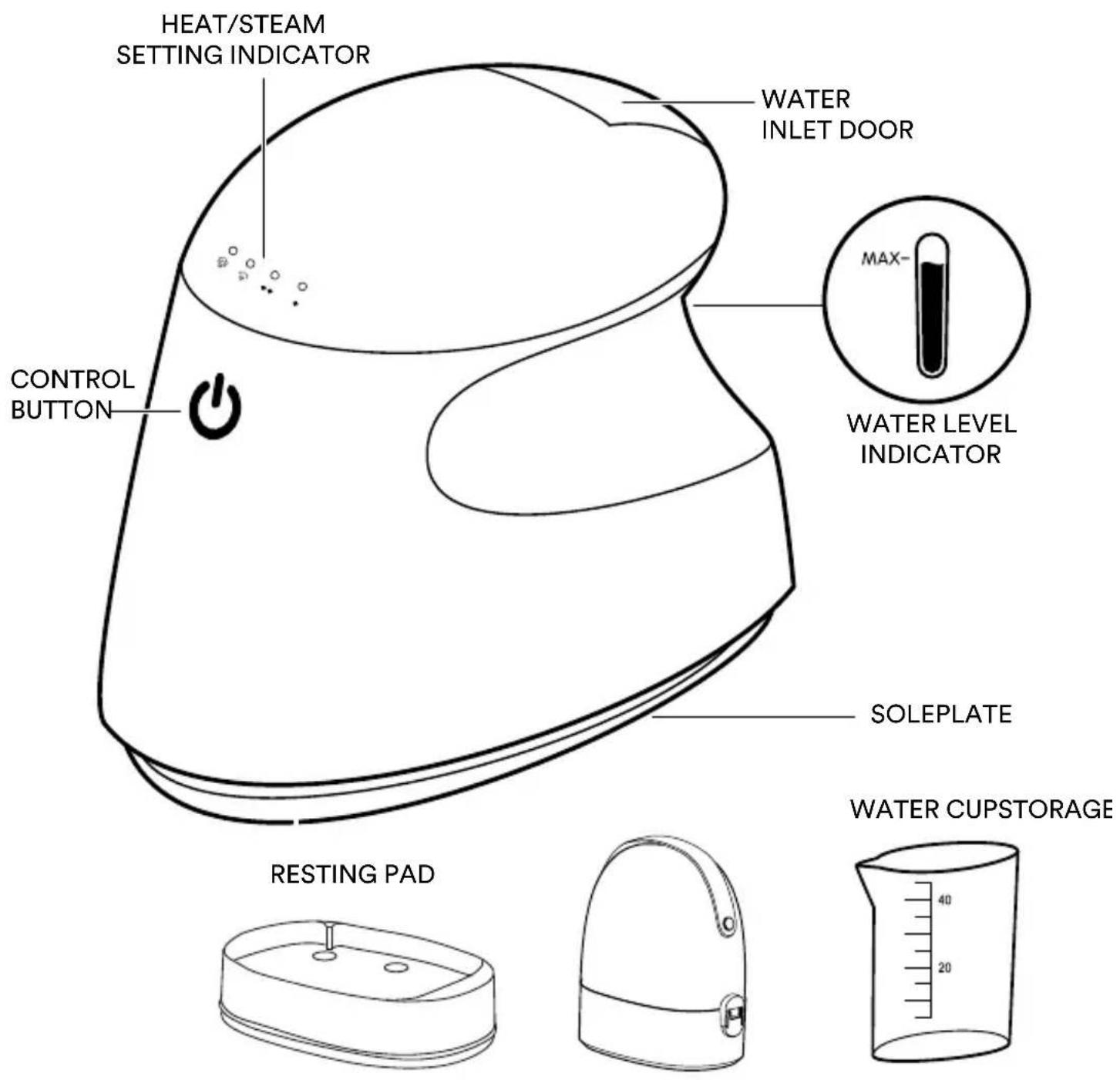
text_image
HEAT/STEAM SETTING INDICATOR CONTROL BUTTON WATER INLET DOOR MAX- WATER LEVEL INDICATOR SOLEPLATE RESTING PAD WATER CUPSTORAGESPECIFICATIONS
NANOSTEAM™ TECHNOLOGY
Nano-sized steam molecules produce a continuous high-temperature dry steam that easily penetrates fabrics to remove tough wrinkles and freshen garments.
QUICK HEAT UP
Ready to use in 15-35 seconds, depending on setting selected.
VERTICAL OR HORIZONTAL USE
Use vertical to steam garments and draperies or horizontal for ironing.
4 SETTINGS FOR ALL FABRIC TYPES
Choose from 2 steamer or 2 iron settings.
AUTO-OFF
Automatically shuts off after being idle for 15 minutes.
CURVED SOLEPLATE
Glides across fabrics and around buttons.
INCLUDES STORAGE CASE, WATER CUP
Easy to store or pack for travel.
HOW TO FILL
CAUTION: Before filling the tank with water, turn the power off and unplug the unit from the outlet.
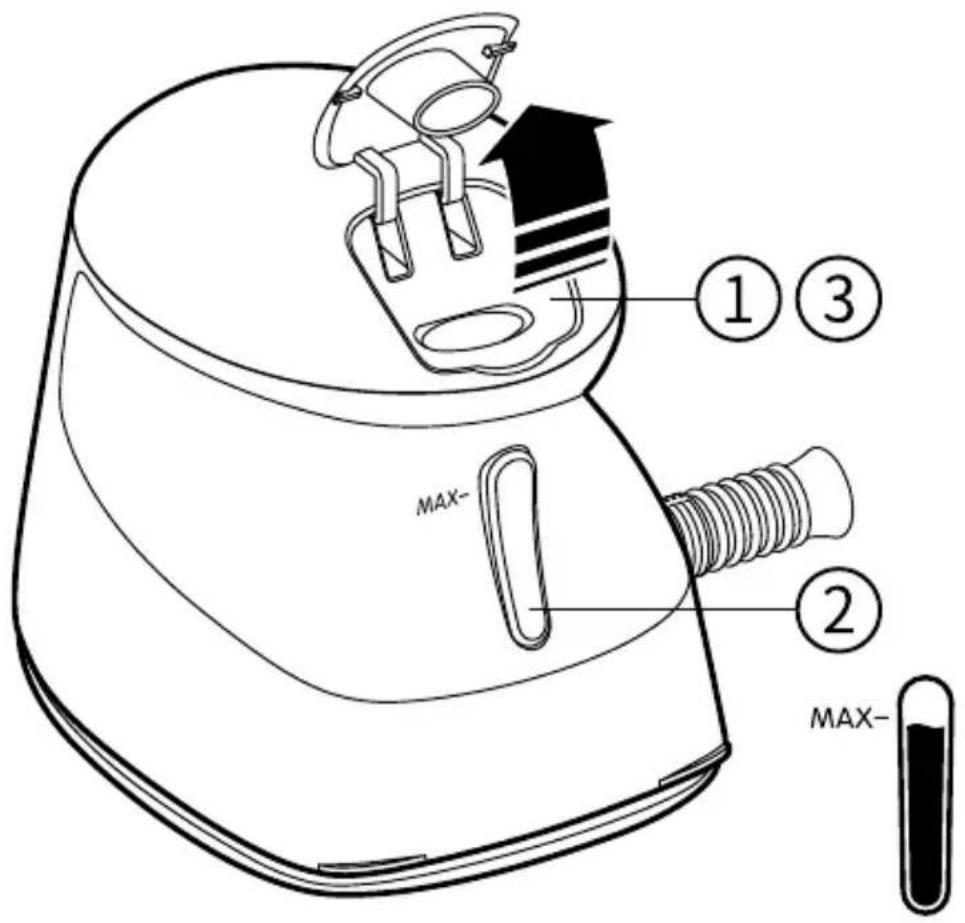
text_image
Technical diagram of a device with labeled parts and a test tube, showing internal components and assembly steps.-
Open the water inlet door.
-
Using the water cup, carefully pour water into the water tank until it reaches the MAX fill line.
NOTE: For best results, use purified or distilled water.
- Make sure the water inlet door is tightly closed.
HOW TO OPERATE
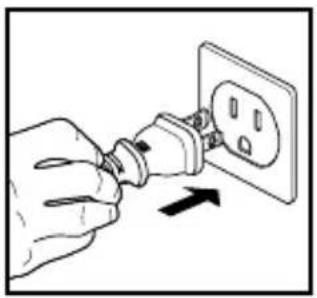
natural_image
Hand inserting a plug into an electrical outlet (no text or symbols visible)- Plug into a 120-volt electrical outlet.
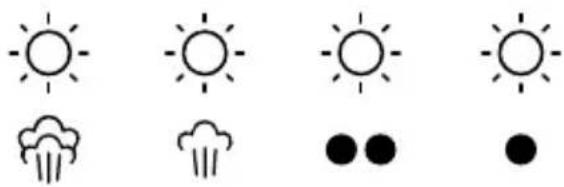
natural_image
Weather icons including suns, cloud, raindrops, and dots (no text or labels)- The heat/steam setting indicator will cycle through each setting indicating the steamer is in standby mode.
NOTE: The steamer will not heat up in standby mode.
HOW TO IRON
NORMAL IRONING


A. Mode 1: Touch the control button once, light should be flashing with one "beep" sound; the steamer will start to heat up. Once the light becomes consistent, the steamer is ready to use in low temperature mode.
NOTE: This mode does not produce steam.


B. Mode 2: Touch the control ⏻ button again, ●●light should be flashing with one “beep” sound; the steamer will heat up until ●●lights become consistent, the steamer will be ready to use in high temperature mode.
NOTE: This mode does not produce steam.
HOW TO STEAM
STEAM IRONING
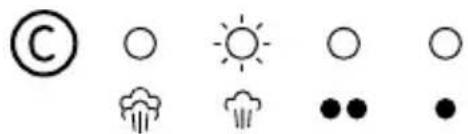
text_image
© ○ ○ ○ ●● ●C. Mode 3: Touch the control button again, light should be flashing with one "beep" sound; the steamer will change temperature until light becomes consistent and a small amount of steam comes out of the soleplate. The steamer is ready to use in low temperature steam/ironing mode.

text_image
D ○ ○ ○ ●● ●D. Mode 4: Touch the button again, light should be flashing with one "beep" sound; the steamer will change temperature until light becomes consistent and large amount of steam comes out of the soleplate. The steamer is ready to use in high temperature steam/ironing mode.
STANDBY
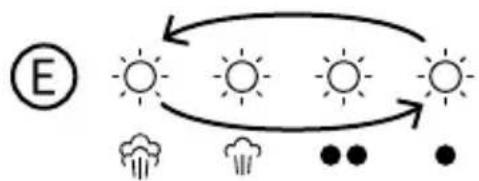
flowchart
graph TD
    A["Sun"] --> B["Sun"]
    B --> C["Sun"]
    C --> D["Sun"]
    D --> E["Wind"]
    E --> F["Sun"]
    F --> G["Wind"]
    G --> H["Sun"]
    H --> I["Wind"]
    I --> J["Sun"]
    J --> K["Wind"]
    K --> L["Sun"]
    L --> M["Wind"]
    M --> N["Sun"]
    N --> O["Wind"]
    O --> P["Sun"]
    P --> Q["Wind"]
    Q --> R["Sun"]
    R --> S["Wind"]
    S --> T["Sun"]
    T --> U["Wind"]
    U --> V["Sun"]
    V --> W["Wind"]
    W --> X["Sun"]
    X --> Y["Wind"]
    Y --> Z["Sun"]
E. To place the steamer in standby mode, press the control button until the "beep" sounds. The lights will flash indicating the steamer is in standby mode.
The iron can be used with an empty water tank, 🚗 🚗 can be treated as normal iron mode. If steam is needed, unplug the steamer and refill the water tank.
The iron will automatically turn off after using in any one mode for 15 minutes. This process can be reset by pressing the control button.
When the steamer is placed on the steamer/iron resting pad and you let go of the steamer, steaming stops and goes into standby mode.
NOTE: The soleplate remains at high temperature.
Steaming is resumed once the steamer is picked up. The steamer automatically shuts off if it has been paused for 15 minutes.
AFTER USE
The soleplate remains hot during and after use. Use the steamer/iron resting pad when transitioning from one garment to another or for cooling after use.
NOTE: The steamer/iron goes into standby mode once placed on the iron resting pad and you are no longer touching the steamer.
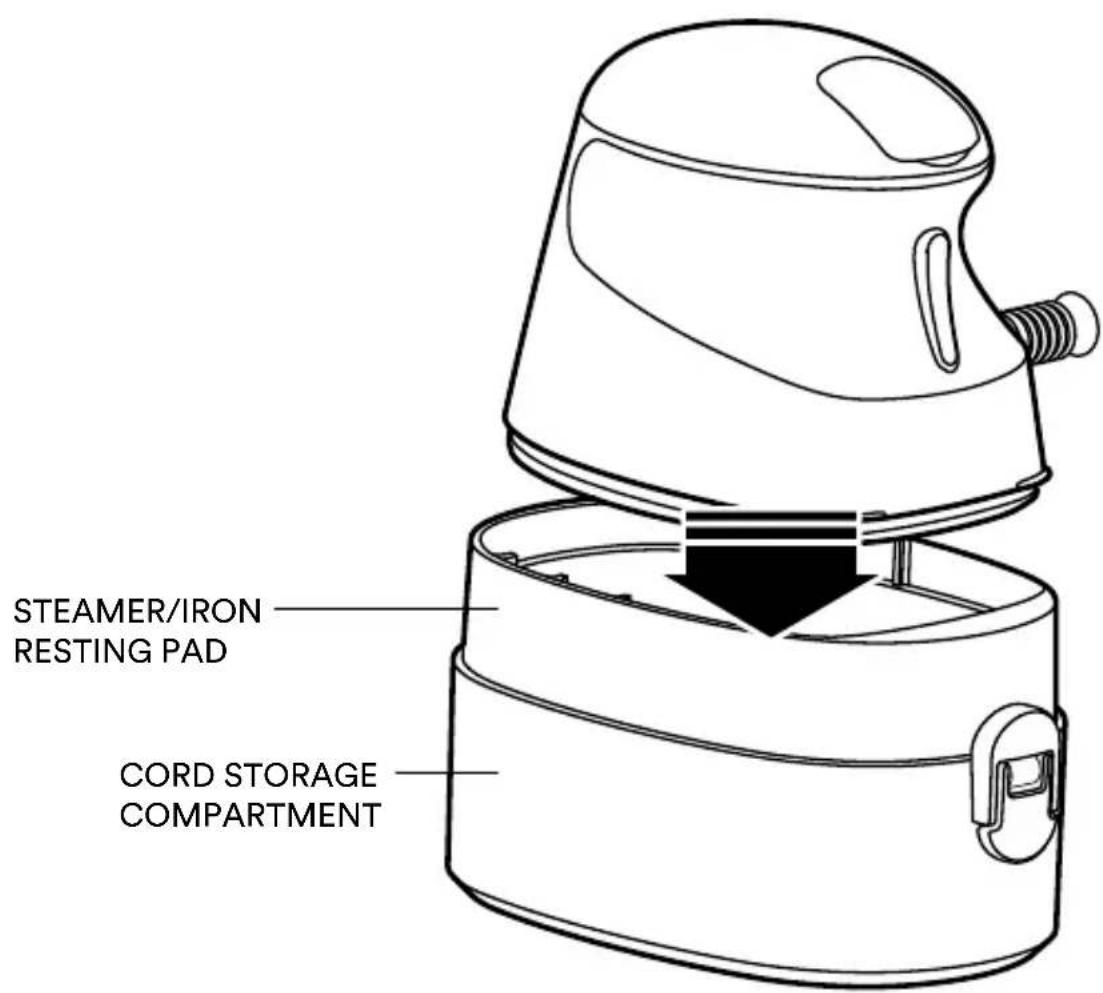
text_image
STEAMER/IRON RESTING PAD CORD STORAGE COMPARTMENTCAUTION: Do not place the steamer inside the storage case until it cools down.
STEAMING/IRONING GUIDE
FABRIC TYPE MODE MODE DESCRIPTION
| Silk/Rayon/Polyester/Viscose |  | Low temp, dry ironing |
| Synthetic fiber/Wool/Cashmere |  | High temp, dry ironing |
| Cotton |  | Low level steaming/ironing |
| Linen |  | High level steaming/ironing |
NOTE: Choose the mode based on the fabric type.
DO NOT hold the steamer/iron in the same location. Doing so may damage the fabric.
STEAMING TIPS
- When steaming vertically, hang the garment on a plastic clothes hanger.
- If placing the hanger on a door for steaming, use care not to damage the door with steam.
- When first using the steamer, test on an old cloth to remove any existing water mineral deposits.
- Test the steamer on an inconspicuous area of the item to be sure the garment can tolerate the selected steam level.
- For best results, continually pass the steam jets over your garment, steaming from top to bottom. Always keep the steamer moving over the fabric.
NOTE: Holding the steamer over one area for more than a few seconds may damage the fabric.
WARNING: NEVER steam a garment while it is being worn.
HOW TO CARE & STORE
- Allow the steamer to cool down before putting away.
- Only use water in the water tank.
• Always empty the water tank after use.
CAUTION: Wait for the unit to cool before attempting to empty the water tank. Tank contents may be hot.
- Clean the exterior with a soft, damp cloth and wipe dry.
- Avoid sharp or abrasive objects contacting the soleplate. These objects can scratch the soleplate and damage clothing while ironing.
- Place the steamer/iron in the storage case after it has cooled down.
- Wind the cord and place it in the cord storage department.
- Place the steamer resting pad over the cord storage compartment and place the iron on top of the iron resting pad.
- Close the storage case with the cover.
- Store the unit in a cool, dry area.
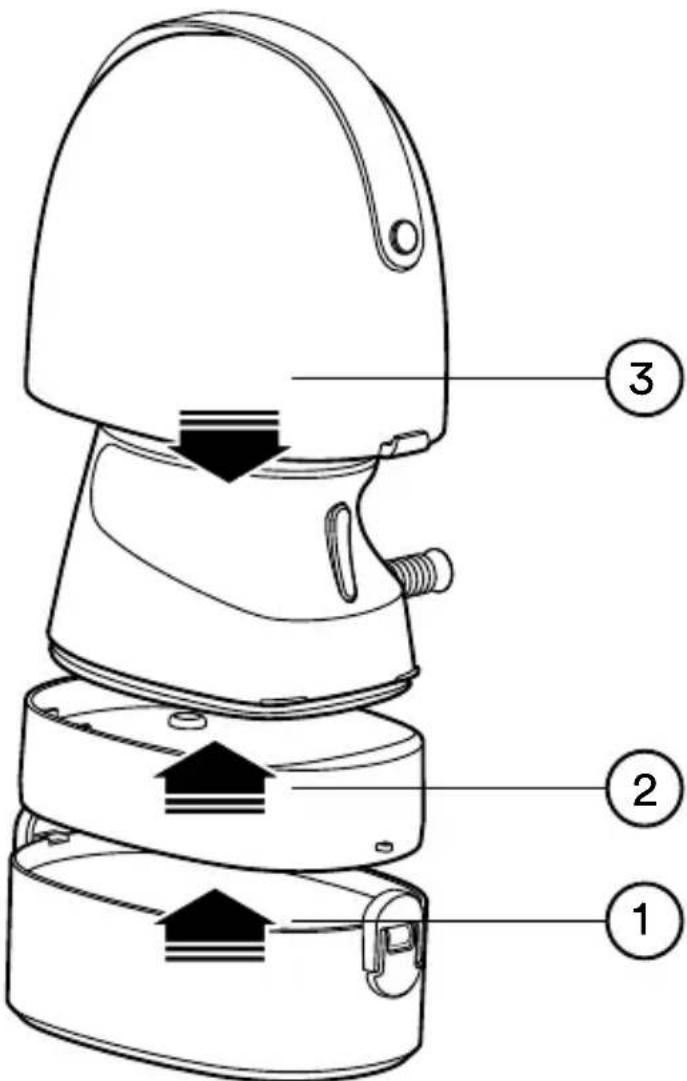
text_image
Technical diagram of a device with numbered parts labeled 1, 2, and 3TROUBLESHOOTING
| PROBLEM POSSIBLE CAUSE SOLUTION | ||
| No power • Unit is | not plugged in• No power at unit | Plug unit inCheck circuits and fuses or try a different outlet |
| Not heating • Mode | is not selected,or unit is in standby mode | Press the control button to select the desired mode. The steamer/iron will not heat up while in standby mode |
| Little or no steam • | Out of water• First time use• Wrong mode | Refill the tank with waterSelect mode 4 and wait 2 minutes for the steamer/iron to heat upThe first two modes are for dry ironing, the last two are steam |
| Burn marks • Wrong | mode• Iron in the same place for too long | Select mode according to clothing materialAlways keep iron moving across garment |
SUPPLIER'S DECLARATION OF CONFORMITY
Product Description: 2-in-1 Garment Steamer & Iron
Model Number: PS-80, PS-81
Trade Name: Homedics
FCC Compliance Statement
This device complies with Part 15 of the FCC Rules. Operation is subject to the following two conditions: (1) This device may not cause harmful interference, and (2) This device must accept any interference received, including interference that may cause undesired operation.
U.S. Contact Information
Company: Homedics, LLC.
Address: 3000 N Pontiac Trail, Commerce Township, MI 48390
8:30am-7:00pm EST Monday-Friday 1-800-466-3342
Homedics is not responsible for any radio or TV interference caused by unauthorized modifications to this equipment. Such modifications could void the user authority to operate the equipment.
This equipment has been tested and found to comply with the limits for a Class B digital device, pursuant to Part 15 of the FCC Rules. These limits are designed to provide reasonable protection against harmful interference in a residential installation. This equipment generates, uses, and can radiate radio frequency energy and, if not installed and used in accordance with the instructions, may cause harmful interference to radio communications. However, there is no guarantee that interference will not occur in a particular installation. If this equipment does cause harmful interference to radio or television reception, which can be determined by turning the equipment off and on, the user is encouraged to try to correct the interference by one or more of the following measures:
- Reorient or relocate the receiving antenna.
- Increase the separation between the equipment and receiver.
- Connect the equipment to an outlet on a circuit different from that to which the receiver is connected.
- Consult the dealer or an experienced radio/TV technician for help.
CAN ICES-003(B)/NMB-003(B)
Homedics
1-YEAR LIMITED WARRANTY
Homedics sells its products with the intent that they are free of defects in manufacture and workmanship for a period of 1 year from the date of original purchase, except as noted below. Homedics warrants that its products will be free of defects in material and workmanship under normal use and service. This warranty extends only to consumers and does not extend to Retailers.
To obtain warranty service on your Homedics product, contact a Consumer Relations representative for assistance. Please make sure to have the model number of the product available.
Homedics does not authorize anyone, including but not limited to Retailers, the subsequent consumer purchaser of the product from a Retailer, or remote purchasers, to obligate Homedics in any way beyond the terms set forth herein. This warranty does not cover damage caused by misuse or abuse; accident; the attachment of any unauthorized accessory; alteration to the product; improper installation; unauthorized repairs or modifications; improper use of electrical/power supply; loss of power; dropped product; malfunction or damage of an operating part from failure to provide manufacturer's recommended maintenance; transportation damage; theft; neglect; vandalism; or environmental conditions; loss of use during the period the product is at a repair facility or otherwise awaiting parts or repair; or any other conditions whatsoever that are beyond the control of Homedics.
This warranty is effective only if the product is purchased and operated in the country in which the product is purchased. A product that requires modifications or adoption to enable it to operate in any other country than the country for which it was designed, manufactured, approved, and/or authorized, or repair of products damaged by these modifications is not covered under this warranty.
THE WARRANTY PROVIDED HEREIN SHALL BE THE SOLE AND EXCLUSIVE WARRANTY. THERE SHALL BE NO OTHER WARRANTIES EXPRESS OR IMPLIED, INCLUDING ANY IMPLIED WARRANTY OF MERCHANTABILITY OR FITNESS OR ANY OTHER OBLIGATION ON THE PART OF THE COMPANY WITH RESPECT TO PRODUCTS COVERED BY THIS WARRANTY. HOMEDICS SHALL HAVE NO LIABILITY FOR ANY INCIDENTAL, CONSEQUENTIAL, OR SPECIAL DAMAGES. IN NO EVENT SHALL THIS WARRANTY REQUIRE MORE THAN THE REPAIR OR REPLACEMENT OF ANY PART OR PARTS THAT ARE FOUND TO BE DEFECTIVE WITHIN THE EFFECTIVE PERIOD OF THE WARRANTY. NO REFUNDS WILL BE GIVEN. IF REPLACEMENT PARTS FOR DEFECTIVE MATERIALS ARE NOT AVAILABLE, HOMEDICS RESERVES THE RIGHT TO MAKE PRODUCT SUBSTITUTIONS IN LIEU OF REPAIR OR REPLACEMENT.
This warranty does not extend to the purchase of opened, used, repaired, repackaged, and/or resealed products, including but not limited to sale of such products on internet auction sites and/or sales of such products by surplus or bulk resellers. Any and all warranties or guarantees shall immediately cease and terminate as to any products or parts thereof that are repaired, replaced, altered, or modified, without the prior express and written consent of Homedics.
This warranty provides you with specific legal rights. You may have additional rights that may vary from country to country. Because of individual country regulations, some of the above limitations and exclusions may not apply to you.
For more information regarding our product line in the USA, please visit www.Homedics.com. For Canada, please visit www.Homedics.ca.
FOR SERVICE IN THE USA
Email: cservice@homedics.com
8:30am-7:00pm EST Monday-Friday
1-800-466-3342
FOR SERVICE IN CANADA
Email: cservice@homedics.ca
8:30am-5:00pm EST Monday-Friday
1-888-225-7378
Homedics
text_image
QR code image containing encoded data, no visible human-readable textPS-80A | PS-81A | L-04843, Rev.1
INSTRUCTIONS DE SÉCURITÉ IMPORTANTES
LORS DE L'UTILISATION DE PRODUITS ÉLECTRIQUES, DES PRÉCAUTIONS DE SÉCURITÉ DE BASE DOIVENT TOUJOURS ÊTRE SUIVIES, NOTAMMENT LES SUIVANTES : LISEZ TOUTES LES INSTRUCTIONS AVANT UTILISATION.
DANGER - POUR RÉDUIRE LE RISQUE DE CHOC ÉLECTRIQUE :
natural_image
Hand inserting a plug into an electrical outlet with an arrow indicating direction (no text or symbols)natural_image
Weather icons including sun, cloud, and raindrops (no text or symbols)text_image
A ○ ○ ○ ●● ●text_image
(C) ○ ⚪ ○ ○ ●● ● (D) ○ ○ ○ ●● ● ●flowchart
graph TD
    A["Sun"] --> B["Sun"]
    B --> C["Sun"]
    C --> D["Sun"]
    D --> E["Sun"]
    E --> F["Cloud Icon"]
    style A fill:#fff,stroke:#000
    style B fill:#fff,stroke:#000
    style C fill:#fff,stroke:#000
    style D fill:#fff,stroke:#000
    style E fill:#fff,stroke:#000
    style F fill:#fff,stroke:#000
text_image
Technical diagram of a device with numbered parts labeled 1, 2, and 3DÉPANNAGE
Adresse : 3000 N Pontiac Trail, Commerce Township, MI 48390
CSERVICE@HOMEDICS.COM
8 H 30 À 19 H 00 HNE DU LUNDI AU VENDREDI
1-800-466-3342
POUR OBTENIR DU SERVICE AU CANADA
CSERVICE@HOMEDICS.CA
8 H 30 À 17 H 00 HNE DU LUNDI AU VENDREDI
1-888-225-7378
text_image
QR code image containing encoded data, no visible human-readable textPS-80A | PS-81A | L-04843, Rev.1
natural_image
Hand inserting a plug into an electrical outlet with an arrow indicating direction (no text or symbols)natural_image
Weather icons including sun, cloud, and raindrops (no text or symbols)text_image
A ○ ○ ○ ●● ●text_image
(© ○ ● ○ ●text_image
D ○ ○ ○ ●● ●CÓMO CUIDAR Y ALMACENAR
text_image
Technical diagram of a device with numbered parts labeled 1, 2, and 3Empresa: Homedics, LLC.
Dirección: 3000 N Pontiac Trail, Commerce Township, MI 48390
CSERVICE@HOMEDICS.COM
8:30 A. M. A 7:00 P. M. EST DE LUNES A VIERNES
1-800-466-3342
PARA SERVICIO EN CANADÁ
CSERVICE@HOMEDICS.CA
8:30 A. M. A 5:00 P. M. EST DE LUNES A VIERNES
1-888-225-7378