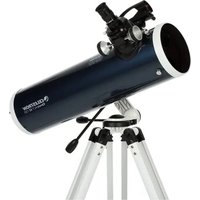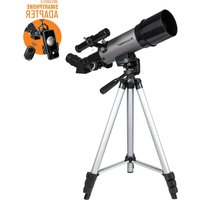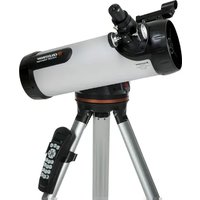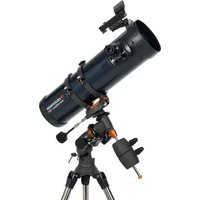
AstroMaster 130EQ-MD - Telescope CELESTRON - Free user manual and instructions
Find the device manual for free AstroMaster 130EQ-MD CELESTRON in PDF.


User questions about AstroMaster 130EQ-MD CELESTRON
0 question about this device. Answer the ones you know or ask your own.
Ask a new question about this device
Download the instructions for your Telescope in PDF format for free! Find your manual AstroMaster 130EQ-MD - CELESTRON and take your electronic device back in hand. On this page are published all the documents necessary for the use of your device. AstroMaster 130EQ-MD by CELESTRON.
USER MANUAL AstroMaster 130EQ-MD CELESTRON
natural_image
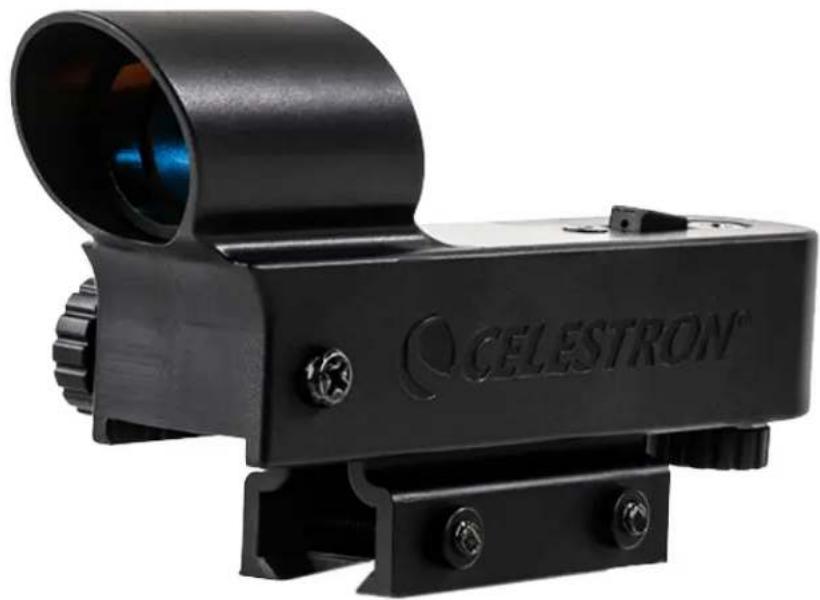
Black CELESTRON® optical targeting device with lens and mounting bracket (no text or symbols on body)STARPOINTER™
Red-dot Finderscope
INSTRUCTION MANUAL
MODEL #51630
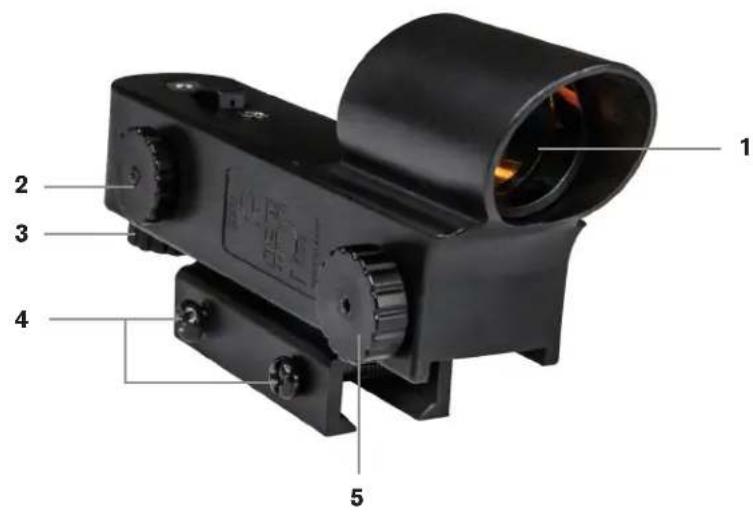
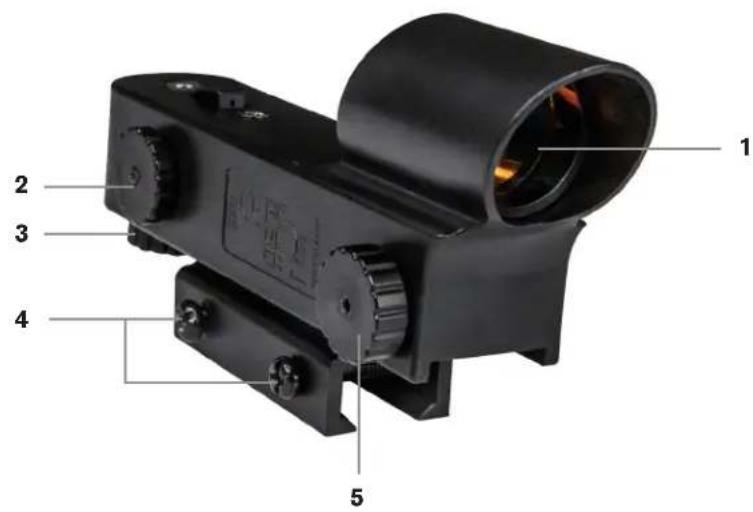
PARTS LIST
text_image
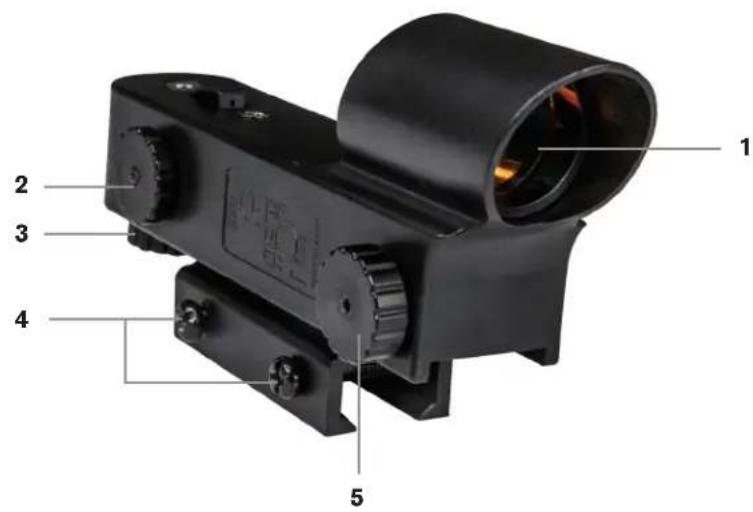
1 2 3 4 5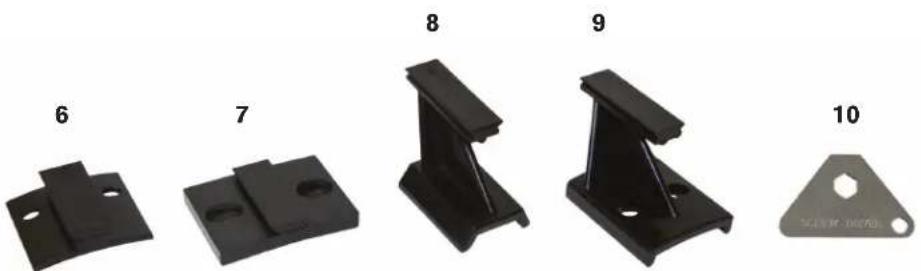
natural_image
Five black metal bracket components labeled 6 to 10, displayed in a row (no text or symbols on parts)- Front lens
- Power/brightness knob
- Altitude adjustment knob
- Mounting screws
-
Azimuth adjustment knob
-
Small Schmidt-Cassegrain bracket
- Large Schmidt-Cassegrain bracket
- Mounting bracket for small telescopes with dovetails
- Mounting bracket for small telescopes with screw holes
- Metal pocket multi-tool
INSTALLING THE STARPOINTER FINDERSCOPE
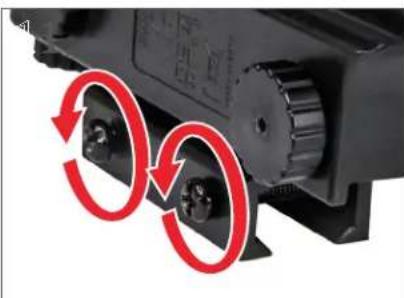
natural_image
Close-up of a mechanical component with red circular arrows indicating rotational motion (no text or symbols)- Loosen the two mounting screws near the bottom of the finderscope.
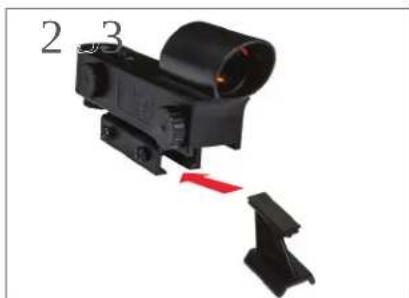
natural_image
Close-up of a black tactical scope with red adjustment points, labeled 2 and 3 (no text or symbols on the object itself)- Choose the correct bracket for your telescope, and attach it to the base of the finder.
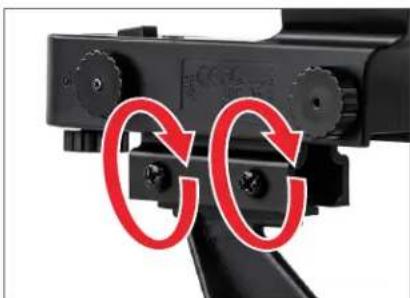
natural_image
Close-up of a black mechanical device with red circular annotations highlighting the 'CC' (no text or symbols on the device itself)- Tighten the screws to secure the bracket in place.
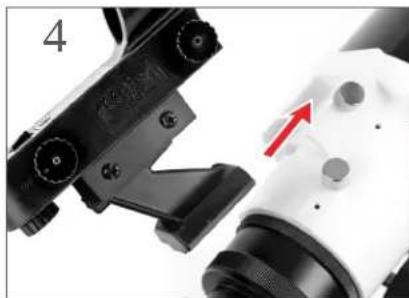
natural_image
Close-up of a mechanical device with a red arrow pointing to a component (no visible text or symbols)- If your bracket is the dovetail type, loosen the setscrew on the telescope mounting bracket, slide the base of the finderscope into the bracket and tighten the setscrew.
01
natural_image
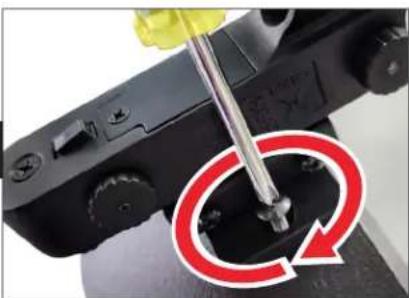
Close-up of a screwdriver inserted into a black plastic component with a red circular arrow indicating rotation (no text or symbols)If your bracket is the screw-on type, remove the two Phillips-head screws or thumb screws from the telescope. Place the finder over the screw holes or posts. Tighten the screws or thumb screws down to secure the finder in place.
natural_image
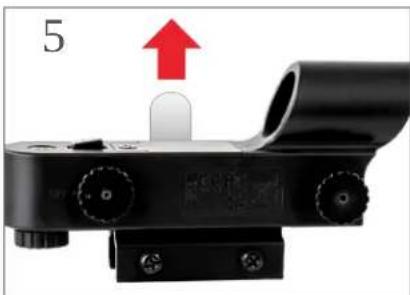
Close-up of a black optical device with a red arrow pointing to a component, labeled '5' (no text or symbols on the device itself)- A clear plastic tab prevents the battery from discharging. Pull out the tab before using your finderscope.

* SOLAR WARNING! Never attempt to view the Sun through this finderscope or any telescope without a solar filter!
ALIGNING THE STARPOINTER FINDERSCOPE
The finderscope is one of the most important parts of your telescope. It helps you locate objects and center them in the eyepiece. The first time you assemble your telescope, you'll need to align the finderscope with the telescope's main optics. It's best to do this during the day* using land-based targets.

* SOLAR WARNING! Never attempt to view the Sun through this finderscope or any telescope without a solar filter.
NOTE: Be sure to turn off the StarPointer finderscope when not in use to conserve battery power. New batteries can be purchased online or at watch/electronic stores.
text_image
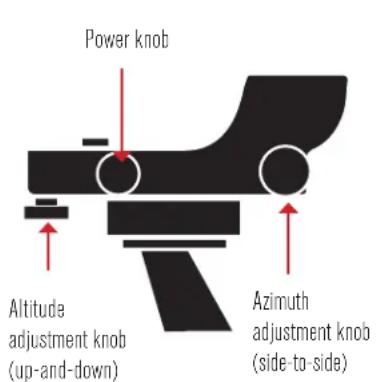
Power knob Altitude adjustment knob (up-and-down) Azimuth adjustment knob (side-to-side)
natural_image
Silhouette of a telescope with a dotted light source and an octagonal target (no text or symbols)CHOOSE A TARGET
- Take the telescope outside during the day and turn on the finderscope using the power knob. Find an easily recognizable object, such as a streetlight, car license plate, or sign. The object should be as far away as possible but at least a quarter mile away.
text_image
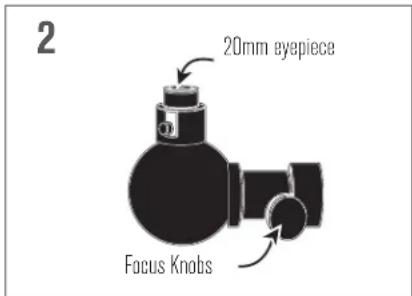
2 20mm eyepiece Focus KnobsCENTER THE TARGET IN THE EYEPIECE
- Look through the telescope using your lowest power eyepiece. Move the telescope until your chosen object lies in the center of the view. If the image is blurry, turn the focus knob until it comes into sharp focus.
natural_image
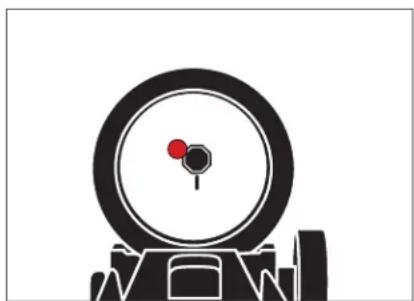
Silhouette of a target with a red dot on the eye and a black circular target (no text or symbols)LOOK THROUGH THE FINDERSCOPE
- With the object precisely centered in the eyepiece, look through the finderscope's optical window and locate the red dot.
natural_image
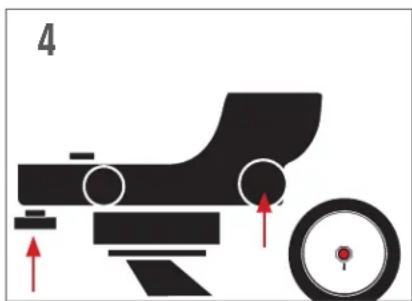
Diagram of a mechanical device with a wheel and directional arrows indicating motion (no text or symbols)ADJUST THE FINDERSCOPE
- Without moving the telescope, use the finderscope's two adjustment knobs to move it around until the red dot appears over the object you are observing in the eyepiece.

natural_image
Silhouette of a telescope on a tripod with a star and dotted lines indicating light direction (no text or symbols)YOUR FINDERSCOPE IS NOW ALIGNED!
- It should not require realignment unless it is bumped or dropped. If you want to test the alignment, point the red dot at another land-based target. Then verify the object is in the center of the eyepiece's field of view.
ACCESSING THE FINDERSCOPE BATTERY
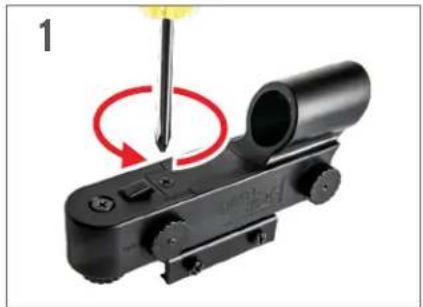
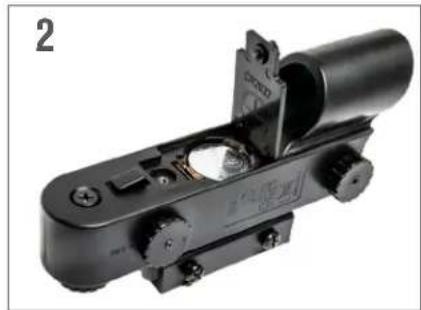
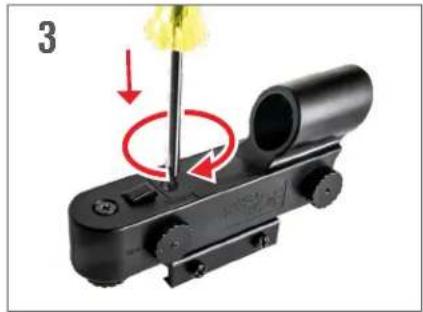
The StarPointer finderscope uses a long-life 3V lithium battery (#CR2032), which is located on the StarPointer's top surface. If you plan on not using your telescope for an extended period, we recommend removing the battery for storage. To remove or replace the battery, follow these instructions:
natural_image
Close-up of a black mechanical device with a screwdriver inserted, showing a red circular motion indicator (no text or symbols)- Using a Phillips-head screwdriver, loosen the battery cover screw and flip the cover open.
natural_image
Close-up of a mechanical clamp or lever device with no visible text or symbols- If you are replacing the battery, install the new one with the (+) terminal facing outward.
natural_image
Close-up of a mechanical device with a yellow tool inserted, showing a red circular motion indicator (no text or symbols)- Place the cover back onto the finderscope and retighten the screw with the Phillipshead screwdriver.
NOTE: You will need a small Philips-head screwdriver to replace the StarPointer finderscope's battery
| ! BATTERY WARNING | ||
| ! | · INGESTION HAZARD: This product contains a button cell or coin battery. · DEATH or serious injury can occur if ingested. · A swallowed button cell or coin battery can cause Internal Chemical Burns in as little as 2 hours. · KEEP new and used batteries OUT OF REACH OF CHILDREN · SEEK IMMEDIATE MEDICAL ATTENTION if a battery is suspected to be swallowed or inserted inside any part of the body. | |
SAFETY INSTRUCTIONS
- There is a risk of explosion if the battery is replaced with an incorrect type.
- The included battery is not rechargeable.
- Only use the battery as originally intended to avoid a short circuit. Connecting the conductive material directly to the battery's positive and negative sides will cause a short circuit.
- Do not use a damaged battery.
- Do not store the battery in an extremely cold or hot environment. Doing so can reduce battery life.
- When replacing the battery, refer to the instruction manual and ensure the positive and negative sides are oriented correctly.
- Do not put the battery in fire.
- Dispose of the battery according to local regulations.
FCC NOTICE: This device complies with Part 15 of the FCC Rules. Operation is subject to the following two conditions: (1) This device may not cause harmful interference, and (2) this device must accept any interference received, including interference that may cause undesired operation.





Separate waste collection. Check
your local municipal guidelines,
©2024 Celestron. Celestron and Symbol are trademarks of Celestron, LLC. • All rights reserved. Celestron.com
US: 2835 Columbia Street, Torrance, CA 90503 USA
UK: Unit 2 Transigo, Gables Way, Thatcham RG19 4JZ, United Kingdom
This product is designed and intended for use by those 14 years of age and older.
Product design and specifications are subject to change without prior notification.
Made in China
www.celestron.com/pages/warranty

08-24
natural_image
Black CELESTRON® optical targeting device with lens and mounting bracket (no text or symbols on body)STARPOINTER™
Red-dot Finderscope
MODE D'EMPLOI
MODEL #51630
LISTE DES PIÈCES
text_image
1 2 3 4 5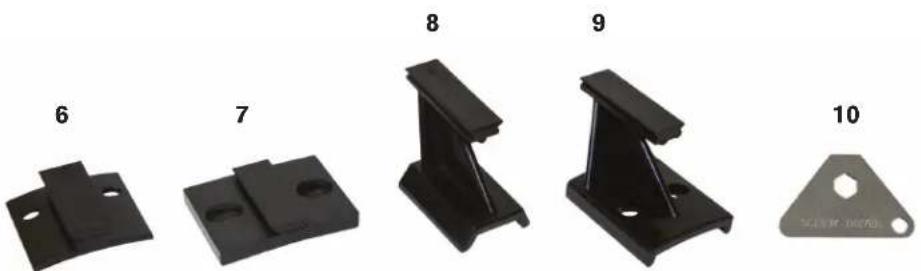
natural_image
Five black metal bracket components labeled 6 to 10, displayed in a row (no text or symbols on parts)natural_image
Close-up of a mechanical component with red circular arrows indicating rotational motion (no text or symbols)natural_image
Close-up of a black tactical scope with red adjustment points, no visible text or symbolsnatural_image
Close-up of a black mechanical device with red circular annotations highlighting the 'CC' (no text or symbols on the device itself)natural_image
Close-up of a mechanical device with a red arrow pointing to a component (no visible text or symbols)natural_image
Close-up of a screwdriver inserted into a black plastic component with a red circular arrow indicating rotation (no text or symbols)natural_image
Close-up of a black optical device with a red arrow pointing to a component, no visible text or symbols.natural_image
Silhouette of a telescope with an octagonal target, shown against a plain background (no text or symbols)CHOISIR UNE CIBLE
natural_image
Silhouette of a camera with a red lens and black aperture, mounted on a stand (no text or symbols)REGARDER DANS LE CHERCHEUR
natural_image
Diagram of a mechanical device with a wheel and arrow indicators (no text or symbols)AJUSTER LE CHERCHEUR
natural_image
Silhouette of a telescope on a tripod with a star and dotted line indicating direction (no text or symbols)VÔTRE CHERCHEUR EST MAINTENANT ALIGNÉ!
natural_image
Close-up of a black mechanical device with a screwdriver inserted, showing a red circular motion indicator (no text or symbols)natural_image
Close-up of a black mechanical device with adjustment knobs and a cylindrical component (no visible text or symbols)natural_image
Close-up of a black mechanical device with a yellow tool inserted, showing a red circular motion indicator (no text or symbols)Separate waste collection. Check your local municipal guidelines.
US: 2835 Columbia Street, Torrance, CA 90503 USA
UK: Unit 2 Transigo, Gables Way, Thatcham RG19 4JZ, United Kingdom
natural_image
Black CELESTRON® optical targeting device with lens and mounting bracket (no text or symbols on body)STARPOINTER™
Red-dot Finderscope
BEDIENUNGSANLEITUNG
MODEL #51630
TEILELISTE
text_image
1 2 3 4 5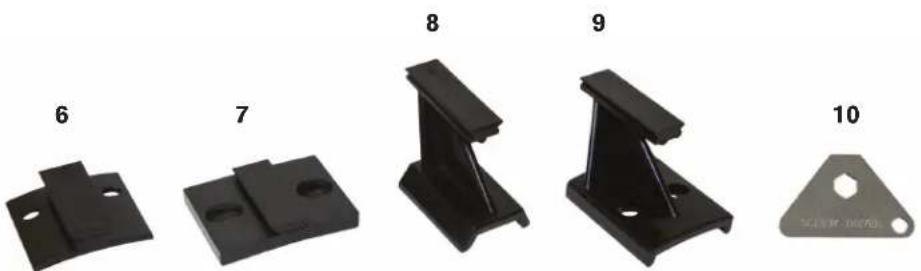
natural_image
Five black metal bracket components labeled 6 to 10, displayed in a row (no text or symbols on parts)natural_image
Close-up of a mechanical component with red circular arrows indicating rotational motion (no text or symbols)natural_image
Close-up of a black tactical scope with red adjustment points, no visible text or symbolsnatural_image
Close-up of a black mechanical device with red circular annotations highlighting the 'CC' (no text or symbols on the device itself)natural_image
Close-up of a mechanical device with a red arrow pointing to a component, no visible text or symbolsnatural_image
Close-up of a black mechanical device with a red circular arrow indicating rotation or cycle (no text or symbols visible)natural_image
Close-up of a black optical device with a red upward arrow and label '5' (no readable text or symbols beyond the number)natural_image
Silhouette of a telescope with an optical lens and a hexagonal target, labeled '1' (no text or symbols on the diagram itself)WÄHLEN SIE EIN ZIEL
natural_image
Silhouette of a camera with a red lens and targeting scope (no text or symbols)DURCH DAS SUCHERFERNROHR SCHAUEN
natural_image
Diagram of a mechanical device with a wheel and directional arrows indicating motion (no text or symbols)natural_image
Silhouette of a telescope on a tripod with a star and dotted lines indicating light direction (no text or symbols)IHR SUCHERFERNROHR IST JETZT AUSGERICHTET!
natural_image
Close-up of a black mechanical device with a screwdriver inserted, showing a red circular motion indicator (no text or symbols)natural_image
Close-up of a black mechanical device with visible internal components and mounting holes (no text or symbols)natural_image
Close-up of a mechanical device with a yellow flower and red circular motion indicator (no text or symbols)Separate waste collection. Check
your local municipal guidelines.
US: 2835 Columbia Street, Torrance, CA 90503 USA
UK: Unit 2 Transigo, Gables Way, Thatcham RG19 4JZ, United Kingdom
natural_image
Black CELESTRON® optical targeting device with lens and mounting bracket (no text or symbols on body)STARPOINTER™
Red-dot Finderscope
natural_image
Five black metal bracket components labeled 6 to 10, displayed in a row (no text or symbols on parts)natural_image
Close-up of a mechanical component with red circular arrows indicating rotational motion (no text or symbols)natural_image
Close-up of a black tactical scope with red adjustment points, no visible text or symbolsnatural_image
Close-up of a black mechanical device with red circular annotations highlighting the 'CC' (no text or symbols on the device itself)natural_image
Close-up of a mechanical device with a red arrow pointing to a component, no visible text or symbolsnatural_image
Close-up of a screwdriver inserted into a black mechanical component with a red circular arrow indicating rotation (no text or symbols)natural_image
Close-up of a black optical device with a red arrow pointing to a component, labeled '5' (no text or symbols on the device itself)natural_image
Silhouette of a telescope with an octagonal target, shown against a plain background (no text or symbols)SCEGLIERE UN OGGETTO DA OSSERVARE
natural_image
Silhouette of a camera with a red lens and targeting scope (no text or symbols)GUARDARE ATTRAVERSO IL CERCATORE
natural_image
Diagram of a mechanical device with a wheel and directional arrows indicating motion (no text or symbols)REGOLARE IL CERCATORE
natural_image
Silhouette of a telescope on a tripod with a star and dotted lines indicating light rays (no text or symbols)natural_image
Close-up of a black mechanical device with a screwdriver inserted, showing a red circular motion indicator (no text or symbols)natural_image
Close-up of a black mechanical device with a cylindrical component and mounting holes (no visible text or symbols)natural_image
Close-up of a black mechanical device with a yellow tool inserted, showing a red circular motion indicator (no text or symbols)US: 2835 Columbia Street, Torrance, CA 90503 USA
natural_image
Black CELESTRON® optical targeting device with lens and mounting bracket (no text or symbols on body)STARPOINTER™
Red-dot Finderscope
natural_image
Five black metal bracket components labeled 6 to 10, displayed in a row (no text or symbols on parts)natural_image
Close-up of a mechanical component with red circular arrows indicating rotational motion (no text or symbols)natural_image
Close-up of a black tactical scope with red adjustment points, no visible text or symbolsnatural_image
Close-up of a black mechanical device with red circular annotations highlighting the 'CC' (no text or symbols on the device itself)natural_image
Close-up of a mechanical device with a red arrow pointing to a component (no visible text or symbols)natural_image
Close-up of a screwdriver working on a black mechanical component with a red circular arrow indicating rotation (no text or symbols)natural_image
Close-up of a black optical device with a red arrow pointing to a component, labeled '5' (no text or symbols on the device itself)natural_image
Silhouette of a telescope with an octagonal target, shown against a plain background (no text or symbols)ELEGIR UN OBJETO
natural_image
Silhouette of a target with a red dot on the eye and a black outline, no text or symbols present.natural_image
Diagram of a mechanical device with a wheel and directional arrows indicating motion (no text or symbols)natural_image
Silhouette of a telescope on a tripod with a star and dotted lines indicating light direction (no text or symbols)natural_image
Close-up of a black mechanical device with a screwdriver inserted, showing a red circular motion indicator (no text or symbols)natural_image
Close-up of a black mechanical device with internal components and mounting holes (no visible text or symbols)natural_image
Close-up of a precision optical device with a screwdriver inserted, showing red motion arrows (no text or symbols)Separate waste collection. Check
your local municipal guidelines
US: 2835 Columbia Street, Torrance, CA 90503 USA
UK: Unit 2 Transigo, Gables Way, Thatcham RG19 4JZ, United Kingdom