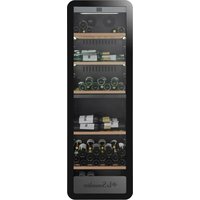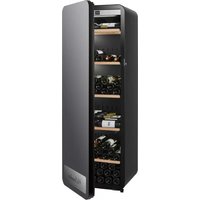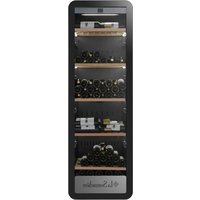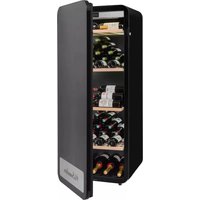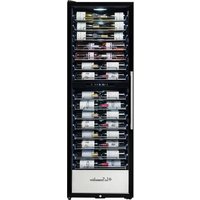
PRO160DZN - Wine cellar LA SOMMELIERE - Free user manual and instructions
Find the device manual for free PRO160DZN LA SOMMELIERE in PDF.


User questions about PRO160DZN LA SOMMELIERE
0 question about this device. Answer the ones you know or ask your own.
Ask a new question about this device
Download the instructions for your Wine cellar in PDF format for free! Find your manual PRO160DZN - LA SOMMELIERE and take your electronic device back in hand. On this page are published all the documents necessary for the use of your device. PRO160DZN by LA SOMMELIERE.
USER MANUAL PRO160DZN LA SOMMELIERE
natural_image
Three black-framed refrigerator units with wine rack panels, each labeled 'La Somnelaire' (no additional text or symbols visible)Modèles / models / Modelle PRO110N PRO160N PRO160DZN
FR - MANUEL D'UTILISATION
R600a
PRO160DZN
natural_image
Pure line drawing of six identical abstract shapes with wavy top and bottom edges, no text or symbols present.1. GENERAL SAFETY INSTRUCTIONS
For your own safety and for the proper utilization of the appliance, read this manual carefully, including the warnings and recommendations, before installing the appliance and using it for the first time. In order to avoid damage to the appliance and/or personal injury, persons using the appliance should be fully familiar with its operation and safety functions. Keep these recommendations close to the appliance, for future reference, and ensure that the document is transferred with the appliance if it is sold or in the case of moving. This will ensure optimum operation of the appliance.
To avoid any risk of injury, keep this manual. The manufacturer declines any liability whatsoever in the case of operating/handling errors concerning the appliance.
Safety of children and other vulnerable persons
This appliance may be used by children aged 8 years and above, and by persons who are physically, sensorially or mentally handicapped, or who have not learned to use the appliance, providing they are supervised by a person familiar with the appliance and who is aware of the risks involved. Children should not be allowed to play with the appliance. User cleaning and servicing operations should not be carried out by children, unless they are more than 8 years old and are supervised.
- Keep all packaging out of the reach of children, as there is a risk
- of suffocation.
- If you decide to scrap the appliance, disconnect it from the wall socket, cut the connection cable (as close to the appliance as possible) and remove the door, in order to prevent children playing with it, with the resulting risk of electric shock or being trapped inside.
If an appliance with a magnetic door seal is being replaced by another appliance with a latch on the door or on the seal, ensure that the latch is disabled before selling or scrapping the old appliance. This will prevent the appliance from being transformed into a trap for children. - Keep the appliance and its power cable out of reach of children less than 8 years old.
NOTE: children between 3 and 8 can load and unload the appliance.
General safety
CAUTION — Never store inflammable substances, such as aerosols, inside the appliance, as they could leak or release fluids.
CAUTION — A damaged power cable should be immediately replaced by the manufacturer or by a qualified retailer, in order to avoid any risk of electric shock.
CAUTION — Keep the ventilation openings well open and ensure that air can circulate, especially if the appliance is recessed into a wall.
CAUTION — Do not damage the refrigerating circuit.
CAUTION — Do not use electrical appliances inside the compartment unless they are tolerated by the manufacturer.
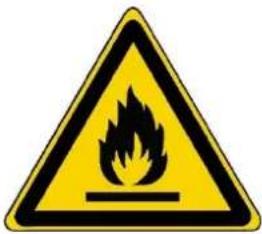
CAUTION — The refrigerating and insulating systems contain inflammable gases. When the appliance is scrapped, it should be deposited at an accredited collection center. Do not expose the appliance to fire.
Refrigerating fluid
The refrigerating circuit in the appliance uses refrigerating isobutane (R600a), which is a highly inflammable natural gas and is therefore dangerous for the environment. When transporting installing the appliance, ensure that no element of the refrigerating circuit is damaged. The refrigerating fluid (R600a) is inflammable.
Caution: Fire rise
If the refrigerating circuit is damaged:
- Avoid open flames or any source of combustions
- Ensure that the room in which the appliance is installed is well ventilated. It is dangerous to change the specification of the appliance in any way whatsoever.
Damage to the power cable may cause a short circuit and/or electric shock.
Electrical safety
■ We decline any liability in respect of incidents caused by poor electrical installation.
- Do not extend the power cable. Do not use an extension cable, or adapter, or multi-way socket.
- Check that the wall socket is not damaged. A wall socket in poor condition may cause the appliance to overheat and explode.
- Check that the wall socket used for the appliance is properly accessible.
- Never pull on the main power cable.
- Ensure that the appliance is always electrically earthed.
- If the wall socket is loose, do not connect the cable, as there is a risk of electric shock or fire.
- Do not use the appliance if the interior lighting cover is not installed.
- Disconnect the appliance before replacing the lighting bulb.
- The appliance operates on a single phase 220\~240 V / 50 Hz power supply.
- The appliance must be connected to an earthed wall socket, in accordance with applicable recommendations.
- Do not attempt to replace a damaged power cable, contact your after-sales service.
- The power socket must be easily accessible but out of reach of children.
- In case of doubt, contact your installation technician.
Daily utilization
• This appliance is intended for wine storage only. It is recommended to set the wine cellar to 12 °C.
- Do not store inflammable substances or fluids inside the appliance. This would create a risk of explosion.
- Do not operate other electrical equipment inside the appliance (mixers, whirling rotor for ice cream, etc.).
- When disconnecting the appliance, grip the plug firmly and do not pull on the cable.
- Do not expose the appliance to direct sunlight.
- Keep the appliance away from candles, luminaries and open flames, in order to avoid fire risk.
- The appliance is heavy. Be careful when moving it.
If your appliance is equipped with castors, remember that these are only designed to facilitate minor movements. Do not move the appliance over long distances.
Do not lean or climb on the appliance or its elements.
In order to avoid falling objects and to prevent damage to the appliance, do not overload the compartments of the appliance.
Caution! Cleaning and servicing
Before carrying out servicing, switch off the power supply and disconnect the appliance.
When cleaning the appliance, do not use metal objects, steam systems, volatile fluids, organic solvents or abrasive substances.
Do not use sharp or pointed objects to remove ice. Use a plastic scraper.
Important information concerning installation!
- This refrigerating appliance is not intended to be used as a built-in appliance
• To ensure proper electrical connection, follow the recommendations given in the present manual. - Unpack the appliance and visually check that it is not damaged. Do not connect a damaged appliance. Inform your retailer or point of sale of any damage. In such a case, keep the packaging. It is recommended that the appliance be allowed to settle for at least 4 hours before connecting the electrical power supply, so that the compressor fluid feed is correct.
- Proper air circulation is necessary to avoid overheating. To ensure sufficient ventilation, observe the installation recommendations provided.
In order to avoid fire risk, wherever possible, ensure that the appliance is not in contact with walls or with any hot element (compressor, condenser). Observe the installation recommendations.
The appliance should not be placed close to radiators or cooking hot plates or gas rings.
Check that electrical sockets remain accessible when the appliance is installed.
- When positioning the appliance, ensure the supply cord is not trapped or damaged.
Power saving
To limit the electricity consumption of your appliance:
- Install it in an appropriate place (see "Installing your appliance")
- Leave the doors open as little time as possible.
- To ensure that the appliance operates properly, clean the condenser regularly (see “Routine servicing of your appliance”).
- Regularly inspect the door seals and ensure that they are still closing properly. If this is not the case, contact your after-sales service.
Recommendation combination:
The following combination of shelves is recommended for energy to be used as efficiently as possible by the refrigeration unit.
Trouble shooting and spareparts
Any electrical work should be carried out by a qualified and skilled technician.
The appliance should be repaired by an accredited repair center, using only manufacturer's original spare parts.
Aesthetic and functional spare parts in accordance with REGULATION (EU) 2019/2019 (Annex II, point 3.), are made available to professional repairers and end users for a period of 7 years or 10 years (List in Annex II, point 3.a.1 and 3.a.2) from the time the last unit of the model is placed on the market. The list of spare parts and the procedure for ordering them (professional access / special access) are available on the following website: www.interfroidservices.fr or by post at the following address: FRIO - Interfroid Services, 143 Bd Pierre Lefaucheux - 72230 ARNAGE For other functional spare parts not specified in EU regulation 2019/2019, they are available for a period of 10 years. The manufacturer's warranty is 1 year for functional parts.
R600a
Safety instructions

Caution: Do not obstruct the ventilation grills on the appliance.

Caution: Do not store explosive substances, such as aerosol cans containing an inflammable propellant, in the appliance.

Caution: Do not damage the refrigerating circuit in the appliance.

Caution: The refrigerating units use isobutane (R600a), and should not be placed close to ignition sources (for example, electrical contacts that are exposed or open contacts that could be closed by the refrigerating fluid in the event of a leak). The refrigerating fluid type is specified on the power cabinet identification plate.

Caution: Do not use electrical equipment in the compartments of the appliance, unless they are of the type recommended by the manufacturer.
This appliance meets the requirements of all applicable European directives and their amendments.


2. TECHNICAL DATA
Below is an example of the nameplate:
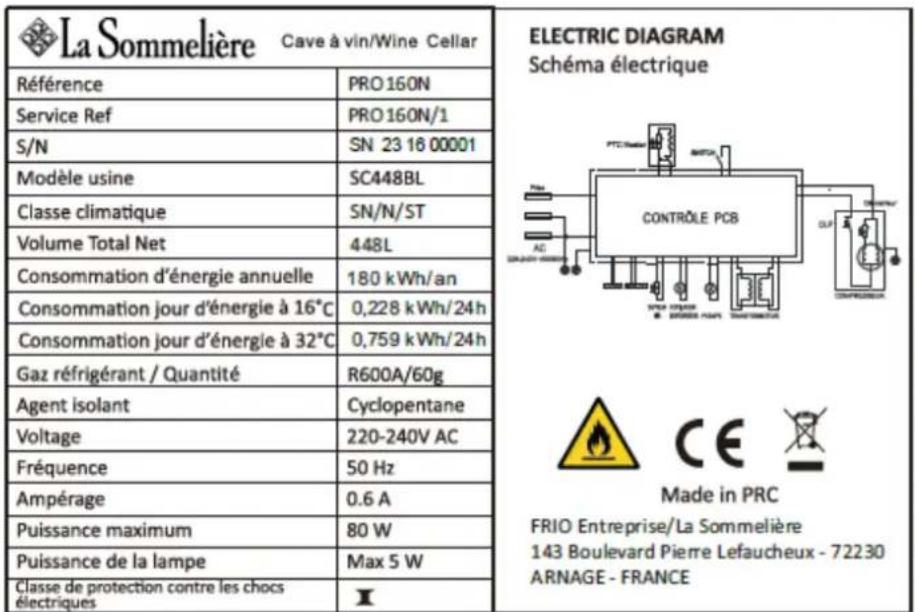
The nameplate attached to the inside or rear of the appliance (depending on the model) includes the entire information specific to your appliance.
We recommend that you make a note of its serial number in this booklet prior to installation, so that you can refer to it later (technical work, request for assistance, etc.).

natural_image
Empty rectangular frame with no text, symbols, or content insideOnce the appliance is installed and loaded, access to it is not so easy.
CAUTION: no assistance can be provided without this information.
- PRODUCT DESCRIPTION
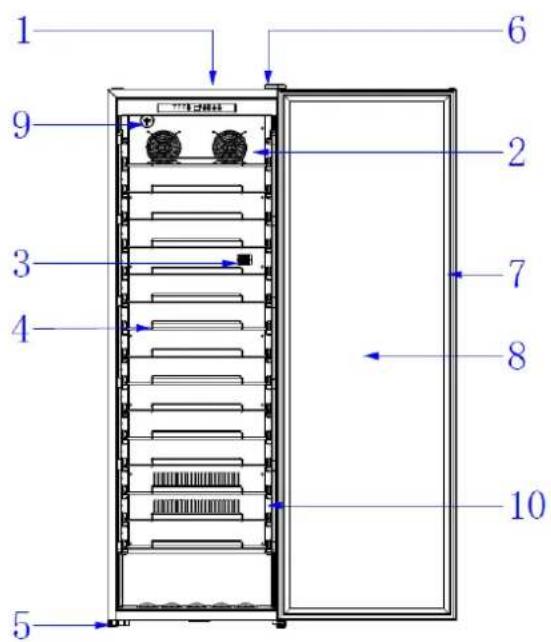
PRO110N and PRO160N
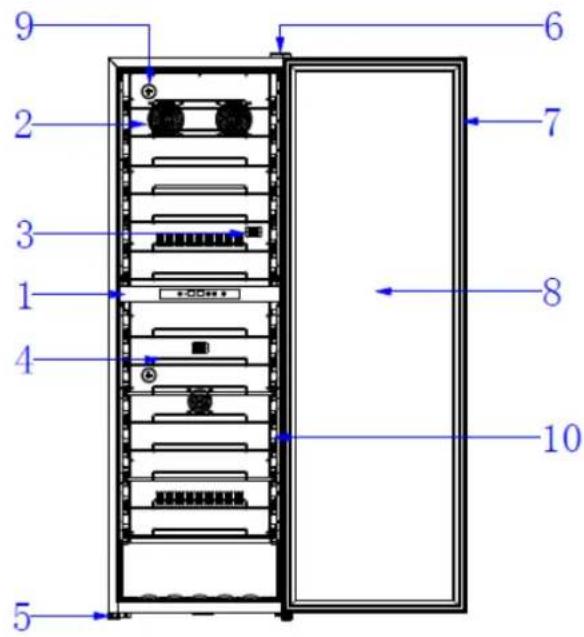
PRO160DZN
| 1 | Control board |
| 2 | Inside fan |
| 3 | Sensor |
| 4 | Wire shelf |
| 5 | Adjustable feet |
| 6 | Hinge |
| 7 | Door seal |
| 8 | Glass door with anti-UV treatment |
| 9 | Carbon filter |
| 10 | Light LED on each side |
To find out more about your product, consult the online EPREL database. As defined in Commission Delegated Regulation (EU) 2019/2016, all information relating to this refrigeration appliance is available on the EPREL Base (European Product Database for energy labeling). This database enables you to consult the information and technical documentation of your refrigeration appliance. You can access the EPREL Database by scanning the QR code on the energy label of your appliance or by going directly to: www.ec.europa.eu and searching the reference of your refrigeration appliance.
Announced capacity
The advertised capacity is the maximum capacity calculated with a defined number of shelves which varies depending on the model. This standard is calculated with 75cl traditional Bordeaux type bottles. Any other type of bottle format as well as the addition of shelves will considerably reduce the storage capacity.
4. INSTALLATION INSTRUCTIONS
When selecting a location for your appliance you should make sure the floor is flat and firm, and the room is well ventilated. This device is suitable for operation in rooms with a very specific ambient temperature, this climatic class is indicated on the nameplate. The ambient temperature affects the interior temperature and humidity of your cellar. For optimal operation, your cellar settings are made for ambient temperatures of 23^ C to 25^ C.
Before using this appliance
- Remove the exterior and interior packing.
Before connecting the appliance to the power source, let it stand upright for approximately 24 hours. This will reduce the possibility of a malfunction in the cooling system from handling during transportation.
- Clean the interior surface with lukewarm water using a soft cloth.
- When disposing your appliance, please choose an authorized disposal site.
- Place your wine cooler on a floor that is strong enough to support it when it is fully loaded. To level your Wine cooler, adjust the front leveling leg at the bottom of the wine cooler.
- Adequate ventilation is required, do not block the front air outlet.
- This wine cellar is designed for free-standing
- Connect the cellar to a single socket, leaving a 30-mm gap between the back of the cellar and the wall. Be careful to support it, so that your wine cellar is perfectly level (use of a spirit level is recommended). This will prevent any movement due to instability, causing noise and vibration, and will ensure that the door seals perfectly.
- This appliance is intended to be used exclusively for the storage of wine.
- This appliance is using flammability refrigerant. So never damage the cooling pipe work during the transportation.
Caution
- Store wine in sealed bottles.
- Do not overload the cabinet.
- Do not open the door unless necessary.
- Do not cover shelves with aluminum foil or any other shelf material which may prevent air circulation.
- Should the wine cooler be left empty for long periods it is suggested that the appliance is unplugged, and after careful cleaning, leave the door ajar to allow air to circulate inside the cabinet in order to avoid possible condensation, mold or odors forming.
CAUTION: please keep the appliance away from substance, which can cause ignition.
Ambient temperature ranges and climate class of the device:
This appliance is indicated for operation in rooms with a very specific ambient temperature, this climatic class is indicated on the rating plate. The ambient temperature affects the interior temperature, the humidity of your cellar, and the operation of the compressor. Your device can operate in an ambient temperature between 5°C and 20°C. Outside of these limits, your device cannot guarantee normal operation and may cause breakdowns. For optimal operation and to achieve the desired performance, the device has been designed to operate at an ambient temperature between 23°C and 25°C. An ambient temperature above or below 23-25°C may affect the performance of the appliance in reaching the desired set temperature.
| CLASS | SYMBOL | AMBIENT TEMPERATURES RANGE (°C) |
| Extended temperate | SN | From +10 to +32 |
| Temperate | N | From +16 to +32 |
| Subtropical | ST | From +16 to +38 |
| Tropical | T | From +16 to +43 |
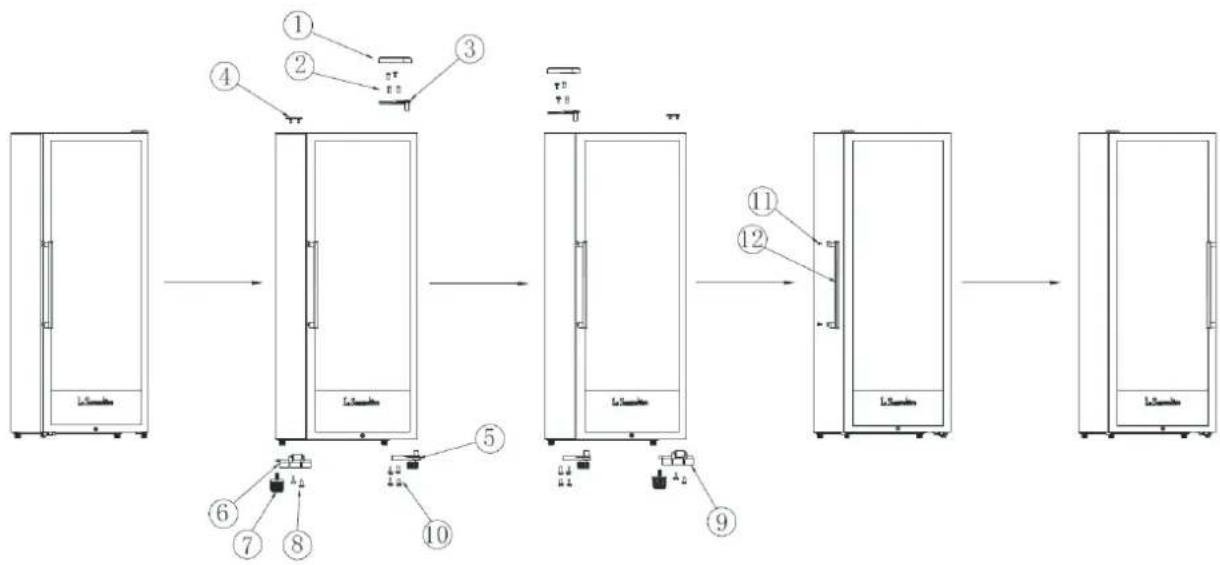
Reverse the direction of the door:
The door of this appliance is reversible. Adapt the opening direction of the door according to the chosen location:
flowchart
graph LR
    A["Raw Material"] --> B["Step 1: Internal Control"]
    B --> C["Step 2: Internal Control"]
    C --> D["Step 3: Internal Control"]
    D --> E["Step 4: Internal Control"]
    E --> F["Step 5: Internal Control"]
    F --> G["Step 6: Internal Control with Component 6"]
    F --> H["Step 7: Internal Control with Component 7"]
    F --> I["Step 8: Internal Control with Component 8"]
    F --> J["Step 9: Internal Control with Component 9"]
    G --> K["Step 10: Internal Control with Component 10"]
    K --> L["Step 11: Internal Control with Component 11"]
    L --> M["Step 12: Internal Control with Component 12"]
- Upper hinge cover
- Top hinge screws
- Top hinge
- Cover upper part
- Bottom hinge
- Left anti-fall accessory
- Left front adjustable foot
- Anti-fall accessory screw
- Right anti-fall accessory
- Bottom hinge screws
- Screws for the handle
-
Handle
-
Remove the upper hinge cover (1) unscrew the upper hinge screws (2) and remove the door
- Remove the elements of the front left adjustable foot (7) unscrew the screws of the lower hinge and the left anti-fall accessory (5)(6)(8)(10)
- Remove the upper hinge cover, use the lower hinge screws and install on the left side (5).
- Place the right fall arrest accessory (9) on the right side and tighten the left adjustable foot (7) on the right side.
- Place the door on the lower hinge, install the screws (2) in the left hinge and replace the cover of the upper hinge (1) and the cover of the upper part (4)
- Unscrew the handle and place it on the opposite side (12)
5. USE INSTRUCTIONS
➢ Display board for single temperature zone models: PRO110N and PRO160N
The temperature of the device is adjustable between 5°C to 20°C.
The temperature is regulated by a thermostat. Changing the temperature generates higher energy consumption. The appliance assures that temperature is maintained as long as it is in operation and that it is used in normal conditions of use. The temperature inside the appliance and its energy consumption can be influenced by many factors: ambient temperature, exposure to the sun, number of door openings and quantity stored... Slight changes in temperature are perfectly normal.
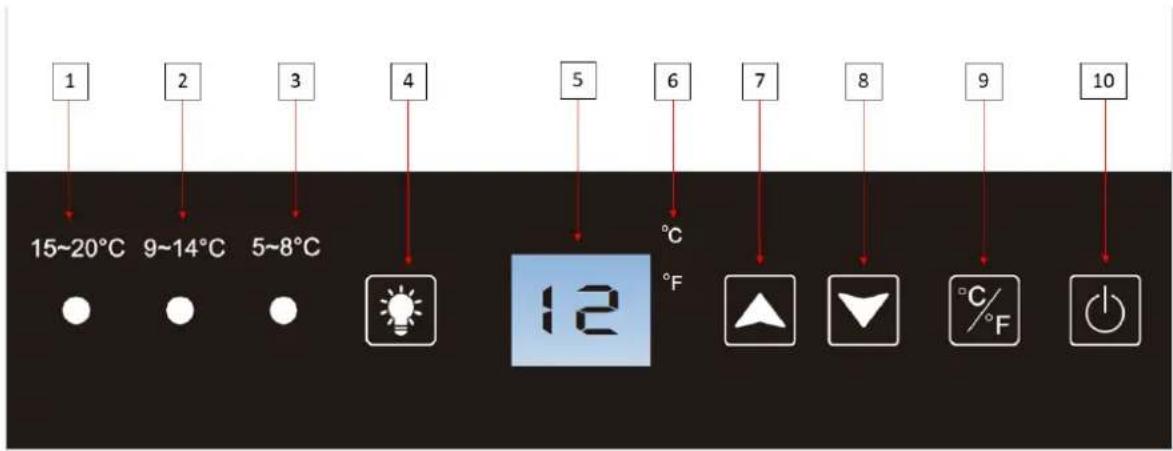
| 1 | Temperature indicator light; if the indicator is on, the setting temperature is between 15 and 20 °C. |
| 2 | Temperature indicator light; if the indicator is on, the setting temperature is between 9 and 14 °C. |
| 3 | Temperature indicator light; if the indicator is on, the setting temperature is between 5 and 8 °C. |
| 4 | Button to choose the lighting mode: door opening mode or permanent |
| 5 | Display of the set temperature. To display the actual temperature, press simultaneously on the temperature adjustment buttons (7) and (8). Temperature actual is displayed. After 10 seconds the cellar returns to the initial mode and indicates automatically set the temperature. |
| 6 | Temperature measurement unit indicator indicated in degrees Celsius by the °C symbol or in Fahrenheit by the °F symbol. |
| 7 | Temperature adjustment knob. Press this button to increase the Temperature one degree Celsius or Fahrenheit until the desired temperature is reached. The cellar temperature is adjustable between 5 °C and 20 °C. |
| 8 | Temperature adjustment knob. Press this button to decrease the Temperature one degree Celsius or Fahrenheit until the desired temperature is reached. The cellar temperature is adjustable between 5 °C and 20 °C. |
| 9 | Button for changing the temperature unit of measurement between Degree Celsius indicated by the symbol "°C" and Fahrenheit indicated by the symbol "F". Press the button for 3 seconds to switch from one unit of measurement to another. |
| 10 | Press this button for 3 seconds to turn the cellar on or off without unplugging it. |
When you plug the device into a power outlet, it automatically displays the set temperature.
To display the actual temperature, simultaneously press the temperature adjustment buttons (7) and (8). The actual temperature is displayed. After 10 seconds the cellar returns to the initial mode and automatically indicates the programmed temperature.
NOTE: for your comfort of use, the cellar fans stop automatically when the door is opened. This process is completely normal, the fans start again once the door is closed.
LIGHTING CONTROL
When the cellar is ON, automatically the ON/OFF light mode is activated. (door opening, light ON and door closed, light OFF). The light button will indicate "P1" mode.
Press the button (4) to adjust the light mode.
-
Press once to activate the permanent light mode. The light button will indicate "P2" mode.
-
Press twice to turn ON again the "P1" mode interior lighting; automatically the ON/OFF light mode is activated. (door opening, light ON and door closed, light OFF)
VACATION MODE
Vacation mode is available for observing certain religious holidays. This mode turns off the displays, interior lighting and audible alarms and prevents them from turning back on. Normal cooling operations will still take place.
To start holiday mode, press the power (10) and light (4) buttons simultaneously for at least 3 seconds. The indicator light will flash four times and confirm that vacation mode is activated. Vacation mode can be stopped by repeating the above process.
Vacation mode will automatically end after 96 hours.
ECO-DEMO MODE
The eco demo mode can be activated by presenting the device at exhibitions, trade fairs or in sales rooms. In eco demo mode, the compressor and all fan motors are off.
By pressing and holding at the same time for at least three seconds (4), (7) and (8), the indicator light will flash five times to confirm the entry and the device will operate in eco-demo mode. The demo-eco mode can be abandoned by repeating the above process, note that the compressor and fan will activate 5 seconds later (for compressor protection reasons).
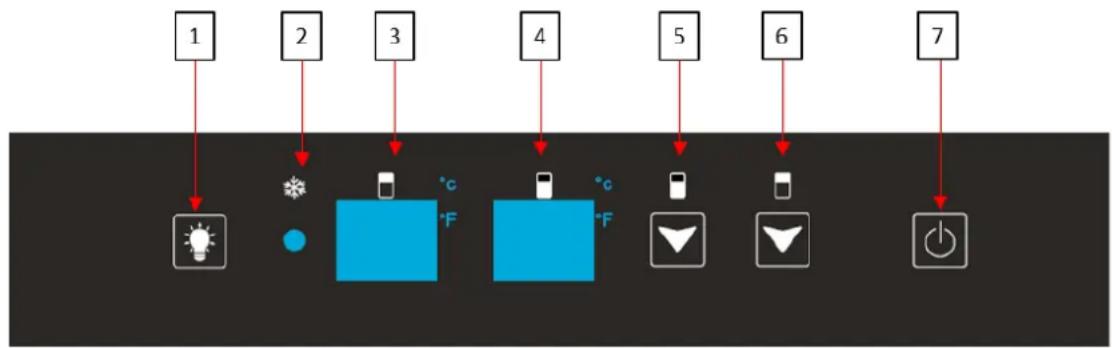
➢ Display board for double temperature zone model: PRO160DZN
The temperature range of this wine cellar is from 5^ C to 12^ C for upper zone and 12-20^ C for lower zone. The set temperature of the upper zone must be lower than that of the lower zone.
flowchart
graph TD
    A["1"] --> B["Light Bulb"]
    C["2"] --> D["Weather Light"]
    E["3"] --> F["Smartphone"]
    G["4"] --> H["Smartphone"]
    I["5"] --> J["Smart Phone"]
    K["6"] --> L["Smart Device"]
    M["7"] --> N["Power Input"]
| 1 | Button to choose the lighting mode: door opening mode or permanent |
| 2 | Indicates whether the winter function is on by an illuminated indicator light |
| 3 | Display of the set temperature in the upper zone of the cellar. To display the actual temperature, simultaneously press the temperature adjustment buttons (5) and (6). The actual temperature is displayed. After 10 seconds the cellar returns to the initial mode and automatically indicates the programmed temperature. |
| 4 | Display of the set temperature in the lower area of the cellar. To display the actual temperature, simultaneously press the temperature adjustment buttons (5) and (6). The actual temperature is displayed. After 10 seconds the cellar returns to the initial mode and automatically indicates the programmed temperature. |
| 5 | Lower compartment temperature adjustment knob (between 12-20 °C). Press this button to decrease the Temperature by one degree Celsius or Fahrenheit until thedesired temperature is obtained. Once the minimum temperature is reached, the temperature returns to the maximum temperature again. Lowering or raising the temperature of the cellar is done with the same command. |
| 6 | Upper compartment temperature adjustment knob (between 5-12 °C). Press this button to decrease the Temperature by one degree Celsius or Fahrenheit until the desired temperature is obtained. Once the minimum temperature is reached, the temperature returns to the maximum temperature again. Lowering or raising the temperature of the cellar is done with the same command. |
| 7 | Button to turn the device on or off without unplugging it. |
When you plug the device into a power outlet, it automatically displays the set temperature.
To display the actual temperature, simultaneously press the temperature adjustment buttons (5) and (6). The actual temperature is displayed. After 10 seconds the cellar returns to the initial mode and automatically indicates the programmed temperature.
Select the unit of measurement in degrees Celsius by the °C symbol or in Fahrenheit by the °F symbol by pressing the button (6) for 3 seconds.
NOTE: for your comfort of use, the cellar fans stop automatically when the door is opened. This process is completely normal, the fans start again once the door is closed.
IMPORTANT: to optimize the operation of the appliance, it is important to set the temperatures respecting a difference of 10^ C maximum between the upper and lower compartment (18 and 8^ C for example).
DOOR OPEN ALARM
To protect your wines, the cellar is equipped with an open door alarm. If the door has been left open for more than 180 seconds, the audible alarm will sound. Close the door to stop the audible alarm.
VACATION MODE
Vacation mode is available for observing certain religious holidays. This mode turns off the displays, interior lighting and audible alarms and prevents them from turning back on. Normal cooling operations will still take place.
To start holiday mode, press the power (7) and light (1) buttons simultaneously for at least 3 seconds. The indicator light will flash four times and confirm that vacation mode is activated. Vacation mode can be stopped by repeating the above process.
Vacation mode will automatically end after 96 hours.
ECO-DEMO MODE
The eco demo mode can be activated by presenting the device at exhibitions, trade fairs or in sales rooms. In eco demo mode, the compressor and all fan motors are off.
By pressing and holding at the same time for at least three seconds (1), (5) and (6), the indicator light will flash five times to confirm the entry and the device will operate in eco-demo mode. The demo-eco mode can be abandoned by repeating the above process, note that the compressor and fan will activate 5 seconds later (for compressor protection reasons).
6. EQUIPMENT
The climate control system
According to advice from specialists, the ideal temperature for storing wine is around 12^ C, within a bracket of 10 to 14^ C. Do not confuse this with service temperature, which varies between 5 and 18^ C, depending on the specific nature of the wine.
It is especially important to avoid sudden changes in temperature. Designed by specialists for oenophiles, this appliance, unlike a simple refrigerator, takes into account the sensitivity of grand cru wines to sudden variations in temperature by ensuring the close control of a constant average temperature.
The anti-vibration system
The refrigeration compressor is equipped with special dampers (silent-blocks) and the inner space is insulated from the body by a thick layer of polyurethane foam. These characteristics prevent the transmission of vibration to your wines.
The anti-UV system
Light accelerates the ageing of wine. In our solid door cellars, your wines are naturally protected, on condition, of course, that the door is not opened too often. This glass-door model has been specially treated and filters out harmful ultraviolet rays, thus ensuring your wines are perfectly shielded.
Defrosting
Your appliance is equipped with an automatic defrost cycle. When a cooling cycle finishes, the appliance's refrigerated surfaces are defrosted automatically. The defrost water is channeled into a condensates evaporation tray which is located in the back of the appliance near the compressor. The heat produced by the compressor then evaporates the condensates collected in the tray.
The winter function
The winter function is a frost protection system which enables the cellar to operate in an environment where the temperature is between 5 and 38°C. A sensor located outside the appliance triggers a low power electrical element when the ambient temperature in the room falls to around 8°C in case. This is a low power element to avoid sudden rises in the temperature of the wine and so avoid thermal shocks that are damaging to the preservation of the wine. The kit is intended to raise the cellar's internal temperature even before there is a thermal exchange with the bottles.
Shelves
- To prevent damage to the door seal, ensure that the door is fully open before pulling out the shelves to add or remove bottles.
- For easier access to the contents of the shelves, slide the shelf out approximately one third of the way. The shelves are, however, fitted with a stop to prevent the bottles falling out.
7. LOADING
The maximum recommended loading quantities for bottles are given as guidelines and are indicative only; they provide a quick estimate of the size of the appliance (similar to the capacity of a refrigerator expressed in liters).
They correspond to tests conducted with a standard bottle: the standard “75 cl light Bordeaux” bottle -standards apply the geographical origin of each bottle shape (Bordeaux, Burgundy, Provence, etc.) and a type (traditional, heavy, light, flute, etc.), each with its own diameter and height.
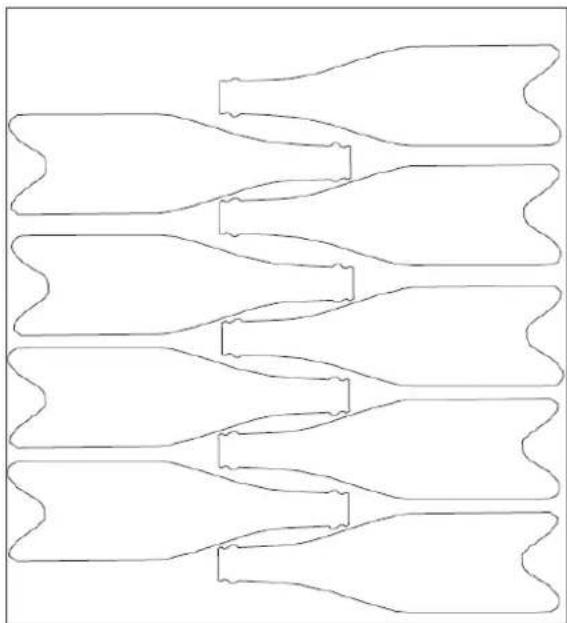
These caves present bottles of wine, thanks to the highlighting of the labels of each wine. You will find below the plan of loading of your bottles on a clay, knowing that it is possible to put up to 9 bottles on a shelf.
Back of the shelf
natural_image
Pure line drawing of six identical abstract shapes with wavy, wavy top/bottom outlines (no text or symbols)Front of the shelf
Examples of serving temperatures
Opinions vary, and the ambient temperature too, but many people agree on the following:
Prestigious Bordeaux wines – Reds 16 – 17°C
Prestigious Burgundy wines – Reds 15 – 16°C
Prestigious dry white vintages 14 – 16°C
Light, young, fruity reds 11 – 12°C
Provence rosés, primeur wines 10 – 12°C
Dry whites and vin de pays reds 10 – 12°C
Vin de pays whites 8 – 10°C
Champagnes 7 – 8°C
Sweet wines 6°C
Announced capacity
The advertised capacity is measured according to the EN62552 standard. This standard is calculated with 75cl traditional Bordeaux type bottles. Any other type of bottle format as well as the addition of shelves will considerably reduce the storage capacity. The maximum capacity is calculated with a defined number of shelves which vary according to the models.
8. CARE AND MAINTENANCE
Before cleaning your appliance (something that should be done regularly), disconnect it by removing the plug or by pulling the fuse on the circuit.
Before using your appliance for the first time and regularly after that, we recommend that you clean the inside and outside (front, side and top) with warm mixed with a gentle cleaning product. Rinse with clean water and allow drying before reconnecting. Do not use solvents or abrasives.
When the appliance is switched on for the first time, there may be a residual odor. In that case, runt the appliance empty for a few hours at the coldest possible temperature. The cold will kill any odors.
In case of a power cut
Most power cuts are resolved within a short time. A power cut of 1 or 2 hours will not affect the temperature in your cabinet. To protect your wines during a power cut, avoid opening the door as much as possible. During very long power cuts, take the necessary measures to protect your wine.
If the appliance is disconnected or if there is a power cut, you must wait three to five minutes before re-starting. If you try to re-start before this time, the compressor will only re-start after 3 to 5 minutes (if the temperature requires).
When switching on for the first time or following a prolonged shutdown, it is possible that when re-starting, the temperatures selected and those displayed are not the same. This is normal. It will take a few hours before they stabilize.
Vacation time
Short vacations: leave the wine cooler operating during vacations of less than three weeks.
Long vacations: if the appliance will not be used for several months, remove all items and turn off the appliance. Clean and dry the interior thoroughly. To prevent odor and mold growth, leave the door open slightly: blocking it open if necessary.
Moving your wine cooler
- Remove all items.
- Securely tape down all loose items (shelves) inside your appliance.
- Turn the adjustable leg up to the base to avoid damage.
- Tape the door shut.
- Be sure the appliance stays secure in the upright position during transportation. Also protect outside of appliance with a blanket, or similar item.
9. IN THE EVENT OF A BREAKDOWN
Despite the care, we take during production, a breakdown can never be totally ruled out. Before contacting your retailer's after-sales department, please check that:
■ The appliance is properly plugged in
■ There is not a power cut in progress
- The breakdown is not one of those described in the table at the end of this manual
IMPORTANT: if the power cable supplied is damaged, it must be replaced by the manufacturer, a service centre approved by the brand or the retailer. In all events, it must be replaced by qualified personnel in order to avoid any risk of injury.
IF THESE CHECKS REVEAL NOTHING, THEN CONTACT YOUR RETAILER'S AFTER-SALES DEPARTMENT
CAUTION!
Unplug the appliance before carrying out any maintenance or repair work.
10. TROUBLESHOOTING
| PROBLEM | POSSIBLE CAUSE |
| Wine cooler does not operate | Not plugged inThe appliance is turned offThe circuit breaker tripped or a blown fuse |
| Wine cooler is not cold enough | Check the temperature control settingExternal environment may require a higher settingThe door is opened too oftenThe door is not closed completelyThe door gasket does not seal properly |
| Turns on and off frequently | The room temperature is hotter than normalA large amount of contents has been added to the wine cooler.The door is open too oftenThe door is not closed completelyThe temperature control is not set correctlyThe door gasket does not seal properly |
| The light does not work | Not plugged inThe circuit breaker tripped or a blown fuseThe bulb has burned outThe light switch is “OFF” |
| Vibrations | Check to assure that the wine cooler is level |
| The wine cooler seems to make too much noise | The rattling noise may come from the flow of the refrigerant, which is normalAs each cycle ends, you may hear gurgling sounds caused by the flow of refrigerant in your wine coolerContraction and expansion of the inside walls may cause popping and crackling noisesThe wine cooler is not level |
| The door will not close properly | The wine cooler is not levelThe door was reversed and not properly installedThe gasket is dirtyThe shelves are out of position |
| The code “HH” is displayed on the control board | If the temperature is too high (>30°C), the code "HH" appears on the display and an audible alarm sound.The audible alarm can be deactivated immediately by pressing the “on” / “off” button or by unplugging the cellar. In this case please contact the after-sales service. |
| The code “LL” is displayed on the control board | If the temperature is too low (<3°C), the code "LL" appears on the display and an audible alarm sound.The audible alarm can be deactivated immediately by pressing the “on” / “off” button or by unplugging the cellar. In this case please contact the after-sales service. |
Replacing light
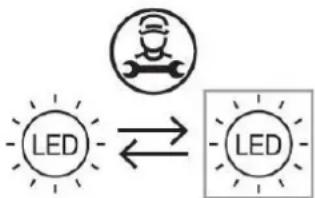
This appliance consists of light-emitting diodes (LEDs). This type of diode cannot be changed by the consumer. The lifetime of these LEDs is normally sufficient for no change to be made. If however, and despite all the care taken during the manufacture of your wine cellar, the LEDs were defective, please contact your after-sales service for any intervention.
flowchart
graph LR
    A["LED"] --> B["Robot Icon"]
    B --> C["LED"]
11. ENVIRONMENT
This appliance is marked according to the European directive 2019/290/UE on Waste Electrical and Electronic Equipment (WEEE). By ensuring this product is disposed of correctly, you will help prevent potential negative consequences for the environment and human health, which could otherwise be caused by inappropriate waste handling of this product.
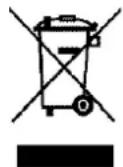
The symbol on the product, or on the documents accompanying the product, the Crossed Out Wheelie Bin, indicates that this appliance may not be treated as household waste. Instead it shall be handed over to the applicable collection point for the recycling of electrical and electronic equipment, or, if you are buying an equivalent product, to the retailer of the new product.
The user is responsible for taking the appliance to the appropriate collection center at the end of its useful life. Selective and appropriate collection for the recycling of no longer used appliances and their disposal and destruction in an environmentally friendly manner, helps to prevent potential negative effects on the environment and health, and encourages the recycling of materials used to make the product.
For more detailed information about treatment, recovery and recycling of this product, please contact your local authority, your household waste disposal service or the retailer where you purchased the product.
12. WARNING
As we continuously improve our products for the benefit of our customers, we reserve the right to modify technical characteristics without notice.
Warranties for LA SOMMELIERE brand products are offered exclusively by selected retailers. No part of these instructions may be considered as a supplementary guarantee.
FRIO ENTREPRISE cannot be held liable for errors or technical or editorial omissions in this document.
Non-binding document.
natural_image
Pure line drawing of six identical abstract shapes with wavy, elongated forms (no text or symbols)R600a