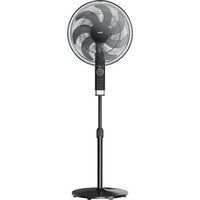
FS40-23MR - Fan MIDEA - Free user manual and instructions
Find the device manual for free FS40-23MR MIDEA in PDF.


| Product type | Pedestal fan |
| Model | FS40-23MR |
| Brand | Midea |
| Rated voltage | 220-240 V ~ 50 Hz |
| Rated power | 50 W |
| Maximum air flow | 61.77 m³/min |
| Sound power level | 56.55 dB(A) |
| Ventilation modes | 3 speeds + natural ventilation |
| Programmable timer | Up to 7 hours (1-hour increments) |
| Oscillation | Yes, can be turned on/off |
| Remote control | Yes, range up to 5 meters |
| Remote control batteries | 2 AAA batteries (not included) |
| Front grille attachment | Self-clipping |
| Adjustable height | Yes, by tightening knob |
| Recommended use | Household indoor use only |
| Cleaning | Soft cloth slightly damp, do not immerse |
| Safety | Fixed blade guard, stop before disassembly |
| Standby consumption | 0.31 W |
| Seasonal consumption | 13.24 kWh/a |
Frequently Asked Questions - FS40-23MR MIDEA
User questions about FS40-23MR MIDEA
0 question about this device. Answer the ones you know or ask your own.
Ask a new question about this device
Download the instructions for your Fan in PDF format for free! Find your manual FS40-23MR - MIDEA and take your electronic device back in hand. On this page are published all the documents necessary for the use of your device. FS40-23MR by MIDEA.
USER MANUAL FS40-23MR MIDEA
EN English
DE German
IT Italian
FR France
THANK YOU LETTER
Thank you for choosing Midea! Before using your new Midea product, please read this manual thoroughly to ensure that you know how to operate the features and functions that your new appliance offers in a safe way.
EN
CONTENTS
THANK YOU LETTER 01
SAFETYINSTRUCTIONS 02
SPECIFICATIONS 05
PRODUCT OVERVIEW 06
PRODUCT INSTALLATION 07
OPERATION INSTRUCTIONS 10
CLEANING AND MAINTENANCE 13
TROUBLESHOOTING 14
TRADEMARKS, COPYRIGHTS AND LEGAL STATEMENT 15
DISPOSAL AND RECYCLING 16
DATA PROTECTION NOTICE 17
SAFETY INSTRUCTIONS
Intended Use
The following safety guidelines are intended to prevent unforeseen risks or damage from unsafe or incorrect operation of the appliance. Please check the packaging and appliance on arrival to make sure everything is intact to ensure safe operation. If you find any damage, please contact the retailer or dealer. Please note modifications or alterations to the appliance are not allowed for your safety concern. Unintended use may cause hazards and loss of warranty claims.

Explanation of Symbols
| Danger This symbol indicates that there are dangers to the life and health of persons due to extremely flammable gas. | |
| Warning of electrical voltage This symbol indicates that there is a danger to life and health of persons due to voltage. | |
| Warning The signal word indicates a hazard with a medium level of risk which, if not avoided, may result in death or serious injury. | |
| Caution The signal word indicates a hazard with a low degree of risk which, if not avoided, may result in minor or moderate injury. | |
| Attention The signal word indicates important information (e.g. damage to property), but not danger. | |
| Observe instructions This symbol indicates that a service technician should only operate and maintain this appliance in accordance with the operating instructions. |
Read these operating instructions carefully and attentively before using/commissioning the unit and keep them in the immediate vicinity of the installation site or unit for later use!
Caution
- Read rules for safe operation and instructions carefully.
- This appliance can be used by children aged from 8 years and above and persons with reduced physical, sensory or mental capabilities or lack of experience and knowledge if they have been given supervision or instruction concerning use of the appliance in a safe way and understand the hazards involved. Children shall not play with the appliance. Cleaning and user maintenance shall not be made by children without supervision.
- Keep electrical appliances out of reach from Children or infirm persons. Do not let them use the appliances without supervision.
- When the appliance is not in use and before cleaning, unplug the appliance from the outlet.
-
When the fan was assembled, the rotor blade guard shall not be taken off anymore.
-
Prior to cleaning, unplug the fan.
- The rotor guard shall not be disassembled/opened to clean the rotor blades.
-
Wipe the fan enclosure and rotor blade guard with a slightly damp cloth.
-
Never insert fingers, pencils, or any other object through the grille when fan is running.
- Disconnect fan when moving from one location to another.
- Indoor and household use only.
Warning
- If the supply cord is damaged, it must be replaced by manufacturer or its service agent or a similarly qualified person in order to avoid a hazard.
- To protect against the risk of electrical shock, do not immerse the unit, cord or plug in water or other liquid.
- When the appliance is not in use and before cleaning, unplug the appliance from the outlet.
- Ensure that the fan is switched off from the supply mains before removing the guard.
- DISPOSAL: Do not dispose of electrical appliances as unsorted municipal waste, use separate collection facilities. Contact your local government for information regarding the collection systems available. If electrical appliances are disposed of in landfills or dumps, hazardous substances can leak into the groundwater and get into the food chain, damaging your health and well-being.
SPECIFICATIONS
| Product Model | MFS400ROAPH MFS400ROAPW |
| Voltage | 220-240V~ |
| Frequency | 50Hz |
| Power | 50W |
| Item/DescriptionSymbolValue | Unit | ||
| Maximum fan flow rate | F | 61,77 | m³/min |
| Fan power input | P | 40,30 | W |
| Service value | Sv | 1,53 | (m³/min)W |
| Standby power consumption | PSB | 0,31 | W |
| Off power consumption | POFF | - | W |
| Fan sound power level | LWA | 56,55 | dB(A) |
| Maximum air velocity | C | 2,94 | meters/sec |
| Seasonal electricity consumption | Q | 13,24 | kWh/a |
| Measurement standard for service value | EN IEC 60879:2019 | ||
| Contact details for obtaining more information | Midea Italia Srl. a sostio unico Viale Luigi Bodio 29/37 20158 Milano Italia midea.com/it | ||
PRODUCT OVERVIEW
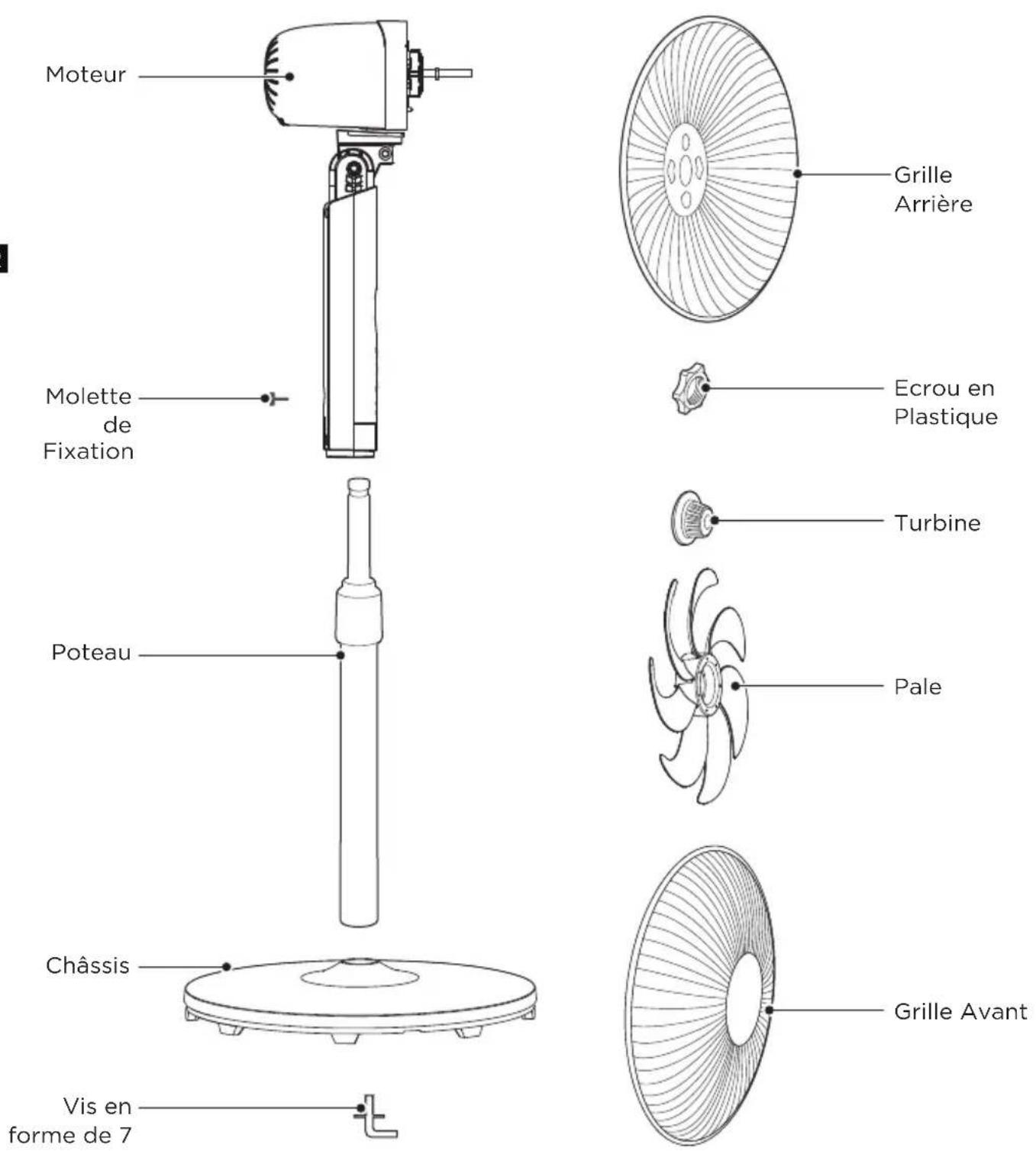
Component Name
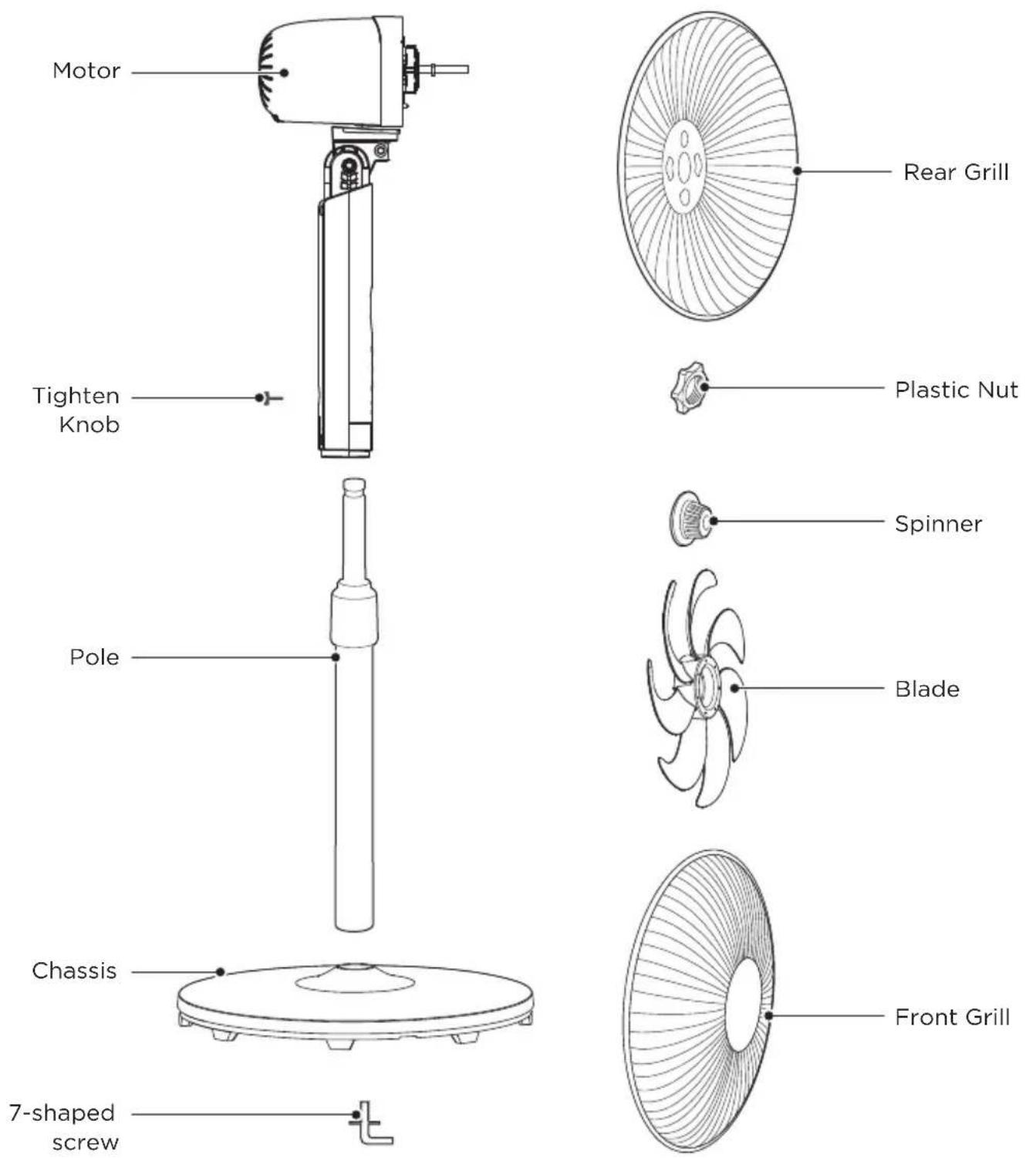

NOTE
All the pictures in this manual are for explanation purpose only. Any discrepancy between the real object and the illustration in the drawing shall be subject to the real subject. Remove parts from the component before performing installation.
PRODUCT INSTALLATION
Installation Procedures

NOTE
Before installation, first remove 7-shape screws from the pole, remove the Spinner and EN Plastic nut from the motor shaft, and then install.
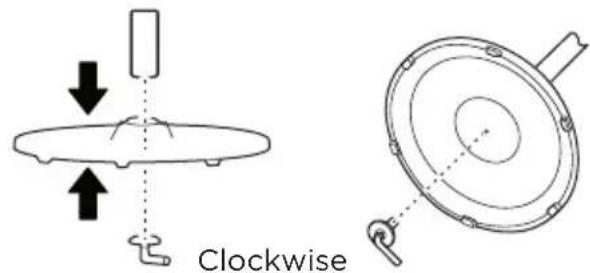
1 Chassis installation
Align the lower pole and the chassis, and then fasten securely with chassis screws.
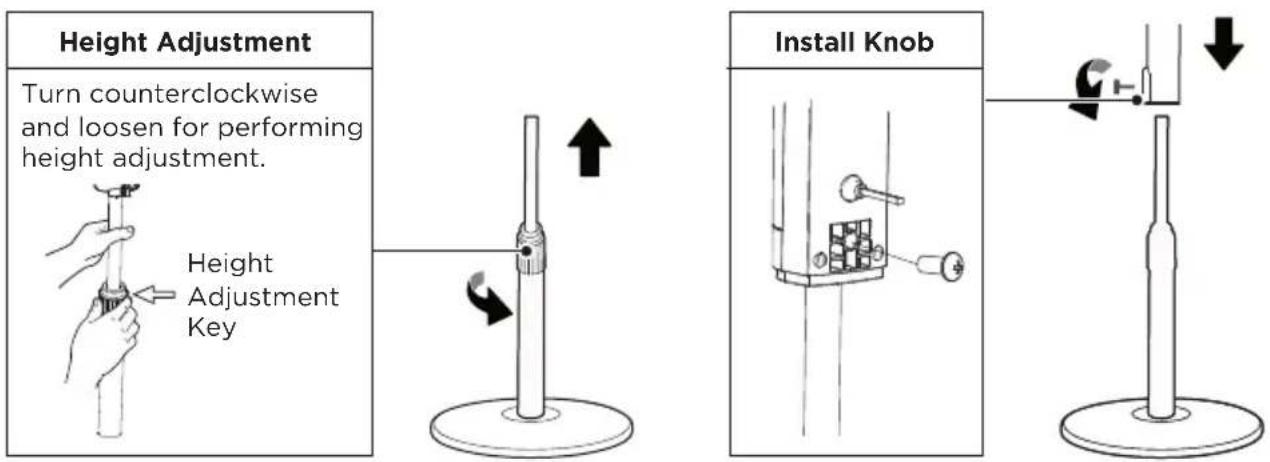
2 Pole installation
2.1 Pull out and fix the internal pole (column) after adjusting the height by way of tightening or loosening the knob.
2.2 Install and fix the machine body by way of tightening or loosening tighten knob.
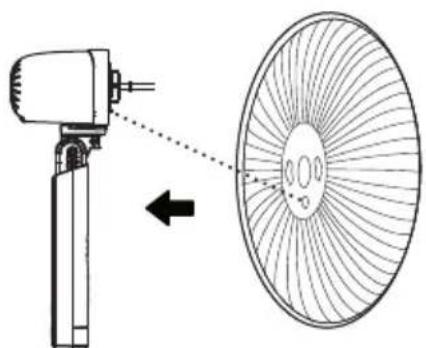
3 Installation of Rear Grill
Align the holes of rear grill with the protruded points on the motor housing.
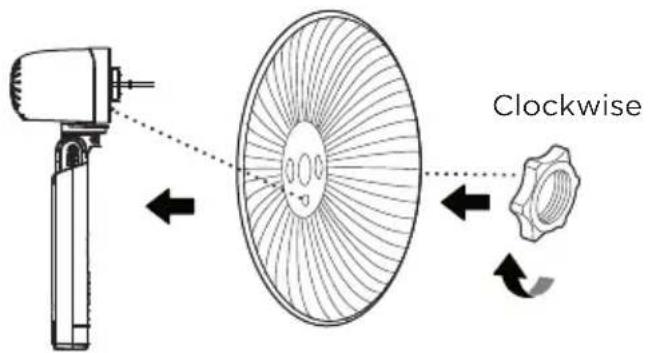
4 Installation of Plastic Nut
Screw clockwise the plastic nut tightly to fasten the rear grill.
EN
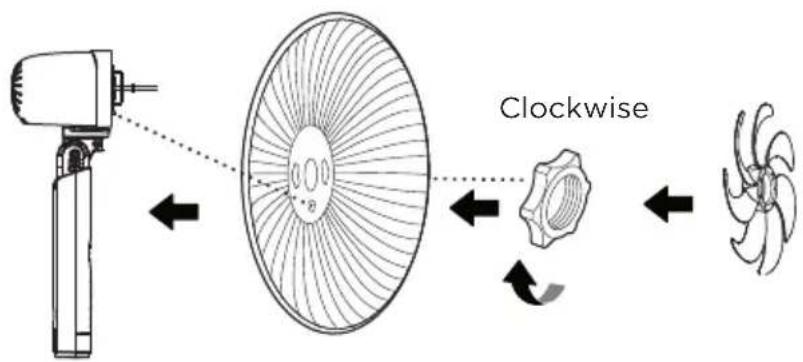
5 Blade installation
After the installation of blade, rotate the blade with your finger to make sure the blade works normally.
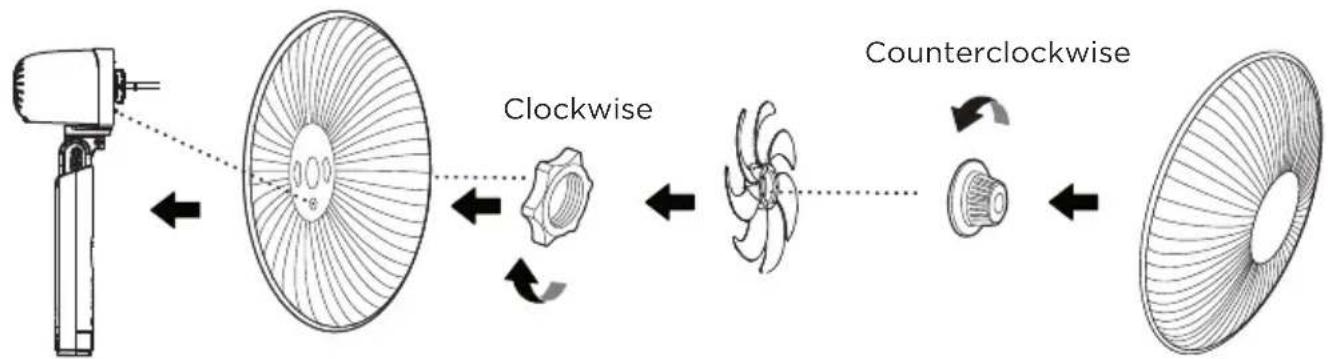
6 Spinner installation
Screw counterclockwise the spinner tightly, and then install the front grill.
7 Installation of Front Grill
7.1 From top to bottom align the clips of the front grill with the uppermost mesh of the rear grill. After the alignment is correct, look from back to front according to the diagram.
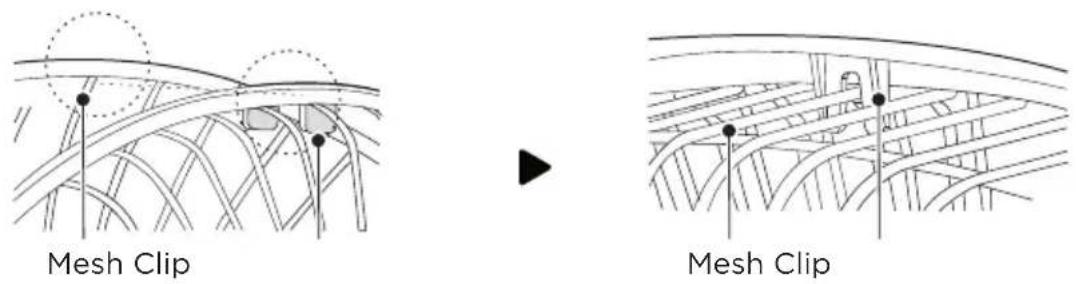
7.2 Press the grills in order with both hands. A sound of "click" will be heard when installed right.
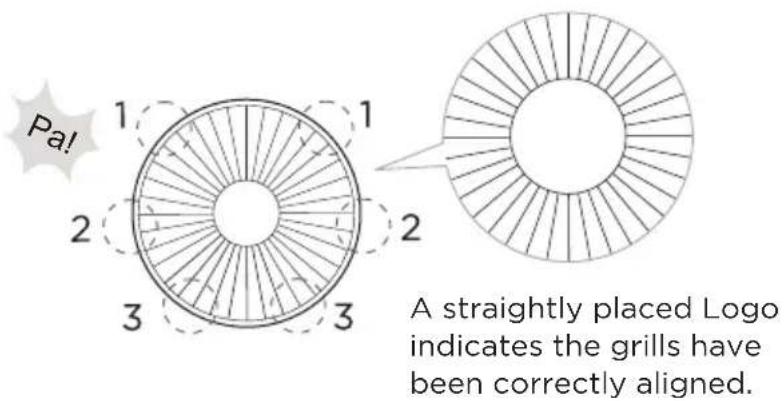
in the pictures you do not see the logo
7.3 Self-clipped installation.
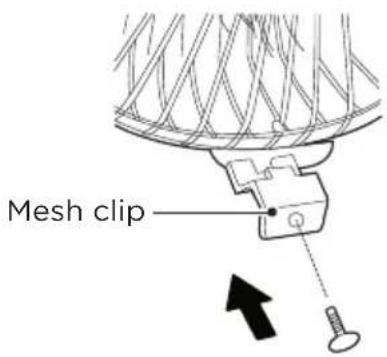
OPERATION INSTRUCTIONS
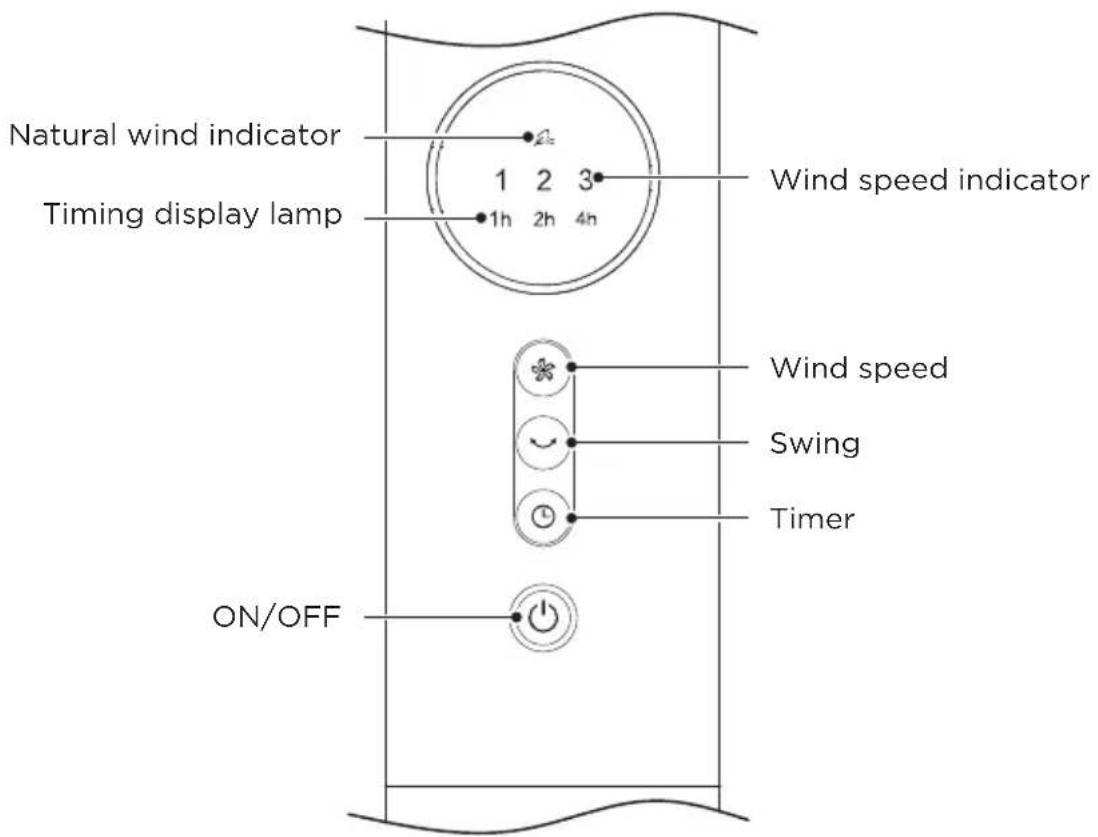
Operating Instructions Of The Machine Body
EN
| Function descriptionButton | |
| ON/OFF KEY | ·The key is for switching on the fan. The fan will be started at low speed. Press the key again, it will be switched off. |
| TIMER KEY space | ·When the TIMER key is touched repeatedly, the time to be set for air delivery increased step by step. For instance, if the fan operation is required to be set for 7 hours, this key must be touched repeatedly so that the pilot lamps for 1, 2 and 4 hours lighten together. ·It means that the set time is 1+2+4=7 hours. The time setting indicated by the pilot lamp will increase gradually by a unit of 1 hour. Don't press the TIMER key when the fan is required to operate continuously. At the moment all pilot lamps don't light. |
| SWING KEY | ·In power-on state, press this Swing key to turn on/off swing. |
| WIND SPEED KEY | ·Press the wind speed key to select set the wind speed in the following sequence:level 1 → level 2 → level 3 → Nature Wind. |
Remote Controller
- The remote control should be normally used within 5 meters of the front of the product and 30 degrees of the deviation angle.
- The battery contains many heavy metals, acids and bases, etc., which may threaten human's health; Waste batteries should be recycled separately.

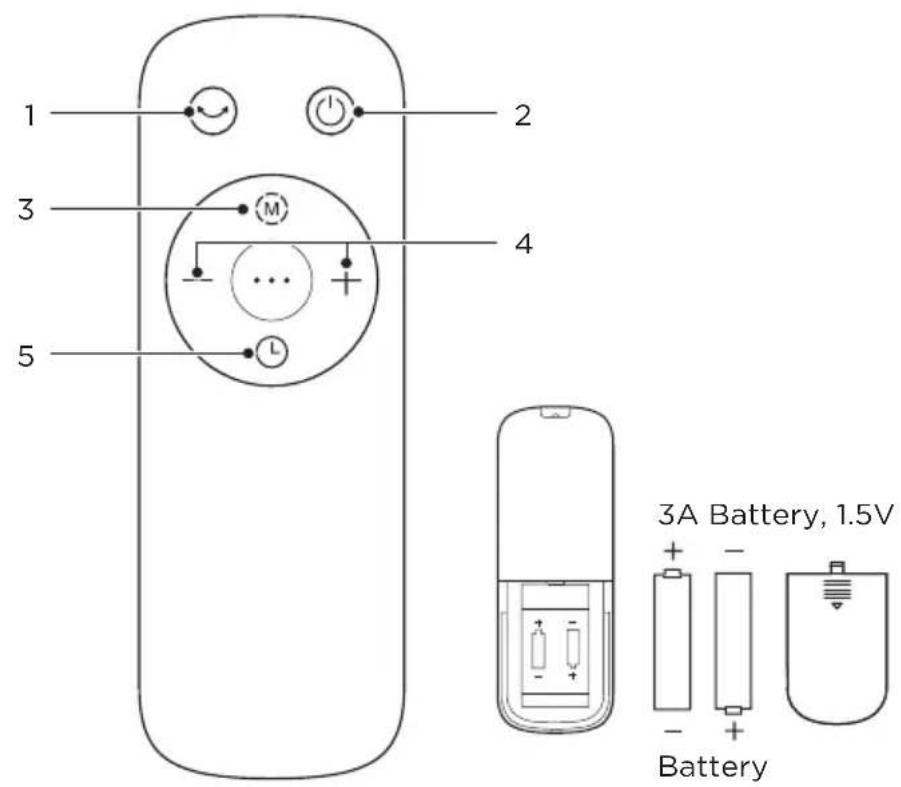
| Function descriptionButtonNO | ||
| 1 | • Start up or shut down oscillating. | |
| 2 | • Startup/Standby. | |
| 3 | • Switch the wind mode between normal wind and nature wind. | |
| 4 | - / + | • Press “+, -” to set the wind speed. |
| 5 | L | • Set the timed shutdown/ reserved startup. |
Batteries Installation
Battery not included in the packaging
1 Slide the battery compartment cover.
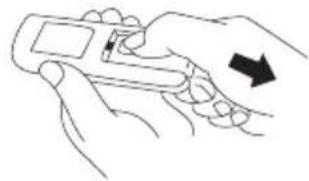
Fig 1
EN
2 Insert the batteries, and make sure that the batteries are placed as shown in the Fig 2.
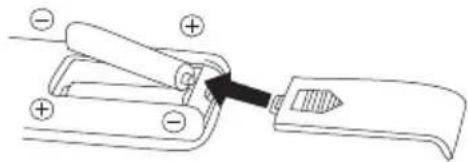
Fig 2
3 Slide back the battery cover.
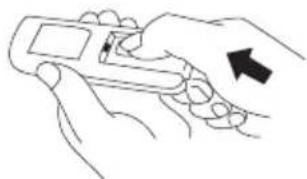
Fig 3

NOTE
- Use manganese or alkaline batteries of type "AAA".
- "Do not dispose of batteries in fire, batteries may explode or leak."
- Do not mix old and new batteries.
- Do not mix alkaline, standard (carbon-zinc) or rechargeable (nickel-cadmium) batteries.
Batteries Warning As Below
- Do not dispose of batteries in fire, batteries may explode or leak. why do we use twice
- Do not mix old and new batteries.
- Do not mix alkaline, standard (carbon-zinc) or rechargeable (nickel-cadmium) batteries.
- Non-rechargeable batteries are not to be recharged.
- Batteries are to be inserted with the correct polarity.
- Exhausted batteries are to be removed from the product.
- The batteries must be removed from the remote controller before it is scrapped and that they are disposed of safely.
CLEANING AND MAINTENANCE
The fan requires minimal maintenance. Do not try to fix it by yourself. Refer it to qualified service personnel if service is needed.
- Before cleaning and assembling, unplug the fan power.
- To ensure adequate air circulation to the motor, keep vents at the rear of the motor free of dust. Do not disassemble the fan to remove dust. and
Please wipe the exterior parts with a soft cloth soaking a mild detergent.
- Do not use any abrasive detergent or solvents to avoid scratching the surface.
- Do not use any of the following as a cleaner: gasoline, thinner.
- Do not allow water or any other liquid entering into the motor housing or interior parts.
- Be sure to unplug from the electrical supply source before cleaning.
- Plastic parts should be cleaned with a soft cloth moisten with mild soap Thoroughly remove soapsuds with dry cloth. Extra point
TROUBLESHOOTING
Operation of your appliance can lead to errors and malfunctions. The following tables contain possible causes and notes for resolving an error message or malfunction. It is recommended to read the table below carefully in order to save your time and money that may cost for calling to the service center.
| Cause Solu | ||
| The machine does not work properly after installed | ·The power cable is not plugged in or has poor contact. | Make sure the plug is properly inserted into the socket. |
| ·The switch on the body is not turned on. | Turn on the switch on the body. | |
| The remote does not work | ·The battery needs replacing. Replace the battery. | |
| ·The remote is being used more than 5m away from the fan. | Use the remote closer to the fan and make sure it is pointing directly at the display panel. | |
TRADEMARKS, COPYRIGHTS AND LEGAL STATEMENT
Midea logo, word marks, trade name, trade dress and all versions there of are valuable assets of Midea Group and/or its affiliates ("Midea"), to which Midea owns
trademarks, copyrights and other intellectual property rights, and all goodwill derived from using any part of an Midea trademark. Use of Midea trademark for commercial purposes without the prior written consent of Midea may constitute trademark infringement or unfair competition in violation of relevant laws.
This manual is created by Midea and Midea reserves all copyrights thereof. No entity or individual may use, duplicate, modify, distribute in whole or in part this manual, or bundle or sell with other products without the prior written consent of Midea.
All the described functions and instructions were up to date at the time of printing this manual. However, the actual product may vary due to improved functions and designs.
DISPOSAL AND RECYCLING
Important instructions for environment
Compliance with the WEEE Directive and Disposing of the Waster Product: This product complies with EU WEEE Directive (2012/19/EU). This product bears a classification symbol for waster electrical and electronic equipment (WEEE).
This symbol indicates that this product shall not be disposed with other household wastes at the end of its service life. Used device must be returned to official collection point for recycling of electrical electronic devices. To find these collection systems please contact to your local authorities or retailer where the product was purchased. Each household performs important role in recovering and recycling of old appliance. Appropriate disposal of used appliance helps prevent potential negative consequences for the environment and human health.
EN
Compliance with RoHS Directive
The product you have purchased complies with EU RoHS Directive (2011/65/EU). It does not contain harmful and prohibited materials specified in the Directive.
Package information
Packaging materials of the product are manufactured from recyclable materials in accordance with our National Environment Regulations. Do not dispose of the packaging materials together with the domestic or other wastes. Take them to the packaging material collection points designated by the local authorities.

DATA PROTECTION NOTICE
For the provision of the services agreed with the customer,
we agree to comply without restriction with all stipulations of applicable data protection law, in line with agreed countries within which services to the customer will be delivered, as well as, where applicable, the EU General Data Protection Regulation (GDPR).
EN
Generally, our data processing is to fulfil our obligation under contract with you and for product safety reasons, to safeguard your rights in connection with warranty and product registration questions. In some cases, but only if appropriate data protection is ensured, personal data might be transferred to recipients located outside of the European Economic Area.
Further information are provided on request. You can contact our Data Protection Officer via MideaDPO@midea.com. To exercise your rights such as right to object your personal data being processed for direct marketing purposes, please contact us via MideaDPO@midea.com. To find further information, please follow the QR Code.
VIELEN DANK
Same comment as In English language, I don't think that we need to write twice same text
VUE D'ENSEMBLE DU PRODUIT 06
INSTALLATION DU PRODUIT 07
INSTRUCTIONS SUR LE FONCTIONNEMENT 10
NETTOYAGE ET ENTRETIEN 13
Dépannage 14
MARQUES, DROITS D'AUTEUR ET MENTIONS LEGALES 15
ELIMINATION ET RECYCLAGE 16
AVIS SUR LA PROTECTION DES DONNNEES 17
CONSIGNES DE SECURITE
Usage prévu
VUE D'ENSEMBLE DU PRODUIT
Noms des Composants
FR
REMARQUE
INSTALLATION DU PRODUIT
make yourself at home

- THANK YOU LETTER
- CONTENTS
- SAFETY INSTRUCTIONS
- Intended Use
- Explanation of Symbols
- Caution
- Warning
- SPECIFICATIONS
- PRODUCT OVERVIEW
- Component Name
- NOTE
- PRODUCT INSTALLATION
- Installation Procedures
- Chassis installation
- Pole installation
- Installation of Rear Grill
- Installation of Plastic Nut
- Blade installation
- Spinner installation
- Installation of Front Grill
- OPERATION INSTRUCTIONS
- Remote Controller
- Batteries Installation
- Battery not included in the packaging
- Batteries Warning As Below
- CLEANING AND MAINTENANCE
- TROUBLESHOOTING
- TRADEMARKS, COPYRIGHTS AND LEGAL STATEMENT
- DISPOSAL AND RECYCLING
- Important instructions for environment
- Compliance with RoHS Directive
- Package information
- DATA PROTECTION NOTICE
- EN
- VIELEN DANK
- CONSIGNES DE SECURITE
- Usage prévu
- VUE D'ENSEMBLE DU PRODUIT
- Noms des Composants
- REMARQUE
- INSTALLATION DU PRODUIT
Brand : MIDEA
Model : FS40-23MR
Category : Fan