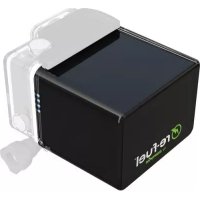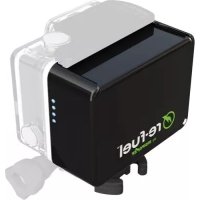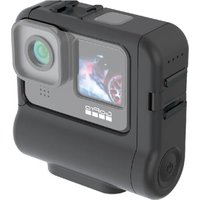
RF-REFUEL10 - Rechargeable Battery Digipower - Free user manual and instructions
Find the device manual for free RF-REFUEL10 Digipower in PDF.


User questions about RF-REFUEL10 Digipower
0 question about this device. Answer the ones you know or ask your own.
Ask a new question about this device
Download the instructions for your Rechargeable Battery in PDF format for free! Find your manual RF-REFUEL10 - Digipower and take your electronic device back in hand. On this page are published all the documents necessary for the use of your device. RF-REFUEL10 by Digipower.
USER MANUAL RF-REFUEL10 Digipower
text_image
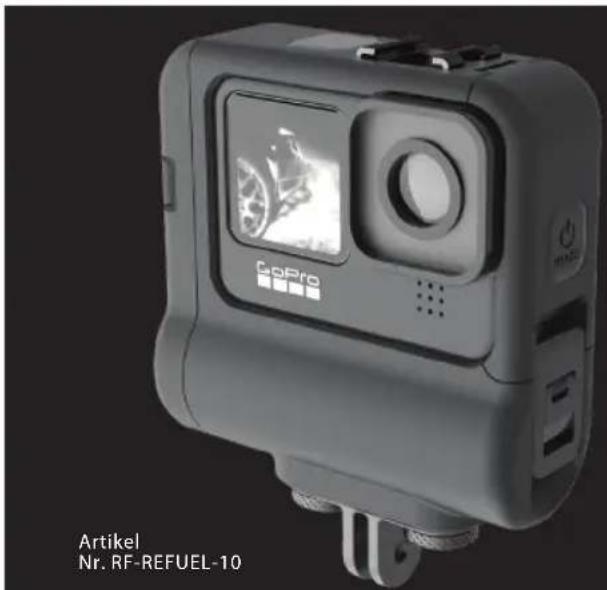
digipower® ACTIONPACK RECHARGEABLE BATTERY Item No. RF-REFUEL-10 USER GUIDE High capacity power for GoPro® HERO10 Black, HERO9 Black


ENGLISH
PREPARING THE CAMERA FOR USE WITH THE ACTIONPACK
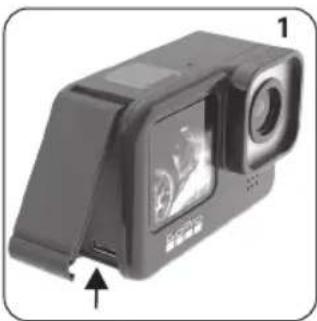
It is necessary to remove the USB door so the camera can connect to the ActionPack.
The USB door is designed to be safely removed and reinstalled on the camera as needed.
- Open the USB door on the left side of the camera.
- With the door open at a 90 degree angle to the camera body gently pull downward at a 45 degree angle to remove the door.
- Keep the door in a safe place, you will need this when not using the ActionPack on the camera.
natural_image
Black-and-white photo of a digital camera module with an open screen and a small sensor, shown in a corner view (no text or symbols visible)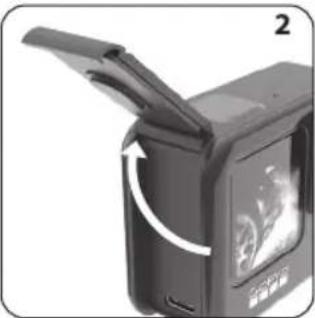
natural_image
Close-up of a black digital camera with an open lid and a white arrow indicating rotation (no text or symbols visible)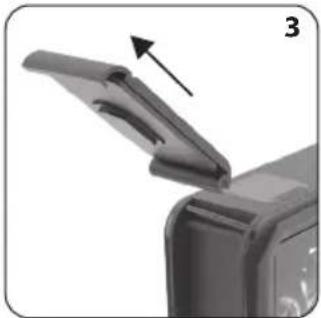
natural_image
Close-up of a printer's lid with an arrow indicating the open lid (no text or symbols visible)


ENGLISH
USING THE ACTIONPACK IN 4 EASY STEPS
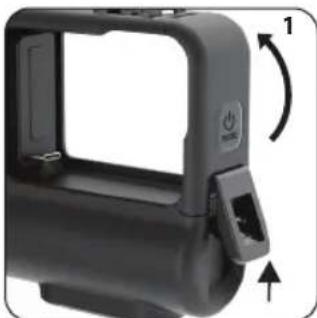
- Open the ActionPack housing by pressing up on the security clip (the security clip is found on the right side of the ActionPack).
- Lift the pivoting frame up and to the left so you can install the GoPro camera.
- Slide the GoPro camera to the left so that it FIRMLY connects to the USB-C plug on the ActionPack, close the housing.
- Press in on the side door while latching the case.
- Secure the case latch. IT IS VERY IMPORTANT TO PROPERLY LATCH THE CASING OR THE PRODUCT WILL NOT BE WATERPROOF.

natural_image
Close-up of a black plastic device casing with a handle and side panel, showing a 1° rotation indicator (no text or symbols)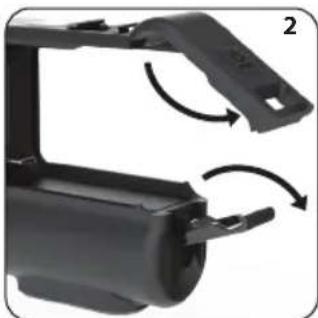
natural_image
Close-up of a black plastic mechanical component with curved arrows indicating rotation or assembly (no text or symbols visible)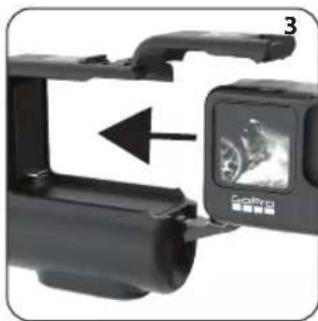
natural_image
Close-up of a black camera module with an arrow pointing to a digital display (no visible text or symbols)
natural_image
Close-up of a black GPS camera module with adjustment arrows indicating rotation (no text or symbols visible)2




CHARGING THE ACTIONPACK
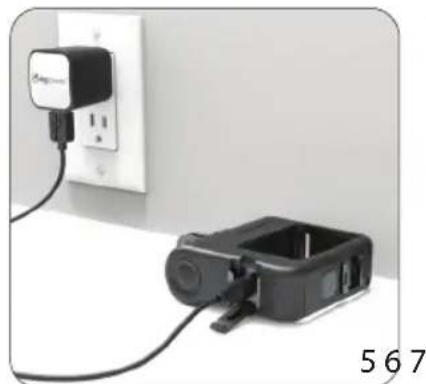
- The USB-C charging port is in the middle of the shoe mount on the left side of the ActionPack.
- Open the USB port cover by pulling upward to unlatch it. Using a coin will make it easier to open.
- Insert the included USB-C charging cable.
- With the cable inserted, plug the other end into a USB power source (not included).


text_image
Unlocked 1 2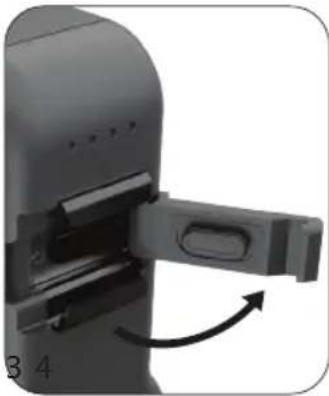
natural_image
Close-up of a mechanical device with a handle and arrow indicating rotation (no text or symbols visible)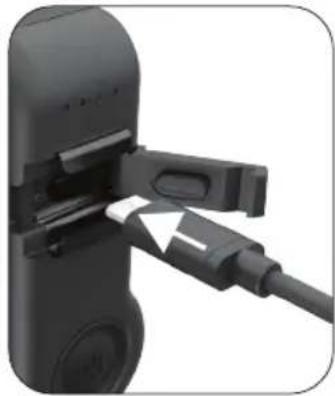
natural_image
Close-up of a black electronic device with a cable inserted, showing internal components and a white arrow pointing to a component (no text or symbols visible)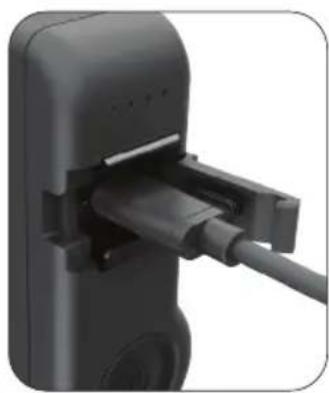
natural_image
Close-up of a black electronic device with a cable inserted, showing no visible text or symbols.3
ENGLISH
- For fastest charging use a 2 Amp (10 Watt) power supply (not included).
- If the camera is installed in the ActionPack the camera's internal battery will also charge.
- Press and hold the power button for 2 seconds to turn the ActionPack on. Press and hold for 2 seconds to turn it off.
NOTE: IT IS VERY IMPORTANT TO PROPERLY LOCK THE USB-C DOOR DOOR AFTER CHARGING OR THE PRODUCT WILL NOT BE WATERPROOF.

natural_image
Close-up of a black-and-white photo showing a small device connected to a wall-mounted power outlet (no visible text or symbols)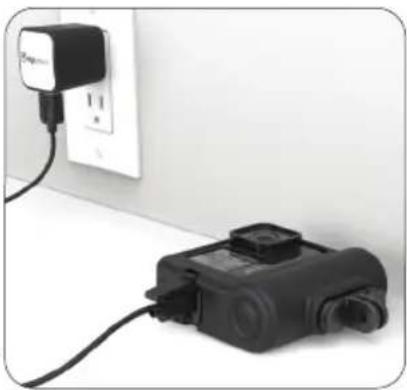
natural_image
Exterior view of a white electrical outlet with a black power plug and connected device (no visible text or symbols)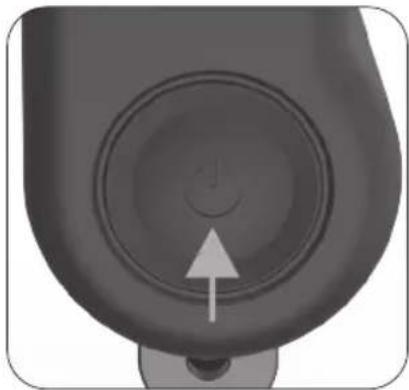
natural_image
Close-up of a mechanical component with a circular dial and an arrow pointing to its center (no text or symbols visible)4



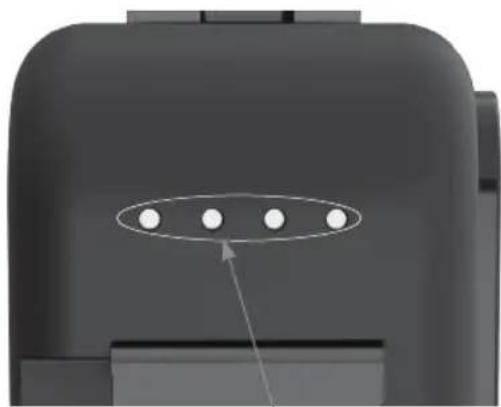
CHARGING STATUS INDICATOR
| STATUS DISPLAY STATE CHARGE STATUS | |
| One LED is blinking Below 25% | |
| One LED is on, next LED is blinking 25% - 50% | |
| Two LEDs are on, next LED is blinking 50% - 75% | |
| Three LEDs are on, last LED is blinking 75% - 100% | |
| All four LEDs are on Charging complete | |
When the ActionPack is fully charged, all 4 LEDs will remain lit.
When the camera is installed in the ActionPack, both the ActionPack and the internal camera battery will charge at the same time.
natural_image
Close-up of a dark mechanical component with five circular holes and an arrow pointing to one (no text or symbols)Charge level LEDs
The percent of charge by LED is an approximation, it is best to wait until all four LEDs are lit, the unit will be fully charged then.
ENGLISH
BATTERY LEVEL INDICATOR
| STATUS DISPLAY STATE BATTERY LEVEL | |
| One LED is blinking Very low, recharge soon | |
| One LED is on Below 25% | |
| Two LEDs are on 25% - 50% | |
| Three LEDs are on 50% - 75% | |
| All four LEDs are on 75% - 100% | |
CHECKING THE BATTERY CHARGE LEVEL
To check the charge level tap the power button.

TIME TO CHARGE (ASSUMING THE CAMERA BATTERY AND ACTIONPACK ARE COMPLETELY DRAINED)
| Power supply ( not included) | Camera installed Camera not installed |
| 1 Amp (5 Watt) Camera | ActionPack charge then ActionPack, total charge time approximately 8 hours 30 minutes |
| 2 Amp (10 Watt) Camera | ActionPack charge then ActionPack, total charge time approximately 4 hours 30 minutes |



APPROXIMATE USE TIME FOR ACTIONPACK RF-REFUEL-10
| RF-REFUEL-10 | ||
| RESOLUTION WiFi STATUS TOTAL TIME | ||
| 1080P/24fps OFF 9 HOURS | ||
| 4K/30fps OFF 5 HOURS | ||
| 5K/30fps OFF 4 HOURS | ||
A Class 10/UHS1 memory card is required for best performance.
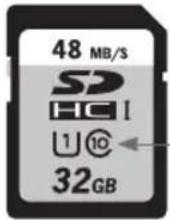
Class 10/UHS 1 memory card

ENGLISH
text_image
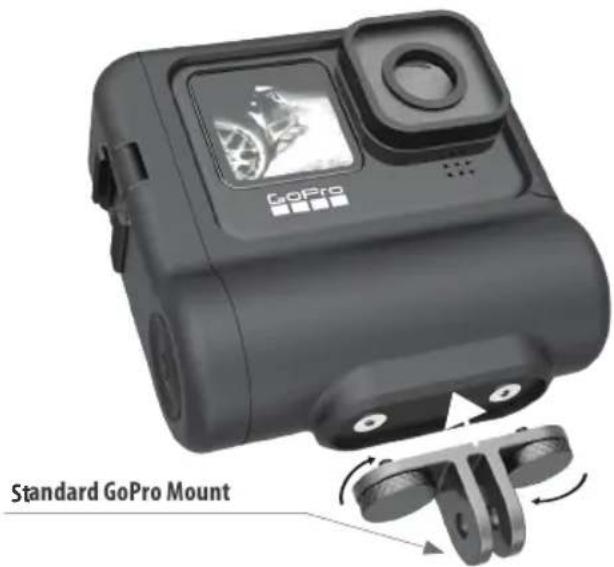
GoPro Standard GoPro MountUSING THE GOPRO MOUNT
- Attach the mounting plate to the bottom of the ActionPack by turning the two knurled knobs clockwise. Do not overtighten.
- Connect your favorite GoPro accessories as you normally would.



ATTACHING ACCESSORIES TO THE COLD SHOE MOUNTS
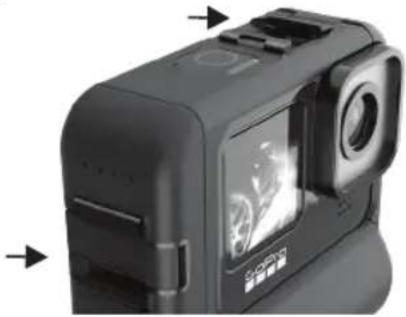
• There are two cold shoes on the Actionpack frame
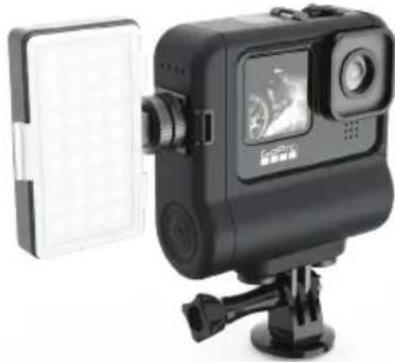
- You can attach a light, microphone or other camera accessory that uses a cold shoe mount
- Slide the accessory onto the cold shoe, turn the lock - ing wheel on the base of the accessory clockwise to secure it.
natural_image
Close-up of a black handheld device with visible camera and display screen (no text or symbols)NOTE: These are cold shoe mounts, there is no electrical connection to the camera.
natural_image
Black and white photo of a camera module with display and camera frame, mounted on a tripod stand (no visible text or symbols)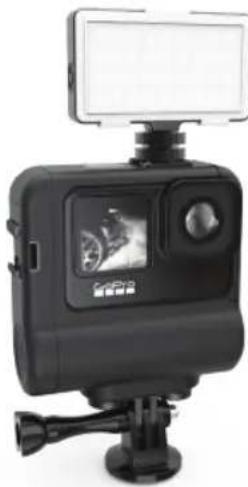
natural_image
Black handheld camera with mounted display and tripod top (no visible text or symbols)ENGLISH
IMPORTANT NOTES ABOUT THE ACTIONPACK RF-REFUEL-10
- The LEDs on the ActionPack remain on when the ActionPack is powered on. It will tell you the level of charge remaining in the ActionPack by the number of LEDs lit.
- The ActionPack provides power to the camera battery which then powers the camera. The camera's battery level will not begin to go down until the ActionPack battery has been fully depleted.
- With the ActionPack powered on and the camera in standby or playback modes the battery display on the camera will show charging.
- With the ActionPack powered on and the camera in record mode the battery display on the camera will not show charging.
- When you are done using the ActionPack power it off
by pressing the power button for 2 seconds. If you do not press the power button it will continue to provide power to the internal battery the same way a USB charger would provide power to your Smartphone.
- Turning on the ActionPack does not turn on the camera, use the camera's power button to turn it on.
- Turning off the ActionPack does not turn off the camera, use the camera's power button to turn it off.
- For proper functioning, it is necessary to have the internal camera battery installed while using the ActionPack.
- The ActionPack has been tested and approved to IEC standard IP68 for water and dust ingress. Lab testing done in a pressurized water tank for 2 hours' submersion, simulated 33ft/10m depth



PASS THRU POWER
Pass thru power allows you to record indefinitely and keep your battery charged up at the same time.
- Open the USB-C port door as noted on page 3.
- Connect the USB-C cable to a power source such as a USB car charger, wall charger, or power bank
- You do not need to press the power button on the ActionPack, it starts working automatically.
- Operate the camera as you normally would
REMOVING YOUR CAMERA FROM THE ACTIONPACK CASE AFTER IT HAS BEEN IN WATER
- Visually inspect the camera, dry off any residual water found before opening the case.
- Unlatch the casing and pivot the frame away from the camera.
- Remove the camera by sliding it out of the Action-Pack frame.
- Visually look for any water around the USB-C port on the camera; dry it off immediately.
ENGLISH
CARE OF THE ACTIONPACK EXTENDED BATTERY
-
- Before using, especially if you plan to use it in water, visually inspect the ActionPack for signs of dust, dirt, or anything that may affect its ability to maintain a waterproof seal.
• 2. If the ActionPack is used in salt water clean the areas around the USB-C port with a damp clean (lint free) cloth then dry thoroughly.
- Before using, especially if you plan to use it in water, visually inspect the ActionPack for signs of dust, dirt, or anything that may affect its ability to maintain a waterproof seal.
- DO NOT IMMERSE THE ACTIONPACK IN WATER WITHOUT THE CAMERA IN PLACE AND THE LATCH SECURED OR IT CAN BE PERMANENTLY DAMAGED.


ACTIONPACK RF-REFUEL-10
SPECIFICATIONS:
• 5000mAh (18Wh) Lithium Ion battery
• USB-C Input: 5V DC, 2A(10W)
• USB-C Output: 5V DC,2A (10W) Max
• Battery Output: 3.6V DC
• Weight and dims: 6.2oz | 4.3" x 3.5" x 1.4" 177g | 110mm x 89mm x 35mm

YEAR WARRANTY ANS GARANTIE LIMITÉE





We want you to have the best possible experience when using our products, and we're ready to help you with any questions or problems. Technical support can be reached at techsupport@mizco.com. Please allow up to one business day for email replies.
WARRANTY INFORMATION FOR DIGIPOWER PRODUCTS, A DIVISION OF MIZCO INTERNATIONAL, INC.
Mizco's responsibility with regard to this warranty shall be limited solely to the repair or replacement, at its option, of any product that fails during normal consumer use for a period of two years from the date of purchase. This warranty does not extend to damage or failure resulting from misuse, neglect, accident, alteration, abuse, or improper installation or maintenance. This warranty does not extend to
equipment used with the product. If at any time during the two years period following your purchase the product fails due to defects in materials or workmanship, please contact us at 800-838-3200 between the hours of 9AM and 6PM M-F Eastern time, to obtain an RMA number and return shipping instructions. For fastest service, have a copy of your product receipt available with the model number, date, and location of purchase. This warranty gives you specific legal rights, and you may have other rights that may vary in certain states or provinces.
ENGLISH
FCC STATEMENT: This equipment has been tested and found to comply with the limits for a Class B digital device, pursuant to Part 15 of the FCC Rules. These limits are designed to provide reasonable protection against harmful interference in a residential installation. This equipment generates uses and can radiate radio frequency energy and, if not installed and used in accordance with the instructions, may cause harmful interference to radio communications. However, there is no guarantee that interference will not occur in a particular installation. If this equipment does cause harmful interference to radio or television reception, which can be determined by turning the equipment off and on, the user is encouraged to try to correct the interference by one or more of the following measures:
- Reorient or relocate the receiving antenna.
- Increase the separation between the equipment and receiver.
- Connect the equipment into an outlet on a circuit different from that to which the receiver is connected.
- Consult the dealer or an experienced radio/ TV technician for help.
Operation is subject to the following two conditions:
- this device may not cause harmful interference, and
- this device must accept any interference received, including interference that may cause undesired operation.
CAUTION: Changes or modifications not expressly approved by the party responsible for compliance could void the user's authority to operate the equipment
IC CAN IECS-003/NMB-003




digipower®
Visit: www.digipowersolutions.com
Mizco International, Inc. Cranford, New Jersey 07016.
All rights reserved.
email: digipowersolutions@mizco.com
DigiPower is a registered trademark of
Mizco International, Inc.





natural_image
Exterior view of a GoPro camera module (no visible text or symbols on the device body)
digipower®
ACTIONPACK - WIEDERAUFLAD-BARER AKKU
natural_image
Black rectangular device with a screen and lens, shown from front and side (no visible text or symbols)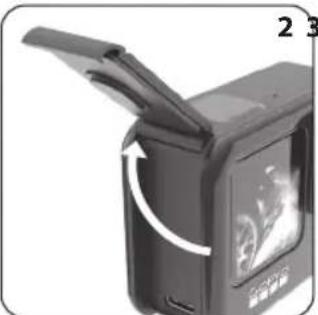
natural_image
Close-up of a black electronic device with an open lid and a curved arrow indicating rotation (no text or symbols visible)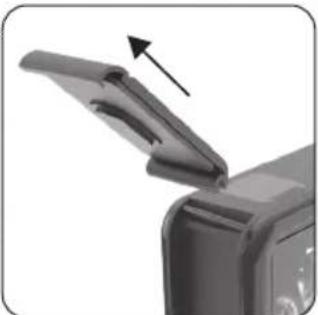
natural_image
Close-up of a mechanical component with an open lid and an arrow indicating direction (no text or symbols visible)


1



DEUTSCH
natural_image
Close-up of a black plastic camera holder with adjustment knob and directional arrows (no text or symbols)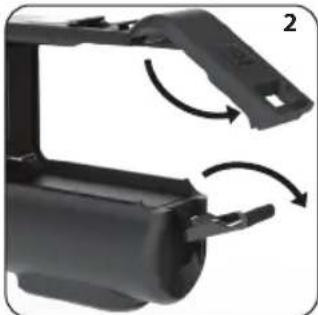
natural_image
Close-up of a black plastic mechanical component with curved arrows indicating rotation or assembly (no text or symbols visible)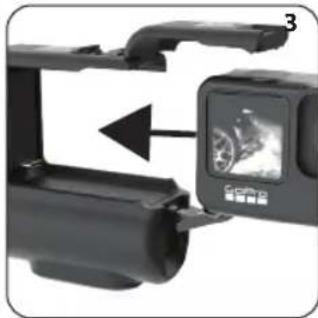
natural_image
Close-up of a black camera module with an open screen showing a motorcycle (no text or symbols visible)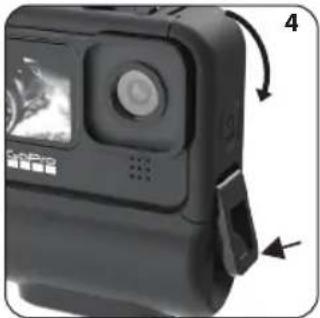
natural_image
Close-up of a black GPS camera module with adjustment arrows indicating rotation (no text or symbols visible)2




ACTIONPACK LADEN
natural_image
Close-up of a mechanical device with a handle and arrow indicating rotation (no text or symbols)
natural_image
Close-up of a black electronic device with a cable inserted, showing no visible text or symbols.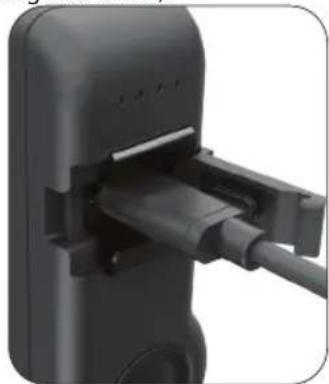
natural_image
Close-up of a black handheld device with a cable inserted, showing internal components (no text or symbols visible)3

DEUTSCH
natural_image
Close-up of a black-and-white photo showing a small device connected to a wall-mounted power outlet (no visible text or symbols)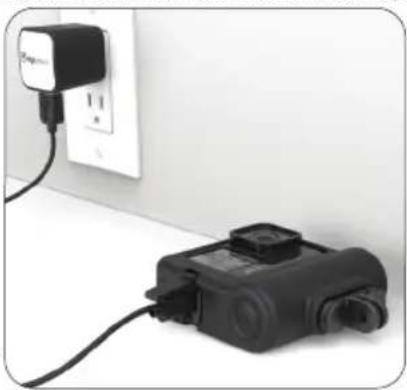
natural_image
Exterior view of a wall-mounted electrical outlet connected to a black handheld device (no visible text or symbols)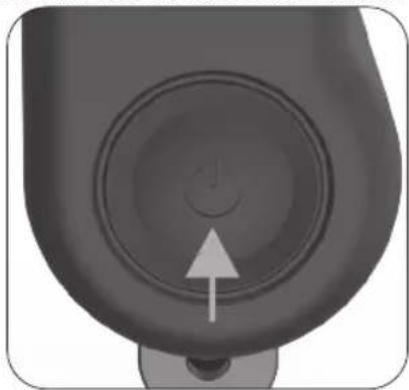
natural_image
Close-up of a mechanical component with a circular dial and a white arrow pointing to its center (no text or symbols visible)4




LADESTANDANZEIGE
natural_image
Simple diagram with four circular nodes and an arrow pointing to the first node, no text or symbols present.natural_image
Close-up of a black handheld device with a circular lens and control panel, showing no visible text or symbols.natural_image
Black and white photo of a camera module with display screen and control lever (no visible text or symbols)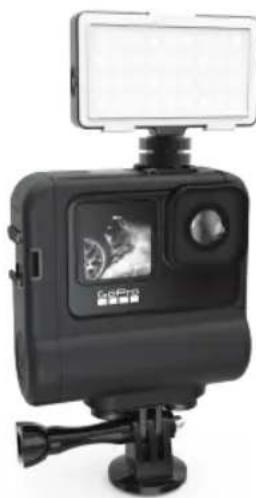
natural_image
Black GPS camera module with mounted screen and tripod, no visible text or symbolsDEUTSCH
WICHTIGE HINWEISE ZUM ACTIONPACK RF-REFUEL-10
natural_image
Exterior view of a GoPro camera module (no visible text or symbols on the device body)GUIDE D'UTILISATION
digipower®
BLOC-PILES
RECHARGEABLE ACTIONPACK
natural_image
Black-and-white photo of a handheld electronic device with a screen and lens, showing an open lid and a small button (no visible text or symbols)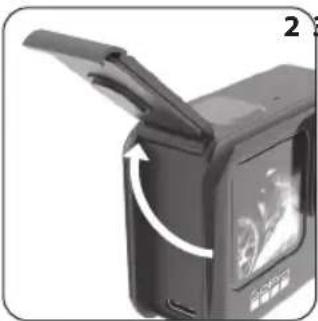
natural_image
Close-up of a black electronic device with an open lid and a curved arrow indicating rotation (no text or symbols visible)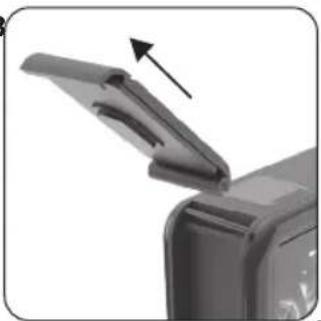
natural_image
Close-up of a printer's lid with an arrow indicating compression (no text or symbols visible)



FRANÇAIS
UTILISATION DU BLOC-PILES ACTIONPACK EN 4 ÉTAPES SIMPLES
natural_image
Close-up of a black plastic device casing with a handle and side clip, showing rotational arrow (no text or symbols)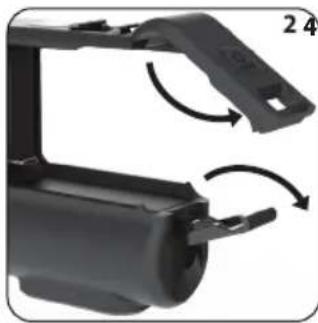
natural_image
Close-up of a black plastic mechanical component with curved arrows indicating rotation or assembly (no text or symbols visible)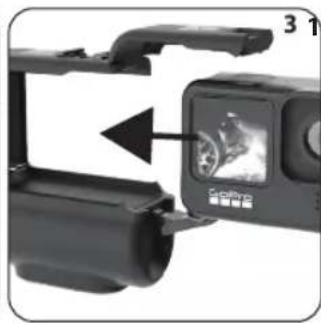
natural_image
Close-up of a black camera module with an open display showing a circular image, no visible text or symbols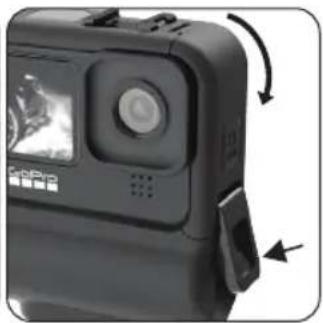
natural_image
Close-up of a black QDAR camera with visible sensor and control buttons, showing motion arrows (no text or symbols)2




CHARGEMENT DU BLOC-PILES ACTIONPACK
natural_image
Close-up of a mechanical device with a handle and arrow indicating rotation (no text or symbols visible)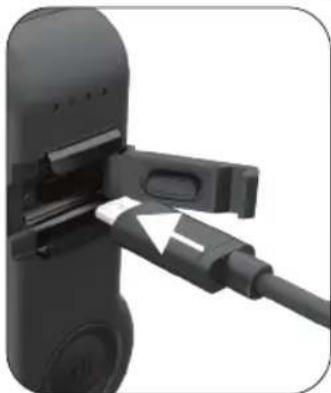
natural_image
Close-up of a black electronic device with a cable inserted, showing a white arrow pointing to the cable (no text or symbols visible)
natural_image
Close-up of a black plastic plug connector with cable inserted (no visible text or symbols)3




FRANÇAIS
natural_image
Close-up of a black-and-white photo showing a small device connected to a white electrical outlet with a plug, next to a wall-mounted power strip (no visible text or symbols)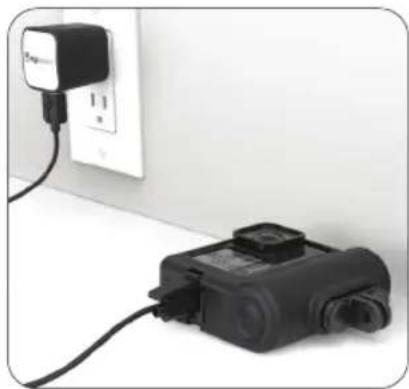
natural_image
Exterior view of a white electrical outlet with a black plug and connected device (no visible text or symbols)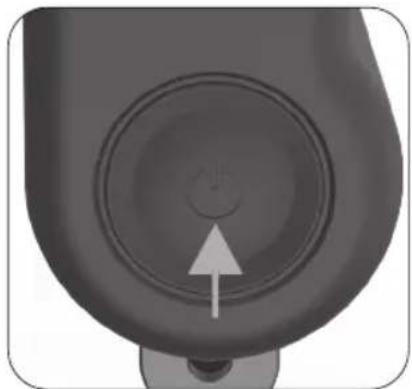
natural_image
Close-up of a mechanical component with concentric circular features and a white arrow pointing to a small circular feature (no text or symbols)4




INDICATEUR D'ÉTAT DE CHARGE
natural_image
3D rendered object with four white circular holes and an arrow pointing to one (no text or symbols)natural_image
Close-up of a black DDA camera module with visible lens and control buttons, shown with directional arrows (no text or symbols on device)natural_image
Two black-and-white photo cameras with camera modules and display screens, shown from different angles (no visible text or symbols)FRANÇAIS
REMARQUES IMPORTANTES CONCERNANT L'ACTIONPACK RF-REFUEL-10
text_image
2 YEAR WARRANTY ANS GARANTIE LIMITÉE € Please recycle