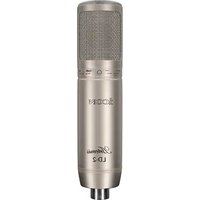
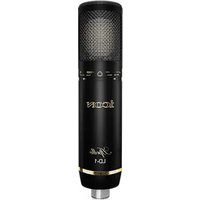
Artemis - Microphone icon - Free user manual and instructions
Find the device manual for free Artemis icon in PDF.


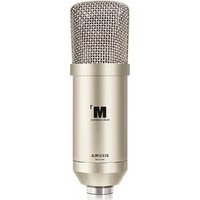
| Product type | Large diaphragm studio condenser microphone |
| Brand | Icon |
| Model | Artemis |
| Category | Microphone |
| Polar pattern | Cardioid |
| Power supply | External phantom power 36-52 Volts |
| Transducer | Pressure gradient with shock-mounted capsule |
| Application | Vocals, acoustic instruments, studio |
| Included accessories | Sturdy stand mount, wooden carrying case |
| Construction | Ultra-rugged die-cast metal body |
| Approximate dimensions | Approximately 200 mm length, 50 mm diameter |
| Approximate weight | Approximately 500 g |
| Maintenance | Clean with a damp cloth only |
| Safety | Do not expose to moisture or rain; do not open the housing |
| Repairability | No user-serviceable parts; contact customer support |
| Warranty | Product registration at iconproaudio.com |
| Compatibility | Mixing consoles with phantom power |
| Gain adjustment | Use Trim/Gain control; avoid lighting the PEAK indicator |
| Proximity effect | Bass attenuation by angling the microphone off-axis |
| Pop filter | Use an external pop filter (recommended ICON PF-01) or angle the microphone off-axis |
Frequently Asked Questions - Artemis icon
User questions about Artemis icon
0 question about this device. Answer the ones you know or ask your own.
Ask a new question about this device
Download the instructions for your Microphone in PDF format for free! Find your manual Artemis - icon and take your electronic device back in hand. On this page are published all the documents necessary for the use of your device. Artemis by icon.
USER MANUAL Artemis icon
Important Safety Instructions
- Read these instructions.
- Keep these instructions.
- Heed all warnings.
- Follow all instructions.
- Do not use this apparatus near water.
- Clean only with dry cloth.
- Do not block any ventilation openings. Install in accordance with the manufacture's instructions.
- Do not install near any heat sources such as radiators, heat registers, stoves, or other apparatus (including amplifiers) that produce heat.
- Only use attachments/accessories specified by the manufacturer.
FRANÇAIS
Register your ICON ProAudio product to your personal account 2
Features 3
Operating the Apollo/Artemis 4
4
Setting up the signal level 4
Microphone Placement 4
P-Poping 5
Mounting the Apollo/Artemis 5
Specifications 6
Services 7
FRANÇAIS
Introductions 8
Thank you for purchasing the ICON Legend series Apollo/Artemis studio large-diaphragm condenser microphone. We sincerely trust this product will provide years of satisfactory service, but if anything is not to your complete satisfaction, we will endeavor to make things right.
In these pages, you'll find a detailed description of the features of the Apollo/Artemis, step-by-step instructions for its setup and use, and full specifications.
Please register the product on our website at the below link www.ironproaudio.com/registration:
You'll also find a warranty card enclosed---please don't forget to fill it out and mail it so that you can receive online technical support at: www.iconproaudio.com. And so we can send you updated information about these and other ICON products in the future. As with most electronic devices, we strongly recommend you retain the original packaging. In the unlikely event the product must be returned for servicing, the original packaging (or reasonable equivalent) is required.
With proper care, your Apollo/Artemis will operate without any trouble for many years. We recommend that you record your serial number in the space provided below for future reference.
Register your ICON ProAudio product to your personal account
- Check serial number of your device
Please go to http://iconproaudio.com/registration or scan the QR code below.

Input your device's serial number and the other information on the screen. Click "Submit".
A message will pop up showing your device information such as model name and its serial number - Click "Register this device to my account" or if you see any other message, please contact our after-sales service team
- Log in to your personal account page for existing user or sign up for new user
Existing user: Please log into your personal user page by inputting your user name and password.
New user: Please click "Sign Up" and fill in all the information.
- Download all useful materials
All your registered devices under your account will show on the page. Each product will be listed along with all its available files such as drivers, firmware, user manual in different languages and bundled software etc. for download.
Please make sure you have downloaded the necessary files such as driver before you begin device installation.
Features
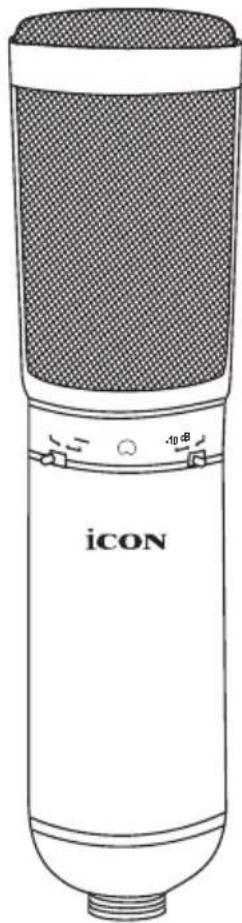
Professional Large-diaphragm condenser microphone for unsurpassed audio quality
- Ideal as main and support microphone for most differing recording situations
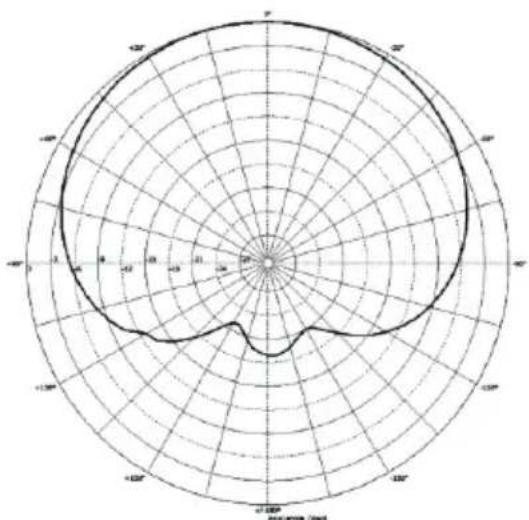
Cardioid pickup pattern for outstanding sound source separation and feedback rejection
Pressure-gradient transducer with shock-mounted capsule
- Prefect for vocals and acoustic instruments
- External 36-52 Volt phantom power operation
- Heavy-duty suspension mount and wooden transport case included
- Ultra-rugged construction with metal die-cast body
- High-quality components and exceptionally rugged construction ensure long lift.
Operating the Apollo/Artemis
Powering the Apollo/Artemis
The Apollo/Artemis is a large diaphragm condenser microphone and therefore needs to be operated by connecting a phantom power supply. Phantom power is standard on most quality mixers, outboard MIC-pres and hard disk recorders. If necessary an external phantom power supply can also be used. The Apollo/Artemis receives the phantom power directly from a MIC cable when connected to a mixer or other microphone input that includes a phantom supply. The power is actually sent OUT of the microphone INPUT, riding silently along with the audio signal. Most mixers have a switch to engage the phantom power so be sure to check that the phantom power is on.
Setting up the signal level
When connecting the Apollo/Artemis to a mixer or recorder input, be sure that the input is of microphone level. Also, be sure that the phantom power is engaged as explained at the previous section "Powering the Apollo/Artemis". Most mixers and recorders of reasonable quality will offer a microphone input with MIC trim (usually called Trim or Gain) control. The purpose of the MIC trim control is to optimize the amount of good signal to any noise associated with the mixers electronics. A good MIC pre with trim also will have a Peak or Clip LED. To set a good level on the MIC, set the Apollo/Artemis up in front of the desired sound source and slowly raise the MIC trim control until you see the Peak LED light up. Then, turn the mix trim control down until the LED does not light any more. On most mixers, the ideal setting is that the trim control is turned up as much as possible without lighting the Peak LED.
Microphone Placement
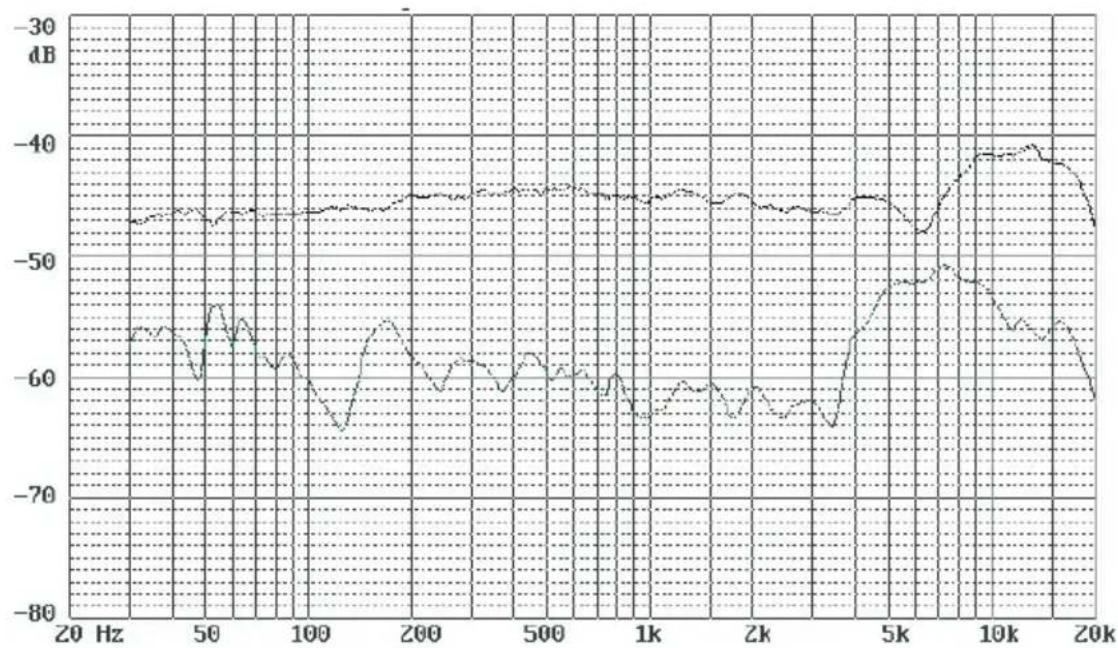
In order to maximize the sound quality, you must pay careful attention to the placement of your Apollo/Artemis and how it is positioned for the instrument orologist that you are miking. All microphones, especially unidirectional or cardioid microphones, exhibit a phenomenon known as the "proximity effect". Very simply put, proximity effect is a resulting change in the frequency response of a microphone based on the position of the MIC capsule relative to the sound source. Specifically, when you point a cardioid MIC directly at the sound source (on-axis) you will get the best frequency response, however, when you start pointing the microphone slightly away (off-axis) you will notice the low frequency dropping off and the microphone will start to sound thinner.
For most vocal applications you'll want to position the microphone directly in front of the artist. The same may be true for miking instruments. However, you can make some pretty amazing equalization adjustments by slightly changing the angle of the capsule to the sound source. This can be a very useful technique in capturing the optimum sound of drum set, acoustic guitar, piano or other instruments in a live room or sound stage. Experimentation and experience are the best teachers in getting good sounds, so plug in!
P-Poping
P-Poping is that annoying pop that you can get when the microphone diaphragm gets a blast of air from a vocalist pronouncing words with the letter "P" included. There are a few ways to deal with the problem including using an external pop filter. Some famous engineers have relied on an old nylon stocking over a bent clothes hanger, which actually works very well. For a cleaner solution, try ICON PF-01 pop filter. You can also try placing the microphone slightly off axis (on a slight angle) from the vocalist. This can often solve the problem without using an external pop filter.
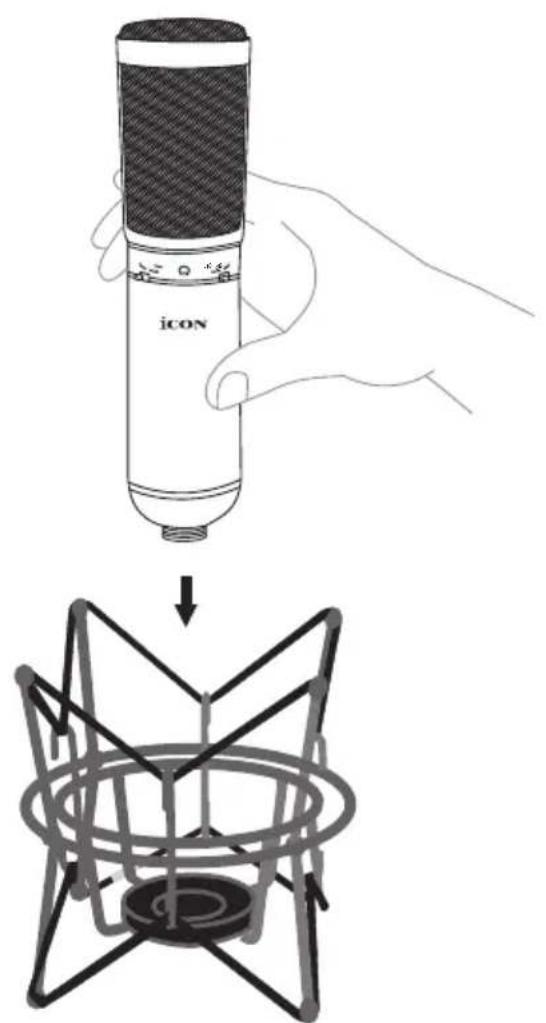
Mounting the Apollo/Artemis
Mount your Apollo/Artemis into the provided suspension mount as the diagrams illustrated below.
Specifications
Acoustical operating principle Pressure gradient transducer
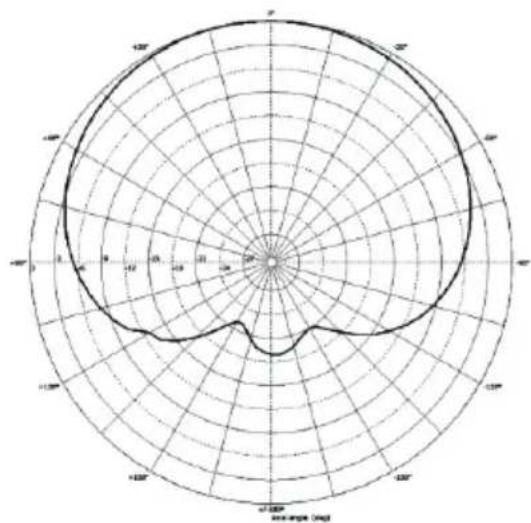
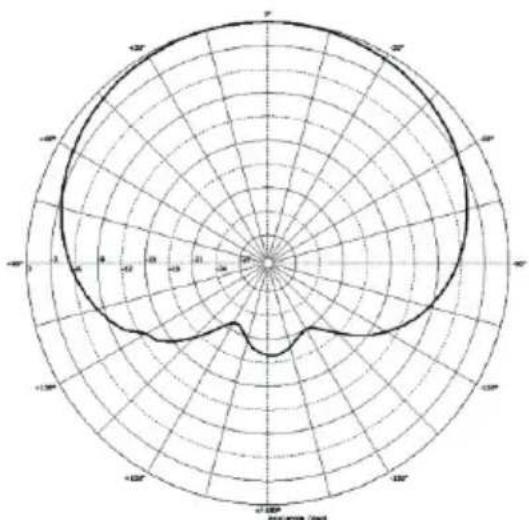
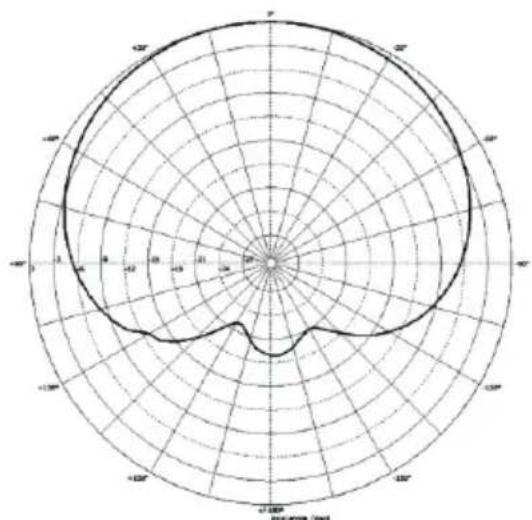
Directional pattern Cardioid
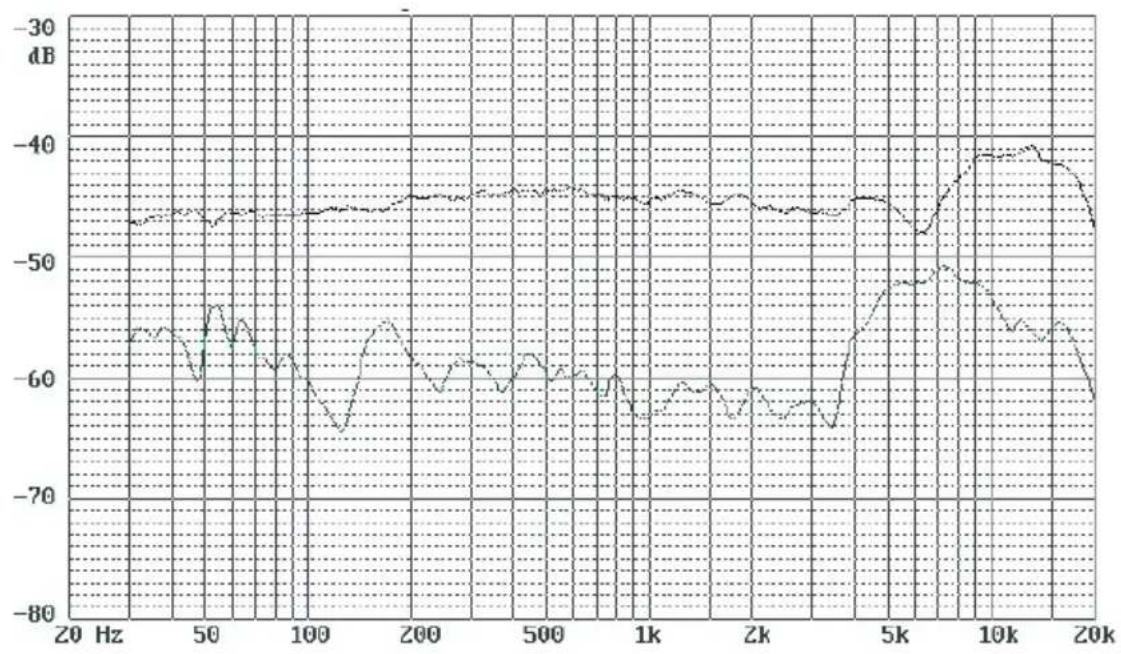
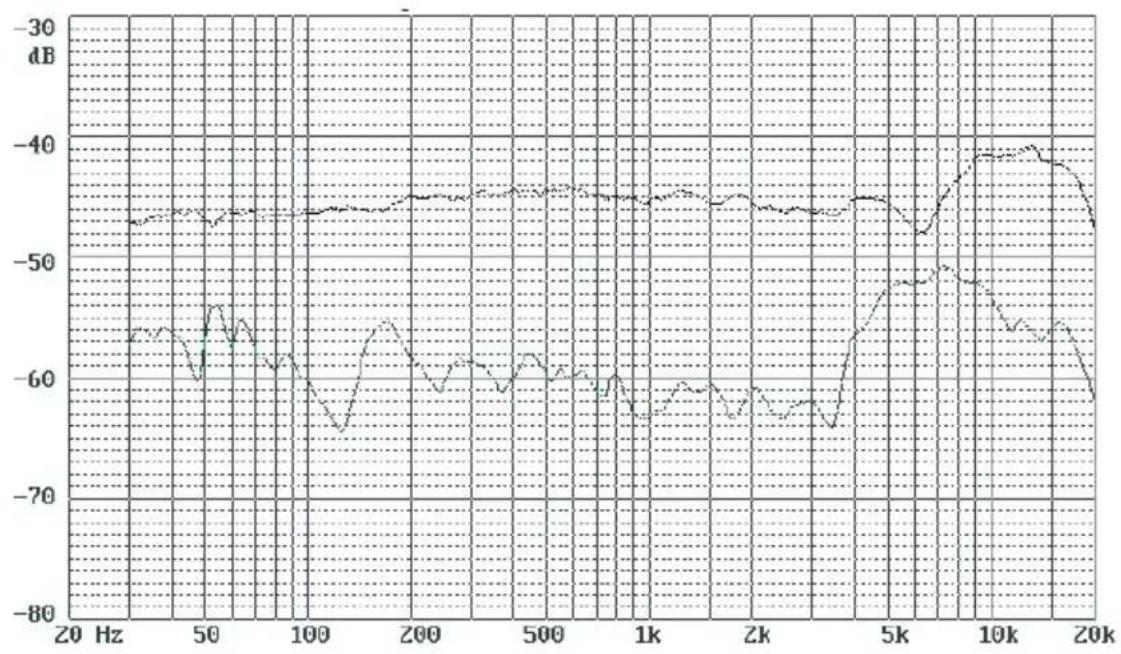
Frequency range 20Hz - 18KHz
Field Sensitivity (mV/Pa) 23.30
Field Sensitivity (dB re iV/Pa) -32.7
Rated Impedance 200 Ohms
Min. load impedance 1000 Ohms
SPL 126dB
S/N ratio 83.7dB
Power supply voltage 48V +/-3V
Current consumption 2.9mA
Weight (Microphone only) 0.67Kg (1.5lb)
(with suspension mount) 1.09Kg (2.4lb)
Dimensions 50mm (dia.) x 209mm (L)
1.97" (dia.) x 8.23" (L)
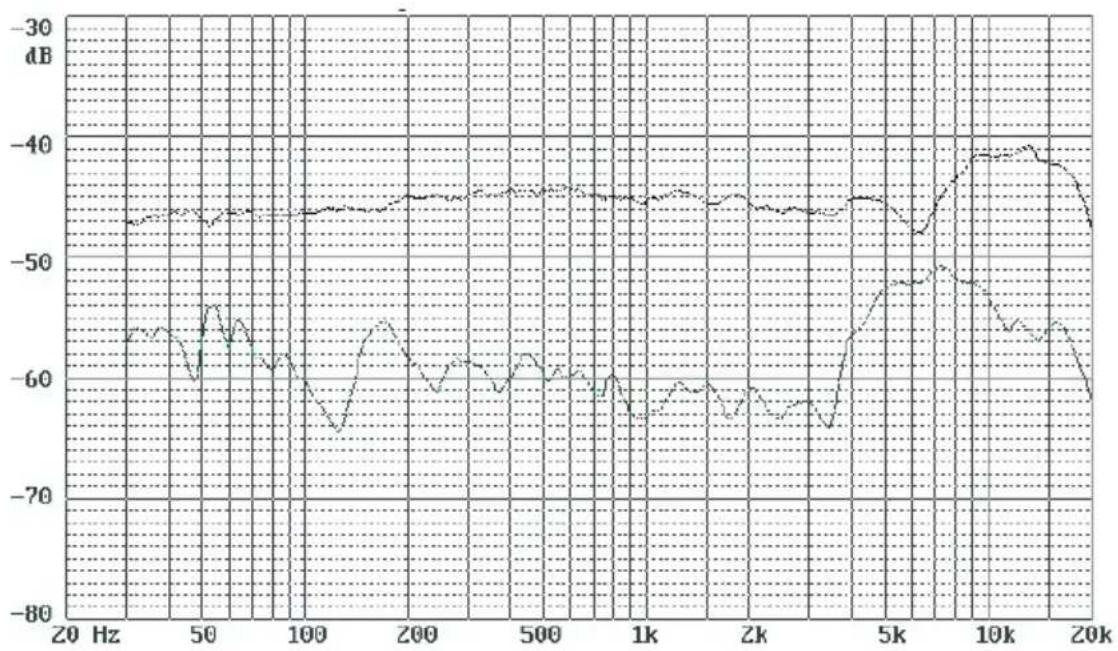
Frequency response chart
Polar pattern
Services
If your Apollo/Artemis needs servicing, follow these instructions.
Check our online Help Center at http://support.ironproaudio.com/hc/en-us, for information, knowledge, and downloads such as:
- FAQ
- Download
- Learn More
- Forum
Very often you will find solutions on these pages. If you don't find a solution, create a support ticket at our online Help Center at the link below, and our technical support team will assist you as soon as we can.
Navigate to http://support.iconproaudio.com/hc/en-us and then sign in to submit a ticket.
As soon as you have submitted an inquiry ticket, our support team will assist you to resolve the problem with your ICON ProAudio device as soon as possible.
To send defective products for service:
- Ensure the problem is not related to operation error or external system devices.
- Keep this owner's manual. We don't need it to repair the unit.
- Pack the unit in its original packaging including end card and box. This is very important. If you have lost the packaging, please make sure you have packed the unit properly. ICON is not responsible for any damage that occurs due to non-factory packing.
- Ship to the ICON tech support center or the local return authorization. See our service centers and distributor service points at the link below:
If you are located in US
Send the product to:
North America
Mixware, LLC -U.S. Distributor
11070 Fleetwood Street -Unit F.
Sun Valley, CA 91352; USA
Tel.: (818) 578 4030
Contact: www MIXware.net/help
If you are located in Europe
Send the product to:
Sound Service GmbH European
HeadquarterMoriz-Seeler-Straße
3D-12489 Berlin
Telephone: +49 (0)30 707 130-0
Fax: +49 (0)30 707 130-189
E-Mail: info@sound-service.eu
If you are located in Hong Kong
Send the product to:
ASIA OFFICE:
Unit F, 15/F., Fu Cheung Centre,
No. 5-7 Wong Chuk Yueng
Street, Fotan, Sha Tin, N.T., Hong Kong.
- For additional update information please visit our website at:
FRANÇAIS
Introductions
| Acoustical operating principle | Pressure gradient transducer |
| Directional pattern | Cardioid |
| Frequency range | 20Hz – 18KHz |
| Field Sensitivity (mV/Pa) | 23.30 |
| Field Sensitivity (dB re iV/Pa) | -32.7 |
| Rated Impedance | 200 Ohms |
| Min. load impedance | 1000 Ohms |
| SPL | 126dB |
| S/N ratio | 83.7dB |
| Power supply voltage | 48V +/-3V |
| Current consumption | 2.9mA |
| Weight (Microphone only) | 0.67Kg (1.5lb) |
| (with suspension mount) | 1.09Kg (2.4lb) |
| Dimensions | 50mm (dia.) x 209mm (L) |
| 1.97" (dia.) x8.23" (L) |
Frequency response chart
Polar pattern
Unit F, 15/F., Fu Cheung Centre,
No. 5-7 Wong Chuk Yueng Street, Fotan,
Sha Tin, N.T., Hong Kong.
Mixware, LLC - U.S. Distributor
11070 Fleetwood Street - Unit F.
Sun Valley, CA 91352; USA
Tel.: (818) 578 4030
Contact: www MIXware.net/help
- For additional update information please visit our website at:
DEUTSCHE
Einführung
| Acoustical operating principle | Pressure gradient transducer |
| Directional pattern | Cardioid |
| Frequency range | 20Hz – 18KHz |
| Field Sensitivity (mV/Pa) | 23.30 |
| Field Sensitivity (dB re iV/Pa) | -32.7 |
| Rated Impedance | 200 Ohms |
| Min. load impedance | 1000 Ohms |
| SPL | 126dB |
| S/N ratio | 83.7dB |
| Power supply voltage | 48V +/-3V |
| Current consumption | 2.9mA |
| Weight (Microphone only) | 0.67Kg (1.5lb) |
| (with suspension mount) | 1.09Kg (2.4lb) |
| Dimensions | 50mm (dia.) x 209mm (L) |
| 1.97" (dia.) x 8.23" (L) |
Frequency response chart
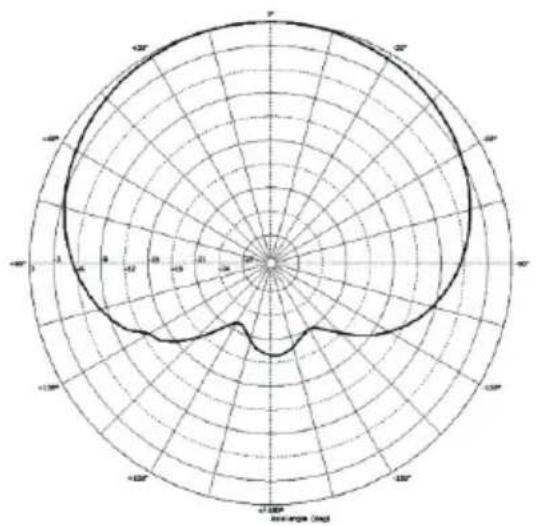
Polar pattern
Unit F, 15/F., Fu Cheung Centre,
No. 5-7 Wong Chuk Yueng Street, Fotan,
Sha Tin, N.T., Hong Kong.
Mixware, LLC - U.S. Distributor 11070 Fleetwood Street - Unit F.
Sun Valley, CA 91352; USA
Tel.: (818) 578 4030
Contact: www MIXware.net/help
ESPNOL
Introduccion
Acoustical operating principle Pressure gradient transducer
Directional pattern Cardioid
Frequency range 20Hz - 18KHz
Field Sensitivity (mV/Pa) 23.30
Field Sensitivity (dB re iV/Pa) -32.7
Rated Impedance 200 Ohms
Min. load impedance 1000 Ohms
SPL 126dB
S/N ratio 83.7dB
Power supply voltage 48V +/-3V
Current consumption 2.9mA
Weight (Microphone only) 0.67Kg (1.5lb)
(with suspension mount) 1.09Kg (2.4lb)
Dimensions 50mm (dia.) x 209mm (L)
1.97" (dia.) x 8.23" (L)
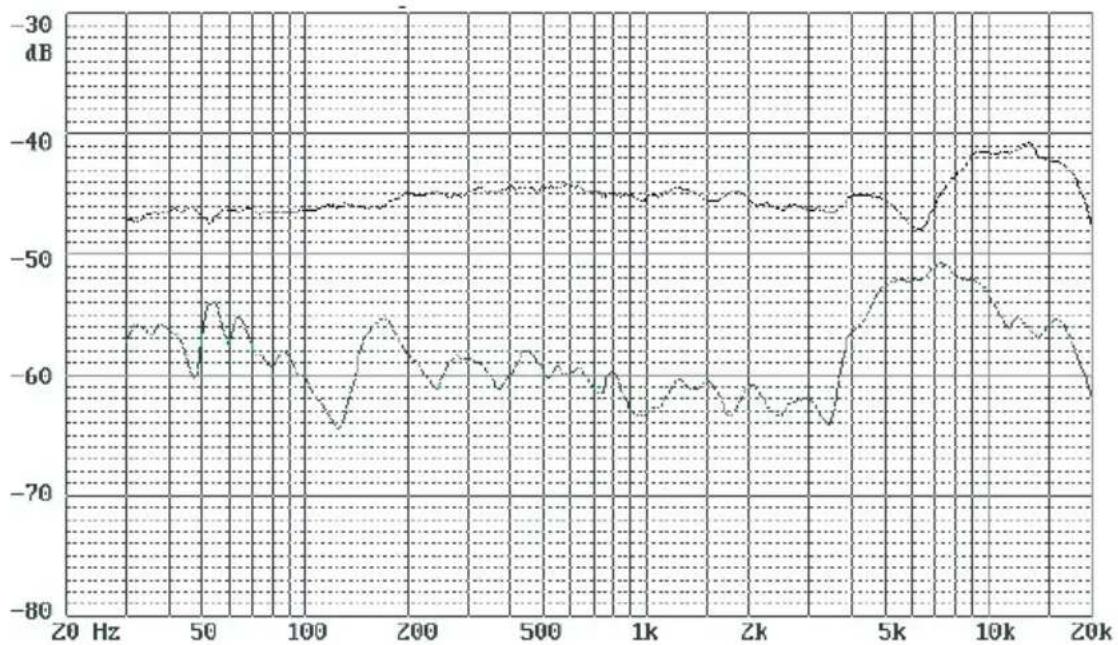
Frequency response chart
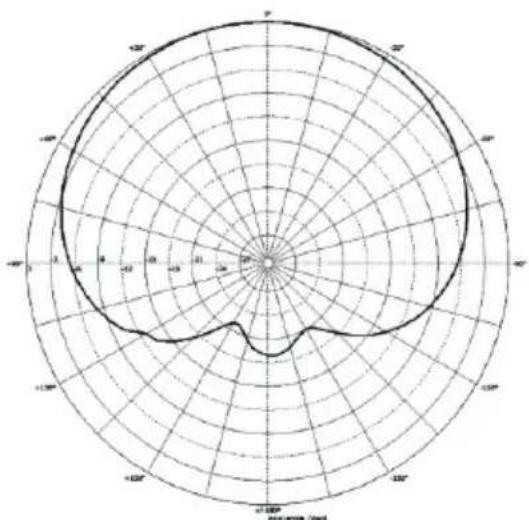
Polar pattern
Servizio
Unit F, 15/F., Fu Cheung Centre, No. 5-7 Wong Chuk Yueng Street, Fotan,
Sha Tin, N.T., Hong Kong.
Mixware, LLC - U.S. Distributor 11070 Fleetwood Street - Unit F
Sun Valley, CA 91352; USA
Tel.: (818) 578 4030
Contact: www MIXware.net/help
- For additional update information please visit our website at:
www.ionproaudio.com
Acoustical operating principle Pressure gradient transducer
Directional pattern Cardioid
Frequency range 20Hz - 18KHz
Field Sensitivity (mV/Pa) 23.30
Field Sensitivity (dB re iV/Pa) -32.7
Rated Impedance 200 Ohms
Min. load impedance 1000 Ohms
SPL 126dB
S/N ratio 83.7dB
Power supply voltage 48V +/-3V
Current consumption 2.9mA
Weight (Microphone only) 0.67Kg (1.5lb)
(with suspension mount) 1.09Kg (2.4lb)
Dimensions 50mm (dia.) x 209mm (L)
1.97" (dia.) x 8.23" (L)
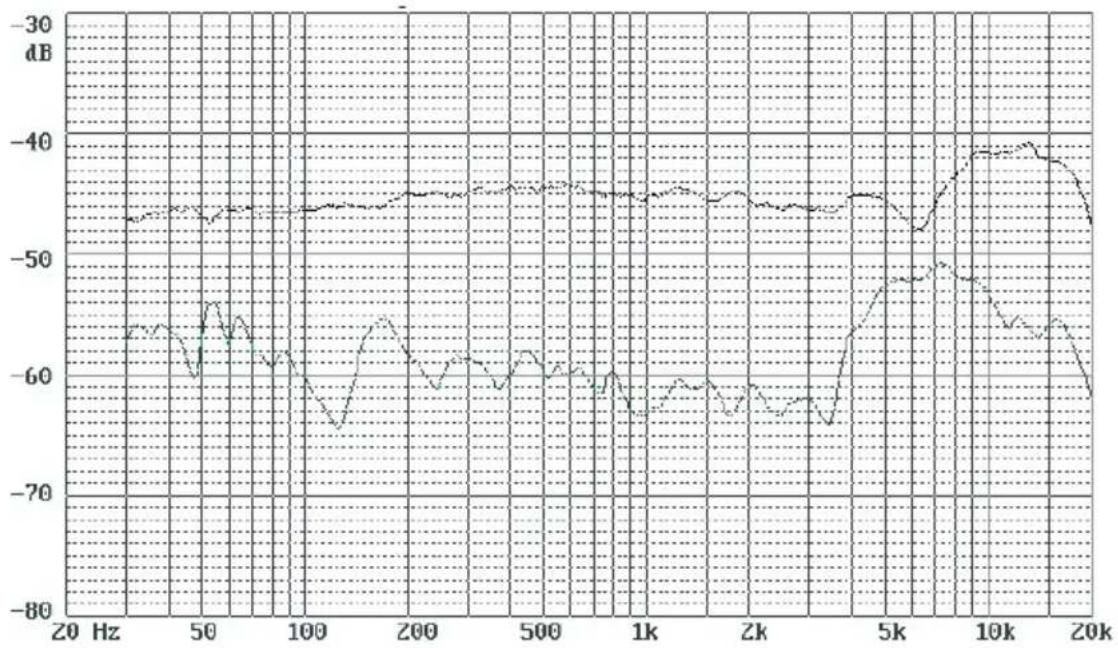
Frequency response chart
Polar pattern
修理にて
Unit F, 15/F., Fu Cheung Centre,
No. 5-7 Wong Chuk Yueng Street, Fotan,
Sha Tin, N.T., Hong Kong.
北米 にお住まいの场合は、
製品をこらまて返送てくだい:
ICON Service Centre
611 Potomac PL Ste 102
Smyrna, 37167-5655 Tennessee.
United States
Tel.: +1 615 540 989
三一口口卜巴有住坐的场合是、
製品をこらまて返送てくだい:
Sound Service
GmbH-European
HeadquarterMoriz-Seeler-Straße
3D-12489 Berlin
Telephone: +49 (0)30 707 130-0
Fax: +49 (0)30 707 130-189
E-Mail: info@sound-service.eu
Acoustical operating principle Pressure gradient transducer
Directional pattern Cardioid
Frequency range 20Hz - 18KHz
Field Sensitivity (mV/Pa) 23.30
Field Sensitivity (dB re iV/Pa) -32.7
Rated Impedance 200 Ohms
Min. load impedance 1000 Ohms
SPL 126dB
S/N ratio 83.7dB
Power supply voltage 48V +/-3V
Current consumption 2.9mA
Weight (Microphone only) 0.67Kg (1.5lb)
(with suspension mount) 1.09Kg (2.4lb)
Dimensions 50mm (dia.) x 209mm (L)
1.97" (dia.) x 8.23" (L)
Frequency response chart
Polar pattern
Revision
Unit F, 15/F., Fu Cheung Centre,
No. 5-7 Wong Chuk Yueng Street, Fotan,
Sha Tin, N.T., Hong Kong.
Se ci si trov a Europa
Mixware, LLC - U.S. Distributor
11070 Fleetwood Street - Unit F.
Sun Valley, CA 91352; USA
Tel.: (818) 578 4030
Contact: www MIXware.net/help










中国地区用户






www.ionproaudio.com

- Important Safety Instructions
- FRANÇAIS
- Features 3
- Operating the Apollo/Artemis 4
- Specifications 6
- Services 7
- Introductions 8
- Register your ICON ProAudio product to your personal account
- Features
- Operating the Apollo/Artemis
- Powering the Apollo/Artemis
- Setting up the signal level
- Microphone Placement
- P-Poping
- Mounting the Apollo/Artemis
- Specifications
- Services
- Introductions
- DEUTSCHE
- Einführung
- ESPNOL
- Introduccion
- Servizio
- 修理にて
- Revision
Brand : icon
Model : Artemis
Category : Microphone