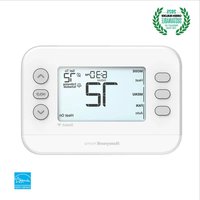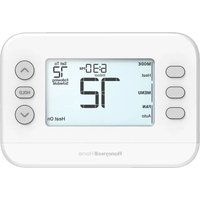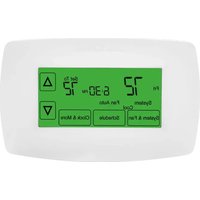
RTH7600D - Thermostat HONEYWELL - Free user manual and instructions
Find the device manual for free RTH7600D HONEYWELL in PDF.


User questions about RTH7600D HONEYWELL
0 question about this device. Answer the ones you know or ask your own.
Ask a new question about this device
Download the instructions for your Thermostat in PDF format for free! Find your manual RTH7600D - HONEYWELL and take your electronic device back in hand. On this page are published all the documents necessary for the use of your device. RTH7600D by HONEYWELL.
USER MANUAL RTH7600D HONEYWELL
Read and save these instructions.
For help please visit honeywellhome.com

RTH7600 RET97C Series
text_image
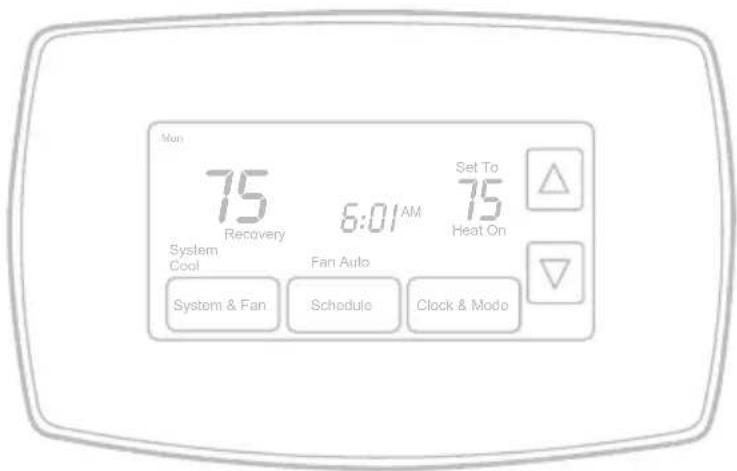
Mon 75 Recovery 6:01 AM System Cool Fan Auto Set To 75 Heat On System & Fan Schedule Clock & ModeInstallation is Easy
- Label wires and remove your old thermostat
- Install and wire your new thermostat
- Set your new thermostat to match your heating/cooling system
• This thermostat works with virtually all System Types
• It is preset for the most common system

natural_image
Black-and-white circular portrait of a man in profile, wearing earphones and holding a pen (no text or symbols visible)Do you need assistance? We are here to help.
Call 1-800-468-1502 for wiring assistance before returning the thermostat to the store.
This thermostat works on 24 volt or 750 mV systems. It will NOT work on 120/240 Volt systems.
text_image
HgNO MERCURY NE PAS JETER LE MERCURE

ATTENTION: MERCURY RECYCLING NOTICE
This product does not contain mercury. However, this product may replace a product that contains mercury. Mercury and products containing mercury should not be discarded in household trash.
For more information on how and where to properly recycle a thermostat containing mercury in the United States, please refer to the Thermostat Recycling Corporation at www.thermostat-recycle.org.
For mercury thermostat recycling in Canada, please refer to Switch the Stat at www.switchthestat.ca

This thermostat contains a Lithium battery which may contain Perchlorate material.
Perchlorate Material—special handling may apply, See www.dtsc.ca.gov/hazardouswaste/perchlorate

NOTICE: To avoid possible compressor damage, do not run air conditioner if the outside temperature drops below 50^ F ( 10^ C).
Customer assistance
For assistance with this product, please visit honeywellhome.com.
Or call Resideo Customer Care toll-free at 1-800-468-1502.
To save time, please note your model number and date code before calling.
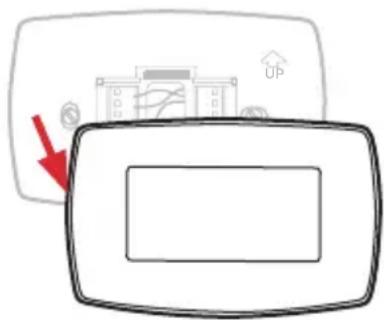
Pull at bottom to remove thermostat from wallplate.
Turn thermostat over to find model number and date code.
text_image
Diagram showing a device with an up/down arrow and a control panel, likely illustrating a system or process step.Table of contents
Installation
Installation....3
Advanced Installation 10
About your new thermostat
Controls and Home screen
quick reference....13
Preset energy-saving schedules.....14
Programming and operation
Setting the clock....14
Adjusting program schedules.....15
Overriding schedules temporarily ....15
Overriding schedules permanently..16
Auto Changeover....16
Change filter 17
Replace batteries....18
Appendices
Troubleshooting....19
Limited warranty....20
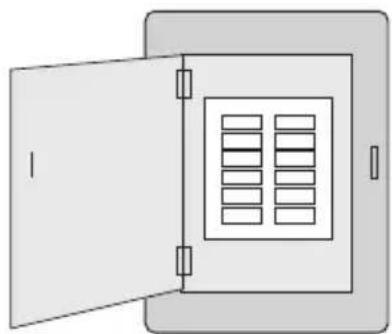
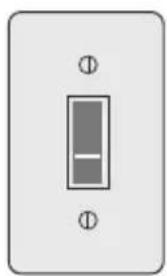
1 Turn Off Power to Heating/Cooling System
natural_image
Simple line drawing of an open storage cabinet with internal compartments (no text or symbols)Circuit breaker box
or
natural_image
Simple electrical switch symbol with two terminals and a central internal component (no text or labels)Heating/cooling system power switch
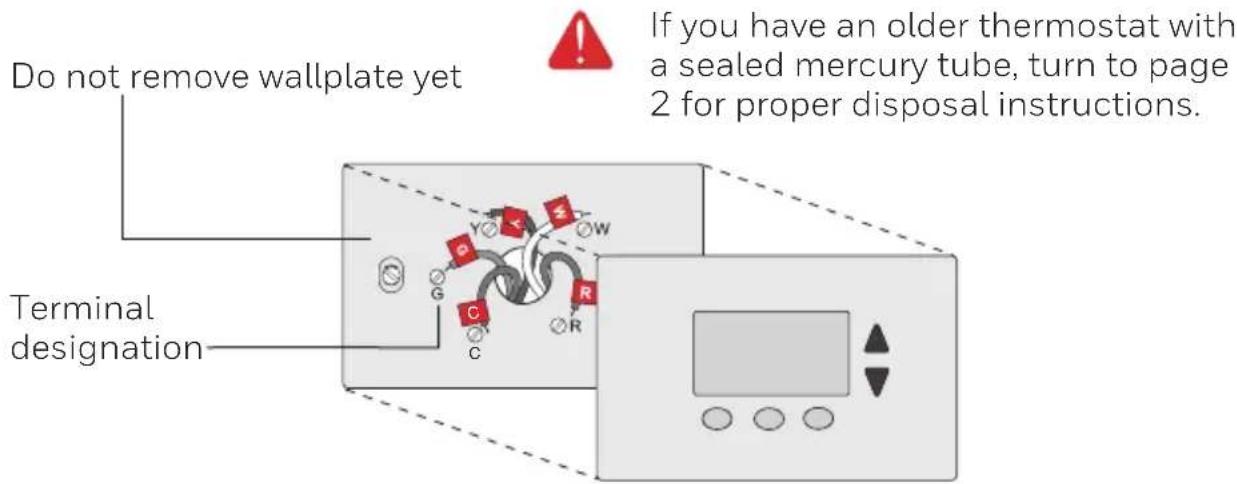
2 Remove Old Thermostat
Remove old thermostat but leave wallplate with wires attached.
text_image
Do not remove wallplate yet Terminal designation If you have an older thermostat with a sealed mercury tube, turn to page 2 for proper disposal instructions.3 Label Wires with Tags
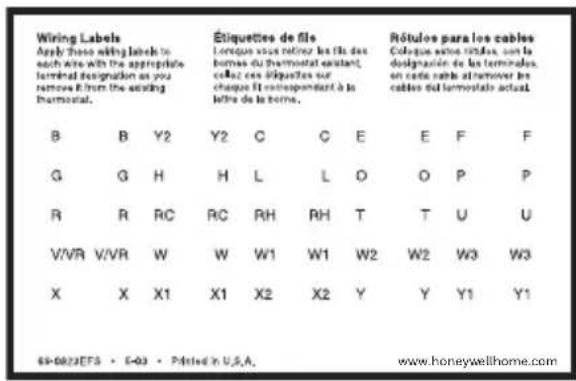
Label the wires using the supplied wire labels as you disconnect them, then remove the old wallplate. Wire color might not match labels.
text_image
Wiring Labels Apply these wiring labels to each site with the appropriate terminal designation as you remove it from the existing thermal. Étiquettes de file Lorsque vous retirer les fils des bornes du thermostat assistant, collect ces étiquettes sur chaque fit correspondant à la lettre de la personne. Rôtules para les cables Colques autres têtes, con la designación de les terminales, en cada cable at remover les cables del terminale actual. B B Y2 Y2 C C E E F F G G H H L L O O P P R R RC RC RH RH T T U U V/VR V/VR W W W1 W1 W2 W2 W3 W3 X X X1 X1 X2 X2 Y Y Y1 Y1 69-0822EFS • 6-03 • Printed in U.S.A. www.honeywellhome.com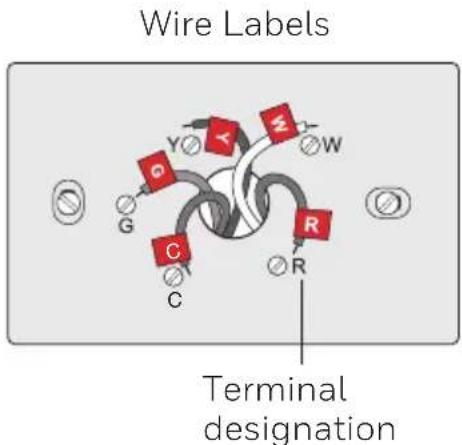
text_image
Wire Labels Terminal designation4 Separate Wallplate from New Thermostat
Remove wallplate from the new thermostat and mount onto wall.
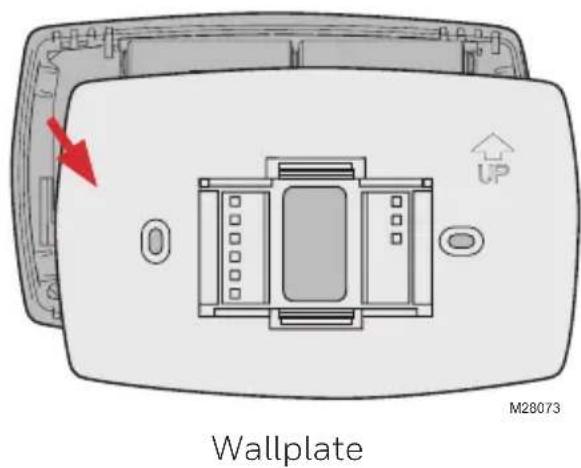
text_image
Wallplate M280735 Mount Wallplate
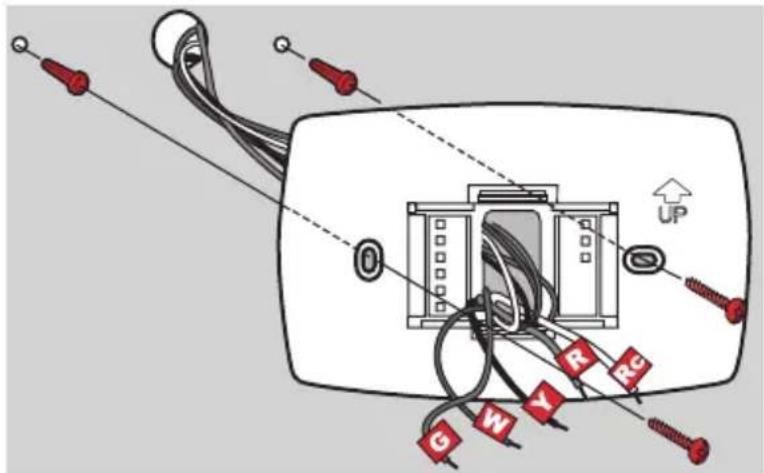
Mount the new wallplate using the included screws and anchors.
text_image
Diagram of an electrical panel with labeled wires and connectors, including a 'UP' indicator and red markers (G, W, Y, R, RG)MCR28094
Drill 3/16-in. holes for drywall
Drill 3/32-in. holes for plaster
6 Connect Wires
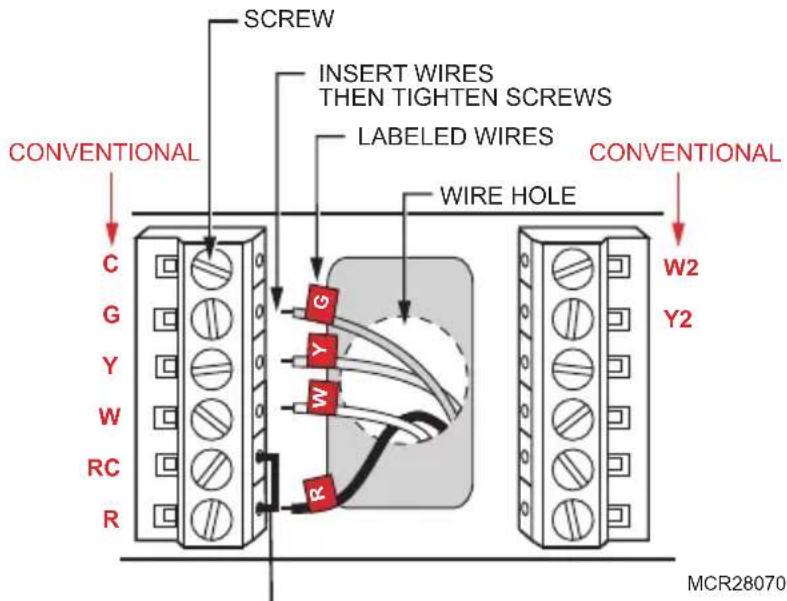
Simply match wire labels.
If labels do not match letters on the thermostat, check "Alternate Wiring (Conventional Systems)" on page 6 and connect to terminal as shown here (see notes, below).
We are here to help. Call 1-800-468-1502 for wiring assistance.
text_image
CONVENTIONAL SCREW INSERT WIRES THEN TIGHTEN SCREWS LABELED WIRES WIRE HOLE CONVENTIONAL C G Y W RC R G Y W R W2 Y2 MCR28070Remove metal jumper if you have both R and Rc wires.
Alternate Wiring (Conventional Systems)
If labels do not match terminals, connect wires as shown here (see notes, below).
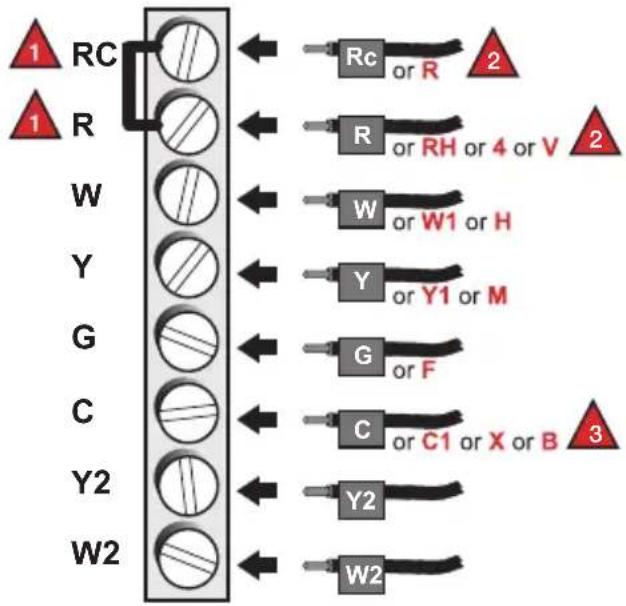
flowchart
graph TD
    A["1 RC"] --> B["2"]
    C["1 R"] --> D["2"]
    E["W"] --> F["3"]
    G["Y"] --> H["3"]
    I["G"] --> J["3"]
    K["C"] --> L["3"]
    M["Y2"] --> N["3"]
    O["W2"] --> P["3"]
    Q["Rc or R"] --> B
    R["R or RH or 4 or V"] --> D
    S["W or W1 or H"] --> F
    T["Y or Y1 or M"] --> H
    U["G or F"] --> J
    V["C or C1 or X or B"] --> N
    W["Y2"] --> P
MCR28076

Remove metal jumper connecting R and Rc only if you must connect both R and Rc wires.

If your old thermostat had both R and RH wires, remove metal jumper. Connect the R wire to the Rc terminal, and the RH wire to the R terminal.

If your old thermostat had only 1 C or C1 wire, connect it to the C terminal. If your old thermostat had 2 C or C1 wires, wrap each separately with electrical tape and do not connect them.
Alternate Wiring (Heat Pump)
If labels do not match letters on thermostat, see page 7.
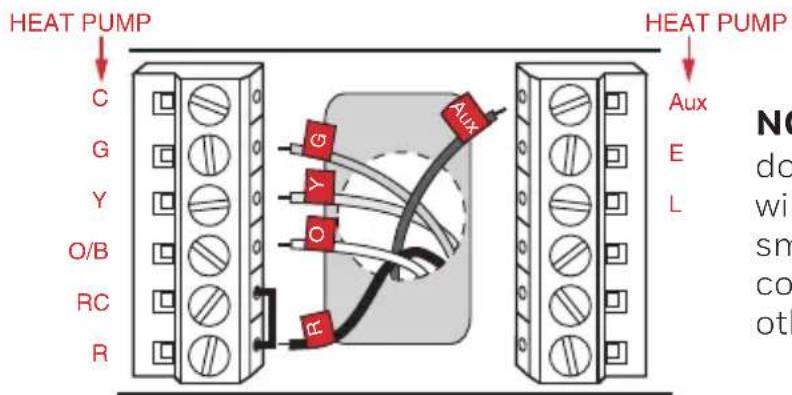
text_image
HEAT PUMP C G Y O/B RC R HEAT PUMP Aux E L NO do wi sm co othMCR33552
NOTE: If E and Aux
do not each have a wire connected, use a small piece of wire to connect them to each other.
Alternate Wiring (For Heat Pumps Only)
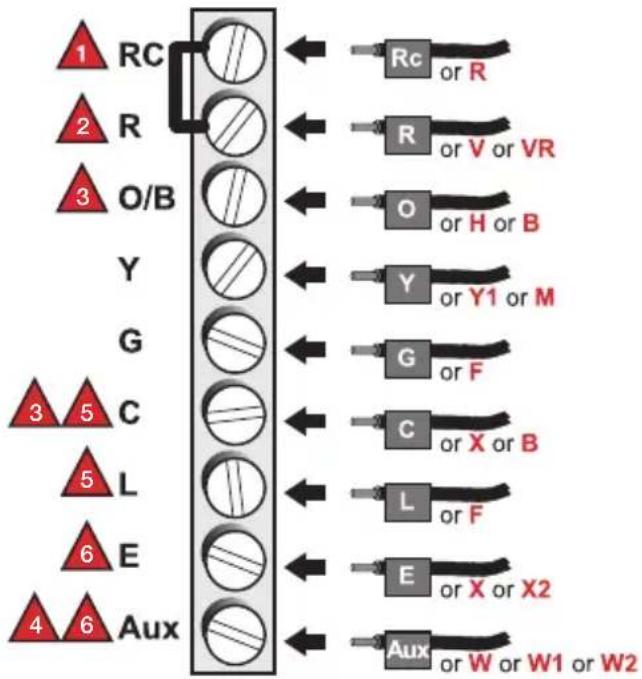
flowchart
graph TD
    A["1 RC"] --> B["2 R"]
    B --> C["3 O/B"]
    C --> D["Y"]
    D --> E["3 5 C"]
    E --> F["5 L"]
    F --> G["6 E"]
    G --> H["4 6 Aux"]

    I["Rc or R"] --> J["R or V or VR"]
    K["O or H or B"] --> L["Y or Y1 or M"]
    M["G or F"] --> N["C or X or B"]
    O["L or F"] --> P["E or X or X2"]
    Q["Aux or W or W1 or W2"] --> R["Aux or W or W1 or W2"]

Leave metal jumper in place, connecting R & Rc terminals.

If your old thermostat had both V and VR wires, stop now and contact a qualified contractor for help.

If your old thermostat had separate O and B wires, attach the B wire to the C terminal. If another wire is attached to the C terminal, stop now and contact a qualified contractor for help.

If your old thermostat had Y1, W1 and W2 wires, stop now and contact a qualified contractor for help.

If L terminal is used, C terminal wire must be connected (contact a contractor if there is no C wire).

If E and Aux terminals do not each have a wire connected, use a small piece of wire to connect them to each other.
7 Install Batteries
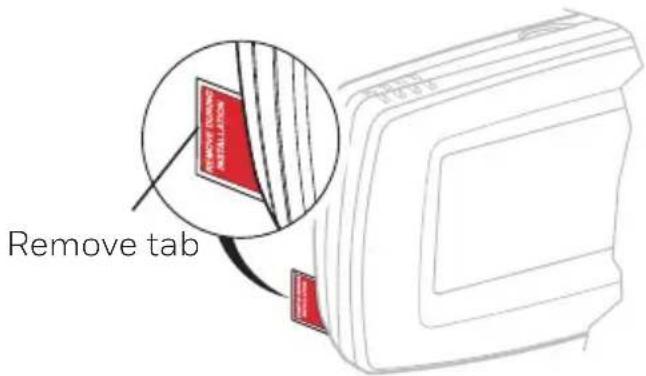
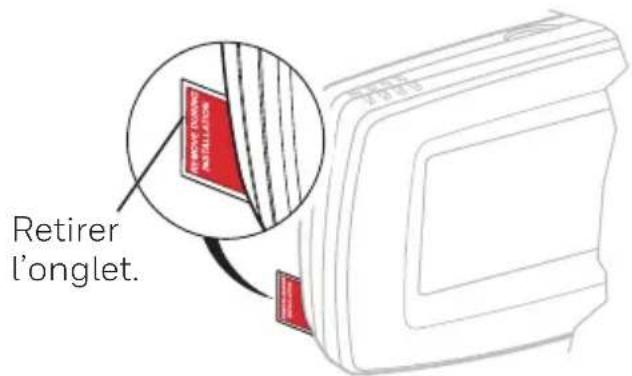
Install two AA alkaline batteries and remove tab.
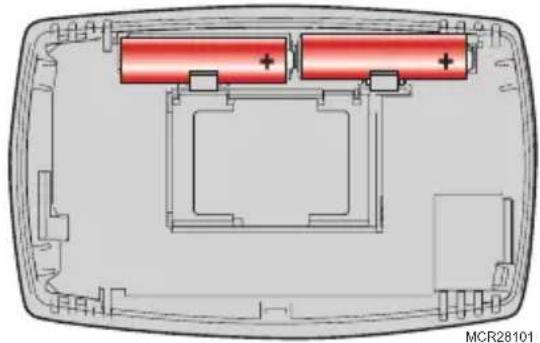
natural_image
Cross-sectional diagram of a device showing two red battery cells with positive charge indicators, enclosed in a transparent housing (no text or symbols)Back of thermostat
text_image
Remove tab REMOVE TABS INSTALLATION8 Install Thermostat onto Wallplate
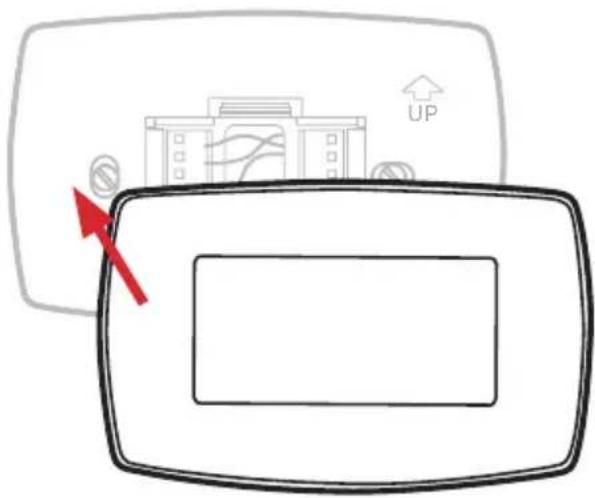
Install thermostat onto the wallplate on the wall.
text_image
Diagram showing a device with an upward arrow and directional indicators, including a building icon labeled 'UP'9 Turn Power Back On
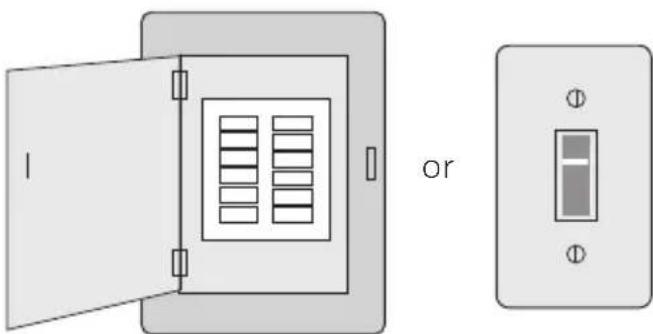
Turn the power back on to the heating/cooling system.
natural_image
Diagram showing two open electrical enclosures with internal compartments and a separate rectangular device labeled 'or' (no text or symbols on the devices themselves)Circuit breaker box Heating/cooling system power switch
10 Set Time and Date
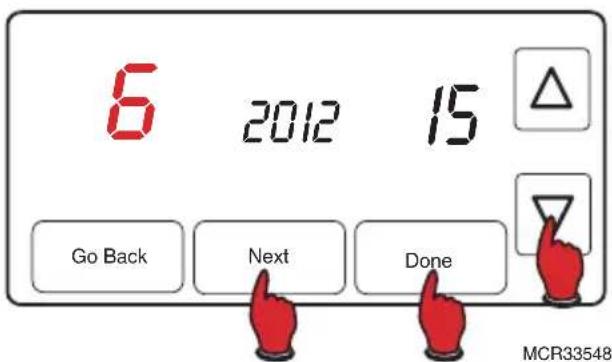
- Press ▲ or ▼ to set month, then press NEXT.
- Press ▲ or ▼ to set day, then press NEXT.
- Press ▲ or ▼ to set year, then press DONE.
- Press ▲ or ▼ to set time, then press DONE to save and exit.
text_image
6 2012 15 Go Back Next Done MCR33548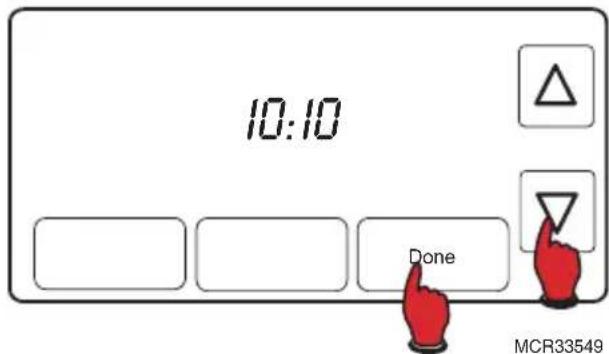
text_image
10:10 Done MCR3354911 If your system type is...
If your system type is:
☐ Single Stage Heat and Cool
Congratulations, you're done!
If your system type is:
□ Multistage Heat and Cool
☐ Heat Pump* without Backup Heat
☐ Heat Pump* with Backup Heat
□ Heat Only
Cool Only
Continue with Advanced Installation on next page to match your thermostat to your system type.
*Heat Pump—an air conditioner that provides cooling in the summer, and also runs in reverse in the winter to provide heating.
If you are not sure of your system type or if you have other questions, call us toll-free at 1-800-468-1502.
This thermostat works on 24 volt or 750 mV systems. It will NOT work on multi-stage conventional systems.
Advanced Installation
Enter System Setup
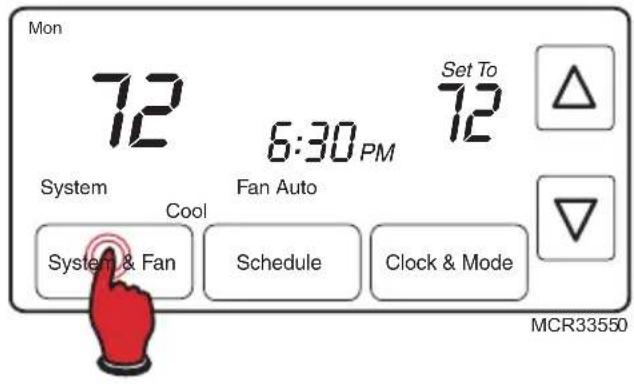
- Press and release the left button.
- Press and hold the center button until the screen changes (approximately 5 seconds).
text_image
Mon 72 6:30 PM 72 Set To System Cool Fan Auto System & Fan Schedule Clock & Mode MCR33550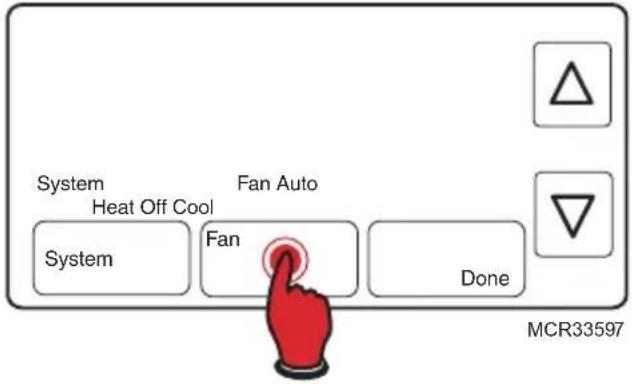
text_image
System Heat Off Cool Fan Auto System Fan Done MCR33597Changing Settings
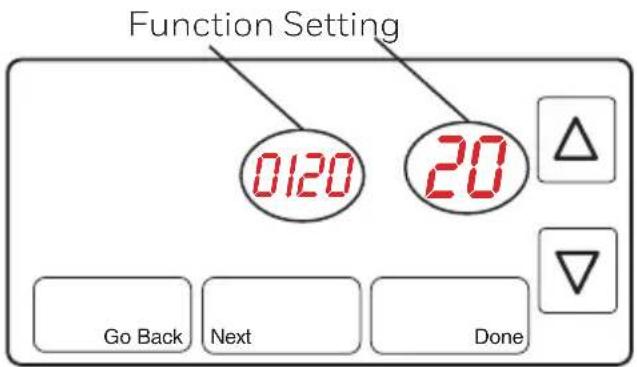
- Press the ▲ or ▼ button to change the setting.
- Press NEXT to advance to next function.
- Press DONE to save & exit.
text_image
Function Setting 0120 20 Go Back Next DoneMCR33551
NOTE: Some functions in the following pages may not appear due to previous selections made.
| Function | Description Setting | Press the ▲ or ▼ button to change the setting. |
| 0120 Year | Setting(first two digits) | 20 = Year 20xx21 = Year 21xx |
| 0130 Year | Setting(second two digits) | 01 - 99 (i.e., 2001 - 2099 |
| 0140 Month | Setting 01 - 12 (i.e., January - December) | |
| 0150 Date | Setting 01 - 31 | |
| 0170 | Select System Type | 1 Heat/cool: Gas, oil or electric heating with central air conditioning.2 Heat pump: Heat pump without backup or auxiliary heat.3 Heat only: Gas, oil or electric heat without central air conditioning.4 Heat only with fan: Gas, oil or electric heat without central air conditioning.5 Hot water heat only (no fan): Gas, oil or hot water heat without central air conditioning.6 Cool only: Central air conditioning only.7 Heat pump: Heat pump with backup or auxiliary heating.8 Heat/Cool Multiple stages: 2 heat stages (wires on W and W2), 2 cooling stages (wires on Y and Y2).9 Heat/Cool Multiple stages: 2 heat stages (wires on W and W2), 1 cooling stage (wire on Y).10 Heat/Cool Multiple stages: 1 heat stage (wire on W), 2 cooling stages (wires on Y and Y2). |
| 0180 | Heating Fan Control | 0 Gas or oil heat: Use this setting if you have a gas or oil heating system (system controls fan operation).1 Electric heat: Use this setting if you have an electric heating system (thermostat controls fan operation). |
| 0190 Heat | Pump Changeover Valve (for heat pumps only) | 0 Cooling changeover valve: Use this setting if you connected a wire labeled “O” to the O/B terminal (see page 6).1 Heating changeover valve: Use this setting if you connected a wire labeled “B” to the O/B terminal (see page 7). |
| 0240 | Heating Cycle Rate | 5 Gas or oil furnace: Standard gas/oil furnace (less than 90% efficiency).9 Electric furnace: Electric heating systems.3 Heat pump, hot water or high-efficiency furnace: Hot water system or gas furnace (more than 90% efficiency).1 Gas/oil steam or gravity system: Steam or gravity heat systems.Settings 5, 9, 3, or 1 recommended. Other settings: 2, 4, 6, 7, 8, 10, 11, 12. The number indicates how frequently the system cycles on and off to maintain the set temperature. A higher number means the system is on and off for shorter amounts of time, a lower number means longer on and off times. When these settings are set to match the system type, the thermostat controls temperature more accurately. |
| 0270 Emergency | Energy Heat Cycle Rate (heat pumps only) | 9 Electric furnace: Electric heating systems. |
| 0300 Manual | Auto Changeover 0 Manual | changeover (Heat/Cool/Off).1 Automatic changeover (Heat/Cool/Auto/Off).Automatically turns on Heat or Cool based on room temperature. Note: System maintains minimum 3°F difference between heat and cool settings. |
| 0320 | Temperature Format (°F/°C) 0 Fahrenheit | 1 Celsius |
| 0330 | Daylight Saving Time On/Off | 0 Off: No adjustment for daylight saving time.1 On: Auto-change to daylight saving time (for areas that do not use the new 2007 DST calendar).2 On: Auto-change to daylight saving time (2007 and beyond, for areas that use the new 2007 DST calendar). |
| 0500 | Furnace Filter Change Reminder | 0 Off (no reminder)1 Reminder in about 1 month2 Reminder in about 3 months3 Reminder in about 6 months4 Reminder in about 9 months5 Reminder in about 1 year6 Reminder in about 3 years |
| 0530 | Smart Response® Technology | 1 On0 Off |
| 0600 | Maximum Heat Setting 90°F (other options: 40-89°F [4-32°C]) | |
| 0610 | Minimum Cool Setting 50°F (other options: 51-99°F [11-37°C]) | |
| 0640 | Clock Format 12 12-hour clock (i.e., “3:30 pm”)24 24-hour clock (i.e., “15:30”) | |
About your new thermostat
Your new Resideo thermostat has been designed to give you many years of reliable service and easy-to-use, push-button climate control.
- Large touchscreen display with backlight is easy to read—even in the dark.
- Daily program schedules maximize comfort and economy.
- One-touch temp control overrides program schedule at any time.
- Precise comfort control keeps temperature within 1^ of the level you set.
- Change/check reminder lets you know when to replace furnace filter.
Thermostat controls
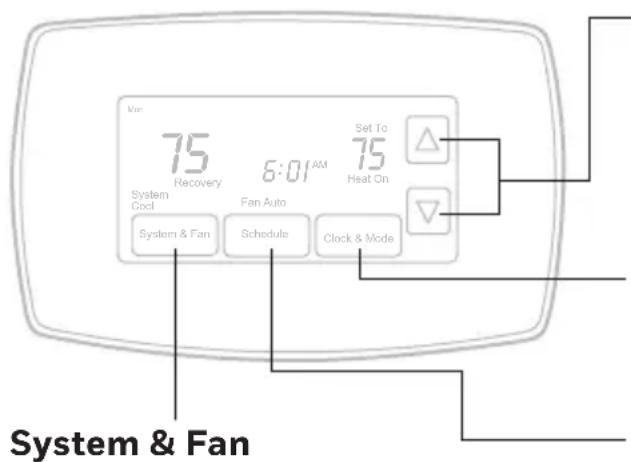
text_image
75 Recovery 6:01 AM System & Fan Fan Auto Clock & Mode Set To 75 Heat On System & FanPress to select fan operation or system.
Arrow keys
Press to adjust temperature or to make selections from screen menus.
Clock & More
Press to set clock or furnace filter reminder.
Schedule
Press to set program schedule (see pages 14–16).
Display screen
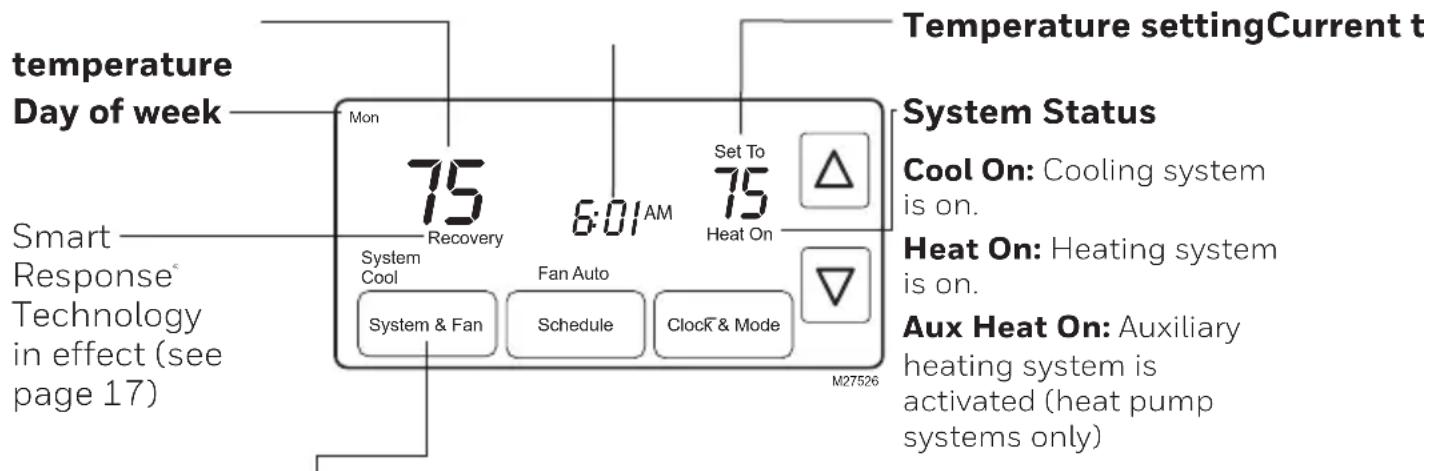
text_image
temperature Day of week Mon 75 Recovery 6:01 AM Set To 75 Heat On Temperature settingCurrent t Smart Response® Technology in effect (see page 17) System Status Cool On: Cooling system is on. Heat On: Heating system is on. Aux Heat On: Auxiliary heating system is activated (heat pump systems only)Press the SYSTEM & FAN button, then press...
...SYSTEM to select:
Heat: Heating system control.
Cool: Cooling system control.
Auto: Thermostat automatically selects heating or cooling depending on the indoor temperature.
Off: All systems off.
Em Heat: Emergency & Auxiliary Heat control. Compressor is locked out. (Select models only.)
...FAN to select:
Auto: Fan runs only when heating or cooling system is on.
On: Fan runs continuously.
Press DONE to exit and save settings.
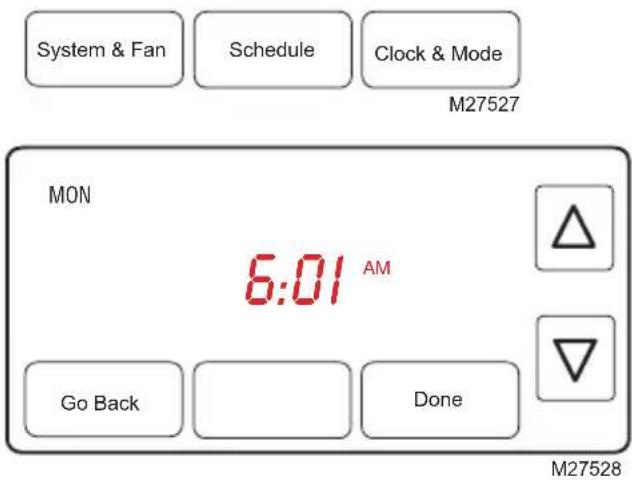
Clock setting
-
To set the current time display, press CLOCK & MORE, then press ▲ or ▼ to adjust the time. Press and hold ▲ or ▼ to advance the time more quickly.
-
Press DONE to save & exit (or press GO BACK to exit without changing the time).
NOTE: The real-time clock should never require adjustment since it automatically updates for daylight savings time, and stores all date/time information.
text_image
System & Fan Schedule Clock & Mode M27527 MON 6:01 AM Go Back Done M27528Program Schedule
You can program four time periods each day, with different settings for weekdays and weekends. We recommend the pre-set settings (shown in the table below), since they can reduce your heating/cooling expenses.
Wake - Set to the time you awaken and the temperature you want during the morning, until you leave for the day.
Leave - Set to the time you leave home and the temperature you want while you are away (usually an energy-saving level).
Return - Set to the time you return home and the temperature you want during the evening, until bedtime.
| Heat Cool | ||
| Wake(6:00 am) | 70° | 75° |
| Leave(8:00 am) | 62° | 83° |
| Return(6:00 pm) | 70° | 75° |
| Sleep(10:00 pm) | 62° | 78° |
Sleep - Set to the time you go to bed and the temperature you want overnight (usually an energy-saving level).
NOTE: Leave and Return periods can be canceled on weekends.
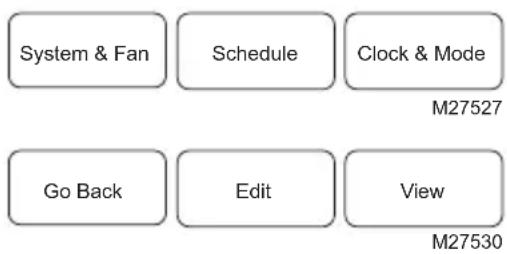
To adjust program schedules
- Press SCHEDULE, then EDIT to see weekdays.
- Press SELECT DAY to highlight Mon-Fri (they will share the same settings).
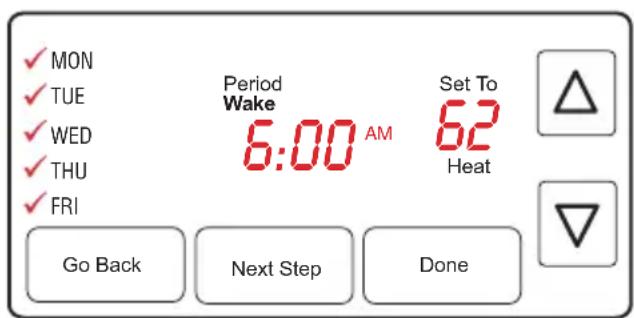
- Press NEXT STEP twice, then press ▲ or ▼ to set Wake time for selected days.
- Press NEXT STEP, then ▲ or ▼ to set Heat temperature for this time period.
- Press NEXT STEP, then ▲ or ▼ to set Cool temperature for this time period.
- Repeat steps 3-5 to program other time periods (LEAVE, RETURN, SLEEP), then press DONE.
-
Press DONE to save & exit.
-
Repeat steps 1-6 to program Saturday/Sunday. (Press ▲ or ▼ until the desired day is flashing, then press SELECT DAY.)
flowchart
graph TD
    A["System & Fan"] --> B["Schedule"]
    B --> C["Clock & Mode"]
    D["Go Back"] --> E["Edit"]
    F["View"] --> G["M27530"]
text_image
✓ MON ✓ TUE ✓ WED ✓ THU ✓ FRI Period Wake 6:00 AM Set To 62 Heat Go Back Next Step DoneM27531
Program schedule override (temporary)
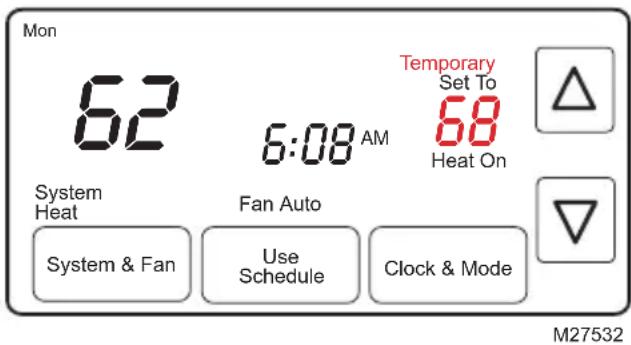
Press ▲ or ▼ to immediately adjust the temperature. This will temporarily override the temperature setting for the current time period.
The new temperature will be maintained until the next time period.
When the timer expires, the program schedule will resume and set the temperature to the level you've programmed for the current time period.
To cancel the temporary setting at any time, press USE SCHEDULE.
text_image
Mon 62 6:08 AM Temporary Set To 68 Heat On System Heat Fan Auto System & Fan Use Schedule Clock & Mode M27532Program schedule override (permanent)
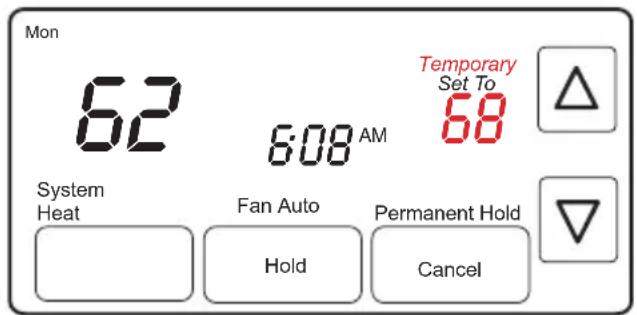
Press ▲ or ▼ to adjust temperature, then press HOLD. This will turn off the program schedule.
Whatever temperature you set will be maintained 24 hours a day, until you manually change it, or press USE SCHEDULE to cancel "Hold" and resume the program schedule.
text_image
Mon 62 6:08 AM Temporary Set To 68 System Heat Fan Auto Hold Permanent Hold CancelM27533
Auto changeover
Use this feature in climates where both air conditioning and heating are used on the same day. When the system mode is in Auto, the thermostat automatically selects heating or cooling depending on the indoor temperature.
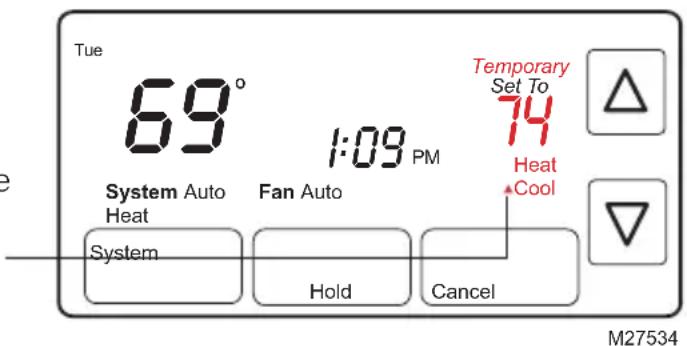
While in the Auto mode, if a schedule override takes place (temporarily or permanently) the thermostat will automatically adjust the cooling and heating settings to maintain a 3-degree separation between the cool and heat settings.
For example, if the heat temperature is raised to where it gets within 3-degrees of the cool setting, the display will show an up arrow next to "Cool" to show the thermostat is raising the cool setting up to maintain a 3-degree separation.
text_image
Tue 69° 1:09 PM Temporary Set To 74 Heat Cool System Auto Heat Fan Auto System Hold Cancel M27534The display will also show both “Auto” and either “Heat” or “Cool” for which temperature setting you are currently adjusting. Press the system button to select between the heat and cool to view/adjust either mode.

CAUTION: To avoid possible compressor damage, do not use Auto Changeover if the outside temperature drops below 50^ F ( 10^ C).
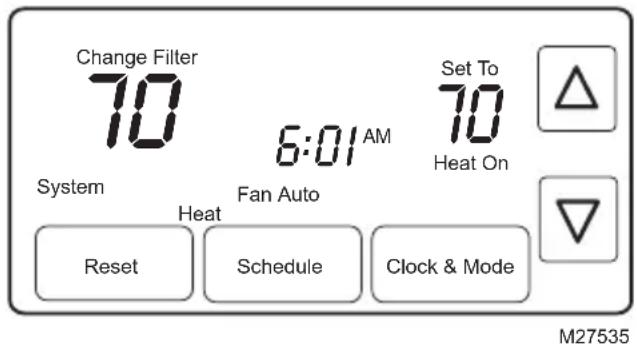
Filter reminder
If activated during installation, the furnace filter reminder alerts you when it is time to replace your filter.
Press RESET after changing the filter, to restart the timer.
To reset the reminder interval before it expires:
- Press MORE, then NEXT.
- Press RESET.
- Press DONE to save and exit.
text_image
Change Filter 70 6:01 AM Set To 70 Heat On System Fan Auto Heat Reset Schedule Clock & Mode M27535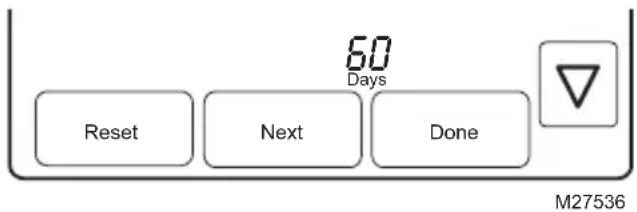
text_image
60 Days Reset Next Done M27536Special features
Smart Response® Technology: This feature allows the thermostat to "learn" how long the furnace and air conditioner take to reach programmed temperature settings, so the temperature is reached at the time you set. For example: Set the Wake time to 6 am, and the temperature to 70^ . The heat will come on before 6 am, so the temperature is 70^ by the time you wake at 6. The message "Recovery" is displayed when the system is activated before a scheduled time period.
Compressor Protection: This feature forces the compressor to wait a few minutes before restarting, to prevent equipment damage. During the wait time, the message “Wait” is displayed on screen.
Auto Changeover: This feature is used in climates where both air conditioning and heating are used on the same day. When the system is set to Auto, the thermostat automatically selects heating or cooling depending on the indoor temperature. Heat and cool settings must be at least 3 degrees apart. The thermostat will automatically adjust settings to maintain this 3-degree separation.
Battery replacement
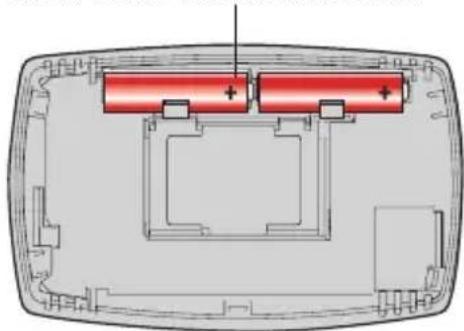
Batteries are optional (to provide backup power) if your thermostat was wired to run on AC power when installed.
Install fresh batteries immediately when the LO BATT warning begins flashing. The warning flashes about 30 days before batteries are depleted.
Even if the warning does not appear, you should replace batteries once a year, or before leaving home for more than a month.
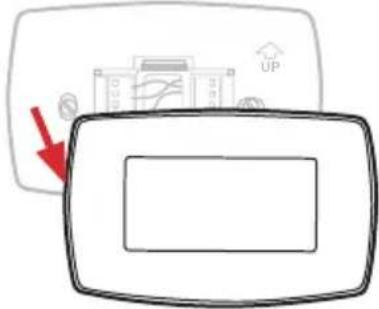
Grasp thermostat and pull to remove from wallplate
text_image
Diagram showing a device with a red arrow pointing to a labeled component and an 'UP' icon above it.Turn thermostat over, insert fresh AA alkaline batteries, then reinstall thermostat.
natural_image
Cross-sectional diagram of a device casing with two red battery cells and a central positive charge (no text or symbols)Troubleshooting
If you have difficulty with your thermostat, please try the following suggestions.
Most problems can be corrected quickly and easily.
| Display is blank | Check circuit breaker and reset if necessary.Make sure power switch at heating & cooling system is on.Make sure furnace door is closed securely.Make sure fresh AA alkaline batteries are correctly installed. |
| Temperature settings do not change | Make sure heating and cooling temperatures are set to acceptable ranges:Heat: 40° to 90 °F (4.5° to 32 °C).Cool: 50° to 99 °F (10° to 37 °C). |
| Heating or cooling system does not respond | Press SYSTEM to set system to Heat. Make sure the temperature is set higher than the Inside temperature.Press SYSTEM to set system to Cool. Make sure the temperature is set lower than the Inside temperature.Check circuit breaker and reset if necessary.Make sure power switch at heating & cooling system is on.Make sure furnace door is closed securely.Wait 5 minutes for the system to respond. |
| Cannot change system setting to Cool | Check Function 0170: System Type to make sure it is set to match your heating and cooling equipment. |
| Fan does not turn on when heat is required | Check Function 0180: Heating Fan Control to make sure it is set to match your heating equipment. |
| Heating system is running in cool mode | Check Function 0170: System Type to make sure it is set to match your heating and cooling equipment. |
| Red light is on | If thermostat is in Emergency Heat mode the red light is normal. It shows that the thermostat is in emergency heat mode.If thermostat is not in Emergency Heat mode, contact a qualified service contractor for repair. |
| “Wait” appears on the screen | Compressor protection feature is engaged. Wait 5 minutes for the system to restart safely, without damage to the compressor. |
| Heat pump issues cool air in heat mode, or warm air in cool mode | Check Function 0190: Heat Pump Changeover Valve to make sure it is properly configured for your system. |
For assistance with this product, please visit honeywellhome.com or call Resideo Customer Care toll-free at 1-800-468-1502.
1-year limited warranty
Resideo warrants this product, excluding battery, to be free from defects in workmanship or materials, under normal use and service, for a period of one (1) year from the date of first purchase by the original purchaser. If at any time during the warranty period the product is determined to be defective due to workmanship or materials, Resideo shall repair or replace it (at Resideo's option).
If the product is defective,
(i) return it, with a bill of sale or other dated proof of purchase, to the place from which you purchased it; or
(ii) call Resideo Customer Care at 1-800-468-1502. Customer Care will make the determination whether the product should be returned to the following address: Resideo Return Goods, 1985 Douglas Dr. N., Golden Valley, MN 55422, or whether a replacement product can be sent to you.
This warranty does not cover removal or reinstallation costs. This warranty shall not apply if it is shown by Resideo that the defect was caused by damage which occurred while the product was in the possession of a consumer.
Resideo's sole responsibility shall be to repair or replace the product within the terms stated above. RESIDEO SHALL NOT BE LIABLE FOR ANY LOSS OR DAMAGE OF ANY KIND, INCLUDING ANY INCIDENTAL OR CONSEQUENTIAL DAMAGES RESULTING, DIRECTLY OR INDIRECTLY, FROM ANY BREACH OF ANY WARRANTY, EXPRESS OR IMPLIED, OR ANY OTHER FAILURE OF THIS PRODUCT.
Some states do not allow the exclusion or limitation of incidental or consequential damages, so this limitation may not apply to you.
THIS WARRANTY IS THE ONLY EXPRESS WARRANTY RESIDEO MAKES ON THIS PRODUCT. THE DURATION OF ANY IMPLIED WARRANTIES, INCLUDING THE WARRANTIES OF MERCHANTABILITY AND FITNESS FOR A PARTICULAR PURPOSE, IS HEREBY LIMITED TO THE ONE YEAR DURATION OF THIS WARRANTY. Some states do not allow limitations on how long an implied warranty lasts, so the above limitation may not apply to you.
This warranty gives you specific legal rights, and you may have other rights which vary from state to state. If you have any questions concerning this warranty, please write Resideo Customer Care, 1985 Douglas Dr, Golden Valley, MN 55422 or call 1-800-468-1502.

resideo
Resideo Inc., 1985 Douglas Drive North
Golden Valley, MN 55422
www.resideo.com33-00089EF-03 M.S. Rev. 05-19
Printed in United States
This product is manufactured by Resideo Technologies, Inc., Golden Valley, MN, 1-800-468-1502
©2019 Resideo Technologies, Inc. The Honeywell Home trademark is used under license from Honeywell International Inc. All rights reserved.

text_image
Black and white barcode image with vertical lines and a horizontal bar at the bottom33-00089EF-03
Thermostat programmable
natural_image
Black-and-white circular portrait of a man wearing earphones, holding a pen (no text or symbols visible)text_image
Diagram showing a device with an up/down arrow and a logo, likely illustrating a UI or control interface.Table des matières
Installation
Installation....3
natural_image
Diagram showing two views of a door panel with internal compartments and a separate electrical component (no text or symbols)5 Installer la plaque
text_image
THERMOPOMPE C G Y O/B RC R THERMOPOMPE Aux E L R b so a b ranatural_image
Cross-sectional diagram of a device showing two red battery cells with positive charges, enclosed in a transparent housing (no text or symbols)Dos du thermostat
text_image
Retirer l'onglet.text_image
Diagram showing a device with an upward arrow and directional indicators, including a building icon labeled 'UP'natural_image
Diagram showing two views of a door with internal compartments and a separate electrical component labeled 'ou' (no text or symbols on the diagram itself)text_image
System Heat Off Cool Fan Auto Fan System Done MCR33597text_image
✓ MON ✓ TUE ✓ WED ✓ THU ✓ FRI Period Wake 6:00 AM Set To 62 Heat Go Back Next Step DoneM27531
text_image
Mon 62 6:08 AM Temporary Set To 68 Heat On System Heat Fan Auto System & Fan Use Schedule Clock & Mode M27532text_image
Mon 62 6:08 AM Temporary Set To 68 System Heat Fan Auto Hold Permanent Hold Cancel M27533text_image
Tue 69° 1:09 PM Temporary Set To 74 Heat ▲Cool System Auto Heat Fan Auto System Hold Cancel M27534text_image
Change Filter 70 6:01 AM Set To 70 Heat On System Heat Fan Auto Reset Schedule Clock & Mode M27535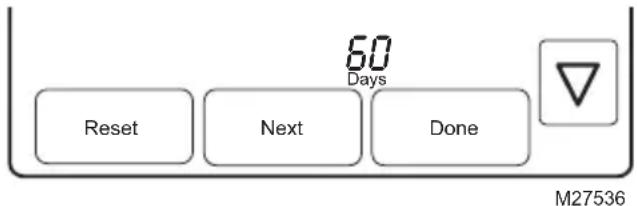
text_image
60 Days Reset Next Done M27536text_image
Diagram showing a device with an 'UP' label and a red arrow pointing to it, indicating a directional change or action.natural_image
Cross-sectional diagram of a device casing with two red battery cells and mounting brackets (no text or symbols)Dépannage
Resideo Inc., 1985 Douglas Drive North Golden Valley, MN 55422
www.resideo.com