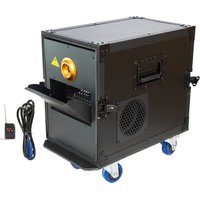
CLOUD-HAZER-MAX - Effect machine AFX - Free user manual and instructions
Find the device manual for free CLOUD-HAZER-MAX AFX in PDF.


| Product Type | Haze machine |
| Brand | AFX |
| Model | CLOUD-HAZER-MAX |
| Power Supply | 220-240 V~ 50/60 Hz, 2000 W |
| Preheat Time | 3 minutes |
| Tank Capacity | 6 liters |
| Output Volume | 906 m³/min |
| Coverage Area | 300 m² |
| Dimensions | 490 x 300 x 480 mm |
| Weight | 23 kg |
| Protection Class | I (grounding mandatory) |
| Safety Distance | 5 meters from flammable materials and people |
| Surface Temperature | 40-80 °C during operation |
| Control | DMX 512 (2 channels), 433 MHz wireless remote control, LCD panel |
| Remote Control Battery | 23A 12 V (alkaline) |
| Fuse | User-replaceable, same rating |
| Maintenance | Clean regularly; after 40 h, use 80% distilled water + 20% white vinegar |
| Recommended Fluid | Water-based haze fluid (not included) |
| Usage | Indoor use only |
| Spare Parts | No user-serviceable parts (except fuse) |
Frequently Asked Questions - CLOUD-HAZER-MAX AFX
User questions about CLOUD-HAZER-MAX AFX
0 question about this device. Answer the ones you know or ask your own.
Ask a new question about this device
Download the instructions for your Effect machine in PDF format for free! Find your manual CLOUD-HAZER-MAX - AFX and take your electronic device back in hand. On this page are published all the documents necessary for the use of your device. CLOUD-HAZER-MAX by AFX.
USER MANUAL CLOUD-HAZER-MAX AFX
DMX CONTROLLED HAZE MACHINE
WITH HF REMOTE CONTROL
MACHINE A BROUILLARD DMX
AVEC TELECOMMANDE HF
natural_image
Technical line drawing of a mechanical device with no visible text or symbolsGB - User Manual - p. 2
UNPACKING INSTRUCTIONS
Immediately upon receiving a fixture, carefully unpack the carton, check the contents to ensure that all parts are present and have been received in good condition. Notify the freight company immediately and retain packing material for inspection if any parts appear to be damaged from shipping or the carton itself shows signs of mishandling. Keep the carton and all packing materials. In the event that a fixture must be returned to the factory, it is important that the fixture be returned in the original factory box and packing.
CONTENTS OF THE CARTON
• 1 pc. CLOUD-HAZER-MAX
• 1 pc wireless remote control
• 1 pc. user manual
EXPLANATION OF SYMBOLS ON THE SILKSCREEN

The triangle containing a lightning symbol is used to indicate whenever your health is at risk (due to electrocution, for example).

An exclamation mark in a triangle indicates particular risks in handling or operating the appliance.

The unit complies with CE standards

For indoor use only

Protection class I. Requires an earth connection

CAUTION DO NOT OPEN THE HOUSING SHOCK HAZARD
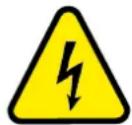
Please read this manual carefully before operating this product.
SAFETY RECOMMENDATIONS
- If the device has been exposed to temperature changes due to environmental changes, do not switch it on immediately. The arising condensation could damage the device. Leave the device switched off until it has reached room temperature.
- It is essential that the device is earthed. A qualified person must carry out the electric connection.
- Make sure that the available voltage is not higher than stated at the end of this manual.
- Make sure the power cord is never crimped or damaged. If it is damaged, ask your dealer or authorized agent to replace the power cord.
- Always disconnect from the mains, when the device is not in use or before cleaning it. Only handle the power cord by the plug. Never pull out the plug by tugging the power cord.
- During initial start-up, some smoke or smell may arise. This is normal and should decrease gradually.
- Be very careful during installation. Since you will be working with a dangerous voltage you can suffer a life-threatening electric shock when touching live wires.
- Please be aware that damages caused by manual modifications to the device are not subject to warranty. Keep away from children and non-professionals.
- The Fog machine doesn't include any spare parts for repair, please check if all the parts are well installed and screws are fitted tightly before operating. Do not use the fog machine when the cover is open.
- This device is allowed for indoor use only.
- Do not shake the device. Avoid brute force when installing or operating it.
- Operate the device only after having familiarized yourself with its functions. Do not permit operation by person not qualified for operating the device. Most damages are the result of unprofes-
sional operation.
- For safety reasons, please be aware that all modifications on the device are forbidden. Furthermore, any other operation may lead to short-circuit, burns, electric shock, lamp explosion, crash, etc. If this device will be operated in any way different to the one described in this manual, the product may suffer damages and the warranty becomes void.
- When you use the fog machine on a wooden floor or ground with carpet, the machine should never be directly in contact with the ground. The machine should keep a distance with the ground of 50cm at least. It's not allowed to put flammable and explosive objects within 5 meters
DISCONNECT DEVICE
Where the MAINS plug or an appliance coupler is used as the disconnect device, the disconnect device shall remain readily operable.
IMPORTANT NOTES
- Before filling the haze liquid, please unplug the unit from the mains.
- In order to prevent short circuits, please don't let haze liquid flow into the inner parts of the machine. You can also take out the liquid tank and fill in the haze liquid outside the unit.
- The fog machine must be installed on the ground. It's not allowed to slope the unit or place it upside down
• After use, switch the haze machine off and unplug it from the mains - The machine isn't waterproof. If moisture or haze liquid enters inside the machine, you must unplug it immediately from the mains and contact your dealer.
- It's forbidden to spray directly towards persons. Keep far away from inflammable and explosive materials.
• The haze spray is very hot, please keep a distance of at least 5 meters when using it - Please don't touch the surface of the haze machine during use because the housing will reach 40-80°C
- When the machine doesn't work, please check if the fuse is burnt. If it is, replace it by an identical fuse, find out the fault and restart the machine. But please note: the repair must be carried out by a professional.
INSTALLATION INSTRUCTIONS
Filling the tank
Unscrew the cap of the haze liquid bottle and fill in the haze liquid. After filling, screw tight the cap of the haze liquid bottle to avoid haze liquid leaking out.
WIRELESS REMOTE CONTROL
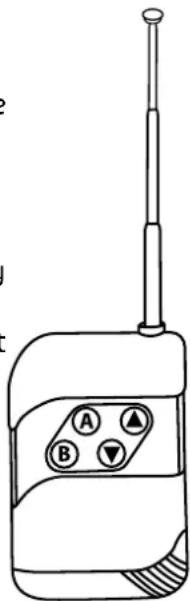
Button A: Adjust the fan speed with buttons "▲" and "▼"
Button B: Adjust the haze volume with buttons “▲” and “▼”. Press again to stop the haze output.
INSTALLING THE BATTERY IN THE REMOTE CONTROL
- Place the remote face down on a flat surface.
- Push the compartment cover into the direction of the arrow to slide the battery compartment open.
- Remove the old battery and install the new one (23A 12V alkaline) with the correct polarity.
• Gently slide the battery compartment closed. It locks automatically.
RECOMMENDATIONS FOR BATTERIES

This symbol indicates that used batteries should not be disposed of with household waste but deposed correctly in accordance with your local regulations..
Batteries shall not be exposed to excessive heat such as sunshine, fire or the like.
When the internal batteries are not to be used, remove them to avoid damage caused by battery leakage or corrosion.
ATTENTION: Danger of explosion if battery is incorrectly placed. Only replace by the same or equivalent type.
WARNING: Do not swallow the battery. Danger of chemical burns. Keep new and old batteries out of the reach of children.
natural_image
Line drawing of a walkie-talkie device with labeled buttons (A, B, ▲) and antenna (no text or symbols beyond labels)If the battery compartment doesn't close properly, stop using the product and keep it out of the reach of children.
If you are in doubt whether the batteries have been swallowed or introduced into any other part of the body, contact immediately a doctor.
LCD DISPLAY
Button functions:
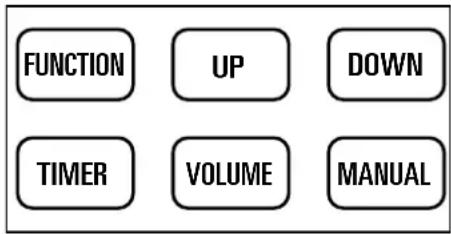
"FUNCTION" button: Press to go to the next page
"UP" button: Increase the value
"DOWN" button: Decrease the value
"TIMER" button: Press to set up the timer for the haze output
"VOLUME" button: Press to start or stop fogging
"MANUAL" button: Long press to haze, release to stop fogging
MENU DISPLAY INSTRUCTION:
- Main menu: During warming up, you will see "Warming Up" on the LCD display. When the machine is ready to haze, "Ready To Work/ "Haze machine" will be displayed
- Fogging timer set up: Interval Timer (1-200s)
- Continue fogging time set up: Duration Timer (1-200s)
- Fogging timing set up: Timer Out (1-100)
- Continue haze volume: Volume Out Level (1-100)
- DMX set up: DMX address (1-512)
- Fan speed setting: Fan Speed Level (1-100)
DMX CONNECTION
Connect an XLR cable to the 3-pin XLR output plug of your controller and the other side to the 3-pin XLR input socket of the device.
DMX CHANNEL TABLE
This machine has 2 DMX channels:
| DMX CHANNEL VALUE FUNCTION | ||
| Channel 1 | 000-005 No fan output | |
| 006-255 Fan output from slow to fast | ||
| Channel 2 | 000-005 No haze | |
| 006-255 Haze volume from slow to fast | ||
IF YOU DON'T USE THE MACHINE ANYMORE
IMPORTANT: DO NOT JUST TURN OFF THE POWER OR UNPLUG THE POWER CORD WHEN YOU WANT TO INTERRUPT OR STOP THE PRODUCTION OF HAZE. Always set haze volume to Zero output and wait for about 1 to 2 minutes before you switch off the unit. This allows the unit to start up its cleaning process so that all remaining fluid is removed from the internal circuits. If you are not using the remote controller, then select [HAZE] OFF on the control panel via the [MENU] button and also wait for about 1 to 2 minutes before you switch off the unit. Switch off the unit, unplug the mains cable and wait until the unit has cooled down.
CLEANING AND FREQUENCY OF USE
Please clean the haze machine periodically in order to keep it in good condition.
- The haze liquid should be clear and not polluted. Please close the haze tank tightly after filling in the haze liquid.
- When the haze machine worked for 40 hours continuously, please use 80% of distilled water and 20% of white vinegar to clean the impurities which accumulated inside the heating tube
- Remove the nozzle before the haze machine is warming up. Use vinegar to clean it
- Pour out the haze liquid and fill the tank with the distilled water/vinegar mix as above. Switch on the power and the machine will warm up.
- Operate the haze machine at open place until the distilled water/vinegar mix has been used up. Fill the unit again with haze liquid and operate it at an open place until the vinegar smell has
disappeared.
Others instructions :
a. Haze machines may jam easily because of impurities in the haze liquid. Therefore, a periodical maintenance will lengthen the life time of the machine.
b. Please use a dry cloth for cleaning, please clean the machine before you store it.
Specifications
Input voltage....220-240V\~50/60Hz
Consumption 2000W
Remote control frequency....433MHz
Max. RF emission -1.07dBm
Remote control battery....23A 12A
Pre-heating .... 3 min.
Output volume.... 906m3/min
Covered area 300m²
Tank capacity 6 litres
Dimensions 490 x 300 x 480mm
Weight 23kg

IMPORTANT NOTE: Electric products must not be put into household waste. Please bring them to a recycling centre. Ask your local authorities or your dealer about the way to proceed.
MANUEL D'UTILISATION
DÉBALLAGE
DISPOSITIF DE COUPURE
natural_image
Line drawing of a walkie-talkie device with labeled buttons (A, B, ▲) and antenna (no text or symbols beyond labels)ANWEISUNGEN AUF DEM DISPLAY:
natural_image
Line drawing of a walkie-talkie device with labeled buttons (A, B, ▲) and antenna (no text or symbols beyond labels)BATTERIJ IN DE AFSTANDSBEDIENING PLAATSEN
natural_image
Line drawing of a walkie-talkie device with labeled buttons (A, B, ▲) and a pole, no text or symbols present.Download the manual in other languages
Assembled in PRC • Designed by LOTRONIC S.A. • Rue F. Englert 17 • Bt 2 • B - 1480 Tubize
- UNPACKING INSTRUCTIONS
- CONTENTS OF THE CARTON
- EXPLANATION OF SYMBOLS ON THE SILKSCREEN
- CAUTION DO NOT OPEN THE HOUSING SHOCK HAZARD
- SAFETY RECOMMENDATIONS
- DISCONNECT DEVICE
- IMPORTANT NOTES
- INSTALLATION INSTRUCTIONS
- Filling the tank
- WIRELESS REMOTE CONTROL
- INSTALLING THE BATTERY IN THE REMOTE CONTROL
- RECOMMENDATIONS FOR BATTERIES
- LCD DISPLAY
- Button functions:
- MENU DISPLAY INSTRUCTION:
- DMX CONNECTION
- DMX CHANNEL TABLE
- IF YOU DON'T USE THE MACHINE ANYMORE
- CLEANING AND FREQUENCY OF USE
- Others instructions :
- Specifications
- MANUEL D'UTILISATION
- DÉBALLAGE
- DISPOSITIF DE COUPURE
- ANWEISUNGEN AUF DEM DISPLAY:
- BATTERIJ IN DE AFSTANDSBEDIENING PLAATSEN
Brand : AFX
Model : CLOUD-HAZER-MAX
Category : Effect machine