
VS5164 - Vacuum packaging machines Vevor - Free user manual and instructions
Find the device manual for free VS5164 Vevor in PDF.
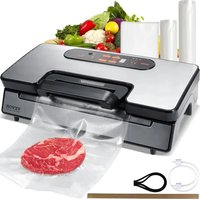


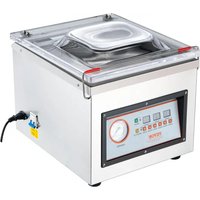
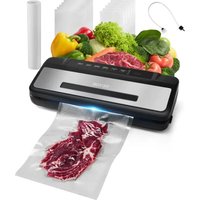
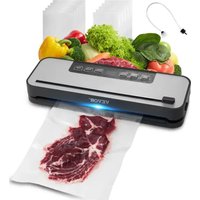
| Product Type | Vacuum Packaging Machine |
| Brand | Vevor |
| Model | VS5164 |
| Dimensions (L x W x H) | Approximately 40 x 20 x 10 cm |
| Weight | Approximately 3 kg |
| Power Supply | 220-240 V ~ 50 Hz |
| Power | 120 W (estimated) |
| Adjustable Vacuum Pressure | Normal and Gentle |
| Adjustable Sealing Time | Dry, Moist, Extended |
| Main Functions | Vacuum sealing, Pulse vacuum, Manual sealing, Marinate, Canning |
| Display | Digital with LED progress indicator |
| Max Bag Width | 30 cm |
| Included Accessories | Hose for canister, bag cutter, bag roll (not included) |
| Main Material | ABS plastic, foam gaskets |
| Safety | Automatic shut-off after 60 s if vacuum not reached, overheat protection |
| Cleaning | Unplug and wipe with a damp cloth; do not immerse |
| Maintenance | Replaceable foam gaskets and Teflon tape |
| Operating Cycle | 1 minute per cycle, allow to cool before reuse |
| Usage | Indoor household use only |
| Recommended Bags | Specific bags with vacuum channels (Vevor brand) |
Frequently Asked Questions - VS5164 Vevor
User questions about VS5164 Vevor
0 question about this device. Answer the ones you know or ask your own.
Ask a new question about this device
Download the instructions for your Vacuum packaging machines in PDF format for free! Find your manual VS5164 - Vevor and take your electronic device back in hand. On this page are published all the documents necessary for the use of your device. VS5164 by Vevor.
USER MANUAL VS5164 Vevor
Technical Support and E-Warranty Certificate www.vevor.com/support
VS5164 VACUUM SEALER INSTRUCTIONS
We continue to be committed to providing you with tools at competitive prices. "Save Half", "Half Price", or any other similar expressions used by us only represent an estimate of savings you might benefit from buying certain tools with us compared to top brands and do not necessarily mean to cover all categories of tools offered. We kindly remind you to verify carefully when placing an order with us that you are actually saving half in comparison with the top major brands.
VEVOR®
TOUGH TOOLS, HALF PRICE
VS5164 VACUUM
SEALER
VS5164
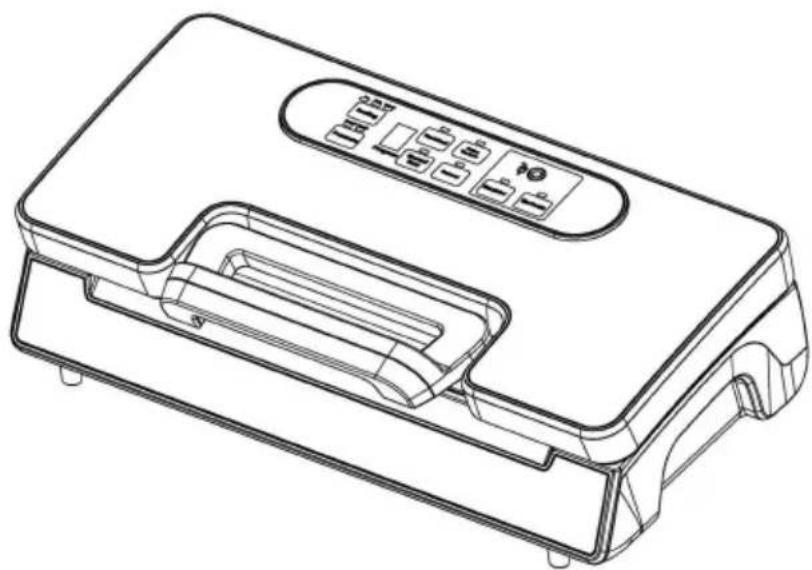



NEED HELP? CONTACT US!
Have product questions? Need technical support? Please feel free to contact us:

CustomerService@vevor.com
This is the original instruction. Please read all manual instructions carefully before operating. VEVOR reserves a clear interpretation of the user manual. The appearance of the product shall be subject to the product you received. Please forgive us that we won't inform you if there are any technology or software updates on our product.
IMPORTANT SAFEGUARDS
When using this electrical appliance, safety precautions should always be observed, including the following:
READ ALL INSTRUCTIONS
- Carefully read all of the instructions before using this appliance and for future reference.
- Before plugging the cord into the wall outlet, or disconnecting, make sure that the cover of the machine is in the unlocked condition, and unplug it when not in use or before cleaning.
- This appliance is not a toy. When used by or near children, close attention is necessary. Store this appliance in a safe place, out of reach of children.
- Do not use any bags or attachments not recommended or appointed, and do not use this appliance for any purpose other than its intended use.
- Stop using the machine immediately if the cord is damaged, and have it replaced by a professional.
- Keep away from moving parts.
- Do not contact the hot sealing element located on the edge of the top housing of this machine. It is hot and may cause burns.
- Do not try to repair this appliance by yourself.
- Do not use the appliance if it has fallen or appears to be damaged.
- Avoid doing the following: pull or carry by the cord, use the cord as a handle, close a door on the cord, or pull the cord around sharp edges or corners. Do not operate the appliance over the cord, or use it if the cord or plug is wet.
- Keep away from hot gas, heated ovens, electric burners, or any other hot surfaces. Do not use this appliance on wet or hot surfaces, or near sources of heat.
- It is better not to use an extension cord with this unit. However, if used, it must have a rating equal to or exceeding the rating of this appliance.
- When disconnecting, to avoid any injury, please unplug by grasping the plug, not the cord.
- Before plugging in the appliance or operating it, make sure your hands are dry and safe to perform the actions.
- When it is in the "ON" or working position, always place it on a stable surface such as a table or counter.
- There is no need to use any lubricant, such as lubricating oils or water, on the appliance.
- Do not immerse any part of this appliance, power cord, or plug in water or any other liquid.
- Do not use this appliance outdoors or on a wet surface; it is recommended for household, indoor use only.
- This appliance can be used by children aged 8 years and above and by persons with reduced physical, sensory, or mental capabilities or lack of experience and knowledge if they have been given supervision or instruction concerning use of the appliance in a safe way and understand the hazards involved.
- Children should be supervised to ensure that they do not play with the appliance.
- If the supply cord is damaged, it must be replaced by the manufacturer, its service agent, or similarly qualified persons in order to avoid a hazard.
- Cleaning and user maintenance shall not be made by children without supervision.
CAUTION:
SAVE THESE INSTRUCTIONS
CONSTRUCTION AND FUNCTIONS
1. Vac & Seal:
- At stand-by condition, it starts the automatic operation of vacuuming the bag and then automatically seals the bag when vacuum is complete;
2. Pulse Vacuum:
Press this button, and the device starts vacuuming; release it, and it will stop. This process can be repeated. Then press “manual seal” when the desired pressure is reached, and turn to seal. Different pressures can be chosen according to different types of food.
3. Sealing time:
Three settings for choosing the best bag sealing time.
- Dry button: for dry bags and items without moisture, with a shorter heat sealing time.
- Moist button: for wet bags or foods with a little moisture, with a moist heat sealing time.
- Extended button: for wet bags or foods with very much moisture, with an extended heat sealing time.
- Default setting is Normal setting for dry bags and shorter sealing time.
4. Pressure:
Two buttons for choice of different vacuum pressure:
● Normal button: for regular items storage in normal vacuum pressure; ● Gentle button: for some soft & crushable items storage where less vacuum pressure is desired. ● Default setting is normal and high vacuum pressure.
5. Canister:
To start vacuuming for canisters, jar lids, wine stoppers or other accessories through a hose.
6. Manual Seal:
This button provides two functions:
- To seal the open end of a bag without vacuuming air suction, used to make a bag from a bag roll.
- When the automatic “Vacuum & Seal” function is in operation, this button stops the motor pump and immediately starts to seal the bag, allowing the operator to control the vacuum pressure inside the bag to prevent crushing delicate items.
7. Marinate:
Press to marinate food in a marinator bowl.
8. Cancel:
- During operation (vacuuming or sealing), it stops the machine.
9. Hose port:
To insert the hose for canister and wine stopper before “marinate” or “canister” operations.
10. Progress:
This is the numeric display apparatus and provides two functions:
● Shows the progress of vacuuming. ● Shows that the device is on and the lid is closed. When the LED blinks, please wait until it lights normally, then you can start the next operation.
11. Air intake:
Air intake connects with the vacuum chamber and pump. Do not cover the intake when placing the bag for vacuum & seal operations.
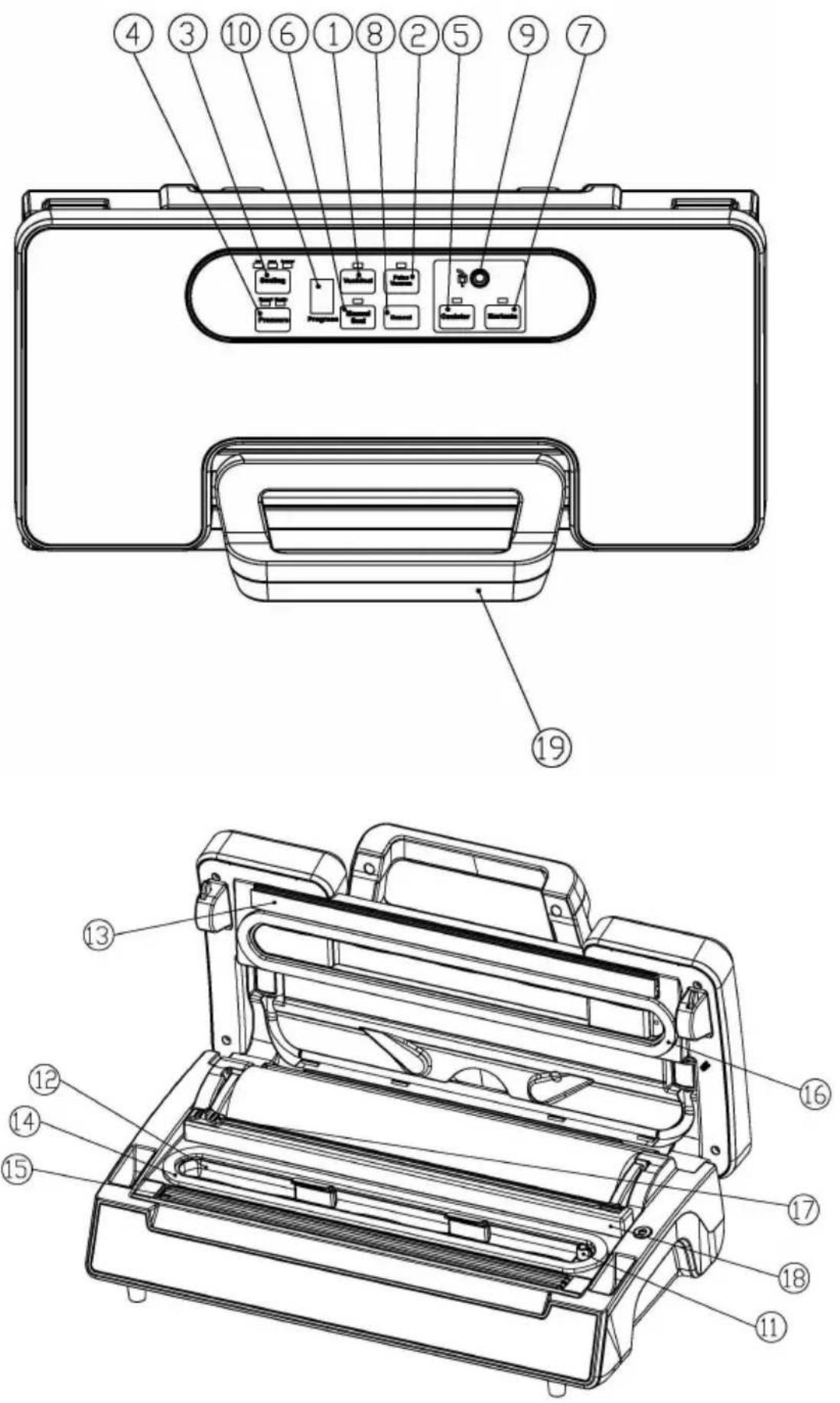
12. Vacuum chamber:
Position the open end of the bag inside the chamber; it draws air from the bag and catches any liquid overflow from the bag.
13. Sealing strip:
Place the bag to be sealed over this strip. Clean and dry or replace it when distorted or broken.
14. Lower gasket:
Keep air away by forming vacuum chamber with upper gasket in the vacuum chamber. Clean and dry or replace it when it is distorted or broken.
15. Sealing element:
Teflon-coated heating element which is hot and seals the bag.
16. Upper gasket:
Keep air away by forming vacuum chamber with lower gasket. Clean and dry or replace it when distorted or broken.
17. Bag Cutter:
Press and slide in one direction or another to cut bags to a desired size.
18. Cutter rack:
Support the cutter to slide along.
19. Front handle:
Press down to lock the cover. And rock to open the cover.
OPERATING INSTRUCTIONS
I. Making a bag with bag roll
- Open the top cover. Fig.1
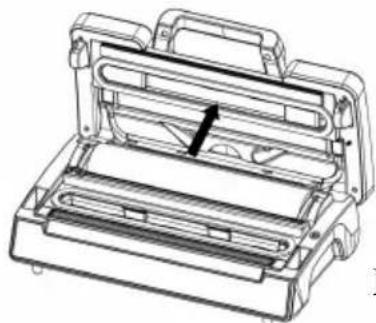
Fig.1
- Make sure the bag cutter is on one end of the cutter rack, then push the cutter rack to the back—Fig.2
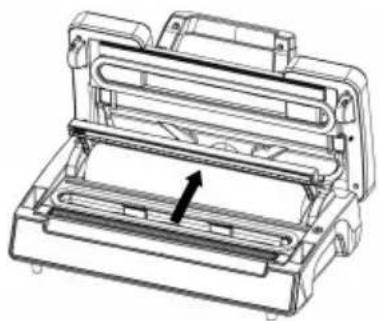
Fig.2
3. Pull out the bag to the suitable length you want—Fig.3
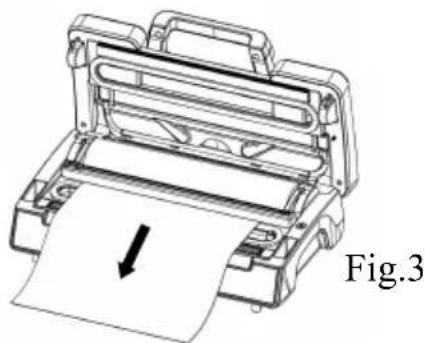
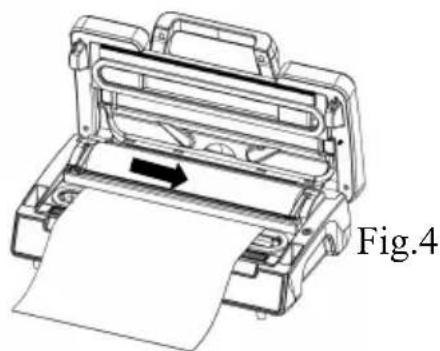
- Put down the cutter rack and make sure it is in the right place, then slide the cutter from one end to the other end to cut the bag—
- Put one end of the bag on top of the element into the bag fixture—Fig.5
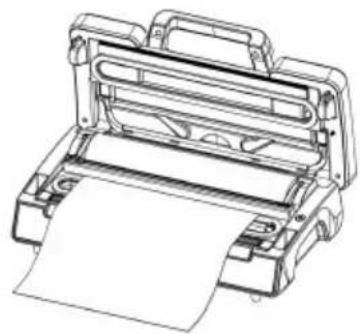
Fig.5
- Close the top cover and press tightly until you hear it click in place on both sides—Fig.6
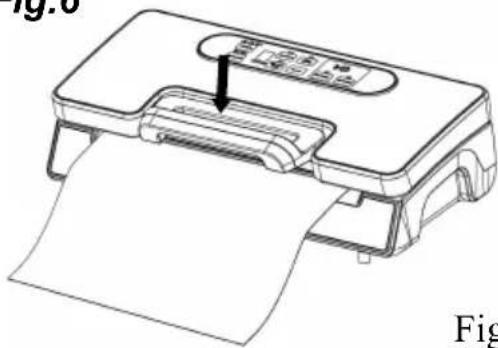
Fig.6
- Press "Manual Seal" button to start sealing the bags -Fig.7
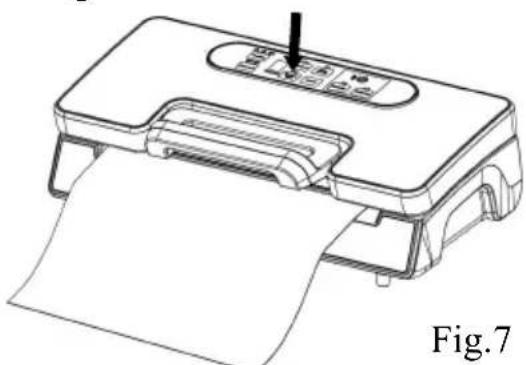
- Lift the handle to open the cover and take the bag out of the machine. The bag is then done and is ready for vacuum sealing -Fig.8
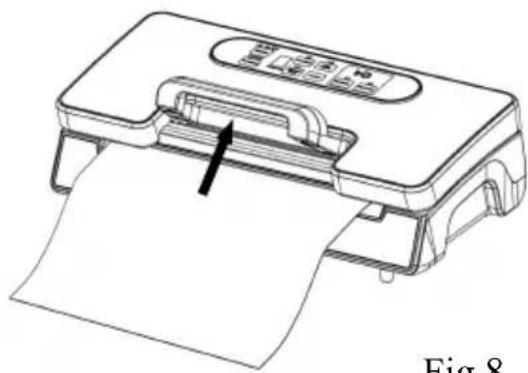
Fig.8
II. Vacuum packaging with a bag
- Put the items inside the bag. Use only the special designed vacuum bags supplied by us with vacuum channels.
- Clean and straighten the open end of the bag, make sure no dust, or ripples.
- Place the open end of the bag within the vacuum chamber area. Make sure the air intake is not covered by the bag. - Fig. 1
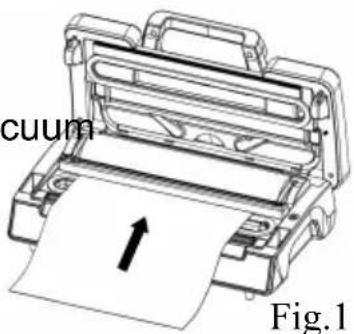
- Put the top cover down and press front handle to lock the top cover. - Fig. 2
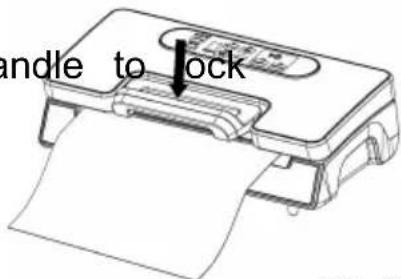
Fig. 2
- Check the LED status of "Pressure" and "Sealing" to confirm sealing time depending on the moisture status of packed items (extended/moist/dry) and desired vacuum pressure (Normal/Gentle) according to the type of food.
- Then press the Vac & Seal button, the unit starts to vacuum and will seal automatically - Fig. 3
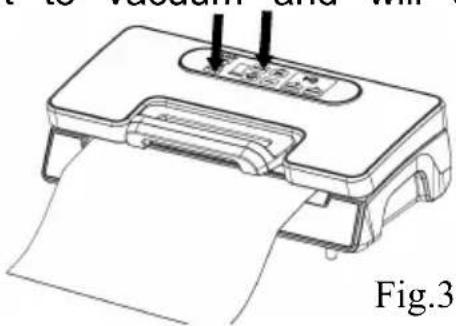
NOTE: This product provides very high vacuum pressure during vacuum packaging with a bag. In order to avoid crushing delicate items by high vacuum pressure, observe the status of the vacuum pressure inside the bag and switch the "MANUAL SEAL" button immediately when the desired vacuum pressure is achieved. The pump will stop and change to heat-seal the bag.
- The vacuum packaging is done. Rock the handle to open the cover.
Take out the packed bags - Fig. 4
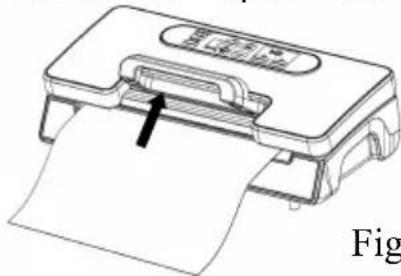
Fig. 4
NOTE:
- For best sealing effect, it is better to let the appliance cool down for 1 minute before using it again. Wipe out any excess liquid or residue in the vacuum chamber after each bag is packaged.
- Do not seal one after another continuously to avoid overheating of the sealing element. The machine will reject if the “seal” button is activated within 15 seconds of the last activation.
- Your appliance can work only with the specific bags provided. Do not attempt to use other bags not intended for vacuum packaging.
- Cut the bag straight across with scissors to open a sealed bag.
III. Vacuum packaging with a bag using Pulse Vacuum
- Press the Pulse Vacuum button, the unit starts to vacuum the bag. Observe the status of the vacuum pressure inside the bag. Release the Pulse Vacuum button immediately when the desired vacuum pressure is achieved. (See Fig. 1)
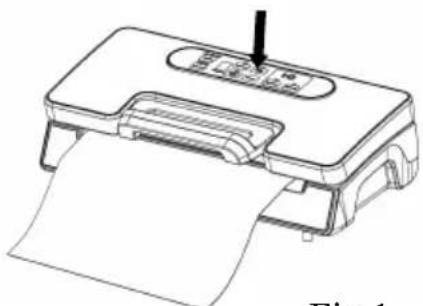
Fig. 1
- Press the Manual Seal button when the vacuuming has been completed. The unit starts to seal the bag automatically. (See Fig. 2)
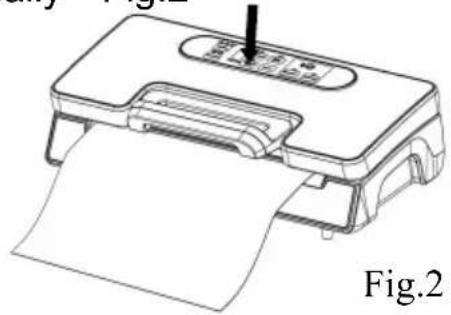
IV. Vacuum packaging in a Canister & Vacuum Bowl
- Wipe the canister cover and canister base, and ensure they are clean and dry.
- Put the items into the canister and do not fill it up too full so that the lid can be in good contact with the canister bowl rim. Clean the cover rim, canister, and bottom seal gasket of the canister cover.
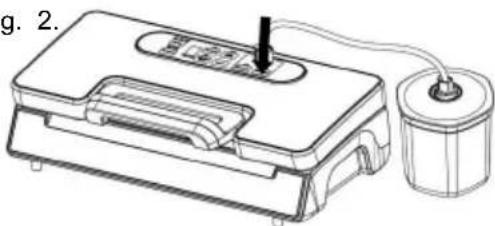
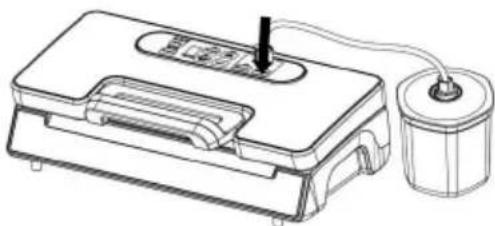
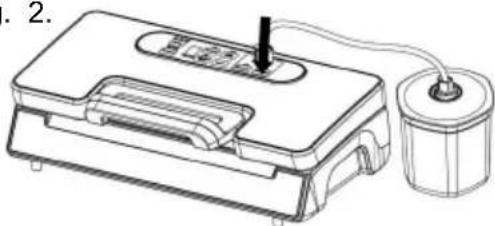
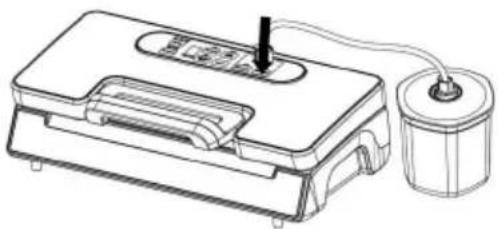
- Insert one end of the hose into the air inlet and the other end of the hose into the center hole of the canister cover. (See Fig. 1)
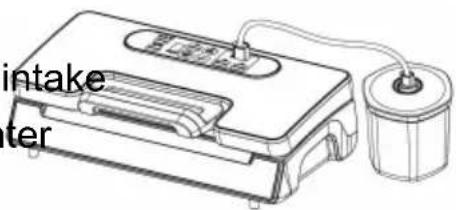
Fig.1
- Check the LED status of "Pressure" and make sure it is in "Normal" setting;
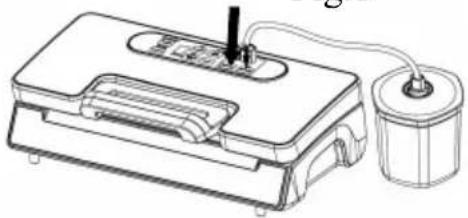
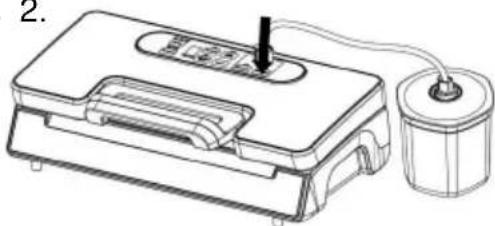
Fig.2
- Press the canister button to start vacuuming—Fig. 2. To ensure no air leaking between the cover and the canister, use your hand to push down the cover at the beginning of the vacuuming work. The machine stops automatically when enough vacuum pressure is achieved.
- Take out the hose tube from the canister or bowl immediately after a job is completed.
Note: When moist food is under vacuuming, moisture will be stored in the adaptor. Remember to clean up the adaptor if there is water before
vacuuming.
Open Canister after vacuum packaging
In order to open the canister, you need to press the "Release" button on the canister cover.
Note:
- At the beginning of the vacuum packaging in a canister or a vacuum bowl, slightly press down the cover or on the hose adaptor to ensure the hose is loose and to avoid air leaking through the gap between the cover and the canister top rim for a few seconds. ● To test vacuum, simply tug on the cover. It shall not move;
- Different canisters are available in the market and also from Bigland. The operation procedure will be a little different. Please refer to the individual manual for the specific canister.
V. Marinate meat with a marinate bowl
- Take out the hose accessory from inside cover, insert it to canister port and the center hole of canister cover—Fig. 1
- Check the LED status of "Pressure" to confirm the desired vacuum pressure (Normal/Gentle) according to the type of food. The default option is Normal mode.
- Press Marinate button to start working—
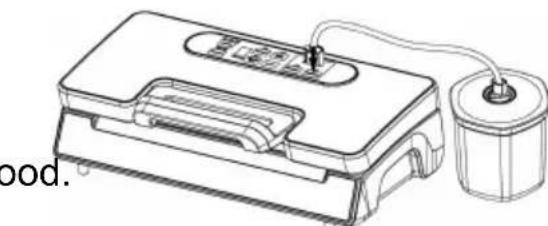
Fig.1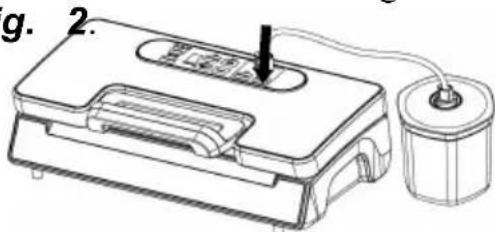
Fig.2
The indicator light glints during the course. It will release air automatically after finished vacuum, this is for 1 working cycle, this machine will totally work for 5 cycles. It takes about 6 minutes to finish the process.
- When the indicator light goes out, the marinate process is completed. Remove the hose accessory from canister port and canister cover.
Note:
- At the beginning of the vacuum packaging in a canister, slightly press down the canister cover or on the hose adaptor to ensure no loose hose and to avoid air leaking through the gap between the cover and canister top rim for a few seconds.
● To test vacuum, simply tug on the cover. It shall not move;
- Do not press any button to interfere with the whole process
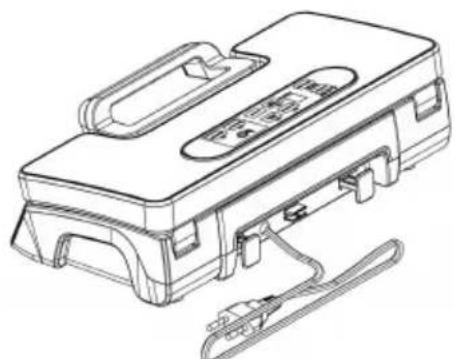
VI. Cord storage box
- Put the power cord into the storage box when not using the machine, located at the back of the machine. Do not wrap the cord around the appliance.
Hints for best vacuuming performance
- Do not put too much stuff inside the bag: leave enough empty space at the open end of the bag so that the bag can be placed in the vacuum chamber area without creating wrinkles or ripples.
- Do not wet the open end of the bag. Wet bags will cause difficulty in heat-sealing tightly. If the food has moisture, or the bag is wet, choose the 'Moist' function which is designed for a longer sealing time and seals better for wet bags.
- Clean and straighten the open end of the bag before sealing. Make sure nothing is left on the open area of the bag, no wrinkles or creases should appear on the open panel. Foreign objects or creased bags may cause difficulty in sealing tightly.
- Do not leave too much air inside the bag. Press the bag to allow
air to escape from the bag before vacuuming it. Too much air inside the bag increases the vacuum pump loading and may cause the motor to have insufficient power to draw away all the air inside the bag.
- Do not vacuum package objects with sharp points like fish bones or hard shells! Sharp points may penetrate and tear the bag! You may use a container instead of a bag to store such items.
- It is suggested to vacuum seal one bag within 1 minute, to let the appliance resume enough.
- If it's not reach the required vacuum for some unknowable reason, the vacuum system will shut automatically after 60 seconds, in this situation, please check if the bag is leak, or not placed properly or other reasons.
- Make sure there is no crack or deformation, or small particles resting on the foam gaskets around the vacuum chamber. When this happens, take it out and wash and dry it thoroughly, or replace with a new one.
- During bag vacuum packaging process, small amounts of liquids, crumbs or food particles can be inadvertently pulled into the vacuum chamber, clogging the pump and damaging your appliance. To avoid this, freeze moist and juicy foods first before sealing bags or place folded paper towel near the inside top of the bag. For powdery or fine-grained foods, avoid overfilling bags. You may also place a coffee filter inside before vacuum packaging.
- Pre-freeze fruits and blanch vegetables before vacuum packaging for best results.
- Liquids need to be cooled before vacuum packing. Hot liquids will bubble up and over the top of the jar when vacuum packed. Note: attachment is necessary for sealing jars.
- Store perishable foods in the freezer or refrigerator. Vacuum packing extends the shelf life of foods, but does not preserve them.
- Fill a bag about 2/3 full with water, seal the end (don't vacuum). Use the bag and use for ice in the cooler, or ice packs for sports injuries.
- Many foods are sold pre-packed in commercial vacuum bags such as cheese and deli meats. Now, you can maintain the taste and freshness of these foods by re-packaging them with vacuum sealer bags after the commercially packed bags have been opened.
- Pantry items such as flour, rice, mixes for cakes and pancakes, all stay fresher longer when vacuum packed. Nuts and condiments maintain their flavor while rancidity is kept out.
- For objects with sharp points and edges, such as bones or dried pasta, pad the edges with paper towels to keep them from puncturing the bag.
- There are many non-food uses for vacuum packing. Keep camping supplies such as matches, first aid kits, and clothing clean and dry. Keep flares for auto emergencies ready. Keep silver and collectibles untarnished. 1. The main function of this appliance is to store all kinds of foods for freshness, longer flavor, and convenience. In general, vacuum packaging keeps food fresh up to three times as long as traditional food storage methods. Once this appliance becomes an indispensable part of your life, it will reduce food spoilage and save money.
a) Cook in advance to vacuum seal and store individual portions or entire meals. This vacuum bag is not recommended for microwave or boil-in-bag cooking; please use the general cooking method to re-heat the vacuum-sealed foods. b) Prepare foods in advance for picnics, camping trips, or barbecues. c) Eliminate freezer burn. d) Package foods such as meat, fish, poultry, seafood, and vegetables to freeze or refrigerate. e) Package dry foods such as beans, nuts, and cereals to store longer.
- It's ideal to prepackage ingredients as well as individual portions for health-conscious individuals, such as those who are weight-conscious or on diets or nutritional regimes with special requirements.
- This system can also be used to store and protect other items: valuable items such as photos, important documents, stamp collections, book collections, jewellery, cards, comics, etc.; hardware items such as screws, nails, studs, and bolts; medicines, band-aids, and other first-aid items, etc.
Note:
After finishing the vacuum work, please always leave the machine cover open. Do not fasten the cover, as it will deform the form g and affect the machine function.
FOOD STORAGE AND SAFETY INFORMATION
This Vacuum Sealer will change the way you purchase and store foods. Once you are accustomed to vacuum packing, it will become an indispensable part of your food preparation. When preparing and vacuum packing foods using your vacuum sealer, there are certain procedures that must be followed to ensure food quality and safety. Review this section carefully for your protection:
- Chemical reactions in the food to air, temperature, moisture, and enzyme action, growth of microorganisms, or contamination from insects will cause food spoilage.
- The main element to cause food to lose nutritive value, texture, flavor, and overall quality is oxygen in the air. Most microorganism growth relies on air, for it will carry moisture into and out of foods unless protected with moisture-proof packing. Frozen foods being exposed to freezer air will result in freezer burn.
- The vacuum seal packing removes up to 90% of the air from the package. It's approximately 21% oxygen in the air, so 90% air removal leaves a 2% to 3% residual oxygen level in vacuum-sealed foods. When the oxygen level is at or below 5%, as you know, most microorganisms are inhibited from growth.
- In general, there are three categories of microorganisms: mold, yeast, and bacteria. They are present everywhere, but only under certain conditions can they cause problems.
- In a low oxygen environment or in the absence of moisture, mold cannot grow; In moisture, sugar, and a moderate temperature circumstance, yeast can grow with or without air. Refrigeration will slow the growth of yeast and freezing stops it completely; Bacteria can grow with or without
air.
- One of the extremely dangerous types of bacteria is Clostridium botulinum, and they can grow under the right conditions without air: in the temperature range of 40°F to 115°F (4°C to 46°C). Conditions for growth are foods lacking acid, low oxygen environment, and temperatures greater than 40°F (4°C) for extended time.
- Frozen, dried, high in acid, salt, or sugar foods can be resistant to botulism. Non-acid foods which include meats, seafood, lye-cured olives, poultry, fish, eggs, and mushrooms; low-acid foods which are mostly vegetables; medium-acid foods include overripe tomatoes, onions, chili peppers, figs, and cucumbers are easy to be infected by botulinum.
- Foods most susceptible to botulism should be refrigerated for short-term storage and frozen for long-term storage, and consumed immediately after heating.
- Some dried foods, such as flour and cereals, may contain insect larvae. If not vacuum-sealed, larvae may hatch during storage and contaminate the foods. To prevent weevils and other insects from hatching, it is necessary to store these foods in vacuum-sealed packages.
- Avoid spoilage: foods should be stored at low temperatures, as few microorganisms can grow without air.
- If temperatures in the refrigerator are greater than 40°F (4°C) (especially for extended periods), it will support the growth of harmful microorganisms, so we should keep the temperature at 40°F (4°C) or below.
- When the temperature for the freezer is 0°F (-17°C) or lower, it is suitable for storing foods, although freezing does not kill microorganisms, it retards their growth.
- The vacuum-sealed storage temperature will affect dried foods: the shelf life is extended 3-4 times for every 18°F (10°C) drop in temperature.
- When packaging large volumes of meat, fish, or any food products, we advise the following:
- Make sure to properly clean your hands, all utensils and surfaces to be used for cutting and vacuum packing foods.
- Once you've packed perishable foods, refrigerate or freeze them immediately. Don't leave them sitting at room temperature.
- Vacuum packing will increase the shelf life of dry foods. Foods with high fat content develop rancidity due to oxygen and warm temperature. Vacuum packaging extends the shelf life of foods such as nuts, coconut or cereals. Store in a cool, dark place.
- Vacuum packing will not extend the shelf life of fruits and vegetables such as apples, bananas, potatoes and root vegetables unless peeled before vacuum packing.
- Vegetables such as broccoli, cauliflower and cabbage emit gases when vacuum packed fresh for refrigeration. To prepare these foods for vacuum packing, blanch and freeze.
GENERAL RULES FOR FOOD SAFETY
Food safety rules are based on scientific study as well as consensus. The following rules are important for food safety and optimal food storage.
- Once you have heated, defrosted or un-refrigerated perishable food, consume them immediately.
- After opening canned food or commercially vacuum packed foods, they can be re-vacuumed packed. Follow the instructions to refrigerate after opening and store re-vacuumed packages properly.
- Don't defrost foods in hot water or via other heat sources. It doesn't matter whether they are vacuum packed or not.
- Don't consume foods if they are perishable and have been left at room temperature for more than a few hours. This is especially important if they have been prepared with a thick sauce, in a vacuum package, or in a low oxygen environment.
- Spread vacuum packages evenly throughout the refrigerator or freezer to cool down food temperature quickly.
CLEANING AND MAINTENANCE
Vacuum sealer
- Always unplug the unit before cleaning.
- Do not immerse in water or any other liquid.
- Avoid using abrasive products or materials to clean the unit, as they will scratch the surface.
- Use a mild dishwashing soap and a warm, damp cloth to wipe off food residue or clean around components.
- Dry thoroughly before using again.
Note: The foam gaskets around the vacuum chamber should be dried thoroughly before re-assembling. When re-assembling, be careful to prevent any damage, and assemble in the original position to ensure no vacuum leaking.
Vacuum bags
- Wash bags in warm water with a mild dishwashing soap.
- When washing bags in the dishwasher, turn bags inside out and spread them over the top rack of the dishwasher, so the entire surface is exposed to the washing water.
- Dry thoroughly before reusing.
IMPORTANT: To avoid possible illness, do not reuse bags after storing raw meats, raw fish, or greasy foods. Do not reuse bags that have been microwaved or boiled.
Accessories
Wash all vacuum accessories in warm water with a mild dishwashing soap, but do not immerse the cover in water.
- Canister bases (not lids) are top rack dishwasher safe. But canister covers should be wiped down with a damp cloth.
- Ensure the accessories are thoroughly dry before reusing.
- The canister and cover are not allowed to be used in the microwave or freezer.
Storing Your Vacuum Sealer:
- -Keep the unit in a flat and safe place, out of the reach of children.
- Remember to make sure the lid of the appliance is unlocked when not in use and in storage. Keeping the cover locked will distort the foam gaskets, causing leaking.
MAINTENANCE KIT INSTRUCTIONS
● Replacing the gasket:
- Turn the switch to “O” and remove the power cord from the electrical outlet.
- Make sure the unit is completely cool.
- Open the Acrylic Vacuum Lid.
- Remove the gasket from the groove on the underside of the Acrylic Vacuum Lid.
- Remove the gasket from the groove in the Plastic Vacuum Chamber.
- Set a new gasket on the groove in the Plastic Vacuum Chamber. Press the seal into the groove with your fingers until done.
- Position a new gasket into the groove in the Acrylic Vacuum Lid. Press it into the groove with your fingers until it is fully seated.
● Replacing the Teflon tape:
- Turn the switch to "O" and remove the Power Cord from the electrical outlet.
- Make sure the unit is completely cool.
- Open the Acrylic Vacuum Lid.
- Using a fingernail or a sharp-edged tool, lift either end of the Teflon Tape covering the Seal Bar Heating Element until it lifts slightly. Grasp the loose end and slowly pull the Teflon Tape back over itself until it is completely removed.
- Remove the backing from a new wide strip of Teflon Tape for the Heating Element. Be careful not to let the Teflon Tape touch itself or any other surface while the adhesive side is exposed.
- Hold one end of the Teflon Tape in each hand. Stick the left end of the Teflon Tape to the flat area on the Plastic Vacuum Chamber just to the left of the Seal Bar Heating Element. Apply the Teflon Tape from left to right over the Seal Bar Heating Element until it is fully covered. Make sure there are no wrinkles or folds in the Teflon Tape once applied. The Teflon Tape should fully cover the Seal Bar Heating Element.
TROUBLESHOOTING
Nothing happens when I try to vacuum package.
- Check the power cord to see if it is firmly plugged into the electrical outlet.
- Check the switch to see if its setting is "O".
- Examine the power cord for any damage.
- See if the electrical outlet is operative by plugging in another appliance.
- Twist the Fuse Cap off, then look at the clear tube to see if the fuse is darkened. If the fuse is darkened, it will need to be replaced with a standard 10-amp Buss Fuse.
- If your appliance has a mode switch, make sure it is set to the cc mode. Refer to the above operating instructions.
- Make sure the bag is placed correctly inside the vacuum chamber and beneath the air intake.
Air is not removed from the bag completely:
- To seal properly, the open end of the bag should be resting entirely inside the vacuum chamber area.
- Check the sealing strip and the foam gasket beneath the lid for debris or misposition. Make sure there is no breaking or distortion of the foam seal gasket on both the cover and on the base around the vacuum chamber. Wipe and smooth them back into place.
- The vacuum bag may have a leak. To test, seal the bag with some air, submerge it in water, and apply pressure. Bubbles indicate a leak. Reseal or use another bag.
- Use only the specific vacuum bags with vacuum channels provided by the manufacturer.
- Leaks along the seal can be caused by wrinkles, debris, crumbs, grease, or liquids. Reopen the bag, wipe the top inside of the bag, and smooth it out along the sealing strip before resealing.
The machine does not turn to seal after vacuuming:
- There is a vacuum pressure sensor built into this machine. The machine will not turn to seal automatically if the vacuum pressure inside the bag is not able to reach the predetermined vacuum pressure. Check
the sealing strip and the foam gasket beneath the lid for debris and correct position. Wipe clean and smooth them back into place, and try again.
- Make sure there is no breaking or distortion of the foam seal gaskets on both the cover and on the base around the vacuum chamber. Take it out of the groove, wash and dry it thoroughly; or replace with a new foam gasket (get it from where you bought it or your nearest service center).
- The vacuum bag may have a leak. To test, seal the bag with some air, submerge it in water, and apply pressure. Bubbles indicate a leak. Reseal or use another bag.
- Leaks along the seal can be caused by wrinkles, debris, crumbs, grease, or liquids from the bag. Reopen the bag, wipe the top inside of the bag, and smooth it out along the sealing strip before resealing.
Air has re-entered into the bag after being sealed.
- Leaks along the seal can be caused by wrinkles, debris, crumbs, grease, or liquids. Reopen the bag, wipe the top inside of the bag, and smooth it out along the sealing strip before resealing.
- The release of natural gases or fermentation from foods (such as fresh fruits and vegetables) may occur. Open the bag if you think food has started to spoil, and discard the food. Lack of refrigeration or fluctuating temperature in the refrigerator can cause food to spoil. Do not consume food that is not consumed immediately.
- Check the bag for a puncture or hole which may have released the vacuum. Do not vacuum package hard items with sharp points (like bones or nut shell cracks). Cushion sharp edges in the contents bag with paper towels.
The bag melts:
If the sealing strip or sealing element overheats and melts the bag, it may be necessary to lift the lid and allow the sealing strip or heating element to cool for a few minutes.
The canister will not vacuum:
- Make sure the adaptor was well connected both to the appliance and the canister firmly.
- Check if the knob of the canister was on the position of "seal".
- Press the lids or the hose adaptor at the very beginning of vacuuming to avoid leaking from the cover seal.
- Check if there are significant damages or smashes; if yes, change for a new one.
- Check the function of the vacuum sealer.
- Make sure the rim of the canister is clean enough. If all the above situations are excluded, please contact the appointed service agency.
DISPOSAL OF THE DEVICE

PROTECTION OF THE ENVIRONMENT

At the end of the life of your product, it should go to a special waste-recycling centre.
ENVIRONMENT PROTECTION FIRST
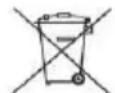
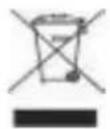
- The symbol on the product or on its packaging indicates that this product may not be treated as household waste. Instead it should be handed over to the applicable collection point for the recycling of electrical and electronic equipment.
- By ensuring this product is disposed of correctly, you will help prevent potential negative consequences for the environment and human health, which could otherwise be caused by inappropriate waste
handling of this product. For more detailed information about the recycling of this product, please contact your local council office or your household waste disposal service.
FOOD PRESERVATION GUIDELINES
| Classification | Food Items | Temperature | Normal Preservation | Vacuum Preservation |
| Refrigerant | Fresh Raw Meat | 5±3°C | 2~3days | 8~9days |
| Fresh Fish/ Sea Food | 5±3°C | 1~3days | 4~5days | |
| Cooked Meat | 5±3°C | 4~6days | 10~14days | |
| Vegetables | 5±3°C | 3~5days | 7~10days | |
| Fruit | 5±3°C | 5~7days | 14~20days | |
| Eggs | 5±3°C | 10~15days | 30~50days | |
| Frozen | Meat | -16~-20°C | 3~5months | >1yeas |
| Fish | -16~-20°C | 3~5months | >1yeas | |
| Sea Food | -16~-20°C | 3~5months | >1yeas | |
| Normal condition | Bread | 25±2°C | 1~2days | 6~8days |
| Biscuit | 25±2°C | 4~6months | >1yeas | |
| Rice/ Flour | 25±2°C | 3~5months | >1yeas | |
| Peanut/Legume | 25±2°C | 3~6months | >1yeas | |
| Medical Material | 25±2°C | 3~6months | >1yeas | |
| Tea | 25±2°C | 5~6months | >1yeas |
VEVOR®
TOUGH TOOLS, HALF PRICE
Technical Support and E-Warranty Certificate
www.vevor.com/support
VEVOR®
TOUGH TOOLS, HALF PRICE



NEED HELP? CONTACT US!
19. Front handle:
Fig. 1
Fig. 2
Note:



NEED HELP? CONTACT US!
Fig.1
Fig.4
NOTE:
Fig.1
Fig.1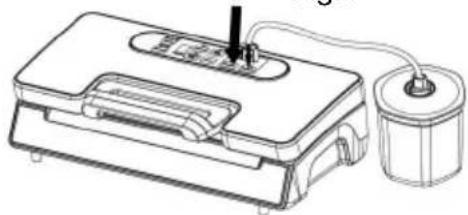
Fig.2
Fig.1
ENVIRONMENTAL PROTECTION
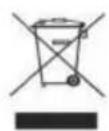



Figure 1
Figure 2
Figure 5
Figure 6
Figure 8
Figure 1

Fig.2
Figure 4
NOTE:
Figure 1
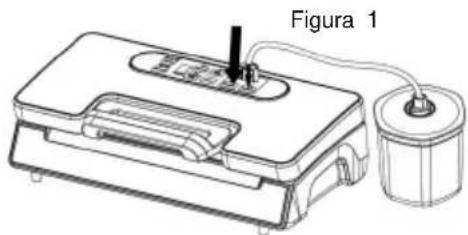
Figure 2
Figure 1
ENVIRONMENTAL PROTECTION



Figure 1
Figure 2
Figure 3
Figure 5
Figure 6
Figure 8
Figure 1
Figure 4
NOTE:
Figure 1
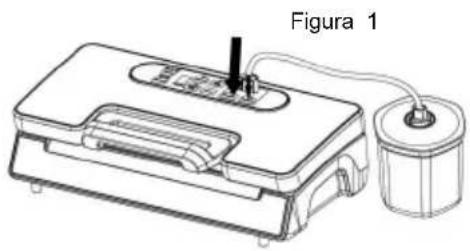
Figure 2
Figure 1



NEED HELP? CONTACT US!
Fig. 1
Fig. 2
Fig. 5
Fig. 6
Fig. 8
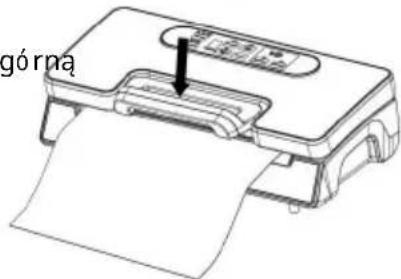
Fig. 2
Fig. 1
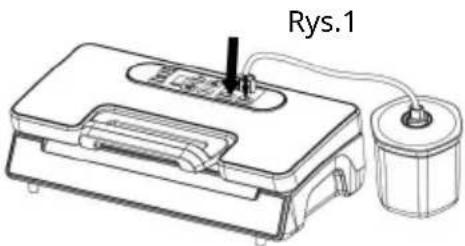
Fig. 2
Fig. 1
ENVIRONMENTAL PROTECTION



NEED HELP? CONTACT US!
Customer service@vevor.com
Figure 1
Image 2
Figure 3
Machine Translated by Google
Figure 5
Image 6
Image 8
NOTE:
Figure 1
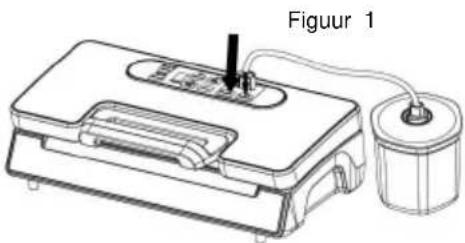
Image 2
Figure 1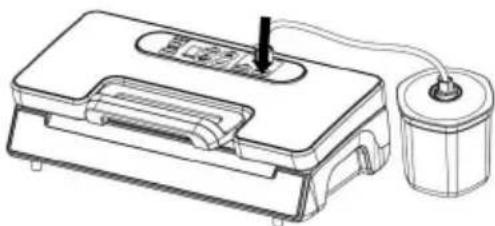
ENVIRONMENTAL PROTECTION
warranty certificate www.vevor.com/support
VEVOR®
TOUGH TOOLS, HALF PRICE



NEED HELP? CONTACT US!
Fig.1
Fig.2
Fig.3
Fig. 5
Fig. 6
Fig. 8
Fig.1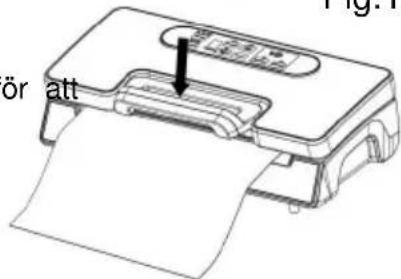
Fig.3
NOTE:
Fig.1
Fig.1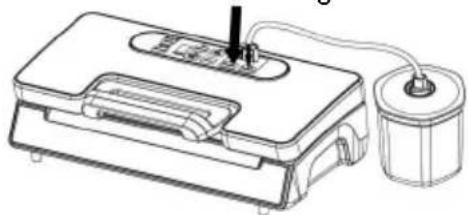
Fig.2
Fig.1
PROTECTION OF THE ENVIRONMENT

www.vevor.com/support
- VS5164 VACUUM SEALER INSTRUCTIONS
- VEVOR®
- VS
- NEED HELP? CONTACT US
- IMPORTANT SAFEGUARDS
- READ ALL INSTRUCTIONS
- CAUTION
- SAVE THESE INSTRUCTIONS
- CONSTRUCTION AND FUNCTIONS
- VAC & SEAL
- PULSE VACUUM
- SEALING TIME
- PRESSURE
- CANISTER
- MANUAL SEAL
- MARINATE
- CANCEL
- HOSE PORT
- PROGRESS
- AIR INTAKE
- VACUUM CHAMBER
- SEALING STRIP
- LOWER GASKET
- SEALING ELEMENT
- UPPER GASKET
- BAG CUTTER
- CUTTER RACK
- FRONT HANDLE
- OPERATING INSTRUCTIONS
- MAKING A BAG WITH BAG ROLL
- VACUUM PACKAGING WITH A BAG
- NOTE
- VACUUM PACKAGING WITH A BAG USING PULSE VACUUM
- VACUUM PACKAGING IN A CANISTER & VACUUM BOWL
- VACUUMING
- OPEN CANISTER AFTER VACUUM PACKAGING
- MARINATE MEAT WITH A MARINATE BOWL
- CORD STORAGE BOX
- HINTS FOR BEST VACUUMING PERFORMANCE
- FOOD STORAGE AND SAFETY INFORMATION
- GENERAL RULES FOR FOOD SAFETY
- CLEANING AND MAINTENANCE
- VACUUM SEALER
- VACUUM BAGS
- ACCESSORIES
- STORING YOUR VACUUM SEALER
- MAINTENANCE KIT INSTRUCTIONS
- ● REPLACING THE GASKET
- ● REPLACING THE TEFLON TAPE
- TROUBLESHOOTING
- NOTHING HAPPENS WHEN I TRY TO VACUUM PACKAGE
- AIR IS NOT REMOVED FROM THE BAG COMPLETELY
- THE MACHINE DOES NOT TURN TO SEAL AFTER VACUUMING
- AIR HAS RE-ENTERED INTO THE BAG AFTER BEING SEALED
- THE BAG MELTS
- THE CANISTER WILL NOT VACUUM
- DISPOSAL OF THE DEVICE
- PROTECTION OF THE ENVIRONMENT
- ENVIRONMENT PROTECTION FIRST
- ENVIRONMENTAL PROTECTION
- MACHINE TRANSLATED BY GOOGLE
- TOUGH TOOLS, HALF PRICE
Brand : Vevor
Model : VS5164
Category : Vacuum packaging machines