YQ3340 - Toys Vevor - Free user manual and instructions
Find the device manual for free YQ3340 Vevor in PDF.


| Product Type | Interactive Dance Mat |
| Brand | Vevor |
| Model | YQ3340 |
| Dimensions | 32.6 x 31.5 inches (approx. 83 x 80 cm) |
| Weight | Approximately 1 kg |
| Power Supply | 4 AA 1.5 V batteries (not included) |
| Main Functions | 5 game modes (free dance, challenge, memory, drums), Bluetooth mode, built-in speaker, digital display, LED lights |
| Connection | Bluetooth |
| Available Languages | English, Russian, German |
| Package Contents | Dance mat, user manual, screwdriver |
| Safety | Not suitable for children under 3 years (small parts). Use under adult supervision. |
| Maintenance and Cleaning | Wipe with a dry cloth. Do not immerse in water. |
| Spare Parts and Repairability | Replaceable batteries. Technical support via www.vevor.com/support |
| General Information | Electronic toy for children. Compliant with FCC Part 15. CE marking. |
Frequently Asked Questions - YQ3340 Vevor
User questions about YQ3340 Vevor
0 question about this device. Answer the ones you know or ask your own.
Ask a new question about this device
Download the instructions for your Toys in PDF format for free! Find your manual YQ3340 - Vevor and take your electronic device back in hand. On this page are published all the documents necessary for the use of your device. YQ3340 by Vevor.
USER MANUAL YQ3340 Vevor
Technical Support and E-Warranty Certificate
www.vevor.com/support
DANCE MAT USER MANUAL
MODEL: YQ3340
We continue to be committed to provide you tools with competitive price. "Save Half", "Half Price" or any other similar expressions used by us only represent of savings you might benefit from buying certain tools with us compared to top brands and does not necessarily mean to cover all categories of tools offered are kindly reminded to verify carefully when you are placing an order with us actually saving half in comparison with the top major brands.
MODEL: YQ3340
flowchart
graph TD
    A["TV 38"] --> B["MODE"]
    B --> C["BT"]
    C --> D["VOL-"]
    D --> E["1"]
    D --> F["2"]
    D --> G["3"]
    D --> H["4"]
    D --> I["5"]
    D --> J["6"]
    style A fill:#f9f,stroke:#333
    style B fill:#ccf,stroke:#333
    style C fill:#cfc,stroke:#333
    style D fill:#fcc,stroke:#333
    style E fill:#ffc,stroke:#333
    style F fill:#cfc,stroke:#333
    style G fill:#cfc,stroke:#333
    style H fill:#cfc,stroke:#333
    style I fill:#cfc,stroke:#333
    style J fill:#cfc,stroke:#333
Photo for reference
NEED HELP? CONTACT US!
Have product questions? Need technical support? Please feel fr contact us:
Technical Support and E-Warranty Certificate www.vevor.com/support
This is the original instruction, please read all manual instruction carefully before operating. VEVOR reserves a clear interpretation user manual. The appearance of the product shall be subject to product you received. Please forgive us that we won't inform you there are any technology or software updates on our product.
SAFETY INSTRUCTION AND PRECAUTIONS

WARNING:
text_image
Attention Adult accompany is recommended.
text_image
Warning Do not put it in mouthHow to use
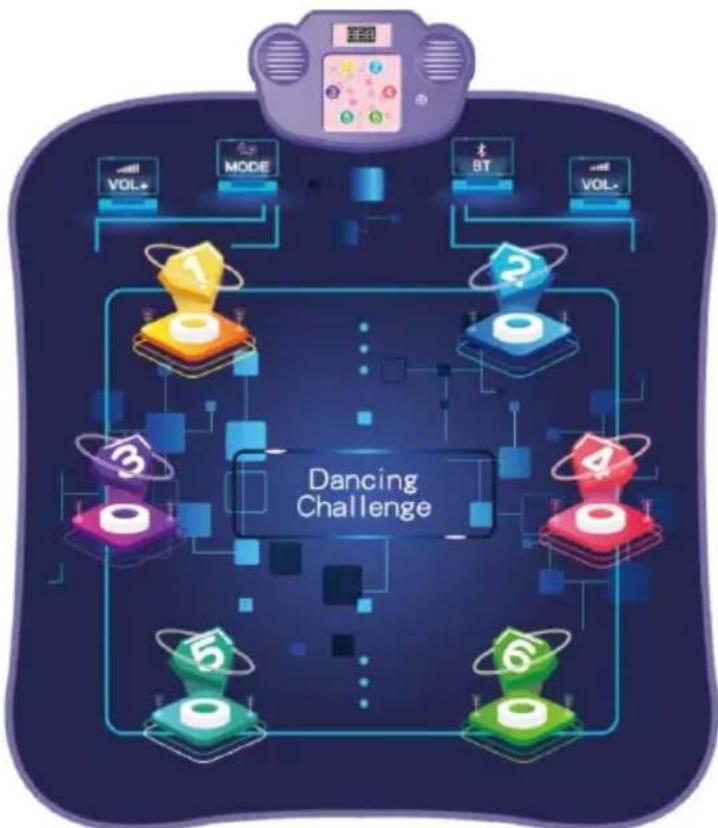
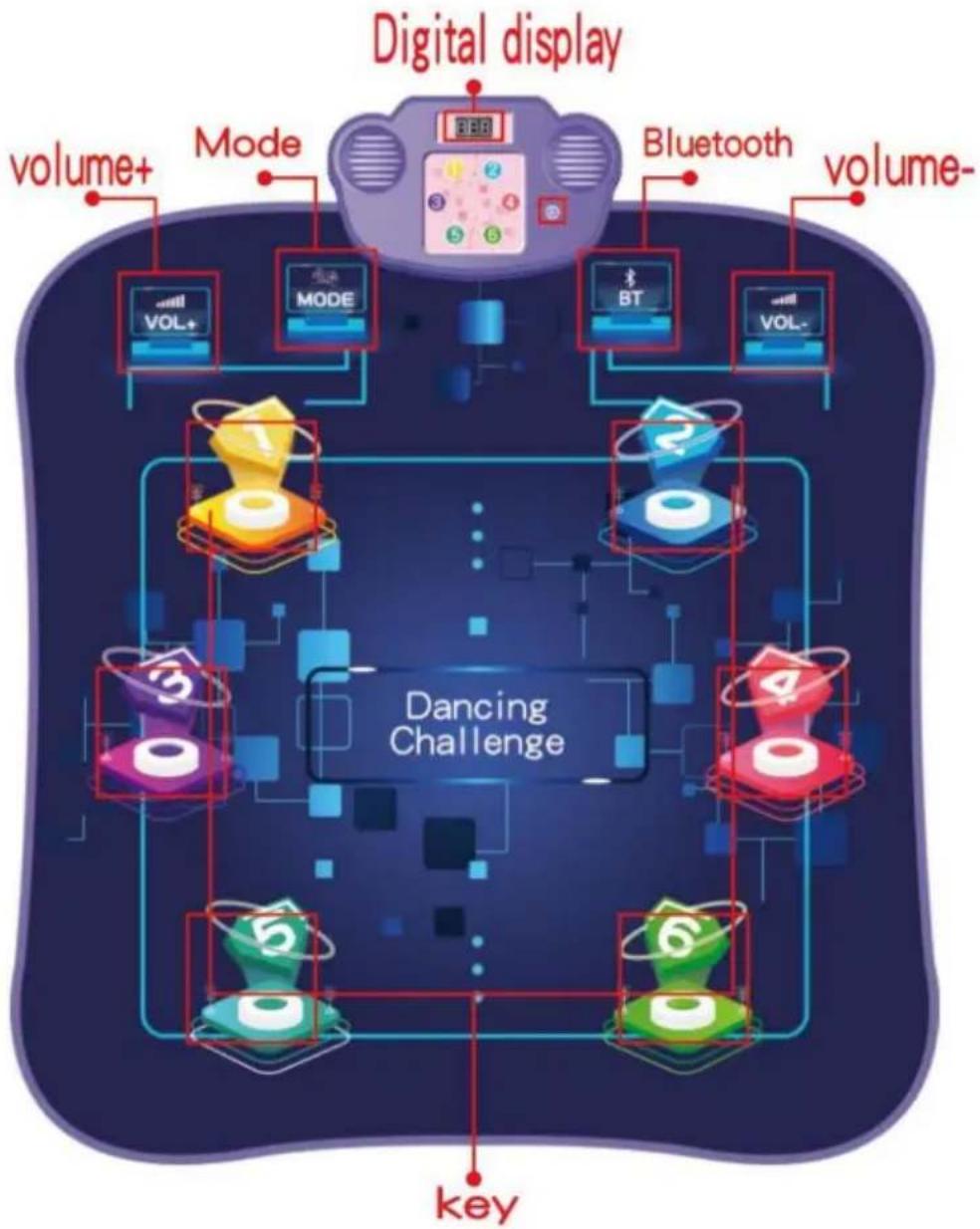
Control panel list:
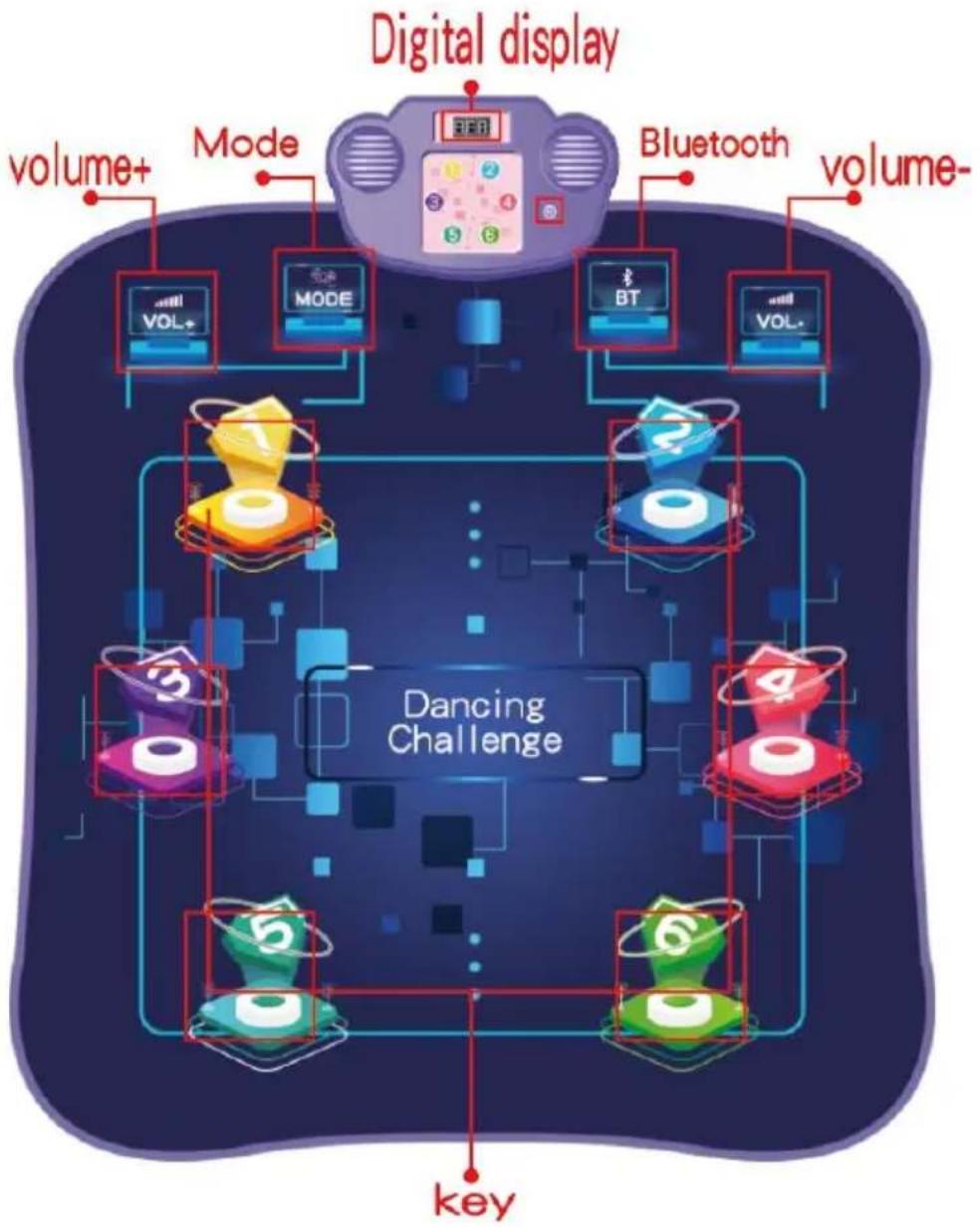
flowchart
graph TD
    A["Digital display"] --> B["VOI+"]
    A --> C["MODE"]
    A --> D["BT"]
    A --> E["VOI-"]
    A --> F["volume+"]
    A --> G["Mode"]
    A --> H["Bluetooth"]
    A --> I["volume-"]
    J["Dancing Challenge"] --> K["0"]
    J --> L["1"]
    J --> M["2"]
    J --> N["3"]
    J --> O["4"]
    J --> P["5"]
    J --> Q["6"]
    J --> R["key"]
Product Name: Dancing Mat Toys ( NOT including Battery )
Product Size:32.6"x31.5"
Package includes:
1* Dance Mat
1* User Manual
1* Screwdriver
Battery Installation:
Use a screwdriver to open battery cover and correctly put the 4x DC AA non-rechargeable battery according to the method and battery polarity, then lock the battery cover.
Language Selection :
Press the ON/OFF button to turn on the mat and the system will automatically enter the language selection, press the corresponding but on the mat to select EN/RUS/DE language. Press the Vol+/Vol- button adjust the volume.
Mode Selection(5 modes to choose):
a) Mode 1 Press the MODE button to enter mode 1. After entering Mo the music will play automatically. When the player dances on the according to the rhythm of the music, the light button on the mat up when the player steps on the music key.
b) Mode 2 (Button 1.2.5.6 will light up) Press the MODE button on the dance mat to enter mode 2. There are 3 levels to choose. Select the according to the button light on the dance mat, There is one minute countdown for each level. Press the corresponding buttons on the blabefore the LED lights turn off.
c) Mode 3 (Button 1.2.3.4.5.6 will light up) Press the MODE button on mat to enter mode 3. There are 3 levels to choose. Select the lev according to the button light on the dance mat. There is one minute countdown for each level. Press the corresponding buttons on the ma before the LED lights turn off.
Scoring Rules for Mode 2 and Mode 3:
Step on all the light buttons before the LED lights go out, and the accumulate 1 point; If you miss a key or misstep a key, no points
scored.When the game time is over, more than 5 times error will be as failure and it can not automatically enter the next level. Less than times including 5 times errors means successful challenge and it will automatically enter the next level
d ) Mode 4 (Memory mode)Press the MODE button to enter Mode 4 Players need to remember the lighting sequence of different colors on mat and press the buttons one by one .If the order is the same as given by the program, the game continues and increases in difficulty, otherwise the game is over and the game will reset , the player will the game again ..
e) Mode 5( Electric drum kit)Electric drum consists of bass drum, T drum, snare drum, hanging cymbals, rhythm cymbals, cymbals. The player presses or steps on the buttons on the mat according to the music, the button lights on the mat, and the mat makes the sound drum instrument.
Bluetooth operating instructions:
1. Bluetooth connection
Press the "BT" button on the mat to enter Bluetooth mode:
Turn on the Bluetooth switch of the mobile phone, search for "LCF-blanket", and click on the pairing connection; When the connection successful, the speaker emits a Bluetooth connection success tone; Pr the "BT" button again to exit the Bluetooth mode;
2,Bluetooth mode operation instructions After the bluetooth connection is successful , open the music player on the mobile phone, select the you like , and click the play button to play it. Press the MODE but mat to enter the level selection . After selecting the level,the dance i starts playing the music we like on the phone . Press or step on th corresponding keys on the dance mat before the light is turned off a LED screen displays the total score of the game . There are three countsdowns for each level.Adjust the volume on the phone , you can change the music volume; the volume of the prompt tone can be ad by the button Vol- or Vol+ on the mat.
Score rules:
Step on all the buttons of the lights before the LED lights turn off a score gets 1 point No points are awarded for missing a key or miss a key. When the game time is over or the number of errors is most times, it means that the level has failed and it can not automatically the next level. Less than 8 times including 8 times errors means success challenge and it will automatically enter the next level. Whether you successfully complete the level or not, the phone music will automat change to the next one when you restart the level. When you fail the level, press the Mode button again to select a new level to start a game.
Warning tips:
-
If the music player on the phone is replaced by another app or disabled, the dance mat may have no music or wrong sounds ^2 . Because the blue tooth version, the connection distance between Bluetooth and devices, different working modes and different music player cause the delay, which is the normal phenomenon. When the battery is low, the product may work abnormally or cannot be effectively connected to the bluetooth device. Please replace the battery in time. 3. Please follow the instructions or the package to install or use correctly, some parts need assembled by adults.
-
Please use under the guidance of an adult
-
The product contains small parts that may pose a risk of ingestion suffocation.
-
Please refer to the actual product for detail
FCC Information:
CAUTION: Changes or modifications not expressly approved by the party responsible for compliance could void the user's authority to operate the equipment! This device complies with Part 15 of the FCC Rules. Operation is subject to following two conditions:
1) This product may cause harmful interference.
2) This product must accept any interference received, including interference that may cause undesired operation.
WARNING: Changes or modifications to this product not expressly approved by the party responsible for compliance could void the user's authority to operate product.
Note: This product has been tested and found to comply with the limits for s B digital device pursuant to Part 15 of the FCC Rules. These limits are to provide reasonable protection against harmful interference in a residential installation.
This product generates, uses and can radiate radio frequency energy, and if installed and used in accordance with the instructions, it may cause harmful interference in radiocommunications. However, there is no guarantee that interference will not occur in a particular installation. If this product does cause harmful interference to radio or television reception, which can be determined by turning the act off and on, the user is encouraged to try to correct the interference by more of the following measures.
- Reorient or relocate the receiving antenna.
- Increase the distance between the product and the receiver.
- Connect the product to an outlet on a circuit different from that to which ver is connected.
- Consult the dealer or an experienced radio/TV technician for assistance.
Correct Disposal
This product is subject to the provision of european Directive 2012/19. The symbol showing a wheelie bin crossed through indicates that the product requires separate refuse collection in the European Union. This applies to the product and all accessories marked with this symbol.
Products marked as such may not be discarded with normal domestic waste, must be taken to a collection point for recycling electrical and electronic
This device complies with Part 15 of the FCC Rules. Operation is subject to following two conditions:(1) This device may not cause harmful interference, and (2) this device must accept any interference received, including interference that may cause undesired operation.
VEVOR®
TOUGH TOOLS, HALF PRICE
Technical Support and E-Warranty Certificate www.vevor.com/support
VEVOR®
TOUGH TOOLS, HALF PRICE
text_image
Attention Adult accompany is recommended.
text_image
Warning Do not put it in mouthComment utiliser
www.vevor.com/support
TANZMATTE BENUTZERHANDBUCH
MODELL: YQ3340
text_image
Attention Adult accompany is recommended.
text_image
Warning Do not put it in mouthAnwendung
e) Modus 5 (E-Drum-Kit)
elettronica www.vevor.com/support
MANUALE D'USO DEL TAPPETO DA BALLO
MODELLO: YQ3340
text_image
Attention Adult accompany is recommended.
text_image
Warning Do not put it in mouthCome usare
text_image
Attention Adult accompany is recommended.
text_image
Warning Do not put it in mouthcomo usar
Lista del panel de control:
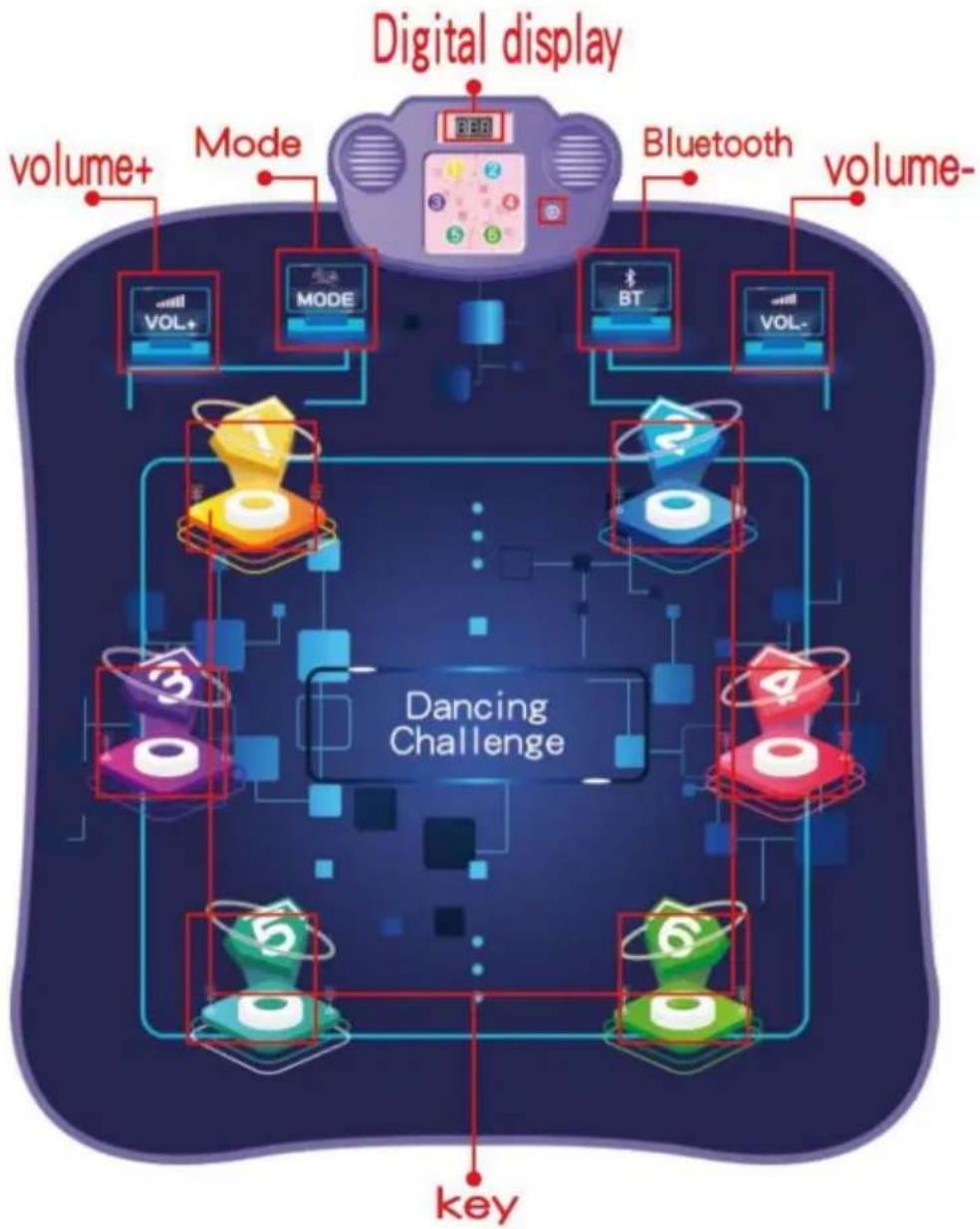
flowchart
graph TD
    A["Digital display"] --> B["volume+"]
    A --> C["Mode"]
    A --> D["Bluetooth"]
    A --> E["volume-"]
    B --> F["VOL+"]
    C --> G["MODE"]
    D --> H["BT"]
    E --> I["VOL-"]
    F --> J["Dancing Challenge"]
    G --> J
    H --> J
    I --> J
    J --> K["key"]
    style J fill:#f9f,stroke:#333,stroke-width:2px
text_image
Attention Adult accompany is recommended.
text_image
Warning Do not put it in mouthJak używać
www.vevor.com/support
VEVOR®
TOUGH TOOLS, HALF PRICE
Technische ondersteuning en e-garantiecertificaat www.vevor.com/support
DANSMAT GEBRUIKERSHANDLEIDING
MODEL: YQ3340
HULP NODIG? NEEM CONTACT MET ONS OP!
text_image
Attention Adult accompany is recommended.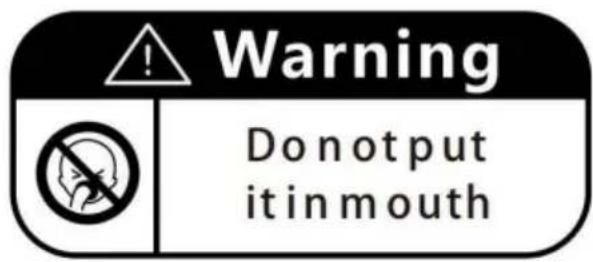
text_image
Warning Do not put it in mouthHoe te gebruiken
www.vevor.com/support
DANSMATTA ANVÄNDARHANDBOK
MODELL: YQ3340
www.vevor.com/support
text_image
Attention Adult accompany is recommended.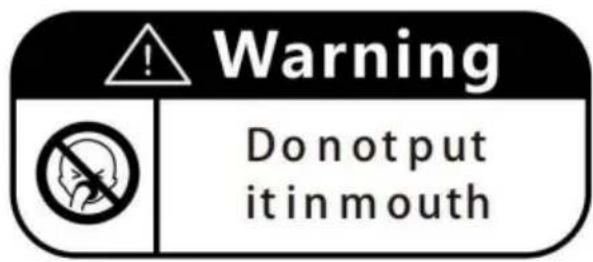
text_image
Warning Do not put it in mouthHur man använder
Kontrollpanel lista:
flowchart
graph TD
    A["Digital display"] --> B["volume+"]
    A --> C["Mode"]
    A --> D["Bluetooth"]
    A --> E["volume-"]
    B --> F["VOL+"]
    C --> G["MODE"]
    D --> H["BT"]
    E --> I["VOL-"]
    F --> J["Dancing Challenge"]
    G --> J
    H --> J
    I --> J
    J --> K["key"]
    style J fill:#f9f,stroke:#333,stroke-width:2px