
TCS-200MLA - Scale Vevor - Free user manual and instructions
Find the device manual for free TCS-200MLA Vevor in PDF.
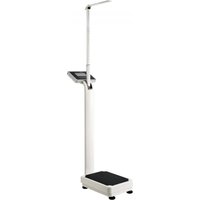


| Product Type | Electronic personal scale with height measurement |
| Brand | Vevor |
| Model | TCS-200MLA |
| Weighing capacity | 500 lb (approx. 227 kg) |
| Division (accuracy) | 2 oz (approx. 57 g) |
| Height measurement range | 88 to 210 cm |
| Height graduation | 1 mm |
| Display | LCD screen with backlight |
| Power supply | AC adapter 110-240 V / 50 Hz, output 6 V; internal rechargeable battery 4 V DC |
| Main functions | Weighing, height measurement, BMI calculation, memory for 7 users, unit selection (kg/lb.oz), zeroing, tare, RS232/USB connection for data transfer |
| Computer connection | RS232 to USB port (cable included) |
| Number of keys | 5 keys (ON/TARE+, OFF, UNIT-, MEM, SET, REQUEST) |
| Platform material | Robust platform (metal or plastic? not specified) |
| Base dimensions | Not specified in the manual |
| Device weight | Not specified |
| Maintenance and cleaning | Clean the surface with a soft, dry cloth; avoid water and harsh chemicals; keep the scale dry and clean |
| Safety | Do not immerse in water; use only the supplied adapter; do not overload; keep out of reach of children; do not disassemble |
| Spare parts and repairability | Replaceable internal battery; USB cable and adapter supplied; screws and seals available; technical support via www.vevor.com/support |
| Protection rating | Indoor use only |
| Standards | CE, FCC (Class B) |
| Included accessories | Scale base, pole with display, AC adapter, USB cable, screws and hex key |
Frequently Asked Questions - TCS-200MLA Vevor
User questions about TCS-200MLA Vevor
0 question about this device. Answer the ones you know or ask your own.
Ask a new question about this device
Download the instructions for your Scale in PDF format for free! Find your manual TCS-200MLA - Vevor and take your electronic device back in hand. On this page are published all the documents necessary for the use of your device. TCS-200MLA by Vevor.
USER MANUAL TCS-200MLA Vevor
TechnicalSupport and E-Warranty Certificate www.vevor.com/support
PHYSICIAN SCALE
Model:TCS-200MLA
We continue to be committed to provide you tools with competitive price. "Save Half", "Half Price" or any other similar expressions used by us only represent the estimate of savings you might benefit from buying certain tools with us compared to major top brands and does not necessarily mean to cover all categories of tools offered to us. You are kindly reminded to verify carefully when you are placing an order with us, as are actually saving half in comparison with the top major brands.
Model:TCS-200MLA
NEED HELP? CONTACT US!
Have product questions? Need technical support? Please feel free contact us: Technical Support and E-Warranty Certificate www.vevor.com/support
This is the original instruction, please read all manual instructions care before operating. VEVOR reserves a clear interpretation of our user m The appearance of the product shall be subject to the product you re. Please forgive us that we won't inform you again if there are any tech or software updates on our product.
SAFETY WARNINGS AND PRECAUTIONS
| Warning-To reduce the risk of injury, user must read instructions manual carefully. | |
| CORRECT DISPOSAL This product is subject to the provision of european Directive 2012/19/EU. The symbol showing a wheelie bin crossed through indicates that the product requires separate refuse collection in the European Union. This applies to the product and all accessories marked with this symbol. Products marked as such may not be discarded with normal domestic waste, but must be taken to a collection point for recycling electrical and electronic devices. | |
| Indoor Use Only | |
| CE | Compliance is a EC security certification. |
| FC | FCC Information: CAUTION: Changes or modifications not expressly approved by the party responsible for compliance could void the user's authority to operate the equipment! This device complies with Part 15 of the FCC Rules. Operation subject to the following two conditions: 1) This product may cause harmful interference. 2)This product must accept any interference received, including interference that may cause undesired operation. WARNING: Changes or modifications to this product not expressly approved by the party.responsible for compliance could void the user's authority to operate the product. Note: This product has been tested and found to comply with the limits for a Class B digital device pursuant to Part 15 of the FCC Rules, These limits are designed to provide reasonable protection against harmful interference in a residential installation. This product generates, uses and can radiate radio frequency en and if not installed and used in accordance with the instructions, |
| cause harmful interference to radio communications. However, the is no guarantee that interference will not occur in a particular installation. If this product does cause harmful interference to rad television reception,which can be determined by turning the produ off and on, the user is encouraged to try to correct the interfere one or more of the following measures. ·Reorient or relocate the receiving antenna. ·Increase the distance between the product and receiver. ·Connect the product to an outlet on a circuit different from tha which the receiver is connected. ·Consult the dealer or an experienced radio/TV technician for assistance. |
Thank you for using this product. Please read all of the instructions before using The information will help you achieve the best possible results.
WARNING:
Please read this manual carefully before using the product. Failure to do so may result in serious injury.
ELECTRIC SAFETY!
- Before using, check that the voltage power corresponds to the one shown on the appliance nameplate. Ensure that the voltage set on the machine corresponds to the electricity supply in your country.
- Do not operate any appliance with a damaged cord or plug or after it malfunctions or has been damaged in any manner. Return the appliance to the nearest authorized service facility for examination, repair, or adjustment.
- If the supply cord is damaged, it must be replaced by a special cord or assembly available from the manufacturer or its service agent.
- Do not let the cord hang over the edge of a table or counter or touch hot surface.
- Do not use appliances for other than intended use.
- To protect against fire, electric shock, or personal injury, do not immerse cords, electric plugs, or appliances in water or other liquids.
-
The use of accessories, which the appliance manufacturer does not recommend, may result in fire, electric shock, or personal injury.
-
Do not use an extension cord with this product.
- The power cord should lie flat on a table or counter surface and may not hair over the edge. Please keep it away from hot surfaces and water.
- WARNING: This product contains small parts. If swallowed, it will pose a choking hazard. Keep these small parts away from children when assembling!
ATTENTION!

WARNING! Remove all packaging materials and keep them for future use. Packaging materials are not a toy.
WARNING! Don't let children play with the packaging
materials. If they swallow the packaging materials, they will suffocate!
SAVE THESE INSTRUCTIONS
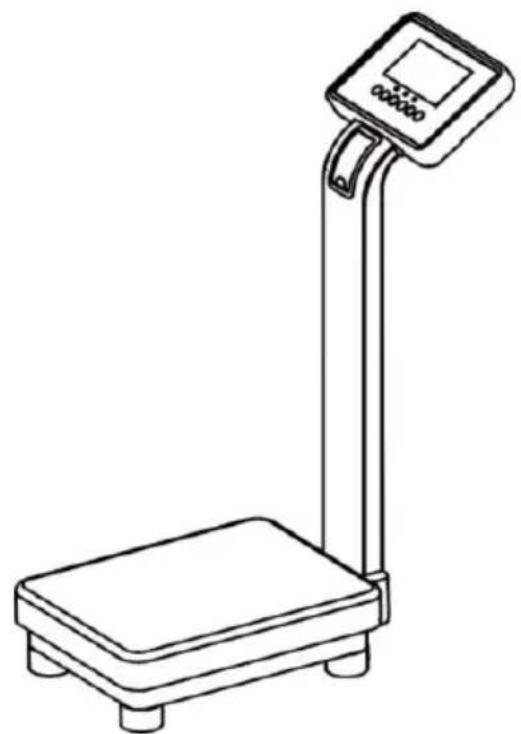
TCS-200MLA series of Electronic Personal Scale With Height Measurement is designed with high-precision load cell and special microcomputer control chip, high-definition large screen LCD display, with accurate weighing and height measurement function, it is reliable and convenient to use.
It can store 7 sets personal information including gender, age, height and health index BMI for each group. The device automatically provides a health index BMI according to the weight result and input parameters.
This devices are widely used in household, medical institutions, healthcare institutions, etc.
1. Main Technical Parameter
1.1 Specification:
| Model No. | Capacity | Minimum Capacity | Grad | Backlight | Height Measurement Range | Grad of Height Meter |
| TCS-200MLA | 500lb | 2lb3oz | 2oz | Yes | 88-210cm | 1mm |
| TCS-200MLA | 660lb | 2lb3oz | 2oz | Yes | 88-210cm | 1mm |
1.2 Two ways of power supply: AC/DC. AC input 110-240V/50HZ and AC output 6V. And with 4V DC rechargeable battery inside of scale.
1.3 Computer connection: Connect with computer via RS232 to USB data cable and upload data to computer.
2. Parts List
| Parts Name | Quantity(Pcs/Set) |
| Scale base(rechargeable battery inside) with platform | 1 |
| Support pole with LCD displayer | 1 |
| Adapter | 1 |
| USB data cable | 1 |
| M16*16 crews | 5 |
| Flat gasket | 5 |
| Hex wrench | 1 |
3. Assembly Method
2.1 To pack and transport easily, the scale is packed by separated into parts:
A. Scale Base
B. Displayer and support pole
2.2 Insert the both aviation socket and plug from the bottoms of support pole and scale base's flange properly, place them into the hole of scale base's flange, then install the support pole with LCD displayer into flange hole of scale base, and align them, the LCD displayer faces scale surface and fasten the support pole with 4pcs crews and flat gaskets .(See below drawing)
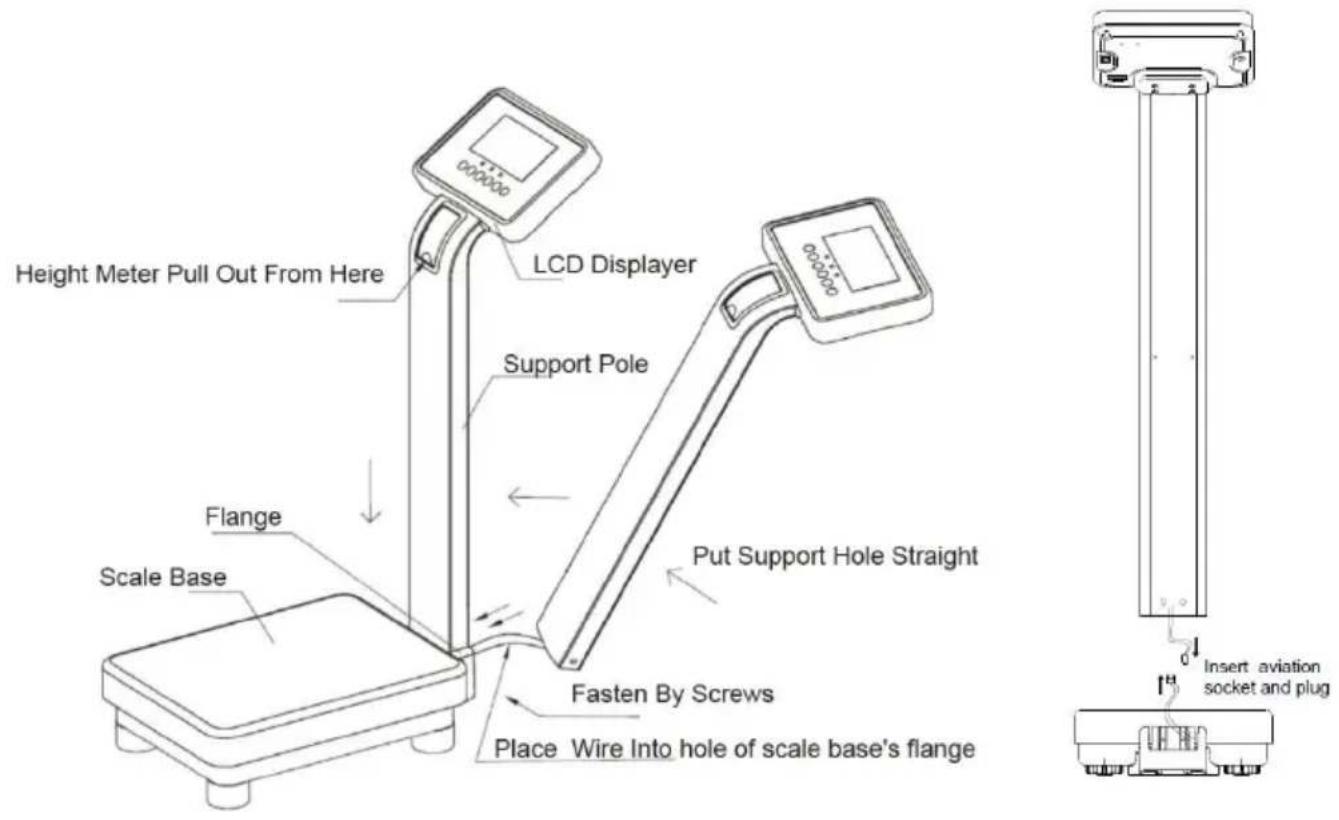
Assembly Drawing
2.3 If it is required to upload data to compute please take the RS232 to USB data cable coming with the scale, in off status, insert the DB9 pin plug into the DB9 pin socket of RS232 on the back of displayer and tighten the screw. Then insert the USB head into the USB port of computer.
Remark: To upload data to computer, the corresponding management software is
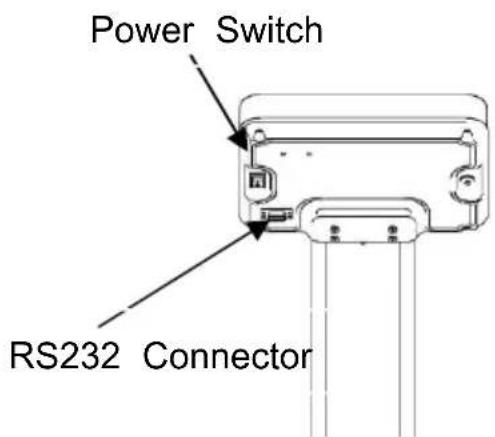
required in the computer, if no corresponding software, please check the "RS232 Connection Description" of 5 point to R&D the software accordingly.
4. Key Function Description
4.1“ON/TARE+”Key
A. With the power switch in the back of displayer on, in off status for the device, short press this key to turn on scale.
B. In weighing mode, short press this key to zero the weight to "0.0" or "0.00".
C. In setting mode or querying mode, short press this key to make one increase.
D. In querying mode, long press this key to delete the current user's data.
4.2 “OFF” Key
Short press this key to turn off the scale.
4.3 "UNIT-" Key
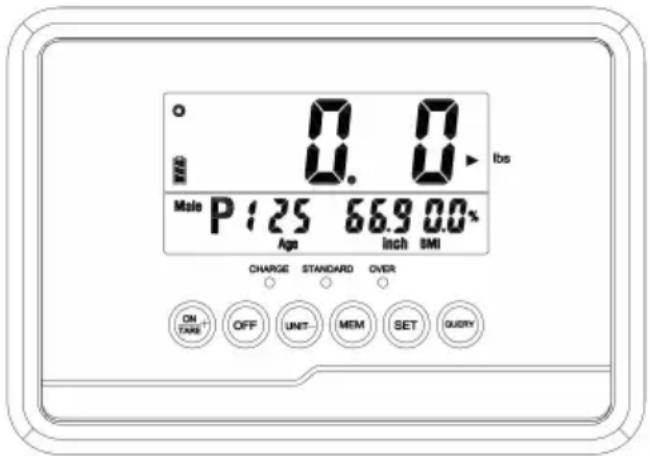
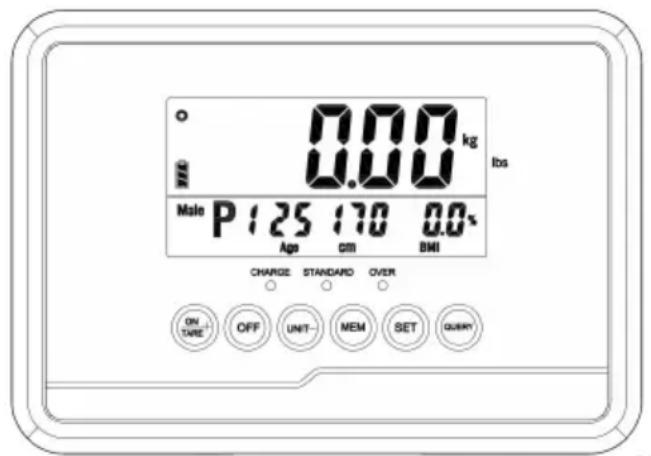
A. In weighing mode, short press this key to select weighing unit, kg or lb.oz. When set "kg" unit, "kg" unit keeps showing on right side of LCD; Whet set "lb" unit, "▶" keeps showing on right side of LCD and pointing to "lbs" unit printed on panel."lb" unit is lb.oz compound unit, the number in front of decimal point is in lb unit, and the number behind of decimal point is in oz unit. For example, it displays the weight result "130.8" in LCD under "lb" unit condition, it means "130lb 8oz".
Note: When you get the new scale, the device is normally under "lb" unit condition.
Kg unit: Lb unit:
B. In setting mode, short press this key to make one decrease.
4.4“MEM”Key
Short press this key to save result of current user.
Note: This scale can save 7 measurements. Once the maximum capacity is reached, the oldest will be deleted as new measurement are saved.
4.5“SET”Key
Short press this key to input user information, such as user number, gender, age, height.
4.6"QUERY"Key
Short press this key to query the saved information by user.
Note: If no data was saved or the data was deleted, when short press this key, it displays "noDAT".
5. RS232 Connection Description
5.1 To upload data to computer, please connect the scale and computer by installing RS232 to USB data cable on RS232 connector on the back of displayer and computer USB port. If the corresponding management software is installed in computer, turn on scale and weight till the weight result is stable, the measurement result can upload to computer accordingly. If no corresponding management software inside computer, please check the parameters of RS232 as below to R&D the software accordingly.
5.2 RS232 communication serial port parameters:
A. Communication method: UART serial port
B. Serial port level: RS232 level
C. Serial communication parameters:
Baud rate: 9600 pbs
Data bits:8-bit
Parity check bit: None
Stop bit:1 bit
Data encoding: hexadecimal (HEX)
D. Communication protocol data format(total 16 bytes of data)
| No. | Byte | Name | Byte Qty | Data Description (Hexadecimal) |
| 1 | 1、2 | Original data | 2 | 0xAB oxBA |
| 2 | 3 | Gender | 1 | male: 01 female: 00 |
| 3 | 4 | Age | 1 | 1byte, hexadecimal, unit:years old |
| 4 | 5 | Height Unit | 1 | 1byte, hexadecimal, 0:cm 1:inch |
| 5 | 6、7 | Height | 2 | 2 byte, hexadecimal (high bytes stated ahead and low bytes state behind), conversion: Height=received data/10 (one decimal place) |
| 6 | 8 | Weight Unit | 1 | 1byte, hexadecimal 0:KG 1:lb:oz 2:lb |
| 7 | 9、10 | Weight | 2 | 2byte, hexadecimal(high bytes stated ahead and low bytes state behind), conversion: Weight =received data/100 (two decimal place; If the "8" byte is "1", Weight=received data/100, number ahead of decimal is LB and the number behind decimal is OZ. For example, received data is 6508, weight=6508/100=65.08, so the weight is 65LB8oz. |
| 8 | 11、12 | BMI | 2 | 2byte, hexadecimal (high bytes stated ahead and low bytes state behind), unit: none; conversion: BMI=received data/10 (one decimal place) |
| 9 | 13 | Physique | 1 | 1byte, hexadecimal, unit: none; 0:none; 1:slim; 2:normal; |
| 10 | 14 | Reserve | 1 | Reserve |
| 11 | 15 | LF | 1 | '\n' (0x0A) Line feed |
| 12 | 16 | CR | 1 | '\r' (0xD) Enter |
6. Operation Method
6.1 Place the scale on a hard and stable surface, adjust the four screw feet of scale to keep it level and stable.
6.2 If you are not sure your actual height, please pick the use the height
mete of the scale to get the height result first. If you know your height well, just follow the next steps.
How to check the height measurement:
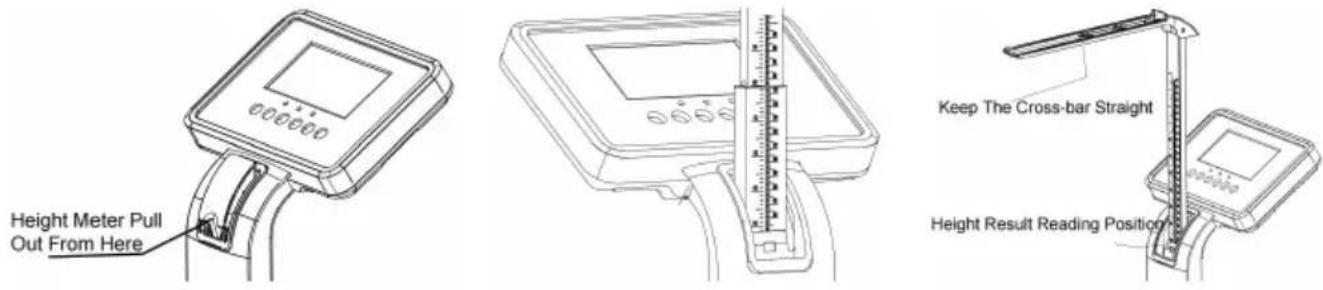
Pull out height meter from support hole and straighten the cross-bar. There are two parts of height meter and it is required to pull out one by one. When you pull out the first part, it need to ensure all of it fully pulled out, marbles at the bottom of first part have been out. Then continue to pull out the second parts until it is mostly out.
Stand on scale base and keep straight, adjust the height meter by pulling second parts, then make the cross-bar touch the head, and read the height result from reading position as below picture. It is suggested to get off scale before reading height result.
6.3 Shut the switch behind displayer, then short press "ON/TARE+"key to turn on scale, scale starts to self-test, it displays "0.00"after end of self-test and enter the weighing mode. If it doesn't display "0.0" or "0.00" in LCD, please short press "ON/TARE+" key to zero the weight.
6.4 Scale is set in "lb" unit during production, short press "UNIT-" key to change it into "kg" unit if necessary, or keep it and operate next step directly.
6.5 Short press "Set" key to enter setting mode, user number flashes, short press "ON/TARE+" key or "UNIT-" key to adjust the numbers, then short press "Set" key to confirm. After this, use same way to input information of gender /age/height in turn.
Till finish inputting the height information and short press "Set" key to confirm, scale gets into weighing mode again.
6.6 Stand in the center of platform, the weighing result displays after the stable symbol “.”Qdisplays at the top left corner of LCD, it is the stable weighing value, BMI displays accordingly at the same time.
6.7 If the scale is connected to computer though cable already, the weight result is uploaded to software as soon as the weighing value is stable.
6.8 If necessary to save result of current user in scale, keep standing on scale and short press "MEN"key to save result, it displays" SURE LCD, then get off the scale. If no need to save result, get off the scale directly. Note: Above operation can save data into scale only, if you need to save related data to software of computer, please operate it directly after the result uploaded to software.
6.9 To check the record of scale, under weighing mode without any weight, short press "QUERY"Key to enter querying mode, it displays "SLUSELCD, short press "ON/TARE+" key to select the user information you are looking for (Gender/User number/Age/Height/BMI) in record, then short press "QUERY" Key to confirm, the corresponding user's weight displays in LCD. After getting the record, short press "QUERY" Key again to exit querying mode, scale gets into weighing mode again.
If it needs to delete the user's data in record of scale, please enter querying mode and short press "ON/TARE+"key to select the user's data required to delete, such as "P3", hold "ON/TARE+"key until "CLRP3" displays in LCD, then the data of P3 is deleted already. Any error operation, please turn off the scale and re-operate above steps.
If no operation any more, please short press "OFF"key to turn off scale. If the scale is not used for some time, it is suggested to shut back the switch behind displayer to let scale in completely off condition.
7. Operation To Select Weighing Unit Status
7.1 Weighing unit status can be set "selectable" or "locked". Turn on scale, short press "UNIT-" key, the weighing unit can be switched from lb unit to kg unit, it is under "selectable" status, otherwise it is under "locked" status. "selectable" status can be switched weighing unit any time, "locked" status remains a weighing unit and can not be changed. Note: A.Under lb unit condition, the unit of height is "inch".
Under kg unit condition, the unit of height is "cm".
B. It is under "selectable" weighing unit status when you get the scale, the weighing unit is lb(lb.oz), users can select the weighing unit according to their usage habits.
7.2 Operation to select "selectable" or "locked" weighing unit status: Turn on scale, when it displays "0. 0" or "0.00" in LCD, select the required weighing unit first, hold "UNIT-" key unitl " ") (pointing to "Ibs" printed on panel) or "kg" flashes, the flashing weighing unit is the unit being locked. To change status from "locked" to "selectable", hold "UNIT-" key until weighing unit changes.
7.3 Any error operation, please turn off the scale and re-operate above steps.
8. About Health Index BMI
8.1 World Health Organization Standard:
| BMI | Physique Description |
| <18.5 | Slim |
| 18.5~24.9 | Normal |
| >25 | Slightly Overweight |
| <30 | Overweight |
| >40 | Obesity |
8.2 Asia Standard
| BMI | Physique Description |
| <18.5 | Slim |
| 18.5~22.9 | Normal |
| >23 | Slightly Overweight |
| <30 | Overweight |
| >40 | Obesity |
9. Announcements For Rechargeable Battery
9.1 This scale is with lead-acid rechargeable batteries inside, it is required to charge by adapter coming inside packing, and not allowed to charge by adapter with different model or different parameters.
9.2 Under charging condition, the charge indicator light on panel is on.
9.3 It is strictly not allowed to overcharge or over-discharge lead-acid battery. Please charge in time when the low battery warning appear "LO"or . When the scale is stored for a long time under fully out battery condition, it will cause high internal resistance of battery and charging very difficulty, or it will damage battery and mainboard.
9.4 Please charge scale for at least 8 hours when low battery warning appear.
9.5 When the scale is not used for a long time, it is suggested to charge the s every 3 months as demand.
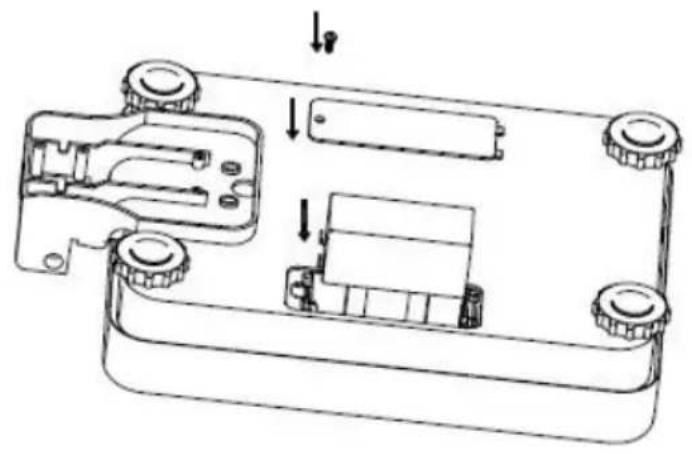
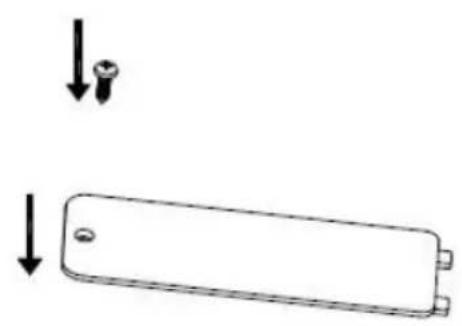
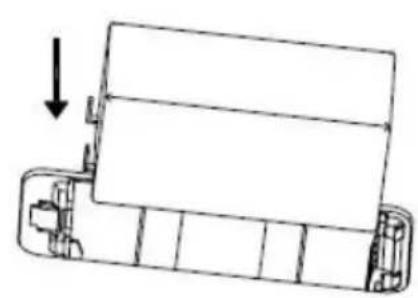
9.6 Replacing battery: remove the screw and open the battery cover on the back of scale base, take off battery from battery case, remove the plug of positive and negative wires, change the battery with new one, insert the positive and negative wires of battery(red wire is for the positive pole with red dot, black wire is for negative pole with black dot), install it back into battery case, install battery cover and screw it tight.
10. Announcements For Device
10.1 It is suggested to turn off scale after use. When the battery symbol displays " , it indicates low battery level, please charge the scale in time. When it displays "LO" in LCD, it indicates the extremely low battery level, please charge the scale immediately to avoid inaccurate or inability to weight. It is required to charge the specialized adapter coming into packing. The scale will be automatically off in 1 minute after "LO"displays.
10.2 When it displays “- H -” in LCD, it indicates over weight.
10.3 When it displays negative number like“- 0.01” or“-0.1” in LCD, over indicator light on panel is on, please short press “ON/TARE+”key to zero scale ,or turn off scale and restart it. When the scale is under normal working condition, standard indicator light on panel is on, please operate it accordingly to 6th point.
10.4 The scale should be placed on a stable and hard surface, adjust the feet to keep scale horizontal to ensure weighing accuracy.
10.5 Clean the surface of scale body regularly, keep it dry and clean.
10.6 It is not included inside of the warranty for damaged sensor or damaged mainboard caused by customer disassembly or abnormal use (such as overloading, strong impact, ect).
10.7 When scale is moved from low-temperature area/high-temperature areas to the working temperature area, please place it in the working temperature area for more that 1 hour before operate, otherwise it may cause the unstable weighing of inaccurate weight.
VEVOR®
TOUGH TOOLS, HALF PRICE
Technical Support and E-Warranty Certificate
www.vevor.com/support
VEVOR
TOUGH TOOLS, HALF PRICE
Assistance technique et certificat de garantie electronique www.vevor.com/support
ÉCHELLE MÉDECIN
www.vevor.com/support
VEVOR®
TOUGH TOOLS, HALF PRICE
elettronica www.vevor.com/support
VEVOR®
TOUGH TOOLS, HALF PRICE
Certificado de soporte专业技术 garantia electrónica www.vevor.com/support
BÁSCULA DEL MÉDICO
Modelo:TCS-200MLA
Seguimos comprometidos a proportionarle herramrientas a precios competisos.
www.vevor.com/support
VEVOR®
TOUGH TOOLS, HALF PRICE
Technische ondersteuning en e-garantiecertificaat www.vevor.com/support
ARTSSCHAAL
Model: TCS-200MLA
garantiecertificaat www.vevor.com/support
VEVOR
TOUGH TOOLS, HALF PRICE
www.vevor.com/support
- PHYSICIAN SCALE
- MODEL:TCS-200MLA
- NEED HELP? CONTACT US
- SAFETY WARNINGS AND PRECAUTIONS
- WARNING
- ELECTRIC SAFETY
- ATTENTION
- SAVE THESE INSTRUCTIONS
- MAIN TECHNICAL PARAMETER
- PARTS LIST
- ASSEMBLY METHOD
- ASSEMBLY DRAWING
- KEY FUNCTION DESCRIPTION
- ON/TARE+”KEY
- OFF” KEY
- UNIT-" KEY
- MEM”KEY
- SET”KEY
- QUERY"KEY
- RS232 CONNECTION DESCRIPTION
- OPERATION METHOD
- OPERATION TO SELECT WEIGHING UNIT STATUS
- ABOUT HEALTH INDEX BMI
- ANNOUNCEMENTS FOR RECHARGEABLE BATTERY
- ANNOUNCEMENTS FOR DEVICE
- VEVOR®
- VEVOR
- TOUGH TOOLS, HALF PRICE
- BÁSCULA DEL MÉDICO
- MODELO:TCS-200MLA
- ARTSSCHAAL
- MODEL: TCS-200MLA
Brand : Vevor
Model : TCS-200MLA
Category : Scale