RB-SP04 - Fitness Equipment Vevor - Free user manual and instructions
Find the device manual for free RB-SP04 Vevor in PDF.


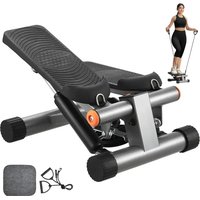
| Product Type | Mini stepper |
| Brand | Vevor |
| Model | RB-SP04 |
| Maximum user weight | 150 kg (330 lb) |
| LCD screen functions | Step counter, exercise time (0-99:59), estimated calories, speed (steps/min), auto-scan |
| Screen power supply | Button cell battery (to be installed before first use) |
| Pedal height adjustment | Yes, via a black button |
| Recommended use | Indoors, on a flat and stable surface |
| Number of simultaneous users | 1 person |
| Safety distance around the device | At least 1 meter |
| Maintenance and cleaning | Wipe with a soft, dry cloth; do not use abrasive cleaners |
| Usage precautions | Consult a doctor before any exercise program; stop use if pain or dizziness |
| Auto-off | After 2 minutes of inactivity |
| Main materials | Steel, plastic |
| Repairability | Screws and hydraulic components accessible; replaceable battery |
Frequently Asked Questions - RB-SP04 Vevor
User questions about RB-SP04 Vevor
0 question about this device. Answer the ones you know or ask your own.
Ask a new question about this device
Download the instructions for your Fitness Equipment in PDF format for free! Find your manual RB-SP04 - Vevor and take your electronic device back in hand. On this page are published all the documents necessary for the use of your device. RB-SP04 by Vevor.
USER MANUAL RB-SP04 Vevor
Technical Support and E-Warranty Certificate www.vevor.com/support
MINI STEPPER FOR EXERCISE
MODEL: RB-SP04
We continue to be committed to provide you tools with competitive price. "Save Half", "Half Price" or any other similar expressions used by us only represents an estimate of savings you might benefit from buying certain tools with us compared to the major top brands and does not necessarily mean to co all categories of tools offered by us. You are kindly reminded to verify carefully when you are placing an order with us if you are actually Saving Half in comparison with the top major brands.
VEVOR®
TOUGH TOOLS, HALF PRICE
MINI STEPPER FOF EXERCISE
MODEL: RB-SP04
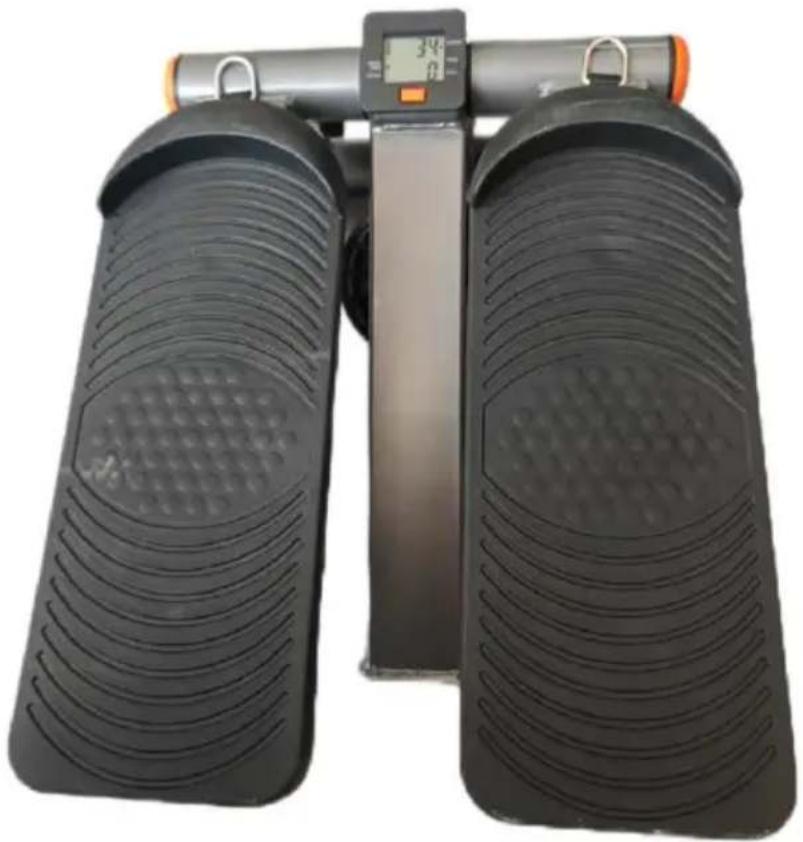
natural_image
Black exercise bar with two side panels, one displaying a digital display showing 34Ω and the other showing a similar pattern (no text or symbols visible)NEED HELP? CONTACT US!
Have product questions? Need technical support? Please feel free to contact us:
Technical Support and E-Warranty Certificate www.vevor.com/support
This is the original instruction, please read all manual instructions carefully before operating. VEVOR reserves a clear interpretation of o user manual. The appearance of the product shall be subject to the product you received. Please forgive us that we won't inform you ag there are any technology or software updates on our product.
 | Warning-To reduce the risk of injury, user must read instructio manual carefully. |
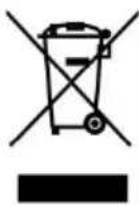 | CORRECT DISPOSALThis product is subject to the provision of European Directive 2012/19/EC. The symbol showing a wheelie bin crossed through indicates that the product requires separate refuse collection in European Union. This applies to the product and all accessor marked with this symbol. Products marked as such may not discarded with normal domestic waste, but must be taken to collection point for recycling electrical and electronic devices |
 | Compliance is a EC & UK security certification. |
SAFETY WARNINGS AND PRECAUTIONS
Thank you for using this product. In order to make sure that you can operate machine correctly, read this instruction carefully before operation and keep it properly for future reference. Please read the precautions and safety rules on page to ensure your safe use. This manual will outline safety warnings and precautions, operating, maintenance and cleaning. The warnings and instructions reviewed in this manual cannot cover all possible conditions and situations that may occur. Caution and common sense are not built into this product, since believe that the uses will comply with these codes. Before starting a training program or engaging in strenuous endurance activity on the device, please cc a doctor.
Please read ALL the instructions before using your product.
-
Do not let children and minors and pet get close to or touch the product leave it unattended while in use.
-
Do not apply this unit to any other purposes than the indicated usage.
- DO NOT CLEAN IT WITH ANY ABRASIVE MATERIAL.
- Pet urine and feces can damage the product, please keep away.
- Before using this product, consult with your physician or therapist to discuss appropriate exercise program.
- If you experience any pain or difficulty with this equipment, stop using immediately and consult your healthcare provider.
- Always inspect the product for any damage before each use.
- To prevent muscle fatigue or injury, do not use this exercise equipment for extended periods of time at once.
- Improper use of this climbing rope and excessive or incorrect training can to serious injuries.
- Before use, the product's feet must be leveled and the product must be on a level surface.
- Keep your body balanced on the product and do not make large movement
- If you suffer from heart disease, high blood pressure or any other disease condition, consult your physician or therapist before beginning any workout.
- Perform two exercises slowly and in a controlled manner, If you feel dizz short of breath, please stop and rest as needed. If the problem persists, do this equipment and consult your doctor.
- Use this product only as intended and demonstrated in these instructions workout!
- Please take warm-up exercise before using the equipment. Be aware of physical ability and condition. Do not overuse.
- Use the equipment on a solid, flat level surface. The feet end caps on the stepper is anti-skid, won't have damage to the floor. But you can also place stepper over a mat if you want.
- Before exercise, please carefully examine the equipment make sure it is good condition. If any defect, adjust and repair it before use. Ensure to wea proper outfit while using this equipment to avoid any possible dangerous circumstances.
- After 20 minutes exercise, the hydraulic cylinder will become hot. Don't to the hydraulic cylinder.
-
Please put your heels on the pedal. Don't jump during exercise.
-
WARNING: This appliance is not intended for use by young or infirm persons unless supervised by a responsible person to ensure that they use the appliance safely. Young children should be supervised to ensure that they do not play with the product. Pets should stay away from the product.
- WARNING: Not all exercises are suitable for everyone, To reduce the risk of injury, consult with your physician before using this exercise equipment and beginning this or any other exercise program. This product is not intended to diagnose any medical condition, or to replace the advice or treatment recommended by your healthcare professional.
- WARNING: PLEASE KEEP A SAFE DISTANCE OF ONE METER ALL AROUNDTHE EQUIPMENT DURING EXERCISE
- WARNING: If there is a physical defects or movement disorders.
Please consult the physician and trainer before exercise. Please read the manual carefully before use. We will not responsible for personal injury damage to the equipment which is caused by improper use. - Do not use this product after taking drugs, drinking, eating, or in a bad mental state, etc.
- Indoor use only! The product should not come into contact with water. Only one person can use!
- Wear appropriate clothes while exercising. Do not wear loose clothes could become caught in the product.
PRODUCT PARAMETERS
| MODEL | Height adjustment function | Maximum load |
| RB-SP04 | Yes | 330Lbs (150Kg) |
METER FUNCTION AND USAGE
Attention: Before use, install the battery! The battery will need to be rep
when an incorrect display appears on the L
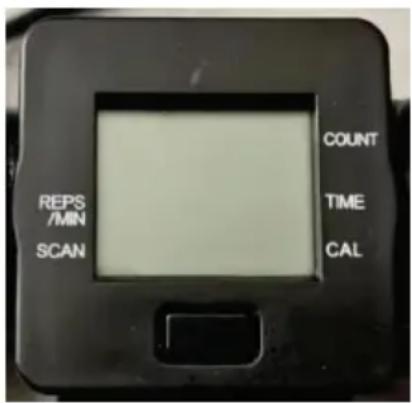
- COUNT: Shows the total number of steps y completed during your workout
- TIME: Shows the length of time you have during your workout.(0-99.59S)
- CALORIES—Shows the approximate number calories you have burned during your workout.
- STEP/MIN: Shows your stepping speed, in str per minute
- SCAN: Displays the TIME,CALORIES,and STEP/MIN modes in a repeating cycle,showing each mode for approximately five seconds.
- BUTTON: Press and hold this button, all data will reset to zero. Shortly pres button, this display will switch in
sequence;TIME,CALORIE,COUNT,REPS/MIN,SCAN
- Switch off: The data will continue from where last workout ended. The met switch off automatically if no movement in two minutes.
OPERATING INSTRUCTIONS
Before using the appliance for the first time, peel off any promotional and packaging materials and check that the product is clean and dust-free. Please dispose of all plastic bags carefully and keep them away from children and
Attention: Before use, the product's feet must be leveled and the product must be placed on a level surface.
Attention: Please check whether the product is damaged before use.
Attention: Before use, install the battery! The battery will need to be rep when an incorrect display appears on the LCD.
- Put the stepper on a flat stable surface.
- Push one pedal right down with your foot until the crash pad is laying o mainframe.Then put your other on the raised pedal.
- Feet trample down in turn, like climbing stairs.
- If you are skilled in exercise, don't trample the pedals to the button, you can speed up to get better effected on the whole body.
CLEANING AND STORAGE
- Wipe with a soft, dry cloth. Never use an abrasive cleanser or harsh packet to keep the product dry
- Children are not allowed to wipe the product to avoid tipping and falling
- After disassembling the product, please assemble the parts and accessories
METHODS TO DEAL WITH BREAKDOWNS
| Breakdowns Description | Possible Reasons | Solution |
| No display or no changes on the meter | Battery in the meter power | Replace the battery |
| Meter broken | Replace the meter | |
| Pedal height is low | Adjust the black knob clockwise to increase the pe height | |
| Noise | Screw get loose | Tighten the screws |
| No lubricant on rotating component | Add lubricant |
INSTALLING / REPLACING BATTERIES
-
When changing the battery, pull out the display panel and then put in the r battery.
-
Then put the display panel back into the original position and make sure t display panel is completely set down in position.
VEVOR®
TOUGH TOOLS, HALF PRICE
Technical Support and E-Warranty Certificate
www.vevor.com/support
VEVOR®
TOUGH TOOLS, HALF PRICE
natural_image
Black exercise bar with two side panels, one displaying a digital display showing 34.0 units (no text or symbols on the bars themselves)BESOIN D'AIDE? CONTACTEZ-NOUS!
SAFETY WARNINGS AND PRECAUTIONS
CLEANING AND STORAGE
natural_image
Black exercise bar with two side panels, one displaying a digital display showing 34Ω and the other showing a similar pattern (no text or symbols visible)SAFETY WARNINGS AND PRECAUTIONS
CLEANING AND STORAGE
www.vevor.com/support
VEVOR®
TOUGH TOOLS, HALF PRICE
natural_image
Black exercise bar with two side panels, one displaying a digital display showing 34.0 units (no text or symbols on the bars themselves)SAFETY WARNINGS AND PRECAUTIONS
CLEANING AND STORAGE
www.vevor.com/support
VEVOR®
TOUGH TOOLS, HALF PRICE
natural_image
Black exercise bar with two side panels, one displaying a digital display showing 34.0 units (no text or symbols on the bars themselves)SAFETY WARNINGS AND PRECAUTIONS
CLEANING AND STORAGE
natural_image
Black exercise bar with two side panels, one displaying a digital display showing 34Ω and the other showing a similar pattern (no text or symbols visible)POTRZEBUJESZ POMOCY? SKONTAKTUJ SIE Z NAMI!
SAFETY WARNINGS AND PRECAUTIONS
CLEANING AND STORAGE
www.vevor.com/support
VEVOR®
TOUGH TOOLS, HALF PRICE
Technisch Ondersteuning en E-garantiecertificaat www.vevor.com/support
MINI STEPPER VOOR OEFENINGEN
MODEL: RB-SP04
natural_image
Black exercise bar with two side panels, one displaying a digital display showing 34Ω and the other showing a similar pattern (no text or symbols visible)HULP NODIG? NEEM CONTACT MET ONS OP!
SAFETY WARNINGS AND PRECAUTIONS
CLEANING AND STORAGE
www.vevor.com/support
VEVOR®
TOUGH TOOLS, HALF PRICE
MINI STEPPER FÖR TRÄNING
MODELL: RB-SP04
natural_image
Black exercise bar with two side panels, one displaying a digital display showing 34.0 units (no text or symbols on the bars themselves)BEHÖVER HJÄLP? KONTAKTA OSS!
SAFETY WARNINGS AND PRECAUTIONS
CLEANING AND STORAGE
www.vevor.com/support