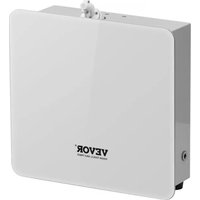
A501 - Aroma diffuser Vevor - Free user manual and instructions
Find the device manual for free A501 Vevor in PDF.


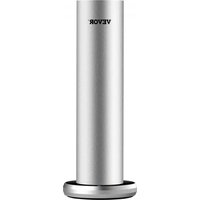
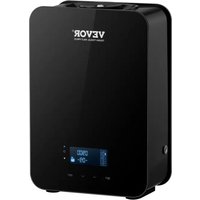
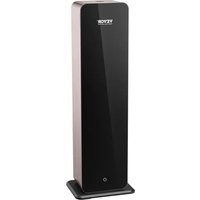
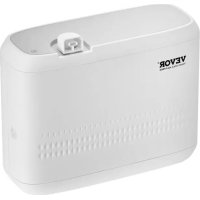
| Product Type | Aroma Diffuser |
| Brand | Vevor |
| Model | A501 |
| Tank Capacity | 500 ml |
| Power | 3 W |
| Power Supply | 12 V DC (0.3 A max) via AC adapter or batteries (not included) |
| Material | Plastic and acrylic |
| Coverage Area | Up to 2500 ft² (approx. 232 m²) |
| Connectivity | Bluetooth and Wi-Fi (depending on version) |
| Mobile App | "Scent Marketing" (Android and iOS) |
| Intensity Levels | 10 levels (G1 to G10) with a working time of 5 s and variable pause from 90 to 900 s |
| Oil Consumption | 0.08 to 0.60 g/h depending on the level |
| Main Functions | Scheduled diffusion, app control, intensity adjustment, timer |
| Types of Essential Oils | Unscented fragrance oils, but compatible with essential oils |
| LED Indicators | Bluetooth (blinking during connection), battery (solid on = charged, blinking = low) |
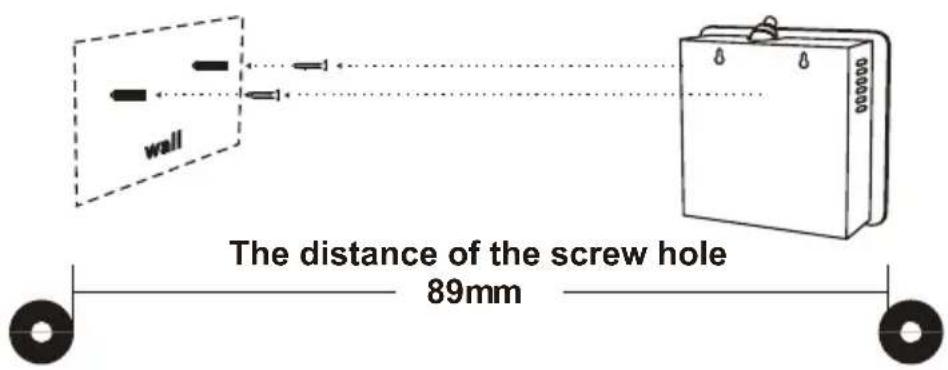
| Mounting | Wall-mounted with screws (hole spacing 89 mm) or placed on a flat surface |
| Cleaning | Use industrial alcohol, run for 5 to 10 minutes to clean the system |
| Country of Origin | China |
| Warranty | Electronic warranty certificate available at www.vevor.com/support |
Frequently Asked Questions - A501 Vevor
User questions about A501 Vevor
0 question about this device. Answer the ones you know or ask your own.
Ask a new question about this device
Download the instructions for your Aroma diffuser in PDF format for free! Find your manual A501 - Vevor and take your electronic device back in hand. On this page are published all the documents necessary for the use of your device. A501 by Vevor.
USER MANUAL A501 Vevor
Technical Support and E-Warranty Certificate www.vevor.com/support
Aroma Diffuser
MODEL: A501
We continue to be committed to provide you tools with competitive price.
"Save Half", "Half Price" or any other similar expressions used by us only represents an estimate of savings you might benefit from buying certain tools with us compared to the major top brands and does not necessarily mean to cover all categories of tools offered by us.
You are kindly reminded to verify carefully when you are placing an order with us if you are actually saving half in comparison with the top major brands.
MODEL: A501
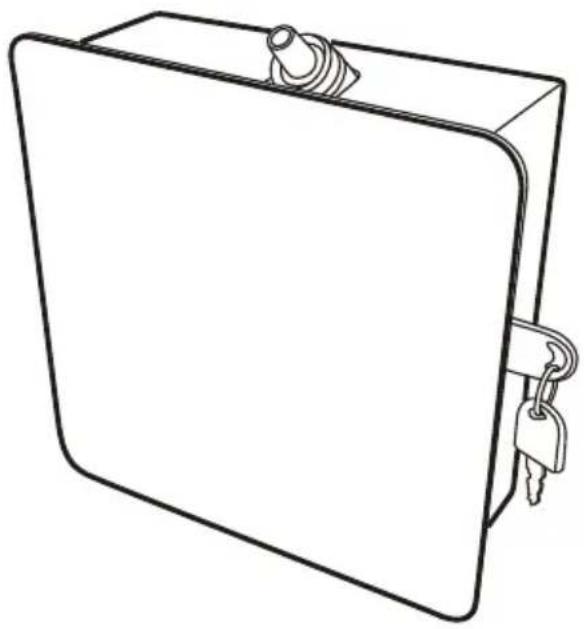
natural_image
Line drawing of a rectangular electronic device with a key inserted, no text or symbols presentNEED HELP? CONTACT US!
Have product questions? Need technical support? Please feel free to contact us:
Technical Support and E-Warranty Certificate
www.vevor.com/support
This is the original instruction, please read all manual instructions carefully before operating. VEVOR reserves a clear interpretation of our user manual. The appearance of the product shall be subject to the product you received. Please forgive us that we won't inform you again if there are any technology or software updates on our product.
SAFETY WARNINGS AND PRECAUTIONS
Thank you for using this product. In order to make sure that you can operate the machine correctly, read this instruction carefully before operation and keep it properly for future reference. Please be sure to read the precautions and safety rules in this page to ensure your safe use. This manual will outline safety warnings and precautions, operating, maintenance and cleaning. The warnings and instructions reviewed in this manual cannot cover all possible conditions and situations that may occur. Caution and common sense are not built into this product, since we believe that the uses will comply with these codes.
Please read ALL the instructions before using your machine.
- Assemble needs to follow these instructions. Incorrect assembly can be a hazard.
- Do not assemble when tired or when under the influence of alcohol, drugs or medication.
- Weight and elastic and other product properties are only applicable to correctly and completely assembled products.
- Keep the assembly area clean and well-lit.
- Keep bystanders out of the area during assembly.
- This is a equipment, not a toy, it needs to be used under the guidance of a professional. Do not allow children and pets to play alone or approach this item.
- Use as intended only. Do not sit or stand on the product.
- Inspect before every use. Do not use it if parts are loose or damaged.
- Do not apply this unit to any other purposes than the indicated usage.
- The Aroma diffuser cannot place items to avoid damage.
- Do not use it for commercial purposes.
- Do not clean it with any abrasive material.
- Never leave it unattended while in use.
- Pet urine and feces can damage the product, please keep away.
- Do not place the product on or near hot air, electric burners or heaters.
Fireworks, cigarettes, flares, and other items can ignite the product. Please stay away from them.

WARNING:
- Young children should be supervised to ensure that they do not play with the product. Pets should stay away from the product.
Do not use outdoors in rainy and cloudy days, avoid lightning strikes and falls.
People or pets hanging on the product will cause injury or death.
TECHNICAL SPECIFICATIONS
| Model Bottle Power Material | ||
| A501 500ml 3W plastic, acrylic | ||
| Input Coverage | / | / |
| DC 12V-0.3A MAX 2500ft^2 / | / |
PARTS LIST
| Parts No. | Parts No.Picture Qty | Picture | Qty | |
| 1 |  | 1 PCS | 2 | 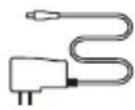 |
| 3 |  | 1 PCS | 4 | 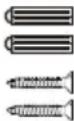 |
| 5 |  | 1 PCS |
Note:
Checking and make sure the packaging is complete when you first open it, If any problem please contact with us soon.
Where to get the app:
Please search for "scent marketing" in Google play or App store.


Android system

IOS system
If the QR code cannot be scanned, please search for "Scent Marketing" in Google play or APPstore.
Note:
- Please make sure that the Bluetooth function is turned on;
- Please make sure that the location function of the mobile phone is turned on.
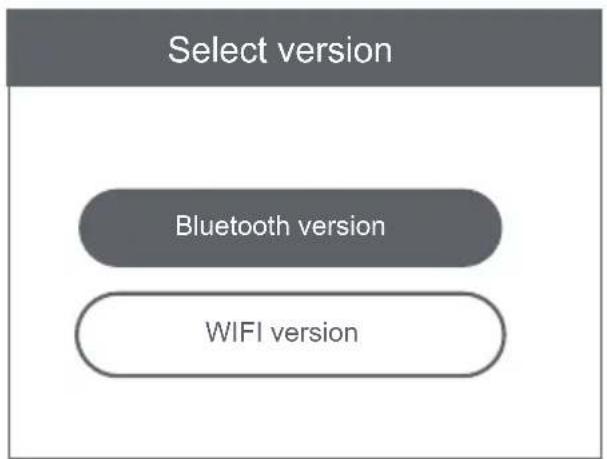
flowchart
graph TD
    A["Select version"] --> B["Bluetooth version"]
    B --> C["WIFI version"]
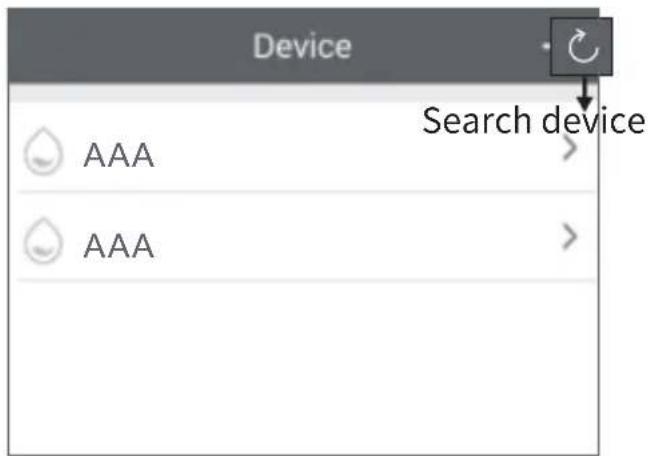
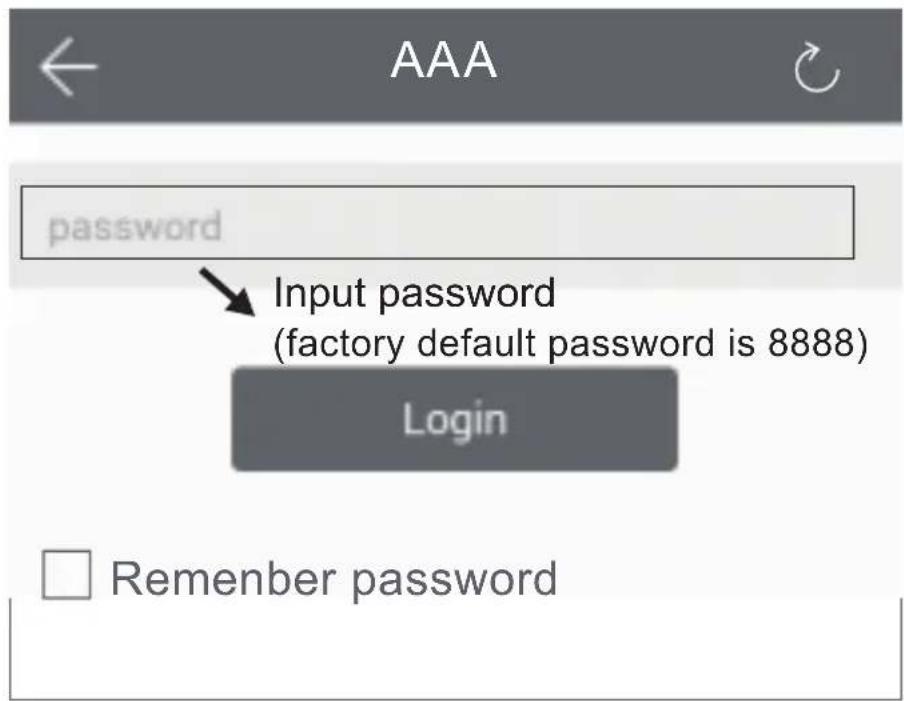
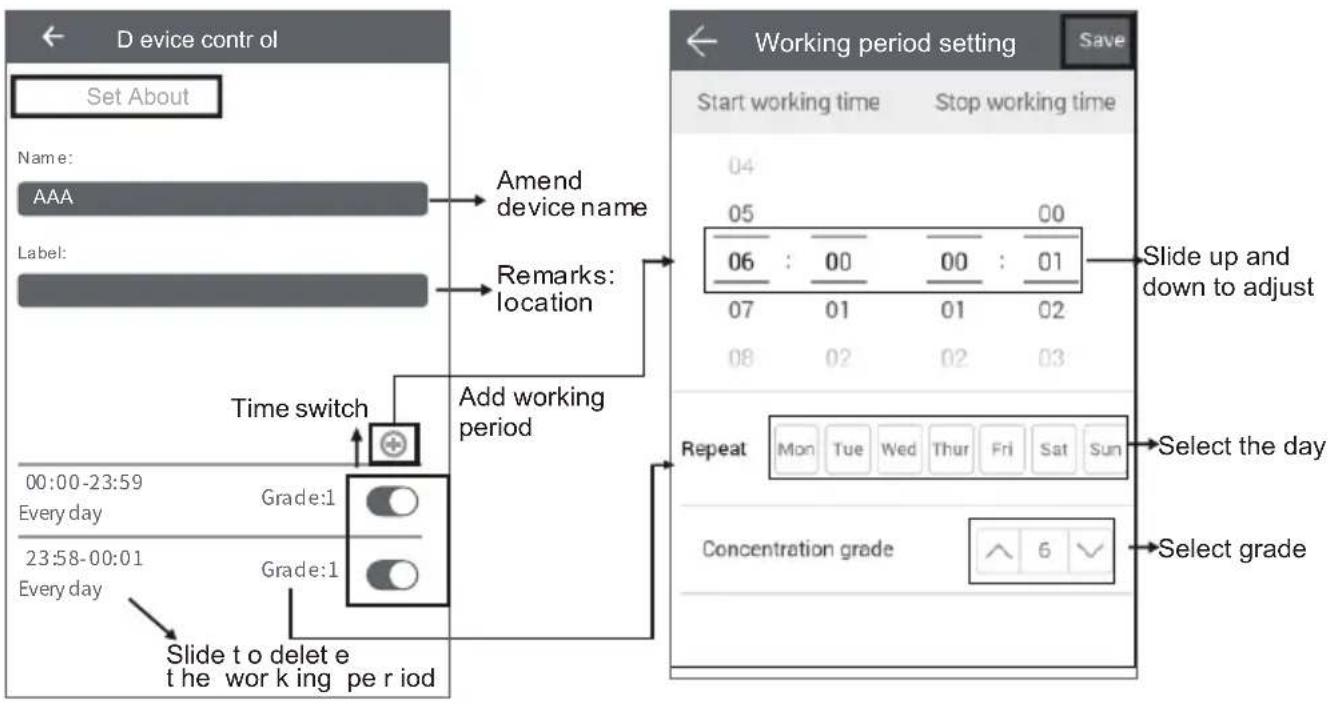
flowchart
graph TD
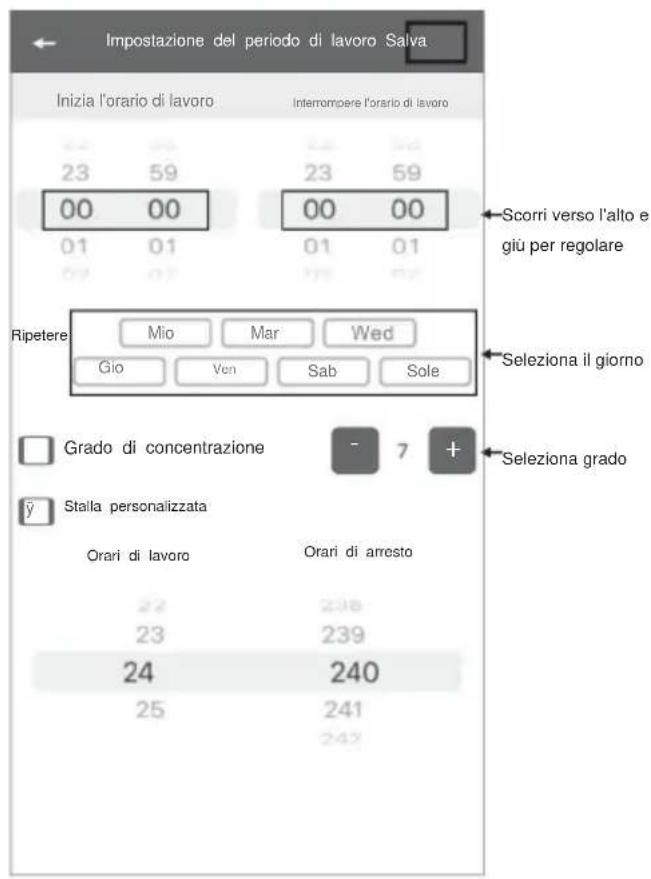
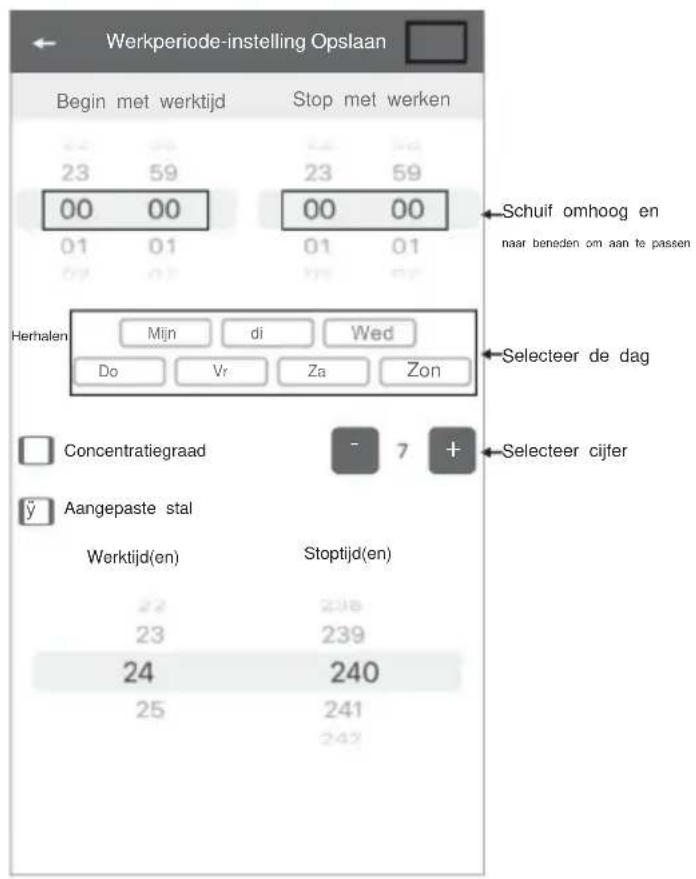
    A["Set About"] --> B["Name: AAA"]
    B --> C["Label:"]
    C --> D["Time switch"]
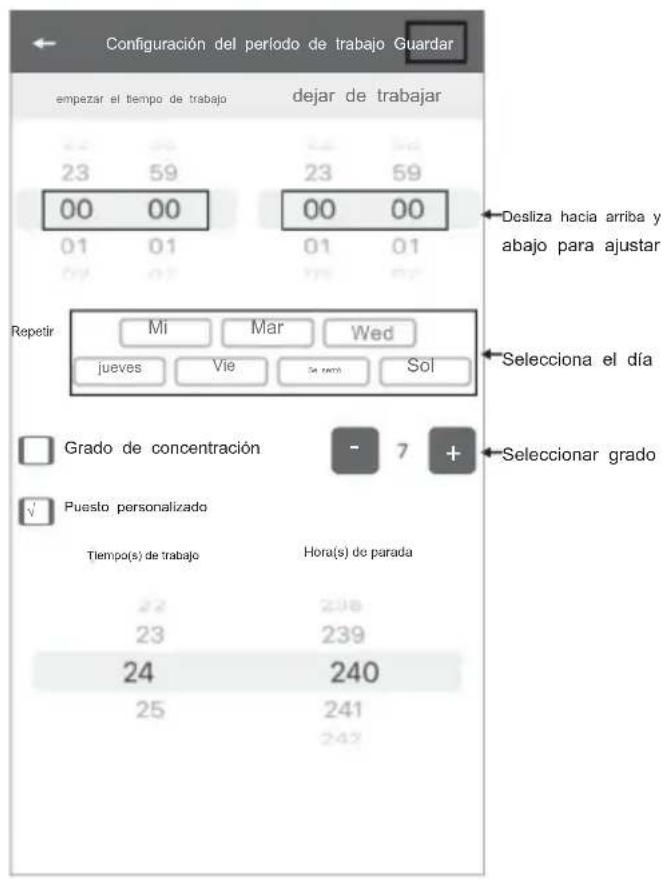
    D --> E["Add working period"]
    E --> F["Grade:1"]
    E --> G["Grade:1"]
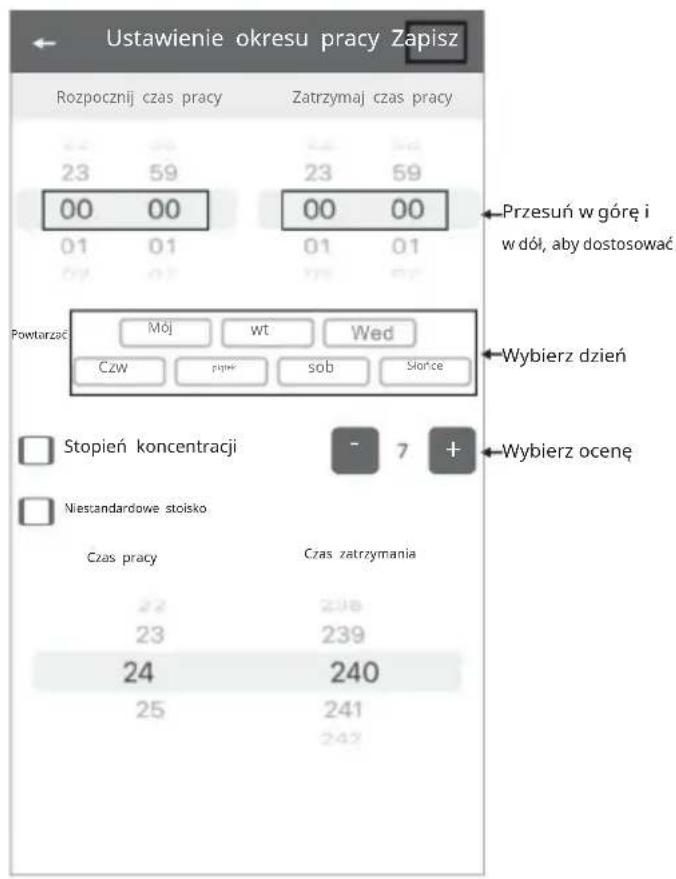
    F --> H["Slide to delete the working period"]
    G --> H
    H --> I["Select day to select grade"]
AMEND PASSWORD
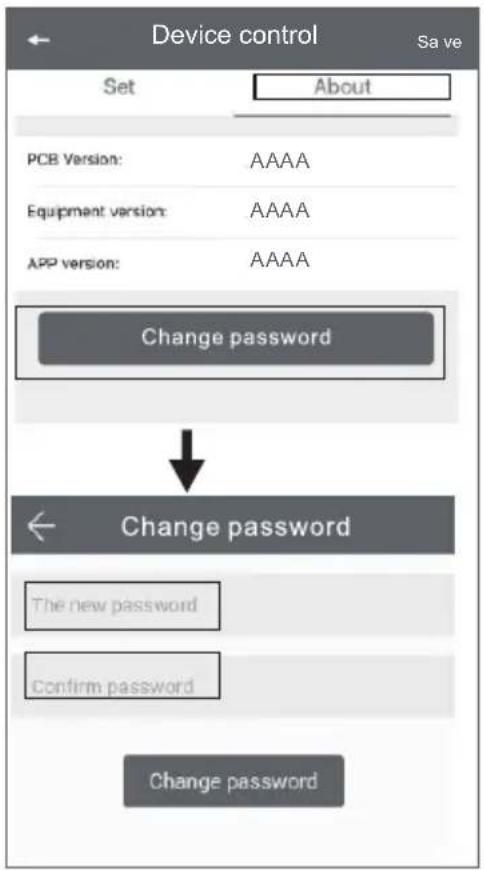
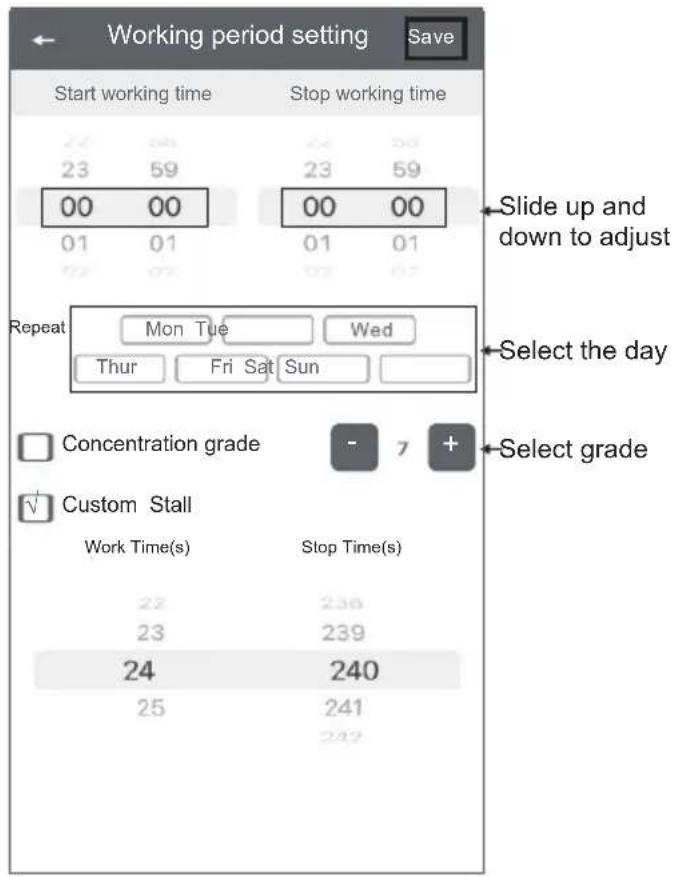
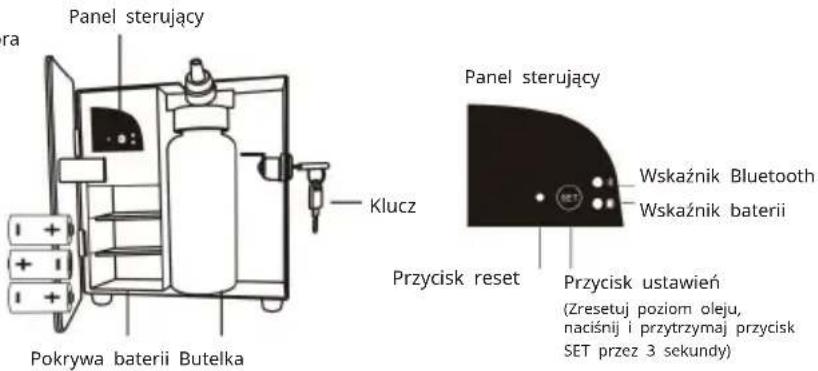
If you forget the password, please press the reset button to restore the factory setting. The factory settings password is 8888.
TROUBLESHOOTING
Before asking to have the machine repaired, please try to diagnose the problem first following to bellow instructions.
| Breakdown Solution | |
| Does not diffuse | – Check whether the batteries are loose or in low battery situation– If the machine is in "not working period", it stops diffuse.– Check whether the air pump is normal or not.– Check whether the gasket is damaged/loose or not. |
| Spray little | – Check whether the gasket is damaged;– Check whether the atomized core is plugged or not;– Check whether the cap of the atomized head is loose or. |
| Oil spill – Whether the atomized head is damaged or not. | |
| Abnormal sound | – Pump is loose, install it correctly;– The pump is damaged, change a new one. |
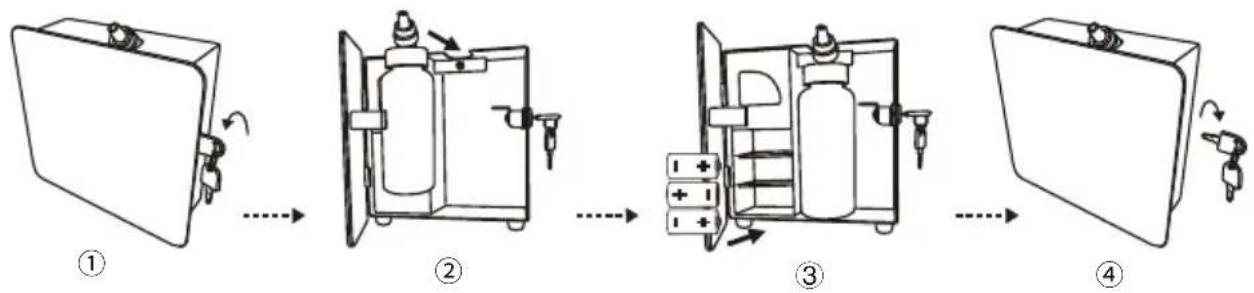
ASSEMBLY STEPS
flowchart
graph LR
    A["① Initial Case"] --> B["② Box with Internal Bag"]
    B --> C["③ Box with Cover and Plug-in Valve"]
    C --> D["④ Final Package with Receiving Valve"]
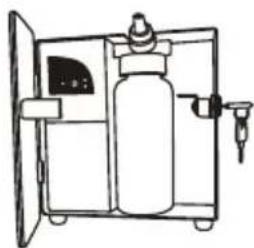
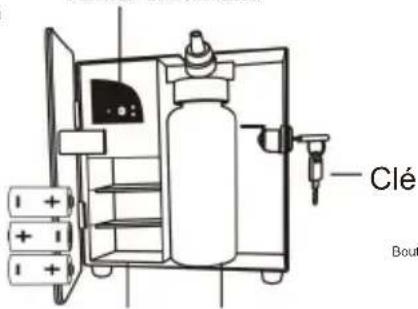
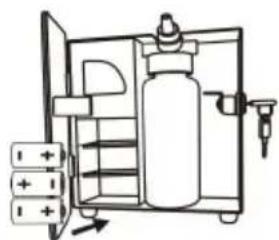
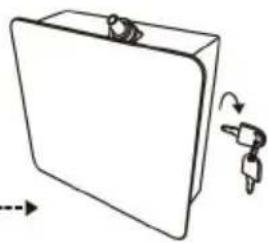
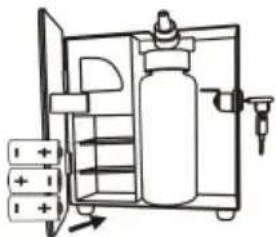
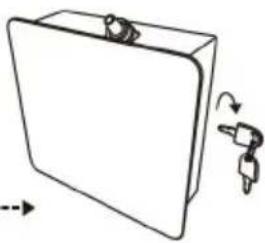
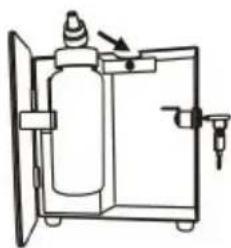
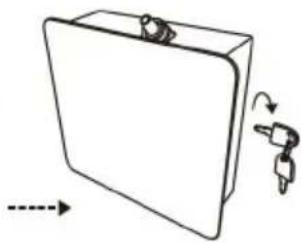
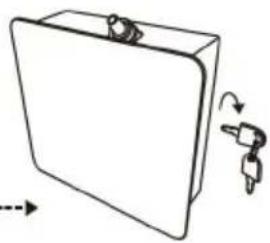
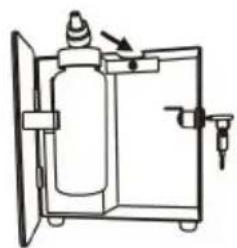
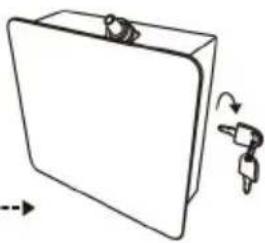
- Insert the key, twirl anticlockwise to unlock the door.
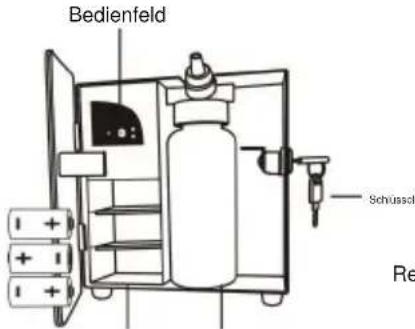
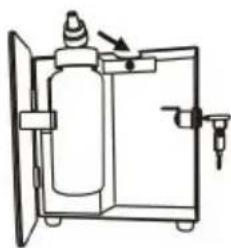
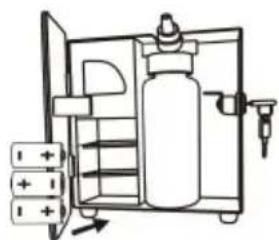
- Tightly connect the atomizer head and the fragrance bottle, and install them to the machine.
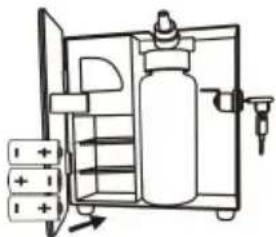
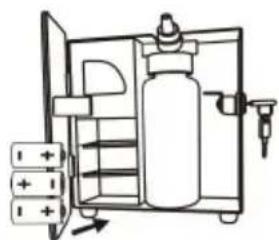
- Install the batteries according to the positive and negative terminals.
(Note: 1. When the unit is connected by DC 12V adapter, the batteries stop supplying power, disconnect the DC 12V connection, the batteries start to supplying power
-
After installing new batteries, the unit will work after 25s.)
-
Insert the key and twirl clockwise to lock the door.
natural_image
Line drawing of a gas cylinder inside a cabinet with a valve and lid (no text or symbols)
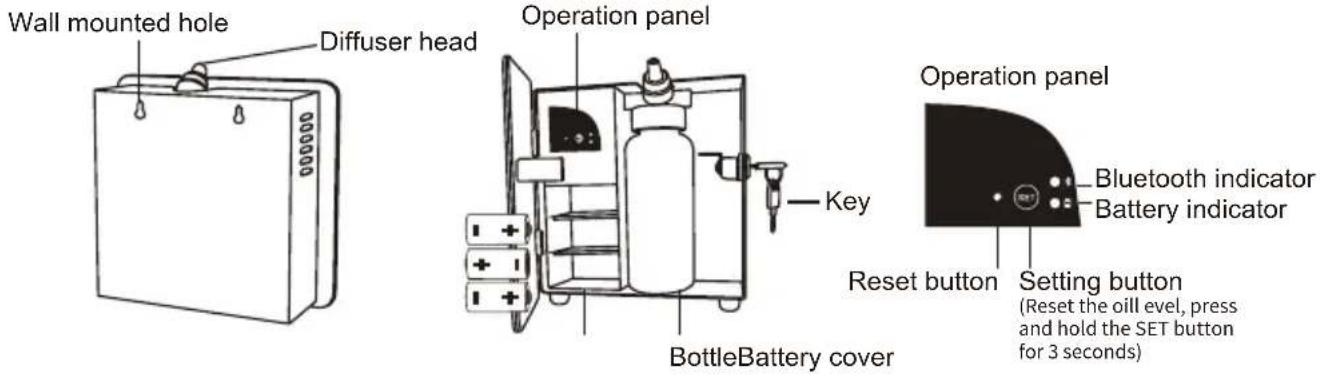
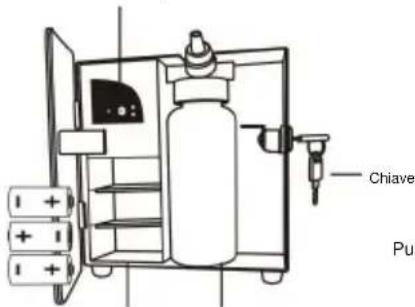
Bluetooth indicator:
As usual, the bluetooth indicator is powered off. After connecting successfully and it will be flashing for reminder.

Battery indicator:
When it lights for 30s stands for full charged, 5s flashing stands for low power and when it always lights, this machine will stop working.
| Grade Work time(s) Stop time(s) Consu mption(g/h) | |
| G1 5s 900s 0.08 | |
| G2 5s 810s 0.09 | |
| G3 5s 720s 0.10 | |
| G4 5s 630s 0.11 | |
| G5 5s 540s 0.12 | |
| G6 5s 450s 0.22 | |
| G7 5s 360s 0.31 | |
| G8 5s 270s 0.41 | |
| G9 5s 180s 0.50 | |
| G10 5s 90s 0.60 | |
Note:
- 500ml oils can diffuse 11000-12500 times under normal circumstances;
- All of the above grade atomization work time is 5 seconds;
- Different grade and oil may with different consumption.

- Please keep the machine vertical. Tilt or lie flatly may cause oil overflow. The machine efficiency may be affected.
- Shall not modify, disassemble or repair the machine. If any failure happens to the machine, please contact our technical personnel.



The machine needs to be cleaned when below situations happen:
- You 're about to change to another essential oil;
- The atomization volume becomes weak.
Cleaning steps:
- Find a clean bottle and fill it with industrial alcohol;
- Install this bottle to the machine and turn the machine on. Let it work for 5-10 minutes;
- Turn off the electric, finish the cleaning.
CORRECT DISPOSAL

This product is subject to the provision of european Directive 2012/19/EU. The symbol showing a wheelie bin crossed through indicates that the product requires separate refuse collection in the European Union. This applies to the product and all accessories marked with this symbol. Products marked as such may not be discarded with normal domestic waste, but must be taken to a collection point for recycling electrical and electronic devices.
Imported to USA: Sanven Technology Ltd., Suite 250, 9166 Anaheim Place, Rancho Cucamonga, CA 91730
Address: Baoshanqu Shuangchenglu 803long 11hao 1602A-1609 shi Shanghai
| UK | REP |
Pooledas Group Ltd
Unit 5 Albert Edward House, The
Pavilions Preston, United Kingdom
| EC | REP |
SHUNSHUN GmbH
Römeräcker 9 Z2021,76351
Technical Support and E-Warranty Certificate www.vevor.com/support
VEVOR®
TOUGH TOOLS, HALF PRICE
natural_image
Line drawing of a closed book with keys and a handle, no text or symbols presentBESOIN D'AIDE? CONTACTEZ-NOUS!
www.vevor.com/support
Warning-To reduce the risk of injury, user must read instructions manual carefully.
AVERTISSEMENTS ET PRÉCAUTIONS DE SÉCURITÉ
INSTRUCTIONS BLUETOOTH
natural_image
Simple line drawing of a rectangular device with a handle and label 'Té' (no text or symbols on the device itself)Tête de diffusion
Panneau de commande
natural_image
Simple line drawing of a closed book with a handle and arrow indicating rotation (no text or symbols)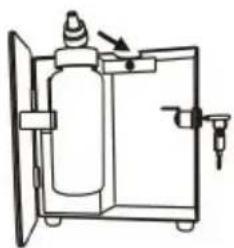
natural_image
Simple line drawing of a fire extinguisher inside a container with an arrow indicating motion (no text or symbols)
natural_image
Diagram of a gas cylinder inside a container with an outlet, showing internal components and no text or symbols.
natural_image
Simple line drawing of a rectangular box with a key inserted, showing motion arrows (no text or symbols)natural_image
Line drawing of a gas cylinder inside a cabinet with doors open (no text or symbols)
natural_image
Line drawing of a closed book with a key inserted, no text or symbols presentBRAUCHEN SIE HILFE? KONTAKTIERE UNS!
Warning-To reduce the risk of injury, user must read instructions manual carefully.
natural_image
Simple line drawing of a rectangular device with a handle and two side clips, no text or symbols present.Diffusorkopf
Reset-Knopf
natural_image
Simple line drawing of a rectangular object with a curved arrow indicating rotation or movement (no text or symbols)ÿ
natural_image
Simple line drawing of a fire extinguisher inside a cabinet (no text or symbols)ÿ

natural_image
Diagram of a fire extinguisher inside a container with an open door and valve (no text or labels)ÿ

natural_image
Simple line drawing of a rectangular device with a handle and two keys, shown with rotation arrows (no text or symbols)natural_image
Line drawing of a gas cylinder inside a cabinet with doors open (no text or symbols)
Bluetooth-Anzeige:
natural_image
Line drawing of a closed book with keys and a handle, no text or symbols presentHO BISOGNO DI AIUTO? CONTATTACI!
Warning-To reduce the risk of injury, user must read instructions manual carefully.
natural_image
Simple line drawing of a rectangular device with a handle and label 'Te' (no text or symbols on the device itself)Testa diffusore
Pannello operativo
natural_image
Simple line drawing of a rectangular object with a curved arrow indicating rotation or movement (no text or symbols)ÿ
natural_image
Simple line drawing of a fire extinguisher inside a cabinet (no text or symbols)ÿ
natural_image
Diagram of a fire extinguisher inside a container with an open door and valve (no text or labels)ÿ
natural_image
Simple line drawing of a closed book with a key inserted, showing an arrow indicating direction (no text or symbols)natural_image
Line drawing of a gas cylinder inside a cabinet with an open door (no text or symbols)
natural_image
Line drawing of a closed book with a key inserted, no text or symbols presentwww.vevor.com/support
Warning-To reduce the risk of injury, user must read instructions manual carefully.
QR, busque "Scent Marketing"
en Google Play o APPstore.
Nota:
natural_image
Simple line drawing of a rectangular device with a label 'Ca' on top and two side clips (no text or symbols on the device itself)Cabezal difusor
natural_image
Simple line drawing of a closed book with a handle and arrow indicating rotation (no text or symbols)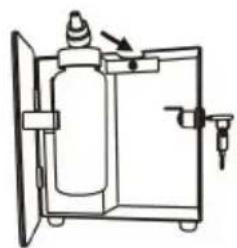
natural_image
Simple line drawing of a fire extinguisher inside a container with no text or symbols
natural_image
Diagram of a gas cylinder inside a container with an outlet, showing internal components and no text or symbols.
natural_image
Simple line drawing of a rectangular box with a key inserted, showing directional arrows (no text or symbols)natural_image
Line drawing of a gas cylinder inside a cabinet with doors open (no text or symbols)
natural_image
Line drawing of a closed book with a key inserted, no text or symbols presentPOTRZEBUJE POMOCY? SKONTAKTUJ SIĘ Z NAMI!
Warning-To reduce the risk of injury, user must read instructions manual carefully.
natural_image
Simple line drawing of a rectangular device with a handle and label 'G' (no text or symbols on the device itself)Głowica dyfuzora
flowchart
graph LR
    A["Initial Box"] --> B["Arrow to Valve"]
    B --> C["Arrow to Pump"]
    C --> D["Arrow to Valve"]
    D --> E["Arrow to Pump"]
    E --> F["Arrow to Final Box"]
natural_image
Line drawing of a gas cylinder inside a refrigerant unit with doors and control panel (no text or symbols)Wskaźnik Bluetooth:
natural_image
Line drawing of a closed book with keys and a handle, no text or symbols presentHULP NODIG? NEEM CONTACT MET ONS OP!
www.vevor.com/support
Warning-To reduce the risk of injury, user must read instructions manual carefully.
VEILIGHEIDSWAARSCHUWINGEN EN VOORZORGSMAATREGELEN
"Scent Marketing" in Google Play of APPstore.
Opmerking:
natural_image
Simple line drawing of a closed book with a handle and arrow indicating rotation (no text or symbols)ÿ
natural_image
Simple line drawing of a fire extinguisher inside a container with no text or symbolsÿ

natural_image
Diagram of a gas cylinder inside a container with an outlet, showing internal components and no text or symbols.
natural_image
Simple line drawing of a rectangular device with a handle and two keys, shown with motion arrows (no text or symbols)natural_image
Line drawing of a gas cylinder inside a cabinet with doors open (no text or symbols)
Bluetooth-indicator:
natural_image
Line drawing of a closed book with a key inserted, no text or symbols presentBEHÖVS HJÄLP? KONTAKTA OSS!
www.vevor.com/support
Warning-To reduce the risk of injury, user must read instructions manual carefully.
SÄKERHETSVARNINGAR OCH FÖRSIKTIGHETSÅTGÄRDER

flowchart
graph LR
    A["Initial Box with y̅"] --> B["Internal Component 1: Internal Bag, Internal Capsule"]
    B --> C["Internal Component 2: Internal Bag, Internal Capsule"]
    C --> D["Internal Component 3: Internal Bag, Internal Capsule"]
    D --> E["Final Device with y̅ and feedback loops"]
natural_image
Line drawing of a gas cylinder inside a cabinet with doors open (no text or symbols)\* Bluetooth-indikator:

- Aroma Diffuser
- MODEL: A501
- NEED HELP? CONTACT US!
- SAFETY WARNINGS AND PRECAUTIONS
- Please read ALL the instructions before using your machine.
- WARNING:
- TECHNICAL SPECIFICATIONS
- PARTS LIST
- Note:
- Where to get the app:
- AMEND PASSWORD
- TROUBLESHOOTING
- ASSEMBLY STEPS
- Bluetooth indicator:
- Battery indicator:
- The machine needs to be cleaned when below situations happen:
- Cleaning steps:
- CORRECT DISPOSAL
- VEVOR®
- TOUGH TOOLS, HALF PRICE
- BESOIN D'AIDE? CONTACTEZ-NOUS!
- Warning-To reduce the risk of injury, user must read instructions manual carefully.
- AVERTISSEMENTS ET PRÉCAUTIONS DE SÉCURITÉ
- INSTRUCTIONS BLUETOOTH
- BRAUCHEN SIE HILFE? KONTAKTIERE UNS!
- Bluetooth-Anzeige:
- HO BISOGNO DI AIUTO? CONTATTACI!
- Nota:
- POTRZEBUJE POMOCY? SKONTAKTUJ SIĘ Z NAMI!
- Wskaźnik Bluetooth:
- HULP NODIG? NEEM CONTACT MET ONS OP!
- VEILIGHEIDSWAARSCHUWINGEN EN VOORZORGSMAATREGELEN
- Opmerking:
- Bluetooth-indicator:
- BEHÖVS HJÄLP? KONTAKTA OSS!
- SÄKERHETSVARNINGAR OCH FÖRSIKTIGHETSÅTGÄRDER
- \* Bluetooth-indikator:
Brand : Vevor
Model : A501
Category : Aroma diffuser