
C110 - Measuring equipment Vevor - Free user manual and instructions
Find the device manual for free C110 Vevor in PDF.
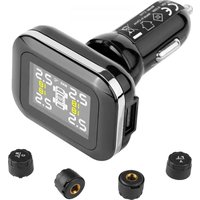


| Product Type | Tire Pressure Monitor (TPMS) |
| Model | C110 |
| Brand | Vevor |
| Power Supply | 12 V DC (cigarette lighter) |
| Power Consumption | 0.03 W |
| Pressure Measurement Range | 0.5 to 6 bar (7.25 to 87 psi) |
| Net Weight | 0.1 kg |
| Number of Sensors | 4 (one per tire) |
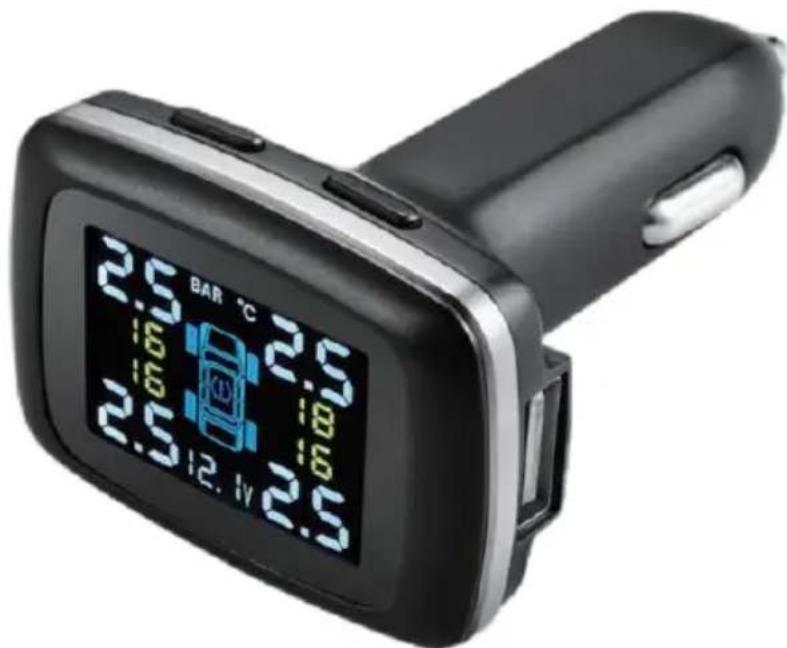
| Display | LCD, simultaneous display of all 4 pressures and temperatures |
| Adjustable Units | bar/psi, °C/°F |
| Main Functions | Pressure and temperature monitoring, visual and audible alarms, intelligent sleep mode, leak detection |
| Adjustable Alarm Thresholds | High pressure (0.6-6 bar), low pressure (0.5-5.9 bar), high temperature (50-99 °C) |
| Sensor Type | External (screws onto valve) |
| Installation | Screw sensors onto valves, plug receiver into cigarette lighter |
| Pairing | Automatic while driving >20 km/h, or manual via SET button |
| Maintenance | Clean with a dry soft cloth; avoid chemicals |
| Safety | Complies with FCC Part 15; do not modify without authorization |
| Replaceable Parts | Sensors (integrated batteries) |
| Warranty | Via www.vevor.com/support |
Frequently Asked Questions - C110 Vevor
User questions about C110 Vevor
0 question about this device. Answer the ones you know or ask your own.
Ask a new question about this device
Download the instructions for your Measuring equipment in PDF format for free! Find your manual C110 - Vevor and take your electronic device back in hand. On this page are published all the documents necessary for the use of your device. C110 by Vevor.
USER MANUAL C110 Vevor
Technical Support and E-Warranty Certificate www.vevor.com/support
TPMS
MODEL: C110
We continue to be committed to providing you with tools at competitive prices. "Save Half", "Half Price", or any other similar expressions used by us only represent an estimate of savings you might benefit from buying certain tools with us compared to top brands, and do not necessarily mean to cover all categories of tools offered by us. We kindly remind you to verify carefully when placing an order with us if you are actually saving half in comparison with the top major brands.
MODEL: C110
NEED HELP? CONTACT US!
Have product questions? Need technical support? Please feel free to contact us:
Technical Support and E-Warranty Certificate www.vevor.com/support
This is the original instruction. Please read all manual instructions carefully before operating. VEVOR reserves a clear interpretation of the user manual. The appearance of the product shall be subject to the product you received. Please forgive us that we won't inform you of any technology or software updates on our product.
PARAMETER LIST
| Model | C110 |
| Voltage | DC 12V |
| Power | 0.03W |
| Test The Tire Pressure Range (Bar) | 0.5-6 |
| Net Weight (Kg) | 0.1 |
PART LIST
| Name | Picture | Quantity |
| Wrench | 1 | |
| Nut | 4 | |
| Sensor | 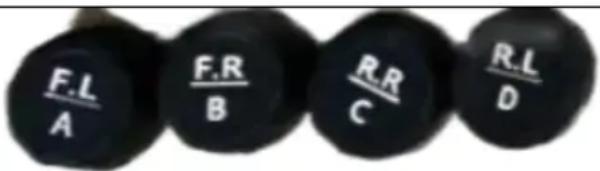 | 4 |
| Host |  | 1 |
OPERATION
1. FEATURES
- Monitor the pressure and temperature of your tyres.
- Intelligent sleeping mode for power saving.
- Tyre leaking warning
- Visual and audible warning for abnormal tyre pressure and temperature
- Displays up to 4 tyres temperature and pressure at a glance
- Can be set to Fixed Bar Or PSI
- Can be set to °C or °F temperature
2. Structure
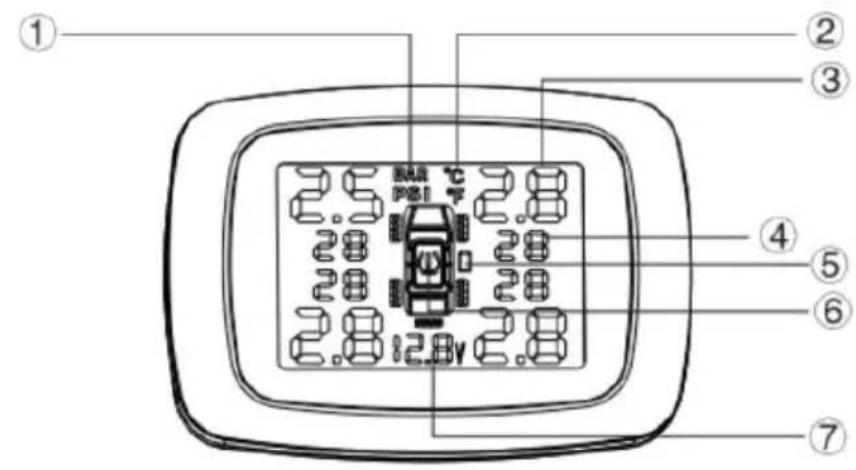
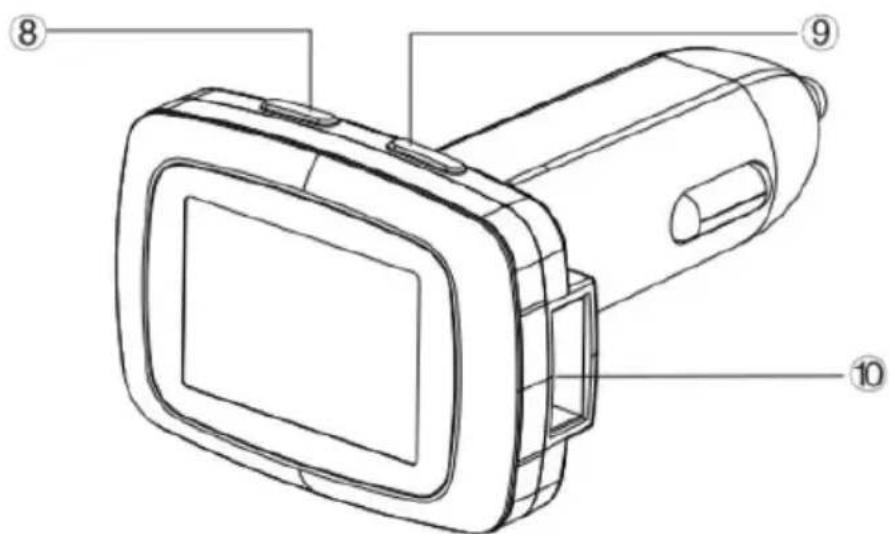
- Pressure unit
- Pressure data 5. Sensor battery indicator 7. Input voltage 9. (+) Button
2. Temperature unit 4. Temperature data 6. Warning signs 8. "SET" Button 10. USB port
3. PARAMETER SETTING REFERENCE
- Before using this product, please press any button on the display to turn it on, then charge the display for 3-4 hours with the cigarette plug charger.
- Factory default parameter setting
| Factory default setting | Parameter setting range |
| HI pressure alarm data: 3.0Bar | 0.6-6.0 Bar |
| low pressure alarm data:2.0Bar | 0.5-5.9 Bar |
| HI temperature alarm data: 68°C | 50-99°C |
- 1Bar=14.5Psi
- When the ACC is ON, the display will enter self-test mode for 2 seconds. After 2 seconds, all icons will be displayed on the LCD screen, and it will be ready to receive new data. When the ACC is OFF, the display will be OFF.
- When the speed reaches 20 kilometers per hour, the sensor will be activated and start to detect and send the pressure and temperature data.
- Alarming instruction
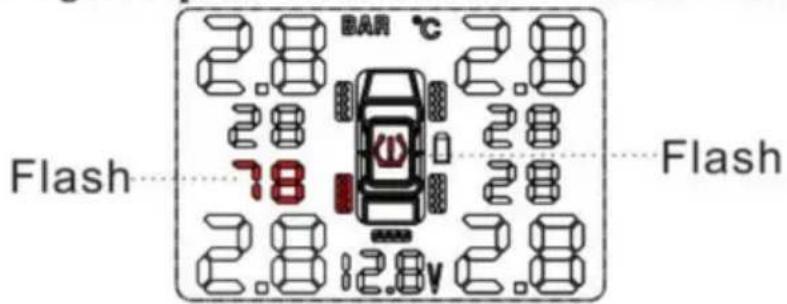
a) When tyre pressure exceeds the set range or the tyre is leaking, the corresponding tyre position icon, pressure data, and the alarm icon (!) will flash together, and the built-in buzzer will chirp as: Bi Bi. Note: Press any button to stop the buzzer; all corresponding icons will still flash, and the buzzer will chirp once per minute.
b) When tyre temperature exceeds the set data, the corresponding tyre position icon, temperature data, and high temperature alarm icon (!) will flash together, and the built-in buzzer will chirp as: Bi Bi. c) When the sensor battery is low, the icon of the corresponding tyre position and the sensor low battery icon will flash together, and the built-in buzzer will chirp as: E Bi. Note: To stop the buzzer, press the set button; note that all icons will still flash.
The buzzer will "chirp" once per minute.
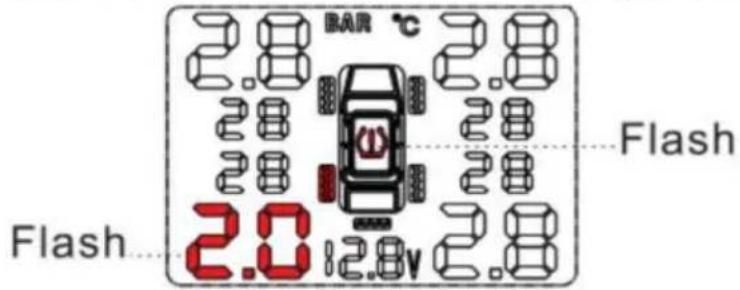
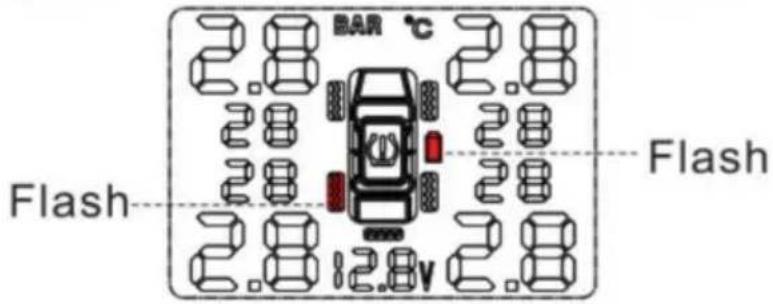
5. ALARM STATUS
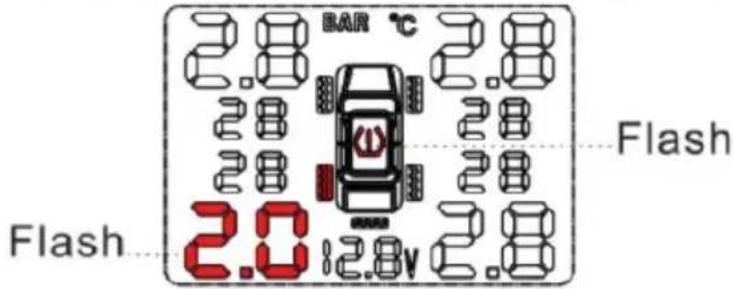
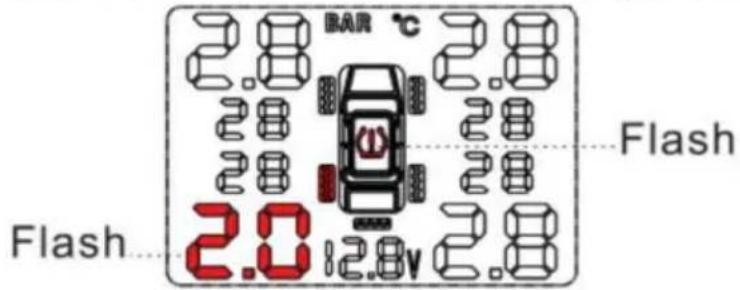
Leaking or low tyre pressure alarm

Bi.Bi.
Example: L.R. tyre leaking or low tyre pressure alarm. The corresponding tyre position icon, pressure data, and the alarm icon will flash together.
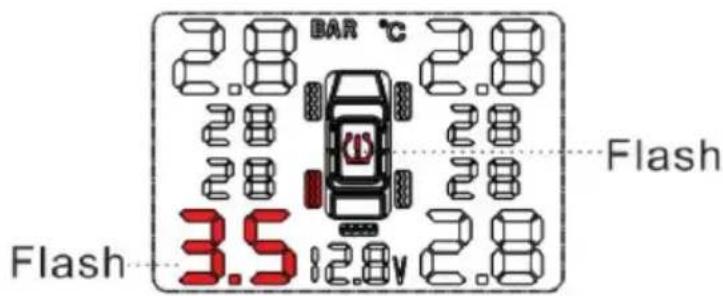
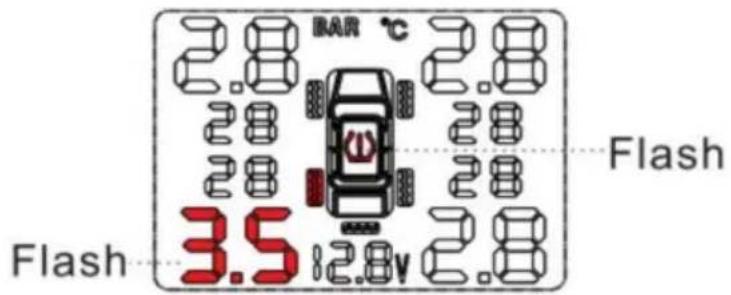
High tyre pressure alarm

Bi.Bi.
Set range: 1.7~3.4 Bar. Example: L.R. tyre high pressure alarm. The corresponding tyre position icon, pressure data, and the alarm icon will flash together.
High tyre temperature alarm

Bi.Bi.
Factory default setting: 70°C. Example: L.R. tire high temperature alarm. Temperature data and high temperature alarm icon will flash together.
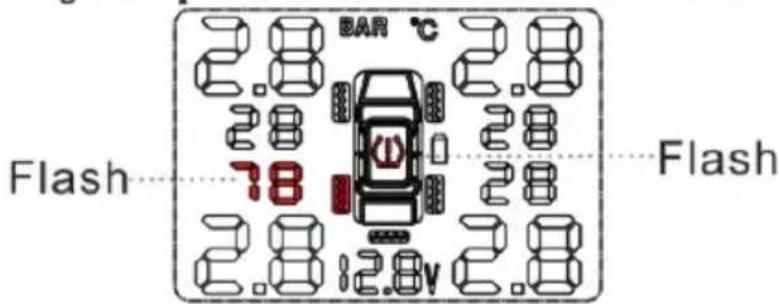
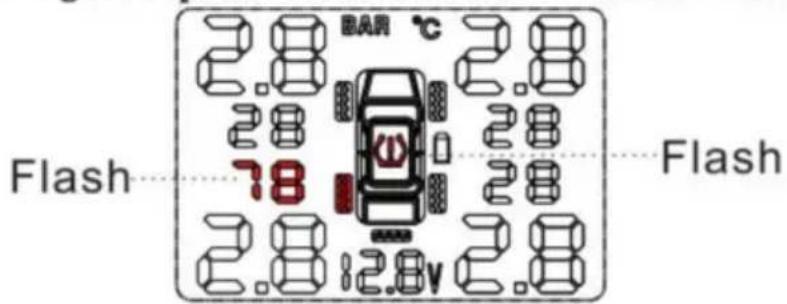
Sensor low battery

Beep. Beep.
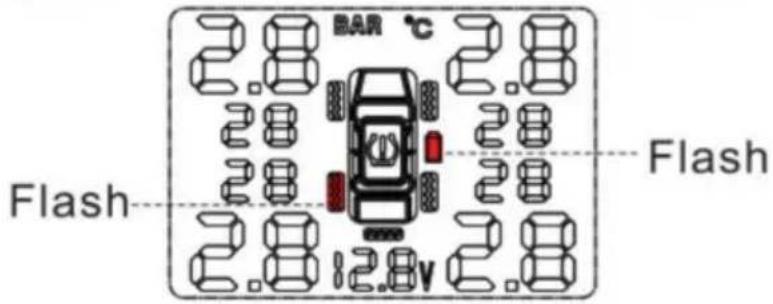
Sensor battery normal life: 3-5 years. Example: L.R. tire high temperature alarm. The corresponding tire position icon and sensor low battery icon will flash together.
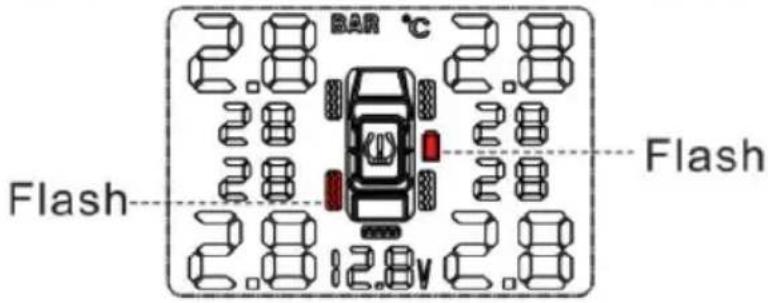
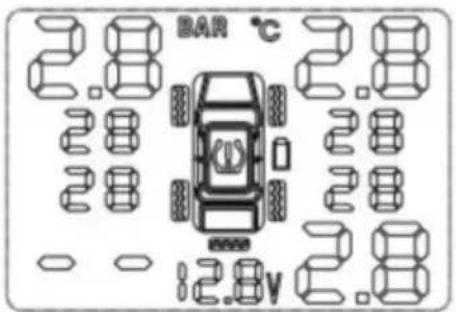
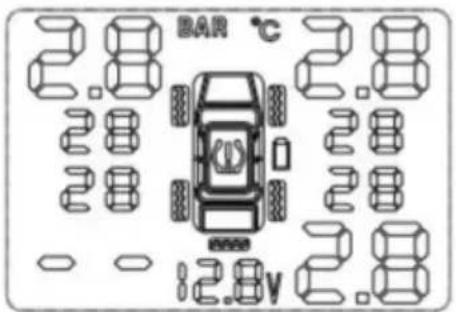
Sensor not working

Beep. Beep.
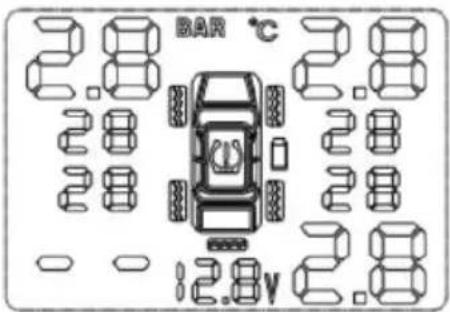
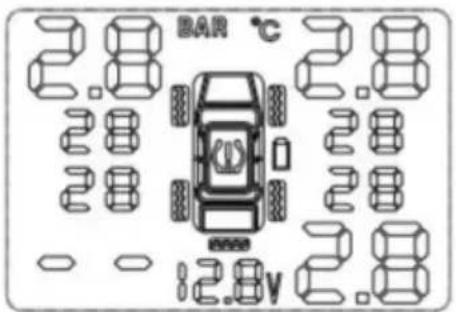
Example: L.R. tire sensor not working. The corresponding tire position icon, pressure data, and temperature will disappear together.
6. WORK PARAMETER SETTING OPERATION
1. Enter and quit setting mode:
Press and hold the "SET" button for 3 seconds, release the button after hearing a long chirp, and the monitoring system will enter the setting mode. Press the "SET" button briefly to cycle through the following settings: Bar-Psi, °C > °F, pressure HI, pressure LO, alarm temperature HI. Press the (+) button to adjust the corresponding data. After finishing all settings, press and hold the "SET" button for 3 seconds, and after hearing a short chirp, the system will save all set parameters and quit the setting mode.
(Note: After entering the setting mode, if there is no operation within 3 minutes, the system will quit the mode and return to normal working mode automatically.)
2. Tire pressure HI setting:
Press and hold the "SET" button for 3 seconds, release the button after hearing 1 long chirp, and you will enter the setting mode.
Then press the (+) button repeatedly to get into tire pressure HI setting mode. The pressure HI data will flash. Press the (+) button to adjust the data, then press and hold the "SET" button for 3 seconds, release the button after hearing a short chirp, and the system will save the set data and quit the mode.
(Note: The set pressure HI data must be higher than the set pressure LO data. Pressure HI adjustable range: 0.6-6.0 Bar. Factory default setting: 3.0 Bar.)
- Tyre pressure LO setting: Press and hold the (+) button for 3 seconds. Release the button after hearing one long chirp; the system enters the setting mode. Then press the "SET" button one by one to enter the tyre pressure LO setting status. The pressure LO data will flash. Press the (+) button to adjust the data, then press and hold the "SET" button for 3 seconds. Release the button after hearing a short chirp; the system saves the set data and quits the mode. (Note: The set pressure LO data must be lower than the set pressure HI data. Pressure LO adjustable range: 0.5-5.9 Bar. Factory default setting: 2.0 Bar)
- Release the button after hearing one long chirp; the system enters the setting mode. Then press the (+) button one by one to get into alarm temperature HI setting status. The icon will flash. Press the RIGHT button to adjust the data, then press and hold the button for 3 seconds. Release the button after hearing a short chirp; the system saves the set data and quits the mode.
(Note: Temperature HI adjustable range: 50 °C - 99 °C. Factory default setting: 68 °C)
- Pressure unit setting: Press and hold the (+) button for 3 seconds. Release the button after hearing one long chirp; the system enters pressure unit setting mode. The Bar icon will flash. Press the (+) button to adjust the unit, then press and hold the SET button for 3 seconds. Release the button after hearing a short chirp; the system saves the set data and quits the mode. (Factory default setting: Bar)
- Temperature unit setting: Press and hold the (+) button for 3 seconds, release the button after hearing one long chirp, the system enters the setting mode. Then press the (+) button one by one to get into temperature unit setting status. The °C icon will flash, press the ( ) button to adjust the data, then press the button to confirm.
Press and hold for 3 seconds, release the button after hearing one short chirp, the system saves the set data and quits the mode.
- Tyre pressure code matching: Long press the (+) button for 3 seconds and release it after hearing a long “Bi” to enter the tyre pressure code matching mode. The left front wheel icon and “_.” flash. Press the “SET” button to select the tyre to be matched, and the corresponding tyre after selection “_.” will flash. At this time, inflate the corresponding tyre (the external sensor is directly screwed to the valve). After receiving the signal, “_.” changes to the pressure value to indicate that the matching is successful. Then short press the (+) button to jump to the next tyre. Follow the previous step to match other tyres. After matching, press and hold the (+) button for 3 seconds, save and exit after a “Bi” (entering the tyre matching mode without any action, the matching mode will automatically exit after 3 minutes). (Note: The sensor and receiver have been matched before leaving the factory, and the sensor or receiver needs to be re-matched to change the sensor or receiver.)
INTERNAL SENSOR INSTALLATION
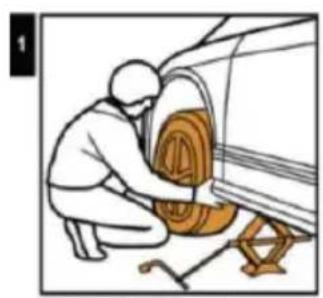
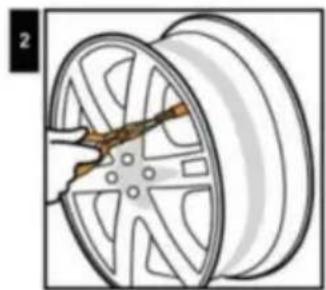
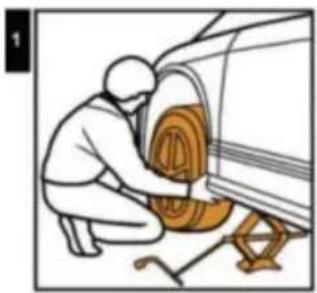
Jack up the car and de-mount the tire.
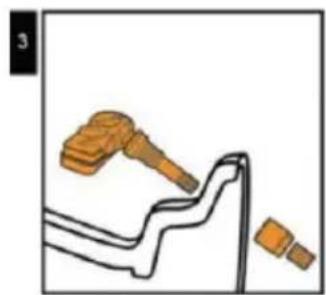
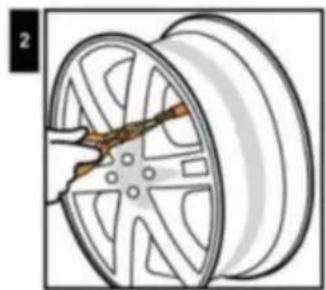
Remove original valve.
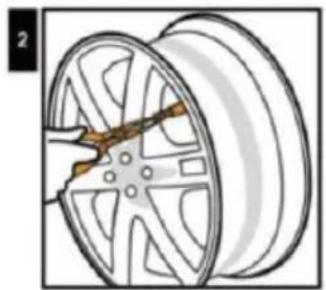
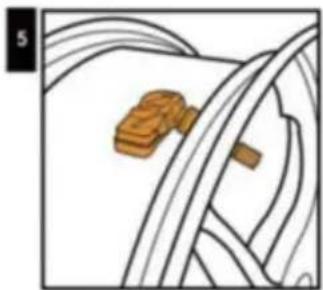
Tighten up screw.
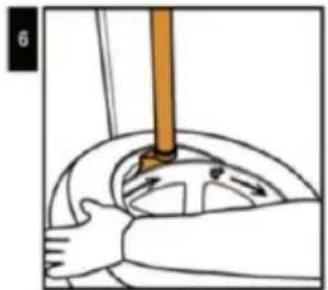
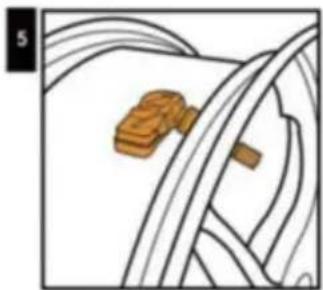
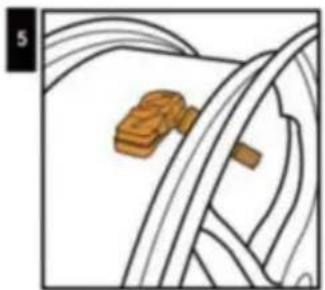
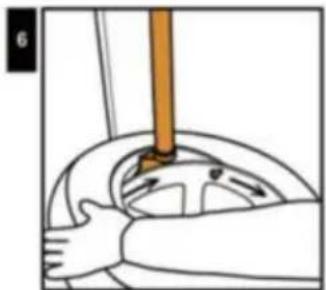
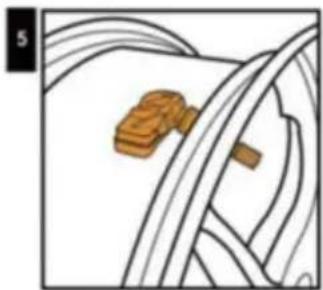
Install the tire from left side of the valve clockwise direction, avoid tire bead hits valve and sensor.
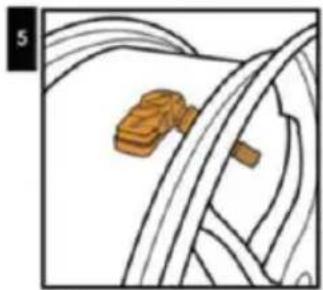
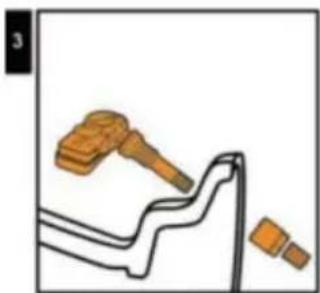
Sensor Assemble
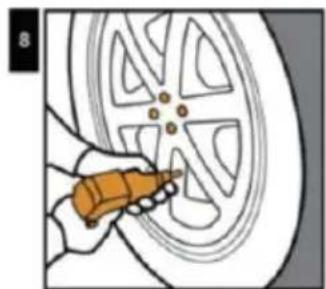
Tighten the valve by wrench and screw it (Torque value must be ≥ 4Nm).
Balance the tire.
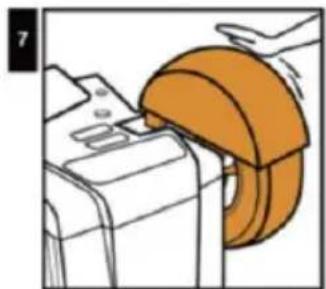
Mount the tire to its position.
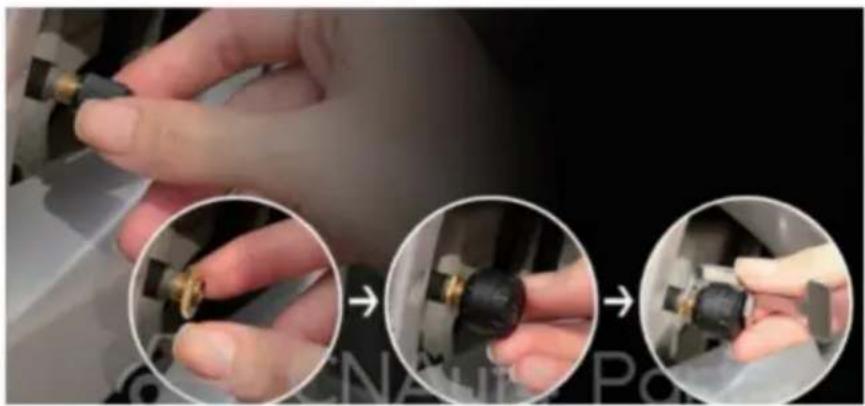
External sensor installation

- Unscrew the valve cap.
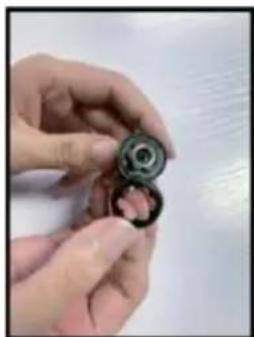
- Screw in the nut.
- Screw in the sensor.
- Lock the sensor with an anti-theft wrench.
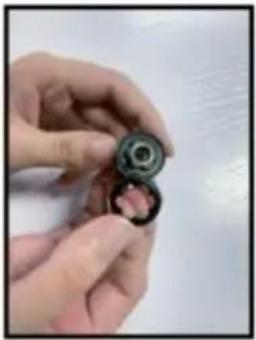
Movement / Replacement of battery
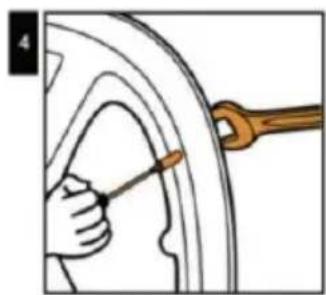
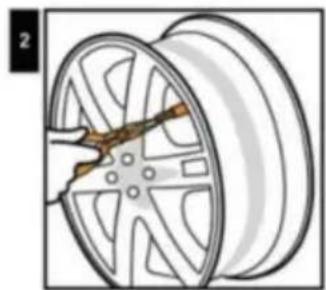
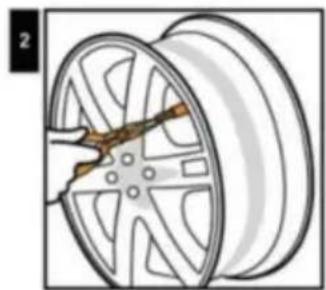
- Peel off the non-slip gasket
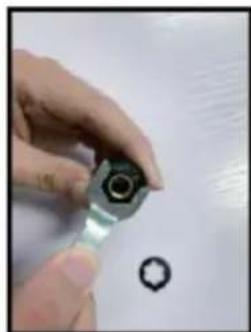
- Unscrew the sensor with a wrench
| ITEM\UNIT | SENSOR | DISPLAY | |
| Working frequency | 433.9200MHz±0.1MHz | ||
| Workong voltage | 2.0~3.6V | 12-24V | |
| Working current | static current≤1uA | static current≤0uA | |
| Dynamic≤15mA | Dynamic≤30mA | ||
| Working environment | Temperature | -40°C~+125°C | -40°C~+70°C |
| Monitoring scope | Temperature | 50-99bar | |
| Pressure | 0-6 bar 0 psi~72.5 psi | ||
FCC Information:
CAUTION: Changes or modifications not expressly approved by the party responsible for compliance could void the user's authority to operate the equipment!
This device complies with Part 15 of the FCC Rules. Operation is subject to the following two conditions:
1) This product may cause harmful interference. 2) This product must accept any interference received, including interference that may cause undesired operation.
WARNING: Changes or modifications to this product not expressly approved by the party responsible for compliance could void the user's authority to operate the product.
Note: This product has been tested and found to comply with the limits for a Class B digital device pursuant to Part 15 of the FCC Rules. These limits are designed to provide reasonable protection against harmful interference in a residential installation.
This product generates, uses and can radiate radio frequency energy, and if not installed and used in accordance with the instructions, may cause harmful interference to radio communications. However, there is no guarantee that
interference will not occur in a particular installation. If this product does cause harmful interference to radio or television reception, which can be determined by turning the product off and on, the user is encouraged to try to correct the interference by one or more of the following measures.
- Reorient or relocate the receiving antenna.
- Increase the distance between the product and receiver.
Connect the product to an outlet on a circuit different from that to which the receiver is connected.
Consult the dealer or an experienced radio/TV technician for assistance.
CORRECT DISPOSAL
This product is subject to the provision of European Directive 2012/19/EU. The symbol showing a wheelie bin crossed through indicates that the product requires separate refuse collection in the European Union. This applies to the product and all accessories
marked with this symbol. Products marked as such may not be discarded with normal domestic waste, but must be taken to a collection point for recycling electrical and electronic devices.
Manufacturer: Shanghaimuxinmuyeyouxiangongsi
Address: Shuangchenglu 803nong11hao1602A-1609shi, baoshanqu, shanghai 200000 CN.
Imported to AUS: SIHAO PTY LTD. 1 ROKEVA STREETEASTWOOD NSW 212 Australia
Imported to USA: Sanven Technology Ltd. Suite 250, 9166 Anaheim Place, Rancho Cucamonga, CA 91730
| UK | REP |
YH CONSULTING LIMITED.
C/O YH Consulting Limited Office 147,
Centurion House, London Road,
Staines-upon-Thames, Surrey, TW18 4AX
| EC | REP |
E-CrossStu GmbH
Mainzer Landstr. 69,
60329 Frankfurt am Main.
VEVOR®
TOUGH TOOLS, HALF PRICE
Technical Support and E-Warranty Certificate
www.vevor.com/support
VEVOR®
TOUGH TOOLS, HALF PRICE
NEED HELP? CONTACT US!
- Pressure unit
- Pressure data 5. Sensor battery indicator 7. Input voltage 9. (+) Button
2. Temperature unit 4. Temperature data 6. Warning signs 8. "SET" Button 10. USB port
3. PARAMETER SETTING REFERENCE
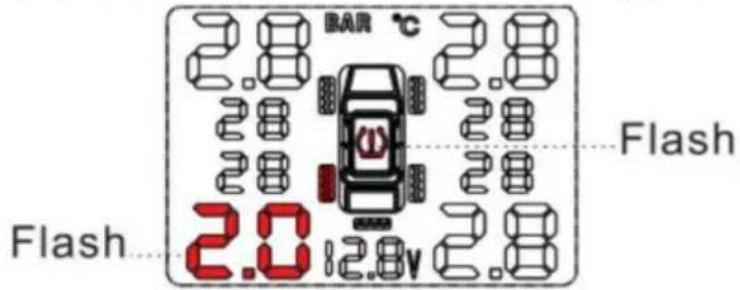
Leaking or low tyre pressure alarm

Bi.Bi.
E.g., L.R. tyre leaking or low tyre pressure alarm. The corresponding tyre position icon, pressure data and the alarm icon will flash together.
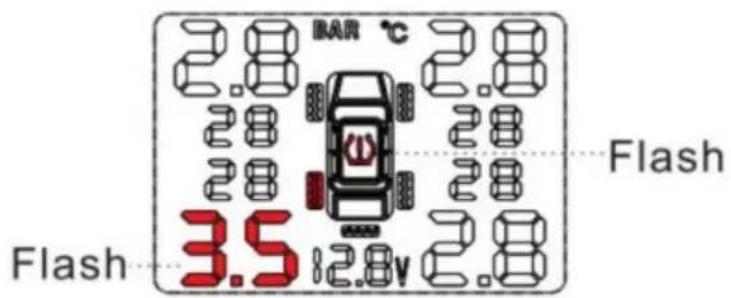
High tyre pressure alarm

Bi.Bi.
Set range: 1.7~3.4 Bar. E.g., L.R. tyre high pressure alarm. The corresponding tyre position icon, pressure data and the alarm icon will flash together.
High tyre temperature alarm

Bi.Bi.
Factory default setting: 70°C. E.g., L.R. tyre high temperature alarm. Temperature data and high temperature alarm icon will flash together.
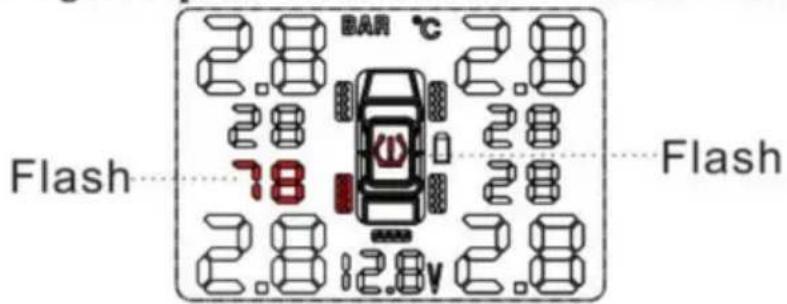
Sensor low battery

Bi.Bi.
Sensor battery normal life: 3-5 years. E.g., L.R. tyre high temperature alarm. The according tyre position icon, sensor low battery icon will flash together.
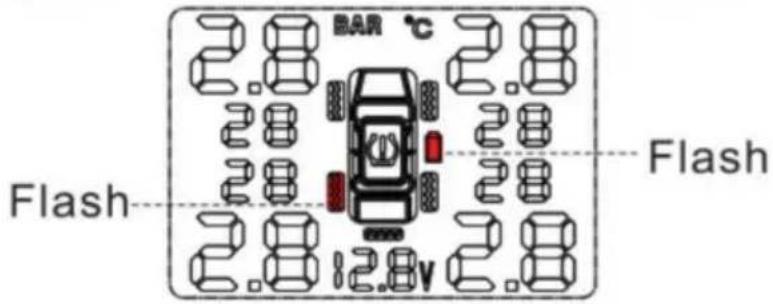
Sensor not work

Bi.Bi.
E.g., L.R. tyre sensor not work. The corresponding tyre position icon, pressure data and the temperature will disappear together.
6. OPERATION FOR SETTING WORK PARAMETERS
Jack up the car and de-mount the tire.
Remove original valve.
Tighten up screw
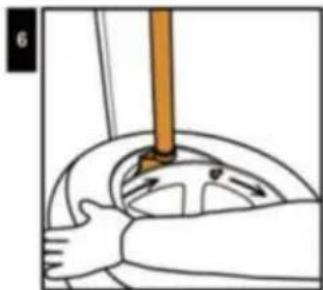
Install the tire from left side of the valve clockwise direction, avoid tire bead hits valve and sensor.
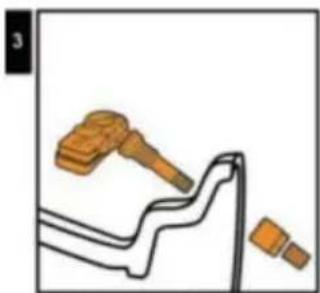
Sensor Assemble
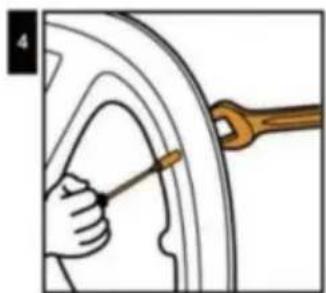
Tighten the valve by wrench and screw it ( Torque value must be ≥ 4Nm)
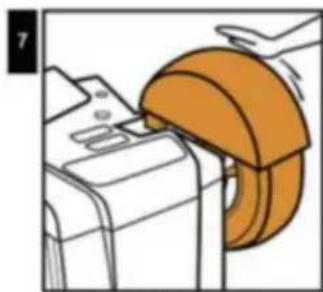
Balance the tire.
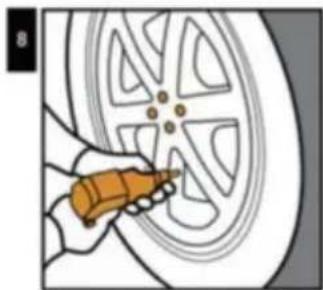
Mount the tire to it's position.
External sensor installation
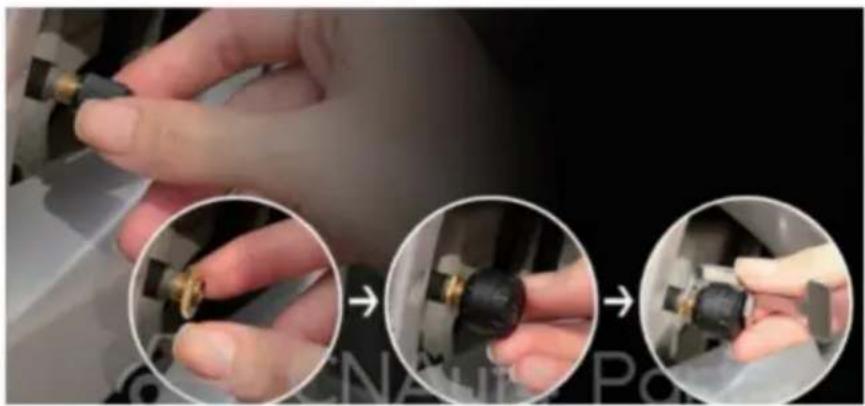
- Unscrew the valve cap.
- Screw in the nut.
- Screw in the sensor.
- Lock the sensor with an anti-theft wrench.
Movement / Replacement of battery
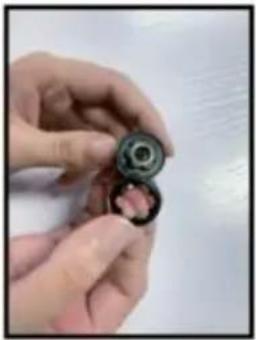
- Peel off the non-slip gasket
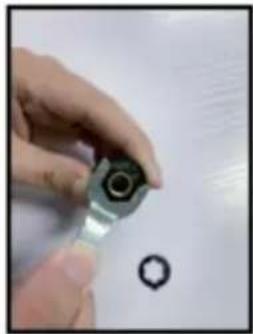
- Unscrew the sensor with a wrench
| ITEM\UNIT | SENSOR | DISPLAY | |
| Working frequency | 433.9200MHz±0.1MHz | ||
| Workong voltage | 2.0~3.6V | 12-24V | |
| Working current | static current≤1uA | static current≤0uA | |
| Dynamic≤15mA | Dynamic≤30mA | ||
| Working environment | Temperature | -40°C~+125°C | -40°C~+70°C |
| Monitoring scope | Temperature | 50-99bar | |
| Pressure | 0-6 bar 0 psi~72.5 psi | ||
FCC Information:
C/O YH Consulting Limited, Bureau 147,
Centurion House, London Road,
Staines-upon-Thames, Surrey, TW18 4AX
E-CrossStu GmbH
Mainzer Landstr. 69,
- Pressure unit
- Pressure data 5. Sensor battery indicator 7. Input voltage 9. (+) Button
2. Temperature unit 4. Temperature data 6. Warning signs 8. "SET" Button 10. USB port
3. PARAMETER SETTING REFERENCE
Leaking or low tyre pressure alarm

Bi.Bi.
E.g.: L.R. tyre leaking or low tyre pressure alarm. The corresponding tyre position icon, pressure data and the alarm icon will flash together.
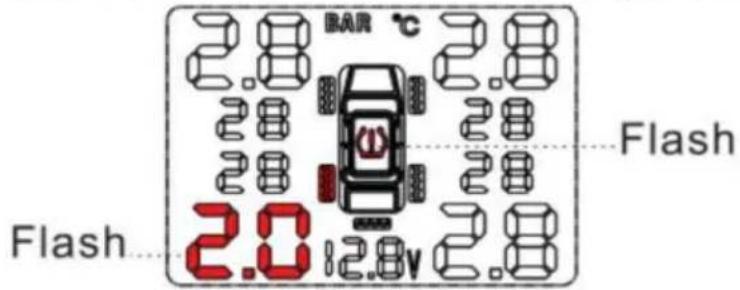
High tyre pressure alarm

Bi.Bi.
Set range: 1.7~3.4 Bar. Eg: L.R. tyre high pressure alarm. The corresponding tyre position icon ☐, pressure data and the alarm icon ☑ will flash together.
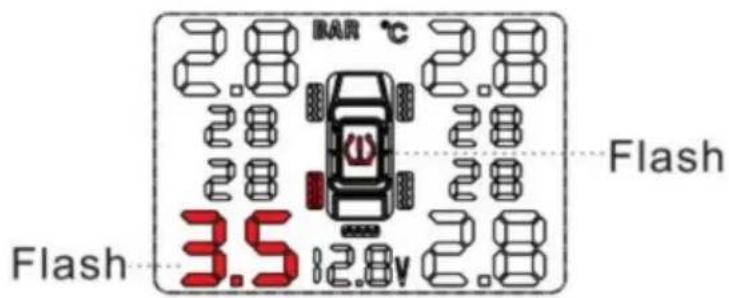
High tyre temperature alarm

Bi.Bi.
Factory default setting: 70°C. Eg: L.R. tyre high temperature alarm. Temperature data and high temperature alarm icon will flash together.
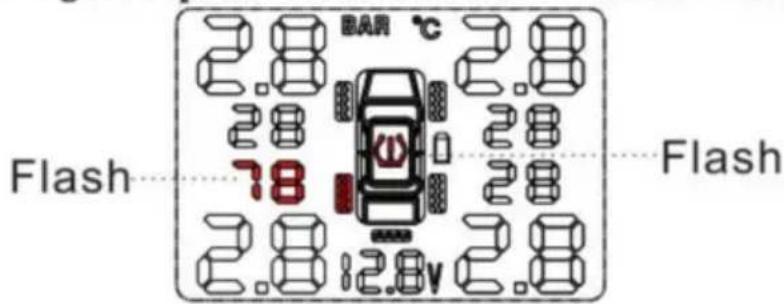
Sensor low battery

Bi.Bi.
Sensor battery normal life: 3-5 years. Eg: L.R. tyre high temperature alarm. The according tyre position icon ☐, sensor low battery icon — will flash together.
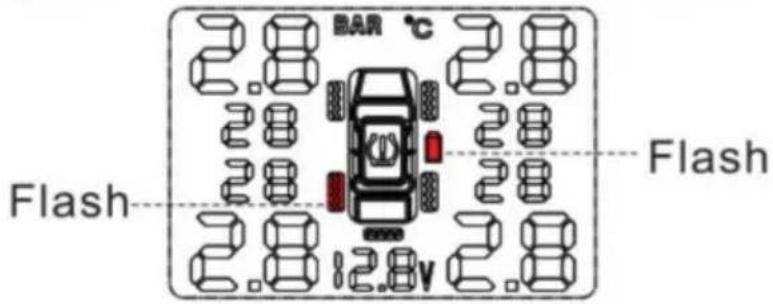
Sensor not work

Bi.Bi.
Eg: L.R. tyre sensor not work. The corresponding tyre position icon ☐, pressure data and the temperature will disappear together.
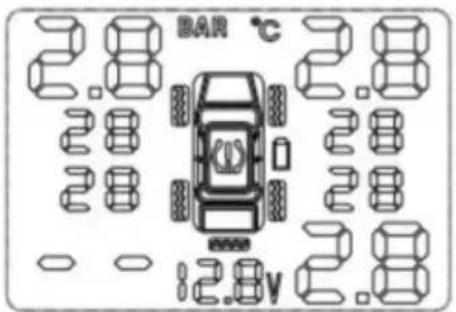
Jack up the car and de-mount the tire.
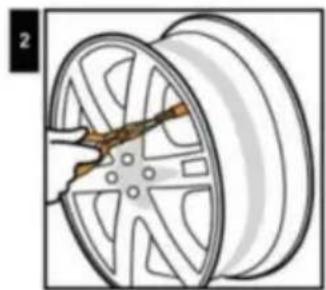
Remove original valve.
Tighten up screw.
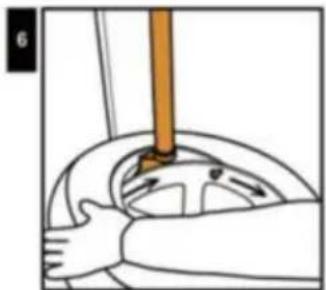
Install the tire from left side of the valve clockwise direction, avoid tyre bead hits valve and sensor.
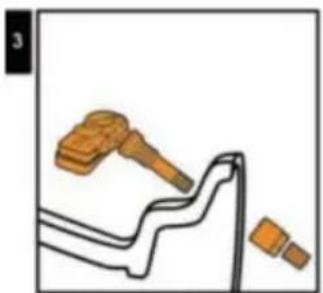
Sensor Assemble
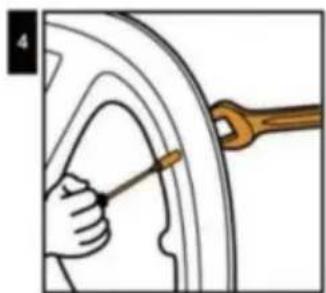
Tighten the valve with a wrench and screw it (torque value must be ≥ 4 Nm).
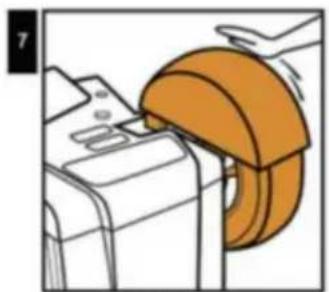
Balance the tire.
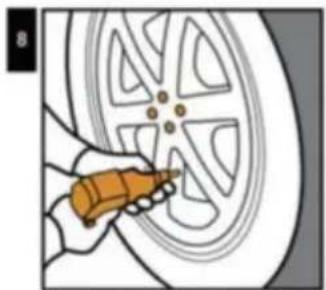
Mount the tire in its position.
External sensor installation
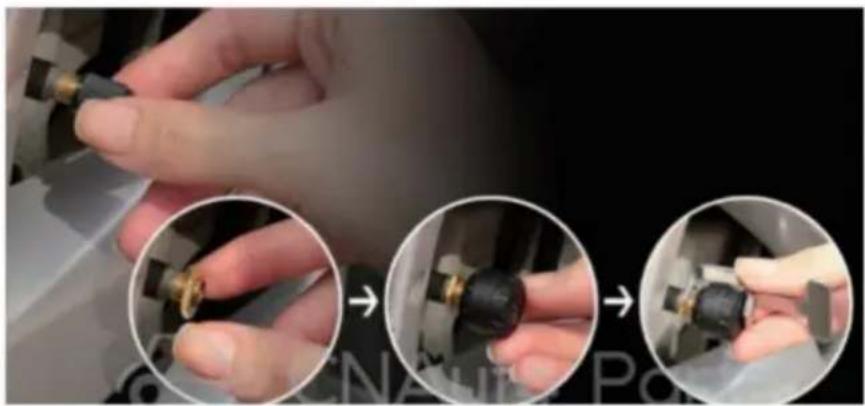
- Unscrew the valve cap.
- Screw in the nut.
- Screw in the sensor.
- Lock the sensor with an anti-theft wrench.
Movement / Replacement of battery
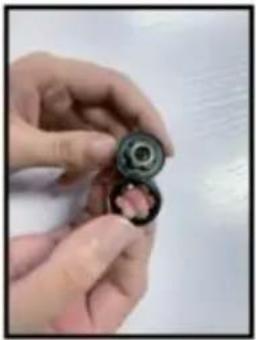
- Peel off the non-slip gasket.
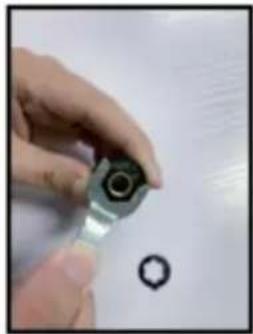
- Unscrew the sensor with a wrench.
| ITEM\UNIT | SENSOR | DISPLAY | |
| Working frequency | 433.9200MHz±0.1MHz | ||
| Workong voltage | 2.0~3.6V | 12-24V | |
| Working current | static current≤1uA | static current≤0uA | |
| Dynamic≤15mA | Dynamic≤30mA | ||
| Working environment | Temperature | -40°C~+125°C | -40°C~+70°C |
| Monitoring scope | Temperature | 50-99bar | |
| Pressure | 0-6 bar 0 psi~72.5 psi | ||
FCC Information:
C/O YH Consulting Limited Office 147,
Centurion House, London Road,
Staines-upon-Thames, Surrey, TW18 4AX
www.vevor.com/support
VEVOR®
TOUGH TOOLS, HALF PRICE
- Pressure unit
- Pressure data 5.Sensor battery indicator 7.Input voltage 9.(+) Button
2.Temperature unit 4.Temperature data 6.Warning signs 8."SET"Button 10.USB port
3. PARAMETER SETTING REFERENCE
Leaking or low tyre pressure alarm

Bi.Bi.
Eg:L.R. tyre leaking or low tyre pressure alarm. The corresponding tyre position icon, pressure data and the alarm icon will flash together.
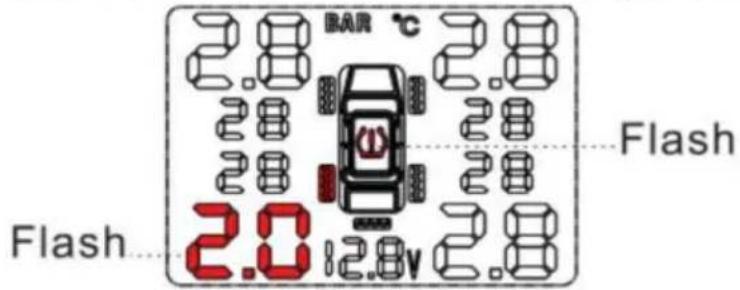
High tyre pressure alarm

Bi.Bi.
Set range:1.7\~3. 4Bar Eg:L.R. tyre high pressure alarm. The corresponding tyre position icon ☐, pressure data and the alarm icon ☑ will flash together.
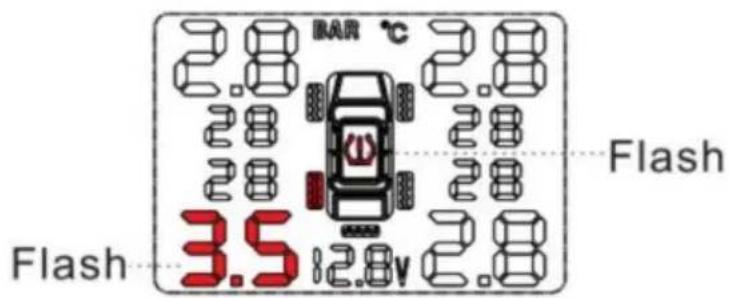
High tyre temperature alarm

Bi.Bi.
Factory default setting: 70°C. Example: L.R. tyre high temperature alarm. Temperature data and high temperature alarm icon will flash together.
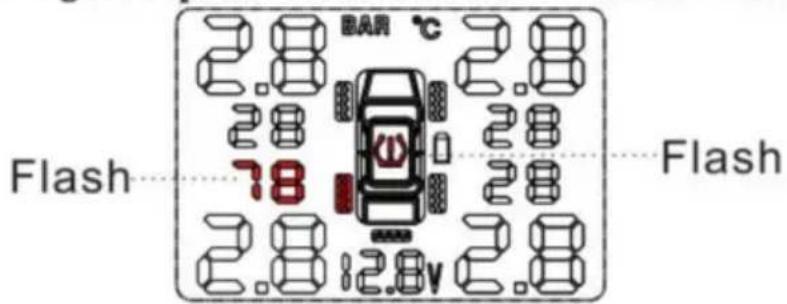
Sensor low battery

Bi.Bi.
Sensor battery normal life: 3-5 years. Example: L.R. tyre high temperature alarm. The according tyre position icon ☐ and sensor low battery icon will flash together.
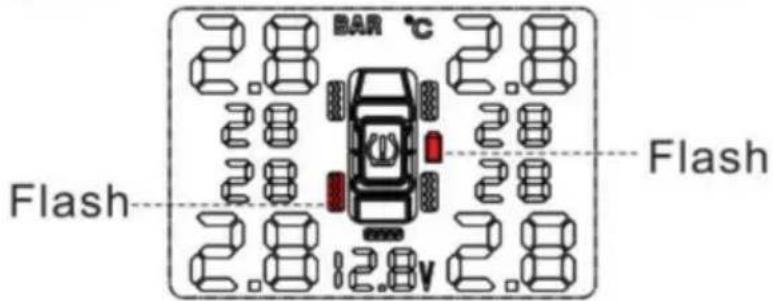
Sensor not work

Bi.Bi.
Example: L.R. tyre sensor not work. The corresponding tyre position icon ☐, pressure data, and temperature will disappear together.
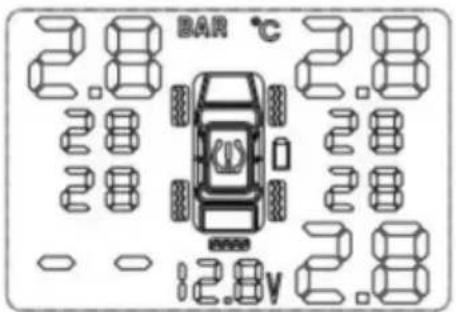
Jack up the car and de-mount the tire.
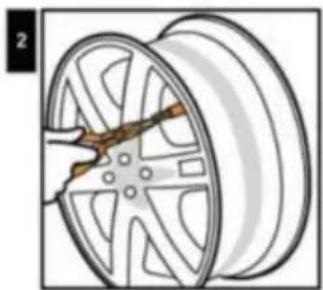
Remove original valve.
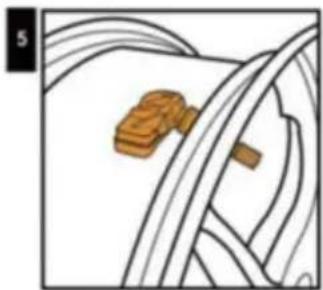
Tighten up screw.
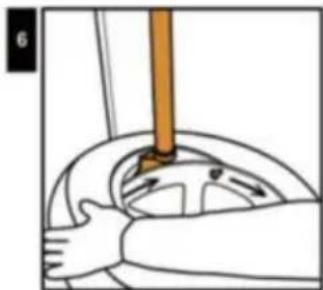
Install the tire from left side of the valve clockwise direction, avoid tire bead hits valve and sensor.
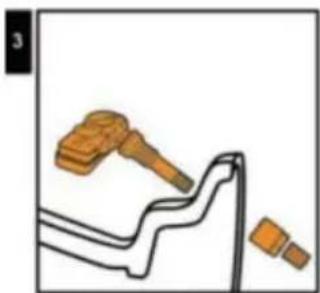
Sensor Assemble
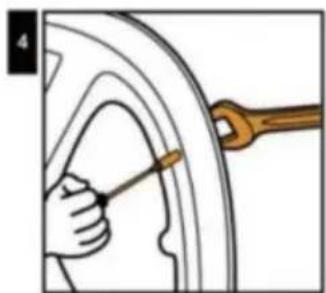
Tighten the valve by wrench and screw it (Torque value must be ≥ 4Nm).
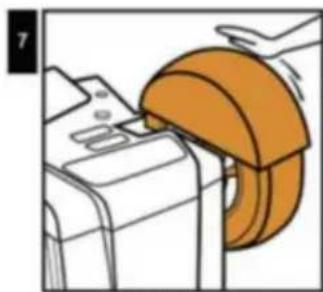
Balance the tire.
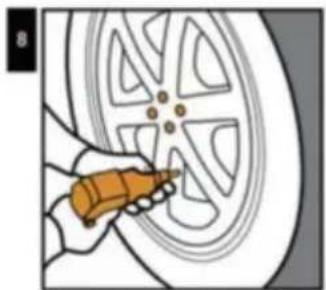
Mount the tire to its position.
External sensor installation
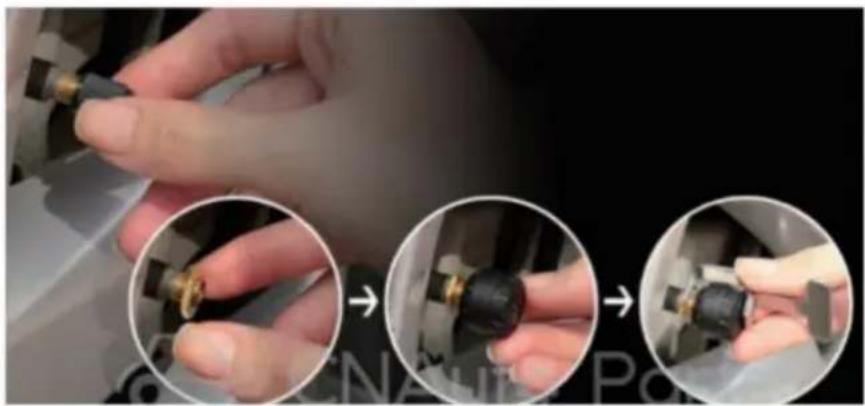
- Unscrew the valve cap.
- Screw in the nut.
- Screw in the sensor.
- Lock the sensor with an anti-theft wrench.
Movement / Replacement of battery
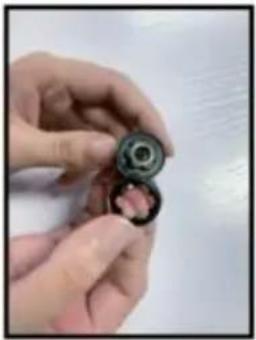
- Peel off the non-slip gasket
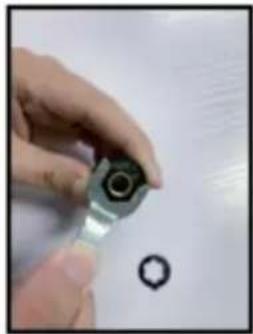
- Unscrew the sensor with a wrench
| ITEM\UNIT | SENSOR | DISPLAY | |
| Working frequency | 433.9200MHz±0.1MHz | ||
| Workong voltage | 2.0~3.6V | 12-24V | |
| Working current | static current≤1uA | static current≤0uA | |
| Dynamic≤15mA | Dynamic≤30mA | ||
| Working environment | Temperature | -40°C~+125°C | -40°C~+70°C |
| Monitoring scope | Temperature | 50-99bar | |
| Pressure | 0-6 bar 0 psi~72.5 psi | ||
FCC Information:
Imported in AUS: SIHAO PTY LTD. 1 ROKEVA STREETEASTWOOD NSW 2122 Australia
C/O YH Consulting Limited Office 147,
Centurion House, London Road,
Staines-upon-Thames, Surrey, TW18 4AX
| REP.CE |
E-CrossStu GmbH
Mainzer Landstr.69,
electronics www.vevor.com/support
VEVOR®
TOUGH TOOLS, HALF PRICE
- Pressure unit
- Pressure data 5. Sensor battery indicator 7. Input voltage 9. (+) Button
2. Temperature unit 4. Temperature data 6. Warning signs 8. "SET" Button 10. USB port
Leaking or low tyre pressure alarm

Bi.Bi.
Eg: L.R. tyre leaking or low tyre pressure alarm. The corresponding tyre position icon, pressure data and the alarm icon will flash together.
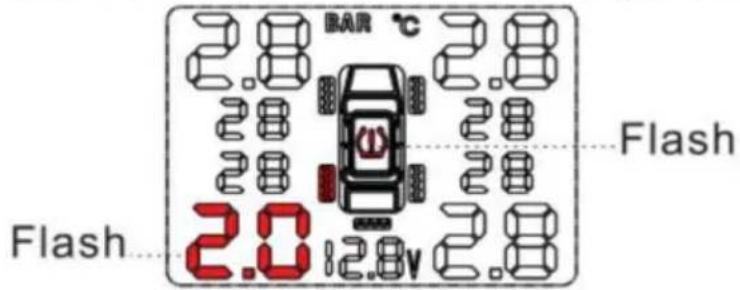
High tyre pressure alarm

Bi.Bi.
Set range: 1.7~3.4 Bar. Eg: L.R. tyre high pressure alarm. The corresponding tyre position icon, pressure data and the alarm icon will flash together.
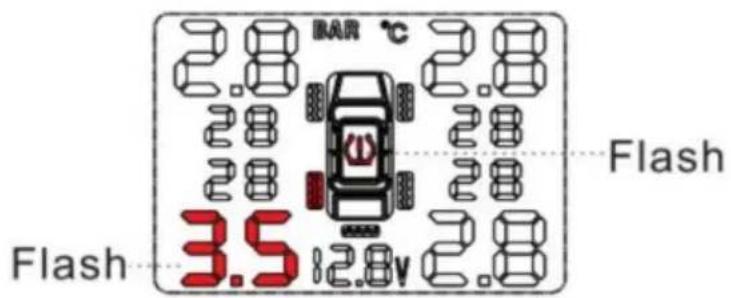
High tyre temperature alarm

Bi.Bi.
Factory default setting: 70°C. Eg: L.R. tyre high temperature alarm. Temperature data and high temperature alarm icon will flash together.
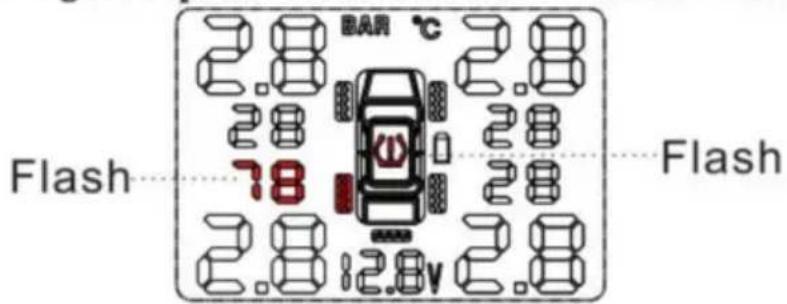
Sensor low battery

Bi.Bi.
Sensor battery normal life: 3-5 years. E.g., L.R. tyre high temperature alarm. The according tyre position icon ☐ and sensor low battery icon — will flash together.
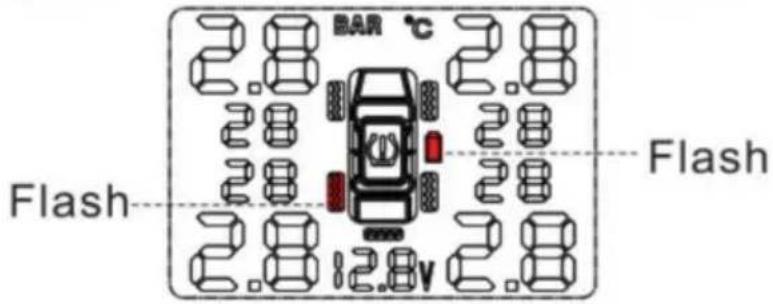
Sensor not work

Bi.Bi.
E.g., L.R. tyre sensor not work: the corresponding tyre position icon ☐, pressure data, and the temperature will disappear together.

Jack up the car and de-mount the tire.
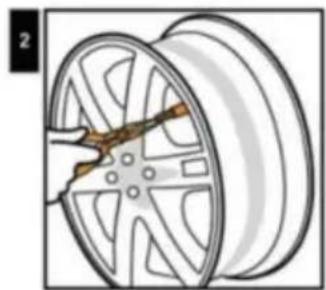
Remove original valve.
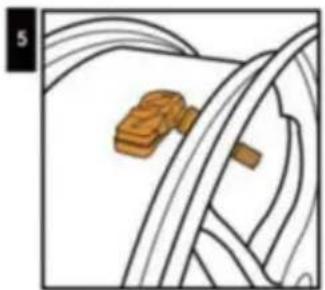
Tighten up screw.
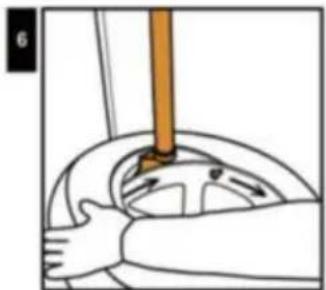
Install the tire from left side of the valve clockwise direction, avoid tire bead hits valve and sensor.
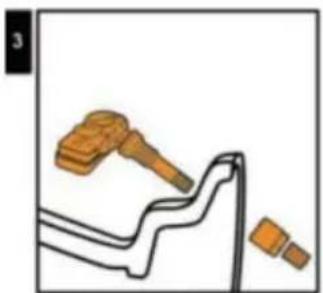
Sensor Assemble
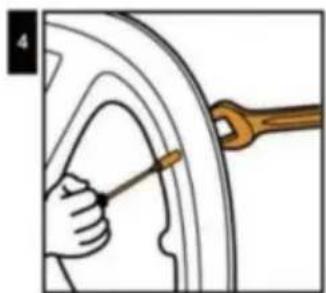
Tighten the valve by wrench and screw it (Torque value must be ≥ 4 Nm).
Balance the tire.
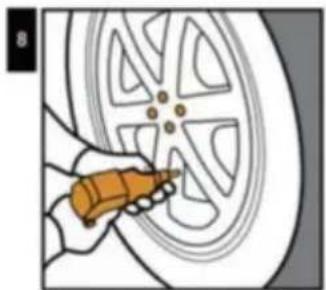
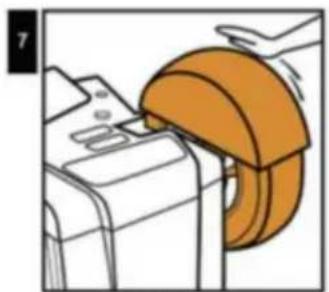
Mount the tire to its position.
External sensor installation
- Unscrew the valve cap.
- Screw in the nut.
- Screw in the sensor.
- Lock the sensor with an anti-theft wrench.
Movement / Replacement of battery
- Peel off the non-slip gasket

- Unscrew the sensor with a wrench
| ITEM\UNIT | SENSOR | DISPLAY | |
| Working frequency | 433.9200MHz±0.1MHz | ||
| Workong voltage | 2.0~3.6V | 12-24V | |
| Working current | static current≤1uA | static current≤0uA | |
| Dynamic≤15mA | Dynamic≤30mA | ||
| Working environment | Temperature | -40°C~+125°C | -40°C~+70°C |
| Monitoring scope | Temperature | 50-99bar | |
| Pressure | 0-6 bar 0 psi~72.5 psi | ||
Centurion House, London Road,
Staines-upon-Thames, Surrey, TW18 4AX
E-CrossStu GmbH
Mainzer Landstr.69,
NEED HELP? CONTACT US!
- Pressure unit
- Pressure data 5. Sensor battery indicator 7. Input voltage 9. (+) Button
2. Temperature unit 4. Temperature data 6. Warning signs 8. "SET" Button 10. USB port
3. REFERENCE TO PARAMETER SETTINGS
Leaking or low tyre pressure alarm

Bi.Bi.
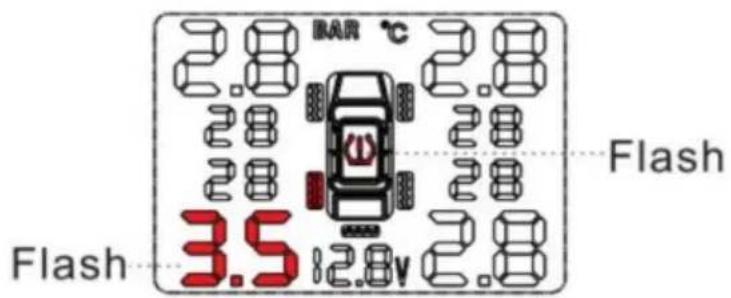
Eg: L.R. tyre leaking or low tyre pressure alarm. The corresponding tyre position icon, pressure data and the alarm icon will flash together.
High tyre pressure alarm

Bi.Bi.
Set range: 1.7~3.4 Bar. Eg: L.R. tyre high pressure alarm. The corresponding tyre position icon, pressure data and the alarm icon will flash together.
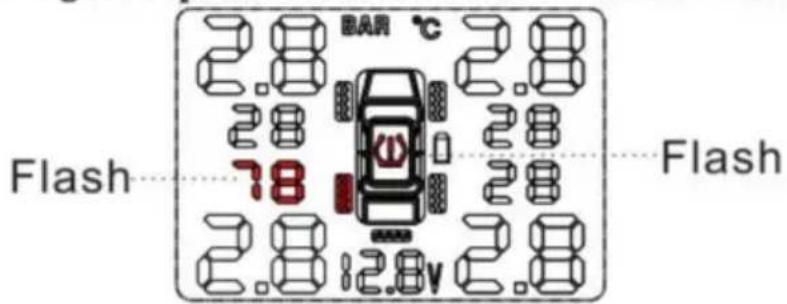
High tyre temperature alarm

Bi.Bi.
Factory default setting: 70°C. Eg: L.R. tyre high temperature alarm. Temperature data and high temperature alarm icon will flash together.
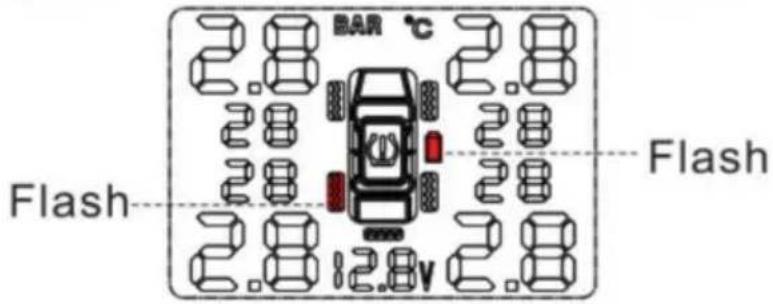
Sensor low battery

Bi.Bi.
Sensor battery normal life: 3-5 years. Eg: L.R. tyre high temperature alarm. The according tyre position icon, sensor low battery icon will flash together.
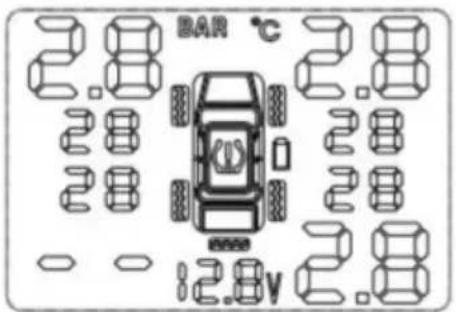
Sensor not work

Bi.Bi.
E.g., if the L.R. tire sensor is not working, the corresponding tire position icon ☐, pressure data, and temperature will disappear together.
6. OPERATING PARAMETER SETTING PROCEDURE
Jack up the car and remove the tire.
Remove the original valve.
Tighten the screw.
Install the tire from the left side of the valve in a clockwise direction, avoiding the tire bead hitting the valve and sensor.
Sensor assembly
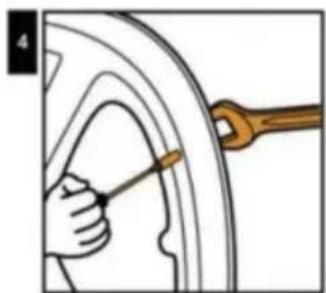
Tighten the valve with a wrench and screw it (torque value must be ≥ 4 Nm).
Balance the tire.
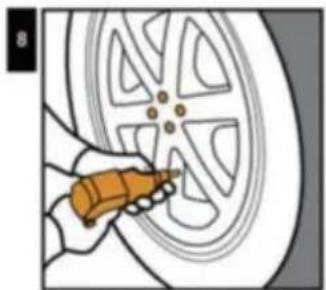
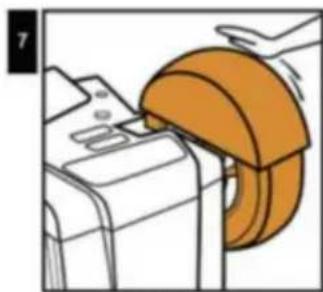
Mount the tire in its position.
External sensor installation
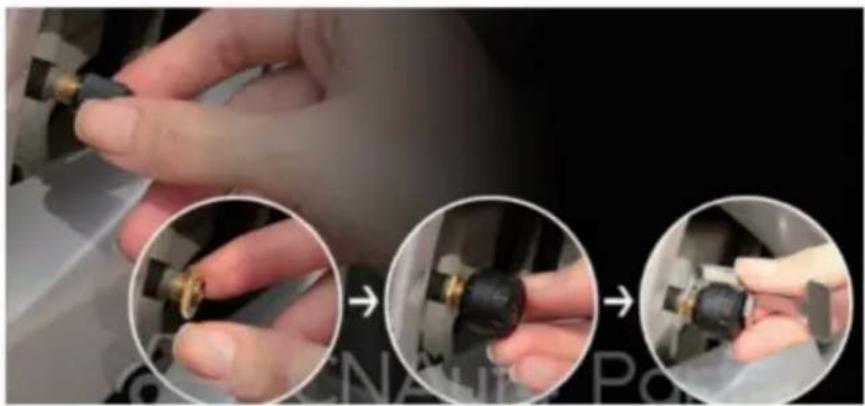
- Unscrew the valve cap.
- Screw in the nut.
- Screw in the sensor.
- Lock the sensor with an anti-theft wrench.
Movement / Replacement of battery
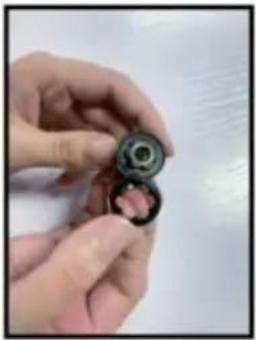
- Peel off the non-slip gasket
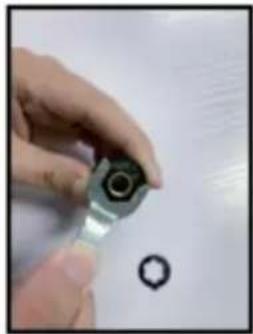
- Unscrew the sensor with a wrench
| ITEM\UNIT | SENSOR | DISPLAY | |
| Working frequency | 433.9200MHz±0.1MHz | ||
| Workong voltage | 2.0~3.6V | 12-24V | |
| Working current | static current≤1uA | static current≤0uA | |
| Dynamic≤15mA | Dynamic≤30mA | ||
| Working environment | Temperature | -40°C~+125°C | -40°C~+70°C |
| Monitoring scope | Temperature | 50-99bar | |
| Pressure | 0-6 bar 0 psi~72.5 psi | ||
FCC Information:
C/O YH Consulting Limited Office 147,
Centurion House, London Road,
Staines-upon-Thames, Surrey, TW18 4AX
| REPREZENT KE |
E-CrossStu GmbH
Mainzer Landstr.69,
60329 Frankfurt am Main.
VEVOR®
TOUGH TOOLS, HALF PRICE
www.vevor.com/support
VEVOR®
TOUGH TOOLS, HALF PRICE
Technical support and e-warranty certificate www.vevor.com/support
TPMS
MODEL: C110
NEED HELP? CONTACT US!
Leaking or low tire pressure alarm

Bi.Bi.
E.g., L.R. tire leaking or low tire pressure alarm. The corresponding tire position icon, pressure data, and the alarm icon will flash together.
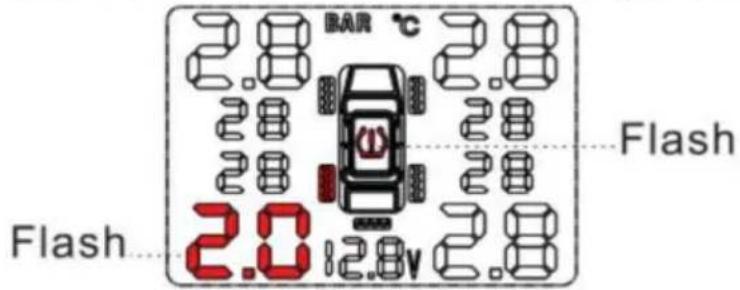
High tire pressure alarm

Bi.Bi.
Set range: 1.7~3.4 Bar. E.g., L.R. tire high pressure alarm. The corresponding tire position icon, pressure data, and the alarm icon will flash together.
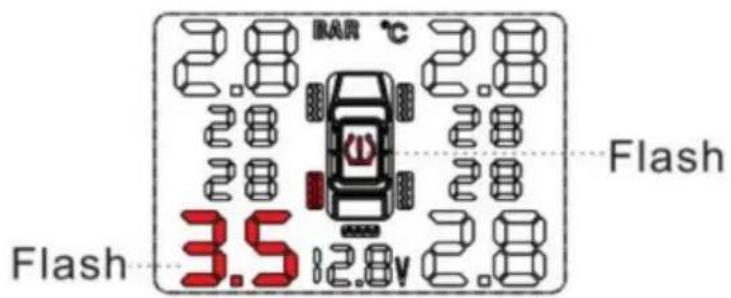
High tire temperature alarm

Bi.Bi.
Factory default setting: 70°C. E.g., L.R. tire high temperature alarm. Temperature data and high temperature alarm icon will flash together.
Sensor low battery

Bi.Bi.
Sensor battery normal life: 3-5 years. E.g., L.R. tyre high temperature alarm. The according tyre position icon ☐, sensor low battery icon — will flash together.
Sensor not work

Bi.Bi.
E.g., L.R. tyre sensor not work, the corresponding tyre position icon ☐, pressure data and the temperature will disappear together.
6. WORK PARAMETER SETTING OPERATION
Jack up the car and de-mount the tire.
Remove original valve.
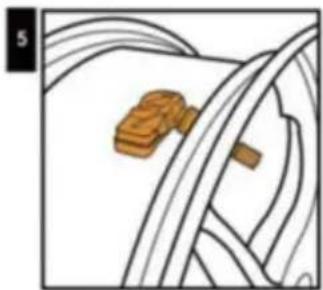
Tighten up screw.
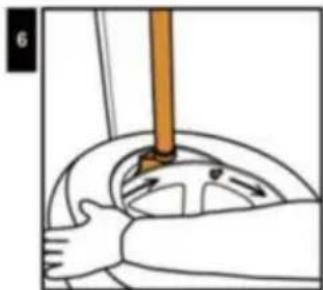
Install the tire from left side of the valve clockwise direction, avoid tire bead hits valve and sensor.
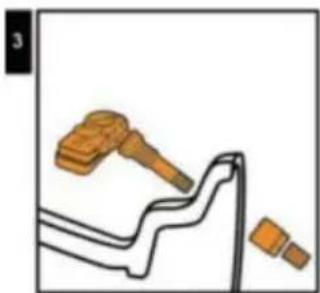
Sensor Assemble
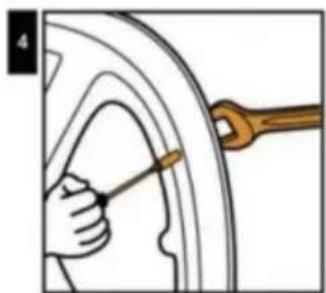
Tighten the valve by wrench and screw it (Torque value must be ≥ 4Nm).
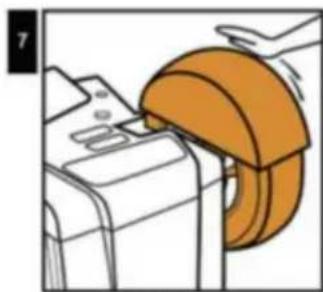
Balance the tire.
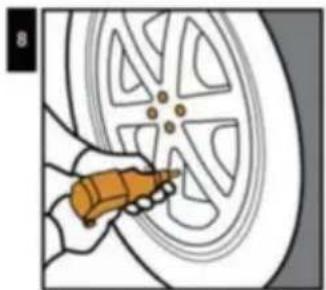
Mount the tire to its position.
External sensor installation
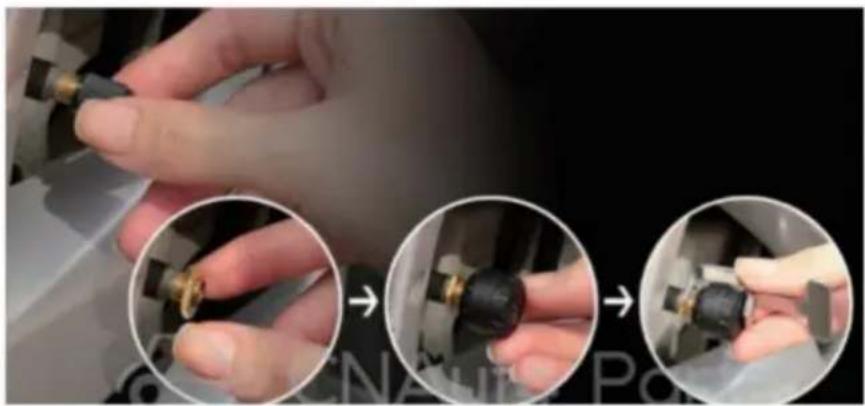
- Unscrew the valve cap.
- Screw in the nut.
- Screw in the sensor.
- Lock the sensor with an anti-theft wrench.
Movement / Replacement of battery

- Peel off the non-slip gasket
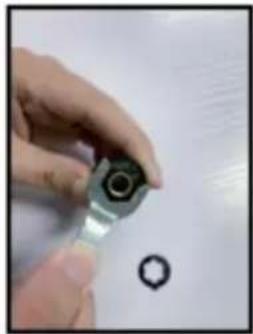
- Unscrew the sensor with a wrench
| ITEM\UNIT | SENSOR | DISPLAY | |
| Working frequency | 433.9200MHz±0.1MHz | ||
| Workong voltage | 2.0~3.6V | 12-24V | |
| Working current | static current≤1uA | static current≤0uA | |
| Dynamic≤15mA | Dynamic≤30mA | ||
| Working environment | Temperature | -40°C~+125°C | -40°C~+70°C |
| Monitoring scope | Temperature | 50-99bar | |
| Pressure | 0-6 bar 0 psi~72.5 psi | ||
FCC information:
C/O YH Consulting Limited Office 147,
Centurion House, London Road,
Staines-upon-Thames, Surrey, TW18 4AX
E-CrossStu GmbH
Mainzer Landstr.69,
60329 Frankfurt am Main.
VEVOR®
TOUGH TOOLS, HALF PRICE
Warranty certificate www.vevor.com/support
VEVOR®
TOUGH TOOLS, HALF PRICE
NEED HELP? CONTACT US!
Leaking or low tyre pressure alarm

Bi.Bi.
Eg:L.R. tyre leaking or low tyre pressure alarm. The corresponding tyre position icon, pressure data and the alarm icon will flash together.
High tyre pressure alarm

Bi.Bi.
Set range:1.7\~3. 4Bar Eg:L.R. tyre high pressure alarm. The corresponding tyre position icon ☐, pressure data and the alarm icon ☑ will flash together.
High tyre temperature alarm

Bi.Bi.
Factory default setting: 70°C Eg: L. R. tyre high temperature alarm. Temperature data and high temperature alarm icon will flash together.
Sensor low battery

Bi.Bi.
Sensor battery normal life: 3-5 years. E.g., L.R. tyre high temperature alarm. The according tyre position icon ☐ and sensor low battery icon — will flash together.
Sensor not work

Bi.Bi.
E.g., L.R. tyre sensor not work: the corresponding tyre position icon ☐, pressure data, and the temperature will disappear together.
6. USE OF WORK PARAMETER SETTING
INSTALLATION OF INTERNAL SENSOR
Jack up the car and de-mount the tire.
Remove original valve.
Tighten up screw.
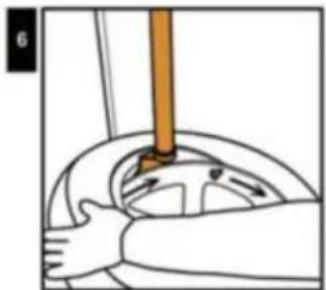
Install the tire from the left side of the valve clockwise direction, avoid tire bead hitting valve and sensor.
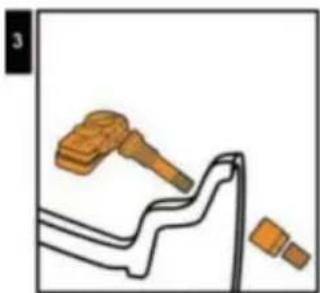
Sensor assembly.
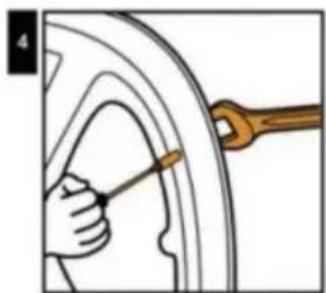
Tighten the valve with a wrench and screw it (torque value must be ≥ 4 Nm).
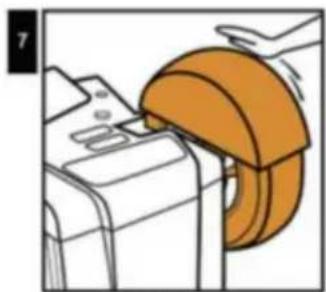
Balance the tire.
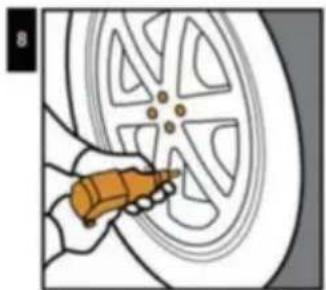
Mount the tire to its position.
External sensor installation

- Unscrew the valve cap.
- Screw in the nut.
- Screw in the sensor.
- Lock the sensor with an anti-theft wrench.
Movement / Replacement of battery
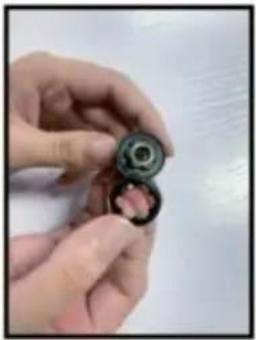
- Peel off the non-slip gasket
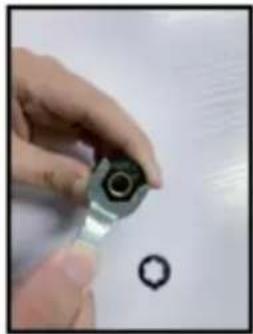
- Unscrew the sensor with a wrench
| ITEM\UNIT | SENSOR | DISPLAY | |
| Working frequency | 433.9200MHz±0.1MHz | ||
| Workong voltage | 2.0~3.6V | 12-24V | |
| Working current | static current≤1uA | static current≤0uA | |
| Dynamic≤15mA | Dynamic≤30mA | ||
| Working environment | Temperature | -40°C~+125°C | -40°C~+70°C |
| Monitoring scope | Temperature | 50-99bar | |
| Pressure | 0-6 bar 0 psi~72.5 psi | ||
FCC-information:
C/O YH Consulting Limited Office 147,
Centurion House, London Road,
Staines-upon-Thames, Surrey, TW18 4AX
| EC | REP |
E-CrossStu GmbH
Mainzer Landstr.69,
60329 Frankfurt am Main.
VEVOR®
TOUGH TOOLS, HALF PRICE
www.vevor.com/support
- TPMS
- MODEL: C
- NEED HELP? CONTACT US
- OPERATION
- FEATURES
- STRUCTURE
- PARAMETER SETTING REFERENCE
- ALARM STATUS
- SENSOR LOW BATTERY
- BEEP. BEEP
- SENSOR NOT WORKING
- WORK PARAMETER SETTING OPERATION
- ENTER AND QUIT SETTING MODE
- TIRE PRESSURE HI SETTING
- INTERNAL SENSOR INSTALLATION
- EXTERNAL SENSOR INSTALLATION
- MOVEMENT / REPLACEMENT OF BATTERY
- FCC INFORMATION
- CORRECT DISPOSAL
- VEVOR®
- TOUGH TOOLS, HALF PRICE
- LEAKING OR LOW TYRE PRESSURE ALARM
- HIGH TYRE PRESSURE ALARM
- HIGH TYRE TEMPERATURE ALARM
- SENSOR NOT WORK
- OPERATION FOR SETTING WORK PARAMETERS
- REFERENCE TO PARAMETER SETTINGS
- OPERATING PARAMETER SETTING PROCEDURE
- USE OF WORK PARAMETER SETTING
- INSTALLATION OF INTERNAL SENSOR
- FCC-INFORMATION
Brand : Vevor
Model : C110
Category : Measuring equipment