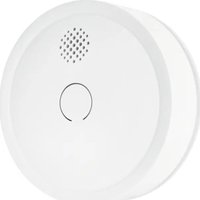
Comfion FURM80000 - Smoke detector ABUS - Free user manual and instructions
Find the device manual for free Comfion FURM80000 ABUS in PDF.


User questions about Comfion FURM80000 ABUS
0 question about this device. Answer the ones you know or ask your own.
Ask a new question about this device
Download the instructions for your Smoke detector in PDF format for free! Find your manual Comfion FURM80000 - ABUS and take your electronic device back in hand. On this page are published all the documents necessary for the use of your device. Comfion FURM80000 by ABUS.
USER MANUAL Comfion FURM80000 ABUS
natural_image
Abstract graphic with a circular object, four colored rectangular shapes (black, white, UK, gray, and black) arranged below, no text or symbols present.https://abus.com/products/FURM80000
1.4. Impressum
natural_image
Top-down schematic of a circular device with internal components and mounting holes (no text or symbols)natural_image
Symbol of a trash bin with crossed lines indicating no waste or restriction, and a solid black rectangle below (no text or symbols)der örtlichen
- General information 2
- Safety instructions 4
- Behaviour in the event of an alarm 6
- Operating principles and features 7
- Assembly & commissioning 10
5.1. Location selection 10
5.2. Where the device should not be installed 11
5.3. Mounting the smoke alarm device 12
5.4. Adding the device to the alarm system 13
-
Functionality, maintenance and instructions 14
-
Guarantee 21
-
Disposal instructions 22
-
Conformity 22
1. General information
1.1. Introduction
Thank you for choosing a product from ABUS Security Centre (also known as "ABUS" for short) in the form of the Comfion wireless smoke alarm. This manual contains important descriptions, technical data, overviews and further information on project planning, commissioning and operation of the Comfion wireless smoke alarm in conjunction with the Comfion wireless alarm centre. The products/systems described here may only be installed and maintained by persons who are qualified for the respective task. Qualified personnel for the installation and maintenance of the system is generally a trained ABUS specialist partner.
1.2. Intended use / legal information
The responsibility for the legally compliant use of the product lies with the purchaser or customer and the end user. In accordance with the manufacturer's liability for its products as defined in the Product Liability Act, the above information must be observed and passed on to the operators and users. Non-compliance releases ABUS Security Center from legal liability. Non-conforming or unusual use, repair work or modifications not expressly authorised by ABUS and improper servicing can lead to malfunctions and must be avoided. Any modifications not
expressly authorised by ABUS will result in the loss of liability, warranty and separately agreed guarantee claims. Architects, technical building planners (TGA) and other consulting institutions are required to obtain all necessary product information from ABUS in order to fulfil the information and instruction obligations in accordance with the Product Liability Act. Specialist dealers and fabricators are required to observe the information in the ABUS documentation and to pass it on to their customers if necessary. Further information can be found at www.abus.com on the general page or for dealers and installers in the partner portal at https://partner-asc.abus.com
1.3. Customer service/ Customer Support
For further assistance, please contact our support team: support@abus-sc.com General information on the Comfion wireless smoke alarm can be found on our homepage at: https://abus.com/products/FURM80000
1.4. Imprint
English
With the publication of newer installation instructions, this edition loses its validity. All rights reserved. No part of these installation instructions may be reproduced in any form or duplicated or processed
using electronic, mechanical or chemical processes without the written consent of the publisher. ABUS Security Center accepts no liability for technical or typographical errors and their consequences. The information in these installation instructions has been compiled to the best of our knowledge and belief, considering the current state of the art. It is checked regularly and updated or corrected as necessary. All trademarks and industrial property rights are recognised, changes in the sense of technical progress can be made without prior notice.
2. Safety instructions
2.1. Explanation of symbols
The following symbols are used in these installation instructions:
| Symbol | Signal word | meaning |
 | Caution (danger) | Indicates a risk of injury or health hazard, e.g. due to electrical voltage.due to electrical voltage |
 | Important | Indicates possible damage to the device/accessories or indicates a risk of injury or health hazard |
 | Note | Indicates important information |
2.2. Battery instructions

The device is powered by a 3V CR123A battery. The battery can be replaced if necessary and is not rechargeable!
- Direct strong heat can damage the batteries. Therefore, do not place the device on heat sources (e.g. radiators) or in direct sunlight.
- Only remove the batteries in the event of a battery change, otherwise the device will not be able to warn you in an emergency.
- After each battery change, you must check that the device is working properly.
2.3. device function

Please observe the following points to ensure that the appliance functions properly:
• The appliance must not be covered!
- The appliance must not be painted over or covered with wallpaper!
- Do not open or repair the appliance under any circumstances. Failure to do so will invalidate the warranty.
- If the appliance has been dropped or damaged in any other way, it must no longer be used.
- Gases, vapours, heat and firelight/flames are not detected by the smoke alarm!
- People with impaired hearing may not be able to hear the alarm! Detectors with additional visual signalling are available for such cases!
- Particularly high levels of electromagnetic radiation can impair the function of the detector. Therefore, do not install the detector in the vicinity of devices that emit electromagnetic radiation or in the vicinity of magnets.
3. Behaviour in the event of an alarm

- Warn all flatmates
- Help children, disabled, elderly and sick people.
- Close all windows and doors behind you.
- Leave the house immediately.
- Do not use elevators
- Alert the fire brigade: Tel.: 112 (DE & EU)
4. Operating principles and features
4.1. Product features
The FURM80000 Comfion wireless smoke alarm is a detector for detecting smoke. The smoke alarm works according to the optical principle (photoelectric reflection) and has a measuring chamber in which penetrating smoke particles are measured. If the alarm threshold is exceeded, a loud acoustic alarm sounds.
Main features:
- For ceiling mounting
- Reliably detects smoke in the detection area
- Reports the detected smoke to the alarm centre more
• Optical smoke sensor - Impact-resistant design
- Simple installation
• Monitoring of the radio connection via supervision message
• Voltage monitoring and low battery signal. - Radio protocol AES128 bit encrypted and protected against replay attacks
• Certified according to EN 14604
4.2. Delivery content
- 1 x Smoke alarm FURM80000
- 1 x Battery CR123A (EVE CR17335 or HCB CR17335)
- 1 x back plate
- 1 x instruction manual
4.3. Device description
Product structure
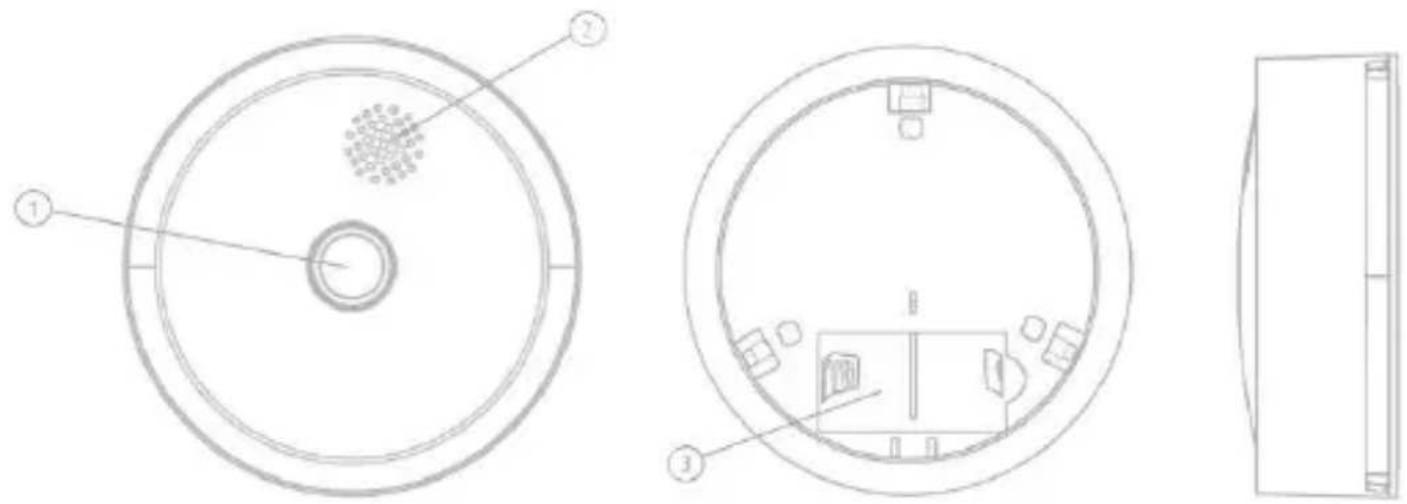
| 1. operating button / Test button | 2. Buzzer / signalling device | 3. battery compartment |
4.4. Compatibility
The Comfion wireless smoke alarm is compatible with the following products:
• FUAA80000 Comfion wireless alarm system
• FUM080100 Comfion radio repeater
4.5. Technical data
| dimensions (H x ø) | 30 x 86 mm |
| Weight | 95g (incl. Batterie) |
| Operating temperature | 0 °C to + 40 °C |
| Environmental class | II (EN 50131-1 + A3:2020) |
| Air humidity | max. 85% RH (relative humidity) |
| Detection method | Photoelectrical reflection |
| volume (Piezo) | >85dB @3m |
| Detection area | max. 50 m2 |
| Display | Status-LED |
| RF-Frequency / modulation | 868.0 - 868.6 MHz / GFSK |
| Power, radio / range | max. 25 mW (14dBm) / 400m, open space |
| Battery type & battery life | 1 x 3V CR123A / CR17335 Lithium max. 5 years |
| Recommended battery | EVE CR17335, HCB CR17335 or Varta CR123A (Abus Art: FU2998) |
| EU directives | RED: 2014/53/EU, RoHS: 2011/65/EU + 2015/863 General safety: 2001/95/EG EN 14604:2005 + AC:2008 |
5. Assembly & commissioning
5.1. Location selection
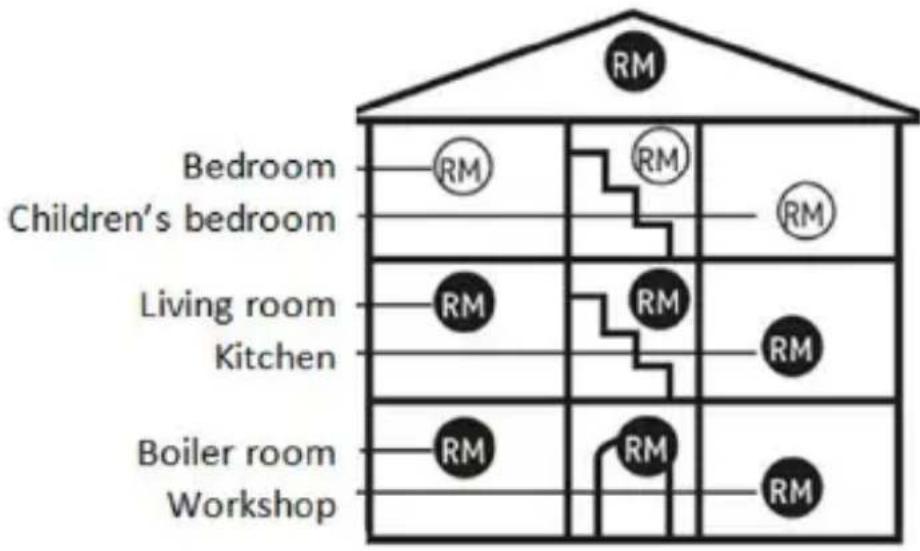
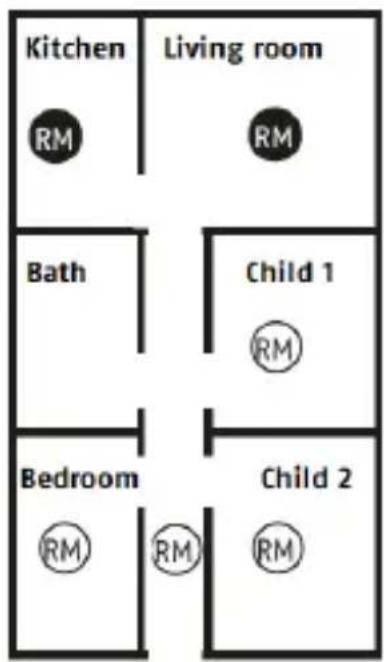
- Smoke alarms should be installed as a minimum in all bedrooms, children's rooms and corridors that serve as escape routes, in the centre of the room on the ceiling only (not wall-mounted)
- Select the highest installation location with a minimum distance of 50 cm from surrounding walls, furniture and lamps.
- You can achieve optimum equipment if the devices are also installed in all other rooms and in the stairwell corridors.
- Keep a minimum distance of 30 cm from light fixtures and 150 cm from fluorescent tubes.
- In rooms with sloping, pointed or gabled ceilings, place the detector 90 cm from the highest point of the ceiling.
5.2. Where the device should not be installed
• Outdoors (use only indoors)
- In rooms in which the alarm can be triggered by disturbance variables (steam, condensation, "normal" smoke, vapour, dust, dirt or grease)
• Next to an air extractor or similar ventilation openings (draughts)
- Where temperature can fall below 0 °C or rise above 40 °C
- near ceiling decorations that could obstruct the path of the smoke to the detector.
5.3. Mounting the smoke alarm device
- Select a suitable installation location and drill holes in the mounting surface using a drill.
- Insert the dowels into the drilled holes.
- Fasten the bracket/back plate with screws.
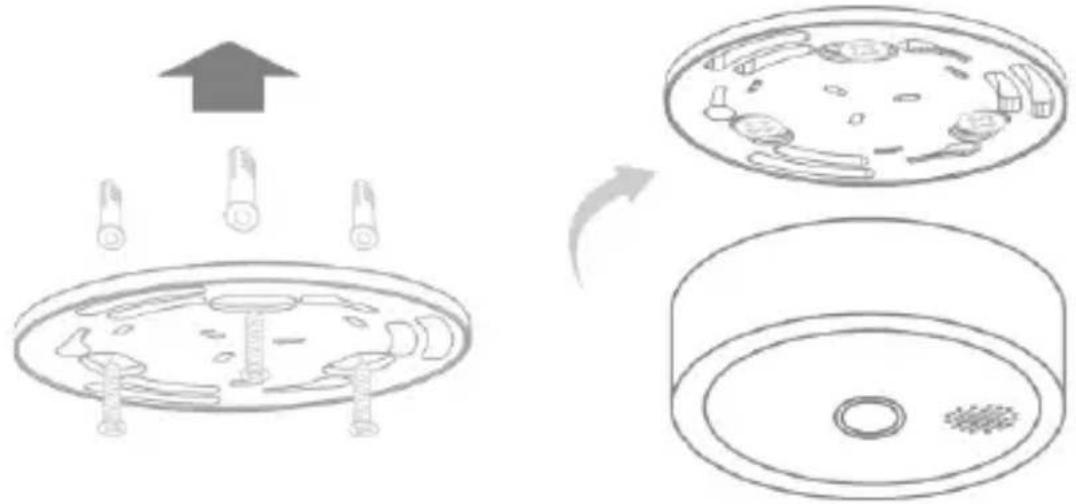
- Enter the current date (installation date) on the label on the back of the detector using a waterproof and abrasion-resistant pen.
- Turn the smoke alarm into the holder/back plate until you hear a clicking sound indicating that the installation is complete.
- Perform a test to ensure that the alarm is functioning normally.
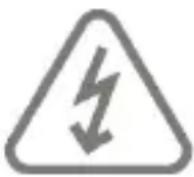 | Make sure that there are no electrical lines/cables, pipes or other important installation components behind the installation point! |
5.4. Adding the device to the alarm system
 Attention Attention | Before adding in the device, start the maintenance mode under the security settings of your Comfion system. |
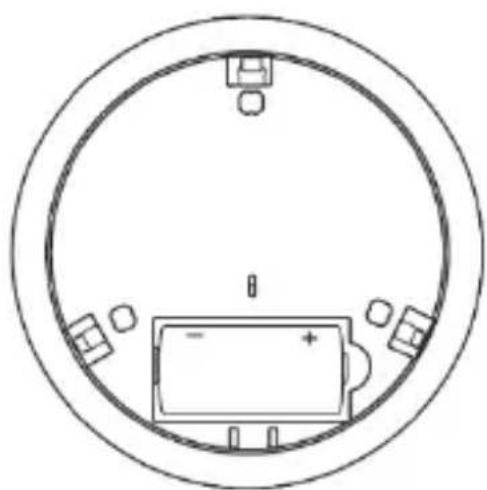
- Insert the battery into the smoke alarm device
- Start the teach-in mode in the Comfion app
- Press the operating button three times until the smoke detector LED flashes
- If the teach-in is successful, the LED lights up for 3 seconds and the Comfion app confirms the process
natural_image
Top-down schematic of a circular device with internal components and mounting holes (no text or symbols)6. Functionality, maintenance and instructions
6.1. Maintenance
6.1.1. Cleaning
According to the German application standard DIN 14676, the functionality of every installed smoke alarm device must be checked regularly and ensured through maintenance measures.
This includes an inspection at least once every 12 ± 3 months, including maintenance and functional testing of the warning signals. The results and measures must be documented accordingly.

- Dusty detectors must be cleaned. Dust deposits in the air slots of the detector can be vacuumed or blown out.
- If necessary, the dust can be removed with a brush.
- The surface can be cleaned with a cloth lightly moistened with soapy water.
- Make sure that no water gets inside the appliance! Do not clean the appliance in the dishwasher!
- Do not use any sharp, pointed, abrasive or corrosive cleaning agents, chemicals or hard brushes!
6.1.2. Maintenance & Testing
During routine maintenance, check that the detector is working properly.
- press and hold the power button for 1 second. The red LED flashes quickly and the buzzer emits a loud signal tone.
- if the test is successful, the system displays the status.
Note: This requires the control centre to be supplied with power and connected to the Internet.
- if the test is not successful, contact technical support and replace the detector if necessary.
 | The electronic components of every smoke alarm are subject to ageing processes. In addition, the insect screen and smoke detection chamber inevitably become dirty over time.To ensure the full function of every smoke alarm device, it must be replaced no later than 10 years after commissioning! |
6.1.3. Low Battery
If the battery is low, the detector emits a beep every 53 seconds and the LED flashes red. Replace the battery of the smoke alarm immediately when this warning signal sounds.
How to replace the batteries:
- Set the alarm panel to maintenance mode (security settings)
- Detach the smoke alarm device from the ceiling panel
- Remove the battery.
- Wait 30 seconds and insert the new battery.
- Reattach the detector to the bracket
• Test the smoke detector for function
6.2. Self-test with automatic error message
The smoke alarm device performs a periodic self-test. If the trigger sensitivity of the detector falls below a required minimum threshold (e.g. due to excessive soiling of the smoke detection chamber), the detector's red LED lights up twice every 53 seconds.

If the error message cannot be eliminated by cleaning the detector, the detector must be replaced immediately.
6.3. Was What to do in the event of false alarms?
Possible causes of false alarms are: Welding and cutting work, soldering and other hot work, sawing and grinding work, dust caused by construction or cleaning work, extreme electromagnetic effects and temperature fluctuations that lead to condensation of the humidity in the detector.
6.4. Display table
| Operation | Condition | GREEN LED | RED LED | Buzzer |
| - | Normal operation | - | Flashes once every 53 sec. | - |
| Press + hold the button for >1 sec | Smoke detector test | - | Flashes quickly | Short fast tones |
| - | Alarm status | - | Flashes quickly | Short fast tones |
| - | Weak battery | - | Flashes once every 53 sec. | One beep every 53 seconds |
| - | Fault/ malfunction | - | Flashes twice every 35 seconds | - |
| Press the button once or via the app | Silent mode (alarm pause in alarm state) | - | Flashes once every 10 seconds | Return to alarm after 10 min. |
| Press the button once or via the app | Silent mode when the battery is low (alarm pause in alarm status) | - | Flashes once every 53 seconds | Return to alarm after 12 hours |
| Press the button 3 times quickly within 2 seconds | Connection mode | Continuous flash for 1 minOnce connection ok, LED lights up for 3 sec.If connection fails, LED flashes slowly for 3 seconds (twice per second) | - | - |
| Press button once in connection mode | Exit the connection mode | Flashes for 3 seconds (twice per second) | - | - |
6.5. Troubleshooting
Some possible causes and solutions are listed in the troubleshooting table. Please contact your specialist dealer or technical support if the solutions listed below do not solve your problem.
| Symptom | Recommendation |
| The smoke alarm does not respond. | Please check that the smoke alarm device is correctly attached to the bracket. |
| The red LED flashes and the alarm beeps every 53 seconds. | The battery is low/empty.CHANGE THE BATTERY |
| The red LED flashes twice every 53 seconds. | The smoke alarm has malfunctioned. Please clean your smoke alarm OR REPLACE IT IMMEDIATELY WITH A NEW SMOKE ALARM! |
| The smoke alarm triggers unwanted alarms at irregular intervals or when the occupants are cooking, showering, etc. | 1. clean the smoke alarm device. See Maintenance.2. commission an electrician to install the smoke alarm in a new location. |
7. Guarantee
- ABUS products are designed and manufactured with the utmost care and tested in accordance with applicable regulations.
- The warranty only covers defects that are attributable to material or manufacturing defects at the time of sale. If there is evidence of a material or manufacturing defect, the module will be repaired or replaced at the discretion of the warranty provider.
• In these cases, the warranty ends with the expiry of the original warranty period of 2 years. Further claims are expressly excluded. - ABUS is not liable for defects and damage caused by external influences (e.g. transport, use of force, incorrect operation), improper use, normal wear and tear or failure to observe these instructions and the care instructions.
- When asserting a warranty claim, the original proof of purchase with the date of purchase and a brief written description of the fault must be enclosed with the product in question.
- If you discover a defect in the product that was already present at the time of sale, please contact your seller directly within the first two years.
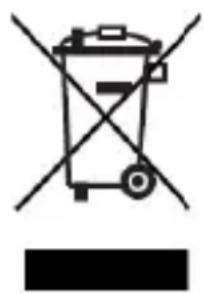
8. Disposal instructions
natural_image
Symbol of a trash bin with crossed lines indicating no waste or discharge (no text or labels)Dispose of the device in accordance with the Waste Electrical and Electronic Equipment EU Directive 2012/19/EU - WEEE (Waste Electrical and Electronic Equipment). If you have any questions, please contact the local authority responsible for disposal. Information on collection points for your old appliances can be obtained, for example, from the local municipal or city administration, the local waste disposal companies or from your dealer.
9. Conformity
9.1. Declaration of performance
This smoke alarm device is tested and certified as a building product in accordance with regulation EU 305/2011. Production is monitored by regular and independent inspections for continued compliance with legal and standard specifications. The decoration of performance FURM80000#1124 can be found at:
9.2. EU-Declaration of conformity
Hereby, ABUS Security Center GmbH & Co KG declares that the radio equipment type FURM80000 is in compliance with Directive 2014/53/EU and 2011/65/EU. The full text of the EU Declaration of Conformity is available at the following Internet address: abus.com > Article search > FUBW80200 > Downloads
https://abus.com/products/FURM80000
natural_image
Top-down schematic of a circular device with battery and four corner ports (no text or symbols)natural_image
Symbol of a trash bin crossed with no text or numbers, representing waste sorting or restriction (no text present)1.3. Klantenservice / Customer Support
| 1. Bedieningsknop/testknop | 2. Zoemer/signaalgever | 3. Batterijvak |
natural_image
Top-down schematic of a circular device with internal components and mounting holes (no text or symbols)natural_image
Symbol of a trash bin with crossed lines indicating no waste or discharge (no text or labels)
- Impressum
- General information
- Introduction
- Intended use / legal information
- Customer service/ Customer Support
- Imprint
- English
- Safety instructions
- Explanation of symbols
- Battery instructions
- device function
- Behaviour in the event of an alarm
- Operating principles and features
- Product features
- Main features:
- Delivery content
- Device description
- Compatibility
- Technical data
- Assembly & commissioning
- Where the device should not be installed
- Mounting the smoke alarm device
- Adding the device to the alarm system
- Functionality, maintenance and instructions
- Maintenance
- Cleaning
- Maintenance & Testing
- Low Battery
- Self-test with automatic error message
- Was What to do in the event of false alarms?
- Display table
- Troubleshooting
- Guarantee
- Disposal instructions
- Conformity
- Declaration of performance
- EU-Declaration of conformity
- Klantenservice / Customer Support
Brand : ABUS
Model : Comfion FURM80000
Category : Smoke detector