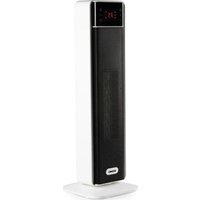
DO7358H - Heating DOMO - Free user manual and instructions
Find the device manual for free DO7358H DOMO in PDF.


| Brand | DOMO |
| Model | DO7358H (DO7358CH) |
| Product type | Ceramic heater - Tower |
| Maximum power | 2000 W (HI mode) |
| Minimum power | 1200 W (LO mode) |
| Operating modes | HI (high), LO (low), ECO (adjustable temperature from 5 to 35 °C), CO (cool ventilation) |
| Timer | 1 to 24 hours with auto on/off function |
| Oscillation | Yes, from left to right |
| Remote control | Yes, 5 m range, AAA batteries included |
| Power supply | 220-240 V ~ 50/60 Hz |
| Digital display | Yes, with automatic dimming after 1 minute |
| Overheat protection | Yes, automatic shutdown in case of overheating |
| Tip-over protection | Yes, automatic shutdown if knocked over |
| Auto-off | After 12 hours of continuous operation |
| Cleaning | Slightly damp cloth for the exterior, vacuum cleaner for the ventilation grille |
| Maintenance | Do not immerse, do not use abrasive detergents |
| Included accessories | Remote control, AAA batteries, user manual |
| Warranty | 2 years |
| Spare parts | Available on the DOMO webshop |
| Customer service | info@linea2000.be |
Frequently Asked Questions - DO7358H DOMO
User questions about DO7358H DOMO
0 question about this device. Answer the ones you know or ask your own.
Ask a new question about this device
Download the instructions for your Heating in PDF format for free! Find your manual DO7358H - DOMO and take your electronic device back in hand. On this page are published all the documents necessary for the use of your device. DO7358H by DOMO.
USER MANUAL DO7358H DOMO
natural_image
Exterior view of a modern vertical digital temperature control tower (no signage)NL Handleiding Keramische verwarming - Tower design
EN Instruction booklet Ceramic heater - Tower design
This product is only suitable for well insulated spaces and occasional use.
Read all instructions carefully.
Save this instruction manual for future reference.
⚠PRODUCTSPECIFIEKE WAARSCHUWINGEN

natural_image
Diagram of three electronic components: a battery, two batteries with positive and negative charges, and a partially open device (no text or symbols)GEBRUIK
natural_image
Symbol of a trash bin with crossed lines indicating no waste or discharge (no text or numbers present)natural_image
Recycling symbol with three chasing arrows forming a triangle (no text or labels)⚠️ AVERTISSEMENTS SPÉCIFIQUES AU PRODUIT
natural_image
Diagram showing three battery types: a light bulb, two batteries with positive and negative charge, and a partially open mobile phone casing (no text or symbols)UTILISATION
natural_image
Symbol of a trash bin crossed with two crossed lines, no text or numbers presentnatural_image
Diagram of three electronic components: a battery, two batteries with positive charge, and a partially open device (no text or symbols)GEBRAUCH
natural_image
Symbol of a trash bin crossed with two crossed lines and a solid black rectangle below (no text or numbers present)Thank you very much for placing your trust in DOMO. We hope you enjoy your new purchase.
All our products undergo strict quality control before reaching you. If you still experience any problems with your device, we sincerely regret that. We have collected the most frequently asked questions about our devices on our webshop. Scan the QR code and have a look!
If you cannot find a solution to your problem there, do not hesitate to contact our customer service via info@linea2000.be. Our staff will do everything they can to assist you!
This device has a warranty period of 2 years from the date of purchase. During this warranty period, the distributor will assume responsibility for any defects that can be shown to be the result of material, construction or manufacturing errors. Such defects will be remedied by repair or replacement of the device. The 2-year warranty period will be suspended during the repair period and will continue after the repair has taken place for the remaining duration of the warranty period. The warranty will be honoured if proof of purchase clearly showing the date of purchase is provided. If your device becomes defective within the 2-year warranty period, please return it with your proof of purchase to the store you purchased it from or follow the procedure of the relevant webshop if you bought it online.
The warranty does not cover damage to the device, accessories or parts caused by:
• normal wear and tear from use;
• non-compliance with the instructions for use, maintenance and cleaning in the manual;
- incorrect connection, e.g. electrical voltage too high;
- incorrect, heavy-handed or abnormal use;
• repairs or alterations carried out by the consumer or unauthorised third parties;
- use of parts or accessories not recommended nor supplied by the distributor.
SAFETY INSTRUCTIONS
When using electrical appliances, basic safety precautions should always be taken, including the following. Any injury or damage caused by failure to comply with these rules are at your own risk. Neither the manufacturer, importer, or the supplier may be held liable.
- Read all instructions carefully.
• Make sure all packaging materials and promotional stickers have been removed before using the appliance for the first time. Make sure children cannot play with the packaging materials. -
This appliance is only suitable for use in domestic and similar environments, such as:
-
staff kitchen areas in shops, offices and other working environments;
- farm houses;
- by clients in hotels, motels and other residential type environments;
• bed and breakfast type environments.
• Children should be supervised to ensure that they do not play with the appliance.
- This appliance can be used by children aged from 16 years and above and persons with reduced physical, sensory or mental capabilities or lack of experience and knowledge if they have been given supervision or instruction concerning use of the appliance in a safe way and understand the hazards involved.
• Children shall not play with the appliance.
- Cleaning and user maintenance shall not be made by children unless they are older than 16 or supervised.
- Keep the appliance and its cord out of reach of children younger than 16 years.
- All repairs should be carried out by the manufacturer or its aftersales service.
⚠️ELECTRICAL WARNINGS
- In order to avoid a hazard this appliance must not be supplied through an external switching device, such as a timer or a
separate remote control, or connected to a circuit that is regularly switched on and off by the utility.
- The appliance must be disconnected from its power source when not in use, during service and when replacing parts. If present, first turn all the buttons to the 'off' position, then pull the plug out of the socket by grasping the plug itself. Never pull the cord or appliance to remove the plug from the socket.
- Before use, check carefully that the electric tension and frequency of the power net at your home match the indications on the rating label of the appliance.
- The appliance must be plugged into an appropriate outlet that is installed in accordance with local installation regulations.
- Do not let the power supply cord hang over the edge of a counter, or touch hot surfaces.
- Keep the power cord away from hot parts and don't cover the appliance.
- Unwrap the cord completely to prevent overheating of the cord. Do not allow the power cord supply to run underneath or around the unit.
- For safety reasons, never use the appliance if the cord, plug, or appliance itself is damaged, or after a malfunction of the appliance. Return the appliance to the DOMO Service Department or its service agent for examination, repair, or electrical or mechanical adjustment. Do not try to repair the appliance yourself.
⚠️INSTALLATION
- Do not place near flammable materials, gases or explosives.
- Do not use or store this appliance outdoors.
• Always use the appliance on a steady, dry and level surface.
- Never place this appliance near a gas stove or electrical stove or in a place where it may come into contact with a warm appliance.
⚠ USE
- Do not use this appliance for other than intended use.
- Never leave the appliance unattended while it is functioning.
- Do not operate the appliance with wet hands.
- The use of accessories that are not recommended or sold by the manufacturer can cause fire, electrical shock or injuries. Only use the utensils delivered with the appliance.
⚠ CLEANING AND MAINTENANCE
- To protect against electrical shock or burns, do not immerse unit, cord, or plug in water or other liquid.
- Failure to maintain this appliance in a clean condition could adversely affect the life of the appliance and possibly result in a hazardous situation.
⚠️PRODUCTSPECIFIC WARNINGS
CAUTION: the appliance gets hot during use and stays warm for some time after use. Keep the power cord away from hot parts.

Do not cover the appliance.
- Do not place the unit against or directly under a socket.
- Do not use the appliance in the immediate vicinity of a bath, shower, or swimming pool. It must not be possible for a person in the bath or shower to touch the unit, the cord, or the control buttons.
- Do not use this unit in confined spaces when these are used by people who are unable to leave the room on their own, unless they are under constant supervision.
- Do not use the heater if it has fallen over.
- Never insert foreign objects into the air inlet or outlet.
- Do not spray insecticides or flammable sprays in the direction of or around the product.
- If the unit emits a strange odour or noise when in use, stop using it immediately and unplug it from the socket.
- Do not bend the cord.
- Switch off and unplug the appliance when not using it for a long period of time.
- Under extreme circumstances, there could be leakage of the battery.
- If the liquid from the battery comes into contact with the skin, remove all contaminated clothing and immediately wash the skin profusely with soap and water or take a shower. Contact a physician immediately if you continue to feel a burning sensation.
- If the liquid comes into contact with the eyes, rinse abundantly with water for at least 15 minutes until the irritation subsides and contact a doctor immediately.
- When inhaling any fumes that were released, immediately move into the fresh air and take a deep breath in and out. Contact a doctor immediately if you experience shortness of breath, dizziness, or headaches.
- If a battery or the liquid from a battery is swallowed, seek medical assistance immediately. Try not to induce vomiting and do not eat or drink anything.
SAVE THESE INSTRUCTIONS FOR FUTURE REFERENCE
All images and descriptions in this manual are purely indicative and may differ slightly from the actual device.
PARTS
- Control panel with display
- Handle
- Air outlet
- Remote control
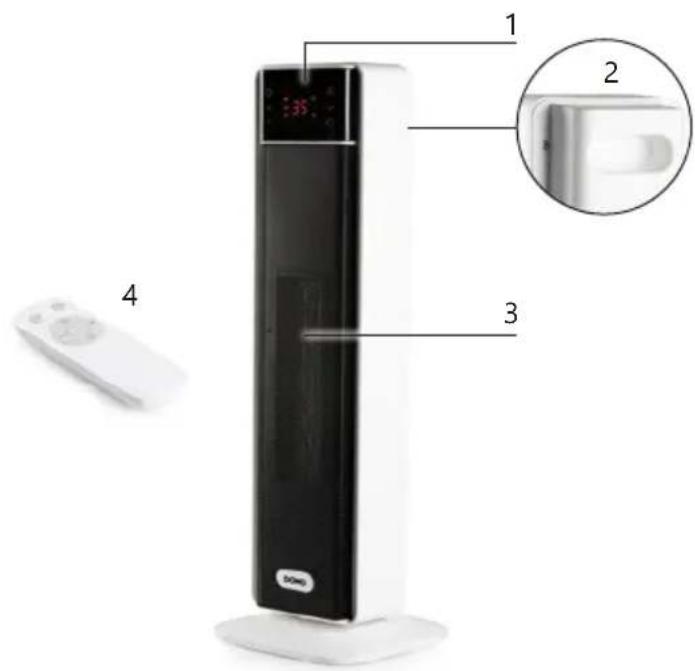
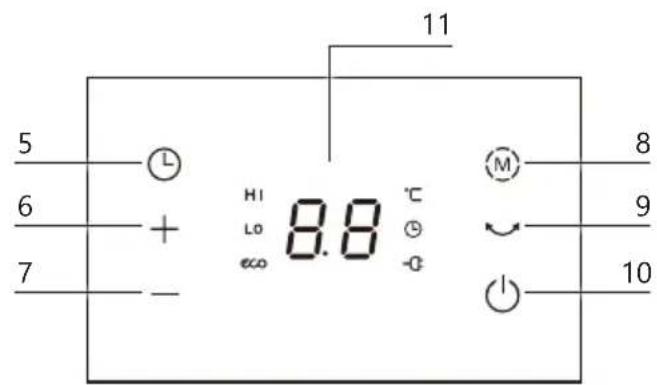
CONTROL
- Timer button
- Button to increase
- Button to decrease
- Function button
- Oscillation button
- On/off switch
- Display
- ECO button
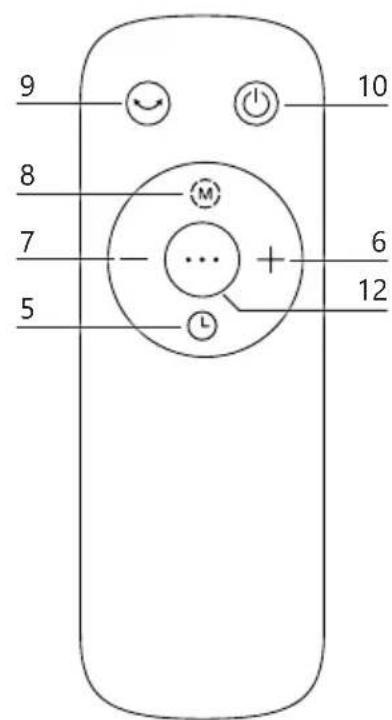
BEFORE THE FIRST USE
- Remove all packaging materials and any promotional stickers.
- When the appliance is switched on for the first time, a slight smell may be emitted. Please ensure sufficient ventilation. This smell will disappear very quickly.
⚠ The heater should only be operated at a minimum distance of 30 cm from any wall or other object that could disturb its operation.
⚠️ Position the air flow in order to optimise the heating of the room. Avoid corners, small volumes, floors and ceilings.
⚠️Place the appliance on a smooth, stable surface. ⚠️Do not cover the appliance.
REMOTE CONTROL
Before using the device with remote control, you must first insert 2x AAA batteries (1.5 V) into the remote control. These are included. The remote control has a range of 5 meters.

natural_image
Diagram of three electronic components: a battery, two batteries with positive and negative charges, and a partially open device (no text or symbols)USE
Before you use the appliance: plug in the appliance and turn on the on/off switch at the back of the device. The display displays the symbol and emits an audible signal to indicate that the device is in standby mode. You can set the appliance using the control panel, but also using the remote control. You can make the settings in the same way. The display will show you the selected settings. Each time a button is pressed, the device emits an audible signal to indicate that the user is making a setting or adjustment.
ON/OFF SWITCH

Push the on/off switch to turn on or off the appliance. If you switch off the device, the display will count down from 15 to 0 in order to cool itself down.
FUNCTION BUTTON

Cycle through the different heating modes by pressing the function button:
- HI (high): high power (2000 W): the device is now operating at its highest power setting.
- LO (low): low power (1200 W): the device is now operating at its lowest power setting.
- ECO: the symbol appears on the display. You can set the temperature between 5-35 °C as desired using the buttons to increase and to decrease. You can also keep this button pressed until you reach the desired setting. If the ambient temperature is 2 °C higher than the set temperature, the device switches to standby mode. If the temperature falls back below the set temperature, the eco function switches on again. This is the most energy-efficient way to maintain the temperature.
- CO (cool): the appliance blows cold air and can also be used as a fan with this function.
The device remembers the last setting made. This means that when you switch the device on again, the last setting appears on the display.
TIMER

- Push this button to set the timer. The symbol appears on the display.
- You can set this between 1-24 hours using the buttons to increase and to decrease. You can also press and hold this button until you reach the desired setting.
- When the selected time has been expired, the appliance will enter the stand-by mode and will no longer emit heat.
- In addition to the automatic switch-off, the appliance also has an automatic switch-on function. If the device is in standby mode, you can set the timer. After the set time has elapsed, the device switches itself on automatically and will operate at the last settings that were used.
- You can also deactivate the set timer again by pressing and holding the timer button on the appliance.
OSCILLATION

Press the oscillation button to allow the heater to oscillate the air from left to right and vice versa. Press this button again to stop this. If you switch the device off with the on/off button, this function stops even if you have not pressed the oscillation button.
DISPLAY
If you do not change any of the settings within a minute, the control panel will dim and go into sleep mode. Press any button on the device to take the appliance out of sleep mode. You can also disable automatic dimming. If the heater is on, press and hold the increase and decrease buttons on the appliance simultaneously for 3 seconds. If you still want the display to turn off afterwards, press and hold the buttons again for 3 seconds.
SAFETY DEVICES
- This heater is protected with an overheat protection that switches off the heater automatically in case of overheat, e.g. due to the total or partial obstruction of the grids. The overheating shut-off switches off the temperature inside when the appliance exceeds the normal running temperature. The heating element will automatically stop working, the motor will continue to operate, the internal heat shed. This protective device applies only to the appliance itself and has no influence on room temperature regulation. In this case, unplug the appliance, wait about 10 minutes for it to cool and remove the object that is obstructing the grids. Then switch it back on as described above. The appliance should operate normally. Should the problem persist, please contact the nearest customer service.
• The heater switches off automatically after 12 hours of continuous operation.
- The appliance is also equipped with a tip-over safety, which is integrated in the appliance. The appliance will turn off when it tips over.
CLEANING AND MAINTENANCE
- Before cleaning the appliance, ensure it is disconnected from the power supply and has cooled down completely.
- To avoid the risk of electric shock, do not clean the heater with water and do not immerse it. Clean the housing with a damp cloth.
- If necessary, dust particles accumulated in the air outlet openings may be removed with a vacuum cleaner. This maintenance should be done regularly to assure the good operation of the appliance. Dust particles in the appliance may cause overheating.
- Store the appliance in a clean and dry place.
⚠️Do not immerse unit, cord, or plug in water or other liquid.
⚠️ Never use aggressive or abrasive cleaning agents.
ERRORS
| ERRORS PROBLEMS SOLUTIONS | ||
| E1 or E2 There is a | fault or failure in the temperature sensor. The buttons on the control panel are disabled. | Contact customer service at the point of purchase or at DOMO. |
| FF The ambient tem | temperature is too high, you cannot make changes to any settings on the device. | Switch off the device and place it in a cooler room. |
| P4 The device is equipped with tilt protection. The device will turn off when it falls over. The buttons on the control panel are disabled | Place the device on a flat, stable surface to enable it again. | |
PROBLEMS AND SOLUTIONS
| PROBLEMS SOLUTIONS | |
| Nothing appears on the display. • Check that the plug is placed in a working socket. | |
| The appliance does not heat up. • Is the room temperature higher than the set temperature?• Was the right heating mode selected?• The device may have overheated. Let it cool down for at least 30 minutes by switching it off and try again. Check that the grille at the top is free of obstacles (such as curtains, clothes, etc.) that block the heat outlet. | |
SPECIFICATIONS
| Model designation(s): DO7358H | |
| Contact details Linea | 2000 BV - Dompel 9 - 2200 Herentals - Belgium |
| Article | Symbol | Value | Unit | Article | Unit |
| Heat output | Type of heat output/room temperature control (select one) | ||||
| Nominal heat output | P nom | 1.955 | kW | Single-stage heat output and no room temperature control | [No] |
| Minimum heat output (indicative) | P min | 1.073 | kW | Two or more manual stages, no room temperature control | [No] |
| Maximum continuous heat output | P max | 1.955 | kW | With mechanical thermostat room temperature control | [No] |
| Article Symbol Value | Unit Article | Unit | |||
| Power consumption With electronic temperature | control | [Yes] | |||
| In off mode P o N/A W | Electronic room temperature | control plus day timer | [No] | ||
| In stand-by mode P sm | 0.48 W Electronic room temperature | control plus week timer | [No] | ||
| In idle mode | P idle | 0.49 | W | Other control options (multiple selections possible) | |
| In network standby | P nsm | N/A W Room temperature | with presence detection | [No] | |
| Standby mode with display of information or status | [No] | Room temperature control with open room detection | [No] | ||
| Seasonal energy efficiency for space heating in active mode | η s,on | 91.0 | % | Distance control option | [No] |
| Adaptive start control | [No] | ||||
| Working time limitation | [No] | ||||
| Black bulb sensor | [No] | ||||
| Self-learning functionality [No] | |||||
| Control accuracy | [No] | ||||
GUIDELINES
natural_image
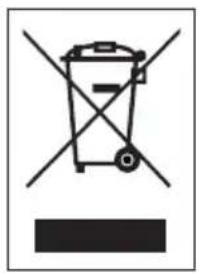
Symbol of a trash bin crossed with two crossed lines, no text or numbers presentThis symbol on the product or on its packaging indicates that this product may not be treated as household waste. Instead it must be brought to the applicable collection point for recycling of electrical and electronic equipment. By ensuring this product is disposed of correctly, you will help prevent potential negative consequences for the environment and human health, which could otherwise be caused by inappropriate waste handling of this product. For more detailed information about recycling of this product, please contact your local city office, your household waste disposal service or the shop where you purchased the product.
The packaging is recyclable. Please treat the packaging ecologically.
REMOVABLE BATTERY
The appliance is battery-operated, and the battery must not be disposed of with household waste, even after use. You can take the appliance to a collection point for discarded electrical appliances (Recupel) in your neighbourhood (container park, specialist shop, etc.). Batteries contain substances that are dangerous to human health and to the environment.
Remove the battery from the appliance before disposal as described in this manual. Recycle the battery in accordance with local laws and regulations. Never pierce the battery or expose it to high temperatures; this may cause the battery to explode.
This appliance conforms to all European requirements in the areas of safety, health, and environmental protection.
The EU declaration concerning this appliance can be requested at any time from info@linea2000.be
GARANTIA
Estimado cliente,
natural_image
Diagram of three electronic components: a battery, two batteries with positive and negative charges, and a cylindrical device (no text or symbols)USO
natural_image
Diagram of three electronic components: a battery, two batteries, and a partially open device (no text or symbols)UTILIZZO
natural_image
Symbol of a trash bin with crossed lines indicating no waste or discharge (no text or labels)natural_image
Diagram of a battery pack showing three components: anode, two batteries, and a partially open casing (no text or symbols)POUŽITÍ
natural_image
Symbol of a trash bin crossed with two crossed lines and a solid black rectangle below (no text or labels)natural_image
Diagram of a battery pack showing anode, two batteries, and a partially open rear panel (no text or symbols)POUŽITIE
natural_image
Symbol of a trash bin with crossed lines indicating no waste or discharge, and a solid black bar below (no text or numbers present)natural_image
Symbol of a trash bin crossed out by two crossed lines, representing no waste or discharge (no text or labels)VYBERATEL'NÉ/VYMENITEL'NÉ BATÉRIE
Looking for extra accessories or you have a broken piece?
ORDER the original DOMO accessories and parts on our webshop.
Webshop

natural_image
Stack of sheets of paper with a circular inset showing a small object, no visible text or symbols
natural_image
Two white plastic electrical connectors with mounting holes (no text or symbols visible)
natural_image
White cylindrical container with black interior, no visible text or symbols
natural_image
Clear glass coffee maker with black handle and lid (no text or symbols visible)
- ⚠PRODUCTSPECIFIEKE WAARSCHUWINGEN
- GEBRUIK
- ⚠️ AVERTISSEMENTS SPÉCIFIQUES AU PRODUIT
- UTILISATION
- GEBRAUCH
- SAFETY INSTRUCTIONS
- ⚠️ELECTRICAL WARNINGS
- ⚠️INSTALLATION
- ⚠ USE
- ⚠ CLEANING AND MAINTENANCE
- ⚠️PRODUCTSPECIFIC WARNINGS
- SAVE THESE INSTRUCTIONS FOR FUTURE REFERENCE
- PARTS
- CONTROL
- BEFORE THE FIRST USE
- REMOTE CONTROL
- USE
- ON/OFF SWITCH
- FUNCTION BUTTON
- TIMER
- OSCILLATION
- DISPLAY
- SAFETY DEVICES
- CLEANING AND MAINTENANCE
- GUIDELINES
- REMOVABLE BATTERY
- GARANTIA
- USO
- UTILIZZO
- POUŽITÍ
- POUŽITIE
- VYBERATEL'NÉ/VYMENITEL'NÉ BATÉRIE
Brand : DOMO
Model : DO7358H
Category : Heating