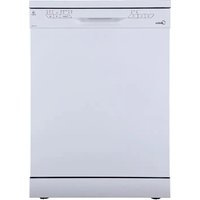
SF 3.60NW PRO - Dishwasher MIDEA - Free user manual and instructions
Find the device manual for free SF 3.60NW PRO MIDEA in PDF.


| Product type | Built-in or freestanding dishwasher |
| Brand | Midea |
| Model | SF 3.60NW PRO |
| Rated capacity | 14 place settings |
| Dimensions (H x W x D) | 84.5 x 59.8 x 60 cm (door closed) |
| Depth with door open at 90° | 117.5 cm |
| Energy class | E (EEI 44.9) |
| Energy consumption (Eco cycle) | 0.951 kWh |
| Water consumption (Eco cycle) | 11 L |
| Eco program duration | 3h40 |
| Noise level | 47 dB(A) - Class C |
| Wash programs | Intensive, Normal, Eco, 90 min, Rapid |
| Additional functions | Half-load, Delay start (3/6/9h), Wi-Fi (MSmartLife) |
| Power supply | 220-240 V ~ 50/60 Hz, 10/13/16 A |
| Water pressure | 0.04 - 1 MPa |
| Connectivity | Wi-Fi 2.4/5 GHz, Bluetooth LE |
| Water softener | Yes, adjustable (H1 to H6) |
| Safety | Grounding, door lock, frost protection |
| Maintenance | Clean filters, spray arms and seals |
| Warranty | 24 months |
Frequently Asked Questions - SF 3.60NW PRO MIDEA
User questions about SF 3.60NW PRO MIDEA
0 question about this device. Answer the ones you know or ask your own.
Ask a new question about this device
Download the instructions for your Dishwasher in PDF format for free! Find your manual SF 3.60NW PRO - MIDEA and take your electronic device back in hand. On this page are published all the documents necessary for the use of your device. SF 3.60NW PRO by MIDEA.
USER MANUAL SF 3.60NW PRO MIDEA
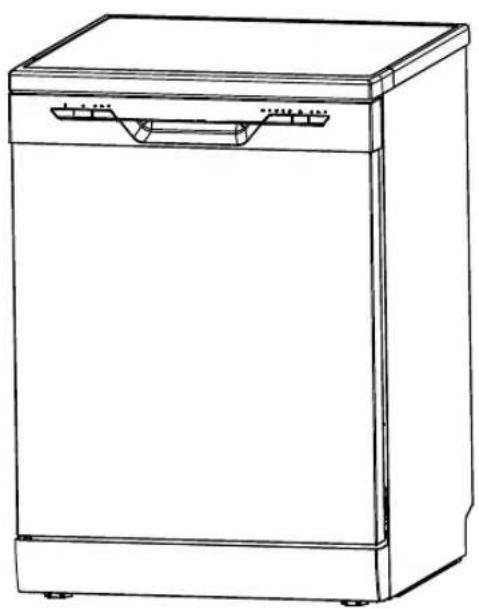
natural_image
Line drawing of a single kitchen appliance with a handle and side panel (no text or symbols)flowchart
graph LR
    A["SALT"] --> B["Innen"]
    B --> C["Außen"]
    C --> D["Water washing machine with dust removal"]
flowchart
graph LR
    A["Hand holding a cup with a lid"] --> B["Person pouring liquid into a container"]
    B --> C["Add salt to a salt container"]
    C --> D["Transfer to a salt container"]
    D --> E["Final hand holding a cup with a lid"]
natural_image
Technical line drawing of a mechanical component with no visible text or symbolsnatural_image
Pure diagram of vertical slanted panels arranged in a grid pattern (no text or symbols)natural_image
Line drawing of a shopping cart with wheels and an arrow indicating direction (no text or symbols)natural_image
Line drawing of a car chassis with wheels and a directional arrow, no text or symbols presentnatural_image
Diagram showing a structural assembly before and after rotation, with no visible text or symbolsnatural_image
Diagram of a device with a lid, fan, and smokestack emitting smoke (no text or symbols)flowchart
graph LR
    A["Preoperative Mode"] --> B["Nach 5 Sekunden"]
    B --> C["Ordering with Barrel"]
    C --> D["Product with Down Arrow"]
    D --> E["Product with Shoe Icon"]
WARNUNG

natural_image
Illustration of a hand cleaning a car with a spray gun, no text or symbols presentnatural_image
Diagram of a device interior with internal components and a magnified view showing a component (no text or symbols)natural_image
Technical illustration of an airplane fuselage with internal components and a magnified inset showing the engine (no text or symbols present)natural_image
Illustration of a hand using a tool to adjust or install a small mechanical component on a tray (no text or symbols visible)natural_image
Illustration of a hand using a spray gun to clean air from a kitchen sink (no text or symbols)natural_image
Line drawing of a faucet with a valve handle (no text or symbols)natural_image
Line drawing of a minimalist office space with a bench, chair, and wall grid (no text or symbols)| ☐☐☐☐☐☐☐☐☐☐☐☐☐☐☐☐☐☐☐☐☐☐☐☐☐☐☐☐☐☐☐☐☐☐☐☐☐☐☐☐☐☐☐☐☐☐☐☐☐☐☐☐☐☐☐☐☐☐☐☐☐☐☐☐☐☐☐☐☐☐☐☐☐☐☐☐☐☐☐☐☐☐☐☐☐☐☐☐☐☐☐☐☐☐☐☐☐☐☐☐ ☐☐☐☐☐☐☐☐☐☐☐☐☐☐☐☐☐☐☐☐☐☐☐☐☐☐☐☐☐☐☐☐☐☐☐☐☐☐☐☐☐☐☐☐☐☐☐☐☐☐☐☐☐☐☐☐☐☐☐☐☐☐☐☐☐☐☐☐☐☐☐☐☐☐☐☐☐☐☐☐☐☐☐☐☐☐☐☐☐☐☐☐☐☐☐☐☐☐☐☐☑☐☐☐☐☐☐☐☐☐☐☐☐☐☐☐☐☐☐☐☐☐☐☐☐☐☐☐☐☐☐☐☐☐☐☐☐☐☐☐☐☐☐☐☐☐☐☐☐☐☐☐☐☐☐☐☐☐☐☐☐☐☐☐☐☐☐☐☐☐☐☐☐☐☐☐☐☐☐☐☐☐☐☐☐☐☐☐☐☐☐☐☐☐☐☐☐☐☐☐☒☐☐☐☐☐☐☐☐☐☐☐☐☐☐☐☐☐☐☐☐☐☐☐☐☐☐☐☐☐☐☐☐☐☐☐☐☐☐☐☐☐☐☐☐☐☐☐☐☐☐☐☐☐☐☐☐☐☐☐☐☐☐☐☐☐☐☐☐☐☐☐☐☐☐☐☐☐☐☐☐☐☐☐☐☐☐☐☐☐☐☐☐☐☐☐☐☐☐☐ |
WARNUNG
RED Declaration of Conformity (DoC)
We,
Midea Europe GmbH
Ludwig-Erhard-Str.14, 65760 Eschborn, Germany
Declare under our sole responsibility that the product:
Product name: Dishwasher
Trade name: Midea
Type or model: SF 3.60NW PRO
Relevant supplementary information:
To which this declaration relates is in conformity with the essential requirements and other relevant requirements of the RE Directive (2014/53/EU).
The product is in conformity with the following standards and/or other normative documents:
HEALTH & SAFETY (Art. 3(1)(a)):
EN 62311:2008, EN 50665:2017,
EN 60335-2-5:2015, EN 60335-1:2012/A2:2019,
EN 62233:2008
EMC (Art. 3(1)(b)): ETSI EN 301 489-17 V3.2.4 (2020-09),
ETSI EN 301 489-1 V2.2.3 (2019-11), EN 55014-1:2017, EN 55014-2:2015,
EN IEC 61000-3-2:2019, EN 61000-3-3:2013/A1:2019
SPECTRUM (Art. 3(2)): ETSI EN 300 328 V2.2.2 (2019-07)
OTHER (incl. Art. 3(3) and voluntary specs):
Limitation of validity (if any):
Supplementary information:
Notified body involved:....
Technical file held by:. Foshan Shunde Midea Washing Appliances Mfg. Co., Ltd.
Place and date of issue (of this DoC): .Foshan/2020-12-25....
Signed by or for the manufacturer:
(Signature of authorised person)
Name (in print):......Ke Ningsheng......
Title: Product Engineer
We congratulate you to your new device and are convinced that you will be sased and have your joy with this modern appliance.
However, if you recognize a reason for a complaint, please contact us:
Midea Europe GmbH
Phone: +49 6196-90 20 - 0
In case of service:
Homepage: www.Email.com/de
service-meg@midea.com
In case of a technical fault, enter your exact address, telephone number, sales contract number and Device type (from the type plate of the device).
A precise fault description saves you time and money. For special questions, please contact the customer service center.
Before calling for service:
Please check whether there is an operating error or a cause that has nothing to do with the function of your device.
Please observe the note in the user manual and check whether:
- The power plug is connected
- The power plug may be damaged
- Electricity is available
Warranty terms
This device has been manufactured and tested according to the most modern methods. The seller warrants for faultless material and proper manufacture for a period of 24 months from the date of sale to the end user. The unit is not suitable for commercial use.
The claim under guarantee lapses in the event of intervention by the Buyer or by a third party. Damage caused as a result of improper handling or operation, incorrect installation or storage, improper connection or installation as well as an act [...] of God or other external factors shall not be covered by this warranty.
When claims are submitted, the manufacturer reserves the right to make improvements to defective parts or to replace or exchange the device.
Only if it is not possible to achieve the intended use of the device by repairing or replacing the device, the buyer can demand a reduction of the purchase price or the cancellation of the purchase contract within 6 months from the date of purchase.
Claims for damages, including consequential damages, are excluded unless they are based on intent or gross negligence.
The guarantee claim exists only with submission of the product and the purchase receipt. This warranty is valid within Germany.
Importer by:
Midea Europe GmbH
65760 Eschborn Germany
Dishwasher
Free Standing
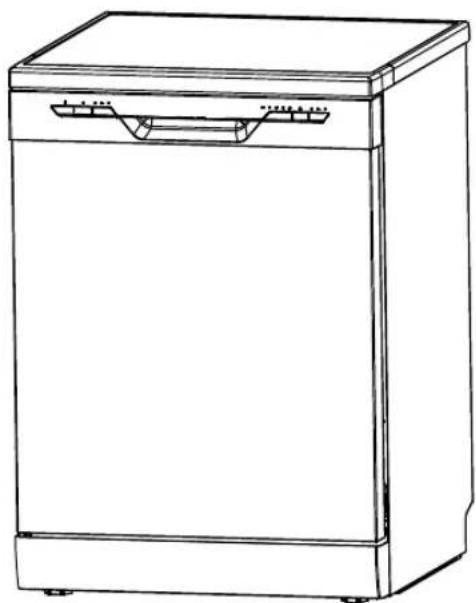
User Manual
natural_image
Line drawing of a single kitchen appliance with front panel and side door (no text or symbols)Use Your Appliance with the MSmartLife App
Before you start, make sure that:
- Your smartphone is connected to home wifi network, and you know the network password.
- Make sure you are next to home appliances.
- The 2.4GHz (preferable) or 5GHz band wireless signal is enabled on your wireless router.
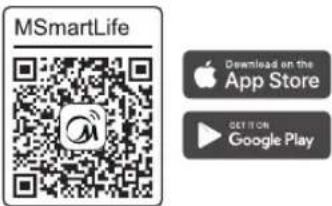
1 Download MSmartLife App
Scan the QR code below, or search for "MSmartLife" in Google play(Android devices) or App Store(ios devices) to download the app.
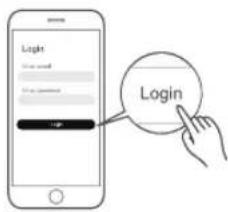
2 Register or Login account
Open the App and create a user account, if you already have one, just login in.
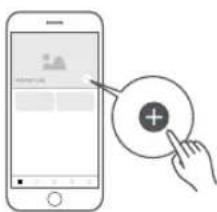
3 Add your appliance
Tap the "+"icon to add home appliance to your MsmartLife account.
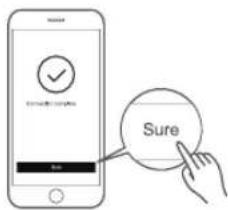
4 Connected to the network
Follow the instructions in the app to set up the WiFi connection. If the network connection fails, please refer to the App tips for operation.
WiFi Status Light
| Slowly flashing | Waiting for connection | |
| Quickly Flashing | Connecting | |
| Steadily display | Connected to your wireless router |
△ Notes on networking
- When networking the product, please make sure that the mobile phone is as close as possible to the product.
- According to the App tips, if the product only supports 2.4GHz wifi communication, please note that the 2.4GHz network is selected for connection.
- Midea recommends WiFi router SSID names contain only alphanumeric values. If special characters, punctuation marks or spaces are used it might prevent the SSID name from showing up in the available networks to join in the App. Try it and if the SSID shows up then it is ok to use, otherwise log into the router and change the SSID name.
• A large number of devices on the WiFi router can affect network stability. - If the router or WiFi name and WiFi password change, please repeat the above process to reconnect to the network.
• As the product technology is updated, the content of MSmartLife may change, and the actual display in MSmartLifeApp shall prevail.
MSmartLife App Troubleshooting
Troubleshooting tips for Midea Smart Appliances. These tips are written for products which contain a dual-band radio cable of working on either 2.4GHz or 5GHz WiFi networks. These instructions do not apply to Midea products which only have 2.4GHz radio.
Since networking technology is rapidly evolving, Midea recommends checking the MSmartLife app "Help" section for updated troubleshooting tips and recommendations.
Background :
Offering dual-band support provides choices and maximum flexibility of the product to have successful experience on home network. Home networks can be expected to have multiple WiFi service possibilities, depending on how their router is configured. There are four WiFi router configuration modes: A, B, C and D.
A. 2.4GHz only ... e.g. older model WiFi router
- In this case dual band radio will automatically operate at 2.4GHz
B. 5GHz only ... some people may choose to turn off older 2.4GHz band due to conflicting interference
- In this case dual band radio will automatically operate at 5GHz
C. 2.4GHz and 5GHz sharing same SSID name ... e.g. JohnsWiFi
- In this case the WiFi router and dual-band radio will negotiate the best frequency to use
D. 2.4GHz and 5GHz with different SSID names ... e.g. JohnsWiFi_2G and JohnsWiFi_5G
- In only this case is there a choice which WiFi band to use.
Having a dual band radio in the appliance means it is not necessary to change routers or router configuration unless problems are experienced, in which case knowing what WiFi router configuration you have (see above A, B, C or D) is important to know and understand.
2.4GHz vs. 5GHz :
There are differing philosophies about which is better for IoT (Internet of Things) devices to use. One philosophy is to use 5GHz band for high bandwidth needs such as streaming audio/video and use 2.4GHz for IoT (Internet of Things) devices. According to radio wave theory, 2.4GHz should be able to penetrate through walls and objects better than 5GHz. Although 5GHz can support higher bandwidths than 2.4GHz, IoT devices don't need high bandwidth.
But there are other compelling reasons to use 5GHz even for IoT devices. The 2.4GHz space is more crowded with non-WiFi interference sources such as microwave ovens, cordless phones, wireless keyboards/mice, and other wireless devices (e.g. Bluetooth, Zigbee, etc.). Furthermore, 5GHz is much newer technology and is more likely to operate robustly and offer advanced features such as beamforming.
The bottom line is that there is no way that Midea can recommend which band will operate best in your particular installation. By offering our appliances with a dual-band radio, it increases the likelihood of successful, robust connections in more installations without requiring changes to router configuration, or requiring a router upgrade. However, it is possible that in some situations that router changes will be required.
Troubleshooting Problems :
If unable to join network the first time
- Cannot see home SSID network :
- Weak signal ... Since appliance radio is dual-band this means neither 2.4GHz nor 5GHz signal is being received by the appliance. Long distance between router and appliance or encountering too many barriers can reduce the signal level too much. Reorienting the router may improve the situation slightly. A better solution would be a WiFi repeater or a higher quality router. Recognize that all WiFi routers transmit power is limited by federal regulations, but a higher quality router can do a better job of transmitting the signal equally in all directions, have more sensitive receivers to better handle weak signals, and have higher quality software to minimize the dropping of connections.
• SSID network seen but cannot join :
- Networks requiring authentication ...often used with public networks at restaurants or hotels. Products cannot accept the legal agreement required to join the network. Please switch to a network that does not require authentication.
- Insufficient encryption ... for cybersecurity reasons Midea does not recommend products to join non-encrypted or insufficiently encrypted networks (e.g. WEP encryption).
- Password length ... for cybersecurity reasons Midea recommends networks to have strong passwords, but the maximum password length supported is 32 characters
- Incorrect password ... If trying to join a different network than the one the phone is currently using, then it is always possible that the network password in the phone is no longer correct. In this case, new credentials will need to be provided.
- Illegal SSID name ... Midea MSmartLife App accepts any SSID name, but the App may issue warning when attempting to join network with certain non-alphanumeric or foreign language characters.
- WLAN+ (Android) or WLAN Assistant (IOS) functions is turned on, please turn off and reconnect to the Internet.
If can join network but the connection is unstable
For WiFi configuration modes A, B and C, follow the instructions provided by your router manufacturer to make the indicated router configuration changes :
- In case of router configuration A (see above), Midea recommends enabling 5GHz band if it is disabled in your router and choosing a distinct SSID name for the 5GHz band (e.g. SSIDname_5G). Then follow the normal joining instructions to join the 5GHz network. If your router is an older 2.4GHz only router, Midea recommends upgrading to a newer dual-band router.
- In case of router configuration B (see above), Midea recommends enabling 2.4GHz band (all routers that offer 5GHz also support 2.4GHz), and choose a distinct SSID name for the 2.4GHz band (e.g. SSIDname_2G). Then follow the normal joining instructions to join the 2.4GHz network.
- In case of router configuration C (see above), Midea recommends assigning distinct SSID names for the 2.4GHz and 5GHz bands. Then follow the normal joining instructions to one of the networks, and subsequently follow the troubleshooting instructions for WiFi mode D.
For these steps router configuration changes are not required:
- In case of router configuration D (see above), then it is worthwhile to try operation on the other band before making changes to the router configuration or upgrading the router. In other words, if unstable connection using 2.4GHz then try 5GHz instead. Or if unstable connection using 5GHz then try 2.4GHz instead. Follow the instructions below "How to set the network to 2.4GHz or 5GHz."
- WLAN+ (Android) or WLAN Assistant (IOS) functions are turned on, please turn off and reconnect to the Internet.
Hereby, Foshan Shunde Midea Washing Appliances Mfg. Co., Ltd., declares that this dishwasher is in compliance with the essential requirements and other relevant provisions of RE Directive 2014/53/EU. A copy of the full DoC is attached.
Operating frequency of product :
| RF | Transmit frequency | Maximum transmit power |
| BLE | 2402-2480MHz | <10dBm |
| 2.4G WiFi | 2412-2472MHz | <20dBm |
| 5G WiFi | 5180-5240MHz | <20dBm |
| 5260-5320MHz |
Note: The product is suitable to operating in the environment of 4\~40°C
TABLE OF CONTENTS
3. SAFETY INFORMATION
6. PRODUCT OVERVIEW
7. USING YOUR DISHWASHER
- Filling salt into the water softener
- Water softener
- Preparing and loading dishes
13. Loading the basket
- Tips for using the basket
- Function of rinse aid and detergent
- Filling the rinse aid container
- Filling the dosing unit
20. USING YOUR DISHWASHER
- Operating panel
22. PROGRAMMING THE DISHWASHER
- Overview of wash cycles
- Starting a wash cycle
- Changing the program during the wash cycle
- Forgotten item
25. MAINTENANCE AND CLEANING
- External care
- Internal care
- Dishwasher care
29. INSTALLATION INSTRUCTIONS
- Information on the power connection
- Water supply and drainage
-
Connecting the drain hoses
-
Setting up the appliance
- Installation
35. TROUBLESHOOTING TIPS
39. ERROR CODES
40. TECHNICAL INFORMATION
- Product information sheet
WARNING
When you use your dishwasher, follow the precautions listed below:
- Installation and repair work may only be carried out by a qualified technician.
- This appliance is designed for household use and similar applications, such as:
• staff kitchens in shops, offices and other working environments
- farmhouses
• from customers in hotels, motels and other home-like environments
• bed & breakfasts
- This appliance can be used by children 8 years of age or older and persons with restricted physical, sensory or intellectual capabilities or a lack of experience and knowledge, if they are observed by a responsible person or if they have received instructions on how to use the appliance safely, and understand the associated hazards.
- Children may not play with the appliance. Children may only clean and maintain this appliance under supervision. (for EN60335-1)
- This appliance must not be used by persons (including children) with reduced physical, sensory or intellectual capabilities or a lack of experience and knowledge, unless they are supervised or have received instruction in the safe use of the appliance and understand the associated hazards. (for IEC60335-1)
- The packaging material may be dangerous for children!
• This appliance is solely intended for indoor use.
To protect yourself from the risk of electric shock, do not immerse the appliance, cord or plug in water or other liquids. Unplug the appliance before cleaning and carrying out maintenance work on the appliance.
- Use a soft moistened cloth with mild soap and then wipe off the appliance with a dry cloth.
Earthing instructions
- This appliance must be earthed. In the event of a malfunction or fault, earthing reduces the risk of electric shock by providing the path of least resistance to the electric current. This appliance is equipped with an earthing plug.
- The plug must be plugged into an appropriate outlet that is installed and earthed in accordance with all local regulations and ordinances.
- There is a risk of electric shock if the earthing conductor is not connected properly.
- Consult a qualified electrician or service representative if you are in doubt as to whether the appliance is properly earthed.
- If the plug supplied with the appliance does not fit into the outlet, it must not be modified.
• In this case, have a qualified electrician install a suitable power outlet.
- Do not sit on the appliance or stand on the door or the dish basket.
- Only operate the dishwasher if all the panels of the housing are properly attached.
- Open the door very carefully when the dishwasher is in operation. Water could splash out.
- Do not place heavy items on the open door or stand on it. The appliance could tip forward.
- When loading items to be washed:
- Position sharp items so that they cannot damage the door seal.
- WARNING: Knives and other utensils with sharp points must be placed in the basket with their points pointing downwards or in a horizontal position.
- Some dishwashing detergents are strongly alkaline. They may be extremely harmful if swallowed. Avoid skin and eye contact and keep children away from the dishwasher when the door is open.
- Make sure that the detergent dispenser is empty when the wash cycle is complete.
- Only wash plastic items if they are marked as "dishwasher safe" or equivalent.
- If plastic items are not marked accordingly, check the manufacturer's recommendations.
- Use only detergent and rinse aid recommended for use in an automatic dishwasher.
- Never use soap, laundry detergent or hand laundry detergent in your dishwasher.
- The door should not be left open, as this could increase the risk of tripping. If the power cord is damaged, it must be replaced by the manufacturer or its customer service or a similarly qualified technician to avoid hazards.
- Do not excessively or dangerously twist or flatten the power cord during installation.
- Do not manipulate the operating elements.
- The appliance must be connected to the main water valve with new hose kits. Old kits should not be reused.
- To save energy, the appliance switches off automatically when in standby mode if it is not in operation for 15 minutes.
- A maximum of 13 place settings fit in the dishwasher.
- The maximum permissible water supply pressure is 1 MPa.
- The minimum permissible water supply pressure is 0.04 MPa.
Disposal
- To dispose of the packaging and the appliance, please contact a recycling centre. To do this, disconnect the power cord and render the door closing device unusable.
- Cardboard packaging is made from recycled paper and should be disposed of in the waste paper collection for recycling.
- When you ensure this appliance is disposed of properly, you help avoid potential damage to the environment and to human health that could occur if this product was disposed of improperly.
- For more detailed information about recycling this product, please contact your local city council or household garbage disposal company.
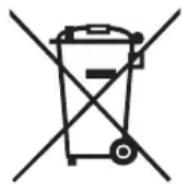
- DISPOSAL: Do not dispose of this product as unsorted municipal waste. Such waste must be collected separately, as it requires special treatment.

IMPORTANT NOTE
To get the best possible performance from your dishwasher, read the operating manual before using it for the first time.
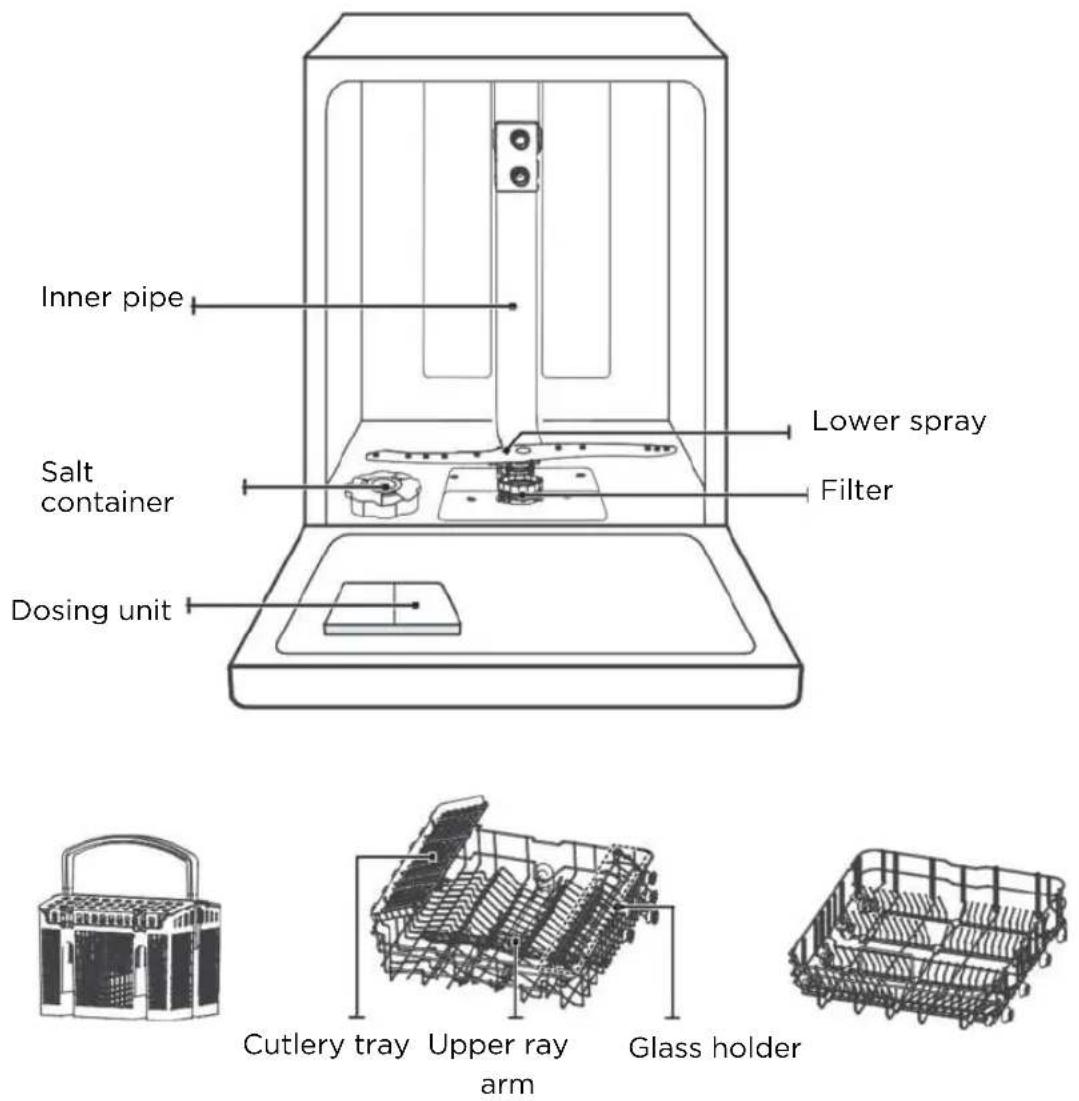
Cutlery basket Upper basket Lower basket
NOTE:
The images are for reference only. The actual situation may vary depending on the model. Please note this.
Before first use:
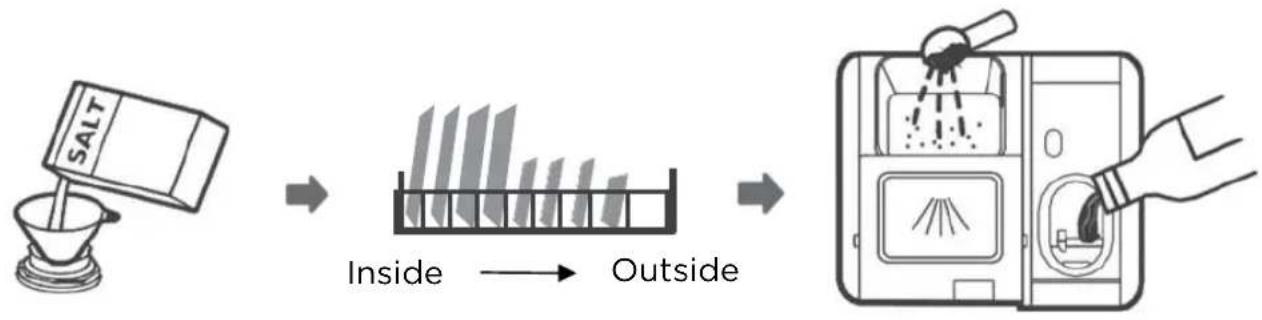
flowchart
graph LR
    A["SALT"] --> B["Inside"]
    B --> C["Outside"]
    C --> D[" Washing Machine"]
- Adjust water softener
- Add salt to water softener
- Load basket
- Fill dosing unit
Filling salt into the water softener
NOTE:
Only use salt that is suitable for use in the dishwasher.
The salt container is located under the lower basket and should be filled as follows:
WARNING
Only use salt that is suitable for use in dishwashers!
- Any other type of salt not specifically developed for use in dishwashers, especially table salt, will damage the water softener. The manufacturer does not provide any warranty for and assumes no liability for any damage resulting from the use of unsuitable salt.
Only fill the water softener with salt before you perform a wash cycle.
- This prevents any spilled salt or salt water from remaining on the bottom of the machine for a long time, which can lead to corrosion.
Follow the steps below to add dishwasher salt:
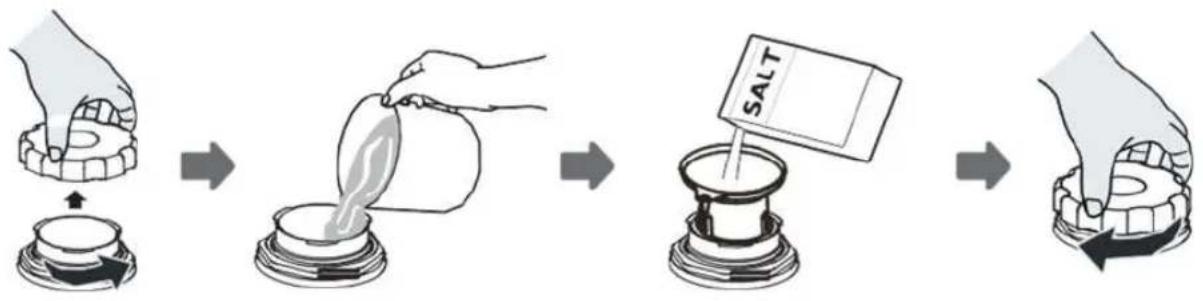
flowchart
graph LR
    A["Hand mixing bowl with salt"] --> B["Person pouring liquid into a container"]
    B --> C["Heated salt in a glass tube"]
    C --> D["Heated salt using salt, adding a drop"]
    D --> E["Heated salt in a container with salt"]
- Remove the lower basket and unscrew the container cap.
- Fill the salt container with water to the maximum. It is normal for a small amount of water to escape from the salt container.
- Insert the end of the funnel (supplied) into the hole and add about 0.8 kg of dishwasher salt.
- Screw the cap back on after filling the container.
- The salt warning light goes out once the salt container has been filled with salt.
- Immediately after filling the salt into the salt container, a wash program should be started (we recommend a short program). Otherwise, the filter system, pump or other important parts of the appliance may be damaged by the salt water. This is not covered by the warranty
NOTE:
- The salt container may only be refilled if the salt warning light ( ) in the operating panel is illuminated. Depending on how well the salt dissolves, the salt warning light may remain on even if the salt container is full.
If there is no salt warning light on the operating panel (on some models), you can estimate when to refill the salt in the softener based on the number of wash cycles the dishwasher has run. - If salt is spilled, run a soak or quick program to remove it.
The water softener must be adjusted manually using the water hardness control.
The water softener removes minerals and salts from the water that would affect the operation of the appliance.
The more minerals there are in your water, the harder it is.
The water softener should be adjusted according to the hardness of the water in your region. You can get the water hardness information from your local water authority.
Adjusting the salt consumption
The dishwasher is designed so that the amount of salt used can be adjusted according to the hardness of the water used. This is intended to allow the optimization and individual adjustment of the salt consumption.
Follow the following steps to adjust the salt consumption.
- Open the door and switch on the appliance.
- Press the program button for more than 5 seconds to start the water softener within 60 seconds of pressing the power button.
- Press the program button to select the correct water softener for your region. The water softeners change in the following order: H3->H4->H5->H6->H1->H2->H3;
- Wait 5 seconds or press the power button to complete the setting and exit the setting mode.
Water hardness
| Germany°dH | France°fH | England°Clarke | mmol/l | Water softener level | Salt consumption(grams/wash cycle) |
| 0-5 0-9 | 0-6 0-0.94 H1 | 0 | |||
| 6-11 10-2 | 0 7-14 1.0-2.0 H2 | 9 | |||
| 12-17 21-3 | 0 15-21 2.1-3.0 H3 12 | ||||
| 18-22 31- | 40 22-28 3.1-4.0 H4 | 20 | |||
| 23-34 41- | 60 29-42 4.1-6.0 H5 | 30 | |||
| 35-55 | 61-98 43-69 6.1-9.8 H6 | 60 |
$$ 1 ^ {\circ} \mathrm{dH} = 1. 2 5 ^ {\circ} \text { Clarke } = 1. 7 8 ^ {\circ} \mathrm{fH} = 0. 1 7 8 $$
$$ \text { mmol / I Factory setting: H3 } $$
You can get the water hardness information from your local water authority.
Water softener
Water hardness varies from place to place. If hard water is used in the dishwasher, deposits will form on the dishes and utensils.
The appliance is equipped with a special water softener with a salt container to remove lime and minerals from the water.
Preparing and loading dishes
- Consider buying utensils that are marked as dishwasher safe.
- For certain items, select a program with the lowest possible temperature.
- To prevent the thermal shock damage, do not unload glasses and cutlery from the dishwasher immediately after the end of the program.
Washing of certain cutlery/dishes
Unsuitable
• Cutlery with handles made of wood, horn or mother of pearl
• Plastic items that are not heat-resistant
- Older cutlery with glued parts that are not temperature resistant
• Glued cutlery or dishes
- Items made of tin or copper
- Crystal glass
- Stainless-steel items
- Wooden plates
- Items made of synthetic fibers
Suitable to limited extent
• Some types of glass may become dull after many washes
• Silver and aluminum parts tend to discolor during washing
- Glazed patterns may fade if they are frequently washed in the dishwasher
Recommendations for loading the dishwasher
Scrape off large quantities of leftover food. Soak pans with burnt food in water. It is not necessary to rinse the dishes under running water.
Follow the loading guidelines below to achieve the best dishwasher performance.
(The features and appearance of baskets and cutlery baskets may differ from your model).
Position items in the dishwasher as follows:
- Items such as cups, glasses, pots/pans etc. point downwards.
- Curved items or those with depressions should be placed at an angle so that the water can run off.
• All utensils are safely stacked and cannot tip over. - All utensils are placed so that the spray arms can rotate freely.
- Hollow items such as cups, glasses, pans, etc. have their openings pointing downwards so that no water can collect in the container or a deep bottom.
- Dishes and cutlery may not lie inside each other or cover each other. To prevent damage, glasses must not touch each other.
- The upper basket is intended for more delicate and lighter dishes, such as glasses, coffee cups and teacups.
- Knives with long blades that are stored upright are a potential danger!
- Long and/or sharp cutlery such as carving knives must be stored horizontally in the upper basket.
- Do not overload your dishwasher. This is important for good results and for reasonable energy consumption.
NOTE:
Very small items should not be washed in the dishwasher, as they could easily fall out of the basket.
Removing the dishes
To prevent water from dripping from the upper basket into the lower basket, you should empty the lower basket first and then the upper basket.
WARING

The items will be hot!
To prevent the thermal shock damage, do not unload glasses and cutlery from the dishwasher until about 15 minutes after the end of the program.

Do not let any items protrude through the bottom.
Always position sharp items with the sharp tip pointing downwards!
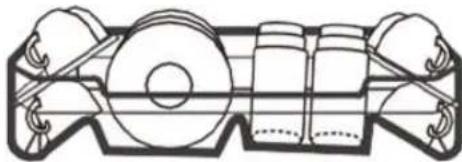
Loading the upper basket
The upper basket is designed to hold more delicate and lighter dishes, such as glasses, coffee cups, and teacups and saucers, as well as plates, bowls and shallow pans (if they are not too dirty). Position the dishes and cookware so that they are not moved by the water jet.
natural_image
Technical line drawing of a mechanical assembly with gears and shafts (no text or symbols)Loading the lower basket
We recommend placing large items and the items that are most difficult to clean, such as pots, pans, lids, serving dishes and bowls, in the lower basket, as shown in the figure below. Serving dishes and lids should be placed on their sides in the slots so that they do not block the rotation of the upper spray arm. The recommended maximum diameter for plates in front of the dosing unit is 19 cm, so as not to obstruct the opening of the dosing unit.
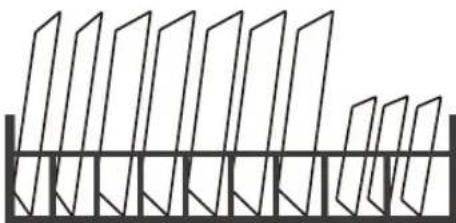
natural_image
Pure geometric diagram of vertical planes with diagonal lines, no text or symbols presentLoading the cutlery basket
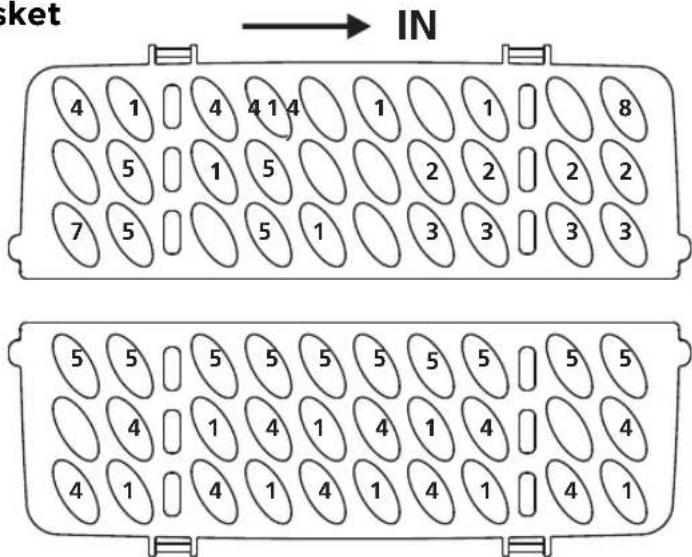
Cutlery should be placed individually at the appropriate places in the cutlery tray, and care should be taken not to nest the utensils together, as this may result in poor cleaning performance.
1. Upper basket
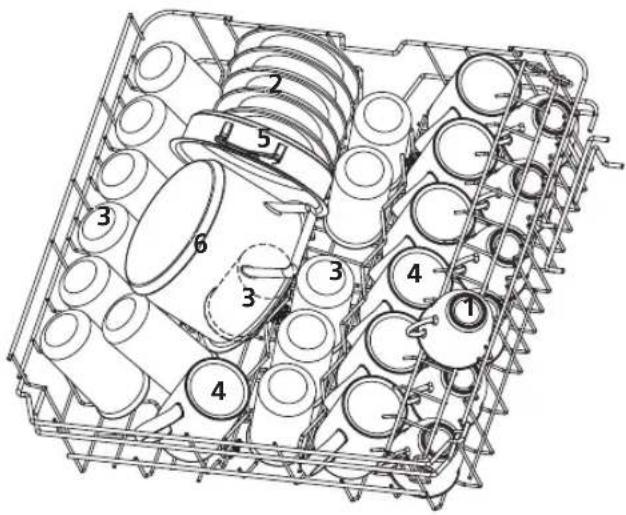
| Number | Item |
| 1 | Cups |
| 2 | Saucers |
| 3 | Glasses |
| 4 | Mugs |
| 5 | Oven pot |
| 6 | Small pot |
2. Lower basket
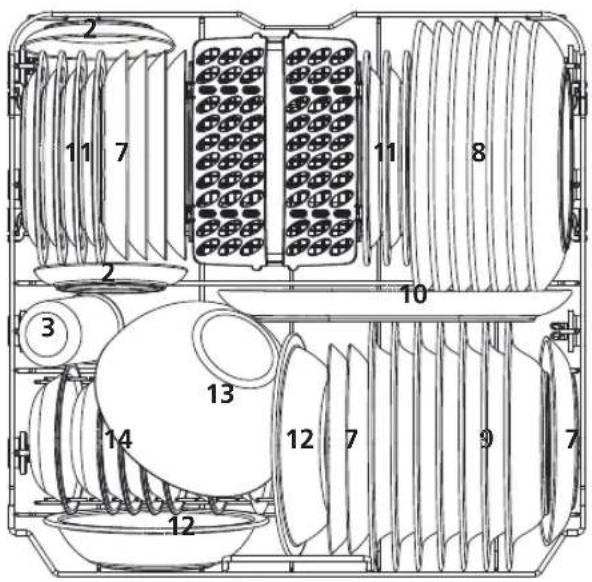
| Number | Item |
| 7 | Dessert plates |
| 8 | Dinner plates |
| 9 | Soup plates |
| 10 | Oval platter |
| 11 | Melamine dessert plates |
| 12 | Melamine bowls |
| 13 | Glass bowl |
| 14 | Dessert bowls |
| 15 | Cutlery basket |
3. Cutlery tray
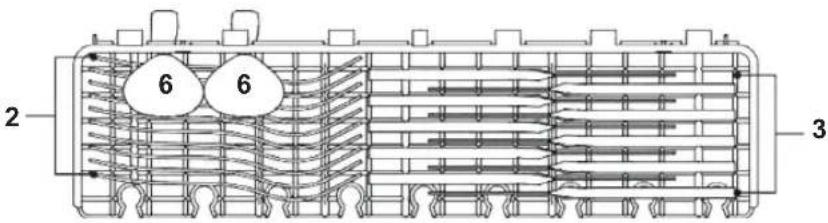
NOTE:
Place light, flat items in the compartment. The total weight must not exceed 1.5 kg.
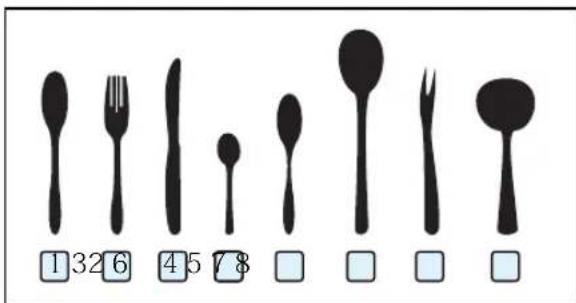
4. Cutlery basket
Information for comparability
tests in accordance with EN60436
Capacity: 14 place settings
Position of the upper basket: lower position
Program: ECO
Rinse aid setting: H5
Softener setting: H3
| Number | Item |
| 1 | Soup spoons |
| 2 | Forks |
| 3 | Knives |
| 4 | Tea spoons |
| 5 | Dessert spoons |
| 6 | Serving spoons |
| 7 | Serving fork |
| 8 | Gravy ladle |
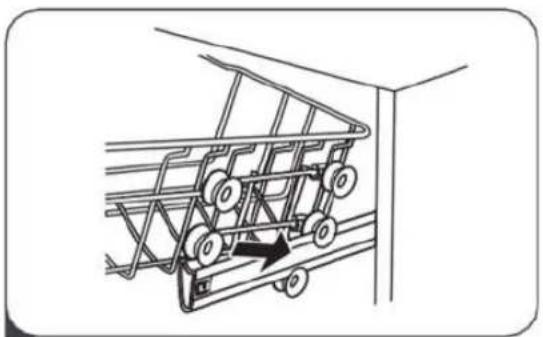
ADJUSTING THE UPPER BASKET
The height of the upper basket can be easily adjusted to accommodate taller containers in the upper or lower basket.
Proceed as follows to adjust the height of the upper basket:
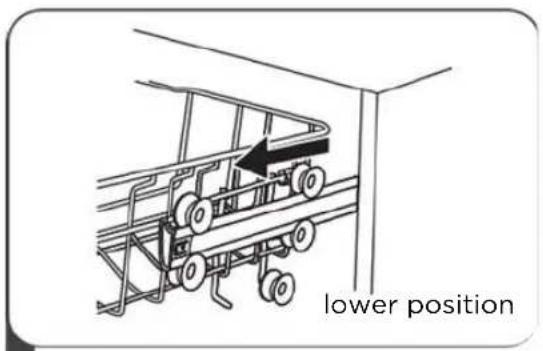
1 Pull out the upper basket.
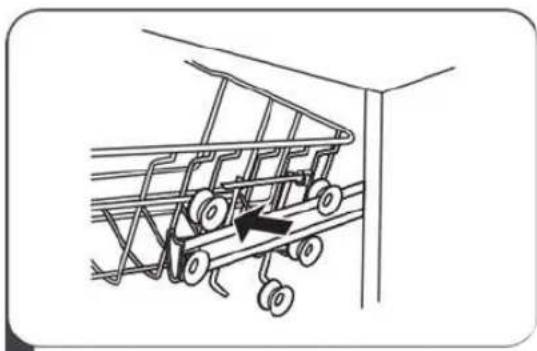
natural_image
Line drawing of a shopping cart with wheels and an arrow indicating motion (no text or symbols)2 Remove the upper basket.
natural_image
Line drawing of a car chassis with wheels and a directional arrow indicating motion (no text or symbols)3 Place the upper basket back on the upper or lower rollers.
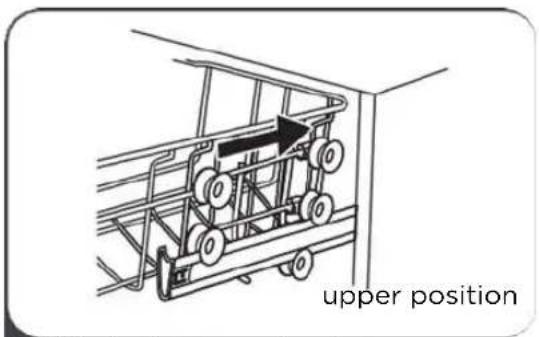
4 Slide in the upper basket.
Folding back the glass holder
Fold the glass holder upwards to make room for higher items in the upper basket. You can then lean tall glasses against it. You can also remove the glass holder entirely when it is not required.
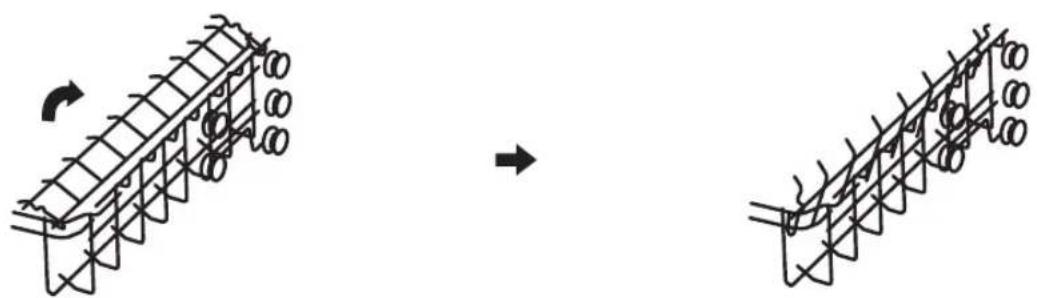
natural_image
Diagram showing a structural assembly before and after rotation, with no visible text or symbolsFolding back the rows of spikes
The spikes of the lower basket serve to hold plates and dishes. They can be lowered to create more space for large items.
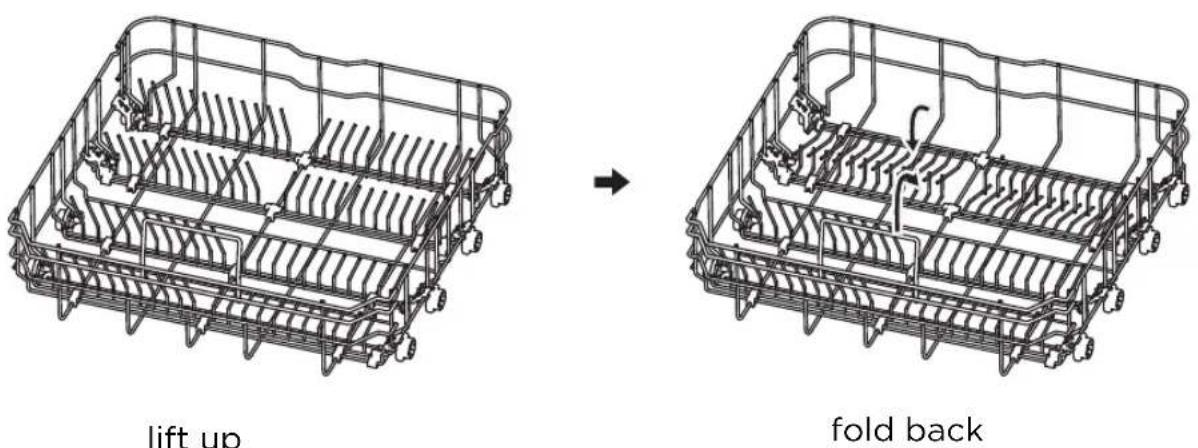
Function of rinse aid and detergent
The rinse aid is released during the final rinse to prevent the water from forming droplets on your dishes, which could lead to stains and streaks. It also improves drying by allowing the water to roll off the dishes. Your dishwasher is designed for the use of liquid rinse aids.
WARNING
Only use brand name rinse aid for your dishwasher. Never fill the rinse aid container with other substances (e.g., dishwashing detergent, liquid detergent). This would damage the appliance.
When should the rinse aid be refilled?
How regularly the dispenser needs to be refilled depends on how often the dishes are washed and which rinse aid setting is used.
- The indicator for too little rinse aid ( ) lights up when rinse aid is needed.
- Do not fill the rinse aid container too full.
Function of the rinse aid
The chemical components that make up the detergent are necessary to remove, break down and distribute the soiling from the dishwasher. Most commercially available quality detergents are suitable for this purpose.
WARNING
• Proper use of detergents
Only use detergents that have been specially made for use in dishwashers. Keep your detergent fresh and dry.
Only add powdered detergent to the dispenser once you are ready to wash your dishes.
- Dishwashing detergent is corrosive! Keep dishwashing detergent out of the reach of children.
Filling the rinse aid container
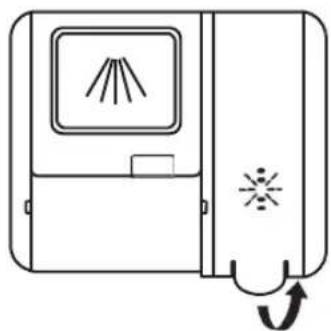
natural_image
Simple line drawing of a door with a window and directional arrow (no text or symbols)1 Lift the handle to remove the lid of the rinse aid container.
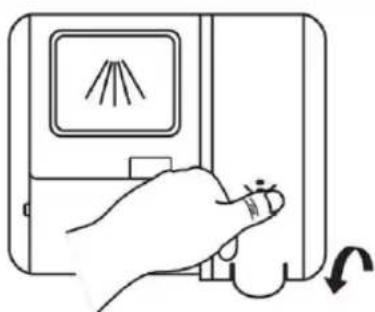
natural_image
Hand holding a device with a screen displaying a flame symbol and an arrow indicating rotation (no text or labels)3 Afterwards, close the cap.
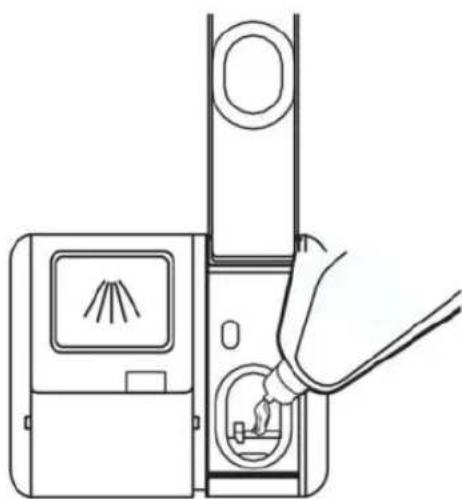
natural_image
Line drawing of a device with a hand inserting a cable into a device (no text or symbols)2 Pour the rinse aid into the dispenser, taking care not to overfill it.
Adjusting the rinse aid container
To achieve a better drying result with limited rinse aid, the dishwasher is designed to allow the user to adjust the consumption of rinse aid. Follow these steps:
- Open the door and switch on the appliance.
- Within 60 seconds of pressing the power button, press the program button for more than 5 seconds and then press the timer button to enter the set model. The rinse aid indicator will flash at a frequency of 1 ~Hz .
-
Press the program button to select the correct water softener according to your usage habits. The settings change in the following order: D1->D2->D3->D4->D5->D1.
The higher the number, the more rinse aid your dishwasher will use. -
Wait 5 seconds or press the power button to complete the setting and exit the setting mode.
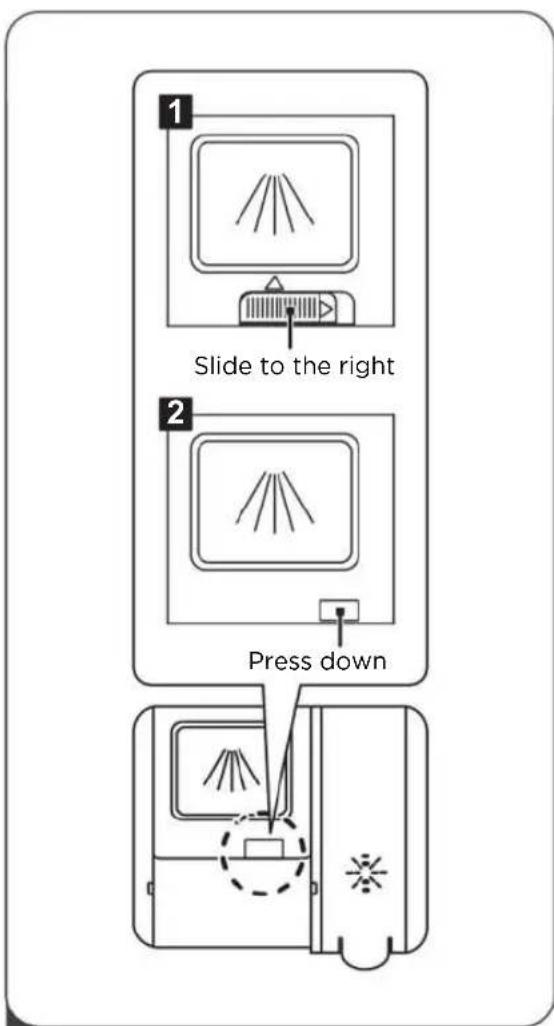
flowchart
graph TD
    A["1: Slide to the right"] --> B["2: Press down"]
    B --> C["3: Display with fan blade and lamp icon"]
    C --> D["4: Press down"]
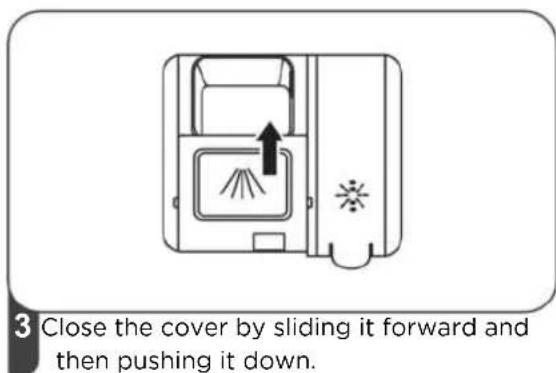
1 Select an opening method according to the current situation.
- Open the cover by sliding the unlocking catch.
- Open the cover by pushing down the unlocking catch.
NOTE:
Please note that the setting may vary depending on water pollution. Follow the manufacturer's recommendations on the detergent packaging.

2 Add detergent to the larger chamber (A) for the main wash cycle. For a better cleaning result, especially with very dirty items, apply a small amount of detergent to the door. The additional detergent is activated during the pre-wash phase.
USING YOUR DISHWASHER
Control Panel
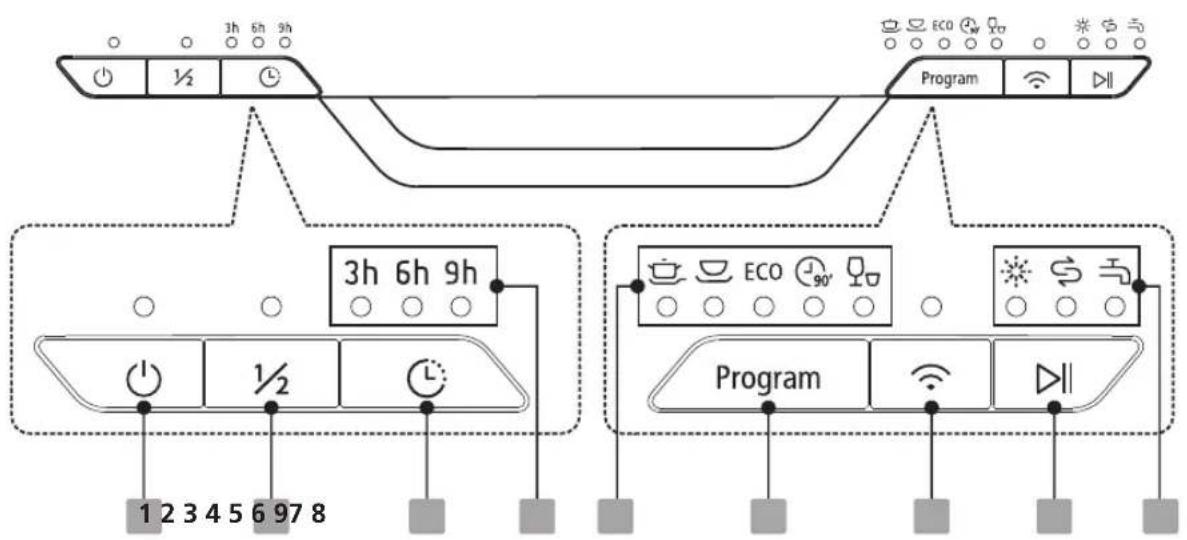
flowchart
graph TD
    A["Input Control"] --> B{Control Signals}
    B --> C["Program"]
    C --> D["Output Signals"]
    subgraph Left_Circuit
        E["3h 6h 9h"] --> F["Control Signals"]
        G["1/2"] --> H["Control Signals"]
        I["3h 6h 9h"] --> J["Control Signals"]
        K["1/2"] --> L["Control Signals"]
        M["3h 6h 9h"] --> N["Control Signals"]
    end
    subgraph Right_Circuit
        O["3h 6h 9h"] --> P["Control Signals"]
        Q["1/2"] --> R["Control Signals"]
        S["3h 6h 9h"] --> T["Control Signals"]
        U["1/2"] --> V["Control Signals"]
        W["3h 6h 9h"] --> X["Control Signals"]
        Y["1/2"] --> Z["Control Signals"]
        AA["3h 6h 9h"] --> AB["Control Signals"]
    end
Operation (Button)
| 1 Power | Press this button to turn on your dishwasher, the screen lights up. |
| 2 Half-load | When you have about or less than half of full place settings dishware to wash, you can choose this function to save energy and water.(It can only be used with Intensive, Normal, ECO, Glass and 90 min.) |
| 3 Delay | Press the button to set the delay time. (3h/6h/9h) |
| 4 Program | Select the appropriate washing program, the selected program indicator will be lit. |
Display
| 5 Wi-Fi | Switch on the appliance, and press Wi-Fi button for more than 3 seconds. After a shout bleeping and the icon starts to blink slowly, it's in the network linking status to APP. |
| Start/Pause | To start the selected washing program or pause it when the dishwasher is working. |
| Delay time | To show the delay time. (3h/6h/9h) |
| Program indicator | IntensiveFor heaviest soiled crockery, and normally soiled pots, pans, dishes etc. With dried-on food.NormalFor normally soiled loads, such as pots, plates, glasses and lightly soiled pans.ECO ECOThis is the standard program suitable for normally soiled loads, such as pots, plates, glasses and lightly soiled pans.90MinFor normally soiled loads that need quick wash.RapidA shorter wash for lightly soiled loads that do not need drying. |
| 9 Warning indicator | Rinse AidIf the “ ” indicator is lit, it means the dishwasher is low on dishwasher rinse aid and requires a refill.SaltIf the “ ” indicator is lit, it means the dishwasher is low on dishwasher salt and needs to be refilled.Water FaucetIf the “ ” indicator is lit, it means the water faucet closed. |
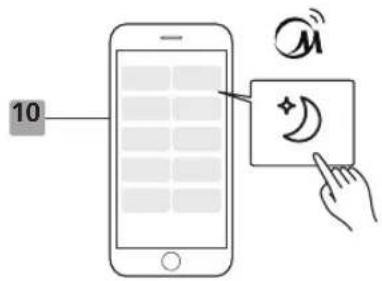
| 10 Options on APP only | WhisperLower noise and normally energy consumption, used for washing in evening. |
Overview of wash cycle
The table below shows which programs are best suited for which amount of food residues and how much detergent is required. In also includes various information about the programs. (● Means: Rinse aid will be dosed, ( ) Means: rinse aid will not be dosed
| Program | Description Of Cycle | Detergent Pre/ Main Wash | Running Time(min) | Energy (kWh) | Water (L) | Rinse Aid |
 Intensive Intensive | Pre-wash(50°C)Wash(65°C) | |||||
| RinseRinseRinse(65°C) | 4/18g(1 or 2 pieces) | 205 | 1.621 | 17.8 | ● | |
| Drying | ||||||
 Normal Normal | Pre-wash(45°C)Wash(55°C)RinseRinse(65°C) | 4/18g(1 or 2 pieces) | 175 | 1.302 | 14.3 | ● |
| Drying | ||||||
| ECO(*EN50242) | Wash(45°C)RinseRinse(60°C) | 22g(1 or 2 pieces) | 220 | 0.951 | 11.0 | ● |
| Drying | ||||||
 90 Min 90 Min | Wash(60°C)RinseRinse(65°C) | 20g(1 or 2 pieces) | 90 1.1 11.7 | ● | ||
| Drying | ||||||
 Rapid Rapid | Wash(45°C)Rinse(50°C) | 20g(1 pieces) | 30 | 0.751 | 11.2 | ○ |
| Rinse(55°C) | ||||||
 Whisper Whisper | Pre-wash(35°C)Wash(60°C)RinseRinse(65°C) | 4/18g(1 or 2 pieces) | 270 1.40 14.6 | ● | ||
| Drying |
NOTE:
This program is the test wash cycle. Information on comparability tests according to EN60436.
Staring a wash cycle
- Pull out the lower and upper basket, load the dishes and push back the baskets. We recommend loading the lower basket first, then the upper basket.
- Add detergent.
- Plug the power plug into the socket. Power supply: see last page of the product data sheet. Make sure that the water supply is switched on completely.
- Open the door and press the power button.
- Select a program, the answer lamp will light up. Then close the door. The dishwasher will now start the wash cycle.
Changing the programme during the wash cycle
You can only change a wash cycle, if it has only been running for a short time. Otherwise, the detergent may have already been released and the dishwasher may have already drained the rinse water. If this is the case, the dishwasher must be reset and the detergent dispenser refilled. Follow these instructions to reset the dishwasher:
- Open the door slightly to stop the dishwasher. When the movement of the spray arm has stopped, you can open the door fully.
- Press the program button for more than three seconds to put the appliance in standby mode.
- You can now change the program.
- Press the Start/Pause button, the dishwasher will start.

flowchart
graph LR
    A["Initial Image"] --> B["3 sec"]
    B --> C["Intensive ECO ECO 90 mins Rapid"]
    C --> D["Final Image Icon"]
Forgotten item
Recommend adding the forgotten items only before the detergent dispenser is opened to ensure the correct washing performance. Follow the instructions below to add a forgotten item:
- Press the Start/Pause button to pause the washing.
- After the spray arms stopped working, you can open the door completely.
- Add the forgotten dishes.
- Close the door.
- Press the Start/Pause button, the dishwasher will continued to run.

flowchart
graph LR
    A["Foot"] --> B["After 5 sec"]
    B --> C["Brushing with a brush, down arrow"]
    C --> D["Toile with bar chart, down arrow"]
    D --> E["Toile with clean water, down arrow"]
    E --> F["Toile with hand, down arrow"]
WARNING

It is dangerous to open the door in the middle of a wash cycle since the hot steam could scald you.
External care
Door and door seal
Clean the door seals regularly with a soft, damp cloth to remove any food residues.
When the dishwasher is loaded, food and drink residues may drip onto the sides of the door. These areas are located outside the wash cabinet and are not reached by water from the spray arms. Any residues should be wiped off before closing the door.
Operating panel
If cleaning is required, the operating panel should only be wiped with a soft, damp cloth.
WARNING
- To prevent the ingress of water into the door lock and electrical components, do not use spray cleaner.
- Never use abrasive cleaning agents or scouring sponges on the outer surfaces, as these may scratch the surface. Some paper towels may also leave scratches or marks on the surface.
Internal care
Filter system
The filter system in the bottom of the wash cabinet catches coarse soiling from the wash cycle. The accumulated coarse dirt may result in the clogging of the filters. Check the condition of the filters regularly and clean them under running water if necessary. Carry out the following steps to clean the filters in the wash cabinet.
NOTE:
The images are for reference only. The filter systems and spray arms may vary depending on the model.
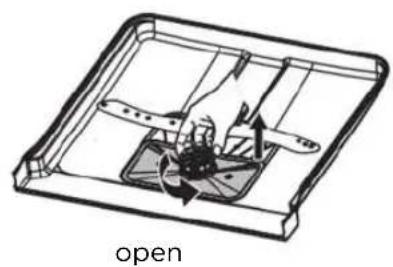
natural_image
Technical line drawing of a mechanical component with internal components and directional arrows, labeled 'open' (no text or symbols on the diagram itself)1 Hold the coarse filter firmly and turn it counterclockwise to unlock it. Lift the filter up and out of the dishwasher.
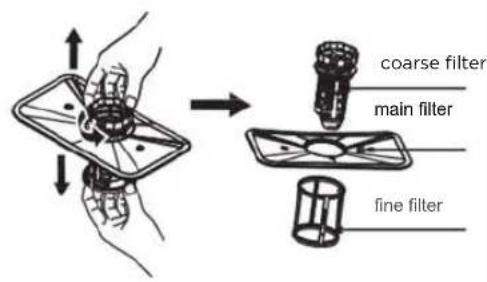
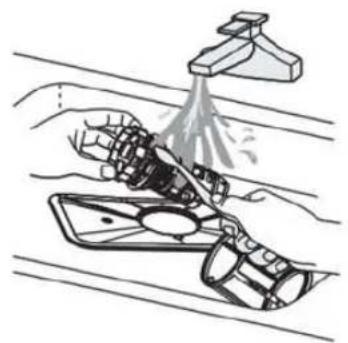
2 The fine filter can be removed from the bottom of the filter assembly. You can remove the coarse filter from the main filter by slightly squeezing and pulling away the tabs at the top.
natural_image
Illustration of a hand cleaning a car with a spray bottle (no text or symbols)3 Larger food residues can be rinsed off under running water. For a more thorough cleaning, use a soft cleaning brush.
natural_image
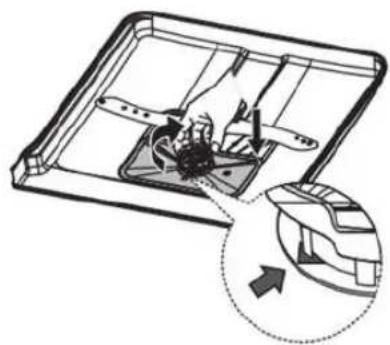
Diagram of a device interior with internal components and an arrow indicating direction (no text or symbols)4 Reassemble the filters in reverse order, replace the filter insert and turn the close arrow clockwise.
WARNING
- Do not over-tighten the filters. Replace the filters in the correct order, otherwise coarse soiling could enter the system and cause clogging.
- Never use the dishwasher without filters. Improper filter replacement may reduce the performance of the appliance and damage dishes and utensils.
Spray arms
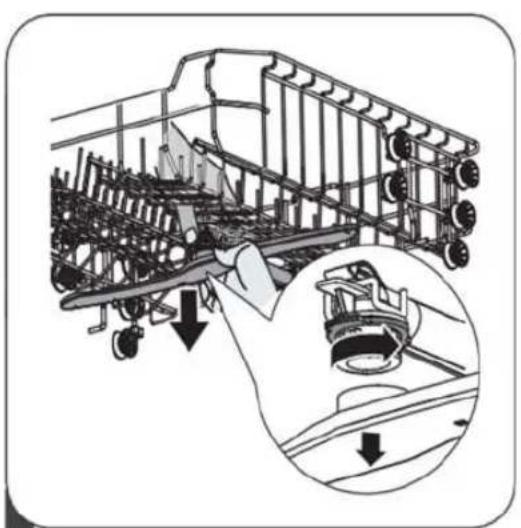
The spray arms must be cleaned regularly, as hard water and chemicals clog the nozzles and bearings of the spray arms.
Follow the following instructions to clean the spray arms:
natural_image
Technical illustration of an airplane fuselage with internal components and a magnified inset showing the engine (no text or symbols present)1 To remove the upper spray arm, hold the nut in the middle and turn the spray arm counterclockwise.
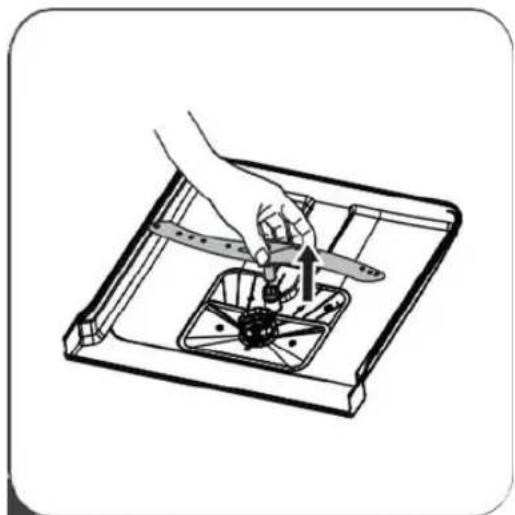
natural_image
Illustration of a hand using a tool to lift a small aircraft component into a tray (no text or symbols)2 Pull out the lower spray arm upwards.
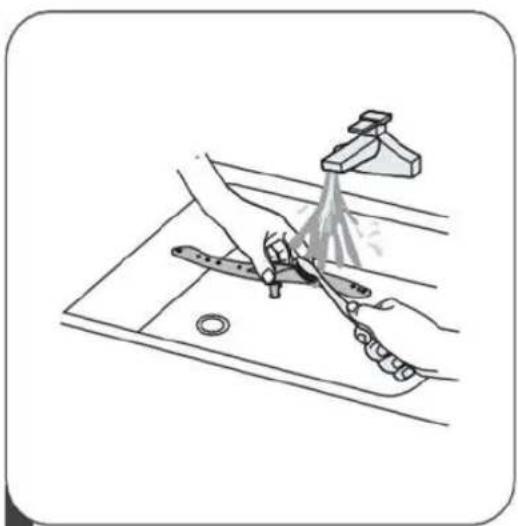
natural_image
Illustration of a hand using a spray gun to spray particles onto a surface, with no visible text or symbols.3 Clean the spray arms in soapy, warm water and use a soft brush to clean the nozzles. Rinse them thoroughly and then reinsert them correctly.
Frost protection measures
In winter, frost protection measures should be taken for the dishwasher.
After each wash cycle, proceed as follows:
- Disconnect the power supply to the dishwasher at the power source.
- Switch off the water supply and disconnect the water supply line from the water valve.
- Drain the water from the inlet line and water valve. (Use a bowl to trap the water)
- Reconnect the water supply to the water valve.
- Remove the filter at the bottom of the tub and suck up the water at the bottom.
After each wash cycle
Switch off the water supply to the appliance after each wash cycle and leave the door open slightly so that no moisture or odors are trapped inside the appliance.
Pull out the plug
Always pull out the plug from the socket before cleaning or carrying out maintenance work.
No solvents or abrasive cleaning agents
Do not use solvents or abrasive cleaning agents to clean the outside and rubber parts of the dishwasher.
Use only a cloth with warm soapy water.
To remove stains from the inside surface, use a cloth moistened with water and a little vinegar or a detergent specially made for dishwashers.
For longer periods of non-use
It is recommended to perform a wash cycle with an empty dishwasher, then unplug the appliance, turn off the water supply and leave the door open slightly.
This will help to extend the life of the door seals and prevent the formation of odors in the appliance.
Moving the appliance
If you must move the appliance, try to keep it in a vertical position. If necessary, it can be placed on its back.
Seals
One of the factors leading to the formation of odors in the dishwasher is food trapped in the seals. Regular cleaning with a damp sponge will prevent this.
INSTALLATION INSTRUCTIONS
WARNING

Risk of electrical shock
Before installing the dishwasher, disconnect it from the power supply. Failure to follow this instruction may result in death or electric shock.

CAUTION:
The installation of the hoses and electrical components should be carried out by specialists.
Information on the power connection
WARNING
For your personal safety:
- Do not use an extension cord.
- Never cut or remove the earthing connection from the power cord.
Electrical requirements
Look at the type of plate to check the rated voltage and connect the dishwasher to a suitable power supply. Use the required 10A/13A/16A fuse, a time-delay fuse or a recommended circuit breaker and provide a separate circuit that supplies power to this appliance only.
Electrical connection
Ensure that the voltage and frequency of the power supply correspond to the specifications on the rating plate. Only insert the plug into a power outlet that has been properly earthed. If the power outlet to which the appliance must be connected is unsuitable for the plug, replace the power outlet instead of using an adapter or equivalent, as this may result in overheating and fire.
⚠ Ensure that the appliance is proper earthed prior to use.
Water supply and drainage
Cold water connection
Connect the cold-water safety supply hose to a threaded 3/4 (inch) connector and make sure it is securely attached. If the water pipes are new or have not been used for a long period of time, let the water run to ensure that the water is clear. This precaution is necessary to avoid the risk of blocking the water supply and damaging the appliance.
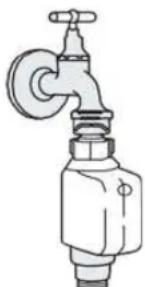
natural_image
Line drawing of a faucet with a valve and handle (no text or symbols)safety supply hose
Information on the safety supply hose
The safety supply hose consists of double walls. The hose system blocks the flow of water if the supply hose ruptures and the air space between the supply hose and the outer corrugated hose is filled with water.
WARNING
A hose attached to a sink sprayer may burst if it is installed on the same water pipe as the dishwasher. If your sink has such a sprayer, it is advisable to disconnect the hose and close the hole.
Connecting the safety supply hose
- Pull the safety supply tubes completely out of the compartment at the back of the dishwasher.
- Tighten the screws of the safety supply hose on the water tap with a 3/4-inch thread.
- Switch the water on completely before starting the dishwasher.
Detaching the safety supply hose
- Shut off the water.
- Unscrew the safety supply hose from the water tap, please add the direct for lift or sink.
Connecting the drain hoses
Insert the drain hose into a drainpipe with a minimum diameter of 4 cm or let it run into the sink, taking care not to kink or crush it. The height of the drain hose must be less than 1,000 mm. To avoid backflow in the hose, the free end of the hose must not be immersed in water.
⚠ Fix the drain hose securely in position A or B.
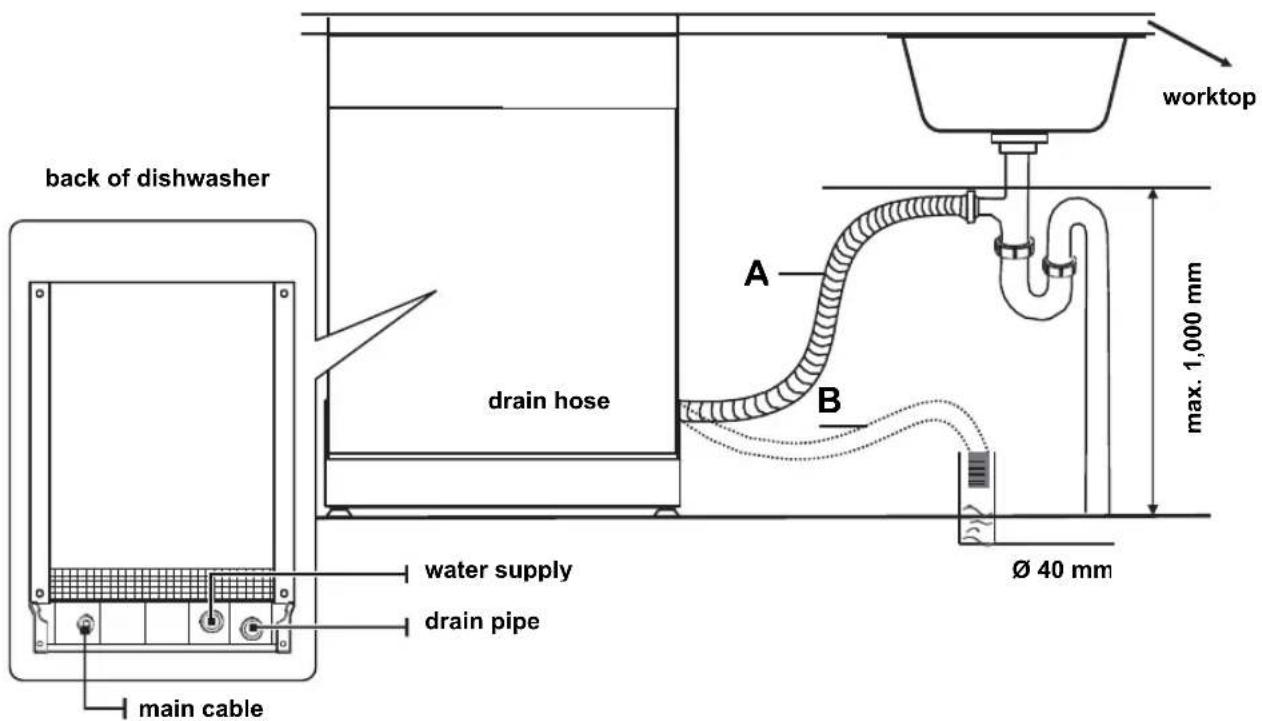
Draining excess water from hoses
If the sink is 1,000 mm higher than the floor, the excess water in the hoses cannot be drained directly into the sink. In this case, excess water from the hoses must be drained into a bowl or suitable vessel located outside and lower than the sink.
Water supply
Connect the water drain hose. The drain hose must be correctly installed to prevent water leaks. Ensure that the water hose is not kinked or crushed.
Extension hose
If you need a drain hose extension, make sure you use a similar drain hose. It must not be longer than 4 meters, otherwise the cleaning effect of the dishwasher could be compromised.
Siphon connection
The drain connection must be at a height of less than 100 cm (maximum) from the bottom of the dishwasher. The water drain hose should be fixed in place.
Setting up the appliance
Position the appliance at the desired location. The back of the appliance should be positioned along wall behind it and the sides along the adjacent cabinets or walls. The dishwasher is equipped with water supply and drain hoses that can be installed either on the right or left to facilitate proper installation.
Fitting between existing carbinets
The height of the dishwasher, 845 mm, has been designed in order to allow the machine to be fitted between existing cabinets of the same height in modern fitted kitchens.
The laminated top of the machine does not require any particular care since it is heatproof, scratchproof and stainproof.
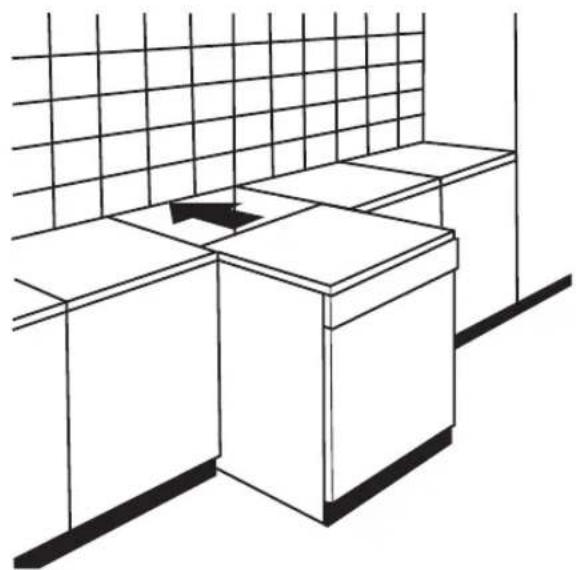
natural_image
Line drawing of a minimalist kitchen counter with grid-patterned wall and side table (no text or symbols)Underneath existing work top
(When fitting beneath a work top)
In most modern fitted kitchens there is only one single work top under which cabinets and electrical appliances are fitted. In this case remove the work top of the dishwasher by unscrewing the screws under the rear edge of the top (a).
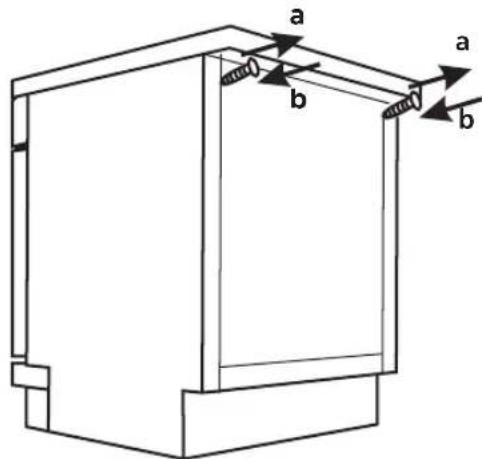

Attention
After removing the work top, the screws must be screwed again under the rear edge of the top (b)
Before you call customer service
If you look at the diagrams on the following pages, you may save yourself a call to customer service.
| Problem Possible causes | What to do | |
| Dishwasher does not start | The power supply is not switched on. | Make sure that the dishwasher is switched on and the door is securely closed.Ensure that the power cord is properly plugged.into the wall outlet. |
| The water pressure is low. | Check that the water supply is connected properly, and the water is switched on. | |
| The door of the dishwasher is not properly closed. | Ensure that the door is properly closed and locked. | |
| Water not pumped out of the dishwasher | Twisted or pinched drain hose. | Check the drain hose. |
| Filter clogged. | Check the coarse filter. | |
| Kitchen sink clogged. | Check the kitchen sink to ensure that the water drain is working properly. If the problem is a non-draining sink, you may need a plumber rather than customer service for your dishwasher. | |
| Suds in the wash cabinet | Incorrect detergent. | Only use special dishwashing detergent to avoid the formation of suds. If this occurs, open the dishwasher, and allow the suds to evaporate. Pour 4 liters of cold water on the bottom of the dishwasher.Close the door of the dishwasher and then select any wash cycle. First the dishwasher drains the water. Open the door when the emptying phase is complete and check that the suds have disappeared.Repeat the process if necessary. |
| Spilled detergent | Always wipe up any spilled rinse aid immediately. | |
| Dirty wash cabinet | A detergent with dye may have been used. | Make sure that the detergent contains no dyes. |
| White film on the inner surface | Minerals in hard water. | To clean the interior, use a damp sponge with dishwashing detergent and wear rubber gloves. Never use any detergent other than dishwashing detergent, as it can cause foam or suds to form. |
| Knocking noise in the dishwasher | A spray arm is knocking against an item in one of the baskets. | Stop the program and rearrange the items obstructing the spray arm. |
| Rattling noise in the dishwasher | Dishes loaded loosely in the dishwasher. | Stop the program and rearrange the dishes. |
| Clouding on glassware | Combination of soft water and too much detergent. | Use less detergent if you have soft water and select a shorter wash cycle to clean glassware. |
| Rust stains on cutlery | The items concerned are not corrosion-resistant. | Avoid washing items that are not corrosion-resistant in a dishwasher. |
| A program was not executed after salt was added to the dishwasher. Traces of salt have entered the wash cycle. | Run a wash program without dishes each time you add salt. After adding salt, do not select the Turbo function (if available). | |
| The softener cap is loose. | Check that the cap of the softener is securely fastened. | |
| Knocking noises in the water pipes | May be caused by the on-site installation or the cross-section. of the pipeline. | Does not affect the functioning of the dishwasher. In case of doubt, contact a qualified installer. |
| The dishes are not clean | The dishes were loaded improperly. | See "Preparing and loading dishes". |
| The program was not strong enough. | Select a more intensive program. | |
| White spots on dishes and glasses | Hard water can cause lime deposits. | Add more detergent. |
| Black or grey stains on the dishes | Aluminum utensils rubbed against the dishes. | Use a mild abrasive cleaning agent to remove these spots. |
| Detergent left in the dosing unit | Dishes are blocking the dosing unit. | Rearrange the dishes. |
| The dishes are not clean | Not enough detergent added | Use more detergent or change your detergent. |
| Items are blocking the movement of the spray arms. | Arrange the items so that the spray arms can rotate freely. | |
| The filter combination is not clean or not correctly inserted into the bottom of the wash cabinet. This can lead to the blocking of the spray arm nozzles. | Clean the filter and/or insert it correctly. Clean the spray arm nozzles. | |
| The dishes will not dry. | The dishes were loaded improperly. | Load the dishwasher as recommended in the instructions for use. |
| The dishes were removed prematurely. | Do not empty the dishwasher immediately after the wash cycle. Only unload the dishes when the inside temperature is safe to touch. Empty the lower basket first so that no water drips from the upper basket. | |
| The wrong program was selected. | With a short program, the washing temperature is lower, which reduces the cleaning performance. Select a program with a long washing time. | |
| Use of cutlery with an inferior coating. | Water drainage is more difficult with these. items. Cutlery or dishes of this type are not suitable for cleaning in a dishwasher. | |
If a malfunction occurs, the dishwasher displays error codes to identify the malfunction:
| Codes | Meanings | Possible Causes |
| The Rapid light flicker fleetly | Longer inlet time. | Faucets is not opened, or water intake is restricted,or water pressure is too low. |
| The Rapid, 90min light flicker fleetly | Not reaching required temperature. | Malfunction of heating element. |
| The ECO light flicker fleetly | Overflow. | Some element of dishwasher leaks . |
| The Intensive, ECO and Rapid light flickers fleetly | Failure of communication between main circuit board with display circuit board. | Open circuit or break wiring for the communication |
WARNING
- If water is leaking, turn off the main water supply before calling customer service.
- If there is water in the tub, you should remove the water before putting the dishwasher back into operation.
- If there is an error code that cannot be solved, please request professional assistance.
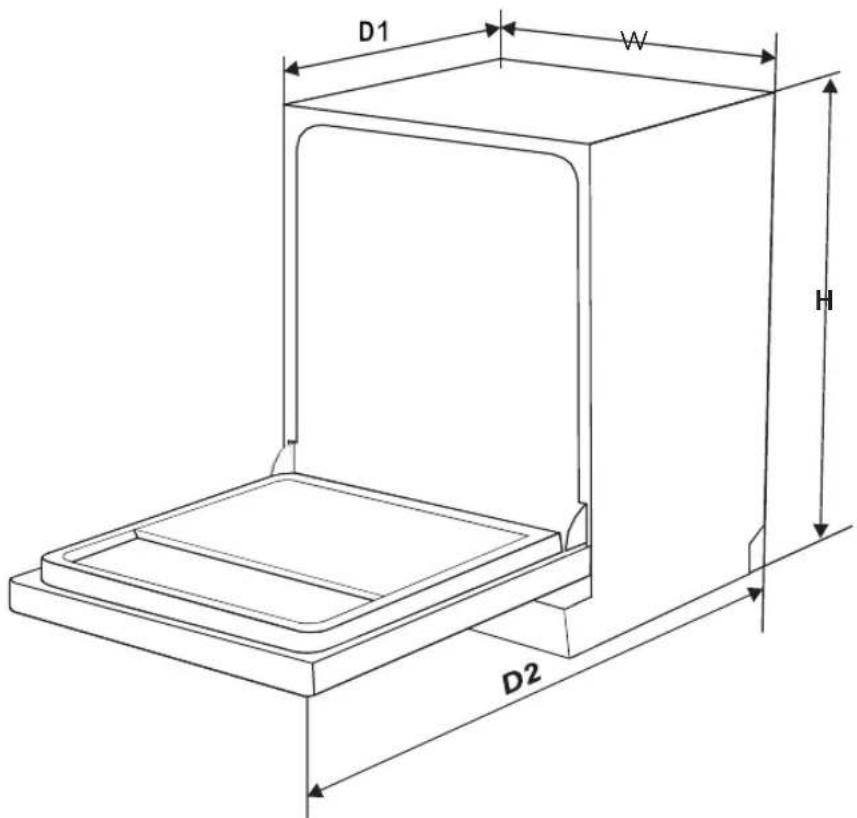
| Height (H) | 845mm |
| Width (W) | 598 mm |
| Depth (D1) | 600 mm (with door closed) |
| Depth (D2) | 1175 mm (with door open 90°) |
Product information sheet
| Name or trademark of the supplier: Midea | Europe GmbH | |||
| Address of supplier (b): Ludwig-Erhard-Str.14, 65760 Eschborn, Germany | ||||
| Model: | SF 3.60NW PRO | |||
| General product parameters: | ||||
| Parameter Value | Parameter Value | |||
| Rated capacity (a) (ps) | 14 | Dimensions in cm | Height | 84.5 |
| Width | 60 | |||
| Depth | 60 | |||
| EEI (a) | 4∠.9 | Energy efficiency class (a) E (c) | ||
| Cleaning performance index(a) | 1.125 Drying performance index (a) 1.065 | |||
| Energy consumption in kWh [per cycle], based on the Eco program with cold water. The actual energy consumption depends on how the appliance is used. | 0.951 | Water consumption in liters (per cycle), based on the Eco program. The actual water consumption depends on the water hardness and how the appliance is used. | 11 | |
| Program duration (a) (h:min) | 03:40 | Type | Free standing | |
| Airborne acoustical noise (a) (dB(A) re 1 pW) | 47 | Airborne acoustical noise class (a) | C (c) | |
| Switched-off state (W) 0.49 Standby modeh (W) | N/A | |||
| Start delay (W) (if applicable) | 1.00 | Network standby (if applicable) | N/A | |
| Minimum duration of the warranty offered by supplier (b): 24 Months | ||||
Additional information:
Web link to the supplier's website where the information in point 6 of Annex II to Commission Regulation (EU) 2019/2022 (1) (b) can be found: www.midea.com
(a) for the Eco program
(b) Amendments to these points shall not be considered relevant for the purposes of Article 4(4) of Regulation (EU) 2017/1369.
(c) If the product database automatically generates the final content of this cell, the supplier must not enter this data.
(1) Commission Regulation (EU) 2019/2022 of 1 October 2019 laying down eco-design requirements for household dishwashers pursuant to Directive 2009/125/EC of the European Parliament and of the Council amending Commission Regulation (EC) No 1275/2008 and repealing Commission Regulation (EU) No 1016/2010 (see page 267 of this Official Journal).
RED Declaration of Conformity (DoC)
We,
Midea Europe GmbH
Ludwig-Erhard-Str.14, 65760 Eschborn, Germany
Declare under our sole responsibility that the product:
Product name: Dishwasher
Trade name: Midea
Type or model: SF 3.60NW PRO
Relevant supplementary information:
To which this declaration relates is in conformity with the essential requirements and other relevant requirements of the RE Directive (2014/53/EU).
The product is in conformity with the following standards and/or other normative documents:
HEALTH & SAFETY (Art. 3(1)(a)):
EN 62311:2008, EN 50665:2017,
EN 60335-2-5:2015, EN 60335-1:2012/A2:2019,
EN 62233:2008
EMC (Art. 3(1)(b)): ETSI EN 301 489-17 V3.2.4 (2020-09),
ETSI EN 301 489-1 V2.2.3 (2019-11), EN 55014-1:2017, EN 55014-2:2015,
EN IEC 61000-3-2:2019, EN 61000-3-3:2013/A1:2019
SPECTRUM (Art. 3(2)): ETSI EN 300 328 V2.2.2 (2019-07)
OTHER (incl. Art. 3(3) and voluntary specs):
Limitation of validity (if any):
Supplementary information:
Notified body involved:....
Technical file held by:. Foshan Shunde Midea Washing Appliances Mfg. Co., Ltd.
Place and date of issue (of this DoC): .Foshan/2020-12-25....
Signed by or for the manufacturer:
(Signature of authorised person)
Name (in print):......Ke Ningsheng......
Title: Product Engineer
We congratulate you to your new device and are convinced that you will be sased and have your joy with this modern appliance.
However, if you recognize a reason for a complaint, please contact us:
| Midea Europe GmbH | Phone: +49 6196-90 20 -0 | In case of service: |
| Ludwig-Erhard-Str. 14 | Fax: +49 6196-90 20 -120 | Phone: +49 6196-90 20 -0 |
| 65760 Eschborn | Email: Fax : +49 6196@midea.com | -90 20 -120 |
| Homepage: www.Email.com/de | service-meg@midea.com |
In case of a technical fault, enter your exact address, telephone number, sales contract number and Device type (from the type plate of the device).
A precise fault description saves you time and money. For special questions, please contact the customer service center.
Before calling for service:
Please check whether there is an operating error or a cause that has nothing to do with the function of your device.
Please observe the note in the user manual and check whether:
- The power plug is connected
- The power plug may be damaged
- Electricity is available
Warranty terms
This device has been manufactured and tested according to the most modern methods. The seller warrants for faultless material and proper manufacture for a period of 24 months from the date of sale to the end user. The unit is not suitable for commercial use.
The claim under guarantee lapses in the event of intervention by the Buyer or by a third party. Damage caused as a result of improper handling or operation, incorrect installation or storage, improper connection or installation as well as an act [...] of God or other external factors shall not be covered by this warranty.
When claims are submitted, the manufacturer reserves the right to make improvements to defective parts or to replace or exchange the device.
Only if it is not possible to achieve the intended use of the device by repairing or replacing the device, the buyer can demand a reduction of the purchase price or the cancellation of the purchase contract within 6 months from the date of purchase.
Claims for damages, including consequential damages, are excluded unless they are based on intent or gross negligence.
The guarantee claim exists only with submission of the product and the purchase receipt. This warranty is valid within Germany.
Importer by:
Midea Europe GmbH
65760 Eschborn Germany
LAVE-VAISSELLE
Sur pied
Manuel
natural_image
Line drawing of a single kitchen appliance with a handle and side panel (no text or symbols)natural_image
Symbol of a waste bin with crossed lines indicating no waste, and a solid black rectangle below (no text or labels)flowchart
graph LR
    A["Hand holding a cup with a lid"] --> B["Add salt into a container"]
    B --> C["Salt being poured into a jar"]
    C --> D["Hearts the process: pouring salt into a container"]
natural_image
Pure diagram of vertical slanted panels arranged in a grid pattern (no text or symbols)natural_image
Line drawing of a shopping cart with wheels and an arrow indicating direction (no text or symbols)natural_image
Line drawing of a car chassis with wheels and an arrow indicating motion (no text or symbols)natural_image
Diagram showing a structural assembly before and after rotation, with no visible text or symbolsnatural_image
Technical line drawing of a mechanical assembly before and after modification (no text or symbols)natural_image
Line drawing of a door with a screen and directional arrow indicating airflow or movement (no text or symbols)natural_image
Line drawing of a device with a hand inserting a cable into a device (no text or symbols)natural_image
Line drawing of a hand pressing down on a device with a slide and scroll, indicating press or action (no text or symbols)3 Ensuite, fermez le capuchon.
natural_image
Diagram of a device with a door, ventilation slots, and a smokestack emitting vapor (no text or symbols)flowchart
graph LR
    A["Lighting"] --> B["3 sec"]
    B --> C["Intensive ECO ECO 90 mins Rapid"]
    C --> D["Final Inspection"]
Ustensile oublié
flowchart
graph LR
    A["Pre-delivery"] --> B["Après 5 secondes"]
    B --> C["Battery with liquid level"]
    C --> D["Recycler with liquid level"]
    D --> E["Product shipment"]
AVERTISSEMENT

natural_image
Technical diagram of a mechanical device with internal components and directional arrows, labeled 'open' (no text or symbols on the diagram itself)natural_image
Line drawing of a mechanical device with spray and motion lines, no text or symbols presentnatural_image
Diagram of a mechanical device with internal components and an inset showing a circular component (no text or symbols)natural_image
Technical illustration of an aircraft carrier with structural frame and internal components, showing no text or symbolsnatural_image
Illustration of a hand using a tool to adjust or install a mechanical component inside a tray (no text or symbols visible)natural_image
Illustration of a hand cleaning a small airplane on a surface with a spray bottle (no text or symbols)natural_image
Line drawing of a faucet with a valve and handle (no text or symbols)natural_image
Line drawing of a minimalist kitchen counter with a grid-patterned wall and side table (no text or symbols)Codes Significations Causes possibles
HEALTH & SAFETY (Art. 3(1)(a)):
EN 62311:2008, EN 50665:2017,
EN 60335-2-5:2015, EN 60335-1:2012/A2:2019,
EN 62233:2008
EMC (Art. 3(1)(b)): ETSI EN 301 489-17 V3.2.4 (2020-09),
ETSI EN 301 489-1 V2.2.3 (2019-11), EN 55014-1:2017, EN 55014-2:2015,
EN IEC 61000-3-2:2019, EN 61000-3-3:2013/A1:2019
SPECTRE (Art. 3(2)): ETSI EN 300 328 V2.2.2 (2019-07)
65760 Eschborn Germany
Vaatwasser
Vrijstaand
Gebruiksaanwijzing
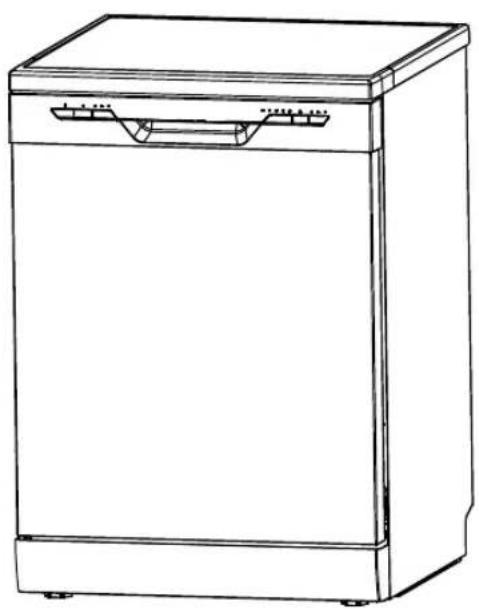
natural_image
Line drawing of a single kitchen appliance with a handle and side panel (no text or symbols)
WLAN-status knippert
flowchart
graph LR
    A["SALT"] --> B["Inside"]
    B --> C["Outside"]
    C --> D["Washing Machine"]
- Waterontharder instellen
- Zout in de waterontharder vullen
- Mand laden
- Doseereenheid vullen
Zout in de waterontharder vullen
OPMERKING:
flowchart
graph LR
    A["Hand holding a bowl with inlet"] --> B["Hand pouring liquid into a container"]
    B --> C["Hand adding salt to the lid"]
    C --> D["Heated salt being poured into a container with a label 'SALT'"]
natural_image
Technical line drawing of a mechanical component with no visible text or symbolsnatural_image
Pure geometric line drawing of a fence with vertical panels (no text or symbols)Cutlery should be placed individually at the appropriate places in the cutlery tray, and care should be taken not to nest the utensils together, as this may result in poor cleaning performance.
natural_image
Line drawing of a shopping cart with wheels and an arrow indicating motion (no text or symbols)natural_image
Line drawing of a shopping cart with wheels and an arrow indicating motion (no text or symbols)natural_image
Diagram showing two mechanical assembly states with rotating components and a directional arrow (no text or symbols)natural_image
Simple line drawing of a device with a screen and directional arrow (no text or symbols)natural_image
Line drawing of a hand inserting a device into a device with a screen showing a tree-like pattern (no text or symbols)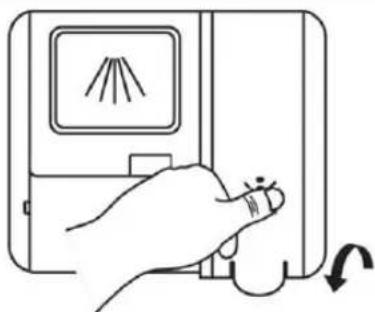
natural_image
Line drawing of a hand pressing down on a device with a screen showing a light source (no text or symbols)natural_image
Diagram of a device with a door, fan, and air vent (no text or symbols)flowchart
graph LR
    A["Start"] --> B["Make a bottle with a hand inside water"]
    B --> C["Close-up of hands using a brush stroke"]
    C --> D["Close-up of hand holding a bag with liquid"]
    D --> E["Cleaner with cloth, down arrow, right-hand rule"]
    E --> F["Cleaner holding a bag, up arrow, right-hand rule"]
WAARSCHUWING

natural_image
Technical line drawing of a mechanical component with internal components and directional arrows, labeled 'open' (no text or symbols on the diagram itself)natural_image
Illustration of a hand cleaning a car with spray and cleaning equipment (no text or symbols)natural_image
Diagram of a device interior with internal components and an arrow indicating rotation (no text or symbols)natural_image
Technical illustration of an airplane fuselage with structural components and a magnified inset showing airflow direction (no text or symbols)natural_image
Illustration of a hand using a tool to adjust or install a small mechanical component on a tray (no text or symbols visible)natural_image
Illustration of a hand using a tool to clean or spray liquid onto a surface, with no visible text or symbols.WATERTOEVOER EN -AFVOER
natural_image
Line drawing of a faucet with a valve and handle (no text or symbols)veiligheidsslang
natural_image
Line drawing of a minimalist office space with a grid-patterned wall and two rectangular furniture blocks (no text or symbols)Type of model: SF 3.60NW PRO
Homepage: www.midea.com/de
service-meg@midea.com
65760 Eschborn Germany
Lavastoviglie
In piedi libero
Istruzioniperl'uso
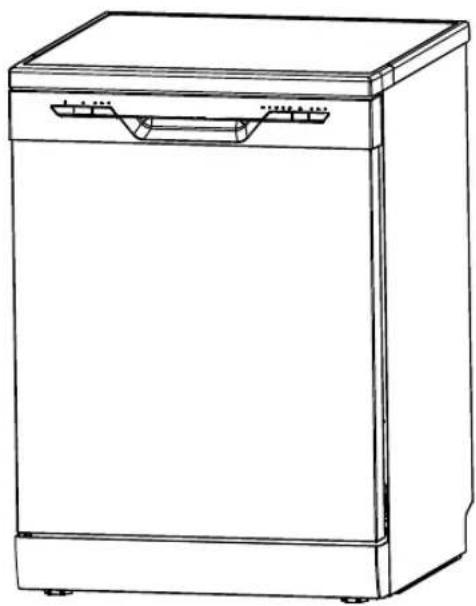
natural_image
Line drawing of a single kitchen appliance with front panel and side door (no text or symbols)MODELLO: SF 3.60NW PRO
www.midea.com

natural_image
Symbol of a waste bin with crossed lines indicating no waste, and a solid black rectangle below (no text or labels)IMPORTANTE
flowchart
graph LR
    A["SALT"] --> B["Intermediate Processing"]
    B --> C["Esterno"]
    C --> D["Final Washing Machine"]
flowchart
graph LR
    A["Hand holding a cup with a lid"] --> B["Add salt into a container"]
    B --> C["Salt being poured into a pot"]
    C --> D["Hearts the process: adding salt, pouring liquid into a container"]
natural_image
Technical line drawing of a mechanical component with rollers and brackets (no text or symbols)natural_image
Pure diagram of vertical slanted panels arranged in a grid pattern (no text or symbols)natural_image
Line drawing of a shopping cart with wheels and an arrow indicating direction (no text or symbols)natural_image
Line drawing of a shopping cart with wheels and an arrow indicating direction (no text or symbols)natural_image
Diagram showing a structural assembly before and after rotation, with no visible text or symbolsThe chemical components that make up the detergent are necessary to remove, break down and distribute the soiling from the dishwasher. Most commercially available quality detergents are suitable for this purpose.
AVVERTENZA
natural_image
Line drawing of a door with a screen displaying a pattern and a switch, showing no text or symbols.natural_image
Line drawing of a device with a handle inserting into a container (no text or symbols)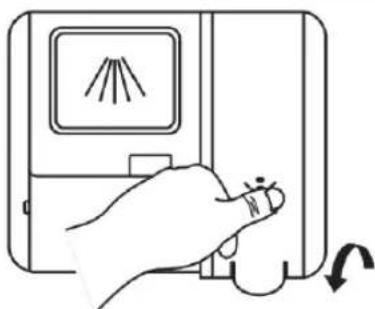
natural_image
Hand holding a device with a screen displaying a light source and a scroll arrow indicating rotation (no text or symbols)flowchart
graph LR
    A["Diuretic Device"] --> B["Dopo 5 secondi"]
    B --> C["Step 1: Stimulation with a hand holding the cup"]
    C --> D["Step 2: Stimulation with a hand holding the cup"]
    D --> E["Step 3: Stimulation with a hand holding the cup"]
    E --> F["Step 4: Hand gesture with a hand pointing down"]
AVVERTENZA

natural_image
Technical line drawing of a mechanical component with internal components and an open section, labeled 'open' (no text or symbols on the diagram itself)natural_image
Illustration of a hand using a spray gun to spray liquid onto a device (no text or symbols visible)natural_image
Diagram of a device interior with internal components and a magnified view showing a mechanical component (no text or symbols)natural_image
Technical illustration of an airplane fuselage with internal components and directional arrows indicating parts of the fuselage (no text or symbols present)natural_image
Illustration of a hand operating a small mechanical component with a fan inside a tray (no text or symbols)natural_image
Illustration of a hand spraying air onto an aircraft on a boat deck (no text or symbols)natural_image
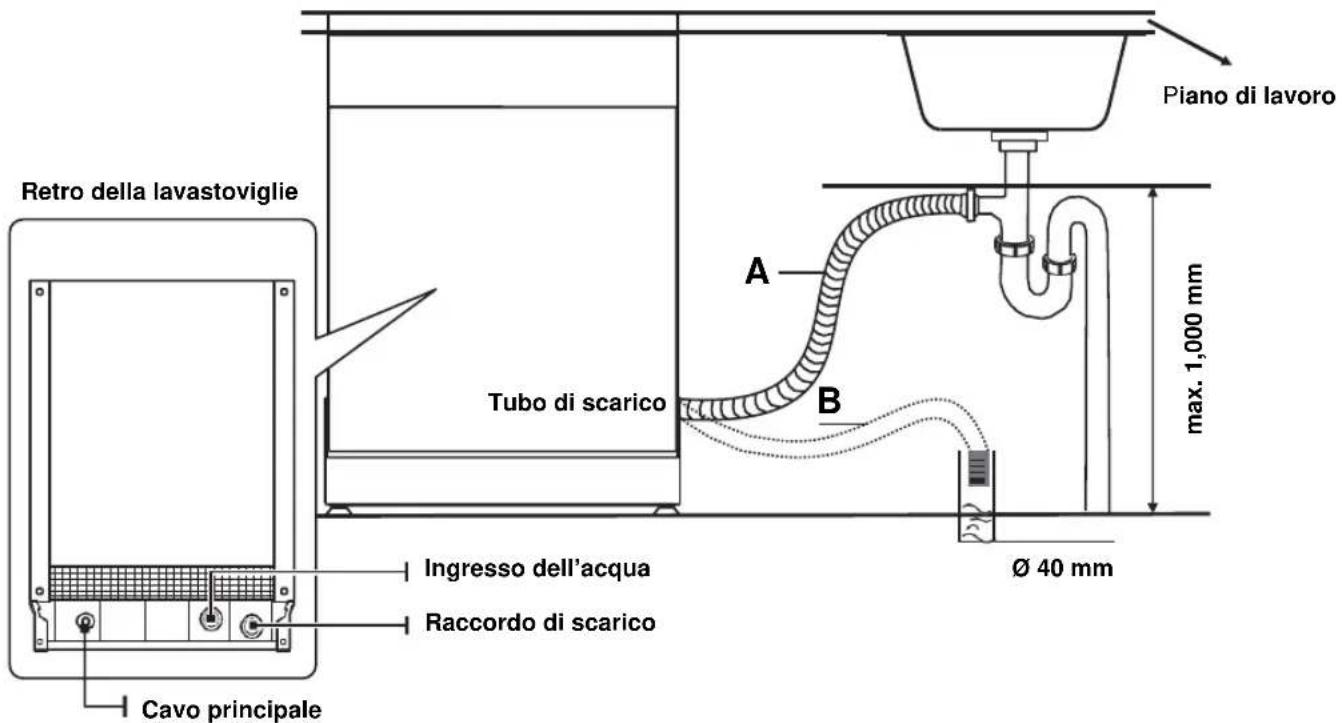
Illustration of a faucet with a valve and handle (no text or symbols)⚠ Fix the drain hose securely in position A or B.
natural_image
Line drawing of a minimalist office space with a grid-patterned wall and two rectangular furniture blocks (no text or symbols)HEALTH & SAFETY (Art. 3(1)(a)):
EN 62311:2008, EN 50665:2017,
EN 60335-2-5:2015, EN 60335-1:2012/A2:2019,
EN 62233:2008
EMC (Art. 3(1)(b)): ETSI EN 301 489-17 V3.2.4 (2020-09),
ETSI EN 301 489-1 V2.2.3 (2019-11), EN 55014-1:2017, EN 55014-2:2015,
EN IEC 61000-3-2:2019, EN 61000-3-3:2013/A1:2019
SPECTRUM (Art. 3(2)): ETSI EN 300 328 V2.2.2 (2019-07)
OTHER (incl. Art. 3(3) and voluntary specs):
Homepage: www.Email.com/de
65760 Eschborn Germany
Lavavajillas libre de Independiente
natural_image
Line drawing of a single kitchen appliance with a handle and side panel (no text or symbols)Modelo: SF 3.60NW PRO
www.midea.com
flowchart
graph LR
    A["Hand holding a container with inlet"] --> B["Add liquid into a jar"]
    B --> C["Transfer to a glass jar with salt"]
    C --> D["Ordering into a container with salt"]
    D --> E["Heaving the container with salt"]
natural_image
Technical line drawing of a mechanical component with gears and shafts (no text or symbols)natural_image
Pure geometric diagram of vertical planes intersecting a horizontal line, no text or symbols presentnatural_image
Diagram of a car with wheels and an arrow indicating motion, no text or symbols present2 Retire la cesta superior
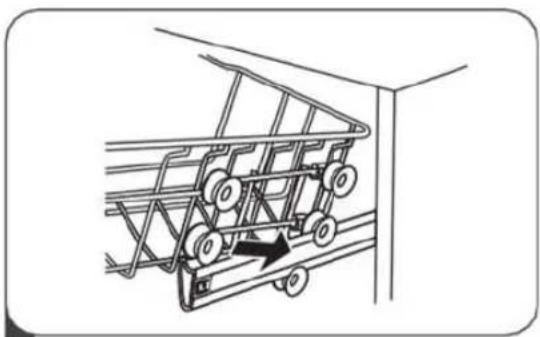
natural_image
Line drawing of a shopping cart with wheels and an arrow indicating motion (no text or symbols)natural_image
Diagram showing a structural assembly before and after modification, with no visible text or symbols.natural_image
Simple line drawing of a door with a screen and directional arrow (no text or symbols)natural_image
Line drawing of a hand inserting a device into a device with a screen showing a tree-like pattern (no text or symbols)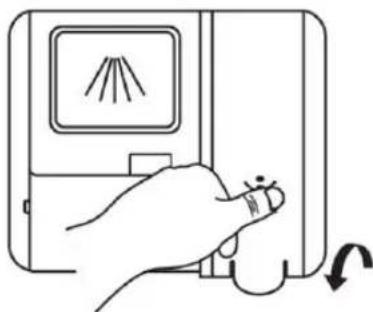
natural_image
Line drawing of a hand pressing down on a device with a screen showing light rays (no text or symbols)natural_image
Diagram of a device with internal components and labeled 'open' (no text or symbols on the diagram itself)natural_image
Illustration of a hand using a tool to clean or spray liquid from a surface, with no visible text or symbols.natural_image
Diagram of a device interior with internal components and a magnified view showing a component (no text or symbols)natural_image
Technical illustration of an airplane fuselage with internal components and a magnified inset showing the engine (no text or symbols present)natural_image
Illustration of a hand using a tool to adjust or install a component inside a tray (no text or symbols visible)natural_image
Illustration of a hand using a spray gun to clean or wash a surface, with no text or symbols present.natural_image
Line drawing of a faucet with a valve and handle (no text or symbols)natural_image
Line drawing of a minimalist office space with a bench, chair, and wall grid (no text or symbols)65760 Eschborn Germany