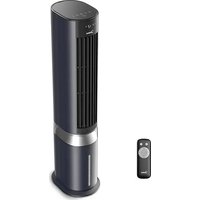
MCF23XRB - Fan MIDEA - Free user manual and instructions
Find the device manual for free MCF23XRB MIDEA in PDF.


| Product type | Air cooler / fan |
| Brand | MIDEA |
| Model | MCF23XRB |
| Power supply | 220-240 V~, 50 Hz |
| Power | 60 W |
| Maximum airflow | 33.59 m³/min |
| Sound power level | 62.47 dB(A) |
| Standby consumption | 0.17 W |
| Wind modes | 4 modes (Normal, Temperature Control, Sleep, Baby) |
| Speed levels | 6 levels |
| Timer | Yes (programmable on/off) |
| Oscillation | Yes |
| Cooling function | Yes (with water tank and ice box) |
| Negative ions | Yes (activated by default) |
| Remote control | Yes (range 5 m, AAA batteries) |
| Display | Digital (temperature, wind level, timer) |
| Safety | Safety switch (filter), tilt protection |
| Maintenance | Clean water tank every 3 days, clean wet curtain |
Frequently Asked Questions - MCF23XRB MIDEA
User questions about MCF23XRB MIDEA
0 question about this device. Answer the ones you know or ask your own.
Ask a new question about this device
Download the instructions for your Fan in PDF format for free! Find your manual MCF23XRB - MIDEA and take your electronic device back in hand. On this page are published all the documents necessary for the use of your device. MCF23XRB by MIDEA.
USER MANUAL MCF23XRB MIDEA
natural_image
Architectural line drawing of a multi-level cabinet or cabinet with internal compartments and doorways (no text or symbols)AIR COOLER
USER MANUAL
MCF23XRB
LANGUAGES
EN English
DE German
IT Italian
FR French
ES Spanish
THANK YOU LETTER
Thank you for choosing Midea! Before using your new Midea product, please read this manual thoroughly to ensure that you know how to operate the features and functions that your new appliance offers in a safe way.
CONTENTS
THANK YOU LETTER 01
SAFETY INSTRUCTIONS 02
SPECIFICATIONS 06
PRODUCT OVERVIEW 07
QUICK START GUIDE 08
PRODUCT OPERATION 11
CLEANING AND MAINTENANCE 14
TROUBLESHOOTING 16
TRADEMARKS, COPYRIGHTS AND LEGAL STATEMENT 17
DISPOSAL AND RECYCLING 18
DATA PROTECTION NOTICE 19
SAFETY INSTRUCTIONS
Intended Use
The following safety guidelines are intended to prevent unforeseen risks or damage from unsafe or incorrect operation of the appliance. Please check the packaging and appliance on arrival to make sure everything is intact to ensure safe operation. If you find any damage, please contact the retailer or dealer. Please note modifications or alterations to the appliance are not allowed for your safety concern. Unintended use may cause hazards and loss of warranty claims.
Explanation of Symbols

Danger
This symbol indicates that there are dangers to the life and health of persons due to extremely flammable gas.

Warning of electrical voltage
This symbol indicates that there is a danger to life and health of persons due to voltage.

Warning
The signal word indicates a hazard with a medium level of risk which, if not avoided, may result in death or serious injury.

Caution
The signal word indicates a hazard with a low degree of risk which, if not avoided, may result in minor or moderate injury.

Attention
The signal word indicates important information (e.g. damage to property), but not danger.

Observe instructions
This symbol indicates that a service technician should only operate and maintain this appliance in accordance with the operating instructions.
Read these operating instructions carefully and attentively before using/commissioning the unit and keep them in the immediate vicinity of the installation site or unit for later use!

Caution
- Read Rules for Safe Operation and Instructions Carefully.
- This appliance can be used by children aged from 8 years and above and persons with reduced physical, sensory or mental capabilities or lack of experience and knowledge if they have been given supervision or instruction concerning use of the appliance in a safe way and understand the hazards involved.
- Children shall not play with the appliance. Cleaning and user maintenance shall not be made by children without supervision.
- Empty and clean the appliance before storage. Clean the appliance before next use.
- Prior to cleaning or other maintenance, the appliance must be disconnected from the supply mains.
- Never insert fingers, pencils, or any other object through the grille when fan is running.
- Be sure fan is on a stable surface when operating to avoid overturning.
- DO NOT use fan in window, rain may create electrical hazard.
- If the unit is not in use for a long time, unplug the power cord.
- In summer, the water in the tank may easily deteriorate and generate odor, please pay attention to regular change of water; if the indoor temperature is below zero in winter humidification, it is best to use warm water for humidification.
- Use a soft cloth moisten with mild soap, and then use a dry cloth to wipe it again.
- Be aware that high humidity levels may encourage the growth of biological organisms in the environment.
• Household use only.
Warning
- If the supply cord is damaged, it must be replaced by manufacturer or its service agent or a similarly qualified person in order to avoid a hazard.
- Unplug the appliance during filing and cleaning.
- Do not permit the area around the appliance to become damp or wet. If dampness occurs, turn the output of the appliance down. If the appliance output volume cannot be turned down, use the appliance intermittently. Do not allow absorbent materials. Such as carpeting, curtains, drapes, or tablecloths, to become damp.
- Be aware that high humidity levels may encourage the growth of biological organisms in the environment.
- Never leave water in the reservoir when the appliance is not in use.
- Warning:Micro-organisms that may be present in the water or in the environment where the appliance is used or stored, can grow in the water reservoir and be blown in the air causing very serious health risks when the water is not renewed and the tank is not cleaned properly every 3 days.
- Disconnect fan when moving from one location to another.
- Clean the water tank every three days.
- Prior to cleaning or other maintenance, the appliance must be disconnected from the supply mains.
• Non-specialized personnel or unauthorized repair personnel shall not to repair or modify the machine. - It is forbidden to operate with wet hands to avoid electric shock.
- To prevent accidental injury or damage to the unit, please do not insert any foreign matter into the air inlet and outlet, because the unit incorporates a high-speed wind rotor.
- It is prohibited to use this unit in environments with flammable and explosive gases and direct sunlight for a long period shall be avoided.
- Do not place this unit in an inclined or other uneven place to prevent the unit from falling and causing damage to the unit or internal parts.
- This machine has a safety switch. If the honeycomb filter support has not been installed well, the unit will not work as usual; when the machine is working, do not remove the honeycomb filter frame.
- At any time the water level in the tank shall not exceed “MAX” (maximum) scale, and during humidification, the total water level in the tank shall be controlled, and shall not be below “MIN” (minimum) scale.
• After the water tank is filled with water, do not tilt or collide with the unit when placing or moving it.
- To move the unit body, please drive it slowly from the side to prevent water overflow.
- In using the unit, prohibit overturning to avoid any accident. If the unit topples over accidentally, and it contains water, unplug the power cord immediately and take it to repair store.
- Do not place items on the unit, and covering the outlet is strictly prohibited.
- When wash the unit appearance, apply a damp cloth (or add a little cleaning agent) to wipe, and never use corrosive cleaning agent or solvent for cleaning. Never rinse the unit with water.
- Do not have the air inlet and outlet of the unit close to walls, curtains and other objects, or they may block the airflow and affect air supply.
- When the unit is running, do not knock at or shock the unit body forcibly or it may lead to automatic shutdown, in which case simply restart the unit.
- Do not place the unit directly below the power outlet.
- Do not use the unit around the tub, sprinkler or swimming pool.
- Product repair must be carried out in a designated agency.
• To protect against the risk of electrical shock, do not immerse the unit, cord or plug in water or other liquid.
SPECIFICATIONS
| Product Model | MCF23XRB |
| Voltage | 220-240V~ |
| Frequency | 50Hz |
| Power | 60W |
| Item Symbol Value | Unit | ||
| Maximum fan flow rate | F | 33,59 | m^3/min |
| Fan power input | P | 52,00 | W |
| Service value | S_V | 0,65 | (m^3/min)W |
| Standby power consumption | P_SB | 0,17 | W |
| Fan sound power level | L_WA | 62,47 | dB(A) |
| Maximum air velocity | C | 4,27 | meters/sec |
| Seasonal electricity consumption | Q | 16,83 | kWh/a |
| Measurement standard for service value | EN IEC 60879:2019 | ||
PRODUCT OVERVIEW
Part Name


NOTE
All the pictures in this manual are for explanation purpose only. Any discrepancy between the real object and the illustration in the drawing shall be subject to the real subject.
QUICK START GUIDE
In structions For Refilling The Water Tank, Disassembling And Washing
• To ensure product performance, please use purified water.
- Please clean up the water at the bottom of the tank in time when it is not used.
- Unplug the power plug before adding water and cleaning.
- Before turning on the machine, make sure that the water pump module is fixed in place. Arbitrary placement of the water pump module may cause abnormal humidification of the product.
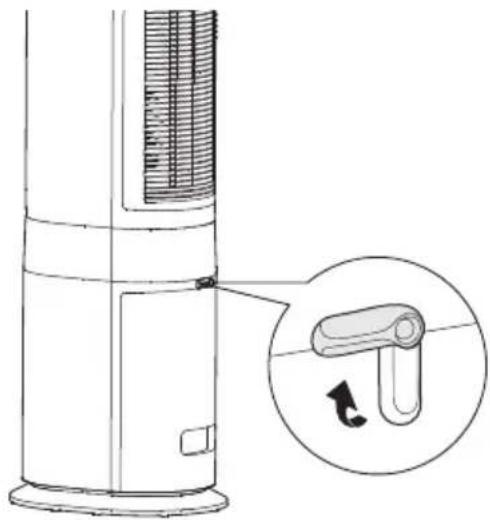
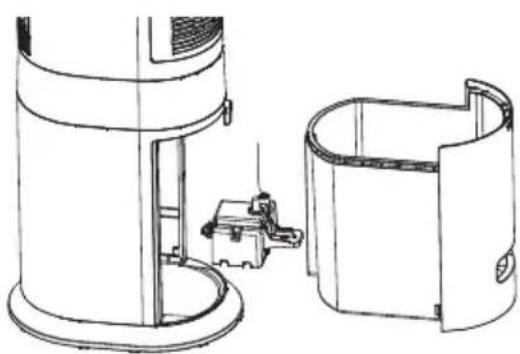
- How to add water: Separate the water pump module, pull out the water tank completely, add water or clean the water tank.
Open the water tank latch to the horizontal state.
natural_image
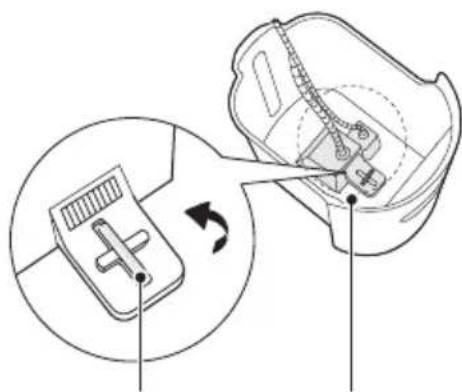
Diagram of a vertical cylindrical device with a magnified inset showing a curved mechanical component (no text or symbols)Turn the knob by hand (90° counterclockwise) to separate the water tank and the water pump module (including water pipe).
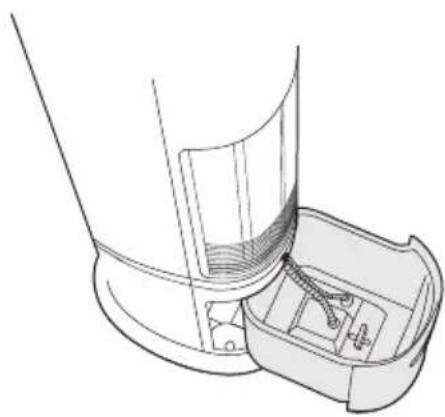
2 Pull out the water tank slowly, as shown in the picture.
natural_image
Technical line drawing of a mechanical component with internal parts (no text or symbols)4 Bull out the water tank completely, clean and add water.
natural_image
Diagram of a device interior showing a switch mechanism and a circular component with rotation arrow (no text or symbols)SLOTTED KNOB
WATER PUMP MODULE
natural_image
Technical line drawing of a cylindrical device with a small mechanical component inserted into a housing (no text or symbols)5 Remove the filter and clean the water pump as shown in the picture (it is recommended to clean once every 3 months to prolong the service life.)
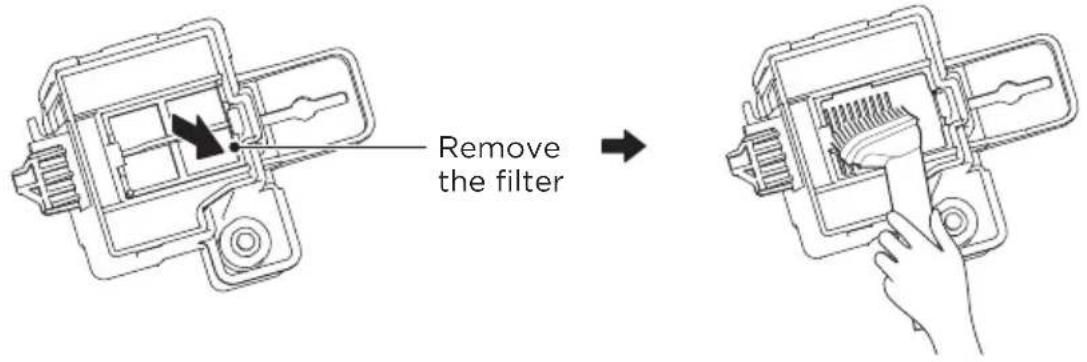
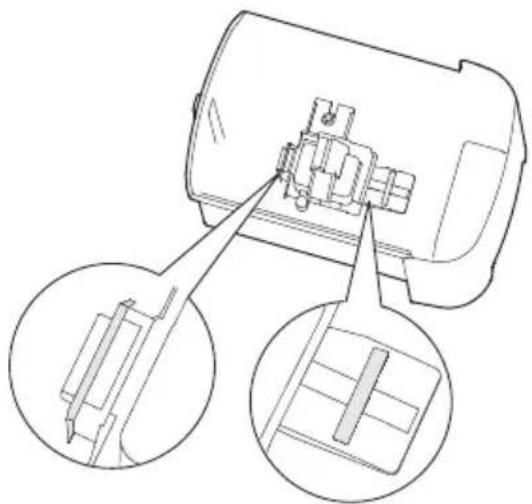
6 After adding water or cleaning the water tank, put the water pump module into the water tank, insert the front hook into the water tank slot, turn the slotted knob clockwise 90°, and snap it to the state as shown in the figure.
7 Slowly push in the water tank and turn the water tank latch to lock the water tank.
EN
natural_image
Technical line drawing of a mechanical component with two circular insets showing internal components (no text or symbols)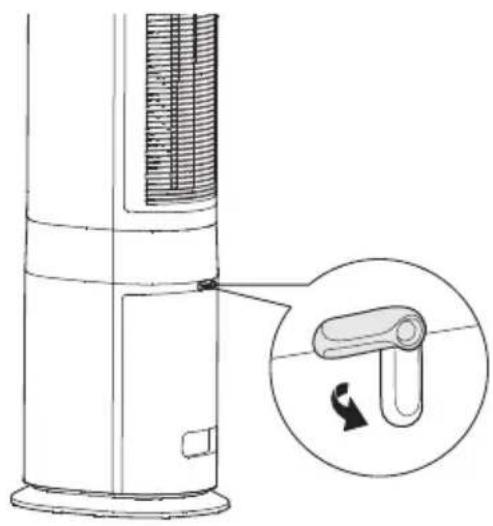
natural_image
Diagram of a vertical cylindrical device with internal structure and a magnified inset showing a curved mechanical component (no text or symbols)Use Of Ice Crystal Box
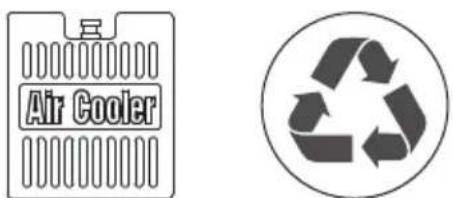
- The ice crystal box can be repeatedly frozen and recycled; you can also choose not to use it according to the temperature.
- Do not open the lid of the ice crystal box in order to prevent damage and leakage.
- Pay close attention to avoid eating when used by or near children.
- The ice crystal box is made of environmentally friendly materials, non-toxic and harmless, and can be safely placed in the freezer for freezing.
- The frozen ice crystal box is used in the water tank. After the cool air is turned on, the temperature of the air outlet will drop.
- Ice crystal box freezing can be replaced with ice cubes, which also has a cooling effect.
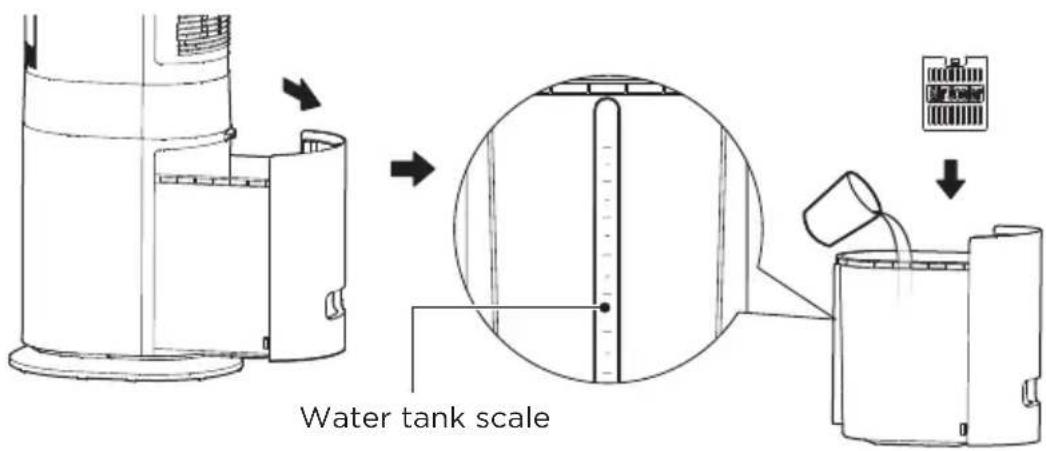
- When adding water, the water level of the tank should be controlled not to exceed the "Max" scale. If the water level is lower than the "Min." scale, please add water in time.
1 Take out the ice crystal box from the packaging box and put it in the freezer for more than 3 hours.
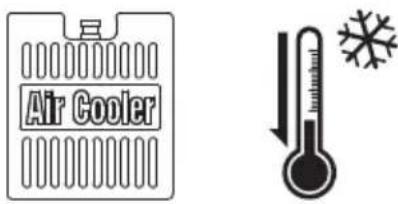
Freeze for more than 3 hours
EN
2 Pull out the water tank from the bottom of the machine, put the frozen ice crystal box into the water tank, and add water below the "MAX" scale.
3 The ice crystal box can be repeatedly frozen and recycled; you can also choose not to use it according to the temperature.
PRODUCT OPERATION
Control Panel Operations
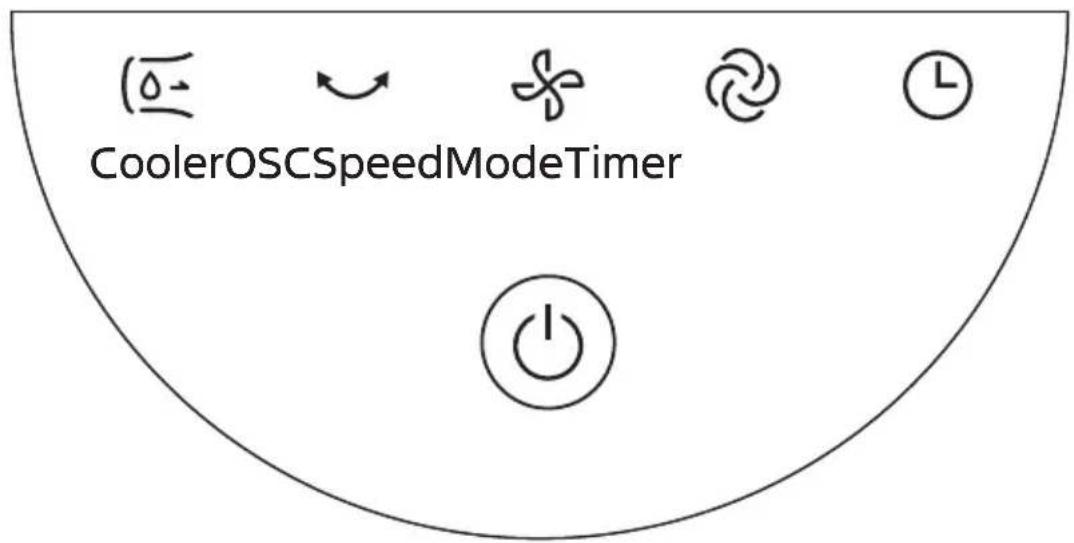
flowchart
graph TD
    A["CoolerOSCSpeedModeTimer"] --> B["Water droplet"]
    A --> C["Refresh"]
    A --> D["Cherry"]
    A --> E["Laptop"]
    A --> F["Power Button"]
EN
| Function | Function description |
 | Click “💡” On/Standby to start or stop the product. |
 Cooler Cooler | When the power is on, press it to turn on or off the cooling wind. In dry or hot weather, turn on the cooling wind function for better experience. |
 OSC OSC | Touch the OSC key “💡” to start or stop the oscillator. |
 Speed Speed | Touch this key to switch the wind speed (Note: normal wind according to 1-2-3-... -6-1 gear cycle; temperature control wind according to 1-2-3-... -6-1 gear cycle; sleep wind by 1-2-3-1 gear cycle; baby wind by 1-2-1 gear cycle). |
  | You can choose from four wind modes: normal (6 levels), temperature control (6 levels, “💡”temperature control wind indicator is on) sleep (3 levels, “💡”sleep wind indicator is on), baby wind (2 levels, “💡”baby wind indicator is on). Note: The temperature control mode only exists when the temperature is below 40°C, and automatically exits when the temperature exceeds 40°C(In this case, press the mode button to cycle in the following sequence:normal wind-sleep wind-baby wind). |
 Timer Timer | In power-on state, press this key and set the time through “💡” when the display flashes; after setting, it flashes 3 times and completes the timer setting.In standby state, press this key and set the time through “💡” when the display flashes; after setting, it flashes 3 times and completes the schedule setting. |
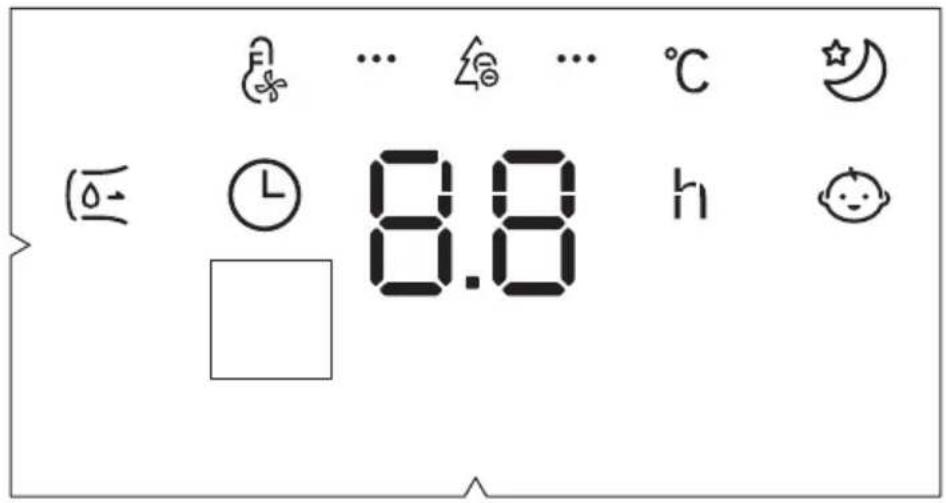
| Function | Function description | |
 | Cooling wind indicator | • In cooling wind mode, the indicator is on. |
 | Temperature control wind indicator | • This indicator is on in temperature control mode, and the wind volume can be adjusted intelligently and automatically according to the ambient temperature. |
 | Timer indicator | • This indicator is on in the timer mode. |
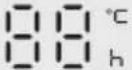 | Nixie tube | • Display wind speed level or schedule time, display temperature in variable speed mode (Set the timer in variable speed mode, and the temperature and schedule time are displayed cyclically). |
| ... [word] ... | Negative ion indicator | • The negative ion mode is turned on by default; in this mode, the indicator light is on. |
 | Sleep wind indicator | • This indicator is on in sleep wind mode. When the sleep wind is turned on, the fan automatically cycles the wind level according to the program. There are 3 levels. You can adjust the level of the sleep wind by pressing the wind speed key. |
 | Baby wind indicator | • This indicator is on in baby wind mode. |
Remote Control
- Both machine body operation “💡” and remote control “💡” are buttons of wind type.
- Both machine body operation “ 0 ” and remote control “…” are buttons of cool wind.
- The remote control should be normally used within 5 meters of the front of the product and 30 degrees of the deviation angle.
- When using, please aim the remote control at the control part of the device.
The battery contains many heavy metals, acids and bases, etc., which may threaten human's health. Waste batteries should be recycled separately.


NOTE
Use manganese or alkaline batteries of type "AAA". DO NOT use rechargeable batteries.
CLEANING AND MAINTENANCE
- Disconnect the power before cleaning the product. Wait for two minutes before cleaning.
- Do not clean the product with any abrasive tools and solvents that will damage the surface. Clean it with detergent and wipe with a dry cloth in time.
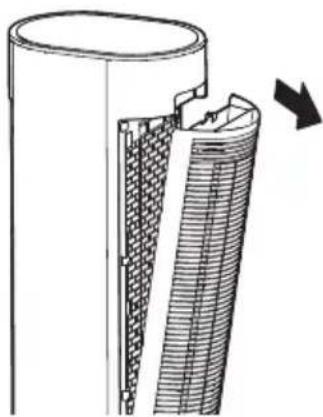
- Do not wash the main unit directly with water. The detachable parts (wet curtain assembly) can be cleaned with a soft brush, and then installed after drying.
- It is forbidden to disassemble the product for modification. It is recommended to check and clean this product regularly to prolong its life.
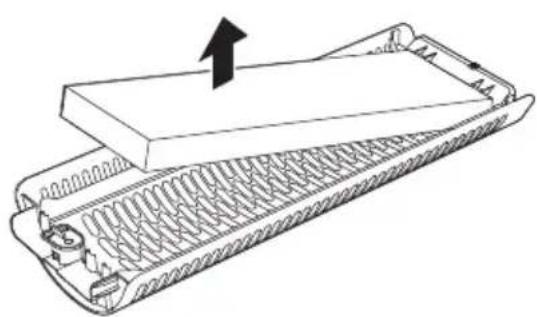
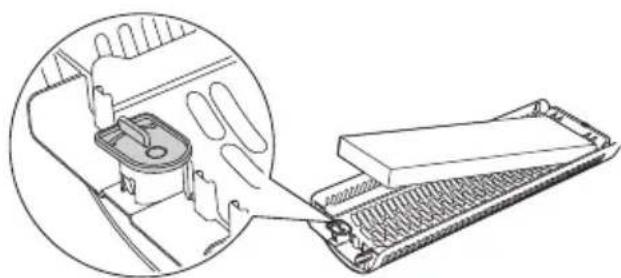
Instructions For Wet Curtain Assembly/disassembly
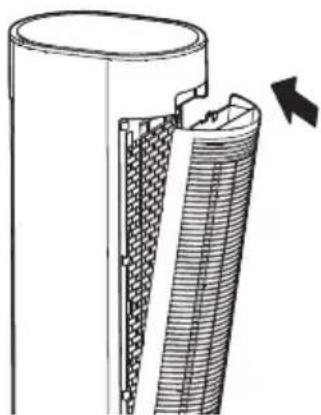
1 Remove the wet curtain support.
natural_image
Technical illustration of a mechanical component with internal grooves and a directional arrow (no text or symbols)3 Take out and clean the wet curtain and dust filter.
natural_image
Diagram of a mechanical component with internal spring and housing, showing a directional arrow (no text or symbols)2 Unscrew the pull button at the bottom first, and then take out the wet curtain.
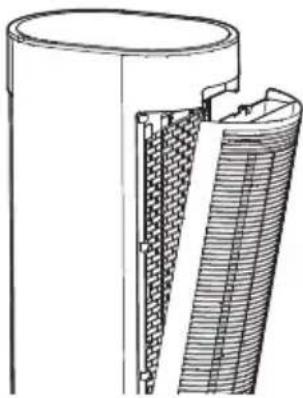
natural_image
Line drawing of a mechanical device with a hand inserting a component into a tray (no text or symbols)4 Install the wet curtain support.
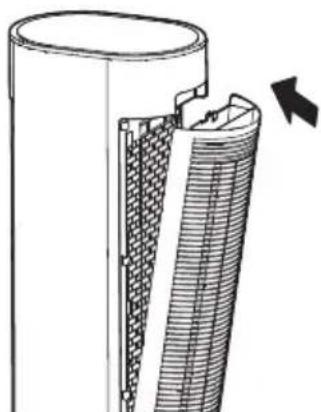
natural_image
Technical illustration of a cylindrical mechanical component with internal grooves and a directional arrow (no text or symbols)Change Water
• After the cooling wind function is stopped for 2 minutes, the water tank can be pulled out to change the water when the water on the pipe and the wet curtain returns to the water tank.
natural_image
Technical line drawing of a mechanical component with internal grooves and textured surfaces (no text or symbols)Stop the cooling wind function for 2 minutes
EN
TROUBLESHOOTING
Operation of your appliance can lead to errors and malfunctions. The following tables contain possible causes and notes for resolving an error message or malfunction. It is recommended to read the table below carefully in order to save your time and money that may cost for calling to the service center.
| Cause SolutionProblem | ||
| The machine does not work properly after installed | · The power cable is not plugged in or has poor contact. | Make sure the plug is properly inserted into the socket. |
| · The switch on the body is not turned on. | Turn on the switch on the body. | |
| The remote does not work | · The battery needs replacing. Replace the battery. | |
| · The remote is being used more than 5m away from the fan. | Use the remote closer to the fan and make sure it is pointing directly at the control part. | |
| The air volume is Getting smaller | · The wet curtain is dirty. Clean wet curtains regularly. | |
| Abnormalities of cool wind function | · Check whether the water tank lacks water. | Fill the water tank in time. |
TRADEMARKS, COPYRIGHTS AND LEGAL STATEMENT
Midea logo, word marks, trade name, trade dress and all versions there of are valuable assets of Midea Group and/or its affiliates (“Midea”), to which Midea owns trademarks, copyrights and other intellectual property rights, and all goodwill derived from using any part of an Midea trademark. Use of Midea trademark for commercial purposes without the prior written consent of Midea may constitute trademark infringement or unfair competition in violation of relevant laws.
This manual is created by Midea and Midea reserves all copyrights thereof. No entity or individual may use, duplicate, modify, distribute in whole or in part this manual, or bundle or sell with other products without the prior written consent of Midea.
EN
All the described functions and instructions were up to date at the time of printing this manual. However, the actual product may vary due to improved functions and designs.
DISPOSAL AND RECYCLING
Important Instructions for Environment
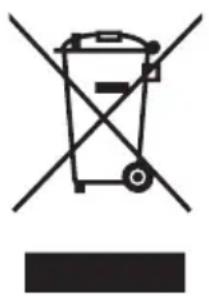
Compliance with the WEEE Directive and Disposing of the Waster Product: This product complies with EU WEEE Directive (2012/19/EU). This product bears a classification symbol for waster electrical and electronic equipment (WEEE).
This symbol indicates that this product shall not be disposed with other household wastes at the end of its service life. Used device must be returned to official collection point for recycling of electrical electronic devices. To find these collection systems please contact to your local authorities or retailer where the product was purchased. Each household performs important role in recovering and recycling of old appliance. Appropriate disposal of used appliance helps prevent potential negative consequences for the environment and human health.
natural_image
Symbol of a trash bin crossed out by two crossed lines, with no text or numbers present.EN
Compliance with RoHS Directive
The product you have purchased complies with EU RoHS Directive (2011/65/EU). It does not contain harmful and prohibited materials specified in the Directive.
Package Information
Packaging materials of the product are manufactured from recyclable materials in accordance with our National Environment Regulations. Do not dispose of the packaging materials together with the domestic or other wastes. Take them to the packaging material collection points designated by the local authorities.

natural_image
Recycling symbol with four arrows forming a triangle (no text or labels)DATA PROTECTION NOTICE
For the provision of the services agreed with the customer,
we agree to comply without restriction with all stipulations of applicable data protection law, in line with agreed countries within which services to the customer will be delivered, as well as, where applicable, the EU General Data Protection Regulation (GDPR).
Generally, our data processing is to fulfil our obligation under contract with you and for product safety reasons, to safeguard your rights in connection with warranty and product registration questions. In some cases, but only if appropriate data protection is ensured, personal data might be transferred to recipients located outside of the European Economic Area.
Further information are provided on request. You can contact our Data Protection Officer via MideaDPO@midea.com. To exercise your rights such as right to object your personal date being processed for direct marketing purposes, please contact us via MideaDPO@midea.com. To find further information, please follow the QR Code.
EN
VIELEN DANK
natural_image
Technical line drawing of a cylindrical industrial or storage unit with internal mesh structure (no text or symbols)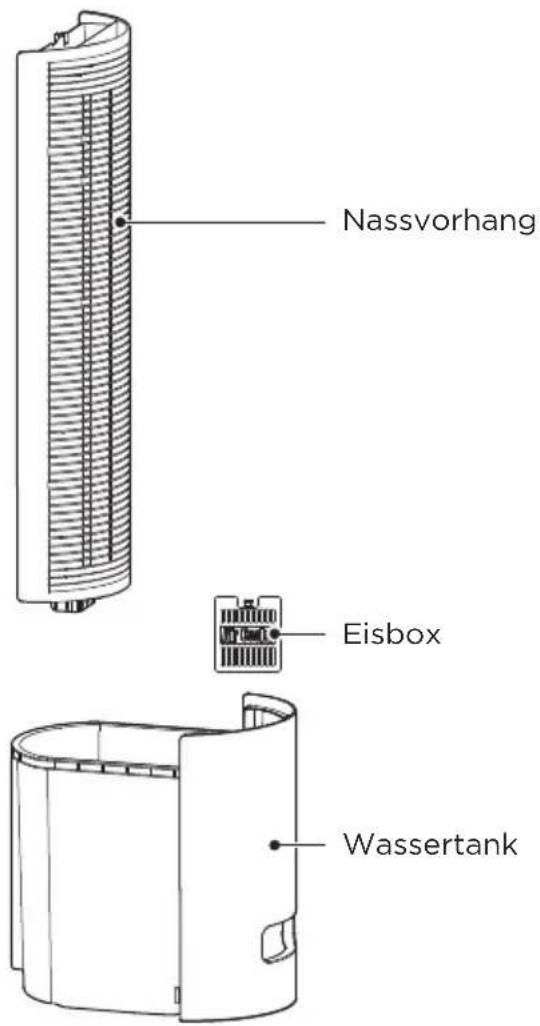
DE
HINWEIS
natural_image
Diagram of a vertical cylindrical device with a magnified inset showing a flexible hose component (no text or symbols present)natural_image
Technical line drawing of a mechanical component with no visible text or symbolsnatural_image
Technical line drawing of a mechanical device with two views: top view and side view (no text or symbols)natural_image
Line drawing of a hand using a handheld device to adjust internal components (no text or symbols)natural_image
Technical line drawing of a mechanical component with two circular insets showing internal components (no text or symbols)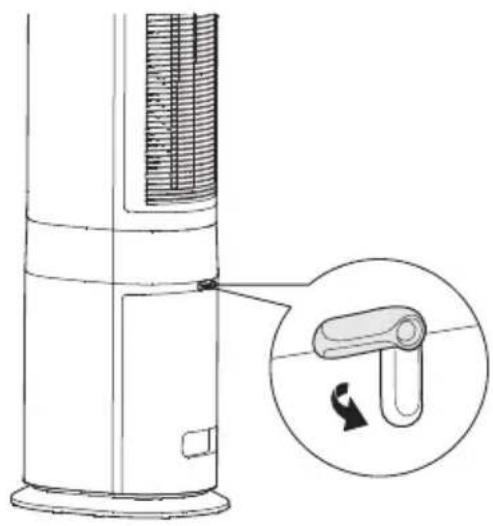
natural_image
Diagram of a vertical cylindrical device with internal structure and a magnified inset showing a curved component (no text or symbols)Eis-Akku
natural_image
Cross-sectional diagram of a mechanical component with internal layered structure and directional arrow (no text or symbols)natural_image
Diagram of a mechanical device with spring-loaded base and upward arrow indicating motion (no text or symbols)natural_image
Line drawing of a mechanical device with a magnified inset showing internal components (no text or symbols)natural_image
Technical illustration of a mechanical component with internal grooves and a directional arrow (no text or symbols)Wasserwechsel
natural_image
Technical line drawing of a mechanical component with internal grooves and textured surfaces (no text or symbols)natural_image
Symbol of a trash bin crossed with no text or numbers, representing waste sorting or disposal (no text present)natural_image
Recycling symbol with four chasing arrows forming a triangle (no text or labels)DATENSCHUTZHINWEISE
natural_image
Diagram of a vertical cylindrical device with a test tube inserted, showing a close-up of its internal structure and a rotation arrow (no text or symbols present)natural_image
Technical line drawing of a mechanical component with no visible text or symbolsnatural_image
Technical line drawing of a portable air conditioner unit with side and top views (no text or symbols)natural_image
Line drawing of a hand using a handheld device to clean or install a mechanical component (no text or symbols visible)natural_image
Technical line drawing of a mechanical component with two circular insets showing internal components (no text or symbols)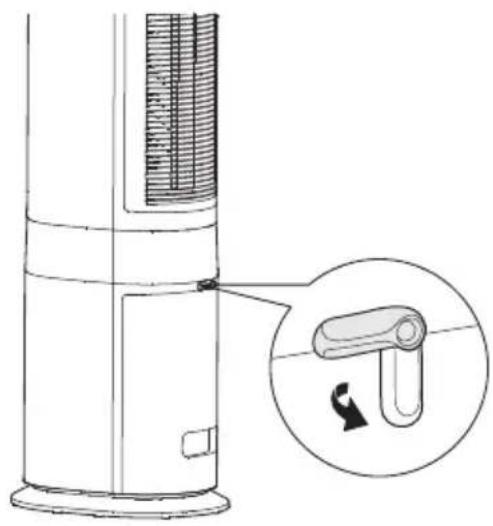
natural_image
Diagram of a vertical cylindrical device with internal structure and a magnified inset showing a U-shaped component (no text or symbols)natural_image
Technical diagram of a mechanical component with internal structure and directional arrow (no text or symbols)natural_image
Diagram of a mechanical component with spring-like grooves and a central block, showing an upward arrow (no text or symbols)natural_image
Line drawing of a mechanical device with a magnified inset showing internal components (no text or symbols)natural_image
Technical illustration of a mechanical component with internal grooves and a directional arrow (no text or symbols)Cambio dell'acqua
natural_image
Technical line drawing of a mechanical component with internal grooves and textured surfaces (no text or symbols)natural_image
Symbol of a trash bin crossed with no text or labels, accompanied by a black rectangular block below (no text or symbols present)natural_image
Recycling symbol with four chasing arrows forming a triangle (no text or labels)VUE D'ENSEMBLE DU PRODUIT 08
GUIDE DE DÉMARRAGE RAPIDE 09
INSTRUCTIONS DE FONCTIONNEMENT 12
NETTOYAGE ET ENTRETIEN 15
DÉPANNAGE 17
MARQUES, DROITS D'AUTEUR ET MENTIONS LEGALES 18
MISE AU REBUT ET RECYCLAGE 19
AVIS SUR LA PROTECTION DES DONNEES 20
CONSIGNES DE SÉCURITÉ
Usage prévu
VUE D'ENSEMBLE DU PRODUIT
Nom de la pièce
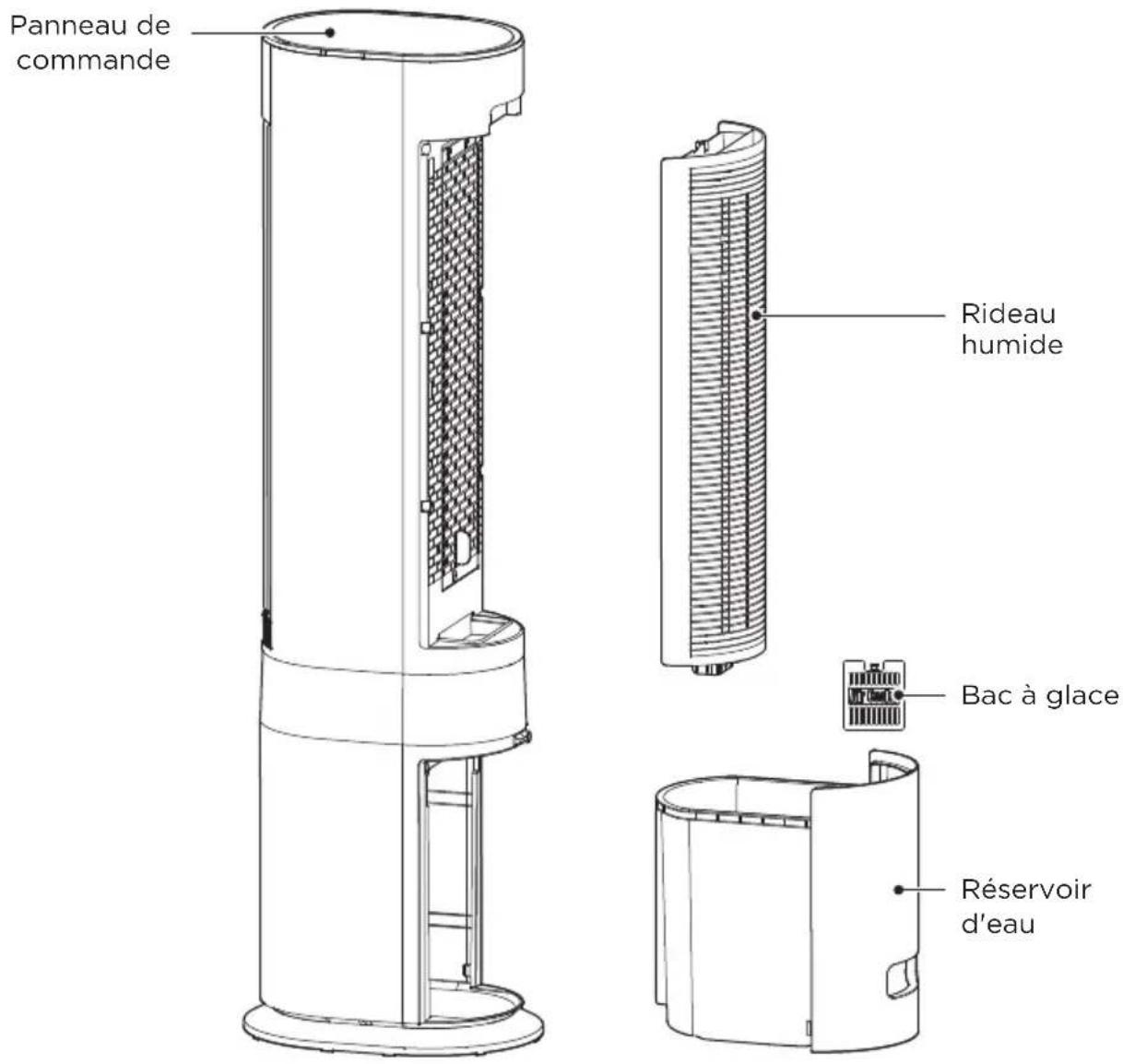
Panneau de commande
FR

REMARQUE
natural_image
Diagram of a vertical cylindrical device with a magnified inset showing a curved mechanical component (no text or symbols)natural_image
Technical line drawing of a mechanical component with no visible text or symbolsnatural_image
Technical line drawing of a cylindrical device with a small mechanical component inserted into a housing (no text or symbols)natural_image
Line drawing of a hand using a handheld device to adjust internal components (no text or symbols)natural_image
Technical line drawing of a mechanical component with two circular insets showing internal components (no text or symbols)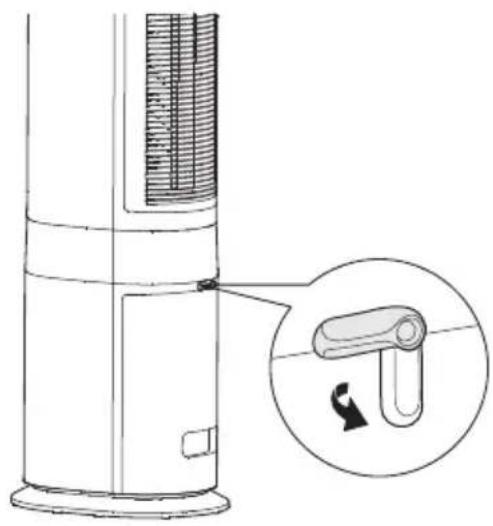
natural_image
Diagram of a vertical cylindrical device with internal structure and a magnified inset showing a curved mechanical component (no text or symbols)natural_image
Cross-sectional diagram of a mechanical component with internal layered structure and directional arrow (no text or symbols)natural_image
Line drawing of a mechanical device with a magnified inset showing internal components (no text or symbols)natural_image
Diagram of a mechanical component with spring-like base and upward arrow indicating motion (no text or symbols)4 Installer le support du rideau humide.
natural_image
Technical illustration of a cylindrical mechanical component with internal grooves and a directional arrow indicating motion (no text or symbols)Changer l'eau
natural_image
Technical line drawing of a mechanical component with internal grooves and textured surfaces (no text or symbols)natural_image
Symbol of a trash bin crossed with no text or numbers, representing waste sorting or disposal (no text present)natural_image
Recycling symbol with four arrows forming a triangle (no text or labels)AVIS SUR LA PROTECTION DES DONNEES
natural_image
Diagram of a vertical cylindrical device with a test tube inserted, showing a close-up of its internal structure and a rotation arrow (no text or symbols present)natural_image
Diagram of a device with a handle and internal components, showing a circular inset view of the handle (no text or symbols)natural_image
Technical line drawing of a mechanical component with no visible text or symbolsnatural_image
Technical line drawing of a cylindrical device with a small mechanical component inserted into a housing (no text or symbols)natural_image
Technical line drawing of a mechanical component with three circular insets showing internal components (no text or symbols)natural_image
Diagram of a vertical cylindrical device with internal structure and a magnified inset showing a curved mechanical component (no text or symbols)natural_image
Cross-sectional diagram of a mechanical component with internal layered structure and directional arrow (no text or symbols)natural_image
Line drawing of a mechanical device with a magnified inset showing internal components (no text or symbols)natural_image
Diagram of a mechanical device with spring-loaded base and upward arrow indicating motion (no text or symbols)natural_image
Technical illustration of a mechanical component with internal grooves and a directional arrow (no text or symbols)Cambiar el agua
natural_image
Technical line drawing of a mechanical component with internal grooves and textured surfaces (no text or symbols)natural_image
Symbol of a trash bin crossed with no text or labels, accompanied by a blank rectangular block below (no text or symbols present)natural_image
Recycling symbol with three chasing arrows forming a triangle (no text or labels)Welcome to MIDEA Service
Midea
Dear Customer,
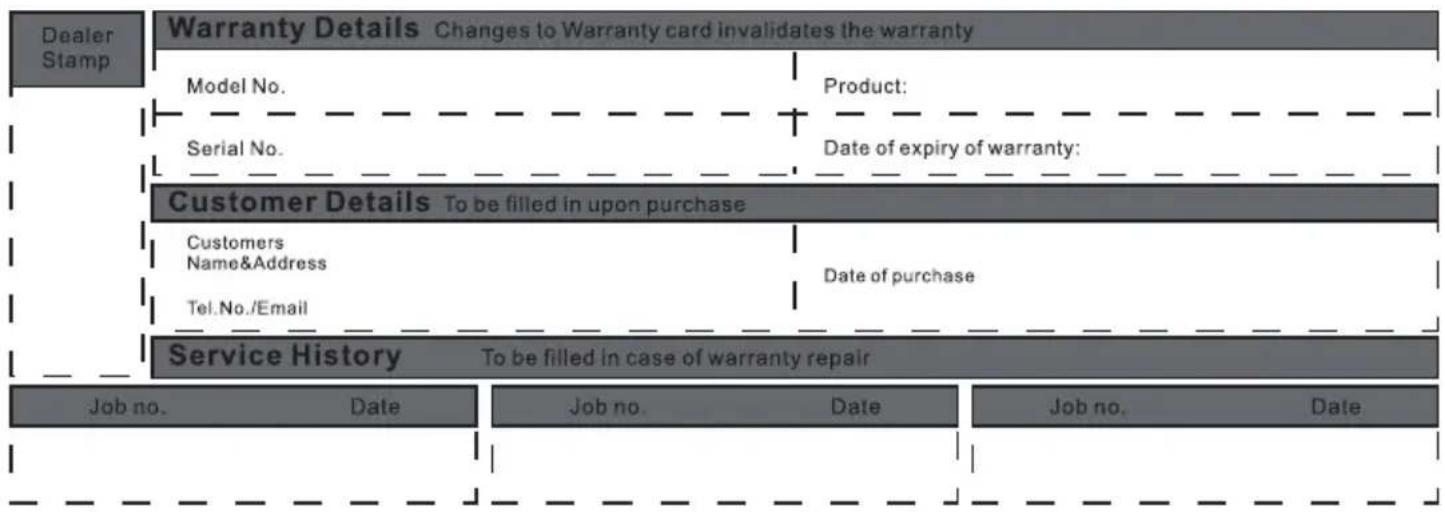
Thank you for purchasing Midea products. Please attach your purchase certificate (invoice or sales slip) to this warranty and keep it properly. If service is required during the warranty period, proof of purchase must be provided. If can't provide, in/out of warranty will be defined by Manufacturer.
Midea product warranty applies to inherent defects in materials and workmanship from the date of initial purchase. For warranty period, please visit www.midea-group.com or your local call center. Warranty service must be obtained from Midea Consumer Services or an authorized Midea servicer.
Warranty terms and conditions
NORMAL RESPONSIBILITIES OF THE CONSUMER
This warranty applies only to products in ordinary household use, and the consumer is responsible for the items listed below:
- Proper use of the appliance in accordance with instructions provided with the product.
- Routine maintenance and cleaning necessary to keep in good working condition.
- Proper installation by an authorized service professional in accordance with instructions provided with the appliance and in accordance with all local plumbing, electrical and / or gas codes.
- Proper connection to a grounded power supply of sufficient voltage, replacement of blown fuses, repair of loosened connections or defects in house wiring.
- Expenses for making the appliance accessible for servicing.
- Damages to finish after installation.
EXCLUSIONS
- Damage due to mishandling or fire and becomes invalid if repair has been attempted by unauthorized persons.
- Any failure to follow the instructions as mentioned in the user manual.
- Fluctuation in voltage or any modifications/adjustments made to comply with local electrical, safety and technical standards.
- Damages caused by fire, accident or any natural disaster, damage due to mishandling, wear & tear, voltage fluctuations.

flowchart
graph TD
    A["Dealer Stamp"] --> B["Warranty Details Changes to Warranty card invalidates the warranty"]
    B --> C["Model No."]
    C --> D["Serial No."]
    D --> E["Customer Details To be filled in upon purchase"]
    E --> F["Customers Name&Address"]
    F --> G["Tel.No./Email"]
    G --> H["Service History To be filled in case of warranty repair"]

    subgraph Customer Details
        I["Product:"]
        J["Date of expiry of warranty:"]
    end

    subgraph Service History
        K["Job no. Date"]
        L["Job no. Date"]
        M["Job no. Date"]
    end
SERVICE CONTACTS
| Albania | 355 |
| Bosnia and Herzegovina | +387 (033) 407 93 |
| +387 (033) 407 937 | |
| Croatia | +385 1 619 5582 |
| Cyprus | +357 24 813890 |
| aikavols / cilbup 420 H43 215 059 | |
| Germany | 49 (0) 6196 9020 0 |
| Greece | 80111 22 622 |
| 210483347 | |
| Hungary | +36 23 769 245 |
| Italy | 199240626 |
| Kosovo | 38349779349 |
| 38349779100 | |
| Malta | +356 21237601 |
| Moldova | +373 (022) 54-54-74 |
| North Macedonia | 389230848 |
| Portugal | 35 1225025742 |
| Roumania | 0742726843 |
| (07GARANTEI)/*414 | |
| Slovakia | 421 2 5710 1800 |
| Slovenia | +385 1 619 5582 |
| Spain | 34 934803322 |
| Srbija | +381 11 3188 033 |
| Latvia/Estonia +37037329000 | |
| Lithuania +37037329000 | |
| Poland | +48 800088680 |
| Hungary | +36 1 888 3250 |
| +36 96 512 527 | |
| +36 96 512 512 | |
| Romania | 021 9196 |
| 021 528 9196 |
Importer
Albania
CED Electric Distributors Ltd
P.O.Box 45071
7100 Aradippou-Larnaca Cyprus
+357 24 813890
Germany
Midea Europe GmbH
FG EUROPE SA Vouliagmenis 128
Ave, Glyfada,
P.O. 16674 - Athens, Greece
Italy
Midea Italia S.R.L.
Via Luigi Bodio 29/37 - Milano (MI)
20158 Italy
Kosovo
Elkos Shpk, address : Road Zona
Industriale P.N, 30 000 Peje, Kosove.
Malta
Kencar Co. Ltd.
168, Industrial Estate,
Luqa LQA 3000, Malta.
North Macedonia
Setec Se Od Tehnika Doo
Street 1523 no.1
Municipality of Kisela Voda 1000 Skopje
Republic of North Macedonia
Tel. 0038923080877
Portugal
MIDEA HOME APPLIANCES UK LTD
Conavon Court Ground Floor, 12 Blackfriars
Street, Salford, Manchester M3 5BQ UK
0333 900 1101
service_uk@midea.com
Latvia/Estonia
Importer: ACC Distribution, UAB
Raudondvario pl. 131 B, LT-47191
Kaunas, Lithuania
Service Data: Raudondvario pl.131B-4,
Kaunas, LT-47191, Tel: +37037329000
E-mail: info@servisaict.lt
https://servisaict.eu/en/
Lithuania
Importer: ACC Distribution, UAB
Raudondvario pl. 131 B, LT-47191 Kaunas,
Lithuania
Service Data: Vilnius Geležinio
Vilko str. 6, LT-03150 Kaunas
https://servisaict.eu/en/
Poland
Importer: AB S.A. 55-040 Magnice, ul.
Europejska 4
Service Data: Quadranet Sp. Z.o.o
Hotline: +48 800088680
Mail: midea@quadra-net.com
Hungary
Importer: Blizzard Hungary kft. 1162
Global City Business Park
Sos. Bucuresti Nord nr. 10
Corp O1, etaj 10
Voluntari, 077190 Ilfov
Service Data: Bucuresti-Nord road,
No. 10, Corps O1, Voluntari, Ilfov
County, Romania, Tel: 021 9196, 021
528 9196, infoclienti@altexservice.ro
Roumanla
ASBIS Romania SRL
J40/5587/1998 | RO10656216
Splaiul Independentei 319, Sector 6,
Bucuresti
Phone : +40 21 337 1097
Fax : +40 21 337 1091
Garantie/Kundendienst
make yourself at home


- USER MANUAL
- LANGUAGES
- THANK YOU LETTER
- CONTENTS
- SAFETY INSTRUCTIONS
- Intended Use
- Explanation of Symbols
- Danger
- Warning of electrical voltage
- Warning
- Caution
- Attention
- Observe instructions
- SPECIFICATIONS
- PRODUCT OVERVIEW
- Part Name
- NOTE
- QUICK START GUIDE
- In structions For Refilling The Water Tank, Disassembling And Washing
- Use Of Ice Crystal Box
- PRODUCT OPERATION
- Control Panel Operations
- Remote Control
- CLEANING AND MAINTENANCE
- Instructions For Wet Curtain Assembly/disassembly
- Change Water
- TROUBLESHOOTING
- TRADEMARKS, COPYRIGHTS AND LEGAL STATEMENT
- DISPOSAL AND RECYCLING
- Important Instructions for Environment
- Compliance with RoHS Directive
- Package Information
- DATA PROTECTION NOTICE
- VIELEN DANK
- HINWEIS
- Eis-Akku
- Wasserwechsel
- DATENSCHUTZHINWEISE
- Cambio dell'acqua
- CONSIGNES DE SÉCURITÉ
- Usage prévu
- VUE D'ENSEMBLE DU PRODUIT
- Nom de la pièce
- REMARQUE
- Changer l'eau
- AVIS SUR LA PROTECTION DES DONNEES
- Cambiar el agua
- Welcome to MIDEA Service
- Midea
- Dear Customer,
- Warranty terms and conditions
- NORMAL RESPONSIBILITIES OF THE CONSUMER
- EXCLUSIONS
- SERVICE CONTACTS
- Importer
- Albania
- Germany
- Italy
- Kosovo
- Malta
- North Macedonia
- Portugal
- Latvia/Estonia
- Lithuania
- Poland
- Hungary
- Roumanla
- Garantie/Kundendienst
Brand : MIDEA
Model : MCF23XRB
Category : Fan