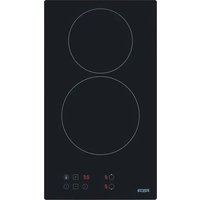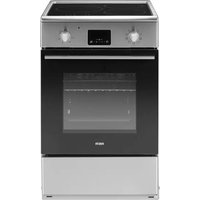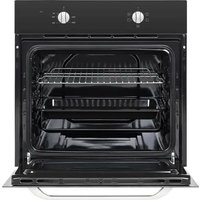
FME7024IBL/M - Cooker FAR - Free user manual and instructions
Find the device manual for free FME7024IBL/M FAR in PDF.


| Product type | Built-in cooker (electric oven) |
| Brand | FAR |
| Model | FME7024IBL/M |
| Oven usable volume | 70 L |
| Net weight | 29 kg |
| Rated voltage | 220-240 V~ |
| Rated frequency | 50-60 Hz |
| Total electrical power | 3.0 kW |
| Energy efficiency index (conventional) | 112.7 (class ?) |
| Energy efficiency index (fan-assisted) | 84.6 (class ?) |
| Energy consumption (conventional) | 0.99 kWh/cycle |
| Energy consumption (fan-assisted) | 0.79 kWh/cycle |
| Cooking functions | Light, Defrost, Double grill + fan, Double grill, Single grill, Fan-assisted (conventional + fan), Convection, Bottom heat, ECO |
| Included accessories | Metal grid, Grill pan |
| Lighting type | Halogen lamp G9, 25 W, 230 V~, class G |
| Cleaning | Manual cleaning, do not use steam cleaner or abrasives |
| Safety | Automatic shut-off after 10 hours of inactivity, child lock not specified |
| Installation | Built-in, requires cabinet with minimum opening (see manual) |
| Electrical connection | 16 A plug, earthing mandatory |
Frequently Asked Questions - FME7024IBL/M FAR
User questions about FME7024IBL/M FAR
0 question about this device. Answer the ones you know or ask your own.
Ask a new question about this device
Download the instructions for your Cooker in PDF format for free! Find your manual FME7024IBL/M - FAR and take your electronic device back in hand. On this page are published all the documents necessary for the use of your device. FME7024IBL/M by FAR.
USER MANUAL FME7024IBL/M FAR
natural_image
Black oven appliance with indicator lights and a blank screen (no visible text or symbols)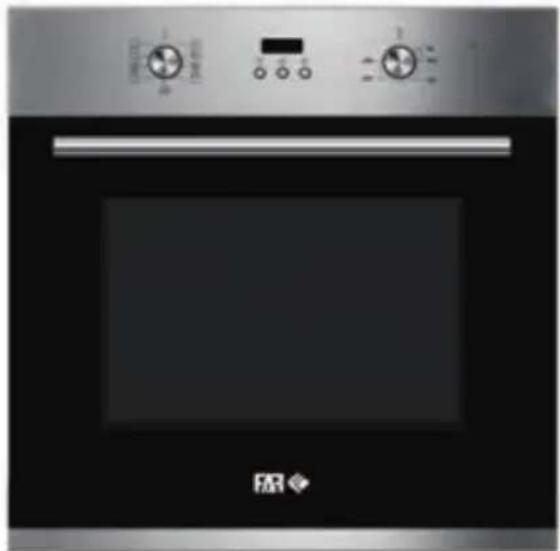
natural_image
Front view of a stainless steel oven with control knobs and a digital display (no visible text or symbols)MANUEL D'UTILISATION
FME7024IBL/M
FME7024IX/M
INSTALLATION DU PRODUIT ....20
NETTOYAGE ET ENTRETIEN 27
DEPANNAGE 29
SPÉCIFICATIONS 31
RECYCLAGE DU PRODUIT 32
CONSIGNES DE SÉCURITÉ IMPORTANTES
LES AVERTISSEMENTS SONT FOURNIS POUR LA SÉCURITÉ. LISEZ ATTENTIVEMENT LES AVERTISSEMENTS AVANT D'INSTALLER OU D'UTILISER L'APPAREIL.
DÉCLARATION DE CONFORMITÉ
natural_image
Simple line drawing of a rectangular tray with internal compartments (no text or symbols)natural_image
Two technical line drawings of a storage or rack system inside a container, showing internal compartments and storage tanks (no text or symbols)INSTALLATION DU PRODUIT
natural_image
Technical line drawing of a mechanical component with no visible text or symbols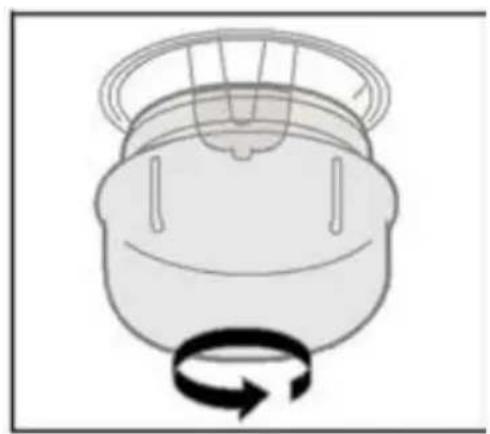
natural_image
Simple line drawing of a mechanical component with a rotating arrow (no text or symbols)RECYCLAGE DU PRODUIT
Thank you to have chosen the FAR quality. This product has been created by our professional team and according to the European regulation. For a better use of your new device, we recommend you to read carefully this user manual and keep it for record.
TABLE DES MATIÈRES
IMPORTANT SAFETY INSTRUCTIONS ......2
PRODUCT INTRODUCTION 8
PRODUCT INSTALLATION ....20
CLEANING AND MAINTENANCE 26
TROUBLESHOOTING 28
SPECIFICATIONS 30
PRODUCT RECYCLING 31
IMPORTANT SAFETY INSTRUCTIONS
THESE WARNINGS ARE PROVIDED IN THE INTEREST OF SAFETY. PLEASE READ THEM CAREFULLY BEFORE INSTALLING OR USING THE APPLIANCE.
To maintain the EFFICIENCY and SAFETY of this appliance, we recommend:
-
Call only the Service Centers authorized by store where you buy the cooker.
• Always use original Spare Parts. -
When the oven is first switched on, it may give off an unpleasant smell. This is due to the bonding agent used for the insulating panels within the oven. Please run the new empty product with the conventional cooking function, 250°C, 90 minutes to clean oil impurities inside the cavity.
-
During the first use, it is completely normal that there will be slight smoke and door. If it does occur, you should wait for the smell to be cleared before putting food into the oven.
-
Please use the product under an open environment.
-
WARNING: The appliance and its accessible parts become hot during use.
Care should be taken to avoid touching heating elements. Children less than 8 years of age shall be kept away unless continuously supervised.
-
If the surface is cracked, switch off the appliance to avoid the possibility of electric shock.
-
This appliance can be used by children aged from 8 years and above and persons with reduced physical, sensory or mental capabilities or lack of experience and knowledge if they have been given supervision or instruction concerning use of the appliance in a safe way and understand the hazards involved. Children shall not play with the appliance. Cleaning and user maintenance shall not be made by children without supervision.
-
During use, the appliance becomes very hot. Care should be taken to avoid touching heating elements inside the oven.
-
Do not allow children to go near the oven when it is operating, especially when the grill is on.
-
WARNING: Ensure that the appliance is switched off before replacing the lamp to avoid the possibility of electric shock.
-
The means for disconnection must be incorporated in the fixed wiring in accordance with the wiring specifications.
-
Children should be supervised to ensure that they do not play with the appliance.
-
This appliance is not intended for use by persons (including children) with reduced physical, sensory or mental capabilities, or lack of experience and knowledge, unless they have been given supervision or instruction concerning use of the appliance by person responsible for their safety.
-
Accessible parts may become hot during use. Young children should be kept away.
-
An all-pole disconnection means must be incorporated in the fixed wiring in accordance with the wiring rules.
-
If the supply cord is damaged, it must be replaced by the manufacturer, its service agent or similarly qualified persons in order to avoid a hazard.
-
Do not use harsh abrasive cleaners or sharp metal scrapers to clean the oven door glass since they can scratch the surface, which may result in shattering of the glass.
-
Only use the temperature probe recommended for this oven.
-
A steam cleaner is not to be used.
-
The appliance is not intended to be operated by means of an external timer or a separate remote control system.
-
For details about the correct installation of the shelves can be found in the PRODUCT INSTALLATION section.
-
Do not use the oven unless you are wearing something on your feet. Do not touch the oven with wet or damp hands or feet.
-
For oven: Oven door should not be opened often during the cooking period.
-
The appliance must be installed by an authorized technician and put into use. The producer is not responsible for any damage that might be caused by defective placement, and installation by unauthorized personnel.
-
When the door or drawer of oven is open do not leave anything on it, or you may unbalance your appliance or break the door.
-
Some parts of appliance may keep its heat for a long time; it is required to wait for it to cool down before touching onto the points that are exposed to the heat directly.
-
If you will not use the appliance for a long time, it is advised to plug it off.
-
The appliance must not be installed behind a decorative door in order to avoid overheating.
-
Replacing certain parts of your household electrical appliance may lead to a danger. Please ensure that you have the necessary skills and own all tools required to carry out the self-repair operations safely. Otherwise, please contact a qualified professional.
This appliance is intended to be used in household and similar applications such as:
- staff kitchen areas in shops, offices and other working environments;
- farm houses;
- by clients in hotels, motels and other residential type environments;
- bed and breakfast type environments.
-
Do not place any heavy load on the oven door when it is open, and do not let children climb or sit on it.
-
Regarding the instructions for installation and electric connection of the appliance, thanks to refer to the below paragraph of the manual.
-
Regarding the instructions for cleaning and maintenance, thanks to refer to the below paragraph of the manual.
-
Regarding the instructions for cleaning surfaces in contact with food thanks to refer to the below paragraph of the manual.
-
Regarding the information pertaining to the installation, handling, servicing and disposal of the appliance, thanks to refer to the below paragraph of the manual.
-
Regarding the information of the method for replacing illuminating lamps, thanks to refer to the below paragraph of the manual.
DECLARATION OF COMPLIANCE
- When you have unpacked the oven, make sure that it has not been damaged in any way. If you have any doubts at all, do not use it: contact a professionally qualified person. Keep packing materials such as plastic bags, polystyrene, or nails out of the reach of children because these are dangerous to children.
PRODUCT INTRODUCTION
Oven
When removing food, please wear heat insulating gloves to prevent burns!
At the moment of opening the door of the furnace, pay attention to the steam. Please open the door at a small Angle to avoid the steam on your face.
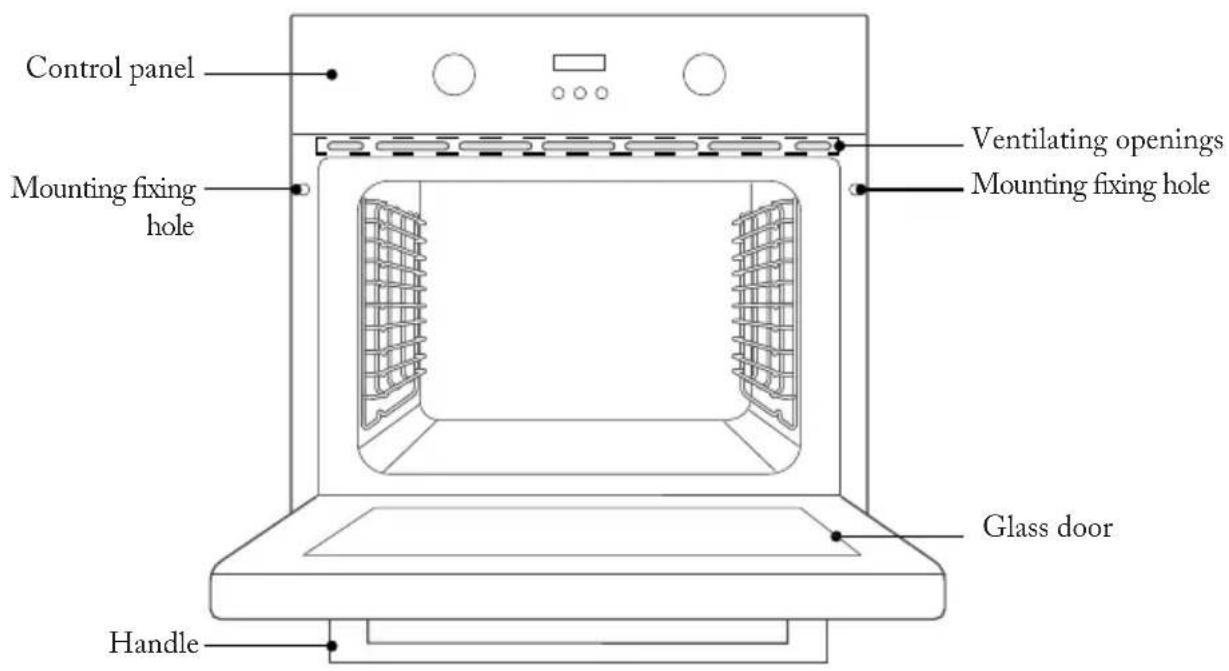
Accessories
natural_image
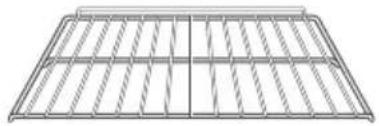
Pure structural grid diagram without any text, numbers, or symbolsGrill rack Grill tray
Grill food or place heat-resistant cooking containers
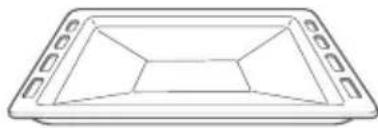
natural_image
Simple line drawing of a rectangular tray with cutouts and a central triangular shape (no text or symbols)Cook large portions of food or catch food scraps

Screws
Mounting fixing hole
Accessories use(Only for some models)
For the oven to work properly, the grill rack and Grill tray should only be placed between the first and fifth levels. When used together, place the Grill tray under the grill rack.
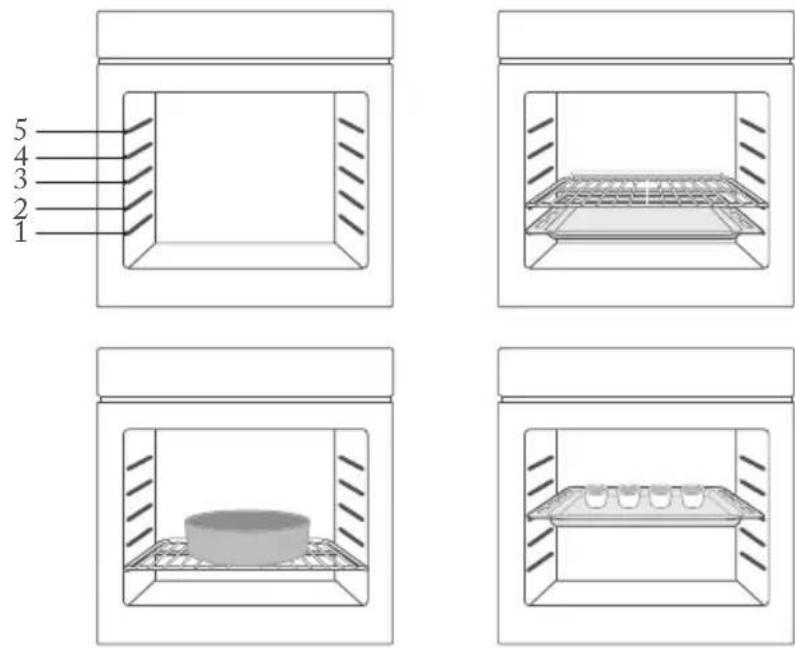
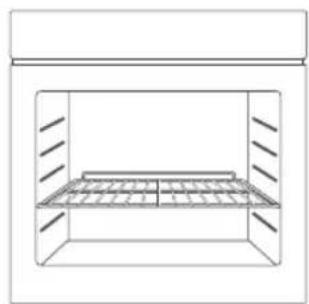
The shelves should be used with the right direction, it will ensure that during careful removal of the shelf ortray, hot food items should not slide out.
natural_image
Simple line drawing of a storage cabinet or rack unit (no text or symbols)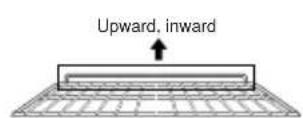
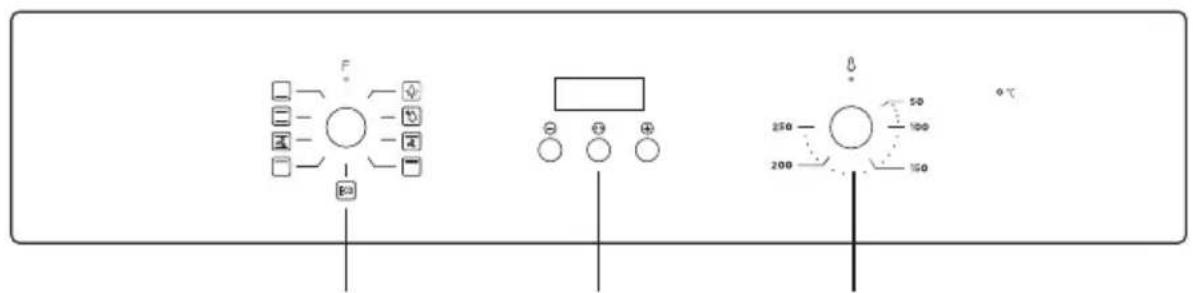
Control Panel
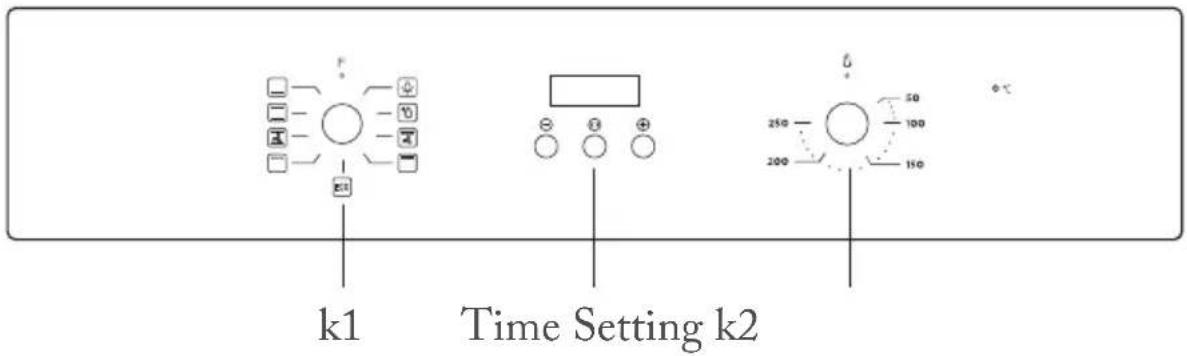
K1: For selecting oven functions.
K2: For setting the temperature.
Time Setting: For adjusting the cooking time.
| Function | Function introduction |
 Lamp Lamp | The cooking process can be observed under illuminated conditions. Except ECO function. |
 Defrost Defrost | The circulation of air at room temperature enables quicker thawing of frozen food (without the use of any heat). |
 Double grill with fan Double grill with fan | The radiant heating element and top heating element are working with fan. |
 Double grill Double grill | The radiant heating element and top heating element are working. |
 Single grill Single grill | The inner grill element switches on and off to maintain temperature.Can be used to grill a small number of food. |
 Conventional+fan Conventional+fan | The combination of fan and the top and bottom heating elements provides more even heat penetration and coloration, primarily for cooking meat. |
 Conventional Conventional | The top and bottom heating elements work together to provide convectional cooking. |
 Bottom heating Bottom heating | Heating is provided by heating pipes at the bottom of the oven.Mainly used for keeping warm and the coloring of the food. |
| ECO ECO | For energy-saving cooking. Cooking the selected ingredients in a gentle manner, and the heat comes from the top and the bottom. |
Before using for the first time
-
The oven must not be operated until it has been correctly installed.
-
To avoid fire, remove all transport protection materials and ensure that the oven is free of residual packaging items and accessories (e.g. foam, cardboard, grill tray, grill rack, etc.).
-
Clean the oven cavity and accessories with soapy water and a soft cloth.
-
Open kitchen windows and cooker hoods to maintain high ventilation.
-
Do not let children or pets into the kitchen and close the doors of adjacent rooms.
-
After connecting the power, activate the oven mode, time, and temperature in the table below to remove odors in the cavity.
| Function | Temperature Time |
| Conventional 25 | 0°C 0.5-1 Hour |
- After the first use, please open the oven door at a small angle and wait for the cooling to complete.
Setting the clock
When the oven is connected to the power supply for the first time, you need to set the clock.
Note: The clock is a 24 hour clock.
- Press " ⊖ " or " ⊕ " key to adjust the hour setting.
- Press " <> " key to confirm the hour setting.
- Press " ⊖ " or " ⊕ " key to adjust the minute setting.
- Press " <> " key to complete the clock setting.
Regular operation
- Turn knob K1 to select the oven functions.
- Turn knob K2 to adjust the temperature.
- Mode setting.
- When cooking is finished, turn all knobs to the "O" position.
flowchart
graph TD
    A["Step 1: Square icon"] --> B["Circle with +/- symbols"]
    B --> C["Box with -50"]
    C --> D["Box with -40"]
    D --> E["Box with -30"]
    E --> F["Box with -20"]
    F --> G["Box with -10"]
    G --> H["Box with 0"]
    H --> I["Box with 1"]
    I --> J["Box with 2"]
    J --> K["Box with 3"]
    K --> L["Box with 4"]
    L --> M["Box with 5"]
    M --> N["Box with 6"]
    N --> O["Box with 7"]
    O --> P["Box with 8"]
    P --> Q["Box with 9"]
    Q --> R["Box with 10"]
    R --> S["Box with 11"]
    S --> T["Box with 12"]
    T --> U["Box with 13"]
    U --> V["Box with 14"]
    V --> W["Box with 15"]
    W --> X["Box with 16"]
    X --> Y["Box with 17"]
    Y --> Z["Box with 18"]
    Z --> AA["Box with 19"]
    AA --> AB["Box with 20"]
    AB --> AC["Box with 21"]
    AC --> AD["Box with 22"]
    AD --> AE["Box with 23"]
    AE --> AF["Box with 24"]
    AF --> AG["Box with 25"]
    AG --> AH["Box with 26"]
    AH --> AI["Box with 27"]
    AI --> AJ["Box with 28"]
    AJ --> AK["Box with 29"]
    AK --> AL["Box with 30"]
k1 Time Setting k2
Mode setting
In standby mode, press and hold the " <> " key for 3 seconds to enter manual mode, the " 🔊 " icon will light up.
Under manual mode, press the " <> " key to enter the time mode selection: manual → minute minder → dur → End → manual.
The automatic cooking modes that can be set are semi-automatic: dur or End.
If the display does not show the icon " 🔊", the oven will not work or heat up.
The oven will only work or heat up if the display shows icon " _.
Notes
-
Manual mode - the cooking time is controlled by the user.
-
Minute minder - you can set an audible reminder for the time period of completion.
-
Dur - you can set the oven so it will cook for a desired time range.
-
End - you can set the oven so it will cook to a desired time.
Manual mode
In manual mode, only the current time and the symbol " 🔊" lights up. The oven is always in working order and the cooking time is controlled by the user.
Notes
-
In manual mode, after 5 hours of no operation, the displayed time starts to flash. After 10 hours without any operation, return to the standby state.
-
When the time is flashing, if you want to use the manual mode again, please press the " ⊖" or " ⊕" key.
Minute minder
This mode is only used as a reminder function.
-
Press " <> " key to select the minute minder function. The relevant " ☐ " " . " symbol will flash.
-
Press the " ⊖ " or " ⊕ " key to enter the alarm clock time setting (the setting method is the same as "Clock Setting").
- After setting, press the " <> " key to confirm the alarm clock setting, and the " ☐ " icon is always on.
- When the time is up, the buzzer beeps to remind you, and the " ☐ " symbol on the screen begins to blink. At this point, press any key to cancel the reminder.
Cooking dur time
If the dur mode is set for 1 hour, cooking ends after 1 hour.
- Press the " <> " key continuously until the screen shows "dur".
- Press the " ⊖ " or " ⊕ " key to enter the dur mode time setting (the setting method is the same as "Clock Setting"). The maximum setting time is 10 hours.
-
After confirming the time setting, press the " <> " key to start. At this time, the icons " 🔊 " and " A " are always on.
-
If the dur mode is set for 1 hour, the buzzer sounds after 1 hour to indicate the end of cooking and the icon "A" flashes.
- At this point, press any key to return to standby, stop the chirping alert and the icon "A" disappears.
Cooking End time
Cooking starts at the current time and ends at the set clock time.
- Press the " <> " key continuously until the screen shows "End".
- Press the " ⊖ " or " ⊕ " key to enter the End mode time setting (the setting method is the same as "Clock Setting").
- After confirming the time setting, press the " <> " key to start. At this time, the icons " 🔊 " and " A " are always on.
- When the End time is the same as the system clock time, the buzzer will sound, indicating the end of cooking. The icon "###" disappears and the icon "A" flashes.
- At this point, press any key to return to standby, stop the chirping alert and the icon "A" disappears.
Precautions for timer use
- When setting the time, press and hold the "⊖" or "⊕" key for 3 seconds to increment or decrement the time continuously.
- In alarm or automatic cooking mode, press and hold the " ⊕ " and " ◀◀" keys until the buzzer sounds to cancel all mode settings and enter standby mode.
- When setting the timer mode, if nothing is done for 5 minutes, it will return to manual mode.
- During each function setting, press and hold the " <> " key for more than 3 seconds to cancel the current setting and enter manual mode.
- When setting the timer mode, only one of the alarm clock and automatic cooking modes can be selected.
PRODUCT INSTALLATION
If there is any discrepancy between the illustration and the actual product, please refer to the actual product.
Cupboard Diagram (Standing Cupboard)
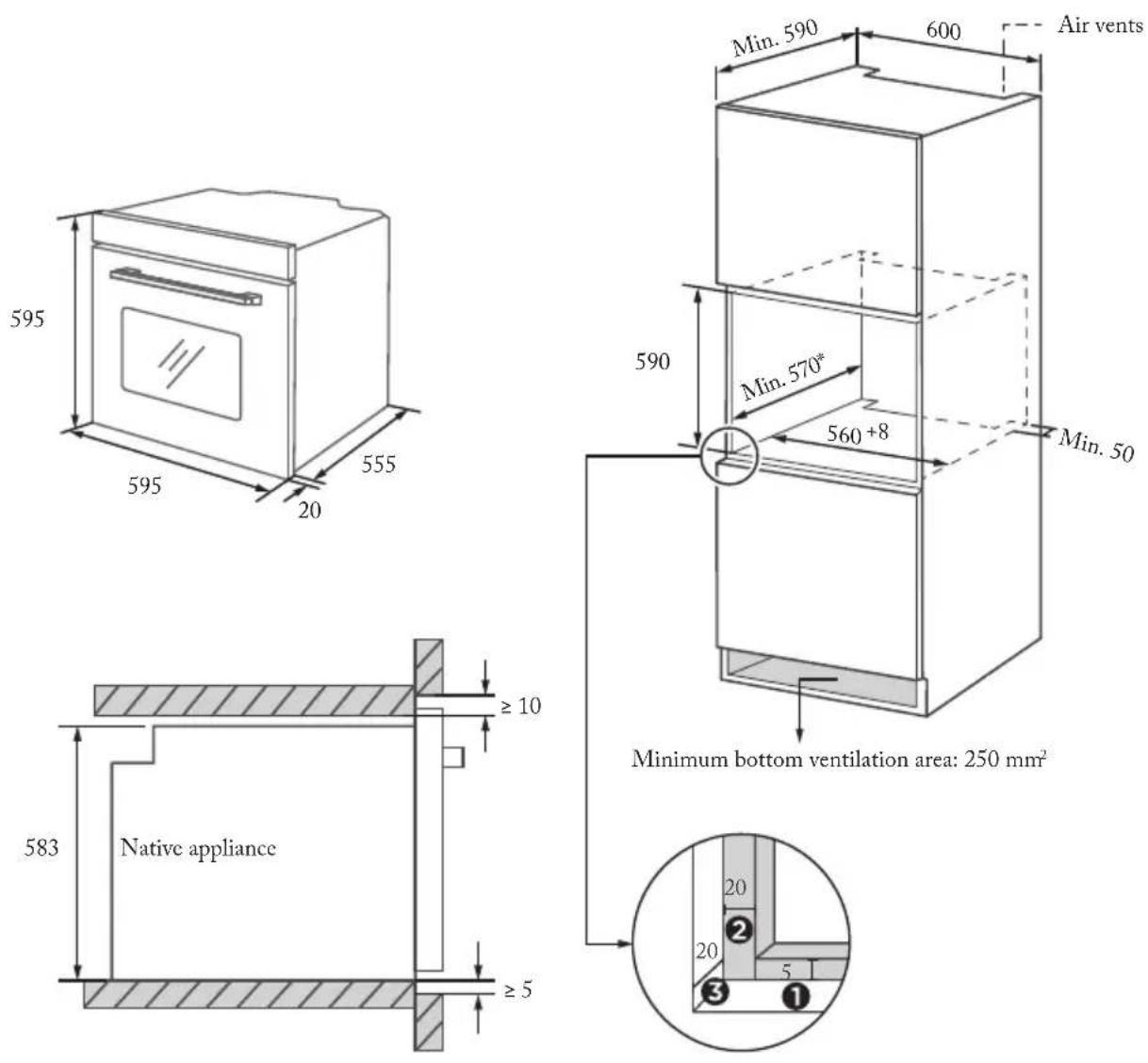
- Reserve 5 mm for the door panel at the top and bottom respectively.
- Reserve 20 mm for the door panel on the left and right respectively.
- Reserve 20 mm for the door panel in thickness.
• The thickness of the cupboard board is 20 mm.
- If the power socket is installed on the back of the appliance, the depth of the cupboard opening shall be increased from a minimum of 590 mm to 620 mm.
• The dimensions in the figures are in mm.
Cupboard Diagram (Ground Cupboard)
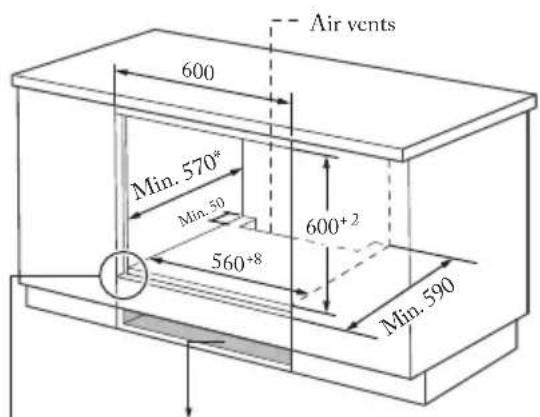
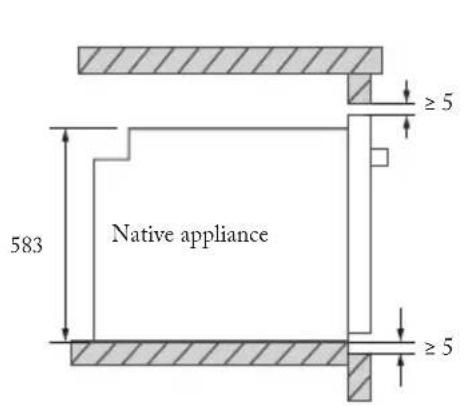
Without hob
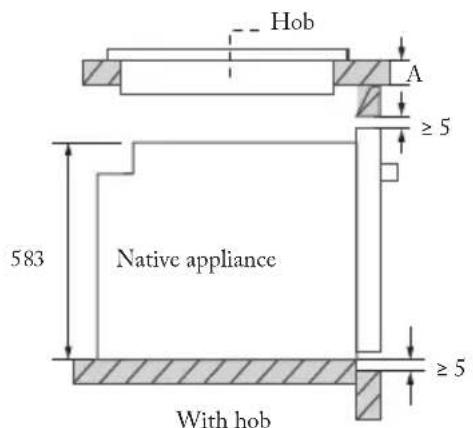
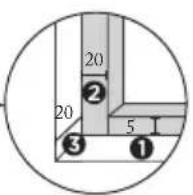
- Reserve 5 mm for the door panel at the top and bottom respectively.
- Reserve 20 mm for the door panel on the left and right respectively.
- Reserve 20 mm for the door panel in thickness.
If the appliance is installed under the hob, the minimum thickness of worktop A is shown below:
| Hob type worktop A | |
| Induction hob 37 mm | |
| Full-surface induction hob 47 mm | |
| Gas hob 30 mm | |
| Electric hob 27 mm |
- The thickness of the cupboard board is 20 mm.
- If the power socket is installed on the back of the appliance, the depth of the cupboard opening shall be increased from a minimum of 590 mm to 620 mm.
- The dimensions in the figures are in mm.
Installation Important Instructions
! Content that means [mandatory]
- The safe operation of this appliance can only be guaranteed if it has been installed to a professional standard in accordance with these installation instructions. The installer shall be liable for any damage resulting from incorrect installation.
- The entire installation process requires two professional installers. Wear dry protective gloves during installation to avoid scratch or electric shock.
- Fitted units must be heat-resistant up to 90^ C, and adjacent unit fronts up to 70^ C.
- Please use a 16A socket.
Content that means [prohibit]
- Do not install the appliance behind a decorative door or the door of a kitchen unit, as this may cause the appliance to overheat.
- Check the appliance for damage after unpacking it. Do not connect the appliance if it has been damaged in transit.
- Do not block the vent of the appliance and the gap between the cupboard and the appliance.
- Use extreme caution when moving or installing the appliance. It is very heavy, do not lift the appliance by the door handle.
- If the power cord or power plug is damaged, stop using the appliance immediately, to avoid fire, electric shock or other injuries.
⚠️ Content that means [note]
- Be very careful when moving or installing the appliance to avoid damage to the appliance or damage to the cupboards.
-
Before starting up the appliance, remove all packaging materials and accessories from the cavity.
-
The power socket shall be accessible to users (such as next to the cupboard) for easy power-off.
-
After installation is complete, make sure that the power plug is firmly inserted into the socket.
-
Please refer to the "Cupboard Diagram" for the requirements of net depth of the cupboard. The clearance between the cupboard bottom board and the rear board (or wall) shall not be less than 50 mm.
Installation steps
-
Please customize the cupboard according to the "Cupboard Diagram".
-
Before installation, please check for normal power socket and appropriate grounding, and check whether the cupboard dimension meets the installation requirements.
-
Place the appliance in designated locations in the kitchen, install it in a vertical cupboard, and connect the power supply.
-
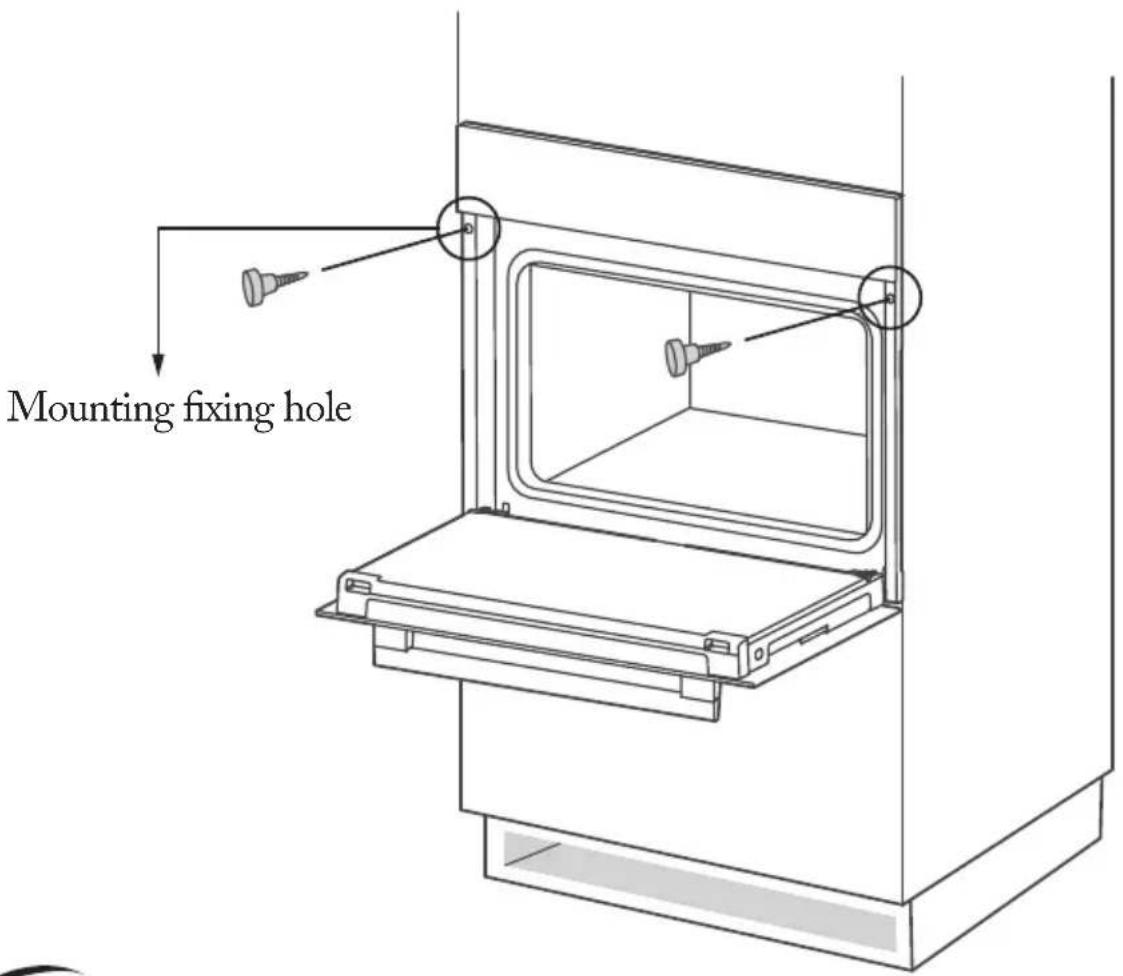
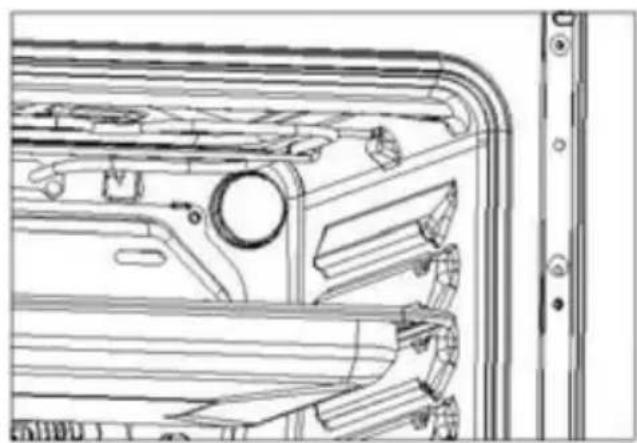
To locate the mounting fixing holes, open the appliance door and look at the side frame of the appliance (position shown above).
-
Fix the appliance to the cupboard with two rubber plugs A and screws B provided with the appliance.
CLEANING AND MAINTENANCE
Cleaning
Disconnect the power supply before cleaning and maintenance.
In order to ensure the life of the oven, it should be thoroughly cleaned frequently.
Cleaning steps are as follows:
- After cooking, wait for the oven to cool completely.
- Remove oven accessories, rinse with warm water and dry.
- Clean up food debris from the oven chamber.
- Wipe the oven with a soft cloth stained with detergent, then dry with a dry soft cloth.
Notes
- Do not use sharp cleaning tools, hard brush and corrosive cleaning products, so as not to damage the oven and its accessories.
- Do not use rough scrubbing agent or sharp metal spatula to clean the door glass.
Lamp Replacement
- Switch off and disconnect the power from the oven. Ensure that the internal parts are cool before touching internal parts.
-
Remove the lamp cover by turning it counterclockwise (note, it may be stiff), replace the bulb with a new one of the same type.
-
Insert the new bulb, which should be resistant to 300^ C. For replacement bulbs contact your local service centre.
- If in any doubt, consult a qualified electrician for help.
natural_image
Technical line drawing of a vehicle door frame with handlebars and mounting bracket (no text or symbols)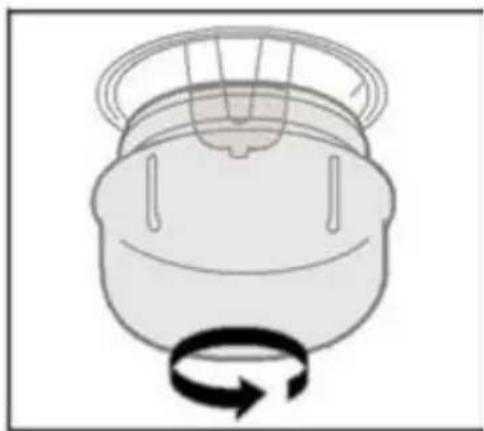
natural_image
Simple line drawing of a mechanical component with a rotating arrow (no text or symbols)This product contains a light source of energy efficiency class: G
Warning
To avoid electric shocks-please ensure that the electricity supply to the appliance is switched off and the appliance is fully cold. before removing the lamp lens.
Only use 25 W/230V\~ type G9, T300 halogen lamps.
TROUBLESHOOTING
If the problem cannot be solved or other problems occur, please contact the after-sales service.
| Problem | Possible reason Solution | No processing required |
| Unable to start | Power is not connected connect power supply | |
| The main power switch is not turned on | Turn on the power switch | |
| Oven door not closed Close the oven door | ||
| lamp does not come on | It's broken | Contact after-sales service |
| Has a pungent odor or smoke | first use | No processing required |
| Food is not cooked | Temperature is too low | Use a higher temperature |
| Food portion is too large | Cook food in smaller pieces or extend the cooking time | |
| Burnt or uneven food | The temperature is set too high or the heating time is too long | Adjust the cooking temperature or time |
| The food is too close to the heating tube | Adjust the placement layers of accessories | |
| The fan did not stop working after stopping the heating | Fan delays blowing for heat dissipation | No processing required |
SPECIFICATIONS
| Model | FME7024IBL/MFME7024IX/M |
| Usable Volume | 70L |
| Rated voltage | 220-240V~ |
| Rated frequency | 50Hz-60Hz |
| Electric power | 3,0 kW |
Information for domestic ovens
| Symbol Value Unit | |||
| Model identification | FME7024IBL/MFME7024IX/M | ||
| Type of oven | Electric oven | ||
| Mass of the appliance M kg | 29 | ||
| Number of cavities | 1 | ||
| Heat source per cavity (electricity or gas) | Electricity | ||
| Volume per cavity V1 | 70 | ||
| Energy consumption (electricity) required to heat a standardised load in a cavity of an electric heated oven during a cycle in conventional mode per cavity (electric final energy) | EC electric cavity | 0,99(at position ☐) | kWh/cycle |
| Energy consumption required to heat a standardised load in a cavity of an electric heated oven during a cycle in fan-forced mode per cavity (electric final energy) | EC electric cavity | 0,79(at position ☐) | kWh/cycle |
| Energy Efficiency Index per cavity EEI | cavity | Conventional:112.7(at position ☐)Fan-forced:84.6(at position ☐) | |
PRODUCT RECYCLING
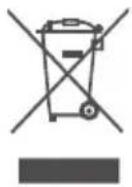
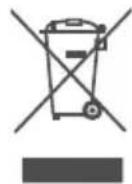
European directive 2012/19/EU on Waste from Electrical and Electronic Equipment (WEEE), requires that used household appliances are not thrown into the normal municipal waste stream. Used appliances must be collected separately in order to optimize the rate of recovery and recycling of materials that compose them, and to reduce the impact on human health and on the environment. The crossed bin symbol is affixed to all the products to remind you of the obligations of separated collection.
CE
This instruction book is also available on our website: www.conforama.fr
If you have a problem with your product, before going to your Conforama store, please get in touch with our aftersales services for electrical household appliances:
https://sav-client.conforama.fr
09 69 32 05 05
CONFORAMA France SA