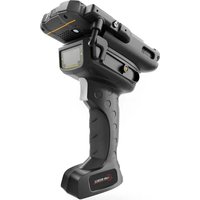
IS-TH1ER.RG - Industrial scanner i.safe Mobile - Free user manual and instructions
Find the device manual for free IS-TH1ER.RG i.safe Mobile in PDF.


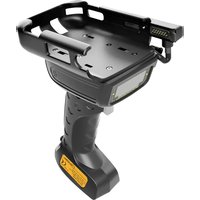
| Product Type | Industrial Scanner |
| Brand | i.safe Mobile |
| Model | IS-TH1ER.RG (MTHA11) |
| Scan Engine | Zebra SE4850 (ER) Long Range |
| Scan Range | Long Range |
| Light Source | Laser Class 2, 630-680 nm, 1 mW |
| Connection | ISM Interface for IS530.RG |
| Scan Button | Yes, dedicated to barcode scanning |
| Cradle | Integrated cradle for IS530.RG |
| Lanyard Attachment | Eyelet for attaching a lanyard |
| Protection | Sealing gaskets for IP protection |
| Operating Temperature | Avoid high temperatures |
| Cleaning | Soft antistatic cloth dampened, no chemicals |
| Authorized Accessories | Only i.safe MOBILE GmbH approved accessories |
| Laser Safety | Do not look into the laser beam |
| Explosive Area | Only connect outside explosive areas |
| Repairability | No user-serviceable parts, repair by authorized specialists |
| Recycling | WEEE compliant, recycle separately |
| Declaration of Conformity | Available at www.isafe-mobile.com |
Frequently Asked Questions - IS-TH1ER.RG i.safe Mobile
User questions about IS-TH1ER.RG i.safe Mobile
0 question about this device. Answer the ones you know or ask your own.
Ask a new question about this device
Download the instructions for your Industrial scanner in PDF format for free! Find your manual IS-TH1ER.RG - i.safe Mobile and take your electronic device back in hand. On this page are published all the documents necessary for the use of your device. IS-TH1ER.RG by i.safe Mobile.
USER MANUAL IS-TH1ER.RG i.safe Mobile
QUICK START MANUAL SAFETY INSTRUCTIONS
IS-TH1xx.RG
PRODUCT DESCRIPTION
Document No. 1056MM01REV02
Version: 2022-10-31
(c) 2022 i.safe MOBILE GmbH
i.safe MOBILE GmbH
i_Park Tauberfranken 10
97922 Lauda-Koenigshofen
Germany
Tel. +49 9343/60148-0
info@isafe-mobile.com
www.isafe-mobile.com Template:TEMPMM01REV10
CONTENTS
English 4
Deutsch 7
Česky 10
Español....13
Suomi....16
Français....19
Magyar 23
Italiano 26
Nederlands 29
Norsk 32
Polski 35
Português 38
Русский....41
Svenska....45
Korean 48
Japanese....51
Chinese....54
Arabic 57
ENGLISH
INTRODUCTION
This document contains information and safety regulations which are to be observed without fail for safe operation of the device IS-TH1xx.RG (Model MTHA10 / MTHA11) under the described conditions. Non-observance of this information and instructions can have serious consequences and / or may violate regulations.
Please read the manual and these safety instructions before using the device. In case of any doubt, the German version shall apply.
The current EU/UK-declaration of conformity, certificates, safety instructions and manuals can be found at www.isafe-mobile.com or requested from i.safe MOBILE GmbH.
> RESERVATION
The content of this document is presented as it currently exists. i.safe MOBILE GmbH does not provide any explicit or tacit guarantee for the accuracy or completeness of the content of this document, including, but not restricted to, the tacit guarantee of market suitability or fitness for a specific purpose unless applicable laws or court decisions make liability mandatory.
i.safe MOBILE GmbH reserves the right to make changes to this document or to withdraw it any time without prior notice. Changes, errors and misprints may not be used as a basis for any claim for damages. All rights reserved.
i.safe MOBILE GmbH cannot be held responsible for any data or other loss and direct or indirect damages caused by any improper use of this device.
EU/UK-DECLARATION OF CONFORMITY
The EU/UK-declaration of conformity can be found at the end of this manual.
>NAME CONCEPT
The two "xx" in IS-TH1xx.RG are placeholders. The IS-TH1xx.RG comes in two variants with different scan ranges and scan engines:
name (model) scan range scan engine
IS-TH1MR.RG (MTHA10) mid range Zebra SE4750 (MR)
IS-TH1ER.RG (MTHA11) extended range Zebra SE4850 (ER)
>FAULTS AND DAMAGES
If there is any reason to suspect that the safety of the device has been compromised, it must be withdrawn from use and removed from any ex-hazardous areas immediately.
Measures must be taken to prevent any accidental restarting of the device. The safety of the device may be compromised, if, for example:
»Malfunctions occur.
» The housing of the device shows damage.
» The device has been subjected to excessive loads.
» The device has been stored improperly.
» Markings or labels on the device are illegible.
We recommend that a device displaying errors or in which an error is suspected be sent back to i.safe MOBILE GmbH to be checked.
FURTHER SAFETY ADVISES
CAUTION
Laser Light. Do not stare into beam class 2 laser product 630 - 680 nm, 1 mW.
» To ensure the IP-protection, it has to be ensured that all gaskets are present and functional. There must be no large gap between the halves of housing.
» The device may not be exposed to any aggressive acids or alkalis.
» Only accessories approved by i.safe MOBILE GmbH may be used.
» Do not put the device in environments with excessive temperatures.
» Do not use the device in areas where regulations or legislatives prohibit the use.
» Do not expose the device to strong magnetic fields, such as are emitted from induction ovens or microwaves.
»Do not attempt to open or repair the device. Improper repair or opening can lead to the destruction of the device, fire or explosion. Only authorized personnel are allowed to repair the device.
»Observe all corresponding laws that are in force in the respective countries regarding the use of devices while operating a vehicle.
» Please power off the device before cleaning the device.
»Do not use any chemical cleaning agents to clean the device. Use a damp and anti-static soft cloth for cleaning.
»The user alone is responsible for any and all damages and liabilities caused by malware downloaded when using the network or other data-exchange functions of the device. i.safe MOBILE GmbH cannot be held responsible for any of those claims.
WARNING
i.safe MOBILE GmbH will not assume any liability for damages caused by disregarding any of these advices or by any inappropriate use of the device.
MAINTENANCE/REPAIR
Please note any legal requirements for periodic inspection.
The device itself has no user-serviceable parts. It is recommended to perform inspections according to the safety regulations and advises. If there is a problem with the device, please contact your vendor or consult the service center. If your device is in need of repair, you can either contact the service center or your vendor.
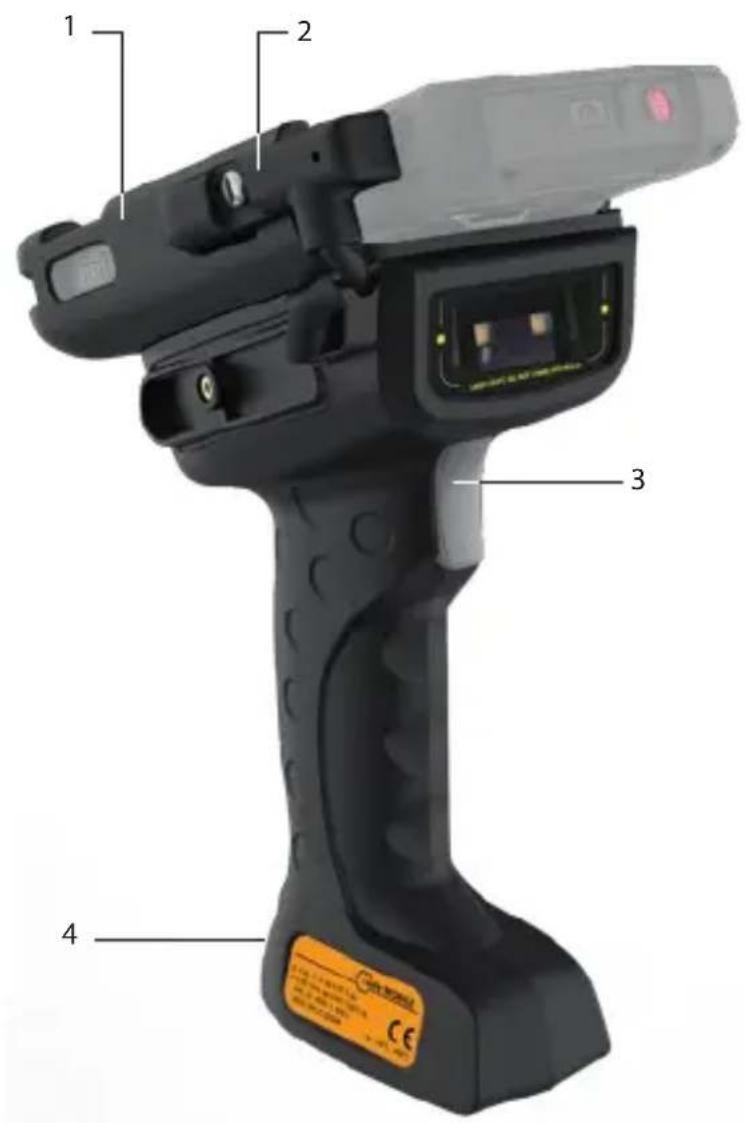
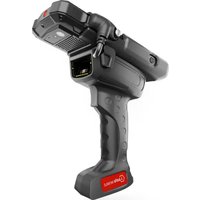
>PRODUCT DESCRIPTION (see illustration on page 2)
1> HOLDER: Holder for IS530.RG
2> PLUG: Connecting IS530.RG
3) SCAN BUTTON: Scanning barcodes.
4 > EYELET: Eyelet for hand strap.
INSTALLATION
WARNING
The device may be connected only outside ex-hazardous areas to the IS530.RG via the ISM interface!
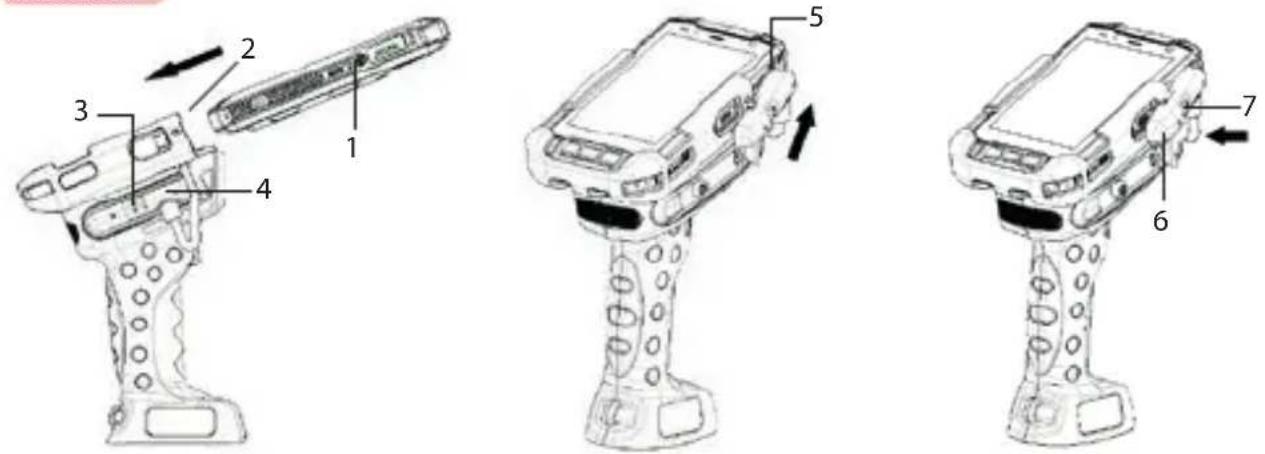
» Unscrew the cover of the ISM interface (1) located on the IS530.RG.
» Push the IS530.RG completely into the holder (2) of the device.
»Unscrew the screw (3).
» Loosen the plug (4).
» Attach the plug on top of the ISM interface (5).
» Fix the plug by pressing the rounded end of the plug (6).
»Tighten the screw (7).
» Check whether the plug is correctly and firmly attached to the ISM interface.
RECYCLING
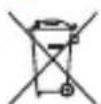
The crossed-out wheeled-bin symbol on your product, battery, literature, or packaging reminds you that all electrical and electronic products, batteries, and accumulators must be taken to separate collection at the end of their working life. This requirement applies in the European Union. Do not dispose of these products as unsorted municipal waste. Always return your used electronic products, batteries, and packaging materials to dedicated collection points. This way you help prevent uncontrolled waste disposal and promote the recycling of materials. More detailed information is available from the product retailer, local waste authorities, national producer responsibility organisations, or your local i.safe MOBILE GmbH representative.
Correct Disposal of this product. This marking indicates that this product should not be dispose other household wastes throughout the EU. To prevent possible harm to the environment or human he from uncontrolled waste disposal, recycle it responsibly to promote the sustainable reuse of material resources. To return your used device, please use the return and collection systems or contact the retailer where the product was purchased. They can take this product for environmental safe recycling.
TRADEMARKS
» i.safe MOBILE and the i.safe MOBILE logo are registered trademarks of the i.safe MOBILE GmbH.
DEUTSCH
EINFÜHRUNG
> DÉCLARATION DE CONFORMITÉ EU/UK
VEDLIKEHOLD / REPARASJON
Ta hensyn til eventuelle lovmessige direktiver i forbindelse med periodiske kontroller, som f.eks. driftssikkerhetsdirektivet (et direktiv som gjelder i Tyskland)!
» Skru av dekselet til ISM-grensesnittet (1) på IS530.RG.
» Skyv IS530.RG helt inn i holderen (2) på enheten.
» Skru ut skruen (3) på kontakten.
»Løsne pluggen (4) fra holderen.
» Fest pluggen til ISM-grensesnittet (5) øverst.
» Fest kontakten ved å trykke på den avrundede enden (6).
»Stram til skruen (7).
» Sjekk om kontakten er riktig og godt festet til ISM-grensesnittet.
RESIRKULERING

» Desaparafusar a tampa da interface ISM (1) no IS530.RG.
» Empurrar o IS530.RG completamente para dentro do suporte (2) do dispositivo.
» Desaparafusar o parafuso (3) no conector.
» Desmontar o conector (4) do suporte.
» Fixe o conector à interface ISM (5) na parte superior.
» Fixe o plugue pressionando na extremidade arredondada (6).
» Aperte o parafuso (7).
» Verifique se o conector está corretamente e firmemente preso à interface ISM.
RECICLAGEM

natural_image
A plain gray background with a single horizontal red line at the bottom (no text or symbols)CONTACT/SERVICE CENTRE
FOR FURTHER QUESTIONS PLEASE CONTACT OUR SERVICE CENTRE:
» i.safe MOBILE GmbH, i_Park Tauberfranken 10, 97922 Lauda-Koenigshofen, Germany
» support@isafe-mobile.com
» https://support.isafe-mobile.com
EU/UK-DECLARATION OF CONFORMITY
i.safe MOBILE
EU/UK – Declaration of Conformity
The company i.safe MOBILE GmbH declares under its sole responsibility that the product to which this declaration relates is in accordance with the provisions of the following data, directives and standards:
EU/UK-DECLARATION OF CONFORMITY
i.safe MOBILE
| BS EN 62321-5: 2014;BS EN 62321-4: 2014 + AMD1: 2017;BS EN 62321-7-1: 2015; BS EN 62321-7-2: 2017;BS EN 62321-6: 2015; BS EN 62321-8: 2017 | |
| CE/UKCA MarkingCE/UKCA-Kennzeichnung |

afe MOBILE
Lauda – Koenigshofen 02.02.2022

Dirk Amann
Managing Director
Geschäftsführer
natural_image
Nighttime exterior view of a large industrial chemical plant with illuminated towers and piping (no visible text or signage)WWW.ISAFE-MOBILE.COM

- PRODUCT DESCRIPTION
- CONTENTS
- ENGLISH
- INTRODUCTION
- > RESERVATION
- EU/UK-DECLARATION OF CONFORMITY
- >NAME CONCEPT
- >FAULTS AND DAMAGES
- FURTHER SAFETY ADVISES
- CAUTION
- WARNING
- MAINTENANCE/REPAIR
- >PRODUCT DESCRIPTION (see illustration on page 2)
- INSTALLATION
- RECYCLING
- TRADEMARKS
- DEUTSCH
- EINFÜHRUNG
- > DÉCLARATION DE CONFORMITÉ EU/UK
- VEDLIKEHOLD / REPARASJON
- RESIRKULERING
- RECICLAGEM
- CONTACT/SERVICE CENTRE
- i.safe MOBILE
- EU/UK – Declaration of Conformity
- afe MOBILE
Brand : i.safe Mobile
Model : IS-TH1ER.RG
Category : Industrial scanner