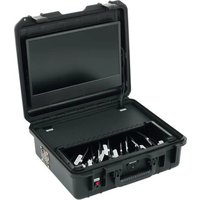
ATEM Mini Extreme - Electronic carrying case BSS Audio - Free user manual and instructions
Find the device manual for free ATEM Mini Extreme BSS Audio in PDF.


| Product type | Electronic transport case for ATEM Mini Extreme |
| Brand | BSS Audio |
| Model | BSS-Case Extreme (for ATEM Mini Extreme) |
| Intended use | Live streaming and recording with integrated ATEM Mini/Extreme |
| Mains power | 230 V ~ / 6.67 A (Extreme) or 7.0 A (with battery option) |
| Battery power (option) | 12–14.4 V DC, continuous current ≥5 A |
| Power consumption | 80 W (Extreme Case) |
| Main connections | 8x HDMI in, 2x HDMI out, 2x USB-C, 1x RJ45 Ethernet, 2x 3.5 mm stereo audio jack (or XLR depending on version), 3.5 mm headphone jack (or locking 6.35 mm) |
| Options | SDI inputs/outputs, USB charging port (2 A), integrated battery, 3/8 inch mount |
| Ventilation | Integrated fan (right side) + ventilation slots |
| Operating temperature | +5° to +40°C |
| Relative humidity | 20–90% (non-condensing) |
| Storage temperature | -20° to +60°C |
| Maximum altitude | 2000 m |
| Protection | Overload fuse 5 A, reverse polarity protection |
| Cleaning | With a damp cloth; avoid disinfectants and harsh plastic products |
| After-sales service | BSS Streaming Service, Mühlstrasse 80, 73655 Plüderhausen, Germany |
| Available versions | Economic, Basic, Professional, Extreme, Extreme Professional, Extreme SDI |
Frequently Asked Questions - ATEM Mini Extreme BSS Audio
User questions about ATEM Mini Extreme BSS Audio
0 question about this device. Answer the ones you know or ask your own.
Ask a new question about this device
Download the instructions for your Electronic carrying case in PDF format for free! Find your manual ATEM Mini Extreme - BSS Audio and take your electronic device back in hand. On this page are published all the documents necessary for the use of your device. ATEM Mini Extreme by BSS Audio.
USER MANUAL ATEM Mini Extreme BSS Audio
Plüderhausen, April 2023
BSS-Streaming Service
Anschlüsse BSS-Case Economic
natural_image
Black hard-shell object with red arrows pointing to labeled parts A and B (no text or symbols on body)Linke Seite
natural_image
Black plastic case with a circular button labeled 'C' and a red arrow pointing to it (no text or symbols beyond the label)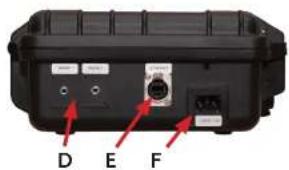
Anschlüsse BSS-Case Basic
natural_image
Black hard-shell device casing with labeled points A and B, showing internal components and mounting features (no text or symbols beyond labels)Rechte Seite
• Lüfter (C)
natural_image
Black plastic case with a circular button labeled 'C' and a red arrow pointing to it (no text or symbols beyond the label)Linke Seite
Anschlüsse BSS-Case Professional
natural_image
Black hard-shell device casing with labeled points A and J, no visible text or symbols beyond labels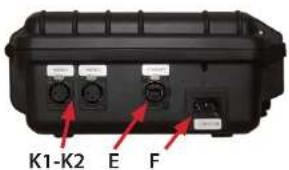
Anschlüsse BSS-Case Professional Option: SDI
- USB-C (G)
- HDMI out (H)
• HDMI in (13-14)
• SDI in - BNC 75 Ω (L1-L2)
Anschlüsse BSS-Case Option: USB / Batterieanschluss
natural_image
Close-up of a black cylindrical device with red arrows pointing to labeled parts (M and N), no readable text or symbols beyond labels.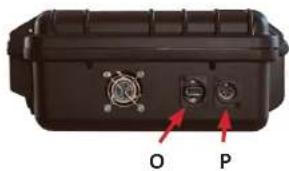
natural_image
Close-up of a black electronic device casing with two ports labeled O and P, showing internal components (no readable text or symbols beyond labels)Anschlüsse BSS-Case-Extreme
natural_image
Black plastic case with red arrows pointing to internal features, labeled A and B (no text or symbols on the casing itself)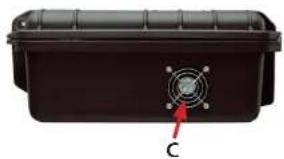
natural_image
Black plastic container with a circular vent and label 'C' pointing to its side (no text or symbols on the container itself)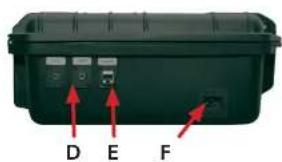
Anschlüsse BSS-Case-Extreme Professional
natural_image
Close-up of a black plastic case with labeled points A and J, showing internal components without any readable text or symbols.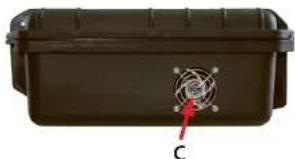
natural_image
Black rectangular container with a circular sensor symbol and label 'C' pointing to it (no readable text or symbols beyond the label)Linke Seite
Anschlüsse BSS-Case Extreme Professional Option: SDI
Anschlüsse BSS-Case Extreme Option: USB / Batterieanschluss
Anschlüsse BSS-Case Extreme SDI Option: USB
Rechte Seite
natural_image
Illustration of a toilet with a red arrow indicating downward motion and a blue checkmark symbol (no text or labels)natural_image
Close-up of a black electronic device with visible wiring and components, no readable text or symbolsnatural_image
Close-up of a black electronic device with a keypad and control panel (no visible text or symbols)natural_image
Close-up of a hand using a black calculator on a device, with no visible text or symbolsnatural_image
Close-up of a black mechanical device casing with a circular button and indicator lights (no visible text or symbols)natural_image
Close-up of a black telephone keypad with control buttons and ventilation grille (no visible text or symbols)natural_image
Close-up of a black mechanical component with a central screw and side brackets (no visible text or symbols)natural_image
Close-up of a black mechanical component with a red indicator light and 'EARPHONE' label (no other text or symbols visible)natural_image
Black rectangular electronic device casing with two ports, no visible text or symbolsnatural_image
Close-up of a black electronic device with a cable inserted, showing ports and connectors (no visible text or symbols)natural_image
Diagram showing two views of a laptop and an open chair, with red arrows indicating downward movement (no text or symbols)natural_image
Close-up of a black electronic device with a metallic connector and green screen (no visible text or symbols)BSS Streaming Service
Mühlstraße 80
73655 Plüderhausen
info@bss-streamingservice.de
Tel: +49 (0)176/81228565
Fax: +49 (0)7181/884765
BSS-Streaming Service BSS-Case
| BSS-Case 33 | 88 |
| Validity 34 | 84 |
| Safety instructions 34 | 84 |
| Proper use 35 | 88 |
| Connections BSS Case Economic 36 | 86 |
| Connections BSS Case Basic 37 | 87 |
| Connections BSS Case Professional 38 | 88 |
| Connections BSS Case Professional SDI 38 | 88 |
| Connections BSS case options: USB / battery connection 39 | 89 |
| Connections BSS Case Extreme 40 | 90 |
| Connections BSS Case Extreme Professional 41 | 91 |
| Connections BSS Case Extreme Professional SDI | 92 |
| Connections BSS case options: USB / battery connection 42 | 93 |
| Connections BSS Case Extreme SDI | 94 |
| Installing the ATEM Mini / Extreme | 94 |
| Start up | 95 |
| Cooling | 96 |
| Connecting Components | 97 |
| USB charging port (option) | 97 |
| Battery connection (option) | 98 |
| 3/8" mount (ATEM Mini option) | 99 |
| Monitor settings | 100 |
| Advice for use | 101 |
| Technical specifications | 102 |
| Troubleshooting | 103 |
| Maintenance and service | 104 |
| Disposal | 105 |
BSS-Case
Thank you for deciding to buy a BSS case.
We are a small manufacturer that uses practical experience to develop products for live streaming and components for video hardware and accessories for practical use.
We always strive to ensure that our products are of high quality and durability which meet the user's requirements. In addition, we are looking for the optimal balance between requirements and costs. You can therefore choose the right technical design for your specifications.
We are grateful for your feedback on the application, improvements or requests for our products.
Plüderhausen, April 2023
BSS-Streaming Service
These instructions apply to the following BSS case models and their options.
model name Item number from model year
| BSS-Case Economic ART-000252 03/2022 |
| BSS-Case Basic ART-000033 05/2021 |
| BSS-Case Professional ART-000129 05/2021 |
| BSS-Case SDI ART-000360 10/2022 |
| BSS-Case Extreme ART-000247 04/2022 |
| BSS-Case Professional Extreme ART-000277 04/2022 |
| BSS-Case Extreme SDI ART-000379 12/2022 |
Safety instructions
Please read all instructions and illustrations prior to the initial use of your device. Proceed accordingly. Non-observance of the operating instructions and safety notes can lead to electric shock, fire or serious injuries!
Unless otherwise stated, the instructions and safety information apply to both the ATEM Mini case and the ATEM Mini Extreme case.
- Only use the case lying down with its lid open and in consideration of the ambient conditions.
- Do not use the BSS case in the rain or under the influence of water or humidity.
- Do not open the screwed covers or flaps.
- Keep the case dry and clean.
- Do not lean on the ATEM Mini cover plate in the case.
- Avoid impact or excessive pressure on the case and its components.
- Always disconnect the case from the power supply after use by first disconnecting the components using the on / off switch and then pulling the power plug.
-
Only use connection devices that are compatible with the connection values of the ATEM Mini and the monitors used. Further information can be found in the operating instructions of the respective manufacturers.
-
If foreign bodies / liquids have penetrated through the ventilation openings of the BSS case, pull out the power plug immediately and contact our service department.
- To avoid scratches, place a soft, thin cloth between the screen and the ATEM Mini during storage and transport.
- Store the BSS case in a dry and clean environment.
- Have the case repaired only by qualified specialists and only with original spare parts.
- Do not use the case again if the on / off switch is defective, the fan is not operating or any other built-in component or part is defective.
- As long as no ATEM Mini or ATEM Mini Extreme is installed in the case, there is a risk of tipping over due to the changed center of gravity. Therefore, when opening the cover, hold the case in a horizontal position with the help of a second person until the installation is complete.
- Current information can be found at: https://bss-streamingservice.de/en/download/
Proper use
The BSS case is intended to transmit and record live streams with proper use of the available connection options of a built-in ATEM Mini in dry, clean and dust-free environments. The correct position for the case while in use is only in a lying position with the lid open.
Connections BSS Case Economic
The following connections on the BSS case are arranged in a user-friendly manner. Different connection sockets can be installed in the BSS Case Professional.
Front side
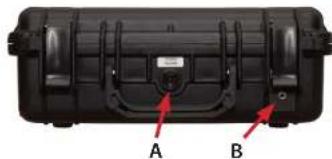
- On/Off switch (A)
- Blind cover or option: headphone connection 3.5mm stereo jack (B)
natural_image
Black hard-shell object with red arrows pointing to labeled parts A and B (no text or symbols on body)Right side
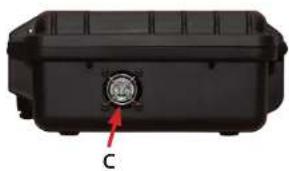
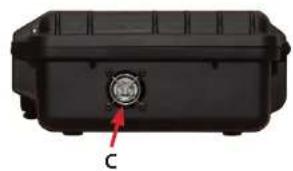
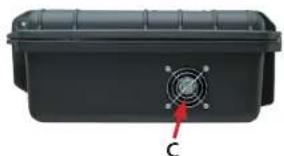
- Fan (C)
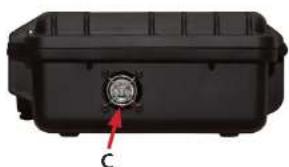
natural_image
Black plastic container with a circular button labeled 'C' and a red arrow pointing to it (no text or symbols on the object itself)Left side
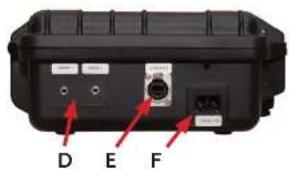
• Audio connections 2x3.5 mm jack stereo unbalanced (D)
- Ethernet connection socket RJ45 (E)
- Mains connection 230 V
Version: C14 (F)
Reverse side
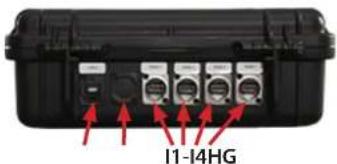
- USB-C (G)
- Blind cover (H)
• HDMI in (I1-I4)
Connections BSS Case Basic
The following connections on the BSS case are arranged in a user-friendly manner. Different connection sockets can be installed in the BSS Case Professional.
Front side
- On/Off switch (A)
• Headphone connection 3.5mm stereo jack (B) or optional 6.35 mm stereo jack
natural_image
Black hard-shell device casing with labeled points A and B, showing internal components and mounting holes (no text or symbols beyond labels)Right side
- Fan (C)
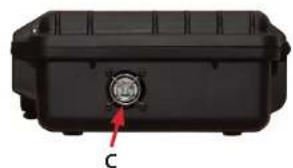
natural_image
Black plastic case with a circular button labeled 'C' and a red arrow pointing to it (no text or symbols beyond the label)Left side
• Audio connections 2x3.5 mm jack stereo unbalanced (D)
- Ethernet connection socket RJ45 (E)
- Mains connection 230 V
Version: C14 (F)
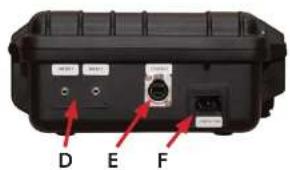
Reverse side
• • USB-C (G)
• • HDMI out (H)
• • HDMI in (I1-I4)
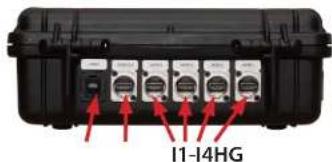
Connections BSS Case Professional
The connections on the BSS Case Professional correspond to those of the BSS Case Basic with the following changes.
Front side
- On/Off switch (A)
• Headphone connection 6.35mm lockable stereo jack socket (J)
Left side
- Mains connection 230 V (D)
- Ethernet connection socket RJ45 (E)
• Audio connections (2x female XLR-3-pin stereo unbalanced) (K1-K2)
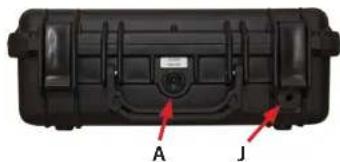
natural_image
Black hard-shell device casing with labeled points A and J, no visible text or symbols on body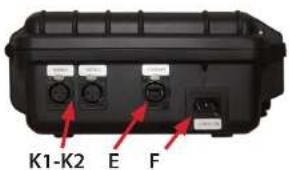
Connections BSS Case Professional SDI
The connections on the BSS Case Professional correspond to those of the BSS Case Professional with the following changes.
Reverse side
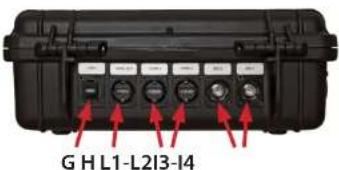
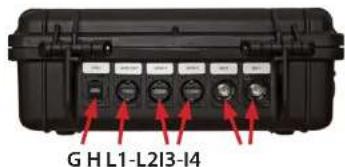
- USB-C (G)
• HDMI out (H)
• HDMI in (13-14)
• SDI in - BNC 75Ω (L1-L2)
Connections BSS case options: USB / battery connection
The connections on the BSS Case Professional correspond to those of the BSS Case Professional with the following changes.
Front side
• LED display battery operation (M)
- 5A fuse (N)
natural_image
Close-up of a dark brown cylindrical device with labeled ports M and N, showing internal components and no readable text or symbols beyond labels.Right side
• USB A (O)
- Battery connection - XLR 4-pin (P)
natural_image
Close-up of a black electronic device casing with labeled ports O and P, showing internal components and connectors (no readable text beyond labels)Connections BSS Case Extreme
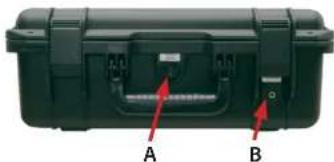
The following connections on the BSS-Case Extreme are arranged in a user-friendly way. Different connection sockets can be installed in the BSS Case Extreme Professional.
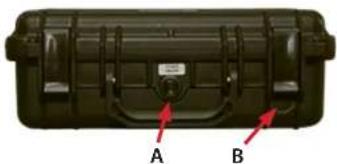
Front side
- On/Off switch (A)
• Headphone connection 3.5 mm stereo jack (B)
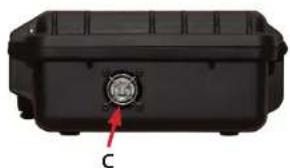
Right side
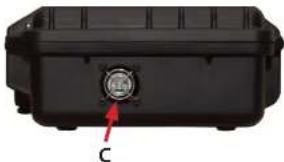
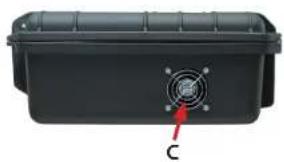
- Fan (C)
natural_image
Black plastic case with red arrows pointing to internal components labeled A and B (no text or symbols beyond labels)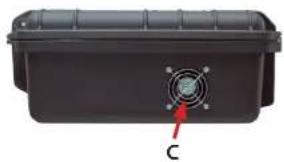
natural_image
Black plastic container with a circular vent and label 'C' pointing to its side (no text or symbols on the container itself)Left side
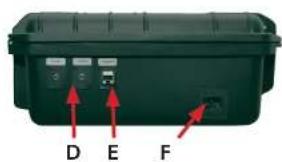
• Audio connections 2x3.5mm jack stereo unbalanced (D)
- Ethernet connection socket RJ45 (E)
- Mains connection 230 V
Version: C14 (F)
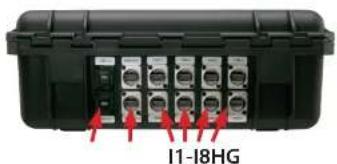
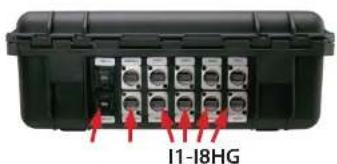
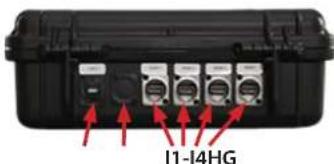
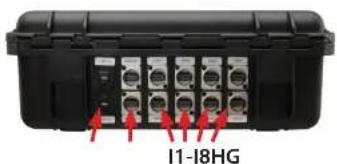
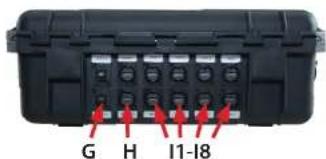
Reverse side
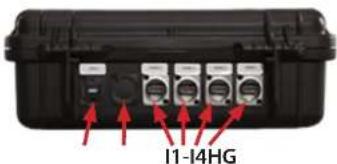
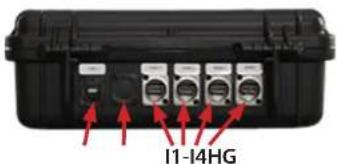
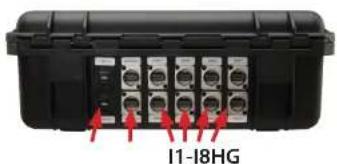
- 2x USB-C (G)
• 2x HDMI out (H)
• 8x HDMI in (I1-I8)
Connections BSS Case Extreme Professional
The connections on the BSS Case Extreme Professional correspond to those of the BSS Case Extreme with the following changes.
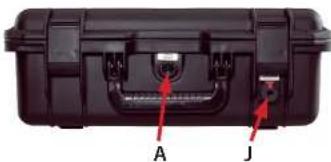
Front side
- On/Off switch (A)
• Headphone connection 6.35 mm lockable stereo jack socket (J)
Right side
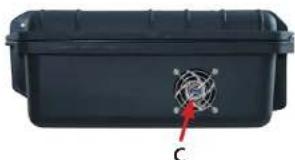
- Fan (C)
natural_image
Close-up of a black plastic case with labeled points A and J, showing internal components without any readable text or symbols.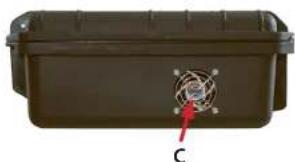
natural_image
Exterior view of a brown rectangular container with a circular sensor-like symbol on top and a red arrow pointing to it, labeled 'C' (no text or symbols on the device itself)Left side
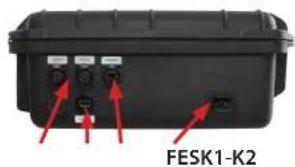
• Audio connectors (2x female XLR-3-pin stereo unbalanced) (K1-K2)
- Ethernet connection socket RJ45 (E)
- Mains connection 230 V
Version: C14 (F)
- USB-A charging socket option (S)
Reverse side
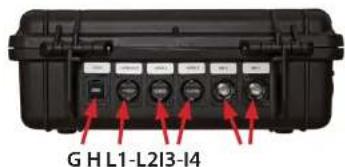
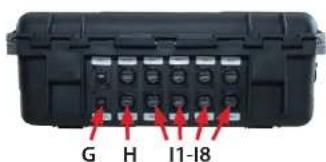
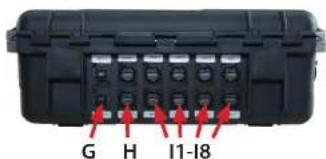
- 2x USB-C (G)
- 2x HDMI out (H)
- 8x HDMI in (I1-I8)
Connections BSS Case Extreme Professional SDI
The connections on the BSS Case Extreme Professional correspond to those of the BSS Case Professional with the following changes.
Reverse side
- 2x USB-C (G)
- 2x HDMI out (H)
• SDI in - BNC 75 Ω (L5-L8)
• HDMI in (I1-I4)
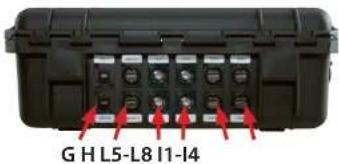
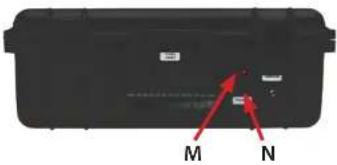
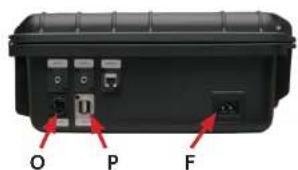
Connections BSS case options: USB / battery connection
The connections on the BSS Case Extreme Professional with the USB / battery connection option are the same as on the BSS Case Extreme / Professional with the following changes.
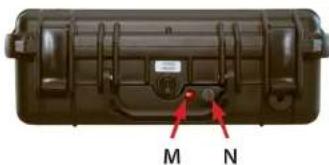
Front side
• LED display battery operation (M)
• Overload fuse (N)
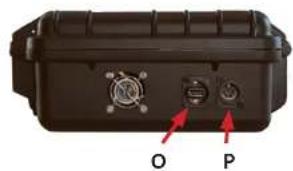
Left side
- Battery connection - XLR 4-pin (O)
- USB A (P)
- Mains connection 230 V Version: C6 (F)
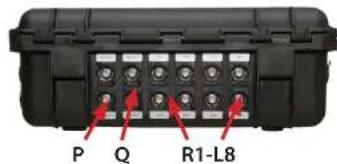
Connections BSS Case Extreme SDI
The connections on the BSS Case Extreme Professional correspond to those of the BSS Case Professional with the following changes.
Reverse side
• 3x SDI-OUT (P)
- 1x HDMI out (Q)
• SDI in - BNC 75 Ω (R1-R8)
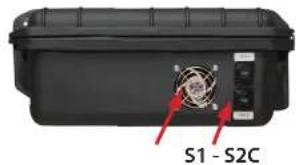
Right side
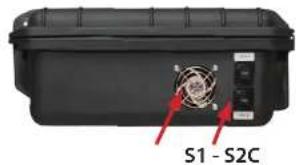
- Fan (C)
- 2x USB-C (S1-S2)
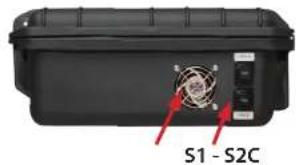
Left side
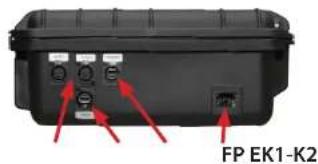
• Audio connectors (2x female XLR-3-pin stereo unbalanced) (K1-K2)
- Ethernet connection socket RJ45 (E)
- Mains connection 230 V
Version: C14 (F)
- 2x USB-C socket (S1-S2)
Installing the ATEM Mini / Extreme
Safety note: Before doing any work on the BSS case, pull the mains plug out of the socket!
Do not touch the built-in electronic components when the installation slot is open. Even when the mains plug is unplugged, these can remain live for a long time and cause an electric shock.
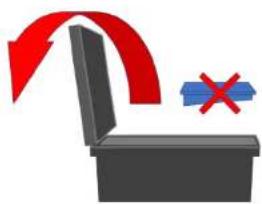
Risk of tipping: When installing the ATEM Mini Extreme yourself, there is an acute risk of tipping over after opening the lid in its end position. Only after installing the ATEM Mini does the case reach the balanced center of gravity.
Therefore, when opening the cover, hold the case in a horizontal position with the help of a second person until the ATEM Mini Extreme has been installed.
natural_image
Illustration of a toilet with a red arrow indicating airflow and a blue box with a red X symbol (no text or labels)(Image 11) Danger of tipping over if ATEM Extreme is not installed
The installation of the ATEM Mini requires technical understanding and some manual skill. Please contact our service team if you need assistance with the installation.
Required tools: Phillips screwdriver, size PH1
Plug in the cables
First remove all transport locks and protective covers from the installation recess. Use the screw-driver to remove the two C-clamps (6x M3x8 ATEM Mini Case / 8x M3x8 ATEM Extreme Case) that are mounted to the left and right of the recess.
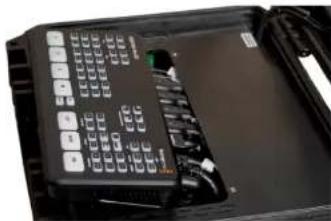
The ATEM Mini / Extreme is swiveled into the recess provided
natural_image
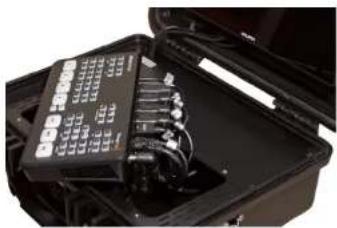
Interior view of an open electronic device case with a black module and indicator lights (no visible text or symbols)(Image 12) Plug the cable into the ATEM
from above and fastened with the enclosed C-rails. First plug in all the cables to the ATEM Mini / Extreme (Image 12). These are all labeled in the same way as printed on the ATEM Mini / Extreme. Hold the ATEM Mini / Extreme with one hand and plug in the cables from left to right, starting with the microphone connectors.
natural_image
Close-up of a black electronic device with control panel and ports (no visible text or symbols)(Image 13) Swing in the ATEM Mini
Note: Never pull the cables with force, as this could damage them.
The ATEM Mini / Extreme is inserted by swiveling the back into the recess (image 13).
Due to the large number of cables that are used at the same time, it may be necessary to insert them one by one, twisting them slightly. Make sure that the cables have enough space to find their place under the cover without much counter-pressure.
Note: Work carefully and never force the ATEM Mini into the recess! If you feel too much back pressure or if the cover plate deforms under the pressure of the cables, carefully remove the ATEM Mini / Extreme and sort the cables again until the ATEM Mini / Extreme can be inserted into the recess without too much counter pressure. You may have to repeat this process several times until the ATEM finds its pressure-free seat.
With the ATEM Extreme, the counter-pressure when used is correspondingly higher due to the almost double number of cables. However, please also note the above-mentioned conditions for assembly.
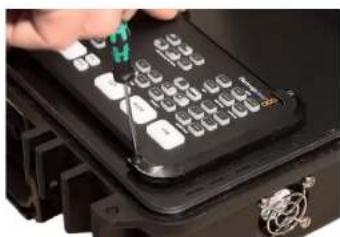
Place the two ATEM C-clamps on the ATEM Mini / Extreme and screw them together using a Phillips screwdriver, size PH1, with the screws
natural_image
Close-up of a hand using a black calculator on a device, with no visible text or symbols(Image 14) Screw ATEM Mini with C-clamps
M3x8mm (6 pcs. ATEM Mini; 8 pcs. ATEM Extreme);, max. tightening torque 0, 2Nm (! apply only slightly) (Image 14)
Start up
Turning on/off
Before switching on, open the case and open the lid completely. The BSS case has an internal power supply unit (max. 5A). For the power supply, plug in the supplied power cable on the left side.
natural_image
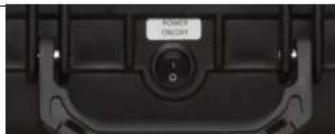
Close-up of a black mechanical device casing with a circular button and indicator lights (no visible text or symbols)(Image 15) On, off switch on the front
The on / off switch is located on the front of the case (Image 15). When it is switched on, the ATEM Mini is switched on at the same time. The field monitor must be started by using the separate on / off switch on the top.
Note: Always turn off using the on / off switch before closing the case and then pulling the power plug! Otherwise there is a risk of overheating / destruction of the built-in devices when the BSS case is closed while switched on.
The device is switched off by manually switching off the field monitor at its on/off switch on the top of the housing. Then turn off the switch on the BSS case. Before closing the case, make sure that all built-in devices are switched off. Close the case lid and remove the power cord.
Cooling
Integrated fan
The BSS case has a built-in fan to cool the built-in components. It is located on the right-hand side of the case and must never be blocked.
Make sure that no objects penetrate through the ventilation grille and block the fan. Make sure there is enough free space (at least 15 cm) around the outlet opening of t

natural_image
Close-up of a black telephone keypad with control buttons and ventilation grille (no visible text or symbols)(Image 16) BSS case ventilation slots
Vents
There are ventilation slots on the cover plate to the right and left of the ATEM Mini (Image 16). Under no circumstances may these be covered, masked or otherwise reduced or blocked in their cross-section. Otherwise there is a risk of overheating / destruction of the built-in components.
Note: Do not expose the BSS case to direct sunlight, otherwise there is a risk of the components overheating.
Connecting Components
All ATEM Mini / Extreme ports are easily accessible on the outside of the case. In the basic version of the case, these correspond to the connections on the ATEM Mini and can be used in the same way. Please note the information in the section on operation with HDMI cables in the chapter.
For more information, see the ATEM Mini user manual on its manufacturer's website under the Support section.
Headphone jack
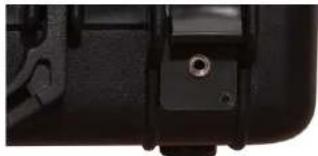
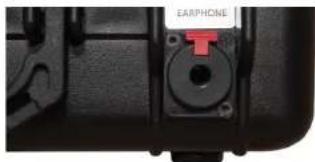
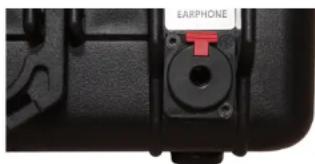
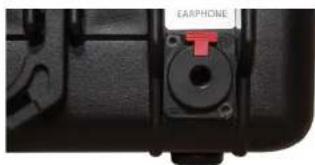
In addition to the interfaces of the ATEM Mini, there is a 3.5mm (Image 17) or a lockable 6.35mm headphone connection (Image 18) (Professional version) on the front of the BSS case (Basic version). The volume can be adjusted via the field monitor's software menu. Further information can be found in the user manual of the field monitor.
natural_image
Close-up of a black mechanical component with a circular bolt and adjustment knob (no visible text or symbols)(Image 17) 3.5mm headphone jack
natural_image
Close-up of a black mechanical component with a red arrow pointing to a circular opening labeled 'EARPHONE' (no other text or symbols visible)(Image 18) 1/4" headphone jack
USB charging port (option)
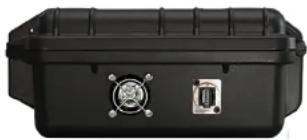
With the optional USB charging connection, USB accessories can be supplied with up to 2A charging current. So that a device only receives the charging current it needs for optimal charging, after the cables have been connected, the corresponding parameters are
first exchanged between the device and the charging controller. If the device is purely passive, i.e. a pure consumer that cannot send any parameters, the charge controller throttles its current to the USB 1.0 standard of 100mA . Therefore, various devices cannot be charged at all or only very
natural_image
Black rectangular electronic device casing with two ports and a central connector (no visible text or symbols)(Image 19) BSS case USB charging socket
slowly at the USB charging socket. This can also affect USB hubs, i.e. USB distributors, which register with the charging controller with their own (sometimes lower) charging parameters.
Since even USB connection cables can have chips in the meantime, the following recommendations apply for optimal charging on the BSS case for the ATEM Mini:
- Only connect devices directly (do not use USB hubs)
- Only use original cables from the manufacturer
- Do not connect any passive devices (illuminated mini Christmas trees etc.)
Battery connection (option)
Never connect 230V mains voltage to the battery connection. There is danger to life!
Do not connect any other low voltages than the permissible 12V-14.4V DC voltage to the battery connection.
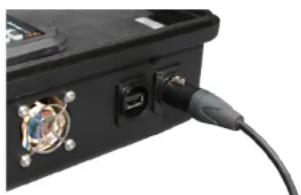
The battery connection on the BSS case is used to supply the built-in components and those connected to the optional charging connection. All 12-14.4V batteries/accumulators that allow a permissible continuous load of at least 5A are suitable as a voltage source.
natural_image
Close-up of a black electronic device with a cable inserted, showing ports and connectors (no visible text or symbols)(Image 20) BSS case battery connector
Do not connect batteries that do not meet these requirements. There is a risk of overheating, short circuit and fire.
Optionally, you can operate the case with the car adapter cable ART-000325 via a 12V on-board power socket or the cigarette lighter. When connecting to an on-board voltage socket, make sure that it provides 12V/5A. Attention, on-board voltage sockets in trucks are often operated with 24V!
Voltages greater than 14.4V can damage or destroy the control electronics in the BSS case.
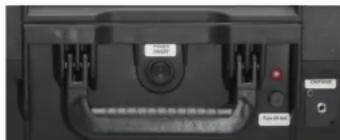
The on/off switch on the front of the housing switches both mains and battery voltage. As long as mains voltage is present, the electronics give priority to this. As long as there is no mains voltage, in the event of a
natural_image
Close-up of a mechanical component with labeled ports and a red indicator light (no readable text or symbols)(Image 21) LED & fuse on the frontside of an ATEM Extreme Case
power failure or when the mains plug is removed, the electronics automatically switch to battery power. As soon as the case is powered by battery voltage, the red LED on the front of the case lights up.
The internal electronics are calibrated for additional loads (e.g. at an optional USB charging port) up to 1.5 A load.
Loads exceeding this must be avoided to ensure safe switching between mains and battery voltage.
Overload safety fuse - over-voltage protection
If 5A or more are constantly consumed by the connected devices, the overload protection on the front can trigger. In this case, disconnect unnecessary loads (e.g. from the USB charging port) from the power supply. Change the fuse. A spare fuse is located in the fuse holder on the top panel (ATEM Mini) or behind the foldable screen (ATEM Extreme) next to the right magnet holder.
The fuse also triggers in the event of a connected over-voltage ( ≥ 17.3V) to protect the connected devices. In this case, before reinserting the fuse, check the voltage source for the correct voltage value (12-14.4V). Please note that the open-circuit voltage (without consumers connected) of batteries or accumulators can be higher and this may trigger the fuse. The internal electronics are calibrated for additional loads (e.g. on an optional USB charging port) up to a
1.5 A load. Loads exceeding this should be avoided in order to ensure safe switching between mains and battery voltage.
Backup fuse
Glass tube fuse 5x20mm; 5.0A; trigger characteristic: FAST
Reverse polarity protection
The built-in Case on-board electronics have reverse polarity protection. In rare cases, it can be the case with vehicle on-board voltage sockets that these lead to ground (-) on the pin contact instead of +12V. If, after connecting the case to an on-board voltage socket, no function of the devices is apparent, please check this possibility as well.
Using the adapter cable ART-000326 with its open cable end, various customer-specific plugs can be assembled for connection to a 12V DC voltage source. Please note that all plugs or connecting elements used must be approved by the manufacturer for at least 5A continuous current.
Pay attention to the type of attachment described by the manufacturer in order to minimize contact resistance and ensure a safe current flow.
Wire color at the open end: brown = +12V; blue = ground
3/8" mount (ATEM Mini option)
The case can be attached to tripods, tubes and the like via the 3/8 inch attach-
ment on the bottom of the housing.
It is attached using a 3/8 inch UNC thread, which is a common type of attachment in photo and video technology.
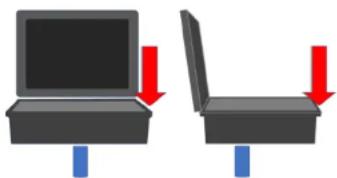
The minimum screw-in depth is 15mm, the maximum tightening torque (with lock nut) is 15Nm. The maximum load values of the case when assembled can be taken from the following sketch.
These are 75N from the vertical at the front and side edges.
natural_image
Two diagrams showing a laptop and its side open position with red arrows indicating downward motion (no text or symbols)(Image 22) Max. load: F = 75N
Monitor settings
ATEM Mini Economic
ATEM Mini's monitor is turned on and off using the main switch on the case. All necessary menu settings can be set using buttons on the right side of the monitor base. For advanced settings, please refer to the monitor's operating instructions included in the scope of delivery.
ATEM Mini Basic /- Professional
The field monitor in the case for the ATEM Mini Basic or Professional has its own power switch on the top right of the monitor. This must also be actuated after switching on the main switch.
ATEM Mini Extreme
ATEM Mini's monitor is turned on and off using the main switch on the case. All necessary menu settings can be set using buttons on the right side of the mon-
itor base. For advanced settings, please refer to the monitor's operating instructions included in the scope of delivery. The inclination of the monitor can be ergonomically adjusted to the right viewing angle by opening it. (Image 23) To do this, hold the monitor in the middle of the upper frame and loosen it from the two holding magnets with a slight tug.

natural_image
Close-up of a black mechanical component with a circular button, mounted on a dark surface (no visible text or symbols)(Image 23) Monitor detached from the magnetic holder
Before closing the case lid, return the monitor to its original position. Both magnets must be securely contacted.
Advice for use
HDMI
Since the introduction of this standard, HDMI cables have been available in different versions, currently up to version 2.1. These differ technically, among other things, in the maximum transferrable data rate, the image resolution and frequency, the sound transmission and the color space formats.
All HDMI cables used in the BSS Case for ATEM Mini are at least HDMI specification 2.0 compliant. This corresponds to a maximum image resolution of 4k 60Hz. Since the ATEM Mini can process a maximum of 1080p 60Hz signals, there are enough reserves.
HDMI is a digital data transmission. In contrast to analog signal transmissions, in which the signal gradually loses level over the length of the transmission path, this is either available in full quality or fails completely. Therefore, please note the following information for trouble-free operation.
What to do if no signal arrives at ATEM Mini?
ATEM Mini - differences in HDMI inputs
The HDMI input 1 on ATEM Mini is what is known as a "low-latency" input. Use this for all HDMI connections with cable lengths over 5m or for signals that may not be correctly received at inputs 2-4.
Reliable signal transmission with HDMI depends on several factors:
Specification and quality of HDMI cables
- Use only HDMI cables with specification 2.0 or better. These are also commercially available under the name "HDMI Premium High Speed".
- Use cables that are as short as possible.
- With cable lengths >5m, the shielding and the cable structure are very important. Only use multiple (triple) shielded, high-quality cables.
- Wherever possible, avoid cable lengths of 10m or more. Alternatively, use active signal converters on SDI, CAT5, fiber optics or similar transmission variants that allow longer cable routes due to their specification. HDMI cables with a signal repeater can also work, but should be tested with the signal source and receiver (ATEM Mini).
Signal source
The signal source is also crucial. Depending on the device, one cable may work fine on one source, but the same cable on the same ATEM Mini HDMI input on another source may not. This depends on the signal level provided by the source device, how high its attenuation is in combination with the cable, etc. Our experience shows that with high quality, well shielded cables, even sources with low signal levels, work without problems on the ATEM Mini. However, a test is necessary in advance in any case.
Compatible parameters
Normally, active HDMI devices agree on compatible parameters in a data exchange before they start transmitting. In the case of the ATEM Mini, this means a maximum resolution of 1080p 60Hz, 8-bit color depth, and RGB or 4:2:2 color subsampling.
However, individual devices such as (professional) video cameras or (SDI) signal converters can or do output a fixed, pre-parameterized signal. If this is not compatible with the specifications of the ATEM Mini (e.g. 4k, 10-bit, REC 2020, etc.), there will be no signal or image flickering on this input regardless of the cables used (a stable connection will not be established) out of!
Therefore, please set the output parameters of your signal source to match the specifications of ATEM Mini's HDMI inputs.
Signal receiver
Not every receiver of an HDMI signal has the same input sensitivity. One device can establish a secure signal connection with the appropriate source-cable combination, another not. In our case, however, when operating with the ATEM-Mini, this question is obsolete. Here we have to live with what Black-magic Design has developed and installed on components.
Conclusion
In all our tests with corresponding cables from different manufacturers, in different cable lengths (0.3 m - 10 m), on different sources, with different ATEM Mini and with the corresponding HDMI test device (signal generator), we came to the following result reached:
With high-quality cables (2.0 and good 3-way shielding) and the correct, compatible transmission parameters, all tested sources deliver signals via the BSS case to the ATEM-Mini without any problems. We only noticed a signal failure on the ATEM Mini with a (cheaper) cable with a length of 10 m. It didn't matter
whether the cables were plugged directly into the BSS case or into the ATEM Mini. Alternatively, with a high-quality 10 m HDMI cable, the signal flow with all tested sources was possible without any problems.
Our recommendation:
Based on our consistently positive experience, we recommend using HDMI quality cables from PURELINK (e.g. PI 1000 series or better). These are available in different lengths.
Audio connections
Depending on the version, the BSS Case for ATEM Mini contains two audio inputs, which are designed either as 3.5 mm stereo jack sockets (Basic) or as 3-pin XLR sockets (Professional). These inputs are unbalanced stereo inputs, analogous to the inputs on ATEM Mini. This can be used, for example, to import the audio signal from a PC or smartphone. The professional case includes two audio adapters (3.5 mm stereo jack to 3-pin XLR connector).
Unbalanced stereo inputs
The input sensitivity of the two audio inputs can also be switched to "Mic" (microphone) in the ATEM software (ATEM Software Control Panel). Nevertheless, these inputs are not suitable for the direct connection of a symmetrically wired microphone. In such a case, a (stereo) signal converter (balanced to unbalanced) must be connected upstream. Other methods, such as using audio cables with appropriate jumpers between the pins, can work in individual cases, but often result in ground loops or other audio artifacts that do not lead to the desired result.
Feeding the signal from the unbalanced outputs of an upstream mixer is certainly one of the easiest ways to connect microphones to the ATEM Mini. Our experience shows that, depending on the internal circuitry of the console, it may still be necessary to use a (two-channel) line transformer to decouple ground loops.
Our recommendation:
- Wherever possible, use hi-fi level, unbalanced stereo signals to feed ATEM Mini's audio inputs.
-
Use an upstream mixer with unbalanced outputs to connect microphones. It may be necessary to use a Y-cable with a 3.5 mm stereo jack (for the basic case) or one with a 3-pin XLR male connector (for the professional case).
-
Depending on the internal circuitry of the mixer, ground loops can still occur. In this case, please use an appropriate line transformer (galvanic isolation) between the mixer output and the ATEM Mini audio input.
- Alternatively, signal converters (balanced – unbalanced) can be used to directly feed in individual symmetrical audio sources. These external converters are available from specialist retailers.
Audio workaround
Many cameras can process symmetrical signals directly (usually recognizable at the XLR input). The signal is then made available to the ATEM Mini via the HDMI input. This solution also has the advantage that video and audio from the camera are synchronized. In this video input, the audio signal can be placed firmly in the stream with the "ON" button on the ATEM Mini, even when switching sources.
For more information on ATEM Mini's audio specifications, please visit the manufacturer's forum at:
https://forum.blackmagicdesign.com
Technical specifications
Conditions for proper use
| Temperature range | +5^ - +40^ C | |
| Relative humidity | 20 – 90% | No condensation |
| Storage temperature | -20^ - +60^ C | |
| Do not use at altitudes over 2000m above sea level | ||
| Do not operate in a dusty environment | ||
Electrical connected load
| Supply voltage ~230V/5A | ATEM Mini Case | |
| Power | 60 W | ATEM Mini Case |
| Supply voltage | ~230V/6,67A | ATEM Extreme Case |
| Power | 80 W | ATEM Extreme Case |
| Supply voltage | ~230V/7,0A | ATEM Extreme Case & Bat.-option |
| Power | 90 W | ATEM Extreme Case & Bat.-option |
Electrical connection values battery voltage
| Supply voltage | = 12 - 14,4V/5A |
| Power | 60 W |
Maximum screw tightening torques
| Description Screw size Maximum torque |
| ATEM-Cover DIN 7380 M4x12 0,3 Nm |
| Screen screw connection DIN 7380 M4x12 0,4 Nm |
| ATEM C-clamps ISO 7380 M3x8 0,2 Nm |
Troubleshooting
| Occurred error First action Further action | ||
| The built-in components do not work. | Check if the power plug is plugged in properly. | Turn on the on/off switch on the BSS case again. |
| Check whether mains voltage is present. | Plug into a different outlet/circuit. | |
| With battery operation - the built-in components do not work | Check for battery voltage. (is the LED on the front lit?) | Remove all connected consumers (e.g. at the USB port) and turn the on/off switch on again. |
| The screen doesn't work. (ATEM Mini only) | Turn on the screen by pressing the power button (top right) for >5 seconds. | Check that the 12V DC power connector on the screen (bottom left) is properly plugged in. |
| The fan is not running Switch off the BSS case, disconnect it from the power supply and check whether a foreign object is blocking the fan (visual Inspection). | Carefully remove the foreign body from the outside. Otherwise contact our service. | |
| A connected device is not recognized on the ATEM Mini / Extreme. | Ensure that the appropriate interface on the device is enabled and compatible with the required ATEM Input values. | For HDMI Input signals: Change the HDMI Input on the BSS case and/or swap the HDMI connection cable. |
Maintenance and service
Every time you start up, check that the fan of the BSS case is running.
Regularly check the power cord for any damage.
Keep the case clean. The surfaces can be cleaned with a damp cloth.
Note: Plastic cleaners and especially disinfectants can attack the surface of the
BSS case. Therefore, first test cleaning agents and disinfectants specifically ap-
proved for plastic on an inconspicuous area for changes to the material.
You can find information on cleaning the built-in components in their operat-
ing and commissioning instructions or on the manufacturer's website.
Service address
In the event of service or spare parts requests, please contact the address be-
low. In any case, have the 10-digit serial number of the BSS case ready. You can
find this on the type label on the underside of the case.
BSS Streaming Service
Mühlstraße 80
D-73655 Plüderhausen
Germany
info@bss-streamingservice.de
Tel: +49 (0)176/81228565
Fax: +49 (0)7181/884765
Disposal
Electronic components do not belong in house-
hold waste, but should be disposed of separately.
BSS Streaming Service
natural_image
Black hard-shell case with two red arrows pointing to the side of the casing (no text or symbols visible)Côté gauche
natural_image
Black plastic case with a circular button labeled 'C' and an arrow pointing to it (no text or symbols beyond the label)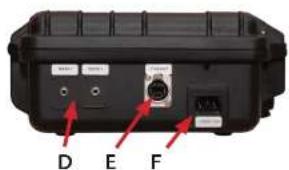
Connexions du BSS-Case Basic
natural_image
Black hard-shell container with labeled parts A and B, showing internal structure and mounting points (no text or symbols beyond labels)Côté droit
- Ventilateur (C)
natural_image
Black plastic container with a circular button labeled 'C' and a red arrow pointing to it (no text or symbols beyond the label)Côté gauche
natural_image
Black hard-shell device casing with labeled points A and J, showing internal components and mounting brackets (no text beyond labels)Connexions du BSS-Case-Professional - Option : SDI
- USB-C (G)
- HDMI out (H)
- HDMI in (13-14)
• SDI in - BNC 75 Ω (L1-L2)
natural_image
Black hard-shell device with labeled buttons M and N, no visible text or symbols beyond labelsCôté droit
natural_image
Close-up of a black electronic device casing with labeled ports O and P, showing internal components and connectors (no readable text beyond labels)Connexions du BSS-Case Extreme
natural_image
Black plastic case with two red arrows pointing to internal features, labeled A and B (no text or symbols on the casing itself)Côté droit
- Ventilateur (C)
natural_image
Black plastic container with a circular vent and labeled point C (no text or symbols on the device itself)Côté gauche
natural_image
Close-up of a black plastic case with labeled points A and J, showing internal components and red arrows indicating features (no text beyond labels)Côté droit
- Ventilateur (C)
natural_image
Black plastic container with a circular sensor symbol and label 'C' pointing to it (no text or symbols on the container itself)Côté gauche
Connexions du BSS-Case Extreme Professional Option : SDI
Côté droit
natural_image
Illustration of a toilet with a red arrow indicating downward motion and a blue box with a red X symbol (no text or symbols present)natural_image
Close-up of an open black electronic device with visible ports and wiring (no readable text or symbols)natural_image
Close-up of a black electronic device with a keypad and control panel (no visible text or symbols)natural_image
Close-up of a hand using a handheld calculator to press down a black electronic device (no visible text or symbols)natural_image
Close-up of a black mechanical component with a circular button and mounting bracket (no visible text or symbols)natural_image
Close-up of a black telephone keypad with buttons (OUT, AUTO, FTR) and a ventilation grille (no visible text or symbols beyond basic labels)natural_image
Close-up of a black mechanical component with a circular hole and a small square button (no visible text or symbols)natural_image
Close-up of a black mechanical component with a red indicator light and a labeled 'EARPHONE' button (no other text or symbols visible)(Figure 18) Prise casque 6,35 mm
natural_image
Black rectangular electronic device with two ports and a central connector (no visible text or symbols)(Figure 19) Prise de charge USB du BSS-Case
natural_image
Close-up of a black electronic device with a cable inserted, showing ports and connectors (no visible text or symbols)natural_image
Close-up of a black electronic device with indicator lights and a 'Stop to Use' button (no readable text or symbols beyond basic labels)natural_image
Illustration of a laptop and its side panel with red arrows indicating compression or disassembly (no text or symbols)(Figure 22) Charge max. Charge: F = 75 N
natural_image
Close-up of a black electronic device with a small circular button on the left side (no visible text or symbols)Notre recommandation :
Notre recommandation :
| Tension de raccordement = 12 - 14,4V/5A |
| Pulissance 60 W |
info@bss-streamingservice.de
Tél : +49 (0)176/81228565
Fax: +49 (0)7181/884765
Nettoyage
natural_image
Black hard-shell case with labeled points A and B, showing internal components and a central lock (no text or symbols beyond labels)Lato destro
- Ventola (C)
natural_image
Black plastic case with a circular button labeled 'C' and an arrow pointing to it (no text or symbols beyond the label)Lato sinistro
natural_image
Black hard-shell object with labeled parts A and B, showing internal casing and adjustment knobs (no text beyond labels)Lato destro
- Ventola (C)
natural_image
Black plastic case with a circular button labeled 'C' and an arrow pointing to it (no text or symbols on the casing itself)Lato sinistro
natural_image
Black hard-shell device casing with labeled points A and J, no visible text or symbols on body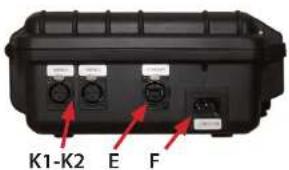
natural_image
Black hard-shell device with labeled buttons (M and N) and a central control panel (no readable text or symbols beyond labels)Lato destro
natural_image
Close-up of a black electronic device casing with two ports labeled O and P, showing internal components (no readable text beyond labels)Collegamenti BSS-Case Extreme
natural_image
Black plastic case with red arrows pointing to internal components labeled A and B (no text or symbols beyond labels)Lato destro
- Ventola (C)
natural_image
Black plastic container with a circular vent and labeled point C (no text or symbols on the object itself)Lato sinistro
- Connessioni audio 2 x 3,5 mm jack stereo sbilanciato (D)
- 8x HDMI in (I1-I8)
natural_image
Close-up of a black plastic case with labeled points A and J, showing internal components without any readable text or symbols.Lato destro
- Ventola (C)
Lato sinistro
natural_image
Black plastic container with a circular sensor-like symbol on top and a red arrow pointing to it, labeled 'C' (no text or symbols on the device itself)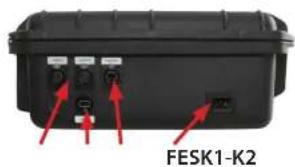
Lato posteriore
- 2x USB-C (G)
- 2x Uscite HDMI (H)
- 8x HDMI in (I1-I8)
Lato destro
- Ventola (C)
• 2x Prese USB-C (S1-S2)
Lato sinistro
natural_image
Illustration of a toilet with a red arrow indicating downward motion and a blue checkmark (no text or symbols)natural_image
Interior view of a black electronic device with visible wiring and ports (no readable text or symbols)natural_image
Close-up of a black electronic device with a keypad and control panel (no visible text or symbols)natural_image
Close-up of a hand using a black remote control device to press or install a device, with no visible text or symbols.natural_image
Close-up of a black electronic device with a control knob and indicator lights (no readable text or symbols)natural_image
Close-up of a black telephone handset with control buttons and ventilation grille (no visible text or symbols)natural_image
Close-up of a black mechanical component with a central screw and mounting bracket (no visible text or symbols)(Fig. 17) Jack per cuffie da 3,5 mm
natural_image
Close-up of a black mechanical component with a red indicator light and 'EARPHONE' label (no other text or symbols visible)(Fig. 18) Jack per cuffie da 6,35 mm
natural_image
Black rectangular electronic device casing with two ports, no visible text or symbolsnatural_image
Close-up of a black electronic device with a cable inserted, showing ports and connectors (no visible text or symbols)natural_image
Close-up of a black electronic device with indicator lights and ports (no readable text or symbols)natural_image
Diagram showing two views of a laptop and an open chair, with red arrows indicating downward motion (no text or symbols)natural_image
Close-up of a black electronic device with a metallic screw and a screen (no visible text or symbols)BSS Streaming Service
Mühlstraße 80
73655 Plüderhausen
info@bss-streamingservice.de
Tel: +49 (0)176/81228565
Fax: +49 (0)7181/884765
Smaltimento
BSS Streaming Service
natural_image
Black hard-shell case with labeled points A and B, no visible text or symbols on the casing itselfLado izquierdo
natural_image
Black plastic case with a circular button labeled 'C' and an arrow pointing to it (no text or symbols beyond the label)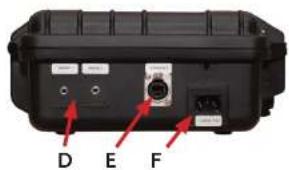
Conexiones BSS-Case Basic
natural_image
Black hard-shell device casing with labeled points A and B, showing internal components and mounting brackets (no text or symbols beyond labels)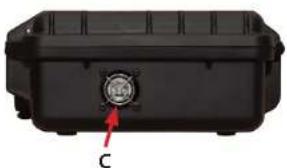
natural_image
Black plastic case with a circular button labeled 'C' and an arrow pointing to it (no text or symbols beyond the label)Lado izquierdoe
natural_image
Black hard-shell device casing with labeled points A and J, no visible text or symbols beyond labels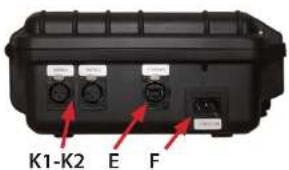
natural_image
Black hard-shell case with labeled buttons (M and N) and a central control panel (no readable text or symbols beyond labels)Lado derecho
natural_image
Close-up of a black electronic device casing with two ports labeled O and P, showing internal components (no readable text beyond labels)Conexiones BSS-Case Extreme
natural_image
Black plastic case with red arrows pointing to internal components labeled A and B (no text or symbols beyond labels)
natural_image
Black plastic container with a circular vent and labeled point C (no text or symbols on the object itself)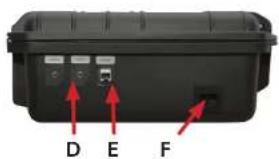
Conexiones BSS Case Extreme Professional
natural_image
Close-up of a black plastic case with labeled points A and J, showing internal components without any readable text or symbols.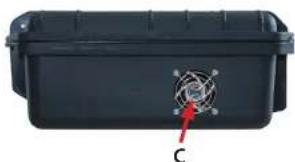
natural_image
Black plastic container with a circular sensor symbol and label 'C' pointing to it (no readable text or symbols beyond the label)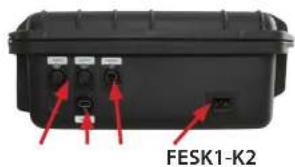
Conexiones BSS Case Extreme Professional Opción: SDI
Lado derecho
- Ventilador (C)
• 2x toma USB-C (S1-S2)
。
Lado izquierdo
natural_image
Illustration of a toilet with a red arrow indicating downward motion and a blue box with a red X symbol (no text or symbols present)natural_image
Interior view of an open black electronic device with visible wiring and ports (no readable text or symbols)natural_image
Close-up of a black electronic device with a keypad and control panel (no visible text or symbols)(Fig. 13) Giro en el ATEM Mini
natural_image
Close-up of a hand using a black remote control device to press or install a card (no visible text or symbols)natural_image
Close-up of a black mechanical component with a circular dial and mounting bracket (no visible text or symbols)natural_image
Close-up of a black office phone keyboard with control buttons and ventilation grille (no visible text or symbols)natural_image
Close-up of a black mechanical component with a central screw and adjustment knob (no visible text or symbols)(Foto 17) Toma de auriculares de 3,5 mm
natural_image
Close-up of a black mechanical component with a red indicator light and 'EARPHONE' label (no other text or symbols visible)(Foto 18) Toma de auriculares de 6,35 mm
natural_image
Black rectangular electronic device casing with two ports and a central connector (no visible text or symbols)(Fig. 19) Caja del SBP Toma de carga USB
natural_image
Close-up of a black electronic device with a cable inserted, showing ports and connectors (no visible text or symbols)natural_image
Close-up of a black electronic device with control buttons and indicator lights (no readable text or symbols)natural_image
Two diagrams showing a laptop and its side panel with red arrows indicating downward movement (no text or symbols)(Fig. 22) Carga máx. Carga: F = 75 N
Ajustes del monitor
ATEM Mini Economic
natural_image
Close-up of a black electronic device with a metallic connector (no visible text or symbols)https://forum.blackmagicdesign.com
Datos técnicos
BSS Streaming Service
Mühlstrasse 80
73655 Plüderhausen
info@bss-streamingservice.de
Tel: +49 (0)176/81228565
Fax: +49 (0)7181/884765
Eliminación
BSS Streaming Service
Mühlstraße 80
73655 Plüderhausen
www.bss-streamingservice.de/
Technical changes reserved.
- Anschlüsse BSS-Case Economic
- Linke Seite
- Anschlüsse BSS-Case Basic
- Rechte Seite
- Anschlüsse BSS-Case Professional
- Anschlüsse BSS-Case Professional Option: SDI
- Anschlüsse BSS-Case Option: USB / Batterieanschluss
- Anschlüsse BSS-Case-Extreme
- Anschlüsse BSS-Case-Extreme Professional
- Anschlüsse BSS-Case Extreme Professional Option: SDI
- Anschlüsse BSS-Case Extreme Option: USB / Batterieanschluss
- Anschlüsse BSS-Case Extreme SDI Option: USB
- BSS-Case
- Safety instructions
- Proper use
- Connections BSS Case Economic
- Front side
- Right side
- Left side
- Reverse side
- Connections BSS Case Basic
- Connections BSS Case Professional
- Connections BSS Case Professional SDI
- Connections BSS case options: USB / battery connection
- Connections BSS Case Extreme
- Connections BSS Case Extreme Professional
- Connections BSS Case Extreme Professional SDI
- Connections BSS Case Extreme SDI
- Installing the ATEM Mini / Extreme
- Plug in the cables
- Start up
- Turning on/off
- Cooling
- Integrated fan
- Vents
- Connecting Components
- Headphone jack
- USB charging port (option)
- Battery connection (option)
- Overload safety fuse - over-voltage protection
- Backup fuse
- Reverse polarity protection
- 3/8" mount (ATEM Mini option)
- Monitor settings
- ATEM Mini Economic
- ATEM Mini Basic /- Professional
- ATEM Mini Extreme
- Advice for use
- HDMI
- What to do if no signal arrives at ATEM Mini?
- ATEM Mini - differences in HDMI inputs
- Specification and quality of HDMI cables
- Signal source
- Compatible parameters
- Signal receiver
- Conclusion
- Our recommendation:
- Audio connections
- Unbalanced stereo inputs
- Audio workaround
- Technical specifications
- Troubleshooting
- Maintenance and service
- Service address
- Disposal
- Côté gauche
- Connexions du BSS-Case Basic
- Côté droit
- Connexions du BSS-Case-Professional - Option : SDI
- Connexions du BSS-Case Extreme
- Connexions du BSS-Case Extreme Professional Option : SDI
- Notre recommandation :
- Nettoyage
- Lato destro
- Lato sinistro
- Collegamenti BSS-Case Extreme
- Lato posteriore
- Smaltimento
- Lado izquierdo
- Conexiones BSS-Case Basic
- Lado izquierdoe
- Lado derecho
- Conexiones BSS-Case Extreme
- Conexiones BSS Case Extreme Professional
- Conexiones BSS Case Extreme Professional Opción: SDI
- Ajustes del monitor
- Datos técnicos
- Eliminación
Brand : BSS Audio
Model : ATEM Mini Extreme
Category : Electronic carrying case