MAGIC-COLOR-STICK - Lighting IBIZA SOUND - Free user manual and instructions
Find the device manual for free MAGIC-COLOR-STICK IBIZA SOUND in PDF.


| Product type | LED RGB light tube with holder |
| Brand | Ibiza Sound |
| Model | MAGIC-COLOR-STICK (1.5WH/1.5BK/1.8WH/1.8BK) |
| Power supply | 100-240 V~ 50/60 Hz via 12 V / 2 A power adapter |
| Power consumption | 18 W |
| Dimensions (tube) | Diameter 1.7 cm, length 115 cm (1.5 m model) or 118 cm (1.8 m model) |
| Total weight | 2.3 kg (1.5 m model) / 2.6 kg (1.8 m model) |
| Bluetooth version | 4.0 |
| Bluetooth frequency band | 2402 - 2480 MHz |
| Maximum RF power | 1.43 dBm |
| Remote control battery | Lithium CR2025 (3 V) |
| Required system (app) | Android 4.4+ / iOS 11.0+ |
| Main functions | Manual control (on/off, mode change), remote control (colors, brightness, speed, 10 modes, 4 music modes, timer), LED LAMP smartphone app (RGB settings, pixels, timer, music and microphone modes) |
| Care and cleaning | Unplug before cleaning, use a clean dry cloth, no harsh detergents |
| Safety | Indoor use only, max ambient temperature 40°C, do not expose to moisture, non-replaceable light sources |
| Spare parts and repairability | No user-serviceable parts; if the light source is defective, the entire unit must be disposed of |
| General information | Manual available in multiple languages, CE compliance, recycling at end of life |
Frequently Asked Questions - MAGIC-COLOR-STICK IBIZA SOUND
User questions about MAGIC-COLOR-STICK IBIZA SOUND
0 question about this device. Answer the ones you know or ask your own.
Ask a new question about this device
Download the instructions for your Lighting in PDF format for free! Find your manual MAGIC-COLOR-STICK - IBIZA SOUND and take your electronic device back in hand. On this page are published all the documents necessary for the use of your device. MAGIC-COLOR-STICK by IBIZA SOUND.
USER MANUAL MAGIC-COLOR-STICK IBIZA SOUND
natural_image
Three vertical stand holders with black and white stands, no text or symbols visibleMANUAL
EN- Instruction Manual - p. 2
UNPACKING INSTRUCTIONS
Immediately upon receiving a fixture, carefully unpack the carton, check the contents to ensure that all parts are present and have been received in good condition. Notify the freight company immediately and retain packing material for inspection if any parts appear to be damaged from shipping or the carton itself shows signs of mishandling. Keep the carton and all packing materials. In the event that a fixture must be returned to the factory, it is important that the fixture be returned in the original factory box and packing.
EXPLANATION OF SYMBOLS ON THE SILKSCREEN
CE The unit complies with CE standards
For indoor use only
Please read this manual carefully before operating this product.
SAFETY RECOMMENDATIONS
- Please read these instructions carefully, they include important information about the installation, usage and maintenance of this product.
- Please keep this User Guide for future reference. If you sell the unit to another user, be sure that he also receives this instruction booklet.
• Always make sure that you are connecting to the proper voltage, and that the line voltage you are connecting to is not higher than that stated on the bottom of the fixture. - This product is intended for indoor use only!
- To prevent risk of fire or shock, do not expose fixture to rain or moisture.
- Maximum ambient temperature (Ta) is 104^ (40^) . Do not operate the fixture at temperatures higher than this.
- In the event of a serious operating problem, stop using the unit immediately. Never try to repair the unit by yourself.
- The light source of this luminaire is not replaceable. When it reaches the end of its life time, the whole unit must be discarded.
- Caution: Flashing lights can cause epileptic seizures in sensitive people.
DISCONNECT DEVICE
The power outlet must be installed near the equipment and be easily accessible.
CONNECTIONS
Insert the lead from the LED tube to the supplied mains adaptor and plug the mains adaptor into a suitable wall outlet.
MANUAL CONTROL
Keep the button on the switch of the lead pressed to switch the tube on or off.
Press the button shortly to cycle through the modes
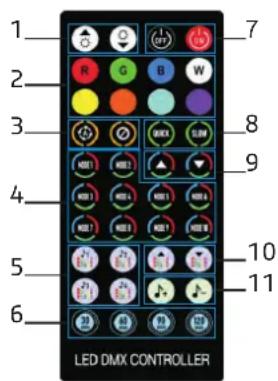
REMOTE CONTROL
- Brightness adjustment
- Colour selection
- Auto, pause
- 10 modes
- 4 music modes
- Timer
- ON/OFF
- Speed adjustment
- Mode switching
- Music mode switching
- Sound sensitivity adjustment
RECOMMENDATIONS FOR BATTERIES

This symbol indicates that used batteries should not be disposed of with household waste but deposited in separate collection points for recycling.
ATTENTION
- Danger of explosion if battery is incorrectly placed. Only replace by the same or equivalent type.
- Keep new and old batteries out of the reach of children.
- If the battery compartment doesn't close properly, stop using the product and keep it out of the reach of children.
WARNING
The supplied remote control contains a button cell (type CR2025). In case of ingestion, it might cause serious internal burns within only 2 hours that might lead to death.
If you are in doubt whether the batteries have been swallowed or introduced into any other part of the body, contact immediately a doctor.
DOWNLOAD APP SOFTWARE
Please search LED LAMP in major Appcenters, or scan below QR code
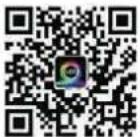
- Download the "LED LAMP" APP with your mobile phones by scanning the QR code on user manual or search the "LED LAMP" APP in iPhone APP store or Google Play store.
- Once the APP has been downloaded successfully, you need to turn on the Bluetooth function on your phone first. Then plug in the strip light and open the APP.
Android phones need to open the location function and allow permission
INSTRUCTIONS
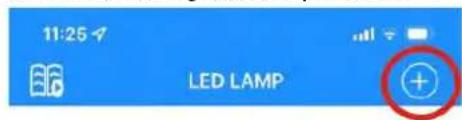
Open the app and click on the arrow pointing towards the left.
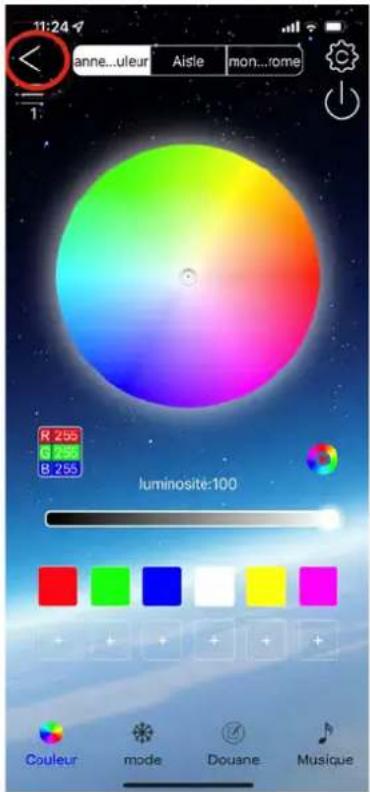
On the following screen, press the "+" sign in the upper right corner

natural_image
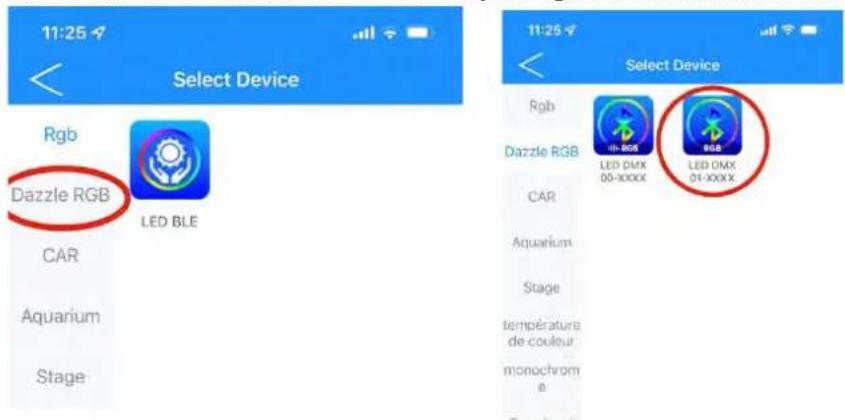
Abstract blue and white graphic with no discernible text or symbolsSelect function "Dazzle RGB" to control your light sticks and the second icon LED DMX which is the update.
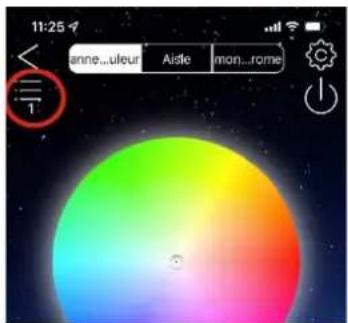
You'll get back automatically to the control screen where you have to select all your light sticks by clicking on the 3 horizontal lines
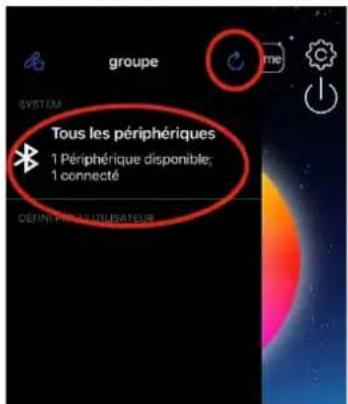
Refresh all peripherals via the rotating arrow and you will find all peripherals nearby. The app is now ready.
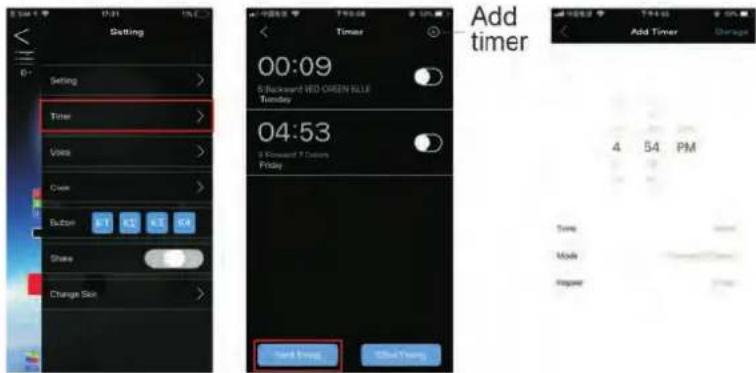
- In Settings menu: You can set the rhythm, RGB sequence, adjust pixels, timer, shake, change background and design your own color
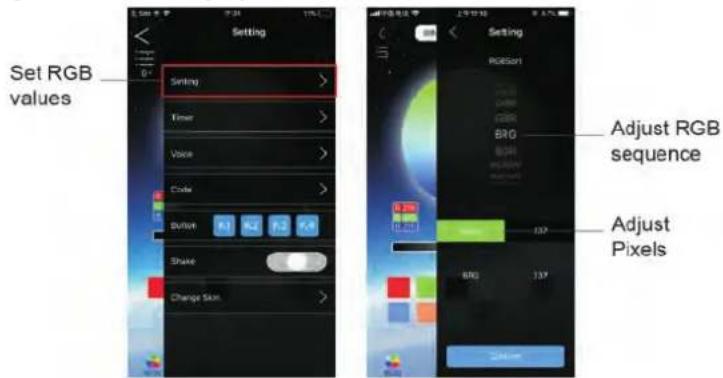
PIXEL ADJUSTMENT
This function allows to compensate factory defaults such as poor top or bottom, front or rear illumination of the light tube.
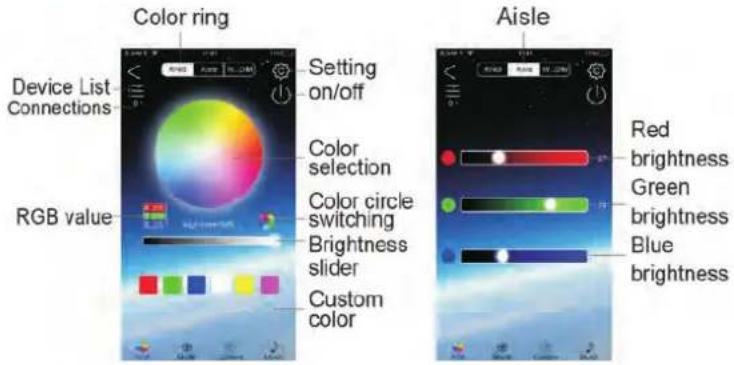
- Color interface: The color interface has three parts: Ring, Aisle and monochrome
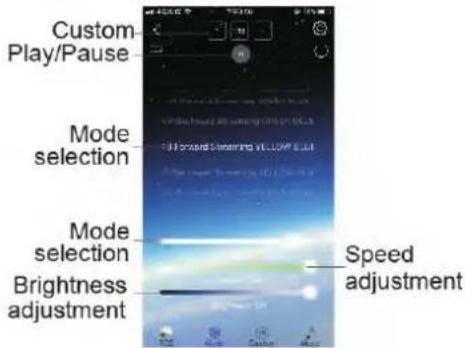
- Mode interface: you can choose the mode, adjust the speed, adjust the brightness what you want
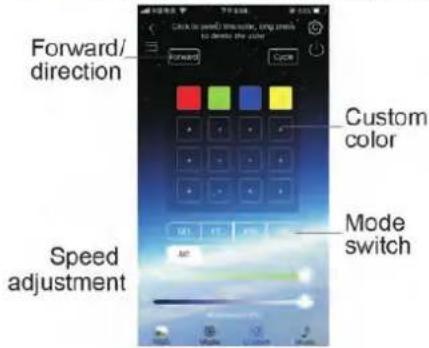
- In custom interface, you can add color, choose mode, adjust speed
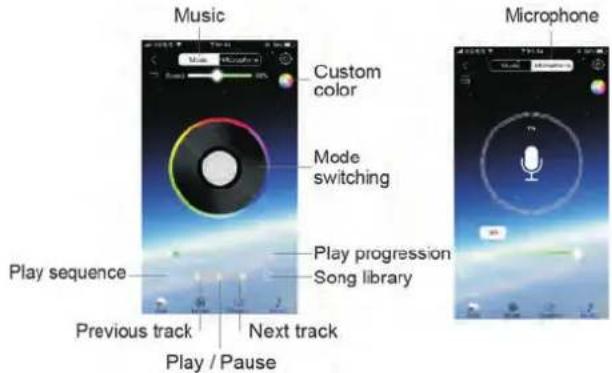
- Music interface has a music and a microphone mode. In music mode, the color changes by your mobile phone music; in microphone mode, the color changes by exterior sound.
- Timer: You can set a specific time period to open or close the mode. After adding the timing, click the "Send Timing" button.
CARE
Before cleaning the unit, disconnect it if from the mains. Do not use aggressive cleaning agents. Use a clean cloth to wipe any dust or dirt from the product. We are not liable for damage arising from incorrect handling, improper use or wear and tear.
TROUBLESHOOTING IF PAIRING FAILS
- Check if the power supply of the light strip is working normally.
- Check if Bluetooth is enabled.
- Check if another mobile phone is already connected as Bluetooth 4.0 only supports one connection to one device.
- Check in APP Bluetooth setting if the phone is connected to the device, if it is, exit the APP and reopen it. The APP will connect automatically.
- If everything is working normally but pairing keeps failing, please exit the APP and reopen it.
- Exit APP, restart mobile phone, power on the strip light, reopen the APP, then they will connect automatically.
SPECIFICATIONS
| Model MAGIC-COLOR-STICK-1.5WH | MAGIC-COLOR-STICK-1.8WH | |
| MAGIC-COLOR-STICK-1.5BK | MAGIC-COLOR-STICK-1.8BK | |
| Power supply 100-240V | ~50/60Hz | |
| Input voltage 12V= 2A | ||
| Consumption 18W | ||
| Bluetooth version 4.0 | ||
| BT freq. band 2402-248 | 0MHz | |
| Max. RF value 1,43dBm | ||
| Remote control batt. 3V | Lithium CR2025 | |
| System requirement Android 4.4 and above / iOS 11.0 and above | ||
| Dimensions Tube ∅ 1.7 | x 115cm Tube ∅ 1.7 x 118cm | |
| Total weight 2.3kg | 2.6kg | |
Correct Disposal of this product

This marking indicates that this product should not be disposed with other household wastes throughout the EU. To prevent possible harm to the environment or human health from uncontrolled waste disposal, recycle it responsibly to promote the sustainable reuse of material resources. To return your used device, please use the return and collection systems or contact the retailer where the product was purchased. They can take this product for environmental safe
recycling.
TUBE LUMINEUX RGB SUR PIED
NOTICE D'UTILISATION
DÉBALLAGE
DISPOSITIF DE COUPURE
- MANUAL
- UNPACKING INSTRUCTIONS
- EXPLANATION OF SYMBOLS ON THE SILKSCREEN
- SAFETY RECOMMENDATIONS
- DISCONNECT DEVICE
- CONNECTIONS
- MANUAL CONTROL
- REMOTE CONTROL
- RECOMMENDATIONS FOR BATTERIES
- ATTENTION
- WARNING
- DOWNLOAD APP SOFTWARE
- INSTRUCTIONS
- PIXEL ADJUSTMENT
- CARE
- TROUBLESHOOTING IF PAIRING FAILS
- Correct Disposal of this product
- TUBE LUMINEUX RGB SUR PIED
- NOTICE D'UTILISATION
- DÉBALLAGE
- DISPOSITIF DE COUPURE
Brand : IBIZA SOUND
Model : MAGIC-COLOR-STICK
Category : Lighting