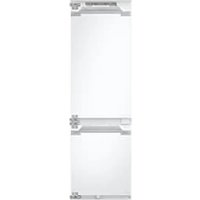
BRB70F26DEF0 - Fridge SAMSUNG - Free user manual and instructions
Find the device manual for free BRB70F26DEF0 SAMSUNG in PDF.


User questions about BRB70F26DEF0 SAMSUNG
0 question about this device. Answer the ones you know or ask your own.
Ask a new question about this device
Download the instructions for your Fridge in PDF format for free! Find your manual BRB70F26DEF0 - SAMSUNG and take your electronic device back in hand. On this page are published all the documents necessary for the use of your device. BRB70F26DEF0 by SAMSUNG.
USER MANUAL BRB70F26DEF0 SAMSUNG
What you need to know about the safety instructions 3
Important safety symbols and precautions: 5
Important safety precautions 6
Severe warning signs for transportation and site 9
Critical installation warnings 10
Installation cautions 14
Critical usage warnings 14
Usage cautions 19
Cleaning cautions 21
Critical disposal warnings 23
Additional tips for proper usage 24
Instructions about the WEEE 26
Installation 27
Refrigerator at a glance 27
Step-by-step installation 28
Operations 39
Main panel 39
SmartThings (applicable models only) 44
Storage information 47
Maintenance 49
Handle and care 49
Cleaning 51
Replacement 51
Troubleshooting 52
General 52
Do you hear abnormal sounds from the refrigerator? 55
SmartThings (applicable models only) 57
Appendix 58
Safety Instruction 58
Install Instruction 58
Temperature Instruction 59
Information for model and ordering spare parts 62
Open Source Announcement 63
Open Source Announcement 63
English2
Safetyinformation
Before using your new Samsung Refrigerator, please read this manual thoroughly to ensure that you know how to operate the features and functions that your new appliance offers safely and efficiently.
What you need to know about the safety instructions
- Warnings and Important Safety Instructions in this manual do not cover all possible conditions and situations that may occur.
It is your responsibility to use common sense, caution, and care when installing, maintaining, and operating your appliance.
- Because these following operating instructions cover various models, the characteristics of your refrigerator may differ slightly from those described in this manual and not all warning signs may be applicable. If you have any questions or concerns, contact your nearest service center or find help and information online at www.samsung.com.
- R-600a or R-134a is used as a refrigerant. Check the compressor label on the rear of the appliance or the rating label inside the fridge to see which refrigerant is used for your appliance. When this product contains flammable gas (Refrigerant R-600a), contact your local authority in regard to safe disposal of this product.
- In order to avoid the creation of a flammable gas-air mixture if a leak in the refrigerating circuit occurs, the size of the room in which the appliance may be sited depends on the amount of refrigerant used.
- It is hazardous for anyone other than an Authorized Service Person to service this appliance.
English 3
Safety information
- Never start up an appliance showing any signs of damage. If in doubt, consult your dealer. The room must be 1 m³ in size for every 8 g of R-600a refrigerant inside the appliance.
The amount of refrigerant in your particular appliance is shown on the identification plate inside the appliance.
- Refrigerant squirting out of the pipes could ignite or cause an eye injury. When refrigerant leaks from the pipe, avoid any naked flames and move anything flammable away from the product and ventilate the room immediately.
- Failing to do so may result in fire or explosion.
• To avoid contamination of food, please respect the following instructions:
- Opening the door for long periods can cause a significant increase of the temperature in the compartments of the appliance.
- Clean regularly surfaces that can come in contact with food and accessible drainage systems.
- Clean water tanks if they have not been used for 48 h; flush the water system connected to a water supply if water has not been drawn for 5 days.
- Store raw meat and fish in suitable containers in the refrigerator, so that it is not in contact with or drip onto other food.
- Two-star frozen-food compartments are suitable for storing pre-frozen food, storing or making icecream and making ice cubes.
- One-, two- and three-star compartments are not suitable for the freezing of fresh food.
English4
- If the refrigerating appliance is left empty for long periods, switch off, defrost, clean, dry, and leave the door open to prevent mould developing within the appliance.
Important safety symbols and precautions:
Please follow all safety instructions in this manual. This manual uses the following safety symbols.
WARNING
Hazards or unsafe practices that may result in severepersonal injury, property damage, and/or death.
CAUTION
Hazards or unsafe practices that may result in severepersonal injury and/or property damage.
NOTE
Useful information that helps users understand or benefit from the refrigerator.
These warning signs are here to prevent injury to you and others.
Please follow them carefully.
After reading this section, keep it in a safe place for future reference.
Safety information
Important safety precautions
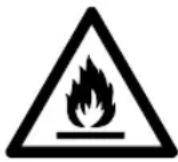
WARNING; Risk of fire / flammable materials
WARNING
- When positioning the appliance, ensure the supply cord is not trapped or damaged.
- Do not locate multiple portable socket-outlets or portable power supplies at the rear of the appliance.
- Keep ventilation openings, in the appliance enclosure or in the built-in structure, clear of obstruction.
- Do not use mechanical devices or any other means to accelerate the defrosting process, other than those recommended by the manufacturer.
• Do not damage the refrigerant circuit. - Do not use electrical appliances inside the food storage compartments of the appliance, unless they are of the type recommended by the manufacturer.
- This appliance is not intended for use by persons (including children) with reduced physical, sensory, or mental capabilities, or those who lack experience and knowledge, unless they have been given supervision or instruction concerning the use of the appliance by a person responsible for their safety.
English6
- This appliance can be used by children aged from 8 years and above and persons with reduced physical, sensory or mental capabilities or lack of experience and knowledge if they have been given supervision or instruction concerning use of the appliance in a safe way and understand the hazards involved. Children shall not play with the appliance. Cleaning and user maintenance shall not be made by children without supervision. Children aged from 3 to 8 years are allowed to load and unload refrigerating appliances.
- If the supply cord is damaged, it must be replaced by the manufacturer, its service agent or similarly qualified persons in order to avoid a hazard.
- The socket must be easily accessible so that the appliance can be quickly disconnected from the supply in an emergency.
- It must be outside the area of the rear of the appliance.
-
Do not store explosive substances such as aerosol cans with a flammable propellant in this appliance.
• If the product is equipped with LED lamps, do not disassemble the Lamp Covers and LED lamps yourself. -
ContactaSamsungservicecenter.
- Use only the LED Lamps provided by the manufacturer or its service agents.
- If the interior or exterior LED lamp has gone out, contact your nearest service center.
- For the most efficient use of energy, please keep the all inner fittings such as baskets, drawers, shelves on the position supplied by manufacturer.
Safety information
- To get the best energy efficiency of this product, please leave all shelves, drawers and baskets on their original position.
How to minimize the energy consumption
• Install the appliance in a cool, dry room with adequate ventilation.
- Ensure that it is not exposed to direct sunlight and never put it near a direct source of heat (radiator, for example).
- Not to block any vents or grilles is recommended for energy efficiency.
- Allow warm food to cool down before placing it in the appliance.
- Put frozen food in the refrigerator to thaw. You can then use the low temperatures of the frozen products to cool food in the refrigerator.
- Do not keep the door of the appliance open for too long when putting food in or taking food out.
- The shorter time for which the door is open, the less ice will form in the freezer.
- Clean the rear of the refrigerator regularly. Dust increases energy consumption.
- Do not set temperature colder than necessary.
- Ensure sufficient air exhaust at the refrigerator base and at the back wall of the refrigerator. Do not cover air ventopenings.
- Allow clearance to the right, left, back and top when installing. This will help reduce power consumption and keep your energy bills lower.
English8
- Select 560 mm cavity depth. A smaller cavity depth will result in a higher energy consumption.
This appliance is intended to be used in household and similar applications such as
- staff kitchen areas in shops, offices and other working environments;
- farm houses and by clients in hotels, motels and other residential type environments;
- bedandbreakfasttypeenvironments;
- cateringandsimilarnon-retailapplications.
Severewarningsignsfortransportationandsite
WARNING
- When transporting and installing the appliance, care should be taken to ensure that no parts of the refrigerating circuit are damaged.
- Refrigerant leaking from the pipe work could ignite or cause an eye injury. If a leak is detected, avoid any naked flames or potential sources of ignition and air the room in which the appliance is standing for several minutes.
Safety information
- This appliance contains a small amount of isobutane refrigerant (R-600a), a natural gas with high environmental compatibility that is, however, also combustible. When transporting and installing the appliance, care should be taken to ensure that no parts of the refrigerating circuit are damaged.
Criticalinstallationwarnings
WARNING
- Do not install the refrigerator in a damp location or place where it may come in contact with water.
- Deteriorated insulation on electrical parts may cause an electric shock or fire.
- Do not place this refrigerator in direct sunlight or expose it to the heat from stoves, room heaters, or other appliances.
- Do not plug several appliances into the same multiple power strip. The refrigerator should always be plugged into its own individual electrical outlet which has a voltage rating that matches the voltage listed on the refrigerator's ratingplate.
- This provides the best performance and also prevents overloading of house wiring circuits, which could cause a fire hazard from overheated wires.
• If the wall socket is loose, do not insert the power plug. - There is a risk of electric shock of fire.
- Do not use a power cord that has cracks or abrasion damage along its length or at either end.
English10
- Do not bend the power cord excessively or place heavy objects on it.
- Do not pull or excessively bend the power cord.
• Do not twist or tie the power cord. - Do not hook the power cord over a metal object, place a heavy object on the power cord, insert the power cord between objects, or push the power cord into the space behind the appliance.
- When moving the refrigerator, be careful not to roll over or damage the power cord.
- This may result in an electric shock or fire.
- Never unplug your refrigerator by pulling on the power cord. Always grip the plug firmly and pull straight out from the outlet.
- Damage to the cord may cause a short-circuit, fire, and/or electric shock.
- Donotuseaerosolsneartherefrigerator.
- Using aerosols near the refrigerator may cause an explosion or fire.
- Do not install this appliance near a heater or inflammable material.
- Do not install this appliance in a location where gas may leak.
- This may result in an electric shock or fire.
- This refrigerator must be properly located and installed in accordance with the instructions in this manual before you use it.
Safety information
- Connect the power plug in the proper position with the cord hanging down.
- If you connect the power plug upside down, the wire can get cut off and cause a fire or electric shock.
• Make sure that the power plug is not crushed or damaged by the back of the refrigerator.
- Keep the packing materials out of reach of children.
- There is a risk of death from suffocation if a child puts the packing materials on his or her head.
- Do not install this appliance in a humid, oily or dusty location, in a location exposed to direct sunlight and water (raindrops).
- Deteriorated insulation of electrical parts may cause an electric shock or fire.
• If any dust or water is in the refrigerator, pull out power plug and contact your Samsung Electronics service center.
- Otherwise there is a risk of fire.
- Do not stand on top of the appliance or place objects (such as laundry, lighted candles, lighted cigarettes, dishes, chemicals, metal objects, etc.) on the appliance.
- This may result in an electric shock, fire, problems with the product, or injury.
- You need to remove all the protective plastic film before you initially plug the product in.
- Children should be supervised to ensure that they do not play with the snap rings used for door adjustment or the water tube clips.
- There is risk of death by suffocation if a child swallows a snap ring or water tube clip. Keep the snap rings and water tube clips out of children's reach.
- Therefrigeratormustbesafelygrounded.
- Always make sure that you have grounded the refrigerator before attempting to investigate or repair any part of the appliance. Power leakages can cause severe electric shock.
- Never use gas pipes, telephone lines, or other potential lightning attractors as an electrical ground.
- You must ground the refrigerator to prevent any power leakages or electric shocks caused by current leakage from the refrigerator.
- This may result in an electric shock, fire, explosion, or problems with the product.
- Plug the power plug into the wall socket firmly. Do not use a damaged power plug, damaged power cord, or loose wall socket.
- This may result in an electric shock or fire.
- The fuse on the refrigerator must be changed by a qualified technician or service company.
- Failing to do so may result in an electric shock or personal injury.
- This appliance is a built-in model that requires guided ventilation. To prevent a risk of explosion, make sure to secure room for ventilation.
- The fuse on the refrigerator must be changed by a qualified technician or service company. Failing to do so may result in an electric shock or personal injury.
Safety information
Installationcautions
CAUTION
- Allow sufficient space around the refrigerator and install it on a flat surface.
- If your refrigerator is not level, cooling efficiency and durability can be declined.
- Allow the appliance to stand for 2-3 hours before loading foods after installation and turning on.
• We strongly recommend you have a qualified technician or service company install the refrigerator. - Failing to do so may result in an electric shock, fire, explosion, problems with the product, or injury.
Criticalusagewarnings
WARNING
- Do not insert the power plug into a wall socket with wet hands.
- This may result in an electric shock.
• Do not store articles on the top of the appliance. - When you open or close the door, the articles may fall and cause personal injury and/or material damage.
- Do not insert hands, feet or metal objects (such as chopsticks, etc.) into the bottom or the back of the refrigerator.
- This may result in an electric shock or injury.
- Any sharp edges may cause a personal injury.
- Do not touch the inside walls of the freezer or products stored in the freezer with wet hands.
- Thismaycausefrostbite.
• Do not put a container filled with water on the refrigerator.
- If spilled, there is a risk of fire or electric shock.
- Do not keep volatile or flammable objects or substances (benzene, thinner, propane gas, alcohol, ether, LP gas, and other such products) in the refrigerator.
- This refrigerator is for storing food only.
- This may result in fire or explosion.
• Children should be supervised to ensure that they do not play with the appliance.
- Keep fingers out of “pinch point” areas. Clearances between the doors and cabinet are necessarily small. Be careful when you open the doors if children are in the area.
- Do not put your fingers or children's fingers between the doors.
- Keep fingers out of the left and right door gaps. Be careful when you open the doors if your fingers are in between the doors.
- Do not let children hang on the door or door bins. A serious injury may occur.
- Do not let children go inside the refrigerator. They could becometrapped.
- Do not insert your hands into the bottom area under the appliance.
- Any sharp edges may cause personal injury.
Safety information
- Do not store pharmaceutical products, scientific materials, or temperature sensitive products in the refrigerator.
- Products that require strict temperature controls must not be stored in the refrigerator.
- If you smell pharmaceutical or smoke, pull out power plug immediately and contact your Samsung Electronics service center.
- If any dust or water is in Refrigerator, pull out power plug and contact your Samsung Electronics service center.
- Otherwise there is a risk of fire.
• Do not let children step on a drawer.
- The drawer may break and cause them to slip.
- Do not leave the doors of the refrigerator open while the refrigerator is unattended and do not let children enter inside the refrigerator.
• Do not allow babies or children go inside the drawer.
- It can cause death from suffocation by entrapment or personal injury.
- Donotoverfilltherefrigeratorwithfood.
- When you open the door, an item may fall out and cause personal injury or material damage.
- Do not spray volatile material such as insecticide onto the surface of the appliance.
- As well as being harmful to humans, it may also result in an electric shock, fire, or problems with the product.
- Do not use or place any substances sensitive to temperature such as flammable sprays, flammable objects, dry ice, medicine, or chemicals near or inside of the refrigerator.
English16
- Do not use a hair dryer to dry the inside of the refrigerator. Do not place a lighted candle in the refrigerator for removing bad odours.
- This may result in an electric shock or fire.
- Do not stand on top of the appliance or place objects (such as laundry, lighted candles, lighted cigarettes, dishes, chemicals, metal objects, etc.) on the appliance. This may result in an electric shock, fire, problems with the product, or injury. Do not put a container filled with water on the appliance.
- If spilled, there is a risk of fire or electric shock.
- Never stare directly at the UV LED lamp for long periods of time.
- This may result in eye strain due to the ultraviolet rays.
- Do not put shelf in upside down. Shelf stopper could not work.
- It may cause a personal injury because of glass shelf drop.
- If a gas leak is detected, avoid any naked flames or potential sources of ignition, and air the room in which the appliance is standing for several minutes.
- Do not touch the appliance or power cord.
- Do not use a ventilating fan.
- A spark may result in explosion or fire.
- Bottles should be stored tightly together so that they do not fall out.
- This product is intended only for the storage of food in a domestic environment.
Safety information
- Do not attempt to repair, disassemble, or modify the refrigerator yourself.
- Unauthorized modifications can cause safety problems. To reverse an unauthorized modification, we will charge the full cost of parts and labor.
- Do not use any fuse (such as cooper, steel wire, etc.) other than a standard fuse.
- If your refrigerator needs to be repaired or reinstalled, contact your nearest service center.
- Failing to do so may result in an electric shock, fire, problems with the product, or injury.
- If the refrigerator emits a burning smell or smoke, unplug the refrigerator immediately and contact your Samsung Electronics service center.
- Failing to do so may result in an electric or fire hazards.
- Pull the power plug out of the socket before changing the interior lamps of the refrigerator.
- Otherwise, there is a risk of electric shock.
• If you experience difficulty changing a non-LED light, contact a Samsung service center.
• Plug the power plug into the wall socket firmly.
- Do not use a damaged power plug, damaged power cord or loose wall socket.
- This may result in an electric shock or fire.
English18
Usagecautions
CAUTION
- Donotrefreezethawedfood.
- Frozen and thawed food will develop harmful bacteria faster than fresh.
- The second thaw will break down even more cells, leaching out moisture and changing the integrity of the product.
- Donotthawmeatatroomtemperature.
- Safety will depend on whether the raw product was handled properly.
- Do not place glass bottles or carbonated beverages into thefreezer.
- The container may freeze and break, and this may result in injury.
• Use only the ice maker provided with the refrigerator.
• To get the best performance from the product:
- Do not place food too close to the vents at the rear of the refrigerator as this can obstruct free air circulation in the refrigerator compartment.
- Wrap food up properly or place it in airtight containers before putting it into the refrigerator.
- Please observe maximum storage times and expiration dates of frozen goods.
Safety information
- There is no need to disconnect the refrigerator from the power supply if you will be away for less than three weeks. However, if you will be away for more than three weeks, remove all the food and ice in the ice bucket, unplug the refrigerator, close the water valve, wipe excess moisture from the inside walls, and leave the doors open to prevent odors and mold.
• ServiceWarrantyandModification.
- Any changes or modifications performed by a 3rd party on this finished appliance are not covered under Samsung warranty service, nor is Samsung responsible for safety issues that result from 3rd party modifications.
• Do not block the air vents inside the refrigerator.
- If the air vents are blocked, especially with a plastic bag, the refrigerator can be over cooled.
- Wipe excess moisture from the inside and leave the doors open.
- Otherwise, odor and mold may develop.
- If the refrigerator is disconnected from the power supply, you should wait for at least five minutes before plugging it backin.
- When the refrigerator got wet by water, pull out the power plug and contact your Samsung Electronics service center.
- Do not strike or apply excessive force to any glass surface.
- Broken glass may result in a personal injury and/or propertydamage.
• Be careful that your fingers are not caught in.
English20
- If the refrigerator is flooded, make sure to contact your nearest service center.
- There is a risk of electric shock or fire.
- Do not keep vegetable oil in your refrigerator's door bins. The oil can solidify, making it foul-tasting and difficult to use. In addition, the open container can leak and the leaked oil can cause the door bin to crack. After opening an oil container, it is best to keep the container in a cool and shaded place such as a cupboard or pantry.
- Examples of vegetable oil: olive oil, corn oil, grape-seed oil, etc.
Cleaningcautions
CAUTION
- Do not spray water directly on the inside or outside the refrigerator.
- There is a risk of fire or electric shock.
- Do not use a hair dryer to dry the inside of the refrigerator.
- Do not place a lighted candle in the refrigerator to remove badodors.
- This may result in an electric shock or fire.
• Do not spray cleaning products directly on the display. - Printed letters on the display may come off.
- If any foreign substance such as water has entered the appliance, unplug the power plug and contact your nearest servicecenter.
- Failing to do so may result in an electric shock or fire.
Safety information
- Use a clean, dry cloth to remove any foreign matter or dust from the power plug blades. Do not use a wet or damp cloth when cleaning the plug.
- Otherwise, there is a risk of fire or electric shock.
- Do not clean the appliance by spraying water directly onto it.
- Do not use benzene, thinner, or Clorox, Chloride for cleaning.
- They may damage the surface of the appliance and may cause a fire.
- Before cleaning or performing maintenance, unplug the appliance from the wall socket.
- Failing to do so may result in an electric shock or fire.
- Use a clean sponge or soft cloth and a mild detergent in warm water to clean the refrigerator.
- Do not use abrasive or harsh cleansers such as window sprays, scouring cleansers, flammable fluids, muriatic acid, cleaning waxes, concentrated detergents, bleaches, or cleansers containing petroleum products on exterior surfaces (doors and cabinet), plastic parts, door and interior liners, and gaskets.
- These can scratch or damage the material.
- Do not clean glass shelves or covers with warm water when they are cold. Glass shelves and covers may break if exposed to sudden temperature changes or impacts such as bumpingordropping.
English22
Criticaldisposalwarnings
WARNING
- Please dispose of the packaging material from this product in an environmentally friendly manner.
- Ensure that none of the pipes on the back of the refrigerator are damaged prior to disposal.
- When disposing of this refrigerator, remove the door/door seals and door latch so that small children or animals cannot become trapped inside. Children should be supervised to ensure that they do not play with the appliance. If trapped inside, a child may get hurt or suffocate to death.
- If trapped inside, the child may become injury and suffocate to death.
- Cyclopentane is used in the insulation. The gases in the insulation material require a special disposal procedure. Please contact your local authorities in regard to the environmentally safe disposal of this product.
- Keep all packaging materials well out of the reach of children, as packaging materials can be dangerous to children.
- If a child places a bag over his or her head, the child could suffocate.
Safety information
Additionaltipsforproperusage
- In the event of a power failure, call the local office of your electric company and ask how long the failure is going to last.
- Most power failures that are corrected in an hour or two will not affect your refrigerator temperatures. However, you should minimize the number of door openings while the power is off.
- Should the power failure last more than 24 hours, remove and discard all frozen food.
- The refrigerator might not operate consistently (frozen contents can thaw or temperatures can become too warm in the frozen food compartment) if sited for an extended period of time in a location where ambient air temperatures are constantly below the temperatures for which the appliance is designed.
• In case of particular foods, keeping it under refrigeration can have a bad effect on preservation due to its properties. - Your appliance is frost free, which means there is no need to manually defrost your appliance. This will be carried out automatically.
- Temperature rise during defrosting complies with ISO requirements. If you want to prevent an undue rise in the temperature of frozen food while the appliance defrosts, wrap the frozen food in several layers of newspaper.
- Do not re-freeze frozen foods that have thawed completely.
English24
- The temperature of two star section (sections) or compartment (compartments) which have two star symbol (**) is slightly higher than other freezer compartment (compartments). The two star section (sections) or compartment (compartments) is (are) based on the instruction and/or the conditionasdelivered.
Safety information
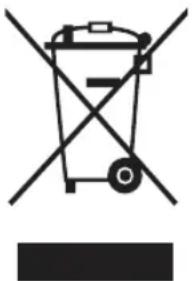
InstructionsabouttheWEEE
natural_image
Symbol of a trash bin crossed with no text or numbers, representing waste sorting or restriction (no text present)Correct Disposal of This Product (Waste Electrical & Electronic Equipment) (Applicable in countries with separate collection systems)
This marking on the product, accessories or literature indicates that the product and its electronic accessories (e.g. charger, headset, USB cable) should not be disposed of with other household waste at the end of their working life. To prevent possible harm to the environment or human health from uncontrolled waste disposal, please separate these items from other types of waste and recycle them responsibly to promote the sustainable reuse of material resources.
Household users should contact either the retailer where they purchased this product, or their local government office, for details of where and how they can take these items for environmentally safe recycling.
Business users should contact their supplier and check the terms and conditions of the purchase contract. This product and its electronic accessories should not be mixed with other commercial wastes for disposal.
For information on Samsung's environmental commitments and product regulatory obligations, e.g. REACH, WEEE or Batteries, visit our sustainability page available via www.samsung.com
(For products sold in European countries and in the UK only)
English26
Installation
Follow these instructions carefully to ensure a proper installation of this refrigerator and to prevent accidents before using it.
WARNING
• Use the refrigerator only for its intended purpose as described in this manual.
• Any servicing must be performed by a qualified technician.
- Dispose of the product packaging material in compliance with the local regulations.
• To prevent electric shock, unplug the power cord before servicing or replacements.
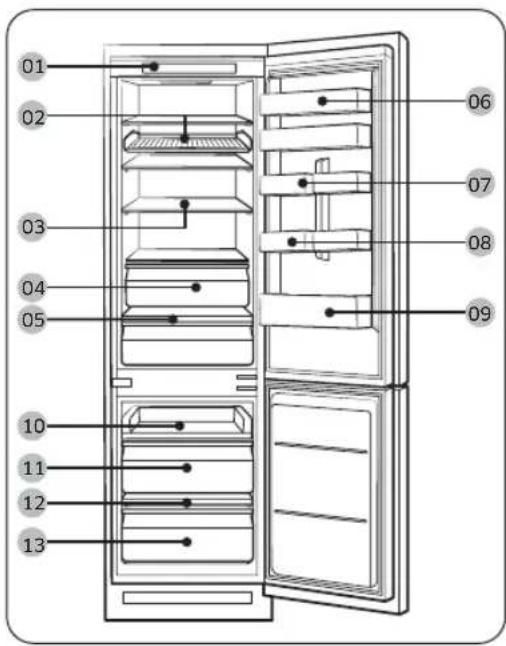
Refrigeratorataglance
The actual image and provided component parts of the refrigerator may differ, depending on the model and the country.
text_image
01 02 03 04 05 10 11 12 13 06 07 08 0901 Controlpanel
02 Shelfwine*
03 Fridgeshelf*
04 Fridgedrawer*
05 Vegetableshelf*
06 Topdoorbin*
07 Varietydoorbin
08 Eggtray*
09 Fridgedoorbin
10 Slideshelf
11 Freezermiddledrawer
12 Freezershelf*
13 Freezerbottomdrawer
*applicablemodelsonly
TE
- For best energy efficiency, make sure all of shelves, drawers, and baskets are placed in their original position.
• Only for models which have freezer shelf: - To quickly freeze large quantities of food, use the freezer after removing the bottom drawer of the freezer.
- To get more space, you can remove the slide shelf (10) and two freezer drawers (11, 13) under it but keep the freezer shelf on the bottom drawer of the freezer. They do not affect thermal and mechanical characteristics. The declared storage volume of the frozen food storage compartment is calculated with the shelf and the freezer drawersremoved.
English 27
Installation
Step-by-stepinstallation
STEP 1 Selectasite
Siterequirements:
• Solid, level surface without carpeting or flooring that may obstruct ventilation
• Awayfromdirectsunlight
- Adequate room for opening and closing the door
• Awayfromaheatsource
• Roomformaintenanceandservicing
Productdimension
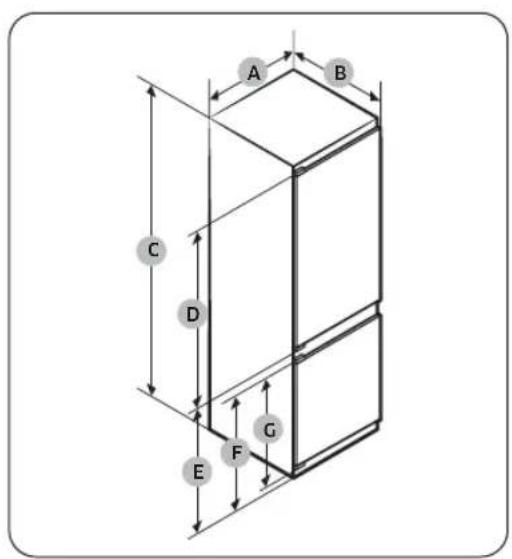
text_image
A B C D E F G| BRB***26*BRB***30* | ||
| A540±2540±2 | ||
| B | 550±2 (with door) | 550±2 (with door) |
| C1775±21935±2 | ||
| D | 987 | 1147 |
| E | 735 | 735 |
| F | 671 | 671 |
| G | 621 | 621 |
(unit:mm)
English28
ProductOverallDimension
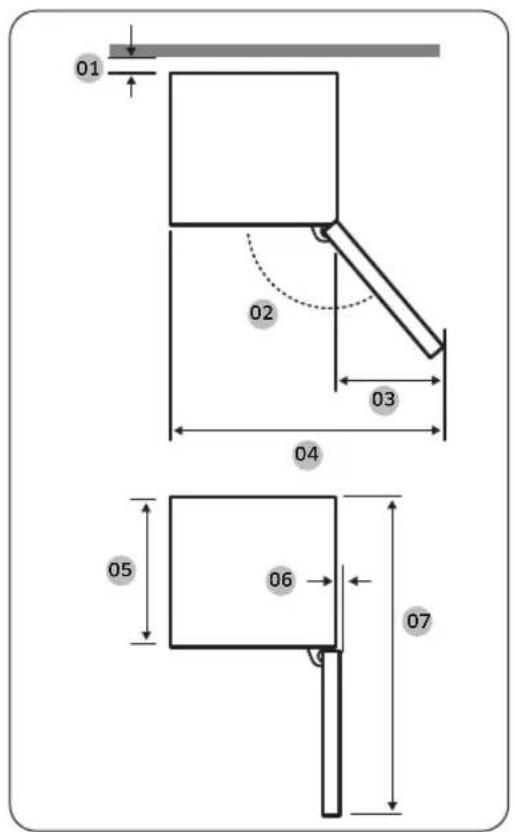
text_image
01 02 03 04 05 06 07| Model | BRB*****SO SLIDETYPE | BRB*****FO FIXEDTYPE |
| 01* | 10 (Min.) / 30 (Recommended) | |
| 02 | 95° (Recommended) | 115°(Recommended) |
| 03218180 | ||
| 04758700 | ||
| 05510510 | ||
| 0615 | ||
| 0710551055 | ||
*01: From cabinet to rear of product.
(unit:mm)
NOTE
- Thespecifiedenergyconsumptionis based on the condition of a 10 mm gap from cabinet to rear of product. The product will work properly even with a gap which is less than 10 mm, however it consumes slightly more energy.
• We recommend using a cabinet that is 18 mm thick with hinges less than 20mm thick.
NOTE
• The measurements in the above table may differ, depending on the measuring method.
- Forbuilt-ininstallation,seetheInstallationManual.
Installation
Ventilation system of the cabinet
As shown in the figure, the air entering the refrigerator circulates along the ventilation path (see the arrow direction) of the cabinet. The cabinet must have at least 200 cm² (WxH: 500 mm x 40 mm) of space both for the air inlet and air outlet. Also, the cabinet must have a rear vent of at least 200 cm² (WxH: 500 mm x 40 mm) of space at the rear bottom.
Airinlet
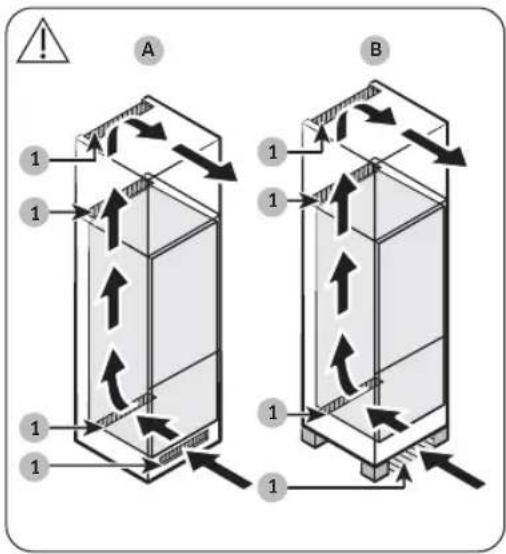
text_image
A B 1 1 1 1 1Airoutlet
text_image
A B C| 1200cm | 2 |
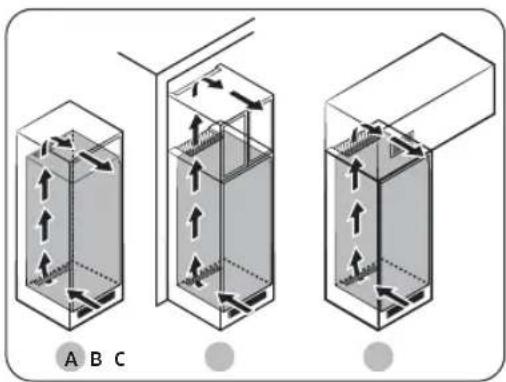
The air inlet must be positioned in one of the examples below, or a similar position, depending on your cabinet type.
A. A ventilation hole included in the cabinet.
B. Acabinetwithfeet.
The air outlet must be positioned in one of the examples below, or a similar position, depending on your cabinet type.
A. Immediatelyabovetherefrigerator with an optional vent grille
B. Closetothecabinetceiling
C. Above the refrigerator with a separately built-in vent
CAUTION
Regardless of the cabinet design, the air ventilation system must not be blocked by any kindofinstallation.
English30
Cabinetdimension
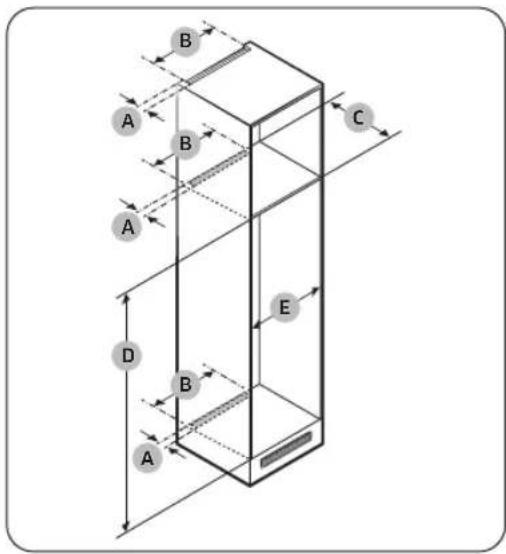
text_image
A B C D E B ACAUTION
If the cabinet has a door, make sure the door is not heavy to prevent it from tipping or falling off.
| Cabinet door | Thickness (mm) | Weight (kg) |
| Fridgeside | Min.16Max.19 | Max.18 |
| Freezer side | Max. 12 |
Any product failure due to the following is not covered by the Warranty.
- Improper site conditions or incorrect cabinetsizes
- Defectivecabinet
- Mistakesbytheinstallerortheuser
Clearance
See the pictures and tables below for space requirements for installation.
| Model | A(mm) | B(mm) | C(mm) | D(mm) | E(mm) | Remark | |
| BRB***26**SOSLIDETYPE | Min. | 40500 | 56017 | 78560 | |||
| Recommend | 58017 | 80562 | |||||
| Max. | - | 1782568 | |||||
| BRB***26**FOFIXEDTYPE | Min. | 560 | 1778 | 555 | Hinge : 17 mm | ||
| Recommend | 58017 | 80562 | |||||
| Max. | - | 1782568 | |||||
| BRB***30**SOSLIDETYPE | Min. | 40500 | 56019 | 38560 | |||
| Recommend | 58019 | 40562 | |||||
| Max. | - | 1942568 | |||||
| BRB***30**FOFIXEDTYPE | Min. | 560 | 1938 | 555 | Hinge : 17 mm | ||
| Recommend | 58019 | 40562 | |||||
| Max. | - | 1942568 | |||||
NOTE
- If the width of a cabinet is larger than 568 mm, the gasket (between the refrigerator and the cabinet) can become loose.
English 31
Installation
- If the cabinet is higher than the maximum dimension (1782 mm), you must use other finishing materials to fill the gap.
Considerationforsocketoutletlocationandrequiredspace
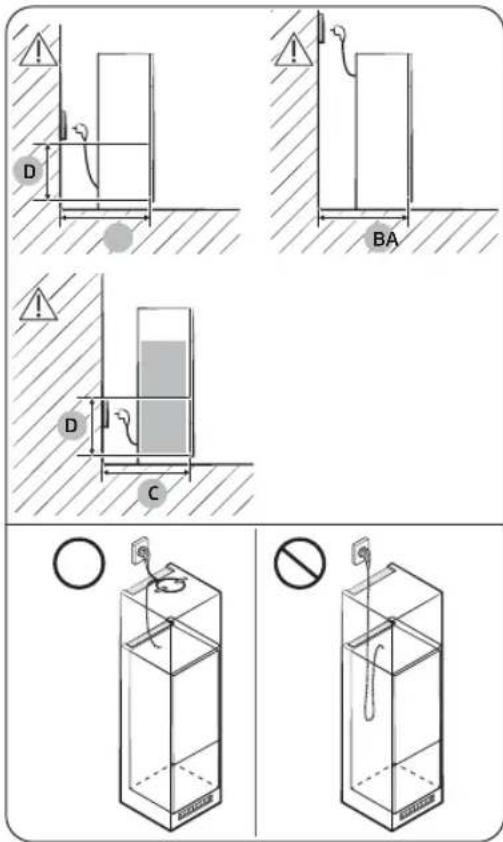
text_image
Technical diagram illustrating four different installation methods for a water tank, with labeled components and warning symbols.| AMin.590 | |
| BMin.560 | |
| CMin.580 | |
| D240 |
(unit:mm)
ENOTE
If you install the refrigerator in a cabinet with a 560 mm depth, make sure the power cord is arranged on a side of the refrigerator before plugging into a power socket. If the power cord is in the rear of the refrigerator, it could decrease the energy efficiency.
English32
Cabinettype
The recommended cabinet type is one of the following:
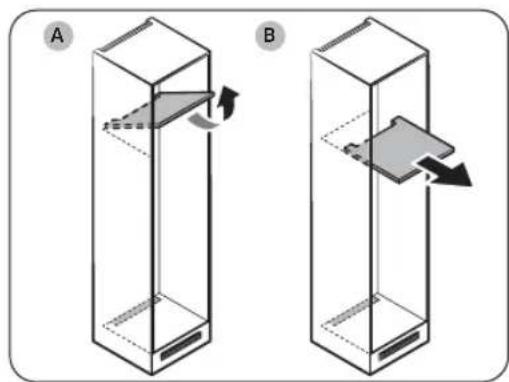
natural_image
Two 3D diagrams of a rectangular container with internal compartments and directional arrows indicating movement (no text or symbols)DTE
If using any of these cabinet types, you don't need to remove the main unit from the cabinet for servicing a defective main PBA. If using another cabinet type, you must remove the main unit from that cabinet for servicing.
A. Flippingtype
B. Slidingtype
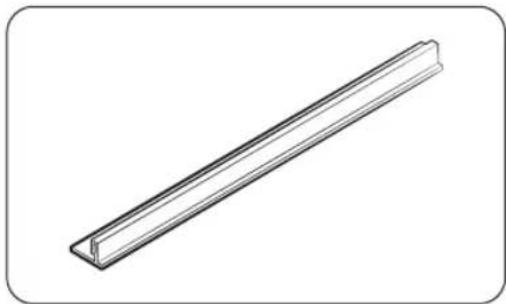
natural_image
Simple line drawing of a long rectangular metal profile (no text or symbols)EDTE
- Using an unrecommended-sized cabinet can cause the gasket between the refrigerator and the cabinet to be loose after the refrigerator is inserted in the cabinet.
Installation
text_image
B 01 03 02 ATE
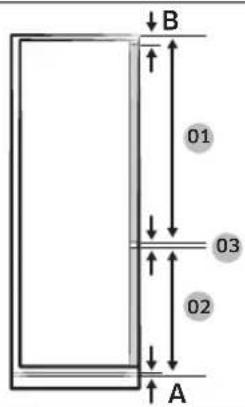
To install a cabinet requiring a 3 mm gap (03), see the cabinet reference table below.
| Model | BRB***26**S0 SLIDETYPE | BRB***26**F0 FIXEDTYPE |
| 01 | Min.1041+B Max.1102+B | Min.1063+B Max.1076+B |
| 02 | Min.670+A Max.731+A | Min.696+A Max.709+A |
| 03 | 3mm (fridge and freezer door gap) | |
| Model | BRB***30**SOSLIDETYPE | BRB***30**FOFIXEDTYPE |
| 01 | Min.1204+BMax.1262+B | Min.1223+BMax.1236+B |
| 02 | Min.670+AMax.731+A | Min.696+AMax.709+A |
| 03 | 3mm(fridge and freezer door gap) | |
A. Lower edge of the front panel above the air ventilation
B. Frontpaneloverhang
English34
STEP 2 Flooring
natural_image
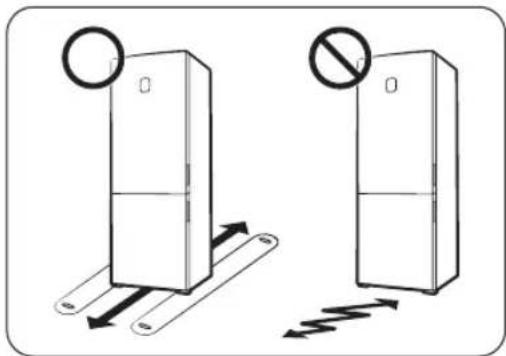
Diagram showing two refrigerator doors with directional arrows indicating movement, one marked with a circle and the other with a prohibition sign (no text or symbols present)• The surface to install the refrigerator must support a fully loaded refrigerator.
- To protect the floor, put a large piece of cardboard on each foot of the refrigerator.
- Once the refrigerator is in its final position, do not move it unless necessary to protect the floor. If you have to, use a thick paper or cloth such as old carpet along the movement path.
STEP 3 Spacing(applicablemodelsonly)
text_image
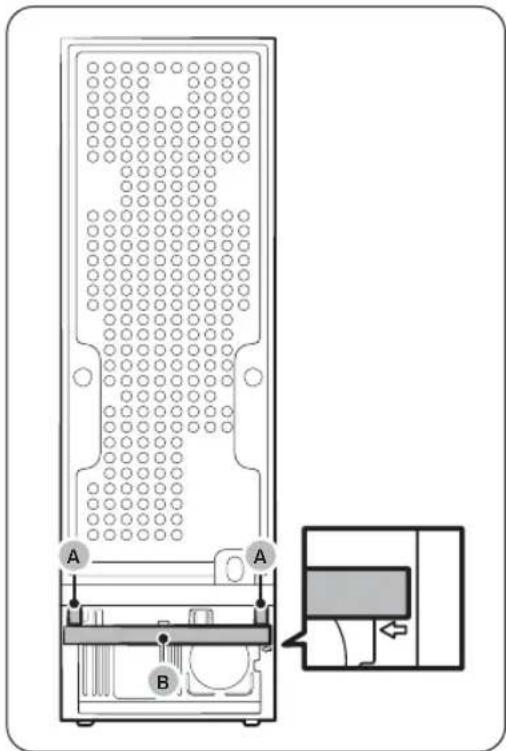
Diagram of a device panel with labeled ports A and B, showing internal structure and connection to a control panel.Attachtheprovidedspacers(A) and the sponge(B) as shown in the figure to for optimal energy efficiency.
CAUTION
If the refrigerator is not flush with the cabinet, you may remove the spacers to make the refrigerator flush with the cabinet, but the optimal energy efficiency cannot beguaranteed.
Installation
STEP 4 Adjustthelevellinglegs
CAUTION
- The refrigerator must be levelled on a flat, solid floor. Failing to do so can cause damage to the refrigerator or physical injury.
- Levelling must be performed with an empty refrigerator. Make sure no food items remain inside the refrigerator.
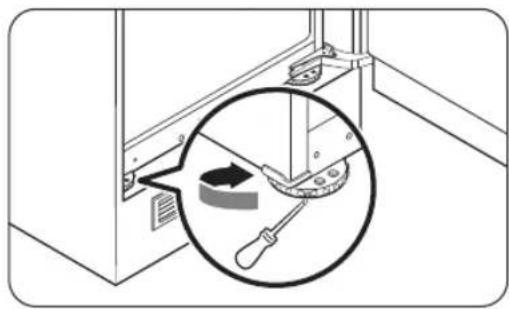
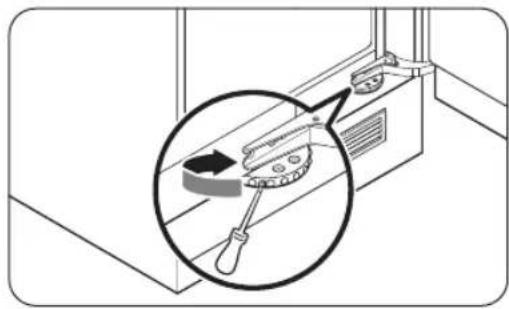
The refrigerator can be levelled using the front legs that have a special screw (leveller) for levelling purposes. Use a flat-head screwdriver for levelling.
natural_image
Diagram showing a mechanical device with a magnified inset highlighting a tool interacting with a component (no text or symbols present)To adjust the height of the left side:
Insert a flat-head screwdriver into the leveller of the front left leg. Turn the leveller clockwise to raise, or turn it counter clockwise to lower.
natural_image
Diagram showing a tool interacting with a window, with an inset magnified view of the tool's rotation (no text or symbols present)To adjust the height of the right side:
Insert a flat-head screwdriver into the leveller of the front right leg. Turn the leveller clockwise to raise, or turn it counter clockwise to lower.
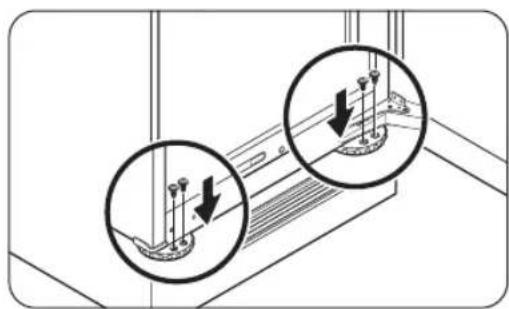
natural_image
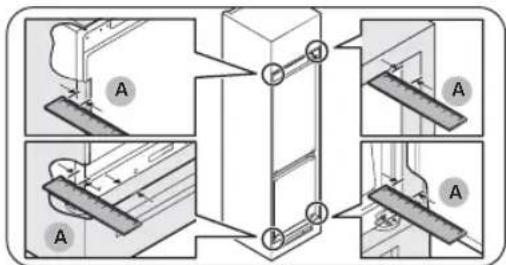
Diagram showing two circular insets of a ship's hull with arrows indicating direction (no text or symbols)DTE
Make sure to secure a 41 mm (A: for both the sliding hinge and the fixed hinge) gap between the refrigerator and the closet or alcove. Then, fix the front legs using the screws.
English36
text_image
Technical diagram showing mechanical assembly steps with labeled components A and numbered parts 1 to 5STEP 5 Initialsettings
By completing the following steps, the refrigerator should be fully functioning.
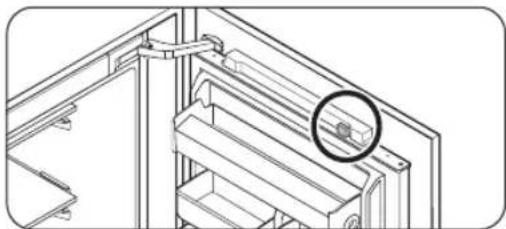
- Remove the PE foam sheet on each shelf corner, which is attached to protect the refrigerator during transportation.
- Open the door, and check if the interior light lights up.
natural_image
Technical line drawing of a mechanical assembly with a magnified inset showing a detail (no text or symbols)-
Remove the PE foam on the magnet from the top of the door.
-
Set the temperature to the coldest, and wait for about an hour. Then, the freezer will be slightly chilled, and the motor will run smoothly.
- Wait until the refrigerator reaches the set temperature. Now the refrigerator is ready foruse.
NOTE
When the refrigerator powers on, the alarm will sound. To turn off the alarm, press Freezer or Fridge.
Installation
STEP 6 Temperature Alarm (applicable models only)
Type1
- The refrigerator blinks '-' on the temperature display with an alarm if the freezer compartment is too warm. This may occur if the freezer becomes too warm after there has been a power failure.
- If this happens, press Freezer or Fridge. Whichever warmer temperature is displayed for 5 seconds. Then the actual temperature is displayed. To deactivate the alarm, press DoorAlarm.
Type2
- The refrigerator blinks the temperature indicator with an alarm if the freezer compartment is too warm. This may occur if the freezer becomes too warm after there has been a power failure. To deactivate the alarm, press Freezer or Fridge.
STEP 7 Finalcheck
When installation is complete, confirm that:
• The refrigerator is plugged into an electrical outlet and grounded properly.
- The refrigerator is installed on a flat, level surface with a reasonable clearance from the wall or the cabinet.
• The refrigerator is level and is sitting firmly on the furniture.
- The door opens and closes freely, and the interior light turns on automatically when you open the door.
English38
Operations
Mainpanel
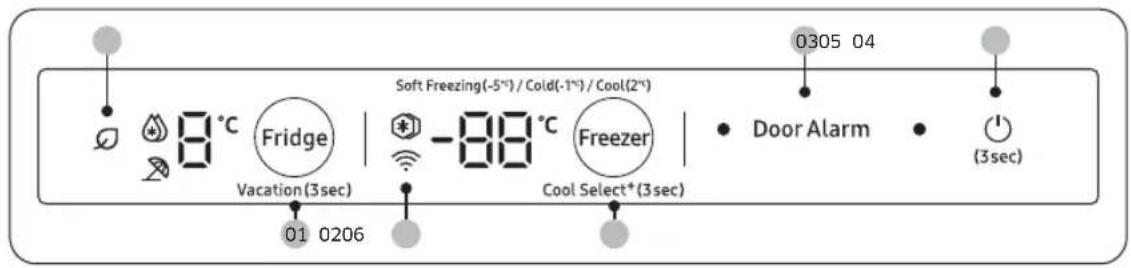
TYPE1
text_image
0305 04 8°C Fridge Soft Freezing(-5°)/Cold(-1°)/Cool(2°) Vacation(3sec) -88°C Freezer Cool Select*(3sec) Door Alarm (3sec) 01 0206TYPE2
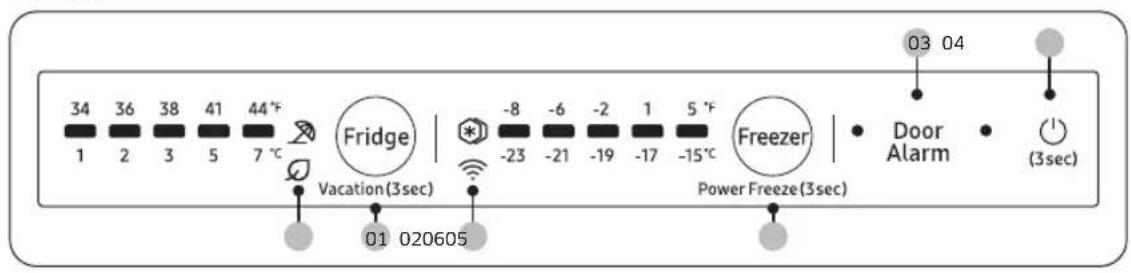
text_image
34 36 38 41 44°F 1 2 3 5 7 °C Fridge | -8 -6 -2 1 5 °F Freezer | Door Alarm (3sec) Vacation(3sec) Power Freeze(3sec) 01 02060501 Fridge / Vacation
02 Freezer / Power Freeze / Cool Select+ *
03 Door Alarm
04 ⏻ (Power)
05 AIEnergyMode06 Networkconnection
* applicable models only
NOTE
The LED indicators turn on all at once when the door is open, or turn off all at once when the door is closed.
Operations
01 Fridge / Vacation (3 sec)
| Fridge | To adjust the fridge temperature, pressFridgeto select the correspondingtemperature.You can change the temperature between 1 °C and 7 °C (default: 3 °C).Power Cool (Type 1)Power Cool speeds up the cooling process at maximum fan speed. The fridge keeps running at full speed for two and a half hours and then returns to the previous temperature.To activate Power Cool, select temperature 1 °C, and then pressFridgeto select Power Cool. The corresponding indicator ( 🔺 )lights up, and the refrigerator will speed up the cooling process for you.TodeactivatePowerCool,pressFridg again. Then, the temperature of the fridge will be set back to 7 °C.TEUsing Power Cool increases power consumption. Make sure you turn off and return to the previous temperature if you don't intend to use it. |
| Vacation | Use the Vacation function if you are going on vacation or a business trip, or if you do not intend to use the fridge for an extended time. The fridge temperature will be kept under 17 °C, but the freezer remains active as previously set.To activate or deactivate the Vacation mode, press and hofridge for 3 seconds.TEMake sure to remove foods in the fridge compartment before using Vacationmode.The Vacation mode will be disabled if you adjust the temperature. |
English40
02 Freezer / Power Freeze (3 sec) / Cool Select+ (3 sec)
| Freezer | The Freezer button can be used to set the freezer temperature. Available temperatures are between -15 °C and -23 °C (default: -19 °C).NOTEYou cannot change the temperature in Cool Select+ mode. |
| PowerFreeze | Power Freeze speeds up the freezing process at maximum fan speed. The freezer keeps running at full speed for 50 hours and then returns to the previous temperature. To freeze large amounts of food, activate Power Freeze for at least 20 hours before putting food in the freezer.Type1To activate Power Freeze, select temperature -23 °C, and then pre Freezer to select Power Freeze.The corresponding indicator (*) lights up, and the refrigerator will speed up the freezing process for you.When the Power Freeze process is complete, the corresponding indicator turns off and the freezer returns to the previous temperaturesetting.TodeactivatePowerFreeze,pressFreezeragain.The freezer returns to the pervious temperature setting.Type2To activate Power Freeze, press and hoFreezer for 3 seconds to selectPowerFreeze.The corresponding indicator (*) lights up, and the refrigerator will speed up the freezing process for you.To deactivate Power Freeze, press and hoFreezer for 3 seconds again.The freezer returns to the previous temperature setting, and the indicator turns off.NOTEUsing Power Freeze increases power consumption. Make sure you turn it off and return to the previous temperature if you do not intend touseit. |
Operations
| CoolSelect+(Type1) | Each time you press and holdCoolSelect+for 3 seconds, the operating mode switches in this sequence:Freeze → Soft Freezing (-5 °C) → Cold (-1 °C) → Cool (2 °C)CAUTIONIf you switch the mode from Freezer to Cool Select+, the stored food may leak juice or liquid from the food.Do not store meat or fishery for an extended time in Cool Select+mode. The food may freeze or spoil because of inappropriate temperature settings for the food to store.If the refrigerator recovers power from an extended time of inactivity, the Cool Select+settings may be reset to factory defaults. Check out the Cool Select+settings before using the refrigerator. |
03DoorAlarm
| DoorAlarm | You can set the alarm for a reminder. If the door is left open for more than 2 minutes, the alarm will sound with the Alarm indicator blinking.You can toggle to enable and disable the alarm by pressingDoor Alarm. |
04 ⏻(Power)
To turn the refrigerator on, press and hold ^① for 3 seconds.
If you press and hold(1) for 3 seconds again, the refrigerator turns off, and the room lamps also turn off.
05 AI Energy Mode (applicable models only)
The icon appears when the AI Energy Mode is operating. You may turn on or off the AI Energy Mode in the SmartThings app. (applicable models only)
English42
06 Network connection (applicable models only)
You can control and monitor your refrigerator on the SmartThings app. For more information, see the SmartThings (applicable models only) section.
NOTE
If the refrigerator is not connected to the SmartThings app, the Wi-Fi (💡) icon blinks to alert. If you see the blinking Wi-Fi (💡) icon, we recommend that you connect your refrigerator to the SmartThings app.
Turning on or off the Wi-Fi (applicable models only)
Type1
To turn the Wi-Fi on or off, tap and holdFridge for 10 seconds. The display shows the status of Wi-Fi for 5 seconds (as shown in the figure).
Wi-Fi On
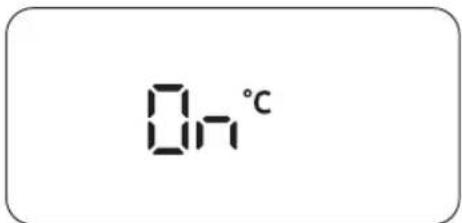
text_image
On°CWi-Fi Off
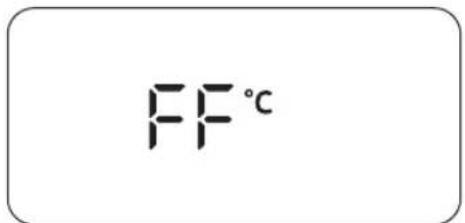
text_image
FF°CType2
To turn the Wi-Fi on or off, press and hold Fridge for 10 seconds. The Wi-Fi (💡) icon shows the status of the Wi-fi as shown below.
• Wi-Fi Off: The Wi-Fi 🔊) icon blinks for 5 seconds and then turns off.
• Wi-Fi On: The Wi-Fi 🔔 icon blinks for 5 seconds and then turns on for 5 seconds.
NOTE
- When you setup the Wi-Fi to connect the refrigerator to the SmartThings app, Wi-Fi On/Off functions turns on.
- For more information, see the SmartThings (applicable models only) section.
Operations
SmartThings(applicablemodelsonly)
Installation
Visit the Google Play Store, Galaxy Apps, or Apple App Store and search for "SmartThings". Download and install the SmartThings app provided by Samsung Electronics to your smart device.
NOTE
- The supporting software version of the SmartThings app is subject to change according to the OS supporting policy the manufacturer provides. In addition, as for the SmartThings app or the functions that the app supports, the new application update policy on the existing OS version can be suspended due to usability or security reasons.
- The SmartThings app is subject to change without notice to improve usability or performance. As the mobile phone OS version is updated every year, the SmartThings is also updated continually according to the latest OS. If you have enquiries regarding the items mentioned above, please contact us on st.service@samsung.com
- Recommended encryption systems include WPA/TKIP and WPA2/AES. Any newer or non-standard Wi-Fi authentication protocols are not supported.
- Wireless networks may be affected by the surrounding wireless communication environment.
- If your Internet service provider has registered the MAC address of your PC or modem for identification, your Samsung Smart Refrigerator may fail to connect to the Internet. If this happens, contact your Internet service provider for technical assistance.
- The firewall settings of your network system may prevent your Samsung Smart Refrigerator from accessing the Internet. Contact your Internet service provider for technical assistance. If this symptom continues, contact a local Samsung service center orretailer.
- To configure the wireless access point (AP) settings, see the user manual of the AP (router).
- Samsung Smart Refrigerators support both Wi-Fi 2.4 GHz with IEEE 802.11 b/g/n and Soft-AP protocols. (IEEE 802.11 n is recommended.)
- Unauthorized Wi-Fi wireless routers may fail to connect to applicable Samsung Smart Refrigerators.
English44
Samsungaccount
You are required to register your Samsung account to use the app. If you don't have a Samsung account, follow the app's onscreen instructions to create a free Samsung account.
Gettingstarted
Turn on the device you want to connect, open the SmartThings app on your phone, and then follow the instructions below.
If a pop-up appears saying that a new device has been found, tapADDNOW.
If a pop-up doesn't appear, tap the+ button, and then select the device you want to connect from the list of available devices.
If your device isn't in the list of available devices, tapSupportedDevices, select the device type (Refrigerator), and then select the specific device model.
Follow the instructions in the app to set up your device. Once setup is complete, your refrigerator will appear as a "card" on your Devicescreen.
Integratedcontrol
You can monitor and control your refrigerator at home and on the go.
- Tap the refrigerator icon on the SmartThings Dashboard or tap the Devices icon at the bottom of the Dashboard, and then tap the refrigerator "card" to open the Refrigerator page.
- Check the operation status or notifications related to your refrigerator, and then change options or settings if necessary.
NOTE
Some options or settings of the refrigerator may not be available for remote control.
Operations
| Category | Item | Description |
| Monitoring | Fridgetemperature | Displays the current temperature setting of the fridge. |
| Freezer temperature | Displays the current temperature setting of the freezer. | |
| Functions | PowerCool (applicable models only) | You can turn Power Cool on or off, and check the current settings. |
| PowerFreeze | You can turn Power Freeze on or off, and check the current settings. | |
| Fridgetemperature | You can set the desired temperature of the fridge. | |
| Freezer temperature | You can set the desired temperature of the freezer. | |
| Alarms | Abnormallyhigh temperature | This alarm is triggered when the fridge or freezer has abnormally high temperatures. |
| Dooropening | This alarm is triggered if the door is open for more than 2 minutes. | |
| AI Energy Mode (applicable models only) | You can turn on or off the AI Energy Mode under the Energy menu in the SmartThings app.You can check the status of the AI Energy Mode on the SmartThings app.On some models, theicon appears on the main panel to indicate that AI Energy Mode is operating. (applicable models only)Turning on the AI Energy Mode decreases energy consumption, but it may also reduce the cooling performance. | |
Securityupdatesinformation
Security updates are provided to strengthen the security of your device and protect your personal information. For more information on security updates, visit https://security.samsungda.com.
* The website supports only some languages.
English46
Storageinformation
text_image
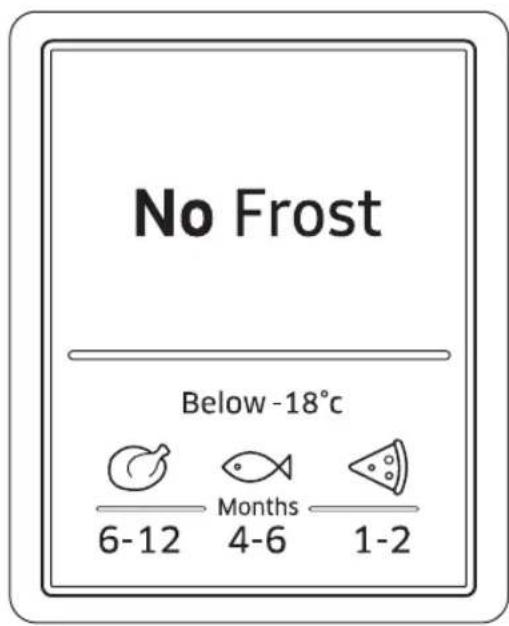
No Frost Below -18°C 6-12 Months 4-6 1-2The numbers marked in the bottom section of this figure indicate the storage period for the immediately above food item. For example, 4-6 months for fish.
Tofreezefood
- Wrap the food airtight with suitable wrapping materials.
- Sealthewrapping.
- Label the wrapping with the content and date.
Wrappingmaterials
- Materials suitable for wrapping food: plastic film, polyethylene blown film, aluminium foil, and freezer tins.
- Materials not suitable for wrapping food: wrapping paper, greaseproof paper, cellophane, food garbage bags, and used shopping bags.
Sealingmaterials
Rubber bands, plastic clips, string, cold-resistant adhesive tape or similar. Bags and polyethylene blown film can be sealed with a film sealer.
Operations
Storageperiodoffrozenfood
The storage period differs with food types and storing temperatures. The following specification is based on a temperature of -18^ (0 °F):
• Fresh poultry (whole chickens), fresh meat (steaks, roasts): up to 12 months
• Fish (lean fish, cooked fish), fresh shrimp, scallops, squid: up to 6 months
- Pizza, sausage: up to 2 months
NOTE
For more information, visit the FDA web site (http://www.fda.gov/).
Thawing
Frozen food can be thawed in the following ways:
• Naturallyatroomtemperatures
• Naturallyinthefridge
• By using an electric oven with or without heat support
- Byusingamicrowaveoven
NOTE
• Do not refreeze thawed food. Some parts of the food may not freeze completely.
• Do not store frozen food for longer than the max storage period.
English48
Maintenance
Handleandcare
Shelves (fridge/freezer) / Shelf Wine (applicable models only)
natural_image
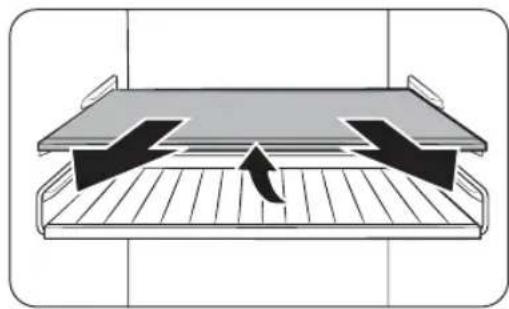
Diagram of a mechanical or electrical component with arrows indicating direction, no text or symbols present- Pull out the shelf (or shelf wine) a little. Then, while lifting the rear side, pull out.
natural_image
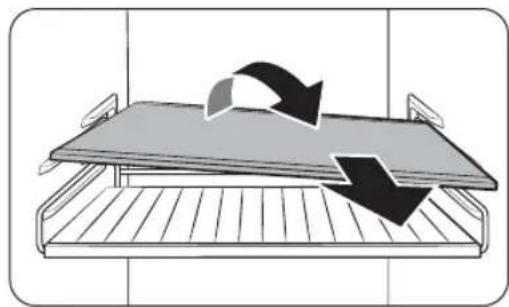
Diagram of a bed tray with two arrows indicating clockwise motion (no text or symbols)- Twist the shelf (or shelf wine) diagonally to remove.
CAUTION
• The shelf must be inserted correctly. Do not insert upside down.
• Glass containers may scratch the surface of glass shelves.
- Do not insert a shelf in the shelf wine position. This may damage the refrigerator.(applicablemodelsonly)
Vegetableshelf(applicablemodelsonly)
natural_image
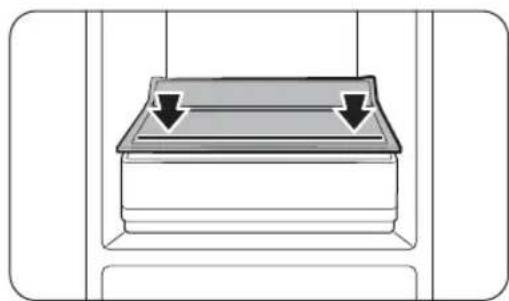
Diagram of a mechanical component with two downward arrows indicating force or movement (no text or symbols)- If your model has just one drawer in the fridge, the vegetable shelf just above the drawer has a line printed on it. When you store items on the vegetable shelf, make sure you put the items withintheprintedline.
Maintenance
natural_image
Diagram of a mechanical component with an upward arrow indicating force or direction (no text or symbols present)Hold the door bin with both hands, and then lift up to remove.
CAUTION
To prevent accidents, empty the door bins beforeeremoving
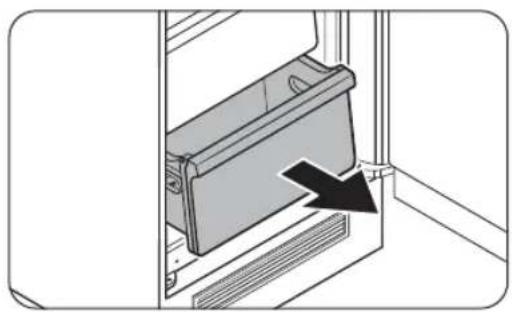
Fridgedrawer/Freezerdrawer
natural_image
Diagram of a mechanical component with a black arrow indicating a specific part (no text or symbols present)Gently lift up the front of the drawer and slideout.
English50
Cleaning
Interiorandexterior
WARNING
- Do not use benzene, thinner, vinegar, liquid bleach, baking soda, citric, salt mixtures or home/car detergent such as Clorox™ for cleaning purposes. They may damage the surface of the refrigerator and cause a fire.
• Do not spray water onto the refrigerator. This may cause electric shock.
Regularly use a dry cloth to remove all foreign substances such as dust or water from the power plug terminals and contact points.
- Unplugthepowercord.
- When done, use a dry cloth or paper towel to dry well.
-
Pluginthepowercord.
-
Use a moistened, soft, lint-free cloth or paper towel to clean the refrigerator's interior and exterior.
Replacement
LEDLamps
To replace the lamps of the refrigerator, contact a local Samsung service centre.
WARNING
- The lamps are not user-serviceable. Do not attempt to replace a lamp yourself. This can cause electric shock.
Lamp(LightSource)
This product contains a light source of energy efficiency class
The lamp(s) and/or control gear(s) are not user-serviceable. To replace the lamp(s) and/or control gear(s) in the product, contact a local Samsung service centre.
For detailed instructions on replacing lamp(s) or control gear(s) in your product, visit the Samsung website (http://www.samsung.com), go to Support > Support home, and then enter the model name.
For detailed instructions on dismantling lamp(s) and/or control gear(s), simply follow the replacement instruction reached as described above.
Troubleshooting
Before calling for service, review the checkpoints below. Any service calls regarding normal situations (No Defect Cases) will be charged to users.
General
Temperature
| Symptom | Possible causes | Solution |
| Fridge/freezerdoes not operate.Fridge/freezer temperature is warm. | Power cord is not plugged in properly. | Properly plug in the power cord. |
| Temperaturecontrolisnot setcorrectly. | Setthetemperaturelower. | |
| Refrigeratorislocatednear a heat source or direct sunlight. | Keeptherefrigeratoraway from direct sunlight or a heatsource. | |
| Notenoughclearance between refrigerator and sides/rear. | Make sure to secure at least 7 mm of space from the rear and side walls of the cabinet. | |
| Vacation mode is activated. | Deactivate vacation mode. | |
| Therefrigeratoris overloaded. Food is blocking therefrigeratorvents. | Donotoverloadthe refrigerator. Do not allow foodtoblockventilation. | |
| Fridge/freezeris over-cooling. | Temperaturecontrolisnot setcorrectly. | Setthetemperaturehigher. |
| Interior wall is hot. | Refrigeratorhasheat-proof piping in the interior wall. | Topreventcondensation from forming, the refrigerator has heat-proof piping in the front corners. If the ambient temperature rises, this equipment may not work effectively. This is not a system failure.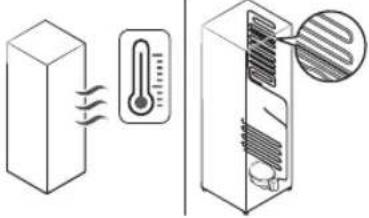 |
English52
Odors
| Symptom | Possible causes | Solution |
| Refrigeratorhas odors. | Spoiledfood. | Cleantherefrigeratorand removeanyspoiledfood. |
| Foodwithstrongodors. | Makesurestrongsmelling foodiswrappedairtight. |
Frost
| Symptom | Possible causes | Solution |
| Frost around the vents. | ·Foodisblockingthevents. | ·Make sure no food blocks therefrigeratorvents. |
| Frost on interior walls. | ·Doorisnotclosedproperly. | ·Make sure food does not block the door. Clean the doorgasket. |
| Fruits or vegetables are frozen. | ·Fruitsorvegetablesare stored in the Fresh/Chef Zone. | ·The Fresh/Chef Zone is only formeat/fish. |
Excessivefrost build-ups in the freezer.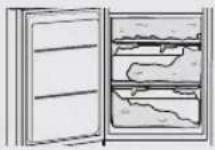 | ·The door is not sealing properly because the door gasket was not reversed after reversing the doors.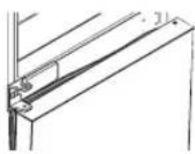 | ·Detach the door gasket and then attach it after rotating it180°.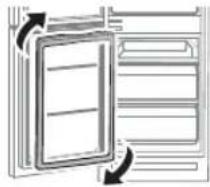 |
Troubleshooting
Condensation
| Symptom | Possible causes | Solution |
| Condensationforms on the interior walls. | If door is left open, moisture enterstherefrigerator. | Remove the moisture and do not open the door for a long time. |
| Foodwithhighmoisture content. | Make sure food is wrapped airtight. |
Alarm
| Symptom | Possible causes | Solution |
| An alarm sounds. | If the door is left open for more than two minutes, the alarm sounds until the door isclosed. | Press any button to turn off the alarm. Contact a local Samsung service centre if the alarm sounds again after 12hours. |
English54
Do you hear abnormal sounds from the refrigerator?
Before calling for service, review the checkpoints below. Any service calls related to normal sounds will be charged to the user.
Thesesoundsarenormal.
- When starting or ending an operation, the refrigerator may make sounds similar to a car engine igniting. As the operation stabilizes, the sounds will decrease.
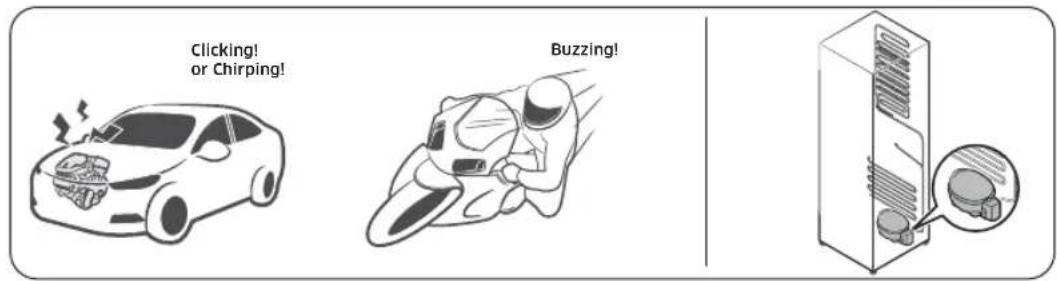
text_image
Clicking! or Chirping! Buzzing!- While the fan is operating, these sounds may occur. When the refrigerator reaches the set temperature, no fan sound will occur.
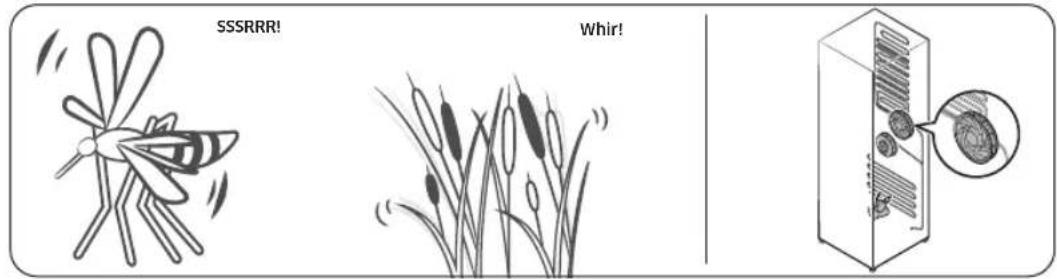
text_image
SSSRRR! Whir!- During a defrost cycle, water may drip on the defrost heater, causing sizzling sounds.
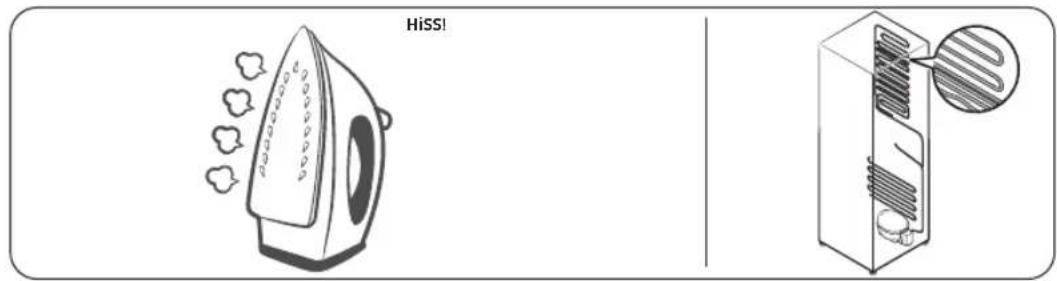
text_image
HiSS!English 55
Troubleshooting
- As the refrigerator cools or freezes, refrigerant gas moves through sealed pipes, causing bubblingsounds.
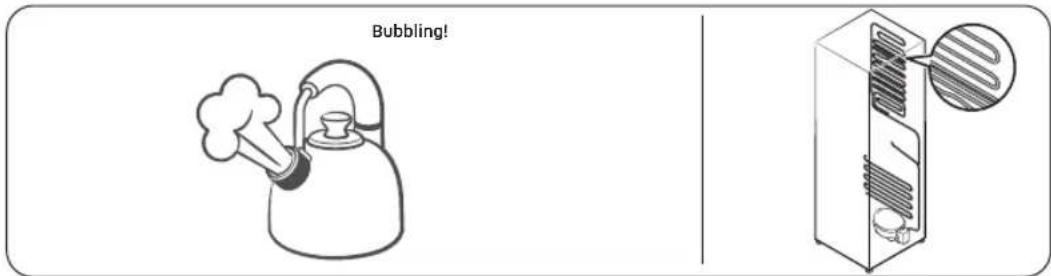
text_image
Bubbling!- As the refrigerator temperature increases or decreases, plastic parts contract and expand, creating knocking noises. These noises occur during the defrosting cycle or when electronic parts are working.
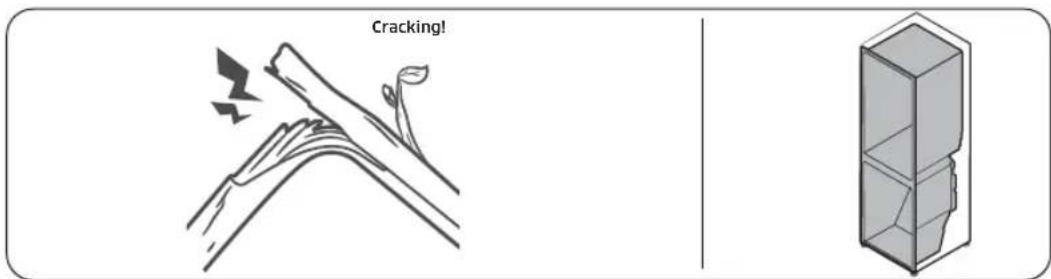
text_image
Cracking!- For ice maker models: When the water valve opens to fill the ice maker, buzzing sounds may occur.
- Because of pressure equalizing when opening and closing the refrigerator door, whooshingsoundsmayoccur.
English56
SmartThings(applicablemodelsonly)
| Symptom | Action |
| Could not find “SmartThings” in the app market. | The supporting software version of the SmartThings app is subject to change according to the OS supporting policy the manufacturer provides. In addition, as for the SmartThings app or the functions that the app supports, the new application update policy on the existing OS version can be suspended due to usability or security reasons. |
| The SmartThings app fails to operate. | The SmartThings app is available for applicable models only.The old Samsung Smart Refrigerator app cannot connect with SamsungSmartHomemodels. |
| TheSmartThings app is installed but is not connected to my refrigerator. | You must log into your Samsung account to use the app.Make sure that your router is operating normally.If the Wi-Fi icon on the refrigerator’s display is off, this indicates that no network connection has been established yet. In this case, use the SmartThings app to connect and register your refrigerator to the access point (AP) of your house. |
| Could not log into the app. | You must log into your Samsung account to use the app.If you don’t have a Samsung account, follow the app’s onscreen instructions to create one. |
| An error message appears when I try to register my refrigerator. | Easy Connection may fail due to the distance from your access point (AP) or electrical interference from the surrounding environment. Wait a moment and try again. |
| TheSmartThings app is successfully connected to my refrigerator but does not run. | Exit and restart the SmartThings app, or disconnect and reconnect the router.Power off the refrigerator, and then power it on again after 1 minute. |
| The Wi-Fi icon is blinking. ( [IMAGE] ) | Connect your refrigerator with the SmartThings app before use. When the connection is made successfully, the indicator stopsblinking.If you fail to make connection or don’t want to use the app, press and hold theFridgebutton for 10 seconds. The indicatorstopsblinking. |
Appendix
SafetyInstruction
- For the most efficient use of energy, please keep the all inner fittings such as baskets, drawers, shelves and ice cube tray on the position supplied by manufacturer.
InstallInstruction
For refrigerating appliances with climate class
Depending on the climate class, This refrigerating appliance is intended to be used at ambient temperatures range as specified following table.
The climate class can be found on the rating plate. The product may not operate properly at temperatures outside of the specific range.
You can find climate class on label inside of your refrigerator
Effectivetemperaturerange
The refrigerator is designed to operate normally in the temperature range specified by its classrating.
| Class | Symbol | Ambient Temperature range (°C) | |
| IEC 62552 (ISO 15502) | ISO 8561 | ||
| ExtendedTemperateSN | +10to+32+1 | 0to+32 | |
| TemperateN+16to | +32+16to+32 | ||
| SubtropicalST+16to | +38+18to+38 | ||
| Tropical | T | +16to+43+18to+43 | |
NOTE
The cooling performance and power consumption of the refrigerator may be affected by the ambient temperature, the door-opening frequency, and the location of the refrigerator. Were recommend adjusting the temperature settings as appropriate.
English58
TemperatureInstruction
RecommendedTemperature
The optimal temperature setting for food storage:
- Fridge:3°C
- Freezer:-19°C
NOTE
The optimal temperature setting of each compartment depends on the ambient temperature. Above optimal temperature is based on the ambient temperature of 25^ C.
PowerCool
Power Cool speeds up the cooling process at maximum fan speed. The fridge keeps running at full speed for two and a half hours and then returns to the previous temperature.
PowerFreeze
Power Freeze speeds up the freezing process at maximum fan speed. The freezer keeps running at full speed for 50 hours and then returns to the previous temperature. To freeze large amounts of food, activate Power Freeze for at least 20 hours before putting food in the freezer.
NOTE
When you use this function the energy consumption of the refrigerator will increase. Remember to turn it off when you don't need it and return the freezer to your original temperaturesetting.
How to store for best preservation (applicable models only)
Cover foods to retain moisture and prevent them from picking up odors from other foods. A large pot of food like soup or stew should be divided into small portions and put in shallow containers before being refrigerated. A large cut of meat or whole poultry should be divided into smaller pieces or placed in shallow containers before refrigerating.
PlacementofFoods
| Shelves | Shelves should be adjustable to accommodate a variety of packages. |
| Specializedcompartment (applicablemodelsonly) | Sealed crisper drawers provide an optimal storage environment for fruits and vegetables. Vegetables require higher humidity conditions while fruits require lower humidityconditions.Crispers are equipped with controls devices to control the humidity level. (*Depending on model and options) An adjustable temperature meat drawer maximizes the storage time of meats and cheeses. |
Appendix
| Stored on the door | Don't store perishable foods in the door. Eggs should be stored in the carton on a shelf. The temperature of the storage bins in the door fluctuate more than the temperature in the cabinet. Keep the door closed as much as possible. |
| FreezerCompartment | You can store frozen food, make ice cubes and freeze fresh food in the freezer compartment. |
EOTE
Freeze fresh, undamaged food only. Keep food which is to be frozen away from food which is already frozen. To prevent food from losing its flavour or drying out, place in airtightcontainers.
Refrigerator&FreezerStorageChart
The freshness longevity depends on temperature and exposure to moisture. Since product dates aren't a guide for safe use of a product, consult this chart and follow these tips.
Milkproducts
| Product | Refrigerator | Freezer |
| Milk1week1month | ||
| Butter2weeks12months | ||
| Icecream- | 2-3weeks | |
| Naturalcheese | 1month4-6months | |
| Creamcheese | 2weeks | Notrecommended |
| Yogurt | 1month | - |
Meat
| Product | Refrigerator | Freezer |
| Fresh roasts, steaks, chops | 3-4 days | 2-3 months |
| Fresh ground meat, stew meat | 1-2days | 3-4months |
| Bacon | 7days | 1month |
| Sausage, Raw from pork, beef,turkey | 1-2days | 1-2months |
English60
Poultry/Eggs
| Product | Refrigerator | Freezer |
| Freshpoultry2days6-8months | ||
| Poultrysalad1day- | ||
| Eggs, Fresh in shell 2-4weeks | Notrecommended |
Fish/Seafood
| Product | Refrigerator | Freezer |
| Freshfish1-2days3-6months | ||
| Cookedfish3-4days1month | ||
| Fishsalad | 1day | Notrecommended |
| Dried or pickled fish | 3-4 weeks | - |
Fruits
| Product | Refrigerator | Freezer |
| Apples | 1month | - |
| Peaches | 2-3weeks | - |
| Pineapple | 1week | - |
| Otherfreshfruit | 3-5days | 9-12months |
Vegetables
| Product | Refrigerator | Freezer |
| Asparagus | 2-3days | - |
| Broccoli, Brussels sprouts, green peas, mushrooms | 3-5days | - |
| Cabbage, cauliflower, celery, cucumbers,lettuce | 1week | - |
| Carrots,beets,radishes | 2weeks | - |
Appendix
Informationformodelandorderingspareparts
Modelinformation
To access energy labelling information about this product on the European Product Registry for Energy Labelling (EPREL), scan QR-Code on the energy label.
You can find QR-Code on the energy label in your product box.
Partinformation
- The minimum period during which spare parts, necessary for the repair of the appliance, are available
- 7 Years thermostats, temperature sensors, printed circuit boards and light sources, door handles, door hinges, trays, baskets (boxes or drawers)
- 10Yearsdoorgaskets
- The minimum duration of the guarantee of the refrigerating appliance offered by the manufacturer 24 Months.
- Relevant information for ordering spare parts, directly or through other channels provided by the manufacturer, importer or authorized representative
- You can find professional repair information on http://samsung.com/support. You can find user servicing manual on http://samsung.com/support.
English62
OpenSourceAnnouncement
OpenSourceAnnouncement
The software included in this product contains open source software. You may obtain the complete corresponding source code for a period of three years after the last shipment of this product by contacting our support team via http://opensource.samsung.com (Please use the "Inquiry" menu.)
It is also possible to obtain the complete corresponding source code in a physical medium such as a CD-ROM; a minimal charge will be required.
The following URL http://opensource.samsung.com/opensource/COMMON_TZ6_0/seq/0 leads to the open source license information as related to this product. This offer is valid to anyone in receipt of this information.
text_image
QR code image containing encoded data, no visible human-readable textEnglish 63
SAMSUNG
NOTE
Hereby, Samsung declares that this radio equipment is in compliance with Directive 2014/53/EU and with the relevant statutory requirements in the UK.
The full text of the EU declaration of conformity and the UK declaration of conformity is available at the following internet address: The official Declaration of conformity may be found at http://www.samsung.com, go to Support > Search Product Support and enter the model name.
| FrequencyrangeTransmitterpower(Max) | |
| Wi-Fi 2412 - 2472 MHz 20dBm | |
| Bluetooth 2402 - 2480 MHz 20dBm |
| FRANCE 01 48 | 63 00 00 www.samsung.com/fr/support | |
| GERMANY 06196 | 77 555 77 www.samsung.com/de/support | |
| LUXEMBURG2610 | 3710www.samsung.com/be_fr/support | |
| NETHERLANDS | 088 90 90 100 | www.samsung.com/nl/support |
| BELGIUM02-201 | -24-18 | www.samsung.com/be/support(Dutch)www.samsung.com/be_fr/support(French) |
| NORWAY | 21629099 | www.samsung.com/no/support |
| DENMARK | 70701970 | www.samsung.com/dk/support |
| FINLAND030-62 | 27515 www.samsung.com/fi/support | |
| SWEDEN | 0771-400300www.samsung.com/se/support | |
| CYPRUS | 8009 4000 only from landline, toll free | www.samsung.com/gr/support |
| GREECE | 80111-SAMSUNG (80111 726 7864) only from landline(+30) 210 6897691 from mobile and land line | |
| ITALIA | 800-SAMSUNG (800.7267864) | www.samsung.com/it/support |
| PORTUGAL | 210608098Chamada para a rede fixa nacionalDias úteis das 9h às 20h | www.samsung.com/pt/support |
| SPAIN | 91 175 00 15 | www.samsung.com/es/support |


Réfrigérateur
Manueld'utilisation
Appareil encastré
SAMSUNG
Sommaire
Open Source Announcement 69
Open Source Announcement 69
Français 3
Consignesdesécurité
natural_image
Symbol of a trash bin crossed with no visible text or labelsnatural_image
Two circular diagrams showing a hand holding a small object inside a machine, with no visible text or symbols.text_image
A B C D E F Gtext_image
Technical diagram illustrating four different installation methods for a vertical structure, labeled D, BA, C, and no symbols.| AMin.590 | |
| BMin.560 | |
| CMin.580 | |
| D240 |
(unité:mm)
EMARQUE
natural_image
Two 3D diagrams of a rectangular container with internal components, showing directional arrows indicating movement or force (no text or symbols)MARQUE
natural_image
Isometric line drawing of a long rectangular metal profile (no text or symbols)MARQUE
natural_image
Diagram showing two refrigerator units with directional arrows indicating movement, one marked with a circle and the other with a prohibition sign (no text or symbols present)text_image
Diagram of a device panel with labeled ports A and B, showing internal components and a close-up view of the internal structure.natural_image
Diagram showing a mechanical device with a magnified inset highlighting a curved tool interacting with a component (no text or symbols present)natural_image
Diagram of a manual tool in a kitchen setting, showing a curved blade and handle (no text or symbols)natural_image
Diagram showing two circular insets of a ship's hull with arrows indicating direction (no text or symbols)MARQUE
text_image
Technical diagram showing four variations of a door mechanism with labeled components and directional arrows indicating assembly or positioning.natural_image
Technical line drawing of a mechanical assembly with a magnified inset showing a detail (no text or symbols)text_image
No Frost Below -18°C Months 6-12 4-6 1-2natural_image
Diagram of a bed tray with an arrow indicating direction, no text or symbols presentnatural_image
Diagram of a bed tray with two arrows indicating direction, no text or symbols presentnatural_image
Diagram of a mechanical component with two downward arrows indicating force or direction (no text or symbols)natural_image
Diagram of a mechanical component with an upward arrow indicating motion or force (no text or symbols present)natural_image
Diagram of a mechanical component with a black arrow indicating a directional movement or force (no text or symbols present)OpenSourceAnnouncement
OpenSourceAnnouncement
The software included in this product contains open source software. You may obtain the complete corresponding source code for a period of three years after the last shipment of this product by contacting our support team via http://opensource.samsung.com (Please use the "Inquiry" menu.)
It is also possible to obtain the complete corresponding source code in a physical medium such as a CD-ROM; a minimal charge will be required.
The following URL http://opensource.samsung.com/opensource/COMMON_TZ6_0/seq/0 leads to the open source license information as related to this product. This offer is valid to anyone in receipt of this information.
text_image
QR code image containing encoded data, no visible human-readable textFrançais 69
Mémo


Mémo


SAMSUNG
国EMARQUE
Open Source Announcement 66
Open Source Announcement 66
Italiano2
natural_image
Symbol of a trash bin crossed with no text or numbers, representing waste sorting or disposal (no text present)(https://www.samsung.com/it/sustainability/environment/environment-data/) attraverso il tuo browser.
Italiano 29
Installazione
text_image
A B C D E F G| BRB***26°BRB***30° | ||
| A540±2540±2 | ||
| B | 550±2 (con la porta) | 550±2 (con la porta) |
| C1775±21935±2 | ||
| D | 987 | 1147 |
| E | 735 | 735 |
| F | 671 | 671 |
| G | 621 | 621 |
(unità:mm)
Italiano 31
Installazione
natural_image
Simple line drawing of a long rectangular metal profile (no text or symbols)TA
natural_image
Diagram showing two refrigerators with directional arrows indicating movement, one marked with a circle and the other with a prohibition sign (no text or symbols present)text_image
Technical diagram of a device panel with labeled components A and B, showing internal structure and connection to a control panel.natural_image
Diagram showing a mechanical device with a magnified inset highlighting a tool (no text or symbols present)natural_image
Diagram showing a tool interacting with a device, with an arrow indicating rotation (no text or symbols present)natural_image
Diagram showing two circular insets of a ship's hull with arrows indicating direction (no text or symbols)TA
text_image
Technical diagram showing mechanical assembly steps with labeled components A and directional arrows indicating movement or assembly.natural_image
Technical line drawing of a mechanical assembly with a magnified inset showing a detail (no text or symbols)text_image
Wi-Fi Off FF °CTipo2
text_image
No Frost Below -18°C 6-12 Months 4-6 1-2natural_image
Diagram of a mechanical or electrical component with arrows indicating direction, no text or symbols presentnatural_image
Diagram of a bed tray with two arrows indicating direction, no text or symbols presentnatural_image
Diagram of a mechanical component with two downward arrows indicating force or movement (no text or symbols)natural_image
Diagram of a mechanical component with an upward arrow indicating force or direction (no text or symbols present)Cassettofrigo/Cassettofreezer
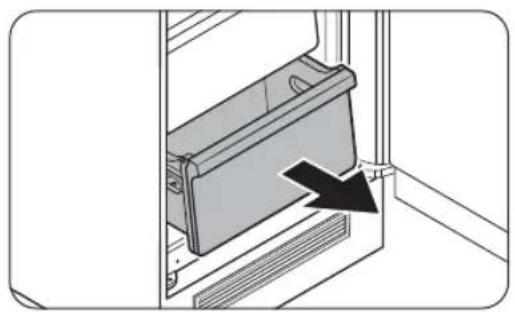
natural_image
Diagram of a mechanical component with an arrow indicating a specific part (no text or symbols present)text_image
scricchiolioOpenSourceAnnouncement
OpenSourceAnnouncement
The software included in this product contains open source software. You may obtain the complete corresponding source code for a period of three years after the last shipment of this product by contacting our support team via http://opensource.samsung.com (Please use the "Inquiry" menu.)
It is also possible to obtain the complete corresponding source code in a physical medium such as a CD-ROM; a minimal charge will be required.
The following URL http://opensource.samsung.com/opensource/COMMON_TZ6_0/seq/0 leads to the open source license information as related to this product. This offer is valid to anyone in receipt of this information.
text_image
QR code image containing encoded data, no visible human-readable textItaliano66
Memo


SAMSUNG
NOTA
Open Source Announcement 65
Open Source Announcement 65
Español2
natural_image
Symbol of a trash bin with crossed lines indicating no waste or restriction, and a solid black rectangle below (no text or symbols)text_image
A B C D E F G| BRB**26*BRB***30* | ||
| A540±2540±2 | ||
| B | 550±2 (con puerta) | 550±2 (con puerta) |
| C | 1775±2 | 1935±2 |
| D | 987 | 1147 |
| E | 735 | 735 |
| F | 671 | 671 |
| G | 621 | 621 |
(unidad:mm)
Español 30
text_image
Technical diagram illustrating four different installation methods for a vertical structure, labeled D, BA, C, and no symbols.| AMín.590 | |
| BMín.560 | |
| CMín.580 | |
| D240 |
(unidad:mm)
国OTA
natural_image
Two 3D diagrams of a rectangular container with internal components, showing directional arrows indicating movement or flow (no text or symbols)TA
natural_image
Isometric line drawing of a long rectangular metal profile (no text or symbols)TA
natural_image
Diagram showing two refrigerator units with directional arrows indicating movement, one marked with a circle and the other with a prohibition sign (no text or symbols present)text_image
Diagram of a device panel with labeled ports A and B, showing internal components and a close-up view of the internal structure.natural_image
Diagram showing a mechanical device with a magnified inset highlighting a tool interacting with a component (no text or symbols present)natural_image
Diagram of a mechanical device with a magnified inset showing a tool interacting with a component (no text or symbols present)natural_image
Diagram showing two circular insets of a ship's hull with arrows indicating direction (no text or symbols)TA
text_image
Technical diagram showing four variations of a door mechanism with labeled components and directional arrows indicating assembly or positioning.PASO 5 Configuracióninicial
natural_image
Technical line drawing of a mechanical assembly with a magnified inset showing a detail (no text or symbols)text_image
No Frost Below -18°C Months 6-12 4-6 1-2natural_image
Diagram of a mechanical or electrical component with arrows indicating direction, no text or symbols presentnatural_image
Diagram of a bed tray with two arrows indicating clockwise motion (no text or symbols)natural_image
Diagram of a mechanical component with two downward arrows indicating direction (no text or symbols)natural_image
Diagram of a mechanical component with an upward arrow indicating direction (no text or symbols present)natural_image
Diagram of a mechanical device with a black arrow pointing to a component, no text or symbols presentOpenSourceAnnouncement
OpenSourceAnnouncement
The software included in this product contains open source software. You may obtain the complete corresponding source code for a period of three years after the last shipment of this product by contacting our support team via http://opensource.samsung.com (Please use the "Inquiry" menu.)
It is also possible to obtain the complete corresponding source code in a physical medium such as a CD-ROM; a minimal charge will be required.
The following URL http://opensource.samsung.com/opensource/COMMON_TZ6_0/seq/0 leads to the open source license information as related to this product. This offer is valid to anyone in receipt of this information.
text_image
QR code image containing encoded data, no visible human-readable textEspañol 65
Notas


Notas


SAMSUNG
EOTA
Open Source Announcement 65
Open Source Announcement 65
Português2
natural_image
Symbol of a trash bin with no text or numbers presenttext_image
A B C D E F G| BRB***26*BRB***30* | ||
| A540±2540±2 | ||
| B | 550±2 (com porta) | 550±2 (com porta) |
| C | 1775±2 | 1935±2 |
| D | 987 | 1147 |
| E | 735 | 735 |
| F | 671 | 671 |
| G | 621 | 621 |
(unidade:mm)
Português30
natural_image
Simple line drawing of a long rectangular metal profile (no text or symbols)TA
natural_image
Diagram showing two refrigerator units with directional arrows indicating movement, one marked with a circle and the other with a prohibition sign (no text or symbols present)text_image
Diagram of a device panel with labeled ports A and B, showing internal components and a close-up view of the internal structure.natural_image
Diagram showing a mechanical device with a magnified inset highlighting a tool interacting with a component (no text or symbols present)natural_image
Diagram of a mechanical device with a magnified inset showing a tool interacting with a component (no text or symbols present)natural_image
Diagram showing two circular insets of a ship's hull with arrows indicating direction (no text or symbols)TA
text_image
Diagram illustrating air conditioner unit installation steps with labeled components and directional arrowsnatural_image
Technical line drawing of a mechanical assembly with a magnified inset showing a detail (no text or symbols)text_image
No Frost Below -18°C Months 6-12 4-6 1-2natural_image
Diagram of a mechanical or electrical component with arrows indicating direction, no text or symbols presentnatural_image
Diagram of a bed tray with two arrows indicating clockwise motion (no text or symbols)natural_image
Diagram of a mechanical component with two downward arrows indicating force or direction (no text or symbols)natural_image
Diagram of a mechanical component with an upward arrow indicating force or direction (no text or symbols present)natural_image
Diagram of a mechanical component with a black arrow indicating a directional movement or force (no text or symbols present)text_image
Borbulhar!OpenSourceAnnouncement
OpenSourceAnnouncement
The software included in this product contains open source software. You may obtain the complete corresponding source code for a period of three years after the last shipment of this product by contacting our support team via http://opensource.samsung.com (Please use the "Inquiry" menu.)
It is also possible to obtain the complete corresponding source code in a physical medium such as a CD-ROM; a minimal charge will be required.
The following URL http://opensource.samsung.com/opensource/COMMON_TZ6_0/seq/0 leads to the open source license information as related to this product. This offer is valid to anyone in receipt of this information.
text_image
QR code image containing encoded data, no visible human-readable textPortuguês 65
Memo


Memo


SAMSUNG
EOTA
Open Source Announcement 63
Open Source Announcement 63
Ελληνικά2
natural_image
Symbol of a trash bin crossed with no text or numbers, representing waste sorting or disposal (no text present)text_image
A B C D E F G| BRB***26*BRB***30* | ||
| A540±2540±2 | ||
| B | 550±2 (με την πόρτα) | 550±2 (με την πόρτα) |
| C | 1775±2 | 1935±2 |
| D | 987 | 1147 |
| E | 735 | 735 |
| F | 671 | 671 |
| G | 621 | 621 |
(μονάδες:mm)
Ελληνικά28
text_image
Diagram showing two containers with labeled parts and a prohibition symbol, likely illustrating a safety or disinfection scenario.natural_image
Two technical diagrams showing a device inside a transparent enclosure, labeled A and B, with no visible text or symbols.ΜΕΙΩΣΗ
natural_image
Simple line drawing of a long rectangular metal profile (no text or symbols)ΜΕΙΩΣΗ
natural_image
Diagram showing two refrigerators with directional arrows indicating movement, one marked with a circle and the other with a prohibition sign (no text or symbols present)text_image
Technical diagram of a device panel with labeled components A and B, showing internal layout and a close-up view of the component.natural_image
Diagram showing a mechanical device with a magnified inset highlighting a rotating component (no text or symbols present)natural_image
Diagram of a manual tool in a cabinet, showing a curved arrow and handle (no text or symbols present)natural_image
Diagram showing two circular insets of a ship's hull with arrows indicating direction, no text or symbols present.
ΜΕΙΩΣΗ
text_image
Technical diagram showing mechanical assembly steps with labeled components A and directional arrows indicating movement or assembly.natural_image
Technical line drawing of a mechanical assembly with a magnified inset showing a detail (no text or symbols)text_image
No Frost Below -18°C 6-12 Months 4-6 1-2natural_image
Diagram of a bed tray with two chairs and an arrow indicating direction (no text or symbols)natural_image
Diagram of a bed tray with two arrows indicating direction, no text or symbols presentnatural_image
Diagram of a mechanical component with two downward arrows indicating force or movement (no text or symbols)natural_image
Diagram of a mechanical assembly with a black arrow indicating upward motion (no text or symbols present)natural_image
Diagram of a mechanical component with a black arrow indicating a directional movement or force (no text or symbols present)OpenSourceAnnouncement
OpenSourceAnnouncement
The software included in this product contains open source software. You may obtain the complete corresponding source code for a period of three years after the last shipment of this product by contacting our support team via http://opensource.samsung.com (Please use the "Inquiry" menu.)
It is also possible to obtain the complete corresponding source code in a physical medium such as a CD-ROM; a minimal charge will be required.
The following URL http://opensource.samsung.com/opensource/COMMON_TZ6_0/seq/0 leads to the open source license information as related to this product. This offer is valid to anyone in receipt of this information.
text_image
QR code image containing encoded data, no visible human-readable textΕλληνικά 63
SAMSUNG
国ΗΜΕΙΩΣΗ
Open Source Announcement 69
Open Source Announcement 69
Deutsch2
natural_image
Symbol of a trash bin with crossed lines indicating no waste or restriction (no text or numbers present)text_image
A B C D E F Gtext_image
Technical diagram illustrating four different installation methods for a water tank, with labeled components and warning symbols.| AMin.590 | |
| BMin.560 | |
| CMin.580 | |
| D240 |
(Einheit:mm)
INWEIS
natural_image
Two 3D diagrams of a rectangular container with internal compartments and directional arrows indicating movement (no text or symbols)NWEIS
natural_image
Simple line drawing of a long rectangular metal profile (no text or symbols)NWEIS
natural_image
Diagram showing two refrigerator doors with directional arrows indicating movement, one marked with a circle and the other with a prohibition sign (no text or symbols on the devices themselves)text_image
Technical diagram of a device panel with labeled components A and B, showing internal structure and a close-up view of the component.natural_image
Diagram showing a mechanical device with a magnified inset highlighting a rotating component (no text or symbols present)natural_image
Diagram of a manual tool in a kitchen setting, showing a curved blade and handle (no text or symbols)natural_image
Diagram showing two circular insets of a ship's hull with arrows indicating direction (no text or symbols)NWEIS
text_image
Technical diagram showing four views of a mechanical assembly with labeled components and directional arrows indicating assembly steps.natural_image
Technical line drawing of a mechanical assembly with a magnified inset showing a detail (no text or symbols)text_image
No Frost Below -18°C 6-12 Months 4-6 1-2natural_image
Diagram of a mechanical or electrical component with arrows indicating direction, no text or symbols presentnatural_image
Diagram of a bed tray with two arrows indicating direction, no text or symbols presentnatural_image
Diagram of a mechanical component with two downward arrows indicating direction (no text or symbols)natural_image
Diagram of a mechanical component with an upward arrow indicating force or direction (no text or symbols present)natural_image
Diagram of a mechanical component with a black arrow indicating a directional movement or force (no text or symbols present)text_image
Blubbern!OpenSourceAnnouncement
OpenSourceAnnouncement
The software included in this product contains open source software. You may obtain the complete corresponding source code for a period of three years after the last shipment of this product by contacting our support team via http://opensource.samsung.com (Please use the "Inquiry" menu.)
It is also possible to obtain the complete corresponding source code in a physical medium such as a CD-ROM; a minimal charge will be required.
The following URL http://opensource.samsung.com/opensource/COMMON_TZ6_0/seq/0 leads to the open source license information as related to this product. This offer is valid to anyone in receipt of this information.
text_image
QR code image containing encoded data, no visible human-readable textDeutsch 69
Notizen


Notizen


SAMSUNG
NNWEIS
Open Source Announcement 66
Open Source Announcement 66
Nederlands2
natural_image
Symbol of a trash bin crossed with no text or numbers, representing waste sorting or disposal (no text present)text_image
A B C D E F G| BRB***26°BRB***30° | |
| A540±2540±2 | |
| B | 550+2 (met deur) 550+2 (met deur) |
| C | 1775±2 1935±2 |
| D | 987 1147 |
| E | 735 735 |
| F | 671 671 |
| G | 621 621 |
(eenheid:mm)
Installatie
Totaleproductafmeting
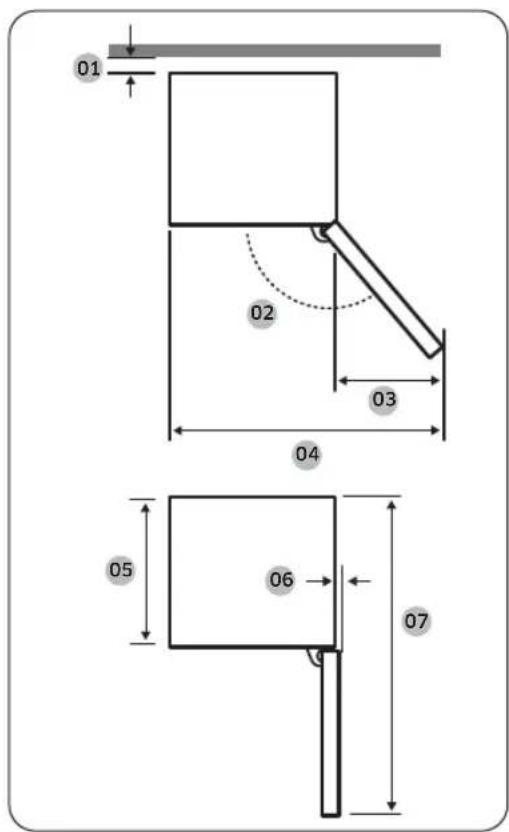
text_image
01 02 03 04 05 06 07| Model | BRB*****SO SCHUIFTYPE | BRB*****FO VASTTYPE |
| 01* | 10 (min.) / 30 (aanbevolen) | |
| 02 | 95° (aanbevolen) | 115° (aanbevolen) |
| 03218 | 180 | |
| 04758 | 700 | |
| 05510 | 610 | |
| 0615 | ||
| 07105 | 51055 | |
text_image
Technical diagram illustrating four different indoor water level control scenarios with labeled components and warning symbols.| AMin.590 | |
| BMIn.560 | |
| CMin.580 | |
| D240 |
(eenheid:mm)
国PMERKING
natural_image
Simple line drawing of a long rectangular metal profile (no text or symbols)PERKING
natural_image
Diagram showing two refrigerators with directional arrows indicating movement, one marked with a circle and the other with a prohibition sign (no text or symbols present)text_image
Technical diagram of a device panel with labeled components A and B, showing internal structure and connection to a control panel.natural_image
Diagram showing a mechanical device with a magnified inset highlighting a tool (no text or symbols present)natural_image
Diagram showing a tool interacting with a device, with an arrow indicating the process (no text or symbols present)natural_image
Diagram showing two circular insets of a ship's hull with arrows indicating direction (no text or symbols)MERKING
text_image
Technical diagram showing mechanical assembly steps with labeled components A and directional arrows indicating movement or assembly.STAP 5 Eersteinstelling
natural_image
Technical line drawing of a mechanical assembly with a magnified inset showing a detail (no text or symbols)text_image
No Frost Below -18°C 6-12 Months 4-6 1-2natural_image
Diagram of a mechanical or electrical component with arrows indicating direction, no text or symbols present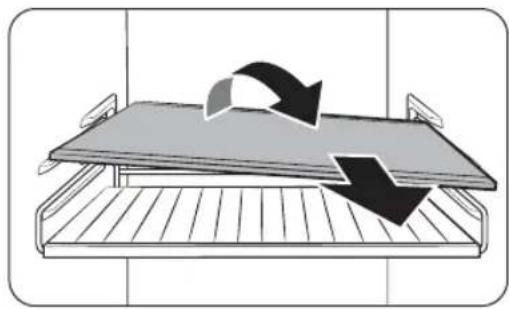
natural_image
Diagram of a bed tray with arrows indicating direction of movement or flow (no text or symbols)Groentelegger(alleenbepaaldemodellen)
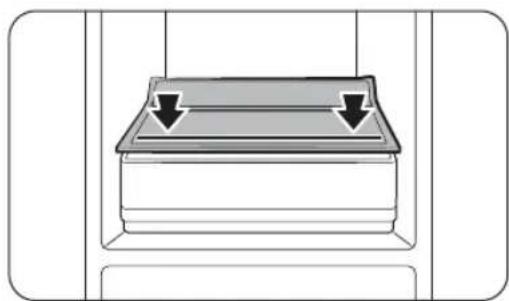
natural_image
Diagram of a mechanical component with two downward arrows indicating force or direction (no text or symbols)natural_image
Diagram of a mechanical component with an upward arrow indicating force or direction (no text or symbols present)natural_image
Diagram of a mechanical component with an arrow indicating a specific part (no text or symbols present)OpenSourceAnnouncement
OpenSourceAnnouncement
The software included in this product contains open source software. You may obtain the complete corresponding source code for a period of three years after the last shipment of this product by contacting our support team via http://opensource.samsung.com (Please use the "Inquiry" menu.)
It is also possible to obtain the complete corresponding source code in a physical medium such as a CD-ROM; a minimal charge will be required.
The following URL http://opensource.samsung.com/opensource/COMMON_TZ6_0/seq/0 leads to the open source license information as related to this product. This offer is valid to anyone in receipt of this information.
text_image
QR code image containing encoded data, no visible human-readable textNederlands66
Notities


SAMSUNG
国PMERKING
Open Source Announcement 62
Open Source Announcement 62
Svenska2
Säkerhetsinformation
natural_image
Symbol of a trash bin crossed with no visible text or labelstext_image
A B C D E F G| BRB***26'BRB***30' | ||
| A540±2540±2 | ||
| B | 550 ± 2 (med dörr) | 550 ± 2 (med dörr) |
| C1775±21935±2 | ||
| D | 987 | 1147 |
| E | 735 | 735 |
| F | 671 | 671 |
| G | 621 | 621 |
(enhet:mm)
Installation
text_image
Technical diagram showing five different installation or cleaning methods for a vertical structure, with labeled components and warning symbols.| AMin.590 | |
| BMin.560 | |
| CMin.580 | |
| D240 |
(enhet:mm)
BS!
natural_image
Simple line drawing of a long rectangular metal profile (no text or symbols)S!
natural_image
Diagram showing two refrigerator doors with directional arrows indicating movement, one marked with a circle and the other with a prohibition sign (no text or symbols on the devices themselves)text_image
Diagram of a device panel with labeled ports A and B, showing internal components and a close-up view of the component.natural_image
Diagram showing a mechanical device with a magnified inset highlighting a tool (no text or symbols present)natural_image
Diagram showing a tool interacting with a device, with an arrow indicating the process (no text or symbols present)natural_image
Diagram showing two circular insets of a ship's hull with arrows indicating direction (no text or symbols)S!
text_image
Technical diagram showing mechanical assembly steps with labeled components A and directional arrows indicating movement or alignment.natural_image
Technical line drawing of a mechanical assembly with a magnified inset showing a detail (no text or symbols)01 Fridge (Kylskåp) / Vacation (Semester)
02 Freezer (Frys) / Power Freeze (Högeffektsfrys) / Cool Select+ *
03 Door Alarm (Dörralarm)
04 ⏻ (Ström)
05 AI Energy Mode
text_image
No Frost Below -18°C 6-12 Months 4-6 1-2natural_image
Diagram of a mechanical or electrical component with arrows indicating direction, no text or symbols present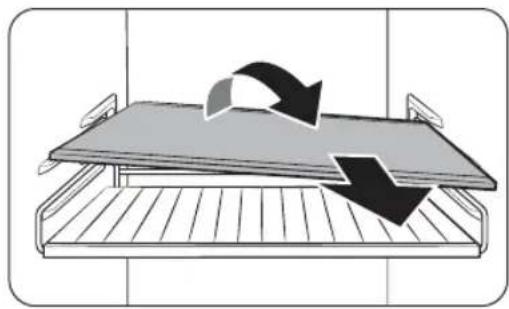
natural_image
Diagram of a bed tray with arrows indicating direction of movement or flow (no text or symbols)natural_image
Diagram of a mechanical component with two downward arrows indicating force or direction (no text or symbols)natural_image
Diagram of a mechanical assembly with a box and lever mechanism, no text or symbols presentnatural_image
Diagram of a door handle assembly with a black arrow indicating a component (no text or symbols present)OpenSourceAnnouncement
OpenSourceAnnouncement
The software included in this product contains open source software. You may obtain the complete corresponding source code for a period of three years after the last shipment of this product by contacting our support team via http://opensource.samsung.com (Please use the "Inquiry" menu.)
It is also possible to obtain the complete corresponding source code in a physical medium such as a CD-ROM; a minimal charge will be required.
The following URL http://opensource.samsung.com/opensource/COMMON_TZ6_0/seq/0 leads to the open source license information as related to this product. This offer is valid to anyone in receipt of this information.
text_image
QR code image containing encoded data, no visible human-readable textSvenska62
Anteckningar


SAMSUNG
BS!
Trin for trin-installation 27
Drift 38
Hovedpanel 38
SmartThings (kun relevante modeller) 43
Open Source Announcement 62
Open Source Announcement 62
Dansk2
natural_image
Symbol of a trash bin with crossed lines indicating no waste or restriction, and a solid black rectangle below (no text or labels)Trinfortrin-installation
TRIN 1 Vælgetsted
Kravtilstedet:
text_image
A B C D E F G| BRB***26'BRB***30' | ||
| A540±2540±2 | ||
| B | 550±2 (med dør) | 550±2 (med dør) |
| C1775±21935±2 | ||
| D | 987 | 1147 |
| E | 735 | 735 |
| F | 671 | 671 |
| G | 621 | 621 |
(enhed:mm)
Dansk 27
Installation
text_image
Technical diagram illustrating four different installation methods for a water tank, with labeled components and warning symbols.| AMin.590 | |
| BMin.560 | |
| CMin.580 | |
| D240 |
(enhed:mm)
EMARK
natural_image
Simple line drawing of a long rectangular metal profile (no text or symbols)BEMARK
natural_image
Diagram showing two refrigerators with directional arrows indicating movement, one marked with a circle and the other with a prohibition sign (no text or symbols present)text_image
Diagram of a device panel with labeled ports A and B, showing internal structure and connection to a control panel.Monterdemedfølgendeafstandsstykker(A) og svampen(B) som vist i figuren for optimal energieffektivitet.
FORSIGTIG
natural_image
Diagram showing a mechanical device with a magnified inset highlighting a tool interacting with a curved arrow (no text or symbols present)natural_image
Diagram of a mechanical device with a magnified inset showing a tool interacting with a component (no text or symbols present)natural_image
Diagram showing two circular insets of a mechanical or structural component with arrows indicating motion or force direction (no text or symbols present)MÄRK
text_image
Technical diagram showing mechanical assembly steps with labeled components A and directional arrows indicating movement or assembly.TRIN 5 Indledendeindstillinger
natural_image
Technical line drawing of a mechanical assembly with a magnified inset showing a detail (no text or symbols)text_image
No Frost Below -18°C 6-12 Months 4-6 1-2Tallene markeret i den nederste del af denne figur indikerer opbevaringsperioden for madvaren umiddelbart over. F.eks. 4-6 måneder forfisk.
Sådanfrysesmadvarer
- Pak madvaren ind i passende, lufttæt indpakningsmateriale.
- Forseglindpakningen.
- Mærk indpakningen med indhold og dato.
Indpakningsmateriale
natural_image
Diagram of a mechanical or electrical component with arrows indicating direction, no text or symbols present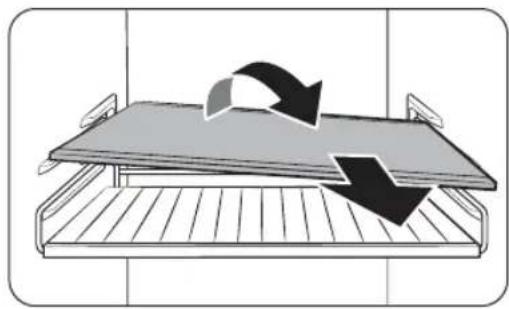
natural_image
Diagram of a bed tray with arrows indicating direction of movement or flow (no text or symbols)Grøntsagshylde(kunrelevantemodeller)
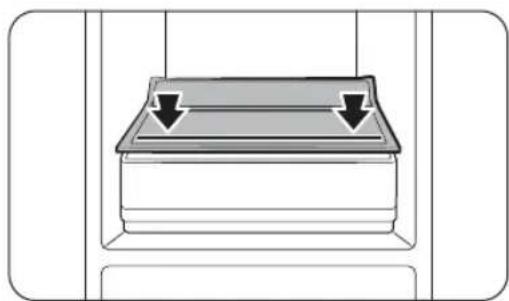
natural_image
Diagram of a mechanical component with two downward arrows indicating force or direction (no text or symbols)natural_image
Diagram of a mechanical component with an upward arrow indicating force or direction (no text or symbols present)natural_image
Diagram of a mechanical component with an arrow indicating a specific part (no text or symbols present)text_image
SSSRRR! RaslenOpenSourceAnnouncement
OpenSourceAnnouncement
The software included in this product contains open source software. You may obtain the complete corresponding source code for a period of three years after the last shipment of this product by contacting our support team via http://opensource.samsung.com (Please use the "Inquiry" menu.) It is also possible to obtain the complete corresponding source code in a physical medium such as a CD-ROM; a minimal charge will be required.
The following URL http://opensource.samsung.com/opensource/COMMON_TZ6_0/seq/0 leads to the open source license information as related to this product. This offer is valid to anyone in receipt of this information.
text_image
QR code image containing encoded data, no visible human-readable textDansk62
Notater


SAMSUNG
EMARK
Open Source Announcement 62
Open Source Announcement 62
Norsk2
natural_image
Symbol of a trash bin crossed with no text or numbers, representing waste sorting or disposal (no text present)text_image
A B C D E F G| BRB***26'BRB***30' | ||
| A540±2540±2 | ||
| B | 550±2 (med dør) | 550±2 (med dør) |
| C | 1775±2 | 1935±2 |
| D | 987 | 1147 |
| E | 735 | 735 |
| F | 671 | 671 |
| G | 621 | 621 |
(enhet:mm)
Norsk 27
Installasjon
text_image
Technical diagram illustrating five different installation or cleaning methods for a cylindrical container, with labeled components and warning symbols.| AMin.590 | |
| BMin.560 | |
| CMin.580 | |
| D240 |
(enhet:mm)
EMERK
Hvis du installerer kjøleskapet i et skap som er 560 mm dypt, må du sørge for at strømledningen er på siden av kjøleskapet før du kobler den til et strømuttak. Hvis strømledningen er bak på kjøleskapet, kan det senkeenergieffektiviteten.
Norsk 31
Installasjon
Kabinettype
natural_image
Simple line drawing of a long rectangular metal profile (no text or symbols)BERK
natural_image
Diagram showing two refrigerators with directional arrows indicating movement, one marked with a circle and the other with a prohibition sign (no text or symbols present)text_image
Diagram of a device panel with labeled ports A and B, showing internal structure and connection to a control panel.Festdemedlevertemellomstykkene(A) og svampen(B) som vist i figuren for å få optimal energieffektivitet.
FORSIKTIG
natural_image
Diagram showing a mechanical device with a magnified inset highlighting a tool interacting with a curved arrow (no text or symbols present)natural_image
Diagram of a mechanical device with a magnified inset showing a tool interacting with a component (no text or symbols present)natural_image
Diagram showing two circular insets of a mechanical or structural component with arrows indicating motion or force direction (no text or symbols present)国ERK
text_image
Technical diagram showing mechanical assembly steps with labeled components A and directional arrows indicating movement or assembly.natural_image
Technical line drawing of a mechanical assembly with a magnified inset showing a detail (no text or symbols)text_image
No Frost Below -18°C 6-12 Months 4-6 1-2natural_image
Diagram of a mechanical or electrical component with arrows indicating direction, no text or symbols present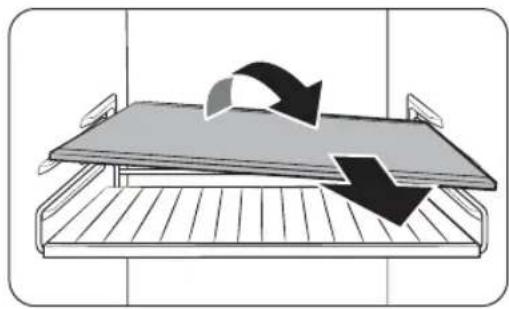
natural_image
Diagram of a bed tray with arrows indicating direction of movement or flow (no text or symbols)natural_image
Diagram of a mechanical component with two downward arrows indicating force or movement (no text or symbols)natural_image
Diagram of a mechanical assembly with a box and clamping mechanism, no text or symbols presentnatural_image
Diagram of a door handle assembly with a black arrow indicating a component (no text or symbols present)text_image
Klikking! eller Kvitring! Summing!text_image
SSSRRR! Brumming!text_image
Hlissing!Norsk54
OpenSourceAnnouncement
OpenSourceAnnouncement
The software included in this product contains open source software. You may obtain the complete corresponding source code for a period of three years after the last shipment of this product by contacting our support team via http://opensource.samsung.com (Please use the "Inquiry" menu.) It is also possible to obtain the complete corresponding source code in a physical medium such as a CD-ROM; a minimal charge will be required.
The following URL http://opensource.samsung.com/opensource/COMMON_TZ6_0/seq/0 leads to the open source license information as related to this product. This offer is valid to anyone in receipt of this information.
text_image
QR code image containing encoded data, no visible human-readable textNorsk62
Notat


SAMSUNG
EMERK
Open Source Announcement 62
Open Source Announcement 62
Suomi2
Turvallisuusohjeet
natural_image
Symbol of a trash bin crossed with a diagonal line and a horizontal bar below (no text or numbers present)text_image
A B C D G E F| BRB***26°BRB***30° | ||
| A540±2540±2 | ||
| B | 550 ± 2 (oven kanssa) | 550 ± 2 (oven kanssa) |
| C1775±21935±2 | ||
| D | 987 | 1147 |
| E | 735 | 735 |
| F | 671 | 671 |
| G | 621 | 621 |
(yksikkö:mm)
Asentaminen
text_image
Technical diagram showing five different installation methods for a water tank, with labeled components and warning symbols.| AVäh.590 | |
| BVäh.560 | |
| CVäh.580 | |
| D240 |
(yksikkö:mm)
EUOM.
natural_image
Simple line drawing of a long rectangular metal profile (no text or symbols)HOM.
natural_image
Diagram showing two refrigerators with directional arrows indicating movement, one marked with a circle and the other with a prohibition sign (no text or symbols on the devices themselves)text_image
Diagram of a device panel with labeled ports A and B, showing internal structure and connection to a control panel.natural_image
Diagram showing a mechanical device with a magnified inset highlighting a tool interacting with a curved arrow (no text or symbols present)natural_image
Diagram of a mechanical device with a magnified inset showing a tool interacting with a component (no text or symbols present)natural_image
Diagram showing two circular insets of a mechanical or structural component with arrows indicating direction (no text or symbols present)图VOM.
text_image
Technical diagram showing mechanical assembly steps with labeled components A and directional arrows indicating movement or assembly.natural_image
Technical line drawing of a mechanical assembly with a magnified inset showing a detail (no text or symbols)text_image
No Frost Below -18°C 6-12 Months 4-6 1-2natural_image
Diagram of a mechanical or electrical component with arrows indicating direction, no text or symbols presentnatural_image
Diagram of a bed tray with arrows indicating direction of movement or flow (no text or symbols)natural_image
Diagram of a mechanical component with two downward arrows indicating force or movement (no text or symbols)natural_image
Diagram of a mechanical assembly with a black arrow indicating upward motion (no text or symbols present)natural_image
Diagram of a door handle assembly with a black arrow indicating a component (no text or symbols present)OpenSourceAnnouncement
OpenSourceAnnouncement
The software included in this product contains open source software. You may obtain the complete corresponding source code for a period of three years after the last shipment of this product by contacting our support team via http://opensource.samsung.com (Please use the "Inquiry" menu.)
It is also possible to obtain the complete corresponding source code in a physical medium such as a CD-ROM; a minimal charge will be required.
The following URL http://opensource.samsung.com/opensource/COMMON_TZ6_0/seq/0 leads to the open source license information as related to this product. This offer is valid to anyone in receipt of this information.
text_image
QR code image containing encoded data, no visible human-readable textSuomi62
Muistiinpanoja


