AB1070 - Earphones Essentiel B - Free user manual and instructions
Find the device manual for free AB1070 Essentiel B in PDF.


User questions about AB1070 Essentiel B
0 question about this device. Answer the ones you know or ask your own.
Ask a new question about this device
Download the instructions for your Earphones in PDF format for free! Find your manual AB1070 - Essentiel B and take your electronic device back in hand. On this page are published all the documents necessary for the use of your device. AB1070 by Essentiel B.
USER MANUAL AB1070 Essentiel B
natural_image
Black outdoor headphones with black plastic headband and white earband (no visible text or symbols)Notice d'utilisation / User guide / Bedienungsanleitung / Gebruiksaanwijzing
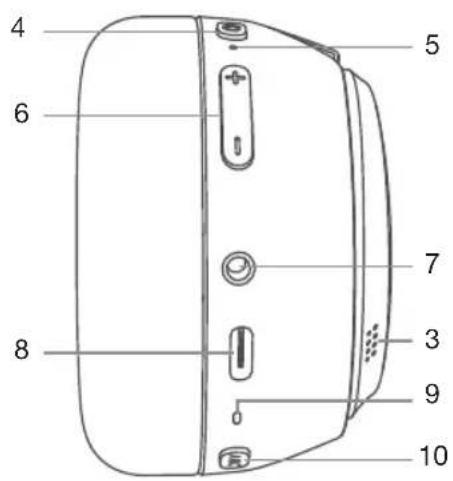
| FR EN DE NL | ||||
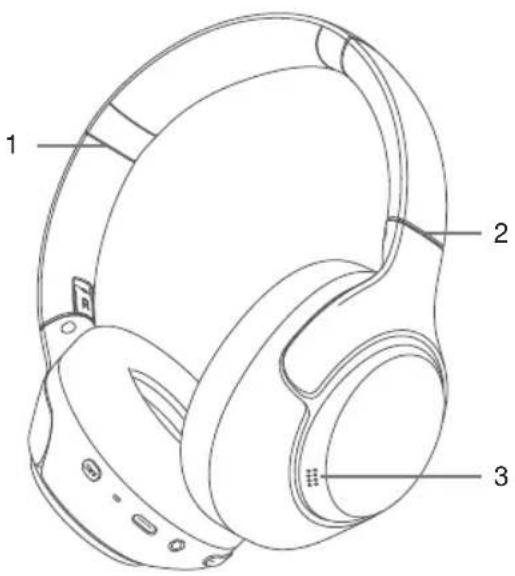
| 1 | Glissière ajustable | Adjustable folder | Verstellbares Kopfband | Verstelbaar schuifsysteem |
| 2 | Arceau pliable Folding bracket | Faltbarer Kopf-hörerbügel | Opvouwbaar | |
| 3 | Microphones d'ambiance pour les modes réduction de bruit (ANC) et transparence | Surround microphones for noise reduction (ANC) and transparency modes | Umgebungs-mikrofone für Geräuschunterdrückungs-modi (ANC) und Transparenz | Surround microfoons voor ruisonderdruk-king (ANC) en transparantie-modi |
| 4 | Bouton multifonction | Multifunction button | Taste Multifunktion | Multifunctionele knop |
| 5 | Témoin lumineux Indicator light Kontroll Leuchte Signaallampie | |||
| 6 | Volume - / Volume + | Volume - / Volume + | Lautstärke - / Lautstärke + | Volume - / Volume + |
| 7 | Prise AUX Jack 3,5 mm | 3.5mm AUX audio port | AUX-Anschluss für 3,5-mm-Klinke | AUX-aansluiting Jack 3,5 mm |
| 8 | Port USB-C destiné à la charge | USB-C charging port | USB-C-An-schluss zum Aufladen | USB-C-oplaadpoort |
| 9 | Microphone intégré | Built-in microphone | Integriertes Mikrofon | Geïntegreerde microfoon |
| 10 | Bouton d'activation des modes réduction de bruit (ANC) et transparence | Button for activating noise reduction (ANC) and transparency modes | Taste zur Aktivierung der Geräuschunterdrückungs-modi (ANC) und Transparenz | Knop voor het activeren van de modus ruisonderdruk-king (ANC) en transparantie |
votre produit
Contenu de la boîte
natural_image
Diagram showing two headphones connected via a cable to a laptop and a separate audio device (no text or symbols present)natural_image
Line drawing of a door handle with a hand pointing to the left side (no text or symbols)»ANC autonomy Off: 40 hours
• Built-in microphone
• Volume control +/-
• Automatically switches off after 10 minutes of inactivity
- Hands-free kit
- Adjustable and foldable headband
- Bluetooth* version: 5.4
description of indicator light
| Indicator light colour | Description |
| Off The headset is off | |
| Steady red The headset battery is charging | |
| White (steady) The headset battery is charged | |
| Flashing red The battery is low | |
| Red and white flashing rapidly | The headset is in discoverable and pairable mode |
| White flashing every 10 sec | The headset is paired with a Bluetooth device* |
user guide
READ THESE INSTRUCTIONS CAREFULLY BEFORE USING THE DEVICE AND KEEP THEM IN A SAFE PLACE FOR FUTURE REFERENCE.
- Do not use this device for any purpose other than those described in this document.
- To prevent any risk of fire or electric shock, never expose the headset to high temperatures, excessively high humidity or direct sunlight.
- Never put heavy objects on top of your headset.
- Do not insert other objects into the headset, as this may cause electrical incidents.
- Do not throw or hit your headset.
- Only allow young children to use the headset unattended if proper instructions have been given so that they can use it safely, as improper use can lead to injury.
- This product is not suitable for children under 36 months of age. Strangulation hazard.
- The headset must not be immersed in water, splashed or placed near containers filled with liquid, such as vases. Keep the headset in a dry location after use.
- Never attempt to disassemble or reassemble the headset yourself. Repairs must be carried out by qualified personnel.
- To protect your health and hearing ability, do not listen to music at a high volume for long periods of time. It is advisable to regularly stop using your headset and/or keep the output volume at a reasonable level.
- Do not set the volume to a level preventing you from hearing what is happening around you.
- Only clean the device using a soft, dry cloth and avoid using aerosols.

In order to avoid possible hearing damage, do not listen at high volume level for long periods of time.
This product complies with the order of 8 November 2005 implementing article L.5232-1 of the French public health code.
Recycling the battery

This product contains an internal lithium battery likely to explode or release hazardous chemicals. To reduce the risk of fire or burn, never dismantle, crush, puncture the battery.
Do not throw the battery away with household waste.
In order to protect the environment, the battery must be disposed of according to current regulations.
Disposing of a battery in a fire or hot oven, or mechanically crushing or cutting a battery may cause an explosion.
Storing a battery in a very hot environment may cause an explosion, or cause flammable liquids or gases to leak out.
Batteries subject to extremely low air pressure may cause flammable liquids or gases to explode or leak out.
Electronic equipment
Your Bluetooth* headset uses Bluetooth* technology. It transmits and receives radio electric frequencies (HF) in the 2.4 GHz range.
These emissions can interfere with the operation of various electronic devices. To prevent accidents, do not use your Bluetooth* headset when you are in the following locations:
- places where flammable gas is present, in hospitals or petrol stations, on trains, aeroplanes or in petrol stations near automatic doors or fire alarms,
- areas where blasting is carried out
If you have a pacemaker or other prosthesis, ask your doctor for advice.
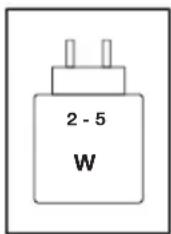
The power supplied by the charger must be between the minimum 2 watts required by the radio equipment and the maximum 5 watts to achieve maximum charging speed.
charging the battery
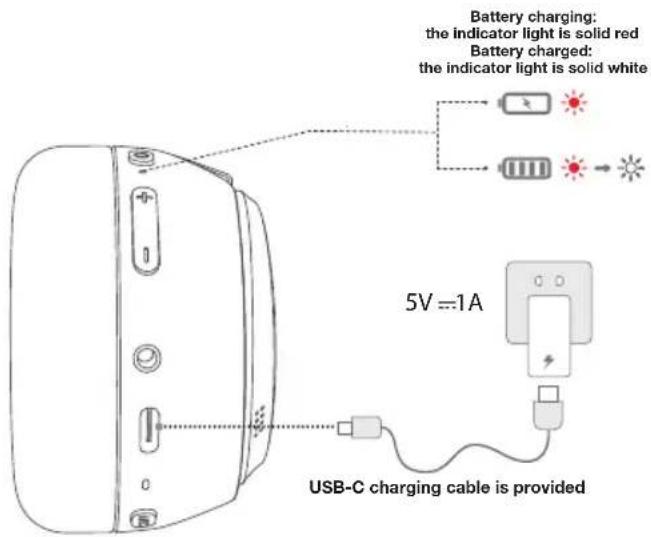
Charging time: Approximately 2 hours 10 minutes
Fully charge the battery before using the headset for the first time. Charging time is approximately 130 minutes.
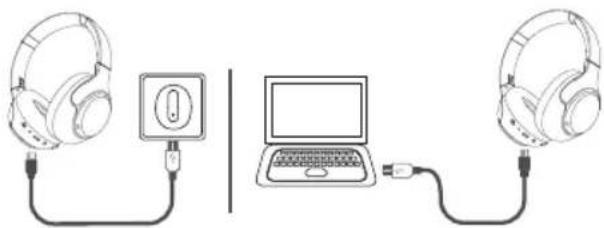
- To charge the battery, use the USB-C cable supplied. Connect the USB-C connector to the charging port on the right ear side, then plug the USB connector into a free USB port on your computer.
- You can also connect the USB-C plug to the charging port on the right ear side before connecting the USB plug to the USB port of a USB mains adapter (not included).
natural_image
Diagram showing two headphones connected via a cable to a laptop and a separate audio jack (no text or symbols present)- During charging, the headset indicator light turns red. When fully charged, the indicator light turns white.
- This gives you around 45 hours of music listening time if the ANC function is activated, and 57 hours if the ANC function is deactivated.
- When the battery level is low, the indicator light flashes red at regular intervals.
using the headset
Turning the headset on and off

- To switch on the headset, press and hold the button for 3 seconds. The indicator light flashes red and white, your headset is ready to be paired.
- To switch the device off, press and hold the multifunction button for 4 seconds. The indicator light turns red then goes out.
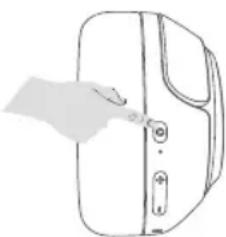
natural_image
Line drawing of a hand pressing down on a door panel (no text or symbols)To save battery power, the headset switches off automatically if no device is connected after 10 minutes.
Direct connection to an audio player
You can connect an external audio device (e.g. smartphone or MP3 player) to your headset. The sound from the audio device is then transferred to the headset.
- Use the 3.5 mm jack cable provided. Plug one end into the 3.5 mm audio cable port on the headset and the other end into the external audio device.
- Be careful not to use a 3.5 mm jack cable with 4 contacts. This would cause the headset to malfunction.
-
If you are listening to music in auxiliary mode, the headset controls are deactivated. Use the audio source controls to listen to music and adjust the volume.
-
If your headset emits no sound, check the volume level on the audio source. Also check that the music is actually playing on the audio source.
- Direct connection with an audio player is effective, even if the headset battery is completely discharged.
- The auxiliary connection takes precedence over the Bluetooth* connection.
Establishing a Bluetooth\* connection
If you have an audio device with wireless technology (smartphone, tablet, laptop computer, etc.), you can pair it with your headset.
The wireless connection allows you to listen to the music playing on your audio device without using a cable.
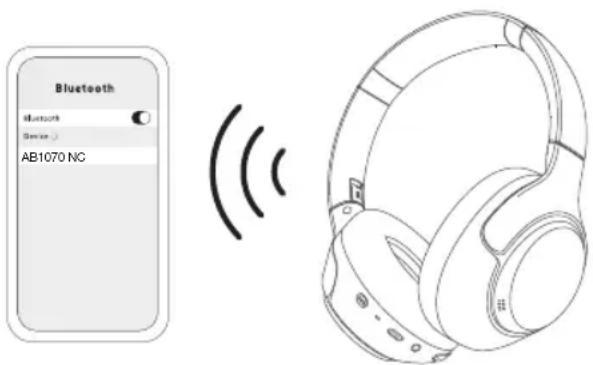
- Make sure that your wireless device is compatible and that the headset is switched off.
- Press and hold the multifunction button for 3 seconds. The indicator light flashes red and white, your headset is ready to be paired.
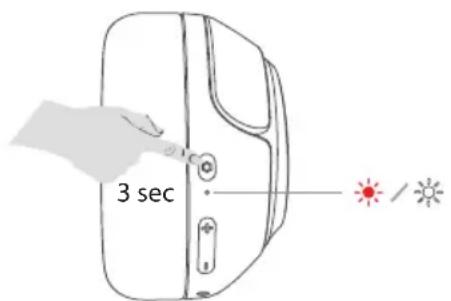
- On your mobile phone, activate the "search for wireless devices" function. Refer to your mobile phone's manual for more information.
- During pairing, the distance between the audio source and your headset must not exceed 1 metre.
- When the search is complete, connect your device with the AB1070 NC device.
- After connection, the indicator light flashes white every ten seconds.
Pairing takes about 5 minutes. If no device is paired within this time frame, the headset automatically switches to standby mode.
- For optimal transmission quality, make sure the headset and your Bluetooth* devices are less than 10 metres apart and that no electronic devices are obstructing transmission.
- If the connection fails, turn off the headset and try the connection again.
-
If your phone has a wireless system older than version 2.1, your headset may require an identification key. If this is the case, type 0000, 8888, 1111 or 1234 and confirm.
-
Following successful pairing, the headset and your mobile phone will connect automatically when they are in proximity to one another. The headset can save up to 8 devices. When there are more than 8 devices, the first will be replaced.
- Each time the headset is turned on, it will pair with the last device connected. If you want to pair another device, turn off the wireless function of the last device connected to the headset.
Listening to music

- Start playback on your wireless audio device.
- To move to the next track, press and hold the +button.
- To return to the previous track, press and hold the button.
- To pause playback, press the multifunction button.
- To return to playback, press the multifunction button again.
Adjusting the volume

Briefly press the +button to increase the volume.
Briefly press the button to lower the volume.
Making a call
Dial the telephone number on your mobile phone. You can then talk to your caller via the microphone built into the headset.
Incoming call detection
When a call is received or dialled, the phone pauses music playback. The transmission of music from your mobile phone to your headset is interrupted.
When the call ends, the phone resumes playback from the point where it was interrupted, and streams music to your headset again.
Activating voice command

When you are not on a call, press the multifunction button three times to activate voice control.
Answering or ending a call

When there is an incoming call, a beep sounds. To take the incoming call, briefly press the multifunction button. To end a call, press the multifunction button again.
Rejecting a call

To reject an incoming call, press and hold the multifunction button for approximately 2 seconds.
Activating / deactivating the ANC function

Your headset is equipped with the ANC (Active Noise Cancellation) feature, which allows you to block unwanted noise when using your headset.
To activate or deactivate this function, briefly press the ANC button located on the right earphone.
Activate/deactivate transparency mode

Unlike ANC, this technology incorporates ambient noise into your listening, so you can stay aware of what's going on around you.
To activate or deactivate this function, press the ANC button located on the right earphone three times.
Activate/deactivate game mode

Once the headset is connected via Bluetooth*, press the multifunction button twice to activate game mode. This mode allows the headset to be used with lower latency, giving real-time audio feedback during gameplay.
Press the multifunction button twice more to deactivate game mode.
Pairing with two mobile phones
The multi-pairing function lets you pair two phones with your headset and choose to answer one of them.
During a call, a ringing notification alerts you to an incoming call on the second paired phone.
To answer a call on the second paired phone, you must interrupt the current call by pressing the multifunction button. The second incoming call will then be automatically connected.
If you choose to ignore the second call, it will be redirected to voicemail.
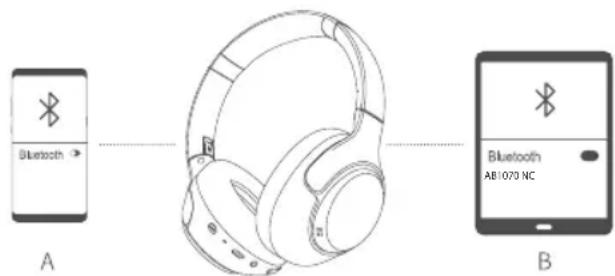
To connect two devices:
- Connect the headset to your first Bluetooth* device.
- Once the connection has been established, deactivate Bluetooth* on the first device. The headset goes back into pairing mode.
- Connect the second Bluetooth* device to your headset. You can then activate the Bluetooth* connection again on the first device.
After each successful pairing, the connection information is saved in the internal memory of each device.
You do not have to repeat the pairing procedure for subsequent connections, unless you delete this information, for example, by pairing another device to the headset.
Resetting the headset to factory settings
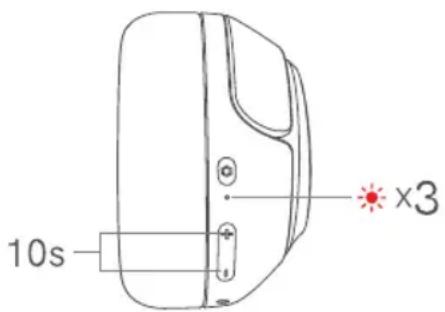
If you encounter a problem while using your essentiel b headset, we recommend that you return them to their factory settings to restore normal operation.
The list of your Bluetooth devices* will be deleted during this operation.
Hold down the +and -buttons simultaneously for 10 seconds until the indicator light flashes red 3 times.
The indicator light flashes red and white again, your headset is ready to be paired.
troubleshooting guide
- Why is the red indicator light flashing regularly?
This means that the battery is no longer sufficiently charged and must be charged.
- Why does the red indicator light not turn on during charging?
a) Check that the charging device is correctly connected to the left earpiece of the headset.
b) Perhaps you have not used the headset for a long time and the battery is completely flat. If this is the case, put the battery on the charger and wait 30 minutes. The indicator light then switches on.
- What is the maximum effective range between the headset and a wireless mobile phone?
According to the wireless standard, the maximum possible range is 10 metres for class II devices. This range however may be less depending on the environment.
- Why is my mobile phone not looking for and finding the headset?
The search can only start if the mobile phone and the headset are both in pairing mode. Make sure this is the case and check that the distance between the two devices does not exceed the maximum permissible distance (10 metres). These two conditions are critical to pairing and connecting your devices.
- Why can I not hear the voice of my contact in the headset?
a) Make sure the headset is on.
b) Make sure the volume is not too low and the sound output is not deactivated.
c) Make sure the headset is properly connected to the mobile phone.
d) Make sure the distance between the two devices does not exceed the maximum distance permitted by the wireless standard.
- Why can I not hear the voice of my contact when I make a call from the headset?
a) Make sure the mobile phone receives a strong enough signal.
b) Make sure the earbuds are within range of the phone for a wireless Bluetooth* connection (1 metre).
- Why are none of the pause, play, previous track and next track functions accessible in music playback mode?
These functions are only accessible if the audio device supports the AVRCP profile (Audio/Video Remote Control). Make sure the mobile phone or wireless transmitter supports the AVRCP profile.
simplified EU declaration of conformity
The undersigned, Sourcing & Création, hereby declares that the essentiel b AB1070 NC wireless headset electric device complies with directive 2014/53/EU.
The full text of the EU declaration of conformity is available on the following website:
https://www.boulanger.com/info/assistance
• Frequency band: 2402 - 2480 Mhz
• Emitted power: < 0.66 mW
Ihr Produkt
Packungsinhalt
natural_image
Diagram showing two headphones connected via a cable to a laptop and a USB cable (no text or symbols present)
natural_image
Line drawing of a hand pressing down on a door panel (no text or symbols)natural_image
Diagram showing two headphones connected via a cable to a laptop and a separate audio jack (no text or symbols present)natural_image
Line drawing of a hand pressing down on a door panel (no text or symbols)Protection of the environment
This symbol on the product means that it is a device whose disposal is subject to the directive on waste from electrical and electronic equipment (WEEE). This device may not in any way be treated as household waste and must be subject to a specific type of removal for this type of waste. Recycling and recovery systems are available in your area (waste removal) and provided by distributors. By taking your device to a recycling facility at its end of life, you will contribute to environmental conservation and prevent any harm to your health.

Umweltschutz
All information, designs, drawings and pictures in this document are the property of SOURCING & CREATION. SOURCING & CREATION reserves all rights to its brands, designs and information. Any copy and reproduction through any means shall be deemed and considered as counterfeiting.
Tested in our laboratories
Warranty valid from the date of purchase (receipt as proof of purchase). This warranty does not cover defects or damage caused by improper set up, incorrect use, or normal wear and tear of this product.
In unseren Labors getestet.
natural_image
Two identical diagrams of a trash bin with cross-bracing and a blank rectangular block below (no text or symbols)