USER MANUAL AC3360 PHILIPS
natural_image
White Philips portable radio device with a gold strap (no visible text or symbols on the device body)
| EN | 3 |
| BG | 22 |
| CS | 43 |
| DA | 62 |
| DE | 81 |
| EL | 103 |
| ES | 124 |
| ET | 143 |
| FI | 162 |
| FR | 181 |
| HR | 202 |
| HU | 221 |
| IT | 241 |
| LT | 260 |
| LV | 279 |
| MK | 298 |
| NL | 319 |
| NO | 339 |
| PL | 358 |
| PT | 378 |
| RO | 398 |
| SK | 418 |
| SL | 437 |
| SQ | 456 |
| SR | 476 |
| SV | 495 |
| TR | 514 |
| UK | 533 |
| VI | 553 |
Contents
1 Important ....4
Safety 4
Electromagnetic fields (EMF) 5
Recycling 5
Simplified EU declaration of conformity 5
2 Your pet air purifier 6
Product overview 6
Controls overview 7
3 Getting started 7
Installing the filter 7
Understanding Wi-Fi indicator 8
Wi-Fi connection 9
4 Using the pet air purifier 10
Understanding the air quality light 10
Turning on and off 10
Changing the mode setting 11
Fur capture boost mode 12
Setting the pet lock 12
Using the light function 13
5 Cleaning and maintenance 13
Cleaning schedule 13
Cleaning the body of the air purifier 13
Cleaning the PM2.5+gas sensor 14
Cleaning the filters 14
Replacing the filter 16
6 Storage 19
7 Troubleshooting 19
8 Warranty and support 21
Order parts or accessories 21
Safety
Read this user manual carefully before you use the appliance, and save it for future reference.
Danger
- Do not let any liquid or flammable detergent enter the appliance, to avoid electric shock and/or a fire hazard.
- Do not spray any flammable materials such as insecticides or fragrance around the appliance.
Warning
- Check if the voltage indicated on the appliance corresponds to the local mains voltage before you connect the appliance.
- If the supply cord is damaged, you must have it replaced by Philips, a service center authorized by Philips, or similarly qualified persons in order to avoid a hazard.
- Do not use the appliance if the plug, the power cord, or the appliance itself is damaged.
- This appliance can be used by children aged from 8 years and above under supervision. This appliance can be used by persons with reduced physical, sensory or mental capabilities or lack of experience and knowledge if they have been given supervision or instruction concerning use of the appliance in a safe way and understand the hazards involved.
• Children shall not play with the appliance.
• Cleaning and user maintenance shall not be made by children without supervision.
• Do not block the air inlet and outlet, e.g. by placing items on the air outlet or in front of the air inlet.
• Make sure that foreign objects do not fall into the appliance through the air outlet.
- Please avoid reaching your fingers or pet's tail inside the gap of the purifier or air inlet/outlet.
- Do not shake the purifier when the shield is operating.
- Please make sure the shield is installed in the right position before turning on the purifier.
• Do not reach your fingers inside the shield to protect yourself from getting stuck or hurt.
- Standard Wifi interface based on 802.11b/g/n/ax at 2.4 GHz with a maximum output power of 72mW EIRP.
- Bluetooth version 5.2 (LE) at frequency 2.4 GHz with RF output less than 10mW EIRP.
Caution
- This appliance is not a substitute for proper ventilation, regular vacuum cleaning, or use of an vacuum cleaning, or use of an extractor hood or fan while cooking.
• Always place and use the appliance on a dry, stable, level, and horizontal surface.
- Leave at least 30cm free space around the appliance and leave at least 30cm free space above the appliance.
- Do not sit or stand on the appliance. Do not place anything on top of the appliance.
- Do not place the appliance directly below an air conditioner to prevent condensation from dripping onto the appliance.
• Make sure that all the filters are correctly installed before turning the appliance on.
• Only use the original Philips filters specially intended for this appliance. Do not use any other filters.
- Combustion of the filter may cause irreversible human hazard and/or jeopardize other lives. Do not use the filter as fuel or for similar purpose.
- Avoid knocking against the appliance (the air inlet and outlet in particular) with hard objects.
- Do not insert your fingers or objects into the air outlet or the air inlet to prevent physical injury or malfunctioning of the appliance.
- Do not use this appliance when you have used indoor smoke-type insect repellents or in places with oily residues, burning incense, or chemical fumes.
• Do not use the appliance near gas appliances, heating devices or fireplaces.
- Always unplug the appliance when you want to move, clean appliance, replace the filter or carry out maintenance.
• The appliance is only intended for household use under normal operating conditions.
- Do not use the appliance in wet surroundings or in surroundings with high ambient temperatures, such as the bathroom, toilet, or kitchen.
- The appliance does not remove carbon monoxide (CO) or radon (Rn). It cannot be used as a safety device in case of accidents with combustion processes and hazardous chemicals.
Electromagnetic fields (EMF)
This appliance complies with the applicable standards and regulations regarding exposure to electromagnetic fields.
Recycling
This symbol means that this product shall not be disposed of with normal household waste (2012/19/EU).
Follow your country's rules for the separate collection of electrical and electronic products. Correct disposal helps prevent negative consequences for the environment and human health.
Hereby, DAP B.V. declares that the radio equipment type AC3360 is in compliance with Directive 2014/53/EU. The full text of the EU declaration of conformity is available at the following internet address: www.philips.com.
2 Your pet air purifier
Congratulations on your purchase, and welcome to Philips!
To fully benefit from the support that Philips offers, register your product at www.philips.com/welcome.
Product overview
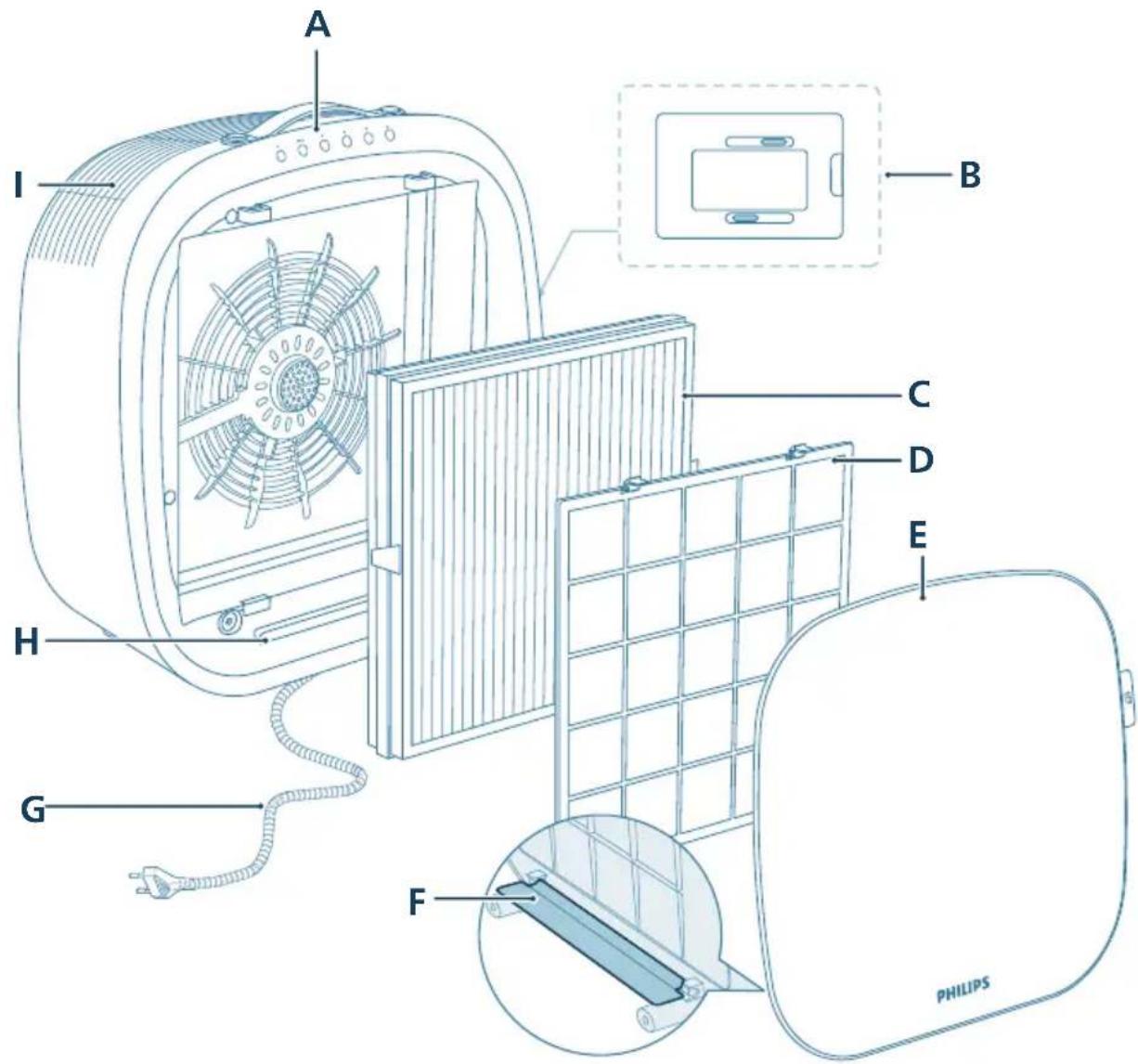
| A Control panel F Shield | | |
| B PM2.5+gas sensor G Power cord protective cover | | |
| C Integrated HEPA and Active Carbon filter (FY3110) | H Light strip |
| D Pre-filter I Air outlet | | |
| E Front cover | | |
Controls overview

natural_image
Six circular icons representing power, refresh, cat face, lightbulb, lock, and Wi-Fi symbols (no text or labels)
Control buttons
 | Power on/off Mode switch button | | |
| [3K08] | Fur capture boost mode Light switch button | | |
 | Pet lock button | | Wi-Fi connect/reset button/indicator |
| [XGWH] | Filter replacement reset button | | |
3 Getting started
Installing the filter
Remove all packaging of the filter before first use.
Note: Make sure the air purifier is unplugged from the electrical outlet before installing the filter.
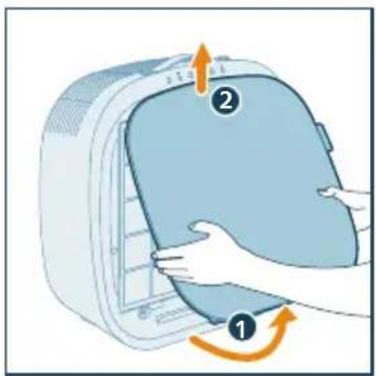
1 Open the front cover.
natural_image
Illustration of a hand opening a large air conditioner cover with a numbered label (1 and 2), showing the process (no text or symbols on the diagram itself)
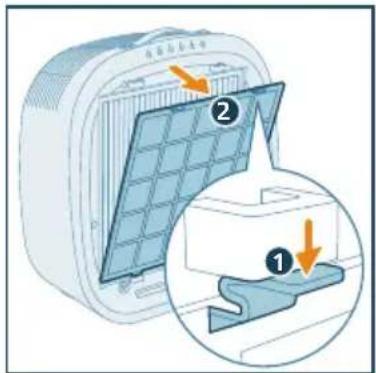
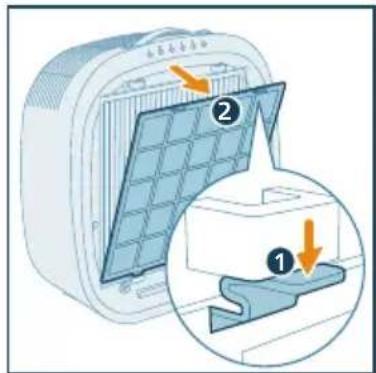
2 Press the clips on the both sides of the prefilter to remove it.
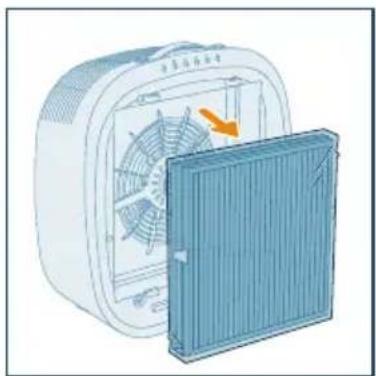
3 Remove the purification filter from the appliance.
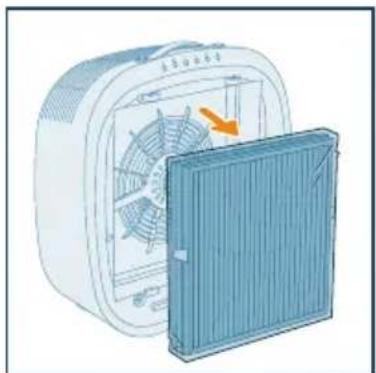
natural_image
Illustration of a front-mounted air conditioner unit with a cooling fan removed, showing internal fan structure (no text or symbols)
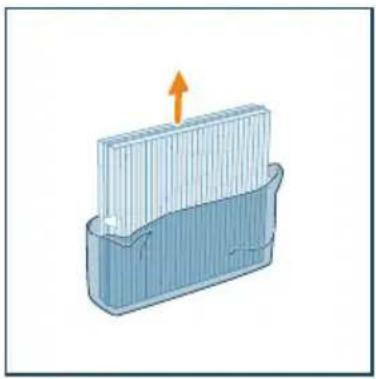
4 Remove all packaging materials of the purification filter.
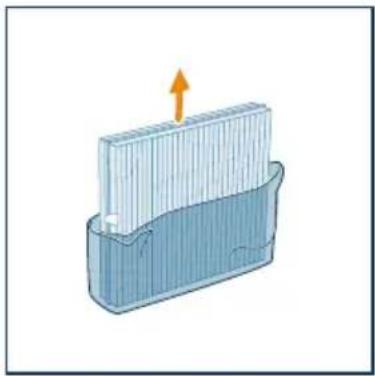
natural_image
Diagram of a container with a stack of liquid and an upward arrow, no text or symbols present
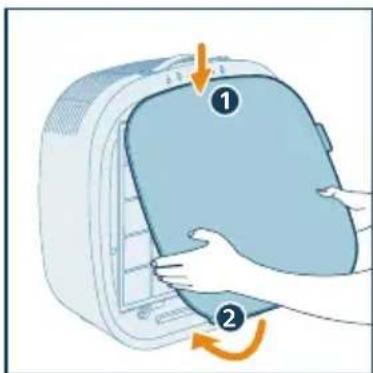
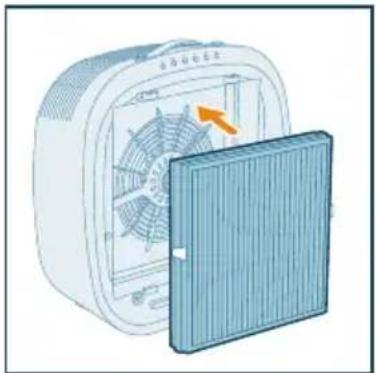
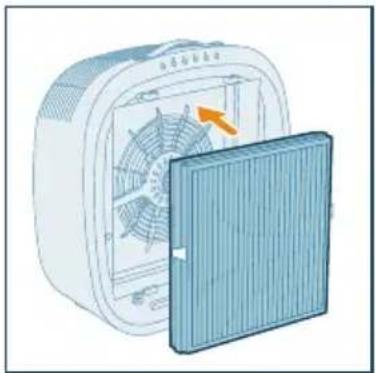
5 Put the Integrated HEPA and Active Carbon filter back to the appliance, ensuring that the filter with two clips is facing outwards.
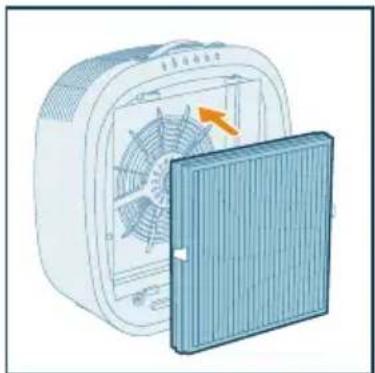
natural_image
Illustration of a fan device with an orange arrow indicating rotation or change, next to a blue cover (no text or symbols)
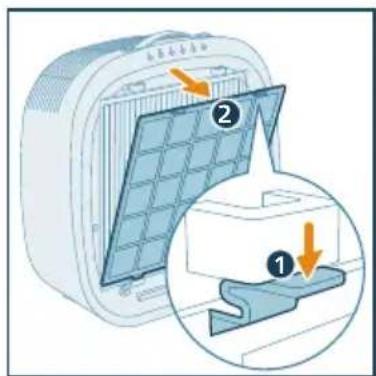
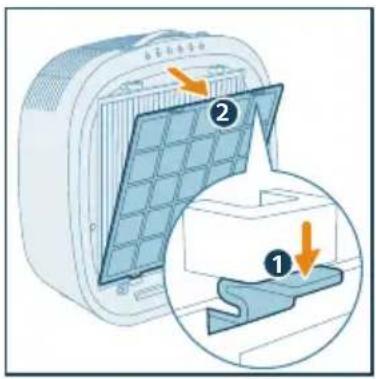
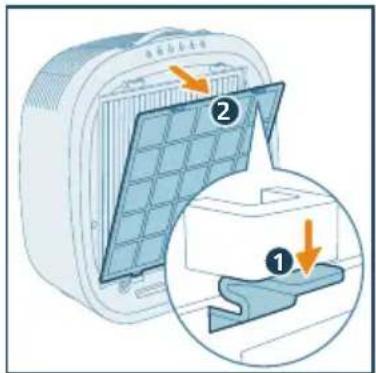
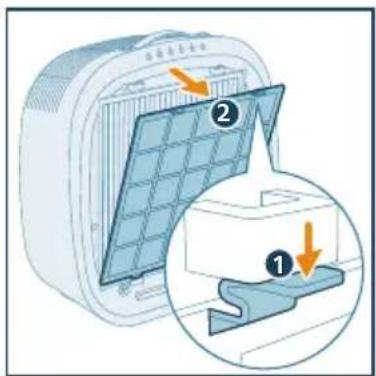
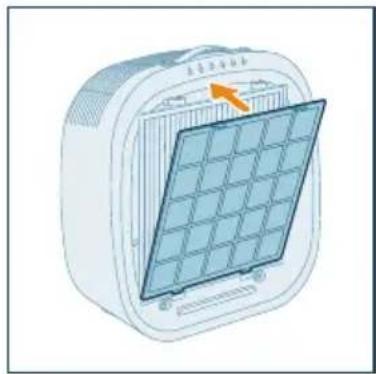
6 Put the pre-filter back to the appliance. Make sure you insert the pre-filter into the left and right holes at the bottom side. The two clips on the top of the filter make a "click" sound when installed properly.
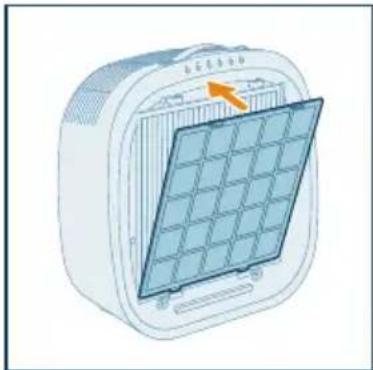
natural_image
Illustration of a solar panel mounted on a device (no text or symbols visible)
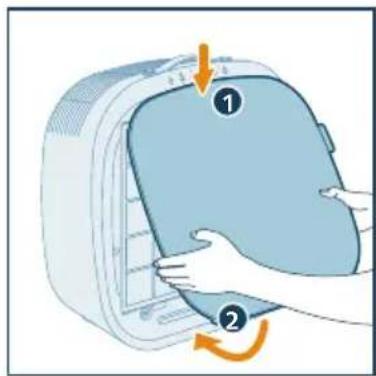
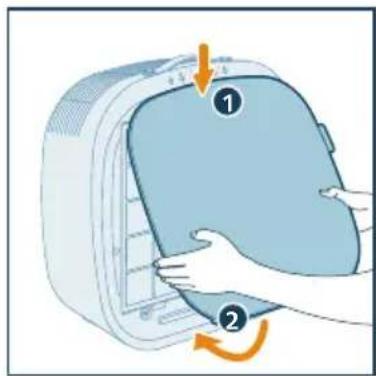
7 Reattach the front cover.
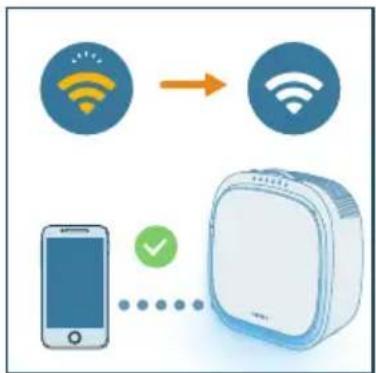
Understanding Wi-Fi indicator
| Wi-Fi icon status Wi-Fi connection status |
| Blink in orange Connecting to the smartphone |
| Stable in orange Connected to the smartphone |
| Blink in white Connecting to the server |
| Stable in white Connected to the server |
| Off Wi-Fi function disabled | |
Wi-Fi connection
Setting up the Wi-Fi connection for the first time
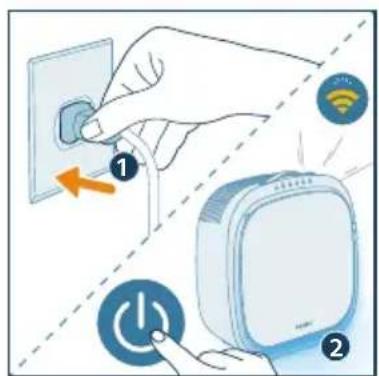
1 Download and install the Philips "Air+" app from the App Store or Google Play.

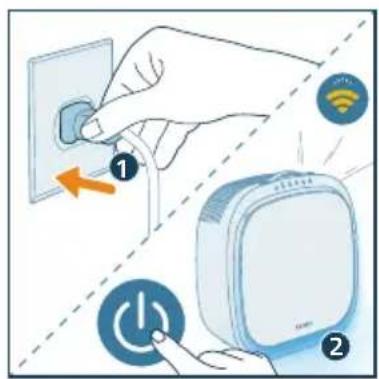
2 Put the plug of the purifier in the power socket and press to turn on the purifier.
→The Wi-Fi indicator 📋links orange for the first time.
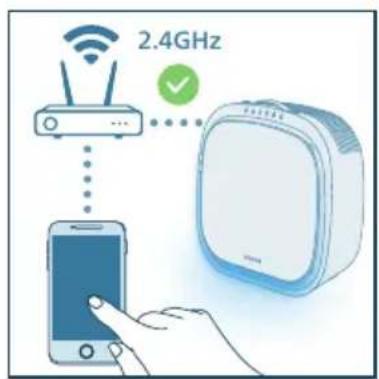
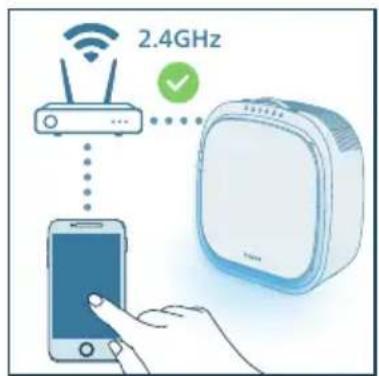
3 Make sure that your smartphone or tablet is successfully connected to your Wi-Fi network.
Note:
- Enable Bluetooth feature on your smart phone to ensure the smooth pairing.
- Please ensure your smart phone is connected to a 2.4GHz (home) Wi-Fi network instead of a 5GHz Wi-Fi network or public Wi-Fi. For a successful pairing, we suggest turning off your mobile data before initiating the pairing process.
4 Launch the "Air+" app and click on "Connect a New Device" or press the "+" button on the top of the screen. Follow the onscreen instructions to connect the air purifier to your network.
flowchart
graph TD
    A["Mobile Device"] -->|Signal| B["Wireless Device"]
    C["Smart Phone"] -->|Signal| B
    D["Phone icon"] -->|Valid| B
Note:
- This instruction is only valid when the air purifier is being set up for the first time. If the network has changed or the setup needs to be performed again, see Chapter "Reset the Wi-Fi connection" on page 10.
- If you want to connect more than one air purifier to your smartphone or tablet, you have to do this one by one.
• Make sure that the distance between your smartphone or tablet and the air purifier is less than 10 m without any obstructions.
Reset the Wi-Fi connection
Note:
- Reset the Wi-Fi connection when your default network has changed.
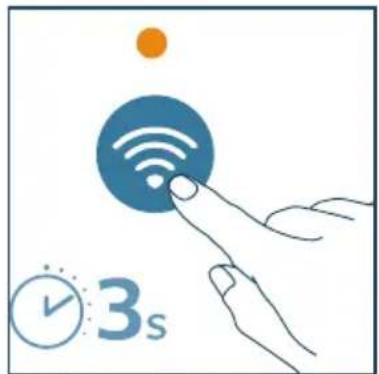
1 Put the plug of the purifier in the power socket and press to turn on the purifier.
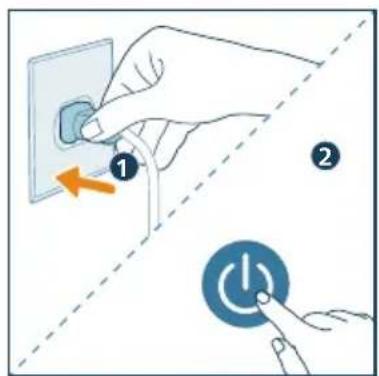
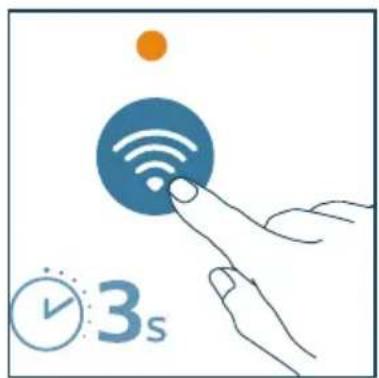
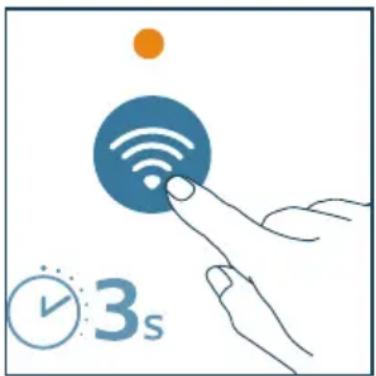
2 Press for 3 seconds until you hear a beep.
natural_image
Illustration of a hand interacting with a Wi-Fi icon and clock, no text or symbols present
→The purifier goes to pairing mode.
→ The Wi-Fi indicator ↔ blinks orange.
3 Follow the steps 3-4 in "Setting up the Wi-Fi connection for the first time" section.
4 Using the pet air purifier
Understanding the air quality light
The light strip automatically goes on when the pet air purifier is switched on. After approximately 30 seconds, the screen displays light color that corresponds to the ambient air quality.
PM2.5&Gas
AeraSense sensing technology accurately detects and quickly responds to even the slightest particle change in the air. It provides you with reassurance with realtime PM2.5 feedback. Most of the indoor air pollutants fall under PM2.5 – which refers to airborne particle pollutants smaller than 2.5 micrometers.
Common indoor sources of fine particles are tobacco smoke, cooking, burning candles. Some airborne bacteria and the smallest mold spores, pet allergen and dust mite allergen particles also fall under PM2.5.
With an advanced gas sensor, a display with different colors shows the level change of both PM2.5 and potential harmful gases (incl. VOC, odor, etc.) detected.
| PM2.5&Gas level Air quality level |
| Blue Good | |
| Blue-purple Fair | |
| Purple-red Poor | |
| Red Very poor | |
Turning on and off
Note:
- For optimum purification performance, close doors and windows.
- Avoid foreign objects (such as curtains) from falling into or obstructing the air inlet or air outlet.
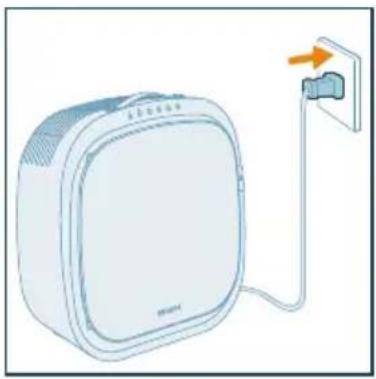
1 Put the plug of the pet air purifier in the power socket.
natural_image
Illustration of a white electronic device connected to a wall-mounted power outlet (no text or symbols visible)
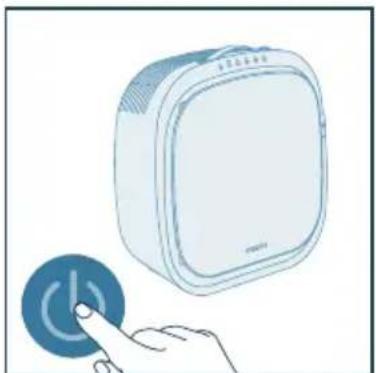
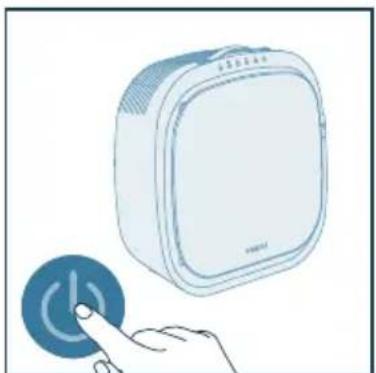
2 Press the button, turn on the purifier while the indicator light is on.
→The purifier beeps. The light stripe goes on.
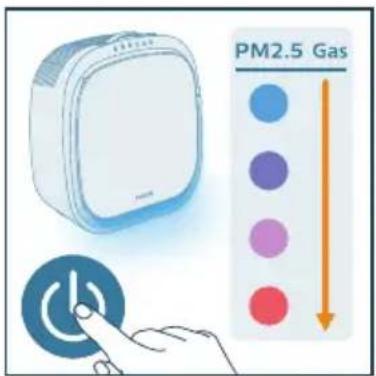
3 Press the button again to turn off the purifier.
natural_image
Illustration of a hand pressing a circular button with a power symbol (no text or labels)
Note: If the air purifier stays connected to the electrical outlet after turning OFF, the air purifier will operate under the previous settings when turned ON again.
Changing the mode setting
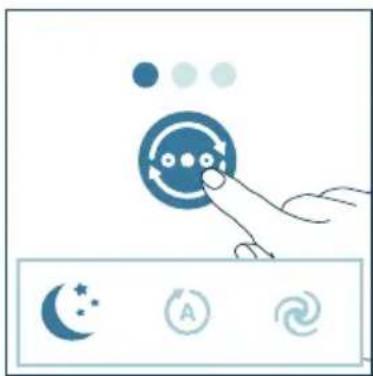
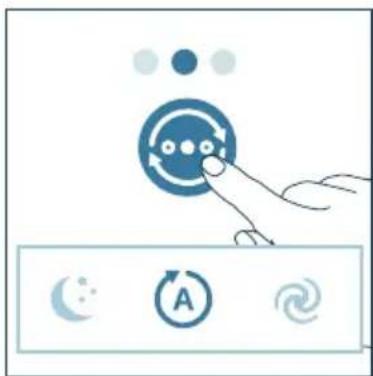
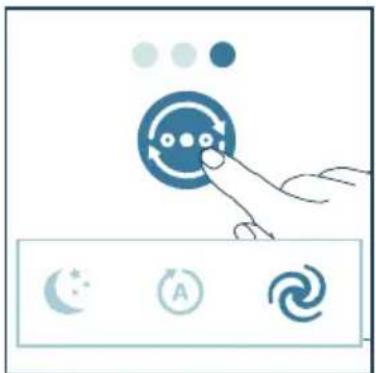
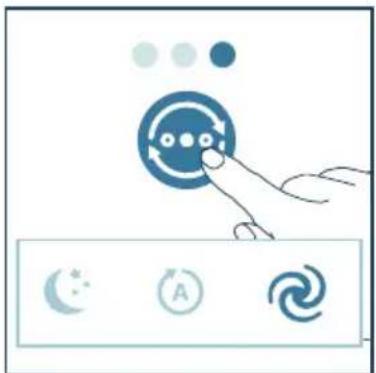
You can press the button to select the Auto mode, the sleep mode or the turbo mode.
- Sleep mode: When in Sleep mode, your appliance provides you with clean air in near silence. Shortly after activating this mode, the display lights are dimmed and all other lights on the appliance are turned off. This setting is ideal for the bedroom when it's time to turn in.
natural_image
Illustration of a hand interacting with a circular button and three moon icons (star, circle, spiral) below (no text or symbols)
- Auto mode: In Auto mode, the appliance will do the work for you. Based on the sensor data that measure and track the air quality in the room, your device automatically selects the right fan speed to make your air clean and healthy again.
natural_image
Illustration of a hand interacting with a circular icon and three circular icons below (no text or symbols)
- Turbo mode: When the appliance is in Turbo mode, it operates on the highest speed for powerful, rapid cleaning of the air.
natural_image
Illustration of a hand interacting with a circular button and three icons (star, circle, spiral) on a control panel (no text or symbols)
Fur capture boost mode
Note:
- Fur Capture Boost Mode is designed specifically for removing foating pet fur. It is not intended for standard air purification use.
Press the button to activate fur capture boost mode. In this mode, the appliance will run at the highest speed for 2 hours so that it will achieve maximum fur suction effectiveness with relatively higher working noise. After running 2 hours it will turn to Auto mode. We suggest to run this mode when you have instant need to purify fur or odor.
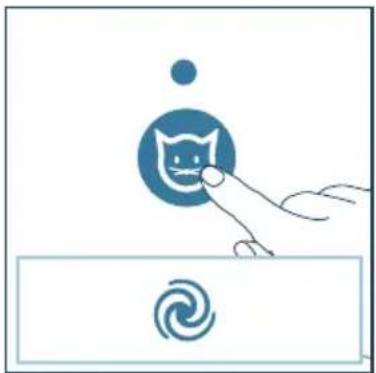
natural_image
Illustration of a hand interacting with a cat icon and a spiral symbol (no text or labels)
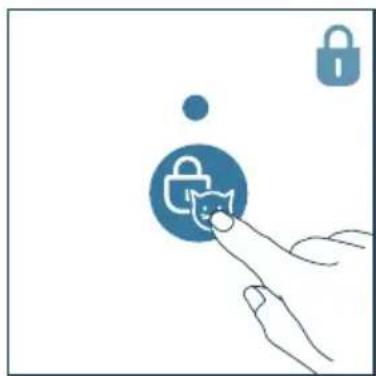
Setting the pet lock
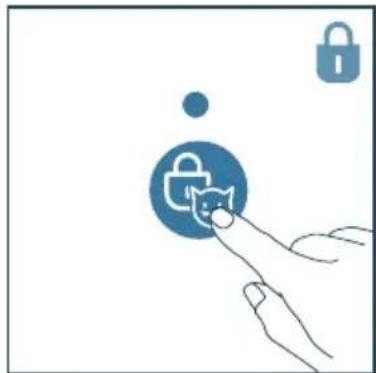
1 Press the button to activate the pet lock.
→The appliance beeps.
→Other buttons are unresponsive.
natural_image
Illustration of a hand interacting with a padlock icon and a cat, no text or symbols present
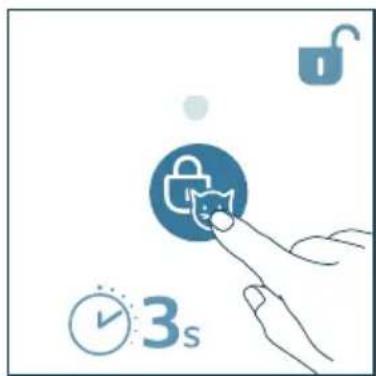
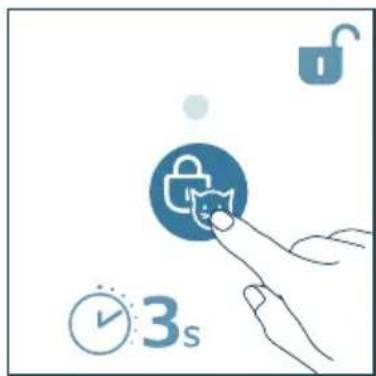
2 Press and hold the for 3 seconds to deactivate the pet lock.
→The appliance beeps.
natural_image
Illustration of a hand interacting with a lock icon and clock, no text or symbols present
Using the light function
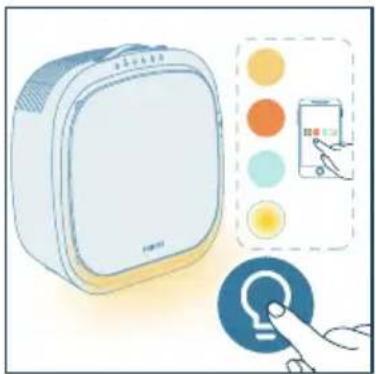
You can press the 🔊 button to turn on air quality light, ambient light or turn off the light strip.
1 Press the button to switch to lamp mode: a cozy light strip under the bottom of the appliance. Tailor the brightness and color of the cozy light in the Air+ app.
natural_image
Illustration of a white electronic device with a hand interacting with a touchscreen icon (no text or symbols present)
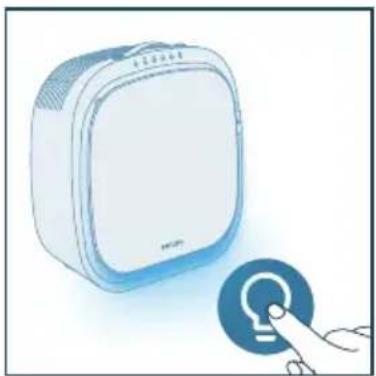
2 Press the button to switch to the air quality mode. The light strip will change color based on the current ambient air quality.
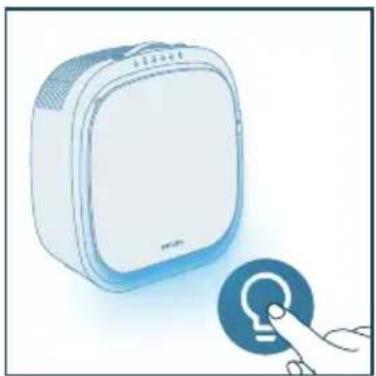
natural_image
Illustration of a white rectangular device next to a blue circular button with a finger pointing at it (no text or symbols)
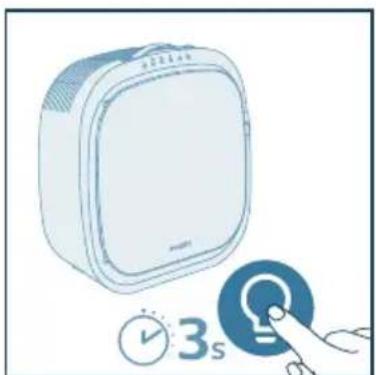
3 Press the button for 3 seconds to turn off the light strip.
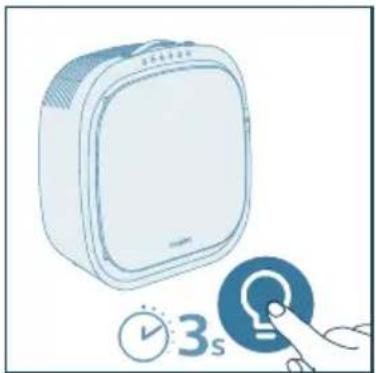
natural_image
Illustration of a white rectangular device with a clock and a blue circular button, no text or symbols present.
5 Cleaning and maintenance
Note:
• Always unplug the appliance before you clean it.
- Never immerse the appliance in water or any other liquid.
- Never use abrasive, aggressive, or flammable cleaning agents such as bleach or alcohol to clean any part of the appliance.
- Never use any liquids (including water) to clean the Integrated HEPA and Active Carbon filter.
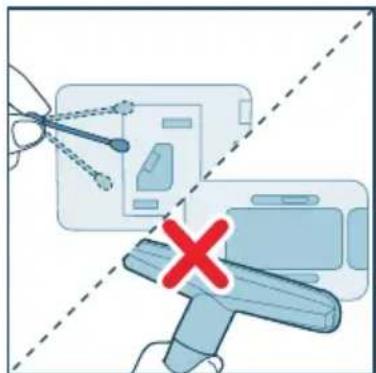
- Do not attempt to clean the PM2.5+gas sensor with a vacuum cleaner.
Cleaning schedule
| Frequency Cleaning method |
| About one month | Wipe the plastic part of the appliance with a soft, dry cloth |
| Clean the air outlet cover |
| Every two months | Clean the PM2.5+gas sensor with a dry cotton swab |
| When necessary | Clean the pre-filter and pet filter |
Cleaning the body of the air purifier
Regularly clean the inside and outside of the air purifier to prevent dust from collecting.
- Use a soft, dry cloth to clean both the interior and exterior of the air purifier and the air outlet.
Cleaning the PM2.5+gas sensor
Clean the PM2.5+gas sensor every 2 months for optimal functioning of the appliance.
Note:
- If the air purifier is used in a dusty environment, it may need to be cleaned more often.
- If the humidity level in the room is very high, condensation may develop on the PM2.5+gas sensor and the air quality light may indicate a more poor air quality even though the air quality is actually good. If this occurs, clean the PM2.5+gas sensor.
- We recommend people who are allergic to dust, pollen, pets or mold, not to replace filters by themselves or to take protective measures, such as wearing a mask and gloves.
1 Switch off the purifier and unplug from the power socket.
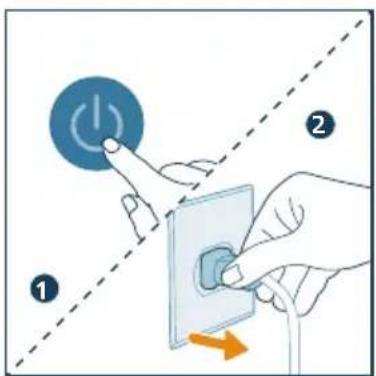
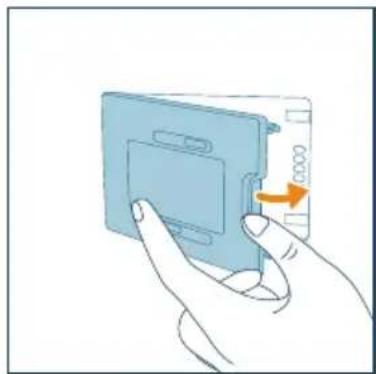
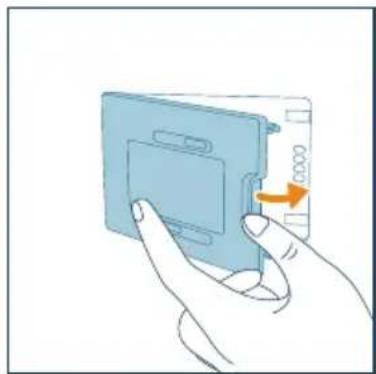
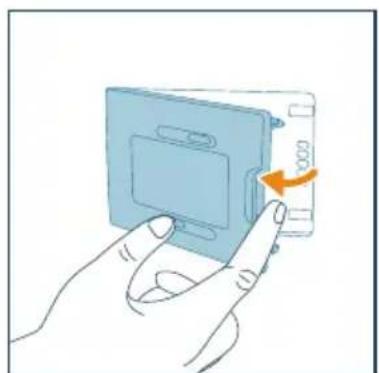
2 Open the air quality sensor cover.
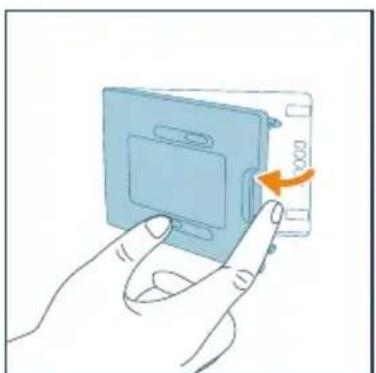
natural_image
Illustration of a hand inserting a card into a device (no text or symbols visible)
3 Clean the PM2.5+gas sensor with a damp cotton swab. Dry all parts thoroughly with a dry cotton swab.

4 Close the air quality sensor.
natural_image
Illustration of a hand inserting a card into a device (no text or symbols visible)
Cleaning the filters
To ensure optimum performance, it is recommended to regularly clean both the Integrated HEPA and Active Carbon filter and the pre-filter based on your current usage.
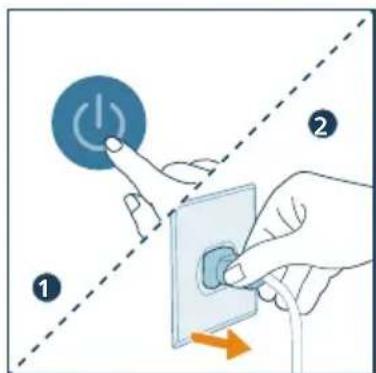
1 Switch off the appliance and unplug from the power socket
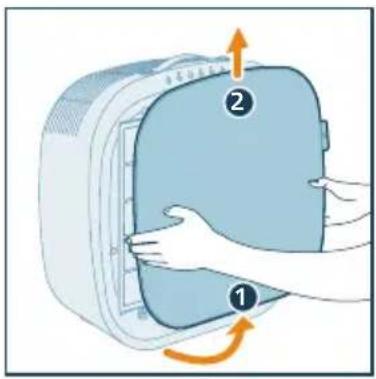
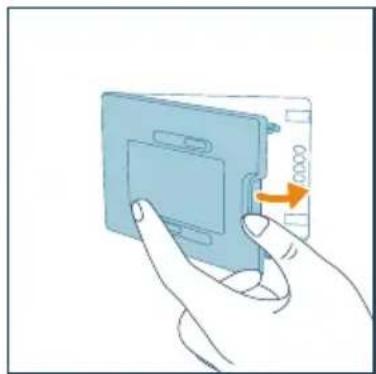
2 Pull the downside of the front cover out from the appliance and lift it upwards.
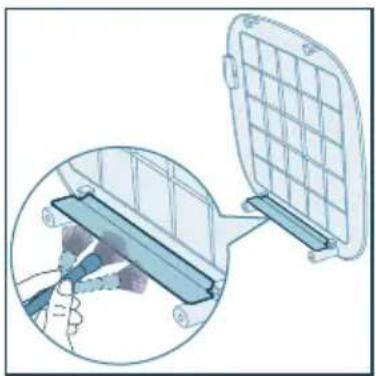
3 Use a soft brush to clean the shield.
natural_image
Diagram showing a device being inserted into a grid panel, with a magnified inset illustrating the process (no text or symbols present)
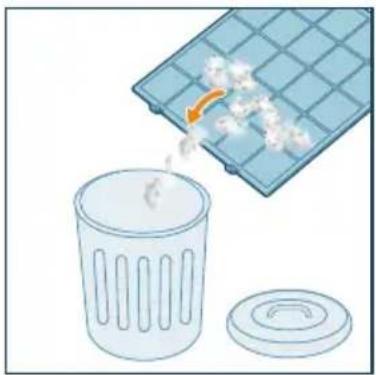
4 Clear the pet fur on the pre-filter.
natural_image
Illustration of a trash bin with plastic waste being poured into a grid-patterned container (no text or symbols)
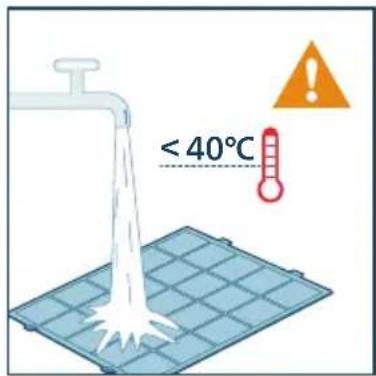
5 Clean the pre-filter under water tap. The water temperature cannot be higher than 40irc C.
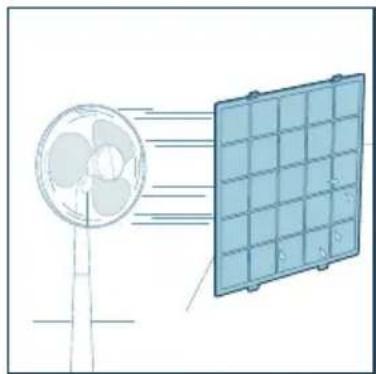
6 Air dry the pre-filter.
natural_image
Diagram showing airflow from a fan to a solar panel array (no text or symbols)
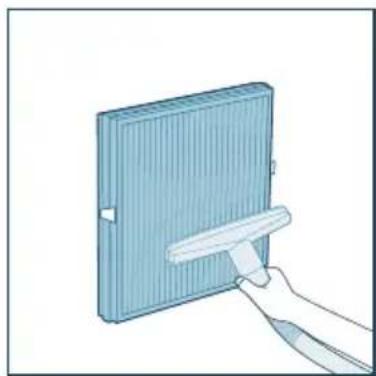
7 Use a vacuum cleaner to clean the Integrated HEPA and Active Carbon filter.
natural_image
Illustration of a hand holding a blue rectangular object with a white handle, no text or symbols present
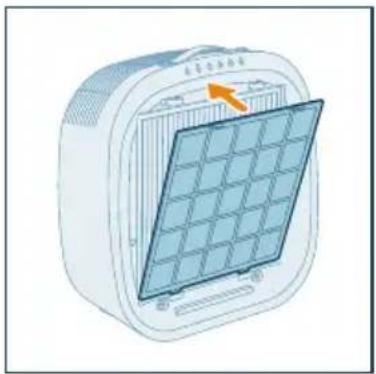
8 Put the pre-filter back to the appliance. Make sure you insert the pre-filter into the left and right holes at the bottom side. The two clips on the top of the filter make a "click" sound when installed properly.
natural_image
Illustration of a portable electric heater with a grid panel and orange arrow indicating the blade (no text or symbols)
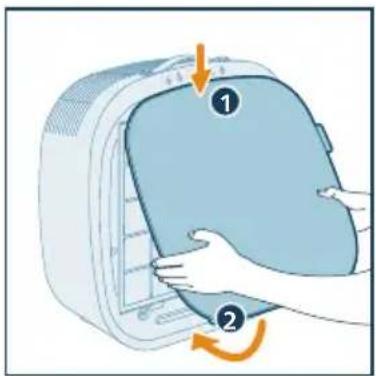
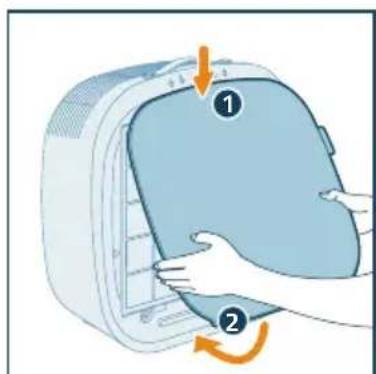
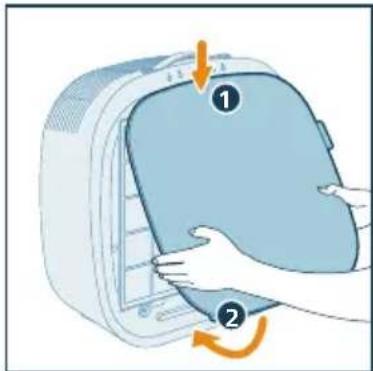
9 Reattach the front cover.
natural_image
Illustration of a hand pressing down on a device with a numbered label (1 and 2) and an orange arrow indicating rotation (no text or symbols present)
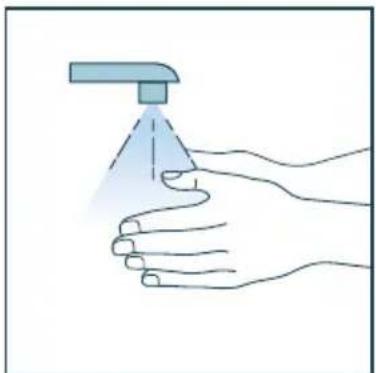
10 Wash your hands thoroughly after cleaning the filter.
natural_image
Illustration of a hand holding a spray can with a dropper (no text or symbols)
Replacing the filter
Understanding the healthy protection lock
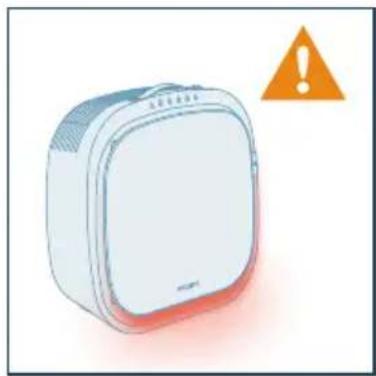
This pet air purifier is equipped with a filter replacement indicator to make sure that the air purification filter is in optimal condition when the air purifier is operating. When the filter need to be replaced, the light strip on the bottom of the appliance lights up red, and it continues to show red immediately after you unplug the appliance, plug in again and power it on.
If the filter is not replaced in time, the air purifier will stop operating and automatically lock to protect the air quality in the room. Replace the filter as soon as possible.
natural_image
Illustration of a white rectangular device with a warning symbol (no text or labels)
The light strip lights up red first, and it continues to show red immediately after you unplug and power it on.
Replacing the Integrated HEPA and Active Carbon filter
Note:
- The Integrated HEPA and Active Carbon filter is not washable or reusable.
• Always turn off the purifier and unplug from the electrical outlet before replacing the Integrated HEPA and Active Carbon filter.
- We recommend people who are allergic to dust, pollen, pets or mold, not to replace filters by themselves or to take protective measures, such as wearing a mask and gloves.
When the light strip lights up red, replace the Integrated HEPA and Active Carbon filter (FY3110).
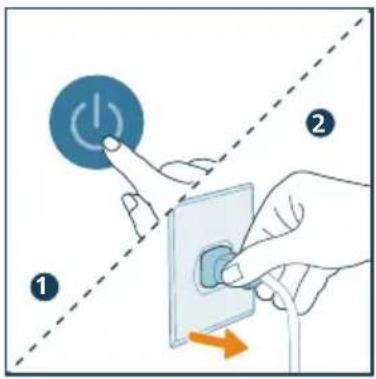
1 Switch off the air purifier and unplug from the power socket.
2 Pull the downside of the front cover out from the appliance and lift it upwards.
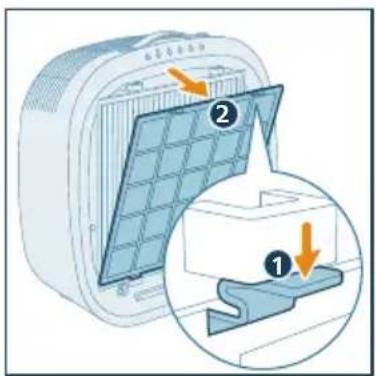
3 Press the clips on the both sides of the prefilter to remove it.
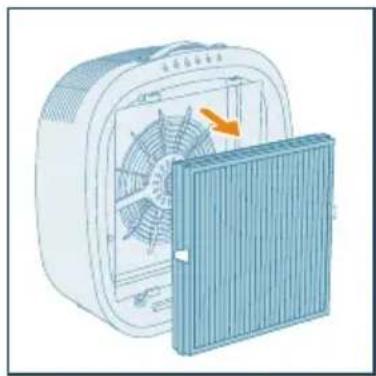
4 Remove the Integrated HEPA and Active Carbon filter from the appliance.
natural_image
Illustration of a portable air conditioner unit with fan and cooling panel (no text or symbols)
5 Discard the used filter.
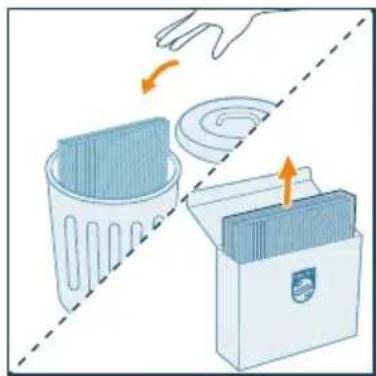
natural_image
Illustration of a hand placing a trash bin into a storage case with an arrow indicating rotation (no text or symbols)
6 Remove all packaging materials of the new purification filter.
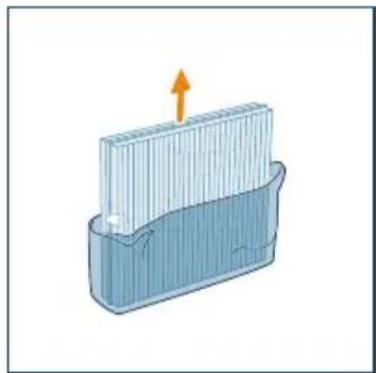
natural_image
Illustration of a container with a side panel and an upward arrow, no text or symbols present
7 Put the Integrated HEPA and Active Carbon filter back to the appliance, ensuring that the filter with two clips is facing outwards.
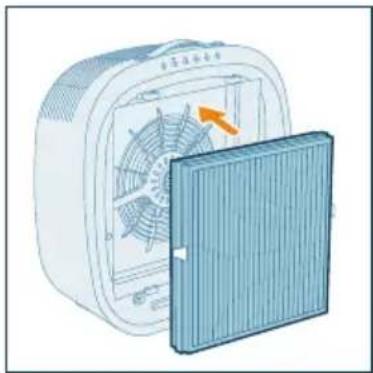
natural_image
Illustration of a fan device with an orange arrow indicating airflow or heat transfer, partially enclosed by a blue panel (no text or symbols)
8 Put the pre-filter back to the appliance. Make sure you insert the pre-filter into the left and right holes at the bottom side. The two clips on the top of the filter make a "click" sound when installed properly.
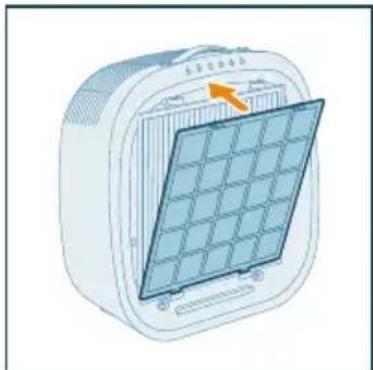
natural_image
Illustration of a portable air conditioner unit with a grid panel and orange arrow indicating the grille (no text or symbols)
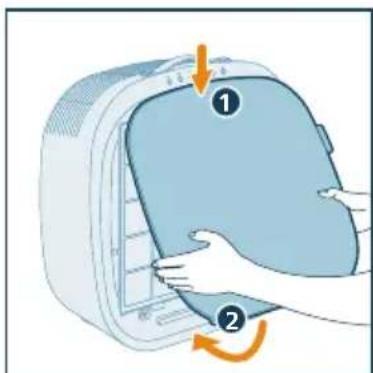
9 Reattach the front cover.
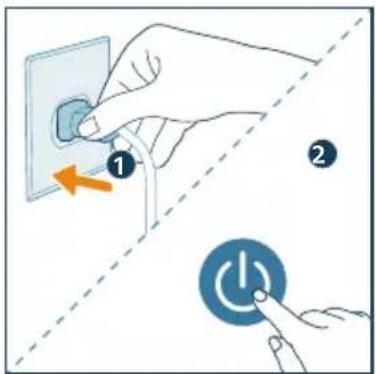
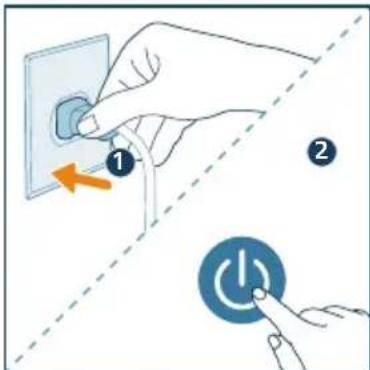
10 Put the plug of the purifier in the power socket and press to turn on the purifier.
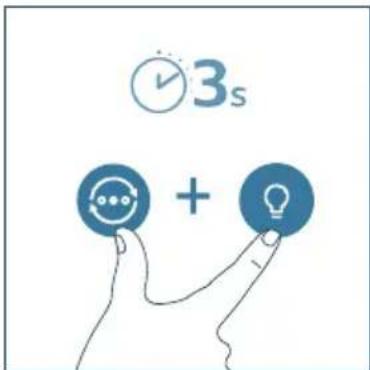
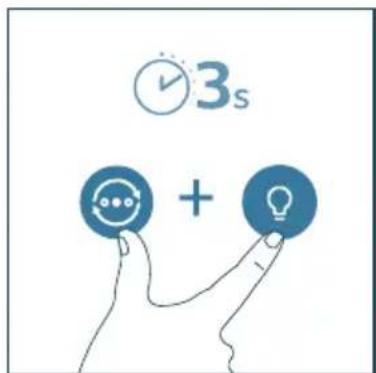
11 Reset the Integrated HEPA and Active Carbon filter lifetime by long pressing mode button and light button at the same time for 3 seconds or reset via App.
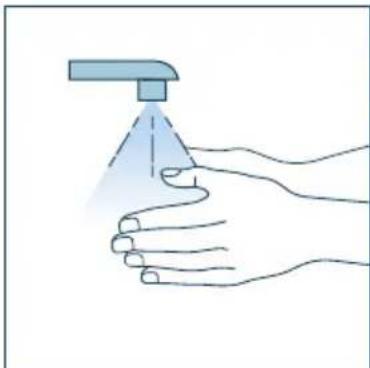
12 Wash your hands thoroughly after replacing the filter.
natural_image
Illustration of a hand holding a spray can with a dropper (no text or symbols)
Note:
- Do not smell the filter as it has collected pollutants from the air.
6 Storage
1 Turn off the air purifier and unplug from the power socket.
2 Clean the appliance, PM2.5+gas sensor and the surface of the filter (see chapter "Cleaning and maintenance").
3 Let all parts air dry thoroughly before storing.
4 Wrap the filters in air tight plastic bags.
5 Store the air purifier, filter in a cool, dry location.
6 Always thoroughly wash hands after handling the filter.
7 Troubleshooting
This chapter summarizes the most common problems you could encounter with the appliance. If you are unable to solve the problem with the information below, contact the Consumer Care Center in your country.
| Problem | Possible solution |
| The appliance does not work properly. | Check if the front cover is properly installed. If not, for safety reason, the appliance will stop working.The light strip lights up red. You can unplug it first, then plug in and turn it on again. If the light strip lights up red immediately, that means you have not replaced the corresponding filter. As a result, the appliance is now locked. In this case, replace the filter and reset the filter lifetime counter.The light strip lights up red. You can unplug it first, then plug in and turn it on again. If the light strip lights up red after 30s, that means the motor has malfunctions. Contact the Consumer Care Center in your country. |
| The airflow that comes out of the air outlet is significantly weaker than before. | The surface of the filter is dirty. Clean the surface of the filter (see the chapter “Cleaning and maintenance”). |
| The air quality does not improve, even though the appliance has been operating for a long time. | Check if the packing material is removed from the filter.Make sure that the filter (FY3110) is properly installed.If you want to purify the Indoor pollution sources, switch to the turbo mode.Room size is large or the outdoor air quality is poor. For optimum purification performance, please close the doors and windows when operating the air purifier.For optimum purification performance, avoid to obstruct the appliance with objects in its vicinity.For optimum purification performance, we strongly recommend following the instructions in the user manual to regularly clean or replace the filter. |
| The appliance produces a strange smell. | · The first few times you use the appliance, it may produce a plastic smell. This is normal. However, if the appliance produces a burnt smell even if removing filters, contact your Philips dealer or an authorized Philips service center. The filter may produce smell after being used for a while because of the absorption of indoor gases. It's recommended that you reactivate the filter by putting it in direct sunlight for repeated use. If odor still exists, replace the filter.· Neglecting to clean the pre-filter may result in the accumulation of hair or dust, which can lead to an unpleasant smell. |
| The appliance is extra loud. | · The appliance runs in turbo mode or fur capture boost mode, it is normal.· In the Auto mode, if the appliance is too loud, maybe the appliance runs at high speed because air quality becomes worse. When using the appliance in a bedroom at night, choose the Sleep speed.· If there is abnormal sound, contact the Consumer Care Center in your country.· If anything drops into air outlet, it may also cause abnormal loud sounds. Immediate turn off appliance, turn appliance upside down, to get foreign objectives out of appliance. |
| The airflow that comes out of the air outlet is significantly weaker than before. | · The surface of the filter is dirty. Clean the surface of the filter. |
| The appliance still indicates that I need to replace a filter, but I already did. | · Perhaps you did not reset the filter lifetime counter. Switch on the appliance and then long press mode button and light button at the same time for 3 seconds or reset the lifetime via APP until red light disappears. |
| Why did the appliance fail to filter the pet fur in my house? | · General speaking, the appliance could filter floating fur in the air and on the nearby floor, while the usage condition might influence the filtration effect probably due to different situation of number of pet, ventilation condition, humidity and temperature, mode used most frequently etc. You may observe the pre-filter status again after below actions: 1) using at least 8 hours per day and 5 days per week; 2) adjust mode selection and usage frequency, for example, consider to use Fur capture boost mode or Turbo mode to achieve higher filtration effectiveness, or use the scheduler function in APP to plan your purification schedule. |
| The Wi-Fi setup is not successful. | Please ensure your smart phone is connected to a 2.4GHz (home) Wi-Fi network instead of a 5GHz Wi-Fi network or public Wi-Fi. For a successful pairing, we suggest turning off your mobile data before initiating the pairing process. Ensure to enable the following permissions: "Location", "Storage", "Bluetooth", and "Local Network" on your smart phone. After a successful Wi-Fi setup, you can change permission settings as desired.Please verify that you have entered the correct Wi-Fi password. The password is case-sensitive, has a limit of 63 characters. Special symbols are not accepted.Ensure the network name of your home Wi-Fi is correct. The network name is case-sensitive.If you are using a VPN on your smart phone, please turn it off before starting the pairing process.If your router has a whitelist set up to block pairing, please disable the whitelist to ensure successful connection.Please ensure that both your device and smart phone are within 10 meters of the router.Ensure the app has been updated to the latest version.To ensure a strong Wi-Fi connection, avoid placing your device near other electronic devices, bright light sources, or signal stations that may cause interference. If you experience connectivity issues, move the device away from these sources and attempt to reconnect it to the Wi-Fi network.Consult the help section in the app for extensive and up-to-date troubleshooting tips. |
8 Warranty and support
Versuni offers a two-year warranty after purchase on this product. This warranty is not valid if a defect is due to incorrect use or poor maintenance. Our warranty does not affect your rights under law as a consumer. For more information or for invoking the warranty, please visit our website www.home.id/warranty.
Order parts or accessories
If you have to replace a part or want to purchase an additional part, go to your Philips dealer or visit www.philips.com/support.
If you have problems obtaining the parts, please contact the Philips Consumer Care Center in your country.
Съдържание
1 Важно 23
Безопасност ....23
Електромагнитни полета (ЕМП) 24
Рециклиране 24
natural_image
Six circular icons representing power, refresh, cat face, lightbulb, lock, and Wi-Fi symbols (no text or labels)
Контролни бутони
natural_image
Illustration of a hand pressing down on a blue appliance with an arrow indicating rotation (no text or symbols)
natural_image
Illustration of a heating fan with a cooling cover removed, showing internal fan blades and a highlighted section (no text or symbols)
natural_image
3D diagram of a container with an upward arrow indicating flow or movement (no text or symbols)
natural_image
Illustration of a fan device with an orange arrow indicating rotation or change, next to a blue panel (no text or symbols)
natural_image
Illustration of a portable air conditioner unit with a grid panel and orange arrow indicating the front panel (no text or symbols)
natural_image
Illustration of a hand interacting with a Wi-Fi icon and clock symbol (no text or symbols present)
natural_image
Illustration of a white electronic device connected to a wall with an orange arrow indicating direction (no text or symbols)
natural_image
Illustration of a hand pressing a button with a blue circular icon (no text or symbols)
natural_image
Illustration of a hand interacting with a circular icon containing three dots, next to four circular icons below (star, crescent, circle, spiral) — no text or symbols present.
natural_image
Illustration of a hand interacting with a circular button and three icons (star, crescent, spiral) on a control panel (no text or symbols)
natural_image
Illustration of a hand interacting with a blue circular emblem and a spiral symbol (no text or symbols present)
natural_image
Illustration of a hand interacting with a blue circular button containing a cat icon, with a padlock and dot above (no text or symbols)
natural_image
Illustration of a hand interacting with a lock icon and clock, no text or symbols present
natural_image
Illustration of a white electronic device with a hand interacting with a touchscreen icon and a colorful app interface (no text or symbols)
natural_image
Illustration of a white square electronic device with a blue circular button and a finger pointing at it (no text or symbols)
natural_image
Illustration of a white rectangular device with a clock and a blue circular button, no text or symbols present.
natural_image
Illustration of a hand inserting a card into a device (no text or symbols visible)
natural_image
Illustration of a hand inserting a CD into a plastic case with an arrow indicating rotation (no text or symbols)
natural_image
Diagram showing a device being inserted into a grid panel, with an inset close-up of the component (no text or symbols present)
natural_image
Illustration of a trash bin with an orange arrow indicating particle motion, next to a plastic grid on a surface (no text or symbols)
natural_image
Illustration of a fan emitting exhaust from a solar panel array (no text or symbols)
natural_image
Illustration of a hand holding a rectangular object with a tool, no text or symbols present
natural_image
Illustration of a portable air conditioner unit with a grid panel and orange arrow indicating airflow direction (no text or symbols)
natural_image
Illustration of a hand pressing down on a device component with an arrow indicating rotation (no text or symbols)
natural_image
Illustration of a hand spraying a spray bottle with a triangular tip (no text or symbols)
Смяна на филтъра
natural_image
Illustration of a white rectangular device with a red base and an orange warning triangle (no text or symbols on the device itself)
natural_image
Illustration of a portable air conditioner unit with fan and cooling panel (no text or symbols)
natural_image
Illustration of a hand placing a trash bin into a storage case with arrows indicating motion (no text or symbols)
natural_image
Illustration of a container with an upward arrow indicating flow or movement (no text or symbols)
natural_image
Illustration of a heating fan with a cooling cover removed, showing internal fan blades and a highlighted orange arrow (no text or symbols)
natural_image
Illustration of a portable air conditioner unit with a grid panel and orange arrow indicating airflow direction (no text or symbols)
natural_image
Illustration of a hand spraying a spray bottle with a triangular tip (no text or symbols)
Забележка:
natural_image
Six circular icons representing power, refresh, cat face, lightbulb, lock, and Wi-Fi symbols (no text or labels)
Tlačítka ovládání
natural_image
Illustration of a hand pressing down on a blue bag with an arrow indicating rotation (no text or symbols)
natural_image
Illustration of a white electric fan with a blue cover partially removed, showing internal blades and a small orange arrow indicating rotation (no text or symbols present)
natural_image
3D diagram of a container with an upward arrow, no text or symbols present
natural_image
Illustration of a fan with an orange arrow pointing to the side panel, next to a blue cover (no text or symbols)
natural_image
Illustration of a portable electric heater with a grid panel and orange arrow indicating the blade (no text or symbols)
natural_image
Illustration of a hand interacting with a Wi-Fi symbol and clock icon (no text or symbols)
natural_image
Illustration of a white electronic device connected to a wall-mounted power outlet (no text or symbols visible)
natural_image
Illustration of a hand pressing a button with a circular icon (no text or symbols)
natural_image
Illustration of a hand interacting with a circular icon containing a star and swirl, next to three circular icons (star, circle, spiral) below (no text or symbols)
natural_image
Illustration of a hand interacting with a circular icon and three circular symbols below (star, crescent, spiral) — no text or labels present.
natural_image
Hand interacting with a circular icon and three control icons (syringe, Earth, Spiral) on a white background (no text or symbols)
natural_image
Illustration of a hand interacting with a shield icon and a spiral symbol (no text or symbols present)
natural_image
Illustration of a hand interacting with a lock icon and padlock (no text or symbols)
natural_image
Illustration of a white electronic device with a blue circular button and a hand interacting with it (no text or symbols)
natural_image
Illustration of a white rectangular device with a button and a blue circular icon, accompanied by a clock and timer (no text or symbols on the device itself)
5 Čištění a údržba
Poznámka:
natural_image
Illustration of a hand inserting a card into a device (no text or symbols visible)
natural_image
Illustration of a hand inserting a card into a device with an arrow indicating rotation (no text or symbols)
Čištění filtrů
natural_image
Diagram showing a device being inserted into a grid panel, with a magnified inset illustrating the process (no text or symbols present)
natural_image
Illustration of a plastic waste bin with an orange arrow indicating particle flow, next to a plastic tray (no text or symbols)
natural_image
Illustration of a fan emitting exhaust from a solar panel array (no text or symbols)
natural_image
Illustration of a hand holding a tool interacting with a blue rectangular panel (no text or symbols visible)
natural_image
Illustration of a portable air conditioner unit with a grid panel and orange arrow indicating the front panel (no text or symbols)
natural_image
Illustration of a hand pressing down on a blue plastic bag with an arrow indicating rotation (no text or symbols)
natural_image
Illustration of a hand spraying a spray gun with a blue spray can (no text or symbols)
Výměna filtru
natural_image
Illustration of a white rectangular device with a red base and an orange warning triangle (no text or symbols on the device itself)
natural_image
Illustration of a portable air conditioner unit with fan and cooling panel (no text or symbols)
natural_image
Illustration of a hand placing a trash bin into a storage case with an arrow indicating rotation (no text or symbols)
natural_image
Illustration of a container with a side panel and an upward arrow, no text or symbols present
natural_image
Illustration of a fan inside an electric oven with a cooling cover removed (no text or symbols)
natural_image
Illustration of a solar panel mounted on a heating element, showing internal grid structure (no text or symbols)
natural_image
Illustration of a hand placing a blue bag into a white container with an orange arrow indicating rotation (no text or symbols)
natural_image
Illustration of a hand spraying a spray bottle with a triangular tip (no text or symbols)
Poznámka:
natural_image
Six circular icons representing power, refresh, cat face, lightbulb, lock, and Wi-Fi symbols (no text or labels)
Betjeningsknapper
natural_image
Illustration of a hand pressing down on a blue appliance with an arrow indicating rotation (no text or symbols)
natural_image
Illustration of a fan assembly with a blue cover partially removed (no text or symbols visible)
4 Fjern alle emballagematerialer fra luftrenserfilteret.
natural_image
3D diagram of a container with an upward arrow indicating flow or movement (no text or symbols)
5 Sæt det integrerede HEPA-filter og det aktive kulfilter tilbage i apparatet, og sørg for, at filteret med to clips vender udad.
natural_image
Illustration of a fan inside a technical enclosure with an orange arrow indicating rotation (no text or symbols)
natural_image
Illustration of a portable air conditioner unit with a grid panel and orange arrow indicating airflow direction (no text or symbols)
Om Wi-Fi-indikator
→Luftrenseren skifter til parringstilstand.
→Wi-Fi-indikatoren blinker orange.
natural_image
Illustration of a white electronic device connected to a wall-mounted power outlet (no text or symbols visible)
3 Tryk på knappen iden for at slukke for renseren.
natural_image
Illustration of a hand pressing a circular button with a power symbol (no text or labels)
natural_image
Illustration of a hand interacting with a circular icon and three moon icons below (no text or symbols)
natural_image
Illustration of a hand interacting with a circular button and three icons (moon, refresh arrow, spiral) below (no text or symbols)
natural_image
Illustration of a hand interacting with a circular icon and three icons (sunny, Earth, spiral) on a control panel (no text or symbols)
Tilstanden hårboost
Bemærk:
natural_image
Illustration of a hand interacting with a shield emblem and a spiral symbol (no text or labels)
natural_image
Illustration of a hand interacting with a padlock icon and a cat on a circular button (no text or symbols)
natural_image
Illustration of a hand interacting with a lock icon and clock, no text or symbols present
natural_image
Illustration of a white rectangular device connected to a touchscreen display with a hand interacting with it (no text or symbols present)
2 Tryk på knappen for at skifte til tilstanden luftkvalitet. Lysbåndet skifter farve baseret på den omgivende luftkvalitet.
natural_image
Illustration of a white rectangular device with a circular button labeled 'P' and a hand pointing at it (no text or symbols on the device itself)
3 Tryk på knappen i 3 sekunder for at slukke for lysbåndet.
natural_image
Illustration of a white rectangular device with a clock and a blue circular button, no text or symbols present.
natural_image
Illustration of a hand inserting a card into a device (no text or symbols visible)
4 Luk partikelsensoren.
natural_image
Illustration of a hand inserting a card into a device (no text or symbols visible)
natural_image
Diagram showing a device with a grid panel and a magnified view of its internal structure (no text or symbols)
natural_image
Illustration of a trash bin with an orange arrow indicating particle dispersion (no text or symbols)
natural_image
Diagram showing airflow from a fan to a solar panel array (no text or symbols)
natural_image
Illustration of a hand holding a white tool next to a blue rectangular panel (no text or symbols visible)
natural_image
Illustration of a portable air conditioner unit with a grid panel and orange arrow indicating the grille (no text or symbols)
natural_image
Illustration of a hand holding a spray can with a blue tip, no text or symbols present
natural_image
Illustration of a white rectangular device with a warning symbol (no text or labels)
natural_image
Illustration of a portable air conditioner unit with fan and cooling panel (no text or symbols)
natural_image
Illustration of a hand placing a trash bin into a storage case with an arrow indicating rotation (no text or symbols)
natural_image
Illustration of a container with a side panel and an upward arrow, no text or symbols present
7 Sæt det integrerede HEPA-filter og det aktive kulfilter tilbage i apparatet, og sørg for, at filteret med to clips vender udad.

natural_image
Illustration of a fan inside a heating unit with an open panel and a blue cover, showing no text or symbols.
natural_image
Illustration of a portable air conditioner unit with a grid-patterned panel and an orange arrow pointing to it (no text or symbols)
natural_image
Illustration of a hand pressing down on a blue plastic bag with an arrow indicating rotation (no text or symbols)
11 Nulstil levetiden for det integrerede HEPAfilter og det aktive kulfilter ved at trykke på tilstandsknappen og lysknappen samtidig og holde dem nede i 3 sekunder, eller nulstil via appen.
natural_image
Illustration of a hand holding a spray can with a dropper (no text or symbols)
Bemærk:
natural_image
Six circular icons representing power, refresh, smart cat face, lightbulb, lock, and Wi-Fi symbols (no text or labels)
Bedientasten
natural_image
Illustration of a hand pressing down on a blue appliance with an arrow indicating rotation (no text or symbols)
natural_image
Illustration of a fan with an orange arrow indicating rotation, next to a blue heat sink (no text or symbols)
natural_image
Illustration of a container with an upward arrow, no text or symbols present
natural_image
Illustration of a portable air conditioner unit with fan and vent, showing internal blades and a closed lid (no text or symbols)
natural_image
Illustration of a portable air conditioner unit with a grid panel and orange arrow indicating airflow direction (no text or symbols)
natural_image
Illustration of hands pressing down on a computer case with an arrow indicating rotation (no text or symbols)
natural_image
Illustration of a hand interacting with a Wi-Fi symbol and clock icon (no text or symbols)
natural_image
Illustration of a white electronic device connected to a wall with an orange arrow indicating power or signal (no text or symbols present)
natural_image
Illustration of a white electronic device with a blue circular button and a finger pointing at it (no text or symbols)
natural_image
Illustration of a hand interacting with a circular icon and three symbolic icons (star, crescent, spiral) below (no text or labels)
natural_image
Illustration of a hand interacting with a circular icon and three icons (star, crescent, spiral) on a control panel (no text or symbols)
natural_image
Illustration of a hand pressing a button onto a rectangular object with a spiral symbol (no text or labels)
natural_image
Illustration of a hand interacting with a padlock icon and a cat on a finger (no text or symbols)
natural_image
Illustration of a hand interacting with a lock icon and clock, no text or symbols present
natural_image
Illustration of a white electronic device with a control knob and a smartphone displaying a color-coded interface (no text or symbols)
natural_image
Illustration of a white electronic device with a blue circular button and a finger pointing at it (no text or symbols)
natural_image
Illustration of a white rectangular device with a clock and a blue circular button, no text or symbols present.
natural_image
Illustration of a hand inserting a card into a device (no text or symbols visible)
natural_image
Illustration of a hand inserting a device into a blue plastic housing with an arrow indicating rotation (no text or symbols)
Reinigen der Filter
natural_image
Diagram showing a device with a grid panel and a magnified view of its internal structure (no text or symbols)
natural_image
Illustration of a trash bin with an orange arrow indicating waste from a plastic grid array (no text or symbols)
natural_image
Illustration of a fan emitting exhaust from a solar panel array (no text or symbols)
natural_image
Illustration of a hand holding a tool interacting with a blue rectangular panel (no text or symbols visible)
natural_image
Illustration of a portable air conditioner unit with a grid panel and orange arrow indicating airflow direction (no text or symbols)
natural_image
Illustration of a hand holding a spray can with a dropper (no text or symbols)
Filterwechsel
natural_image
Illustration of a white rectangular device with a warning symbol (no text or labels)
natural_image
Illustration of a portable air conditioner unit with fan and cooling panel (no text or symbols)
natural_image
Illustration of a hand removing a trash bin into a plastic bag, showing mechanical components and motion arrows (no text or symbols)
natural_image
Illustration of a container with a stack of liquid and an upward arrow, no text or symbols present
natural_image
Illustration of a portable air conditioner unit with fan and cooling cover (no text or symbols)
natural_image
Illustration of a portable air conditioner unit with a grid-patterned panel and an orange arrow pointing to its side (no text or symbols)
natural_image
Illustration of a hand spraying a spray bottle with a blue tip (no text or symbols)
Hinweis:
natural_image
Six circular icons representing basic security and connectivity symbols (power, refresh, cat face, lightbulb, lock, Wi-Fi), no text or labels present.
Κουμπιά ελέγχου
natural_image
Illustration of a hand pressing down on a computer monitor with an orange arrow indicating rotation (no text or symbols)
natural_image
Illustration of a fan inside a technical enclosure with a side panel showing internal structure (no text or symbols)
natural_image
3D diagram of a container with an upward arrow indicating flow or movement (no text or symbols)
natural_image
Illustration of a blue industrial fan with an orange arrow indicating rotation or airflow direction (no text or symbols)
natural_image
Illustration of a portable air conditioner unit with a grid panel and orange arrow indicating airflow direction (no text or symbols)
flowchart
graph TD
    A["Mobile Device"] -->|Wireless Signal| B["Wireless Device"]
    C["Smart Phone"] -->|Wireless Signal| D["Wireless Device"]
    style A fill:#4CAF50,stroke:#388E3C
    style B fill:#4CAF50,stroke:#388E3C
    style C fill:#FFA500,stroke:#388E3C
    style D fill:#FFA500,stroke:#388E3C
Σημείωση:
natural_image
Illustration of a white electronic device connected to a wall with an orange arrow indicating power or signal (no text or symbols present)
natural_image
Illustration of a white electronic device with a blue circular button labeled 'Power' and a finger pointing at it (no text or symbols on the device itself)
natural_image
Illustration of a hand interacting with a circular icon containing three dots and arrows, next to four symbolic icons (star, crescent, circle, spiral) below (no text or labels)
natural_image
Illustration of a hand interacting with a circular button and three icons (syringe, Earth, spiral) on a control panel (no text or symbols)
natural_image
Illustration of a hand interacting with a shield icon and a spiral symbol (no text or symbols present)
natural_image
Illustration of a hand interacting with a padlock icon and a cat, no text or symbols present
natural_image
Illustration of a hand interacting with a lock icon and clock, no text or symbols present
natural_image
Illustration of a smart home control unit with a hand interacting with a touchscreen button (no text or symbols present)
natural_image
Illustration of a white rectangular device next to a blue circular button with a hand pointing at it (no text or symbols present)
natural_image
Illustration of a white rectangular device with a button and a blue circular icon, next to a clock and timer (no text or symbols on the device itself)
natural_image
Illustration of a hand inserting a card into a device (no text or symbols visible)
natural_image
Illustration of a hand holding a blue electronic device with an arrow indicating rotation (no text or symbols)
natural_image
Diagram showing a device being inserted into a grid panel, with an inset close-up of the component (no text or symbols present)
natural_image
Illustration of a trash bin with a plastic tray and an orange arrow indicating particle motion (no text or symbols)
natural_image
Diagram showing airflow from a fan to a solar panel array (no text or symbols)
natural_image
Illustration of a hand holding a tool interacting with a blue rectangular panel (no text or symbols visible)
natural_image
Illustration of a portable air conditioner unit with a grid panel and orange arrow indicating the front panel (no text or symbols)
natural_image
Illustration of a hand holding a spray can with a blue tip, no text or symbols present
natural_image
Illustration of a white rectangular device with a warning symbol (no text or labels)
natural_image
Illustration of a portable air conditioner unit with fan and cooling panel (no text or symbols)
natural_image
Illustration of a hand placing a trash bin into a plastic bag with an arrow indicating motion (no text or symbols)
natural_image
Diagram of a container with liquid and an upward arrow, no text or symbols present
natural_image
Illustration of a fan inside a heating fan with an orange arrow indicating airflow direction (no text or symbols)
natural_image
Illustration of a portable solar panel with a grid and control panel (no text or symbols)
natural_image
Illustration of a hand pressing down on a blue appliance with a scroll arrow indicating rotation (no text or symbols)
natural_image
Illustration of a hand holding a spray can with a blue tip, no text or symbols present
Σημείωση:
natural_image
Six circular icons representing power, refresh, cat face, lightbulb, lock, and Wi-Fi symbols (no text or labels)
Botones de control
natural_image
Illustration of a hand pressing down on a computer back panel with an orange arrow indicating motion (no text or symbols)
natural_image
Illustration of a portable air conditioner unit with fan blades and cooling cover (no text or symbols)
natural_image
Diagram of a container with a side panel and an upward arrow, no text or symbols present
natural_image
Illustration of a fan inside an electric fan with a cooling cover removed (no text or symbols)
natural_image
Illustration of a portable solar panel with a grid and orange arrow indicating the component (no text or symbols)
natural_image
Illustration of a hand pressing down on a computer case with an arrow indicating rotation (no text or symbols)
flowchart
graph TD
    A["Wi-Fi icon"] --> B["Wi-Fi icon"]
    C["Smartphone"] --> D["Wireless Device Icon"]
    style A fill:#4CAF50,stroke:#388E3C
    style B fill:#4CAF50,stroke:#388E3C
    style C fill:#FFA500,stroke:#388E3C
    style D fill:#FFA500,stroke:#388E3C
Nota:
natural_image
Illustration of a hand interacting with a Wi-Fi symbol and clock icon (no text or symbols)
natural_image
Illustration of a white electronic device connected to a wall-mounted power outlet (no text or symbols)
natural_image
Illustration of a hand pressing a button with a power symbol (no text or labels)
natural_image
Illustration of a hand interacting with a circular icon and three moon icons below (no text or symbols)
natural_image
Illustration of a hand interacting with a circular icon and three circular symbols (star, crescent, spiral) below, no text or labels present.
natural_image
Illustration of a hand interacting with a circular button and three icons (star, circle, spiral) on a control panel (no text or symbols)
Modo de refuerzo de captura de pelo
Nota:
natural_image
Illustration of a hand interacting with a blue circular emblem and a spiral symbol (no text or symbols present)
natural_image
Illustration of a hand interacting with a padlock icon and cat symbol (no text or symbols present)
natural_image
Illustration of a hand interacting with a lock icon and clock, no text or symbols present
natural_image
Illustration of a smart home control unit with a hand interacting with a touchscreen button (no text or symbols present)
natural_image
Illustration of a white rectangular device with a circular button labeled 'P' and a hand pointing at it (no text or symbols on the device itself)
natural_image
Illustration of a smart air conditioner unit with a clock and timer button (no text or symbols)
natural_image
Illustration of a hand inserting a card into a device (no text or symbols visible)
natural_image
Illustration of a hand holding a blue computer case with an orange arrow indicating rotation (no text or symbols)
natural_image
Diagram showing a device being inserted into a grid panel, with a magnified inset illustrating the process (no text or symbols present)
natural_image
Illustration of a plastic waste bin with a tray and an orange arrow indicating particle motion (no text or symbols)
natural_image
Diagram showing airflow from a fan to a solar panel array (no text or symbols)
natural_image
Illustration of a hand holding a white object next to a blue rectangular panel (no text or symbols visible)
natural_image
Illustration of a portable air conditioner unit with a grid panel and orange arrow indicating airflow direction (no text or symbols)
natural_image
Illustration of a hand holding a spray can with a blue tip, no text or symbols present
natural_image
Illustration of a white rectangular device with a warning symbol (no text or labels)
natural_image
Illustration of a portable air conditioner unit with fan and cooling panel (no text or symbols)
natural_image
Illustration of a hand placing a trash bin into a file case with an arrow indicating rotation (no text or symbols)
natural_image
Illustration of a container with an upward arrow, no text or symbols present
natural_image
Illustration of a fan with an orange arrow indicating rotation or airflow, next to a blue panel (no text or symbols)
natural_image
Illustration of a portable air conditioner unit with a grid panel and orange arrow indicating airflow direction (no text or symbols)
natural_image
Illustration of a hand spraying a spray bottle onto a palm (no text or symbols)
Nota:
natural_image
Six circular icons representing power, refresh, cat face, lightbulb, lock, and Wi-Fi symbols (no text or labels)
Juhtnupud
natural_image
Illustration of a hand pressing down on a blue appliance with an arrow indicating rotation (no text or symbols)
2 Vajutage klambreid eelfiltri mölemal küljel, et see eemaldada.
natural_image
Illustration of a fan assembly with a blue cover and orange arrow indicating rotation (no text or symbols)
natural_image
3D diagram of a container with an upward arrow indicating flow or movement (no text or symbols)
natural_image
Illustration of a fan device with an orange arrow indicating rotation or change, next to a blue panel (no text or symbols)
natural_image
Illustration of a portable electric heater with a grid panel and orange arrow indicating airflow (no text or symbols)
7 Paigaldage esikaas uuesti.
flowchart
graph TD
    A["Mobile Device"] -->|Signal Transmission| B["Wireless Device"]
    B --> C["Smart Phone"]
    C --> D["Router"]
Märkus.
2 Hoidke nuppu 📋 all 3 sekundit, kuni kölab piiks.
natural_image
Illustration of a hand interacting with a Wi-Fi symbol and clock icon (no text or symbols)
→Puhasti lülitub sidumisrežiimile.
natural_image
Illustration of a white electronic device connected to a wall-mounted power outlet (no text or symbols)
natural_image
Illustration of a hand pressing a button with a circular icon (no text or symbols)
natural_image
Illustration of a hand interacting with a circular icon containing three dots and arrows, alongside four icons below (star, crescent, circle, spiral) — no text or symbols present.
natural_image
Illustration of a hand interacting with a circular icon and three circular symbols below (star, crescent, spiral) — no text or labels present.
natural_image
Illustration of a hand interacting with a circular icon and three icons below (star, crescent, spiral), no text or symbols present.
natural_image
Illustration of a hand interacting with a blue circular icon containing a skull and a spiral symbol (no text or labels)
Loomaluku seadistamine
natural_image
Illustration of a hand interacting with a lock icon and padlock (no text or symbols)
natural_image
Illustration of a hand interacting with a lock icon and clock, symbolizing security or time-sensitive functions (no text present)
natural_image
Illustration of a white electronic device with a blue circular button and a finger pointing at it (no text or symbols)
natural_image
Illustration of a white rectangular device with a clock and lock icon, no text or symbols present
natural_image
Illustration of a hand inserting a card into a device (no text or symbols visible)
natural_image
Illustration of a hand holding a blue electronic device with an arrow indicating rotation (no text or symbols present)
Filtrite puhastamine
natural_image
Illustration of a solar panel being inserted into a tray, showing the blade and handle (no text or symbols)
natural_image
Illustration of a plastic waste bin with an orange arrow indicating particle emission (no text or symbols)
natural_image
Diagram showing airflow from a fan to a solar panel array (no text or symbols)
natural_image
Illustration of a hand holding a tool interacting with a blue rectangular panel (no text or symbols visible)
natural_image
Illustration of a portable air conditioner unit with a grid panel and orange arrow indicating airflow direction (no text or symbols)
9 Paigaldage esikaas uuesti.
natural_image
Illustration of a hand spraying a spray bottle with a triangular tip (no text or symbols)
filtri vahetamine
natural_image
Illustration of a white rectangular device with a warning symbol (no text or labels)
3 Vajutage klambreid eelfiltri mölemal küljel, et see eemaldada.
natural_image
Illustration of a portable air conditioner unit with fan and cooling panel (no text or symbols)
natural_image
Illustration of a hand placing a trash bin into a storage case with an arrow indicating rotation (no text or symbols)
natural_image
Illustration of a container with a side panel and an upward arrow, no text or symbols present
natural_image
Illustration of a small electric fan with a blue cover partially removed, showing internal fan structure (no text or symbols)
natural_image
Illustration of a portable air conditioner unit with a grid-patterned panel and control panel (no text or symbols)
9 Paigaldage esikaas uuesti.
natural_image
Illustration of a hand pressing down on a computer monitor with an orange scroll arrow indicating rotation (no text or symbols)
natural_image
Illustration of a hand holding a spray can with a dropper (no text or symbols)
Märkus.
natural_image
Six circular icons representing power, refresh, cat face, lightbulb, lock, and Wi-Fi symbols (no text or labels)
Ohjauspainikkeet
natural_image
Illustration of a hand pressing down on a computer back panel with an orange arrow indicating motion (no text or symbols)
natural_image
Illustration of a fan device with a blue cover and orange arrow indicating airflow or movement (no text or symbols)
natural_image
Diagram of a container with liquid and an upward arrow, no text or symbols present
natural_image
Illustration of a fan inside an electric fan with a cooling cover removed (no text or symbols)
natural_image
Illustration of a portable air conditioner unit with a grid panel and orange arrow indicating the front panel (no text or symbols)
Wi-Fi-merkkivalo
flowchart
graph TD
    A["Smartphone"] -->|Signal Transmission| B["Cloud Access"]
    C["Mobile Device"] -->|Signal Transmission| B
    D["Wireless Signal"] -->|Transmission| E["Wireless Signal"]
Huomautus:
natural_image
Illustration of a hand interacting with a Wi-Fi symbol and clock icon (no text or symbols)
natural_image
Illustration of a white electronic device connected to a wall with an orange arrow indicating direction (no text or symbols)
natural_image
Illustration of a white smart home control unit with a blue circular button and a finger pointing at it (no text or symbols)
natural_image
Illustration of a hand interacting with a circular icon containing a star and circular elements, accompanied by three symbolic icons below (star, crescent, circle, spiral) — no text or labels present.
natural_image
Illustration of a hand interacting with a circular button and three icons (moon, refresh arrow, spiral) on a base panel (no text or symbols)
natural_image
Illustration of a hand interacting with a circular icon and three control buttons (star, circle, spiral) on a device interface (no text or symbols)
natural_image
Illustration of a hand interacting with a blue circular emblem and a spiral symbol (no text or symbols present)
natural_image
Illustration of a hand interacting with a padlock icon and a cat, no text or symbols present
natural_image
Illustration of a white rectangular device with a hand interacting with a touchscreen icon and a smartphone displaying a red square (no text or symbols present)
natural_image
Illustration of a white square device with a blue circular button and a finger pointing at it (no text or symbols)
natural_image
Illustration of a smart air conditioner unit with a clock and timer, no text or symbols present
natural_image
Illustration of a hand pressing a blue plastic component with an orange arrow indicating rotation (no text or symbols)
natural_image
Illustration of a hand inserting a card into a device (no text or symbols visible)
natural_image
Diagram showing a device being processed into a grid panel, with a magnified inset illustrating the process (no text or symbols present)
natural_image
Illustration of a trash bin with a plastic bag pouring liquid from a grid-patterned tray onto a surface (no text or symbols)
natural_image
Diagram showing airflow from a fan to a solar panel array (no text or symbols)
natural_image
Illustration of a hand holding a tool interacting with a blue rectangular panel (no text or symbols visible)
natural_image
Illustration of a portable air conditioner unit with a grid panel and orange arrow indicating the grille (no text or symbols)
natural_image
Illustration of a hand pressing down on a blue bag with an arrow indicating rotation (no text or symbols)
natural_image
Illustration of a hand holding a spray can with a blue tip, no text or symbols present
Suodattimen vaihto
natural_image
Illustration of a white electronic device with a warning symbol (no text or labels)
natural_image
Illustration of a portable air conditioner unit with fan and cooling panel (no text or symbols)
natural_image
Illustration of a hand placing a trash bin into a storage case, with no text or symbols present.
natural_image
Illustration of a container with a stack of liquid and an upward arrow, no text or symbols present
natural_image
Illustration of a portable air conditioner unit with fan and cooling panel, showing internal fan structure (no text or symbols)
natural_image
Illustration of a solar panel mounted on a heating unit (no text or symbols visible)
natural_image
Illustration of a hand spraying a spray bottle onto a palm (no text or symbols)
Huomautus:
natural_image
Six circular icons representing power, refresh, cat face, lightbulb, lock, and Wi-Fi symbols (no text or labels)
Boutons de commande
natural_image
Illustration of a hand pressing down on a blue appliance with arrows indicating motion (no text or symbols)
natural_image
Illustration of a fan with cooling effect, showing internal fan blades and heat sink (no text or symbols)
natural_image
Diagram of a container with an upward arrow indicating flow or movement (no text or symbols)
natural_image
Illustration of a fan device with an orange arrow pointing to the fan blade (no text or symbols present)
natural_image
Illustration of a portable air conditioner unit with a grid panel and orange arrow indicating the component (no text or symbols)
flowchart
graph TD
    A["Mobile Device"] -->|Signal Transmission| B["Wireless Device"]
    C["Smart Phone"] -->|Signal Transmission| D["Router"]
Remarque :
natural_image
Illustration of a hand interacting with a Wi-Fi symbol and clock icon (no text or symbols)
natural_image
Illustration of a white electronic device connected to a wall-mounted power outlet (no text or symbols)
natural_image
Illustration of a hand pressing a button with a circular icon (no text or symbols)
natural_image
Illustration of a hand interacting with a circular icon containing a star and swirl symbol (no text or labels)
natural_image
Illustration of a hand interacting with a circular icon and three circular symbols below (star, crescent, spiral) — no text or labels present.
natural_image
Illustration of a hand interacting with a circular icon and three icons (star, crescent, spiral) on a white background (no text or symbols)
natural_image
Illustration of a hand interacting with a blue circular emblem and a spiral symbol (no text or symbols present)
natural_image
Illustration of a hand interacting with a padlock icon and a cat, no text or symbols present
natural_image
Illustration of a hand interacting with a lock icon and clock, symbolizing security or security (no text present)
natural_image
Illustration of a smart home control unit with a hand interacting with a touchscreen button (no text or symbols present)
natural_image
Illustration of a white rectangular device with a circular button and a hand pointing at it (no text or symbols)
natural_image
Illustration of a white rectangular device with a clock and a blue circular button, no text or symbols present.
natural_image
Illustration of a hand inserting a card into a device (no text or symbols visible)
natural_image
Illustration of a hand holding a blue computer case with an orange arrow indicating rotation (no text or symbols)
natural_image
Diagram showing a device being inserted into a grid panel, with a magnified inset illustrating the process (no text or symbols present)
natural_image
Illustration of a plastic waste bin with a tray and a trash can, showing an orange arrow indicating particle movement (no text or symbols)
natural_image
Diagram showing airflow from a fan to a solar panel array (no text or symbols)
natural_image
Illustration of a hand holding a blue rectangular panel with a white handle, no text or symbols present
natural_image
Illustration of a portable air conditioner unit with a grid panel and orange arrow indicating airflow direction (no text or symbols)
natural_image
Illustration of a hand spraying a spray bottle with a triangular tip (no text or symbols)
natural_image
Illustration of a white rectangular device with a warning symbol (no text or labels)
natural_image
Illustration of a portable air conditioner unit with fan and cooling panel (no text or symbols)
natural_image
Illustration of a hand placing a trash bin into a plastic bag, with arrows indicating motion (no text or symbols)
natural_image
Diagram of a container with an upward arrow indicating flow or movement (no text or symbols present)
natural_image
Illustration of a fan inside an electric heating fan with a blue cover, showing internal blades and a yellow arrow indicating rotation (no text or symbols)
natural_image
Illustration of a portable solar panel with a grid pattern and an orange arrow pointing to it (no text or symbols)
natural_image
Illustration of a hand pressing down on a blue plastic bag with an arrow indicating rotation (no text or symbols)
natural_image
Illustration of a hand holding a spray can with a blue tip, no text or symbols present
Remarque :
natural_image
Six circular icons representing power, refresh, cat face, lightbulb, lock, and Wi-Fi symbols (no text or labels)
Gumbi za upravljanje
natural_image
Illustration of a hand pressing down on a blue bag with an arrow indicating rotation (no text or symbols)
2 Pritisnite kopče s obje strane predfiltra kako biste ga izvadili.
3 Izvadite filtar za pročišćavanje iz aparata.
natural_image
Illustration of a fan inside an electric fan with a partially open panel showing internal blades (no text or symbols)
natural_image
Diagram of a container with a side panel and an upward arrow, no text or symbols present
5 Vratite integrirani HEPA filtar i filtar s aktivnim ugljenom u aparat, pazeći da filtar s dvije kopče bude okrenut prema van.
natural_image
Illustration of a fan device with an orange arrow indicating rotation or airflow direction (no text or symbols)
6 Vratite predfiltar u aparat. Provjerite je li predfiltar umetnut u lijevu i desnu rupu na donjoj strani. Kada dvije kopče na vrhu filtra budu pravilno postavljene, čut ćete „klik”.
natural_image
Illustration of a portable air conditioner unit with a grid panel and orange arrow indicating airflow direction (no text or symbols)
7 Vratite prednji poklopac.
2 Utikač pročišćivača ukopčajte u strujnu utičnicu i pritisnite ⚠ako biste uključili pročišćivač.
→ Indikator za Wi-Fi 📋 prvi puta bljeska narančasto.
3 Provjerite jesu li se pametni telefon ili tablet uspješno povezali s vašom Wi-Fi mrežom.
Napomena:
2 Pritisnite 📋 i zadržite pritisak na 3 sekunde dok se ne oglasi zvučni signal.
→Pročišćivač prelazi u način rada za uparivanje.
→ Indikator za Wi-Fi 📋 bljeska narančasto.
natural_image
Illustration of a white electronic device connected to a wall-mounted power outlet (no text or symbols visible)
natural_image
Illustration of a hand pressing a button with a circular icon (no text or symbols)
natural_image
Illustration of a hand interacting with a circular icon containing a star and swirl symbol (no text or labels)
natural_image
Illustration of a hand interacting with a circular icon containing three dots, next to three circular icons below (no text or symbols)
- Turbo način rada: kada je u turbo načinu rada, aparat radi na najvećoj brzini za snažno i brzo čišćenje zraka.
natural_image
Hand interacting with a circular icon and three control icons (syringe, clock, spiral) on a blue background (no text or symbols)
Pojačani način rada za hvatanje dlaka
Napomena:
- Pojačani način rada za hvatanje dlaka posebno je osmišljen za uklanjanje raspršenih dlaka kućnih ljubimaca. Nije namijenjen za standardno pročišćavanje zraka.
natural_image
Illustration of a hand interacting with a blue circular emblem and a spiral symbol (no text or labels)
Postavljanje blokade za zaštitu kućnih ljubimaca
1 Pritisnite gumb kako biste aktivirali blokadu za zaštitu kućnih ljubimaca.
→Aparat ispušta zvučne signale.
→Ostali gumbi ne izvršavaju naredbe.
natural_image
Illustration of a hand interacting with a padlock icon and a cat on a circular button (no text or symbols)
2 Pritisnite i zadržite gumb 🚙 na 3 sekunde kako biste deaktivirali blokadu za zaštitu kućnih ljubimaca.
→Aparat ispušta zvučne signale.
natural_image
Illustration of a hand interacting with a lock icon and clock, no text or symbols present
natural_image
Illustration of a smart home control unit with a touchscreen icon and a smartphone displaying a color-coded interface (no text or symbols)
natural_image
Illustration of a white rectangular device with a circular button and a hand pointing at it (no text or symbols)
natural_image
Illustration of a white rectangular device with a button and a blue circular icon, accompanied by a clock and timer (no text or symbols on the device itself)
2 Otvorite poklopac senzora kvalitete zraka.
natural_image
Illustration of a hand inserting a card into a device (no text or symbols visible)
3 Očistite senzor za PM2.5 i plin vlažnim pamučnim štapićem. Sve dijelove temeljito osušite suhim pamučnim štapićem.
4 Zatvorite senzor kvalitete zraka.
natural_image
Illustration of a hand inserting a card into a device (no text or symbols visible)
Čišćenje filtara
Za optimalne performanse preporučuje se redovito čišćenje integriranog HEPA filtra, filtra s aktivnim ugljenom te predfiltra, u skladu s učestalošću upotrebe.
2 Izvucite donji dio prednjeg poklopca iz aparata i podignite ga prema gore.
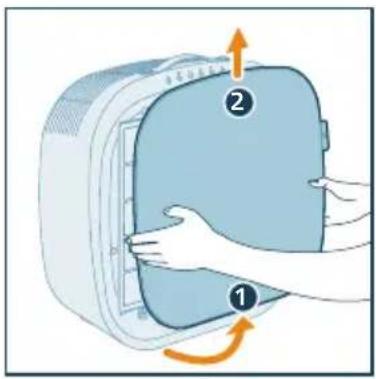
3 Štitnik očistite mekom četkom.
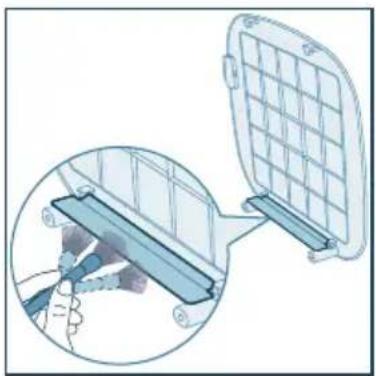
natural_image
Diagram showing a device being inserted into a grid panel, with a magnified inset illustrating the process (no text or symbols present)
natural_image
Illustration of a trash bin with an orange arrow indicating particle dispersion from a grid-patterned container (no text or symbols)
5 Očistite predfilter pod mlazom vode.
Temperatura vode ne smije biti viša od 40 °C.
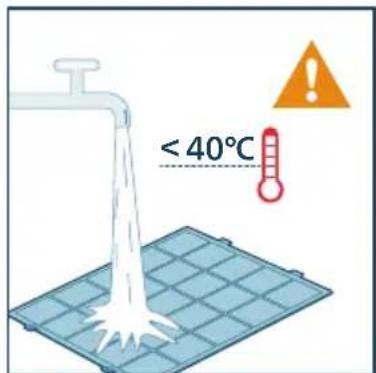
6 Predfiltar osušite na zraku.
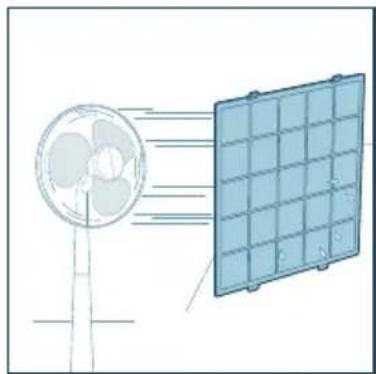
natural_image
Diagram showing airflow from a fan to a solar panel array (no text or symbols)
7 Integrirani HEPA filtar i filtar s aktivnim ugljenom očistite usisivačem.
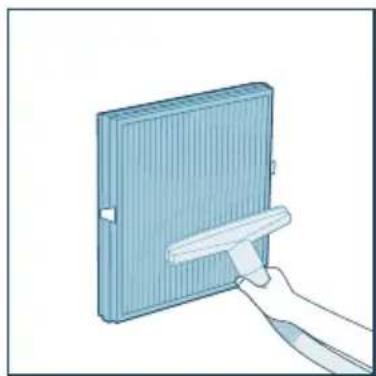
natural_image
Illustration of a hand holding a white object next to a blue rectangular panel (no text or symbols visible)
8 Vratite predfiltar u aparat. Provjerite je li predfiltar umetnut u lijevu i desnu rupu na donjoj strani. Kada dvije kopče na vrhu filtra budu pravilno postavljene, čut ćete „klik”.
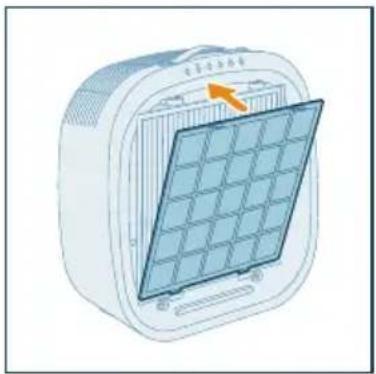
natural_image
Illustration of a portable electric heater with a grid panel and orange arrow indicating the blade (no text or symbols)
9 Vratite prednji poklopac.
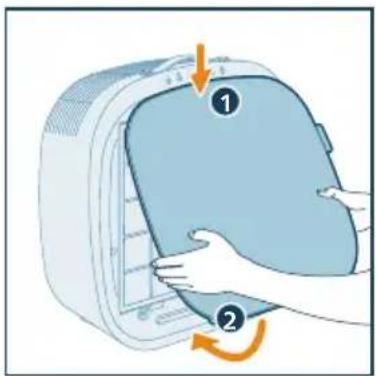
10 Nakon čišćenja filtra temeljito operite ruke.
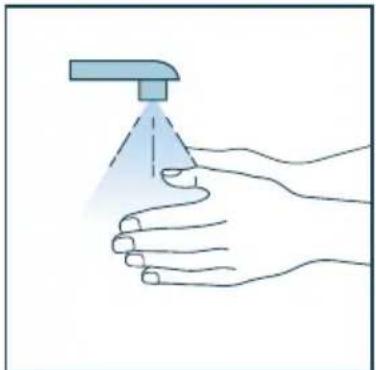
natural_image
Illustration of a hand holding a spray can with a blue tip, no text or symbols present
Zamjena filtra
Objašnjenje blokiranja radi zaštite zdravlja
natural_image
Illustration of a white rectangular device with a warning symbol (no text or labels)
Svjetlosna traka najprije svijetli crveno i nastavlja svijetliti crveno odmah nakon što iskopčate aparat iz struje, ponovo ga ukopčate i uključite.
2 Izvucite donji dio prednjeg poklopca iz aparata i podignite ga prema gore.
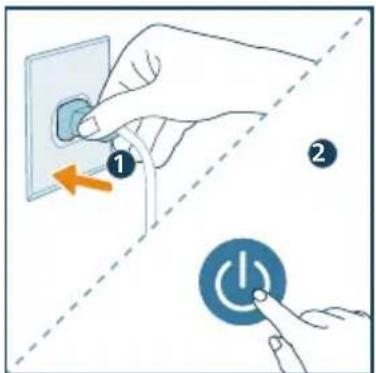
3 Pritisnite kopče s obje strane predfiltra kako biste ga izvadili.
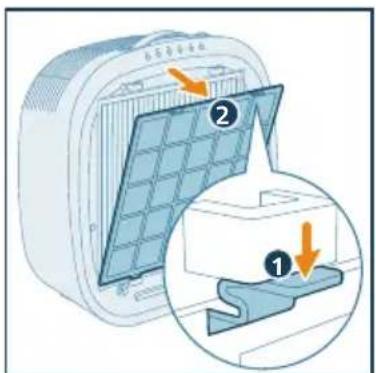
4 Izvadite integrirani HEPA filtar i filtar s aktivnim ugljenom iz aparata.
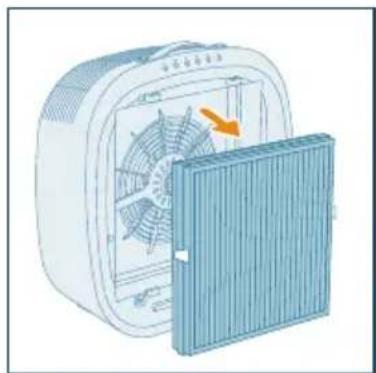
natural_image
Illustration of a portable air conditioner unit with fan and cooling panel (no text or symbols)
5 Iskorišteni filtar odložite u otpad.
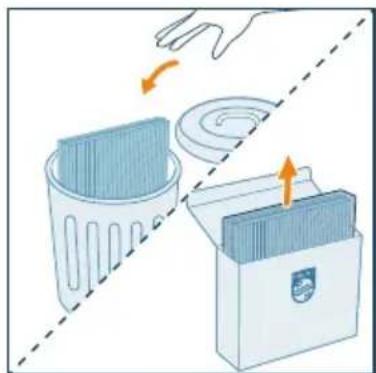
natural_image
Illustration of a hand placing a trash bin into a storage case with arrows indicating motion (no text or symbols)
natural_image
Illustration of a container with a side panel and an upward arrow, no text or symbols present
7 Vratite integrirani HEPA filtar i filtar s aktivnim ugljenom u aparat, pazeći da filtar s dvije kopče bude okrenut prema van.
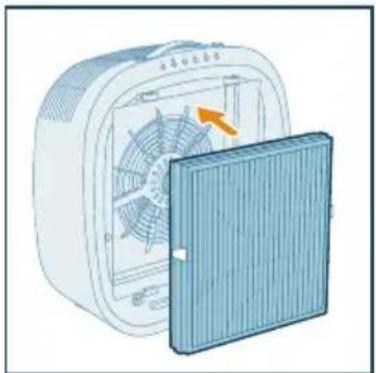
natural_image
Illustration of a portable air conditioner unit with fan and cooling cover (no text or symbols)
8 Vratite predfilter u aparat. Provjerite je li predfilter umetnut u lijevu i desnu rupu na donjoj strani. Kada dvije kopče na vrhu filtra budu pravilno postavljene, čut ćete „klik”.
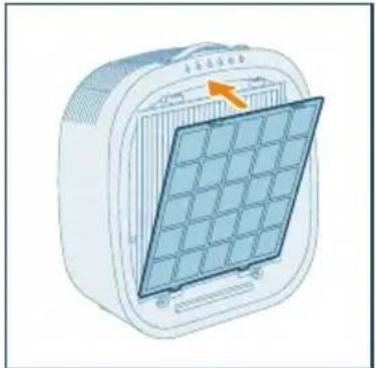
natural_image
Illustration of a portable air conditioner unit with a grid panel and orange arrow indicating airflow direction (no text or symbols)
9 Vratite prednji poklopac.
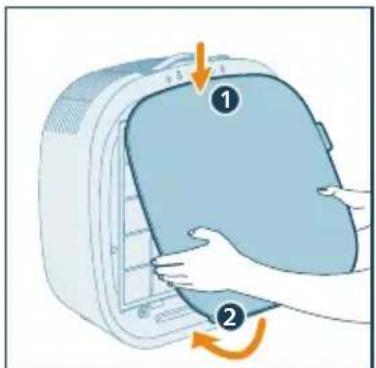
natural_image
Illustration of a hand pressing down on a computer monitor with an arrow indicating rotation (no text or symbols)
10 Utikač pročišćivača ukopčajte u strujnu utičnicu i pritisnite ⚠ako biste uključili pročišćivač.
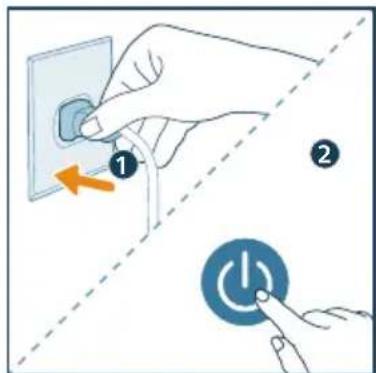
natural_image
Illustration of a hand holding a spray can with a dropper (no text or symbols)
Napomena:
- Nemojte mirisati filtar jer su u njemu skupljeni onečišćivači iz zraka.
6 Spremanje
1 Isključite pročišćivač zraka i odspojite ga od električne utičnice.
2 Očistite aparat, senzor za PM2.5 i plin te površinu filtra (pogledajte poglavlje „Čišćenje i održavanje“).
3 Prije spremanja pričekajte da se svi dijelovi temeljito osuše.
4 Filtre zamotajte u plastične vrećice koje ne propuštaju zrak.
5 Pročišćivač zraka i filtre spremite na hladno i suho mjesto.
6 Nakon rada s filtrom obavezno temeljito operite ruke.
7 Rješavanje problema
natural_image
Six circular icons representing power, refresh, cat face, lightbulb, lock, and Wi-Fi symbols (no text or labels)
Kezelögombok
natural_image
Illustration of a hand pressing down on a blue appliance with an arrow indicating rotation (no text or symbols)
natural_image
Illustration of a heating fan with cooling effect, showing fan blades and cooling unit (no text or symbols)
natural_image
Diagram of a container with a side panel and an upward arrow, no text or symbols present
natural_image
Illustration of a small electric fan with a cooling cover removed, showing internal blades and airflow direction (no text or symbols)
natural_image
Illustration of a portable air conditioner unit with a grid panel and orange arrow pointing to the front panel (no text or symbols)
natural_image
Illustration of a hand pressing down on a computer case with an orange arrow indicating rotation (no text or symbols)
natural_image
Illustration of a hand interacting with a Wi-Fi icon and clock symbol (no text or symbols present)
natural_image
Illustration of a white electronic device connected to a wall-mounted power outlet (no text or symbols visible)
natural_image
Illustration of a hand pressing a button with a circular icon (no text or symbols)
natural_image
Illustration of a hand interacting with a circular icon containing a star and three dots, next to four icons: crescent moon, star, circle, and spiral (no text or symbols)
natural_image
Illustration of a hand interacting with a circular button and three icons (star, crescent, spiral) on a control panel (no text or symbols)
natural_image
Illustration of a hand interacting with a shield emblem and a spiral symbol (no text or labels)
natural_image
Illustration of a hand interacting with a padlock icon and a cat, no text or symbols present
natural_image
Illustration of a hand interacting with a lock icon and clock, no text or symbols present
natural_image
Illustration of a smart home control device with a hand pressing a button (no text or symbols present)
natural_image
Illustration of a white rectangular device with a blue button and a blue circular button, connected by a finger to the right (no text or symbols)
natural_image
Illustration of a white rectangular device with a button and a blue circular icon, accompanied by a clock and timer (no text or symbols on the device itself)
natural_image
Illustration of a hand inserting a card into a device (no text or symbols visible)
natural_image
Illustration of a hand inserting a device into a plastic housing (no text or symbols visible)
A szűrők tisztítása
natural_image
Diagram showing a device being inserted into a grid panel, with a magnified inset illustrating the process (no text or symbols present)
natural_image
Illustration of a trash bin with a plastic tray and an orange arrow indicating particle motion (no text or symbols)
natural_image
Diagram showing airflow from a fan to a solar panel array (no text or symbols)
natural_image
Illustration of a hand holding a white tool next to a blue rectangular panel (no text or symbols visible)
natural_image
Illustration of a portable air conditioner unit with a grid panel and orange arrow indicating airflow direction (no text or symbols)
natural_image
Illustration of a hand pressing down on a blue bag with an arrow indicating rotation (no text or symbols)
natural_image
Illustration of a hand holding a spray can with a blue tip, no text or symbols present
A szűrő cseréje
natural_image
Illustration of a white rectangular device with a warning symbol (no text or labels)
natural_image
Illustration of a portable air conditioner unit with fan and cooling panel (no text or symbols)
natural_image
Illustration of a hand placing a trash bin into a plastic bag with an arrow indicating rotation (no text or symbols)
natural_image
3D diagram of a container with an upward arrow, no text or symbols present
natural_image
Illustration of a fan inside a 3D printer with an open lid showing internal blades (no text or symbols)
natural_image
Illustration of a solar panel mounted on a heating unit (no text or symbols visible)
natural_image
Illustration of a hand pressing down on a computer monitor with a scroll wheel (no text or symbols)
natural_image
Illustration of a hand holding a spray can with a dropper (no text or symbols)
Megjegyzés:
natural_image
Six circular icons representing power, refresh, cat face, lightbulb, lock, and Wi-Fi symbols (no text or labels)
Pulsanti di comando
natural_image
Illustration of a hand placing a blue bag into a refrigerator with an arrow indicating rotation (no text or symbols)
natural_image
Illustration of a fan with an orange arrow indicating rotation, next to a blue heating panel (no text or symbols)
natural_image
3D diagram of a container with an upward arrow indicating flow or movement (no text or symbols)
natural_image
Illustration of a fan device with an orange arrow indicating rotation or change, next to a blue cover (no text or symbols)
natural_image
Illustration of a portable air conditioner unit with a grid panel and orange arrow indicating the front panel (no text or symbols)
natural_image
Illustration of a hand pressing down on a computer case with an orange arrow indicating rotation (no text or symbols)
flowchart
graph TD
    A["Mobile Device"] -->|Signal Transmission| B["Wireless Device"]
    C["Smart Phone"] --> D["Router"]
Nota:
natural_image
Illustration of a white electronic device connected to a wall-mounted power outlet with an arrow indicating direction (no text or symbols present)
natural_image
Illustration of a hand pressing a button with a power symbol (no text or labels)
natural_image
Illustration of a hand interacting with a circular icon containing three dots, next to four circular icons below (star, crescent, circle, spiral) — no text or symbols present.
natural_image
Illustration of a hand interacting with a circular button and three icons (star, crescent, spiral) below, no text or symbols present.
natural_image
Illustration of a hand interacting with a circular icon and three icons (sunny, Earth, spiral) on a control panel (no text or symbols)
natural_image
Illustration of a hand pointing at a blue circular emblem with a skull and spiral symbol (no text or labels)
natural_image
Illustration of a hand interacting with a blue circular icon containing a cat and lock symbol (no text or labels)
natural_image
Illustration of a hand interacting with a lock icon and clock, no text or symbols present
natural_image
Illustration of a white rectangular device with a hand pointing at a touchscreen button, accompanied by a colorful interface panel (no text or symbols on the device itself)
natural_image
Illustration of a white electronic device with a blue circular button and a finger pointing at it (no text or symbols)
natural_image
Illustration of a smart air conditioner with a clock and timer icon (no text or symbols)
natural_image
Illustration of a hand inserting a card into a device (no text or symbols visible)
natural_image
Illustration of a hand inserting a card into a device (no text or symbols visible)
Pulizia dei filtri
natural_image
Diagram showing a device being inserted into a grid array, with a magnified inset illustrating the process (no text or symbols present)
natural_image
Illustration of a trash bin with an orange arrow indicating a chemical process or disposal (no text or symbols present)
natural_image
Diagram showing airflow from a fan to a solar panel array (no text or symbols)
natural_image
Illustration of a hand holding a white object next to a blue rectangular panel (no text or symbols visible)
natural_image
Illustration of a portable air conditioner unit with a grid panel and orange arrow indicating airflow direction (no text or symbols)
natural_image
Illustration of a hand pressing down on a device with a numbered label (1 and 2), showing a circular motion indicator (no text or symbols beyond labels)
natural_image
Illustration of a hand holding a spray can with a blue tip, no text or symbols present
natural_image
Illustration of a white rectangular device with a warning symbol (no text or labels)
natural_image
Illustration of a portable air conditioner unit with fan and cooling panel (no text or symbols)
natural_image
Illustration of a hand placing a trash bin into a storage case with an arrow indicating rotation (no text or symbols)
natural_image
Diagram of a container with a side panel and an upward arrow, no text or symbols present
natural_image
Illustration of a fan inside an electric fan with a cooling cover removed (no text or symbols)
natural_image
Illustration of a portable air conditioner unit with a grid panel and orange arrow indicating the grille (no text or symbols)
natural_image
Illustration of a hand pressing down on a device with a scroll arrow indicating rotation (no text or symbols)
natural_image
Illustration of a hand holding a spray can with a dropper tip (no text or symbols)
Nota:
natural_image
Six circular icons representing power, refresh, cat face, lightbulb, lock, and Wi-Fi symbols (no text or labels)
Valdymo mygtukai
natural_image
Illustration of a heating fan with cooling effect, showing fan blades and cooling cover (no text or symbols)
natural_image
Diagram of a container with a stack of liquid and an upward arrow, no text or symbols present
natural_image
Illustration of a portable air conditioner unit with fan and ventilation cover, showing internal fan structure (no text or symbols)
natural_image
Illustration of a portable air conditioner unit with a grid panel and orange arrow indicating airflow direction (no text or symbols)
flowchart
graph TD
    A["WiFi Signal"] --> B["Wireless Device"]
    C["Smartphone"] --> D["Mobile Device"]
    D --> E["Wireless Device"]
    style A fill:#4CAF50,stroke:#388E3C
    style B fill:#4CAF50,stroke:#388E3C
    style C fill:#4CAF50,stroke:#388E3C
    style D fill:#FFA500,stroke:#388E3C
    style E fill:#FFA500,stroke:#388E3C
Pastaba:
natural_image
Illustration of a hand interacting with a Wi-Fi icon and clock (no text or symbols)
natural_image
Illustration of a white rectangular device connected to a wall-mounted power outlet with an arrow indicating airflow (no text or symbols present)
natural_image
Illustration of a hand pressing a circular button with a power symbol (no text or labels)
natural_image
Illustration of a hand interacting with a circular icon and three circular symbols (star, crescent, spiral) below it, no text or labels present.
natural_image
Illustration of a hand interacting with a circular icon containing three dots and arrows, next to three circular icons below (star, crescent, spiral) — no text or symbols present.
natural_image
Illustration of a hand interacting with a circular icon and three icons (syringe, clock, spiral) below it, no text or symbols present.
natural_image
Illustration of a hand pressing a button onto a rectangular object with a spiral symbol below (no text or labels)
Gyvūnų užraktas
natural_image
Illustration of a hand interacting with a padlock icon and a cat, no text or symbols present
natural_image
Illustration of a white rectangular device with a hand interacting with a smartphone displaying a color-coded app interface (no text or symbols on the device itself)
natural_image
Illustration of a white square electronic device with a blue circular button labeled 'O' and a hand pointing at it (no text or symbols on the device itself)
natural_image
Illustration of a white rectangular device with a clock and a blue circular button, no text or symbols present.
natural_image
Illustration of a hand inserting a card into a device (no text or symbols visible)
natural_image
Illustration of a hand inserting a device into a plastic housing with an arrow indicating rotation (no text or symbols)
Filtrų valymas
natural_image
Diagram showing a device with a grid panel and a magnified view of its internal structure (no text or symbols)
natural_image
Illustration of a plastic waste bin with an orange arrow indicating particle dispersion (no text or symbols)
natural_image
Diagram showing airflow from a fan to a solar panel array (no text or symbols)
natural_image
Illustration of a hand holding a tool interacting with a blue rectangular panel (no text or symbols visible)
natural_image
Illustration of a portable air conditioner unit with a grid panel and orange arrow indicating the front panel (no text or symbols)
natural_image
Illustration of a hand holding a spray can with a blue tip, no text or symbols present
Filtro keitimas
natural_image
Illustration of a white rectangular device with a red base and an orange warning triangle (no text or symbols on the device itself)
natural_image
Illustration of a portable air conditioner unit with fan and cooling panel (no text or symbols)
natural_image
Illustration of a hand placing a trash bin into a plastic bag, with arrows indicating motion (no text or symbols)
natural_image
Illustration of a container with a side panel and an upward arrow, no text or symbols present
natural_image
Illustration of a fan inside a box with an orange arrow indicating airflow or heat transfer (no text or symbols)
natural_image
Illustration of a portable air conditioner unit with a grid-patterned panel and an orange arrow pointing to the top panel (no text or symbols)
natural_image
Illustration of a hand holding a spray can with a blue tip, no text or symbols present
Pastaba:
natural_image
Six circular icons representing power, refresh, cat face, lightbulb, lock, and Wi-Fi symbols (no text or labels)
Vadības pogas
natural_image
Illustration of a hand pressing down on a blue bag with an arrow indicating rotation (no text or symbols)
natural_image
Illustration of a fan inside an electric fan with a partially open panel showing internal blades (no text or symbols)
natural_image
Diagram of a container with a side panel and an upward arrow, no text or symbols present
natural_image
Illustration of a small electric fan with a cooling cover removed, showing airflow direction (no text or symbols)
natural_image
Illustration of a portable air conditioner unit with a grid panel and orange arrow pointing to the front panel (no text or symbols)
natural_image
Illustration of a hand pressing down on a device with an arrow indicating rotation (no text or symbols present)
2 Piespiediet un turiet pogu nospiestu 3 sekundes, līdz atskan pīkstiens.
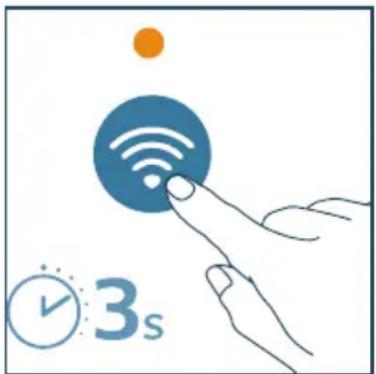
natural_image
Illustration of a hand interacting with a Wi-Fi symbol and clock icon (no text or symbols)
natural_image
Illustration of a white electronic device connected to a wall with an arrow indicating power or connection (no text or symbols present)
natural_image
Illustration of a white electronic device with a blue circular button and a finger pointing at it (no text or symbols)
natural_image
Illustration of a hand interacting with a circular icon containing three dots and arrows, next to four symbolic icons: crescent moon, star, circle, and spiral (no text or labels)
natural_image
Illustration of a hand interacting with a circular icon containing three dots, next to three circular icons below (no text or symbols)
natural_image
Illustration of a hand interacting with a circular icon and three icons (sunny, Earth, spiral) on a control panel (no text or symbols)
natural_image
Illustration of a hand pressing a button onto a rectangular object with a spiral symbol below (no text or labels)
natural_image
Illustration of a hand interacting with a padlock icon and lock symbol (no text or symbols present)
natural_image
Illustration of a hand interacting with a lock icon and clock, no text or symbols present
natural_image
Illustration of a white rectangular device with a hand pointing at a touchscreen icon, alongside a colorful circular interface (no text or symbols)
natural_image
Illustration of a white square electronic device with a blue circular button and a finger pointing at it (no text or symbols)
3 Lai izslēgtu gaismas joslu, 3 sekundes turiet nospiestu pogu ♀
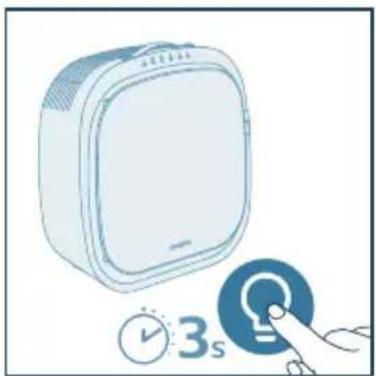
natural_image
Illustration of a stylized air conditioner with a clock and timer icon (no text or symbols)
2 Atveriet dalinu sensora pârsegu.
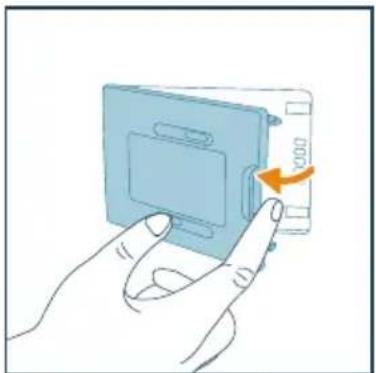
natural_image
Illustration of a hand pressing a blue plastic component with an orange arrow indicating rotation (no text or symbols)
4 Aizveriet dalinu sensoru.
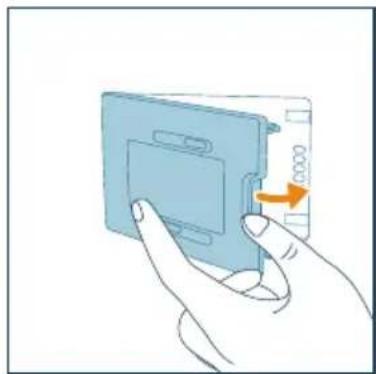
natural_image
Illustration of a hand inserting a card into a device (no text or symbols visible)
Filtru tīrīšana
natural_image
Diagram showing a device with a grid panel and a magnified view of its internal structure (no text or symbols)
natural_image
Illustration of a plastic waste bin with a tray of plastic waste being poured into it, accompanied by a separate empty trash bin (no text or symbols present)
natural_image
Diagram showing airflow from a fan to a solar panel array (no text or symbols)
natural_image
Illustration of a hand holding a tool interacting with a blue rectangular panel (no text or symbols visible)
natural_image
Illustration of a portable air conditioner unit with a grid panel and control panel (no text or symbols)
natural_image
Illustration of a hand pressing down on a device with a numbered label (1 and 2), showing no text or symbols beyond labels.
natural_image
Illustration of a hand spraying a spray bottle with a triangular tip (no text or symbols)
Filtra maina
natural_image
Illustration of a white electronic device with a warning symbol (no text or labels)
natural_image
Illustration of a portable air conditioner unit with fan and cooling panel (no text or symbols)
natural_image
Illustration of a hand placing a trash bin into a storage case with an arrow indicating rotation (no text or symbols)
natural_image
Diagram of a container with an upward arrow indicating flow or movement (no text or symbols)
natural_image
Illustration of a fan device with an orange arrow indicating rotation or airflow direction (no text or symbols)
natural_image
Illustration of a solar panel mounted on a heating element, showing grid layout and control panel (no text or symbols)
natural_image
Illustration of a hand spraying a spray bottle with a triangular tip (no text or symbols)
Piezime.
natural_image
Six circular icons representing power, refresh, cat face, lightbulb, lock, and Wi-Fi symbols (no text or labels)
Копчиња за контрола
natural_image
Illustration of a heating fan with a cooling cover removed, showing airflow direction (no text or symbols)
natural_image
3D diagram of a container with an upward arrow indicating flow or movement (no text or symbols)
natural_image
Illustration of a blue industrial fan with an orange arrow indicating rotation or airflow direction (no text or symbols)
natural_image
Illustration of a portable air conditioner unit with a grid panel and orange arrow indicating airflow direction (no text or symbols)
natural_image
Illustration of a hand pressing down on a computer case with an arrow indicating rotation (no text or symbols)
flowchart
graph TD
    A["Mobile Device"] -->|Wireless Signal| B["Wireless Device"]
    C["Smart Phone"] -->|Wireless Signal| D["Wireless Device"]
    style A fill:#4CAF50,stroke:#388E3C
    style B fill:#4CAF50,stroke:#388E3C
    style C fill:#4CAF50,stroke:#388E3C
    style D fill:#4CAF50,stroke:#388E3C
Забелешка:
natural_image
Illustration of a hand interacting with a Wi-Fi symbol and clock icon (no text or symbols)
natural_image
Illustration of a white electronic device connected to a wall-mounted power outlet with an arrow indicating direction (no text or symbols present)
natural_image
Illustration of a hand pressing a circular button with a battery icon (no text or symbols)
natural_image
Illustration of a hand interacting with a circular icon containing a star and three dots, next to four symbolic icons: crescent moon, star, circle, and spiral (no text or labels)
natural_image
Illustration of a hand interacting with a circular icon containing three dots, next to three circular icons below (no text or symbols)
natural_image
Illustration of a hand interacting with a circular button and three icons (star, crescent, spiral) on a grid background (no text or symbols)
natural_image
Illustration of a hand interacting with a blue circular emblem and a spiral symbol (no text or labels)
natural_image
Illustration of a hand interacting with a padlock icon and a cat silhouette (no text or symbols)
natural_image
Illustration of a white electronic device connected to a touchscreen icon with a hand pointing at it (no text or symbols present)
natural_image
Illustration of a white rectangular device with a circular button labeled 'A' and a hand pointing at it (no text or symbols on the device itself)
natural_image
Illustration of a white air conditioner unit with a blue circular button and a hand interacting with it (no text or symbols)
natural_image
Illustration of a hand inserting a card into a device (no text or symbols visible)
natural_image
Illustration of a hand holding a blue computer case with an orange arrow indicating rotation (no text or symbols)
Чистење на филтрите
natural_image
Diagram showing a device with a grid panel and a magnified view of its internal structure (no text or symbols)
natural_image
Illustration of a trash bin with a plastic tray and an orange arrow indicating particle motion (no text or symbols)
natural_image
Diagram showing airflow from a fan to a solar panel array (no text or symbols)
natural_image
Illustration of a hand holding a rectangular object with a tool, no text or symbols present
natural_image
Illustration of a portable air conditioner unit with a grid panel and orange arrow indicating the component (no text or symbols)
natural_image
Illustration of a hand holding a spray can with a dropper (no text or symbols)
Замена на филтерот
natural_image
Illustration of a white rectangular device with a red base and an orange warning triangle (no text or symbols on the device itself)
natural_image
Illustration of a portable air conditioner unit with fan and cooling panel (no text or symbols)
natural_image
Illustration of a hand placing a trash bin into a storage case with an arrow indicating rotation (no text or symbols)
natural_image
3D diagram of a container with an upward arrow, no text or symbols present
natural_image
Illustration of a fan with an orange arrow indicating rotation or airflow, next to a blue cover (no text or symbols)
natural_image
Illustration of a portable air conditioner unit with a grid panel and orange arrow indicating the component (no text or symbols)
natural_image
Illustration of a hand holding a spray can with a funnel, no text or symbols present
Забелешка:
natural_image
Six circular icons representing power, refresh, cat face, lightbulb, lock, and Wi-Fi symbols (no text or labels)
Bedieningsknoppen
natural_image
Illustration of a hand pressing down on a blue bag with an arrow indicating motion (no text or symbols)
natural_image
Illustration of a heating fan with a blue cover and orange arrow indicating airflow direction (no text or symbols)
natural_image
Diagram of a container with an upward arrow indicating flow or movement (no text or symbols)
natural_image
Illustration of a fan inside an electric fan with a blue cover partially removed (no text or symbols)
natural_image
Illustration of a portable air conditioner unit with a grid panel and orange arrow indicating the ventilation direction (no text or symbols)
flowchart
graph TD
    A["Mobile Device"] -->|Wireless Signal| B["Wireless Device"]
    B --> C["Smart Phone"]
    C --> D["User Interface"]
Opmerking:
natural_image
Illustration of a hand interacting with a Wi-Fi symbol and clock icon (no text or symbols)
natural_image
Illustration of a white electronic device connected to a wall-mounted power outlet (no text or symbols)
natural_image
Illustration of a white electronic device with a blue circular button and a finger pointing at it (no text or symbols)
natural_image
Illustration of a hand interacting with a circular icon containing three dots and arrows, accompanied by four symbolic icons below (star, crescent, circle, spiral) — no text or labels present.
natural_image
Illustration of a hand interacting with a circular button and three icons (star, crescent, spiral) below, no text or symbols present.
natural_image
Illustration of a hand interacting with a circular icon and three icons (sunny, Earth, spiral) on a control panel (no text or symbols)
natural_image
Illustration of a hand interacting with a blue circular icon containing a skull and a spiral symbol (no text or labels)
natural_image
Illustration of a hand interacting with a padlock icon and a cat face, no text or symbols present
natural_image
Illustration of a hand interacting with a lock icon and clock, no text or symbols present
natural_image
Illustration of a smart home control device with a hand interacting with a touchscreen button (no text or symbols present)
natural_image
Illustration of a white electronic device with a blue circular button and a finger pointing at it (no text or symbols)
natural_image
Illustration of a white rectangular device with a clock and a blue circular button, no text or symbols present.
natural_image
Illustration of a hand inserting a card into a device (no text or symbols visible)
natural_image
Illustration of a hand inserting a device into a blue plastic housing with an arrow indicating rotation (no text or symbols)
De filters reinigen
natural_image
Diagram showing a device with a grid panel and a magnified view of its internal structure (no text or symbols)
natural_image
Illustration of a plastic waste bin with an orange arrow indicating particle motion (no text or symbols)
natural_image
Diagram showing airflow from a fan to a solar panel array (no text or symbols)
natural_image
Illustration of a hand holding a white tool next to a blue rectangular panel (no text or symbols visible)
natural_image
Illustration of a portable air conditioner unit with a grid panel and orange arrow indicating the grille (no text or symbols)
natural_image
Illustration of a hand pressing down on a device with a numbered label (1 and 2), showing no text or symbols beyond labels.
natural_image
Illustration of a hand spraying a spray bottle with a blue tip (no text or symbols)
natural_image
Illustration of a white rectangular device with a warning symbol (no text or labels)
natural_image
Illustration of a portable air conditioner unit with fan and cooling panel (no text or symbols)
natural_image
Illustration of a hand placing a trash bin into a plastic bag, with arrows indicating motion (no text or symbols)
natural_image
Illustration of a container with liquid and an upward arrow, no text or symbols present
natural_image
Illustration of a fan inside a 3D printer with an open lid showing internal blades and a yellow arrow indicating rotation (no text or symbols)
natural_image
Illustration of a portable solar panel with a grid and orange arrow indicating the component (no text or symbols)
natural_image
Illustration of a hand pressing down on a device with a scroll arrow indicating rotation (no text or symbols)
natural_image
Illustration of a hand spraying a spray bottle onto a palm (no text or symbols)
Opmerking:
natural_image
Six circular icons representing power, refresh, cat face, lightbulb, lock, and Wi-Fi symbols (no text or labels)
Kontrollknapper
natural_image
Illustration of a hand placing a blue bag into a white container with arrows indicating rotation (no text or symbols)
natural_image
Illustration of a heating fan with cooling effect, showing fan blades and cooling unit (no text or symbols)
natural_image
Diagram of a container with an upward arrow indicating flow or movement (no text or symbols present)
natural_image
Illustration of a fan device with an orange arrow indicating rotation or change, next to a blue cover (no text or symbols)
natural_image
Illustration of a portable air conditioner unit with a grid panel and orange arrow indicating airflow direction (no text or symbols)
Forklaring av Wi-Fi-indikator
| Wi-Fi-ikonstatus Status for Wi-Fi-tilkoblingen |
| Blinkende oransje Koble til smarttelefonen |
| Vedvarende oransje Koblet til smarttelefonen |
| Blinkende hvitt Kobler til serveren |
| Vedvarende hvitt Koblet til serveren |
| Av Wi-Fi-funksjon deaktivert | |
Wi-Fi-tilkobling
natural_image
Illustration of a white electronic device connected to a wall-mounted power outlet (no text or symbols)
2 Trykk på -khappen for å slå på luftrenseren mens indikatorlampen lyser.
→Luftrenseren piper. Lyslisten tennes.
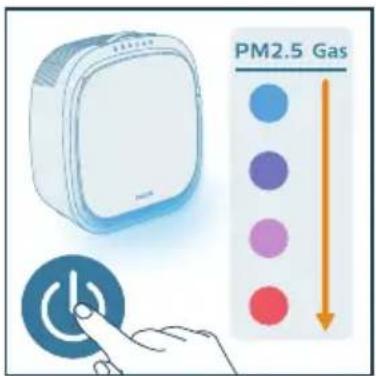
natural_image
Illustration of a hand pressing a button with a circular icon (no text or symbols)
natural_image
Illustration of a hand interacting with a circular icon containing a star and eye symbol, accompanied by three icons below (star, crescent, spiral) — no text or symbols present.
natural_image
Illustration of a hand interacting with a circular icon and three circular symbols below (no text or labels)
natural_image
Illustration of a hand interacting with a circular button and three icons (sunny, Earth, spiral) on a control panel (no text or symbols)
Modus for pelsfang-boost
Merk:
natural_image
Illustration of a hand pressing a button onto a rectangular base with a spiral symbol (no text or labels)
natural_image
Illustration of a hand interacting with a padlock icon and a cat face, no text or symbols present
2 Hold inne i tre sekunder for å deaktivere dyrelåsen.
→Apparatet piper.
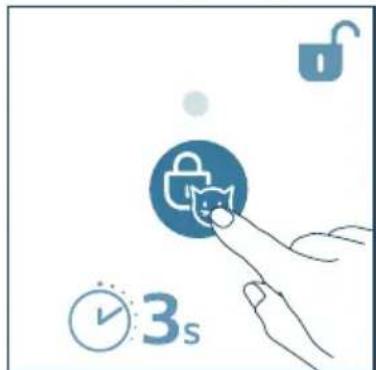
natural_image
Illustration of a hand interacting with a lock icon and clock, no text or symbols present
natural_image
Illustration of a white electronic device with a hand interacting with a touchscreen icon (no text or symbols present)
natural_image
Illustration of a white electronic device with a circular button and a blue square button, connected by a finger (no text or symbols)
natural_image
Illustration of a white rectangular device with a clock and a blue circular button, no text or symbols present.
natural_image
Illustration of a hand inserting a card into a device (no text or symbols visible)
4 Lukk luftkvalitetssensoren.
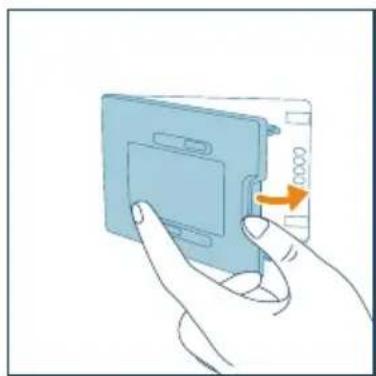
natural_image
Illustration of a hand holding a blue electronic device with an orange arrow indicating rotation (no text or symbols)
Rengjøre filtrene
3 Bruk en myk børste när du rengjør skjoldet.
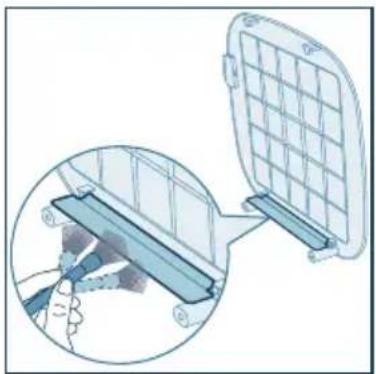
natural_image
Diagram showing a device with a grid panel and a magnified view of its internal structure (no text or symbols)
natural_image
Illustration of a plastic tray with scattered white particles being poured into a trash bin (no text or symbols)
natural_image
Diagram showing airflow from a fan to a solar panel array (no text or symbols)
natural_image
Illustration of a hand holding a small object next to a blue rectangular panel (no text or symbols visible)
natural_image
Illustration of a portable air conditioner unit with a grid panel and orange arrow indicating the grille (no text or symbols)
natural_image
Illustration of a hand pressing down on a blue plastic bag with an arrow indicating rotation (no text or symbols)
10 Vask hendene grundig etter at du har rengjort filteret.
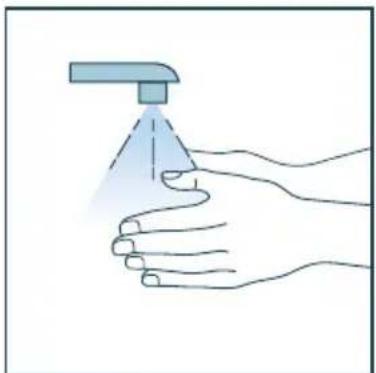
natural_image
Illustration of a hand holding a spray can with a dropper (no text or symbols)
Skifte filteret
natural_image
Illustration of a white rectangular device with a warning symbol (no text or labels)
natural_image
Illustration of a portable air conditioner unit with fan and cooling panel (no text or symbols)
5 Kast det brukte filteret.
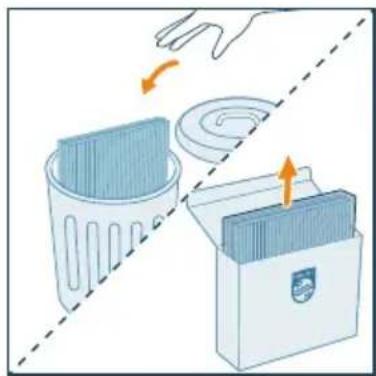
natural_image
Illustration of a hand placing a trash bin into a storage case with an arrow indicating rotation (no text or symbols)
natural_image
Illustration of a container with a side panel and an upward arrow, no text or symbols present
natural_image
Illustration of a portable air conditioner unit with fan and cooling panel (no text or symbols)
natural_image
Illustration of a portable air conditioner unit with a grid panel and orange arrow indicating airflow direction (no text or symbols)
11 Nullstill levetiden til det integrerte HEPAfilter og aktivt karbon-filteret ved å holde inne modusknappen og lysknappen samtidig i tre sekunder, eller nullstill den via appen.
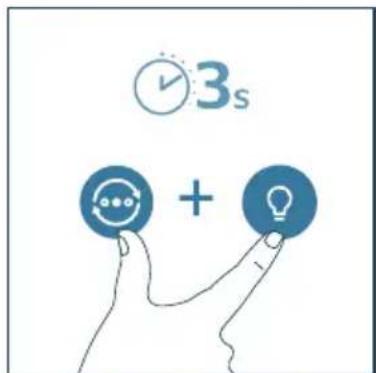
natural_image
Illustration of a hand holding a spray can with a blue tip, no text or symbols present
Merk:
- Ikke lukt på filteret, siden det har samlet opp forurensende stoffer fra luften.
6 Oppbevaring
natural_image
Six circular icons representing power, refresh, cat face, lightbulb, lock, and Wi-Fi symbols (no text or labels)
natural_image
Illustration of a hand placing a blue bag into a refrigerator with an orange arrow indicating rotation (no text or symbols)
natural_image
Illustration of a front-mounted air conditioner unit with fan and cooling panel (no text or symbols)
natural_image
3D diagram of a container with an upward arrow, no text or symbols present
natural_image
Illustration of a fan device with an orange arrow indicating rotation or change, next to a blue panel (no text or symbols)
natural_image
Illustration of a portable air conditioner unit with a grid panel and orange arrow indicating the front panel (no text or symbols)
natural_image
Illustration of a hand pressing down on a computer case with an orange arrow indicating rotation (no text or symbols)
flowchart
graph TD
    A["WiFi Signal"] --> B["Wireless Device"]
    C["Smart Phone"] --> D["Mobile Device"]
    style A fill:#4CAF50,stroke:#388E3C
    style B fill:#4CAF50,stroke:#388E3C
    style C fill:#4CAF50,stroke:#388E3C
    style D fill:#FF9900,stroke:#388E3C
Uwaga:
natural_image
Illustration of a hand interacting with a Wi-Fi icon and clock symbol (no text or symbols present)
natural_image
Illustration of a white electronic device connected to a wall with a power outlet (no text or symbols)
natural_image
Illustration of a hand pressing a button with a circular icon (no text or symbols)
natural_image
Illustration of a hand interacting with a circular icon containing three dots and arrows, next to four symbolic icons (star, crescent, circle, spiral) below (no text or labels)
natural_image
Illustration of a hand interacting with a circular button and three icons (syringe, refresh arrow, spiral) on a blue background (no text or symbols)
natural_image
Illustration of a hand interacting with a circular icon and three icons (star, crescent, spiral) on a control panel (no text or symbols)
natural_image
Illustration of a hand interacting with a blue circular icon containing a skull and a spiral symbol (no text or labels)
natural_image
Illustration of a hand interacting with a padlock icon and a cat face, no text or symbols present
natural_image
Illustration of a white electronic device with a hand interacting with a touchscreen icon (no text or symbols present)
natural_image
Illustration of a white rectangular device with a circular button labeled 'P' and a hand pointing at it (no text or symbols on the device itself)
natural_image
Illustration of a smart air conditioner with a clock and timer next to a button (no text or symbols)
natural_image
Illustration of a hand inserting a card into a device (no text or symbols visible)
natural_image
Illustration of a hand holding a blue electronic device with a scroll wheel (no text or symbols visible)
Czyszczenie filtrów
natural_image
Diagram showing a device with a grid panel and a magnified view of its internal structure (no text or symbols)
natural_image
Illustration of a plastic waste bin with an orange arrow indicating particle dispersion (no text or symbols)
natural_image
Diagram showing airflow from a fan to a solar panel array (no text or symbols)
natural_image
Illustration of a hand holding a small object next to a blue rectangular panel (no text or symbols visible)
natural_image
Illustration of a portable air conditioner unit with a grid panel and orange arrow indicating airflow direction (no text or symbols)
natural_image
Illustration of a hand pressing down on a device with an arrow indicating rotation (no text or symbols present)
natural_image
Illustration of a hand holding a spray can with a blue tip, no text or symbols present
Wymiana filtra
natural_image
Illustration of a white rectangular device with a red base and an orange warning symbol (no text or labels)
natural_image
Illustration of a portable air conditioner unit with fan and cooling panel (no text or symbols)
natural_image
Illustration of a hand placing a trash bin into a plastic bag, with arrows indicating motion (no text or symbols)
natural_image
Illustration of a container with a side panel and an upward arrow, no text or symbols present
natural_image
Illustration of a small electric fan with a cooling cover removed, showing internal fan blades and a highlighted orange arrow (no text or symbols)
natural_image
Illustration of a portable air conditioner unit with a grid panel and orange arrow indicating the grille (no text or symbols)
natural_image
Illustration of a hand pressing down on a device with a scroll wheel (no text or symbols)
natural_image
Illustration of a hand holding a spray can with a dropper (no text or symbols)
Uwaga:
www.home.id/warranty.
natural_image
Six circular icons representing basic digital and connectivity symbols (power, chat, cat face, lightbulb, lock, Wi-Fi), no text or labels present.
Botões de controlo
natural_image
Illustration of a hand pressing down on a blue appliance with an arrow indicating rotation (no text or symbols)
natural_image
Illustration of a fan assembly with a blue panel and orange arrow indicating rotation (no text or symbols)
natural_image
Diagram of a container with a side panel and an upward arrow, no text or symbols present
natural_image
Illustration of a fan inside an electric fan with a cooling cover removed (no text or symbols)
natural_image
Illustration of a portable solar panel with a grid and orange arrow indicating the component (no text or symbols)
7 Volte a colocar a tampa frontal.
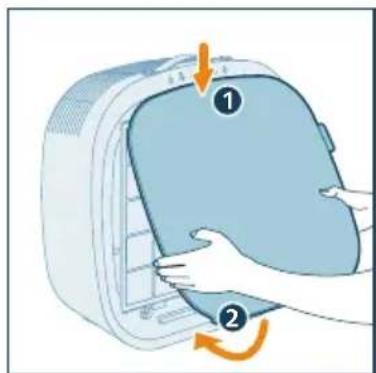
natural_image
Illustration of a hand pressing down on a computer case with an arrow indicating rotation (no text or symbols)
Compreender o indicador de Wi-Fi
flowchart
graph TD
    A["Mobile Device"] -->|Signal Transmission| B["Wireless Device"]
    C["Smart Phone"] -->|Signal Transmission| D["Wireless Device"]
Nota:
natural_image
Illustration of a white electronic device connected to a wall-mounted power outlet (no text or symbols visible)
natural_image
Illustration of a hand pressing a button with a blue circular icon (no text or symbols)
natural_image
Illustration of a hand interacting with a circular button and three icons (star, crescent, spiral) on a white background (no text or symbols)
natural_image
Illustration of a hand interacting with a circular icon containing three dots, next to three circular icons below (no text or symbols)
natural_image
Illustration of a hand interacting with a circular icon and three icons (sunny, Earth, spiral) on a control panel (no text or symbols)
natural_image
Illustration of a hand interacting with a blue circular emblem and a spiral symbol (no text or symbols present)
natural_image
Illustration of a hand interacting with a lock icon and padlock (no text or symbols)
natural_image
Illustration of a hand interacting with a lock icon and clock, no text or symbols present
natural_image
Illustration of a smart home control device with a hand pressing a button and a colorful indicator screen (no text or symbols)
natural_image
Illustration of a white electronic device with a blue circular button labeled 'P' and a hand pointing at it (no text or symbols on the device itself)
natural_image
Illustration of a white square electronic device with a clock and timer icon, no text or symbols present.
natural_image
Illustration of a hand inserting a card into a device (no text or symbols visible)
natural_image
Illustration of a hand inserting a card into a device (no text or symbols visible)
Limpeza dos filtros
natural_image
Diagram showing a device with a grid panel and a magnified view of its internal structure (no text or symbols)
natural_image
Illustration of a plastic waste bin with an orange arrow indicating particle dispersion (no text or symbols)
natural_image
Diagram showing airflow from a fan to a solar panel array (no text or symbols)
natural_image
Illustration of a hand holding a white tool next to a blue rectangular panel (no text or symbols visible)
natural_image
Illustration of a portable air conditioner unit with a grid-patterned panel and an orange arrow pointing to its side (no text or symbols)
9 Volte a colocar a tampa frontal.
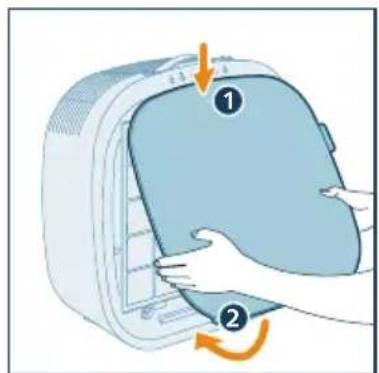
natural_image
Illustration of a hand holding a spray can with a blue tip, no text or symbols present
natural_image
Illustration of a white rectangular device with a warning symbol (no text or labels)
natural_image
Illustration of a portable air conditioner unit with fan and cooling panel (no text or symbols)
natural_image
Illustration of a hand placing a trash bin into a storage box, with no text or symbols present.
natural_image
Illustration of a container with liquid and an upward arrow, no text or symbols present
natural_image
Illustration of a fan inside an electric fan with a cooling cover removed (no text or symbols)
natural_image
Illustration of a solar panel mounted on a device, showing grid layout and ventilation slots (no text or symbols)
9 Volte a colocar a tampa frontal.
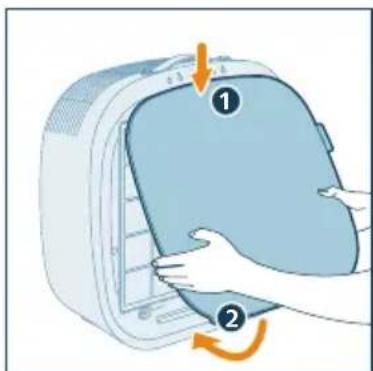
natural_image
Illustration of a hand pressing down on a computer monitor with a scroll wheel (no text or symbols)
natural_image
Illustration of a hand holding a spray can with a dropper (no text or symbols)
Nota:
natural_image
Six circular icons representing power, refresh, cat face, lightbulb, lock, and Wi-Fi symbols (no text or labels)
Butoane de control
natural_image
Illustration of a hand pressing down on a blue appliance with an orange arrow indicating motion (no text or symbols)
natural_image
Illustration of a fan inside a technical enclosure with a side panel showing internal structure (no text or symbols)
natural_image
3D diagram of a container with an upward arrow, no text or symbols present
natural_image
Illustration of a fan device with an orange arrow indicating rotation or change, next to a blue cover (no text or symbols)
natural_image
Illustration of a portable air conditioner unit with a grid panel and orange arrow indicating the front panel (no text or symbols)
natural_image
Illustration of a white electronic device connected to a wall-mounted power outlet (no text or symbols)
natural_image
Illustration of a white electronic device with a blue circular button and a finger pointing at it (no text or symbols)
natural_image
Illustration of a hand interacting with a circular icon containing a star and three dots, next to four symbolic icons (star, crescent, circle, spiral) below (no text or labels)
natural_image
Illustration of a hand interacting with a circular icon and three circular symbols below (no text or labels)
natural_image
Illustration of a hand interacting with a circular icon and three icons (star, crescent, spiral) on a white background (no text or symbols)
natural_image
Illustration of a hand pointing at a circular emblem with a skull and spiral symbol below (no text or labels)
natural_image
Illustration of a hand interacting with a padlock icon and a cat, no text or symbols present
natural_image
Illustration of a hand interacting with a lock icon and clock, symbolizing security or time-sensitive digital elements (no text present)
natural_image
Illustration of a white rectangular device with a hand interacting with a touchscreen icon and a smartphone displaying a color-coded interface (no text or symbols present)
natural_image
Illustration of a white electronic device with a circular button and a finger pointing at it (no text or symbols)
natural_image
Illustration of a white rectangular device with a clock and a blue circular button, no text or symbols present.
natural_image
Illustration of a hand inserting a card into a device (no text or symbols visible)
natural_image
Illustration of a hand inserting a device into a plastic housing with a scroll arrow (no text or symbols)
Curățarea filtrelor
natural_image
Diagram showing a device with a grid panel and a magnified view of its internal structure (no text or symbols)
natural_image
Illustration of a plastic waste bin with an orange arrow indicating particle dispersion (no text or symbols)
natural_image
Diagram showing airflow from a fan to a solar panel array (no text or symbols)
natural_image
Illustration of a hand holding a white object next to a blue rectangular panel (no text or symbols visible)
natural_image
Illustration of a portable air conditioner unit with a grid panel and orange arrow indicating airflow direction (no text or symbols)
natural_image
Illustration of a hand pressing down on a device with a numbered label (1 and 2), showing mechanical components and motion arrows (no text or symbols beyond labels)
natural_image
Illustration of a hand spraying a spray bottle with a blue tip (no text or symbols)
natural_image
Illustration of a white rectangular device with a warning symbol (no text or labels)
natural_image
Illustration of a portable air conditioner unit with fan and cooling panel (no text or symbols)
natural_image
Illustration of a hand removing a trash bin into a plastic bag, with no text or symbols present.
natural_image
Illustration of a container with a stack of liquid and an upward arrow, no text or symbols present
natural_image
Illustration of a portable air conditioner unit with fan and cooling panel (no text or symbols)
natural_image
Illustration of a portable air conditioner unit with a grid panel and control panel (no text or symbols)
natural_image
Illustration of a hand pressing down on a computer monitor with a scroll wheel (no text or symbols)
natural_image
Illustration of a hand holding a spray can with a blue tip, no text or symbols present
Notă:
natural_image
Six circular icons representing power, refresh, cat face, lightbulb, lock, and Wi-Fi symbols (no text or labels)
Ovládacie tlačidlá
2 Stlačte spony na oboch stranách predfiltra, aby ste ho vybrali.
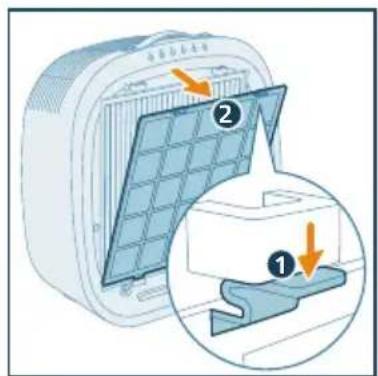
3 Čistiaci filter vyberte zo zariadenia.
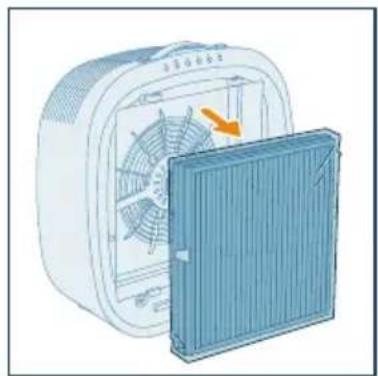
natural_image
Illustration of a white electric fan with a blue cover partially removed, showing internal fan blades and a yellow arrow indicating rotation (no text or symbols)
natural_image
3D diagram of a container with an upward arrow, no text or symbols present
5 Integrovaný filter HEPA a filter s s aktivnym uhlím vložte spät do zariadenia a uistite sa, že filter s dvoma sponami je otočený smerom von.
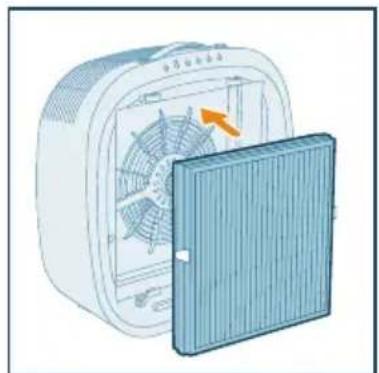
natural_image
3D diagram of a fan with an orange arrow indicating the blade, showing internal blades and a closed panel (no text or symbols)
natural_image
Illustration of a portable air conditioner unit with a grid-patterned panel and an orange arrow pointing to its side (no text or symbols)
flowchart
graph TD
    A["Mobile Device"] -->|Signal| B["Wireless Device"]
    C["Smart Phone"] -->|Signal| B
    B -->|Transmission Signal| D["Wireless Device"]
Poznámka:
natural_image
Illustration of a hand interacting with a Wi-Fi symbol and clock icon (no text or symbols)
natural_image
Illustration of a white electronic device connected to a wall with an orange arrow indicating power or signal (no text or symbols present)
2 Stlačte tlačidlo abapnite čistič, kým svieti indikátor
→Čistič zapípa. Rozsvieti sa svetelný pás.
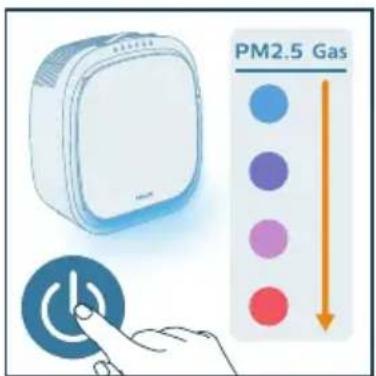
natural_image
Illustration of a hand pressing a button with a circular icon (no text or symbols)
natural_image
Illustration of a hand interacting with a circular icon containing a star and swirl, next to three circular icons below (star, circle, spiral) — no text or symbols present.
natural_image
Illustration of a hand interacting with a circular button and three icons (star, circle, spiral) on a control panel (no text or symbols)
natural_image
Illustration of a hand interacting with a blue circular emblem and a spiral symbol (no text or symbols present)
natural_image
Illustration of a hand interacting with a lock icon and padlock (no text or symbols)
natural_image
Illustration of a hand interacting with a lock icon and clock, symbolizing security or security (no text present)
natural_image
Illustration of a white rectangular device next to a smartphone with a circular button, accompanied by a hand pointing at it (no text or symbols present)
natural_image
Illustration of a white rectangular device with a circular button and a blue square button, connected by a finger to the right (no text or symbols)
natural_image
Illustration of a white rectangular device with a button and a blue circular icon, accompanied by a clock and timer (no text or symbols on the device itself)
5 Čistenie a údržba
Poznámka:
natural_image
Illustration of a hand inserting a card into a device (no text or symbols visible)
natural_image
Illustration of a hand inserting a card into a device (no text or symbols visible)
Čistenie filtrov
natural_image
Diagram showing a device being inserted into a grid panel, with a magnified inset illustrating the process (no text or symbols present)
natural_image
Illustration of a plastic waste bin with an orange arrow indicating particle dispersion (no text or symbols)
5 Predfilter očistite pod tečúcou vodou. Teplota vody nesmie presiahnuť 40 °C.

natural_image
Illustration of a fan emitting exhaust from a solar panel array (no text or symbols)
natural_image
Illustration of a hand holding a tool interacting with a blue rectangular panel (no text or symbols visible)
natural_image
Illustration of a portable electric heater with a grid panel and orange arrow indicating the blade (no text or symbols)
natural_image
Illustration of a hand pressing down on a blue plastic bag with an arrow indicating rotation (no text or symbols)
natural_image
Illustration of a hand spraying a spray bottle with a triangular tip (no text or symbols)
Výmena filtra
natural_image
Illustration of a white rectangular device with a red warning symbol (no text or labels)
Svetelný pás najskôr svieti načerveno a svieti načerveno aj okamžite po odpojení zo siete a zapnutí.
3 Stlačte spony na oboch stranách predfiltra, aby ste ho vybrali.
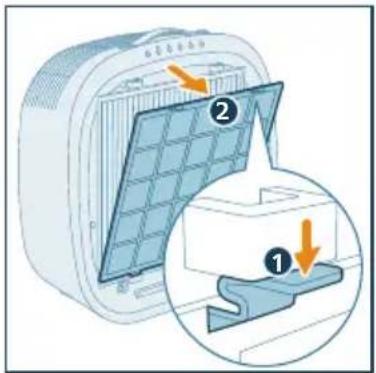
natural_image
Illustration of a portable air conditioner unit with fan and cooling panel (no text or symbols)
natural_image
Illustration of a hand placing a trash bin into a storage case with an arrow indicating rotation (no text or symbols)
natural_image
Illustration of a container with a side panel and an upward arrow, no text or symbols present
7 Integrovaný filter HEPA a filter s s aktivnym uhlím vložte spät do zariadenia a uistite sa, že filter s dvoma sponami je otočený smerom von.
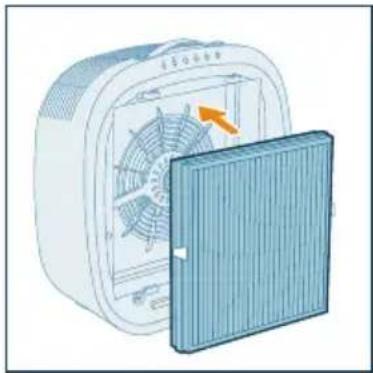
natural_image
Illustration of a fan inside a technical enclosure with an open lid, showing internal fan structure and airflow direction (no text or symbols)
natural_image
Illustration of a portable solar panel with a grid pattern and an orange arrow pointing to it (no text or symbols)
natural_image
Illustration of a hand spraying a spray gun with a blue spray can (no text or symbols)
Poznámka:
natural_image
Six circular icons representing power, refresh, cat face, lightbulb, lock, and Wi-Fi symbols (no text or labels)
Upravljalni gumbi
natural_image
Illustration of a hand pressing down on a blue bag with an arrow indicating motion (no text or symbols)
2 Pritisnite zaponki na obeh straneh predfiltra, da ga odstranite.
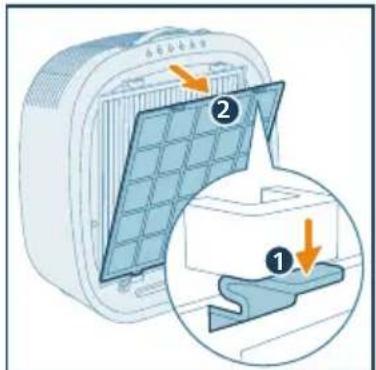
natural_image
Illustration of a heating fan with cooling effect, showing internal fan blades and heat sink (no text or symbols)
4 Odstranite ves embalažni material čistilnega filtra.
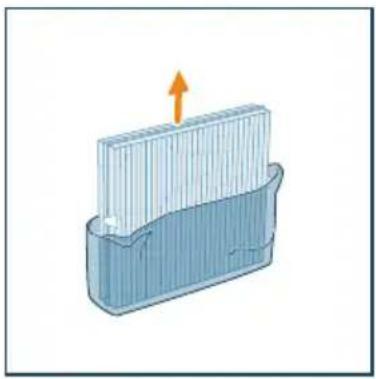
natural_image
3D diagram of a container with an upward arrow indicating flow or movement (no text or symbols)
5 Vgrajeni filter HEPA in filter z aktivnim ogljem vstavite nazaj v aparat, pri čemer pazite, da je filter z dvema zaponkama obrnjen navzven.
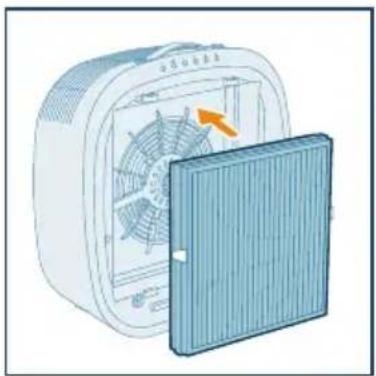
natural_image
Illustration of a fan device with an orange arrow indicating rotation or change, next to a blue cover (no text or symbols)
6 Predfilter namestite nazaj v aparat.
Prepričajte se, da ste predfilter vstavili v levo in desno luknjo na spodnji strani.
Zaponki na zgornjem delu filtra ob pravilni namestitvi klikneta.
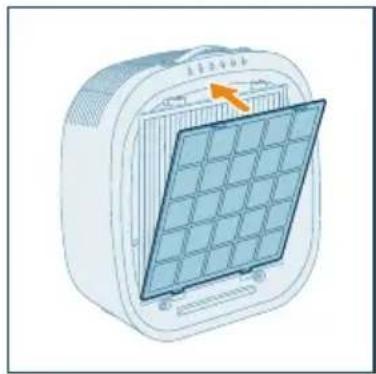
natural_image
Illustration of a portable electric heater with a grid panel and orange arrow indicating airflow (no text or symbols)
3 Preverite, ali je pametni telefon ali tablični računalnik povezan v omrežje Wi-Fi.
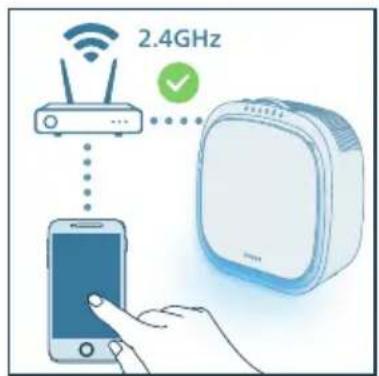
Opomba:
flowchart
graph TD
    A["Wi-Fi icon"] --> B["Wi-Fi icon"]
    C["Smartphone"] --> D["Wireless Device Icon"]
    style A fill:#4CAF50,stroke:#388E3C
    style B fill:#4CAF50,stroke:#388E3C
    style C fill:#FFA500,stroke:#388E3C
    style D fill:#90EE90,stroke:#388E3C
Opomba:
2 Za 3 sekunde pridržite, da zaslišite pisk.
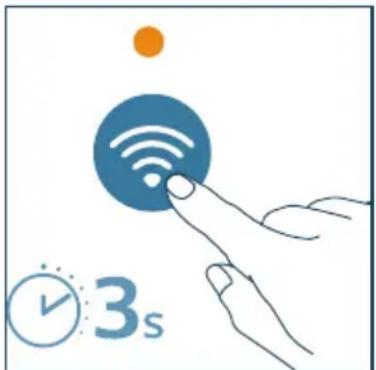
natural_image
Illustration of a hand interacting with a Wi-Fi symbol and clock icon (no text or symbols)
natural_image
Illustration of a white electronic device connected to a wall with an arrow indicating power or connection (no text or symbols present)
3 Za izklop čistilnika zraka znova pritisnite gumb
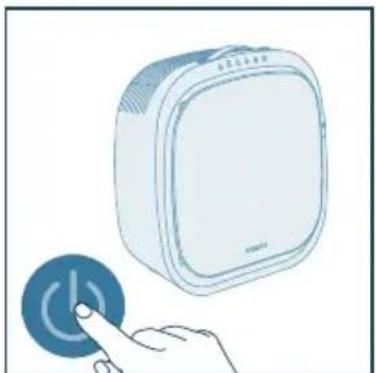
natural_image
Illustration of a hand pressing a circular button with a power symbol (no text or labels)
natural_image
Illustration of a hand interacting with a circular icon containing a star and circular elements, accompanied by three icons below (star, circle, spiral) — no text or symbols present.
natural_image
Illustration of a hand interacting with a circular icon and three control buttons (star, circle, spiral) on a white background (no text or symbols)
natural_image
Illustration of a hand interacting with a blue circular emblem and a spiral symbol (no text or symbols present)
natural_image
Illustration of a hand interacting with a blue circular icon containing a lock and cat face (no text or symbols)
2 Za 3 sekunde pridržite gumb, da izklopite zaklep za hišne ljubljenčke.
→Aparat zapiska.
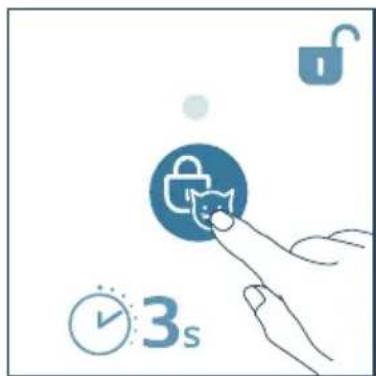
natural_image
Illustration of a hand interacting with a lock icon and clock, no text or symbols present
natural_image
Illustration of a white rectangular device with a hand pointing at a touchscreen button, accompanied by a colorful indicator panel (no text or symbols)
2 Za spremembo načina kakovosti zraka pritisnite gumb ♦Svetlobni trak bo spremenil barvo glede na trenutno kakovost zraka v okolici.
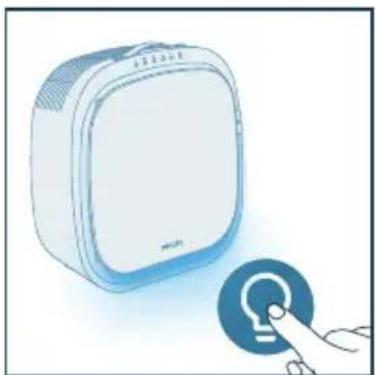
natural_image
Illustration of a white electronic device with a blue circular button and a finger pointing at it (no text or symbols)
3 Za 3 sekunde pridržite gumb, da izklopite svetlobni trak.
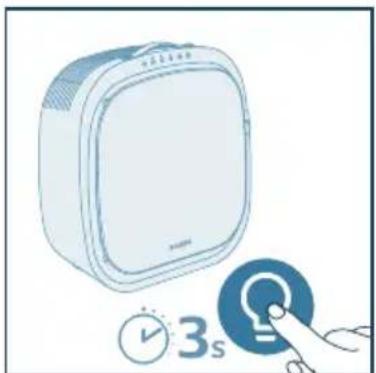
natural_image
Illustration of a white square device with a button and a blue circular icon, accompanied by a clock and timer (no text or symbols on the device itself)
2 Odprite pokrov senzorja kakovosti zraka.
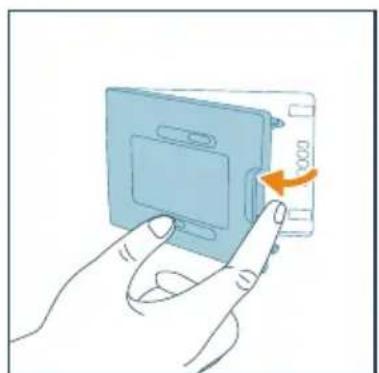
natural_image
Illustration of a hand inserting a card into a device (no text or symbols visible)
3 Senzor delcev PM2,5 in plinov očistite z vlažno vatirano paličico. Vse dele temeljito osušite s suho vatirano paličico.
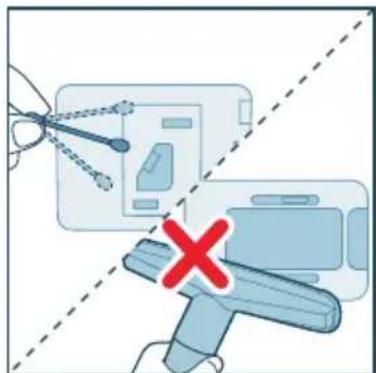
natural_image
Illustration of a hand inserting a card into a device (no text or symbols visible)
Čiščenje filtrov
2 Povlecite spodnjo stran sprednjega pokrova iz aparata in ga dvignite navzgor.
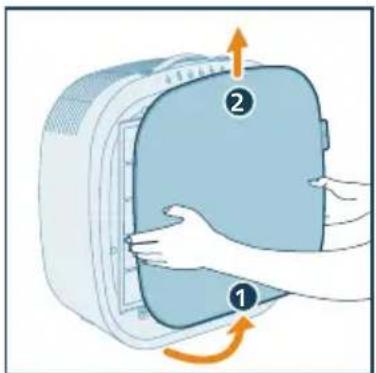
natural_image
Diagram showing a device being inserted into a grid panel, with a magnified inset illustrating the process (no text or symbols present)
natural_image
Illustration of a trash bin with an orange arrow indicating a chemical process or disposal (no text or symbols present)
5 Predfilter sperite pod tekočo vodo iz pipe. Temperatura vode ne sme biti višja od 40 °C.
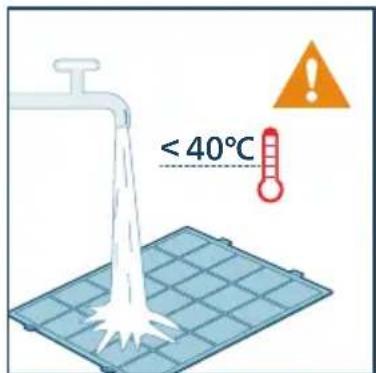
6 Predfilter posušite na zraku.
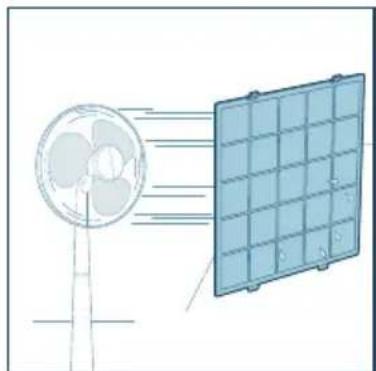
natural_image
Diagram showing airflow from a fan to a solar panel array (no text or symbols)
natural_image
Illustration of a hand holding a white object next to a blue rectangular panel (no text or symbols visible)
8 Predfilter namestite nazaj v aparat.
Prepričajte se, da ste predfilter vstavili v levo in desno luknjo na spodnji strani.
Zaponki na zgornjem delu filtra ob pravilni namestitvi klikneta.
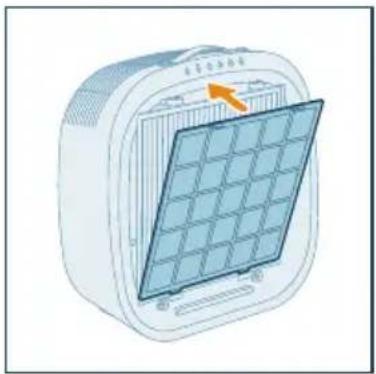
natural_image
Illustration of a portable electric heater with a grid panel and orange arrow indicating the component (no text or symbols)
10 Ko očistite filter, si temeljito umijte roke.

natural_image
Illustration of a hand spraying a spray bottle with a blue tip (no text or symbols)
Menjava filtra
natural_image
White rectangular electronic device with a warning symbol (no text or labels visible)
2 Povlecite spodnjo stran sprednjega pokrova iz aparata in ga dvignite navzgor.
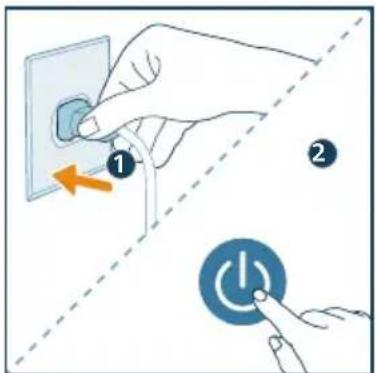
3 Pritisnite zaponki na obeh straneh predfiltra, da ga odstranite.

4 Iz aparata odstranite vgrajeni filter HEPA in filter z aktivnim ogljem.
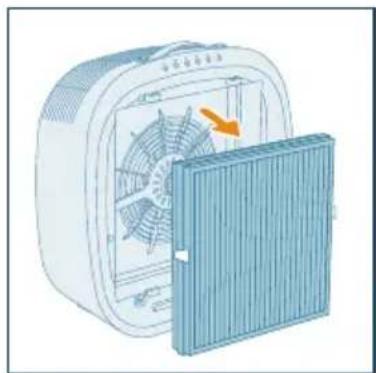
natural_image
Illustration of a portable air conditioner unit with fan and cooling panel (no text or symbols)
natural_image
Illustration of a hand placing a trash bin into a storage case with an arrow indicating rotation (no text or symbols)
natural_image
Diagram of a container with liquid and an upward arrow, no text or symbols present
7 Vgrajeni filter HEPA in filter z aktivnim ogljem vstavite nazaj v aparat, pri čemer pazite, da je filter z dvema zaponkama obrnjen navzven.
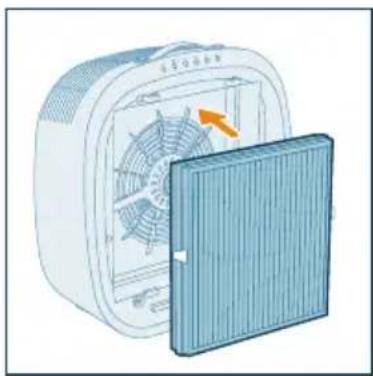
natural_image
Illustration of a fan inside a technical enclosure with an open lid, showing internal fan structure and airflow direction (no text or symbols)
8 Predfilter namestite nazaj v aparat.
Prepričajte se, da ste predfilter vstavili v levo in desno luknjo na spodnji strani.
Zaponki na zgornjem delu filtra ob pravilni namestitvi klikneta.
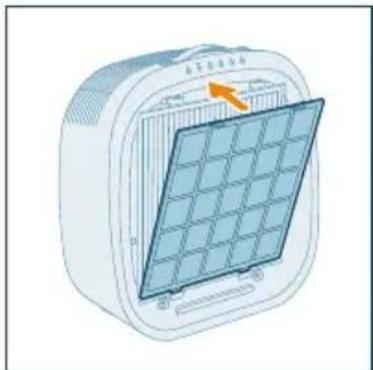
natural_image
Illustration of a portable air conditioner unit with a grid panel and orange arrow indicating airflow direction (no text or symbols)
10 Priključite vtič čistilnika zraka v električno vtičnico in pritisnite gumb da čistilnik zraka vklopite.
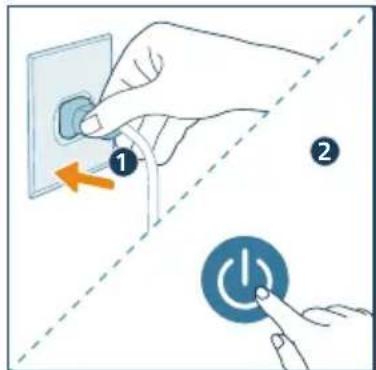
11 Ponastavite življenjsko dobo integriranega filtra HEPA in aktivnega oglja z dolgim pritiskom gumba za način in gumba za osvetlitev hkrati za 3 sekunde ali to izvedite prek aplikacije.
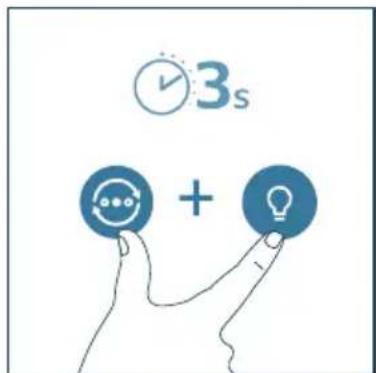
12 Ko zamenjate filter, si temeljito umijte roke.
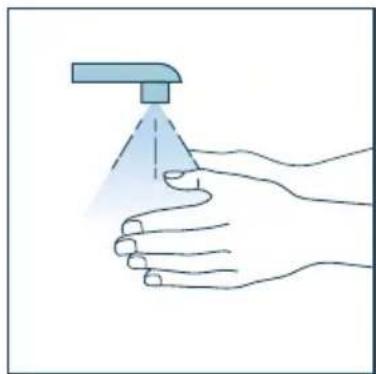
natural_image
Illustration of a hand holding a spray can with a dropper (no text or symbols)
Opomba:
natural_image
Six circular icons representing power, refresh, cat face, lightbulb, lock, and Wi-Fi symbols (no text or labels)
Butonat e komandimit
natural_image
Illustration of a hand pressing down on a blue bag with an arrow indicating rotation (no text or symbols)
3 Hiqni filtrin e pastrimit nga pajisja.
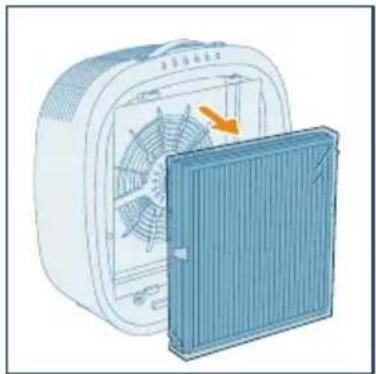
natural_image
Illustration of a white electric fan with a blue cover partially removed, showing internal fan blades and a highlighted section (no text or symbols)
natural_image
Illustration of a container with liquid and an upward arrow, no text or symbols present
natural_image
Illustration of a portable air conditioner unit with fan and cooling panel (no text or symbols)
natural_image
Illustration of a solar panel mounted on a device (no text or symbols visible)
flowchart
graph TD
    A["Wi-Fi Signal"] --> B["Wireless Interface"]
    C["Smartphone"] --> D["Mobile Device"]
    D --> E["User Interface"]
Shënim:
natural_image
Illustration of a hand interacting with a Wi-Fi symbol and clock icon (no text or symbols)
natural_image
Illustration of a white electronic device connected to a wall-mounted power outlet (no text or symbols visible)
2 Shtypni butonin, ndizeni pastruesin ndërsa ndizet drita treguese!
→Pastruesi tingëllon. Shiriti i dritës ndizet.
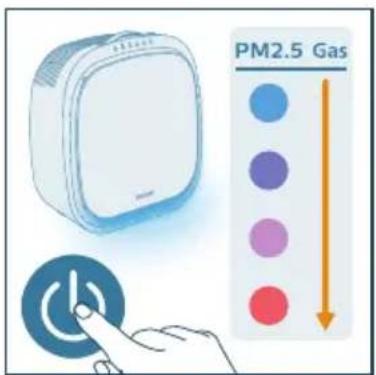
natural_image
Illustration of a hand pressing a button with a power symbol (no text or labels)
natural_image
Illustration of a hand interacting with a circular icon containing a star and eye symbol, accompanied by three icons below (star, crescent, spiral) — no text or symbols present.
natural_image
Illustration of a hand interacting with a circular icon and three circular symbols below (no text or labels)
natural_image
Illustration of a hand interacting with a circular icon and three icons (sunny, Earth, spiral) on a control panel (no text or symbols)
natural_image
Illustration of a hand interacting with a shield icon and a spiral symbol (no text or symbols present)
natural_image
Illustration of a hand interacting with a blue lock icon and padlock (no text or symbols)
natural_image
Illustration of a hand interacting with a lock icon and clock, no text or symbols present
natural_image
Illustration of a white rectangular device with a hand pointing at a touchscreen button, alongside a colorful interface panel (no text or symbols)
natural_image
Illustration of a white electronic device with a circular button and a finger pointing at it (no text or symbols)
natural_image
Illustration of a white electronic device with a button and clock icon, no text or symbols present
natural_image
Illustration of a hand inserting a card into a device (no text or symbols visible)
natural_image
Illustration of a hand holding a blue electronic device with a scroll wheel, showing a right-hand arrow (no text or symbols present)
Pastrimi i filtrave
natural_image
Diagram showing a device with a grid panel and a magnified view of its internal structure (no text or symbols)
natural_image
Illustration of a plastic tray with scattered white particles being poured into a trash bin (no text or symbols)
natural_image
Diagram showing airflow from a fan to a solar panel array (no text or symbols)
natural_image
Illustration of a hand holding a rectangular object with a tool, no text or symbols present
natural_image
Illustration of a portable air conditioner unit with a grid-patterned panel and an orange arrow pointing to it (no text or symbols)
natural_image
Illustration of a hand spraying a spray bottle with a triangular tip (no text or symbols)
Ndërrimi i filtrit
natural_image
Illustration of a white rectangular device with a red accent, accompanied by an orange warning triangle (no text or symbols on the device itself)
4 Hiqni filtrin e integruar HEPA dhe me karbon aktiv nga pajisja.
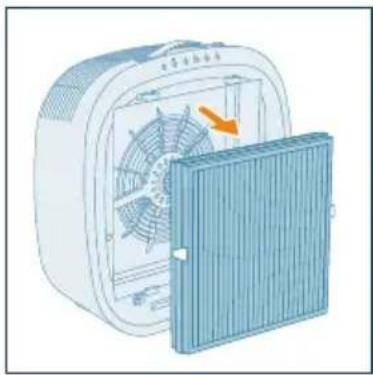
natural_image
Illustration of a portable air conditioner unit with fan and cooling panel (no text or symbols)
natural_image
Illustration of a hand placing a trash bin into a plastic bag, with arrows indicating motion (no text or symbols)
natural_image
Diagram of a container with an upward arrow indicating flow or movement (no text or symbols present)
natural_image
Illustration of a fan inside an electric heating fan with a blue cover removed (no text or symbols)
natural_image
Illustration of a portable air conditioner unit with a grid panel and orange arrow indicating airflow direction (no text or symbols)
natural_image
Illustration of a hand pressing down on a computer back panel with an orange arrow indicating rotation (no text or symbols)
natural_image
Illustration of a hand spraying a spray can with a blue tip (no text or symbols)
Shënim:
natural_image
Six circular icons representing power, refresh, cat face, lightbulb, lock, and Wi-Fi symbols (no text or labels)
Kontrolna dugmad
 | Uključivanje/isključivanje napajanja | | Dugme za promenu režima |
| [YBXK] | Režim pojačanog hvatanja krzna Dugme prekidača svetla | | |
 | Dugme brave za kućne ljubimce | | Dugme/indikator za Wi-Fi povezivanje/resetovanje |
| [WXTK] | Dugme za resetovanje zamene filtera | | |
3 Početak rada
Instaliranje filtera
Uklonite svu ambalažu filtera pre prve upotrebe.
Napomena: Proverite da li je prečišćivač vazduha isključen iz strujne utičnice pre nego što instalirate filter.
1 Otvorite prednji poklopac.
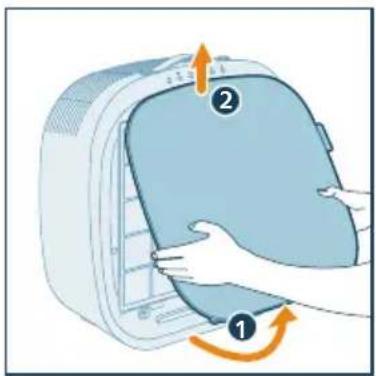
natural_image
Illustration of a hand pressing down on a blue appliance with an arrow indicating rotation (no text or symbols)
2 Pritisnite kopče sa obe strane pretfiltera da biste ga uklonili.
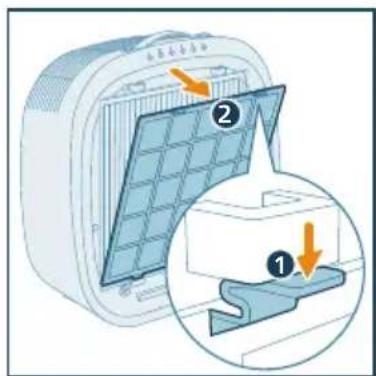
3 Uklonite filter za prečišćavanje iz aparata.
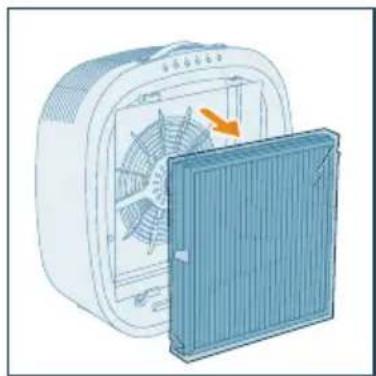
natural_image
Illustration of a fan assembly with a blue panel and orange arrow indicating rotation (no text or symbols)
natural_image
Diagram of a container with a side panel and an upward arrow, no text or symbols present
natural_image
Illustration of a white electric fan with a blue cover partially removed, showing internal fan blades and a yellow arrow indicating rotation (no text or symbols)
6 Vratite pretfilter nazad u uredaj. Obavezno umetnite pretfilter u levi i desni otvor na donjoj strani. Dve kopče na vrhu filtera proizvode zvuk „klika“ kada su pravilno instalirane.
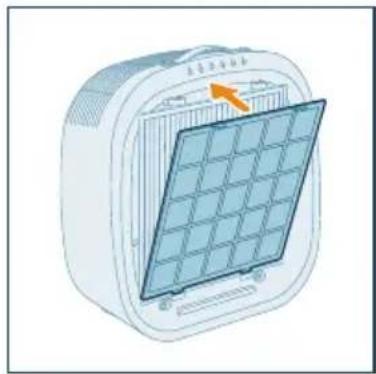
natural_image
Illustration of a portable air conditioner unit with a grid panel and orange arrow indicating airflow direction (no text or symbols)
7 Vratite prednji poklopac na mesto.
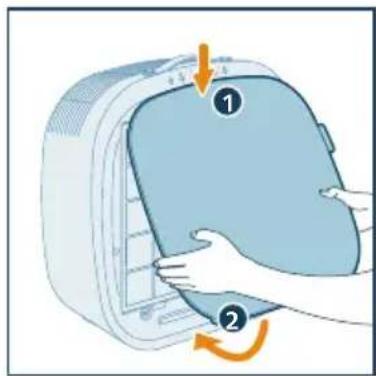
Razumevanje Wi-Fi indikatora
| Status Wi-Fi ikone Status Wi-Fi veze |
| Treperi narandžasto Povezivanje sa pametnim telefonom |
| Svetli narandžasto Uspostavljena je veza sa pametnim telefonom |
| Treperi belo Povezivanje na server |
| Svetli belo Uspostavljena je veza sa serverom |
| Isk. Wi-Fi funkcija je onemogućena |
Wi-Fi veza
2 Uključite utikač prečišćivača u strujnu utičnicu i pritisnite da biste uključili prečišćivač.
Wi-Fi indikator prvi put treperi narandžasto.
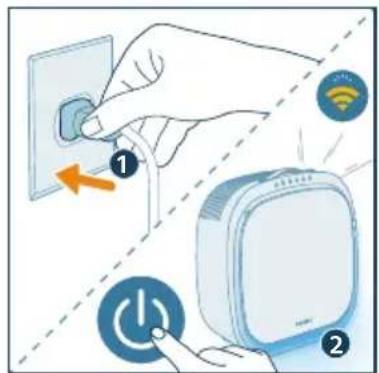
flowchart
graph TD
    A["Mobile Device"] -->|Signal Transmission| B["Wireless Device"]
    C["Smart Phone"] -->|Signal Transmission| D["Wireless Device"]
Napomena:
- Ovo uputstvo važi samo za prvo podešavanje prečišćivača vazduha. Ako se mreža promeni ili je potrebno ponovo obaviti podešavanje, pogledajte poglavlje "Resetovanje Wi-Fi veze" na stranici 483.
2 Pritisnite 📋, pa zadržite 3 sekunde dok ne budete čuli zvučni signal.
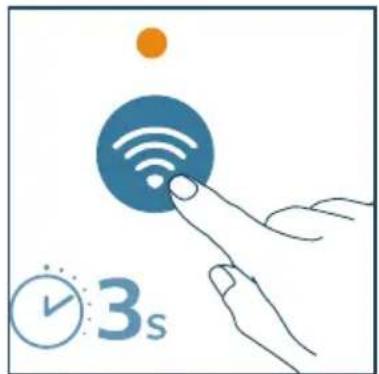
→Prečišćivač prelazi u režim uparivanja.
→Wi-Fi indikator treperi narandžasto.
natural_image
Illustration of a white electronic device connected to a wall-mounted power outlet (no text or symbols visible)
2 Pritisnite dugme, ①ljučite prečišćivač dok je indikatorska lampica ②upaljena.
→Prečišćivač se oglasava zvučnim signalom. Upaliće se osvetljena traka.
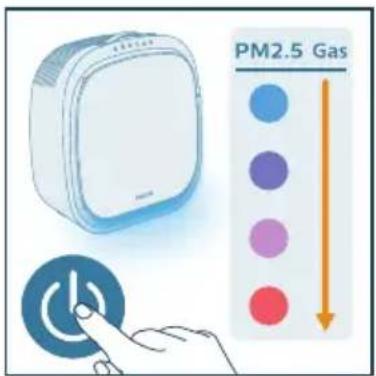
3 Ponovo pritisnite dugme da biste isključili prečišćivač.
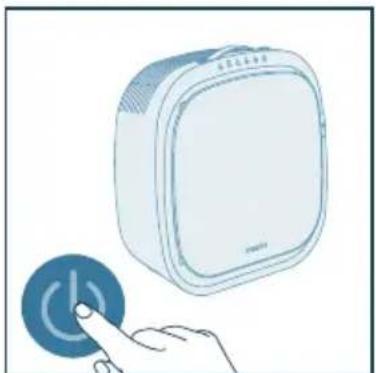
natural_image
Illustration of a white electronic device with a blue circular button and a finger pointing at it (no text or symbols)
natural_image
Illustration of a hand interacting with a circular button and three icons (star, crescent, spiral) below (no text or symbols)
- Automatski režim: U automatskom režimu, uredaj će obaviti posao za vas. Na osnovu podataka senzora koji mere i prate kvalitet vazduha u prostoriji, vaš uredaj automatski bira odgovarajuću brzinu ventilatora kako bi vaš vazduh ponovo bio čist i zdrav.
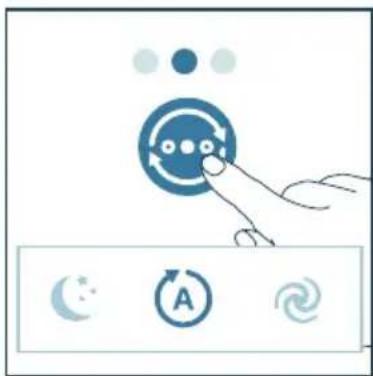
natural_image
Illustration of a hand interacting with a circular icon containing three dots, next to three circular icons below (no text or symbols)
natural_image
Illustration of a hand interacting with a circular icon containing a speech bubble and three icons below (no text or symbols)
Režim pojačanog hvatanja krzna
Napomena:
natural_image
Illustration of a hand interacting with a blue circular emblem and a spiral symbol (no text or symbols present)
natural_image
Illustration of a hand interacting with a padlock icon and a cat face, no text or symbols present
2 Pritisnite 🚙 i držite ga 3 sekunde da biste deaktivirali bravu za kućne ljubimce.
natural_image
Illustration of a hand interacting with a lock icon and clock, symbolizing security or time-sensitive (no text present)
Korišćenje funkcije svetla
Možete pritisnuti dugme da biste uključili indikator kvaliteta vazduha, ambijentalno svetlo ili isključili svetlosnu traku.
1 Pritisnite dugme ♀ da biste prešli na režim lampe: udobna svetlosna traka ispod dna uređaja. Prilagodite osvetljenost i boju ugodnog svetla u aplikaciji Air+.
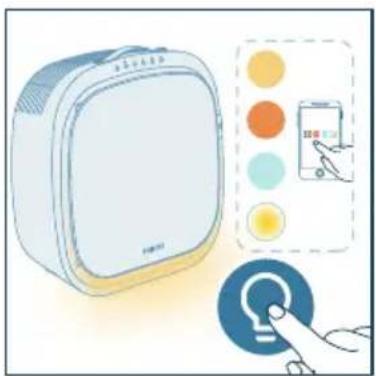
natural_image
Illustration of a white rectangular device with a circular button labeled 'P' and a hand pointing at it (no text or symbols on the device itself)
3 Pritisnite dugme ⚙ i zadržite ga 3 sekunde da biste isključili svetlosnu traku.
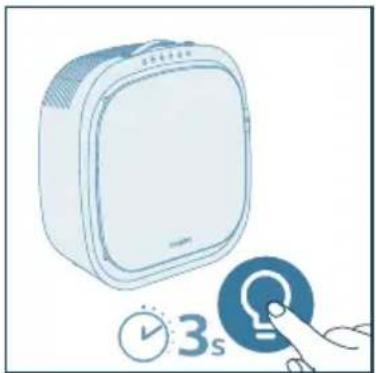
natural_image
Illustration of a white air conditioner unit with a blue circular button and a hand interacting with it (no text or symbols)
2 Otvorite poklopac senzora za kvalitet vazduha.
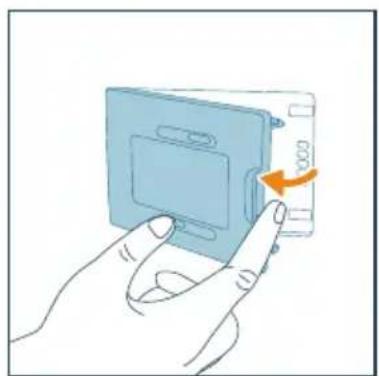
natural_image
Illustration of a hand inserting a card into a device (no text or symbols visible)
4 Zatvorite senzor za kvalitet vazduha.
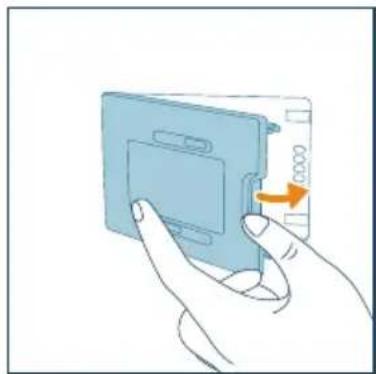
natural_image
Illustration of a hand inserting a card into a device (no text or symbols visible)
Čišćenje filtera
Da bi se osigurale optimalne performanse, preporučuje se redovno čišćenje integrisanog HEPA i filtera sa aktivnim ugljem i pretfiltera na osnovu vaše trenutne upotrebe.
1 Isključite aparat i isključite ga iz zidne utičnice
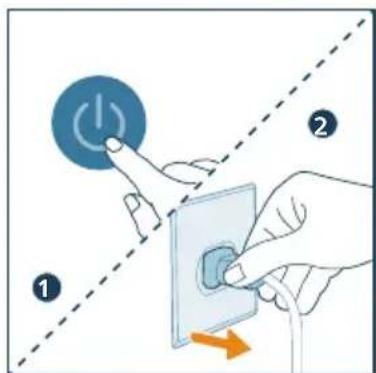
2 Povucite donju stranu prednjeg poklopca sa uredaja i podignite ga nagore.
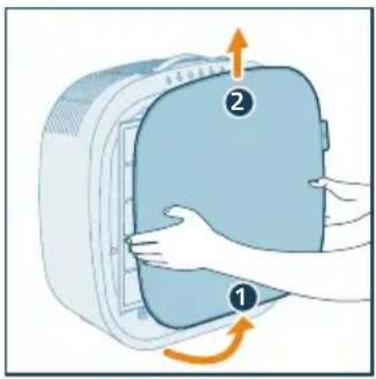
3 Koristite meku četku za čišćenje štitnika.
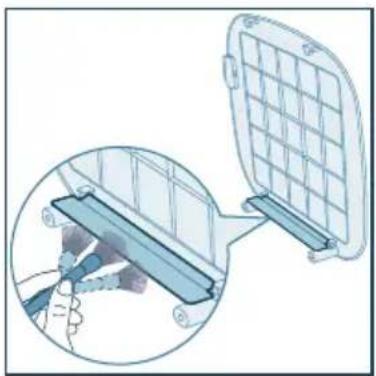
natural_image
Diagram showing a device being inserted into a grid panel, with a magnified inset illustrating the process (no text or symbols present)
4 Očistite dlake kućnih ljubimaca na pretfilteru.
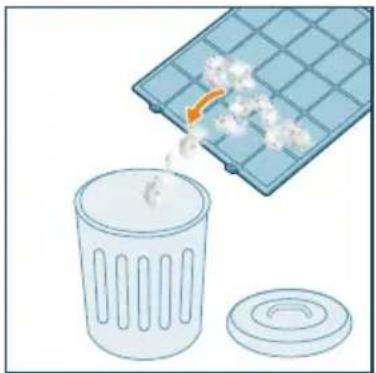
natural_image
Illustration of a trash bin with an orange arrow indicating particle dispersion from a grid-patterned container (no text or symbols)
5 Očistite pretfilter pod mlazom vode iz slavine. Temperatura vode ne sme biti viša od 40 °C.
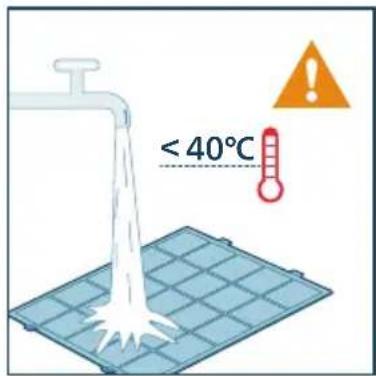
6 Osušite predfilter na vazduhu.
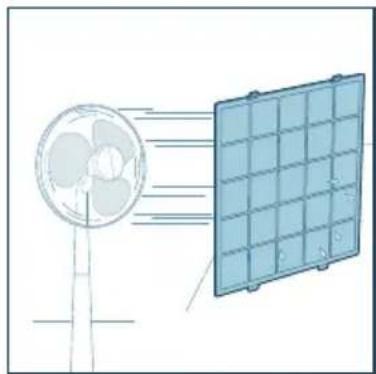
natural_image
Diagram showing airflow from a fan to a solar panel array (no text or symbols)
7 Koristite usisivač za čišćenje integrisanog HEPA i filtera sa aktivnim ugljem.
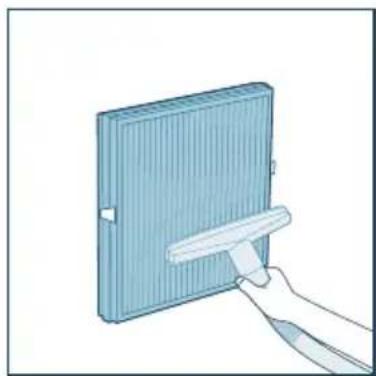
natural_image
Illustration of a hand holding a white object next to a blue rectangular panel (no text or symbols visible)
8 Vratite pretfilter nazad u uredaj. Obavezno umetnite pretfilter u levi i desni otvor na donjoj strani. Dve kopče na vrhu filtera proizvode zvuk „klika“ kada su pravilno instalirane.
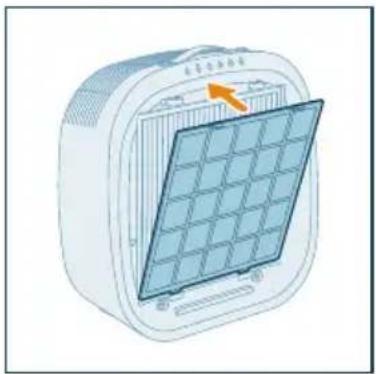
natural_image
Illustration of a portable air conditioner unit with a grid panel and orange arrow indicating the grille (no text or symbols)
9 Vratite prednji poklopac na mesto.
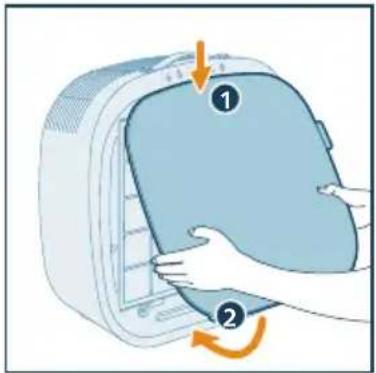
natural_image
Illustration of a hand holding a spray can with a dropper (no text or symbols)
Zamena filtera
natural_image
Illustration of a white rectangular device with a warning symbol (no text or labels)
Svetlosna traka prvo svetli crveno i nastavlja da svetli crveno odmah nakon što je isključite iz struje, ponovo ga uključite u struju i uključite.
2 Povucite donju stranu prednjeg poklopca sa uređaja i podignite ga nagore.
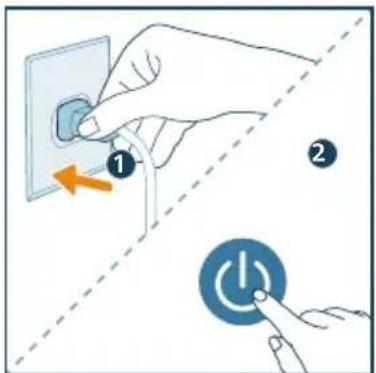
3 Pritisnite kopče sa obe strane pretfiltera da biste ga uklonili.

natural_image
Illustration of a portable air conditioner unit with fan and cooling panel (no text or symbols)
5 Bacite iskorišćeni filter.
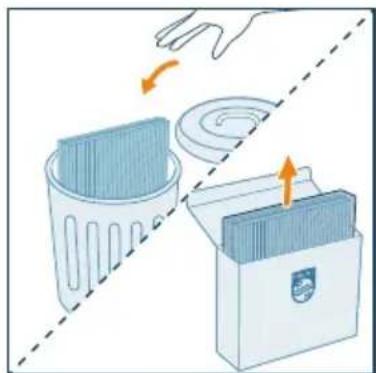
natural_image
Illustration of a hand placing a trash bin into a storage case with arrows indicating motion (no text or symbols)
natural_image
Illustration of a container with a side panel and an upward arrow, no text or symbols present
natural_image
Illustration of a fan device with an orange arrow indicating rotation or airflow direction (no text or symbols)
8 Vratite pretfilter nazad u uređaj. Obavezno umetnite pretfilter u levi i desni otvor na donjoj strani. Dve kopče na vrhu filtera proizvode zvuk „klika“ kada su pravilno instalirane.
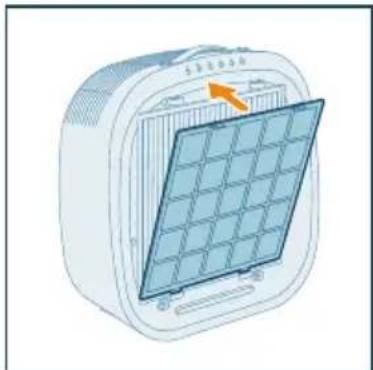
natural_image
Illustration of a portable air conditioner unit with a grid panel and orange arrow indicating the panel area (no text or symbols)
9 Vratite prednji poklopac na mesto.
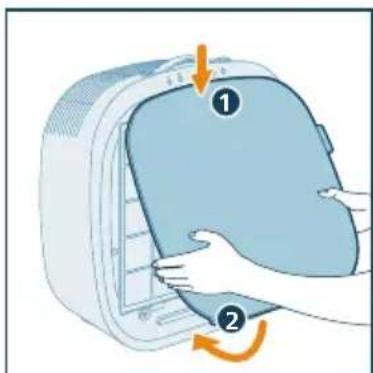
10 Uključite utikač prečišćivača u strujnu utičnicu i pritisnite da biste uključili prečišćivač.
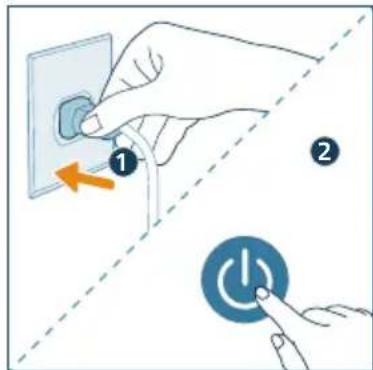
natural_image
Illustration of a hand holding a spray can with a blue tip, no text or symbols present
Napomena:
- Nemojte da mirišete filter zato što se u njemu skupljaju zagadivači iz vazduha.
6 Odlaganje
1 Isključite prečišćivač vazduha i isključite ga iz zidne utičnice.
2 Očistite aparat, senzor za PM2.5+gas i površinu filtera (pogledajte poglavlje „Čišćenje i održavanje“).
3 Ostavite sve delove da se temeljno osuše na vazduhu pre odlaganja.
4 Umotajte filtere u hermetički zatvorene plastične kese.
5 Prečišćivač vazduha i filtere odložite na suvo i hladno mesto.
6 Uvek temeljno operite ruke nakon rukovanja filterom.
7 Rešavanje problema
U ovom poglavlju ukratko su navedeni najčešći problemi do kojih može da dode sa aparatom. Ako ne možete da rešite problem pomoću liste mogućih problema u nastavku, obratite se centru za korisničku podršku u svojoj zemlji.
natural_image
Six circular icons representing power, refresh, cat face, lightbulb, lock, and Wi-Fi symbols (no text or labels)
Kontrollknappar
3 Ta bort reningsfiltret ur apparaten.
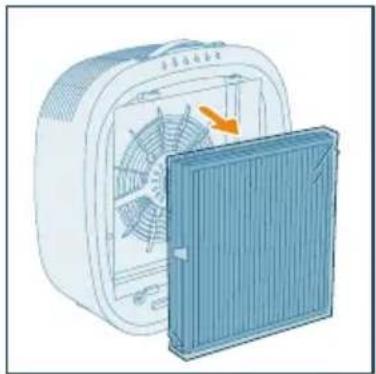
natural_image
Illustration of a portable air conditioner unit with fan and cooling cover (no text or symbols)
natural_image
Diagram of a container with a stack of liquid and an upward arrow, no text or symbols present
natural_image
Illustration of a fan inside a technical enclosure with an orange arrow indicating rotation (no text or symbols)
natural_image
Illustration of a portable air conditioner unit with a grid panel and orange arrow indicating the front panel (no text or symbols)
flowchart
graph TD
    A["Mobile Device"] -->|Signal Transmission| B["Wireless Device"]
    C["Smart Phone"] -->|Signal Transmission| D["Wireless Device"]
Obs!
natural_image
Illustration of a white electronic device connected to a wall-mounted power outlet (no text or symbols visible)
natural_image
Illustration of a white electronic device with a blue circular button and a finger pointing at it (no text or symbols)
natural_image
Illustration of a hand interacting with a circular icon containing three dots and arrows, next to four circular icons below (star, crescent, circle, spiral) — no text or symbols present.
natural_image
Illustration of a hand interacting with a circular button and three icons (moon, refresh arrow, spiral) on a base panel (no text or symbols)
natural_image
Illustration of a hand interacting with a circular icon and three control icons below (no text or symbols)
natural_image
Illustration of a hand interacting with a shield emblem and a spiral symbol (no text or labels)
natural_image
Illustration of a hand interacting with a padlock icon and cat symbol (no text or symbols present)
natural_image
Illustration of a hand interacting with a lock icon and clock, symbolizing security or security (no text present)
natural_image
Illustration of a white rectangular device with a hand interacting with a touchscreen icon and a smartphone displaying a red button (no text or symbols present)
natural_image
Illustration of a white rectangular device with a circular button labeled 'P' and a hand pointing at it (no text or symbols on the device itself)
natural_image
Illustration of a white rectangular device with a clock and a blue circular button, no text or symbols present.
natural_image
Illustration of a hand inserting a card into a plastic housing with an orange arrow indicating the fold (no text or symbols present)
natural_image
Illustration of a hand inserting a device into a card into a slot (no text or symbols)
Rengöra filtren
natural_image
Diagram showing a device with a grid panel and a magnified view of its internal structure (no text or symbols)
natural_image
Illustration of a plastic waste bin with an orange arrow indicating particle dispersion (no text or symbols)
natural_image
Diagram showing airflow from a fan to a solar panel array (no text or symbols)
natural_image
Illustration of a hand holding a tool interacting with a blue rectangular panel (no text or symbols visible)
natural_image
Illustration of a portable air conditioner unit with a grid panel and orange arrow indicating the grille (no text or symbols)
natural_image
Illustration of a hand pressing down on a blue plastic bag with an arrow indicating rotation (no text or symbols)
natural_image
Illustration of a hand holding a spray can with a dropper (no text or symbols)
Byta filter
natural_image
Illustration of a white rectangular device with a warning symbol (no text or labels)
natural_image
Illustration of a portable air conditioner unit with fan and cooling panel (no text or symbols)
5 Kassera det gamla filtret.
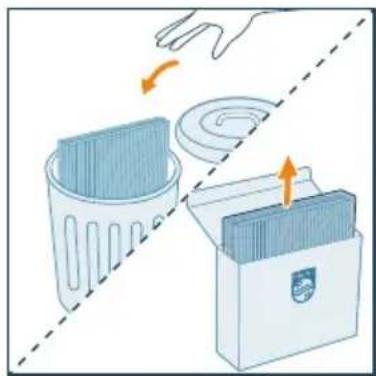
natural_image
Illustration of a hand placing a trash bin into a plastic bag, with arrows indicating motion (no text or symbols)
natural_image
Illustration of a container with a side panel and an upward arrow, no text or symbols present
natural_image
Illustration of a fan inside an electric heating fan with a cooling cover removed (no text or symbols)
natural_image
Illustration of a portable air conditioner unit with a grid panel and orange arrow indicating airflow direction (no text or symbols)
natural_image
Illustration of a hand spraying a spray gun with a blue spray can (no text or symbols)
Obs!
natural_image
Six circular icons representing power, refresh, cat face, lightbulb, lock, Wi-Fi, and signal symbols (no text or labels)
Kontrol düğmeleri
natural_image
Illustration of a hand pressing down on a blue bag with an arrow indicating rotation (no text or symbols)
natural_image
Illustration of a fan inside a technical enclosure with an orange arrow indicating rotation (no text or symbols)
natural_image
Diagram of a container with a side panel and an upward arrow, no text or symbols present
natural_image
Illustration of a small electric fan with a cooling cover removed, showing internal blades and fan structure (no text or symbols)
natural_image
Illustration of a portable air conditioner unit with a grid panel and orange arrow indicating airflow direction (no text or symbols)
natural_image
Illustration of a white electronic device connected to a wall-mounted power outlet (no text or symbols visible)
natural_image
Illustration of a hand pressing a button with a circular icon (no text or symbols)
natural_image
Illustration of a hand interacting with a circular icon containing three dots and arrows, next to four symbolic icons (star, crescent, circle, spiral) below (no text or labels)
natural_image
Illustration of a hand interacting with a circular icon and three circular icons below (no text or symbols)
natural_image
Illustration of a hand interacting with a circular icon and three icons (sunny, Earth, spiral) on a control panel (no text or symbols)
natural_image
Illustration of a hand interacting with a blue circular icon containing a skull and swirl symbol (no text or labels)
natural_image
Illustration of a hand interacting with a padlock icon and a cat, no text or symbols present
natural_image
Illustration of a hand interacting with a lock icon and clock, no text or symbols present
natural_image
Illustration of a smart home control device with a hand interacting with a touchscreen button (no text or symbols present)
natural_image
Illustration of a white rectangular device next to a blue circular button with a hand pointing at it (no text or symbols)
natural_image
Illustration of a white electronic device with a button and a blue circular icon, accompanied by a clock and time indicator (no text or symbols on the device itself)
5 Temizlik ve bakım
Not:
natural_image
Illustration of a hand pressing a blue plastic component with an orange arrow indicating rotation (no text or symbols)
natural_image
Illustration of a hand inserting a card into a device (no text or symbols visible)
natural_image
Diagram showing a device with a grid panel and a magnified inset of its internal structure (no text or symbols)
natural_image
Illustration of a plastic tray with scattered white particles being poured into a trash bin (no text or symbols)
natural_image
Illustration of a fan emitting exhaust from a solar panel array (no text or symbols)
natural_image
Illustration of a hand holding a tool interacting with a blue rectangular panel (no text or symbols visible)
natural_image
Illustration of a portable air conditioner unit with a grid panel and orange arrow indicating the grille (no text or symbols)
natural_image
Illustration of a hand holding a spray can with a dropper (no text or symbols)
Filtreyi değiştirme
natural_image
Illustration of a white rectangular device with a warning symbol (no text or labels)
natural_image
Illustration of a portable air conditioner unit with fan and cooling panel (no text or symbols)
natural_image
Illustration of a hand placing a trash bin into a storage case with an arrow indicating rotation (no text or symbols)
natural_image
Illustration of a container with a side panel and an upward arrow, no text or symbols present
natural_image
Illustration of a fan device with an orange arrow indicating the blade, showing internal blades and a closed lid (no text or symbols)
natural_image
Illustration of a portable air conditioner unit with a grid panel and orange arrow indicating airflow direction (no text or symbols)
natural_image
Illustration of a hand holding a spray can with a blue tip, no text or symbols present
Not:
natural_image
Six circular icons representing power, refresh, cat face, lightbulb, lock, and Wi-Fi symbols (no text or labels)
Кнопки керування
natural_image
Illustration of a hand pressing down on a blue bag with an arrow indicating rotation (no text or symbols)
natural_image
Illustration of a heating fan with cooling effect, showing fan blades and heat sink (no text or symbols)
natural_image
Diagram of a container with a stack of liquid and an upward arrow, no text or symbols present
natural_image
Illustration of a portable air conditioner unit with fan and cooling panel (no text or symbols)
natural_image
Illustration of a portable air conditioner unit with a grid panel and orange arrow indicating airflow direction (no text or symbols)
flowchart
graph TD
    A["Mobile Device"] -->|Signal Transmission| B["Wireless Device"]
    C["Smart Phone"] -->|Signal Transmission| D["Router"]
Примітка.
natural_image
Illustration of a hand interacting with a Wi-Fi symbol and clock icon (no text or symbols)
natural_image
Illustration of a white electronic device connected to a wall-mounted power outlet (no text or symbols)
natural_image
Illustration of a white rectangular device with a blue circular button labeled 'Power' and a finger pointing at it (no text or symbols on the device itself)
natural_image
Illustration of a hand interacting with a circular icon and three circular symbols below (star, crescent, spiral) — no text or labels present.
natural_image
Illustration of a hand interacting with a circular icon containing three dots, next to three circular icons below (star, crescent, spiral) — no text or symbols present.
natural_image
Hand interacting with a circular icon and three control buttons (star, circle, spiral) on a white background (no text or symbols)
natural_image
Illustration of a hand interacting with a blue circular icon containing a skull and spiral symbol (no text or labels)
natural_image
Illustration of a hand interacting with a lock icon and padlock (no text or symbols)
natural_image
Illustration of a hand interacting with a lock icon and clock, no text or symbols present
natural_image
Illustration of a white electronic device with a hand interacting with a touchscreen icon (no text or symbols present)
natural_image
Illustration of a white rectangular device with a circular button and a blue square button, connected by a finger to the right (no text or symbols)
natural_image
Illustration of a white electronic device with a button and clock icon, no text or symbols present
5 Чищення та догляд
Примітка.
natural_image
Illustration of a hand inserting a card into a device (no text or symbols visible)
natural_image
Illustration of a hand inserting a card into a device (no text or symbols visible)
Чищення фільтрів
natural_image
Diagram showing a device with a grid panel and a magnified view of its internal components (no text or symbols)
natural_image
Illustration of a trash bin with a plastic tray and an orange arrow indicating particle emission (no text or symbols)
natural_image
Diagram showing airflow from a fan to a solar panel array (no text or symbols)
natural_image
Illustration of a hand holding a tool interacting with a blue rectangular panel (no text or symbols visible)
natural_image
Illustration of a portable electric heater with a grid panel and orange arrow indicating airflow direction (no text or symbols)
natural_image
Illustration of a hand spraying a spray gun with a blue spray can (no text or symbols)
Заміна фільтра
natural_image
Illustration of a white rectangular device with a red base and an orange warning triangle (no text or symbols)
natural_image
Illustration of a heating fan with cooling fins and a side panel showing airflow direction (no text or symbols)
natural_image
Illustration of a hand placing a trash bin into a storage case with arrows indicating motion (no text or symbols)
natural_image
Diagram of a container with liquid and a stack of rectangular objects, no text or symbols present
natural_image
Illustration of a heating fan with an orange arrow indicating airflow direction (no text or symbols)
natural_image
Illustration of a portable air conditioner unit with a grid panel and orange arrow indicating the component (no text or symbols)
natural_image
Illustration of a hand holding a spray can with a dropper tip (no text or symbols)
Примітка.
natural_image
Six circular icons representing power, refresh, cat face, lightbulb, lock, and Wi-Fi symbols (no text or labels)
Các nút điều khiển
natural_image
Illustration of a hand placing a blue bag into a white container with an orange arrow indicating rotation (no text or symbols)
natural_image
Illustration of a white electric fan with a blue cover partially removed, showing internal fan blades and a highlighted orange arrow (no text or symbols)
natural_image
Diagram of a container with a stack of liquid and an upward arrow, no text or symbols present
natural_image
Illustration of a fan inside a technical enclosure with an orange arrow indicating rotation (no text or symbols)
natural_image
Illustration of a portable air conditioner unit with a grid panel and orange arrow indicating airflow direction (no text or symbols)
flowchart
graph TD
    A["Mobile Device"] -->|Signal Transmission| B["Wireless Device"]
    C["Smart Phone"] -->|Signal Transmission| D["Wireless Device"]
Luu y:
natural_image
Illustration of a hand interacting with a Wi-Fi symbol and clock icon (no text or symbols)
natural_image
Illustration of a white electronic device connected to a wall-mounted power outlet (no text or symbols visible)
natural_image
Illustration of a hand pressing a button with a power symbol (no text or labels)
natural_image
Illustration of a hand interacting with a circular icon and three moon icons below (no text or symbols)
natural_image
Illustration of a hand interacting with a circular icon and three icons (sunny, Earth, spiral) on a control panel (no text or symbols)
natural_image
Illustration of a hand interacting with a blue circular icon containing a cat face and a spiral symbol (no text or symbols present)
natural_image
Illustration of a hand interacting with a padlock icon and a cat face, no text or symbols present
natural_image
Illustration of a hand interacting with a lock icon and clock, symbolizing security or security (no text present)
natural_image
Illustration of a smart home control unit with a smartphone and a key icon (no text or symbols)
natural_image
Illustration of a white rectangular device with a blue circular button and a finger pointing at it (no text or symbols)
natural_image
Illustration of a white rectangular device with a clock and a blue circular button, no text or symbols present.
natural_image
Illustration of a hand inserting a card into a device (no text or symbols visible)
natural_image
Illustration of a hand holding a device with an arrow indicating rotation (no text or symbols)
Vệ sinh bộ lọc
natural_image
Diagram showing a device being inserted into a grid panel, with a magnified inset illustrating the process (no text or symbols present)
natural_image
Illustration of a trash bin with plastic waste being poured into a grid-patterned plastic tray (no text or symbols)
natural_image
Illustration of a fan emitting exhaust from a solar panel array (no text or symbols)
natural_image
Illustration of a hand holding a tool interacting with a blue rectangular panel (no text or symbols visible)
natural_image
Illustration of a portable electric heater with a grid panel and orange arrow indicating the component (no text or symbols)
natural_image
Illustration of a hand spraying a spray bottle with a blue tip (no text or symbols)
thay thể bộ lọc
natural_image
Illustration of a white rectangular device with a red warning symbol (no text or labels)
natural_image
Illustration of a portable air conditioner unit with fan and cooling panel (no text or symbols)
natural_image
Illustration of a hand placing a trash bin into a plastic bag, with arrows indicating motion (no text or symbols)
natural_image
Illustration of a container with a side panel and an upward arrow, no text or symbols present
natural_image
Illustration of a fan device with an orange arrow indicating airflow or heat transfer, next to a blue panel (no text or symbols)
natural_image
Illustration of a portable air conditioner unit with a grid panel and orange arrow indicating airflow direction (no text or symbols)
natural_image
Illustration of a hand holding a spray can with a blue tip, no text or symbols present
Lưu ý:
PHILIPS and the Philips Shield Emblem are registered trademarks of Koninklijke Philips N.V. and are used under license.
This product has been manufactured by and is sold under the responsibility of Versuni Holding B.V., and Versuni Holding B.V. is the warrantor in relation to this product.
2025 © Versuni Holding B.V.
AC3360_UM_EU_v1.0 (23/09/2025)


