
STV 30 A1 - Fan SILVERCREST - Free user manual and instructions
Find the device manual for free STV 30 A1 SILVERCREST in PDF.
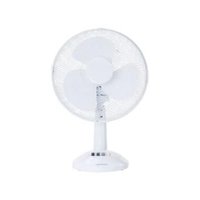


| Product type | Table fan |
| Brand | SilverCrest |
| Model | STV 30 A1 |
| Dimensions (L x H x D) | Approx. 34 x 49 x 23.5 cm |
| Weight | Approx. 1.6 kg |
| Input voltage | 220-240 V~, 50/60 Hz |
| Power consumption | 35 W |
| Protection class | II |
| Maximum air flow | 40.8 m³/min |
| Maximum air speed | 2.54 m/s |
| Sound power level | 50 dB(A) |
| Seasonal electricity consumption | 10.69 kWh/year |
| Number of speeds | 3 (1-2-3) |
| Oscillation function | Yes, horizontal |
| Vertical angle adjustment | Yes, manual |
| Warranty | 3 years |
| Maintenance | Clean with a damp cloth, do not immerse |
| Safety | Protective grilles, automatic shutdown in case of overheating? |
| Country of origin | Germany (design) |
Frequently Asked Questions - STV 30 A1 SILVERCREST
User questions about STV 30 A1 SILVERCREST
0 question about this device. Answer the ones you know or ask your own.
Ask a new question about this device
Download the instructions for your Fan in PDF format for free! Find your manual STV 30 A1 - SILVERCREST and take your electronic device back in hand. On this page are published all the documents necessary for the use of your device. STV 30 A1 by SILVERCREST.
USER MANUAL STV 30 A1 SILVERCREST
11/2018-Ident-No: STV30AT 112018-1
IAN 313831
Operating instructions and safety instructions
(1)
Handling
P
(2)
Deutsch 2 English 16 Francais 29 Nederlands 46 Polski 60 Cesky 74 Slovencina 87
Table of contents
www.targa.de/downloads/conformity/313831.pdf
8.1 Switching the fan on and off 25 8.2 Oscillation 25
- Maintenance/cleaning 25
- Environmental and waste disposal information 26
- Marks of conformity 26
- Notes on guarantee and service 27
Congratulations!
By purchasing the SilverCrest STV 30 A1 tabletop fan, hereinafter referred to as the 'fan', you have opted for a high quality product.
Familiarise yourself with the fan before using it for the first time and read these operating instructions carefully. Observe the safety instructions and only use the fan in the manner described in these operating instructions and for the indicated fields of application.
Keep these operating instructions in a safe place. Hand over all documents in the event that you pass on the fan to a third party.
1. Intended use
This fan is intended to circulate air for cooling. The fan must not be used outside of closed rooms or in regions with a tropical climate. The fan is not intended for business or commercial use. Use the fan solely for private purposes in living areas; any other use is deemed improper. This fan meets the requirements of all relevant standards related to CE conformity. Compliance with these standards is no longer guaranteed if a change is made to the fan without the authorisation of the manufacturer. The manufacturer shall not be liable for any damages or faults arising as a result. Only use the accessories specified by the manufacturer.
Please observe the national regulations and/or laws of the country in which the device is used.
2. Package contents
SilverCrest STV 30 A1 fan (disassembled) These operating instructions
3. Overview
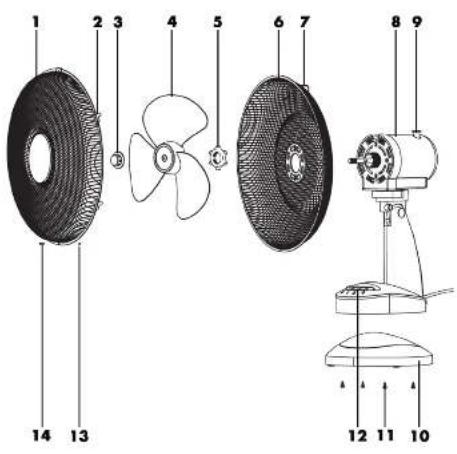
These operating instructions also have a cover that can be unfolded. The inside of the cover provides a schematic of the fan and a number key. The numbers identify the following parts/functions:
1 Protective grille (front) 2 Hinges (2x) 3 Rotor blade nut 4 Rotor blade 5 Protective grille nut 6 Protective grille (rear) 7 Handle 8 Motor unit 9 Oscillation pin 10 Base 11 Screws (for base, 4x) 12 Control panel 13 Nut (for protective grille) 14 Screw (for protective grilles)
4. Technical data
| Input voltage | 220-240 V-(AC voltage), 50/60 Hz |
| Power consumption 35 W | |
| Protection class II / | ☐ |
| Dimensions (W x H x D) approx. 34 x 49 x 23.5 cm | |
| Weight approx. 1.6 kg | |
The specifications and design are subject to change without notice.
4.1 Information requirements
| Information to identify the model(s) to which the information relates: SilverCrest STV 30 A1, IAN 313831 | |||
| Description | Symbol | Value | U |
| Maximum fan flow rate F 40.8 m | 3/min | ||
| Fan power input P 33.40 W | |||
| Service value S | v | 0.93 | (m3/min)/W |
| Standby power consumption P | SB | 0.00 | W |
| Off power consumption P | OFF | - | W |
| Fan sound power level L | WA | 50 | dB(A) |
| Maximum air velocity | c 2.54 m/s | ||
| Seasonal electric consumption Q | 10.69 kWh/a | ||
| Measurement standard for the calculation of the service value | IEC 60879:1986 (corr. 1992) | ||
| Contact address for further information | TARGA GmbH, Coesterweg 45, 59494 Soest, GERMANY | ||
5. Safety instructions
Before using the fan for the first time, read the following instructions carefully and observe all warnings, even if you are familiar with using electronic devices. Keep these operating instructions in a safe place for future reference. If you give the fan away or sell it, please ensure that you also pass on these operating instructions.

DANGER! This icon, in conjunction with the word 'Danger', indicates an impending dangerous situation which, if not prevented, may lead to serious injuries or even death.

WARNING! This icon, in conjunction with the word 'Warning', indicates important information for the safe operation of the device and user safety.

CAUTION! This icon, with the word 'Caution', indicates important information for protection against damage to property.

This icon indicates that further information on the topic is available.

DANGER! Personal safety
This fan can be used by children ages eight and up, as well as by people with reduced physical, sensory or mental abilities or who lack experience and knowledge, provided they are supervised or have been instructed in the safe use of the fan and understand the resulting dangers. Children must not play with the fan. Cleaning and user maintenance must not be carried out by children unless they are supervised. Also keep the packaging film away from children. There is a risk of suffocation.

DANGER! Risk of electric shock!
- Protect the product from moisture and humidity as well as from dripping or splashing water. Never immerse the product in water or any other liquid!
- Should liquid enter the product, immediately remove the plug from the socket. Have the product examined by a qualified specialist before using it again.
- Do not handle the product with wet or damp hands.
- Do not reach for the product if it is in water or any other liquid. In such cases, immediately remove the plug from the socket.
- Do not use the product if the plug or the connecting cable are damaged, if it does not operate as intended, if it has been dropped on the floor or in water or if it exhibits any other damage. In such cases, contact a qualified specialist for repair.
- Only connect the plug to a socket that has been properly installed, is easily accessible and the mains voltage of which corresponds with the information specified in the 'Technical data' section. The socket must continue to be easily accessible after the plug has been connected.
- Ensure that the connecting cable cannot be damaged by sharp edges or hot surfaces.
- When using the product, ensure that the connecting cable is not jammed or squashed.
- The product is also not fully disconnected from the power supply once it has been switched off. Remove the plug from the socket to fully disconnect it from the power supply. Always pull at the plug to remove it from the socket; never pull on the cable.
- Remove the plug from the socket
if a fault occurs, if you are not using the product, during assembly, before cleaning the product and during thunderstorms.
- Do not attempt to repair the product yourself. In the event of a defect, switch the product off, remove the plug and contact our service department.
- If this product's connecting cable is damaged, it must be replaced by the manufacturer, their service department or a similarly qualified person in order to prevent any hazards.

WARNING! Risk of injury!
- Do not insert your fingers or any objects into the product while it is in operation.
- Do not use the product near explosive or flammable materials.
- Never operate the product without a protective grille.
- Keep hair, clothing and other objects clear of the protective grille while it is in operation.
- Do not transport the product while it is in operation.

CAUTION! Damage to property!
- This product is not intended for operation with an external timer or a separate remote-control system.
- Never place the product on hot surfaces (e.g., hobs) or near sources of heat or open flames.
- Only use the original accessories.
- Do not hang or mount the product to the ceiling or wall.
- Only operate the product on a flat, stable surface.
- Never operate the product near highly flammable materials, such as curtains, drapes etc. Keep the product at least 50 cm away from flammable and combustible materials.
- The product must not be exposed to direct sources of heat (e.g., heaters), direct sunlight or strong artificial light. Also avoid contact with splashing and dripping water as well as aggressive liquids. Do not operate the product near water. In particular, the product must never be immersed (do not place any objects filled with liquids, e.g., vases or drinks, on the product). Also make sure that the product is not exposed to excessive shocks and vibrations. Furthermore, no foreign bodies should penetrate into the device.
6. Copyright
All contents of these operating instructions are subject to copyright law and are provided to the user solely as a source of information. Any form of copying or reproduction of data and information without the express written permission of the author is prohibited. This also concerns commercial use of the content and data. The text and illustrations correspond to the technical standards at the time of printing. Subject to alterations.
7. Before initial use
7.1 Unpacking
Take the product out of the packaging. - Completely remove all packaging materials. - Check the package contents for completeness. Contact Service immediately in case of missing components.
7.2 Assembly
- Insert the base (10) into the motor unit (8). Now fasten the base to the motor unit using the four screws provided (11).
- Screw the protective grille nut (5) anti-clockwise from the motor unit (8).
- Attach the rear protective grille (6) to the motor unit (8). To do this, push the two narrow slots on the rear protective grille (6) onto the studs on the motor unit (8). Make sure that the handle (7) on the rear protective grille (6) is pointing upwards.
- Fasten the rear protective grille (6) to the motor unit (8) using the protective grille nut (5). To do this, tighten the protective grille nut (5) clockwise.
- Remove the thread cover from the drive shaft of the motor unit (8). Then attach the rotor blade (4) to the motor unit (8). Ensure that the recess on the rotor blade (4) holds the prong of the motor unit drive shaft (8).
- Fasten the rotor blade (4) to the motor unit (8) using the rotor blade nut (3). To do this, tighten the rotor blade nut (3) anti-clockwise.
- Remove the nut (13) and the screw (14) from the front protective grille (1).
- Hang the front protective grille (1) on the rear protective grille (6). Make sure the hole in the front protective grille (1) lines up with the hole in the rear protective grille (6).
- Push the screw provided (14) through the holes in the front (1) and rear (6) protective grilles and fasten this in place using the nut (13). Then close the hinges (2) on the front protective grille (1) so that they clasp the edge of the rear protective grille (6).
8. Initial use
8.1 Switching the fan on and off
Proceed as follows to put the fan into operation:
- Place the fan on a flat, stable surface.
- Insert the plug into a properly installed socket.
- Switch the fan on by selecting one of the three fan levels on the control panel (12):
Level 1, weak: Press button 1. Level 2, medium: Press button 2. Level 3, strong: Press button 3.
- Switch the fan off by pressing button 0.
8.2 Oscillation
The fan can oscillate horizontally.
- Press the oscillation pin (9) in to start oscillation.
- Pull the oscillation pin (9) out to stop oscillation.

You can adjust the vertical angle of the fan manually.
9. Maintenance/cleaning

DANGER! Risk of electric shock!
- Disconnect the fan from the mains before cleaning commences.
- Do not immerse the fan in water.
- Do not allow any water or cleaning agent to enter the fan.
Maintenance work is required if the fan has been damaged; for example, if the device housing is damaged, liquids or objects have got inside the fan or if the fan has been exposed to rain or moisture. Maintenance work is also required if the fan does not work properly or has been dropped. If you notice any smoke or unusual noises or smells, disconnect the fan from the mains immediately. If this happens, you must stop using the fan until it has been checked by a technician. All maintenance work should only be carried out by qualified specialists. Never open the housing of the fan. Clean the fan using a clean, slightly damp cloth. Never use abrasive liquids during cleaning. Use some washing up-liquid on the damp cloth for stubborn stains.
If required, the protective grille (1, 6) can be cleaned with a soft brush.
10. Environmental and waste disposal information
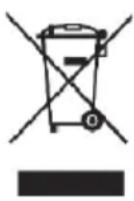
If a product features this icon of a crossed-through waste bin, the product is subject to European Directive 2012/19/EU. Electrical and electronic equipment must not be put in the household waste, but must be disposed of via designated public disposal centres. By properly disposing of the old device, you can avoid environmental damage and hazards to health.

Further information on disposing of old devices can be obtained from your local authority or the shop where you purchased the product.
Make sure that the packaging is disposed of in an environmentally friendly manner. Cardboard packaging can be put out for waste-paper collection or taken to public collection points for recycling. The plastic packaging used for your device is collected by your local waste management company and disposed of in an environmentally-friendly manner.
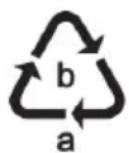
Please pay attention to the labels on packaging materials when you separate waste; these are marked with abbreviations (a) and numbers (b) that mean the following:
1-7: Plastics/20-22: Paper and cardboard/80-98: Composite materials.
11. Marks of conformity

This product fulfils the requirements specified in the applicable European and national policies. This product's conformity has been verified. The declarations and documents are stored with the manufacturer. You can download the full EU declaration of conformity at the following link:
www.targa.de/downloads/conformity/313831.pdf
12. Notes on guarantee and service
Warranty of TARGA GmbH
Dear Customer,
This device is sold with a three-year warranty from the date of purchase. In the event of product defects, you have legal rights towards the seller. These statutory rights are not restricted by our warranty as described below.
Warranty conditions
The warranty period commences upon the date of purchase. Please keep the original receipt in a safe place as it is required as proof of purchase. If any material or manufacturing faults occur within three years of purchase of this product, we will repair or replace the product free of charge as we deem appropriate.
Warranty period and legal warranty rights
The warranty period is not extended in the event of a warranty claim. This also applies to replaced and repaired parts. Any damage or defects discovered upon purchase must be reported immediately when the product has been unpacked. Any repairs required after the warranty period will be subject to charge.
Scope of warranty
The device was carefully manufactured in compliance with stringent quality guidelines and subjected to thorough testing before it left the works. The warranty applies to material and manufacturing faults. This warranty does not cover product components which are subject to normal wear and which can therefore be regarded as wearing parts, or damage to fragile components such as switches, rechargeable batteries or components made of glass. This warranty is void if the product is damaged, incorrectly used or serviced. To ensure correct use of the product, always comply fully with all instructions contained in the user manual. The warnings and recommendations in the user manual regarding correct and incorrect use and handling of the product must always be observed and complied with. The product is solely designed for private use and is not suitable for commercial applications. The warranty is rendered void in the event of incorrect handling and misuse, if it is subjected to force, and also if any person other than our authorised service technicians interfere with the device. No new warranty period commences if the product is repaired or replaced.
Submitting warranty claims
To ensure speedy handling of your complaint, please note the following:
Before using your product for the first time, please read the enclosed documentation carefully. Should any problems arise which cannot be solved in this way, please call our hotline. - Always have your receipt, the product article number as well as the serial number (if available) to hand as proof of purchase.
- If it is not possible to solve the problem on the phone, our hotline support staff will initiate further servicing procedures depending on the fault.

Service

Phone: 0800 404 7657
E-Mail: targa@lidl.co.uk
IE
Phone: 1890 930 034
E-Mail: targa@lidl.ie
MT
Phone: 800
62230
E-Mail:
targa@lidl.com.mt
CY
Phone: 8009
4409
E-Mail:
targa@lidl.com.cy
IAN:313831

Manufacturer
Please note that the following address is not a service address. First contact the service point stated above.
TARGA
GmbH
Coesterweg 45
DE-59494 Soest
GERMANY
Table of contents
www.targa.de/downloads/conformity/313831.pdf
Dear customer,
Dear customer,
www.targa.de/downloads/conformity/313831.pdf
www.targa.de/downloads/conformity/313831.pdf
www.targa.de/downloads/conformity/313831.pdf


- TABLE OF CONTENTS
- CONGRATULATIONS
- INTENDED USE
- PACKAGE CONTENTS
- OVERVIEW
- TECHNICAL DATA
- INFORMATION REQUIREMENTS
- SAFETY INSTRUCTIONS
- DANGER! PERSONAL SAFETY
- DANGER! RISK OF ELECTRIC SHOCK
- WARNING! RISK OF INJURY
- CAUTION! DAMAGE TO PROPERTY
- COPYRIGHT
- BEFORE INITIAL USE
- UNPACKING
- ASSEMBLY
- INITIAL USE
- SWITCHING THE FAN ON AND OFF
- OSCILLATION
- MAINTENANCE/CLEANING
- ENVIRONMENTAL AND WASTE DISPOSAL INFORMATION
- MARKS OF CONFORMITY
- NOTES ON GUARANTEE AND SERVICE
- WARRANTY OF TARGA GMBH
- WARRANTY CONDITIONS
- WARRANTY PERIOD AND LEGAL WARRANTY RIGHTS
- SCOPE OF WARRANTY
- SUBMITTING WARRANTY CLAIMS
- SERVICE
- IE
- MT
- CY
- IAN
- MANUFACTURER
Brand : SILVERCREST
Model : STV 30 A1
Category : Fan