Mey - Scooter Lionelo - Free user manual and instructions
Find the device manual for free Mey Lionelo in PDF.


User questions about Mey Lionelo
0 question about this device. Answer the ones you know or ask your own.
Ask a new question about this device
Download the instructions for your Scooter in PDF format for free! Find your manual Mey - Lionelo and take your electronic device back in hand. On this page are published all the documents necessary for the use of your device. Mey by Lionelo.
USER MANUAL Mey Lionelo
natural_image
Line drawing of a three-wheeled scooter with a long handle and front-mounted sensor (no text or symbols)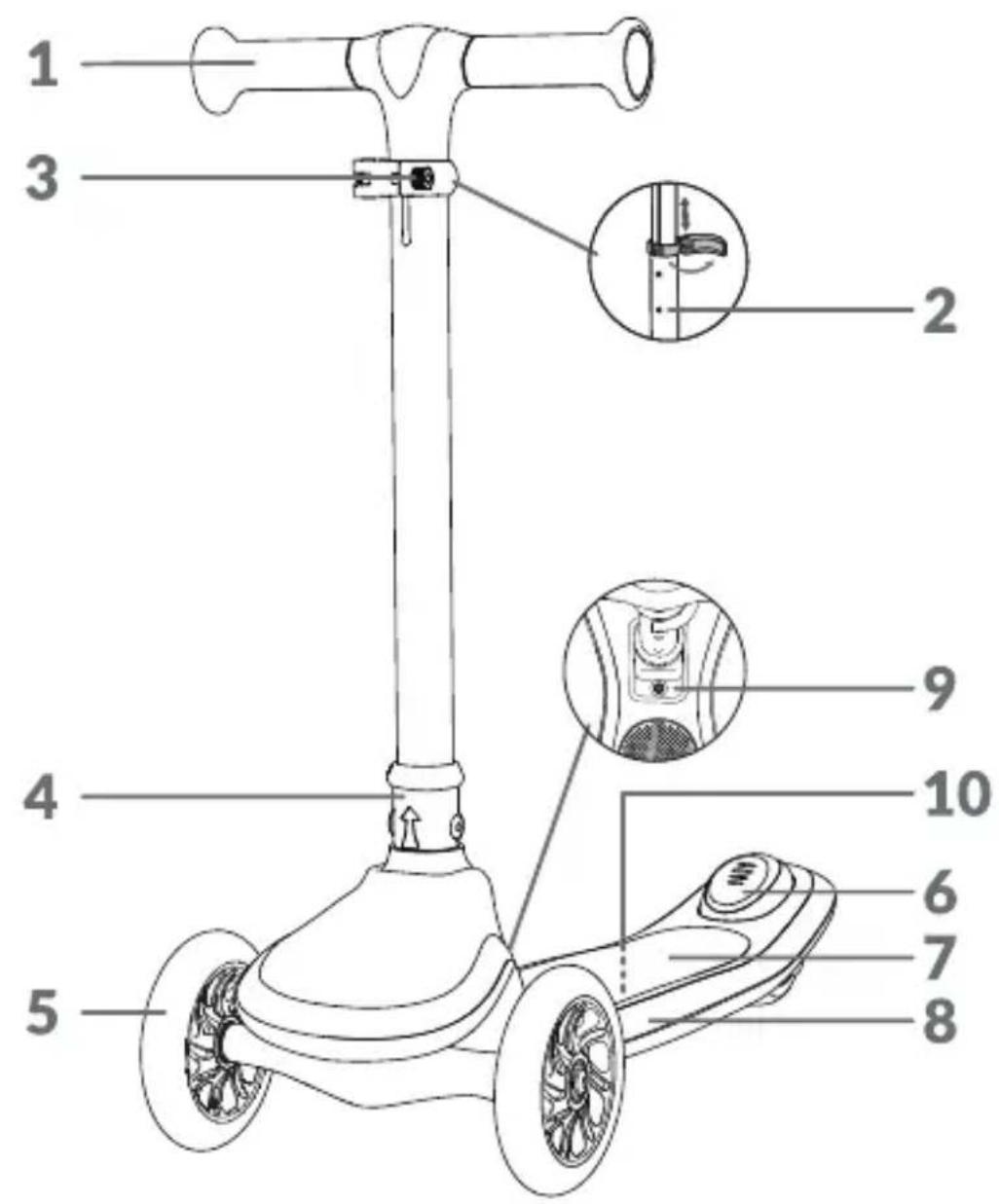
natural_image
Line drawing of a hand pressing down on a wheeled vehicle wheel (no text or symbols)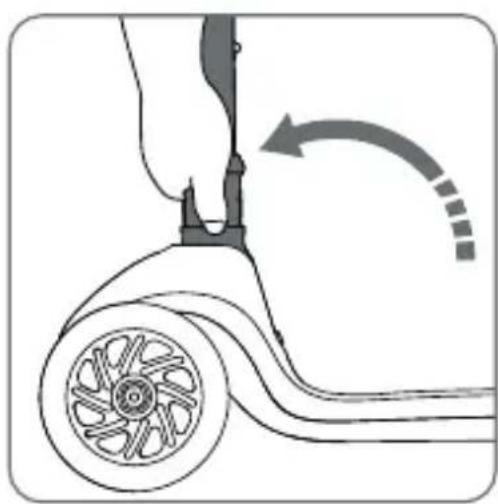
natural_image
Diagram of a hand operating a scooter with a wheel and arrow indicating rotation (no text or symbols)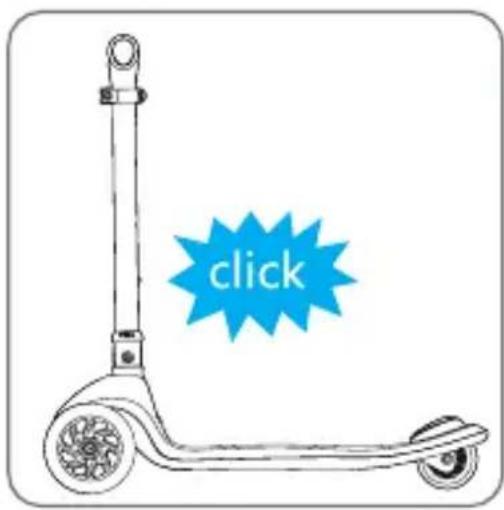
1
natural_image
Diagram of a hand operating a wheeled vehicle with a curved wheel and attached lever (no text or symbols)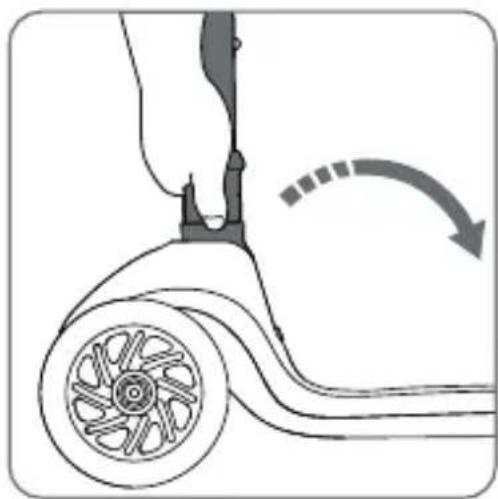
natural_image
Diagram of a hand operating a wheeled vehicle with a curved arrow indicating motion (no text or symbols)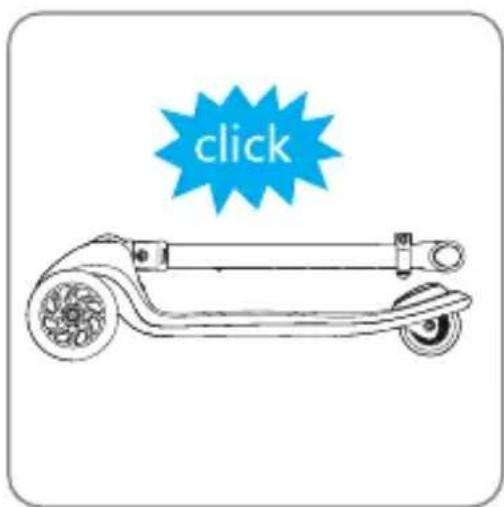
2
natural_image
Illustration of a hand using a tool to lift a vertical tube, showing the mechanism and rotation (no text or symbols)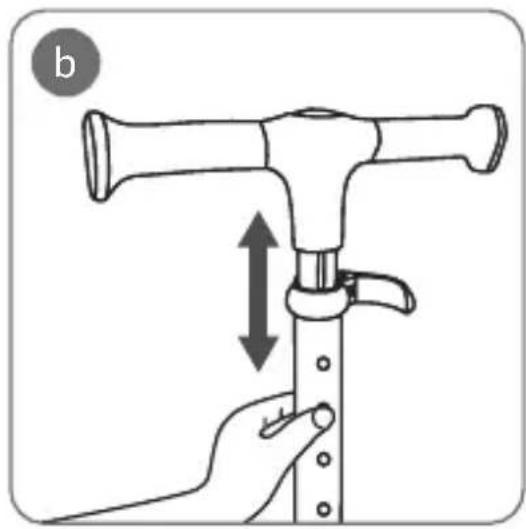
natural_image
Illustration of a hand holding a mechanical device with a double-headed arrow indicating compression or adjustment (no text or symbols)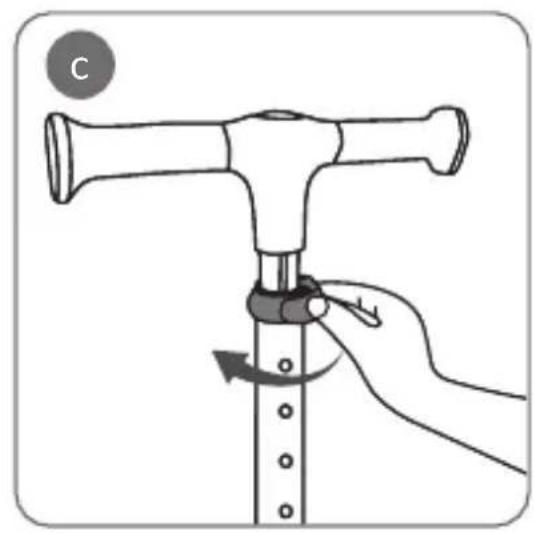
natural_image
Illustration of a hand using a tool to press or adjust a mechanical component, with no visible text or symbols.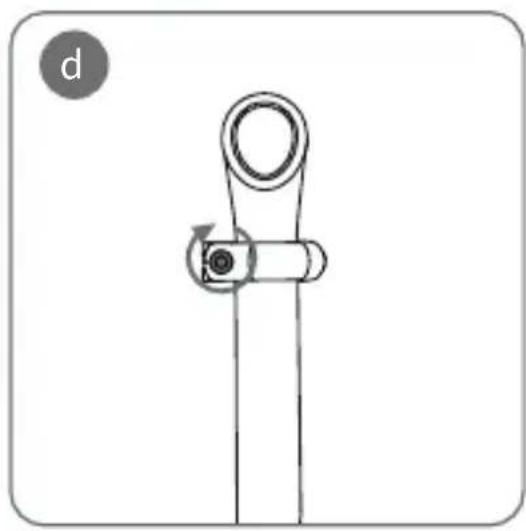
natural_image
Pure mechanical diagram showing a lever mechanism with no text or symbols3
natural_image
Diagram of a mechanical device with rotating arrows indicating motion (no text or symbols)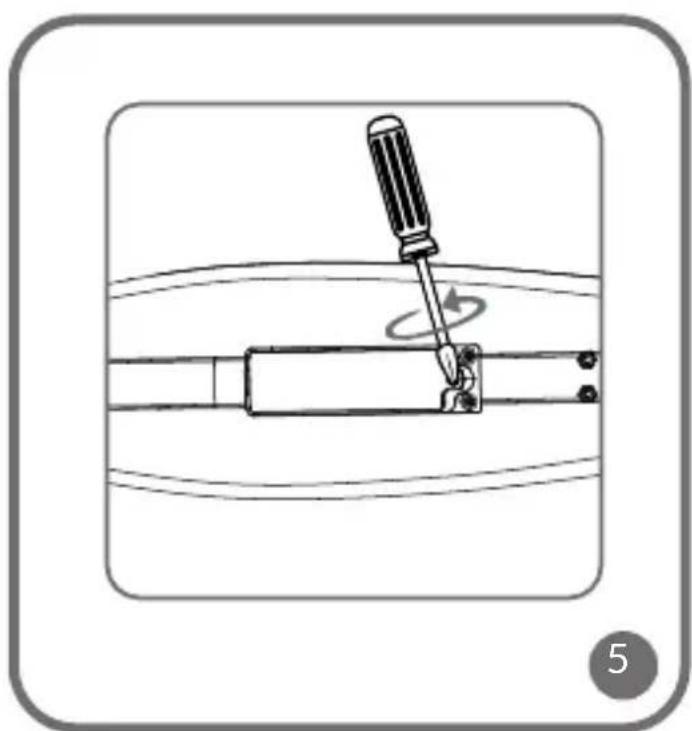
natural_image
Diagram of a screwdriver using a tool to switch a mechanical component, with no visible text or symbols.Dear Customer!
In case of any questions or comments on the purchased product, please contact us:
help@lionelo.com
Producer:
BrandLine Group Sp. z o. o.
Keep this manual, as it contains important information.
WARNINGS
- Warning. Protective equipment should be worn. Not to be used in traffic. 50 kg max.
- Maximum basket load capacity: 0.5 kg.
- The scooter is intended for children aged 3 and older.
- Always wear protective gear, including a helmet, elbow and knee pads, and gloves, while using the scooter.
- A child riding the scooter should wear appropriate footwear.
- Ensure all locking devices are engaged before use.
- The scooter is designed for one person.
- The scooter should be assembled, disassembled, and adjusted exclusively by an adult, keeping children at a safe distance.
- Do not use the scooter near traffic. Riding the scooter in traffic can result in accidents and severe injuries.
- This product is not intended for use in extreme weather conditions such as frost, rain, snow, on icy surfaces, etc. Avoid using your scooter near potentially hazardous areas (e.g. swimming pools). Avoid using the scooter on sloping or uneven surfaces. The safest places to ride a scooter are those with limited or no motorised traffic, including private spaces, recreational areas, playgrounds, and school fields.
- A child using the scooter should be supervised by an adult.
- Educate the child on the proper usage of the product and the correct way to brake.
-
Handle the product with care. The user must possess the skills to avoid falls or collisions that could cause injury to themselves or others.
-
Before each use, inspect the scooter for damage, loose connections, or missing components. Do not use the product if any components are missing or damaged. If this is the case, contact the manufacturer's authorised service centre.
- Never tow your scooter behind a car or any other vehicle.
- Keep the product away from heat sources, high temperatures, hot surfaces, sparks, open flames, oil, and sharp edges.
- Store the product in a dry place.
- Keep plastic packaging away from children to prevent the risk of strangulation.
- Warning: The toy emits flashes that may trigger epilepsy in sensitive individuals.
- Warning: The electronic components in this product can be damaged if exposed to water. The product is not waterproof.
BATTERY WARNINGS
- Disposable, non-rechargeable batteries should not be charged.
- Do not insert different types of batteries or new and used batteries into the device.
- Batteries must be inserted with the correct polarity.
- Dead batteries should be removed from the toy.
- The power supply terminals should not be short-circuited.
- If the product is not used for a long time, remove the batteries from the compartment.
DESCRIPTION OF PARTS (FIG. A)
- Handlebars
- Height adjustment lock
- Lock adjustment knob
- Folding / unfolding mechanism
- Wheels
- Brake
- Deck
- LED lights
- Push button for activating LED lights
- Battery compartment
BATTERY INSTALLATION IN PRODUCT
-
Use a screwdriver to remove the screw from the battery cover. Remove the battery cover (Fig. 5).
-
Insert three AA 1.5V batteries, ensuring the correct polarity.
-
Put the cover back on. Use a screwdriver to tighten the screw.
USE
Unfolding
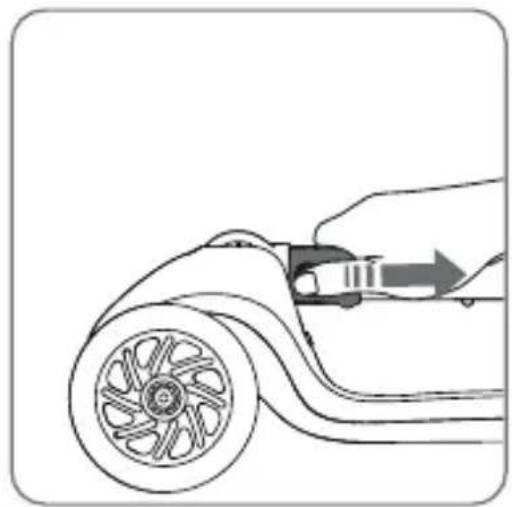
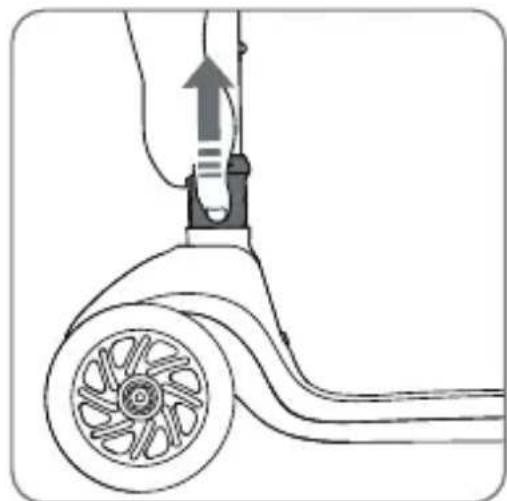
To unfold the scooter, pull the mechanism (Fig. 1) and lift the handlebars upwards. Gently press down on the handlebars to ensure the scooter is fully extended. A clicking sound confirms the scooter is unfolded correctly.
Folding
To fold the scooter, pull the lock, then lower the handlebars and fold the scooter (Fig. 2).
Braking
To brake, press down on the brake (6, Fig. A) located on the scooter's rear axle with a foot.
Handlebar height adjustment
To adjust the height of the handlebars:
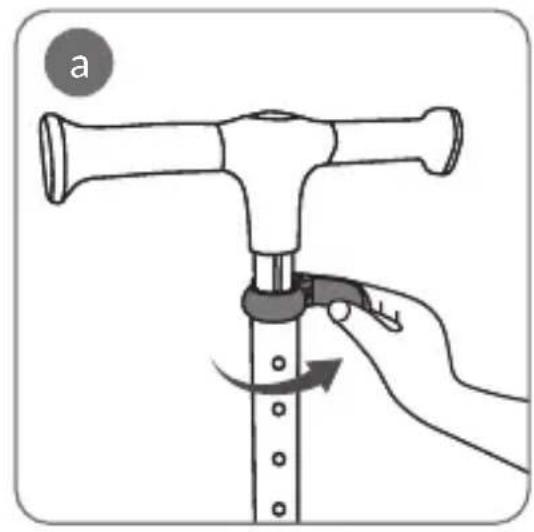
- Swivel the lock (a, Fig. 3).
- Press the height adjustment button located inside the handlebars and set the desired height (b, Fig. 3).
- Make sure the height adjustment button has moved to the desired higher or lower position. The correct position is indicated by an audible click.
- Close the lock (c, Fig. 3). To lock it, tighten the lock adjustment knob (d, Fig. 3).
LED lighting
To activate LED lights, press the light switch button (9, Fig. A). Press the button again to change the mode, and to turn off the lighting, press and hold the button. The LED lighting in the wheels activates and powers on with movement.
Basket assembly
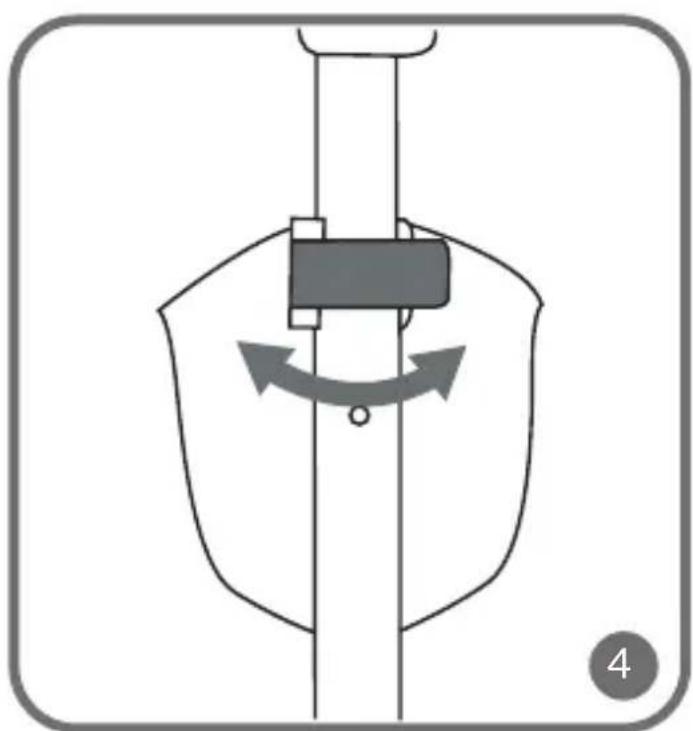
Mount the basket on the handlebars and secure it with the clamp (Fig. 4).
CLEANING AND MAINTENANCE
Use a damp cloth to clean the frame and all scooter components. Prevent the scooter from coming into contact with water to avoid damaging the electronic components. Avoid using caustic or abrasive cleaning products on the scooter. Before each use, inspect the scooter for damage, loose connections, or missing components.
The photos are for illustrative purposes only, the actual appearance of the products may differ from that shown in the photos.
Drogi Kliencie!
BrandLine Group Sp. z o.o.
DALU APRAKSTS (ATT. A)
EN: The product complies with the requirements of European Union directives.
In accordance with Directive 2012/19/EU, this product is subject to separate collection. The product should not be disposed of with municipal
waste, as it may pose a threat to the environment and human health. Return the used product to a recycling center for electrical and electronic equipment.