
Dust Mite - Vacuum Cleaner Xiaomi - Free user manual and instructions
Find the device manual for free Dust Mite Xiaomi in PDF.


| Product type | Dust mite vacuum |
| Brand | Xiaomi |
| Model | MJCMY02EU |
| Dimensions (L × W × H) | 239 × 230 × 144 mm |
| Net weight | 1.63 kg |
| Rated voltage | 220–240 V~ |
| Rated frequency | 50–60 Hz |
| Rated power | 350 W |
| Noise level | ≤ 78 dB(A) |
| Standby power consumption | ≤ 0.3 W |
| UV light | Yes, with automatic shut-off when not on fabric |
| Extraction module | Yes |
| Filtration technology | Hydrocyclone separator + washable filter |
| Compatible surfaces | Upholstery fabrics (mattresses, blankets, pillows, sofas) |
| Dust compartment maintenance | Regular emptying and cleaning |
| Filter washing | Under running water, dry completely before reinstalling |
| Filter replacement | Every 2 to 3 months |
| Included accessories | Vacuum cleaner, user manual, warranty |
| Safety | UV and extraction shut-off if the device is not in contact with fabric |
| Recycling | Compliant with WEEE (do not dispose of with household waste) |
Frequently Asked Questions - Dust Mite Xiaomi
User questions about Dust Mite Xiaomi
0 question about this device. Answer the ones you know or ask your own.
Ask a new question about this device
Download the instructions for your Vacuum Cleaner in PDF format for free! Find your manual Dust Mite - Xiaomi and take your electronic device back in hand. On this page are published all the documents necessary for the use of your device. Dust Mite by Xiaomi.
USER MANUAL Dust Mite Xiaomi
Xiaomi Dust Mite Vacuum Cleaner User Manual
Read this manual carefully before use, and retain it for future reference.
WARNINGS
This appliance is not intended for use by persons (including children) with reduced physical, sensory or mental capabilities, or lack of experience and knowledge, unless they have been given supervision or instruction concerning use of the appliance by a person responsible for their safety.
Children should be supervised to ensure that they do not play with the appliance.
This appliance can be used by children aged from 8 years and above and persons with reduced physical, sensory or mental capabilities or lack of experience and knowledge if they have been given supervision or instruction concerning use of the appliance in a safe way and understand the hazards involved. Children shall not play with the appliance. Cleaning and user maintenance shall not be made by children without supervision.
If the supply cord is damaged, it must be replaced by the manufacturer, its service agent or similarly qualified persons in order to avoid a hazard.
The plug must be removed from the socket-outlet before cleaning or maintaining the appliance.
The dust mite vacuum cleaner comes with a UV light. Do not expose the eyes or skin of humans or animals to UV radiation; otherwise, it may cause damage.
To prevent burns, do not touch the UV light with your hands during use or immediately after it is turned off.
Before cleaning the UV light, make sure the dust mite vacuum cleaner is powered off and avoid pressing the power button during cleaning. Otherwise, the dust mite vacuum cleaner may suddenly start and cause damage.
- Do not touch the plug or any part of the dust mite vacuum cleaner with wet hands.
- Do not use the dust mite vacuum cleaner to vacuum water, any flammable or explosive liquids like gasoline, or any solutions containing toxic and harmful ingredients such as chlorine bleach, ammonia, and drain cleaner.
- Do not use the dust mite vacuum cleaner to vacuum drywall particles, ashes like fireplace ash, or smoking or burning materials such as coal, cigarette butts or matches.
- Do not use the dust mite vacuum cleaner to vacuum hard or sharp objects, such as glass, nails, screws, or coins, which may damage the product.
- Keep the dust mite vacuum cleaner away from heating appliances and direct sunlight to prevent fires.
- Avoid using the dust mite vacuum cleaner for a long time if the suction inlets, heat dissipation vent, or hot air outlet is blocked. Otherwise, the cleaner may be damaged.
- To prevent personal injury, do not touch the tapping module with your hands during use.
- Only use accessories and replacement parts that are approved by Xiaomi.
- The dust mite vacuum cleaner is solely intended for cleaning and removing dust mites from home textiles like mattresses, blankets, pillows, and sofas. Do not use it for other purposes.
- Do not leave the dust mite vacuum cleaner running in the same position for a long time, or items may be damaged.
- Keep the power cord away from sharp objects that may damage it.
- Do not place the dust mite vacuum cleaner on unstable surfaces of objects, such as chairs or tables, to prevent damage or personal injury caused by its falling off.
- If the dust mite vacuum cleaner gives off smoke or odors, or produces powders from the heat dissipation vent during use, stop using and unplug it immediately, and contact the after-sales service team.
- Never attempt to disassemble the dust mite vacuum cleaner by yourself. Contact an authorized service center if it needs repairs.
- WARNING - This appliance contains a UV emitter. Do not stare at the light source.
Package Contents
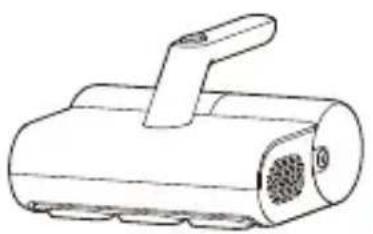
Dust Mite Vacuum Cleaner User Manual Warranty Notice
Product Overview
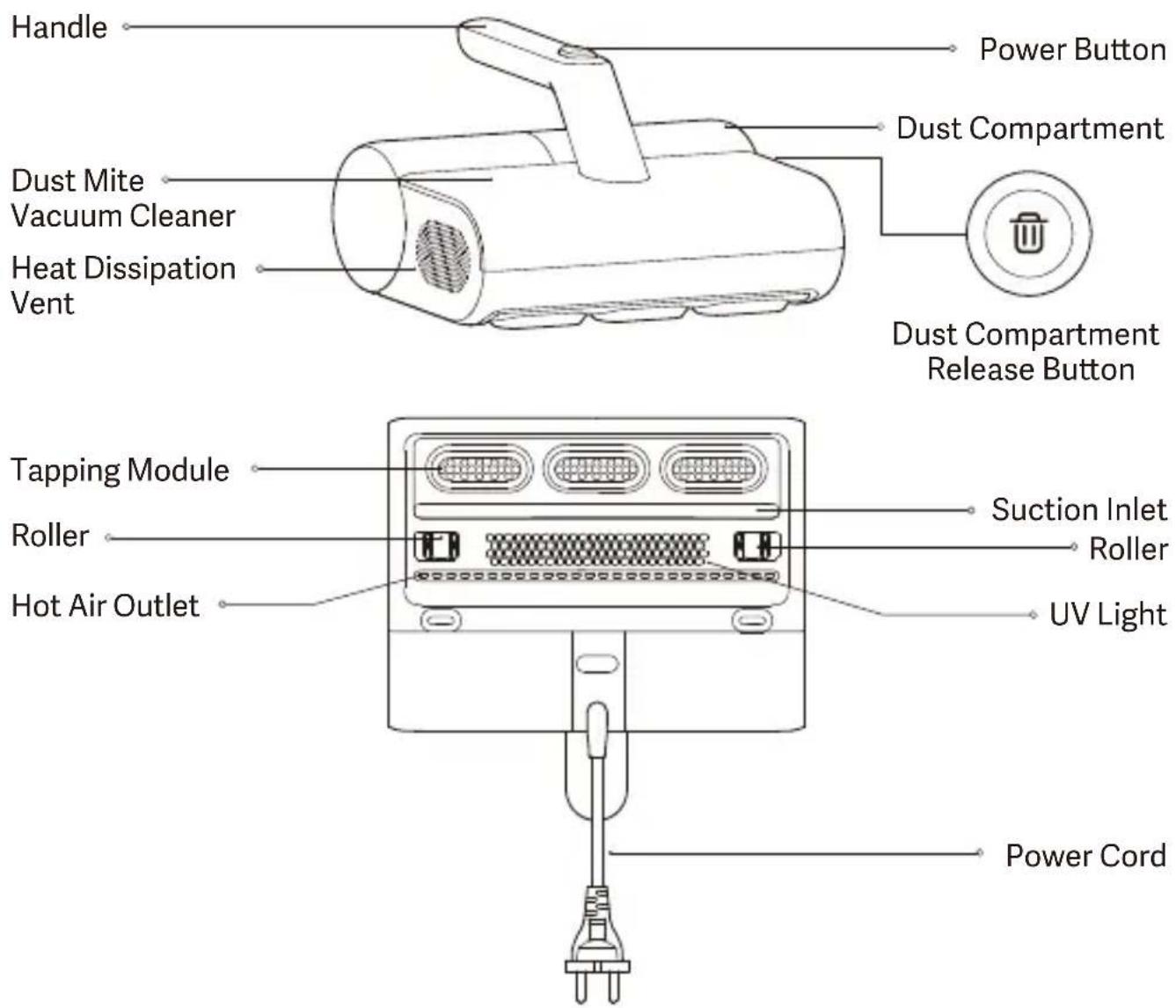
Note: Illustrations of the product, accessories, and user interface in the user manual are for reference purposes only. Actual product and functions may vary due to product enhancements.
Turning On/Off
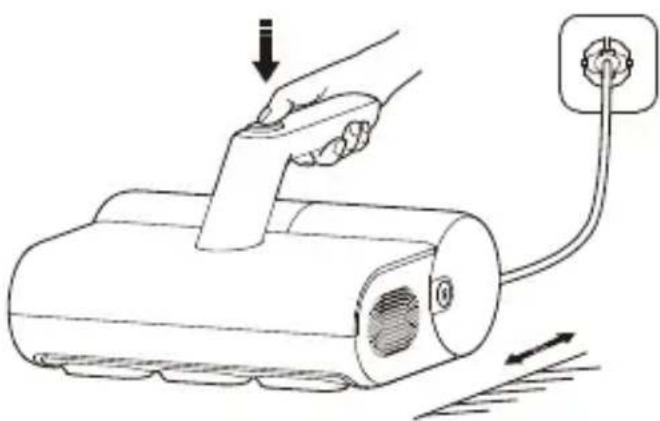
- Connect the dust mite vacuum cleaner to power, and press its power button to turn it on.
- When the dust mite vacuum cleaner is turned on, press its power button to turn it off. Turn off and unplug it after each use.
Using
- Turn on the dust mite vacuum cleaner, place it on the textile surface, and slightly press it while slowly moving it. Then the rollers will trigger the micro switch to turn on, and the UV light and tapping modules will start working. • Take the dust mite vacuum cleaner away from the textile surface, the rollers go back to their original position and the micro switch will turn off, and then the UV light and tapping modules will stop working.
Notes:
• The micro switch is inside the dust mite vacuum cleaner and is invisible. - During use, hot air will come out from the heat dissipation vent. - For first-time use, it is normal for a slight odor to come from the cooling vent, and the odor will naturally dissipate after a period of use. - When the dust mite vacuum cleaner is turned on but does not contact the textile, it is normal for the UV light and tap module to stop operating.
Care & Maintenance
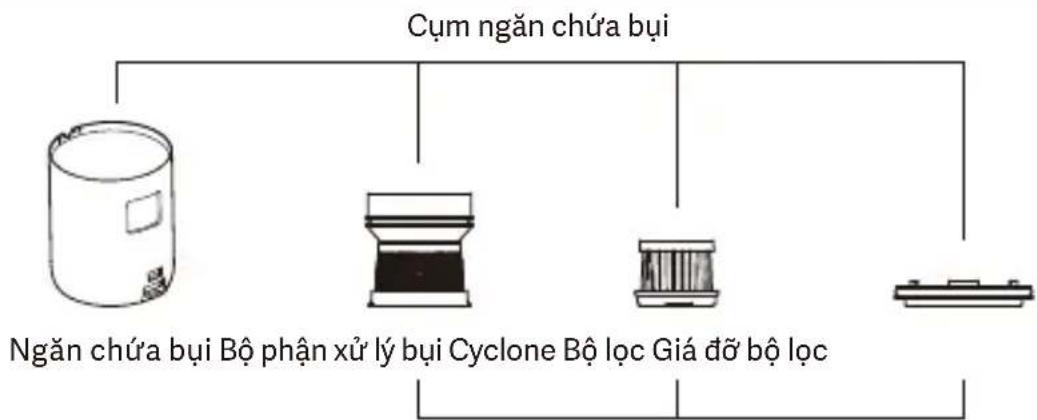
Dust Compartment Assembly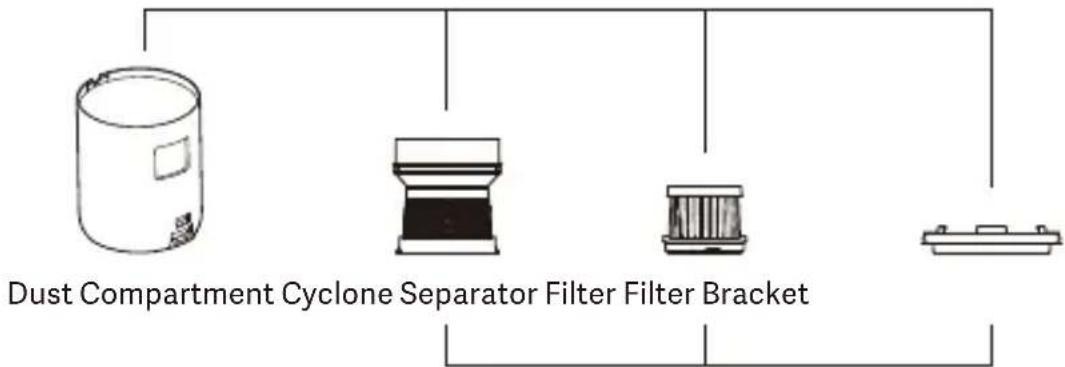
Cyclone Separator Assembly
WARNING: Before cleaning or maintaining the dust mite vacuum cleaner, turn it off and unplug it.
Notes:
- Clean the dust compartment regularly to avoid the buildup of dust that could cause blockage and a decrease in suction.
- It is recommended to release the dust compartment over a trash bin to prevent dust from falling onto the floor.
- Do not submerge the dust mite vacuum cleaner in water for cleaning.
Daily cleaning of the dust compartment assembly
- Press and hold the dust compartment release button, and simultaneously pull out the dust compartment assembly.
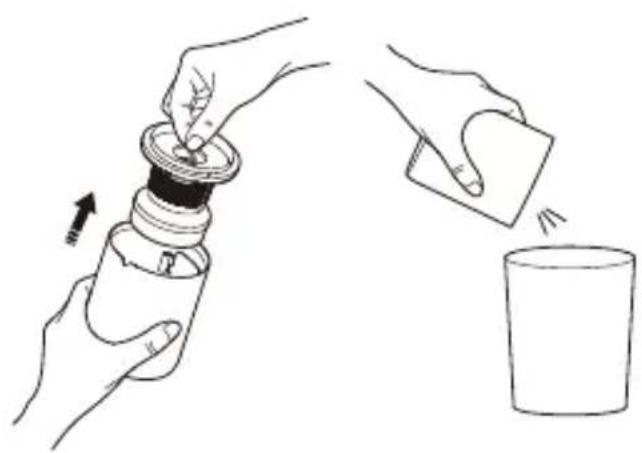
- Lift the cyclone separator assembly over a trash bin, empty the dust compartment, and clean the surface of the cyclone separator assembly.
Dust Compartment Release Button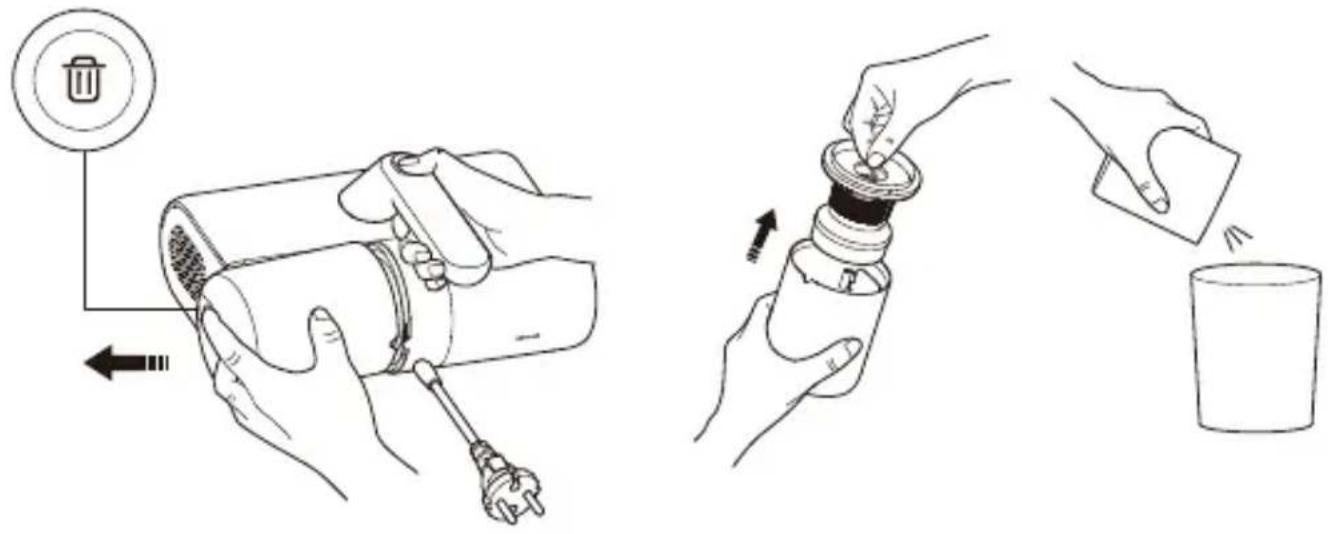
- After cleaning, reinstall the cyclone separator assembly back into the dust compartment.
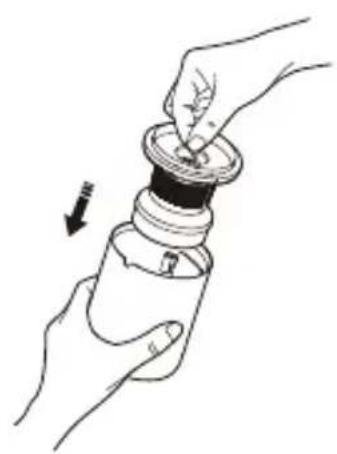
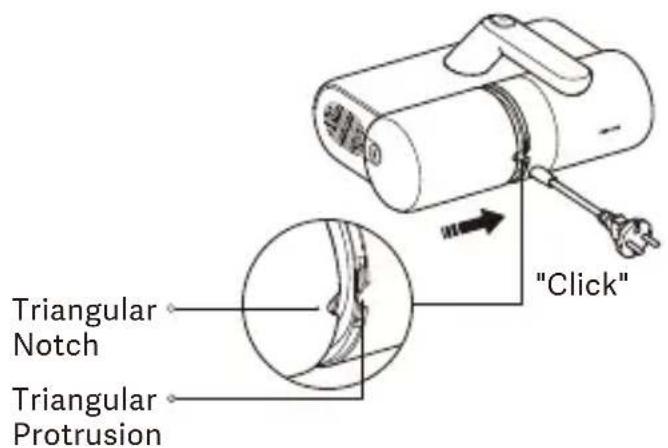
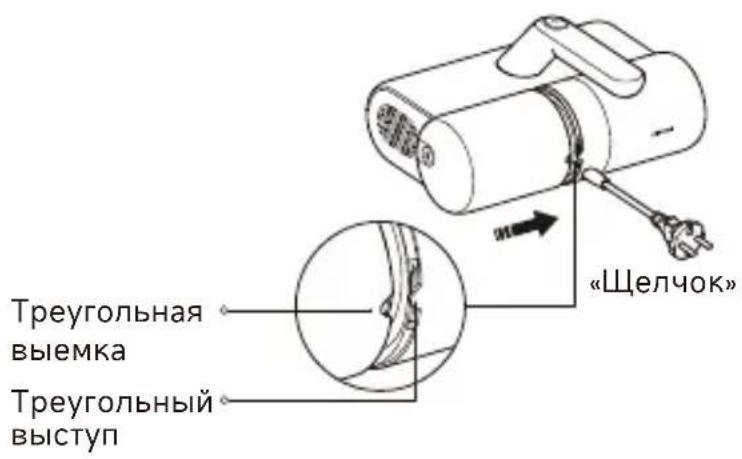
- Align the triangular notch of the dust compartment assembly with the triangular protrusion on the dust mite vacuum cleaner, then push the dust compartment assembly into the vacuum cleaner. It is properly installed when you hear a "click".
Washing the dust compartment assembly
If suction decreases, clean the dust compartment assembly promptly to regain the mite removal performance and prevent blockage from the air duct that may cause the dust mite vacuum cleaner to shut down.
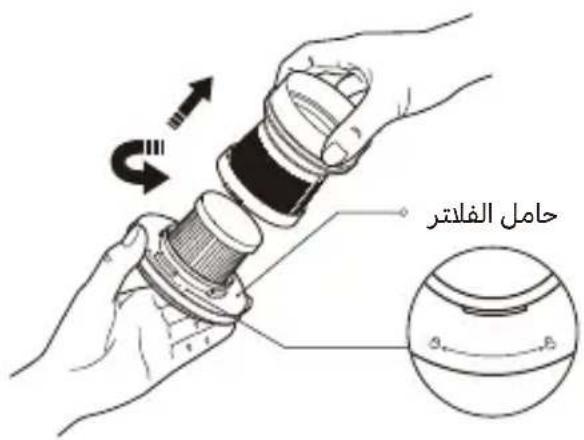
- Remove the dust compartment assembly, and take out the cyclone separator assembly. Hold the filter bracket and rotate the cyclone separator counterclockwise to remove it.
- Rotate the filter counterclockwise to remove it.
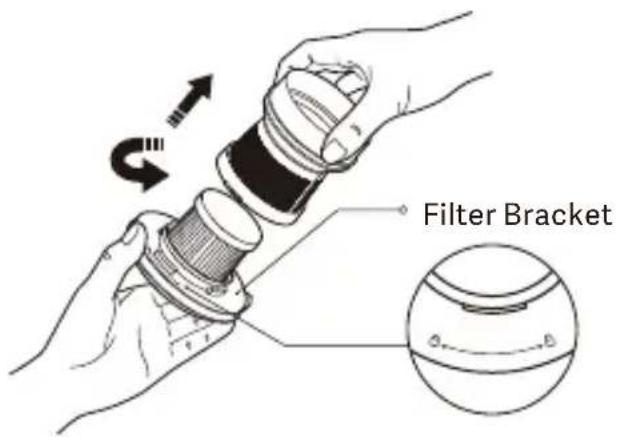
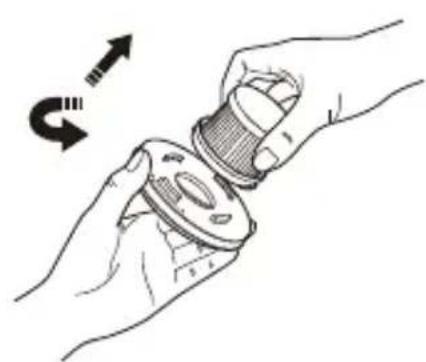
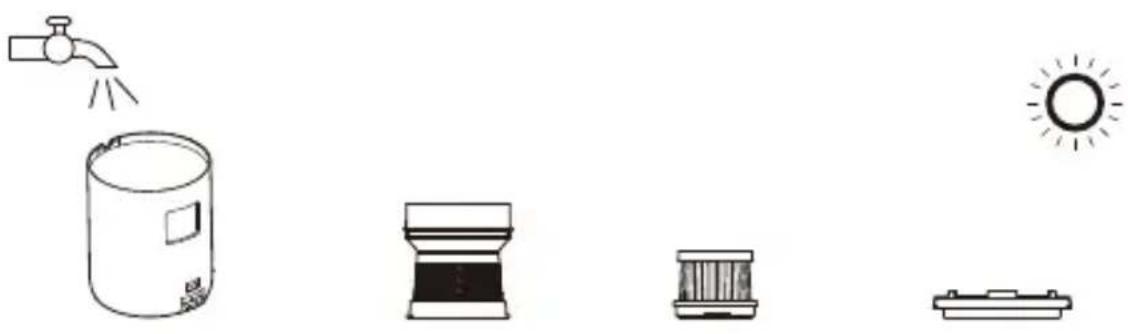
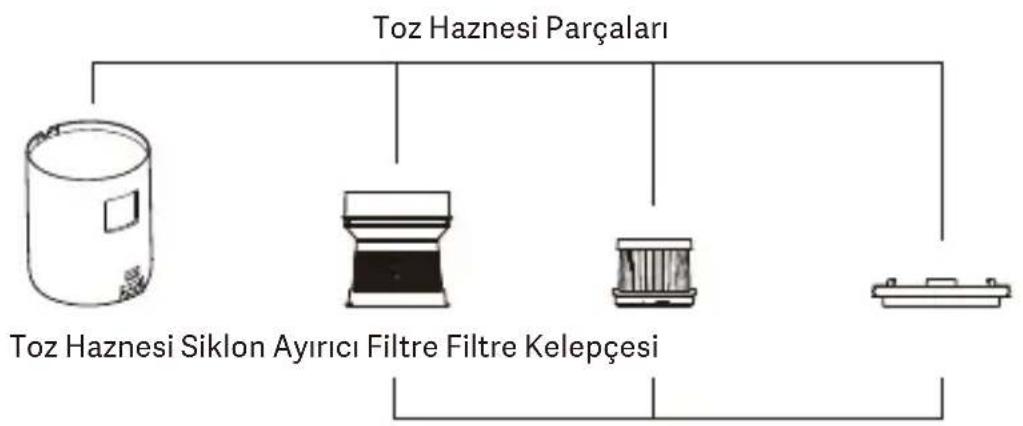
- Clean the surfaces of the dust compartment, cyclone separator, filter, and filter bracket, rinse them with clean tap water, and then air-dry them thoroughly.
Notes:
- It is recommended to wash and clean the filter every 5 to 6 vacuuming, or you can change the cleaning frequency as needed.
- It is recommended to replace the filter every 2-3 months to ensure optimal vacuuming performance.
- Rinse the filter and the air inlet filter cotton with clean water. To prevent damage, do not rub, scrub, or wash them with hands or any sharp objects such as brushes. • After rinsing, be sure to thoroughly air-dry the components (away from direct sunlight) before re-installation.
- After cleaning and fully drying, reinstall the filter and cyclone separator into the filter bracket clockwise in order. Then place the cyclone separator assembly into the dust compartment and press it firmly.
- Reinstall the dust compartment assembly back into the dust mite vacuum cleaner.
Cleaning the suction inlets
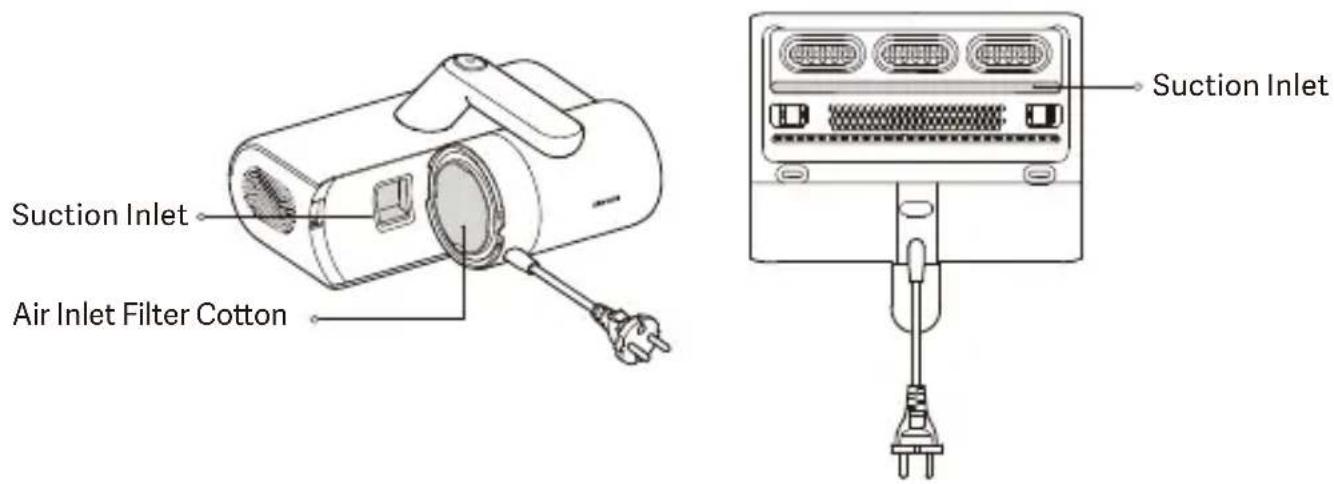
Remove the dust compartment assembly and flip the dust mite vacuum cleaner. There are two suction inlets: the bottom one and the one on the dust compartment. Use a dry cloth or tissue to clean the dust from these inlets.
Notes:
- It is normal for dust and other particles to adhere to the two suction inlets. Clean them in a timely manner.
- The air inlet filter cotton functions as a filter, and do not discard it. If the filter cotton becomes dirty, remove and rinse it with clean tap water. Be sure to thoroughly air-dry it (away from direct sunlight) before reinstallation.
Specifications
| Name: Dust Mite Vacuum Cleaner | Rated Voltage: 220–240 V ~ |
| Model: MJCMY02EU | Rated Power: 350 W |
| Rated Frequency: 50–60 Hz | Noise: ≤ 78 dB(A) |
| Item Dimensions: 239 × 230 × 144 mm | Net Weight: 1.63 kg |
| Power Consumption | Time to Enter the Condition |
| Off mode: ≤ 0.3 W | Off mode: ≤ 20 min |
Troubleshooting
| Possible Causes SolutionsIssues | ||
| The dust mite vacuum cleaner does not start. | The power cord is not plugged properly. | Plug in the power cord properly. |
| The power outlet has no power. | Check to ensure the power outlet is supplying power normally. | |
| The dust mite vacuum cleaner is not turned on. | Press the power button to turn it on. | |
| The circuit has an error. | Contact the after-sales service team. | |
| The main motor of the dust mite vacuum cleaner does not start. | Temperature protection for the main motor is on. | Turn off and unplug the dust mite vacuum cleaner. Restart it after the main motor temperature resumes normal. |
| The main motor is damaged. | Contact the after-sales service team. | |
| The suction decreases. | Clean the dust compartment.The dust comp | |
| Suction inlets are blocked by foreign objects. | Clean the suction inlets. | |
| The filter blocked or not fully dried after washing. | Clean the filter and fully air-dry it. | |
| The dust mite vacuum cleaner is not properly attached to the textile, so the UV light is off to prevent UV leakage, which is normal. | Put the dust mite vacuum cleaner back on the textile surface, and the UV light will resume working. | |
| The UV light is not on. | The UV light is damaged. | Contact the after-sales service team. |
| The dust mite vacuum cleaner is not pressed down enough to make the rollers trigger the micro switch to turn on. | Remove the foreign objects stuck on the rollers. | |
| The noise is too loud. | The dust compartment is full. Clean the dust compartment. | |
| Suction inlets are blocked by foreign objects. | Clean the suction inlets. | |
| Tapping module is not working. | The dust mite vacuum cleaner is not properly attached to the textile, so the tapping module stops working, which is normal. | Put the dust mite vacuum cleaner back on the textile surface, and the tapping module will resume working. |
| The tapping module does not start. | Contact the after-sales service team. | |
Notes:
- In the event of a malfunction during use, turn off and unplug the dust mite vacuum cleaner before troubleshooting.
- If the issue persists after following the above steps, please contact the after-sales service team.
WEEE Disposal and Recycling Information
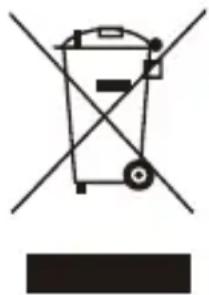
All products bearing this symbol are waste electrical and electronic equipment (WEEE as in directive 2012/19/EU) which should not be mixed with unsorted household waste. Instead, you should protect human health and the environment by handing over your waste equipment to a designated collection point for the recycling of waste electrical and electronic
equipment, appointed by the government or local authorities. Correct disposal and recycling will help prevent potential negative consequences to the environment and human health. Please contact the installer or local authorities for more information about the location as well as terms and conditions of such collection points.
EU Declaration of Conformity

We, Guangdong Deerma Technology Co., Ltd., hereby declare that this equipment is in compliance with the applicable Directives and European Norms, and amendments. The full text of the EU declaration of conformity is available at the following internet address: http://www.mi.com/global/service/support/declaration.html For detailed e-manual, please go to www.mi.com/global/service/userguide
Care and Maintenance
![graph TD A["Staubbehälter-Baugruppe"] --> B["Gauge"] A --> C["Filter"] A --> D["Filter Haltering"] A --> E["Final System"]](/content/2026/04/726295/images/0092fb2b1d782cf3efd2dc8d50a4e211f52117b55dc162cfbb90e862a34ac501.jpg)
Notes:
![graph TD A["Scomparto raccogli polvere"] --> B["Separatore ciclonico"] A --> C["Filtro Staffa del filtro"] A --> D["Other"] style A fill:#f9f,stroke:#333 style B fill:#ccf,stroke:#333 style C fill:#cfc,stroke:#333 style D fill:#fcc,stroke:#333](/content/2026/04/726295/images/9ec821bacab0085b930cdd977d5cbc712c8e0f9d467f05f4ff5438dce4a64da7.jpg)
Note:
Remarks:
Notes:
Notes:
Notes:
Notes:
Notes:
Notes:
Washing the dust compartment assembly
Note:
Address: No.4-1 Longhui Road, Malong Village Committee, Beijiao Town, Shunde
District, Foshan City, Guangdong Province, China
Care and Maintenance

Note:
For further information, please go to www.mi.com
Manufactured for: Xiaomi Communications Co., Ltd.
Manufactured by: Guangdong Deerma Technology Co., Ltd.
(a Mi Ecosystem company)
Address: No.4-1 Longhui Road, Malong Village Committee, Beijiao Town, Shunde
District, Foshan City, Guangdong Province, China
User Manual Version: V3.0
Address: No.4-1 Longhui Road, Malong Village Committee, Beijiao Town, Shunde
District, Foshan City, Guangdong Province, China
Address: No.4-1 Longhui Road, Malong Village Committee, Beijiao Town, Shunde
District, Foshan City, Guangdong Province, China
Address: No.4-1 Longhui Road, Malong Village Committee, Beijiao Town, Shunde
District, Foshan City, Guangdong Province, China
Address: No.4-1 Longhui Road, Malong Village Committee, Beijiao Town, Shunde District, Foshan City, Guangdong Province, China
Address: No.4-1 Longhui Road, Malong Village Committee, Beijiao Town, Shunde District, Foshan City, Guangdong Province, China
Address: No.4-1 Longhui Road, Malong Village Committee, Beijiao Town, Shunde District, Foshan City, Guangdong Province, China
User Manual Version: V3.0
Address: No.4-1 Longhui Road, Malong Village Committee, Beijiao Town, Shunde District, :العنوان
Foshan City, Guangdong Province, China
Address: No.4-1 Longhui Road, Malong Village Committee, Beijiao Town, Shunde District, Foshan City, Guangdong Province, China
Address: No.4-1 Longhui Road, Malong Village Committee, Beijiao Town, Shunde District, Foshan City, Guangdong Province, China
Address: No.4-1 Longhui Road, Malong Village Committee, Beijiao Town, Shunde District, Foshan City, Guangdong Province, China
Xiaomi Technology Netherlands B.V.
Prinses Beatrixlaan 582, 2595BM, The Hague, The Netherlands contact@support.mi.com
UK REP.
Xiaomi Technology UK Limited
Davidson House, Forbury Square, Reading, Berkshire RG1 3EU contact@support.mi.com



- XIAOMI DUST MITE VACUUM CLEANER USER MANUAL
- WARNINGS
- PACKAGE CONTENTS
- PRODUCT OVERVIEW
- TURNING ON/OFF
- USING
- NOTES
- CARE & MAINTENANCE
- DAILY CLEANING OF THE DUST COMPARTMENT ASSEMBLY
- WASHING THE DUST COMPARTMENT ASSEMBLY
- CLEANING THE SUCTION INLETS
- WEEE DISPOSAL AND RECYCLING INFORMATION
- EU DECLARATION OF CONFORMITY
- CARE AND MAINTENANCE
- NOTE
- REMARKS
Brand : Xiaomi
Model : Dust Mite
Category : Vacuum Cleaner