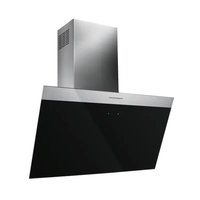
DW8500.1S - Range hood Küppersbusch - Free user manual and instructions
Find the device manual for free DW8500.1S Küppersbusch in PDF.

 FR
FR
 BG
BG
 CS
CS
 DA
DA
 DE
DE
 EL
EL
 EN
EN
 ES
ES
 ET
ET
 FI
FI
 HU
HU
 IT
IT
 KK
KK
 LT
LT
 LV
LV
 MK
MK
 NL
NL
 NO
NO
 PL
PL
 PT
PT
 RO
RO
 RU
RU
 SK
SK
 SL
SL
 SQ
SQ
 SR
SR
 SV
SV
 TR
TR
 UK
UK
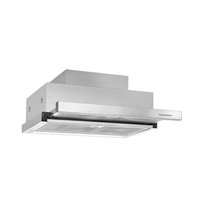
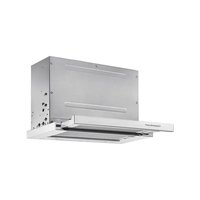
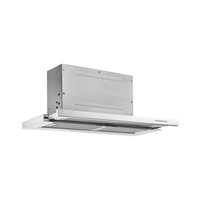
| Product type | Extractor hood |
| Brand | Küppersbusch |
| Model | DW8500.1S |
| Minimum safety distance (cooking surface) | 650 mm |
| Exhaust duct diameter | 120 mm minimum |
| Power supply | 230 V ~ 50 Hz (according to rating plate) |
| Appliance class | Class I (grounding required) |
| Number of speeds | 3 speeds + timed intensive speed |
| Lighting | Integrated LED (replacement by after-sales service) |
| Delayed shutdown function (Delay) | Yes, 5 minutes |
| Grease filter type | Washable metal filter (dishwasher safe) |
| Charcoal filter type | Non-washable activated charcoal filter, replaceable |
| Grease filter cleaning frequency | Every 2 months (or more often depending on use) |
| Charcoal filter replacement frequency | Approximately every 4 months |
| Use with combustion appliances | Adequate ventilation required, maximum negative pressure 0.04 mbar |
| Material | Stainless steel (depending on model) |
| Installation | Recommended by a qualified technician |
| Dimensions (W x D x H) | Refer to the manual for exact dimensions |
| Weight | Approximately 15 kg (estimate) |
Frequently Asked Questions - DW8500.1S Küppersbusch
User questions about DW8500.1S Küppersbusch
0 question about this device. Answer the ones you know or ask your own.
Ask a new question about this device
Download the instructions for your Range hood in PDF format for free! Find your manual DW8500.1S - Küppersbusch and take your electronic device back in hand. On this page are published all the documents necessary for the use of your device. DW8500.1S by Küppersbusch.
USER MANUAL DW8500.1S Küppersbusch
natural_image
Simple line drawing of a tall rectangular object with a base, no text or symbols presentDW8500.0
DW8500.1
Please read the users and installation instructions carefully before installation of the appliance and before starting to use it.
For your safety and correct operation of the appliance, read this manual carefully before installation and use. Always keep these instructions with the appliance even if you move or sell it. Users must fully know the operation and safety features of the appliance.

The wire connection has to be done by specialized technician.
- The manufacturer will not be held liable for any damages resulting from incorrect or improper installation.
- The minimum safety distance between the cooker top and the extractor hood is 650 mm (some models can be installed at a lower height, please refer to the paragraphs on working dimensions and installation).
- If the instructions for installation for the gas hob specify a greater distance, this must be respected.
- Check that the mains voltage corresponds to that indicated on the rating plate fixed to the inside of the hood.
- Means for disconnection must be incorporated in the fixed wiring in accordance with the wiring rules.
-
For Class I appliances, check that the domestic power supply guarantees adequate earthing.
-
Connect the extractor to the exhaust flue through a pipe of minimum diameter 120 mm. The route of the flue must be as short as possible.
- Regulations concerning the discharge of air have to be fulfilled.
- Do not connect the extractor hood to exhaust ducts carrying combustion fumes (boilers, fireplaces, etc.).
- If the extractor is used in conjunction with non-electrical appliances (e.g. gas burning appliances), a sufficient degree of aeration must be guaranteed in the room in order to prevent the backflow of exhaust gas. When the cooker hood is used in conjunction with appliances supplied with energy other than electric, the negative pressure in the room must not exceed 0,04 mbar to prevent fumes being drawn back into the room by the cooker hood.
- The air must not be discharged into a flue that is used for exhausting fumes from appliances burning gas or other fuels.
- If the supply cord is damaged, it must be replaced from the manufacturer or its service agent.
- Connect the plug to a socket complying with current regulations, located in an accessible place.
- With regards to the technical and safety measures to be adopted for fume discharging
it is important to closely follow the regulations provided by the local authorities.

WARNING: Before installing the Hood, remove the protective films.
- Use only screws and small parts in support of the hood.

WARNING: Failure to install the screws or fixing device in accordance with these instructions may result in electrical hazards.
- Do not look directly at the light through optical devices (binoculars, magnifying glasses...).
- Do not flambè under the range hood; risk of fire.
- This appliance can be used by children aged from 8 years and above and persons with reduced physical, sensory or mental capabilities or lack of experience and knowledge if they have been given supervision or instruction concerning use of the appliance in a safe way and understand the hazards involved. Children shall not play with the appliance. Cleaning and user maintenance shall not be made by children without supervision.
• Children should be supervised to ensure that they do not play with the appliance.
- The appliance is not to be used by persons (including children) with reduced physical, sensory or mental capabilities, or lack
of experience and knowledge, unless they have been given supervision or instruction.

Accessible parts may become hot when used with cooking appliances.
- Clean and/or replace the Filters after the specified time period (Fire hazard). See paragraph Care and Cleaning.
- There shall be adequate ventilation of the room when the range hood is used at the same time as appliances burning gas or other fuels (not applicable to appliances that only discharge the air back into the room).
- The symbol ☒ on the product or on its packaging indicates that this product may not be treated as household waste. Instead it shall be handed over to the applicable collection point for the recycling of electrical and electronic equipment. By ensuring this product is disposed of correctly, you will help prevent potential negative consequences for the environment and human health, which could otherwise be caused by inappropriate waste handling of this product. For more detailed information about recycling of this product, please contact your local city office, your household waste disposal service or the shop
where you purchased the product.
2. USE
- The extractor hood has been designed exclusively for domestic use to eliminate kitchen smells.
- Never use the hood for purposes other than for which it has been designed.
- Never leave high naked flames under the hood when it is in operation.
- Adjust the flame intensity to direct it onto the bottom of the pan only, making sure that it does not engulf the sides.
- Deep fat fryers must be continuously monitored during use: overheated oil can burst into flames.
3. CARE AND CLEANING
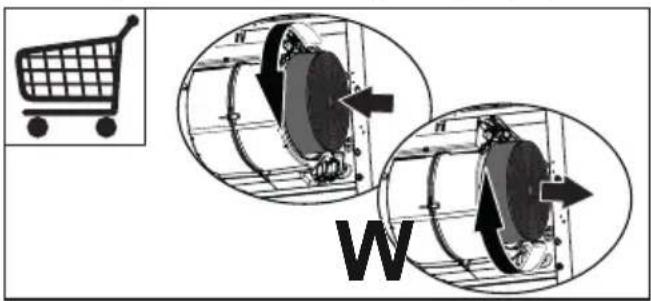
- The Activated charcoal filter is not washable and cannot be regenerated, and must be replaced approximately every 4 months of operation, or more frequently for particularly heavy usage (W).
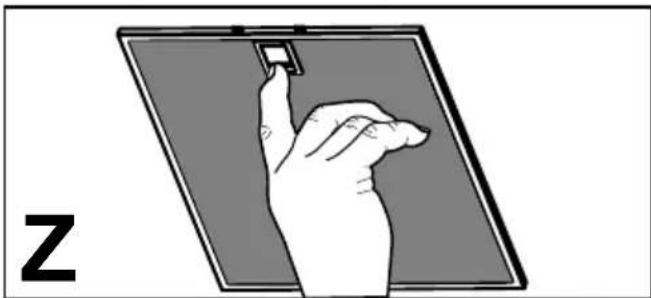
- The Grease filters must be cleaned every 2 months of operation, or more frequently for particularly heavy usage, and can be washed in a dishwasher (Z). When the grease filters are cleaned they may change colour, but this in no way compromises their operation.
natural_image
Illustration of a hand interacting with a small electronic device on a tablet screen (no text or symbols)- Clean the hood using a damp cloth and a neutral liquid detergent.
4. CONTROLS
| * | 1 | 2 | 3i |
| |ABCD | | | | | | |
| Button Function | |
| A | Press the button briefly to turn the lighting system on/off.Can be activated from any speed. |
| DelaySuitable to complete elimination of residual odours. Long pressure: activates the automatic switch - off with a 5 minutes delay. It can be activated at every speed.It can be desabled pressing the speed button, turning the motor off. | |
| B | Brief pressure. Turns the suction motor on and off at speed one. |
| C | Brief pressure. Turns the suction motor on and off at speed two. |
| D | Turns the suction motor on at speed three. |
| - Press and hold 3 seconds on third speed button switches to intensive speed with a duration of 6 minutes.Led flashes.- Press and hold 3 seconds before the 6 minutes end switches back to third speed. Led is on.- Short push before the 6 minutes elapse switches the hood off. | |
5. LIGHTING
- For replacement contact technical support ("To purchase contact technical support").
natural_image
Illustration of a hand interacting with a small electronic device on a screen (no text or symbols)natural_image
Illustration of a hand interacting with a device on a tablet screen (no text or symbols)natural_image
Illustration of a hand interacting with a small electronic device on a tablet screen (no text or symbols)natural_image
Illustration of a hand interacting with a small electronic device on a screen (no text or symbols)natural_image
Illustration of a hand interacting with a small electronic device on a screen (no text or symbols)natural_image
Illustration of a hand interacting with a small electronic device on a tablet screen (no text or symbols)natural_image
Illustration of a hand interacting with a small electronic device on a screen (no text or symbols)natural_image
Illustration of a hand holding a small electronic device on a screen, with the letter 'Z' visible (no text or symbols on the device itself)natural_image
Illustration of a hand holding a small object on a flat surface, with letter 'Z' in the corner (no text or symbols on the diagram itself)natural_image
Illustration of a hand interacting with a small electronic device on a screen (no text or symbols)natural_image
Illustration of a hand holding a small object on a flat surface, with letter 'Z' in the corner (no text or symbols on the diagram itself)natural_image
Illustration of a hand holding a small electronic device on a screen, with the letter 'Z' visible (no text or symbols on the device itself)natural_image
Illustration of a hand holding a small object on a flat surface, with the letter 'Z' in the corner (no text or symbols on the diagram itself)natural_image
Illustration of a hand holding a small electronic component on a flat surface, labeled 'Z' (no text or symbols on the diagram itself)natural_image
Illustration of a hand interacting with a small electronic device on a screen (no text or symbols)natural_image
Illustration of a hand holding a small electronic component on a screen, with letter 'Z' in the corner (no text or symbols on the diagram itself)natural_image
Illustration of a hand interacting with a small electronic device on a screen (no text or symbols)| ☀ | 1 | 2 | 3i |
| |A | |B | |C | |D |
natural_image
Illustration of a hand interacting with a small electronic device on a screen (no text or symbols)natural_image
Illustration of a hand interacting with a small electronic device on a screen (no text or symbols)natural_image
Illustration of a hand interacting with a device on a screen, labeled 'Z' (no text or symbols on the diagram itself)natural_image
Illustration of a hand holding a small electronic device on a screen, with the letter 'Z' visible (no text or symbols on the device itself)- Očistite napu koristeći vlažnu krpu i neutralni tekući deterdžent.
4. NAREDBI
| ☀ | 1 | 2 | 3i |
| |ABCD | | | | | | |
| Tipka Funkcija | |
| A | Kratkim pritiskom na tipku uključuje / isključuje se rasvjetni uređaj.Može se aktivirati s bilo koje brzine. |
| OdgodaPrikladna za dovršetak uklanjanja preostalih mirisa. Može se aktivirati sa svake brzine. Dugim pritiskom aktivira automatsko isključivanje odgođeno za 5 minuta.Deaktivira se pritiskom na tipku brzine, isključivanjem motora. | |
| B | Kratki pritisak. Uključuje motor na prvu brzinu. |
| C | Kratki pritisak. Uključuje motor na drugu brzinu. |
| D | Uključuje usisni motor na treću brzinu. |
| - Pritisnite i držite pritisnutim na 3 sekunde gumb za postavljanje brzine 3 kako biste dobili visoku brzinu rada s trajanjem od 6 minuta. LED lampica treperi- Pritisnite i držite pritisnutim na 3 sekunde prekidač prije završetka 6 minuta kako biste se vratili na brzinu 3. LED lampica ostaje uključena.- Pritisnite na kratko prije završetka 6 minuta za gašenje nape. | |
5. RASVJETA
- Za zamjenu kontaktirajte tehničku podršku ("Za kupnju se obratite tehničkoj podršci").
SL 1. VARNOSTNE INFORMACIJE
natural_image
Illustration of a hand holding a small object on a tablet screen, with the letter 'Z' visible (no text or symbols on the diagram itself)natural_image
Illustration of a hand interacting with a device on a tablet screen (no text or symbols)natural_image
Illustration of a hand holding a small electronic component on a screen, with letter 'Z' in the corner (no text or symbols on the diagram itself)natural_image
Illustration of a hand interacting with a device on a screen, labeled 'Z' (no text or symbols on the diagram itself)natural_image
Illustration of a hand interacting with a small electronic device on a screen (no text or symbols)natural_image
Illustration of a hand interacting with a small electronic device on a screen (no text or symbols)natural_image
Illustration of a hand holding a small electronic device on a screen, with the letter 'Z' visible (no text or symbols on the device itself)natural_image
Illustration of a hand interacting with a device on a tablet screen (no text or symbols)natural_image
Illustration of a hand interacting with a small electronic device on a screen (no text or symbols)
Brand : Küppersbusch
Model : DW8500.1S
Category : Range hood