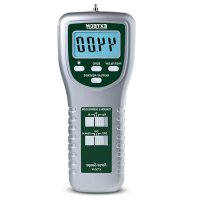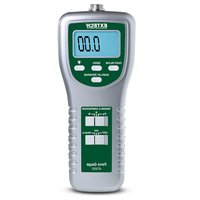
475055 - Measuring equipment Extech - Free user manual and instructions
Find the device manual for free 475055 Extech in PDF.


User questions about 475055 Extech
0 question about this device. Answer the ones you know or ask your own.
Ask a new question about this device
Download the instructions for your Measuring equipment in PDF format for free! Find your manual 475055 - Extech and take your electronic device back in hand. On this page are published all the documents necessary for the use of your device. 475055 by Extech.
USER MANUAL 475055 Extech
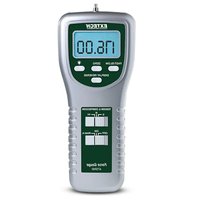
Congratulations on your purchase of Extech's Model 475055 Digital Force Gauge that measures Tension or Compression (pull/push) to 220 lbs. It features: Peak hold, fast/slow response time, positive or reverse display direction, and a separate sensor. An RS-232 PC interface provides data acquisition functionality. This meter is shipped fully tested and calibrated and with proper use will provide years of reliable service.
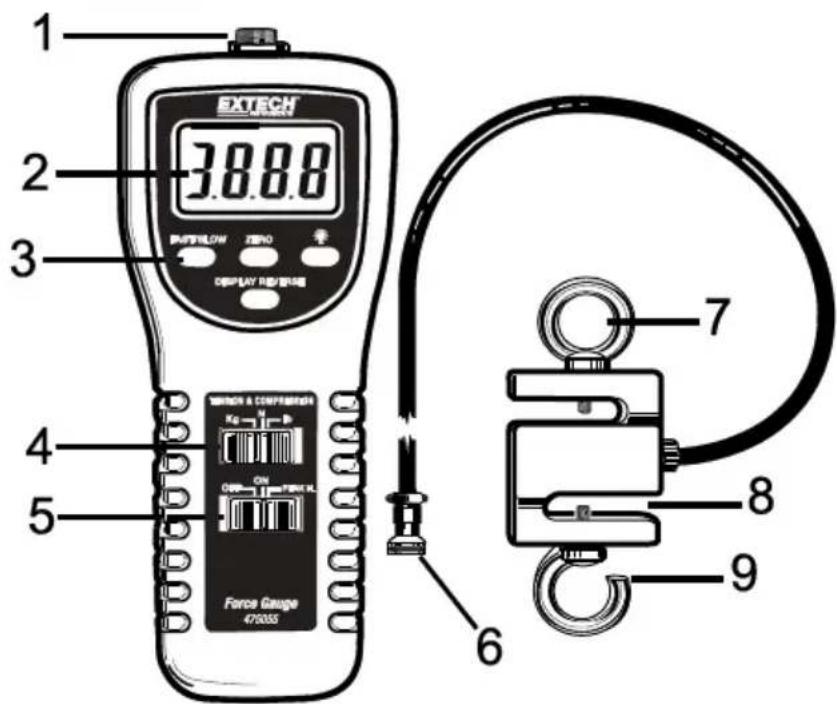
Meter Description
- Sensor socket
- LCD display
- Keypad
- Kg/N/lb switch
- Off/On/Peak switch
- Sensor plug
- Sensor loop
- S-type load sensor
- Sensor hook
text_image
1 2 3 38.8.8 EXTECH DISPLAY R/S/REVIEW STAFFLOW ZERO 4 5 STAFFIN & COMPENSIVE Force Gauge 475055 6 7 8 9Preparation for Measurement
- The 475055 automatically determines Tension or Compression (pull/push) force during use. Compression displays as a negative value and Tension displays as a positive value.
- Select units of measure (kilograms, pounds, or Newtons) via the units select switch.
- Screw in the sensor hook and loop on the load sensor and then connect the sensor to the meter via the input jack on top of the meter.
- Select FAST (0.2 seconds) or SLOW (0.6 seconds) update rate.
- Zero the display before each measurement via the Zero button.
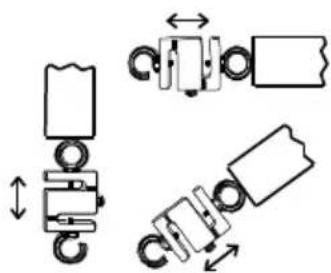
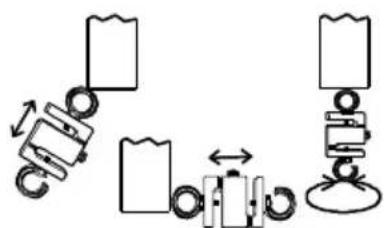
Note: The sensing head with adapter must be in line with the object being measured. Avoid rotating the sensing head. Refer to the Figure 1.
Figure 1 — Correct and Incorrect Angles of Measurement
natural_image
Pure mechanical assembly diagram showing spring-loaded components with no text or symbolsAcceptable
flowchart
graph TD
    A["Roller"] --> B["Block"]
    B --> C["Arrow to Block"]
    C --> D["Roller"]
    D --> E["Block"]
    E --> F["Arrow to Block"]
    F --> G["Roller"]
    G --> H["Block"]
Not Acceptable
Measurement Mode
-
Slide the POWER switch to the ON (I)position. Reverse the LCD display if desired via the Display Reverse key.
-
Zero the meter before each measurement.
-
Touch the adapter to the object being measured in a straight line. Refer to Fig.1.
-
Begin measurement by applying force (Push or Pull). Read the LCD display.
-
After completing the measurement, the display will indicate "0.00" if the position and angle of the Force Gauge have not changed.
Note: Be sure to press "ZERO" before taking a new measurement.
Remove the sensor hook/loop from the "S" load cell for a PUSH or compression measurement.
Over Range Indication
The Model 475055 uses a strain gauge sensor to measure force. Avoid subjecting the instrument to forces outside the specified measurement range. The sensitive strain gauge can be damaged or otherwise compromised by misuse. When an over-range condition is sensed by the meter the LCD displays all dashes.
Note that the dashes are shown at the top of the LCD (----) for tension measurements and at the bottom of the display (----) for compression measurements.
Peak Load Measurement
- Slide the POWER switch to the PEAK position.
- Touch the adapter to the object being measured in a straight line, refer to Fig. 1.
- Zero the meter before each measurement.
- Begin measurement by applying force (pull or push). The LCD will display the peak value, which is the highest reading encountered.
- After completing the measurement, the display will hold the peak reading until a higher reading is reached or the switch is moved out of the peak hold position.
Note: Be sure to press "ZERO" before taking a new measurement.
Remove the sensor hook/loop from the "S" load cell for a PUSH or compression measurement.
Fast/Slow selection
Press the FAST/SLOW key to select the desired display update rate. The "FAST" icon will appear in the display when FAST is selected.
Display Backlight
Pressing the backlight button momentarily will turn on the backlight. After approximately 15 seconds, it will automatically shut off.
PC Interface
PC interface port
Contact Extech for a copy of the 407001-Pro Software for streaming of data from the meter to the PC via the RS232 port. (Sales@Extech.com).
Maintenance
Battery Replacement
The low battery indication appears as a "LO" on the display when battery voltage is less than 6.8V. To replace the battery:
- Remove the two screws from the battery compartment cover.
- Lift off the battery cover.
- Replace with six (6) 1.5V 'AA' batteries.
- Replace compartment cover and screws.
| Range | 220 lbs, 100kg, 980 Newtons |
| Accuracy (23°C) | ±(0.5%rdg + 0.1lbs, 0.1kg or 0.4N) |
| Resolution | 0.05lbs, 0.05kg, 0.2 Newtons |
| Overload Capacity | 150kg |
| Circuit | Custom LSI microprocessor |
| Zero adjust | Button for Peak Hold and normal display zero |
| Display | 5-digit LCD type; Digit height: 0.63" (16 mm) |
| Update Rate | Fast mode 0.2 seconds; Slow mode 0.6 seconds |
| Over range Indicators | LCD displays “----”for tension measurements and “----”for compression measurements |
| Zero / Tare Control | Up to Maximum capacity |
| Full Scale Deflection | <1mm |
| Transducer type | S-type load cell with 2 hooks (thread size: M10 x 1.5mm ISO) and 6.5 ft (2m) cable |
| Peak Hold | Freezes Max reading on display |
| Data Output | RS-232 serial interface with 16-bit data stream output |
| Operating Temperature | 0°C to 50°C (32 °F to 122 °F) |
| Operating RH | Max. 80% Relative Humidity (RH) |
| Power Supply | 6 x 1.5V ‘AA’ batteries or 9VDC adapter (not included) |
| Power consumption | 12mA (approx.) |
| Weight | Meter: 278g (0.61 lbs) w/out batteries |
| Sensor: 635g (1.40 lbs) | |
| Dimensions | Meter: 215 x 90 x 45 mm (8.5 x 3.5 x 1.8") |
| Sensor with 2 hooks: 162 x 51 x 22 mm (6.4 x 2.0 x 0.9") | |
| Cable length: 2m (6.5 ft.) |
One-year Warranty
FLIR Systems, Inc. warrants this Extech brand instrument to be free of defects in parts and workmanship for one year from date of shipment (a six-month limited warranty applies to sensors and cables). If it should become necessary to return the instrument for service during or beyond the warranty period, contact us for return authorization; refer to the customer support channels listed below. This warranty does not apply to defects resulting from action of the user such as misuse, improper wiring, operation outside of specification, improper maintenance or repair, or unauthorized modification. FLIR Systems, Inc. specifically disclaims any implied warranties or merchantability or fitness for a specific purpose and will not be liable for any direct, indirect, incidental or consequential damages. FLIR's total liability is limited to repair or replacement of the product. The warranty set forth above is inclusive and no other warranty, whether written or oral, is expressed or implied.
Calibration and Repair Services
FLIR Systems, Inc. offers calibration and repair services for the Extech brand products we sell. We offer NIST traceable calibration for most of our products. Contact us for information on calibration and repair availability, refer to the contact information below. Annual calibrations should be performed to verify meter performance and accuracy. Product specifications are subject to change without notice. Please visit our website for the most up-to-date product information: www.extech.com.
Contact Customer Support
Customer Support Telephone: U.S. (866) 477-3687; International +1 (603) 324-7800
Calibration, Repair, and Returns email: repair@extech.com
Technical Support: https://support.flir.com
Copyright © 2014-2019 FLIR Systems, Inc.
All rights reserved including the right of reproduction in whole or in part in any form
www.extech.com
Garantía de un año
Copyright © 2014-2019 FLIR Systems, Inc.
Support technique: https://support.flir.com
Copyright © 2014-2019 FLIR Systems, Inc.