407123 - Measuring equipment Extech - Free user manual and instructions
Find the device manual for free 407123 Extech in PDF.


| Product Type | Sound Level Meter |
| Brand | Extech |
| Model | 407123 |
| Category | Measuring Equipment |
| Dimensions | 210 x 55 x 32 mm |
| Weight | 230 g (with battery) |
| Power Supply | 9V battery (IEC 6LR61 type) |
| Measurement Range | 30 to 130 dB |
| Accuracy | ±1.5 dB (at 94 dB, 1 kHz) |
| Weightings | A and C |
| Response Time | Slow and Fast |
| Frequency Range | 31.5 Hz to 8 kHz |
| Main Functions | Sound level measurement, max/min, data hold, auto power off |
| Display | 4-digit LCD with bar graph |
| Maintenance and Cleaning | Wipe with a dry soft cloth. Remove battery if not used for a long time. |
| Safety | Use the device according to the manual. Do not expose to moisture or shocks. |
| Spare Parts and Repairability | Contact Extech after-sales service for repair or calibration. 1 year warranty. |
| General Information | NIST certification available. Annual calibration recommended. |
Frequently Asked Questions - 407123 Extech
For accurate measurements, hold the device at arm's length.
Choose A for standard environmental measurements, C for machine noises.
User questions about 407123 Extech
0 question about this device. Answer the ones you know or ask your own.
Ask a new question about this device
Download the instructions for your Measuring equipment in PDF format for free! Find your manual 407123 - Extech and take your electronic device back in hand. On this page are published all the documents necessary for the use of your device. 407123 by Extech.
USER MANUAL 407123 Extech
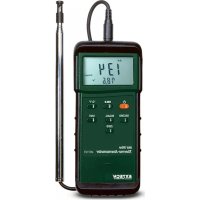
Congratulations on your purchase of the Extech Hot Wire Anemometer. This instrument measures air flow and temperature by placing the sensor into an airway such as a duct or a vent. The sensor is situated at the end of the telescoping wand for convenience and has a protective sliding cover. The meter includes an RS-232 PC Interface jack for use with the Model 407001 Data Acquisition software and interface cable kit. This meter is shipped fully tested and calibrated and, with proper use, will provide years of reliable service.
Description
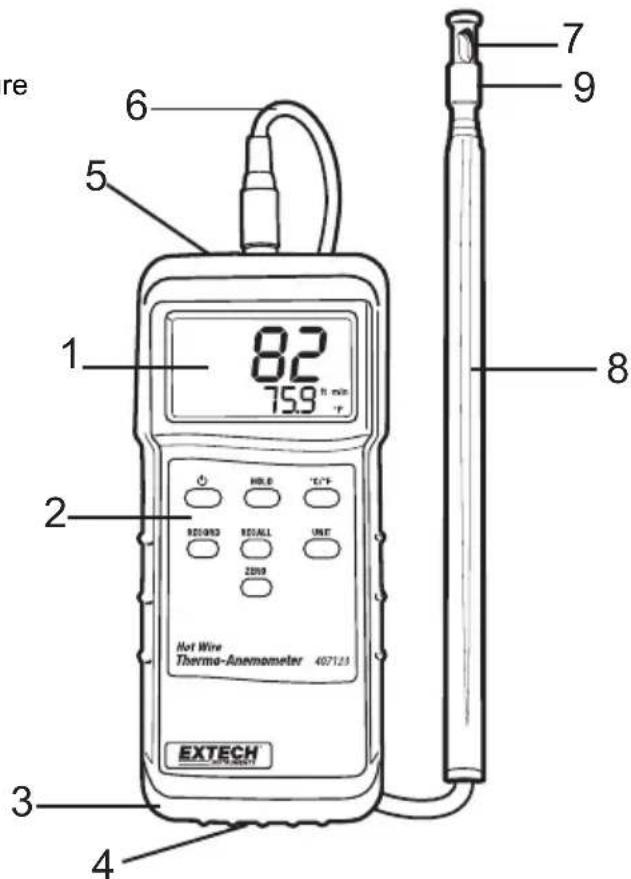
Meter Description
-
LCD display – Indicates air velocity and temperature readings, units of measure, low battery icon, and other user alerts
-
Push-buttons:
• POWER: Turn meter ON and OFF
• HOLD: Freezes the displayed reading
• C/F: Select the temperature units
- RECORD: Press to track the highest (MAX) and lowest (MIN) reading
• RECALL: Displays MAX/MIN readings
• UNIT: Air velocity units of measure
- ZERO: Press to zero the display (sensor cover must be closed)
-
Protective holster – Rubber jacket that surrounds the meter (must be removed to access battery compartment)
-
Battery compartment - Located on the lower back of the meter
-
PC Interface jack – Accepts a 3.5mm plug from a PC interface cable (cable and data acquisition software available using part number 407001)
-
Sensor input jack – Insert the sensor plug
-
Sensor opening – Air must flow through this opening for proper measurement
-
Telescoping sensor handle – Extends to 39" (1m)
-
Sensor protective cover – Slide DOWN to open when in use and slide UP to protect sensor when not in use (close the cover when zeroing the meter)
Sensor Tip Description
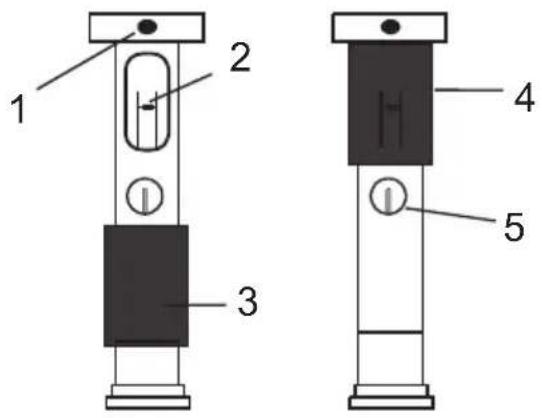
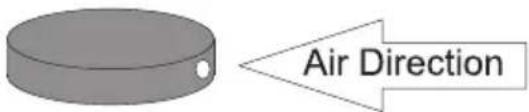
- Air Direction indentation
- Air Velocity Sensor
- Sensor cover in lower (measurement) open position
- Sensor cover in upper (zero) closed position
- Temperature sensor
Operation
Initialization and Zero
The meter should always be zeroed at temperature before use using the ZERO button. Do not rely on the initial zero display.
Notes:
- The meter does not display negative numbers.
-
Open antenna to desired length.
-
Connect the sensor to the input jack on top of the meter and open antenna to desired length.
- Turn on the meter using the Power button. The meter will perform a self-test during which the display will count down from 9 to 0.
- Select the desired temperature units using the C/F select button. The LCD will reflect the selection.
- Select the desired air velocity units using the UNIT button. The LCD will reflect the selection.
- Place the sensor cover in the UP (ZERO) position.
- Place the sensor in the area to be measured and allow a short time for the sensor to reach the temperature of the air under test.
- Press the ZERO button to zero the meter.
Taking Measurements
- Zero the meter as described above.
- Slide the air velocity sensor cover down.
- Place the sensor in the air current to be measured. Have the air flow meet the sensor head in the direction of the indentation on the sensor head.
- View the air velocity and temperature readings on the LCD Display. The large main LCD display indicates the Air Velocity reading. The lower LCD sub-display indicates the temperature reading.
MIN and MAX Function
- To begin capturing the Minimum (MIN) and Maximum (MAX) readings, press the RECORD button. The 'REC' icon will appear on the LCD.
- Take readings as described previously.
- Press the RECALL button to view the Maximum reading encountered since the RECORD button was pressed. The 'MAX' display icon will appear along with the maximum reading.
- Press RECALL again to view the minimum reading (MIN).
- Press the RECORD button to exit this mode and return to normal operation.
Data Hold
To freeze the LCD display, press the HOLD button. The 'DH' display icon will appear on the LCD. Press the HOLD button again to return to normal operation (the 'DH' hold icon will switch off).
Battery Replacement
When the low battery indicator (LBT) appears on the LCD or if the LCD does not switch on when the POWER button is pressed, replace the batteries.
- Remove the protective rubber holster that encapsulates the meter.
- Replace the six 'AAA' 1.5V batteries observing polarity.
-
Replace the battery compartment cover and the protective holster.
-
Open the rear battery compartment by prying the compartment off with a flat-head screwdriver or a coin.
PC Interface
The meter is equipped with an RS-232 PC Interface jack at the top of the meter (next to the sensor input jack). For streaming of data to a PC via the RS232 Output jack, the optional 407001-USB kit (RS232 to USB cable and driver CD) along with the 407001 software (available free at www.extech.com) are required.
General Specifications
| Circuit configuration | Custom one-chip LSI microprocessor circuit |
| Display | 3-1/2 digit (2000 count) dual LCD display |
| Measurements | m/s (meters per second), km/h (kilometers per hour), ft/min (feet/per minute), knots (nautical miles per hour), MPH (miles per hour), Temperature: °C, °F |
| Data hold | Freezes reading on display |
| Sensor Structure | Air velocity sensor: Glass bead thermistorTemperature sensor: Precision thermistor |
| Min/Max Recording | Record and Recall Maximum (MAX) and Minimum (MIN) readings |
| PC Interface | RS 232 PC serial interface jack for use with Model 407001 software and interface cable kit |
| Operating Temperature | 32 to 122°F (0 to 50 °C) |
| Operating Humidity | Max. 80% RH |
| Power Supply | Six (6) 1.5V ‘AAA’ batteries |
| Power Consumption | Approx. 30 mADC |
| Weight | 0.78 lb (355 g) including batteries & probe |
| Dimensions | Main instrument: 7.1 x 2.8 x 1.3” (180 x 72 x 32 mm)Sensor: 0.5” (12mm) diameterTelescope: 7’ (2.1m) maximum length with cable |
Range Specifications
| Units | Range | Resolution | Accuracy |
| m/s | 0.2 to 20.0 m/s | 0.1 m/s | ±(3.0%rdg+0.3m/s)* |
| km/h | 0.7 to 72.0 km/h | 0.1 km/h | ±(3.0%rdg+1.1km/h)* |
| ft/min | 40 to 3940 ft/min | 1 ft/min | ±(3.0%rdg+59ft/min)* |
| MPH | 0.5 to 45.0 MPH 0.1 MPH ±(3.0%rdg+0.67MPH)* | ||
| knots | 0.4 to 38.8 knots | 0.1 knots | ±(3.0%rdg+0.58knots)* |
| *or, ±(1.0%FS+3d) whichever is greater | |||
| Temperature | 32 to 122 °F (0 to 50°C) | 0.1°F and °C | 3.6 °F (2 °C) |
Note: m/s: meters per second; km/h: kilometers per hour; ft/min: feet per minute; Knots: nautical miles per hour; MPH: miles per hour
Area equations
The volume of air flowing through a duct or vent can be determined by taking the area of the duct in square units (i.e. square feet) and multiplying this value by the measured linear velocity (i.e., feet per minute). This gives: ft/min x ft ^2 = ft ^3 /min (CFM)
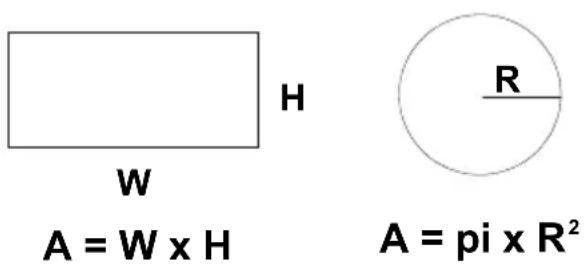
$$ \mathbf {A} = \mathbf {W} \times \mathbf {H} $$
$$ \mathbf {A} = \mathbf {p i} \times \mathbf {R} ^ {2} $$
Cubic equations
$$ \mathrm{CFM} \left(\mathrm{ft} ^ {3} / \min\right) = \text { Air Velocity } (\mathrm{ft} / \min) \times \text { Area } \left(\mathrm{ft} ^ {2}\right) $$
$$ \mathrm{CMM} \left(\mathrm{m} ^ {3} / \min\right) = \text { Air Velocity } (\mathrm{m} / \sec) \times \text { Area } \left(\mathrm{m} ^ {2}\right) \times 6 0 $$
Units Conversion Table
| m/s | ft/min | knots | km/hr | ||
| 1 m/s | 1 | 196.87 | 1.944 | 3.6 | 2.24 |
| 1 ft/min | 0.00508 | 1 | 0.00987 | 0.01829 | 0.01138 |
| 1 knot | 0.5144 | 101.27 | 1 | 1.8519 | 1.1523 |
| 1 km/hr | 0.2778 | 54.69 | 0.54 | 1 | 0.6222 |
| 1 MPH | 0.4464 | 87.89 | 0.8679 | 1.6071 | 1 |
Warranty
FLIR Systems, Inc. warrants this Extech Instruments brand device to be free of defects in parts and workmanship for one year from date of shipment (a six month limited warranty applies to sensors and cables). If it should become necessary to return the instrument for service during or beyond the warranty period, contact the Customer Service Department for authorization. Visit the website www.extech.com for contact information. A Return Authorization (RA) number must be issued before any product is returned. The sender is responsible for shipping charges, freight, insurance and proper packaging to prevent damage in transit. This warranty does not apply to defects resulting from action of the user such as misuse, improper wiring, operation outside of specification, improper maintenance or repair, or unauthorized modification. FLIR Systems, Inc. specifically disclaims any implied warranties or merchantability or fitness for a specific purpose and will not be liable for any direct, indirect, incidental or consequential damages. FLIR's total liability is limited to repair or replacement of the product. The warranty set forth above is inclusive and no other warranty, whether written or oral, is expressed or implied.
Calibration, Repair, and Customer Care Services
FLIR Systems, Inc. offers repair and calibration services for the Extech Instruments products we sell. NIST certification for most products is also provided. Call the Customer Service Department for information on calibration services available for this product. Annual calibrations should be performed to verify meter performance and accuracy. Technical support and general customer service is also provided, refer to the contact information provided below.
Support Lines: U.S. (877) 439-8324; International: +1 (603) 324-7800
Technical Support: Option 3; E-mail: support@extech.com
Repair & Returns: Option 4; E-mail: repair@extech.com
Product specifications are subject to change without notice
Please visit our website for the most up-to-date information
www.extech.com
FLIR Commercial Systems, Inc., 9 Townsend West, Nashua, NH 03063 USA
Copyright © 2014-2016 FLIR Systems, Inc.
All rights reserved including the right of reproduction in whole or in part in any form
www.extech.com
Garantie
Copyright © 2014-2016 FLIR Systems, Inc.
Copyright © 2014-2016 FLIR Systems, Inc.